


If you’re not careful, work may easily take over your life, especially if you work remotely. A whopping 56% of remote employees find it difficult to switch off at the end of their workday! What’s worse is that even businesses find it hard to track employee productivity.
That’s where time-tracking apps like Time Doctor come in, benefiting both business task management and personal well-being. With precise time tracking, you can bill and manage clients more transparently.
It also helps predict the time commitment for future tasks, which is especially important for freelancers and businesses following an hourly billing structure. While a good app like Time Doctor enables you and your team to organize time better and be more productive, the tool may not be your cup of tea.
With that in mind, we’ve compiled a list of the top 10 Time Doctor alternatives that help you manage tasks, boost productivity, and strike that work-life balance like a pro! 🎉
10 Leading Time Doctor Alternatives & Competitors in 2023

 Summarize this article for me please
What Is Time Doctor?
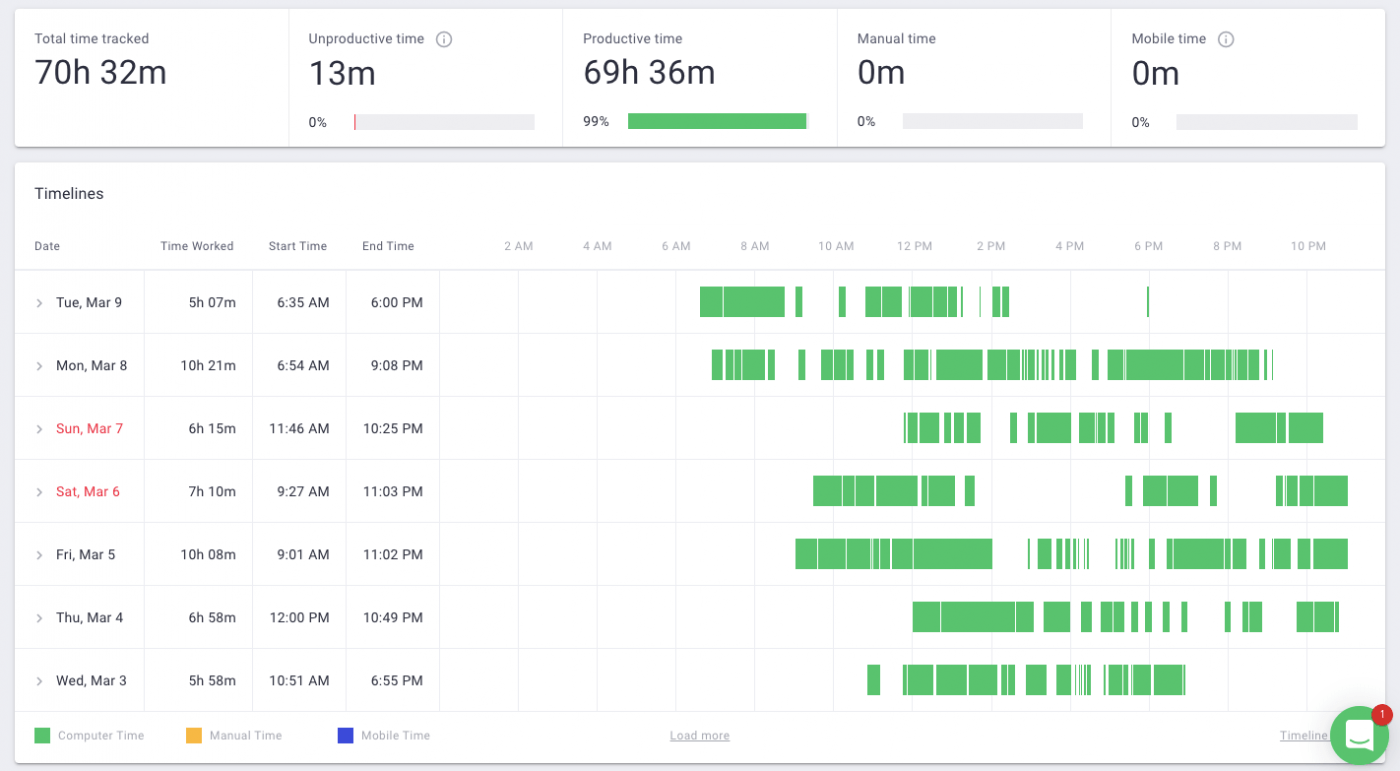
As the saying goes, happy employees are productive employees. Time Doctor aims to promote happiness and work-life balance by enabling a “work anytime, anywhere” culture, facilitating full transparency and accountability.
By automatically monitoring how time is spent, the app helps you identify top performers and know when to step in to offer support, even for remote teams.
The time-tracking software is particularly strong when it comes to features that simplify billing and payroll for teams paid by the hour. It not only tracks time spent on tasks but also monitors website and app usage, helping to mitigate distractions.
For on-site teams, such as construction crews, Time Doctor offers GPS tracking and off-track reminders if a team member strays from their designated area.
While Time Doctor is geared toward creating an efficient and disciplined work environment, some users may struggle to navigate its interface or monitoring features.
How to choose the best Time Doctor alternative
Whether you’re a freelancer looking for invoicing support or a manager seeking to optimize a remote team’s performance, you can consider these factors when looking for your next productivity app:
- Time-tracking accuracy: Choose a platform that offers precise time-tracking capabilities, preferably for simultaneous tasks, to ensure fair billing and project estimations ⏳
- Productivity analytics: Look for in-depth analytics features that help identify productivity bottlenecks and promote informed decisions across your project management process
- Automation features: An ideal alternative should offer robust automation features for task assignment, reminders, and reporting, reducing the everyday manual effort
- Third-party integrations: Make sure the platform integrates nicely with the tools you already use, such as project management software, CRM systems, and accounting software
- Customizability: Flexibility in creating custom reports, setting alerts, or creating unique billing and payroll setups can make your workflows smoother
- Scalability: Pick a platform that can scale with your business as it grows, whether it’s through additional features, user seats, or data storage
Summarize this article for me pleaseUp Your Time Management Game: 10 Best Time Doctor Alternatives
First things first—your needs dictate what you seek. Maybe you only need to know when an employee clocks in and clocks out. Or, if they’re on a mobile team, you may want to keep tabs on what locations they visit.
Whatever your intent, explore our curated selection of Time Doctor alternatives, and you will find one with the set of features you’re looking for! 🔍
1. ClickUp
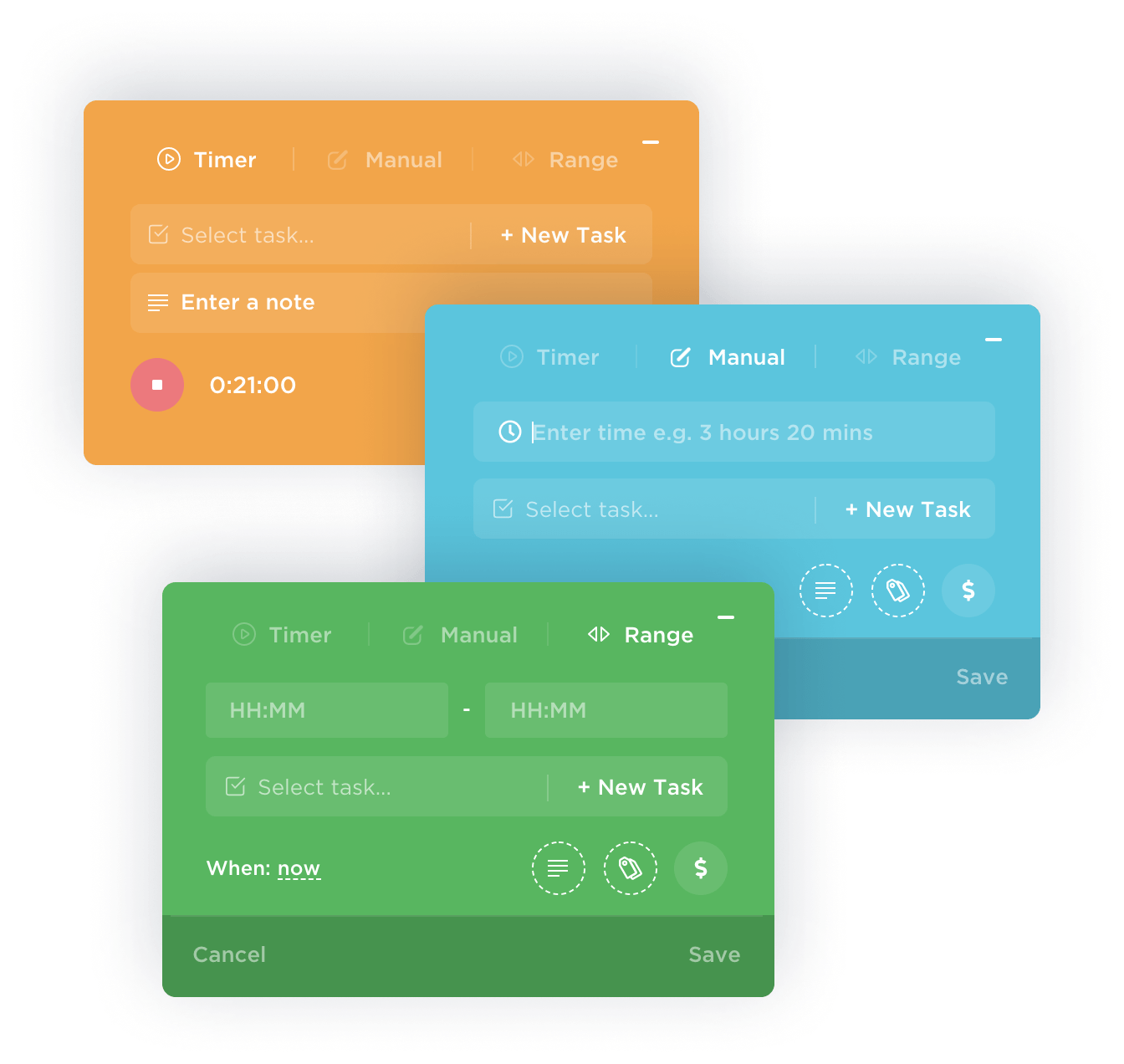
If you want a versatile approach to project time tracking, look no further than ClickUp. With the platform’s native time tracker, you can record time spent on tasks right from your desktop, mobile, or web browser, and also set time estimates and generate reports to analyze productivity. 📈
Furthermore, the integration with other time-tracking tools like Toggl, Harvest, and Everhour lets you add time tracked outside of ClickUp and maintain comprehensive records. This streamlines scattered processes and enables precise planning and forecasting, an essential factor for hitting project milestones and managing workloads.
But ClickUp is not just about tracking time—it also saves time by automating routine activities!
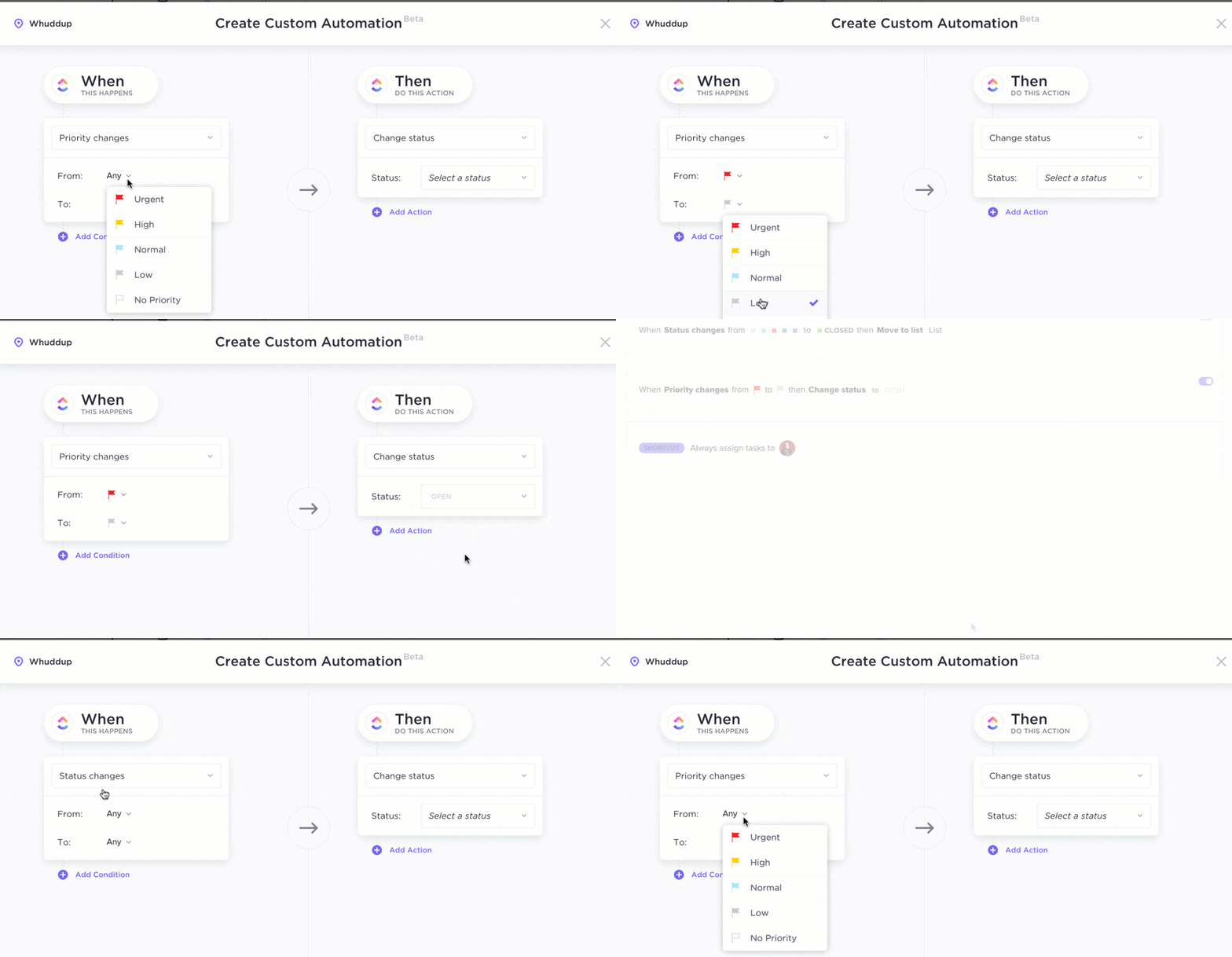
You can customize ClickUp Automations to suit your team’s unique needs, triggering specific actions based on status changes, due dates, or custom fields. For example, you can auto-assign teammates to tasks based on priority status.
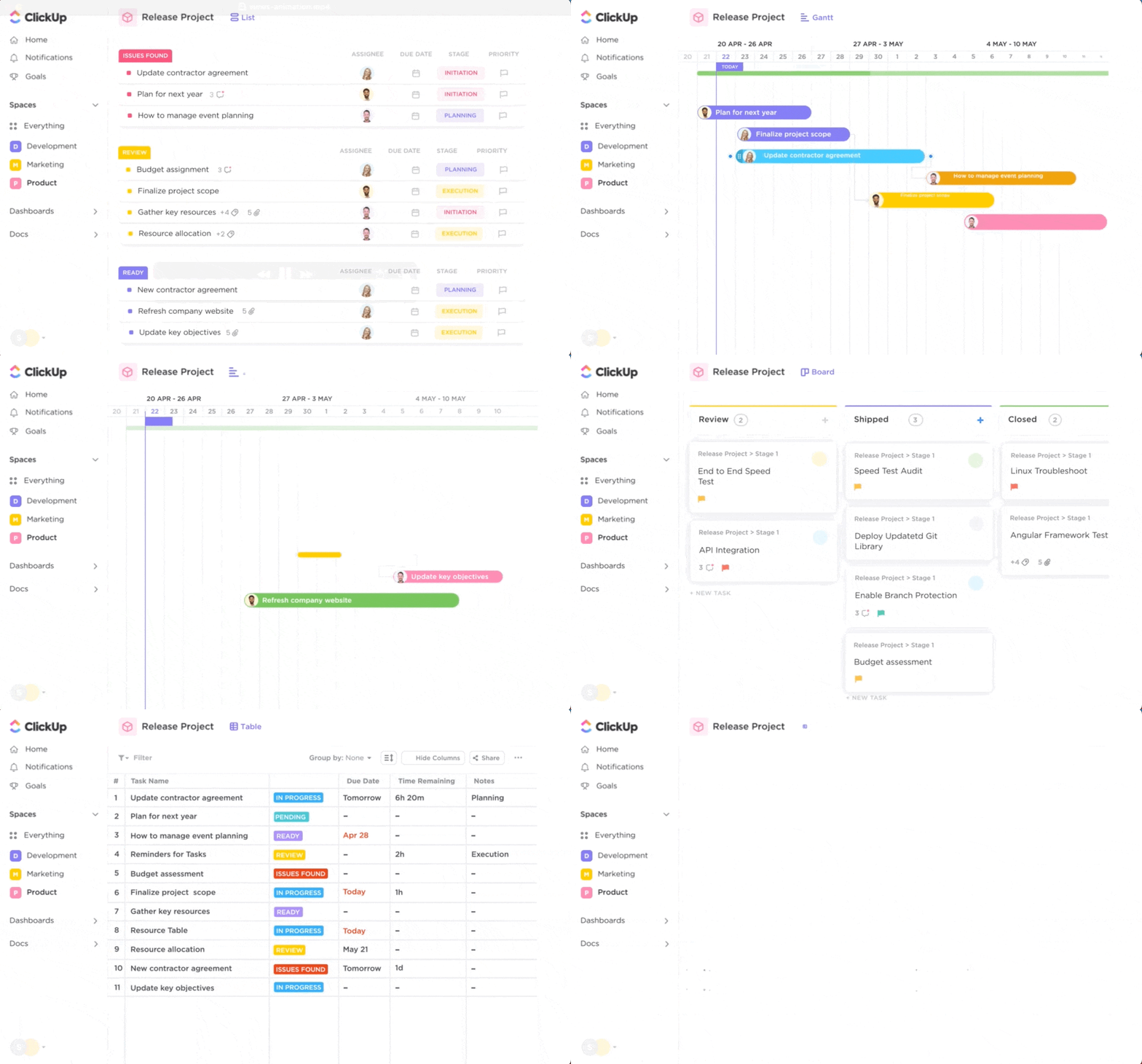
ClickUp is the go-to task management suite for freelancers and small business owners. The platform allows you to create and categorize tasks using custom tags and different color-coded priority levels. Define tasks in detail and visualize them in multiple ways, such as a List, Kanban board, and Gantt chart, for holistic team monitoring!
For busy bees, we recommend leveraging the ClickUp Time Management Schedule Template—a powerful tool to organize your day and keep stress at bay. This beginner-friendly template guides you through the process of setting realistic goals and budgets, managing daily activities and team workloads, and keeping everyone’s schedules aligned for collective success.
ClickUp best features
- Versatile time-tracking options via desktop and mobile apps
- Handy Chrome extension for time tracking on browsers
- Time-tracking Dashboard with Time Reporting, Time Estimated, and Time Tracked cards
- Options to track billable and non-billable hours
- Time estimate and productivity reports
- Integration with time-tracking apps and 1,000+ other tools
- Pre-built time-tracking templates
- Finance and accounting templates to help with invoicing
- Custom automations to save time on routine tasks
- Time blocking for removing distractions at work
- Workflow scheduling and task management
- Customizable Reminders
ClickUp limitations
- Some automations can be tricky to implement (but ClickUp has tutorials to simplify the process)
- Customizing the app to your liking may take time because of the abundance of features
ClickUp pricing
- Free Forever
- Unlimited: $7/month per user
- Business: $12/month per user
- Enterprise: Contact for pricing
- ClickUp AI is available on all paid plans for $5 per Workspace member per month
*All listed prices refer to the yearly billing model
ClickUp ratings and reviews
- G2: 4.7/5 (9,000+ reviews)
- Capterra: 4.7/5 (3,500+ reviews)
2. Harvest
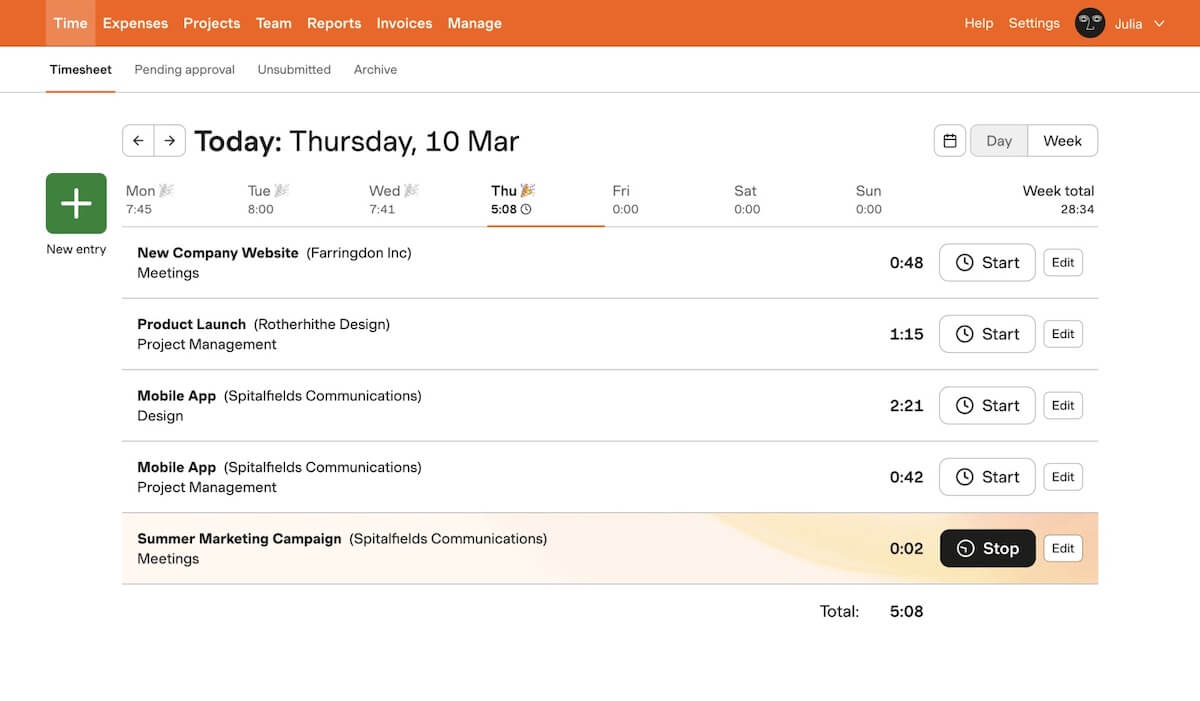
Harvest focuses on three main areas:
- Time tracking
- Reporting and analytics
- Invoicing and payments
Designed with user convenience in mind, it allows for easy time tracking on desktop, mobile, and through a browser. It even goes a step further by turning time and expenses into invoices, simplifying the payment process, and streamlining accounting tasks. 💲
Dynamic visual reporting is where Harvest truly shines. You can monitor project health, keep budgets in check, and visualize how the workload spreads across the team. By helping you understand internal costs and offering insights into time-consuming tasks, Harvest helps you be your productive best!
Harvest best features
- Automated reminders for consistent time capture
- Simplified invoicing
- Online payment options via PayPal and Stripe
- Real-time budget monitoring
- Capacity reporting for easier workload management
- 50+ integrations
- Free Time Doctor alternative
Harvest limitations
- Can be hard to track and manage larger time frames
- Some users find the reporting feature difficult to use
Harvest pricing
- Free
- Pro: $10.80/month per user, billed annually
Harvest ratings and reviews
- G2: 4.3/5 (700+ reviews)
- Capterra: 4.6/5 (500+ reviews)
3. Hubstaff
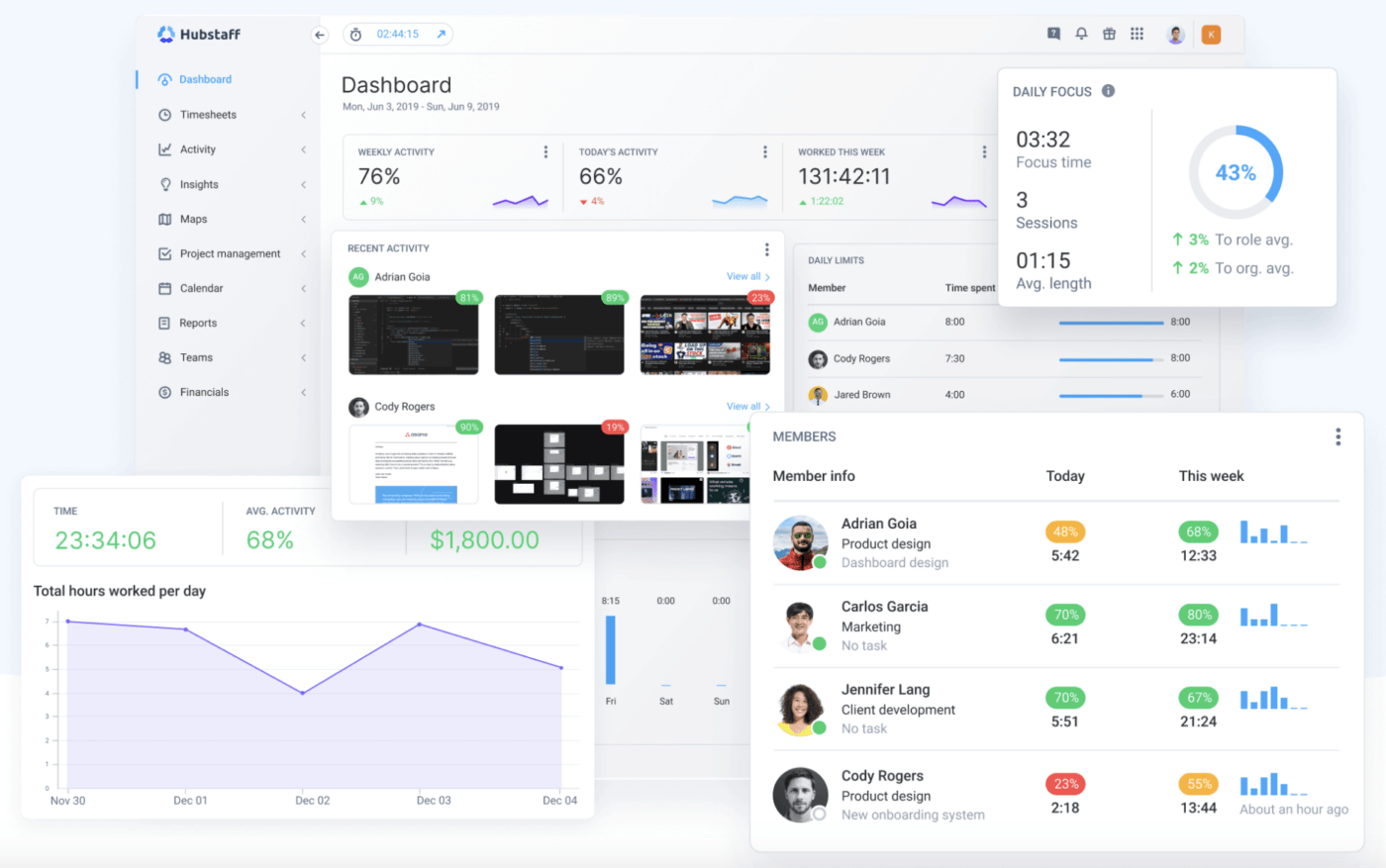
Hubstaff aims to be a one-stop shop for time management, employee monitoring, and payroll. It offers detailed timesheets, automated payroll functions, and online invoicing, making it easy to manage both in-office and virtual teams.
Managing an on-site crew? Hubstaff’s location-based time tracking, custom geofences, and mobile-based GPS features let you monitor your employees’ offline whereabouts. 🗺️
For monitoring online activities, customizable screenshots and app and URL tracking provide detailed insights into how time is being spent during work hours. Virtual achievement badges can be unlocked for high productivity rates (based on mouse and keyboard usage)—use them to boost morale among teammates!
Hubstaff best features
- Online and location-based work monitoring
- Comprehensive timesheets
- Automated payroll features
- Shift scheduling and time-off management
- 30+ integrations
Hubstaff limitations
- The interface could be more user-friendly compared to other Time Doctor alternatives
- Android phone users may experience lags or delays
Hubstaff pricing*
- Starter: $4.99/month per user
- Grow: $7.50/month per user
- Team: $10/month per user
- Enterprise: Contact Hubstaff for pricing
*All listed prices refer to the yearly billing model
Hubstaff ratings and reviews
- G2: 4.3/5 (400+ reviews)
- Capterra: 4.6/5 (1,400+ reviews)
4. Productive
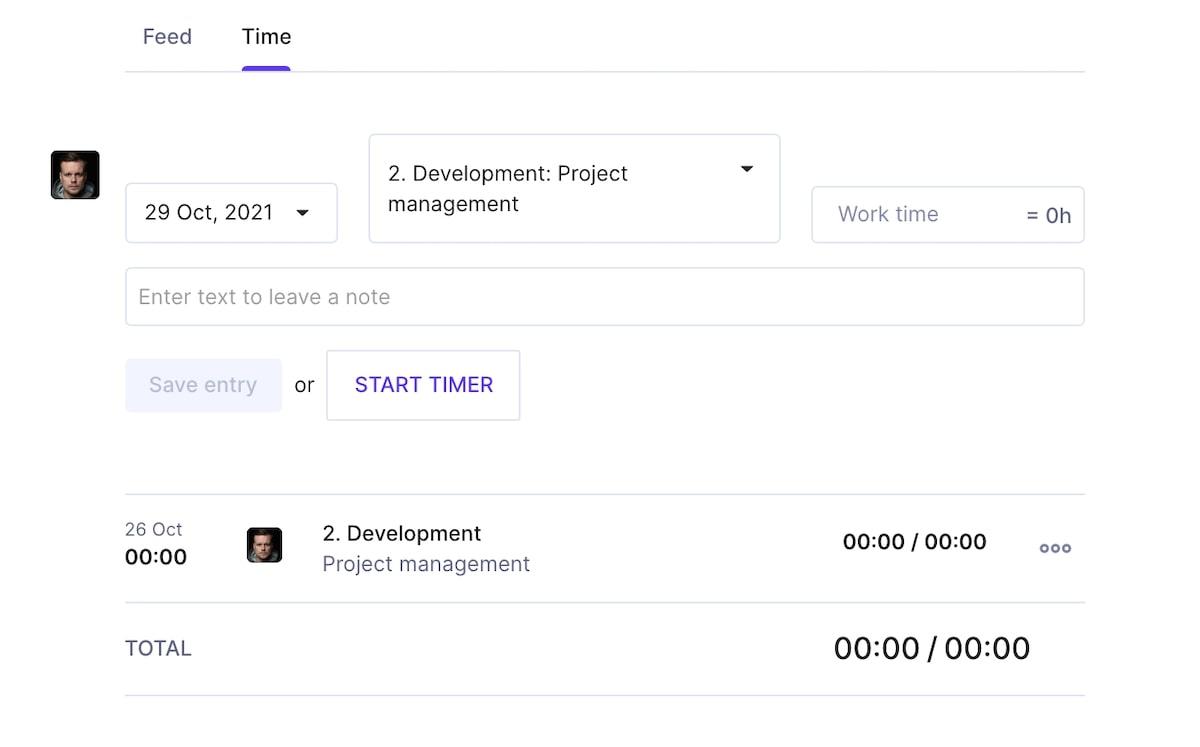
Developed with agencies in mind, Productive offers detailed data analytics to optimize billing and resource management. The aim is to make your operations more profitable.
The platform allows you to manually start a timer on your desktop when you begin a task. Alternatively, you can use automatic tracking based on your pre-scheduled time bookings from the calendar. 📆
Designate tracked hours as either “billable“ (chargeable to the client) or “non-billable“ (not chargeable). Productive streamlines the invoicing process by automatically pulling in total uninvoiced time and invoicing for hourly projects based on your parameters, saving you time and effort.
Productive best features
- Manual and automatic time tracking
- Differentiation between billable and non-billable hours
- Automated invoicing
- Built-in time-off management
Productive limitations
- No email integration yet
- Limited customization and data manipulation flexibility
Productive pricing*
- Essential: $9/month per user
- Professional: $24/month per user
- Ultimate: Contact for pricing
- Enterprise: Contact for pricing
*All listed prices refer to the yearly billing model
Productive ratings and reviews
- G2: 4.6/5 (30+ reviews)
- Capterra: 4.6/5 (70+ reviews)
5. Clockify

Unlike some of its competitors, Clockify can continue to track time even if you lose your Wi-Fi or data connection. Once you’re back online, it syncs the offline time entry with the main record.
In addition to basic time tracking, this platform offers a Pomodoro timer to help you work in predefined intervals with breaks, which is an added tool for focus and productivity. 🍅
Clockify detects when you’re away from your computer and lets you decide whether to include this “idle” time in your overall time tracking. All these features are available on the free plan, which makes Clockify a great choice for small businesses.
Clockify best features
- Offline time tracking
- Free Pomodoro timer
- Idle time detection with user discretion
- Auto-populated timesheets with manual editing options
- 80+ integrations
Clockify limitations
- Limited project management features
- Inaccuracies in time tracking may occur after integrations
Clockify pricing*
- Free
- Basic: $3.99/month per user
- Standard: $5.49/month per user
- Pro: $7.99/month per user
- Enterprise: $11.99/month per user
*All listed prices refer to the yearly billing model
Clockify ratings and reviews
- G2: 4.5/5 (150+ reviews)
- Capterra: 4.7/5 (4,500+ reviews)
6. RescueTime
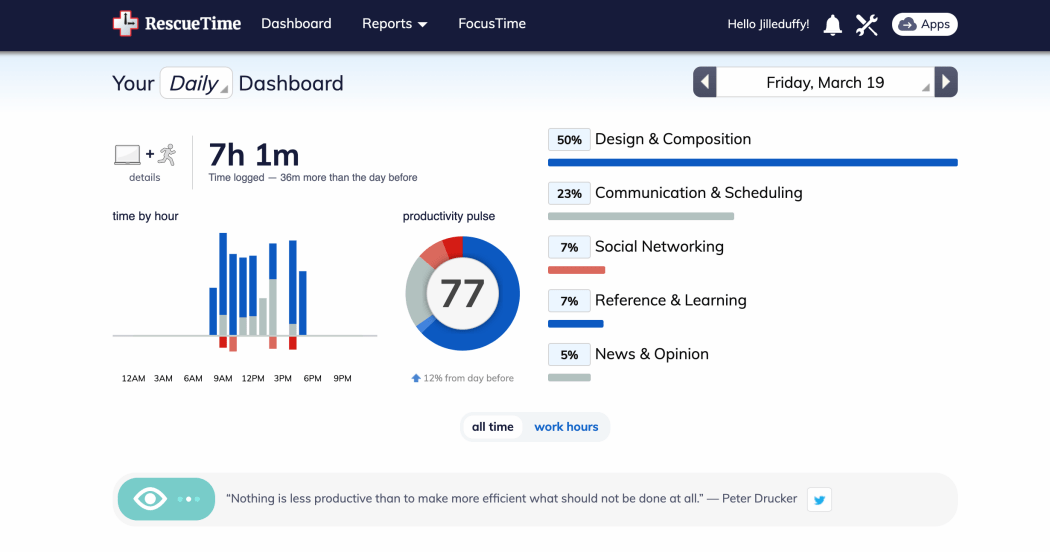
RescueTime sets itself apart by helping users improve focus. It lets you block certain websites during work hours, lending a helpful hand when the intention is strong but the will is weak. 😅
This platform was one of the first to use AI for timesheet creation. That’s particularly useful when you have to switch between different projects or clients on the same workday. RescueTime automatically divides time entries between these categories, saving you hours of admin work.
Another unique feature is the real time alerts that prompt you when you are distracted, guiding you back to the task at hand. Plus, RescueTime monitors your schedule and sends timely reminders so you don’t miss meetings and appointments!
RescueTime best features
- Website blocking to increase productivity
- Intelligent alerts for task redirection
- AI-powered functionalities
- Goal-tracking for better time management
RescueTime limitations
- Some users dislike the more recent product updates on the time-tracking software
- Analytics and reporting features could be improved compared to other Time Doctor alternatives
RescueTime pricing
- Starts at $6.50/month, billed annually
RescueTime ratings and reviews
- G2: 4.1/5 (80+ reviews)
- Capterra: 4.6/5 (130+ reviews)
7. Wrike
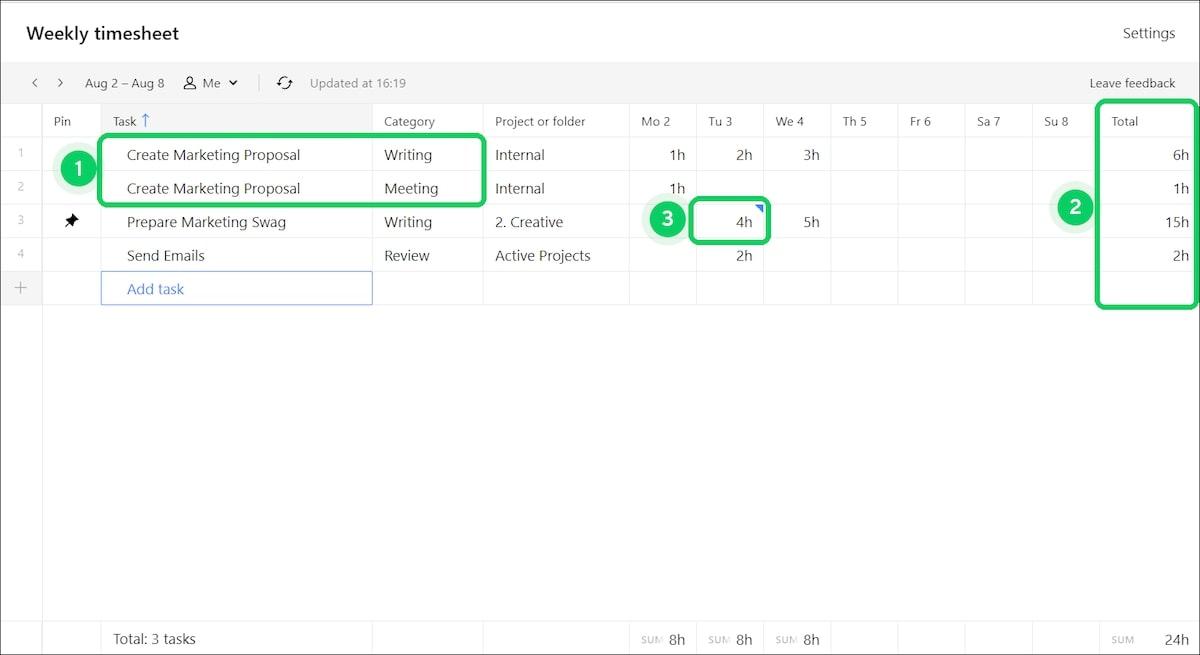
Wrike is a robust project management platform with time-tracking capabilities, giving you full visibility over team workflows. Seamlessly track and create reports on billable hours, which is useful for consultants who need to prepare fair, data-backed invoices.
Interestingly, Wrike’s timer continues to run even if you close your browser window, ensuring that every minute is accounted for—until you manually pause the timer or switch tasks. The result? You only track time for one task at a time, minimizing errors and discrepancies.
For teams, Wrike offers a comprehensive view of the time spent on tasks and projects. This helps you compare actual hours worked with preset estimates, resulting in better resource management and compensation plans.
Wrike best features
- Manual and automatic time-logging options
- Continuous timer runs even if the browser is closed
- Ability to pause or resume timers in its time-tracking software
- 400+ integrations
Wrike limitations
- Project and task management automation capabilities could be stronger
- Mobile apps are not full-featured
Wrike pricing*
- Free
- Team: $9.80/month per user
- Business: $24.80/month per user
- Enterprise: Contact Wrike for pricing
- Pinnacle: Contact Wrike for pricing
*All listed prices refer to the yearly billing model
Wrike ratings and reviews
- G2: 4.2/5 (3,000+ reviews)
- Capterra: 4.3/5 (2,500+ reviews)
8. VeriClock
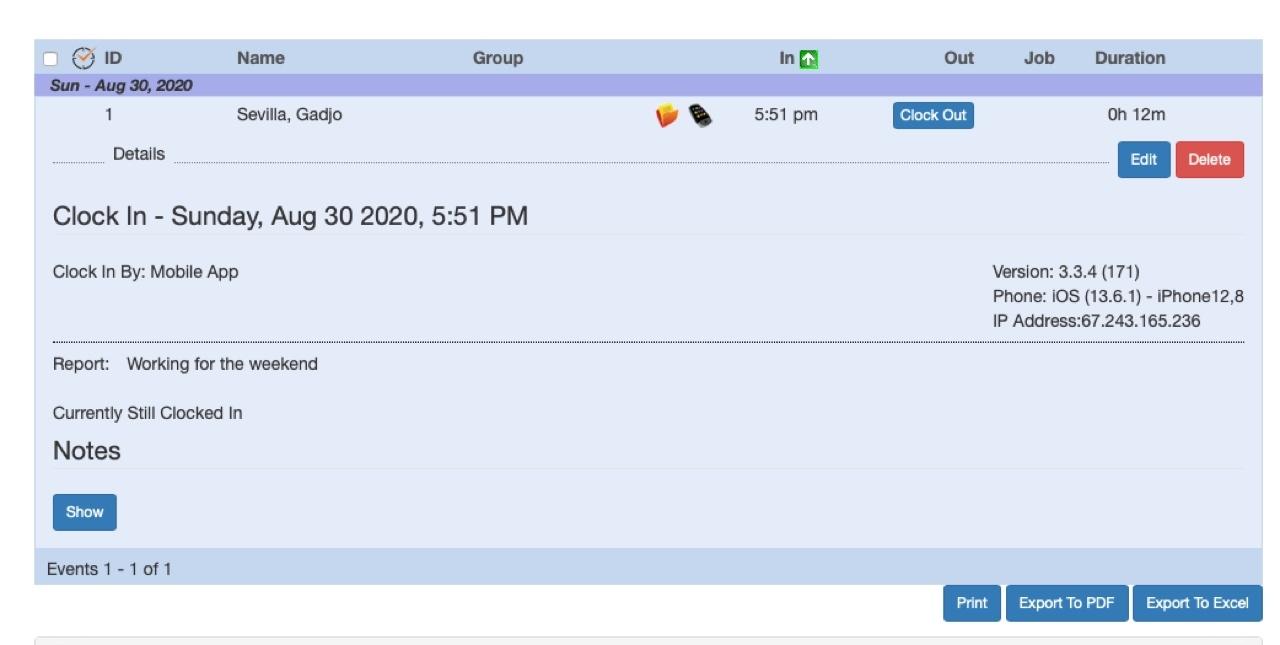
VeriClock is a cloud-based tool that empowers you to keep track of employees working in remote or decentralized setups. The platform lets your team clock in and out by phone or web, helping you monitor labor costs in real-time.
There are several ways to verify if employees are clocking in from where they’re supposed to be, such as checking caller ID or IP address and GPS tracking. This makes it hard for them to play hooky. 😴
VeriClock can also be used for other functions like keeping track of job progress, calculating overtime, making field notes, and sending messages to employees.
VeriClock best features
- Multiple time-entry verification methods across the time-tracking software
- GPS tracking to monitor employee whereabouts
- Email notifications for specific employee actions
- Integration with accounting and payroll software
VeriClock limitations
- Some users are not happy with the cost-to-features ratio
- Time Doctor alternative has a mobile app that tends to drain a phone’s battery
VeriClock pricing
- $10/month account fee + $5/user
VeriClock ratings and reviews
- G2: 4.8/5 (Under 5 reviews)
- Capterra: 4.7/5 (30+ reviews)
9. TimeCamp
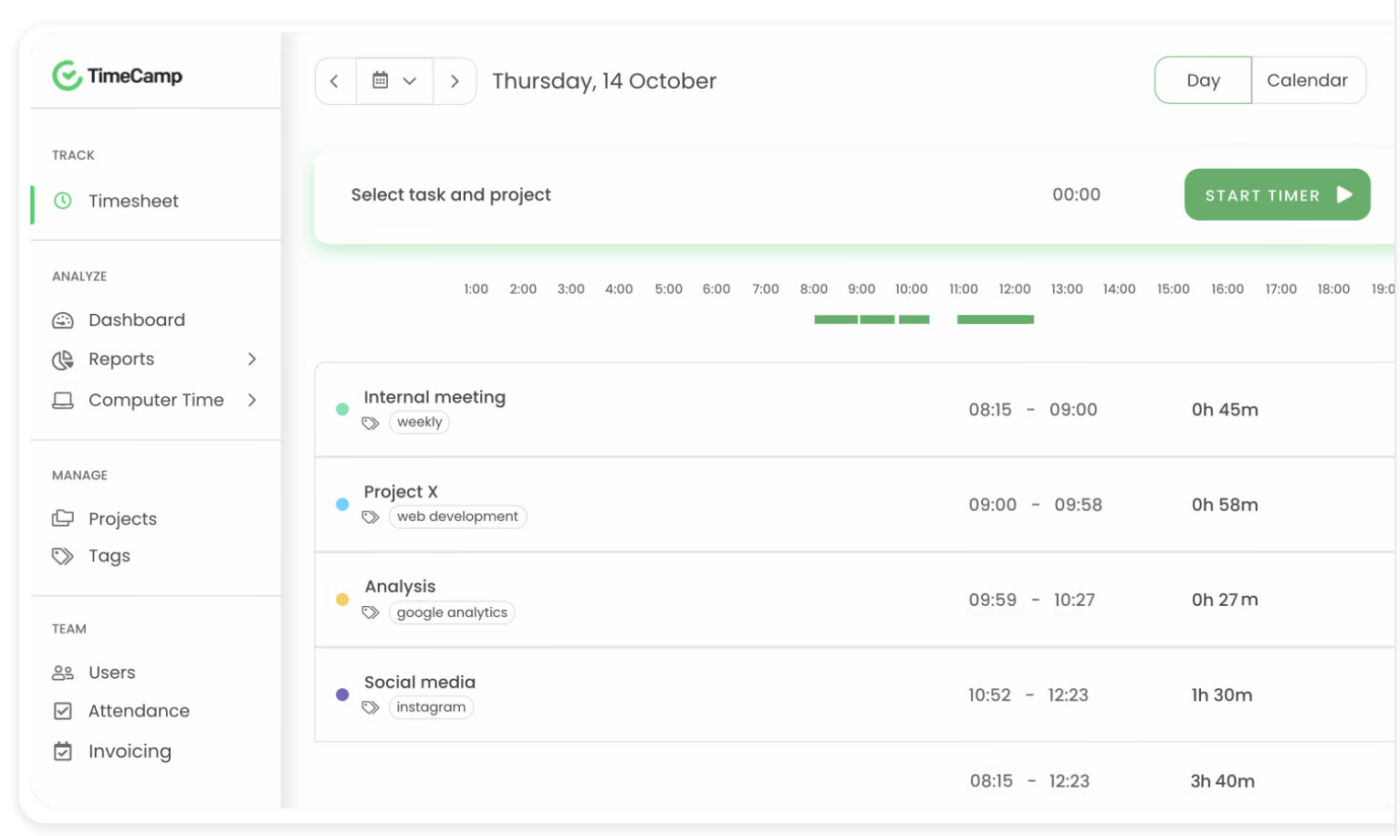
You may want to know not just when your employees are working but also what they’re actually working on. TimeCamp helps you understand how they spend their time by tracking the URLs and applications that your team visits over the day.
Furthermore, if you opt for one of the top two price tiers of TimeCamp, the software offers even more detailed monitoring by taking screenshots of visited pages, as well as robust invoicing capabilities.
TimeCamp is highly versatile when it comes to pushing self-discipline. Team members who wish to improve their time management habits can try its individual goal-setting feature, with options to segregate between work, break, and private time.
TimeCamp best features
- Detailed insights into website and application usage
- Device screenshots for employee monitoring
- Support for self-monitoring and goal-setting
- 100+ integrations with its time tracking features
TimeCamp limitations
- Could use more customizations
- Reporting options could be better vs. some Time Doctor alternatives
TimeCamp pricing*
- Free
- Starter: $2.99/month per user
- Basic: $5.99/month per user
- Pro: $7.99/month per user
- Enterprise: Contact TimeCamp for pricing
*All listed prices refer to the yearly billing model
TimeCamp ratings and reviews
- G2: 4.7/5 (190+ reviews)
- Capterra: 4.7/5 (550+ reviews)
10. QuickBooks Time
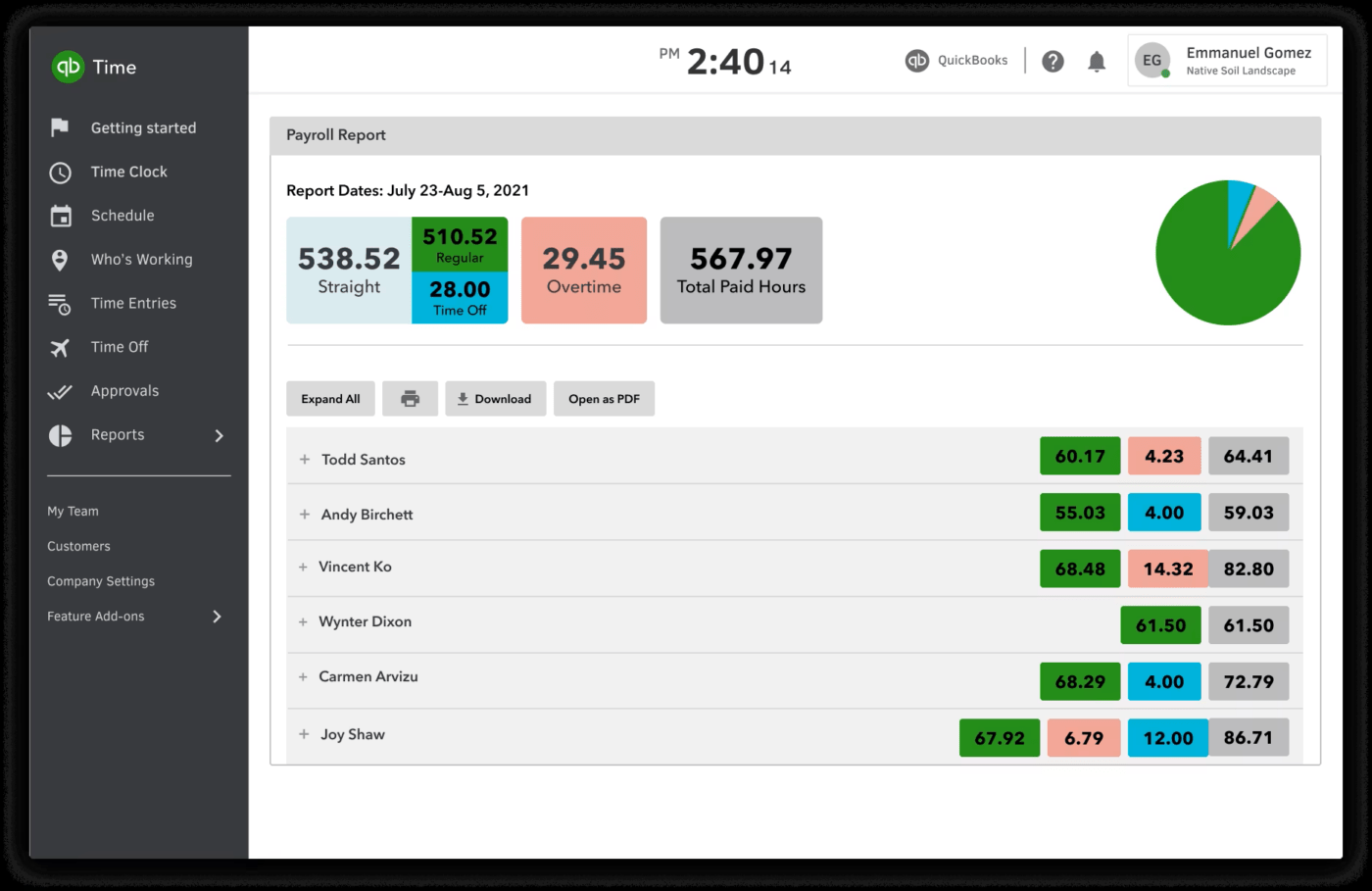
QuickBooks Time focuses more on tracking employees on the go, like field service technicians, sales reps, or construction workers. One of its standout features is mobile time tracking through the QuickBooks Workforce app, which allows users to handle time-related workflows from virtually anywhere.
The software incorporates GPS tracking so that you can monitor not only the hours clocked by your team members but also their locations.
Additionally, QuickBooks Time offers valuable analytical tools. It provides customizable reports that can be used for a range of business decisions, such as predicting job costs and planning payroll. 📊
QuickBooks Time best features
- Mobile time tracking
- GPS tracking for mobile teams
- Real-time insights into team activities
- Job cost prediction and payroll planning reports
- Integrations with accounting and payroll applications
QuickBooks Time limitations
- Occasional glitches can result in the loss of data
- Limited customer support when put against other Time Doctor alternatives in this list
QuickBooks Time pricing
- Premium: $20/month + $8/month per additional user
- Elite: $40/month + $10/month per additional user
QuickBooks Time ratings and reviews
- G2: 4.5/5 (1,400+ reviews)
- Capterra: 4.7/5 (6,500+ reviews)
Summarize this article for me pleaseDiscover the ClickUp Advantage and Make Every Second Count!
While there are numerous Time Doctor alternatives and options available for tracking your team’s time and productivity, ClickUp stands out for its versatility and comprehensive time and task management features.
Whether you’re a small business owner looking for detailed time reports or a freelancer aiming to boost productivity and optimize billable hours, ClickUp not only helps you track time but also makes time work for you!
Registration is free, and the benefits to your workflow could be invaluable. Sign up and experience the ClickUp effect today! 🧚

Everything you need to stay organized and get work done.
