Sorry, there were no results found for “”
Sorry, there were no results found for “”
Sorry, there were no results found for “”
When you’re a freelance digital marketing specialist, everything flows through you.
You write briefs. You take client calls. You respond to feedback and keep mental tabs on deadlines.
But that system breaks the minute you try to grow.
Once you take on more clients or hire your first full-time writer or account manager, the gaps start to show. You’re wrangling between deadlines, coordinating work, hiring, setting up client onboarding processes, and a hundred other things.
You start thinking: How to scale your marketing agency without losing your edge?
As a founder of a growing digital agency, your role shifts from doing to designing.
Suddenly, you need repeatable processes. You need client onboarding templates, shared briefs, and internal reviews. You’re building a business that can deliver without you in every room.
And that’s what this guide is about: How to scale your digital marketing agency with systems and tools in place.
One of the trickiest parts of running a digital marketing agency is knowing when to scale. Move too fast, and you risk stretching your team too thin, burning cash, or compromising quality. Wait too long, and you’ll find yourself stuck in constant reaction mode—overwhelmed, under-resourced, and unable to grow.
So, how do you know it’s time?
Here are a few signs that your digital marketing business has outgrown its current structure:
If your inbound pipeline is healthy but you’re still saying no to new clients, it’s a sign your delivery systems can’t scale yet.
You might be great at launching marketing campaigns. But without the right infrastructure, every additional client feels like a risk rather than an opportunity.
📚 Read More: Client Onboarding Process with Templates
From selecting project management tools and marketing agency software to approving creatives and campaigns, nothing moves without you. In a growing digital agency, this becomes unsustainable.
To maintain quality as you expand your marketing services, you need scalable workflows, defined roles, and repeatable processes.
Maybe you’re great at SEO. Or paid media.
However, your existing clients are requesting email automation, content writing services, or influencer outreach. Scaling your digital marketing services by hiring or partnering lets you grow account size without constantly chasing new clients.
You know it’s time to reevaluate your operations and processes when results start to become inconsistent, or onboarding feels rushed.
A growing agency needs marketing KPIs, SOPs, and systems for delivering consistently great marketing efforts.
You’ve evolved from asking ‘How can I finish this project faster?’ to questions like:
🧠 Fun Fact: DDB Worldwide Communications Group has worked with Volkswagen in the U.S. since 1959. A client relationship of more than half a century!
Scaling means stepping out of the freelancer mindset and building something that runs on its own, even without you in the picture. Here’s how to do it step-by-step.
When you’re early-stage, it’s tempting to say yes to every custom request. ‘We’ll build your website, run your ads, write your blog, manage your socials… whatever you need.’
Sure, you keep getting paid for it, but you’ll hit a roadblock when you think of growing your digital marketing agency.
With productized services, you don’t need to reinvent the wheel for every new client. You define:
📌 Examples of productized service offerings:
Why it works for you is that you have predictable margins. You know how long each package takes, so you can price for profit.
Also, there’s less scope creep in your agency project management. You can point to your offer and say, ‘That’s not included, but here’s a quote for it.’
ClickUp’s built-in AI assistant, ClickUp Brain, helps you write custom client proposals highlighting your services. Even better, it can also help you craft email and conversation summaries, transcribe your calls, and convert the next steps into actionable tasks that you can assign to the right team members.
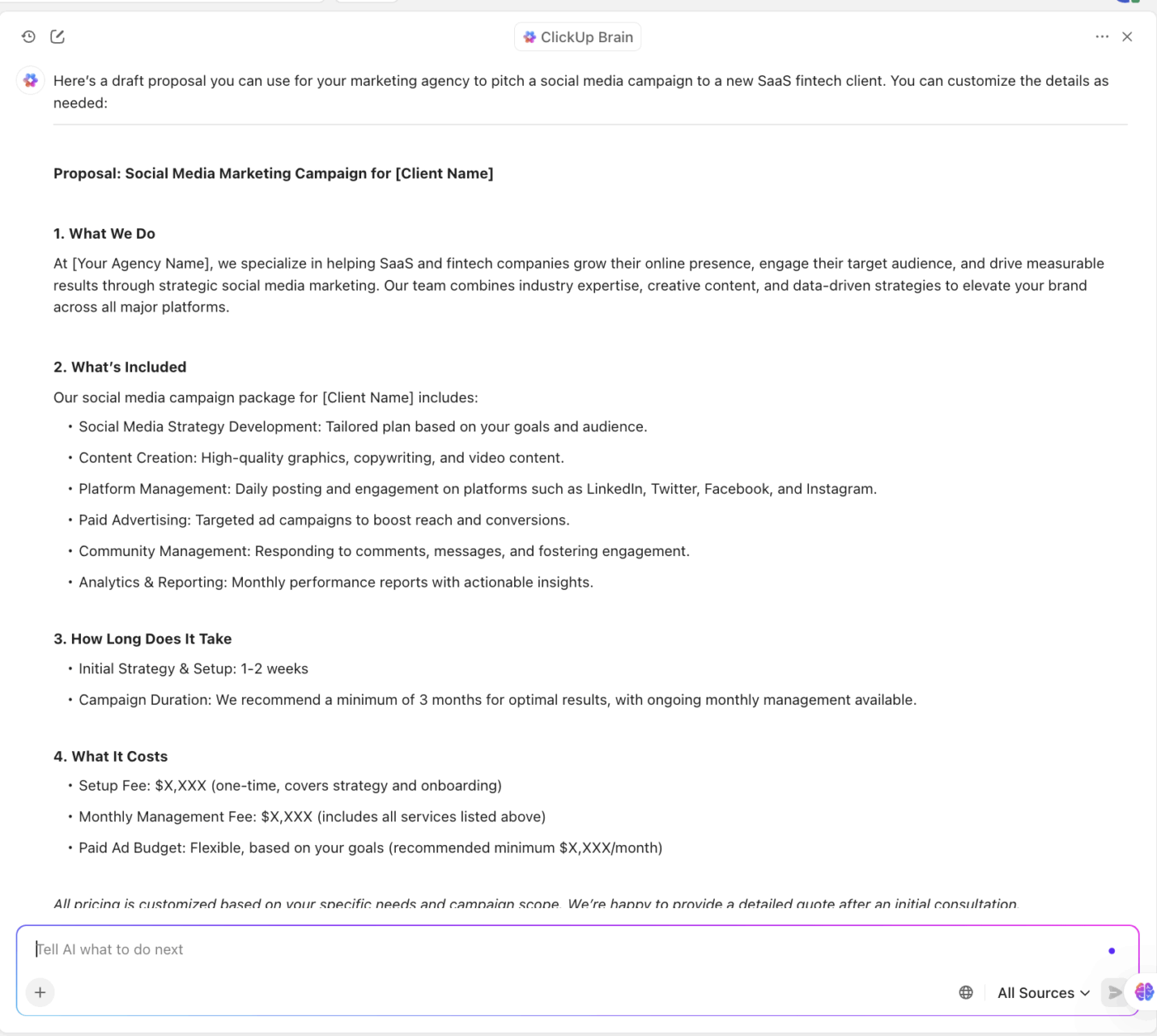
As you scale your marketing agency, creating repeatable workflows ensures that every marketing campaign follows a consistent path, regardless of who is managing it.
From client onboarding to account management, delivery, feedback, reporting, and offboarding, you need to create systems for how work moves through your agency.
How do you do it?
Imagine managing multiple client campaigns, each with its own deadlines, assets, and approvals. Instead of relying on spreadsheets and scattered emails, ClickUp, the world’s first Converged AI Workspace, helps you systemize project management at scale.
ClickUp for Project Management keeps all your documents, projects, and conversations in one place. This sets up the foundation that helps you:
Move away from scattered emails. Set up task templates with ClickUp Task Templates for common deliverables like blog posts, ad campaigns, or design projects. This way, every new task you create inside ClickUp includes the same subtasks, timelines, and assignees by default. You can even add Custom Fields and Dependencies in ClickUp to simplify tasks further.
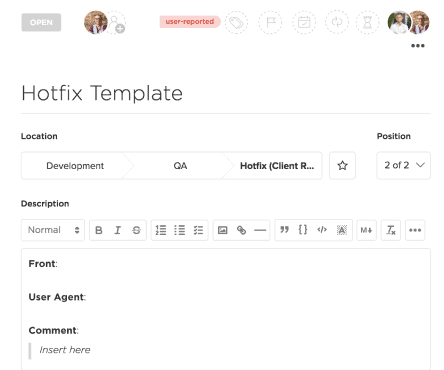
With ClickUp Dashboards, you gain real-time visibility into project progress without the need for constant updates or calls. You can build client dashboards to show milestones and delivery timelines, and even create view-only dashboards or export summaries for reporting.
Here’s how to create one:
👀 Did You Know? 22.34% of professionals reported spending about half a working day each week searching for the information they need. Another 10.47% spend a full one and a half workday weekly just on information searches.
When you have a single repository for all assets, reviews, and approvals in your digital marketing agency, you will spend less time searching for these details and more time working on the campaigns.
For example, all your content drafts can live in ClickUp Docs. You can use Proofing in ClickUp to review ad creatives, PDFs, carousels, and other marketing assets without leaving ClickUp.
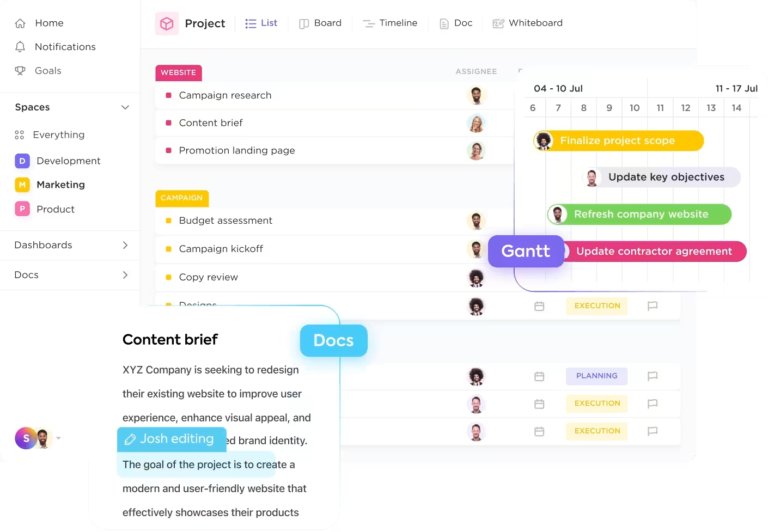
One of the quickest ways to reduce missed deadlines is to visualize all parts of your project. ClickUp offers Calendar View for planning and scheduling your social media posts, blogs, etc.
And with the ClickUp Gantt Chart View, you can plan resources and timelines for larger campaigns, marketing strategies, or product launches. Additionally, ClickUp Milestones let you mark important events like handoffs, launch dates, and more.
Most marketing agencies don’t scale because they grow in the wrong direction.
They add volume before they add structure. More clients. More deliverables. More ‘We’ll figure it out later.’
Signs you need to start outsourcing work:
As a founder, you don’t want to respond by adding random freelancers, rushed hires, or overpriced retainers. The truth is, you don’t need more people. You need the right combinations of people and systems.
That might mean hiring a project manager before hiring another designer. Or outsourcing paid ads to a specialist so your generalist team doesn’t spend hours watching YouTube tutorials for a mediocre result.
With strategic hiring or outsourcing, you protect your agency’s core: your team’s quality of work and their anity.
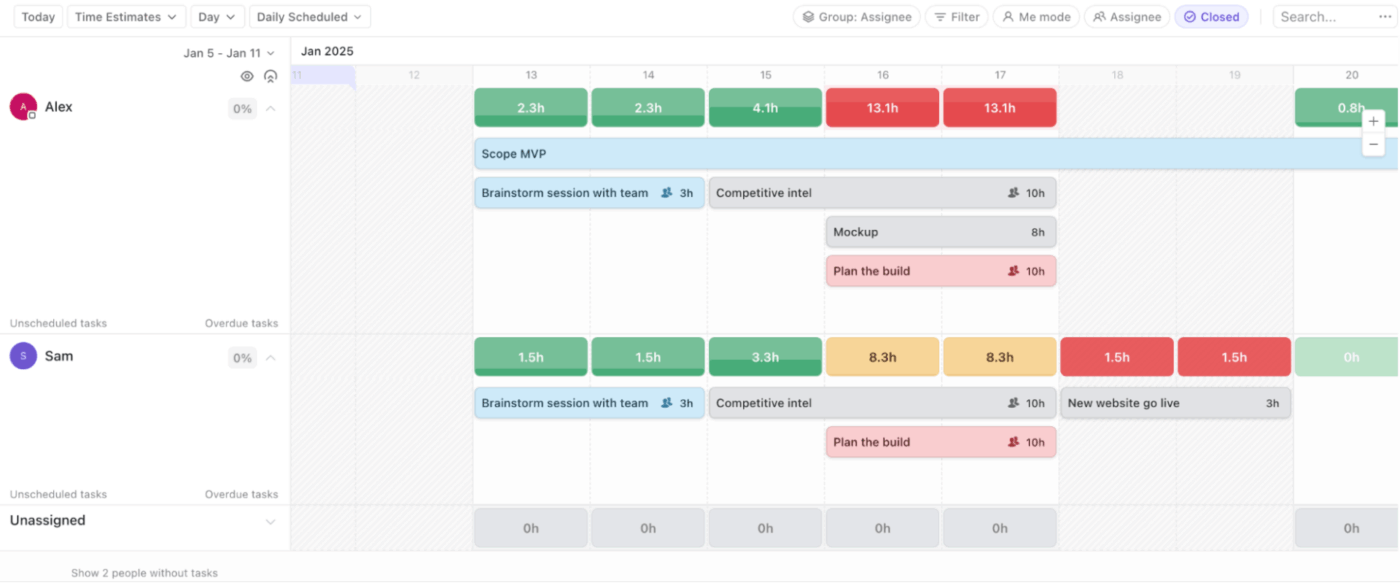
You can use ClickUp’s Workload View to visualize your team’s capacity. You can even adjust the capacity based on each team member’s Workspace work schedule.
Depending on your industry, acquiring a new customer is five to 25 times more expensive than retaining an existing customer. That’s because you don’t have to spend time and resources finding new clients. Just keep the ones you have happy, and even a 5% increase in customer retention rates will increase your profits by 25-95%.
Retaining clients stabilizes growth. To achieve this consistently, it is essential to measure lifetime value (LTV), streamline onboarding, and enhance communication.
For this, consider using ClickUp’s Creative Agency Project Management Platform to document all these details. It comes with a ton of helpful features:
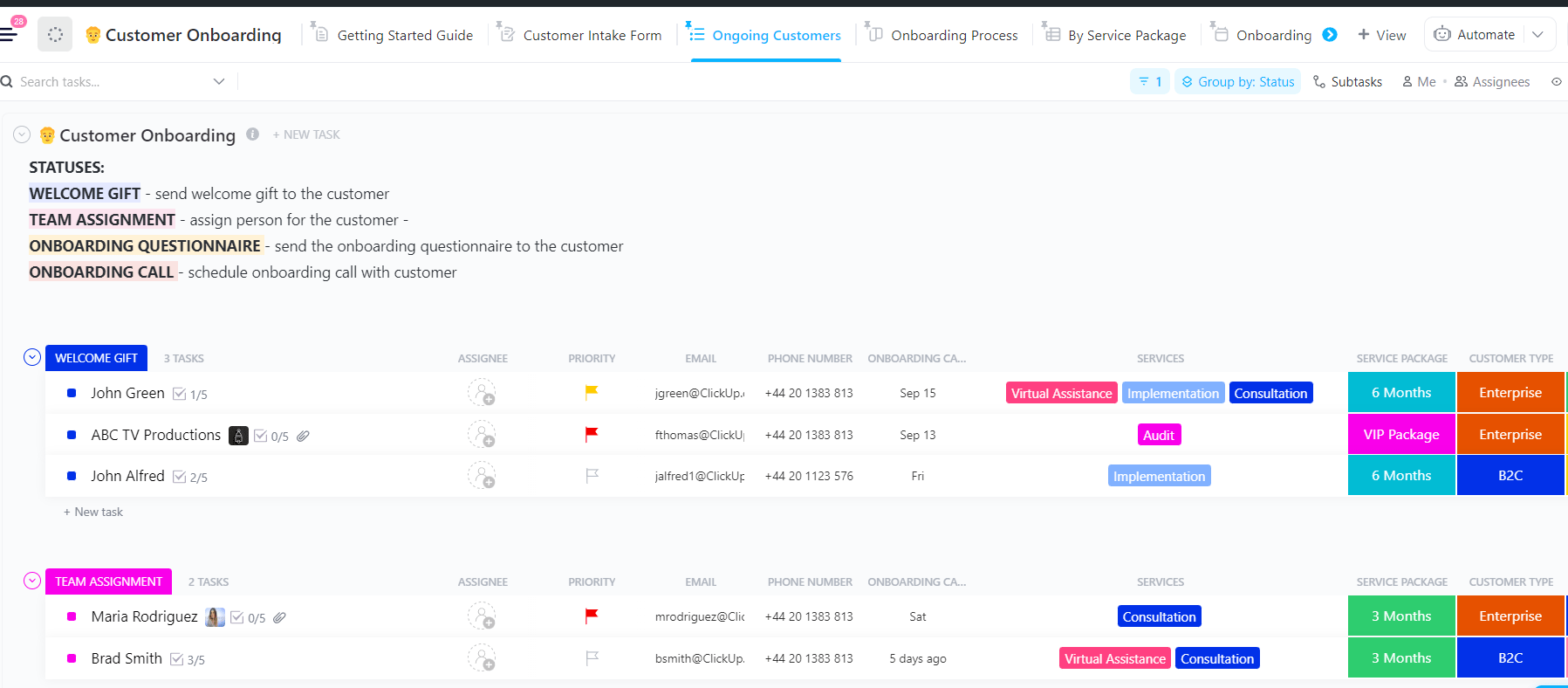
Create automated onboarding templates that guide clients through every step. This includes kickoff meetings, asset submissions, time tracking templates, and setting campaign goals without having to start from scratch each time.
For example, the ClickUp Customer Onboarding Template enables you to deliver a seamless and consistent client onboarding experience every time.
You can:
📌 Example: When a new SEO client signs on, your ClickUp onboarding template automatically assigns tasks like “Send welcome email,” “Schedule strategy call,” “Know industry trends,” and “Request access to analytics.”
Store client-facing SOPs and guides in ClickUp Docs that your team can reference at any time. Add rich formatting, checklists, and even embed videos or Loom links to explain processes clearly.
With real-time collaboration, your team can update SOPs as the relationship evolves, and with permissions control, you decide whether clients can view, comment, or stay hands-off.
You can also link Docs directly inside task descriptions or dashboards for account managers and creatives to always have brand guidelines, review preferences, and tone of voice references easily accessible.
With ClickUp Forms, you centralize feedback capture in one system and not five different tools. With conditional logic, you can even ask clients for context-specific responses. Going a step forward, you can set up automations and visualize all the feedback.
You can set up feedback loops, recurring reminders for quarterly reviews, monthly satisfaction check-ins, or end-of-project surveys.
This kind of marketing agency structure helps reassure your clients that they’re in good hands. And when they feel seen, heard, and supported, they stick around longer, giving you more revenue without the constant hustle of new acquisition.
I tried ClickUp and fell in love with it. The platform has become a favorite part of my workday. I’m an unapologetic evangelist—I tell everybody about ClickUp.
Admin work can quietly eat up hours of your team’s week, creating invoices, sending follow-ups, and scheduling meetings. None of it directly grows your agency, but all of it has to get done.
Tips to automate admin work:
From assigning tasks to updating statuses and generating reports, ClickUp Automations let you reclaim hours every week by automating the busywork
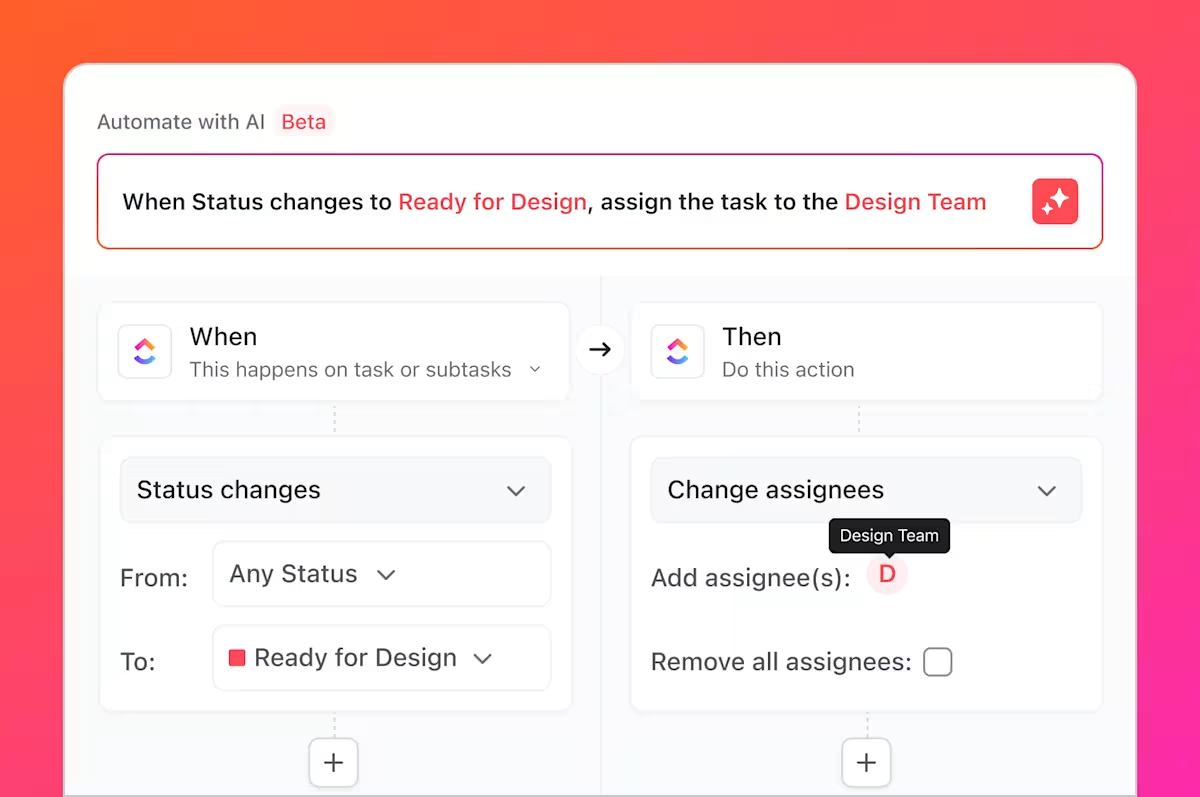
You can use prebuilt automations or create your customized workflows based on your agency processes.
📌 Example: You can set an automation that instantly creates a marketing campaign reporting task every Friday, assigns it to the right team member, and sends an update to the client once it’s marked complete. Or automatically generate an invoice when a project reaches the “Completed” status.
📮 ClickUp Insight: 24% of workers say repetitive tasks prevent them from doing more meaningful work, and another 24% feel their skills are underutilized. That’s nearly half the workforce feeling creatively blocked and undervalued. 💔
ClickUp helps shift the focus back to high-impact work with easy-to-set-up AI agents, automating recurring tasks based on triggers. For example, when a task is marked as complete, ClickUp’s AI Agents can automatically assign the next step, send reminders, or update project statuses, freeing you from manual follow-ups.
💫 Real Results: STANLEY Security reduced time spent building reports by 50% or more with ClickUp’s customizable reporting tools—freeing their teams to focus less on formatting and more on forecasting.
As your digital marketing agency grows, so does the chaos, especially when your team is constantly hunting for the latest SOP, client brief, or reporting template buried in someone’s inbox or random Google Drive folder.
That’s why creating a central knowledge hub is non-negotiable. It’s your agency’s brain, housing all your SOPs, templates, client briefs, and documentation in one structured, accessible space.
This is where ClickUp Docs and Wikis come in.
Use ClickUp Docs to:
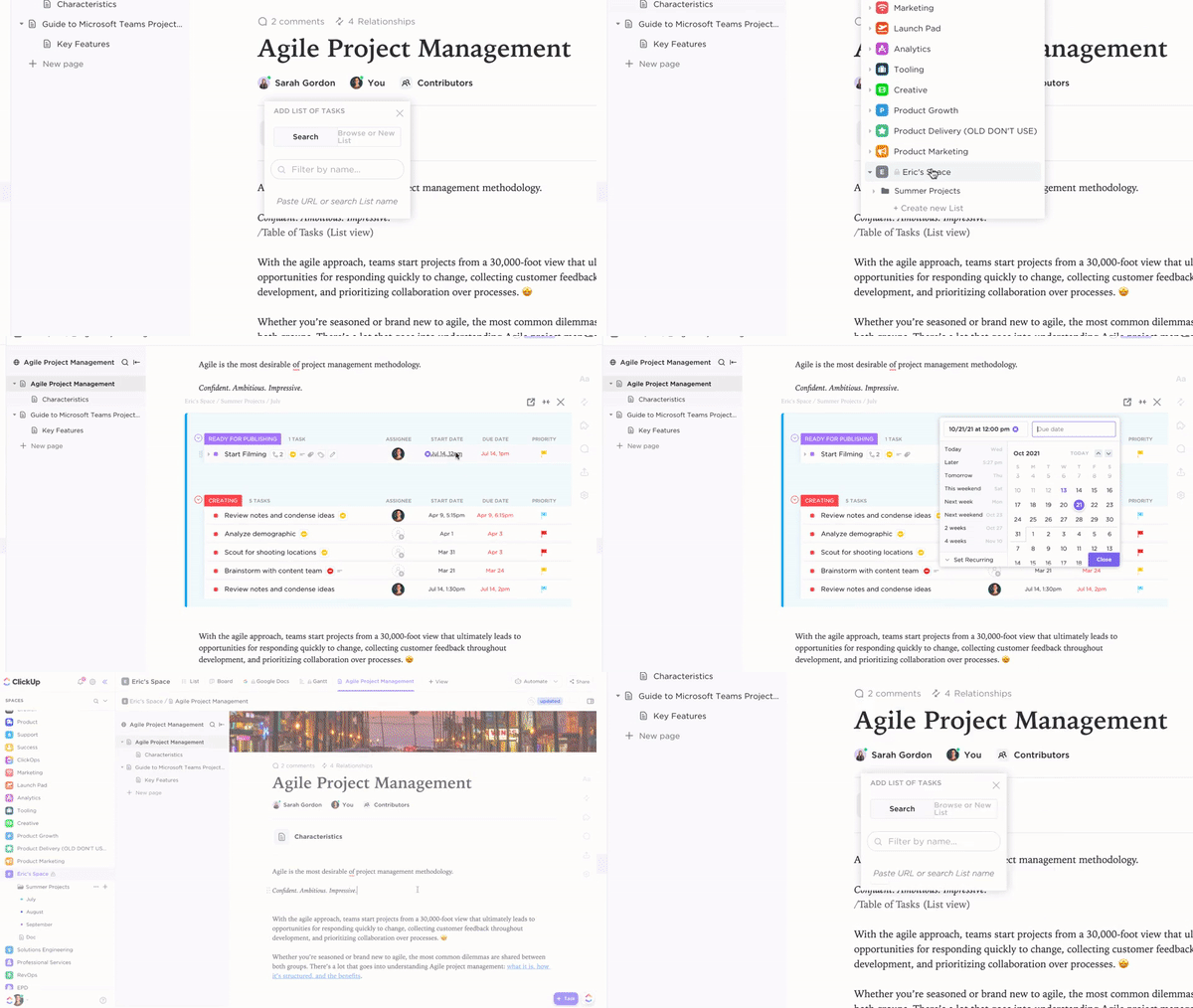
You can also create Wikis that can be used to:
👀 Did You Know? The average knowledge worker switches among 9.4 apps daily: Juggling project management, CRM, email, and analytics tools. This Work Sprawl is a silent productivity killer, costing a staggering $2.5T in lost productivity globally. This is also why many agencies turn to all-in-one platforms like ClickUp to maintain their team’s sanity.
When you’re starting, leads come from your network, a few referrals, maybe a cold DM or two. But as your agency grows, you can’t rely on ‘random reach-outs’ or hope that clients magically renew.
To grow consistently and accurately forecast your revenue, you need a repeatable lead generation engine that combines inbound marketing, referrals, and strategic partnerships.
💡 Pro Tip: Consider using a CRM for marketing agencies to organize your pipeline across all three channels. Track lead source, stage, priority, and follow-up cadence in one place because scaling means building a revenue engine that supports the agency you want to run 12 months from now.
For starters, double down on content marketing, SEO, and lead magnets that bring your ideal clients to you. This includes publishing case studies or playbooks to demonstrate how your agency addresses business challenges. It could also mean creating drip nurture campaigns or using videos for driving inbound interest.
Also consider setting up a referral incentive for clients or peers (e.g., 10% off for every successful intro). Another strategy to consider is partnerships with other SaaS tools or agencies that serve your audience, but with complementary services.
📚 Read More: How to Use AI for Lead Generation
Let’s start with the limitations of spreadsheet-based reporting.
Every client report becomes a ritual of copying data, formatting charts, chasing campaign screenshots, and updating metrics. One wrong formula, one outdated row, or a missed update—and the client’s data is wrong.
It also lacks visual clarity and context, as spreadsheets cannot connect metrics to milestones. And when you’re managing 15+ clients, reporting becomes a full-time job.
Intuitive dashboards, on the other hand, pull in metrics from project tools, ad platforms, or task statuses automatically. They use graphs, charts, and progress bars to communicate performance in a way that clients understand. They’re a single source of truth, enabling all your teams to work from the same data. Being standardized, this type of reporting is scalable across service types and client segments.
Within the ClickUp ecosystem, with ClickUp Dashboards, your agency can:
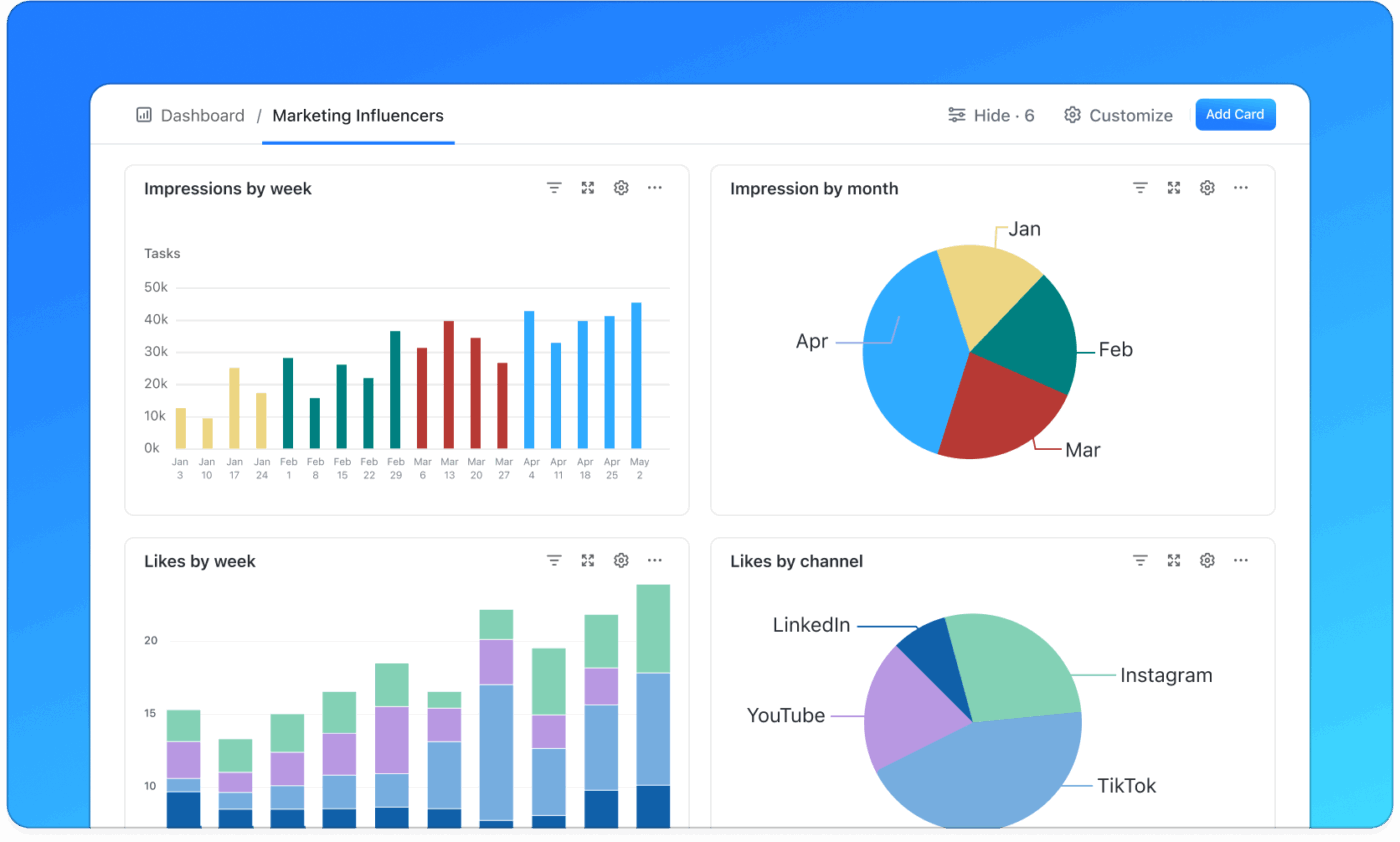
And if you’re staring at a bunch of metrics and wondering what it all means, just ask ClickUp Brain. It can analyze every data point in your dashboards and answer questions like:
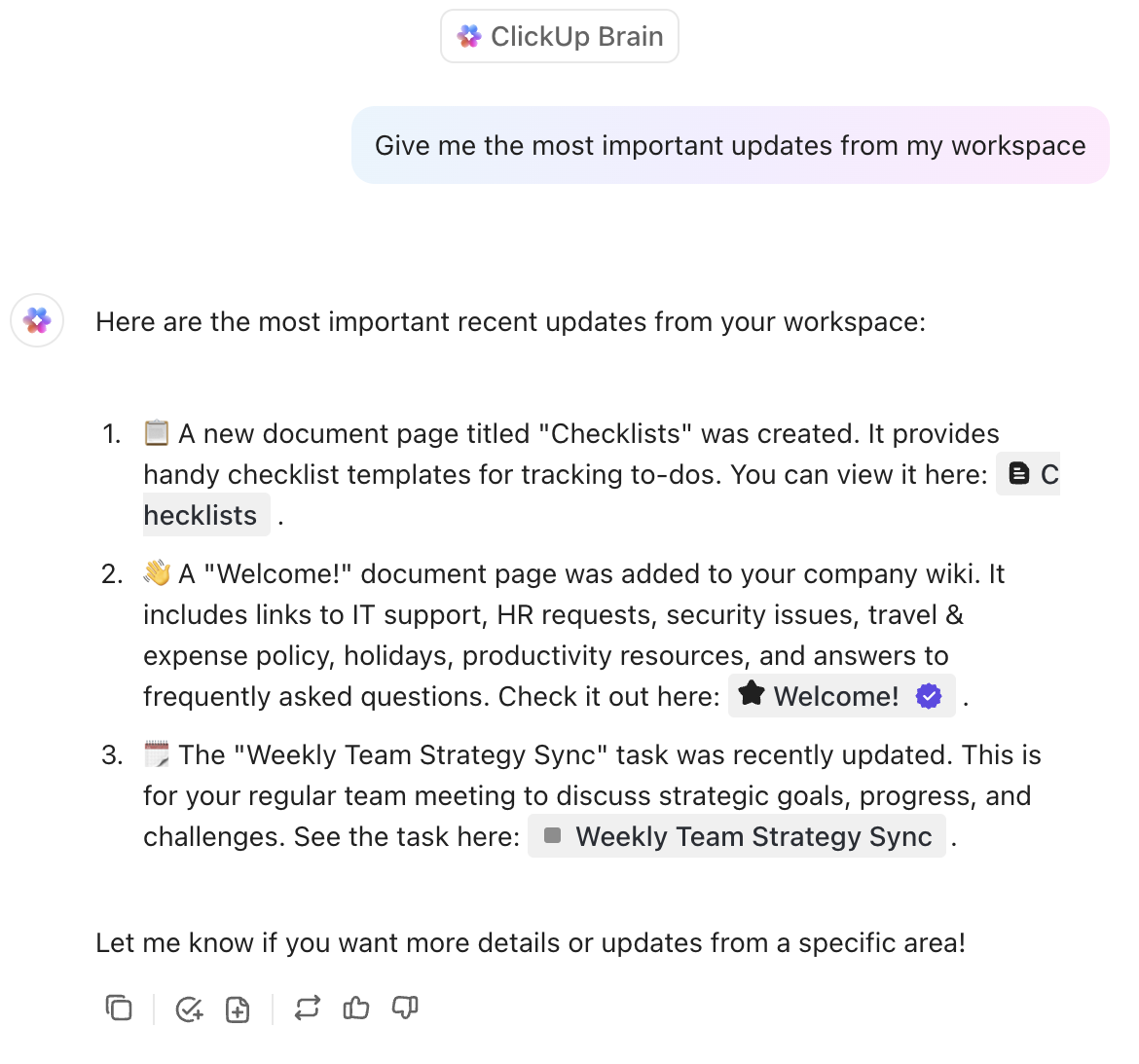
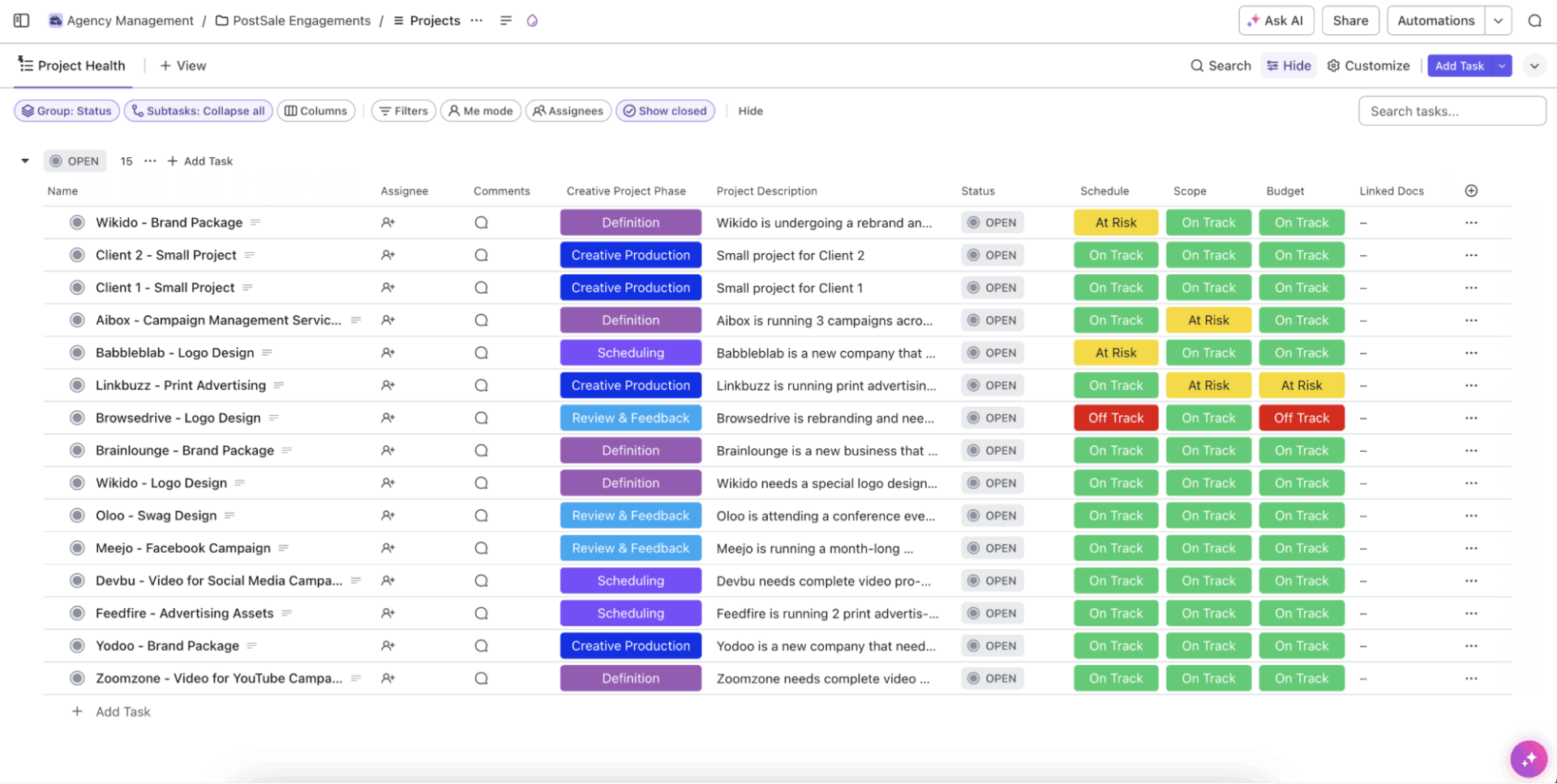
That’s not all! Try the ready-to-use ClickUp Agency Management Template to manage everything, ranging from sales pipeline, project scoping, to client delivery, change requests, and feedback.
Built with industry best practices, it includes:
This template is a plug-and-play system to help your agency run lean, fast, and client-first.
Everything lives in someone’s head. Processes are verbal, client preferences are scattered across chats, and new hires are onboarded with ‘just ask around.’ As you grow, that tribal knowledge doesn’t scale.
🧠 Impact: Delivery becomes inconsistent, team training takes forever, and mistakes repeat across projects.
✅ Fix: Build a central knowledge base with SOPs, templates, naming conventions, and workflows using tools like ClickUp Docs or Wikis. Start with your top 3 repeatable services. For inspiration, here’s how ClickUp’s marketing team uses ClickUp.
Everyone touches everything, and no one owns anything. Designers chase briefs, strategists edit copy, and client calls get dropped because ‘I thought you were handling that.’
🧠 Impact: Internal confusion, duplicated work, and missed handoffs that frustrate both the team and the client.
✅ Fix: Define clear responsibilities for every project using an RACI (Responsible, Accountable, Consulted, Informed) framework.
Within ClickUp Dashboards, by adding role-related Custom Fields and the right dashboard widgets, you can create live, transparent views of task ownership for marketing processes.
You know your top-line revenue, but not your margins per account. Some clients cost more than they earn, but without time tracking or effort analysis, you don’t know which.
🧠 Impact: You scale revenue without scaling profit.
✅ Fix: Track time spent per client or service using ClickUp Time Tracking. Use dashboards to compare hours vs. value, and trim or reprice low-margin work.
Your agency stack becomes a patchwork: Slack + Google Docs + Trello + Notion + Excel + Email. Nothing talks to each other.
🧠 Impact: Context-switching, duplicated effort, and zero visibility across functions.
✅ Fix: Consolidate your agency’s operations into one platform, such as ClickUp for Marketing Project Management. ClickUp lets you centralize tasks, docs, timelines, feedback, and reporting—reducing Work Sprawl and context switching.
Without strong marketing agency leadership, your campaigns will lack direction and accountability. You’ll be firefighting internal conflicts or your team spinning its wheels on low-value work. All this is also a subset of unclear KPIs.
🧠 Impact: Even when your work is solid, client expectations go unmet.
✅ Fix: Some critical KPIs you should be tracking are customer satisfaction and retention, conversion rate optimization (CRO), return on investment (ROI), customer acquisition cost (CAC), and customer lifetime value (CLV).
Consider using the ClickUp Marketing Agency Template to align your teams around meaningful goals and KPIs.
A centralized platform for task management, workflows, dashboards, and documentation tailored to agencies, ClickUp reduces the need for investing in several siloed tools.
Best features
Limitations
Pricing
G2 and Capterra reviews
Streamlines proposal creation with drag-and-drop modules, e-signature, and engagement tracking. Use it to create, edit, send, track, and e-sign proposals, quotes, contracts, and other business documents.
Best features
Limitations
Pricing
G2 and Capterra reviews
Personalized video-based LMS for client onboarding, training, and internal enablement. Includes gamification, assessments, and multilingual delivery.
Best features
Limitations
Pricing
G2 and Capterra reviews
AI-powered tool to turn screen recordings into product videos and step-by-step guides, complete with branded templates, voiceovers, and multilingual support.
Best features
Limitations
Pricing
G2 and Capterra reviews
Centralized feedback on creative assets, with versioning and in-context annotation.
Best features
Limitations
Pricing
G2 and Capterra reviews
AgencyAnalytics is a reporting and analytics platform built for marketing agencies. It integrates SEO, PPC, social, web analytics, and more into unified, white-label dashboards for clients.
Best features
Limitations
Pricing
G2 and Capterra reviews
Consolidates marketing data from multiple channels, enabling unified measurement and attribution reporting.
Best features
Limitations
Pricing
G2 and Capterra reviews
This popular CRM tracks leads, automates follow-ups, integrates with marketing automation, and service hubs. It’s useful for agencies and businesses trying to manage pipelines end-to-end
Best features
Limitations
Pricing
G2 and Capterra reviews
Agency-specific features for centralized campaign management and bulk pricing.
Best features
Limitations
Pricing
G2 and Capterra reviews
Now that you know the steps to scale your marketing agency, the next step is to get started.
For this, ClickUp brings everything your agency needs into one workspace, from project scoping and campaign planning to client onboarding and feedback tracking. With pre-built templates and a built-in Contextual AI assistant, you can hit the ground running and keep every project on track from day one.
Sign up for ClickUp today to start setting up smarter processes.

Manasi Nair
Max 23min read
Manasi Nair
Max 29min read
Manasi Nair
Max 22min read

© 2026 ClickUp