

TL;DR
From managing sprints to tracking bugs, engineering teams need flexible, scalable tools. This blog lists the top PM software—and ClickUp tops the chart with its all-in-one platform, AI-powered automation, and highly customizable workflows built to handle complex engineering pipelines with precision.
For a project manager in the engineering sector, things go from calm to chaotic in a blink of an eye. Overcoming unexpected obstacles, defusing team tension, and trying to finish the job “yesterday” are the many joys of your typical workday.
One little slip-up and you may have to watch projects on the front burner crumble into a hot mess beyond your control. Luckily, you don’t have to bear the burden alone—all you need is the right project management software for engineering to keep your business running smoothly! ⚙️
These tools are equipped with features to facilitate juggling complex projects across all engineering disciplines. Whether handling communication or maintaining tight deadlines—quality software helps you stay organized and slay those KPIs!
We’ll introduce you to the 10 most powerful engineering project management tools to balance your projects effortlessly and keep your team functioning like a well-oiled machine. ?
10 Best Project Management Software for Engineering in 2024

 Summarize this article for me please
What is Engineering Project Management Software?
Engineering Project Management Software is a specialized tool designed to assist engineers and engineering teams in managing, tracking, and executing their projects efficiently. These software solutions are typically equipped with various features like task management, resource allocation, time tracking, scheduling, and risk assessment, specifically tailored for the unique needs of engineering projects.
Summarize this article for me pleaseWhat Should You Look For in Engineering Project Management Software?
A well-rounded project management tool for engineering projects must offer the following benefits:
- Team collaboration: The platform enables collective work in real-time, guaranteeing seamless communication across different departments. Look for features to assign and monitor individual and team tasks
- Centralized management: It acts as a central hub with tools to track engineering projects, documentation, goals, and follow-ups
- Visibility and reporting tools: Look for features like live dashboards and time tracking to get quick reports on the health and progress of projects
- Budgeting and resource management: You should be able to allocate and reallocate human resources, equipment, office tools, and funds across ongoing projects
- Client communication: Any decent project management software helps you relay project parameters and share status updates with clients
- Project methodologies: The tool adapts to project management methodologies, like Agile, Waterfall, and Scrum, common in software development and engineering teams
Summarize this article for me pleaseThe 10 Best Engineering Project Management Software
We have combed through dozens of products and cherry-picked 10 engineering-based project management software. Besides the criteria above, we also looked at the overall reliability of these tools in competitive scenarios.
1. ClickUp– Best Overall Engineering Project Management Software

ClickUp is a multifunctional project management tool customizable to support any project methodology. You have 100+ features to set up a fast-paced Agile workflow—or a Waterfall or Hybrid one! From creating, assigning, and prioritizing tasks to monitoring and controlling, you have every tool to manage workloads across cross-functional teams and complex engineering projects.
Engineering team leads will love ClickUp’s broad-spectrum budgeting and resource management tools. Set Goals and track time to avoid wasting resources on overtime costs or duplicative tasks. ⌛
ClickUp’s versatile templates enable software development teams to fast-track projects to meet deadlines while reducing technical debt. Use engineering templates such as Bug Tracking and Sprint Planning to minimize errors in each output cycle!
Other options include:
You can integrate ClickUp with 1,000+ other apps to manage your everyday work tasks without shuffling between platforms. Communicate updates faster by integrating your email and use branded ClickUp Forms to collect responses from your clients professionally! ?
ClickUp best features
- All-in-one project management tool
- Supports Scrum and Agile frameworks
- High visibility for every project, task, and Sprint with 15+ Views
- Pre-built templates for multiple engineering use cases
- Streamlines communication with coworkers and clients
- Time and budget tracking tools
- Easy to use with a drag-and-drop interface
- 1,000+ integrations
ClickUp limitations
- Automation features can be difficult to grasp without a trial
- The mobile version could use more features
ClickUp pricing
- Free Forever
- Unlimited: $7/month per user
- Business: $12/month per user
- Enterprise: Contact for pricing
*All listed prices refer to the yearly billing model
ClickUp ratings and reviews
- G2: 4.7/5 (8,200+ reviews)
- Capterra: 4.7/5 (3,500+ reviews)
2. Accelo
Best for Service Operations Automation
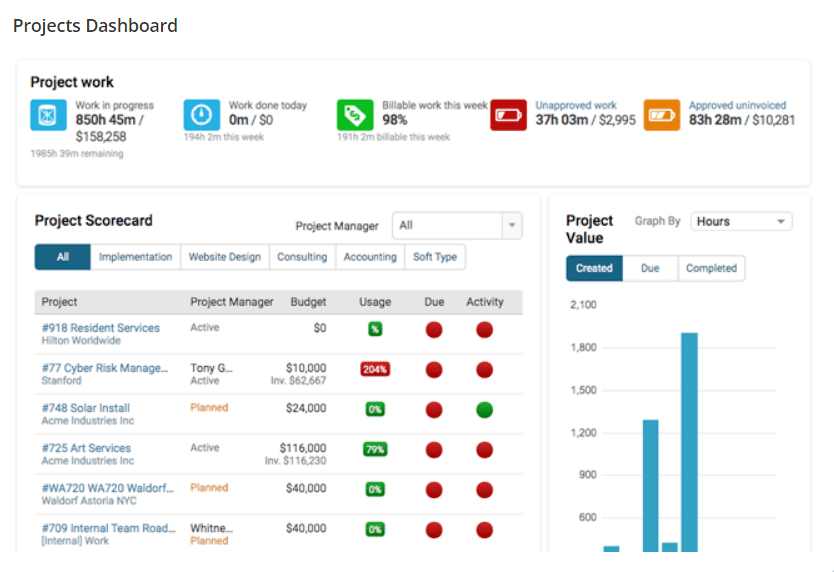
Accelo is a unique solution for managers looking to boost operational efficiency. The platform is highly favored by engineering businesses because it lets you plan in advance and micromanage every project phase, from planning to billing.
Start with customizing your workflow—plan out the day-to-day tasks for every team member and allocate shared resources. Use the platform’s handy automation options for tedious tasks and minimize the risk of burnout within the team!
Accelo’s smartsheets and timers are integrated into every project to support supervisors. Get information about real-time staffing, budgeting, and running capacities in a click or two. Check statuses and task dependencies to adjust the workload if necessary. ♻️
If managing sales across ongoing projects is a headache, Accelo’s ticketing and billing features save the day. Invoice according to the preset budget or use the project completion percentage to set a feasible amount. You can even manage retainer agreements, create bulk invoices, and send statements of outstanding invoices directly from the platform.
Accelo best features
- Support throughout the project lifecycle
- Automated tasks
- Instant insights for decision-making
- Real-time project tracking
- Ticketing and billing support
Accelo limitations
- Billing features can be too complicated to understand
- Adapting to frequent updates can be confusing
Accelo pricing
- Plus: $24/month per user
- Premium: $39/month per user
*All listed prices refer to the yearly billing model
Accelo ratings and reviews
- G2: 4.4/5 (450+ reviews)
- Capterra: 4.5/5 (150+ reviews)
3. Celoxis
Best for Comprehensive Project Planning
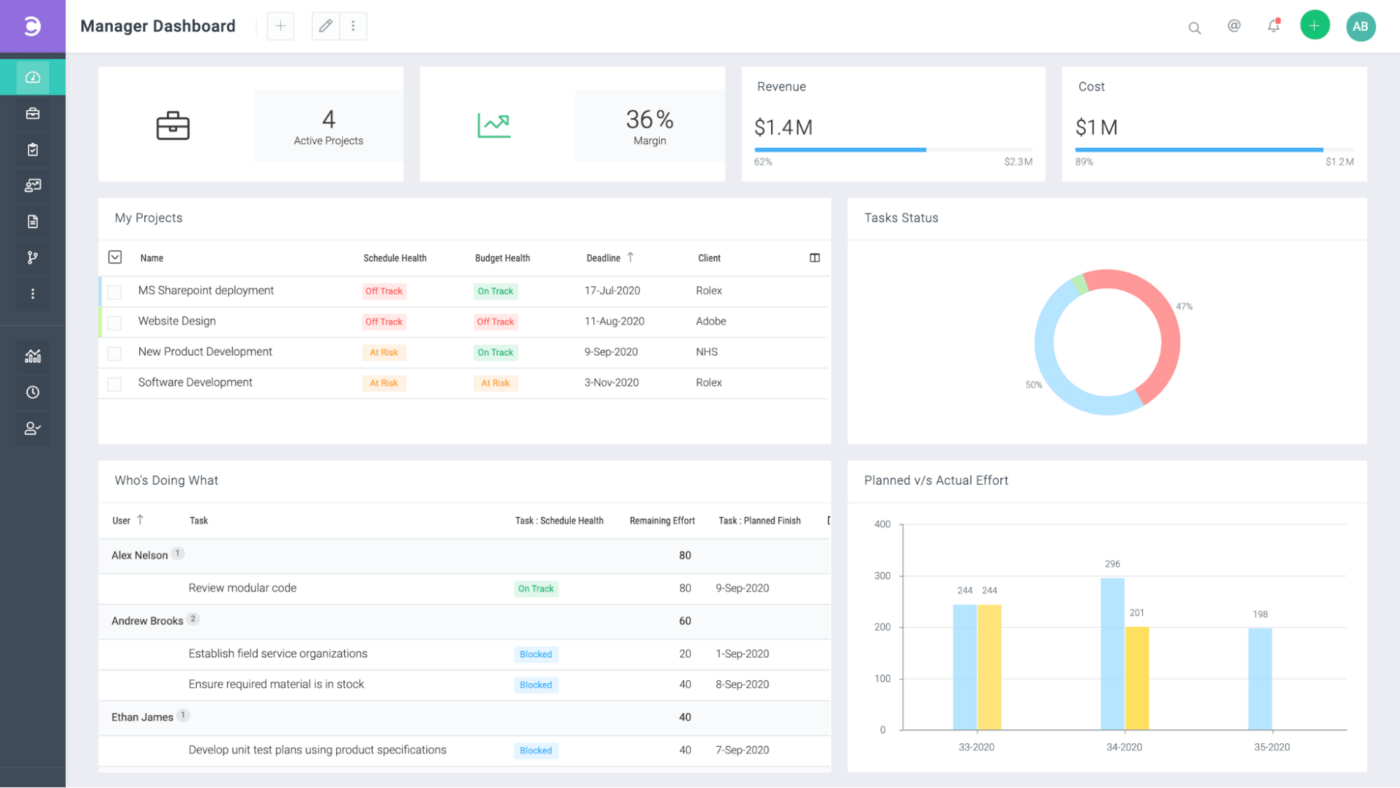
Celoxis is another powerful project management software for engineering teams. Use its intuitive platform to draw out plans that adjust automatically to time-off requests, varying priorities, delays, and other unforeseen circumstances.
Tracking, budgeting, and resource management is a breeze! Use the central dashboard to inspect a project’s task statuses, milestones, and health indicators. The dashboard is 100% customizable, letting you update layouts and change widgets to accommodate any shift in priorities.
Celoxis offers powerful analysis and forecasting features to examine your projects. For example, the What-If Analysis tool can predict potential risks and issues that may arise if significant factors like staffing or budgeting change. It can be a lifesaver for your strategic planning team and prevent projects from derailing amid unpredictable scenarios. ?
Celoxis best features
- Project planning, tracking, and forecasting tools
- Intuitive interface
- Customizable dashboard
- Portfolio management features
- Collaboration-friendly
Celoxis limitations
- The UX/UI can be challenging to navigate
- Some users want a more diverse pool of reporting options
Celoxis pricing
- Cloud: $22.50/month per user (billed annually)
- On-premise: Contact for pricing (billed once)
Celoxis ratings and reviews
- G2: 4.4/5 (50+ reviews)
- Capterra: 4.4/5 (250+ reviews)
4. LiquidPlanner
Best for Predictive Project Management
No, LiquidPlanner won’t cause a meltdown in your engineering team. ?
The “liquid” here refers to the platform’s adaptability to the waves of change bound to hit engineering teams. ?
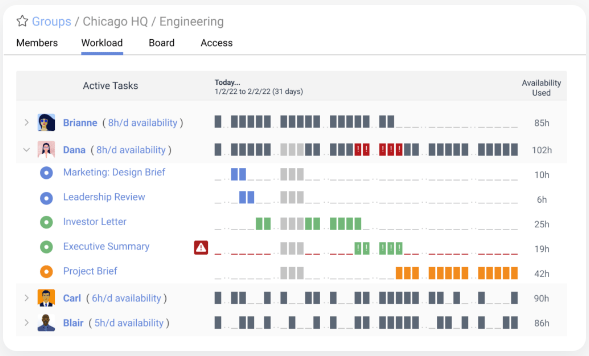
LiquidPlanner is a predictive scheduler incorporating the uncertainty element by default, allowing you to plot project timelines and completion dates. This is done with the help of simulations generating near-accurate forecasts! ⛈️
Once your project goes live, use real-time monitoring features to manage schedules, tasks, and insights. With an idea of the uncertainties, your reaction to off-track activities can be fast and purposeful.
With LiquidPlanner, you get top-grade priority planning support. There’s no room for stress and anxiety when you can create realistic schedules and cross off one emergency after another while keeping your cool! ?
LiquidPlanner best features
- Insights into a project’s health
- Predictive project planning
- Simulation-based risk forecasting
- Top-notch time management tools
- Task prioritization
LiquidPlanner limitations
- Managing numerous projects simultaneously can be challenging
- Workflow management isn’t always smooth
LiquidPlanner pricing
- Essentials: $15/month per user
- Professional: $25/month per user
- Ultimate: $35/month per user
*All listed prices refer to the yearly billing model
LiquidPlanner ratings and reviews
- G2: 4.2/5 (250+ reviews)
- Capterra: 4.3/5 (650+ reviews)
5. Jira
Best for Agile Project Management
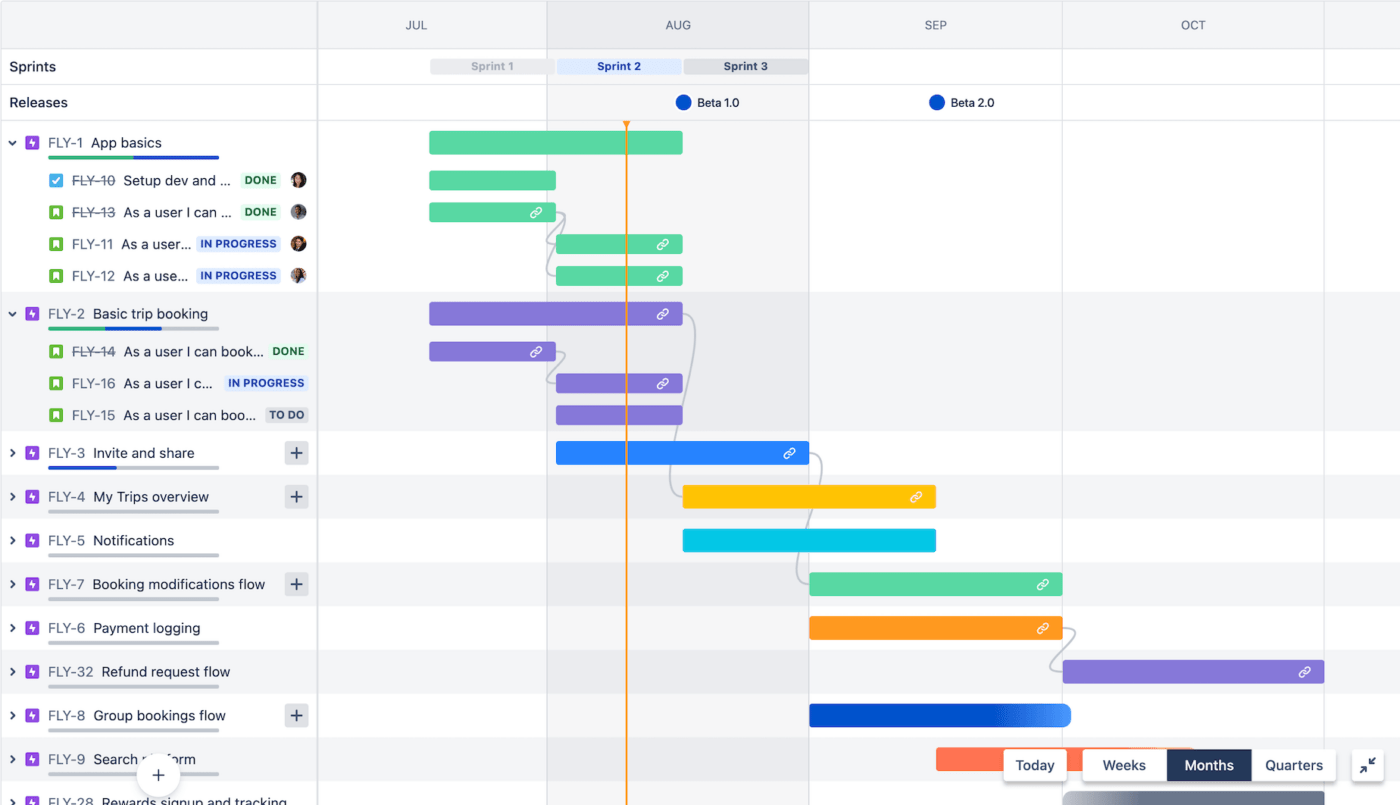
Ugh, the growing pains of Agile teams! ?
Jira is all about making the pain go away. Its intuitive Agile boards are mainly geared toward software developers, but other engineering teams can use them as well.
The tool offers a full range of support features for releasing new software on tight deadlines. Choose between Kanban and Scrum boards to break down complex workflows into manageable tasks for your Agile team. The boards are pretty flexible and can adapt to your team’s unique work pattern.
Use interactive roadmaps to create hierarchy levels and dependencies. Identify bugs and bottlenecks as they appear to keep the resolution time minimal. Leverage the platform’s centralized dashboard and reporting tools to monitor how your goals are shaping up.
Jira best features
- Adapts to Agile teams
- Drag-and-drop automation setup
- Interactive roadmaps
- Centralized task management
- Sleek Scrum and Kanban boards
Jira limitations
- The extensive feature set can be confusing to new users
- Relatively expensive, especially for smaller teams
Jira pricing
- Free: $0
- Standard: $790/year per user
- Premium: $1,525/year per user
- Enterprise: Contact for pricing
Jira ratings and reviews
- G2: 4.3/5 (5,300+ reviews)
- Capterra: 4.4/5 (13,000+ reviews)
6. Linear
Best for Issue Tracking
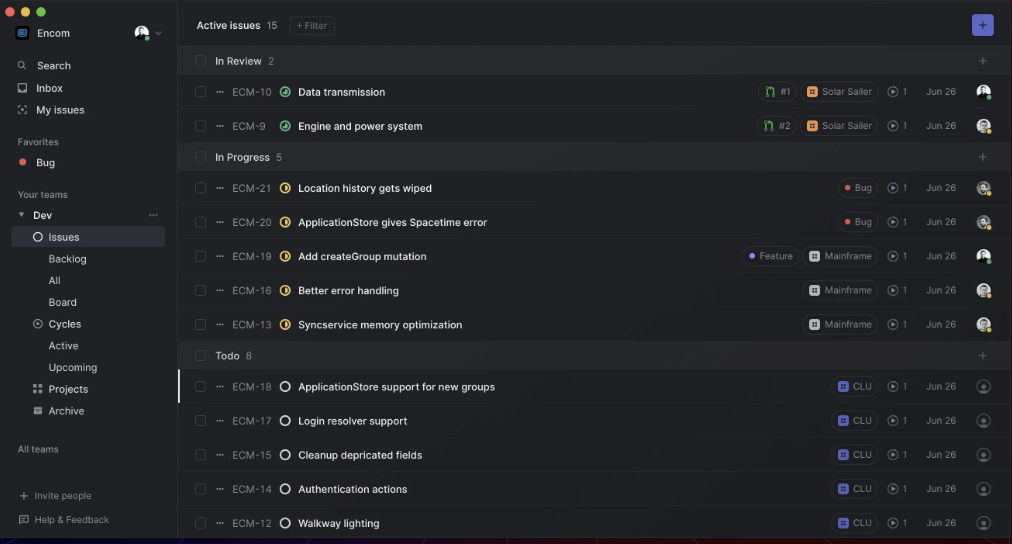
Linear is a no-nonsense tool for planning ahead with ruthless precision.♟️
The platform is ideal for scheduling large-scale software and design projects from a big-picture perspective. Split your project roadmap into Cycles so your team can focus on what to do right now.
Every Cycle is fully customizable. Set start dates and durations or plan your team’s breaks and retrospectives. You can even create Git hooks to automate predictive tasks. Got unfinished tasks after a sprint? Any pending work from one Cycle automatically moves to the next one, so you’re all sorted! ↪️
Linear’s bug reports, automatic project updates, automated backlogs, discussions, and numerous integrations help you collaborate with your teammates without losing context.
Many users find Linear similar to Jira in terms of features, but the former may have better load times and shortcuts to speed up your processes.
Linear best features
- Detailed planning and task management tool
- Useful bug reports and automated backlogs
- Progress tracking
- High-speed platform
Linear limitations
- Fewer advanced features compared to competitors
- No native mobile app
Linear pricing
- Free: $0
- Standard: $8/month per user
- Plus: $14/month per user
*All listed prices refer to the yearly billing model
Linear ratings and reviews
- G2: 4.5/5 (15+ reviews)
- Producthunt: 4.7/5 (90+ reviews)
Check out these Linear alternatives!
7. Asana
Best for Task Management

Asana is another legit superstar in the project management universe! ?
Besides the regular task management features, this Agile-friendly solution has an intuitive interface offering a clear overview of what’s in progress and who’s in charge at any time. Reallocating resources is hardly a problem thanks to the drag-and-drop design allowing you to move elements around and sneak in those last-minute changes. ⌚
Tracking bugs, handling multiple projects, creating and managing calendars, handling sprints, monitoring portfolios, you name it—Asana has your back. Explore multiple views, automation options, and integrations to simplify your daily grind. As the platform is cloud-based, hop on it wherever you are to review project status reports. ?
The one bothersome drawback of the platform is that there’s no way to have multiple assignees for a single task, which limits accountability.
Asana best features
- Project management tools with multiple views
- Free to use for teams with up to 15 members
- Dozens of third-party integrations
- Top-notch dependency options
- Drag-and-drop features
Asana limitations
Asana pricing
- Basic: $0
- Premium: $10.99/month per user
- Business: $24.99/month per user
*All listed prices refer to the yearly billing model
Asana ratings and reviews
- G2: 4.3/5 (9,000+ reviews)
- Capterra: 4.5/5 (12,000+ reviews)
8. Plutio
Best for Freelance Engineers
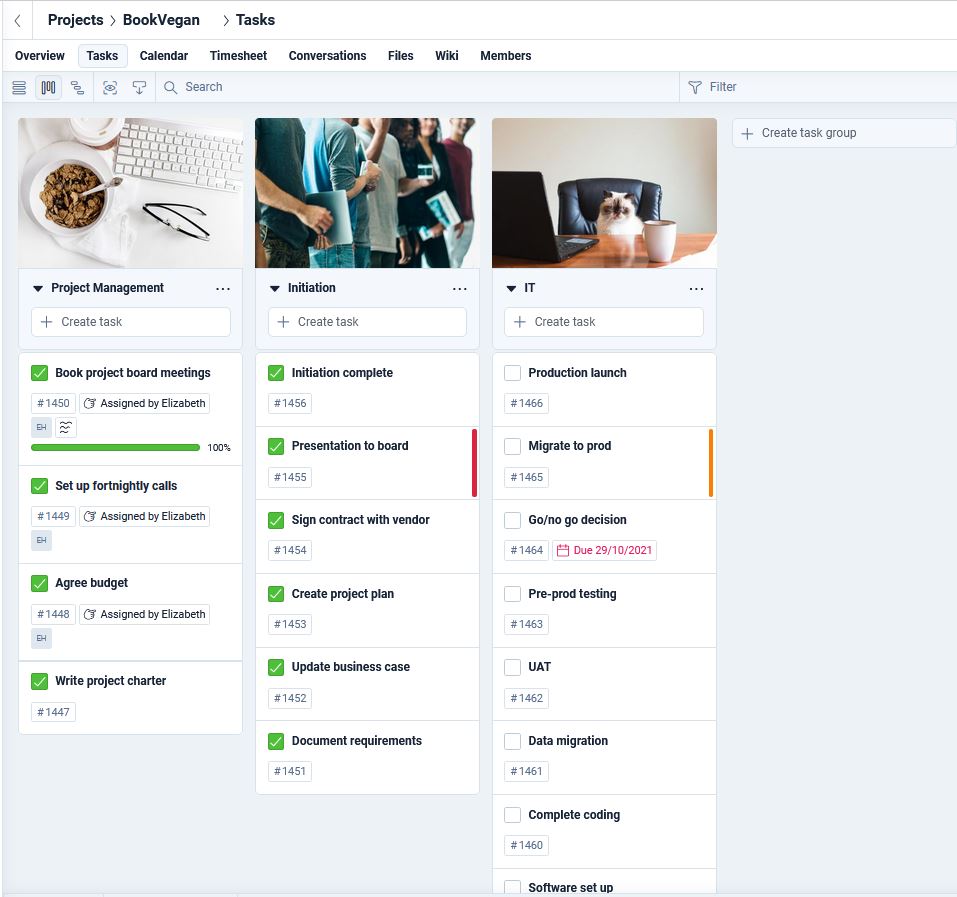
Juggling team collaboration, knowledge sharing, workflow automation, and payroll is quite the feat, especially if your work is spread across dozens of apps. It’s only a matter of time before you drop one of the balls, though. ?
Trust Plutio to bring calm into the chaos with features for centralized management.
It’s a complete and 100% customizable solution—schedule tasks, automate workflows, draft advanced proposals, make data-backed timesheets, create invoices, and customize fields and views. You’re calling the shots through and through! ?
The platform’s user-friendly interface can be customized to match your company branding. Its latest version, Plutio 3.0, comes with a brand new Productivity Tray for accessing top tasks, notes, and contacts with a single click!
Plutio has a fancy global appeal as it’s one of the few project management tools available in 30+ languages! ?
Plutio best features
- Fully customizable centralized workflows
- Excellent invoicing and payment options
- Offers templates for engineering projects
- Supports 30+ languages
- Productivity Tray for easy access
Plutio limitations
- The dashboard can be overwhelming for new users
- Lack of instructions for certain features and add-ons
Plutio pricing
- Solo: $19 per month
- Studio: $39 per month
- Agency: $99 per month
Plutio ratings and reviews
- G2: 4.5/5 (50+ reviews)
- Capterra: 4.6/5 (150+reviews)
9. Zoho Projects
Best for Collaboration
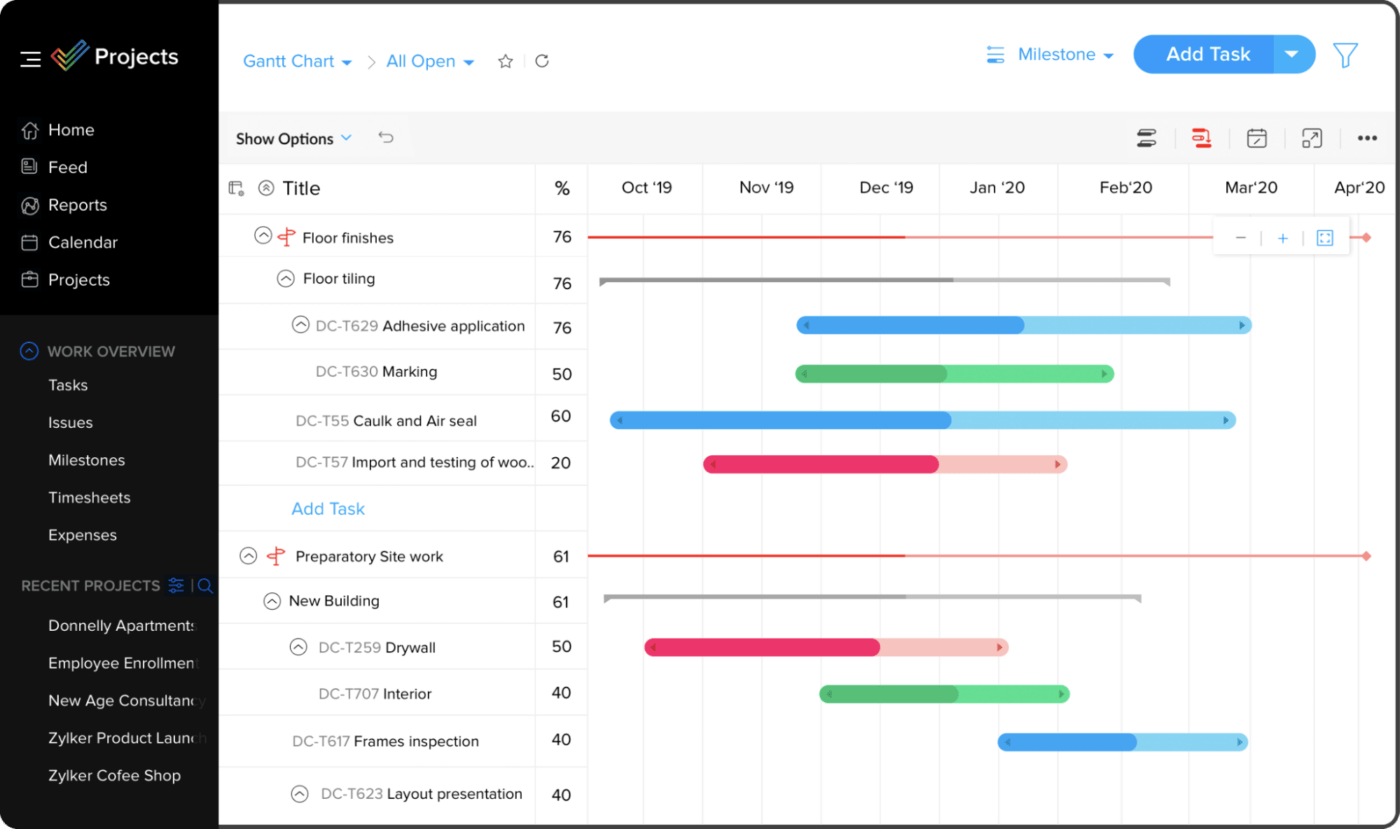
If you’re looking for an inexpensive but efficient engineering project management tool, consider Zoho Projects! This cloud-based software packs dozens of practical project management features. From organizing tasks to scheduling meetings, the platform delivers!
With Zoho Projects, every teammate can be clear on what’s expected of them. Establish ground rules by adding tasks to assignees, setting priorities and dependencies, and creating reminders. You can even automate tasks, although the option is only available to paid users.
Your team’s progress is accounted for on timesheets and task timers. Monitor these reports to identify productivity bottlenecks and shuffle your team’s workload to ensure nobody’s overworking or slacking.
Engineering projects are no one-man jobs, and Zoho Projects knows this well. The platform’s collaboration options, like built-in chats and project forums, keep everyone in the loop about the latest updates.
Zoho Projects best features
- Excellent collaboration options
- Integrated time tracking to monitor project progress
- Relatively affordable pricing
- Useful integration options
Zoho Projects limitations
- Mobile apps have limited features
- The platform may be complex to navigate and set up for beginners
Zoho Projects pricing
- Free: $0
- Premium: $4/month per user
- Enterprise: $9/month per user
*All listed prices refer to the yearly billing model
Zoho Projects ratings and reviews
- G2: 4.3/5 (350+ reviews)
- Capterra: 4.3/5 (300+ reviews)
Check out these Zoho alternatives!
10. Paymo
Best for Time Tracking and Invoicing
Engineering project managers may be top experts in their field, but they often need guidance when it comes to accounting. Simple billing activities can seem painful, especially for small teams that can’t afford a full-time financial expert. ?
Luckily, you can rely on tools like Paymo to give you accounting superpowers! ?
The platform makes mundane activities like invoicing and billing quick and easy. Create estimates for engineering project plans, share them with clients, and turn the approved costs into professional invoices in no time!
Of course, Paymo is, first and foremost, a project management platform. Use it to visualize your projects, create tasks, customize workflows, and check milestones—all that jazz. ?
Use Paymo’s project templates to create easy-to-follow timelines for everyone and make collaboration smooth. You can even invite clients as guests to communicate a project’s progress.
Paymo best features
- Excellent invoicing and billing features
- Handy mobile app to manage projects
- Various time-tracking tools
- Built-in project templates
- Platform sharing with clients
Paymo limitations
- More formatting options for invoices and estimates could be useful
- Some users struggle with the recurring invoice feature
Paymo pricing
- Free: $0
- Starter: $4.95/month per user
- Small office: $9.95/month per user
- Business: $20.79/month per user
*All listed prices refer to the yearly billing model
Paymo ratings and reviews
- G2: 4.6/5 (550+ reviews)
- Capterra: 4.7/5 (450+ reviews)
Summarize this article for me pleaseHow Can Engineers Benefit from Using Project Management Software?
Engineers can greatly benefit from using project management software in several ways:
- Centralized Platform: Project management software provides engineers with a centralized platform to manage their tasks, track progress, and collaborate with team members. This leads to improved communication and coordination, ensuring everyone is on the same page at all times.
- Efficient Planning: These tools are equipped with features that aid in detailed project planning. They help set milestones, create Gantt charts, and forecast project outcomes using various project management methodologies. This allows for better big-picture planning, especially beneficial for long-term engineering projects.
- Real-Time Reports: One of the significant advantages of project management software is its ability to generate real-time reports of productivity and progress. This enables project managers to make timely decisions throughout a project, ensuring efficient resource allocation and task completion.
- Budget Management: Project management software often comes with features for budgeting and financial management. This helps teams keep track of their expenses and ensures the project stays within its budget.
- Fosters Agile Practices: Some project management software, like Teamhood, successfully merges traditional and Agile project management practices. This gives engineering teams the flexibility to adapt to changes quickly and deliver projects more efficiently.
Summarize this article for me pleaseAce Your Engineering Project With Project Management Software
Engineering project managers often feel like the captain of a ship on choppy seas. Keeping the ship balanced is stressful, but the tools on our list can help you pull through. Get your favorite pick—you’ll be chasing the clouds away and getting your team to calmer waters in no time. ☀️


Everything you need to stay organized and get work done.

Recent Articles
The Best Task Management Software in 2026: 10 Tools Compared 
The Best Task Management Software in 2026: 10 Tools Compared
