You’re wrapping up a long workday when a last-minute request pops up in your inbox. You feel the pressure to say “yes” even though you’re already stretched thin.
The struggle to say “no” at work is real. Many of us fear appearing unhelpful or unmotivated, leading to over-commitment and exhaustion.
But here’s the truth: saying “no” isn’t about refusing work—it’s about protecting your time, productivity, and well-being. If you always say “yes,” you risk burnout and diminishing the quality of your work. Setting boundaries isn’t a weakness—it’s a strength that fuels long-term success.
Without setting boundaries, overcommitment can lead to decreased efficiency and even long-term dissatisfaction with work.
This post will explore how learning to say no is really about setting healthy boundaries and prioritizing effectively. We’ll provide you with the practical tips and strategies you need to say no professionally and confidently, so you can thrive at work.
Bonus 🌻 Keep scrolling for examples of perfectly crafted ‘polite refusal’ messages and emails for different situations, templates to manage (and communicate) your workflow, and tools you can use to make workplace communication transparent and unambiguous.
Summarize this article with AI ClickUp Brain not only saves you precious time by instantly summarizing articles, it also leverages AI to connect your tasks, docs, people, and more, streamlining your workflow like never before.
Summarize this article for me please
Why Is It Important to Say No at Work
o set healthy boundaries and protect your productivity, it’s important to say “no” at work when needed.
Prevents burnout and overcommitment: Taking on too many tasks and meetings increases stress and anxiety, and burned-out employees are 2.6x more likely to quit.
Keeps you focused on high-priority work: Saying yes selectively helps you prioritize tasks that align with your goals and expertise.
Builds confidence and respect: A polite “no” shows assertiveness, reinforces clear boundaries, and earns professional credibility.
When you say ‘yes’ to others, make sure you’re not saying ‘no’ to yourself
Paulo Coelho
It’s easy to fall into the habit of saying “yes” to everything. Here’s why setting boundaries can actually work in your favor:
Consistently accepting additional tasks and being part of too many meetings and conversations can lead to burnout and increased anxiety, ultimately hindering performance. Saying no helps you maintain balance at work and avoid overwhelming stress.
📮ClickUp Insight: Nearly 20% of our survey respondents send over 50 instant messages daily. This high volume could signal a team constantly buzzing with quick exchanges—great for speed but also ripe for communication overload.
With ClickUp‘s integrated collaboration tools, like ClickUp Chat and ClickUp Assigned Comments, your conversations are always linked to the right tasks, enhancing visibility and reducing the need for unnecessary follow-ups.
By selectively agreeing to tasks, you can concentrate on responsibilities that align with your goals and expertise. This strategic focus enhances productivity and ensures that your efforts contribute meaningfully to your role.
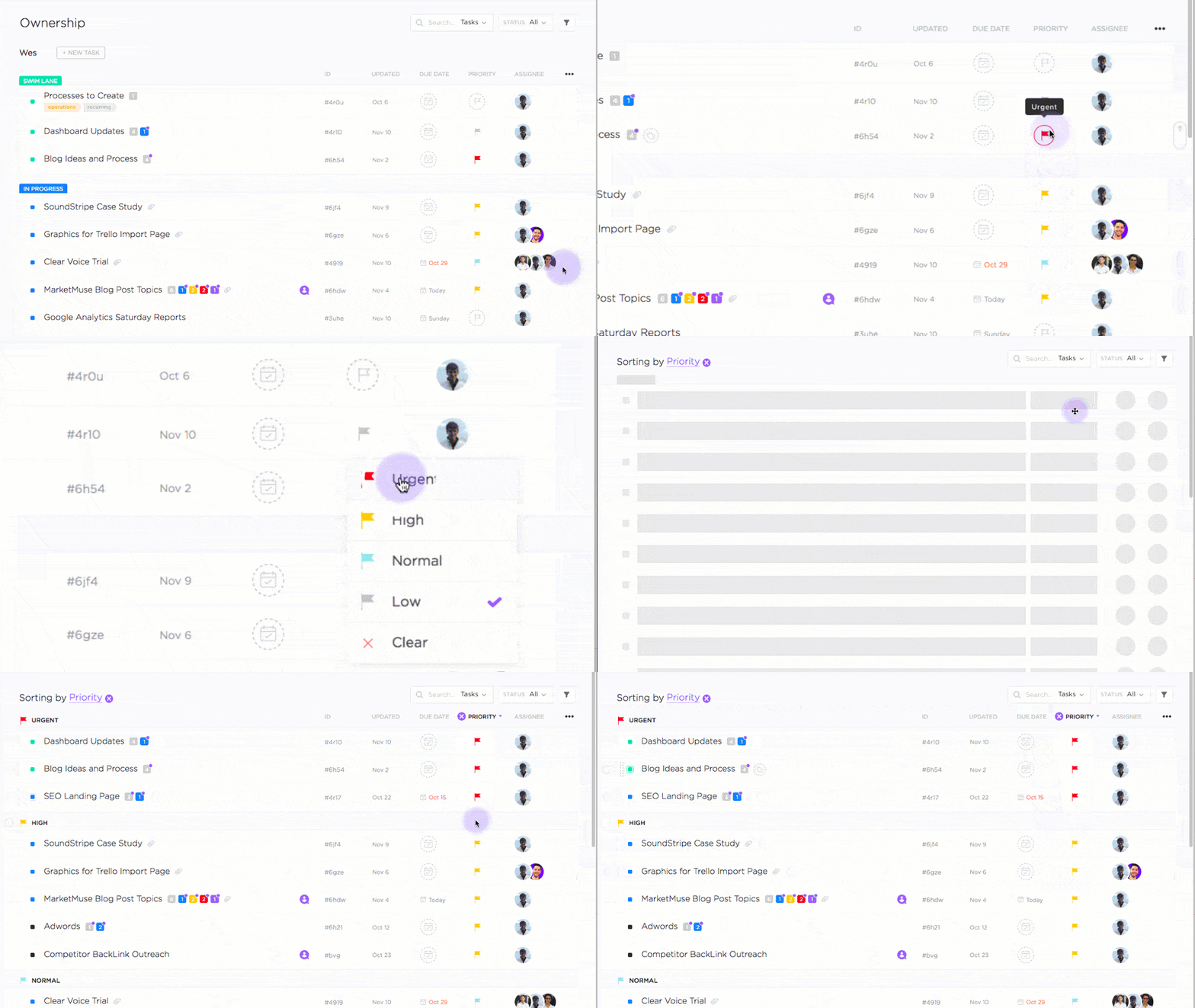
Set priority levels for your task based on which task needs to be done first with ClickUp’s Task Priorities
Demonstrating assertiveness and confidence
Politely declining tasks that don’t align with your priorities showcases your assertiveness and confidence. This approach sets clear, healthy boundaries and earns respect from colleagues and supervisors.
💡Pro Tip: We all struggle to craft that perfect message at times. ClickUp Brain and Brain MAX have your back! With ClickUp Brain, you get the power of multiple advanced AI models that help you craft the perfect, empathetic response—so you can set boundaries and still sound like a pro.
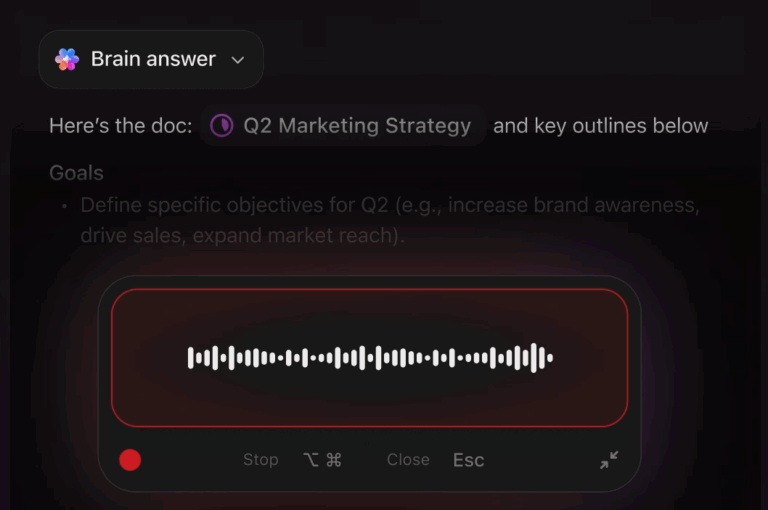
And with Brain MAX, your AI desktop companion, it’s even easier: just speak your thoughts out loud, and its voice-to-text magic captures and refines your message on the spot. No more overthinking or second-guessing—just clear, confident communication that helps you protect your time and keep your workday on track.
Summarize this article with AI ClickUp Brain not only saves you precious time by instantly summarizing articles, it also leverages AI to connect your tasks, docs, people, and more, streamlining your workflow like never before.
Summarize this article for me please
When Should You Say No at Work to Protect Your Priorities
To protect your priorities at work, say “no” when a request pulls you away from what matters most.
It doesn’t align with your goals or role: If it pulls you away from core responsibilities or long-term growth, it’s a smart decline (use ClickUp Goals to keep objectives visible).
Your workload is already at capacity: If adding more will reduce quality or increase stress, pause and say no (track bandwidth with the ClickUp Resource Management Template).
It’s not urgent or important: If it’s low-impact or doesn’t need your expertise, decline so your time goes to higher-value work.
Figuring out when to say “no” at work isn’t always easy, but it’s key to maintaining balance, protecting your energy for the tasks that matter, and staying focused. Here’s how to determine when it’s the right time to turn down a request:
1. Aligning tasks with your goals and responsibilities
Before agreeing to take on a new task, consider whether it aligns with your primary job responsibilities and long-term career objectives. If the request diverts your attention from your core duties, doesn’t contribute to your professional growth, or doesn’t move the needle on the tasks that YOU need to get done, it might be wise to decline.
With ClickUp’s Goals feature, you can set high-level objectives and break them down into measurable targets, ensuring your tasks contribute to achieving these objectives.
Setting goals and objectives with ClickUp
Coworkers and team members can view your goals and the tasks you’re focusing on to achieve them. So they can understand when you politely decline a task that falls outside of that.
2. Evaluating your current workload
Take stock of your existing commitments. If your plate is already full, adding more can lead to decreased productivity and increased stress. It’s important to recognize your limits to maintain the quality of your work.
3. Assessing the urgency and importance of the request
Not all tasks are created equal.
Determine if the request is both urgent and important. If it’s neither, or if it doesn’t require your specific expertise, it might be appropriate to say no. Prioritizing tasks in this manner ensures you’re dedicating your time to what truly matters.
By carefully evaluating these factors, you can make informed decisions about when to decline tasks, ensuring that your workload remains manageable and aligned with your professional goals.
Summarize this article with AI ClickUp Brain not only saves you precious time by instantly summarizing articles, it also leverages AI to connect your tasks, docs, people, and more, streamlining your workflow like never before.
Summarize this article for me please
What Are the Best Strategies to Say No Professionally
To say “no” professionally without burning bridges, keep your response clear, respectful, and confident.
Be direct and honest: Decline quickly with a simple reason—no long explanations.
Offer an alternative: Suggest a different timeline or the right person who can help.
Set boundaries + stay assertive: State your current priorities and use a firm-but-polite tone (use ClickUp Time Blocking Template to protect focus time, and ClickUp Chat + @mentions to communicate capacity transparently).
Practice regularly: Rehearse common scenarios so saying no feels natural.
Sometimes, the most difficult things to say are also the simplest.
Saying no at work doesn’t have to be uncomfortable. The key is to be clear, respectful, and confident while maintaining professionalism. Here are some effective strategies to decline requests without damaging relationships or opportunities,
1. Be direct and honest
When declining a request, it’s best to be straightforward. Clearly communicate your reasons without over-explaining.
For instance, you might say, “I appreciate you thinking of me for this project, but I don’t have the capacity to take it on right now.”
💡Pro Tip: Use this ClickUp Daily Task List Template to visualize and manage your workloads. Share it with your team members to collaborate, track progress in real time, and ensure everyone stays aligned on your daily priorities.
2. Offer alternatives
If possible, suggest other solutions. This shows you’re still committed to the team’s success. You could recommend a colleague who has the bandwidth or propose a different timeline that works better for you.
For example, you can say, “I can’t assist with this task today, but I could help later in the week,” or “Perhaps [Colleague’s Name] might be able to assist.”
3. Set clear boundaries
Establishing and communicating your limits is crucial. Let others know your current priorities and workload.
You might say, “I’m currently focusing on [Project X], and taking on additional tasks would affect my ability to deliver quality work.”
You can even block out sections of your calendar where you indicate periods when you are unavailable or focused on deep work/meetings. Use this ClickUp Time Blocking Template for better productivity and task management
Align your tasks with your peak productivity hours with the ClickUp Daily Time Blocking Template
Maintain a firm yet polite tone. Assertiveness conveys confidence and helps prevent misunderstandings. For instance, “I understand the importance of this task, but I must decline to ensure I meet my existing deadlines.”
Use ClickUp’s communication features, like Chat and @mentions , for transparent discussions about capacity and setting boundaries.
5. Practice saying no
The more you practice, the more comfortable you’ll become. Role-playing scenarios with a trusted colleague or friend can help you find the right words and tone.
By employing these strategies, you can say “no” professionally, protecting your time and energy while maintaining positive workplace relationships and being a team player.
Summarize this article with AI ClickUp Brain not only saves you precious time by instantly summarizing articles, it also leverages AI to connect your tasks, docs, people, and more, streamlining your workflow like never before.
Summarize this article for me please
What Are Real Examples of Professional Ways to Say No at Work
Having ready-to-use “no” scripts makes it easier to decline requests professionally while protecting your time and relationships (you can also use ClickUp Brain to generate polite, assertive replies fast).
Use context-specific refusals for common situations: at capacity, outside your role, need to prioritize, unrealistic deadlines, interruptions, last-minute meetings, tactfully with a manager, work-life balance conflicts, free work outside scope, or repeat requests.
Keep responses short and respectful: thank them, state your limit, and offer an option like a different timeline, another owner, or async follow-up (e.g., review notes).
Save a few general fallback lines (“no bandwidth,” “not aligned with priorities,” “can’t commit”) to use when you need a quick, firm decline.
Declining requests at work can be tricky, but having a few well-crafted responses can make it easier. Below are different workplace scenarios where you might need to say no, along with examples of how to handle them professionally.
You can also try out ClickUp Brain to help create assertive yet polite messages to decline any last minute requests. Here is an example prompt with Brain’s response:
Use ClickUp Brain to craft polite yet firm responses when declining a request
Here are a few ways to say ‘no’ professionally in different situations.
1. When your plate is full
“I’d love to help, but I’m currently at capacity with [X project]. If anything changes, I’ll let you know.”
2. When the task is outside your role
“This sounds like an important project, but it’s outside my expertise. I don’t want to give you false hope about my ability to contribute effectively. You might want to check with [Colleague’s Name] for better insights.”
3. When you need to prioritize high-impact work
“I appreciate the opportunity, but I need to stay focused on my current priorities to meet deadlines. Could we revisit this later this month?”
4. When the deadline is unrealistic
“Given my current workload, I won’t be able to deliver this by [requested date]. Would an extension work, or would you like to delegate it to other team members?”
5. When someone asks for a favor that interrupts your work
You can set your status on ClickUp Chat to indicate the period you’re unavailable. Alternatively, you can say: “I’m in the middle of a critical task right now, but I’d be happy to check in with you later.”
6. When declining a last-minute meeting
“I have other commitments during my working hours, but I’d be happy to review the meeting notes and follow up if needed.”
7. When you need to say no to a manager (tactfully)
“I want to ensure I’m delivering high-quality work on my current assignments. Can we discuss priorities and see where this fits in?”
8. When a request conflicts with your work-life balance
“I appreciate the offer, but I’ve committed to personal obligations after work. Let me know if there’s another way I can support you during work hours.”
9. When you’re asked for free work outside of your job scope
“I appreciate you thinking of me, but I have to focus on my primary responsibilities. I don’t want to give you false hope about my ability to contribute effectively. I’d be happy to recommend someone who specializes in this.”
10. When a colleague keeps asking for help too often
“I’m happy to help when I can, but I encourage you to try tackling it first. If you run into specific issues, I’d be glad to help you.”
If you need a general response that can work in multiple situations, here are some polite yet firm ways to say no:
“I’d love to help, but I don’t have the bandwidth right now.”
“I appreciate the opportunity, but I have to decline.”
“I need to focus on my current workload, so I won’t be able to take this on.”
“I’d prefer to pass on this one, but thank you for thinking of me.”
“This doesn’t align with my current priorities, but I appreciate the offer.”
“Unfortunately, I have to say no this time. Let’s catch up soon!”
“I won’t be able to commit to this, but I’d love to support you in other ways.”
“That’s not something I can take on right now, but I appreciate you reaching out.”
“I have other obligations that need my attention, so I won’t be able to help.”
“I don’t have the availability, but I can connect you with someone who might.”
Having these responses ready makes it easier to say no while maintaining professionalism and strong working relationships.
Summarize this article with AI ClickUp Brain not only saves you precious time by instantly summarizing articles, it also leverages AI to connect your tasks, docs, people, and more, streamlining your workflow like never before.
Summarize this article for me please
What Are the Best Email Templates for Saying No Professionally
To say no professionally over email, keep it firm, respectful, and solution-oriented—especially with colleagues, clients, and other external stakeholders.
Use simple templates for common scenarios: decline extra work when overloaded, skip non-essential meetings, push back on rushed client timelines, and decline tasks outside your expertise—while offering an alternative (another person, different timeline, or another way you can help).
Structure each email the same way: thank them → state the constraint clearly → propose next-best option → close politely.
To keep refusals organized and transparent, manage stakeholder threads inside tasks using ClickUp’s Email ClickApp (emails show up as threaded comments).
Saying no via email can be tricky—you want to be firm yet professional while keeping relationships intact. This is especially true when dealing with external stakeholders such as customers, vendors, or investors.
Below are email templates tailored to different scenarios to help you decline requests gracefully.
1. Declining a task from a colleague
📌 Scenario: A teammate asks you to take on extra work when you’re already overloaded.
📧 Subject: Re: Request for Assistance
Hi [Colleague’s Name],
Thanks for reaching out! I appreciate you thinking of me for this, but I’m currently at full capacity with my existing projects. I wouldn’t be able to give this the attention it deserves at the moment.
If you need help finding someone else, I’d be happy to suggest a colleague who might be available. Let me know how I can support you in that way!
Best, [Your Name]
2. Turning down a meeting
📌 Scenario: You’re invited to a meeting that isn’t essential for you to attend.
📧 Subject: Re: Meeting Invitation
Hi [Organizer’s Name],
Thanks for the invite! I reviewed the agenda, and I don’t think my presence is necessary for this discussion. If there’s anything specific you need from me, I’d be happy to provide input via email or a quick chat beforehand.
Let me know how I can help!
Best, [Your Name]
3. Refusing to expedite a client request
📌 Scenario: A client asks you to complete a project sooner than the agreed deadline, but it’s not feasible.
📧 Subject: Re: Project Timeline Inquiry
Dear [Client’s Name],
Thank you for your mail and I understand the urgency of this request. Right now, our team is fully committed to delivering quality work within the agreed timeline. Expediting the process might compromise the final outcome, which we want to avoid.
If it’s absolutely critical, we can explore options such as adjusting the scope or reallocating resources, though this may impact costs or deadlines. Let me know how you’d like to proceed.
Looking forward to your thoughts.
Best, [Your Name]
4. Declining a task due to lack of expertise
📌 Scenario: You’re asked to take on a task that falls outside your skill set.
📧 Subject: Re: Task Assignment
Hi [Manager/Colleague’s Name],
Thanks for considering me for this. While I’d love to contribute, after careful consideration, I believe [specific skill] expertise is required to do this effectively, which isn’t my area of strength.
I’d recommend [Alternative Person/Department] who has more experience in this area. If you’d like, I can assist in a different way, such as [suggest another way to contribute]. Let me know how you’d like to proceed!
Best, [Your Name]
To simplify communication further, use ClickUp’s Email ClickApp to manage emails directly within tasks, ensuring all conversations stay organized in one place. You can send and receive emails from providers like Outlook, Gmail, and Microsoft Teams, with emails appearing as threaded comments.
Summarize this article with AI ClickUp Brain not only saves you precious time by instantly summarizing articles, it also leverages AI to connect your tasks, docs, people, and more, streamlining your workflow like never before.
Summarize this article for me please
How Can You Overcome the Fear of Saying No at Work
To say “no” confidently at work, focus on mindset + practice so it feels like a professional boundary—not a rejection.
Reframe “no” as self-management: It protects your time, priorities, and work quality—and prevents burnout.
Assume boundaries earn respect: Most colleagues value clear limits; start small and build confidence.
Prep simple scripts + practice: Keep go-to phrases ready, rehearse in low-stakes moments, and buy time when needed (“Let me check and get back to you”).
Offer alternatives, not apologies: Suggest another owner or timeline, and avoid over-explaining—consistency makes “no” easier over time.
Here’s how to overcome the fear of saying no and feel more comfortable asserting yourself:
1. Reframe your mindset: saying no is not a bad thing
Many people associate saying no with negativity, but in reality, it’s an essential part of professional success. It shows that you: ✔ Respect your time and energy ✔ Are focused on priorities that align with your goals ✔ Value quality over quantity
Think of it this way: Every time you say yes to something unimportant, you might be saying no to something that truly matters.
2. Recognize that people respect boundaries
You might fear that saying no will upset others, but in reality, most professionals understand and respect boundaries. Assertive professionals are often seen as more trustworthy and competent because they know their limits.
Start by setting small boundaries and notice how people react. You’ll likely find that most colleagues appreciate your honesty!
3. Prepare and practice your responses
One of the biggest fears around saying no is not knowing how to say it. The more you prepare and improve your communication skills, the easier it gets. ✔ Keep a few go-to phrases handy (e.g., “I’d love to help, but I’m fully booked right now.”) and practice providing a brief explanation for your decision ✔ Practice saying no in low-pressure situations first—like declining a casual favor from a colleague
If you feel pressured in the moment, buy yourself time by saying, “Let me check my schedule and get back to you.”
4. Shift the focus to solutions, not just the no
Saying no doesn’t have to be a hard stop. Offering alternatives makes your response feel more constructive: ✔ Recommend someone else: “I can’t take this on, but have you checked with [Colleague’s Name] or other team members?” ✔ Suggest a different timeline: “I won’t be able to do this today, but I could look into it next week.”
By shifting the focus to solutions, you remain helpful while maintaining your boundaries.
5. Stop over-apologizing
It’s natural to feel guilty when turning someone down, but excessive apologizing can make you seem uncertain or even invite pushback.
Instead of: ❌ “I’m so sorry, but I really can’t do this. I feel bad, but I just don’t have time.”
Try: ✅ “I appreciate you asking, but I won’t be able to take this on right now.”
Remember, being polite is great, but you don’t need to justify or apologize excessively for protecting your time and avoiding false hope. ⚖️
Like any skill, learning to say no gets easier with practice. Over time, you’ll build confidence in setting boundaries without feeling guilty or anxious.
✔ You’ll notice that colleagues respect you more for your honesty ✔ You’ll feel less overwhelmed and more in control of your workload ✔ You’ll have more time to focus on what truly matters in your career
Saying no isn’t about shutting doors; it’s about keeping the right ones open.
Summarize this article with AI ClickUp Brain not only saves you precious time by instantly summarizing articles, it also leverages AI to connect your tasks, docs, people, and more, streamlining your workflow like never before.
Summarize this article for me please
What Are the Dos and Don’ts of Saying No at Work
The Dos and Don’ts of Saying “No”
Dos ✅
Don’ts ❌
Be clear and direct: Get to the point politely without over-explaining.
Avoid vague responses: Saying “Maybe later” or “I’ll try” can create false expectations.
Offer an alternative when possible: Suggest another timeline, resource, or person who can help.
Over-apologize: Saying no doesn’t require excessive guilt or justification.
Show appreciation: Acknowledge the request and express gratitude before declining.
Be overly blunt or dismissive: A rude or abrupt no can damage relationships.
Use positive language: Frame your response in a way that keeps the conversation constructive.
Make false promises: Don’t agree to something you know you can’t follow through on.
Explain briefly if needed: If appropriate, give a short reason for your decision.
Blame others: Instead of saying, “My boss won’t let me,” take ownership of your decision.
Stay consistent: Once you’ve said no, avoid backtracking unless circumstances change.
Say yes out of fear: Agreeing to everything can lead to burnout and decreased performance.
Let guilt dictate your response: Prioritizing your workload is not selfish; it’s necessary.
Summarize this article with AI ClickUp Brain not only saves you precious time by instantly summarizing articles, it also leverages AI to connect your tasks, docs, people, and more, streamlining your workflow like never before.
Summarize this article for me please
Which Tools Help You Manage Workload and Set Boundaries More Easily
The easiest way to set boundaries is to make your workload visible—so your “no” is backed by clear priorities, capacity, and schedules. ClickUp helps by keeping work, conversations, and planning in one place.
Task organization + priorities: Categorize work, set urgency levels, and break projects into subtasks so you can quickly judge what you can take on.
Clear communication + scheduling: Keep requests and decisions documented via Chat/comments, and protect focus time using Calendar View and time-blocking.
Templates for consistency: Use pre-built templates for prioritization, capacity planning, and work schedules to reduce decision fatigue and avoid overcommitting.
Saying no becomes easier when you have clear data on your workflow and tasks. Here, access to right tools can help you make informed decisions about what you can and can’t take on.
Here’s how ClickUp can help you and your team members practice radical transparency and clear communication in the workplace.
1. Organize tasks and set priorities for a clear overview
One of the main reasons people struggle to say no is because they don’t have a clear picture of their commitments. ClickUp’s task management features help you:
✔ Create and categorize tasks based on urgency and importance. ✔ Use priorities to differentiate between must-do tasks and lower-priority requests. ✔ Break down large projects into manageable subtasks to avoid feeling overwhelmed.
With ClickUp you can set task priorities, enabling you to sort, filter, and group tasks by priority in both List and Board views. Additionally, ClickUp’s filtering options allow you to search tasks by priority, due date, assignee, and more, making it easy to quickly find and concentrate on high-priority tasks.
By having a well-structured task list, you can confidently assess when it’s necessary to say no to additional work.
2. Use workload view and time tracking to assess capacity
Overcommitment often happens when you don’t have visibility into how much work is already on your plate. You can utilize these ClickUp features for better workload management
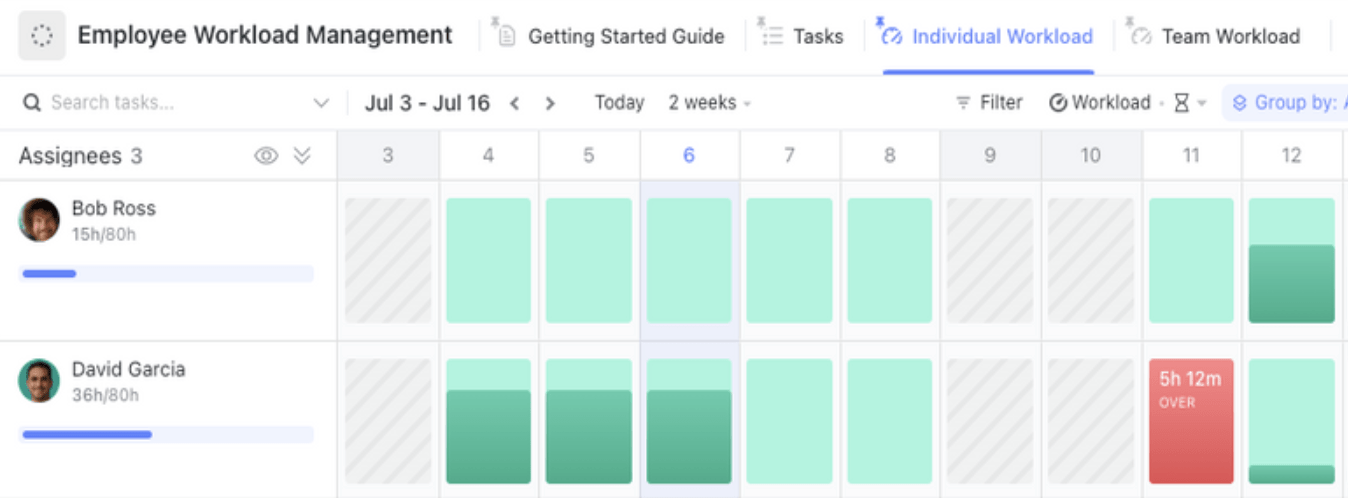
✔ Workload view to visualize the amount of work assigned to each team member over a selected period. This view allows you to compare each person’s workload with their set capacity, helping you identify overburdened members and reallocate tasks as needed
When a new request comes in, you can quickly check your workload and confidently say, “I’d love to help, but I’m currently at full capacity.”
Clear workload visibility: Get an instant overview of team capacity, ensuring balanced task distribution and preventing burnout
Better task prioritization: Organize assignments by priority, deadlines, and effort to keep projects on track
Streamlined team collaboration: Improve coordination with shared workload insights, reducing bottlenecks and enhancing efficiency
✔Time Tracking: Measure how long tasks actually take so you can make realistic commitments in the future. ✔ Capacity Planning: Avoid burnout by ensuring your workload remains balanced.
3. Improve communication with built-in chat and comments
Saying no doesn’t have to feel abrupt—how you communicate matters. ClickUp’s Chat View and task comments allow you to:
✔ Keep all work-related conversations in one place, ensuring clarity. ✔ Provide clear updates on task progress, so expectations are managed proactively. ✔ Collaborate with your team without feeling the pressure to say yes to everything.
Instead of feeling the need to over-explain, you can refer back to documented discussions to reinforce your boundaries. Effective communication helps maintain a good relationship with your team by ensuring clarity and transparency.
4. Use calendar view for scheduling and time blocking
A great way to say no professionally is to have a time-blocked schedule that reflects your priorities. ClickUp’s Calendar View is excellent for visualizing and adjusting these blocks as your week unfolds.
Allocate specific time slots for tasks with ClickUp Calendar View
With ClickUp’s Calendar View you can integrate all your calendars in one. This way, everyone can see when you’re indisposed across personal and professional commitments, and plan work accordingly. Also use it for:
Flexible scheduling: Plan, track, and manage tasks with customizable views, including day, week, and month formats
Seamless task integration: Sync tasks, due dates, and deadlines across multiple calendars for real-time project updates
Drag-and-drop simplicity: Easily adjust schedules, reschedule tasks, and organize priorities with a user-friendly interface
If a colleague requests something last-minute, you can check your calendar and say, “I’d love to assist, but my working hours are fully booked today. Let’s revisit this next week.”
5. Leverage Templates for Task Prioritization and Workload Management
If you frequently struggle with setting boundaries, ClickUp offers pre-built templates to help you:
By using structured templates, you can reduce decision fatigue and confidently manage your workload without overcommitting.
Summarize this article with AI ClickUp Brain not only saves you precious time by instantly summarizing articles, it also leverages AI to connect your tasks, docs, people, and more, streamlining your workflow like never before.
Summarize this article for me please
How Do You Set Work Boundaries Without Feeling Guilty
Saying no isn’t about being difficult—it’s about keeping your sanity intact! When you set boundaries, prioritize like a pro, and communicate with confidence, you’re not just protecting your time—you’re building a career (and life) that doesn’t run on exhaustion.
So, next time you’re tempted to say yes out of guilt, remember: “I’d love to, but my future burnout says no.” 😉 Own your no, reclaim your time, and watch your productivity (and respect) soar! 🚀
Want to set boundaries like a pro without the stress? Try ClickUp to Manage tasks, track your workload, and keep team communication seamless—all in one place. Sign up for free today!
Everything you need to stay organized and get work done.