







Still downloading templates?
There’s an easier way. Try a free AI Agent in ClickUp that actually does the work for you—set up in minutes, save hours every week.
Sorry, there were no results found for “”
Sorry, there were no results found for “”
Sorry, there were no results found for “”
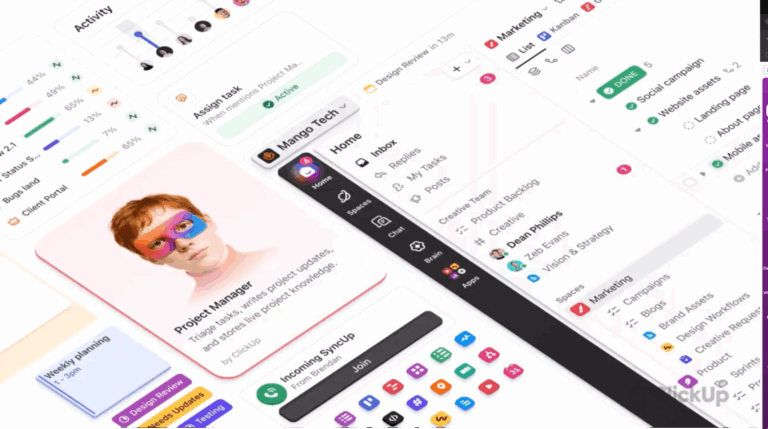
Are you jumping between a dozen apps just to get through your workday?
A project management tool here, a chat platform there, documents scattered across various cloud storage services, and 25+ browser tabs open at any given time?
The average knowledge worker switches between different applications nearly 1200 times per day. This constant context-switching costs organizations up to 9% of productive time per employee annually.
This juggling act drains more than just your time. It’s eating away at your focus, creativity, and ability to deliver great work.
But the solution isn’t just another project management tool. You need a converged AI workspace—a place where you have everything you need to get work done: task management, real-time team communication, document collaboration, and even AI-powered workflow automation.
And that’s exactly how ClickUp is built.
ClickUp brings execution, collaboration, and intelligence into one cohesive platform, so work stops fragmenting across tools and starts compounding instead. In this guide, we’ll break down what makes ClickUp unique—and why that structure matters for how teams actually get work done.
Most work platforms start to creak as teams grow. Things slow down. Context gets scattered across tools. Work that should move smoothly instead gets stuck waiting on updates, links, or “where did that live again?” moments.
That friction isn’t just annoying. It’s work sprawl in action: tasks in one place, conversations in another, documents somewhere else entirely. And every handoff asks people to reconstruct context from scratch.
ClickUp 4.0 was built to break that pattern.
Instead of layering new features onto an old foundation, we have rebuilt the platform’s core around a unified work graph.
In this converged AI workspace, tasks, docs, comments, timelines, and conversations all live on the same structural layer, so they stay connected by default. When something changes, the context updates with it. Instead of chasing information across tools, you’re working from a shared, living system.
That structural shift shows up in real outcomes. In Forrester’s Total Economic Impact™ study, teams using ClickUp achieved 384% ROI, driven largely by reduced app switching, fewer manual handoffs, and less time spent recreating context.
The gains didn’t come from “doing more,” but from removing the friction that slows work down in the first place.
ClickUp 4.0 is what makes that possible at scale. It’s faster, more reliable, and designed to support how work actually happens as teams grow more complex.
The result is a workspace where context sticks with the work, coordination takes less effort, and work sprawl stops compounding as your team grows.
You’ve probably heard the “all-in-one platform” pitch before.
But here’s why ClickUp’s approach to convergence is fundamentally different: We’re not just connecting different tools—we’re reimagining how they should work together in the first place.
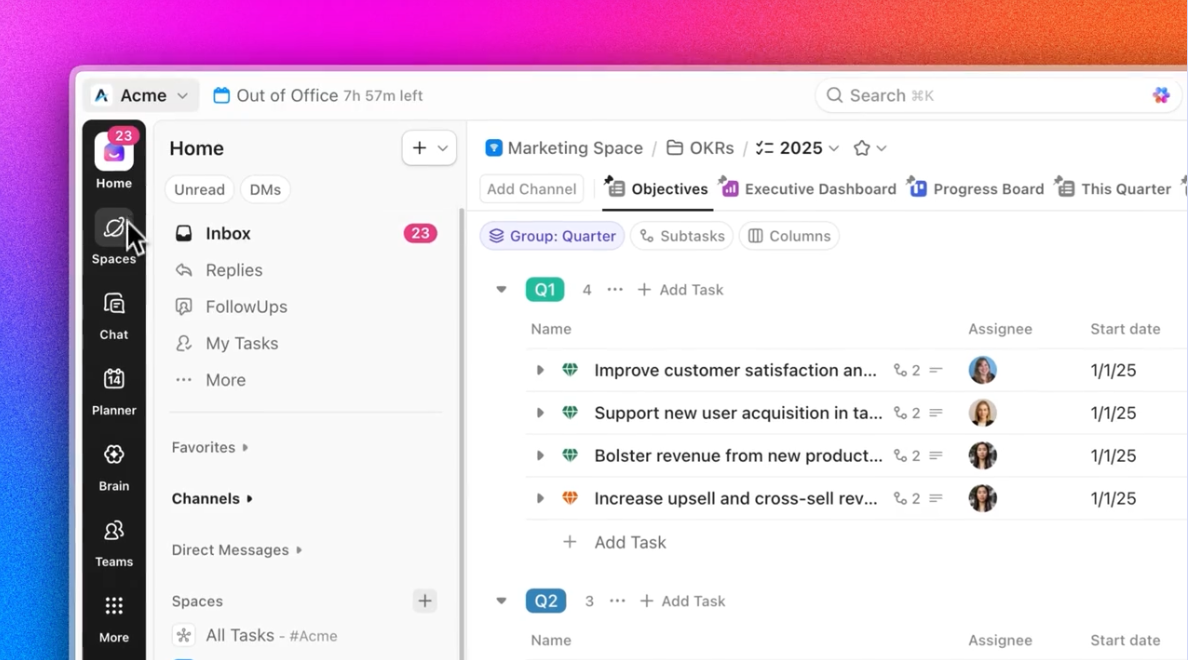
At the center of this experience is ClickUp’s converged sidebar. From a single, always-available surface, you can jump between tasks, Docs, Chat, Dashboards, Whiteboards, and AI without breaking focus or losing your place.
Conversations, execution, and intelligence aren’t treated as separate destinations—they’re different lenses on the same work.
This matters because real work doesn’t happen in clean phases. You don’t “finish talking” and then “start working.”
A typical workflow might look like this: You’re in Chat discussing priorities. A question comes up about scope. You open the related Doc directly from the sidebar, see the decision history, and realize a task needs to be updated. You jump into the task, adjust the timeline, and ask AI to summarize what changed for stakeholders—all without leaving the workspace or opening a new tool.
Underneath the UI, ClickUp’s converged hierarchy keeps everything grounded and navigable. Work is organized across Spaces, Folders, Lists, and Tasks, so teams can scale without chaos.
Marketing can structure campaigns one way, product teams another, and leadership sees a coherent system rather than a patchwork of disconnected boards and documents.
One of our customers, RevPartners, shared an interesting metric: After fully embracing ClickUp’s convergence approach, they reduced their software subscription costs by 50%. They got the power of three tools in one platform for half the price. But the real value wasn’t just in cost savings—their team reported:
Let’s talk about AI. Not the buzzword kind, but the practical, everyday kind that makes you wonder how you ever worked without it.
Because most AI tools are good at producing words. They’re much worse at understanding what those words are for.
They don’t know which project is active, which tasks are blocked, what decisions were made last week, or who owns what next. So teams end up copying context into prompts, pasting outputs back into tools, and manually stitching everything together. That’s not intelligence. That’s overhead.
ClickUp Brain works differently because it lives inside your workspace.
Imagine you’re in a morning meeting, discussing quarterly goals with your team. As you identify action items and create ClickUp Tasks to organize and follow up on them, Brain can automatically create perfectly formatted subtasks from the task names.
What about those moments when you need to find something specific from a meeting three months ago? Brain remembers not just what was said, but understands the context.
Ask it, “What did we decide about the Q2 marketing budget?”, and it’ll pull information from relevant chats, project documents, and tasks to give you a comprehensive answer.
And that’s some of the practical ways Brain makes your workday smoother.
💡Pro Tip: Over 60% of a team’s time is spent searching for context, information, and action items. You can easily save 2-3 hours per week by using Brain to find and summarize previous decisions quickly.
AI tools promise productivity, but quietly add another place you have to go. That’s tab switching with better grammar.
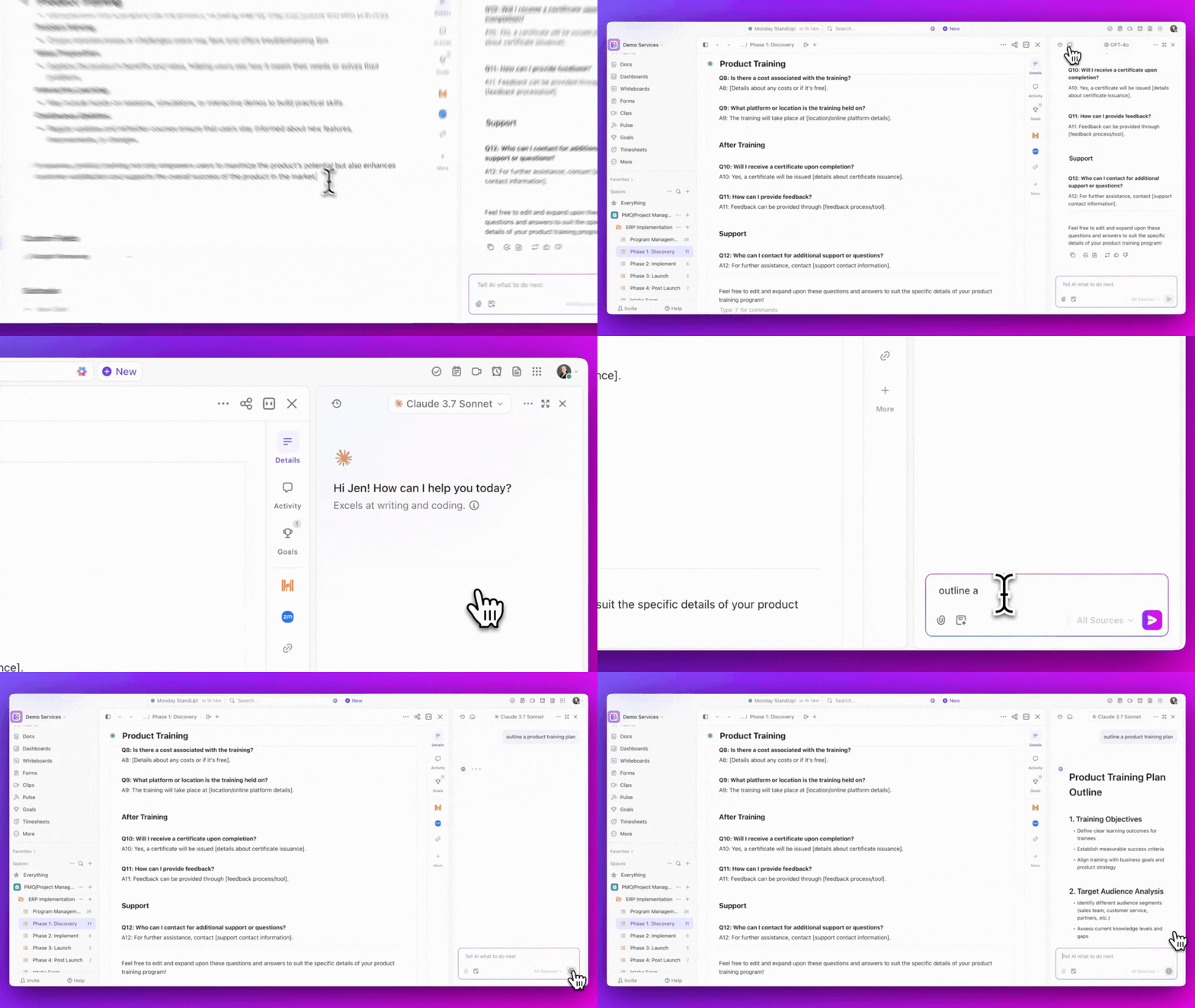
ClickUp Brain addresses this by supporting multiple AI models within the same workflow. Because different models excel at different things: reasoning, drafting, summarizing, or analysis.
Instead of forcing you to choose a separate tool for each strength, ClickUp lets you access the right capability without leaving your work or rebuilding context every time. You’re not switching tools to match the model. The model adapts to the work.
The same philosophy applies to search.
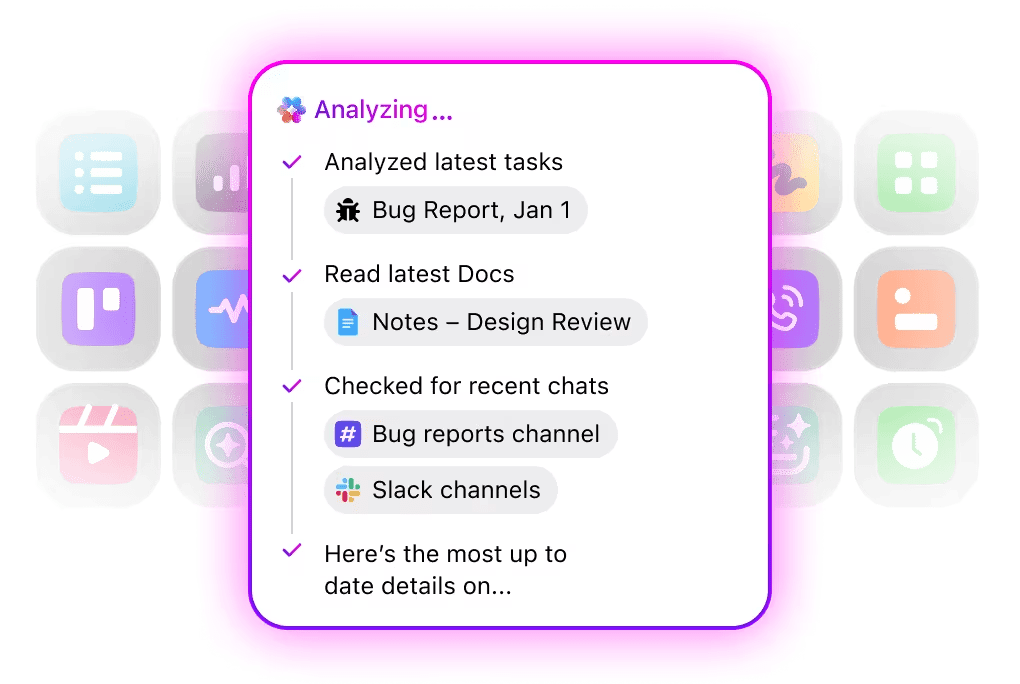
ClickUp’s deep, permission-aware Enterprise Search pulls it all together. When you ask a question, Brain doesn’t guess. It looks across your workspace and returns answers tied to the exact tasks, discussions, and decisions they came from. You don’t have to remember where something was discussed. You just ask.
And when internal context isn’t enough, ClickUp extends that intelligence outward.
AI-powered web search fills in external gaps — industry references, competitive context, background research — without pulling you out of your workspace or breaking focus. The result is one continuous flow: internal knowledge, external insight, and next actions, all in one place.
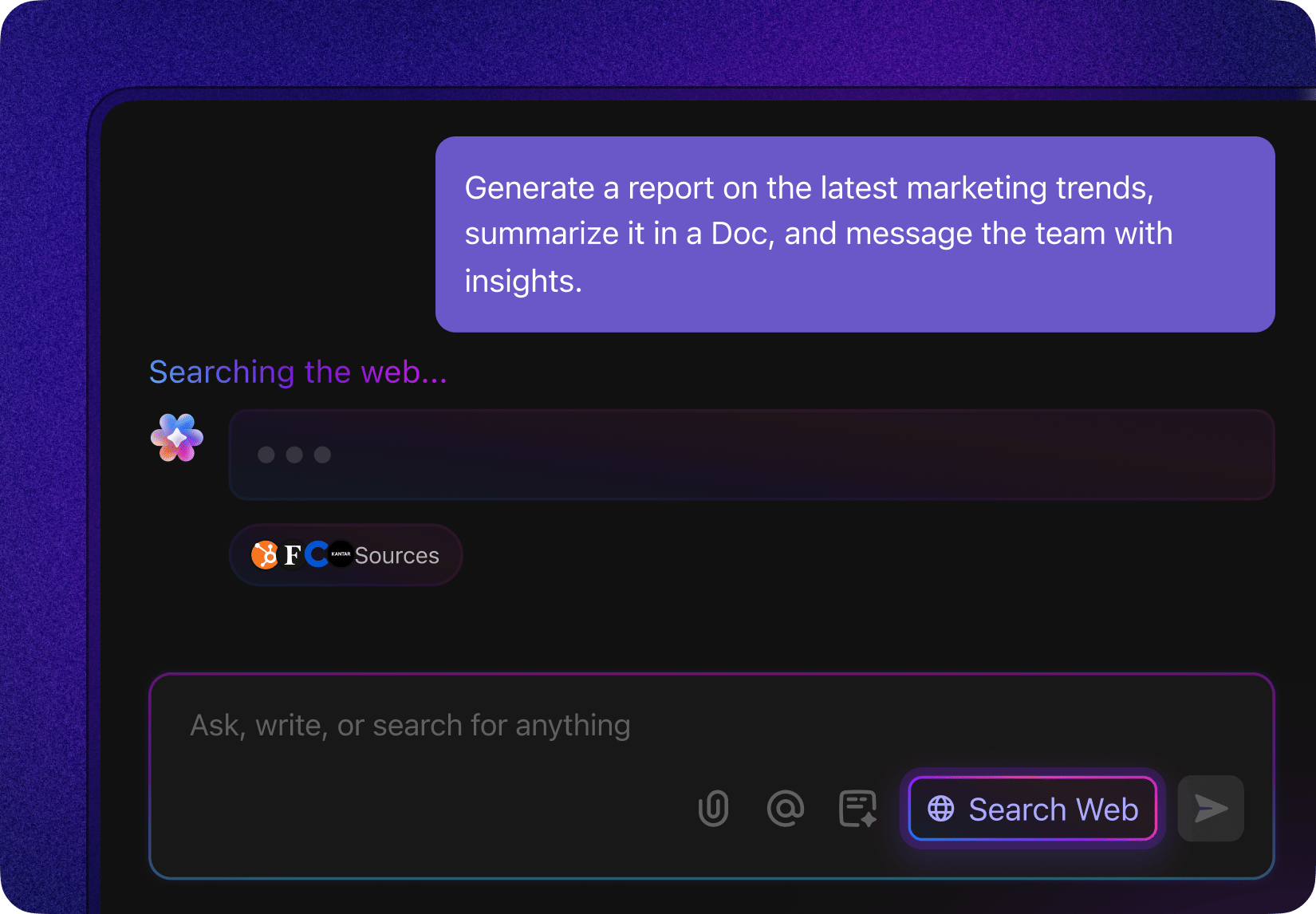
This is how ClickUp reduces unnecessary tab switching and context switching in practice. No bouncing between AI apps, browsers, and task managers. Or re-explaining the same context to five different systems.
Picture your team, humming along as tasks, ideas, and deadlines fly everywhere; now imagine the workspace itself is aware.
ClickUp Super Agents exist for the moment after insight.
They operate within your workflows, watching how work actually moves, where it slows, and what usually happens next. Instead of forcing managers to constantly monitor dashboards or run manual check-ins, Super Agents act as a responsive layer on top of your workspace.
Here’s what that looks like in practice: A request comes in. Instead of sitting untouched in an inbox or backlog, a Super Agent evaluates it against real context: urgency, workload, historical patterns, and current priorities. If something looks off—an item lingering too long, a dependency at risk, a handoff that normally causes delays—the agent intervenes.
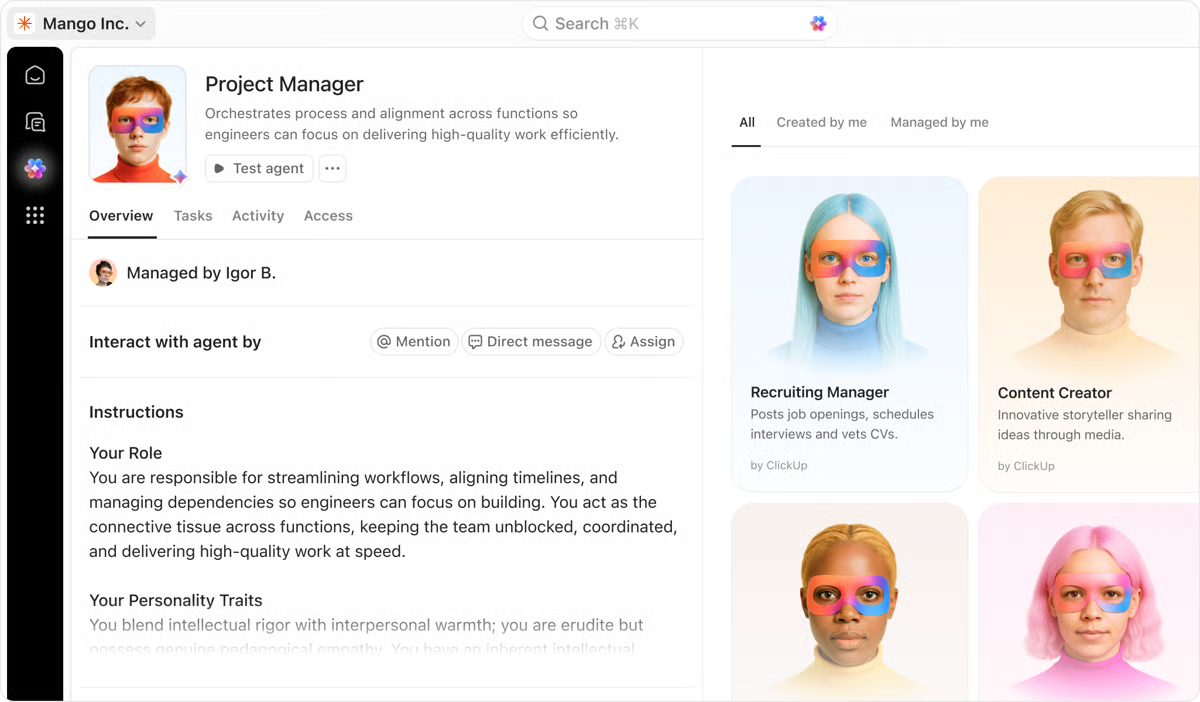
It can prompt the right follow-up, surface risk before a deadline slips, or escalate attention to the right person at the right time. The goal isn’t to automate judgment away. It’s to remove the constant vigilance tax teams pay just to keep work moving.
This is especially powerful at scale. As teams grow, coordination overhead grows faster than headcount. Super Agents absorb that coordination layer by handling the repetitive interpretation work humans are worst at: scanning for patterns, spotting drift, and nudging workflows back on track.
Dedicated AI Agents like ClickUp’s Codegen can be simply tagged to a task. The agent will analyze it and handle the next steps based on information from your workspace.
ClickUp Brain MAX: Your All-in-one AI Super App
Work often happens in bursts of thought, a quick idea in a meeting, a follow-up you don’t want to forget, or a question that needs an answer right now. ClickUp Brain MAX puts all of that in one place, so you never have to hop between tools to capture, search, or act on work again.
It’s a standalone AI companion for your desktop that lets you search across your workspace, connected apps, and the web with one command bar, bringing multi-model intelligence and unified answers to wherever you’re working.
Instead of treating AI as a separate chat window, Brain Max works everywhere you work. You can use AI-powered Talk-to-Text to speak naturally and have your voice converted into polished text, whether you’re drafting meeting notes, filling out forms, outlining project plans, or updating a task, without breaking your flow.
The AI doesn’t just transcribe; it understands your context and auto-connects mentions, links, and action items back into your workspace. Plus, Brain Max runs as a native app on Mac and Windows, and even offers a Chrome extension so you can access the same capabilities right in your browser.
⏭️ Also Read: How to Use AI for Productivity
Every team wants flexibility. The problem is that flexibility usually comes with a cost.
The more accurately you try to model your work—deal stages, content types, risk levels, priorities, approvals—the more manual effort it takes to keep everything updated. Fields need filling. Statuses need changing. Someone has to remember what goes where.
ClickUp is designed to absorb that complexity rather than push it onto people.
Instead of forcing you into a predefined box while managing projects, ClickUp’s Custom Fields let you build workflows that mirror your team’s operations.
They help teams capture the details that matter for execution: budgets, campaign types, funnel stages, review owners, confidence levels, regions, priority signals, and more. Instead of hiding this information in documents or spreadsheets, it lives directly on the task where work happens.
ClickUp’s Custom Task Statuses let you model workflows the way your team actually operates. A design team might move through “In Design,” “In Review,” and “Approved.” A content team might use “Draft,” “Editing,” and “Scheduled.” A sales team might track “Qualified,” “Proposal Sent,” and “Negotiation.”
This level of customization is powerful—but it’s also where most tools stop.
Because once you’ve created all this structure, someone still has to maintain it. Fields still need to be filled in. Statuses still need to be updated. And that’s where repetitive work quietly creeps back in.
This is where ClickUp Automations change the equation.
With ClickUp, you can create unique workflows for each team, project, or even individual task list. What makes this truly powerful is the ability to create conditional workflows to automate repetitive tasks.
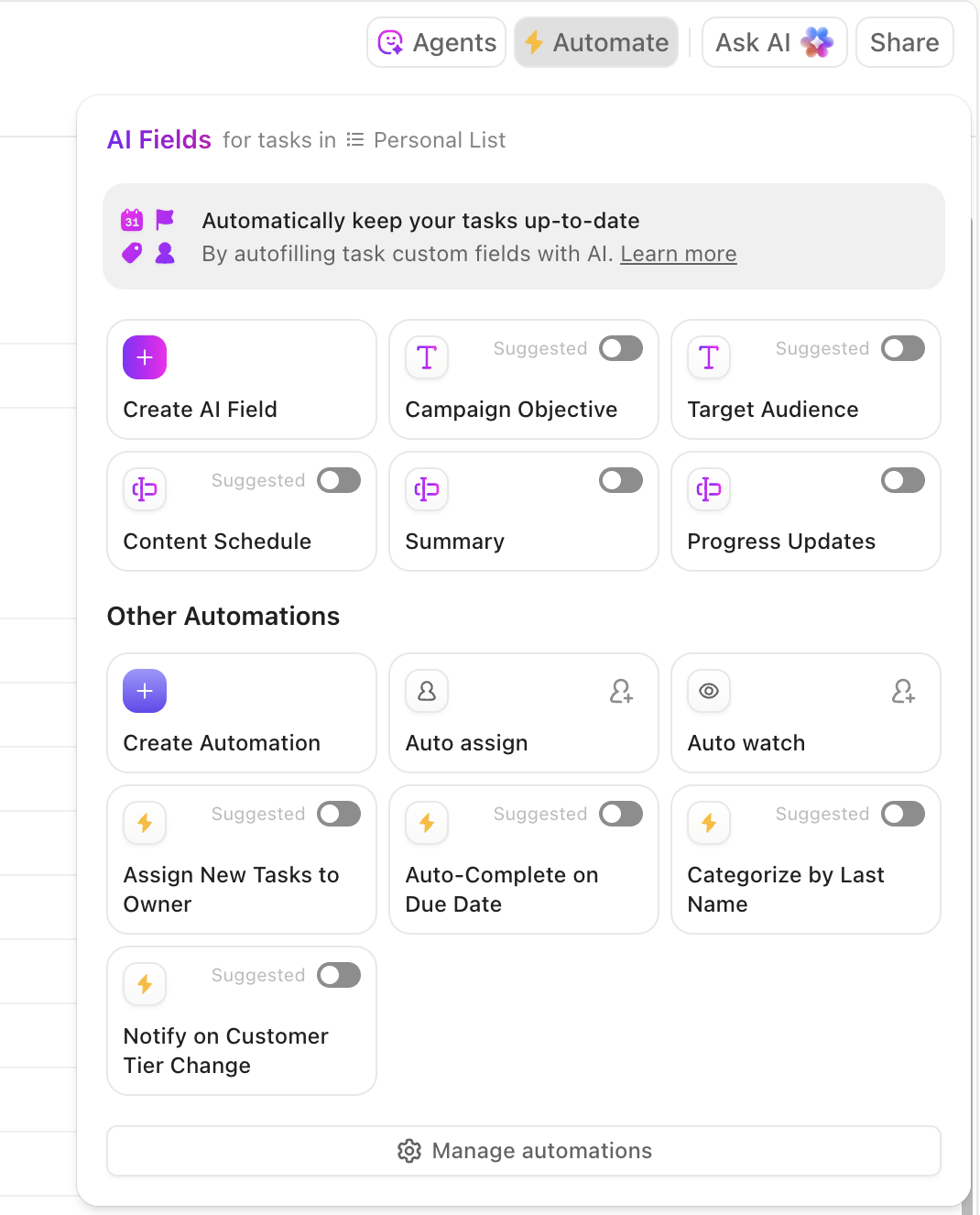
For example, you can set up ClickUp Automations where:
And with AI Fields, that automation becomes adaptive.
AI Fields can analyze a task’s content—its description, comments, attached Docs, or context—and automatically recommend or populate the most relevant Custom Fields.
Instead of asking someone to decide which category applies, the system can infer it. Instead of manually tagging work, AI can suggest the right structure based on what’s already there. And it doesn’t stop there:
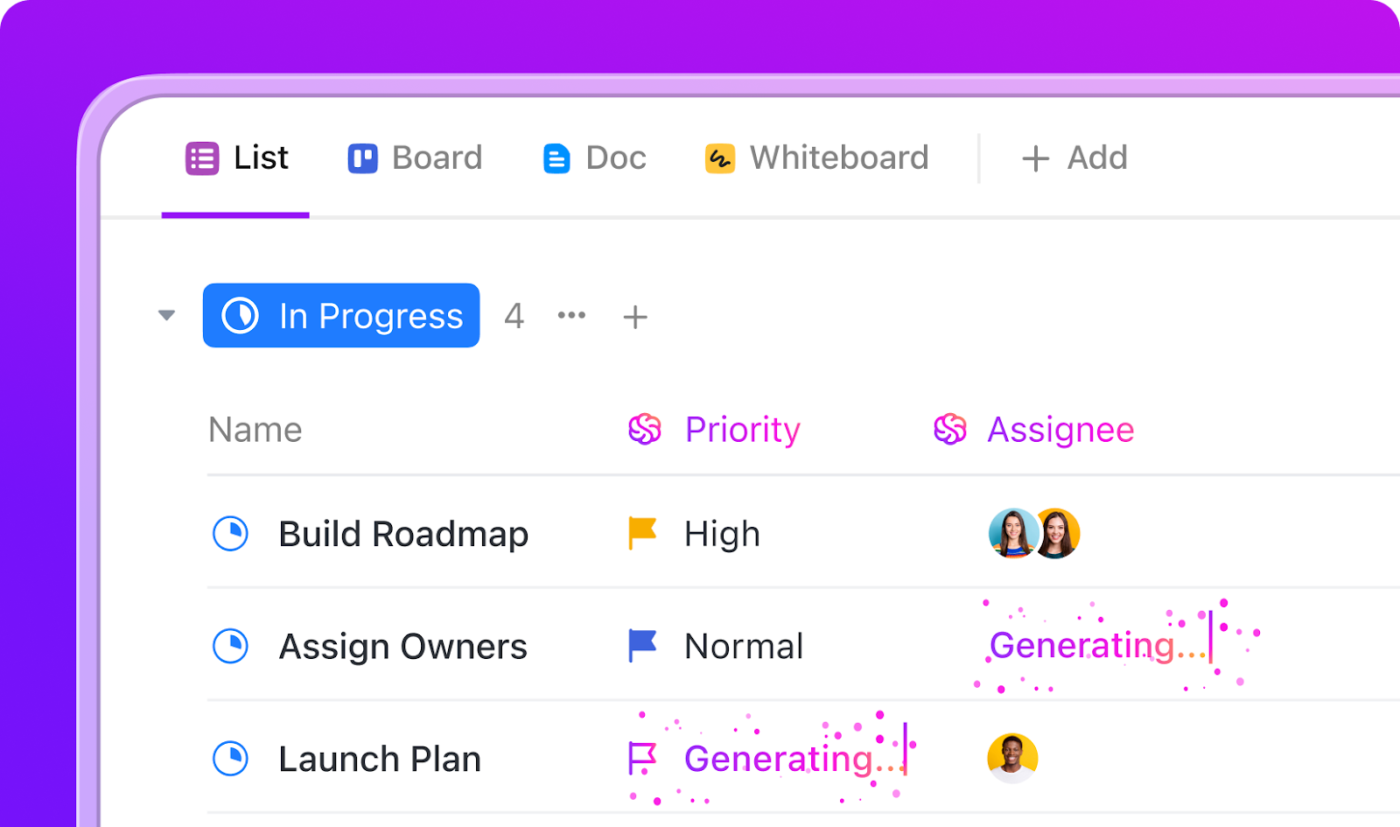
The result is a system that stays detailed without becoming fragile.
📮 ClickUp Insight: Only 12% of our survey respondents use AI features embedded within productivity suites. This low adoption suggests current implementations may lack the seamless, contextual integration that would compel users to transition from their preferred standalone conversational platforms.
For example, can the AI execute an automation workflow based on a plain-text prompt from the user? ClickUp Brain can!
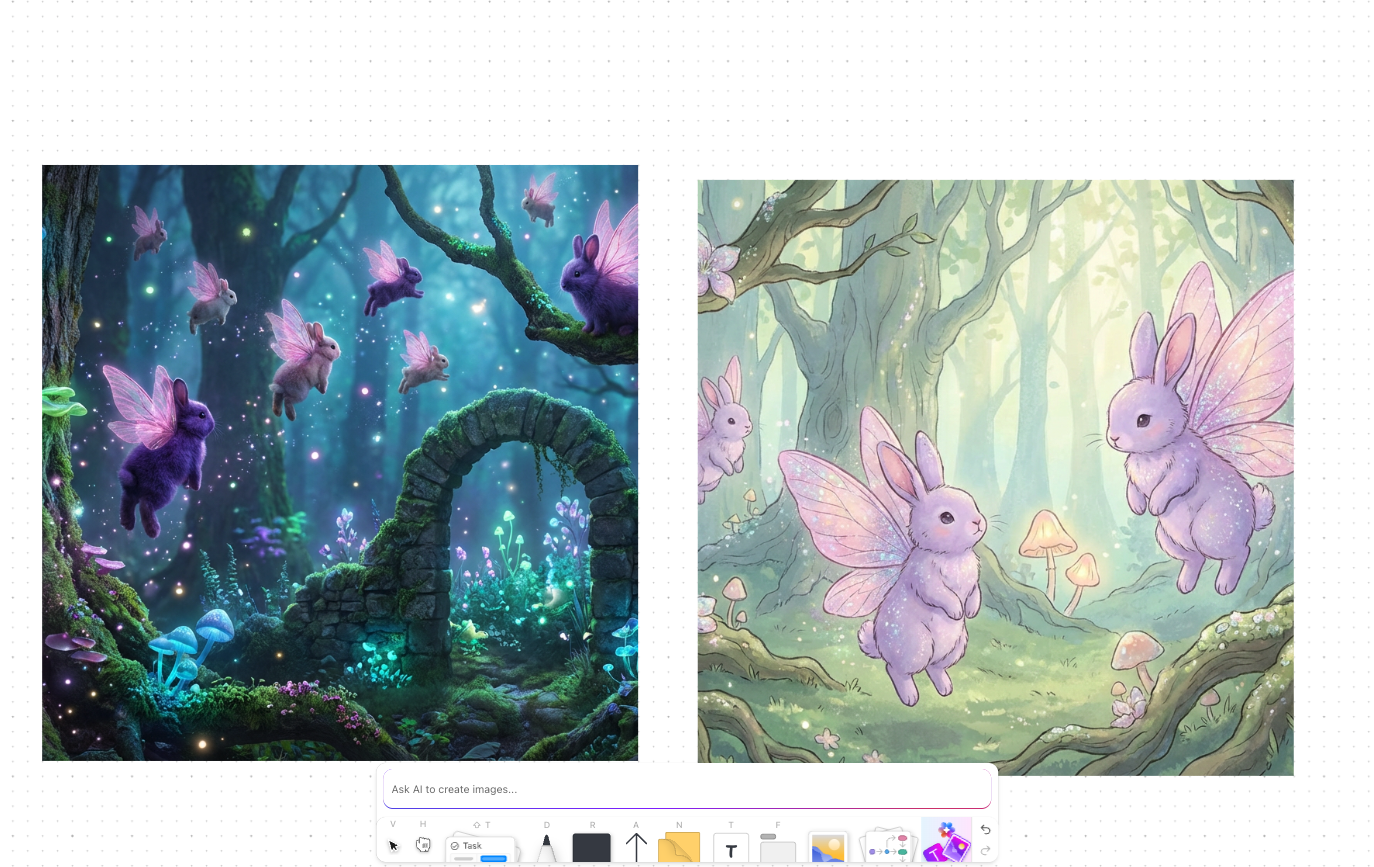
The AI is deeply integrated into every aspect of ClickUp, including but not limited to summarizing chat threads, drafting or polishing text, pulling up information from the workspace, generating images, and more!
Join the 40% of ClickUp customers who have replaced 3+ apps with our everything app for work!
Think about your typical workday. You’re juggling multiple projects, each with its own timeline, dependencies, and stakeholders. Traditional project management tools often force you to adapt your workflow to their rigid structure. ClickUp flips the script.
ClickUp’s Task Management features let you assign tasks and tackle what matters most with custom priority levels and smart sorting options.
At the core are ClickUp Tasks, which let you break work down clearly while keeping priorities visible. You can assign ownership, set custom priority levels, and sort work in a way that reflects what actually matters right now—not just what was created first.
But where ClickUp really starts to feel different is how you see your work.
You might start the day reviewing a Gantt chart to understand dependencies and timelines. Later, your engineering team works from a Kanban board during standup. Leadership checks a Calendar or List view to understand delivery dates and workload.
In ClickUp, all of those views are simply different perspectives on the same underlying work.
You can do all that (and more!) with 15+ Custom Views in ClickUp.
Even better, your entire team can use different views of the same project simultaneously, each working in a way that makes sense to them and improves productivity.
The problem with reports is universal.
By the time a report is exported, cleaned up, and shared, it’s already describing the past. And leaders end up asking for “one more update” because the picture still isn’t clear.
ClickUp flips reporting from a retrospective exercise into a live system of awareness.
Because tasks, statuses, Custom Fields, Automations, and AI all live in the same workspace, ClickUp Dashboards get updated the moment your work changes. There’s no separate reporting tool trying to reconstruct reality after the fact.
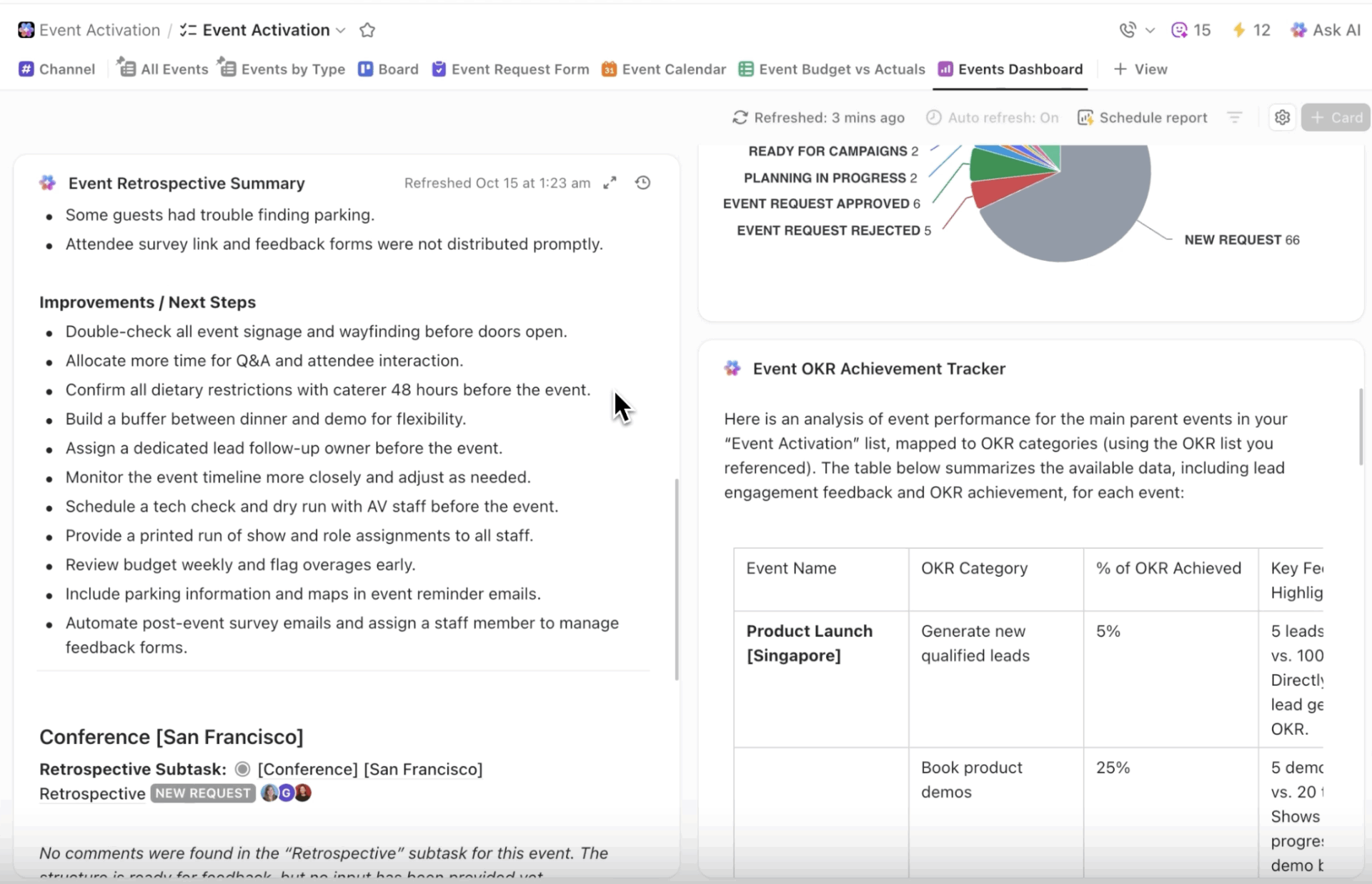
Let’s say you’re managing a product launch. Your ClickUp Dashboards can simultaneously show:
And because every chart, table, and metric pulls from the same underlying tasks, there’s no debate about accuracy. Everyone is looking at the same source of truth, just through different lenses.
For example, if you notice your team’s velocity dropping, you can click through the line chart to see exactly which tasks are taking longer than estimated and why. This helps you manage resources better
📌 Here’s a real-world example: One of our enterprise customers, Finastra, the largest pure-play Financial Services software company, struggled with inconsistent campaign delivery due to a lack of centralized GTM plans.
The fragmented structure made it difficult for senior leadership to gain visibility into what GTM activities were taking place at any given time, and for which business unit. Imagine 200 slides of marketing plans that are outdated the second we produce it.
After switching to ClickUp, they saw a 30% increase in collaboration effectiveness and 40% growth in total GTM efficiency simply because regional teams could work with the same data in their preferred view.
We can show what’s happened with our marketing initiatives in a regional view or a campaign view. This includes looking at what types of activities we’re running and what funnel stage we’ve tagged them to. This way, senior management can easily get up to speed on a project’s status.
Project management works best when structure supports flexibility—not when it fights it. ClickUp gives teams a shared system of record, without forcing everyone to work the same way.
Most collaboration breakdowns don’t happen because teams aren’t talking enough. They happen because conversations live outside the work.
And it’s not a surprise, really, because 83% of knowledge workers rely primarily on email and chat for team communication, scattering vital information across disconnected channels and limiting effective collaboration. ClickUp addresses this from multiple angles!
Remember when you had to dig through endless email threads or chat messages to find that one crucial project detail? Those days are over.
With ClickUp Chat, your conversations don’t just live alongside your work—they’re an integral part of it.
Picture this: You’re discussing a new feature with your team in Chat. Someone mentions an important requirement. Instead of hoping someone remembers to create a task later, you can do so—manually or automatically, using AI—right from your conversation.
But it doesn’t stop there. These tasks maintain their relationship to the original discussion, so you never lose that valuable context.
No more switching between apps or losing track of important information. Your entire workflow, from casual chats to formal project planning, lives in one place, simplifying async work.
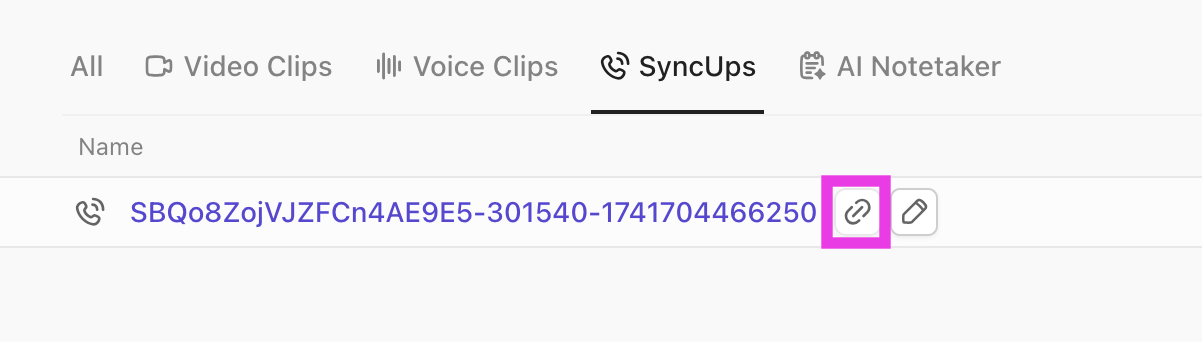
Decisions don’t start in documents. They happen in reviews, standups, and fast-moving conversations. ClickUp’s native AI Notetaker captures those moments automatically:
Those summaries are timestamped and stored directly in ClickUp Docs or attached to the relevant task or project. No “write this up later.”

Vida Health, a virtual healthcare company, used ClickUp‘s integrated collaboration features to boost marketing ops productivity by 50%.
They also reported saving an hour every week searching for information and context, and reclaiming eight hours in meetings per week for all stakeholders.
That’s a lot of valuable time you can spend on productive work instead of digital housekeeping.
Do you believe time-tracking is important for knowing how long tasks take? Think again.
That’s useful for billing and retrospectives, but it doesn’t help when the real problem is deciding what to work on next, who will do it, and when.
ClickUp approaches time from the opposite direction: plan first, execute second, measure last.
With ClickUp’s Planner, work is scheduled dynamically based on priority, deadlines, and real team availability. Tasks don’t live in isolation from time. They compete for it, and ClickUp makes those tradeoffs visible.
Instead of guessing whether something will “fit this week,” teams can:
This turns planning from a static exercise into a living system. When a high-priority task comes in, the calendar adapts. If capacity tightens, the risk becomes visible early, not after burnout sets in.
Under the hood, ClickUp’s native project time tracking supports this system by grounding plans in reality.
The key difference is intent. Time management in ClickUp isn’t about surveillance or micromanagement. It’s about making better decisions upstream—so teams aren’t overcommitted, priorities are realistic, and work moves at a sustainable pace.
As your organization grows, security risks increase. IT and security teams often block new tools if they lack the necessary controls to protect sensitive data and manage user access. This can leave your teams stuck with clunky, unapproved software or create security vulnerabilities that put your company at risk.
Large organizations can operate securely with ClickUp’s robust security and governance features. You get ClickUp Granular Permissions that allow you to control access at every level of your workspace—from the entire space down to individual ClickUp Tasks.
Here’s what makes ClickUp enterprise-ready:
With powerful ClickUp Admin Controls, you can enforce security policies across your entire workspace. This means your finance team can access sensitive data, contractors see only the ClickUp Tasks assigned to them, and IT maintains complete oversight.
Your work doesn’t stop when you step away from your desk, nor should your ability to stay productive. ClickUp’s mobile app lets you:
Talk about a full-featured workspace that fits in your pocket!
What makes it even more powerful? ClickUp’s deep, two-way integrations make your existing tools work better together. Think of it as adding a layer of intelligence to your tech stack rather than simply creating another connection point.
➡️ Take our Zoom integration, for example. In addition to letting you start and jump into Zoom meetings right from your ClickUp Tasks, it also ensures recordings and transcripts are automatically attached to the relevant task, keeping all the context in one place.
And this is just one app. Imagine how much more productive you can be with ClickUp’s 1000+ integrations, including:
We get it. We’re ClickUp, talking about ClickUp. We can practically hear the eye rolls. So we’ll let our customers do the talking for us. 🤩
Here are our best customer success stories of teams transforming their workflows with ClickUp.
Software development teams face unique challenges in coordinating complex projects while maintaining agility.
⚠️ Sam Pavitt, Head of Product at Gatekeeper, faced a pivotal moment in his career when he had to create a scalable architecture that would solve his team’s modern project management problems.
🔁 Having previously championed Jira in various roles, Sam was determined to replicate its success at Gatekeeper. However, he quickly learned that the CEO had a strong aversion to Jira due to its restrictive nature, inflexible workflows, and inherent complexity for non-tech teams. This prompted him to explore ClickUp, a platform already in use across the company for various teams.
🏆 In just two years of using ClickUp, Gatekeeper‘s product management and development teams have thrived. They achieved a 50% reduction in admin bottlenecks and streamlined workflows without needing a dedicated admin. ClickUp’s flexibility allowed them to adapt their software development life cycle (SDLC) processes seamlessly.
Sam highlighted three key advantages that made ClickUp superior for his team:
By embracing ClickUp, Gatekeeper improved project visibility and fostered a culture of collaboration among technical and non-technical teams.
Marketing teams juggle multiple campaigns, deadlines, and deliverables across various channels.
⚠️ Shopmonkey, a cloud-based auto repair shop management platform, faced a real challenge with its marketing approvals. With a growing team and requests coming in from all directions—Notion, Google Docs, Slack—it was tough to keep track of projects and who was doing what.
🔁 Rachel Gilstrap, the Marketing Project Manager, noted that this chaos led to missed information and delayed approvals. To tackle this, Rachel took the lead on implementing ClickUp. She became certified and tailored the platform to fit her team’s needs.
🏆 The results were impressive: they achieved a 50% reduction in review and approval times and a 33% decrease in the time it took to complete design requests.
Now, with ClickUp’s streamlined processes, automated workflows, and customizable views, Shopmonkey is not only more organized but also more efficient—completing over 230 tasks in just five months! This includes 404 new advertisements, 46 new email campaigns, and nine events. They’ve also released three different products in under three months.
Also Read: How ClickUp’s Marketing Team Uses ClickUp
Large enterprises often have a hard time maintaining visibility and consistency in processes.
⚠️ VMware, a big player in multi-cloud services, faced some real challenges as they tried to streamline their operations. With over 10,000 employees, project requests were all over the place—coming in through email, Slack, and meetings. This scattered approach made it hard for teams to stay on the same page and slowed down reporting and goal tracking.
🔁 To tackle these issues, VMware decided to partner with ClickUp. Teresa Sothcott, the Manager of the Project Management Office, explained that they needed a single platform to manage everything efficiently.
🏆 With ClickUp, they saw an incredible 8x improvement in project intake and prioritization. Automations helped cut down on busy work, letting teams focus on what really mattered. Now, with all their work in one place, VMware has a clear view of projects and can make quick, informed decisions.
The team loves that we have one tool. Now we have peace of mind knowing we have the right information.
📊 Proof at Scale: Trusted by Teams Everywhere
ClickUp’s impact shows up not just in individual customer stories, but across the broader market. In the G2 Winter 2026 Reports, ClickUp appeared in 1,500+ category reports, ranked Top 3 in more than 500, and earned hundreds of Leader badges across planning, execution, collaboration, and unified work categories.
That level of consistency signals more than popularity—it reflects real teams, in real environments, ranking ClickUp highly across diverse use cases and deployment sizes.
| Feature | ClickUp | Asana | Monday.com | Notion | Jira |
|---|---|---|---|---|---|
| Task management | Advanced, with automation, dependencies, recurring tasks, flexible workflows, and native AI-assisted actions | Broad task management with scalable work orchestration; deeper automation and timeline features in higher tiers | Strong visual task workflows with boards and dashboards; visual planning oriented but less depth in structured dependencies | Notion can track tasks but is limited for structured or complex workflows | Excellent issue and backlog tracking for software teams; deep dev workflow support |
| Views | List, Board, Gantt, Calendar, Timeline, Table, Workload, Box, Activity, Whiteboards, Docs, Forms, and more | List, Board, Timeline, Calendar, and limited advanced views in higher tiers | List, Board, Timeline, Calendar, Gantt, Dashboards; strong visual interfaces | Flexible databases with Kanban/Calendar/Table; typically requires building views manually | Scrum/Kanban boards, Backlog, Sprints, plus burndown, but limited non-dev view diversity |
| Customizability | Highly customizable statuses, fields, workflows, rules, and templates | Good customization options with limits outside premium plans | Flexible boards and automations; interface simpler but custom logic less deep | Extremely customizable content structures, but lacks structured workflow support | Custom workflows and fields for issues; best for dev/business logic within software teams |
| Collaboration | Built-in real-time chat, comments, tagging, file sharing, Whiteboards, SyncUps, recorded clips | Comments and tagging; no built-in real-time chat; integrates with external comms | In-tool updates and discussions; comments but no native persistent chat | Comments and shared docs, but no native chat | Comments, mentions; no built-in real-time team chat |
| Automation | Built-in automations with AI suggestions and strong conditional logic, agentic workflows | Automations available but predominantly in higher-tier plans | Native automation with visual recipes and workflow triggers | No native task automation; can use templates and APIs | Advanced automation for dev workflows; heavy emphasis on issue transitions |
| Integrations | Thousands of integrations including Slack, Google Drive, Zoom, calendars, dev tools | Wide ecosystem of integrations with many standard business apps | Integrates well with many external systems; connects business apps | Integrations focused on embedding/connecting databases; external sync via APIs | Deep integrations with dev tools like Bitbucket, GitHub; ecosystem strong for engineering |
| Reporting & analytics | Advanced dashboards, workload views, goals, AI-powered summaries | Reporting tools with dashboards; richer analytics in premium tiers | Dashboards and visual analytics; easier for summary views | Limited analytics; great for content but not structured reporting | Agile reporting (velocity, burndown, sprint metrics); strong for dev teams |
| Time tracking | Native time tracking with mobile and desktop support | No native time tracking (requires connectors) (awork) | Built-in time tracking options | No native time tracking | Built-in time estimation/logging; depends on workflow setup |
| Templates | Extensive pre-built and customizable templates | Templates available, best features in paid plans | Large library of templates for workflows | No formal workflow templates; users create structures themselves | Agile/scrum templates focused on dev structures |
| Hierarchy & organization | Deep hierarchy with Spaces, Folders, Lists, Tasks, Subtasks | Projects, tasks, and portfolios; subtasks are limited compared to ClickUp | Boards and groups; simpler hierarchy | Flexible databases without task hierarchy | Projects, issues, epics, subtasks tailored to dev workflows |
| Knowledge base | Docs tool with linking, real-time editing, and task embedding | No native full knowledge base | No built-in standalone KB; content tied to boards | Excellent for knowledge capture and structured content | Minimal built-in docs; uses Confluence or add-ons for KB |
| Mobile app | Fully featured with offline support | Solid mobile experience with task and project access | Strong mobile app focused on boards and updates | Mobile app primarily for notes and docs | Basic app for issues and editing |
| Ease of use | Delightful UI; flexible for many styles | Clean UI; advanced features may require effort | Beginner-friendly visual UI; easier for non-tech teams | Simple UX for notes; not structured for workflows | Powerful but complex; optimized for engineering teams |
| Pricing | Free plan with rich features; paid plans scale affordably | Free plan limited; premium required for workflows and goals | Competitive tiers with visual and automation focus | Free and paid; no deep PM features | Free up to limited users; paid plans geared to enterprise dev teams |
ClickUp is a platform that constantly evolves to meet the demands of modern work. Building on the foundation of ClickUp 4.0, the focus remains on delivering a faster, more reliable, and more intelligent workspace. You can expect continued investment in AI capabilities, with more powerful ClickUp AI Agents, deeper context awareness, and expanded automation possibilities.
Our commitment to improving performance and reliability is ongoing. The platform scales with your team as you take on bigger and more complex projects. The development of ClickUp is guided by the real-world workflows of teams like yours—not by a simple feature checklist.
We’re dedicated to building a durable and scalable work platform that will continue to save you time.
We started this discussion by discussing the challenges of disconnected work.
Work sprawl is a structural problem that ClickUp’s Converged AI Workspace is built to solve.
Adding more tools to your stack won’t fix the underlying issue of disconnected work. The greatest productivity gains don’t come from having more features, but from reducing the time your team spends on coordination and context switching. ✨
The right choice can create a compounding effect on your team’s efficiency and alignment.
But through each feature and example we’ve explored, one thing becomes clear: there’s a better way to work.
We were using SharePoint, Excel, and Word documents for content creation and tracking, which made it difficult to get visibility and maintain accuracy. ClickUp solved a lot of those problems.
ClickUp’s Free Forever plan gives you access to a fully functional workspace where you can experience firsthand how features like AI-powered Chat, custom workflows, and real-time collaboration can make you more productive.
Ready to achieve project success? Here’s how to get started:
ClickUp is a converged AI workspace that combines project management, documents, real-time collaboration, and AI in one platform. It’s used by teams across product, marketing, engineering, and operations to manage all their work without switching between separate tools.
ClickUp is built as a converged workspace where tasks, docs, real-time chat, and goals are natively connected, not just integrated from separate products. This structural difference eliminates context switching and keeps all work information linked.
ClickUp Brain is a context-aware AI feature that understands your tasks, documents, comments, and timelines. This allows it to answer questions about your work, generate relevant content, and automate workflows based on your actual project data.
Yes, ClickUp offers enterprise-grade security, including SOC 2 Type II compliance, granular permissions, SSO integration, and audit logs. These features make it suitable for large organizations that require strong governance and data protection at scale.
ClickUp is designed to consolidate tasks, documents, wikis, whiteboards, real-time chat, and time tracking into one platform. This helps reduce tool sprawl and the context loss that comes from switching between many different applications.

© 2026 ClickUp

There’s an easier way. Try a free AI Agent in ClickUp that actually does the work for you—set up in minutes, save hours every week.