


Ever had one of those moments of drudgery when you realize you’re spending way too much time copying data between systems and formatting cells in worksheets rather than strategizing and innovating? Well, you’re not alone.
About 60% of organizations report that their team loses five hours a week on manual tasks and repetitive processes—that’s approximately 1.5 months a year! And many of these are knowledge workers with the means to automate tasks; imagine what a drain these repetitive tasks would be for other teams.
The good news is that you can reclaim this valuable time by automating routine and repetitive tasks. This frees you up to pursue the more challenging aspects of your job and increase efficiency.
To help in this quest, here’s our quick and easy 5-step guide on automating repetitive tasks.
How to Automate Repetitive Tasks: Your 5-Step Guide to Automagic

 Summarize this article for me please
Understanding Task Automation
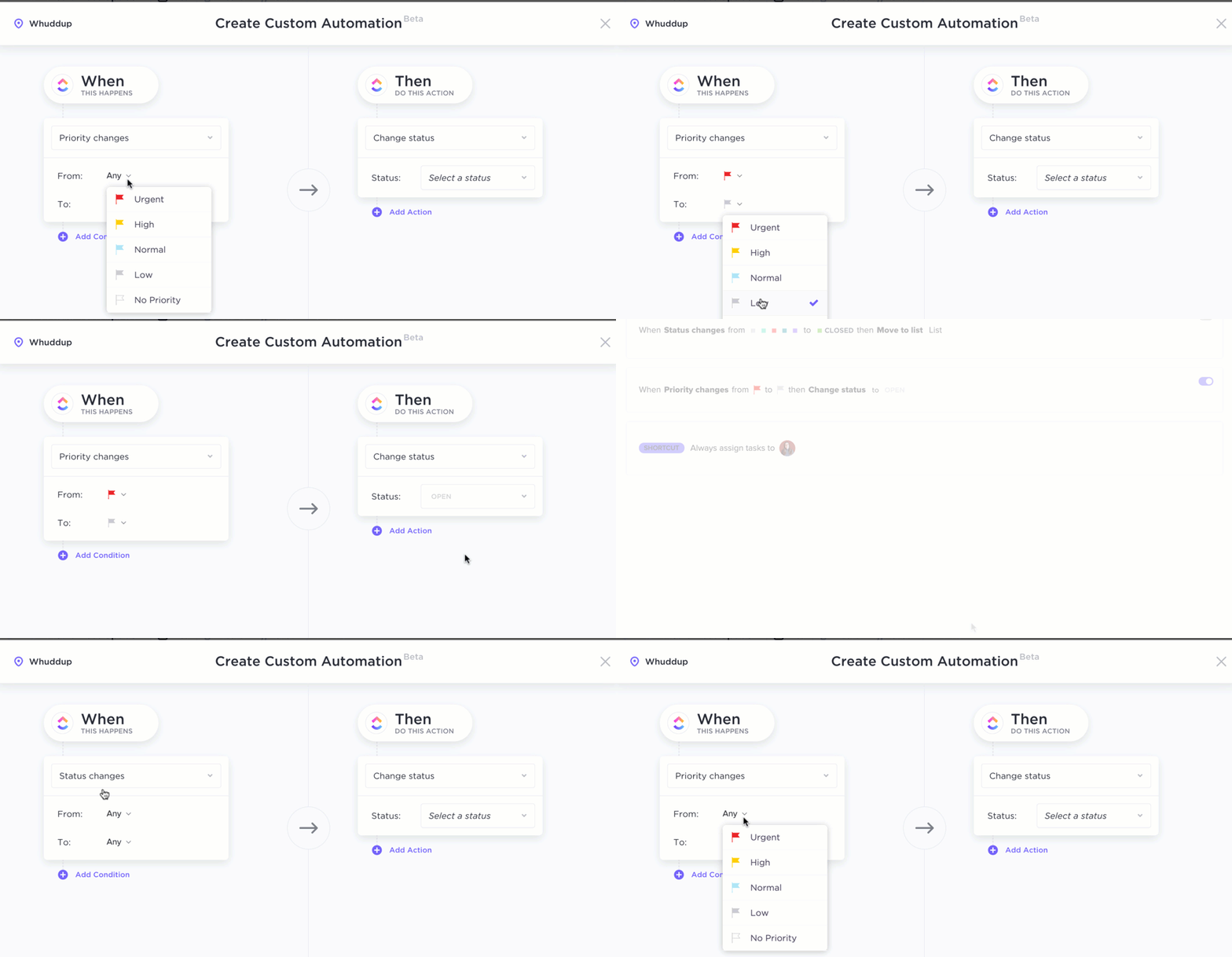
Task automation leverages technology to streamline and complete tasks with minimal or no human intervention. This involves using software, platforms, and tools to:
- Replicate human actions that could be as simple as copying data to as complex as performing actions based on conditional logic
- Execute a task by following a predefined set of steps and instructions
- Respond to specific situations or events and trigger subsequent action
The objective is to delegate tasks to appropriate digital solutions for greater accuracy, productivity, and efficiency. Subsequent sections will discuss the benefits in detail.
Summarize this article for me pleaseWhy Should You Automate Repetitive Tasks?
Workflow automation benefits individuals and businesses in the following ways:
- Saves time and effort by tackling mundane processes. This time can be utilized for more creative, innovative, or strategic pursuits
- Eliminates repetitive or redundant work and streamlines workflows, allowing individuals to be more productive, complete tasks faster, and deliver improved results
- Minimizes human error by following pre-defined rules for accurate business processes
- Establishes a brand based on consistency and reliability since automated processes deliver uniform outcomes
- Boosts employee morale and job satisfaction as individuals are no longer engaged in mundane or tedious tasks
- Reduces costs by lowering the labor costs associated with manual tasks. It also delivers cost savings by reducing the costly errors that can cause a spike in operational costs
- Maintains scalability, allowing businesses to increase workloads or capacity without significantly adding to human resources. This enables businesses to keep up with fluctuating demands and varying growth rates
- Lets teams compile, maintain, and update data in real time, which powers informed decision-making and better results
- Drives customer satisfaction by delivering a smooth customer experience
- Unlocks true potential by freeing up human resources for more demanding or complex tasks, such as building customer relationships and product innovation
- Ensures data security and integrity as it does not involve manual effort for data entry and handling
Summarize this article for me pleaseHow to Automate Repetitive Tasks: 5-Step Guide
As promised, here’s our step-by-step guide on how to automate repetitive tasks:
Step 1: Identify the repetitive task
First things first, you must identify the repetitive tasks that guzzle time and effort.
Here’s how you can go about it:
- Create a task list. It should take stock of all your tasks, along with their respective priority, frequency, and purpose
- Deploy a time-tracking tool to quantify the time required to complete each task
- Consult with experts or collaborate with your team to collect all details related to repetitive tasks
Repetitive tasks would be those that occur frequently, take up a good amount of time, and may attract errors. However, you may also discover some other tasks suitable for automation. These could be:
- Rule-based tasks that follow well-defined rules or logic. For instance, email automation to send autoresponders to incoming emails
- Software tasks that can be automated using an existing software with its built-in automation features. Like how you can automate Excel to perform computations
- Time-consuming tasks that require minimal human supervision but take a significant amount of time. For example, DevOps automation to monitor systems for error logs and flag incidents
- Data entry and manipulation tasks where you have to collect, manage, organize, update, and exploit data to meet business goals. For instance, you could use a sales automation tool in conjunction with a CRM to personalize the sales experience
Identify such tasks systematically as you prepare for the next phase—prioritizing target areas that will yield the highest automation benefits.
Step 2: Measure the automation potential
While you may have a long list of tasks suited for automation, let’s focus on the repetitive ones.
In this stage, you measure the potential to automate repetitive tasks. To calculate this, you’ll need to analyze the following parameters:
| Tasks Typically Suitable for Automation Based on Parameters | |
| Time required to complete the task | Lengthy tasks |
| Periodicity of the occurrence of said task | Frequently occurring tasks |
| Complexity involved in task completion | Predictable and rule-based tasks with lesser complexity |
| Manual effort required to be put into the task | Tasks requiring significant manual labor |
| Average error rate, especially through manual work | Tasks more prone to errors |
| Impact on workflow | High-priority, high-impact tasks |
Such analysis follows a strategic approach while automating repetitive tasks. You may use a weighted formula to prepare a priority-based list for your task automation efforts.
Step 3: Explore automation solutions
Now that you have your list of routine tasks, it is time to select the right task automation tool.
This involves researching the workflow automation software market to identify solutions to automate repetitive tasks.
Here’s how you can proceed with this:
- Clearly identify your needs and map the corresponding requirements from the automation tools. Segregate your requirements into needs, wants, and future plans to focus on the high-priority recurring tasks
- Define the goals of the automation tool. Ideally, specify these goals along the SMART parameters to express and quantify the impact of automated processes on business outcomes
- Once you have a basic idea, perform an online search for popular automation tools that align with your needs. Explore your options by visiting official websites, industry-specific forums, discussion boards, etc.
- Shortlist the possible solutions and compare and evaluate their tool features. Take into account factors like cost, scalability, integration capabilities, ease of use, compatibility with existing tech stack, etc.
- Now that you have a smaller pool of options, closely examine user reviews, customer testimonials, and case studies to get a realistic idea of what to expect from the task automation tool. Take note of any gaps or deficiencies to understand how they impact your task automation goals
- By this point, you’ll have approximately two to three options available. Contact the vendors and sign up for product demos, free trials, and product walkthroughs to get a first-hand idea of each automation tool’s capabilities
- After the trial and testing phase, select the automation tool of your choice that matches your organizational needs, budget, and team capabilities. You want a scalable solution to accommodate long-term goals, even if it comes at a slight premium. For this reason, a tool offering AI-powered workflow automation would outperform one lacking this feature
Step 4: Automate tasks
Now that task automation software is a part of the tech stack, it’s time to automate tasks.
Here’s how you automate tasks with perfection:
- Start by preparing a detailed roadmap of the implementation plan. List the multiple tasks you will automate and assign an appropriate timeline for these. You may even start task automation on a small scale and then expand
- Next, define clear objectives and goals for automating tasks. Identify the KPIs and metrics that you’ll be using to evaluate the performance of automated tasks and feed these into the automation tool
- Kickstart your pilot workflow automation project, ideally, a simple one that offers notable benefits. This is a great way to test workflow automation in a controlled environment before moving on to more complex workflows
- Assess the performance and impact of this first stage of task automation. Refine the automated processes based on feedback, initial results, and performance metrics. Fine-tune workflows, optimize settings, and fix bugs to orchestrate a smooth operation
- When past the iteration and improvement stages of automating routine tasks, go for full rollout by gradually expanding to other tasks, workflows, and departments. Doing so in a phased manner would ensure business continuity and minimal disruptions
Continuous training and support should accompany the automation implementation stage. You must also sensitize your workforce about the benefits and best practices of task automation.
Step 5: Measure the impact of automation
The final stage is all about measuring the impact of your automation efforts. Remember how you had to define KPIs and metrics to figure this out? Your KPIs could measure the time saved, productivity gains, cost savings, or error reduction. Regardless, here’s where you track these to assess the overall effectiveness, performance, and benefits.
To do this, you:
- Capture data in the pre-automation stage. Measure values such as the time required to complete a task, the average error rate, and so on
- Use the automation software to gain insights into business processes and operations after automating processes. Collect the comparable data
- Measure the variance to quantify the improvement and impact on workflows. Set these as benchmarks for future measurements
Additionally, consult all the stakeholders and gather feedback from them. Their insights might illuminate some of the non-tangible aspects of task automation that data might miss, such as increased morale or team collaboration.
Schedule periodic reviews and monitor performance for continuous optimization.
Summarize this article for me pleaseReal-World Examples of Automating Repetitive Tasks
Here are a few business process automation examples based on the five steps outlined above:
Marketing: Simplifying social media calendars
- Identify tasks: Scheduling social media posts across different platforms is time-consuming
- Evaluate potential: The task is frequent, involves following pre-defined posting schedules and processes, and requires minimal supervision
- Explore solutions: Tools like Hootsuite or Buffer could help automate social media scheduling
- Automate: Prepare a content calendar, design marketing collateral, create posts, and use the tool to automate publishing by the schedule
- Measure impact: Track increased efficiency, posting consistency, and engagement growth using analytics
Finance: Improving the accuracy of invoices
- Identify tasks: Entering invoice data manually takes time and effort and is error-prone
- Evaluate potential: The task is frequent, rule-based, and vulnerable to human error
- Explore solutions: OCR can extract data from invoices and auto-populate accounting systems
- Automate: Integrate OCR software into the accounting stack and set up rules for data extraction and validation
- Measure impact: Track reduction in processing time, decrease in errors, and improved accuracy in financial records
Customer service: Doing more with the same resources
- Identify tasks: Answering frequently asked questions (FAQ) takes up too much of a customer support agent’s time
- Evaluate potential: Responding to FAQ is repetitive, follows a predictable pattern, and does not involve complex problem-solving
- Explore solutions: Chatbots can be trained to answer FAQs and escalate complex issues to live agents
- Automate: Design a chatbot with decision flows and answer trees to tackle common inquiries and integrate the chatbot into the customer service platform
- Measure impact: Track metrics like NPS (Net Promoter Score), CSAT (Customer Satisfaction Score), FRT (First Response Time), Repeat Queries, etc.
Also Read: Automation Examples
Summarize this article for me pleaseReasons to Use ClickUp for Task Automation
Whether you’re looking for task automation or full-fledged automated project management, ClickUp is an excellent option either way.
To truly appreciate how you can use ClickUp to automate tasks, consider the following features:
ClickUp Automations
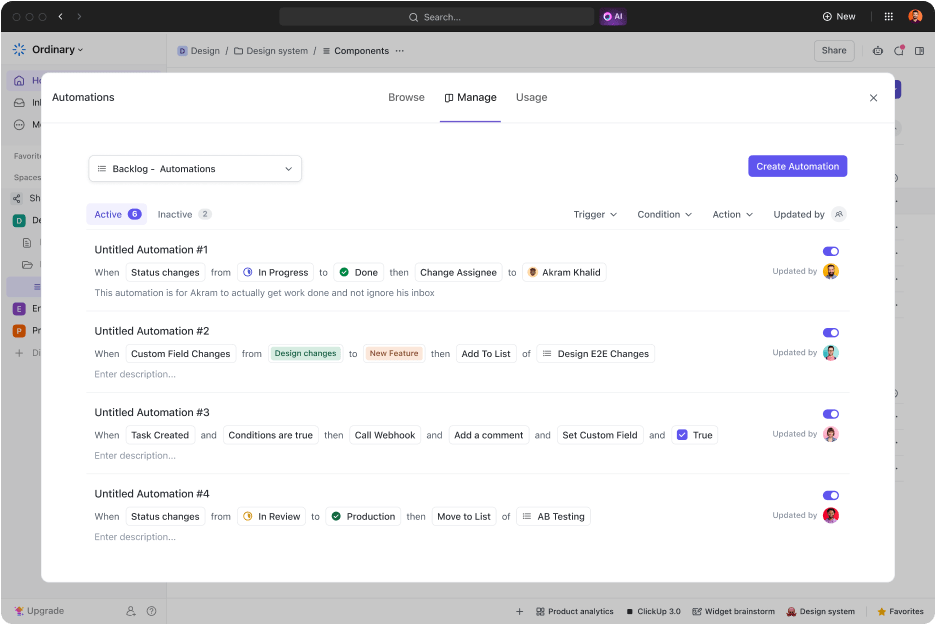
ClickUp Automations allows users to create custom rules or choose from a library of pre-built automation recipes to automate recurring tasks. For instance, you can set up automation to assign tasks automatically to a qualified team member once a task is created.
Similarly, you can set automation to update task priorities based on pre-defined criteria or send notifications upon task completion. Such trigger-based automation acts as a digital assistant while ensuring you’re up-to-date on all activities.
ClickUp Brain

ClickUp Brain is a powerful tool that reduces technical barriers to leveraging technology like AI. This AI assistant accepts commands in natural language and translates them into custom automation rules! This means that you can automate any task or workflow by simply describing the desired workflow in plain, simple language while ClickUp Brain does all the work for you.
Setting up automation is as simple as telling Brain, “When a task is marked high-priority, assign it to Jane and set a due date for the following day.” ClickUp Brain will then set up the automation. Similarly, it can automate tasks like preparing product requirements, drafting emails, summarizing meeting notes, and so much more! This makes automation features accessible to all team members, regardless of their technical expertise.
ClickUp Forms

ClickUp Form View eliminates the time-consuming job of manually recording data. Use it to create detailed custom online forms that capture data and convert them directly into tasks. It serves a two-fold benefit.
First, you don’t have to set aside a dedicated resource for data entry.
Second, it ensures data accuracy with no drop-off points and manual intervention. The resulting user-friendly, accurate, and actionable forms are particularly useful for business activities like lead capturing, client onboarding, and service requests.
ClickUp Recurring Tasks
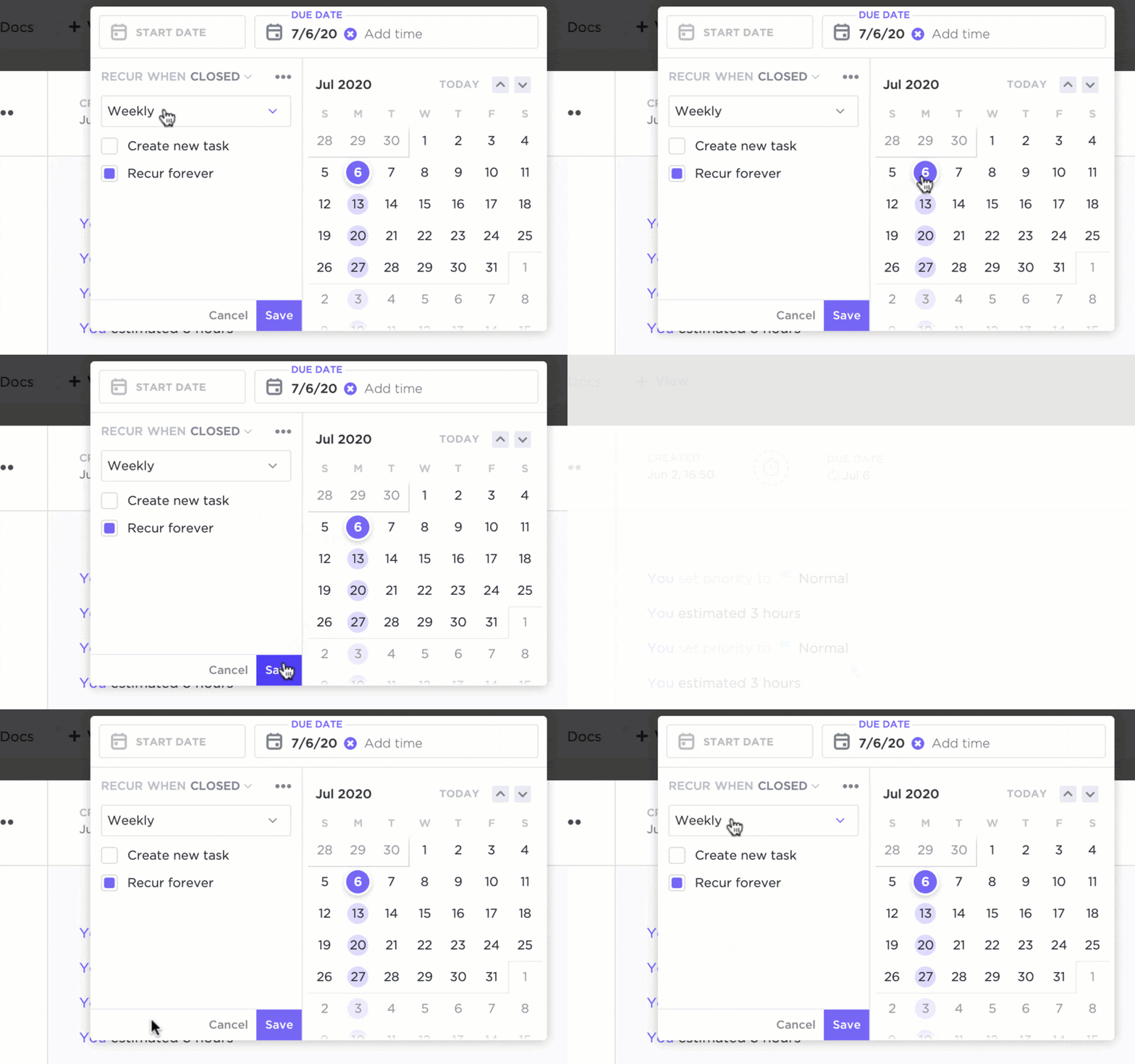
Use ClickUp Recurring Tasks to automate recurring tasks—it’s that simple. Schedule tasks that repeat daily, weekly, monthly, or yearly. Whether it is report generation, invoicing, or following up, customize the recurrence patterns with options like ‘every alternate week’ or ‘on the last day of the month’ to align your workflow with a periodic task. When paired with ClickUp Automations, this feature ensures nothing is missed so you and your team can focus on higher-level activities.
ClickUp Templates
With a rich library of custom automation templates, you can optimize workflows, increase productivity, and save time. These ready-made solutions are a great starting point for automating common workflows.
Here are a few you can use to get started:

ClickUp Template for Email Automation
Remove manual work from email outreach and send personalized emails based on custom field values or task triggers. Imagine automatically sending a welcome email to a newly registered client or delivering an onboarding email kit to a new employee! This lets you send the right emails at the right time while also freeing up team time for other tasks. You can create tasks for each automated email and set up rules in ClickUp defining the trigger.

ClickUp Template for Project Proposal Automation
Streamline the process of crafting project proposals. This template allows you to automate tasks like assigning proposal creation activities to team members, sending reminders and notifications for deadlines, and consulting stakeholders when the proposal is complete. The Project Proposal view provides you with a comprehensive overview of all proposals

ClickUp Automation KPI Tracking Template
Don’t just automate repetitive tasks; measure the impact of this action. Use this template to test the efficacy of your automation. It provides a framework for measuring crucial KPIs that you can track to judge whether the automated workflows are living up to their potential. It includes custom fields like Department, Target Value, Variance, etc. Visualize the timeline and milestones of your automation initiatives with the Timeline View and track the progress of individual tasks with the Progress View.
Summarize this article for me pleaseDon’t Repeat, Just Automate With ClickUp
From everything we’ve discussed so far, it is evident that automation is no longer a luxury or a ‘nice-to-have’ feature. You must automate repetitive tasks to the maximum extent to reach a new plane of efficiency, productivity, and resource utilization. Hopefully, our simple 5-step guide outlines a clear roadmap for implementing automation.
An AI-powered project management solution like ClickUp can transform your day-to-day processes with the power of intelligent automation.
Sign up for free on ClickUp to maximize your business potential!


Everything you need to stay organized and get work done.


