






Still downloading templates?
There’s an easier way. Try a free AI Agent in ClickUp that actually does the work for you—set up in minutes, save hours every week.
Sorry, there were no results found for “”
Sorry, there were no results found for “”
Sorry, there were no results found for “”
Slack has been the go-to communication hub for modern teams, especially in fast-paced startups, marketing agencies, tech companies, and remote or hybrid work environments.
From real-time messaging and file sharing to channels and calendar sync, Slack keeps collaboration flowing freely. But when it comes to managing project management timelines and execution, sometimes Slack alone isn’t enough.
Conversations often obscure important tasks, leading to missed follow-ups. With the right Slack integration, you can turn Slack messages into tasks, link conversations to deliverables, and reduce the disconnect between team chats and actual execution.
In this article, we’ll cover the best project management tools and solution software options that connect seamlessly with Slack.
📖 Also Read: Best Slack Competitors
Here’s a quick comparison of the top project management tools for client services that support real-time collaboration and integrate with Slack:
| Tool | Best For | Key Features | Pricing* |
| ClickUp | All-in-one AI-powered project management, team communication and collaboration | Gantt charts, Kanban, custom workflows, ClickUp Brain, and real-time Slack task sync | Free plan; customizations for enterprises |
| Wrike | Simplifying project intake and cross-team work | Dynamic forms, Kanban boards, custom workflows, Slack request capture | Free plan, paid plans starting from $10/month per user |
| Notion | Organizing ideas into shared systems | Wikis, docs, AI summaries, Slack page previews | Free plan, paid plans starting from $12/month per user |
| Trello | Visual task tracking and simple workflows | Kanban boards, Butler automations, Slack card creation | Free plan, paid plans starting from $5/month per user |
| Jira | Agile task tracking and sprint planning | Scrum boards, backlog grooming, Slack bug tickets | Free plan, paid plans starting from $8.60/month per user |
| Basecamp | Async team comms without clutter | To-do lists, Campfire chat, Slack thread replacement | Free plan, paid plans starting from $15/month per user |
| Miro | Visual collaboration and brainstorming | Whiteboards, sticky notes from Slack, Jira sync | Free plan, paid plans starting from $8/month per user |
| MeisterTask | Visual task tracking + mid-size team automation | Kanban, Slack notifications, AI help, daily task sync | Free plan, paid plans starting from $9/month per user |
| Teamwork | Managing client projects precisely | Slack commands, retainer tracking, resource library | Free plan, paid plans starting from $13.99/month per user |
| Todoist | Lightweight task capture in Slack | Slack commands, checklists, priority tags | Free plan, paid plans starting from $2.50/month per user |
| Zoho Projects | Detailed project baselining and tracking | Gantt charts, time logs, Slack updates | Free trial for 15 days, custom pricing |
| Linear | Product and engineering teams | Visual roadmaps, issue triage, Slack thread sync | Free plan, paid plans starting from $10month per user |
| Hive | Flexible project views and team collab | Templates, Kanban, HiveMind AI, Slack chat-to-task | Free plan, paid plans starting from $1.50/month per user |
Our editorial team follows a transparent, research-backed, and vendor-neutral process, so you can trust that our recommendations are based on real product value.
Here’s a detailed rundown of how we review software at ClickUp.
Instead of bouncing between tools, your team can manage tasks and communicate all within the same Slack workspace with a simple integration.
Here’s why the best Slack integrations are worth the investment:
💡 Pro Tip: If you’re facing any of these issues—tackle mic glitches, message fails, and upload errors head-on. Common Slack Problems and Their Solutions helps you fix frequent Slack issues fast so your team stays connected without interruptions.
50% of teams that use agile methodologies and how teams manage projects also combine them with other tools to fit the project at hand.
That’s why integrating project management software directly into your Slack workspace is a strategic choice.
But not all integrations are created equal. So, what features actually matter when picking the best Slack project management tools?
1. Task management: Create, assign, and update tasks without ever leaving Slack
✅ Solution: A designer drops a mockup in a Slack message, and a teammate instantly converts it into a task with a due date.
2. Real-time notifications: Get project updates, deadline changes, and comments directly in Slack
✅ Solution: Your team sees task progress updates live in the Slack channel, avoiding missed deadlines and endless check-ins
3. File sharing and centralized docs: Share and pin files tied to tasks or threads
✅ Solution: During a campaign sprint, creative assets and Google Docs stay accessible in one place; no more hunting through email.
4. Integration with other tools: Sync with Google Drive, Trello, Jira, and more
✅ Solution: Instead of toggling tabs, your Slack becomes a centralized space where all your project tools talk to each other.
5. Workflow automation: Use bots or custom triggers to automate repetitive steps
✅ Solution: A new task form triggers a Slack message to the right channel, assigns a task, and sets reminders—all without human input.
You don’t need to switch between six different tabs to maintain context.
When that’s the case, project management automation is not fulfilling its promised benefits.
However, with these 13 tools that connect directly with Slack, you can ensure your teams align even while you sleep.

If your team’s Slack is full of daily check-ins, task mentions, and file links, ClickUp is the one project management platform that pulls everything into one unified space.

ClickUp’s project management platform is a converged AI Workspace that combines Docs, Wikis, Chat, generative AI tools, AI Agents, and Automations.
It offers flexible views, including lists, boards, Gantt charts, and calendars, to help teams plan, track, and manage projects independently. You can group tasks into folders, break down dependencies, and set milestones that align with key goals.
For instance, a remote design team working on a product launch can visualize their entire project timeline in Gantt view and then sync task updates directly to a shared Slack channel, ensuring everyone stays informed in real-time.

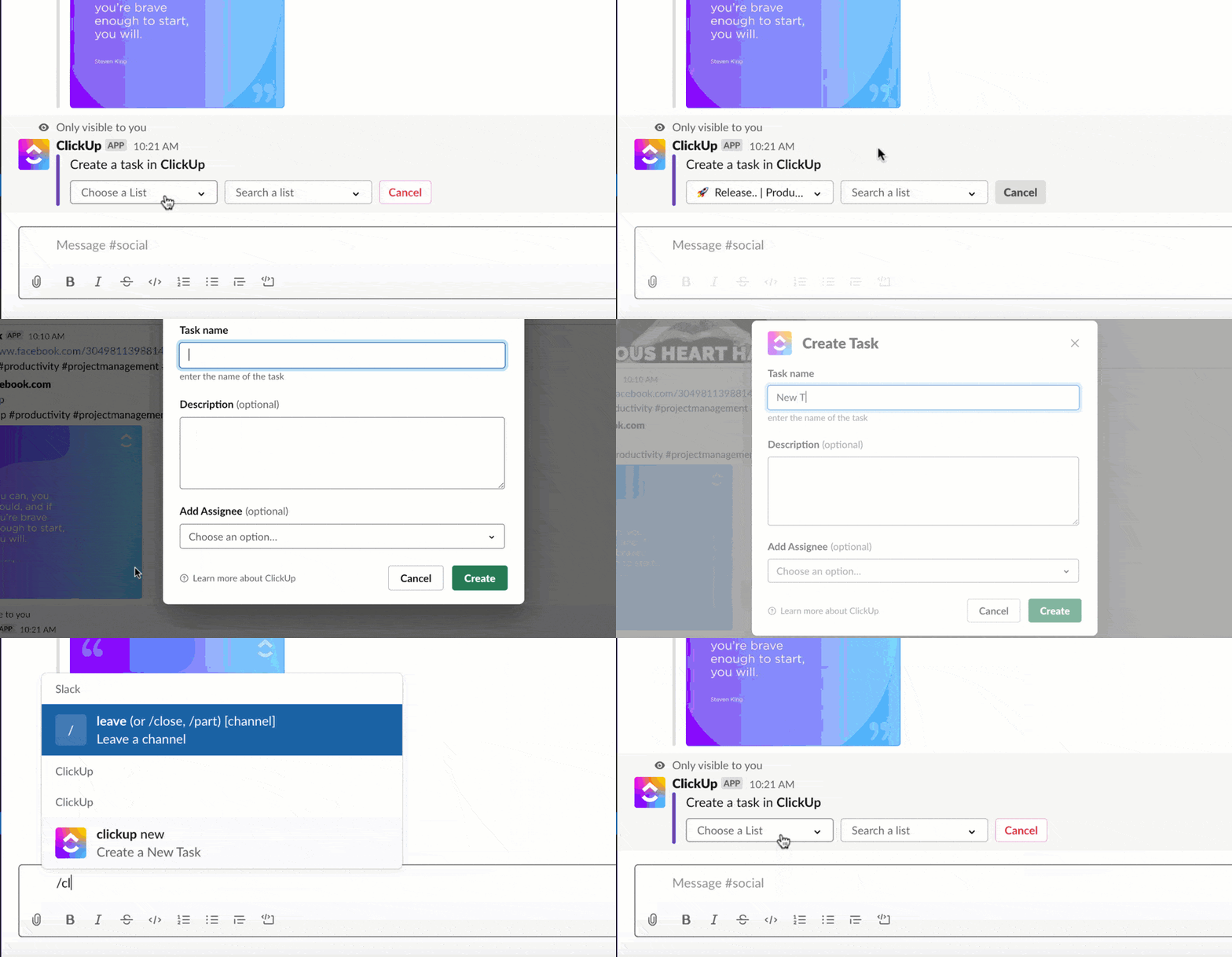
With ClickUp’s tight integration with Slack, you can:
This is what Lauren Makielski, Chief of Staff at Hawke Media, said about ClickUp:
It’s huge for us to have project visibility in ways that serve all learning styles and preferences. ClickUp has also allowed for integrations with Slack and Gmail that keep our work streamlined from platform to platform.

ClickUp Chat brings the best of Slack-style communication into your project management platform, but with a crucial difference. The difference between Slack vs. ClickUp is that the latter directly connects to your tasks, timelines, and workflows.
During a project sync, if a teammate drops a reminder about a missing asset or identifies a blocker, you don’t need to switch tools or dig through Slack threads later. You can instantly turn that message into a task, assign it, set a due date, and link it to the right project. Or command ClickUp Brain to do it for you, right within your Chat!
This functionality makes ClickUp an all-in-one messaging app by combining messaging with task creation.
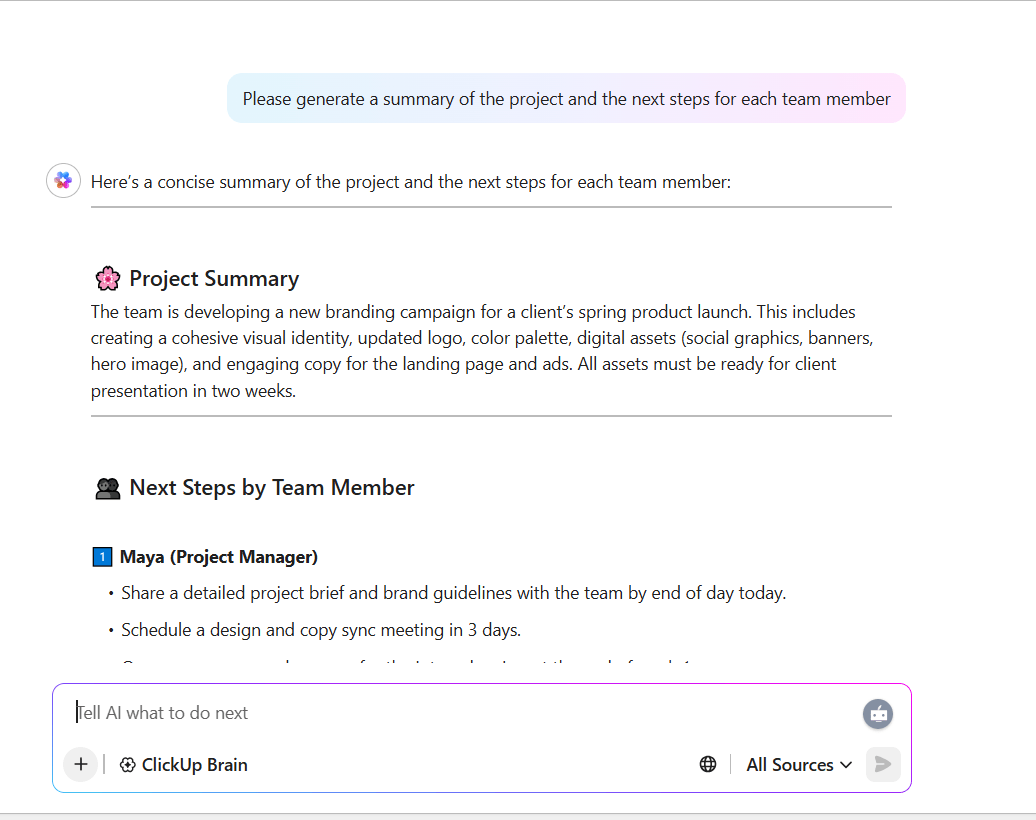
ClickUp Brain brings practical AI into your daily workflow. It’s built to recognize context and eliminate repetitive manual tasks.
For example, after a team huddle, ClickUp Brain can generate a project summary, assign next steps to relevant teammates, and even flag overlapping deadlines.
If you’re catching up after time off, you can use ClickUp Brain’s “Catch Me Up” feature to instantly get a recap of updates across your projects, including highlights from Slack conversations, new comments, and blocked tasks.
You can also ask ClickUp Brain a question like, “What’s the status of the Q3 marketing plan?” And it will pull real-time information from your task list, project docs, and conversations.
🎥 Here’s a quick video explainer on how asking questions on ClickUp Brain works:
💡 Bonus: Looking for a Desktop app that cuts through the clutter and gives you everything you’d want in a work AI? ClickUp Brain MAX might be for you.
Transform the way you manage projects with:
ClickUp Brain MAX is the AI Super App that truly understands you, because it knows your work. Ditch the AI tool sprawl, use your voice to get work done, create documents, assign tasks to team members, and more.
This G2 review shared:
We run agile sprints, publish docs, and manage OKRs without shuffling between apps. Native integrations (Slack, Drive, GitHub) are quick to wire up.
📖 Also Read: Free Project Communication Plan Templates

Scattered to-do lists are a common problem in corporate teams because tasks often arrive through various channels, including Slack, email, meetings, and spreadsheets. Furthermore, there’s no clear system in place to track ownership or progress.
Wrike lets you turn incoming requests into formal projects using dynamic intake forms, auto-assigned tasks, and team-specific workflows. With built-in Slack integration, Wrike keeps your team updated without them leaving their Slack channel, reducing back-and-forth and ensuring clear accountability across departments.
This Capterra review highlighted:
Wrike has powerful project management features that have enabled us to have a simple and streamlined experience managing our project operations.
📖 Also Read: We Tested the Best Wrike Alternatives & Competitors

In most remote teams, there’s no clean bridge between ideation and execution. Notion fixes this by acting as a flexible all-in-one workspace where wikis, docs, projects, and tasks live side-by-side.
And with integrations to platforms like Slack, Notion updates flow directly into your team conversations, so team knowledge isn’t trapped in silos or lost in endless DMs.
This G2 review noted:
I love Notion AI’s ability to pull comprehensive, context-aware answers from a variety of integrated tools—including Notion, Slack, and Google Drive. This integration streamlines information retrieval by surfacing insights from across our knowledge base.
👀 Fun Fact: Before email and Slack, many large companies used physical “message tubes” to send written notes between floors. Some historic buildings still have them hidden in the walls.
📖 Also Read: Best Notion Alternatives & Competitors

According to a survey by the Project Management Institute, 64% of project managers said that prioritizing tasks effectively is key to delivering successful projects. But most teams don’t know what’s going on, who’s in charge, or when things are due.
Trello solves this problem by giving teams a shared visual board to track work in real time. Each task lives on a card that moves through stages like “To Do,” “In Progress,” and “Done.”
With the Slack integration, you can create Trello cards directly from messages, set reminders, and automatically post updates back into your channels.
This G2 review captured:
The ease of implementation is also a bonus, with little setup required to get started using it. I also enjoy the ease of integration with other tools like Slack and Google Drive for integrated workflows.
📖 Also Read: Best Trello Alternatives & Competitors

When tasks are flagged in chats but never make it to your sprint board, your backlog becomes messy and hard to manage. This is a challenge that engineering teams often struggle with.
Jira bridges this gap by turning Slack into an extension of your agile workspace. With scrum boards, sprint reports, and backlog grooming built into a single system, Jira eliminates this friction.
Plus, you can turn a Slack message into a bug ticket, trigger sprint alerts, or update issue status without leaving your chat.
This G2 review featured:
The integration with tools like Confluence, Slack, and GitHub makes it even more powerful. It’s easy to collaborate, assign tasks, set due dates, and maintain accountability across departments.
📖 Also Read: Best Jira Alternatives & Competitors for Agile Teams

Too many meetings waste time that could be spent actually doing the work. When teams depend solely on calls to ensure alignment, their productivity suffers.
Basecamp flips this equation by giving teams a central space to share updates, track tasks, and communicate asynchronously. You don’t need to chase Slack threads or set up sync calls; just open Basecamp to see what’s due, what’s been shared, and what needs your input.
This G2 review shares:
Automation takes things to a new level: tasks that once took hours to complete now resolve themselves. And I can’t help but mention how it integrates with Slack and other utility tools.
📖 Also Read: Best Basecamp Alternatives & Competitors in 2025
📮 ClickUp Insight: 88% of our survey respondents already use AI for personal tasks daily, with over half using it multiple times a day. But what about at work?
When you have centralized AI running your project management, knowledge sharing, and team collaboration, you could reclaim over 3 hours every week—time that 60% of ClickUp users say they’d otherwise lose hunting for scattered information.

Text tools aren’t built for visual thinking. Teams often flatten ideas when they attempt to plan sprints, map workflows, or ideate in spreadsheets and docs.
Miro solves this dilemma by offering a visual collaboration space. You can sketch, structure, and present ideas all in one place—without toggling between tools. And with integrations like Slack and Jira, feedback stays connected to the canvas.
This G2 review highlighted:
Miro also integrates smoothly with a host of popular productivity tools like Jira, Trello, Slack, and Google Workspace, which is crucial for maintaining an efficient workflow.
💡 Pro Tip: Keep team chats clear and collaboration focused. The Pros and Cons of Slack at Work breaks down how to use Slack’s strengths and ClickUp’s workflows together for smoother teamwork.
📖 Also Read: Best Miro Alternatives & Competitors in 2025

MeisterTask offers a native Slack integration that turns casual conversations into actionable tasks in just a few clicks.
This integration enables users to receive daily task summaries, convert Slack messages into MeisterTask tasks or comments, and link entire projects to Slack channels for real-time updates. It guarantees seamless task ownership tracking and deadline management for your team.
This G2 review captured:
I strongly admire its integrations with most popular products such as Zendesk, GitHub, Slack, and many others in order to make our workflow smooth enough. MeisterTask has made each and everything simple and easier.

Managing client projects across multiple task management software makes it simple to lose visibility in billable hours and resource utilization.
Teamwork is a tool built specifically for service-based teams that combines project management, resource planning, and client communication. Whether you’re forecasting workloads or tracking margins on a retainer project, this team communication app offers tailored control without overwhelming your workflow.
This G2 review noted:
Anyone who works with developers and designers regularly knows that you need accountability if you want projects done on time. Slack integration is useful also.
🧠 Did You Know? Slack skyrocketed from just 16,000 users to over 10 million daily users in a decade. How to Use Slack Effectively: The Ultimate Guide for Slack Users shows you practical ways to make the most of it and boost your team’s daily productivity.
📖 Also Read: Best Teamwork Alternatives and Competitors in 2025

When your Slack channels are busy throughout the day, quick tasks and casual requests can easily disappear into the scroll. Todoist bridges that gap by letting you instantly capture any Slack message as an actionable task.
Instead of copy-pasting reminders or hoping you’ll remember, you can keep your to-do list up to date right where work happens.
This G2 review cited:
The ease of use and the effective way to segregate lists. Moreover, the design is very simple, and the application is supported by Slack, Teams, Apple, Android, and Windows.
📖 Also Read: Best Todoist Alternatives & Competitors

Only 48% of teams consistently baseline their project schedules, making it hard to measure progress and adjust timelines. Zoho Projects tackles this problem with dynamic Gantt charts, precise time tracking, and detailed task management so teams can see the plan, spot deviations, and get work back on track fast.
The Slack integration means your project progress flows directly into daily chats without duplicating work.
This G2 review noted:
Integration with other Zoho apps and third-party tools is smooth, which makes it ideal for managing projects end-to-end.

Modern product and engineering teams can lose countless hours stitching together planning docs, specs, roadmaps, and bug trackers across disconnected tools.
Linear unifies product direction, project updates, and issue tracking into a single, lightning-fast system.
As a result, teams can plan roadmaps visually, track cycles, triage bugs, and stay aligned through real-time insights and a thoughtful Slack integration that keeps conversations and tasks in sync.
This G2 review highlighted:
Linear can adapt to any size of project and can be implemented in no time. Integrates with many third parties.
🧠 Did You Know? Nearly 80% of Fortune 100 companies use Slack Connect. Learn how to keep your workspace organized and cut down the noise with clear, structured channels in How to Organize Slack Channels at Work.
📖 Also Read: Best Project Management Tools in 2025

Imagine a creative agency managing multiple client campaigns at once. Designers wait for approvals, marketers track campaign tasks, and project managers spend hours switching between chats, emails, and spreadsheets just to get a status update.
Hive solves the problem by giving teams a single workspace to manage all of this. This tool connects directly with Slack so your team can turn Slack chats into Hive tasks, share tasks back to Slack channels, and get updates in real time.
This G2 review noted:
The integration capabilities of Hive include seamless connection with Google Drive and Slack through its tool interface. Hive aligns its simple interface structure with user needs so that any member of the team who may lack tech experience can operate it without difficulty.
📖 Also Read: Hive Alternatives for Project Management
Here are 3 additional project management tools that also offer Slack integrations and would fit nicely alongside the ones we’ve covered:
When project teams run on Slack but without the right project management integration, those conversations too often vanish into the scroll.
Connecting Slack with a project management solution means every message can turn into an action item, every deadline stays visible, and every project stays on track without endless back-and-forth.
While plenty of collaboration tools promise this bridge, many still leave you toggling between half-finished tasks, missing context, and disconnected workflows. ClickUp closes that gap with real-time Slack integration, AI-powered summaries, task creation, and chat-to-task conversion.
Ready to stop losing time between messages and milestones? Sign up for ClickUp today!

© 2026 ClickUp

There’s an easier way. Try a free AI Agent in ClickUp that actually does the work for you—set up in minutes, save hours every week.