






Still downloading templates?
There’s an easier way. Try a free AI Agent in ClickUp that actually does the work for you—set up in minutes, save hours every week.
Sorry, there were no results found for “”
Sorry, there were no results found for “”
Sorry, there were no results found for “”
You’ve built a team, landed a few clients, and projects are finally rolling in. Before you realize it, the hardest part is no longer about landing work; it’s keeping it organized.
When simple to-dos turn into full-blown projects, it’s time for real structure. It’s time to bring in a powerful project management platform that works just the way you do. And, for many teams, the choice comes down to nTask vs. ClickUp.
In this blog post, we’ll break down the differences between nTask vs. ClickUp, how their features stack up, and which one might just help you sleep better at night.
Our editorial team follows a transparent, research-backed, and vendor-neutral process, so you can trust that our recommendations are based on real product value.
Here’s a detailed rundown of how we review software at ClickUp.
Here’s a quick head-to-head comparison before we explore the tools in depth:
| Criteria | ClickUp | nTask |
| Customization | Highly customizable workflows, dashboards, permissions, task types, and task management templates | Limited customization options in comparison to ClickUp |
| Views | List, Board, Calendar, Gantt charts, Timeline, Table, Mind Map | List, Board, Calendar, and Gantt chart project templates |
| Automation | Robust automation features and templates | Basic automation |
| Integrations | Extensive: Google Drive, Slack, Dropbox, Trello, GitHub, more | Limited: Slack, Google Calendar, Outlook, and Zoom |
| Task management | Advanced task creation, dependencies, priorities, time tracking, reminders | Basic task management, dependencies, time tracking |
| Collaboration tools | Built-in chat, document sharing, comments, real-time collaboration | Comments, meeting management, file attachments |
| Reporting and dashboards | Rich, AI-powered dashboards, customizable reports, goal and project progress tracking | Limited reporting dashboards |
| Mobile support | Web, iOS, Android | Web, iOS, Android |
| Learning curve | Steeper (due to advanced features and depth) | More beginner-friendly, simpler onboarding |
Work today is broken.
Our projects, knowledge, and communication are scattered across disconnected tools. This creates Work Sprawl, makes us lose 61% of our time searching for information, and slows us down.
ClickUp fixes this with the world’s first Converged AI Workspace that combines your projects, knowledge, and chat in one place—all powered by Contextual AI that helps you work faster and smarter.
When work and context are split across multiple tools, you’ve to keep switching context to get things done. This constant tab-switching drains focus, leads to duplicated work, and creates silent friction that builds up over time. Let’s see how ClickUp’s free project management software tackles such problems.
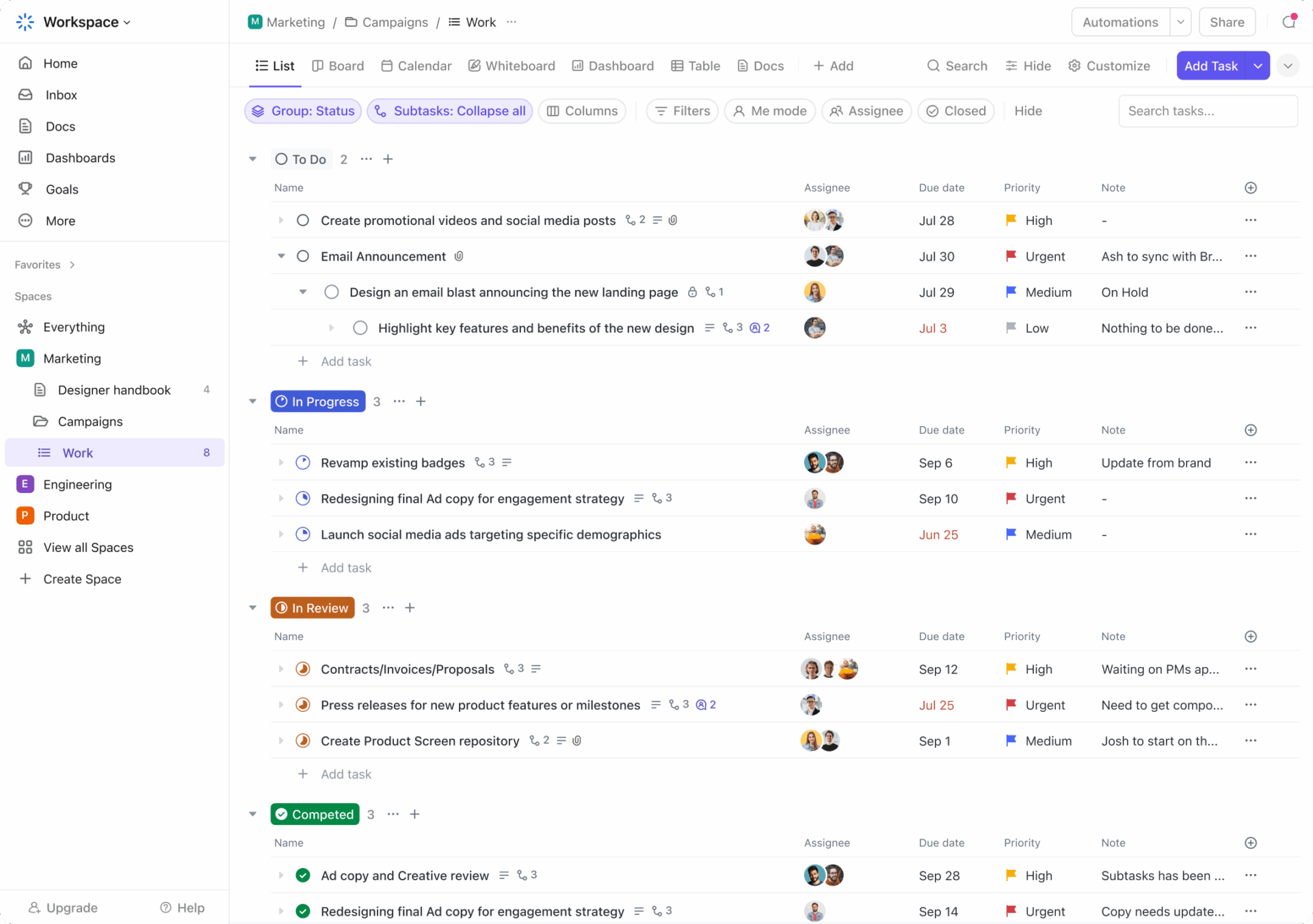
ClickUp’s Project Management Solution adapts to any team, workflow, or project size. If you’re managing a project launch, sprint cycle, client deliverable, or internal ops project, it brings everything into one connected workspace.
For execution, you have ClickUp Tasks. Think of them as individual units of work you can assign, track, and measure.
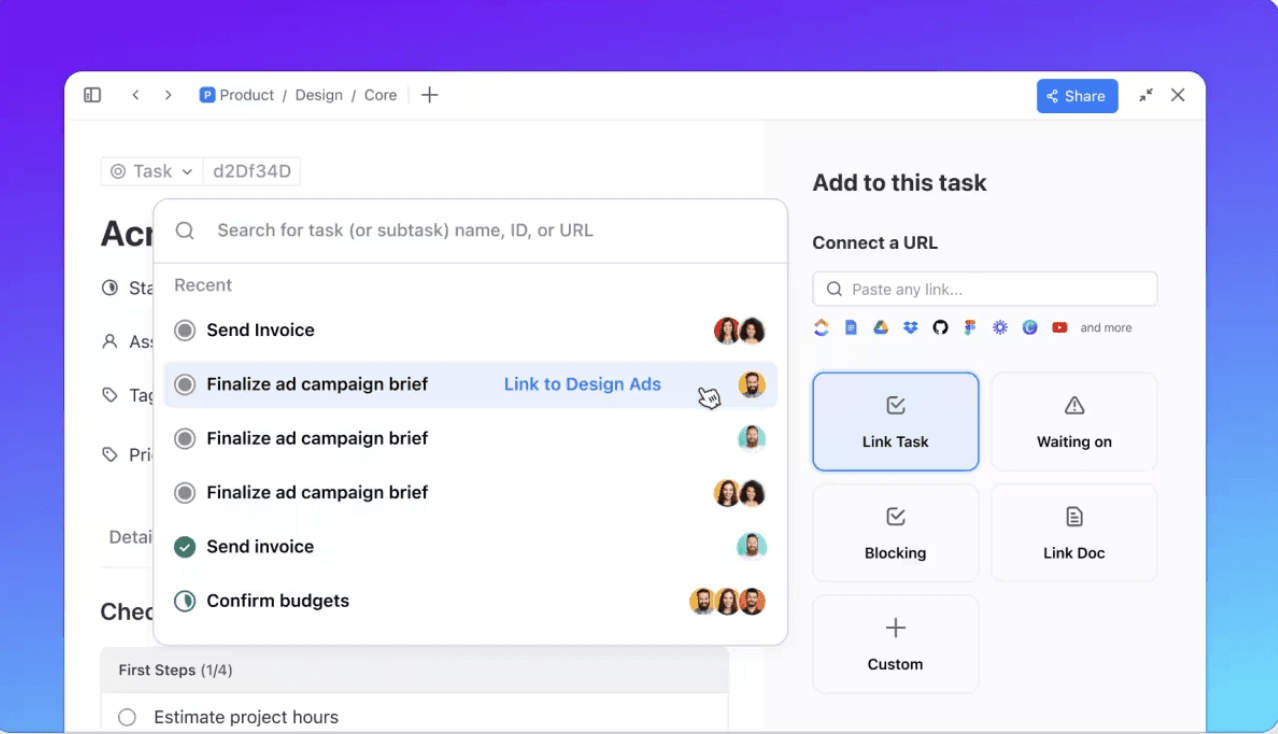
Let’s say you’re a startup founder planning a product launch. You can create a task for each key milestone, like ‘Finalize landing page copy,’ ‘QA product demo,’ or ‘Schedule launch emails.’
Within each task, you can add detailed instructions, assign it to multiple teammates, set deadlines, track time, and attach relevant docs or links for context. If you want to break it down further, add subtasks for each step, like writing the copy, reviewing with legal, and final approval.
And the best part? You don’t have to do any of it manually! You can use:
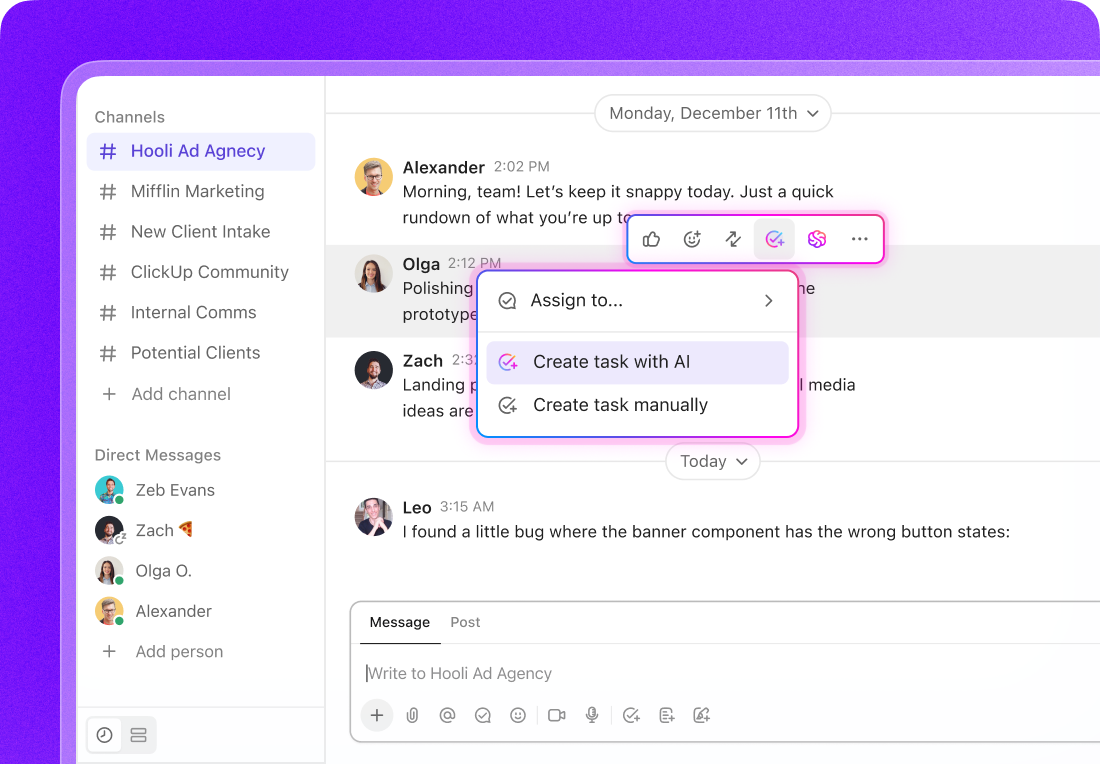
All of this simplifies task management, so you can make actual progress.
Hear it from Dane Dusthimer of RevPartners:
Without ClickUp, we wouldn’t be able to quickly see gaps in work and process. Being able to see tasks without due dates, tasks overdue, tasks without sprint points, and tasks without assignees helps me keep the forward momentum among teams and projects. These metrics aren’t available in most project management software options.
ClickUp boasts of the planet’s most complete and context-aware work AI, ClickUp Brain. Designed to understand your projects, docs, tasks, meetings, and even team dynamics, it connects the dots to find you relevant insights from your workspace and connected apps. With Brain as your AI assistant, you don’t have to waste time manually searching for information.
Use ClickUp Brain to save at least one day every week:
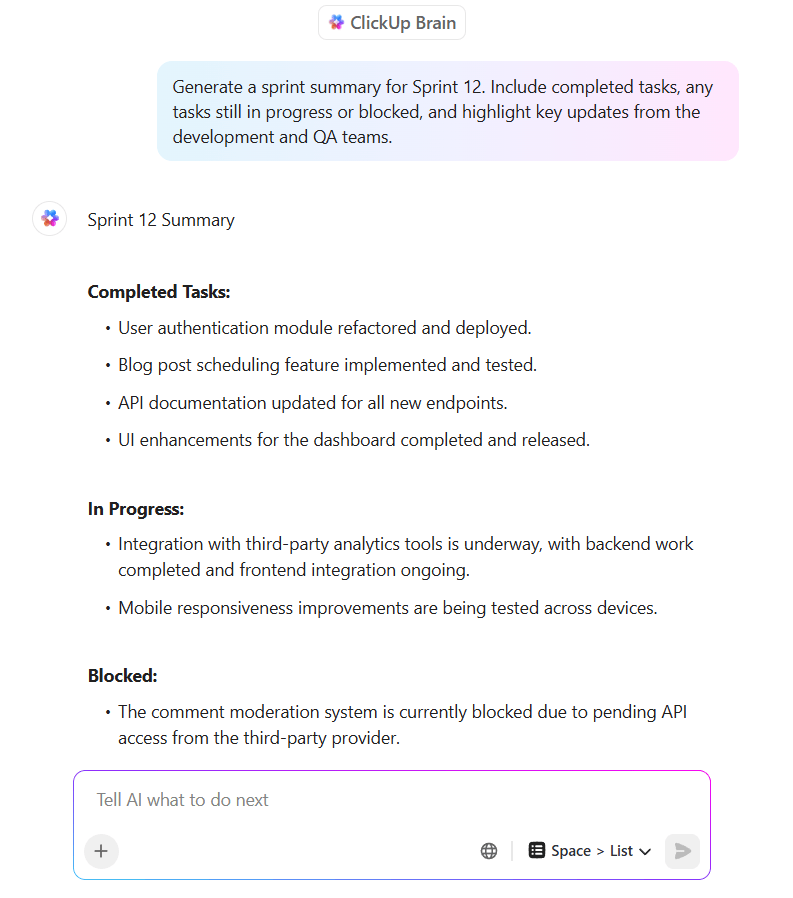
Need to quickly catch up on a task you weren’t part of? Just ask ClickUp Brain. Want to generate a project plan from a single sentence? Done. You can even run workflow automations and update dashboards using natural language.
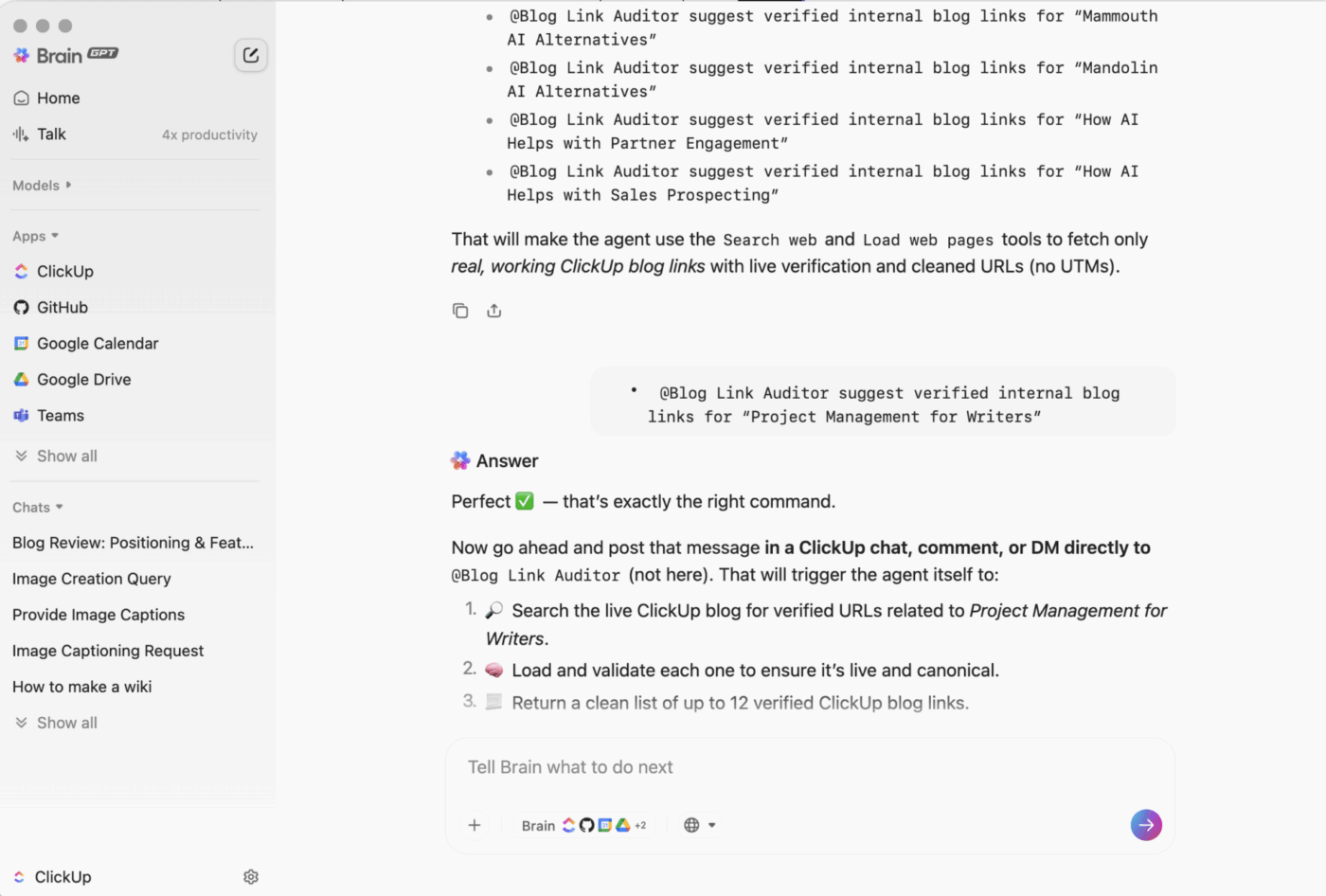
Take things a step further with ClickUp BrainGPT. It centralizes AI across ClickUp and third-party tools like Google Drive, Notion, and GitHub, so you can find anything, take action across multiple platforms, and eliminate the clutter of using multiple disconnected AI tools (also known as AI Sprawl). There’s also Talk to Text for times when you’d rather dictate instructions, emails, and documents than type them out!
💡 Pro Tip: With ClickUp, you’re not locked into one AI model. ClickUp Brain lets you choose from ChatGPT, Claude, Gemini, and others to suit different project tasks.
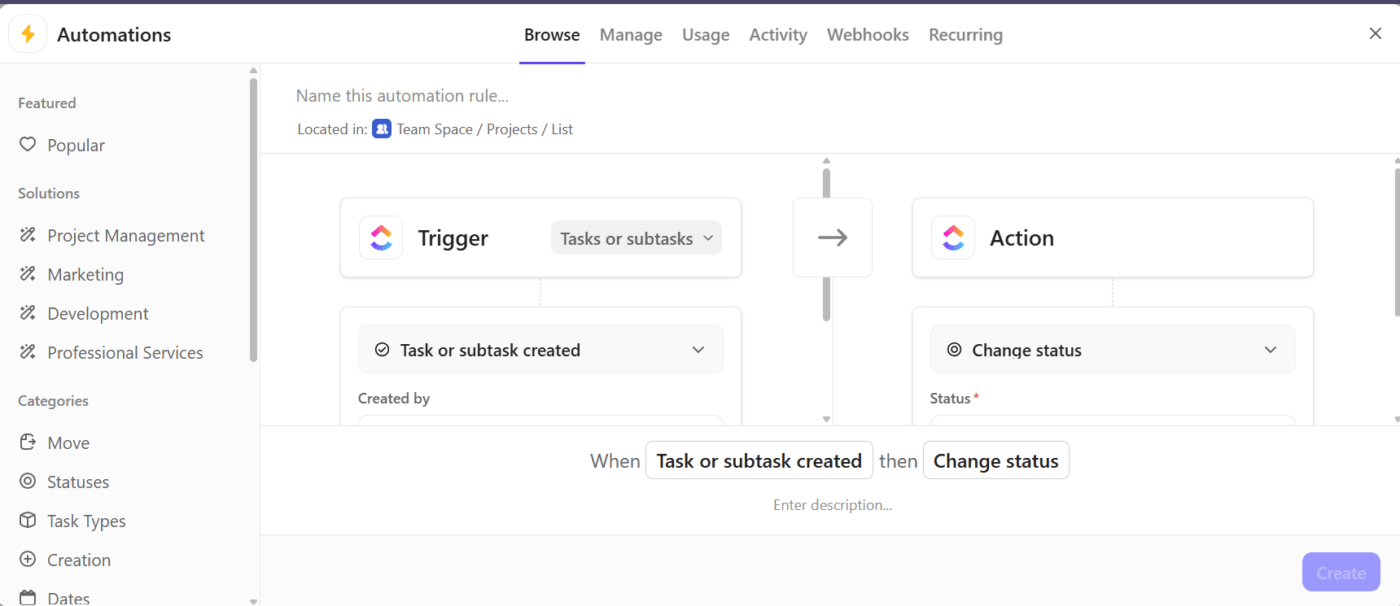
Pair these capabilities with ClickUp Automations and ClickUp Super Agents, and you’ve got a duo that keeps work moving on autopilot.
Automations handle rule-based workflows at scale, triggering updates the moment conditions are met. Super Agents go further, reasoning over context, making decisions, and taking action across tasks, Docs, and tools.
For instance, you’re a project manager overseeing a cross-functional product launch. You can create an Automation that instantly assigns a task to your designer when a content task moves to ‘Ready for Design.’
A Super Agent takes it further—reviewing the task brief for missing inputs, flagging unclear requirements, tagging the right stakeholders for clarification, and updating the timeline if delays are detected—so the project stays on track without you playing traffic cop.
Together, Automations ensure consistency, while Super Agents adapt intelligently—so routine work runs itself, and complex work still moves fast.
Learn more about Super Agents here:
ClickUp Chat brings communication and work together in one place. Unlike traditional chat tools that live outside your project workflow, it’s fully integrated, so discussions naturally connect to tasks, documents, and deadlines.
You can create tasks directly from messages, link conversations to specific folders or projects, and keep chats organized by team, function, or initiative.
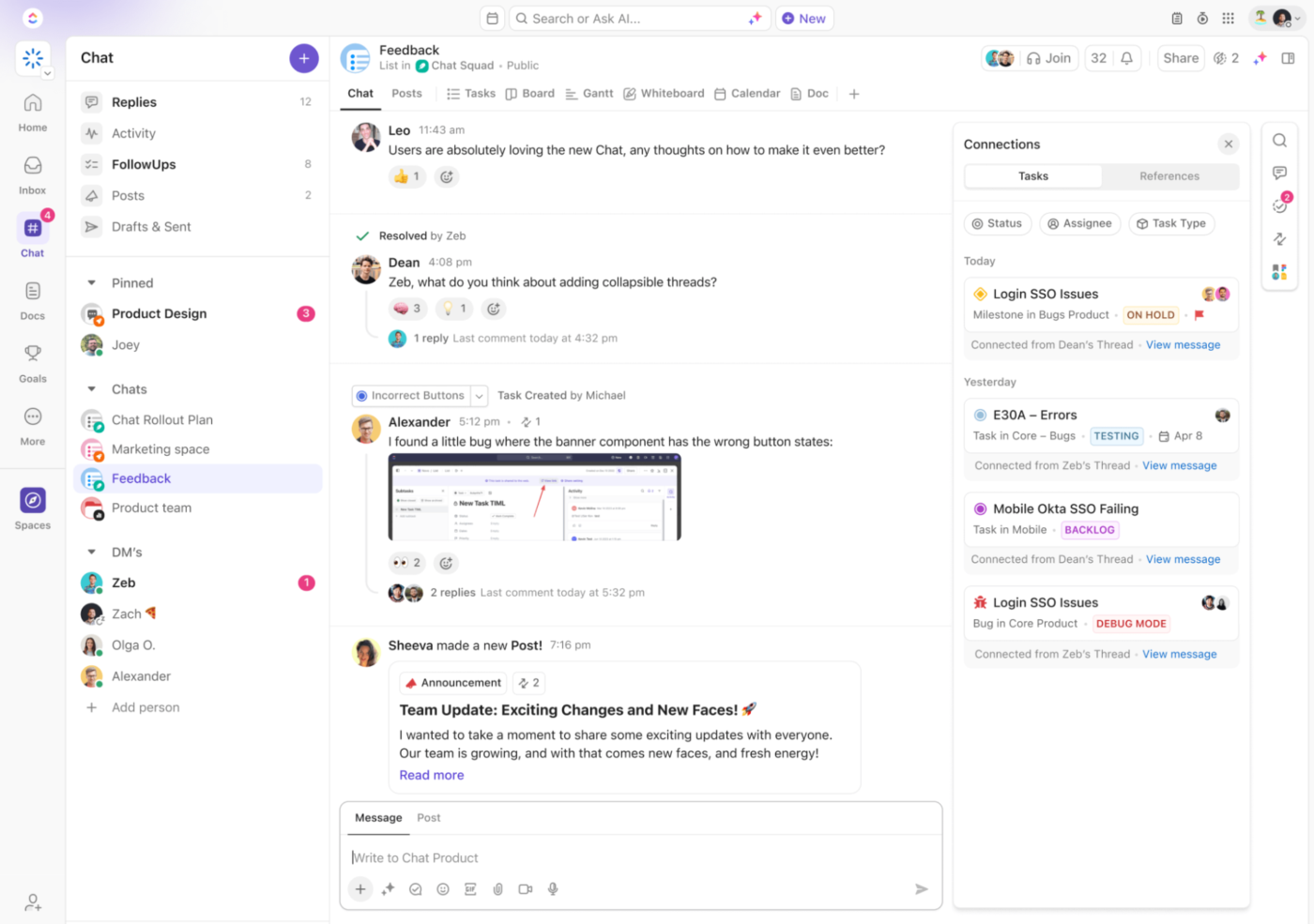
Let’s say your product and marketing teams are finalizing a launch plan. During a chat about project timelines, someone mentions that the social media creative is still pending approval. With ClickUp Chat, you can instantly convert that message into a task, assign it to the right teammate, and link it to the ‘Launch Campaign’ folder, without leaving the chat thread.

Chat, powered by ClickUp Brain, can also generate smart summaries of conversations you’ve missed, extract key decisions, and even suggest next steps. You can prompt AI to draft follow-up messages, tag relevant stakeholders, and summarize voice or video call transcripts.
💡 Pro Tip: When texts don’t work, switch to ClickUp SyncUps for real-time audio-video calls with your team. ClickUp’s AI Notetaker can even record, transcribe, and summarize them for you so you can stay fully present in the discussion!
When deadlines creep up, the question often is, ‘Are we spending our time in the right places?’
ClickUp Project Time Tracking makes it easy to answer that. The platform lets you start and stop timers from anywhere: desktop, mobile, or browser.
Prefer logging hours after the fact? You can do that too, down to the last minute.
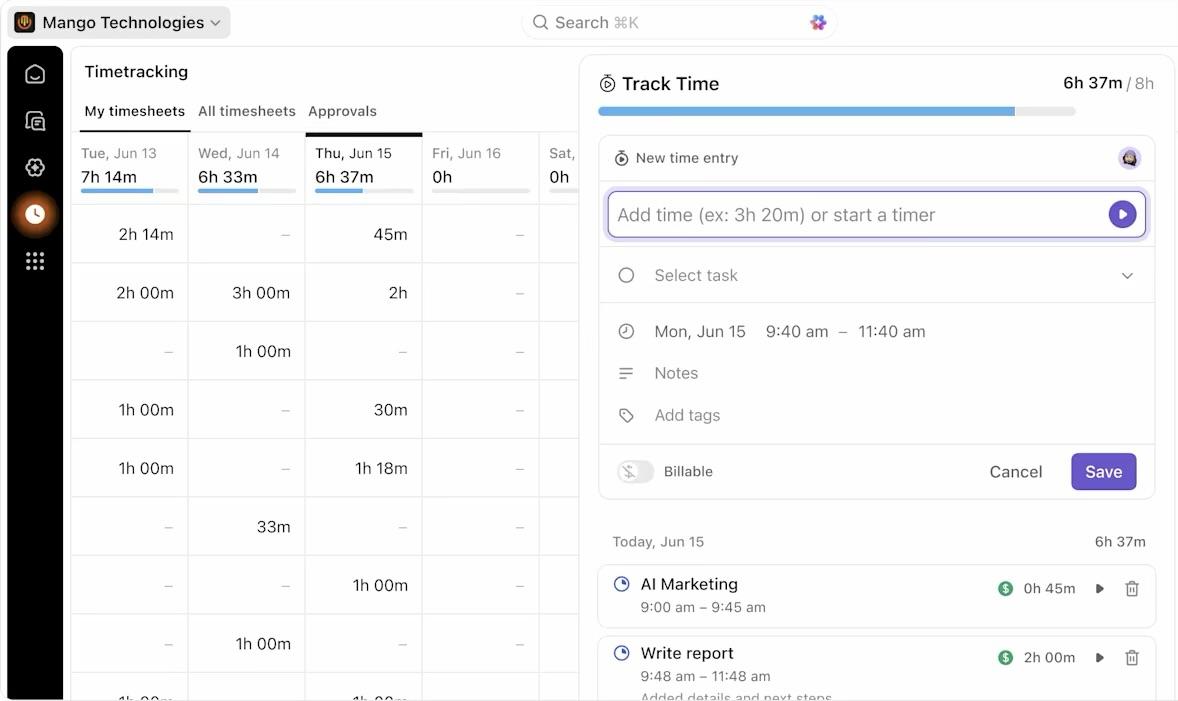
Let’s say you’re a startup founder managing tasks for a small but resourceful team. Each teammate keeps track of tasks and the time spent on them. At the end of the week, you can review a timesheet, view the distribution of hours across departments, and compare them against estimates to identify bottlenecks or misallocations.
Need to bill clients or justify timelines to stakeholders? Use ClickUp Dashboards and timesheets to generate detailed, visual reports by task, project, or teammate.
📮ClickUp Insight: 16% of managers struggle with integrating updates from multiple tools into a cohesive view. When updates are scattered, you end up spending more time piecing together information and less time leading.
The result? Unnecessary administrative burdens, missed insights, and misalignment. With ClickUp’s all-in-one workspace, managers can centralize tasks, documents, and updates, reducing busywork and surfacing the insights that matter most, right when they’re needed.
💫 Real Results: Convene unified 200 professionals into one ClickUp workspace, using customizable project management templates and time tracking to reduce overhead and improve delivery times across multiple locations.
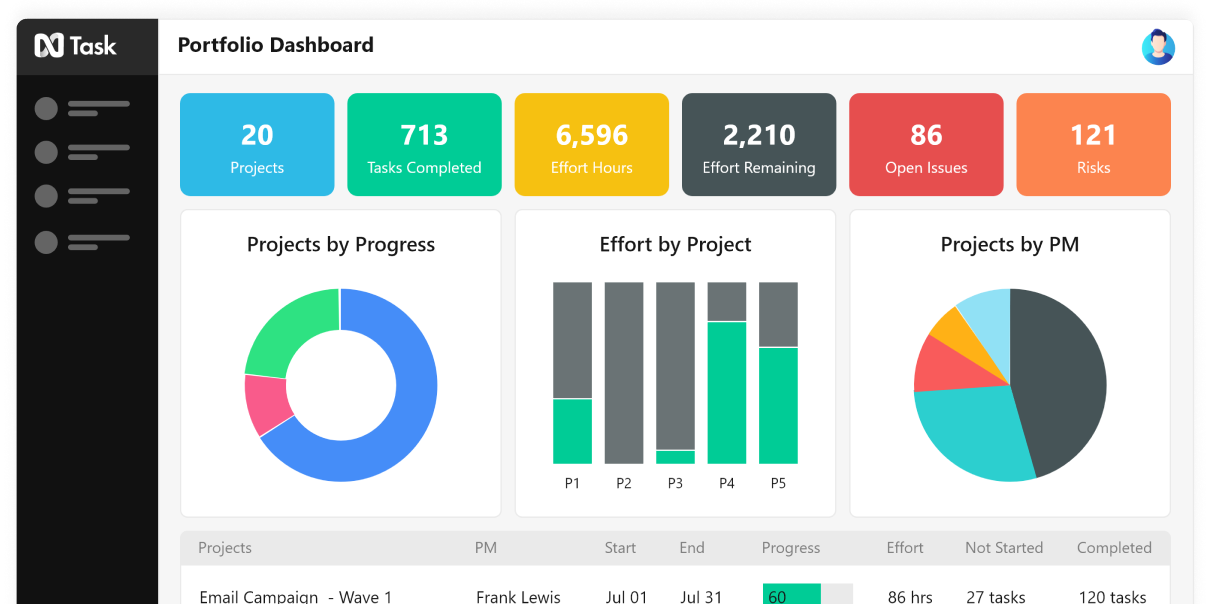
via nTask
nTask is a cloud-based platform designed for project and task management, collaboration, and workflow organization.
It stands out due to its user-friendly interface and affordability, making it accessible to freelancers, small businesses, and growing teams across various industries. The platform supports both agile and traditional project management approaches.
🧠 Fun Fact: An fMRI study found that every time you switch tasks, your brain has to work harder to adjust. It lights up control centers to reset and refocus, which slows you down and increases the chances of making mistakes.
For teams needing structure without complexity, nTask offers a straightforward project management experience. Let’s explore some of its features.
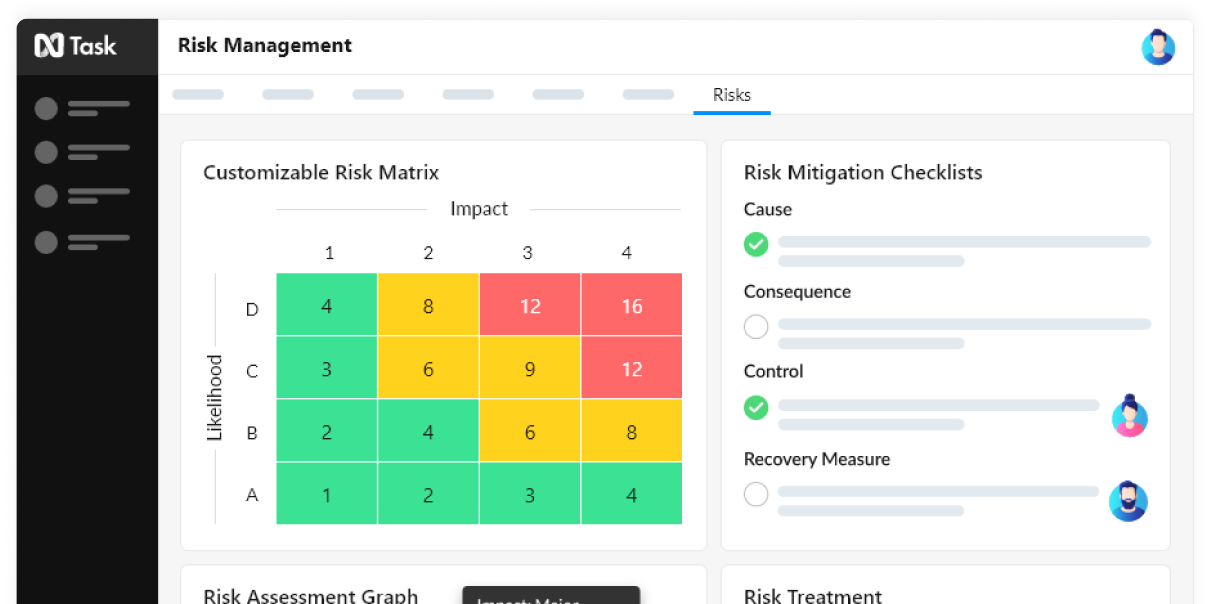
nTask has built-in tools for risk and issue tracking. You can log bugs or blockers, assign severity levels, and set dates for resolution. There’s even a full-blown risk matrix and register if you’re in a high-stakes project environment.
Let’s say you’re launching a new app. You can track potential API failures, team bandwidth concerns, or compliance issues in one place and act on them.
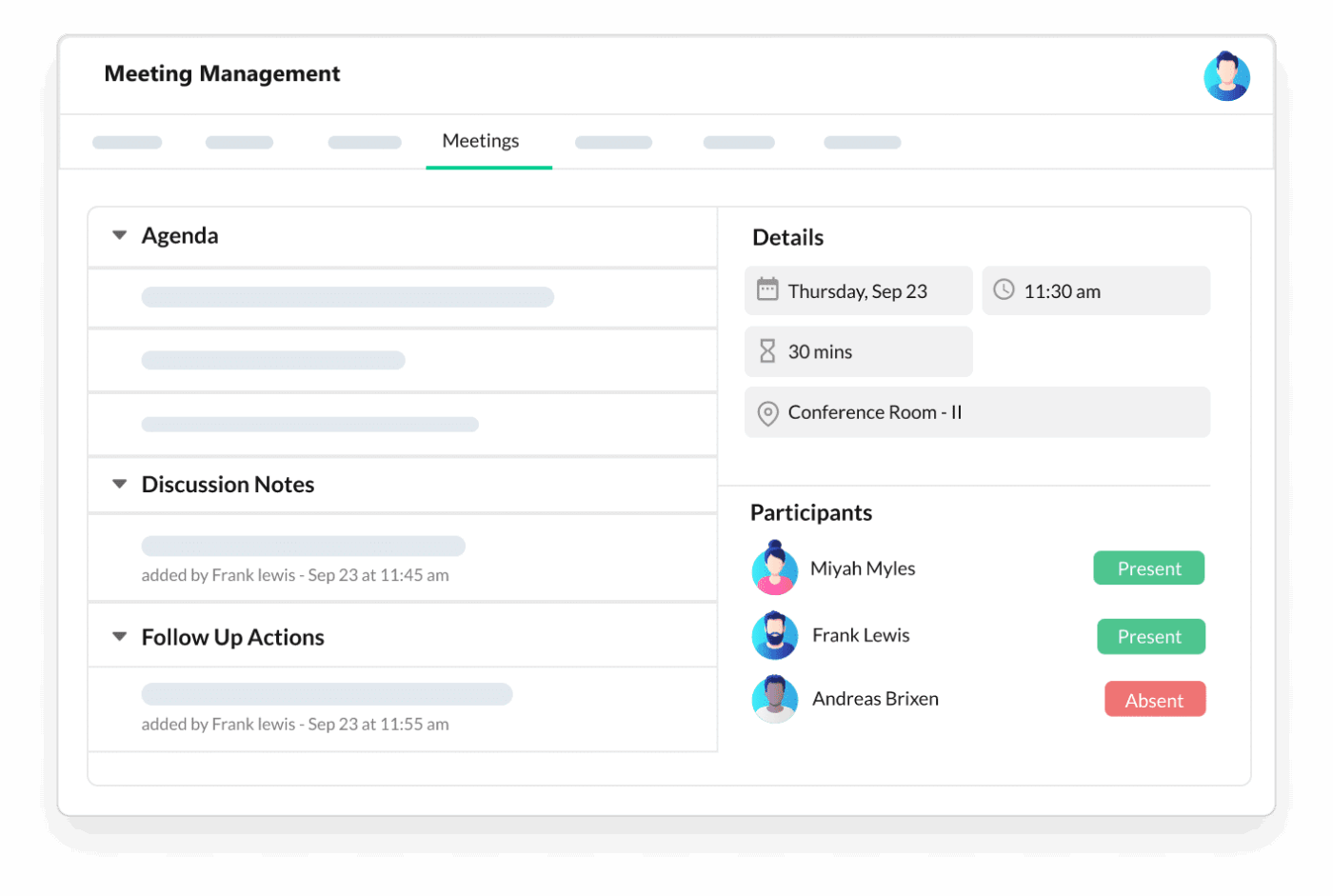
Meetings in nTask are fully trackable workspaces. You can build agendas, take live notes, assign action items, and revisit minutes right inside the app.
Planning a sprint review or check-in? Set it to recur weekly, connect it to your Google Calendar, and drop the Zoom link right in the meeting invite. It keeps everything connected without digging through email threads.
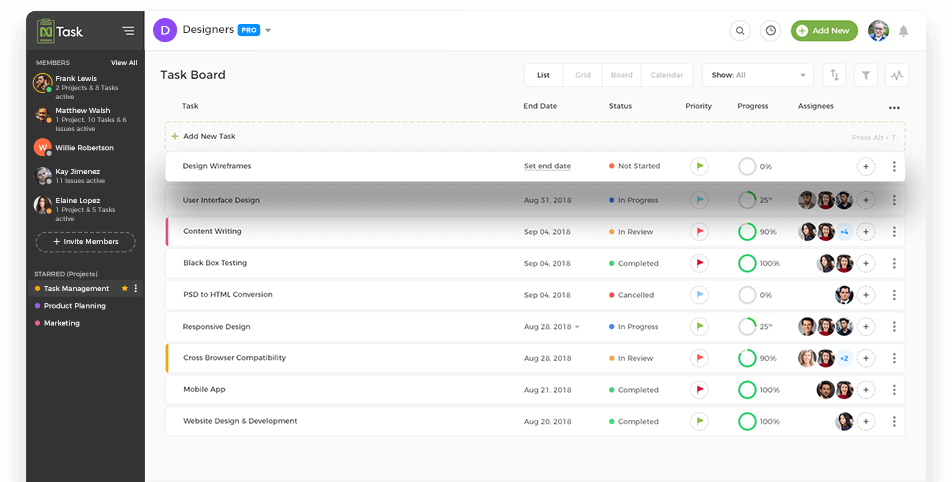
In-app chat and task-level comments make sure conversations stay tied to the work itself. You don’t need to bounce between tools or wonder where someone left feedback. Teams can use @mentions, upload files, or thread replies directly under a task.
Combine these team collaboration features with custom workspaces and role permissions, and it’s easy to loop in just the right people on the right details.
Both ClickUp and nTask promise to simplify planning, boost productivity, and keep teams aligned. However, when you look more closely at the features, the differences become apparent.
Let’s explore how these task management software tools shine in various categories. 👇
Both ClickUp and nTask deliver on the core project management tools you’d expect. However, the difference lies in how scalable and adaptable they are as your project management needs grow.
nTask is straightforward and highly approachable, especially for smaller teams or those new to project management software. It covers the basics well: tasks, subtasks, due dates, and multiple views like Kanban boards, Gantt charts, and calendar.
However, advanced workflow customization is limited.
Kanban and Gantt views are gated behind paid plans, and while you do get dependencies and recurring tasks, the control over them is fairly basic.
ClickUp, on the other hand, is built with flexibility at its core. It scales from startup use cases all the way to enterprise-level complexity. It provides you with views (List, Board, Gantt, Timeline, Calendar), automation tools, data visualization tools, and Custom Fields to tailor the workspace to your team’s specific needs.
Say you’re launching a multi-stage marketing campaign. You can create a board view for creative workflows, set task dependencies between review stages, automate reminders, and track progress in a dashboard.
🏆 Winner: ClickUp for its unmatched flexibility, automated workflows, and ability to support teams of all sizes.
Let’s explore how these tools help teams connect during highly collaborative, complex projects.
nTask handles task-level collaboration well, with threaded comments, file attachments, and @mentions. However, it lacks deeper real-time collaboration features like shared documents or a dedicated chat.
It’s a good fit if your team communicates primarily in meetings or uses other tools alongside it.
ClickUp turns your project space into a full-fledged collaboration hub. You can co-edit Docs, start whiteboards for brainstorming, assign comments as trackable tasks, and even chat in dedicated ClickUp Chat spaces or DMs. For fast-moving or async teams, these features help reduce context switching and centralize communication.
You can even jump into scheduled meetings on Google Meet, Zoom, and other tools, right from your ClickUp Calendar. There’s also a built-in Notetaker to record the meeting and take AI-powered notes for you.
🏆 Winner: ClickUp, for deeper, more versatile collaboration built into every layer of your workspace.
🔍 Did You Know? Only 48% of projects are truly successful. Around 40% land in a weird in-between where no one’s sure how it went, and 12% don’t make it. ClickUp helps you stay on top of everything so your project gets across the finish line the way it should.
Tracking time is about understanding where effort goes, optimizing workloads, and staying accountable. Here are these tools’ approaches.
nTask offers built-in time tracking with a simple start-stop timer, manual time entry, and timesheet approvals.
Team members can log time against tasks, and managers can generate reports to evaluate productivity or billable hours. It’s beneficial for small teams and freelancers who need lightweight, built-in time tracking without external integrations.
ClickUp’s time tracking is just as capable, offering timers, manual entry, date-range logging, and timesheets. You can track time from any device or use the free Chrome extension.
For advanced teams, ClickUp also enables roll-up time tracking across subtasks and lets you compare estimated vs. actual time. However, it doesn’t include screenshot monitoring, prioritizing transparency over surveillance.
🏆 Winner: It’s a tie! Both tools cover the essentials well. nTask keeps things clean for smaller teams, while ClickUp offers extra depth for complex workflows and larger organizations.
To hear from the real users of both tools, we took to Reddit. While there aren’t specific threads that compare the two, here’s a general consensus.
This user maps out exactly what they like about nTask:
The best feature I like about nTask is the nTask Kanban boards, it streamlines my work processes and the dynamic real-time collaboration really helps with team communication. Plus in Kanban boards, I can review my team’s Tasks performance in one glance. The missing feature that nTask needs is Customer relationship management (CRM).
Another Reddit user shares why ClickUp is a great fit for Enterprise firms:
ClickUp is an incredible tool. To get 1000 people using the same app consistently would give you so much visibility into work and projects. If done right, the dashboards alone would be incredible.
A Reddit user also shared:
I run a team of web designers around the world, and ClickUp is great! It’s not perfect, but it’s consistently improving and the company are pretty transparent.
I often try other apps like Basecamp and Asana, thinking the grass is greener, but I always come back to ClickUp. While those other apps may be more polished in small ways, they just don’t do what ClickUp does.
🔍 Did You Know? Only 47% of teams track project KPIs in real time. The rest lose entire days just trying to pull reports. ClickUp gives you this data live, so you always know where things stand, in real time.
The verdict’s in, and you guessed it—ClickUp wins!
While nTask covers the basics and may work well for smaller teams or simpler workflows, it starts to show limitations as your projects (and expectations) grow.
On the other hand, ClickUp powers ahead. From customizable views and smart automation to native documents, whiteboards, and contextual AI-powered assistance, it provides teams with the flexibility, structure, and visibility they need to move faster.
Want to ditch tool sprawl and consolidate your work?
Sign up to ClickUp for free today! ✅

© 2026 ClickUp

There’s an easier way. Try a free AI Agent in ClickUp that actually does the work for you—set up in minutes, save hours every week.