






Still downloading templates?
There’s an easier way. Try a free AI Agent in ClickUp that actually does the work for you—set up in minutes, save hours every week.
Sorry, there were no results found for “”
Sorry, there were no results found for “”
Sorry, there were no results found for “”

Every single day, the internet is hit with around 7.5 million new blog posts. That’s the scale marketers are competing with.
Yet many waste hours trying to design a clean and professional blog layout from scratch. And that’s where the real trouble begins.
Why slow down your content pipeline before publishing a single word? Just try out of the many high-quality blog templates available!
Below, you’ll find free Figma blog templates that give you customizable and responsive blog layouts you can instantly plug into your workflow. Plus, we’ll share some ClickUp templates as a bonus.
Let’s get blogging.
Before we dive into the details, here’s a rundown of some of the best Figma blog templates, with the bloggers they’re ideal for, best features, and the format they come in.
| Template Name | Download Template | Ideal for | Best Features | Visual Format |
| Figma Beauty Blog Template | Download this template | Beauty creators, skincare/makeup bloggers | Soft luxury layout, trending-post blocks, newsletter section, structured card layouts | Figma Page, Card Layout, Newsletter Block |
| Travel Blog Figma Template | Download this template | Travel writers, photographers | Hero image with search bar, category slider, recent posts slider, built-in subscribe box | Figma Page, Slider, Gallery |
| Personal Blog Design In Figma Template | Download this template | Creators, developers, writers | Dual color themes, article feed with tabs, sidebar with profile bio, and code blocks support | Figma Page, Tabs, Sidebar |
| Veggieble – Restaurant Food Blog UI Figma Template | Download this template | Restaurants, food bloggers, nutrition coaches | Recipe sections, wellness tools (BMI calculator), chef/team grid, product cards | Figma Page, Recipe Cards, Grid |
| Blog Thumbnail Figma Template | Download this template | Bloggers who need click-worthy thumbnails | Bold typography, modern illustrations, reusable frames, easy color customization | Figma Thumbnails, Frames |
| Writing X – Blog Figma Template | Download this template | SaaS blogs, editorial writers, marketers | Hero section for featured articles, sidebar with newsletter + bio, ad slots, reading layout | Figma Page, Sidebar, Reading Layout |
| ClickUp Blog Template | Get free template | Bloggers, travel writers, marketers | Guided structure (hook → intro → sections → CTA), comments + feedback area | ClickUp List, Docs, Board |
| ClickUp Blog Planner Template | Get free template | Content teams, agencies | Kanban workflow, revision tracker, Custom Fields, calendar planning | ClickUp Board, Calendar, List |
| ClickUp Blog Management Template | Get free template | Teams managing high-volume content | Three-list system, timeline planning, automations, request form | ClickUp List, Timeline, Board |
| ClickUp Blog Database Template | Get free template | Creators tracking full blog lifecycle | Database-style list + board, metadata fields, update signals, post audit-ready structure | ClickUp List, Board, Table |
| ClickUp How To Start A Blog Template | Get free template | Beginners launching their first blog | Step-by-step checklist, auto progress bars, detailed subtasks, asset attachments | ClickUp List, Checklist, Docs |
| ClickUp New Blog Post Template | Get free template | Writers, SaaS marketers, agencies | 10-step writing guide, 20+ Custom Fields, TOFU/MOFU/BOFU tracking, promo subtasks | ClickUp List, Board, Docs |
| ClickUp AI Prompts and Guide for Blog Post Template | Get free template | Writers using AI for fast drafting | Built-in blog framework, prompt guide, AskAI editing tools, tone + creativity controls | ClickUp Docs, List |
| ClickUp Social Media Blog Template | Get free template | Social media managers | Idea → draft → design → QA → publish workflow, performance tracking, approvals view | ClickUp List, Board, Calendar |
| ClickUp Blog Editorial Calendar Template | Get free template | Content teams needing a content schedule | Monthly/weekly calendar, swimlanes, draft links, design approvals, final URL archive | ClickUp Calendar, Board, List |
| ClickUp Posting Calendar Template | Get free template | Social media creators | Color-coded calendar, brand book, grouped views (post types), platform-specific fields | ClickUp Calendar, List, Board |
| ClickUp Publishing Content Plan Template | Get free template | Teams running multi-format publishing | Multi-tag system (Post/Story/Blog etc.), progress indicators, content pillars, asset tracking | ClickUp List, Board, Calendar |
| ClickUp Web Content Production Template | Get free template | Agencies managing complex pipelines | 7-stage production workflow, automatic progress bar, SEO/formatting micro-checklists | ClickUp List, Board, Docs |
| ClickUp SEO Content Brief Template | Get free template | SEO strategists, content managers | SERP elements, target audience table, outline + subtopics, competitor landscape | ClickUp Docs, List, Table |
| ClickUp Content Writing Template | Get free template | Anyone writing blogs, pages, and press releases | Guided templates for different formats, media table, branding fields, systematic prompts | ClickUp Docs, List, Board |
Figma blog templates are pre-designed layouts that help you easily build professional-looking and responsive blog pages. You get ready-made structures for designing headers, featured images, sidebars, CTA’s and more.
These templates save hours of designing from scratch and ensure visual consistency across every post you publish.
Many templates also come with reusable UI kits, mobile-responsive frames, and content blocks you can drag, duplicate, and adapt for different types of articles.
Whether you’re designing a long-form editorial, a product announcement, or a lightweight tips post, Figma blog templates give you a faster path to a well-designed final layout.
Figma blog templates give you a solid visual foundation to start from.
With these templates, you can:
👀 Did You Know? Around 80% of businesses get measurable marketing results from blogging. But here’s the twist: big wins are still rare. Only 21% of bloggers said their content delivers ‘strong results,’ while 60% said it delivers ‘some results.’
Before picking a Figma blog template for your workflow, here’s what you should look for: 👇
📈 Marketing Insight: Blog posts account for 19.47% of all content formats used by marketers. This makes blogs the 4th most-used format, right after short-form videos, images, and interviews.
Let’s get into it! Here’s our list of Figma’s best blog templates for a modern, eye-catching blog page.
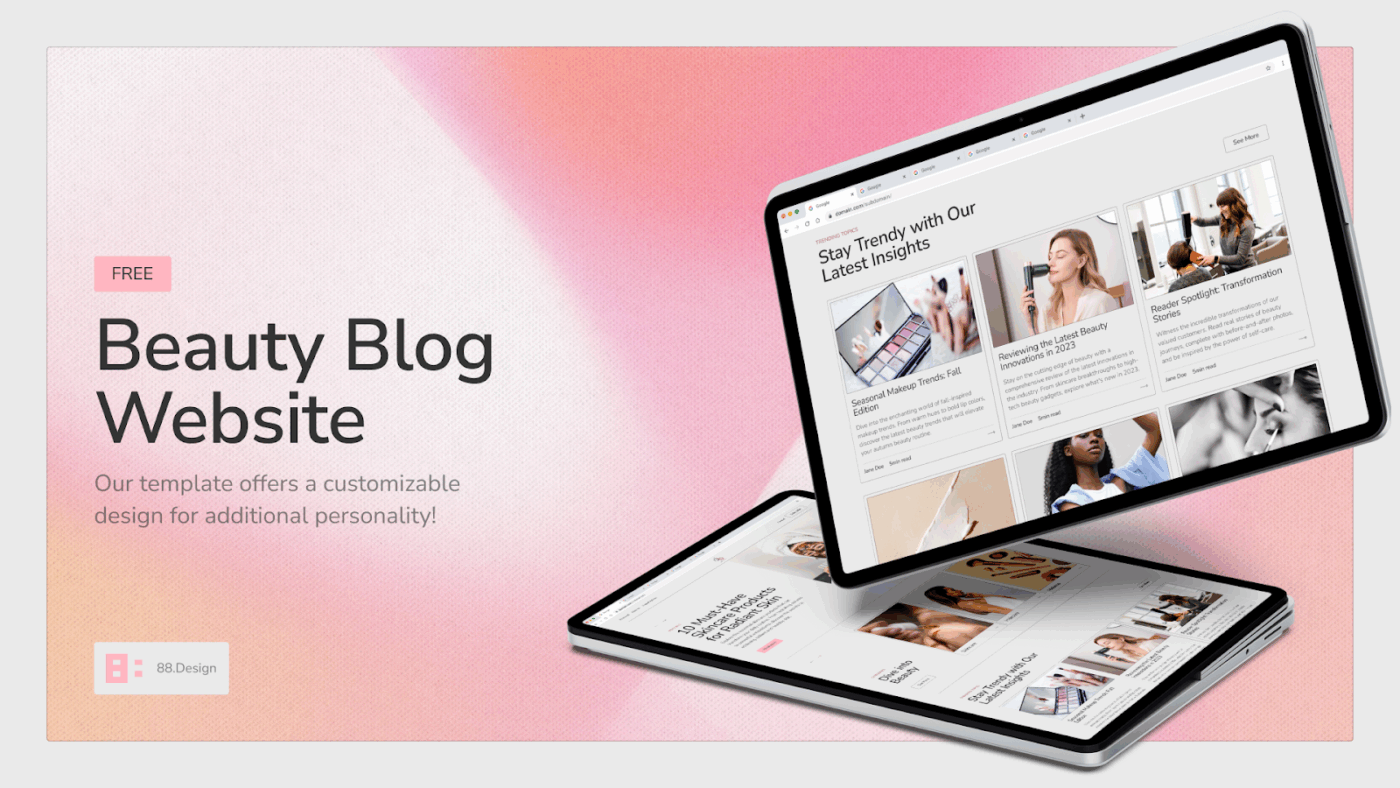
The Figma Beauty Blog Template gives you a fresh layout with gentle, pastel colors that instantly makes your beauty blog stand out. You can use it to publish skincare routines, makeup tips, product reviews, and interview-based stories using ready-made pages where you can simply swap in your own images and text.
The entire template features a soft pink gradient theme, and its aesthetics are aligned with the beauty and skincare industries. You can customize the font, color, layout, and images to match your brand or personal style.
It also includes tabs for trending posts, article pages, a built-in subscribe section, and a dedicated video highlights section that makes it easy to showcase your beauty content in a magazine-style format.
✅ Ideal for: Beauty creators who want a simple-to-use but elegant blog layout
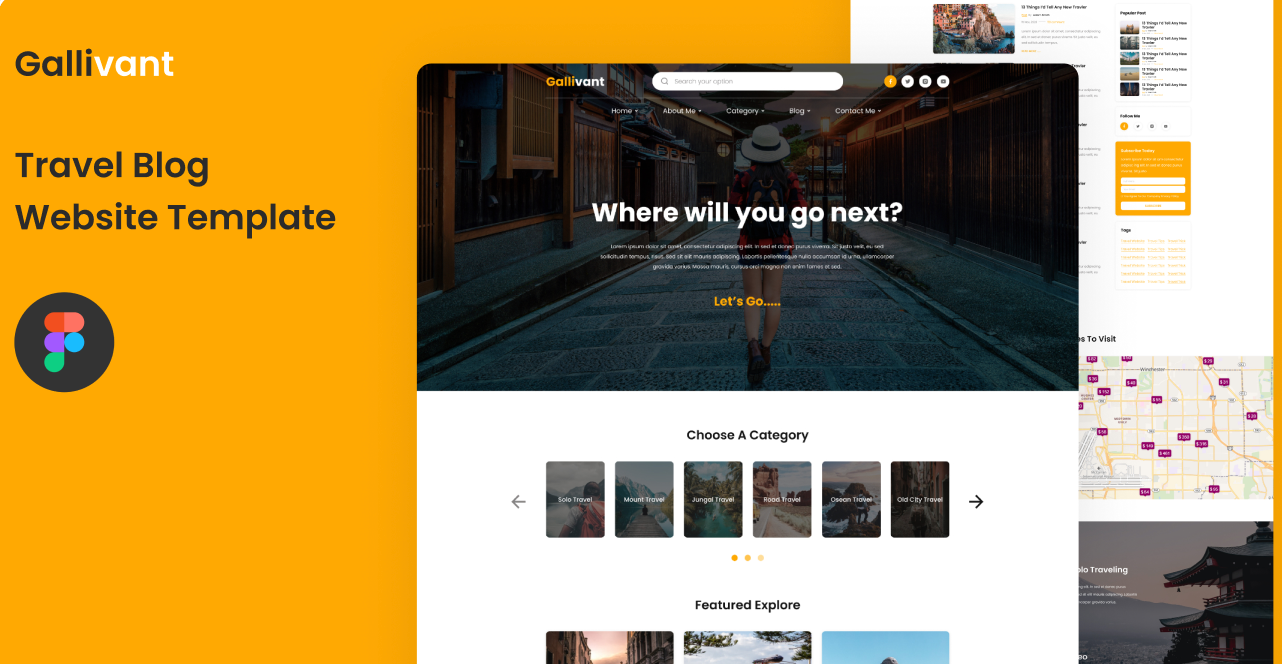
If you love telling stories about the places you have visited, the Travel Blog Figma Template is a good option. Your readers are greeted by a large hero image where you can add your stunning travel photos and a search bar for exploring various destinations.
The template also has a fun, thematic headline asking ‘Where will you go next?’ which encourages the readers to start exploring your blog right away. There are ready-made sections, such as the category slider, a slider for recent posts, a subscribe box for growing your audience, and even a small map to highlight routes or places to visit.
✅ Ideal for: Travel bloggers and photographers who want a ready-to-use layout to share their travel journeys and destination experiences
✈️ Stat Spotlight: According to the TGM Global Travel Survey, 22% of travelers worldwide say they most often use travel blogs to discover new destinations, placing them right alongside travel guidance and booking websites as major discovery channels.
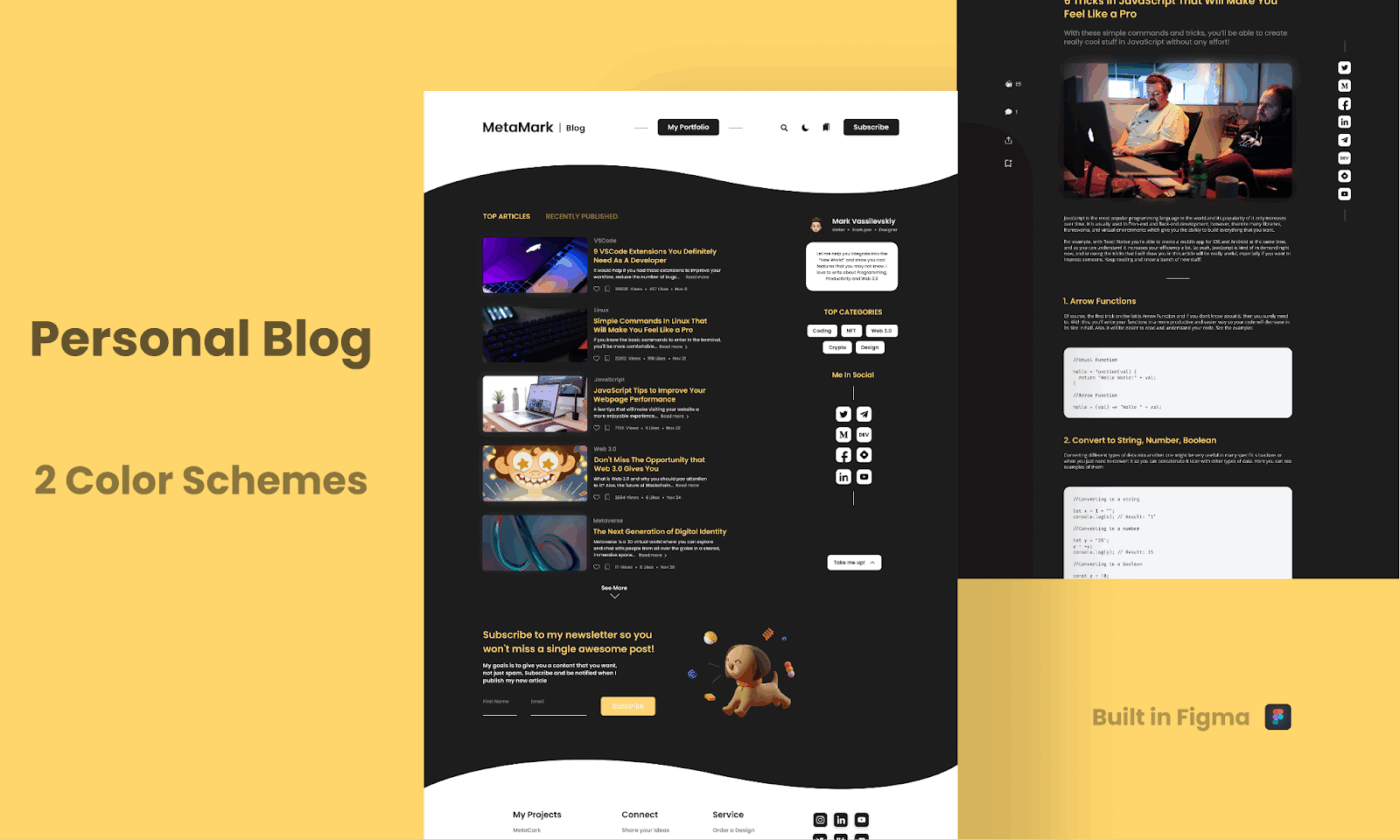
The Personal Blog Design in Figma Template is created in a way that your thought leadership articles and personal content feel naturally at home. Instead of a plain block header, the template uses a curved wave design that separates the top menu from the main content.
At the top, you will see your blog name, a neat navigation bar, and some helpful tools like search, theme toggle, and a subscribe button. Just below this section, you will find the article feed, which features two smart tabs: one for your top-performing posts and the other for your recently published articles.
Each article preview comes with a bold thumbnail image along with a short description and details like number of views, date, and reading time.
✅ Ideal for: Creators, developers, writers, and anyone who wants a space to share their stories and ideas
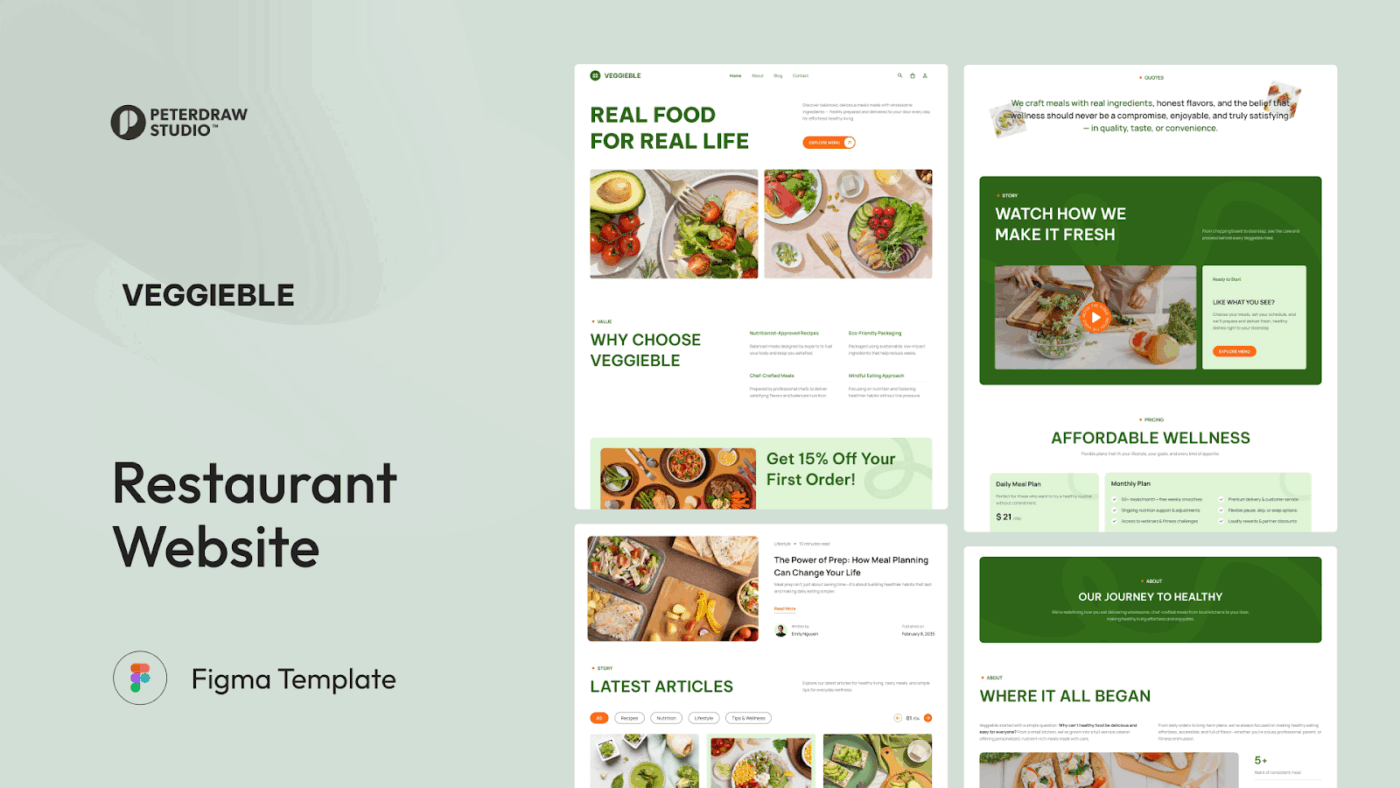
If you want to build a restaurant website that exudes a warm, food-loving vibe, the Veggieble – Restaurant Food Blog UI Figma Template is a great choice. The homepage is thoughtfully designed for your blog headlines, vibrant meal photos, and trust-building sections.
You can easily showcase your special offers, highlight chef-crafted meals, customer favorites, and even share behind-the-scenes videos of how your dishes are prepared. The template also includes a full section dedicated to recipes and wellness tips.
Additionally, a team page is available to help you introduce your chefs and nutritionists. There is also a contact page that features a simple form and an integrated map for quick communication.
✅ Ideal for: Restaurants, meal-prep brands, nutrition coaches, and food startups who want a nature-inspired food website that builds trust and boosts conversions
📊 Fact Check: Top-performing food blogs are among the most profitable niches in blogging, earning a median monthly income of US$9,169.

A great blog thumbnail can decide whether someone clicks on your article or scrolls past it, and this Blog Thumbnail Figma Template makes that part easy. The layout features bold typography, large, modern human character art, and bright illustrations.
The main design uses a large headline area where you can add your blog title that is immediately visible to the readers. Supporting graphics like geometric shapes and characters help add personality.
The color palette is also adaptable; you can easily switch colors or adjust the layout as per your blog style. Since everything in Figma is editable, you can change text, replace images, or experiment with different visual styles depending on your niche, such as education, lifestyle, tech, or productivity.
✅ Ideal for: Bloggers, writers, educators, and content creators who want stylish, high-impact thumbnails that boost click-through rates
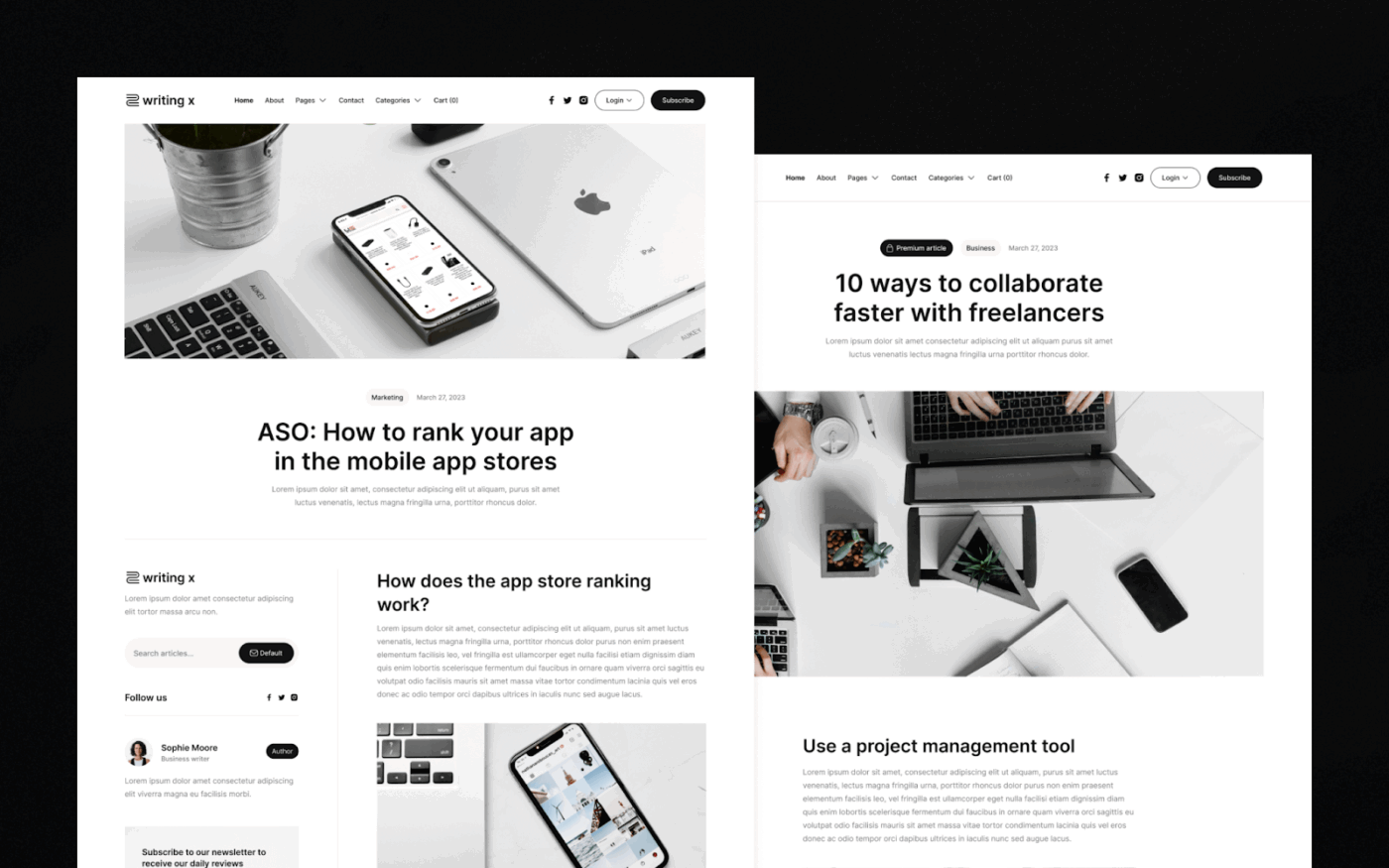
The Writing X Blog Figma Template is good for creating a premium-looking, content-focused blog. It is best suited for content-heavy websites, like SaaS blogs, design and marketing blogs, productivity guides, and even editorial websites.
The moment you open the template, you will find a search bar that includes links to all pages, categories, contact, login, and subscribe button, etc. Right below it, the layout opens into a wide hero section where your featured articles get the spotlight.
The reading area has generous margins, bold headlines, readable paragraph spacing, and an optional sidebar. The sidebar includes a newsletter subscription box, an author bio, social icons, and a popular articles list.
✅ Ideal for: Bloggers, media writers, newsletter creators, or SaaS content teams looking for an editorial-style blog layout that emphasizes clarity and high-quality content
💡 Pro Tip: If you’re designing your blog in Figma, the next step is filling it with content that keeps working for you long after it’s published. Here are some examples of evergreen content that reliably drive long-term traffic.
No doubt, Figma is great for designing blog layouts, but it has its limitations. Here are some things to keep in mind before you build your entire blog workflow in it:
📚 Read More: Best Content Marketing Software Platforms
Creating consistent, high-quality blog content requires more than just writing skills. Editorial teams need to coordinate content calendars, manage writer assignments, maintain SEO checklists, and ensure every post follows the same quality standards—all while juggling multiple articles at different stages of production.
And that is where ClickUp shines. It is the world’s first Converged AI Workspace, bringing together all work applications, data, and workflows.
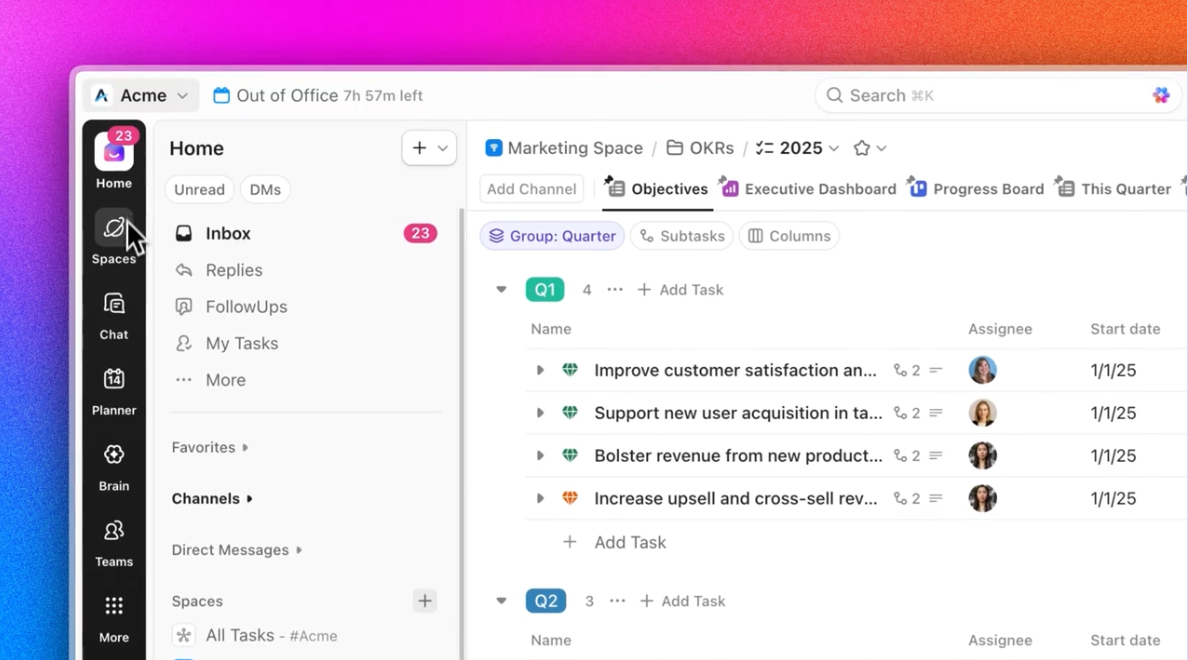
It gives you ready-made workflows, content calendars, SEO checklists, and task structures to operate your blog from a single place. All powered by AI that can help draft outlines, suggest improvements, and automate repetitive tasks.
At the end of the day, ClickUp eliminates all forms of Work Sprawl to provide 100% context—so your blog templates aren’t just static documents, but living workflows connected to actual content production, writer assignments, and publication schedules.
Now, let’s discuss some of the best ClickUp blog templates you can use as workflow-driven alternatives to Figma’s design templates.
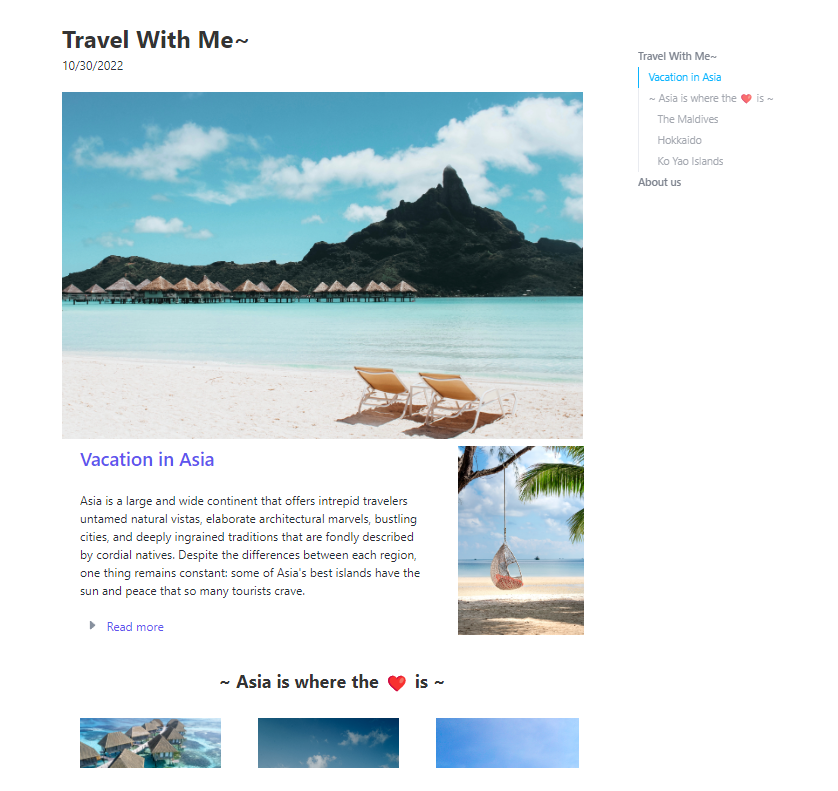
The ClickUp Blog Template is a ready-to-use blog structure that can be used for any type of blog, including travel, blogging, personal blogs, tourism, news, and magazines.
At the top of the blog, you will see the hero section to write the title of your blog along with a compelling opening statement that instantly hooks the reader. Right beside it, there’s a space to credit your blog author, add the publishing date, and include quick contact details.
From there, the layout guides you to write the introduction and the main body of your blog. You can break your content into defined sections and add various photos and illustrations to each section to make it more engaging. At last, you have space to add a summary, CTA buttons, or internal links to your other blogs, perfect for boosting engagement.
✅ Ideal for: Writers, bloggers, marketers, and creators who want a ready-to-use blog layout that turns long-form content into an attractive, publication-quality article
💡 Pro Tip: Setting up your content workflow is a breeze when your workspace truly understands you and has 100% context of your work. ClickUp Brain is an AI assistant built directly inside ClickUp that helps you research and write content without needing to switch tools.
With custom prompts, you can:

Our own team uses ClickUp Brain every day to scale content efficiently (yes, we ship 150+ blog posts per month).
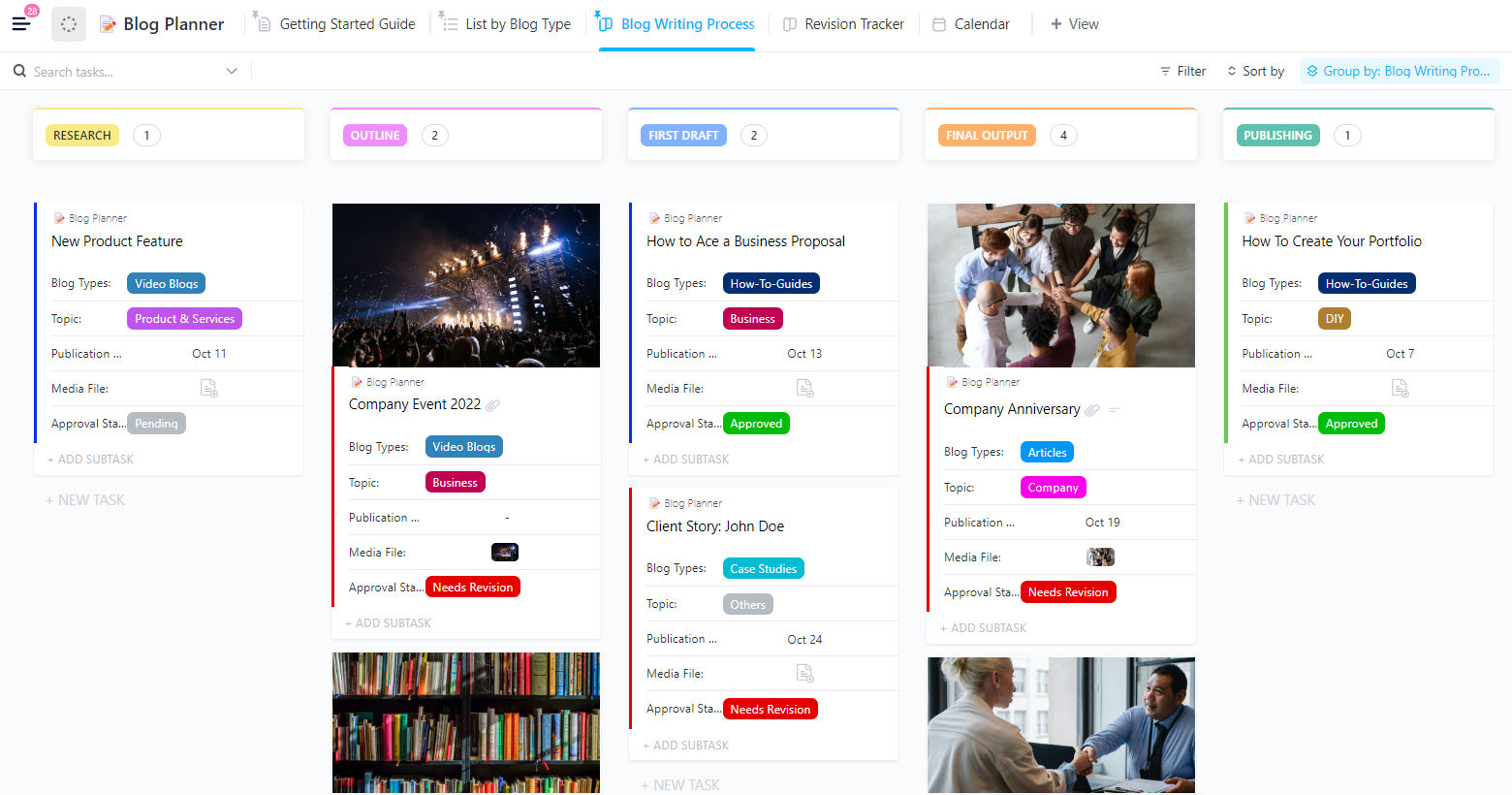
If you need a solid command center to run your entire blog content production, the ClickUp Blog Planner Template is what you need. It works almost as a mini editorial CMS built right inside ClickUp. It categorizes every blog idea by blog type, such as ‘how-to guides’, ‘video blogs’, ‘guest blogs’, and ‘personal stories’, among others.
The ClickUp Kanban Board view gives you an overall look at your blog writing process from research and outline to publishing and promotion. You can drag and drop your blogs through each stage. And when revisions start coming in, the dedicated Revision Tracker shows which blogs are pending, approved, and which still need revisions.
✅ Ideal for: Content teams, bloggers, editors, agencies, and marketers who want a professional-grade content planning system that brings structure and speed to their blogging workflow
Here’s what a ClickUp user has to say about managing blog posts inside the platform:
I appreciate ClickUp for its collaborative nature, which is incredibly beneficial in my work at a marketing agency. The platform allows me and my colleagues to see exactly what each other is doing or working on, which significantly improves our team coordination and communication. This feature helps in keeping everyone aligned in managing blog posts and understanding the steps in the process. I find this transparency and ability to track each other’s progress to be a very valuable aspect of using ClickUp.
💡 Pro Tip: Since the ClickUp Blog Template is a doc-style template, you’re already halfway to publishing a professional, polished blog. ClickUp Docs enables you to treat your content as a living workspace.
With ClickUp Docs, you get:
You can add inline comments, tag your team for feedback, attach reference links, embed images seamlessly, and even transform your draft into tasks with one click.
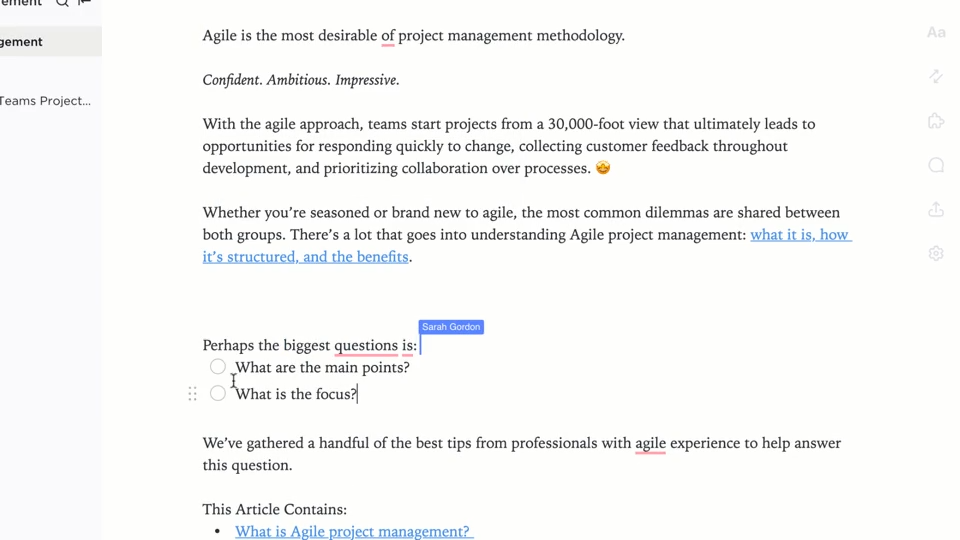
The coolest part? You can style your blog like a real webpage using banners, colored callouts, dividers, nested pages, and rich formatting that makes your writing feel premium and reader-ready.
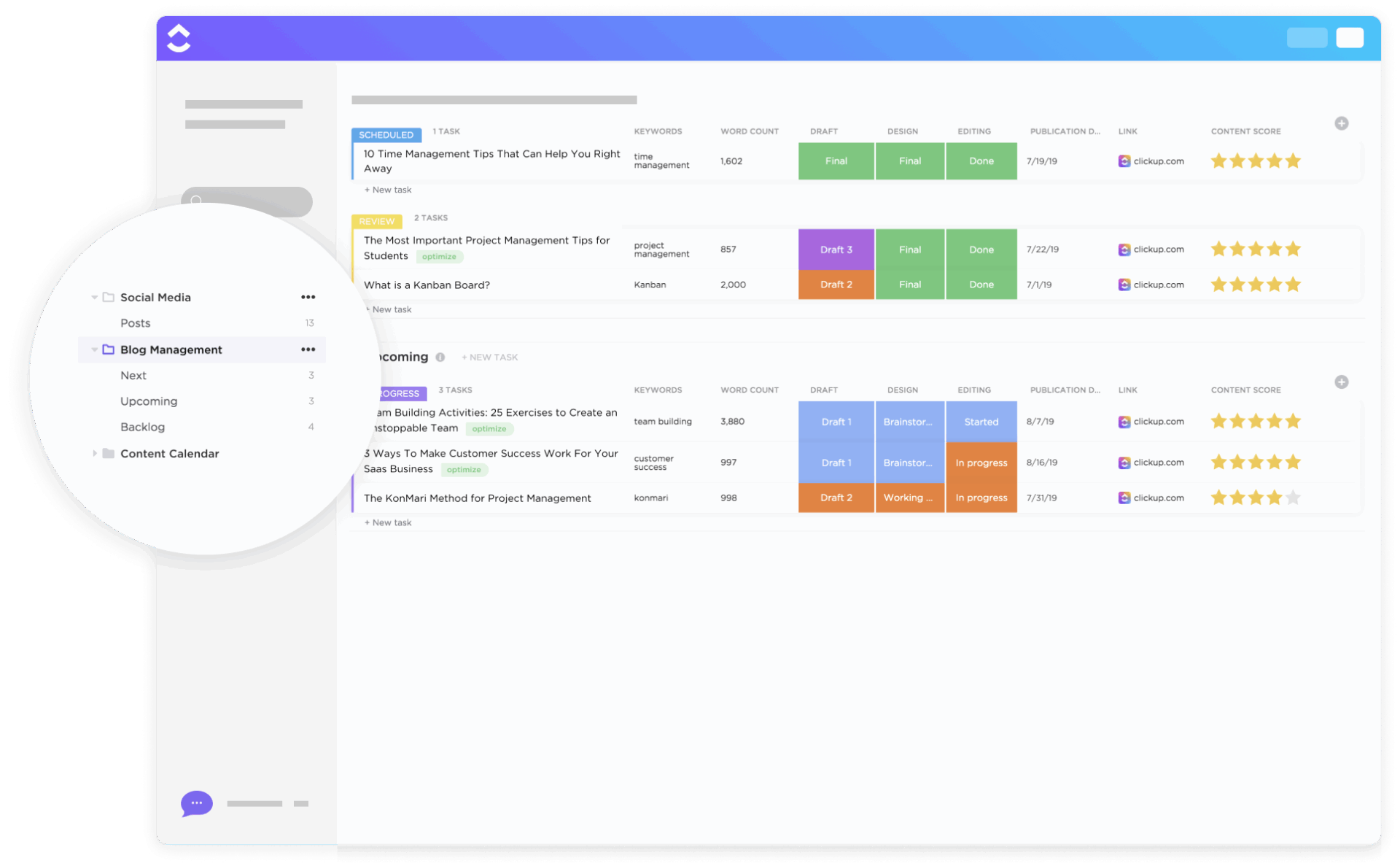
The ClickUp Blog Management Template comes with a smart three-list system that keeps your entire blogging workflow organized from idea to publication. One list is for incoming blog requests, one for active posts in the writing and approval process, and one for designers to track thumbnails and graphics.
Now, what makes this template truly valuable is how it manages high-volume content. For example, you can drag blog tasks across a Kanban board, grouped by status or even by channel (Website, LinkedIn, Instagram, YouTube).
Also, Calendar and Timeline Views give you a picture of your publishing schedule. Designers and writers work in parallel without stepping on each other because assets also have their own workflow with statuses like Concept → In Review → Approved.
✅ Ideal for: Teams or creators who want a centralized and automated visual system to plan, write, review, and publish content across multiple channels
📮 ClickUp Insight: Low-performing teams are 4 times more likely to juggle 15+ tools, while high-performing teams maintain efficiency by limiting their toolkit to 9 or fewer platforms. But how about using one platform?
As the everything app for work, ClickUp brings your tasks, projects, docs, wikis, chat, and calls under a single platform, complete with AI-powered workflows.
Ready to work smarter? ClickUp works for every team, makes work visible, and allows you to focus on what matters while AI handles the rest.
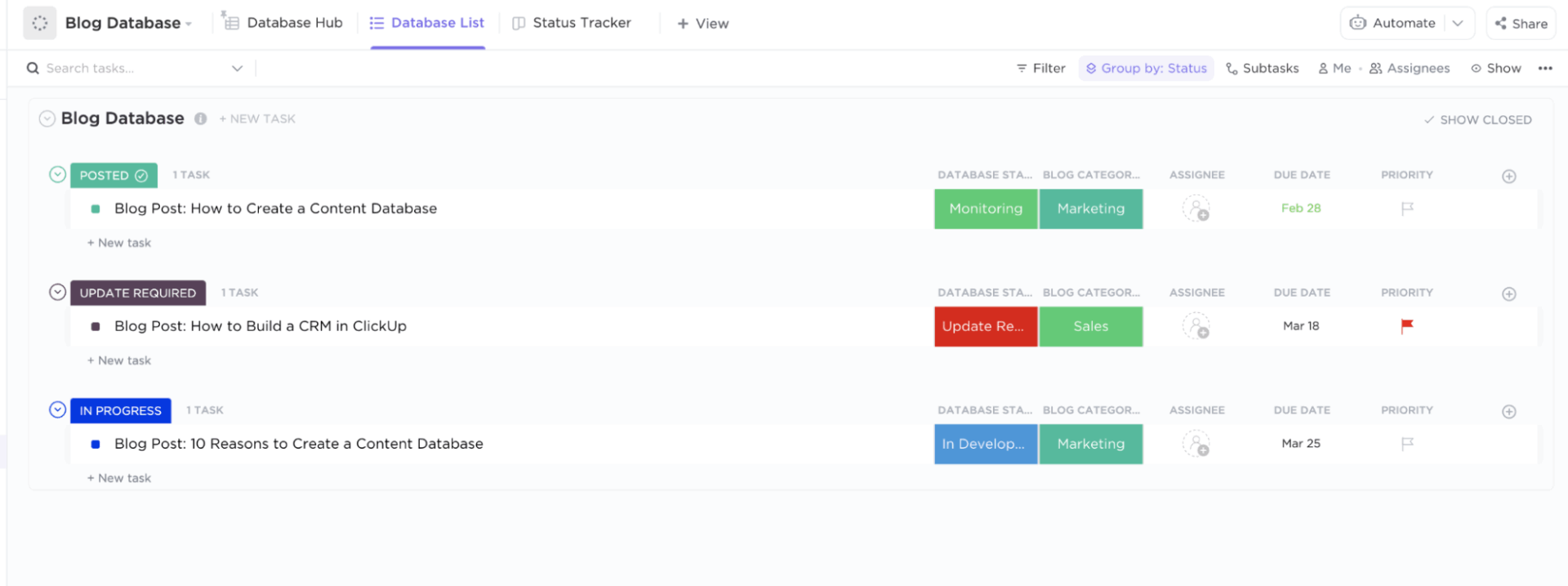
The ClickUp Blog Database Template is a complete database for your blog where every blog post has a status and a definite next step. You can see whether a blog post is just an idea, in progress, or already published, along with all its essential details.
There are columns for draft links, published URLs, assignees, categories, and progress stages. For a spreadsheet-like breakdown, there is List view, where the blogs are arranged by their production status, like Posted, In Progress, and Update Required.
It’s ideal for weekly review meetings or content audits because you can expand on tasks, check metadata, update fields, or assign due dates directly from the list without opening individual cards.
✅ Ideal for: Content creators and managers who want a database-style workflow that tracks every blog post from idea to post-publish maintenance with total visibility
📚 Read More: Want to take your blog organization even further? Check out our guide on how to build a content database (with templates).
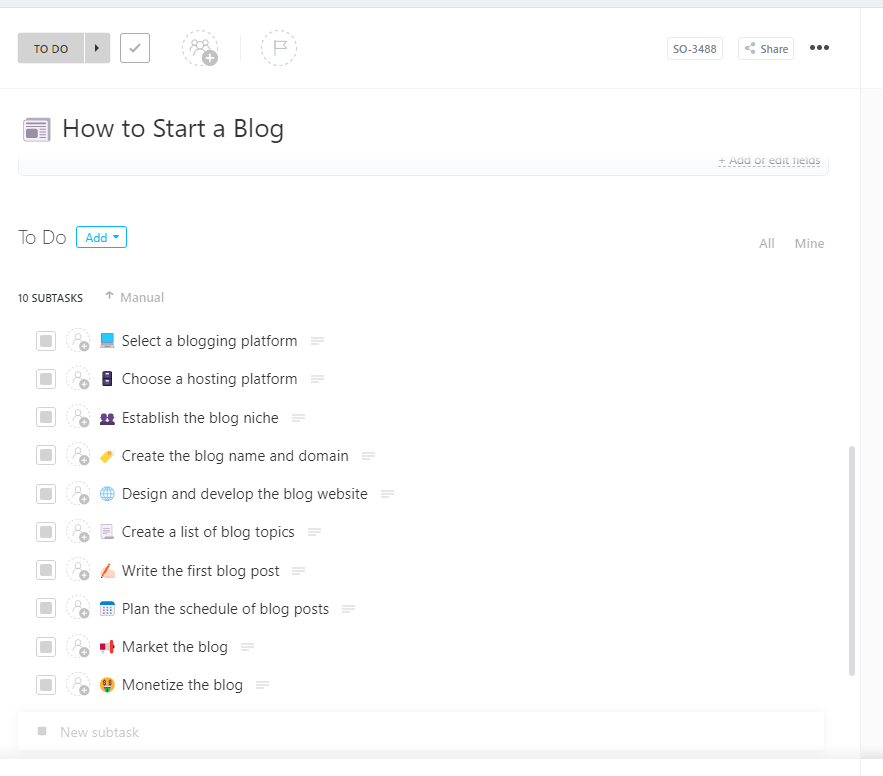
If you are a newbie to blogging or looking to start your own site, the ClickUp How To Start A Blog Template is a perfect pick for you. The template begins with the basics, including your blog name, the blog owner, and a link to the blog’s website once it is created.
As you scroll further, a list of subtasks is provided for every major step required to launch a blog successfully. This covers choosing a platform, selecting a hosting provider, creating the blog name and domain, designing the website, planning your content strategy, writing your first post, and even marketing and monetization.
You will also have two dynamic progress bars that automatically calculate your completion percentage as you check off subtasks.
✅ Ideal for: Creators and beginners who want a step-by-step workflow to launch a blog with zero confusion and maximum clarity
📚 Read More: Check out the most useful blogging tools that can support your content creation process and help you grow faster.
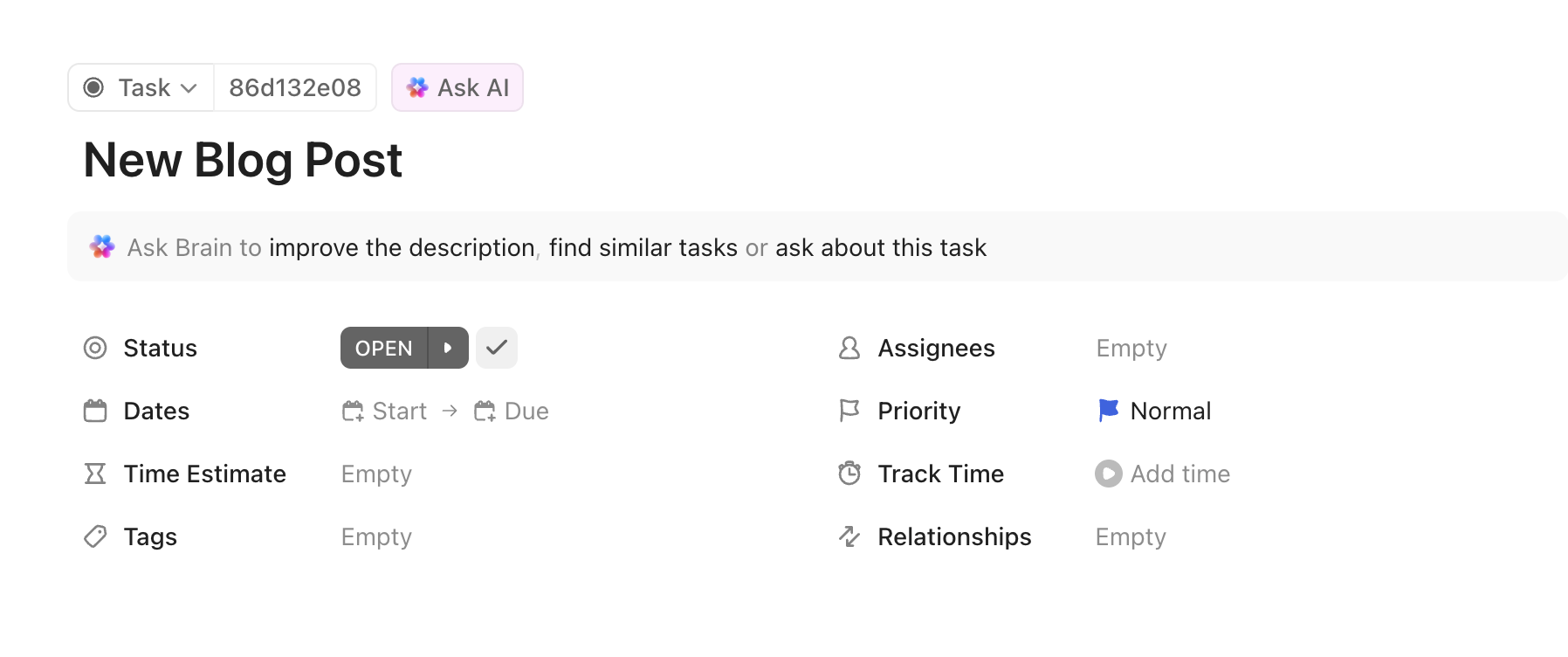
The ClickUp New Blog Post Template works like a project manager for every article you create. It gives you a complete workflow for planning, writing, publishing, and promoting a new blog post. It has a task panel where you can set the blog status, add start and due dates, estimate time, assign team members, and even turn on time tracking.
What truly elevates this template is the built-in 10-step blog writing guide. It guides writers, especially newer ones, through a consistent writing process, ensuring they don’t get stuck and always know what to do next.
With Custom Fields for details like blog category, draft link, final version, funnel stage, launch date, post URL, and a progress bar, nothing gets lost. In simple terms, from TOFU/MOFU/BOFU to SEO tags to draft links, it captures everything a content team needs.
✅ Ideal for: Content writers, SaaS marketers, bloggers, agencies, and teams who need a repeatable and trackable system to plan, write, publish, and promote every blog post
🚀 ClickUp Advantage: ClickUp BrainGPT turns your new blog post template into a hands-free, AI-powered writing cockpit.
Instead of typing every outline or updating manually, you can simply speak your ideas aloud, and Talk to Text will turn your voice into formatted content inside your ClickUp Doc or task description.
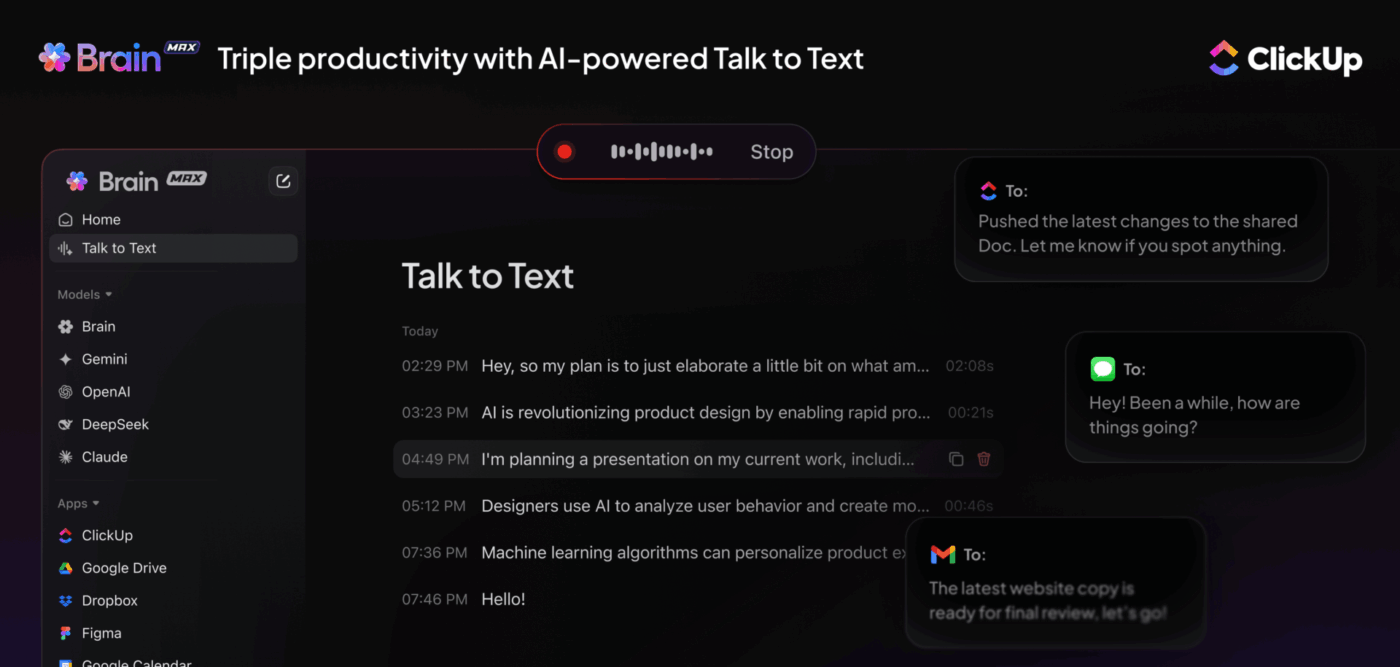
That means you can brainstorm headings, dictate intro paragraphs, add SEO notes, or explain changes to your editor without stopping your workflow.
It’s like having a voice-activated editor and project manager working beside you inside ClickUp.
⭐ Bonus: Use premium AI models like ChatGPT, Claude, and Gemini directly from BrainGPT to rewrite your paragraphs, sharpen your hooks, and generate SEO-optimized titles.
📚 Read More: Best AI Blog Writers to Try
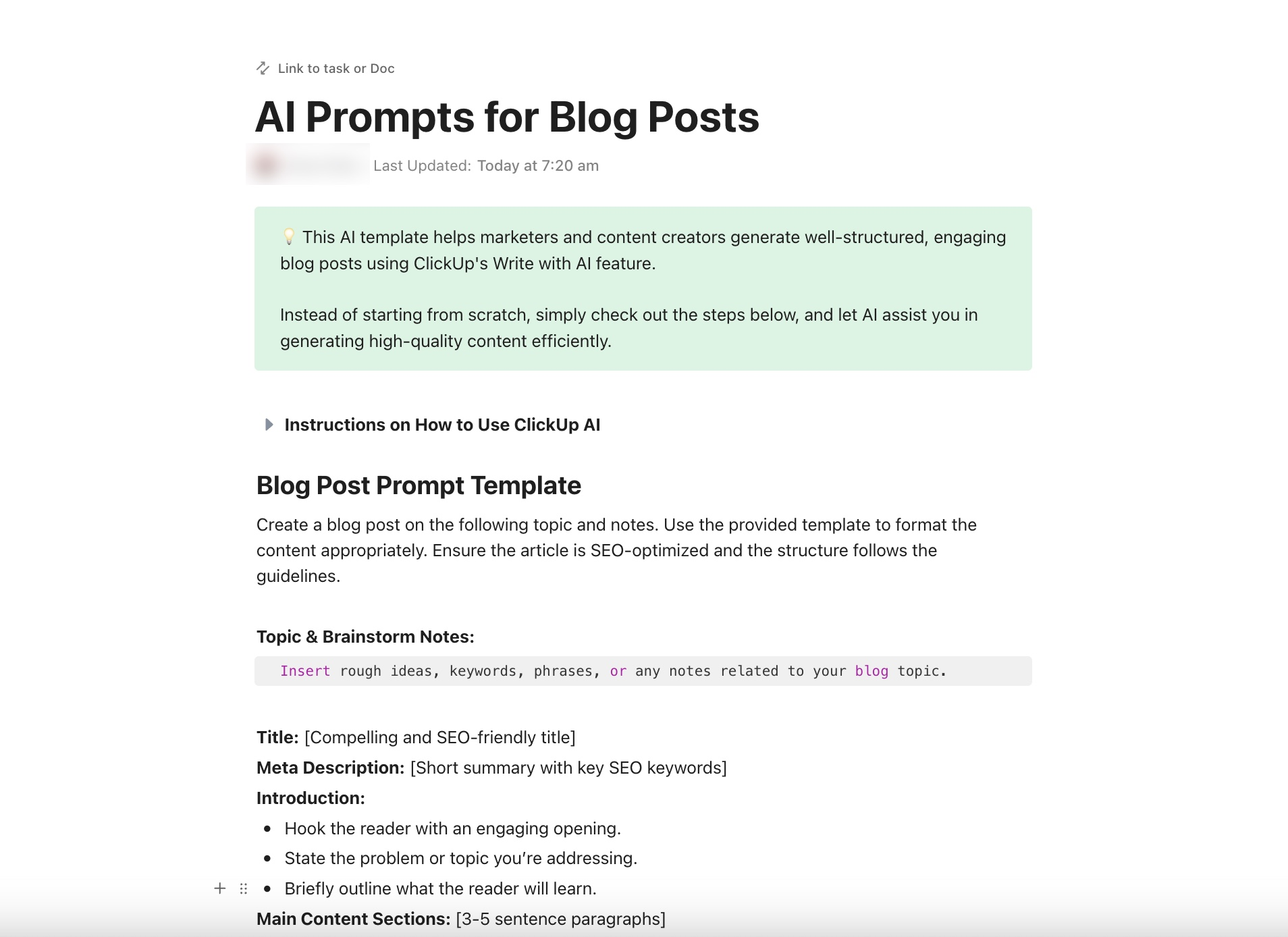
Using AI for generating blog content is common now, but using it effectively is still rare. The ClickUp AI Prompts and Guide for Blog Post Template bridges that gap by giving a simple doc-style template that helps you write your entire blog post with ClickUp Brain.
You can start by dumping all your ideas, keywords, examples, and references so the Brain has the right context to work with. Once the context is ready, you can paste the built-in blog framework, choose your tone, and creative style.
And then, let ClickUp Brain generate a complete first draft with a title, meta description, intro, main sections, and a conclusion.
✅ Ideal for: Bloggers, SaaS writers, content teams, and anyone who wants to write fast and high-quality blogs using AI without compromising on quality
🎁 Bonus: Watch this video to learn how to write and refine blog posts faster using ClickUp Brain:
With over 5.24 billion social media users and people spending more than 2 hours a day scrolling, you can’t afford a scattered social media content workflow.
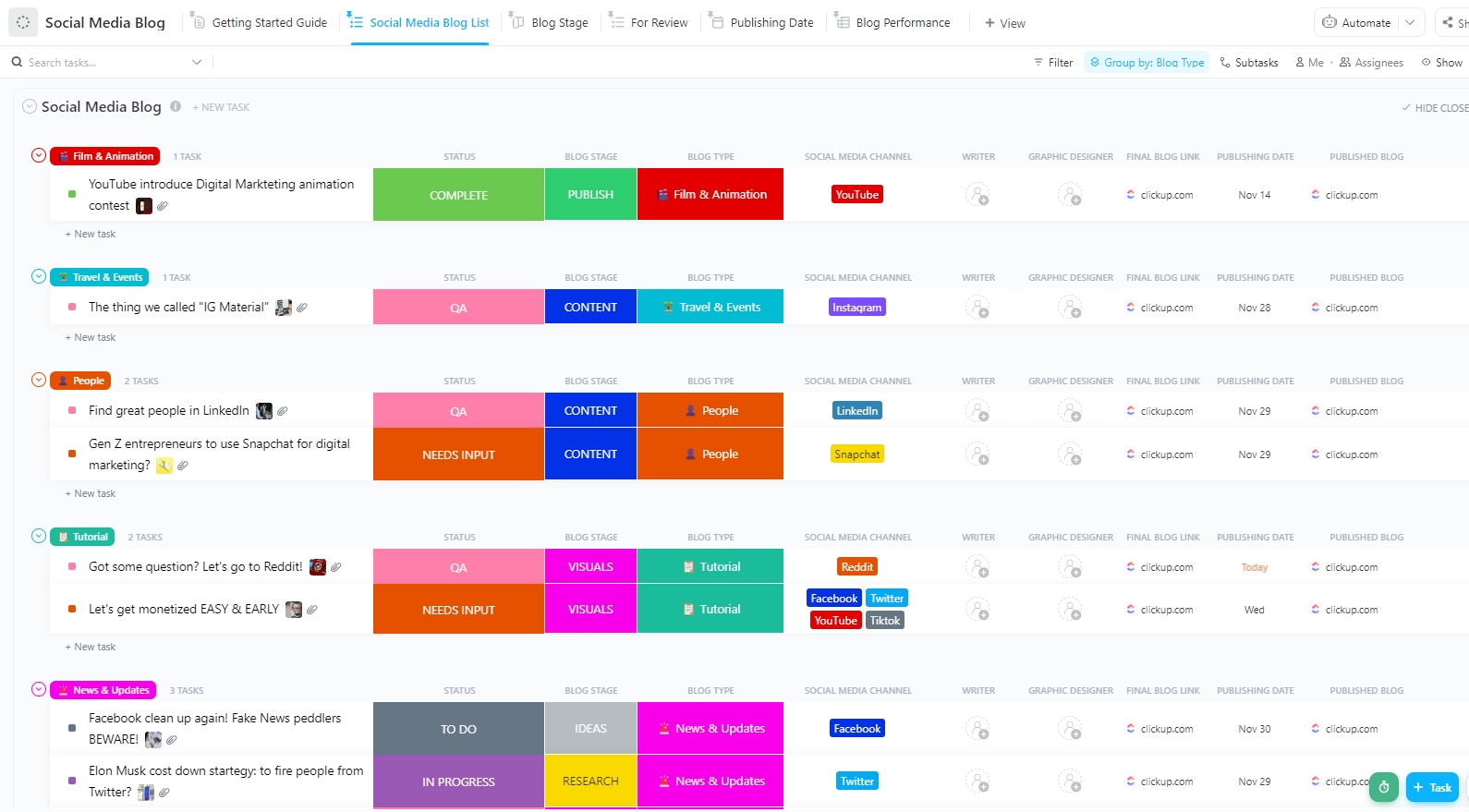
The ClickUp Social Media Blog Template gives you a single dashboard to manage all your social media post ideas, drafts, designs, reviews, and publishing dates. You can tag each blog by writer, blog type, social media channel, stage, designer, etc, turning this into your central editorial database.
Once posts are added, the workflow becomes completely visual. The Board view organizes your entire post timeline into stages, including Ideas, Research, Draft, Content, Visuals, QA, and Publish. Moving work forward is as simple as dragging each card to the next phase.
✅ Ideal for: Social media managers and content teams who want to publish on social media consistently and track performance easily
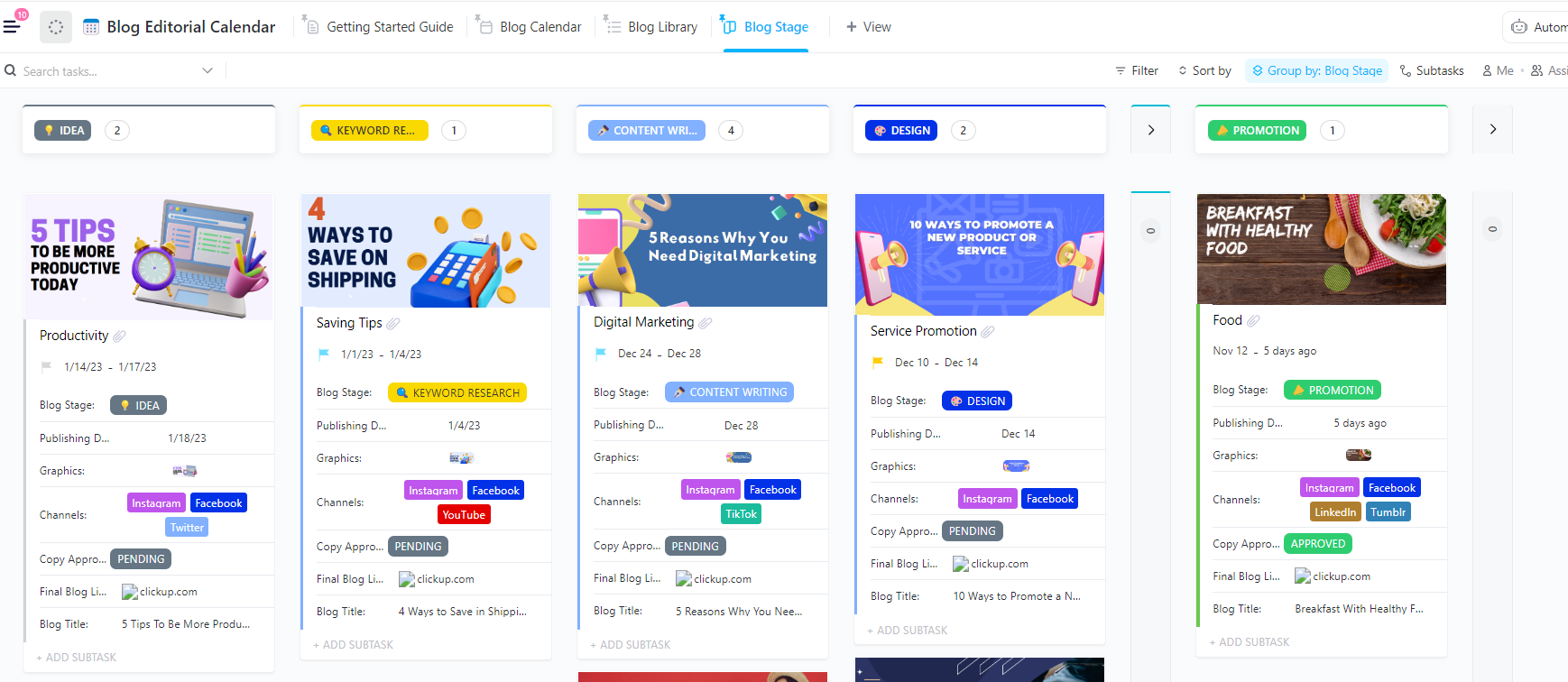
The ClickUp Blog Editorial Calendar Template is built to help you track all your blogs along with their related activities. You can set publishing dates one by one and adjust them with a simple drag-and-drop on Calendar View.
If you want a broader or tighter view of your schedule, you can also switch between weekly, monthly, or custom time frames in a single click. With fields like Blog Stage, Publishing Date, Channels, Draft link, Graphics, Design Approval, Copy Approval, and Final Blog Link, you can see every detail without opening multiple tasks.
✅ Ideal for: Content teams who want to have a consistent blog publishing workflow
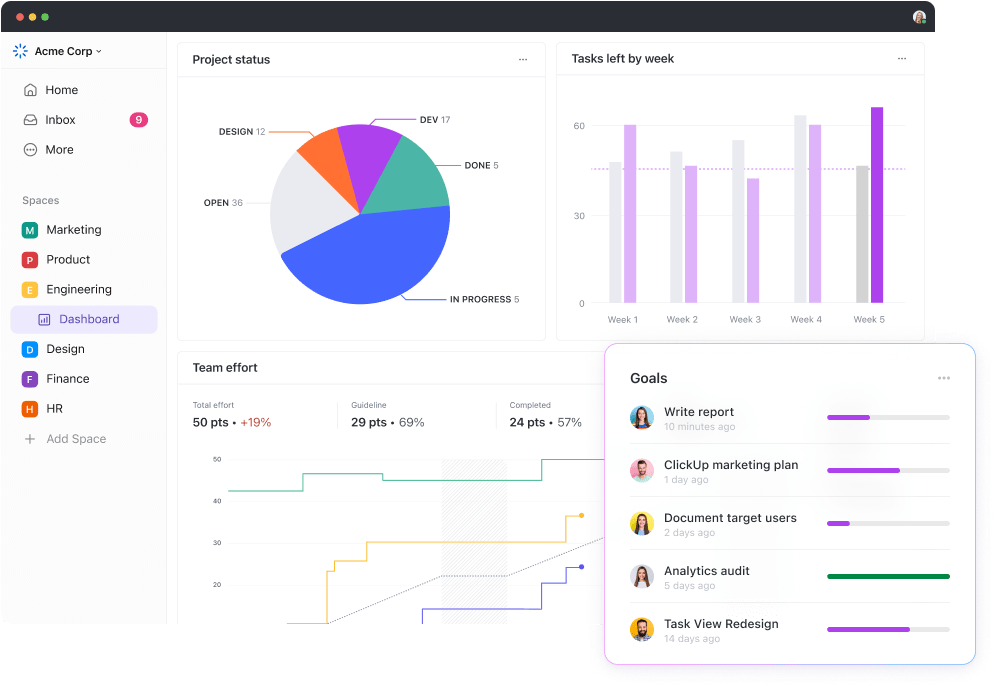
💡 Pro Tip: If you want a clear picture of how your blog is doing, ClickUp Dashboards can save you a lot of guesswork. It brings all your important content activity into one screen, so you can see what’s moving well and what needs attention.
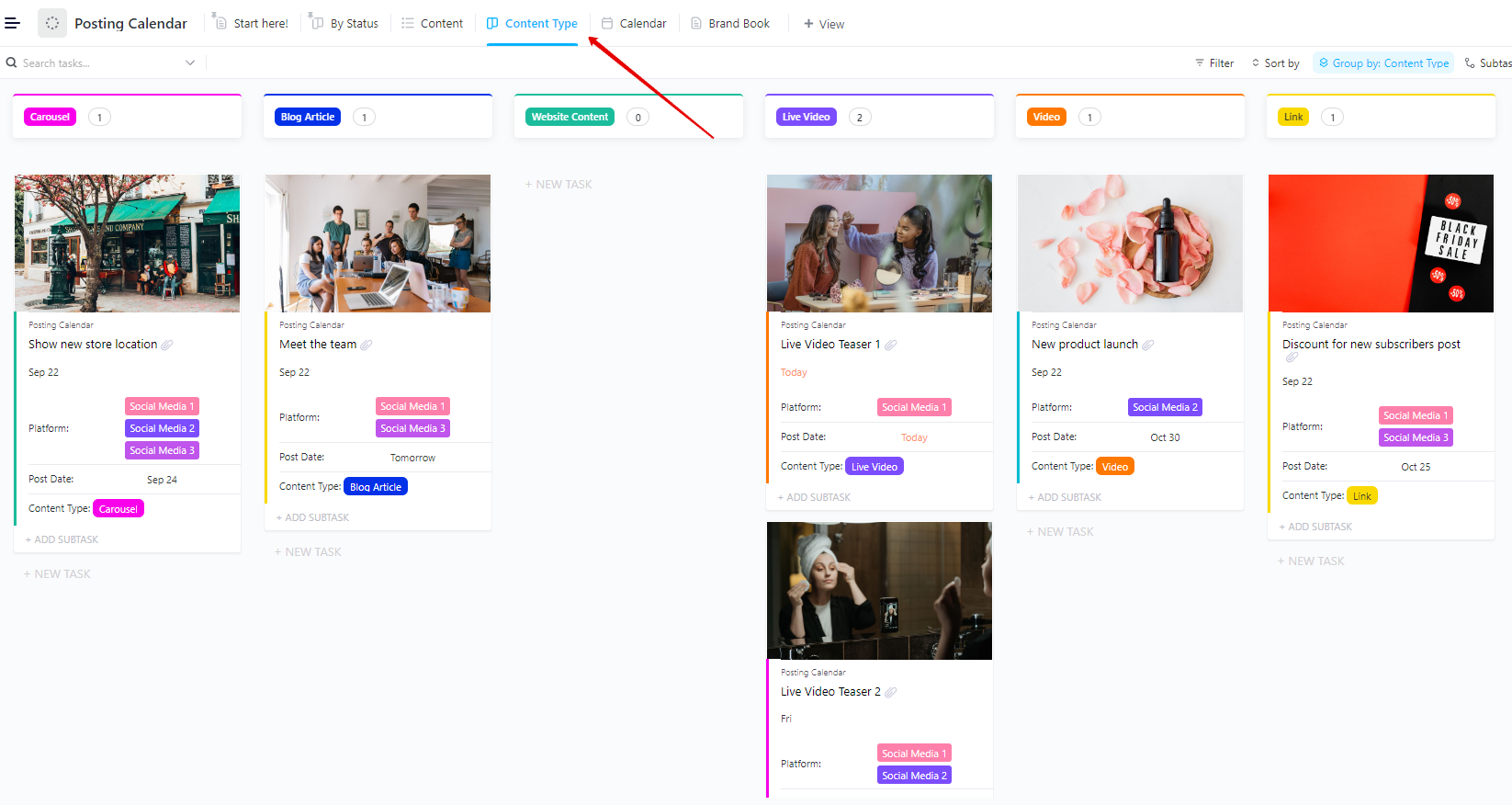
The ClickUp Posting Calendar Template gives you a bird’s-eye view of everything you are publishing across your social media channels. Each post appears as a task card with a color-coded header that shows its stage, whether it’s in Research, Content Writing, Design, Approval, or Published.
The Board view even displays your actual media, such as your images, to be posted with each post, so you can better visualize each post.
Additionally, if you want to understand your content strategy by format, you can group your posts by category as well, such as Blog Article, Website Content, Live Video, Carousel, or Link, allowing you to quickly review how balanced your content mix is.
✅ Ideal for: Social media managers and creators who need a deadline-proof way to plan and publish content consistently across multiple social media platforms
⚡ Template Archive: Free Content Calendar Templates for Social Media
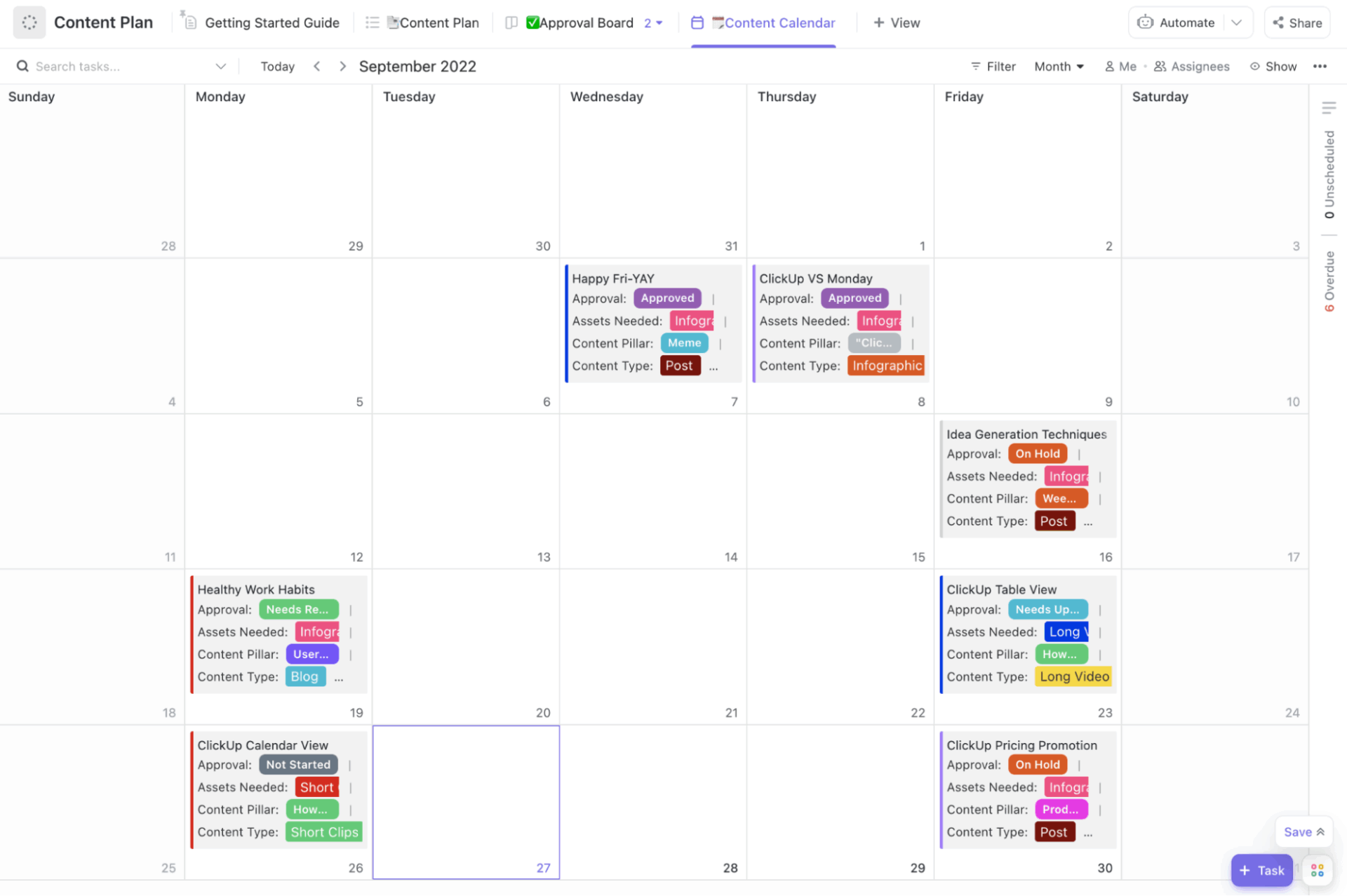
Creating and publishing content becomes easier when you have the ClickUp Publishing Content Plan Template with you. It helps capture every content idea as a task and automatically groups it by priority level, like Urgent, High, Normal, and Low.
With every task, you can also add details like action taken, its purpose, content type, content pillar, target audience, keywords, and assets needed to indicate the information about your content. The same task can be viewed in a full calendar format, where you can easily drag and drop content to adjust deadlines.
✅ Ideal for: Teams or creators who want an organized content publishing system that manages every idea from brainstorm to published
⚡ Template Archive: Building a consistent content engine is tough when ideas, drafts, deadlines, and approvals are scattered everywhere. A solid content plan gives your team clarity on what to create, when to publish, and how each piece contributes to your marketing goals.
Our curated list of content plan templates makes this process smoother by helping you choose a content plan that:
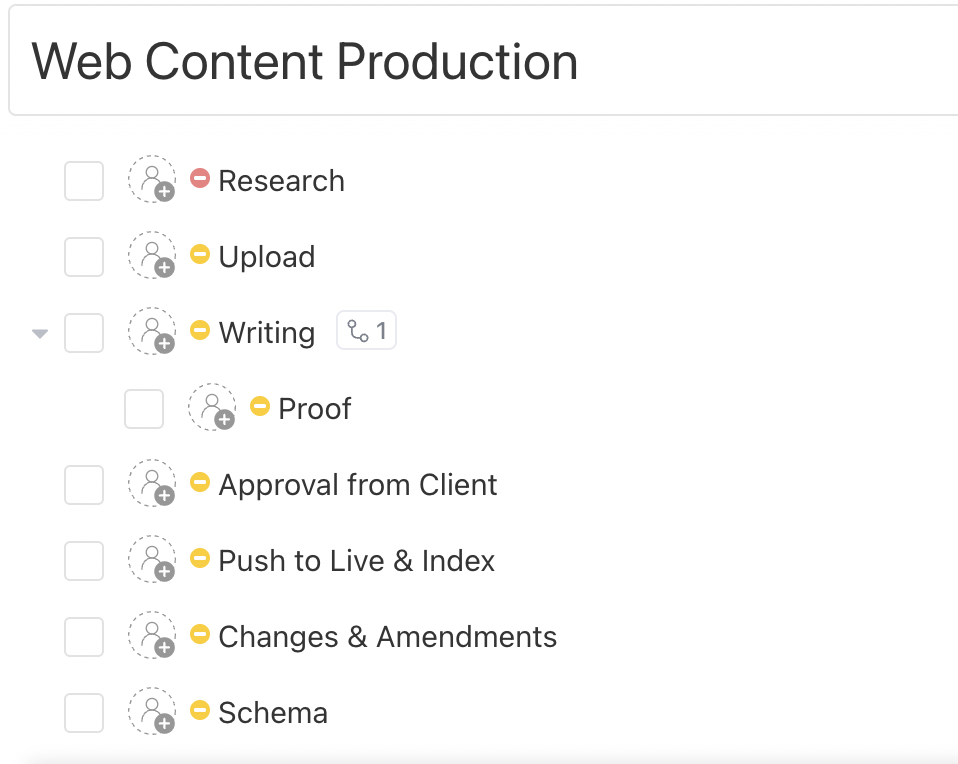
Creating content for multiple clients or channels? If yes, you need the ClickUp Web Content Production Template. It includes two key fields: Design Category and Progress. The design category allows you to group content types like landing pages, blog posts, or web copy together.
Progress, an auto-updating bar, indicates exactly how far each piece has progressed. It also updates automatically based on subtasks, making it incredibly easy to monitor the status of any task at a glance.
At the core of the template is a 7-subtask production pipeline that covers everything from Research and Writing to Changes, Amendments, and Schema. Each one represents a major milestone in content creation, making the process transparent and trackable for everyone involved.
✅ Ideal for: Agencies and teams that manage multi-stage content pipelines, where research, writing, approvals, revisions, SEO tasks, etc., need to move in sync without losing visibility or deadlines
⚡ Template Archive: Free Content Strategy Plan Templates to Streamline Your Content Plan
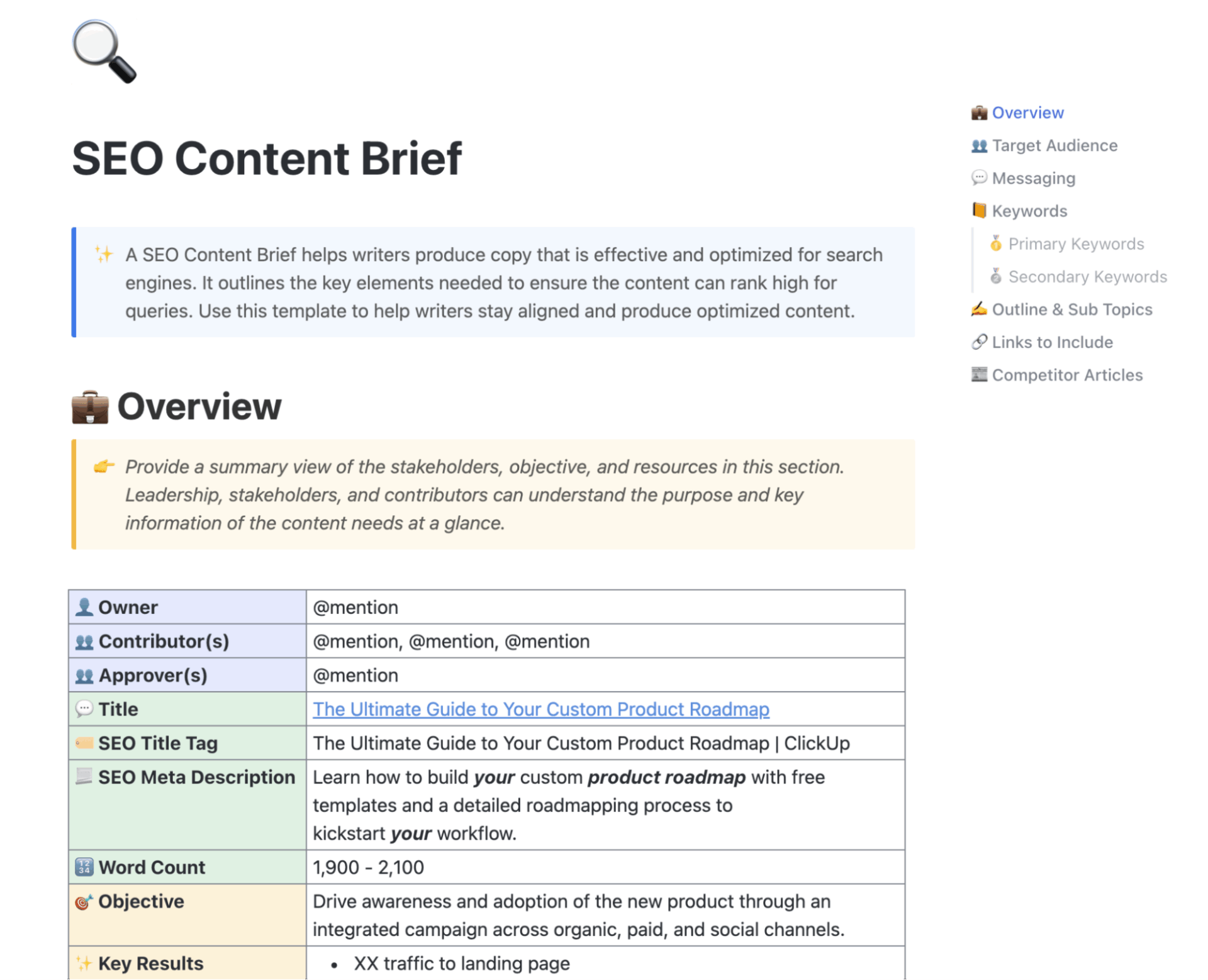
Optimizing your content for search engines to improve its ranking is probably the first part of nailing SEO content. The ClickUp SEO Content Brief Template brings an entire SEO workflow into one well-formatted document.
You can tag the article’s Owner, Contributors, and Approver so everyone knows their role from the start. Writers also receive the exact SERP-facing elements they need, such as a clickable Title, SEO Title Tag, and meta description.
The Target Audience table captures age, education, occupation, income, and behavioral insights so the writer knows who they’re speaking to. The Messaging section outlines the core themes, selling points, tone of voice, and final CTA, making sure every article stays aligned with brand goals.
✅ Ideal for: SEO strategists and content managers who want to produce high-quality, SEO-optimized content
📚 Read More: Best Content Management Software and Tools
The ClickUp Content Writing Template can be used for writing any type of content, including website pages, blog posts, press releases, case studies, or simple call-to-actions. It includes separate templates for all these types of content.
You can define your content goal, target audience, publishing channel, timelines, and required media upfront so every piece starts with clarity. Every content type comes with a structure for guidance.
For example, in the website landing page template, you will find spaces for documenting your blog goals, audience, navigation menus, keywords, meta tags, hero sections, benefits, social proof, awards, and more to plan your website content.
✅ Ideal for: Anyone who wants a guided, all-in-one content planning system that can help them write published-ready content from scratch
⚡ Template Archive: If you’re looking for more structured writing systems, you’ll love our content writing templates. It’s a curated collection of plug-and-play templates for articles, press releases, website copy, newsletters, scripts, briefs, and more.
You’ve seen the types of blog templates available. But what if you’re just looking to start a blog and are undecided on your focus area?
Here are some of the most common (and useful) Figma blog template categories you will come across:
Beauty and lifestyle blogs are created with a simple goal in mind, i.e., to make your content look elegant and visually irresistible.
In these blogs, you will find features such as large hero images, soft color palettes, elegant typography, and ample white space. The layouts are designed to perfectly highlight your product photos, before-and-after images, tutorials, routine breakdowns, and influencer-style storytelling.
Travel is all about stories and experiences. These templates focus heavily on immersive visuals to make your places and destinations shine throughout. The typography is mainly simple so that the readers can go through long travel stories or guides without feeling overwhelmed.
You will also find sections for maps, travel highlights, tips, photo grids, etc., to showcase both visuals and detailed narratives.
The highlight of a personal blog template is ‘you’. These templates typically feature balanced typography, soft spaces, and minimal visual clutter, allowing readers to more easily resonate with your thoughts and stories.
Even for visuals, they rely on subtle design cues that make long-form content easy to read and emotionally engaging. You will often find sections for essays, opinions, life updates, and expertise-driven posts, along with simple author bios.
👀 Do You Know? The #1 thing readers want from personal blogs? Vulnerability.
Posts that show:
….create emotional connection. Blogs with only brief snapshots don’t perform as well as long-form, story-driven content.
Food and restaurant blog templates make your dishes and stories look as good as they taste. With a perfect combination of rich visuals and coherent sections, they are perfect for putting out recipes, ingredient lists, chef notes, and food photography.
You will find warm color palettes and elegant typography that bring attention to both the food and the narrative behind it.
Many of these templates also include areas for step-by-step instructions, nutritional details, restaurant highlights, chef introductions, and featured dishes.
Blog thumbnail templates are designed to help your content stand out and get clicked in an instant. These designs are not complete blog layouts.
Instead, they include scroll-stopping thumbnail styles, like bold titles, strong visual hierarchy, simple color blocks, or even strategic image placements you can easily reuse for every post.
Multi-purpose editorial blog templates are suitable for almost any niche, including business, technology, writing, and thought leadership. They include clean grids and well-structured typography to create layouts that look both modern and professional.
There will be multiple sections for featured posts, listicles, guides, long-form articles, author profiles, and more. They are also created with scalability in mind.
This means whether you publish one article or build a library of a hundred blogs, it will stay consistent and polished without limiting creativity.
⚡ Template Archive: If you’re building more than just a blog layout, this archive gives you a full stack of ready-to-use content marketing strategy templates to plan and scale your content like a pro.
Figma blog templates make it easy to design visually appealing layouts without having to start from scratch. They help you turn ideas into beautiful blog pages that look great on every device.
But great design is only half the journey. You still need a smooth way to plan topics, manage drafts, track edits, organize assets, handle SEO, and publish consistently.
That’s where ClickUp templates fit perfectly. They provide you with ready-made workflows, calendars, checklists, and content systems that keep your entire blog process organized, from idea to promotion.
If you want to create blogs that are not just well-designed but also consistent and conversion-ready, ClickUp is the tool you’ll want by your side.
Sign up for ClickUp today and build a content workflow that actually works.

© 2026 ClickUp

There’s an easier way. Try a free AI Agent in ClickUp that actually does the work for you—set up in minutes, save hours every week.