Sorry, there were no results found for “”
Sorry, there were no results found for “”
Sorry, there were no results found for “”
Your Monday used to be predictable: team huddles, quick desk check-ins, and a clear sense of who was doing what. Today, with 55% of remote-capable employees working hybrid and another 26% fully remote, workplace dynamics have shifted dramatically.
In fact, about 60% of employees in large North American enterprises now work in hybrid mode. The office today is less of a fixed space and more of wherever your Wi-Fi decides to be.
Adopting hybrid work demands a clear plan of action. Without one, you risk a week lost to Zoom fatigue, missed deadlines across time zones, and discovering that ‘working from anywhere’ can sometimes feel like ‘working from nowhere.’
This blog post shows you how to transition from on-site to hybrid working with support from ClickUp, the everything app for work, to keep teams coordinated, projects on track, and hybrid collaboration seamless.
Let’s get started! 💼
Hybrid work is a flexible working model where employees split time between remote locations (home, coworking spaces, or anywhere with internet) and a physical workspace.
What ‘hybrid’ looks like in practice depends heavily on policies, role requirements, and company culture.
There are four main kinds of hybrid working models:
🧠 Fun Fact: The cubicle, a symbol of on-site work for decades, was introduced in 1968 by Herman Miller’s Robert Propst. Ironically, he intended it to give employees freedom and creativity, but companies used it to cram more people into less space.
Organizations today are increasingly shifting from fully on-site models to hybrid work, and with good reason: the benefits extend to both employees and business performance.
🧠 Fun Fact: The first experiments with hybrid work date back to the 1970s oil crisis. Companies in the U.S. and Europe let employees work from home part-time to save fuel during commuting. It wasn’t called hybrid then, but it was the same idea.
📮 ClickUp Insight: Our meeting effectiveness survey data shows that 25% of meetings involve eight or more participants on average. We also found that an average meeting lasts approximately 51 minutes. These large meetings can result in at least 6 to 8 hours of collective meeting time spent per week at an organizational level.
What if you could cut it down? ClickUp transforms how teams communicate! Instead of lengthy meetings, collaborate directly within tasks using comments, attachments, voice notes, video clips, and more—in one place.
💫 Real Results: STANLEY Security’s global teams already saved 8+ hours weekly on meetings and updates with our everything app for work!
Before transitioning to a hybrid model, assess how ready your organization truly is. A thoughtful readiness check ensures that your people, policies, work-from-home tools, and spaces can support flexibility without losing alignment or productivity.
Start here. 🏁
🔍 Did You Know? A Gallup survey found that hybrid workers have the highest engagement rates at 35%, compared to 33% for fully remote workers and 27% for in-office employees.
Not sure where to start with hybrid working? This guide breaks it down step by step. 👇🏼
Start by setting clear guidelines around your company’s hybrid work policy. You need a clear, enforceable policy that balances flexibility, fairness, and business needs.
The goal: Minimize ambiguity so that employees know when, how, and why they come to the office vs. remote.
📌 Here’s a checklist of what to include:
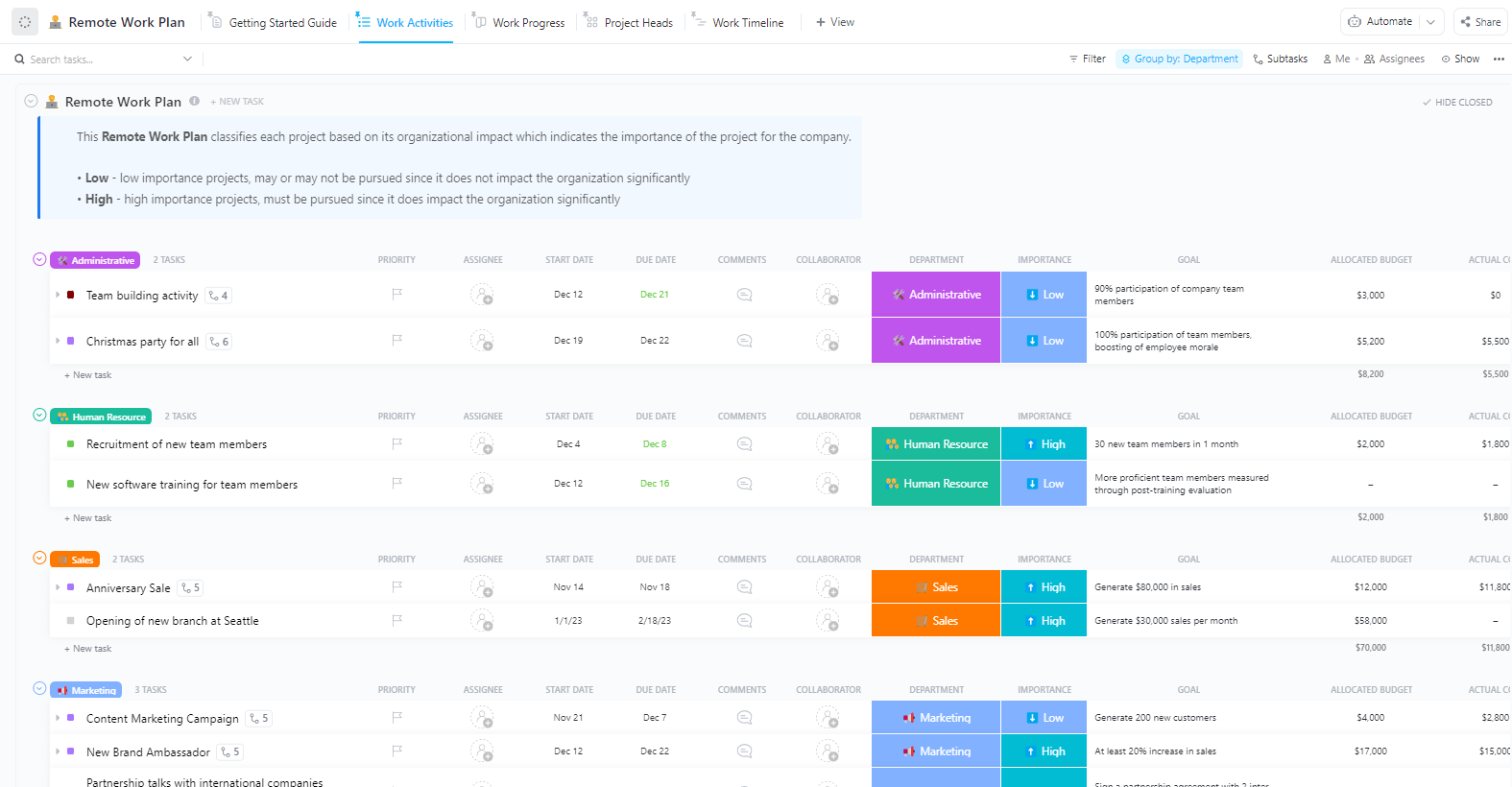
Laying a solid foundation for hybrid work starts with a clear, actionable plan. The ClickUp Remote Work Plan Template is designed to guide teams through this transition. It helps you outline expectations, define roles, and track progress on essential tasks.
This template allows you to:
🚀 ClickUp Advantage: Use ClickUp Docs to create a centralized, living hybrid work policy that your entire team can access and update with ease. Tap into its collaborative editing capabilities to involve HR, legal, and leadership teams in real time for feedback.

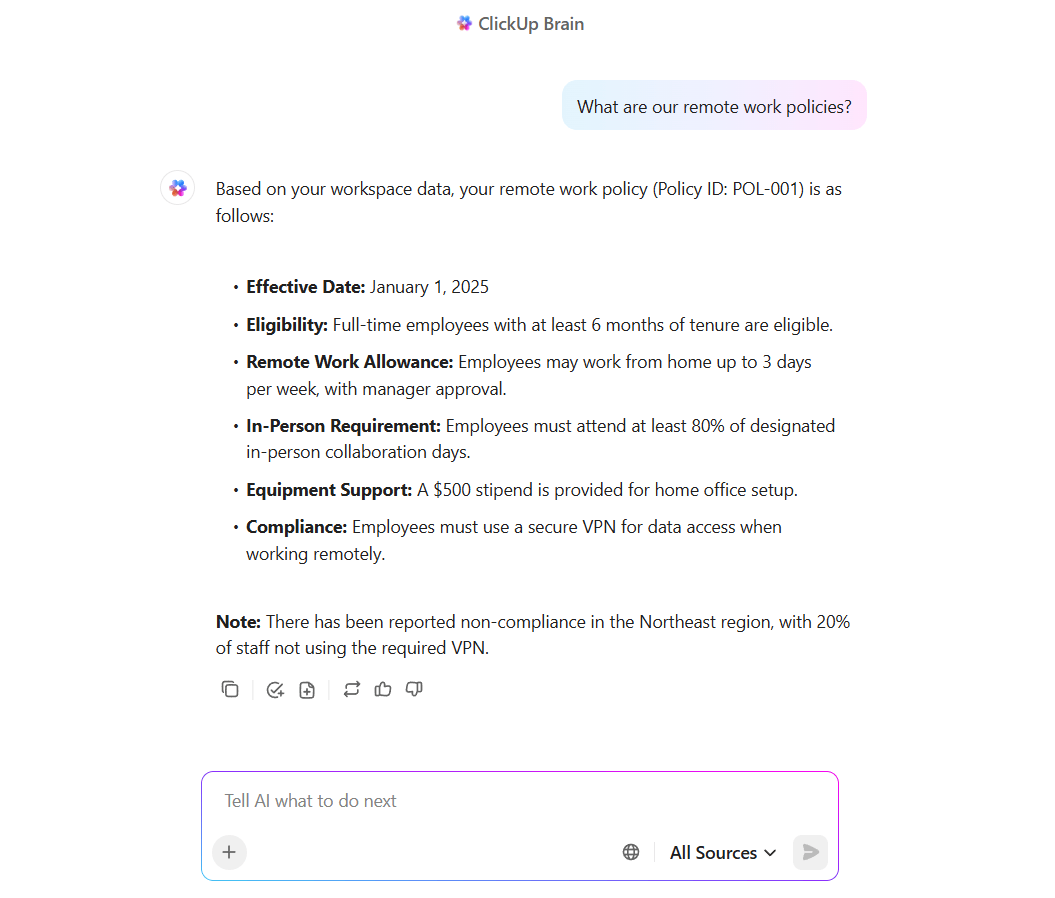
Pair it with ClickUp Brain, the integrated AI assistant, to answer policy questions, summarize lengthy policy docs, and generate FAQs from your policy content.
For example, you could ask, ‘In our work policy, how many remote days am I allowed?’ and ClickUp Brain fetches the exact section from your policy, making updates and communication faster without losing any context.
Before jumping into hybrid implementation, it’s crucial to pause and assess which roles and people are suited for this model. Instead of relying on assumptions or one-size-fits-all decisions, HR teams and managers can use data-driven insights to assign the right hybrid tier to each role.
Use these quick checks:
After assessment, create hybrid tiers like Fully Hybrid, Partially Hybrid, Office-Centric, or In-Person Only to match roles and team needs.
To make this process simpler, create a ClickUp List called Hybrid Suitability Assessment. Add tasks for each department or role, and use ClickUp Custom Fields to track details like Requires On-Site Presence, Client-Facing, or Eligible for Remote. Assign each task to department heads so they can fill in the specifics.
Then, let ClickUp Brain analyze responses, spot patterns, and even flag roles that might need extra attention before finalizing your hybrid tiers.
📌 Try these prompts:
Hybrid project management falls apart without a solid tech stack to support both asynchronous and synchronous work.
ClickUp offers unparalleled project visibility across distributed teams by organizing all tasks, assignments, deadlines, and project details in a single place. With ClickUp for Remote Teams, you get a purpose-built platform that bridges gaps between remote and on-site workers and keeps everyone aligned with real-time updates and centralized workflows.
Here’s how to bring your team together in ClickUp. 👇
Use ClickUp’s Project Hierarchy to break down your workspace into Spaces, Folders, and Lists to mirror how your organization operates.

Keep your hybrid transition transparent and easy to follow with ClickUp Views.
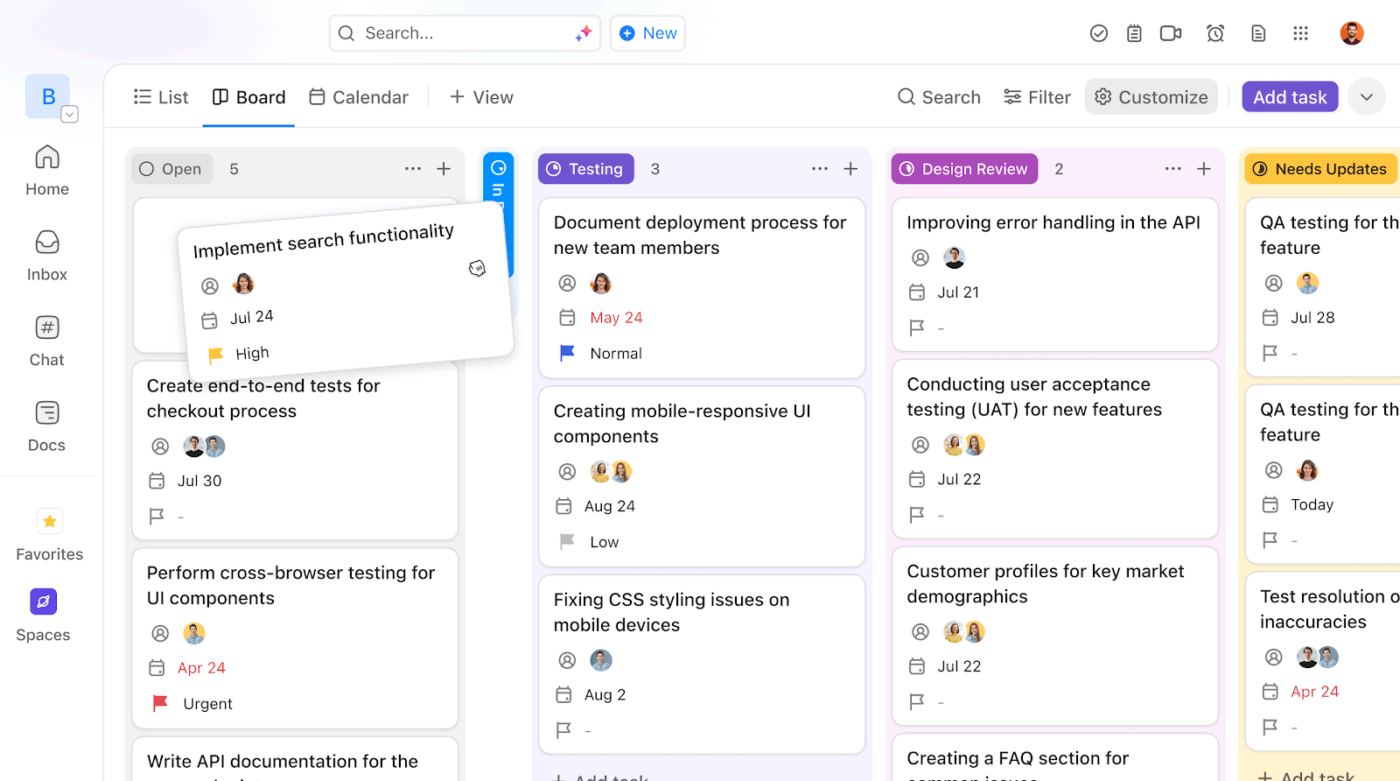
Organize work into columns like Planning, In Progress, and Done in the ClickUp Board View so everyone can see what’s moving and what’s stuck. It’s a simple, hands-on way to track onboarding progress, manage equipment setup, or oversee workflow updates.
Then map your entire hybrid transition using ClickUp Gantt View. You can link dependent tasks so delays are instantly visible, and adjust schedules dynamically when priorities shift.
Jumping between meeting links, notes, and tasks wastes time that you don’t have.
With ClickUp’s Zoom Integration, you can launch meetings directly from within a task, attach recordings, and store meeting summaries, all in the same workspace.
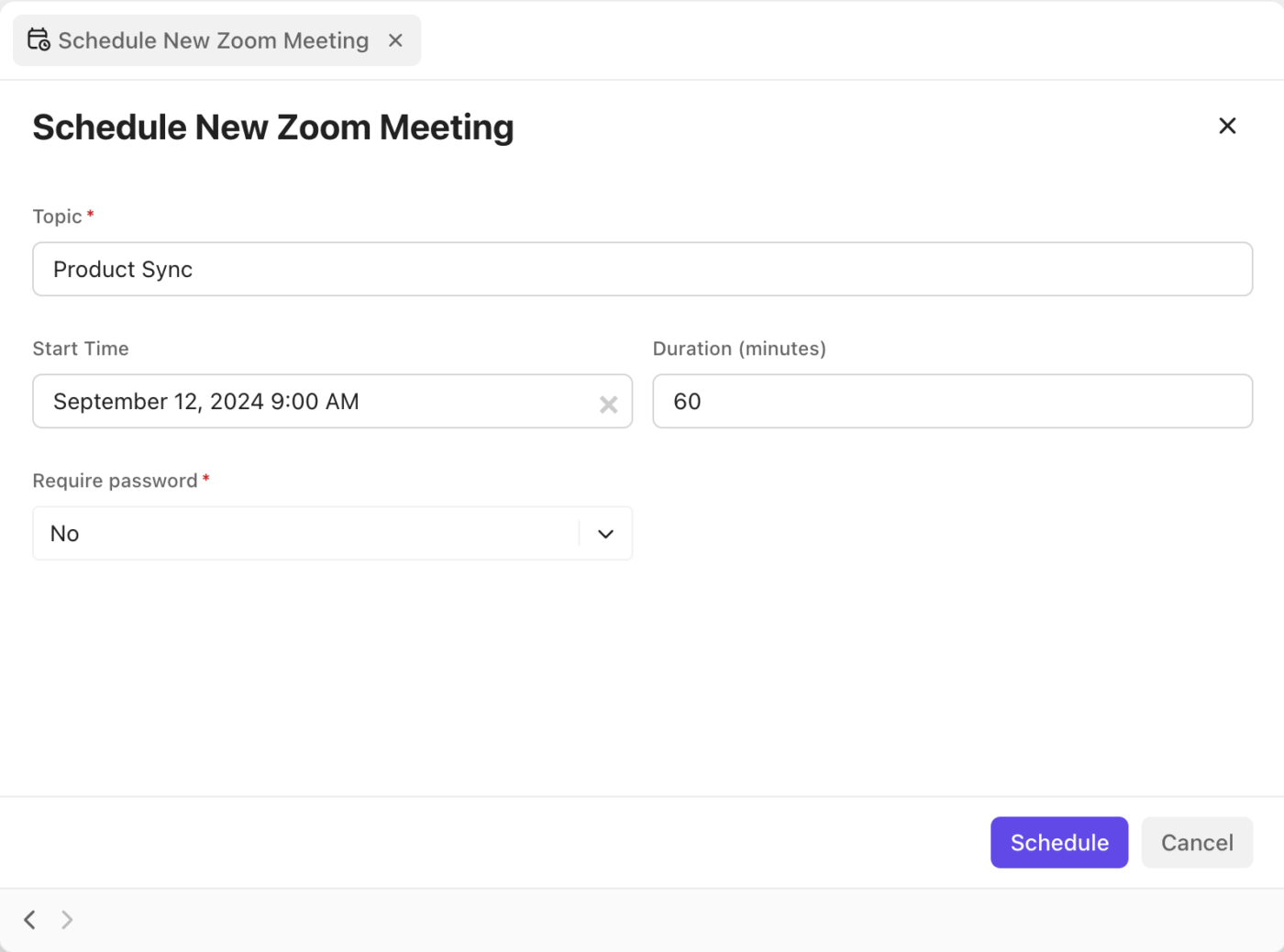
Hybrid work thrives on clarity, and ClickUp Chat helps keep it that way. Instead of scattering conversations across Slack, email, or DMs, use Chat to keep discussions tied to your work.
Create team channels for ongoing conversations (e.g., Hybrid Rollout Updates), @mention teammates for quick clarifications, and thread replies to keep discussions tidy.

On-site workflows often rely on physical proximity, like walking over for a quick discussion, impromptu check-ins, or shared whiteboards. In hybrid setups, these steps can become bottlenecks if not redesigned.
You need to intentionally refurbish your workflows in a way that every approval, update, and task handoff moves seamlessly, regardless of where employees are working from.
Start by mapping your existing workflows, such as what happens, who’s involved, and where delays usually occur, in ClickUp Whiteboards. This makes it easier to spot steps that depend too heavily on being in the same room, like physical sign-offs or verbal check-ins.
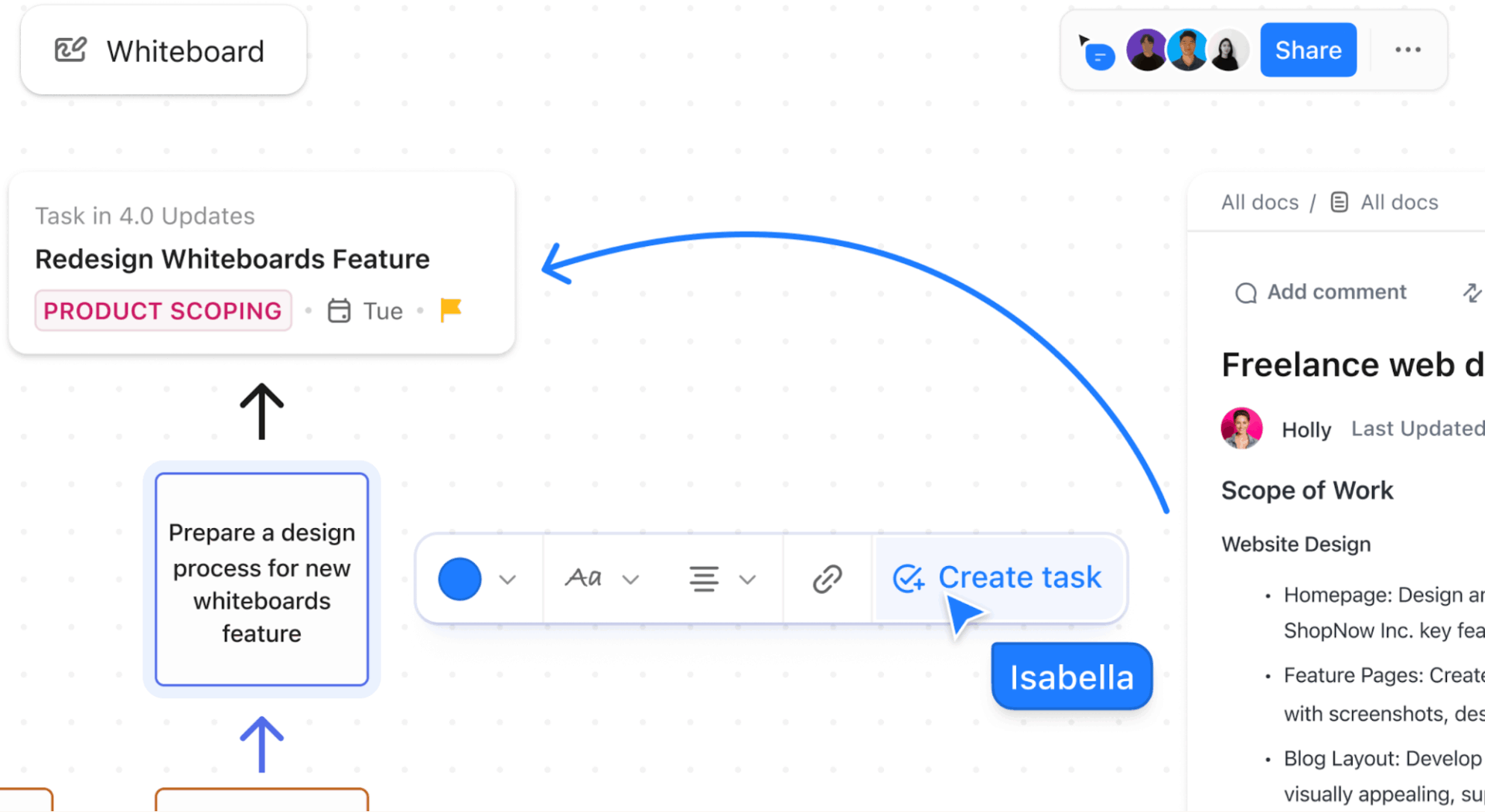
Then, use ClickUp BrainGPT, the desktop companion, to analyze and optimize. With a simple prompt like ‘Show me the steps in our onboarding process and highlight bottlenecks,’ it can scan tasks, statuses, and connected apps to surface where work slows down.
Suppose approvals often wait on one manager, or certain handoffs always slip through—Brain GPT points those out instantly. You can then ask it to suggest automation rules or workflow changes to remove those blockers.

📌 Try these prompts:
Here’s what Matt Brunt from Creative Element had to say about ClickUp:
Our team has moved to a hybrid remote/in-office model, and in October 2023, we will become a fully remote agency. This definitively would not be possible without the collaborative improvements we’ve all enjoyed after the switch to ClickUp
Even the best system fails if people don’t know how to use it. You need training, coaching, and support, especially for managers who must adapt from ‘watching presence’ to outcome-based oversight.
Here are some core actions to implement:
Learn more about virtual meeting etiquette here:
Well, what if onboarding could be effortless, engaging, and effective from day one?
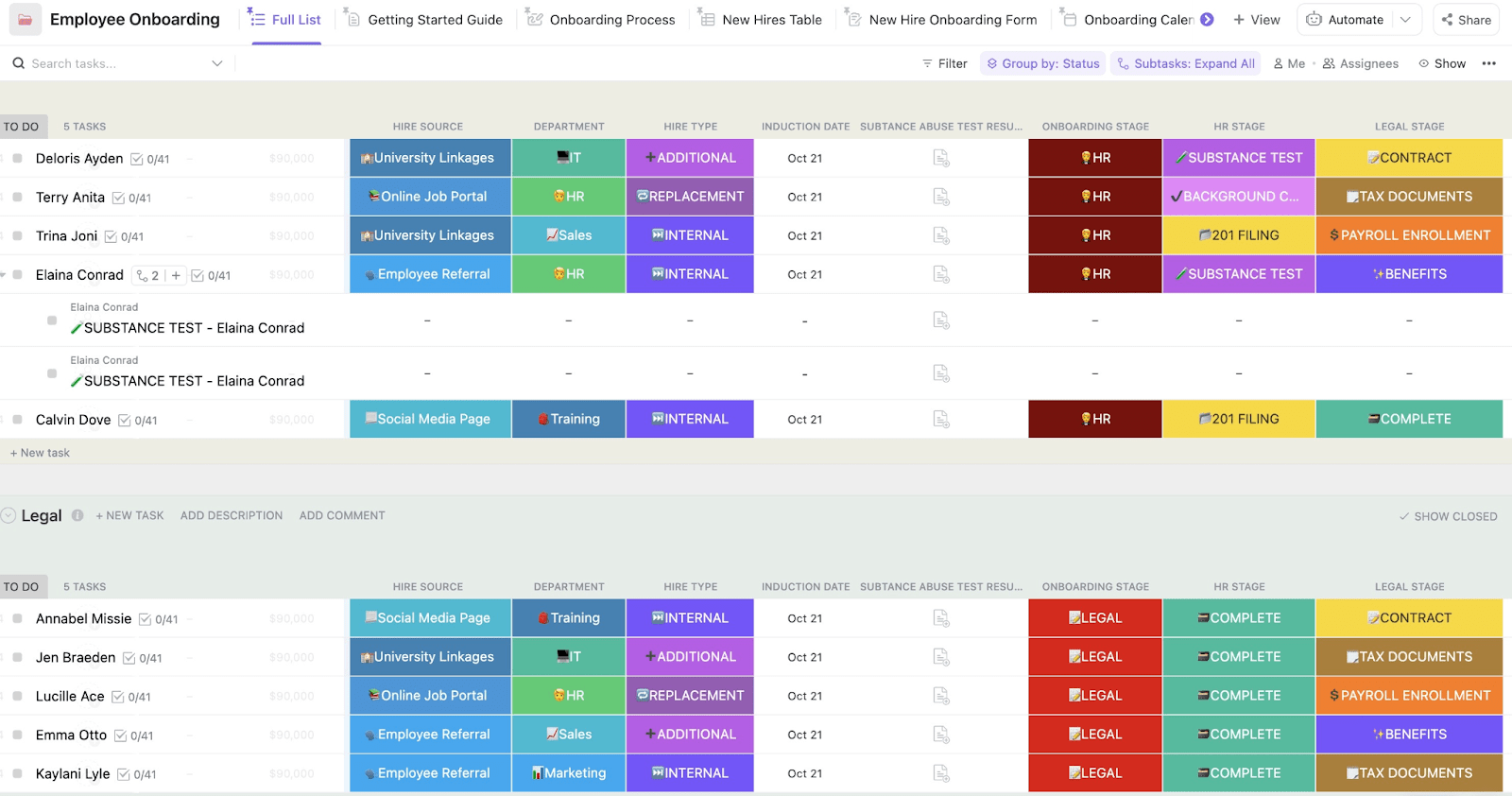
Make your hybrid transition seamless with the ClickUp Employee Onboarding Template. It organizes every aspect of hybrid training, from policy updates and workflow guides to team adaptation sessions, ensuring everyone understands how to thrive in this new setup. With this template, you can:
You can’t just announce “We’re hybrid now!” and expect it to work overnight. Hybrid success is earned through testing and tweaking.
Here’s what you can do:
🚀 ClickUp Advantage: Monitor how your pilot teams are adapting with ClickUp Dashboards. Add cards for each team to track active tasks, completed work, and overdue items. Then, bring AI Cards into the mix to auto-generate daily standups or weekly updates.
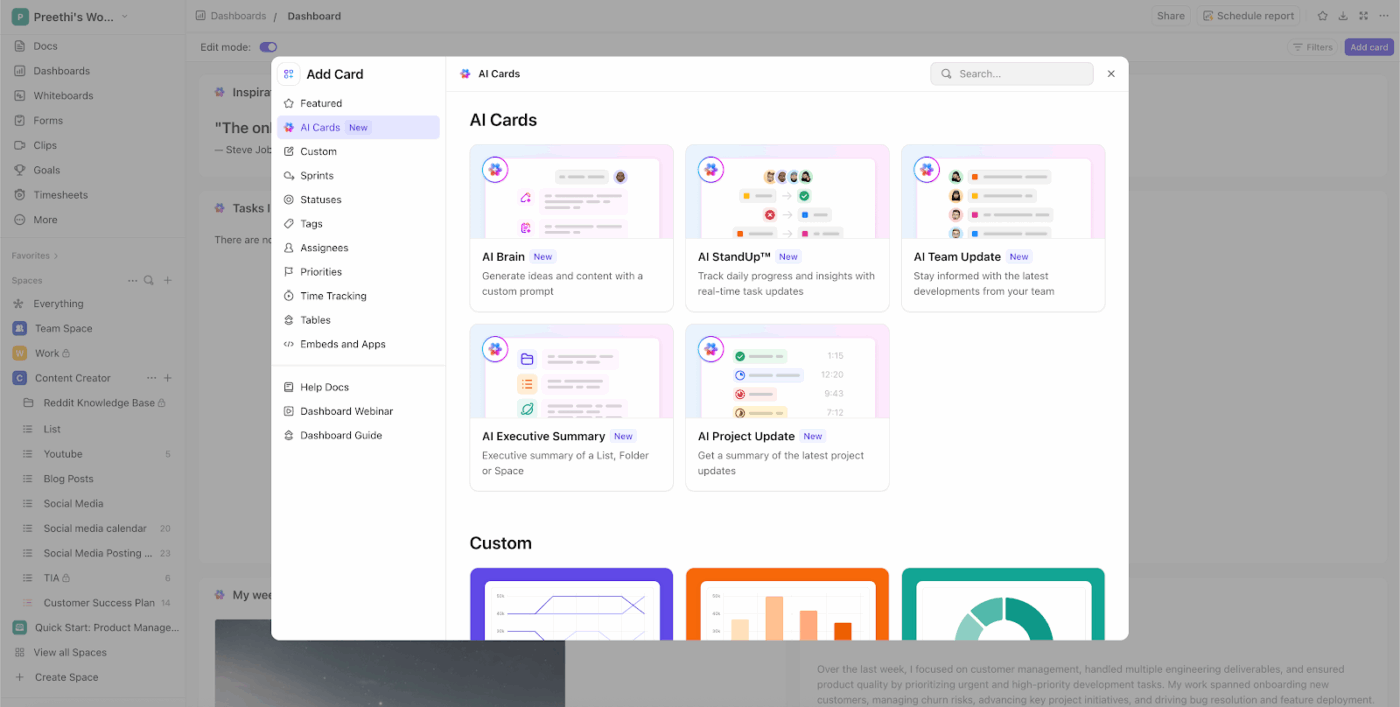
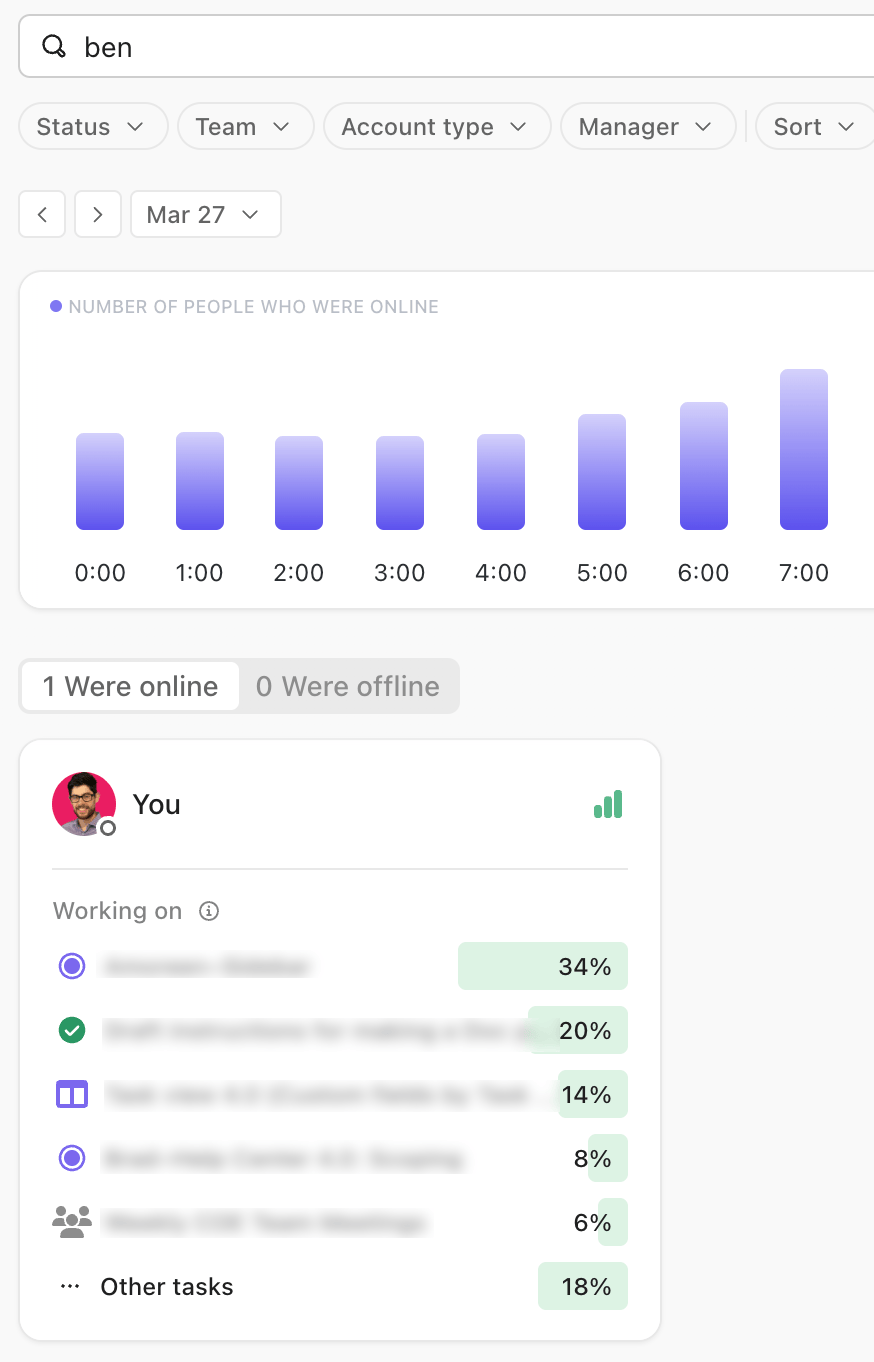
To take it even further, leverage ClickUp Analytics to view organization-wide trends, drill down by team or user, and spot recurring bottlenecks before they scale. You can even export these insights for leadership reviews.
The shift to hybrid work requires specialized tools to help your team navigate the logistics of splitting time between office and remote work. Here are some essential ones to make the transition smoother.
When employees no longer have assigned desks, chaos follows. These tools let people reserve workspaces and see who else will be in the office:
📖 Also Read: Home Office Tips to Boost Remote Work Productivity
Deciding who comes in when shouldn’t require endless email threads. These platforms help teams sync their office days:
Your hybrid policies are worthless if nobody reads them or they’re buried in email. These tools create a single source of truth with acknowledgment tracking:
📖 Also Read: How Asynchronous Work Changes Collaboration
You can’t fix hybrid problems you don’t know exist. These platforms gather targeted feedback about the arrangement and help you spot issues early:
📮 ClickUp Insight: 50% of workers are still tied to the office, even though 48% prefer a hybrid setup for better work-life balance. The result? Rigid schedules, commuting fatigue, and poor boundary control. 🚗💨
With automated scheduling and time blocking, ClickUp’s Calendar helps you stay organized across work environments. Whether you’re at home or in the office, your workflow stays consistent on ClickUp, and personal time stays protected!
💫 Real Results: Lulu Press saves 1 hour per day, per employee using ClickUp Automations—leading to a 12% increase in work efficiency.
When people work from multiple locations, traditional timekeeping breaks down. These tools adapt to hybrid schedules while maintaining compliance:
🚀 ClickUp Advantage: Hybrid work often makes it hard to see how time is being spent across locations. ClickUp Project Time Tracking solves this by allowing teams to mark hours as billable or non-billable, compare estimated vs. actual time, and view this data in real time.
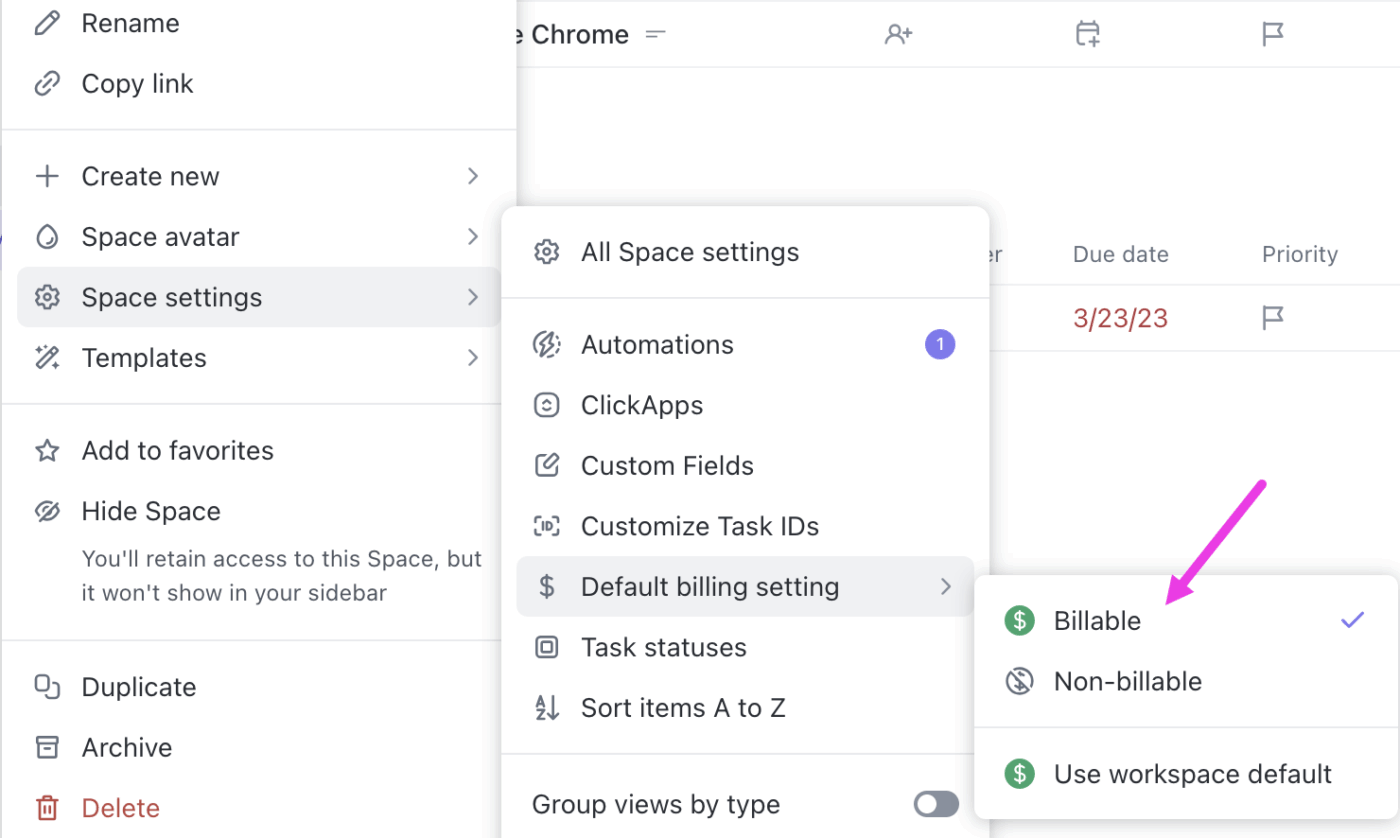
Managers can immediately spot when projects are exceeding estimates or when workloads need rebalancing in ClickUp Workload View. This helps maintain cost control and productivity without resorting to micromanagement.
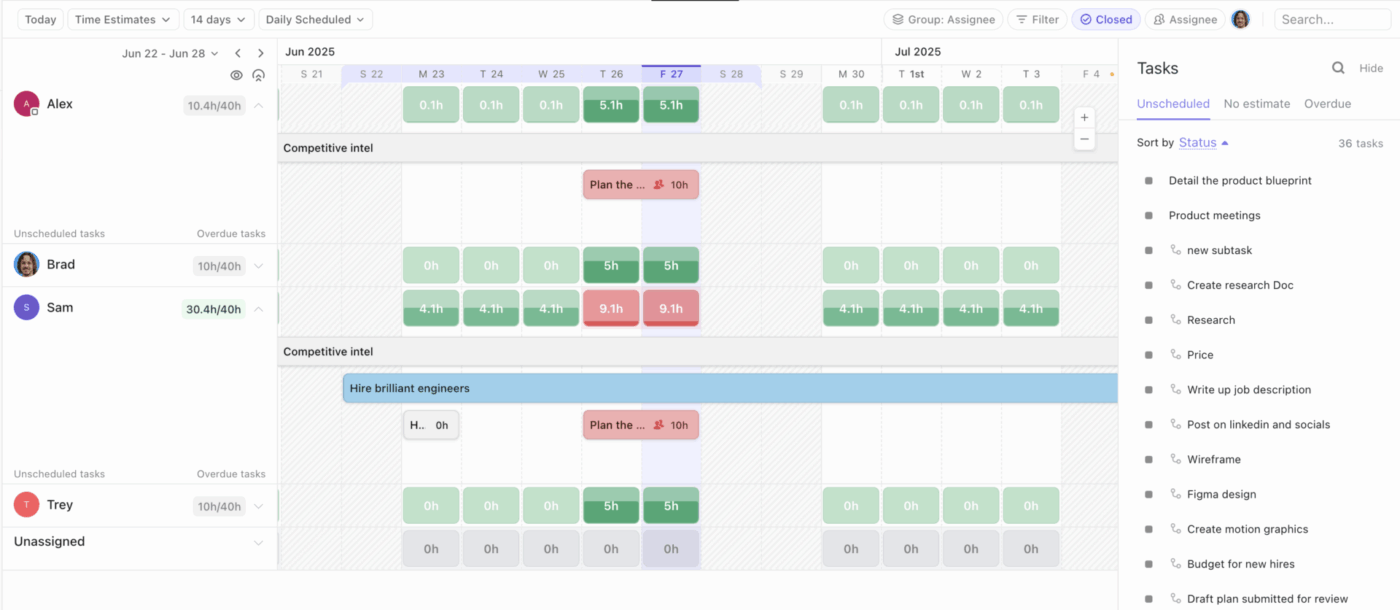
It visually distributes time estimates across days, helping managers see when someone is over capacity—even if they’re working from a different time zone.
You’re paying for square footage you might not need. These platforms show you actual usage patterns so you can make data-driven decisions about your real estate:
Shifting to a hybrid work schedule sounds simple on paper until reality hits you. Here are some common pitfalls that companies often face:
🔍 Did You Know? In the legal industry, roughly a third of professionals (32%) follow a hybrid schedule, and 11% work entirely from home.
Transitioning to a hybrid work environment is an ongoing process of learning, adapting, and optimizing. Once your people and processes are ready, the focus should shift to designing smarter spaces and improving employee experiences.
Here are some best practices and work-from-home hacks to build a hybrid workplace that works:
Use foot traffic, desk bookings, and meeting room usage to understand how your office is really being used.
For example, if Wednesdays see higher attendance, plan collaborative sessions or catered lunches then. If video-enabled rooms are in high demand, upgrade underused ones with conferencing tech.
Give your teams hybrid work software to book desks, plan in-office days, and invite clients, all in one place. This autonomy makes hybrid schedules feel seamless instead of chaotic.
Go beyond functionality by creating experiences employees look forward to. Offer grab-and-go snacks for busy days, organize networking events, or reserve the best spaces for client meetings to make both employees and guests feel valued.
Run quick pulse surveys or feedback forms to understand how employees feel about the hybrid setup. Use these insights to improve amenities, policies, and office design.
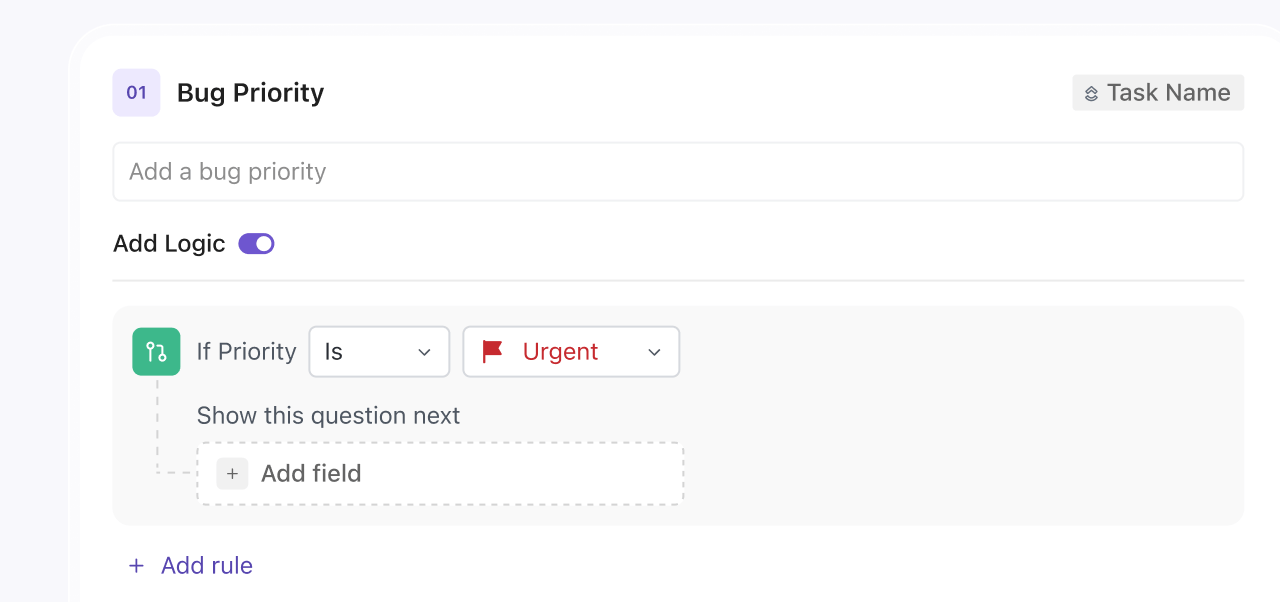
💡 Pro Tip: Add conditional logic in ClickUp Forms to tailor questions based on each employee’s experience—like showing different prompts for remote vs. in-office staff. You can also enable anonymous submissions to encourage honest feedback and use automation to tag responses (for example, ‘culture,’ ‘tools,’ or ‘communication’) so patterns are easier to identify.
Hybrid success depends on trust. Schedule regular team check-ins, establish transparent goals, and use metrics (like project completion rates or collaboration activity) to measure outcomes.
🔍 Did You Know? A mixed-method study covering 2,450 knowledge workers found hybrid work models can increase productivity by 9-14% compared to fully on-site setups, especially when companies focus on results instead of presence.
Let’s explore how organizations have implemented hybrid work thoughtfully, proving that flexibility and structure can coexist effectively.
The objective for Mars Wrigley Poland was to define and implement hybrid working as a flexible, team-driven arrangement tailored to individual roles and team needs.
Teams co-created their hybrid schedules instead of following a rigid, top-down plan, while management ensured these decisions aligned with company-wide culture, technology infrastructure, and overall employee experience goals.
Key success factors:
This resulted in increased employee engagement and productivity, showing that hybrid work thrives when teams are empowered and supported.
🧠 Fun Fact: About 71% of Gen Z employees say hybrid is their preferred work mode, much more than fully remote.
The Sovini Group, a North-West England-based construction and facilities services provider with over 800 employees, transitioned half of its office-based workforce to an agile model, emphasizing output over hours.
Their approach was to co-create flexible work arrangements tailored to role, location, and individual preferences. They empowered managers to support, approve, and document team-specific agile protocols with a focus on technology upgrades, communication tools, and continuous employee feedback.
The outcome:
Zoom, with 6,100 employees across 35 countries, adopted a hybrid work model post-pandemic, prioritizing employee choice in work location.
Their approach was to:
As a result, Zoom’s offices now support formal and informal collaboration, individual focus, and relaxation, and over 50% of employees prefer flexible or hybrid work.
🔍 Did You Know? The flexibility of hybrid work has led to significant out-migration from urban centers. For instance, San Francisco experienced a 7% population decline from mid-2020 to mid-2022. Many individuals moved to suburban or rural areas, prioritizing better housing conditions over proximity to city centers.
Hybrid work is here to stay, and your teams shouldn’t have to guess how to thrive in it.
You can follow the steps outlined in this guide to make your transition smoother, but that alone won’t cut it. Success comes from connecting strategy with tools that simplify collaboration, streamline workflows, and keep everyone aligned.
ClickUp provides a complete solution to plan, manage, and execute hybrid work, keeping distributed teams aligned and productive.
Its AI-powered tools make sure messages, tasks, and project updates stay seamless and on track. With this converged AI workspace, teams get a centralized platform to collaborate, manage tasks, and communicate from anywhere.
Sign up to ClickUp for free and start your hybrid transition today!
Remote work involves employees working entirely from locations outside the traditional office, such as their homes or co-working spaces. In contrast, hybrid work combines both in-office and remote work, allowing employees to split their time between the office and remote locations.
Determining hybrid eligibility depends on the nature of the role and the tasks involved. Roles that require frequent in-person interactions, access to specialized equipment, or team-based collaboration may not be suitable for hybrid work.
Conversely, positions involving independent tasks, digital communication, and minimal need for physical presence are more adaptable to a hybrid model.
Effective hybrid team management necessitates a suite of digital tools:
Communication platforms: Tools like ClickUp Chat or Microsoft Teams facilitate real-time messaging and collaboration
Project management tools: Platforms such as ClickUp or Trello track tasks, deadlines, and project progress
Video conferencing tools: ClickUp SyncUps, Zoom, or Google Meet are vital for virtual team meetings, with support for in-office teams
Document sharing and storage platforms: Apps like Google Drive or Dropbox ensure easy access to shared files and documents
Maintaining a strong company culture in a hybrid setting requires intentional efforts:
Regular virtual check-ins: Schedule consistent meetings to foster communication and engagement
Inclusive activities: Organize virtual team-building exercises and social events to strengthen relationships
Clear communication: Ensure transparency in policies and expectations to build trust
Feedback mechanisms: Implement systems for employees to voice concerns and suggestions
The transition duration to a hybrid model varies based on organizational size, readiness, and resources. On average, companies may require several months to a year to fully implement and optimize hybrid work practices.
Success in a hybrid work environment can be assessed through:
Employee productivity: Monitoring output and efficiency levels
Employee satisfaction: Conducting surveys to gauge morale and engagement
Retention rates: Analyzing turnover and retention statistics
Performance metrics: Evaluating the achievement of set goals and objectives
You can ensure fairness between in-office and remote teams with:
Standardized policies: Implementing uniform guidelines applicable to all employees
Equal opportunities: Providing access to career growth opportunities and development resources regardless of work location
Transparent communication: Maintaining open channels to address concerns and feedback
Hybrid work models provide significant cost benefits for organizations. Remote companies can reduce overhead costs related to office space, utilities, and on-site amenities since fewer employees are present in the office at any given time. This approach also lowers costs for rent, energy, and supplies.
Savings extend to commuting subsidies and relocation expenses, while improved talent attraction and retention help minimize recruitment and turnover costs.
Training managers for hybrid leadership involves:
Developing communication skills: Enhance their abilities to manage remote and in-person teams effectively
Providing technological training: Familiarize them with tools that support both remote and in-person collaboration
Fostering inclusivity: Promote practices to ensure all team members feel valued and engaged
Encouraging flexibility: Adapt leadership styles to accommodate diverse work preferences and needs

© 2026 ClickUp