






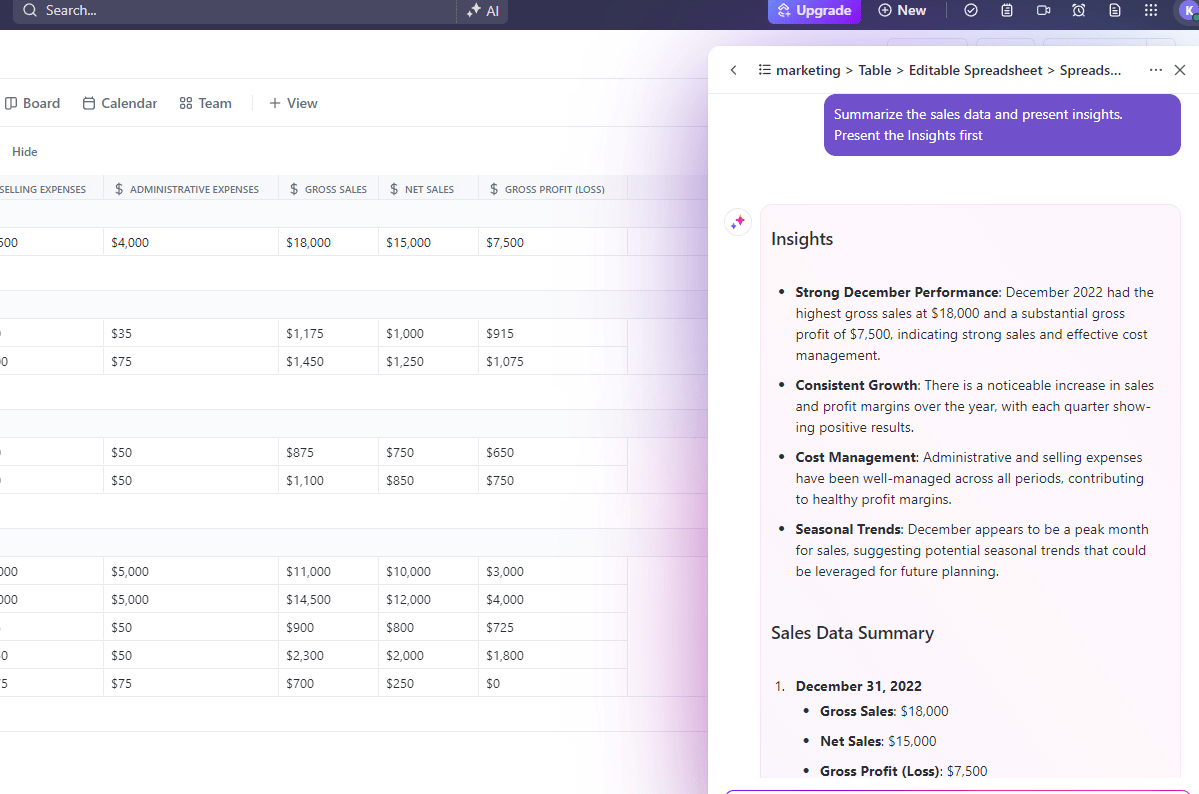





Still downloading templates?
There’s an easier way. Try a free AI Agent in ClickUp that actually does the work for you—set up in minutes, save hours every week.
Sorry, there were no results found for “”
Sorry, there were no results found for “”
Sorry, there were no results found for “”

Every sales team wants to win more leads and close more deals. But how do you make that happen? With a solid sales plan, of course!
A sales plan allows your team to focus on your goals while taking only the necessary steps to achieve them. It has everything you need to win, which means it’s often a comprehensive guide—and that takes time.
And we’re guessing you’re already pressed for time. ⏲️
Fortunately, creating a plan doesn’t have to be complicated—with the right template, you can simplify the process.
That’s why we’re sharing this list of the best sales plan templates. Not only are these sales strategy templates absolutely free, but they’ll also save you time so you can start closing those deals faster. ⚡
A sales plan is your roadmap for how to make sales effectively. Think of it in the same way that a business plan guides the strategy for your company or a marketing plan sets out how you’ll find, reach, and serve your ideal customers.
A good sales plan sets out your sales goals, objectives, and sales activities. It considers your target customers, brand, products, services, and needs—and covers which sales tactics and strategies you’ll use to close deals, as well as which metrics you’ll use to measure success.
Your sales strategy plan is a practical plan that outlines who’s responsible for what, the resources you’ll need, and the overall goals you’re working toward. Without one, your sales team will feel lost and struggle to connect with your customer base.
With a successful sales plan, though, the sales manager and the entire team will know exactly what you’re trying to achieve and the steps needed to get there. 📚
| Template name | Download template | Ideal for | Best features | Visual format |
| ClickUp Sales Plan Template | Get free template | Sales managers, team leads | Executive summary, tactics/strategies, task tracking, accountability | ClickUp List |
| ClickUp Sales and Marketing Plan Template | Get free template | Sales & marketing teams, cross-functional campaigns | Shared goals, KPI tracking, dashboards, collaboration | ClickUp List |
| ClickUp Sales Strategy Guide Template | Get free template | New sales teams, companies entering new markets | Strategy prompts, target market, nested docs, benchmarking | ClickUp Doc |
| ClickUp Sales Pipeline Template | Get free template | Sales reps, managers, B2B sales | Visual pipeline, custom statuses, risk spotting, task automation | ClickUp List/Board |
| ClickUp Sales KPI Template | Get free template | Sales leaders, KPI tracking | Custom fields, status tracking, reports, dashboards | ClickUp List/Board |
| ClickUp B2B Sales Strategy Template | Get free template | B2B sales teams, SaaS, enterprise | Market research, stakeholder analysis, buyer personas | ClickUp Doc |
| ClickUp Sales Calls Template | Get free template | SDRs, AEs, high-volume outreach | Call tracking, reminders, CRM integration, follow-up automation | ClickUp List/CRM |
| ClickUp Sales Tracker Template | Get free template | Sales teams, pipeline management | Lead/deal tracking, dashboards, automations, owner assignment | ClickUp List/Board |
| ClickUp Sales CRM Template | Get free template | Startups, SMBs, sales teams | Custom pipelines, automations, Kanban/List/Table views, integrations | ClickUp CRM/List |
| ClickUp Sales Report Template | Get free template | Sales managers, analysts | Pre-built layouts, KPI fields, automated reminders, dashboards | ClickUp List/Board |
| ClickUp Project Reporting Template | Get free template | Sales ops, project managers | Dynamic dashboards, AI summaries, exportable reports | ClickUp Doc/Dashboard |
| ClickUp Sales Page Template | Get free template | Marketing/sales teams, product launches | Content/design/approval tracking, launch checklists, performance metrics | ClickUp List/Board |
| Sales Plan Template by GoodDay | Download this template | Teams using Word/Google Docs | Visual timeline, Kanban, customizable fields, progress indicators | GoodDay |
| Word Sales Plan Template by TemplateLab | Download this template | Teams/freelancers needing offline Word templates | Multiple formats, customizable, goal/action planning | Word |
| 30/60/90 Day Sales Plan Template by CaptivateIQ | Download this template | New sales reps, onboarding, team rollouts | Structured objectives, onboarding phases, status tracking, accountability | Google Sheets |
There are so many different sales plan templates out there. Some are designed for specific niche audiences, while others are more generic and easier to customize. How do you know which is the right template for you?
When you’re thinking about using a sales plan template, consider the following:
Asking yourself these questions will help you determine your needs and choose a template that matches.
Now that you have a better idea of what you’re looking for, let’s explore what’s out there. Take a look at our hand-picked selection of the best sales plan templates available today for Microsoft Word and sales enablement tools like ClickUp.
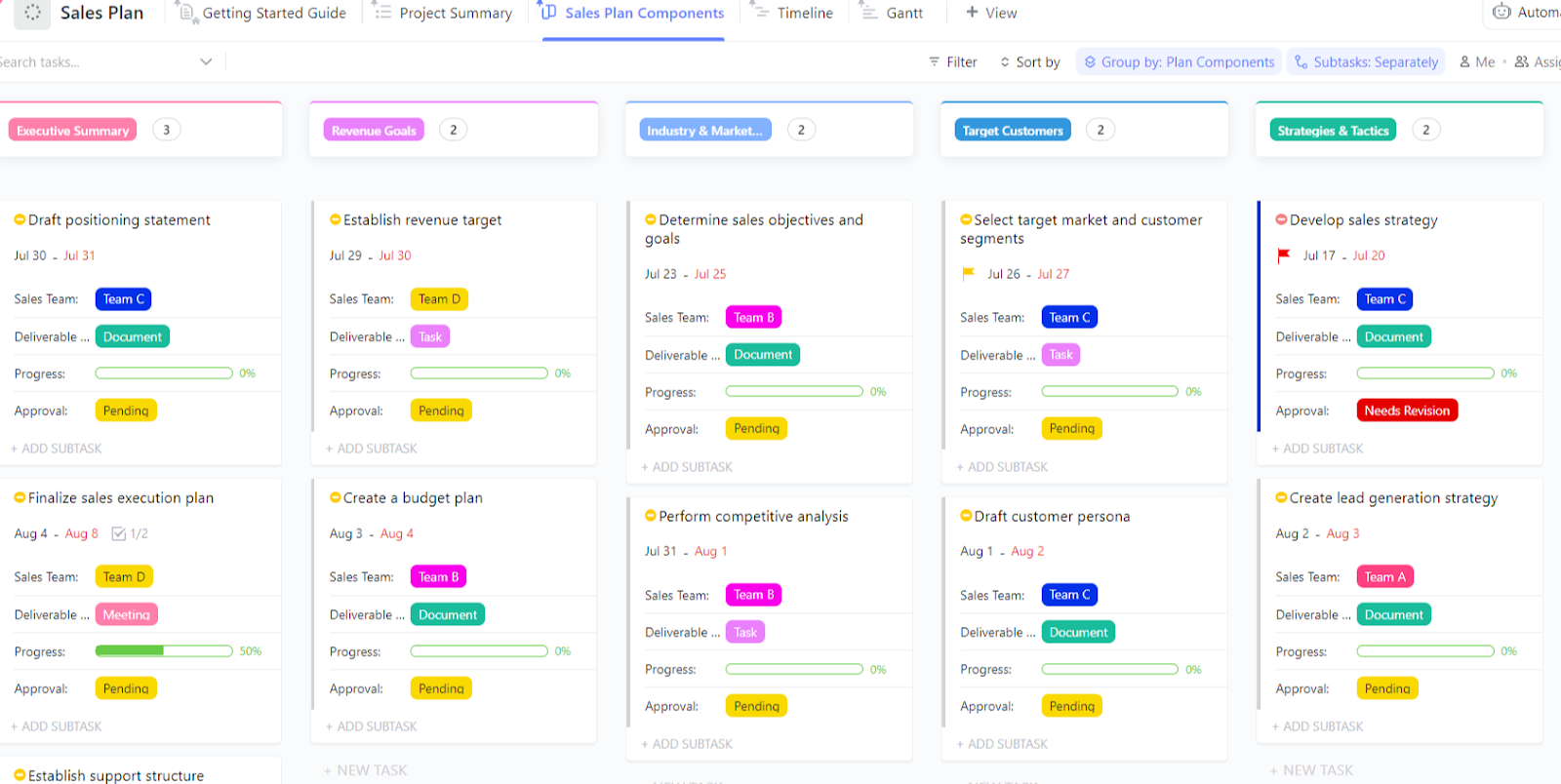
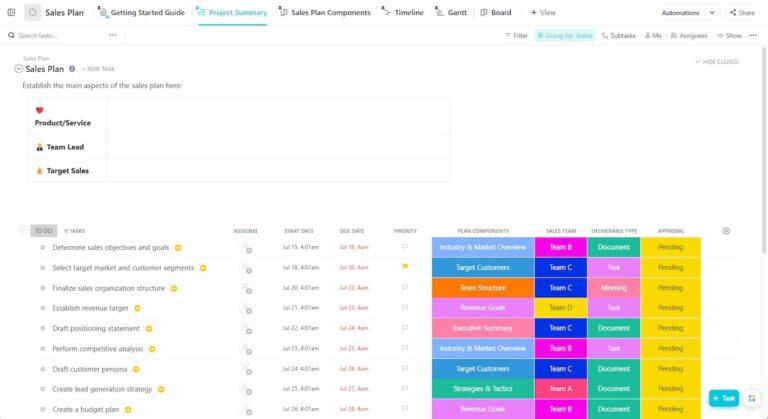
Smart sales teams use a sales plan to map out their route to success. The best sales teams use the Sales Plan Template by ClickUp to simplify the process and ensure they don’t leave anything out.
This template is designed with all the structure you need to create a comprehensive sales plan that can drive results. Use this template to set SMART (specific, measurable, achievable, relevant, and time-bound) business goals; plan strategies and tactics; and organize all your sales ideas in one place.
⏩ When to use this template: This template is ideal for sales managers and team leads who want a structured, goal-driven roadmap for their sales strategy. It is perfect for annual or quarterly planning and team alignment.
👀 Did You Know? Only ~20% of organizations hit sales forecasts within a 5% margin, and many miss targets by 10% or more, showing big room for better modeling and tracking.
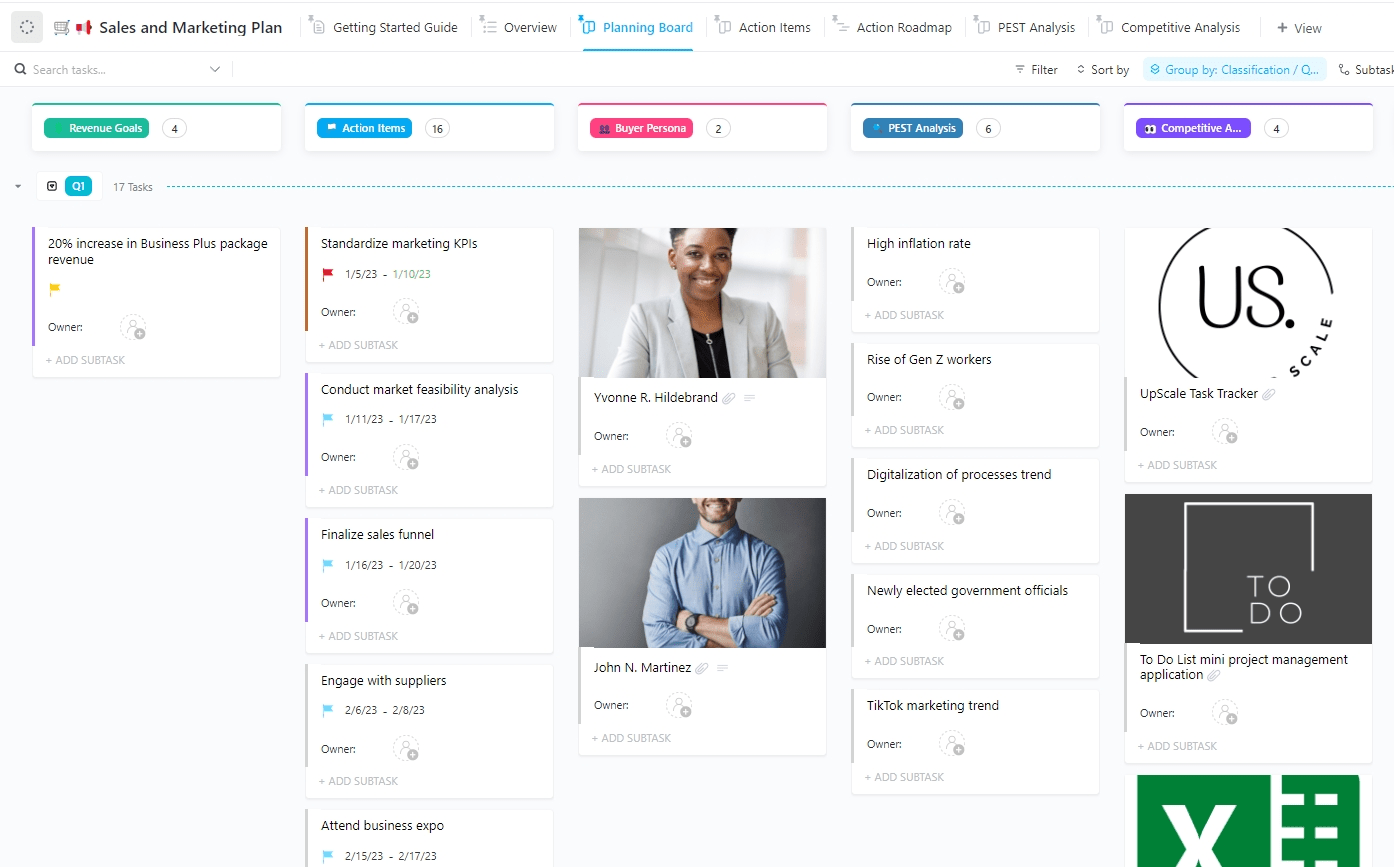
While sales and marketing teams often work independently, sometimes it’s useful to collaborate on shared goals. With the Sales and Marketing Plan Template by ClickUp, you can organize and run your sales and operations from one location.
This sales and marketing plan template allows you to split your tasks into sections. The examples in the template include revenue goals, competitive analysis, and action items, but you can customize these to match your needs exactly.
View tasks beneath these categories to see at a glance whether there are any roadblocks when a task is due, and who is responsible for it. Add this template to your collection if you want to work more collaboratively with your marketing team—especially on preparing assets for sales calls or outreach programs. 📞
⏩ When to use this template: It’s best for organizations looking to align sales and marketing teams on shared campaigns, objectives, and KPIs.
Before you can plan your sales tactics, you need to decide on your overall goals. The Sales Strategy Guide Template by ClickUp is your go-to resource for determining your approach.
This sales process template explains the benefits of having a well-defined strategy and gives you a central place to create, review, and store your own. Everyone on your team can then access your sales strategy guide to help them understand what to do when prospecting and closing deals.
⏩ When to use this template: Use this when you need to define or refresh your sales approach, target market, and value proposition—ideal for new sales teams or companies entering new markets.
Sales strategies are a must-have for any great sales team, but beyond that, you need a way to record and monitor specific tasks or initiatives. That’s where the Sales Pipeline Template by ClickUp comes in handy. It enables visual sales forecasting for your team to see how you’re tracking against your specific sales goals.
⏩ When to use this template: Perfect for sales reps and managers who want to visualize, track, and manage every stage of the sales process from lead to close—especially useful for B2B sales cycles.
📚 Also Read: Sales Pipeline Templates
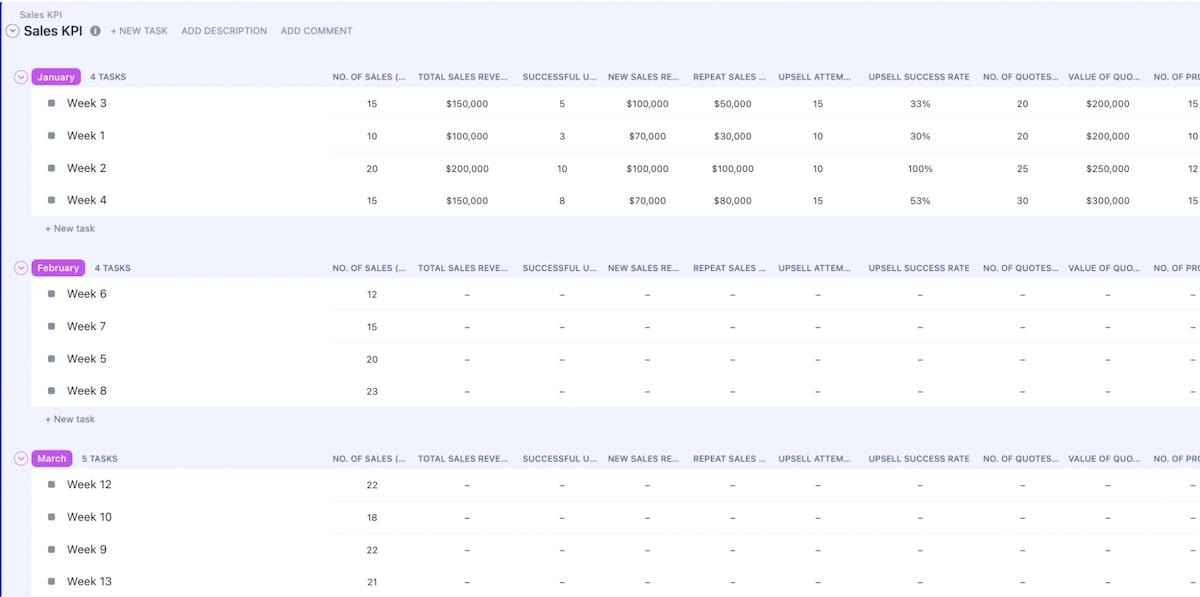
With ClickUp’s Sales KPI Template, you and your team can create and manage goals surrounding your sales initiatives. You can instantly see what’s in progress and when it’s due, alongside the task’s impact level. This allows you to identify high-priority tasks to focus on and to react quickly if a roadblock appears.
This template gives you a simple way to see which tasks are complete or in progress, so you can monitor the progress of your project and crush your sales KPIs. 📈
⏩ When to use this template: Best for sales leaders who need to monitor, measure, and report on key performance indicators.
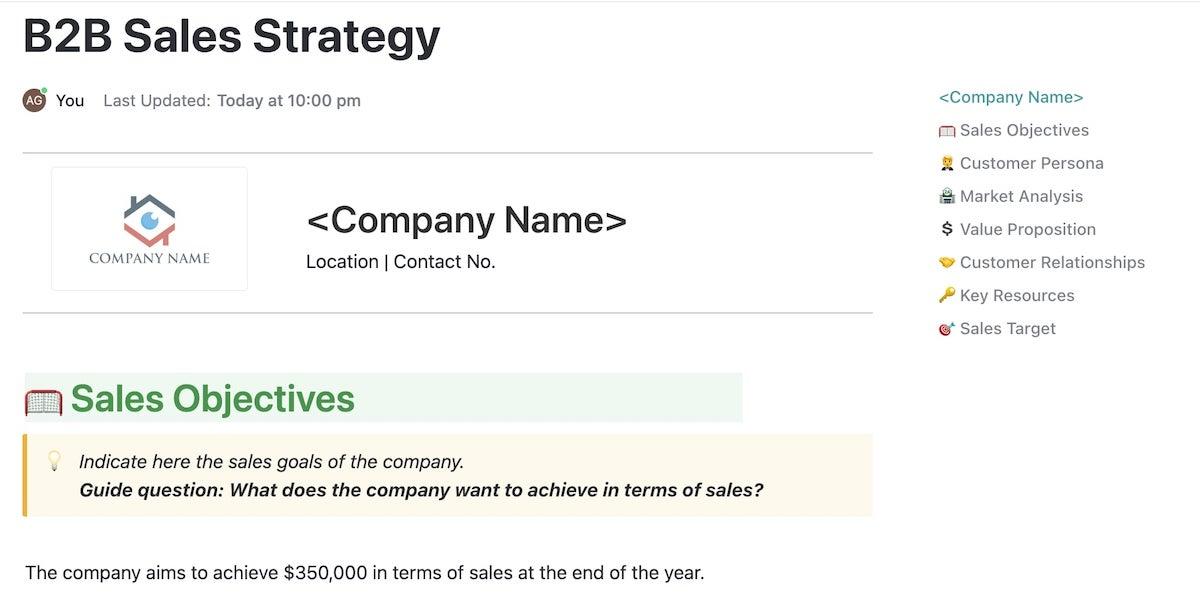
While there’s not a huge difference in the way we market to business-to-business (B2B) or business-to-consumer (B2C) customers these days, it’s still useful to have specific templates for niche needs. If you’re driving sales in the B2B space, you need the B2B Sales Strategy Template by ClickUp.
Like our first sales plan template, this one gives you space to communicate your sales objectives and business revenue targets, but it also introduces other areas, such as market research, stakeholder analysis, customer relationships, buyer personas, and customer pain points.
⏩ When to use this template: It’s designed for B2B sales teams building detailed strategies, conducting market research, and managing complex stakeholder relationships—great for SaaS and enterprise sales.
ClickUp’s Sales Calls Template is designed to streamline the sales process, from tracking contacts and calls to managing sales opportunities.
The template includes Custom Statuses for creating unique workflows, ensuring that every call and client interaction is accounted for. It also provides an easy-to-use Sales CRM to manage and track leads, visualize sales opportunities in the sales funnel, and keep all contacts organized.
With additional features like the Sales Phone Calls SOP Template, sales professionals can empower their teams to make every call count and close more deals. ClickUp’s Sales Calls Template is a versatile solution for sales teams, aiding in everything from daily calls to long-term sales forecasting.
⏩ When to use this template: Use this to organize, track, and follow up on sales calls—ideal for SDRs, account executives, and anyone managing high volumes of outreach.
👀 Did You Know? AI adoption is mainstream in sales—and it correlates with revenue growth.
81% of sales teams are either experimenting with or have implemented AI; 83% of teams using AI reported revenue growth last year versus 66% for teams not using AI.
Want to accelerate your sales planning and follow-up? ClickUp Brain, the world’s most complete and context-aware work AI, leverages your sales pipeline, tasks, and CRM data to instantly generate meeting summaries, draft follow-up emails, and surface key action items—helping sales teams save up to 1.1 days per week and close deals 3x faster, all from one workspace.
The ClickUp Sales Tracker Template is your go-to solution for monitoring every stage of your sales process. From prospecting to closing, this template helps you visualize your pipeline, assign tasks to move prospective leads to closed deals, and keep your team aligned on revenue goals.
⏩ When to use this template: Use it to monitor leads, deals, and follow-ups in real time—ideal for sales teams that need a centralized, visual way to track progress and pipeline health.
The ClickUp Sales CRM Template transforms your workspace into a powerful, customizable CRM. Manage contacts, nurture relationships, and automate repetitive sales tasks—all in one place.
⏩ When to use this template: Best for teams seeking a customizable CRM to manage contacts, deals, and communications—great for startups and SMBs wanting to centralize customer data.
Learn how ClickUp combines your sales CRM and sales project management in one powerhouse tool!
The ClickUp Sales Report Template makes it simple to generate, share, and analyze sales reports. Whether you’re tracking weekly performance or monthly revenue, this template keeps your team and stakeholders in the loop.
⏩ When to use this template: Ideal for sales managers and analysts who need to generate, share, and analyze regular sales reports—perfect for performance reviews and stakeholder updates.
The ClickUp Project Reporting Template is perfect for sales teams that need to report on campaign or project outcomes. It helps you visualize progress, highlight wins, and identify bottlenecks.
⏩ When to use this template: Use this for reporting on sales campaigns, projects, or initiatives—ideal for sales ops, project managers, and anyone needing dynamic, visual reporting.
💡 Pro Tip: If your sales process spans multiple tools, try ClickUp Brain MAX: the only desktop AI that lets you dictate sales notes, search across all your connected sales apps, and automate repetitive updates—using just your voice. It’s built to eliminate the “AI sprawl” of using multiple, disconnected AI apps and keep your sales pipeline moving, even on your busiest days.

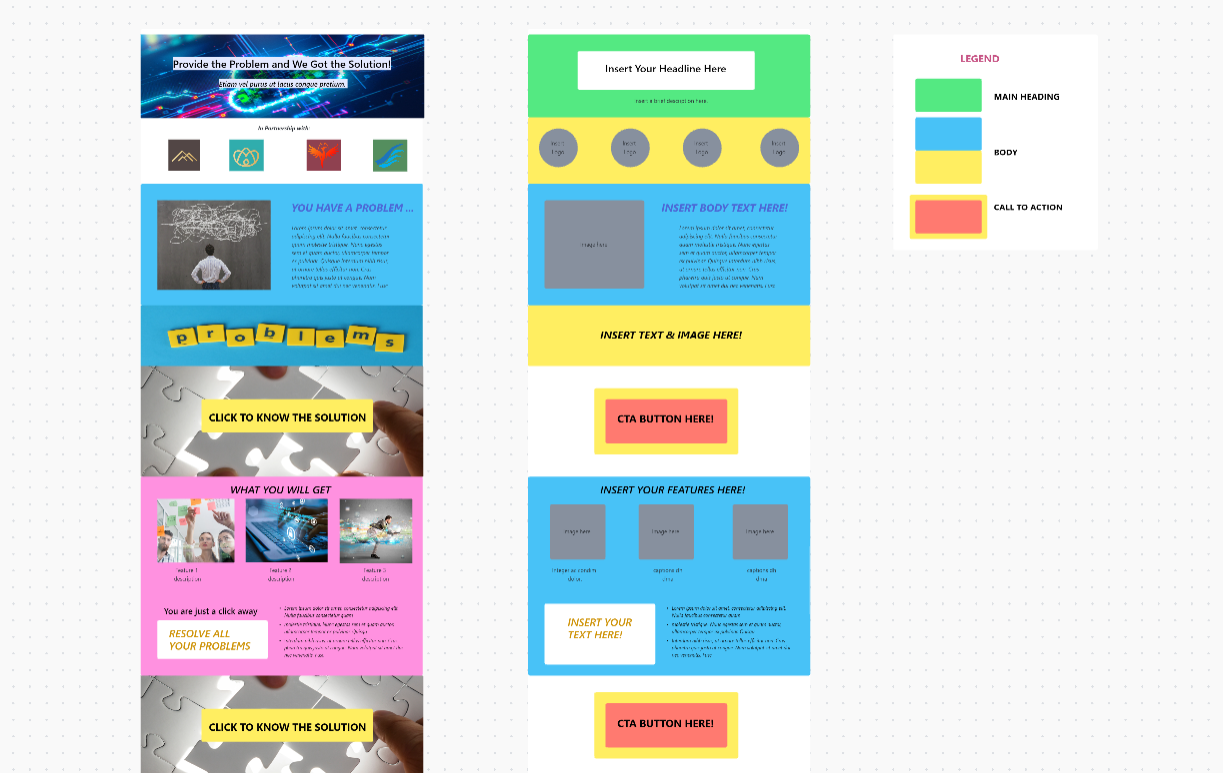
The ClickUp Sales Page Template is designed to help you plan, build, and optimize high-converting sales pages. Perfect for sales and marketing teams, this template streamlines the process from brainstorming to launch.
⏩ When to use this template: Best for marketing and sales teams planning, building, and optimizing sales or landing pages for product launches and campaign rollouts.
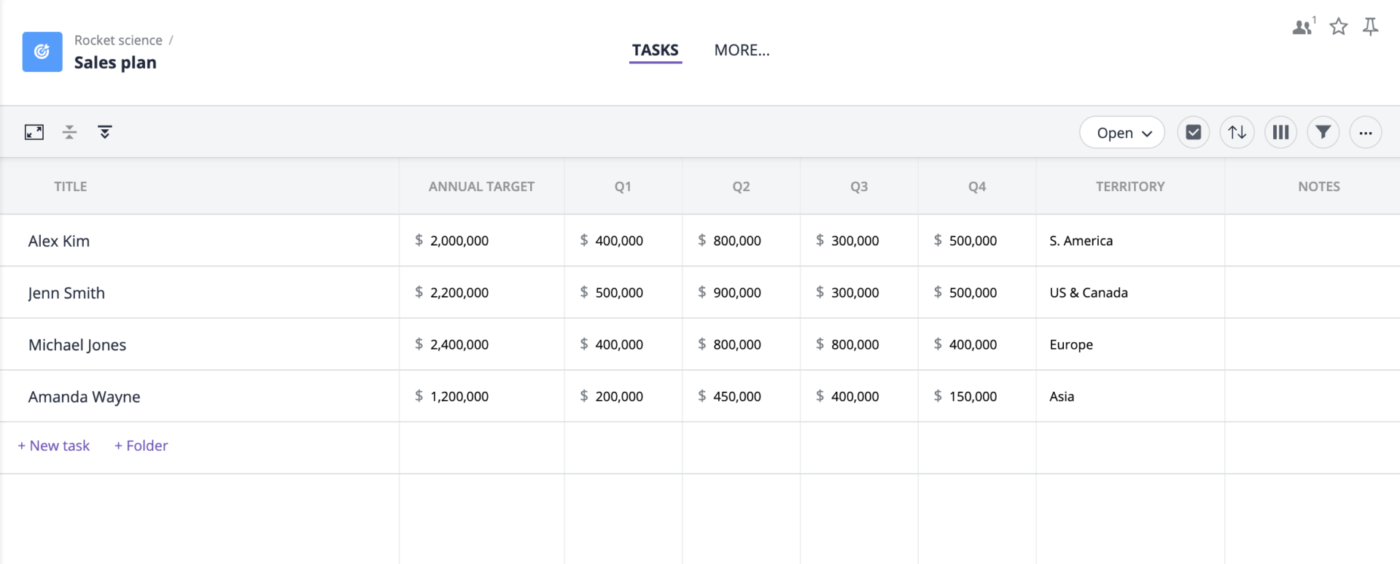
We’re big advocates of using ClickUp as the go-to place to store everything about your sales workflow, but if you’re limited to using Microsoft Word or Google Docs, then this template is a great option.
This sales business plan template offers a flexible, visual framework for mapping out your sales strategy, tracking progress, and aligning your team on key objectives. Designed for clarity and collaboration, it helps you organize every stage of your sales process—from goal-setting to execution.
⏩ When to use this template: This template makes it simple to turn your sales goals into actionable plans, ensuring your team stays focused, organized, and ready to close more deals.
📮ClickUp Insight: 92% of workers use inconsistent methods to track action items, which results in missed decisions and delayed execution.
Whether you’re sending follow-up notes or using spreadsheets, the process is often scattered and inefficient. ClickUp’s Task Management Solution ensures seamless conversion of conversations into tasks—so your team can act fast and stay aligned.
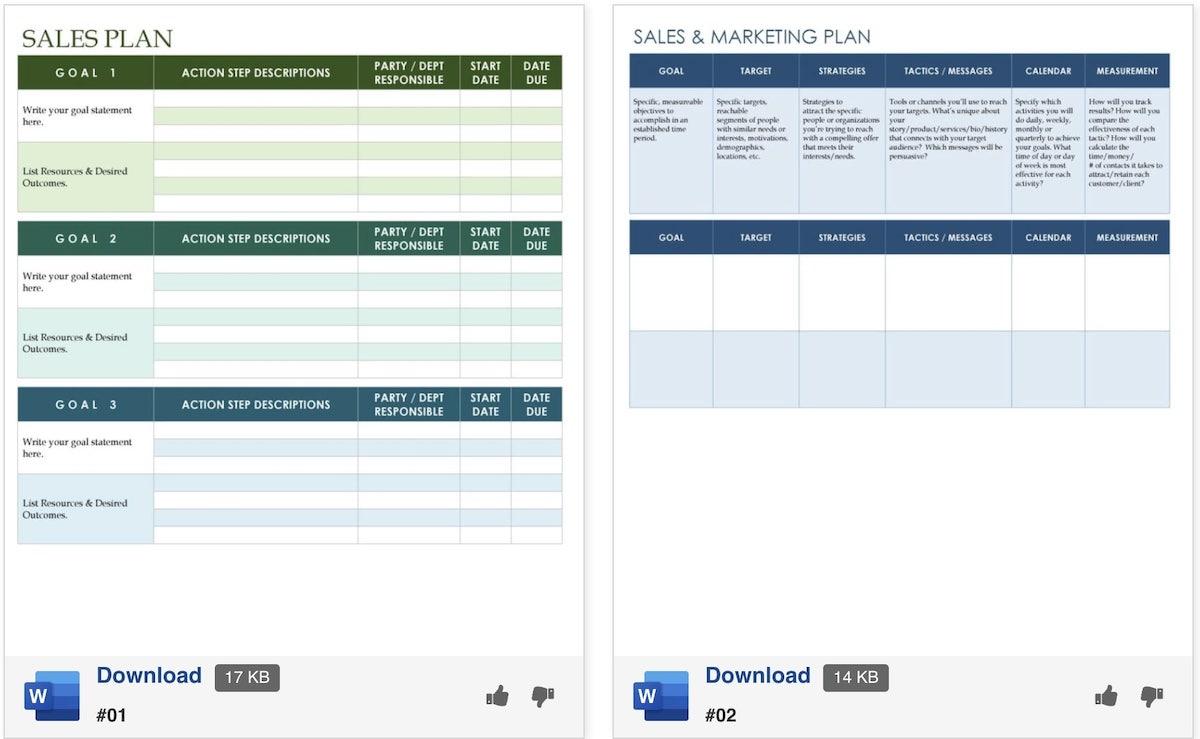
TemplateLab offers a wide range of free sales templates, including sales process plans, lead generation plans, sales action plans, and sales report templates. Each template works with Microsoft Word, and you can customize the look and feel to match your brand or your sales goals.
Use this resource if you prefer to see a range of templates on one page, or if you’re not sure exactly what you’re looking for until you see it. You can easily set your sales goals and the action steps needed to achieve them. 📃
Successful sales strategies need to be integrated with other teams—like your marketing department—to ensure your sales objectives are clear and possibly align with the overall marketing strategy too. Choose your specific sales goals, set revenue targets, and describe everything in detail with these Word sales planning and sales process templates.
⏩ When to use this template: These templates are best for teams or freelancers who want a variety of customizable Word templates for different sales planning needs—ideal for quick starts and offline use.
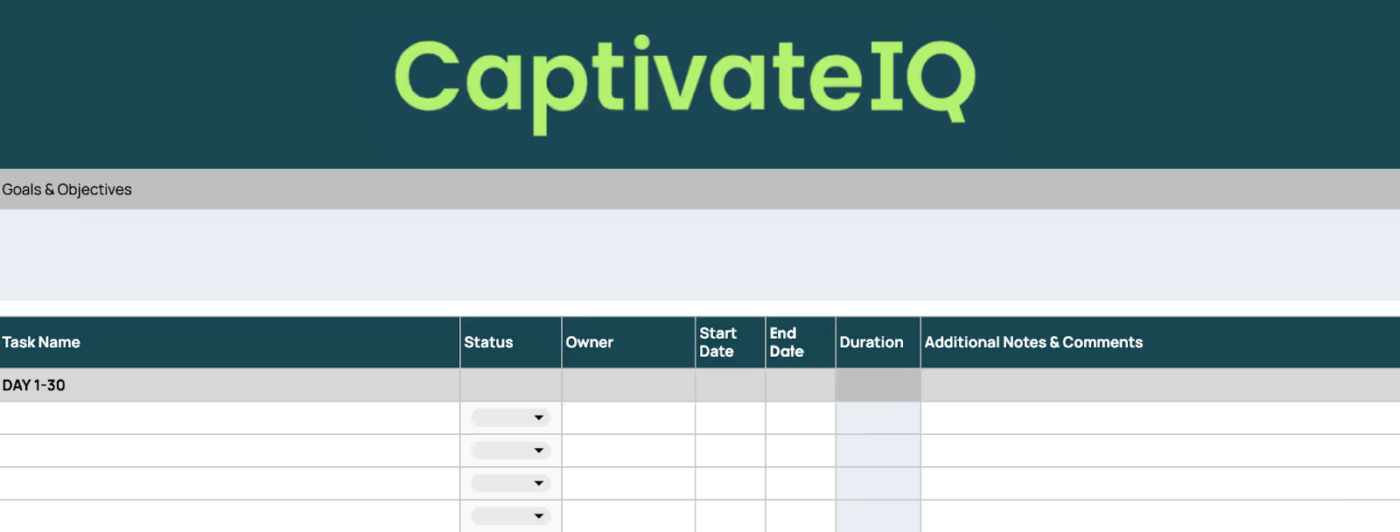
The 30/60/90 Day Sales Plan Template by Captivate IQ is your blueprint for ramping up new sales reps or rolling out new sales strategies with clarity and confidence. This template breaks down onboarding and team-wide initiatives into actionable milestones, ensuring every step is tracked, measured, and optimized for success.
⏩ When to use this template: This template transforms the daunting ramp-up period into a series of achievable wins—helping new hires hit the ground running and teams adopt new sales strategies with measurable impact.
It’s essential to know that there isn’t a single ‘best’ strategy that will work for every business or every sales team. It all depends on your business goals, the nature of your product or service, your audience demographics, and various other factors. Here’s an overview of some of the most common types of sales strategies that you may consider incorporating into your sales plan:
This strategy involves identifying a problem that your prospective customer is experiencing and positioning your product or service as the best solution. This requires a deep understanding of your customers’ pain points and how your offerings can address those issues.
🧠 Fun Fact: 87% of business buyers expect sales reps to act as trusted advisors, making solution selling a key technique for businesses to focus on.
Value selling is a strategy often used in B2B sales where the focus is on communicating the overall value that a product or service brings to a customer’s business. It involves demonstrating how features and benefits translate to significant returns on investment, savings, or productivity gains for your customer.
With the prevalence of social media platforms in today’s business landscape, social selling has become highly effective. It involves using social networks like LinkedIn, Twitter, or Facebook to find and engage with potential customers. By providing useful content, answering questions, and engaging in conversations, salespeople can build relationships and generate leads.
Inbound selling puts the customer first. It’s a sales methodology that focuses on personalizing the sales experience based on where the buyer is in their journey. This strategy aligns sales efforts with buyer needs to provide solutions that are the best fit for their individual challenges.
This strategy involves acting as a trusted adviser to potential customers. The focus is on building relationships, understanding the needs and problems of the customer, and then recommending solutions. It’s more about dialogue and less about pitching.
Account-based selling is a strategic approach that treats individual accounts as markets of their own. It involves crafting personalized buying experiences that cater to the unique needs and challenges of high-value accounts.
Each of these sales strategies can bring efficiency and effectiveness to your sales process. However, the key to success is understanding and selecting which strategy aligns best with your business model and customer base. Then, incorporate it into your sales plan and support it with the right sales plan template.
📚 Also Read: Leads to Deals: Key SDR vs.BDR Role Differences
Planning is a crucial aspect of a successful sales strategy. Here are some valuable tips and strategies to boost your sales planning process:
1. Set clear objectives: Clearly outline what you want to achieve. Your objectives are your guiding light, providing a direction for your sales planning. These objectives should align with broader business goals.
2. Understand your audience: Research extensively about your target audience. Understand their needs, desires, and pain points. The more you know about your potential customers, the better you’ll be able to position your product or service effectively.
3. Implement SMART goals: Your sales plan should be based on SMART (Specific, Measurable, Attainable, Relevant, and Time-bound) goals. This way, your goals will be clear, realistic, and trackable.
4. Stay informed about market trends: Business environments are constantly changing. Stay updated with the latest industry trends and competitor strategies to keep your sales plan agile and effective.
5. Incorporate sales tools: The effective use of technology can completely transform your sales process. Build your sales tech stack with CRM software, data analytics, and sales project management platforms like ClickUp to automate processes and give your sales team a high-impact lift.
6. Regularly review and adjust your plan: Your sales plan should be a dynamic document. Regularly revisiting and adjusting your plan based on performance metrics, market changes, or shifts in company goals ensures that your sales strategy remains relevant and effective.
7. Train and empower your sales team: The success of any plan lies in its execution. Provide your sales team with proper training and resources they need to effectively implement the sales plan. Encourage them to also bring innovative ideas to the table.
8. Customer retention: Don’t just focus on acquiring new customers. Implement strategies in your sales plan to retain existing customers as it’s often more cost-effective to maintain a loyal customer base than to constantly seek out new ones.
9. Refine your sales pitch: Ensure your value proposition is strong and compelling. Your sales pitch should highlight the unique values and benefits of your product or service.
10. Measure performance: Use key performance indicators (KPIs) to measure the effectiveness of your sales plan. This can provide valuable insights about what’s working and what needs to be improved.
By incorporating these sales planning tips and strategies into your processes, you can improve your sales plan’s effectiveness and increase your chances of success. As always, keep an open mind to adjustments and improvements along the way!
A strategic sales plan makes it easier to achieve your goals. Give your team the guidance and support they need with the help of a well-crafted free sales plan template.
If you’re considering making even more improvements in how you work, try ClickUp for free. We don’t just have incredible sales process templates: Our range of features and AI tools for sales make it easy for you to optimize and run your entire sales funnel and CRM system from one place. ✨

© 2026 ClickUp

There’s an easier way. Try a free AI Agent in ClickUp that actually does the work for you—set up in minutes, save hours every week.