Sorry, there were no results found for “”
Sorry, there were no results found for “”
Sorry, there were no results found for “”
🔍 Did You Know? According to PMI, the average project performance rate is 73.8%, highlighting room for improvement despite most projects delivering some value.
Every project starts with specific goals, motivated teams, and clear deadlines. But somewhere between kickoff and delivery, things often go sideways. Tasks pile up, priorities shift, and communication gaps widen.
Smartsheet project management templates are built to address these gaps. They bring structure, clarity, and sanity to your workflow.
So, instead of reinventing the wheel each time, check out these top project templates that are already designed to help you succeed.
Smartsheet project management templates are pre-built, customizable spreadsheets designed to help teams plan, track, and manage projects efficiently. These templates include features like task lists, timelines, Gantt charts, and collaboration tools, streamlining project setup and execution within Smartsheet’s cloud-based platform.
Here’s what a good Smartsheet project template includes:
Here’s a summary table for the “Smartsheet Project Management Templates” blog, including both Smartsheet and ClickUp alternatives. This follows your SOP for clarity, consistency, and SEO/AI best practices.
| Template name | Download template | Ideal for | Best features | Visual format |
| Smartsheet Project with Resource Management Template | Download this template | Project managers, ops teams | Resource allocation %, task completion %, scheduling, comments | Smartsheet Sheet |
| Smartsheet Project Tracking and Rollup Template Set | Download this template | Small teams | Project phase planning, rollup dashboard, milestone tracking | Smartsheet Sheet/Dashboard |
| Smartsheet Project Management Plan Dashboard Template | Download this template | Project managers | Gantt chart, dashboard widget, budget tracking, task list | Smartsheet Sheet/Dashboard |
| Smartsheet Team Project Task Board Template | Download this template | Team leads, ops teams | Kanban layout, progress %, resource formulas, filters | Smartsheet Board |
| Smartsheet Simple Agile Project Template | Download this template | Agile teams | Timeline, dependencies, priorities, task descriptions | Smartsheet Sheet |
| Smartsheet Project with Hard Deadline and Gantt Template | Download this template | Small teams, PMs | Gantt timeline, buffer/lead times, file attachments, messaging | Smartsheet Gantt/Sheet |
| ClickUp Project Management Template | Get free template | Freelancers, PMs | Goals, timelines, budget, Gantt/Calendar views, automations | ClickUp List/Gantt/Calendar |
| ClickUp Project Work Plan Template | Get free template | Small teams, freelancers | Stage-based planning, task forms, custom fields, calendar | ClickUp List/Calendar |
| ClickUp Work Breakdown Structure Template | Get free template | Ops managers, team leads | WBS numbers, priority board, resource/task hierarchy | ClickUp List/Board |
| ClickUp Project Schedule Template | Get free template | PMs, contributors | Phased tasks, dependencies, automations, risk/issue tracking | ClickUp List/Calendar |
| ClickUp Project Charter Template | Get free template | Small teams, freelancers | Stakeholder tracking, deliverables, risk table, comments | ClickUp Doc/List |
| ClickUp High-Level Project Management Plan Template | Get free template | Ops teams, PMs | Category views, completion %, checklists, resources | ClickUp List/Board |
| ClickUp Project Management Timeline Template | Get free template | Dev/marketing teams, project leads | Whiteboard, sticky notes, color-coded timeline, drag-and-drop | ClickUp Whiteboard |
| ClickUp Project Management Portfolio Template | Get free template | PMs, portfolio managers | Project health, workload, dashboards, AI prioritization | ClickUp List/Dashboard |
| ClickUp Project Tracker Template | Get free template | Agile teams, freelancers | Project stages, time tracking, RAG status, automations | ClickUp List/Board |
| ClickUp Agile Sprint Planning Template | Get free template | Ops managers, agile teams | Sprint backlog, workload, formula fields, dashboards | ClickUp List/Board/Calendar |
| ClickUp To-Do List Template | Get free template | Freelancers, small teams | Checklists, task conversion, imports, linking | ClickUp List |
| ClickUp Issue Tracker Template | Get free template | Project/dev teams | Issue log, checklists, dependencies, Gantt view | ClickUp List/Gantt |
| ClickUp Resource Allocation Template | Get free template | PMs, ops teams | Workload view, custom statuses, project categorization | ClickUp List/Workload |
| ClickUp Time Management Schedule Template | Get free template | Freelancers, team members | Time estimates, time tracking, priority, daily/weekly planning | ClickUp List/Calendar |
| ClickUp SMART Goals Template | Get free template | PMs, marketing, ops teams | SMART worksheet, status tracking, effort rating | ClickUp List/Board |
| ClickUp Project Management Dashboard Template | Get free template | PMs, team leads | Custom fields, statuses, team performance, capacity planning | ClickUp Dashboard/List |
| ClickUp Task Management Template | Get free template | PMs, team leads, freelancers | Task lists, priorities, drag-and-drop scheduling | ClickUp List/Calendar |
| ClickUp Communication Plan Template | Get free template | Support, marketing, PMs | Stakeholder list, PEST/SWOT, actionable tasks | ClickUp Doc/List |
| ClickUp Project Status Report Template | Get free template | PMs, ops teams | Status/budget tracking, automations, accountability | ClickUp List/Board |
| ClickUp Project Management Requirements Template | Get free template | Small teams, ops leads | Requirements, statuses, formula fields, checklists | ClickUp List |
| ClickUp Project Management Spreadsheet Template | Get free template | Project/marketing/ops managers | Spreadsheet layout, approval process, dependencies | ClickUp Spreadsheet/List |
| ClickUp Budget Project Management Template | Get free template | Freelancers, marketing/dev/ops teams | Budget tracking, notes, multiple views | ClickUp List/Board |
| ClickUp Project Management Playbook Template | Get free template | PMs, team leads, ops teams | Phase docs, KPIs, summary tab, actionable tasks | ClickUp Doc/List |
As powerful project management tools, Smartsheet’s templates make project execution streamlined and more transparent. Here’s what to look for:
Smartsheet project management templates are useful for most project management components, including tracking tasks, managing timelines, and keeping stakeholders updated. They give you a head start, so you spend less time formatting information and more time using it to get things done.
Here are the Smartsheet project templates we recommend you explore:
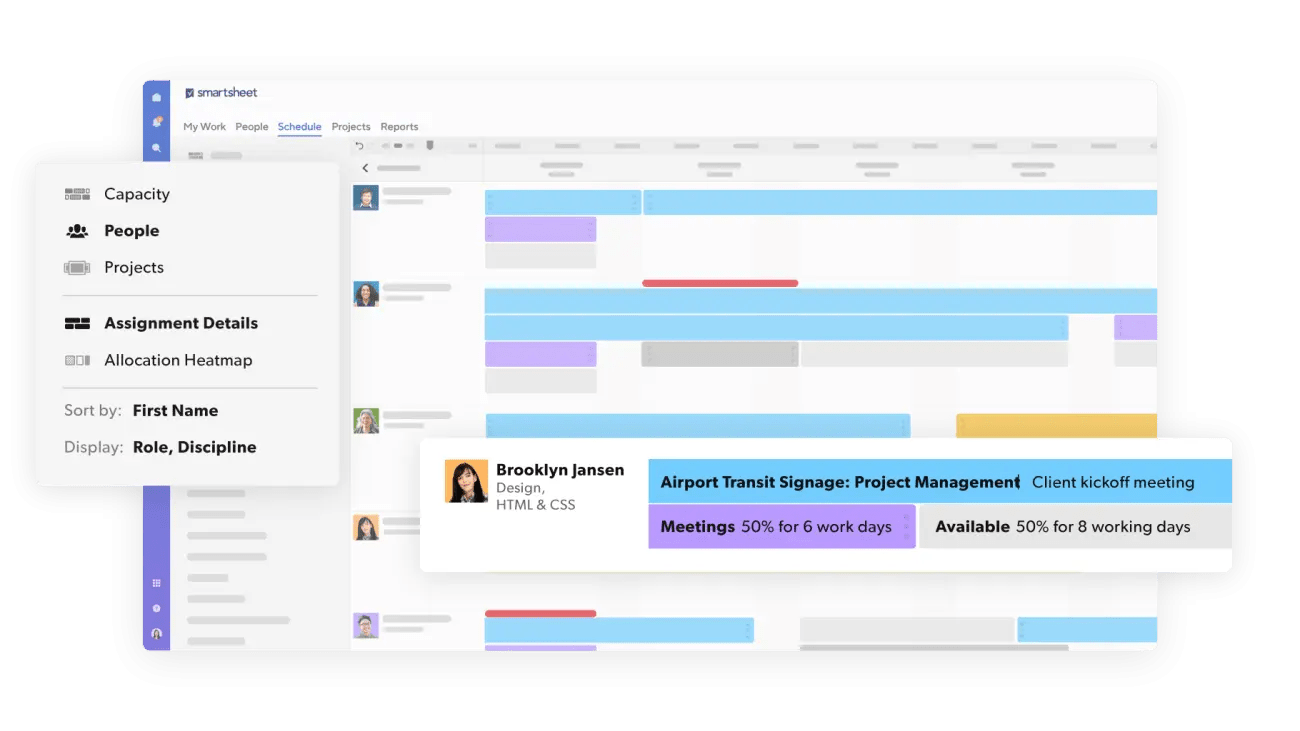
The Project with Resource Management template by Smartsheet helps teams balance workloads, allocate resources wisely, and support smart decision-making.
You can easily track who’s available and what they’re working on to improve productivity. This will simplify resource planning while covering every task without overwhelming your team.
🔑 Ideal for: Project managers and operations teams looking to enhance project resource allocation
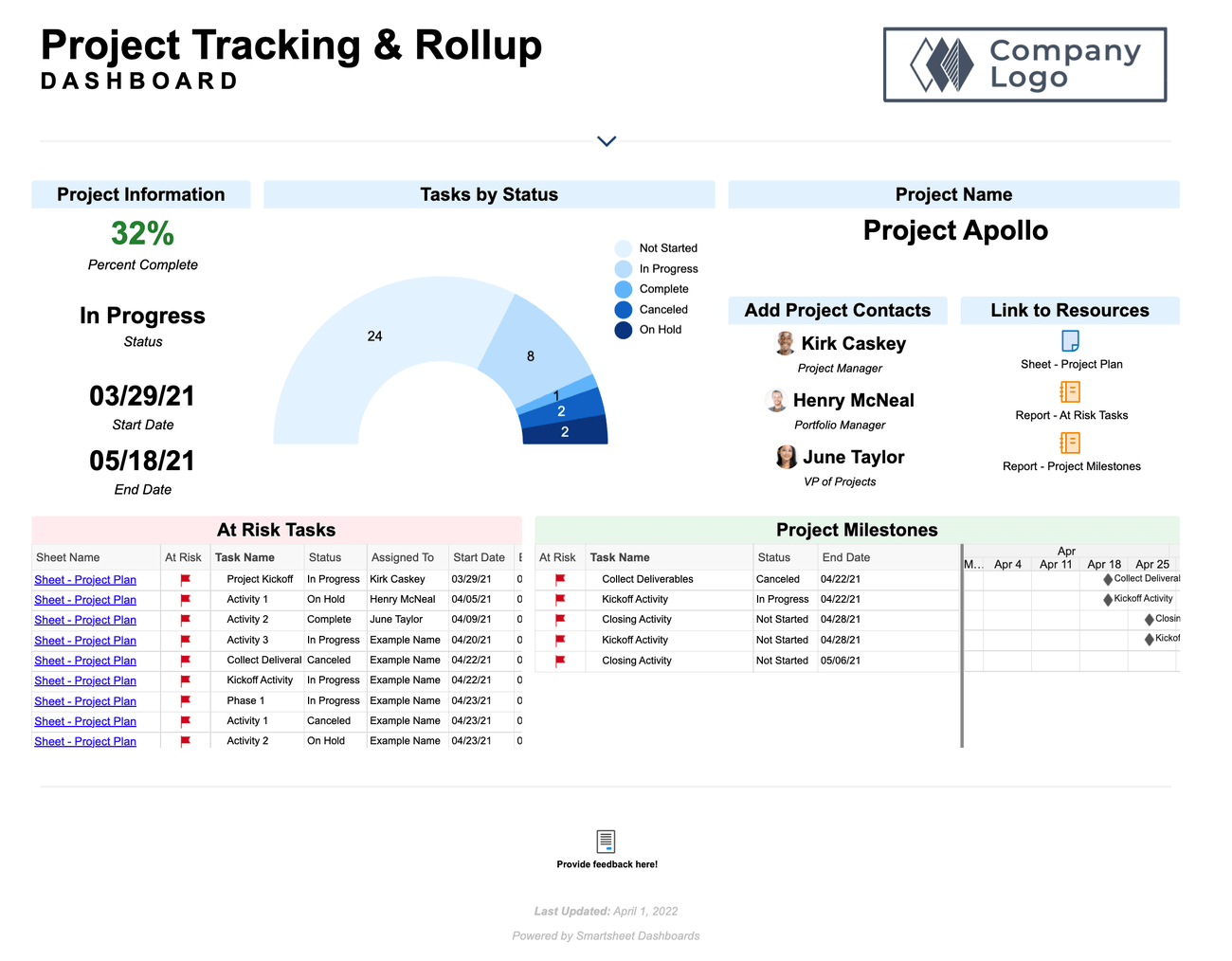
The Project Tracking and Rollup Template Set by Smartsheet provides a quick and efficient way to track projects and keep them running smoothly.
The template helps you plan, schedule, and assign tasks based on project phases. With the project rollup dashboard, track key details like completion, start date, end date, and project overview in one place.
🔑 Ideal for: Small teams searching for a template to track project success
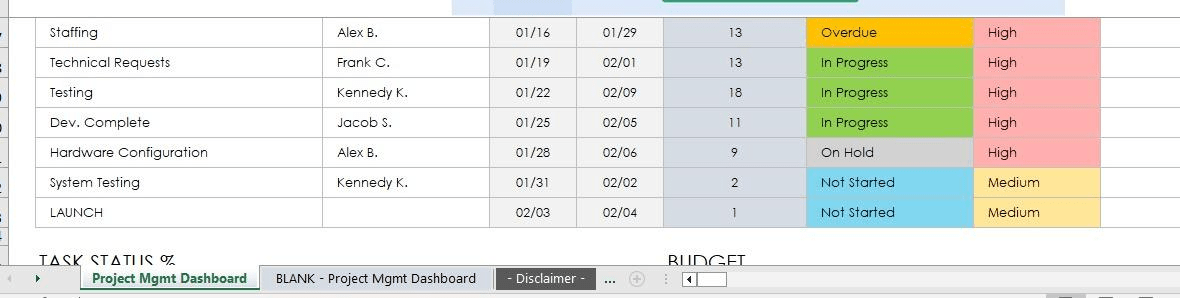
The Project Management Plan Dashboard Template by Smartsheet offers a streamlined way to track and visualize key project metrics.
It also includes a dynamic task list that automatically updates your project Gantt chart in Smartsheet as tasks progress. A built-in dashboard widget summarizes task status, project spending, and pending items. This helps project managers, stakeholders, and teams stay aligned.
🔑 Ideal for: Project managers who want to plan project tasks, track budgets, and keep them running smoothly
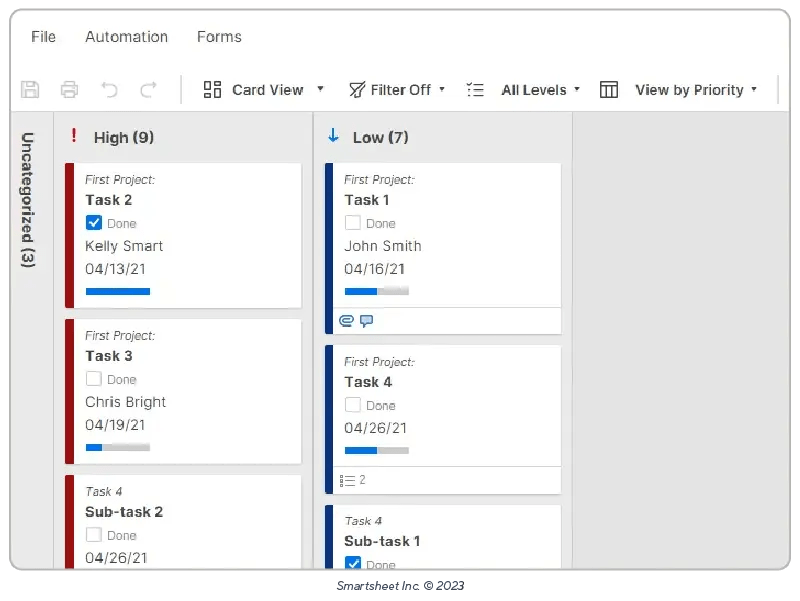
Smartsheet’s Team Project Task Board Template helps you view and track projects across your team in a simplified Kanban-style layout. The structured columns make it easy to track progress percentages, help identify gaps in resource allocation, and balance workload accordingly.
🔑 Ideal for: Team leads and operations teams searching for a tool to streamline project planning and task allocation
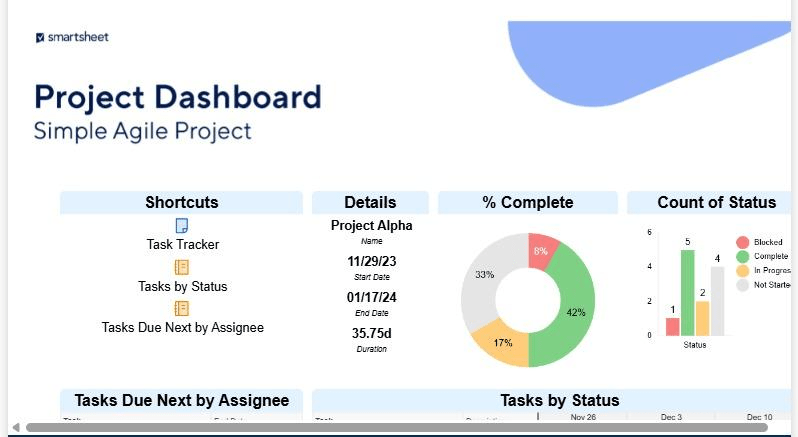
Want to track project hierarchy by dates, duration, and status? The Simple Agile Project template by Smartsheet helps you do exactly that.
It lets you set dependencies, visualize the project timeline, and report progress to ensure that the project runs smoothly. With a structured approach, the template helps you analyze and optimize project details at a granular level.
🔑 Ideal for: Agile teams seeking a structured approach to planning projects, allocating resources, and monitoring progress
🧠 Fun Fact: 63% of projects led by professionals with high business acumen adhere to schedule vs. only 59% of those led by others.
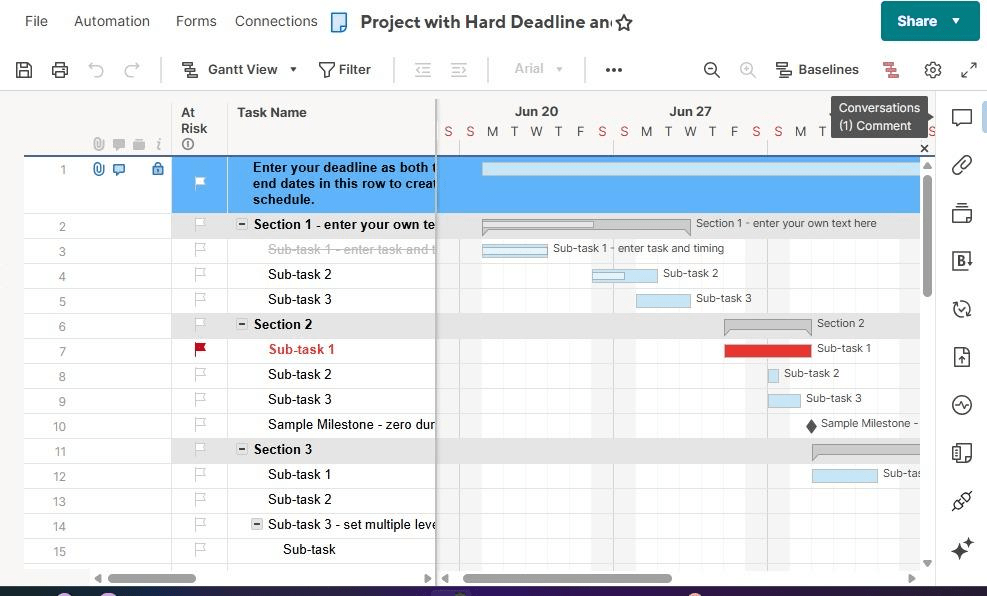
A project that stays on time has a lower chance of losing money and wasting resources. The Project with Hard Deadline and Gantt Template by Smartsheet helps you plan and manage your team schedule to achieve just that.
It also lets you set buffer times and lead times for the tasks, so you can account for deviations along the way and still complete them on time. As dependencies are introduced and updated, the delivery dates and deadlines change automatically, allowing precise planning.
🔑 Ideal for: Small teams and project managers searching for a tool to better predict and manage project deadlines
While Smartsheet is popular for its spreadsheet-style interface, it does have some limitations:
Smartsheet templates do make a project manager’s life easier to some extent, but they do not meet specific requirements for large-scale projects.
So, how do you overcome these limitations?
Here are some of the best Smartsheet alternative templates to try:
The ClickUp Project Management Template makes project management seamless from inception to completion.
The template helps you identify goals, plan action items and timelines, monitor success, and manage budget—all in one place. Plus, built-in ClickUp Views, including Gantt View and Calendar View, help track scheduled and overdue tasks at a glance.
Besides, ClickUp’s Project Management Software lends advanced capabilities like automations, reminders, custom alerts, and notifications to help your team focus and adapt to any project.
🔑 Ideal for: Freelancers and project managers looking for a user-friendly and comprehensive tool to plan multiple projects
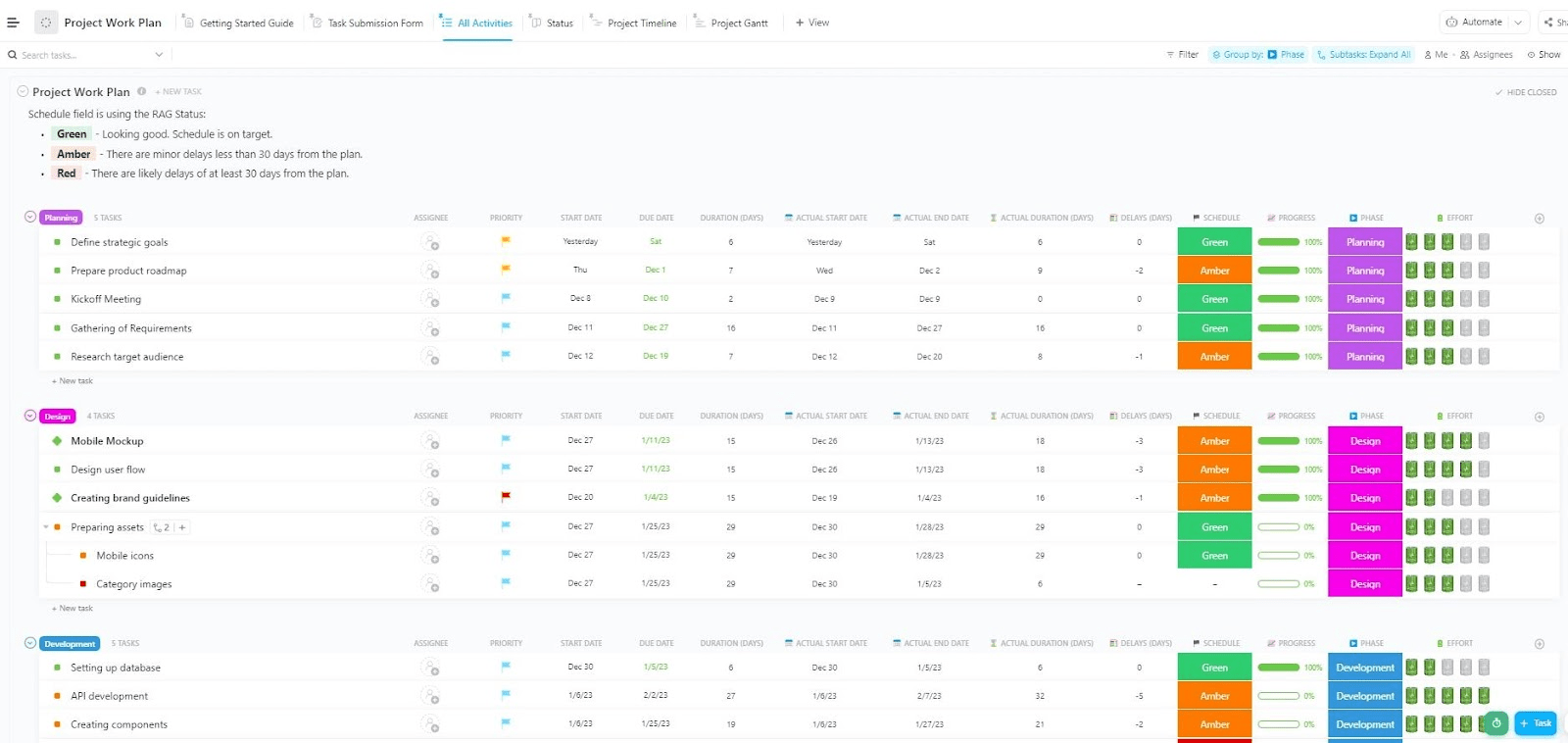
Is planning every minute project detail before kickoff leaving you stressed? The ClickUp Project Work Plan Template makes the process seamless.
The template provides a structured framework for categorizing activities by stage, including planning, design, development, QA, and deployment. The best part? It creates a timeline for each stage and shows all tasks in a calendar view to help you stay on track.
🔑 Ideal for: Small teams and freelancers who want to plan and track projects while avoiding delays
💡 Pro Tip: As the world’s most complete work AI, ClickUp Brain makes it seamless to plan tasks and identify gaps for efficient project management. How? It has the total context of all your workspace data—tasks, due dates, timelines, assignees, priorities, dependencies, and more. Stitch all of it together and you’ve got an AI assistant that makes you 10x more productive!
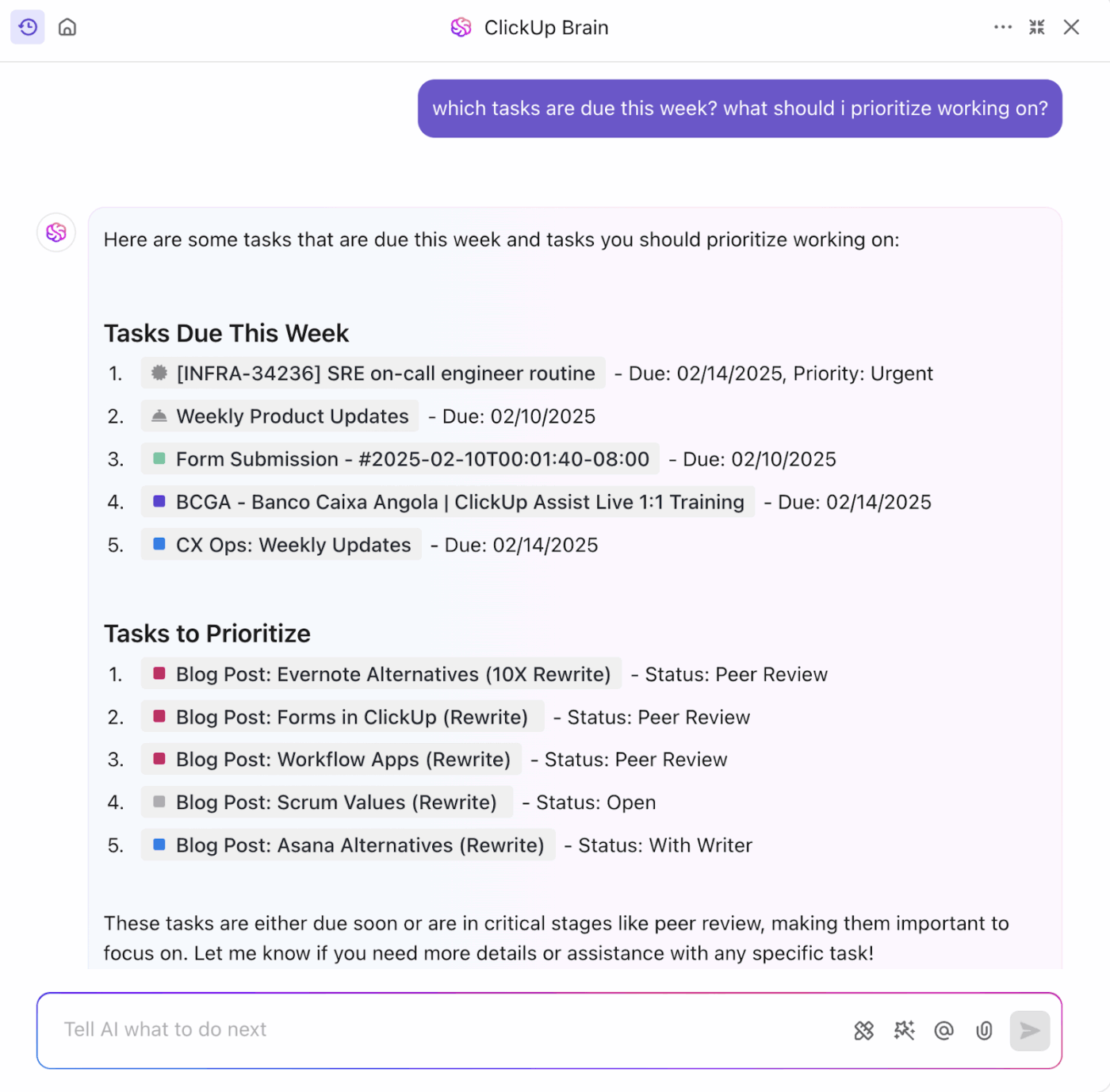
Watch this video to learn more about harnessing ClickUp’s Brain intelligence for your workflows:
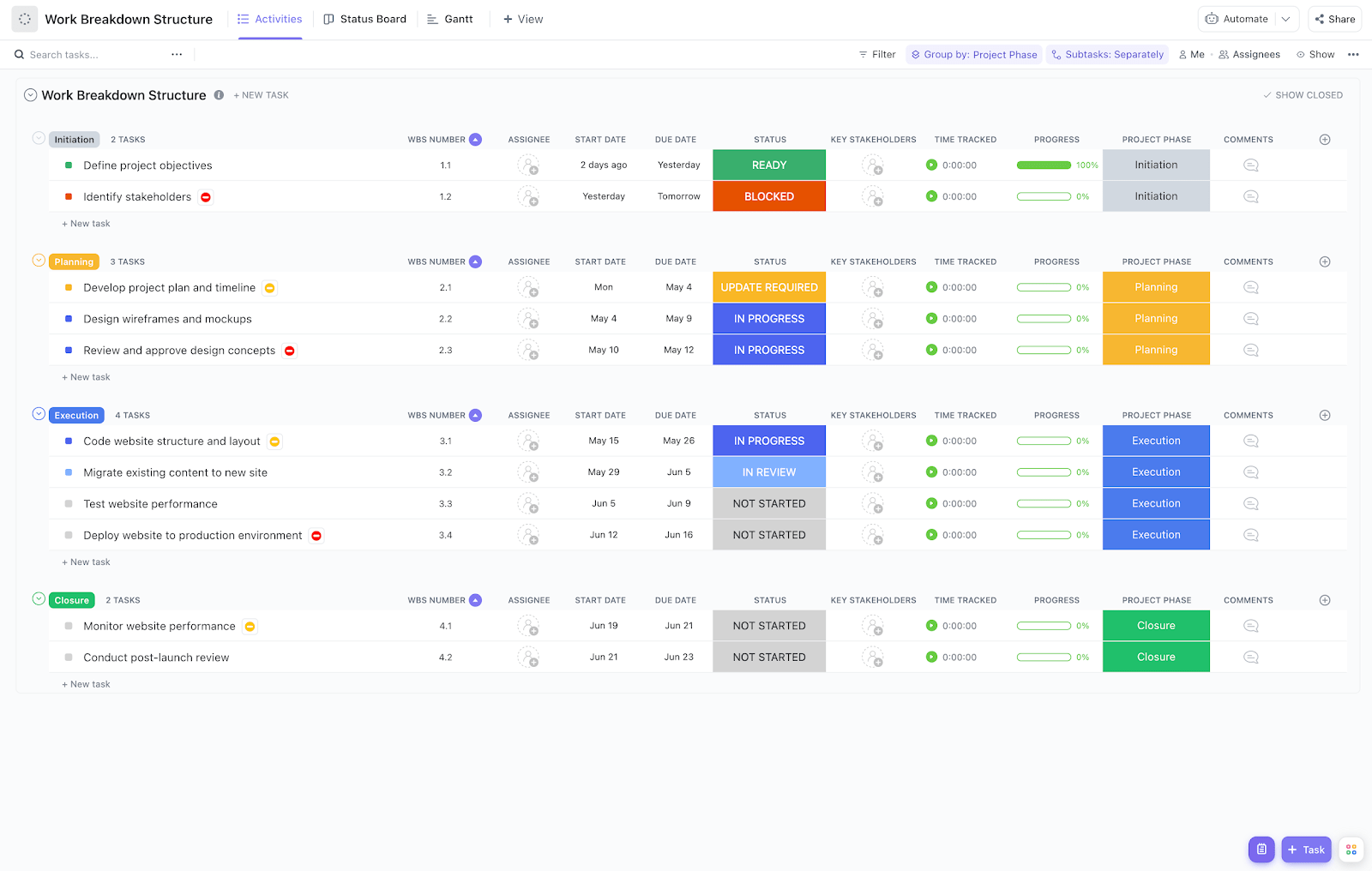
Completing a project won’t be challenging anymore, thanks to the ClickUp Work Breakdown Structure Template. It helps you break down bigger projects into manageable tasks and subtasks that can be completed in a logical sequence. You can even draft handy ClickUp Checklists that give you a dopamine rush every time you check a task off.
🔑 Ideal for: Operations managers and team leads looking for an organized structure to break down project tasks and track progress
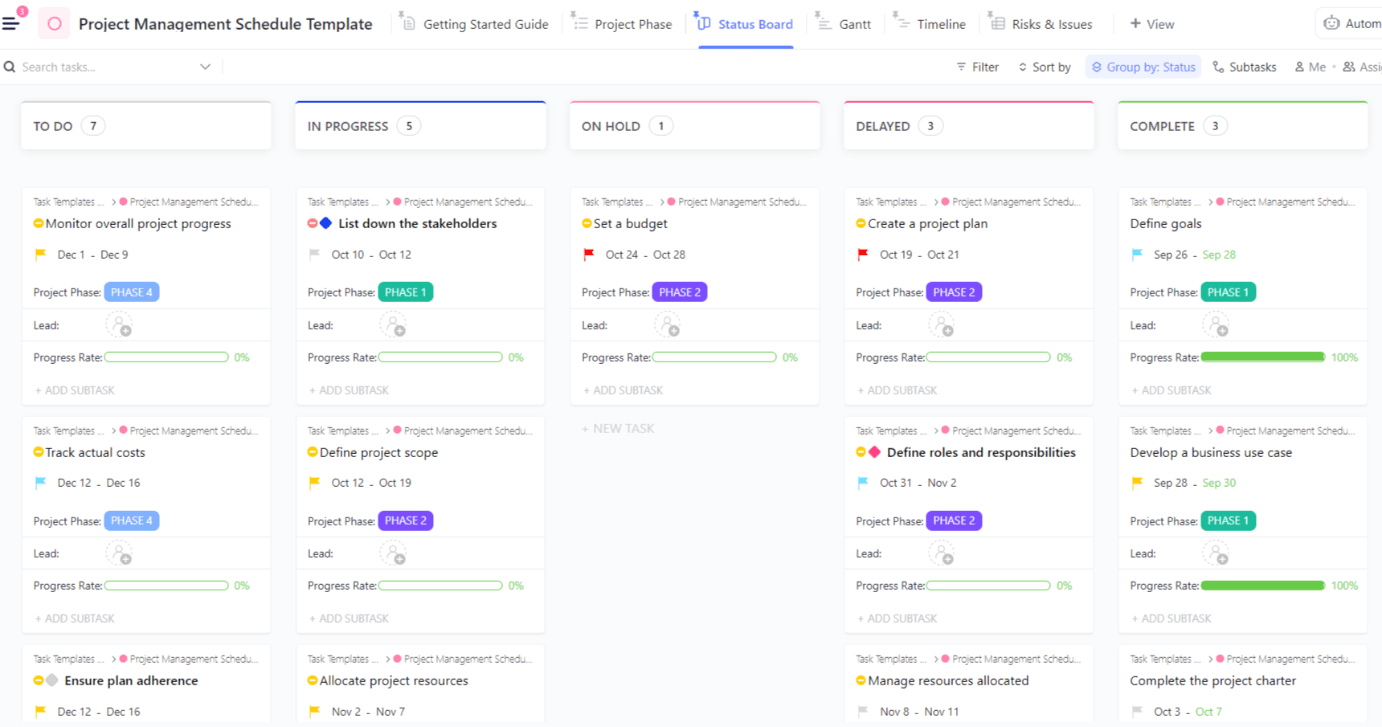
The ClickUp Project Schedule Template is a simple tool to track the status of each task that makes up your project, from ‘In Progress’ to ‘Completed’. It also has a dedicated view to flag issues and risks that might derail your project timeline and delivery.
This template is perfect when you need an organized framework to keep the project lead and contributors accountable for their respective goals. The ability to add comments for each task simplifies tracking and referencing context for decision-making.
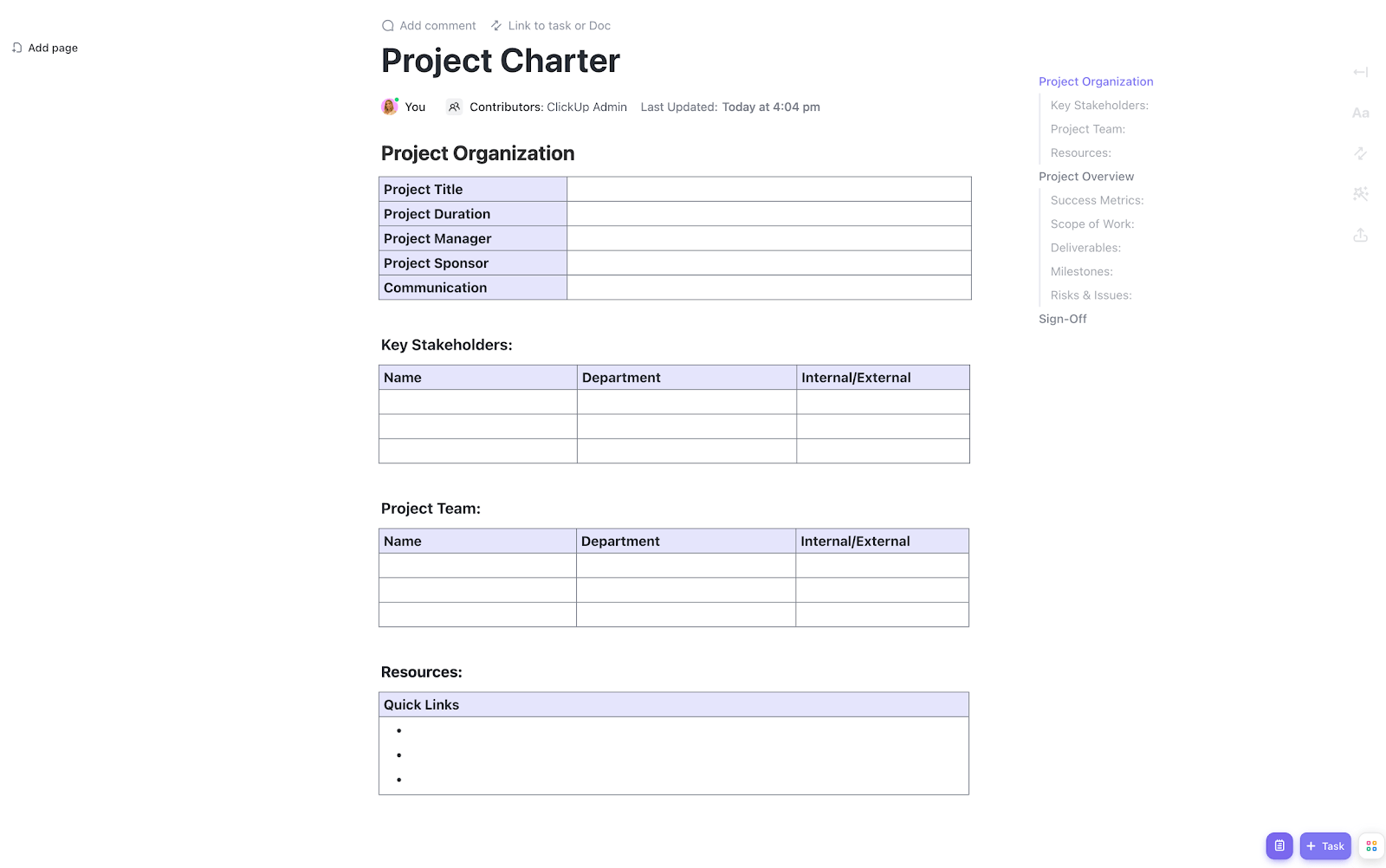
Create a complete outline and record the scope of your project with the ClickUp Project Charter Template. It provides a clear structure for defining and simplifying team communication during the project.
You can track who the key stakeholders and project team members are, as well as what the deliverables, constraints, and success metrics look like. The result? A comprehensive charter that keeps everyone aligned from start to finish.
Need to brainstorm on specific parts or get a section reviewed before finalizing? Tag teammates or Assign Comments directly in the project charter Doc to speed it up.
🔑 Ideal for: Small teams and freelancers who want a structured way to outline project goals and deliverables, while managing anticipated risks
📚 Also Read: Communication Plan Templates
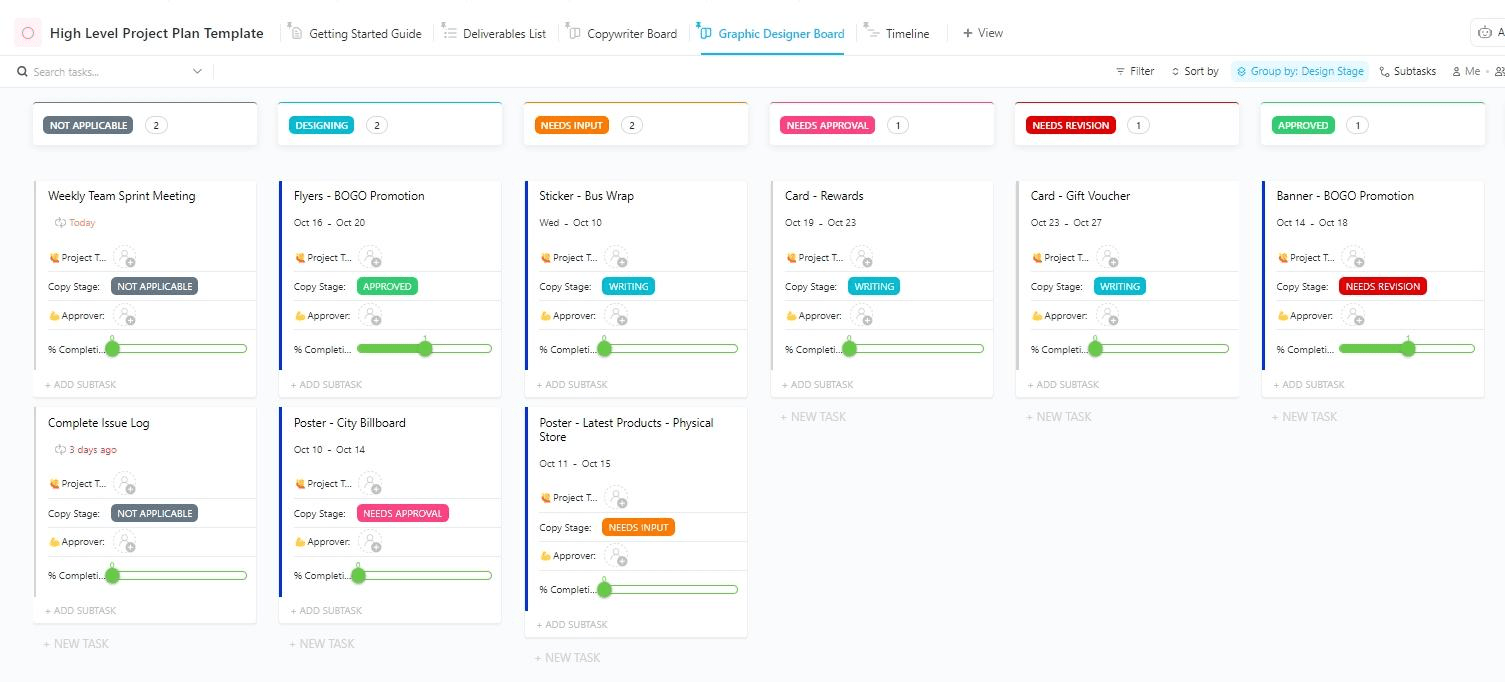
Want to create a high-level overview of your entire project—from goals and expectations to resources and timelines?
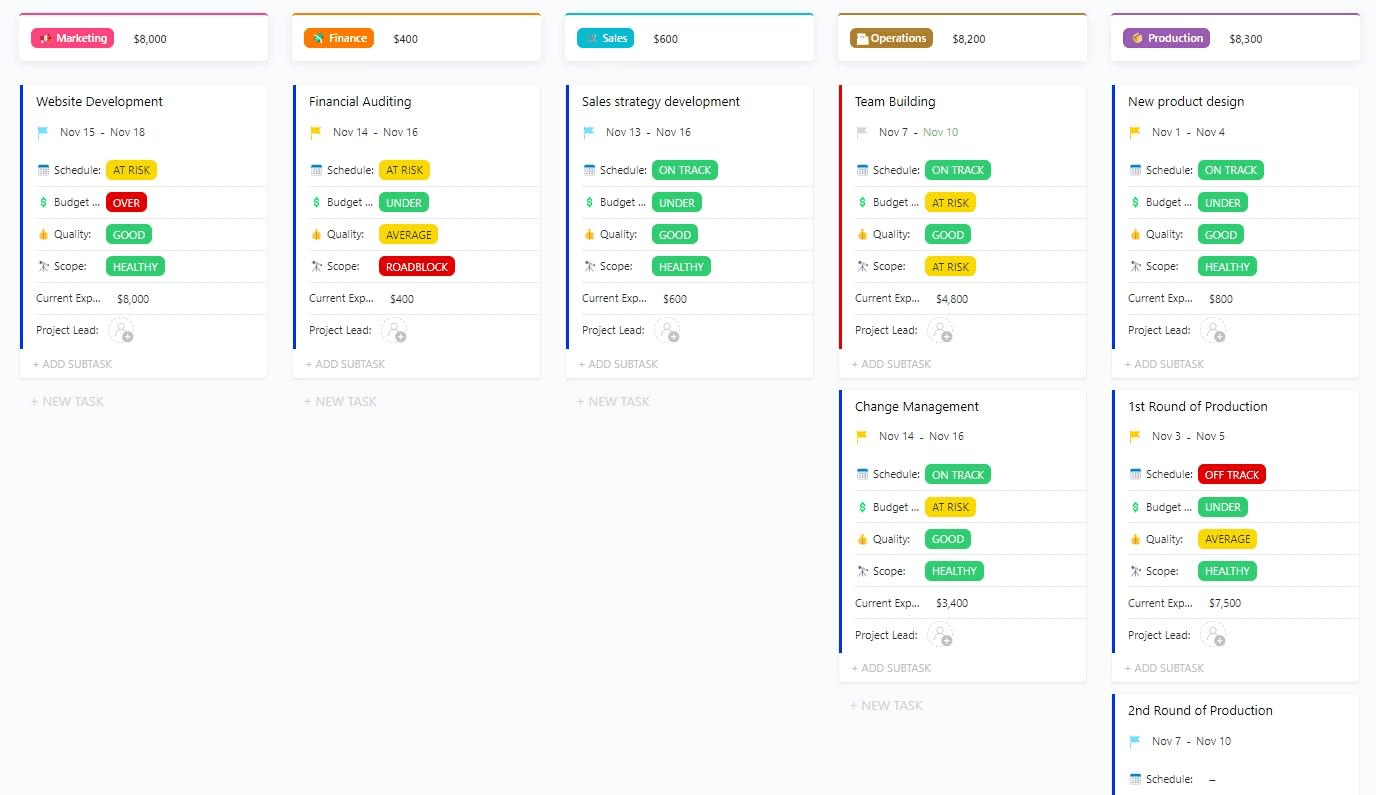
The ClickUp High-Level Project Management Plan Template provides the right framework for this. It offers a clear structure for listing and categorizing deliverables by function, such as design or finance. Plus, you can mark the current stage of each deliverable for improved tracking.
🔑 Ideal for: Operations team and project managers looking for a structured template to plan high-level projects
⚡️ Bonus: Learn how to create a high-level project plan in under 30-min in this video!
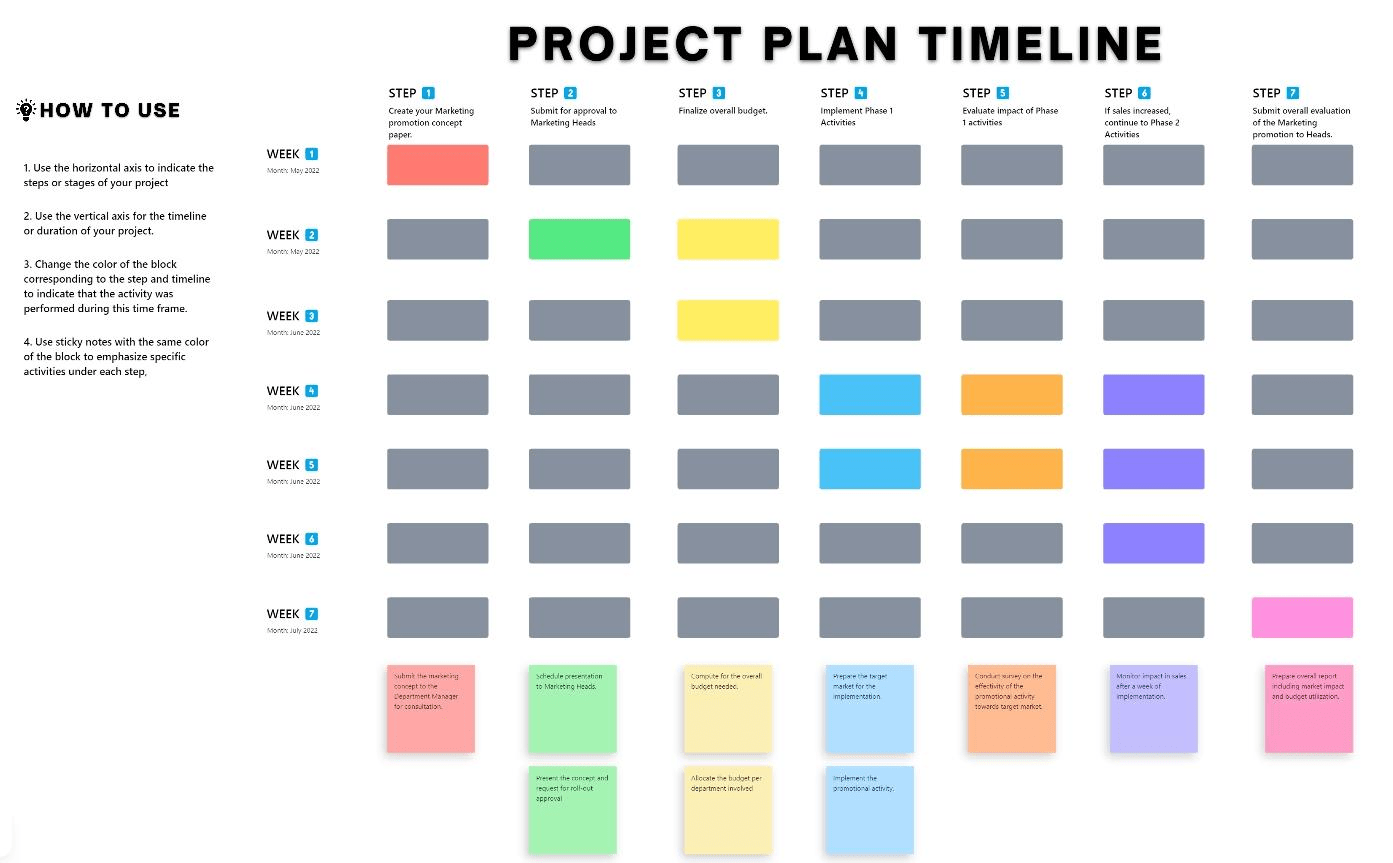
Missed deadlines are a thing of the past with the ClickUp Project Management Timeline Template. The whiteboard layout makes planning and visualizing every stage of your project seamless.
Outline steps, add sticky notes and shapes for extra context, and keep all details in one place. You can switch up the timeline and move tasks around with the simple drag-and-drop capability. Maintain a smooth workflow with priority labels, tags, and comments.
🔑 Ideal for: Development teams, marketing teams, and project leads seeking an efficient way to plan and manage a project timeline
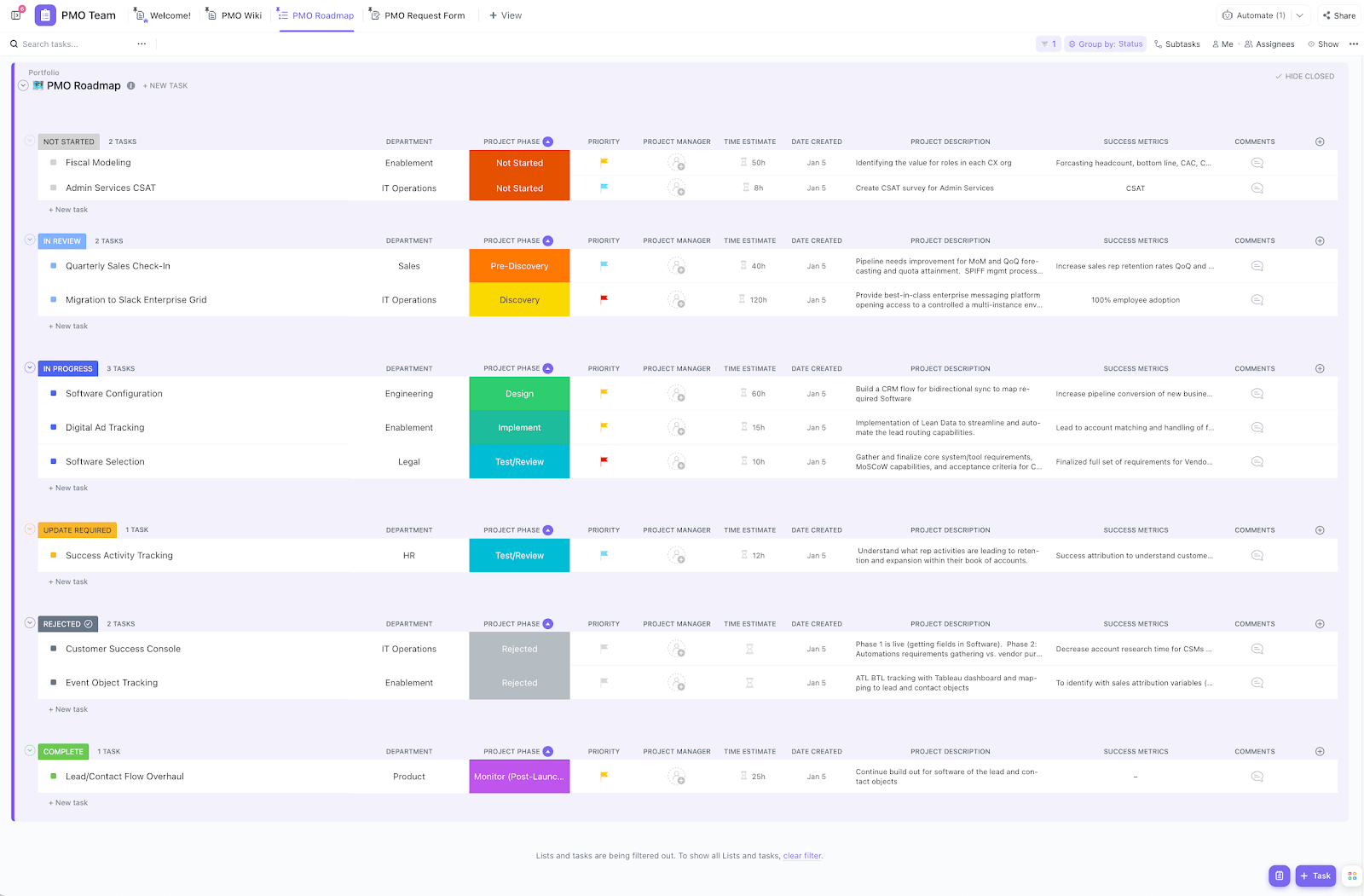
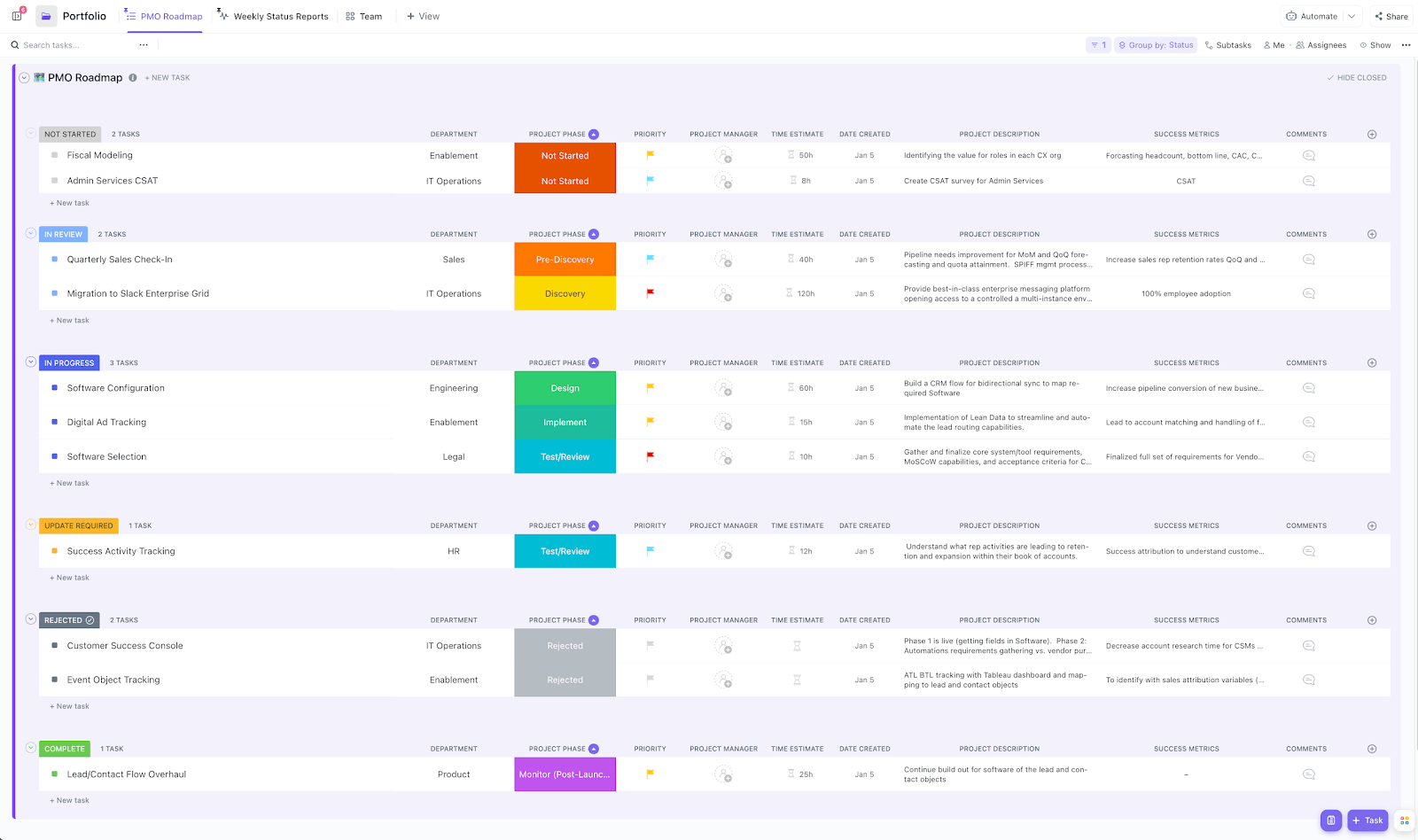
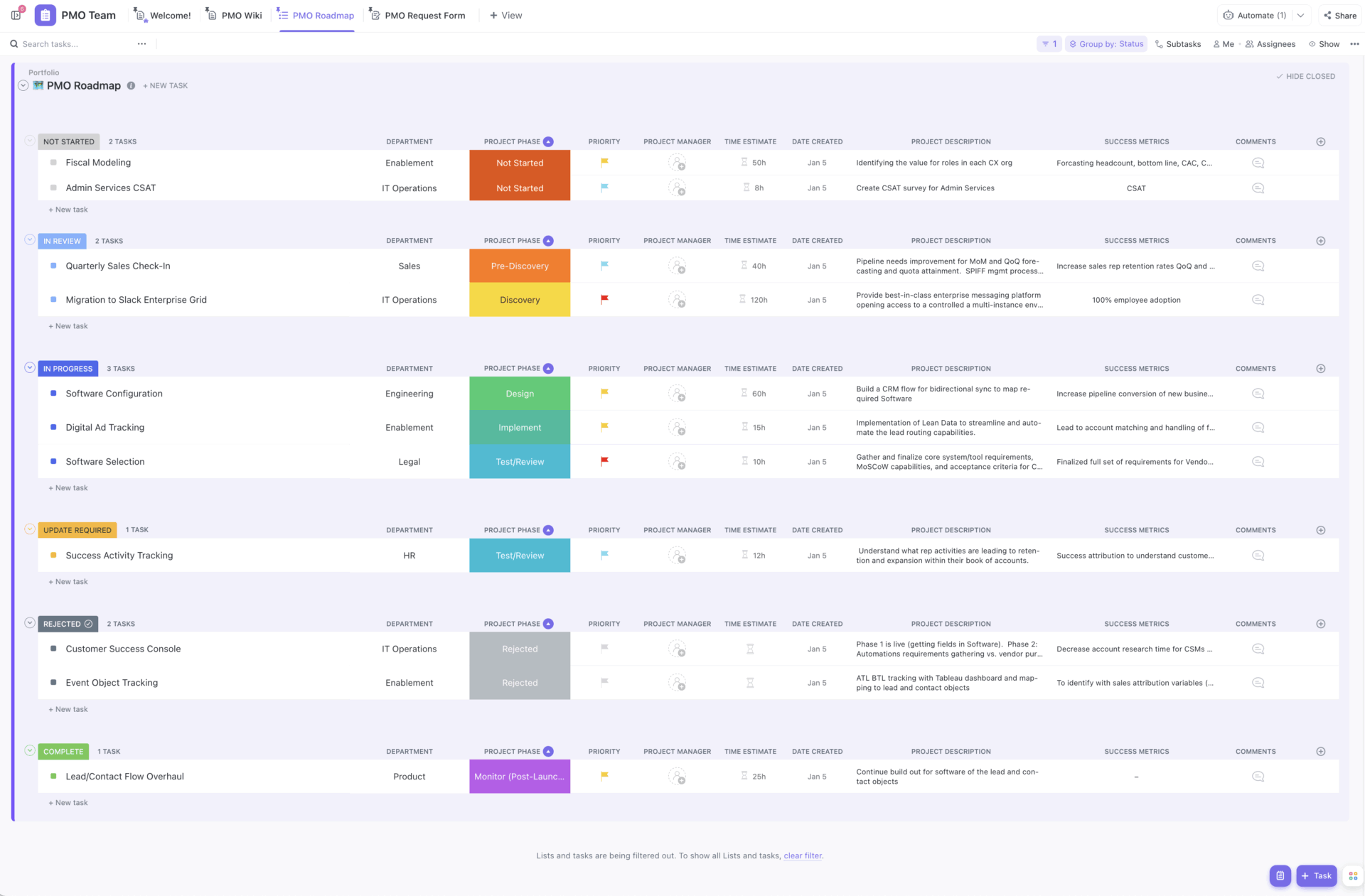
The ClickUp Project Management Portfolio Template simplifies the complexity of managing multiple projects simultaneously.
It features lists for monitoring project health and details your PMO roadmap. It also helps you track each activity by its completion status, simplifying and consolidating planning across various initiatives.
The best part? Built-in AI simplifies prioritizing tasks, setting deadlines, and estimating the time individual tasks will take.
🔑 Ideal for: Project managers looking for a framework to manage different projects and related tasks simultaneously in their portfolio
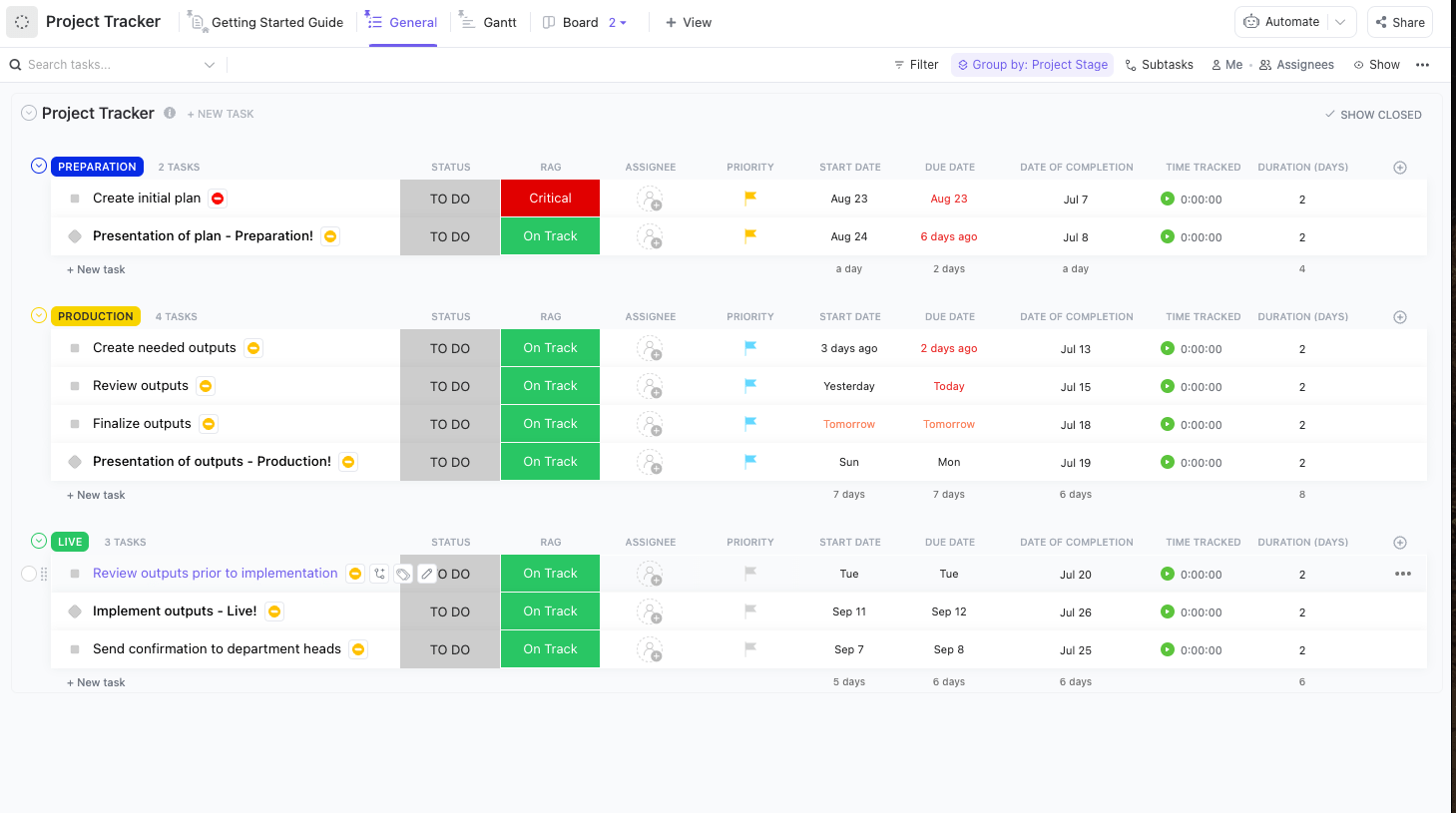
No more juggling multiple projects, tasks, and tight deadlines scattered across tools—the ClickUp Project Tracker Template organizes it all together. It features pre-made Custom Fields that you can edit or keep based on your project needs.
Plus, you can create folders with subtasks and checklists to break down each task clearly. It also helps to keep your team on track with custom project management automations that reduce manual work and boost productivity.
🔑 Ideal for: Agile teams and freelancers seeking a solution to track project success
👀 Did You Know? Research consistently shows a strong connection between thorough planning and project success. Across multiple studies, the correlation is strikingly consistent—on average, planning accounts for about 33% of the variation in efficiency and 34% in overall project success.
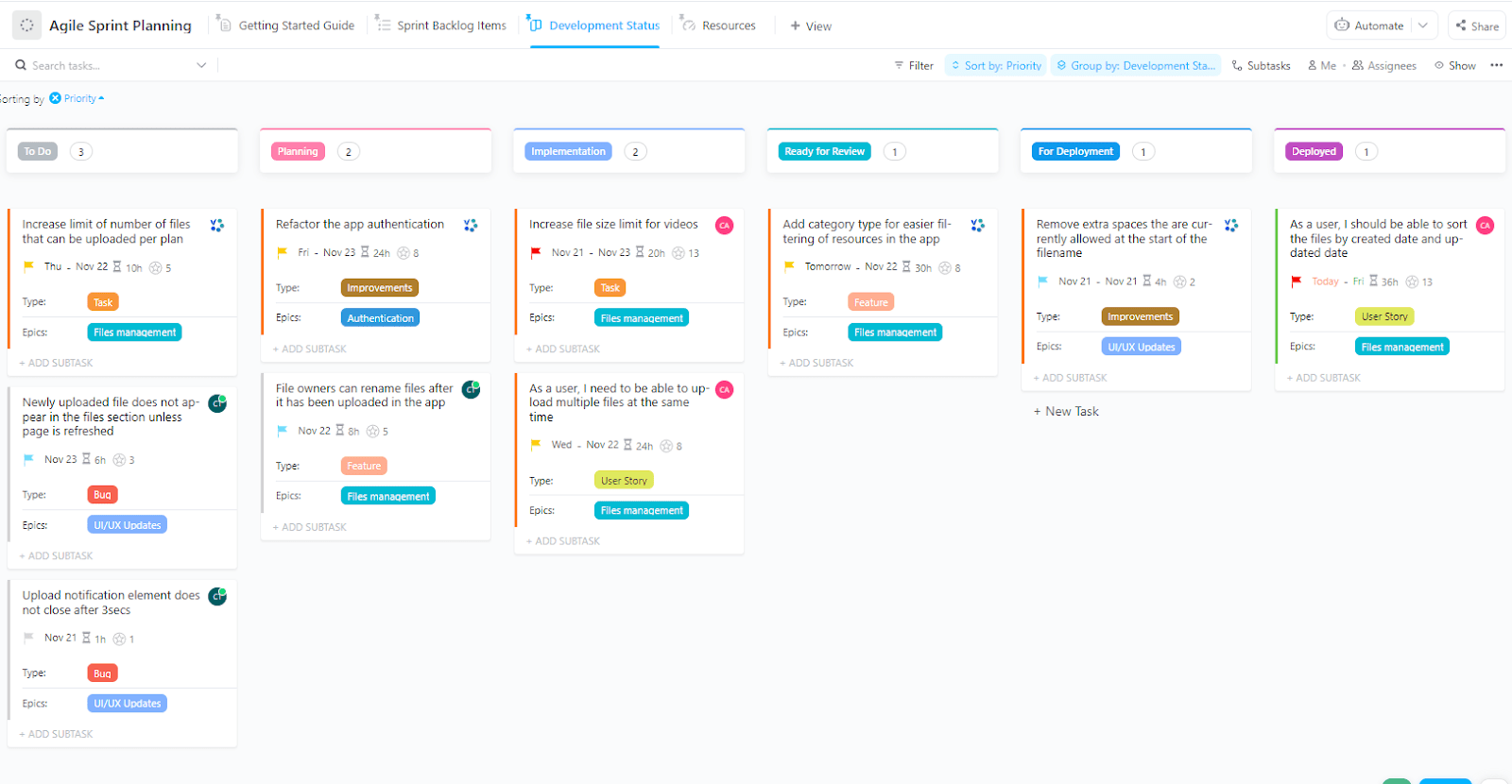
Want to organize work, monitor progress, and track resources effortlessly across sprints? Try the ClickUp Agile Sprint Planning Template. Set clear sprint goals, outline the steps to achieve them, and break everything down into manageable tasks.
You get custom views like the Sprint Backlog view to track and prioritize work items, the Development Status view to visualize task progress across a Kanban board, and the Calendar View to keep an eye on deadlines and stay on schedule. The best part? The template’s intuitive work dashboards provide real-time progress updates to keep everyone aligned.
🔑 Ideal for: Operations managers, agile teams, finance leads, and marketing heads looking for a structured approach to plan and manage sprints
📮 ClickUp Insight: 19% of managers say getting timely updates from team members is their biggest visibility challenge.
But even when updates do come in, they’re often inconsistent. Some are vague, some are overly detailed, and others are missing altogether. That inconsistency creates noise instead of clarity.
ClickUp’s AI Cards and AI-generated Status Summaries and Chat Summaries help bring consistency to how progress is reported. Team members can generate structured updates with a click, while you get a unified, readable view of what’s on track—and what needs attention.
💫 Real Results: Pigment improved team communication efficiency by 20% with ClickUp—keeping teams better connected and aligned.
Many project managers are fans of to-do lists, and for good reason. They reduce mental clutter by getting tasks out of one’s head and onto paper (or an app), which boosts productivity and lowers stress.
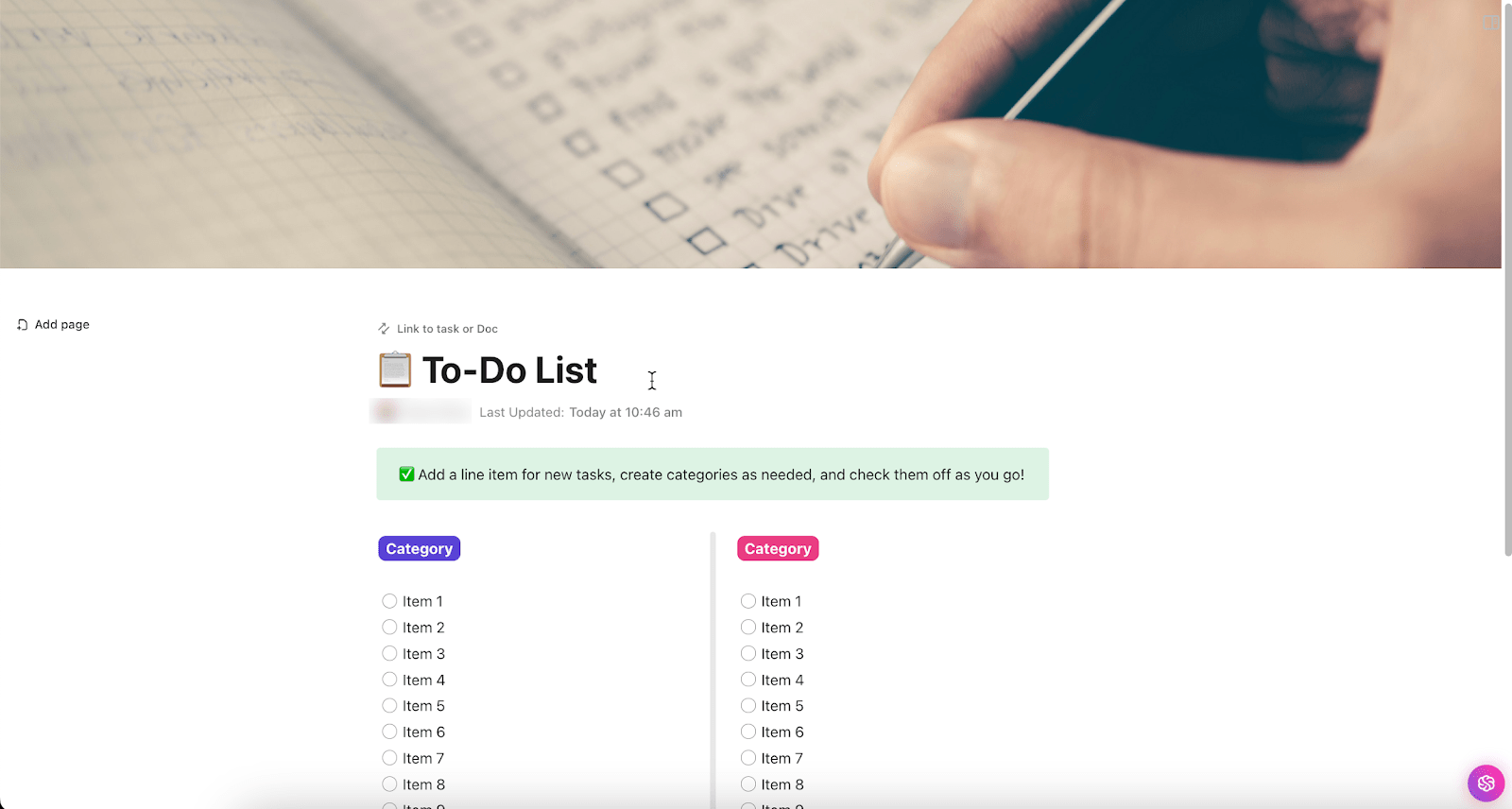
The ClickUp To-Do List Template allows you to simplify task management by creating your own to-do lists. With easy-to-edit checklists and status trackers, the neat format keeps you steadily on the road toward seamless project execution.
Use it to focus on project priorities without missing a step. Whether you’re managing a personal goal or collaborating on a team project, this template helps you plan, organize, and stay on track—all in one place.
🔑 Ideal for: Freelancers and small teams who want a clean and simple layout to list and track project tasks
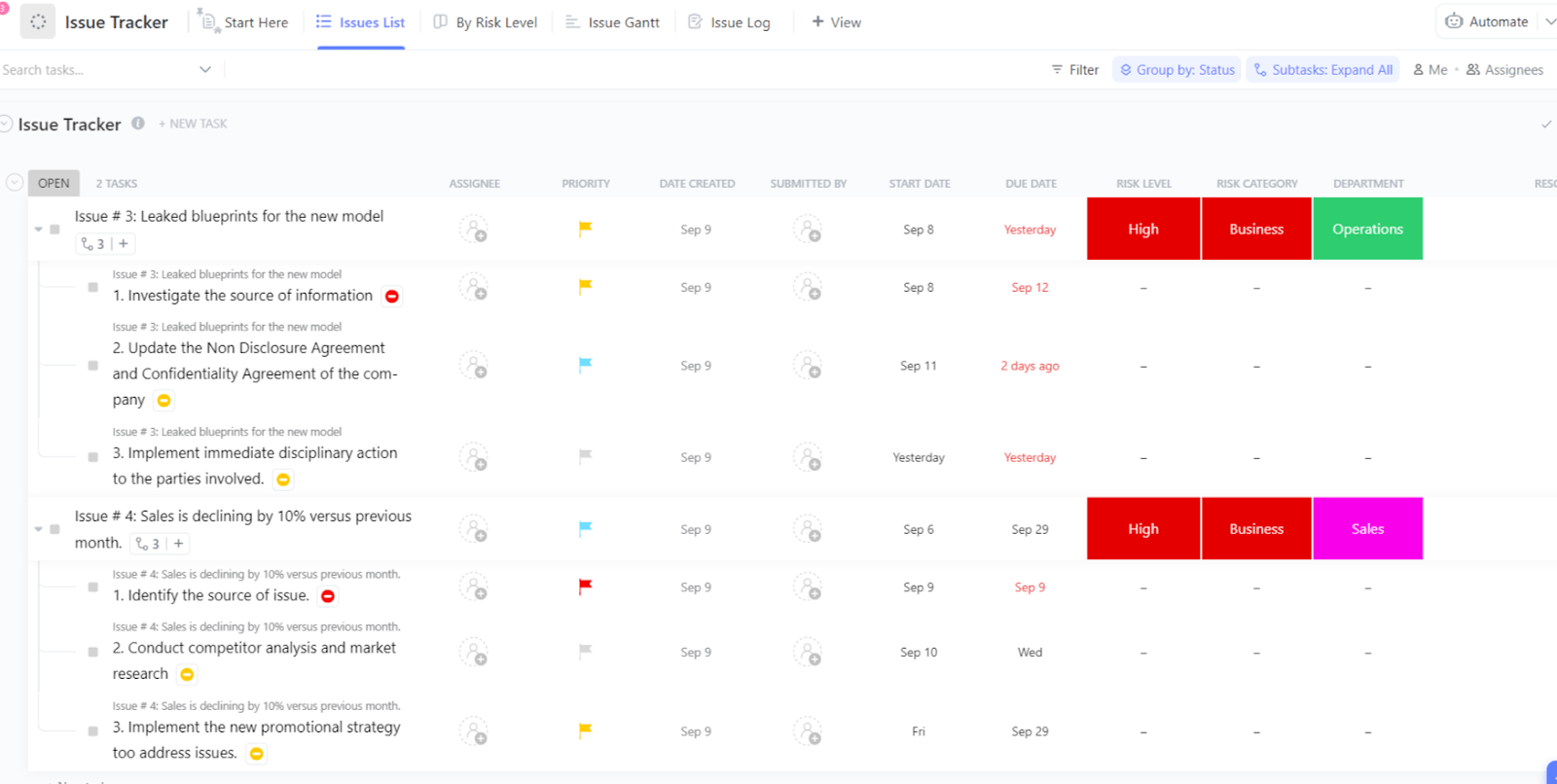
Worried about bugs disrupting your project workflow? Try the ClickUp Issue Tracker Template to log the impediments.
The List View keeps every issue visible and easy to manage. Brief descriptions offer quick context at a glance, and the Gantt View highlights deadlines and dependencies to support timely resolutions. Key details such as department, resolution status, and risk category help you stay ahead of bottlenecks.
🔑 Ideal for: Project teams and development teams looking for a simple layout to track and resolve bugs
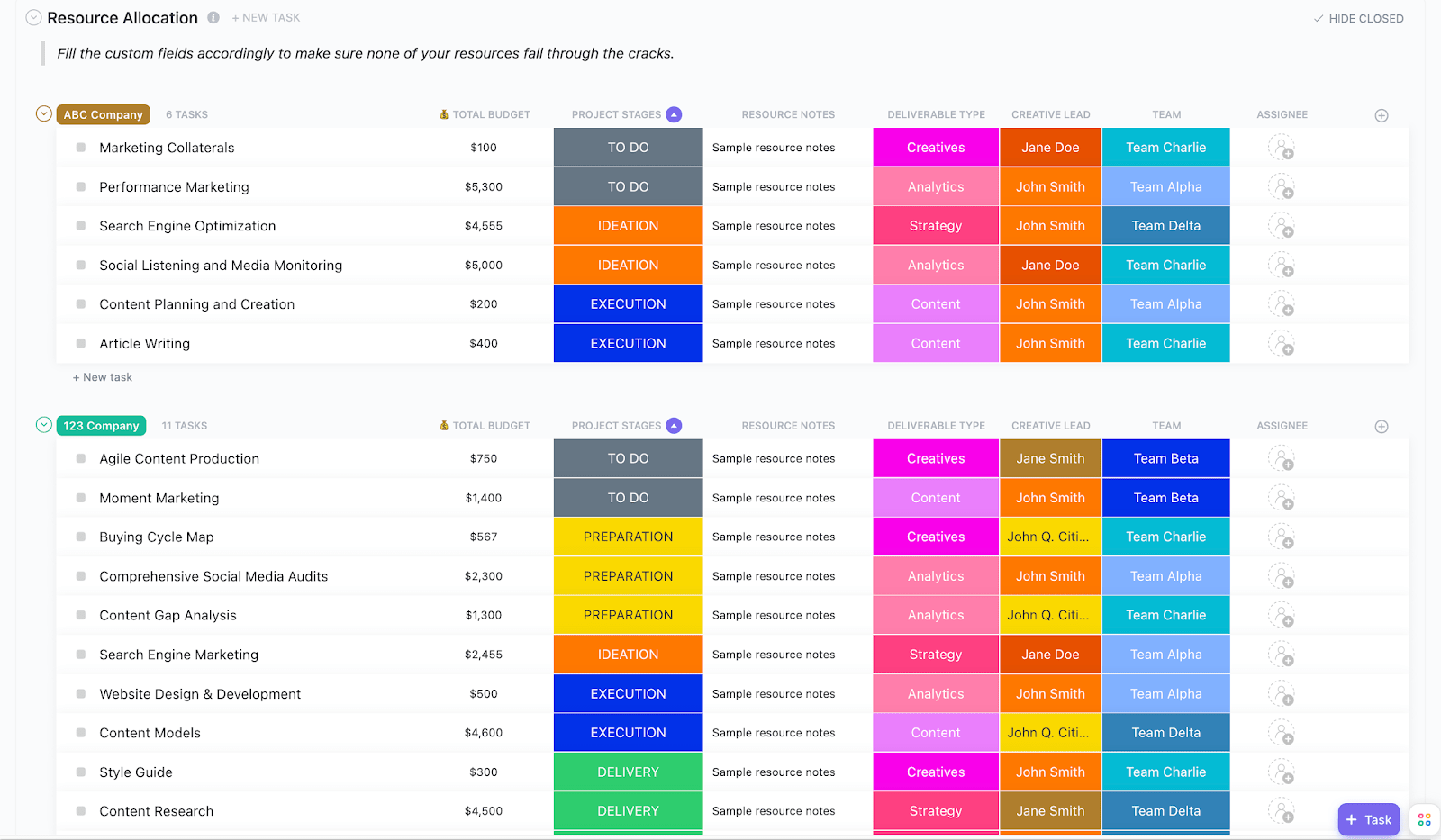
Tired of wondering where your team’s bandwidth or budget is going? ClickUp’s Resource Allocation Template gives you total clarity, letting you track real-time resource usage and assign tasks precisely where they’re needed most.
The Workload View offers visibility into team schedules, with flexible time spans, filters, and workload settings. It lets you quickly spot over- or under-utilization and reassign work where it belongs.
You can also use configurable Custom Task Statuses in ClickUp (like “In Progress”, “To Do”, “Client Review”, etc.) to standardize your workflow and make every stage of your process transparent. Plus, adding Custom Fields that capture key project details—like budget, deliverable type, and project stage—ensures complete alignment across teams.
🔑 Ideal for: Project managers, team leads, and operations teams seeking an intuitive approach to manage and optimize resource usage
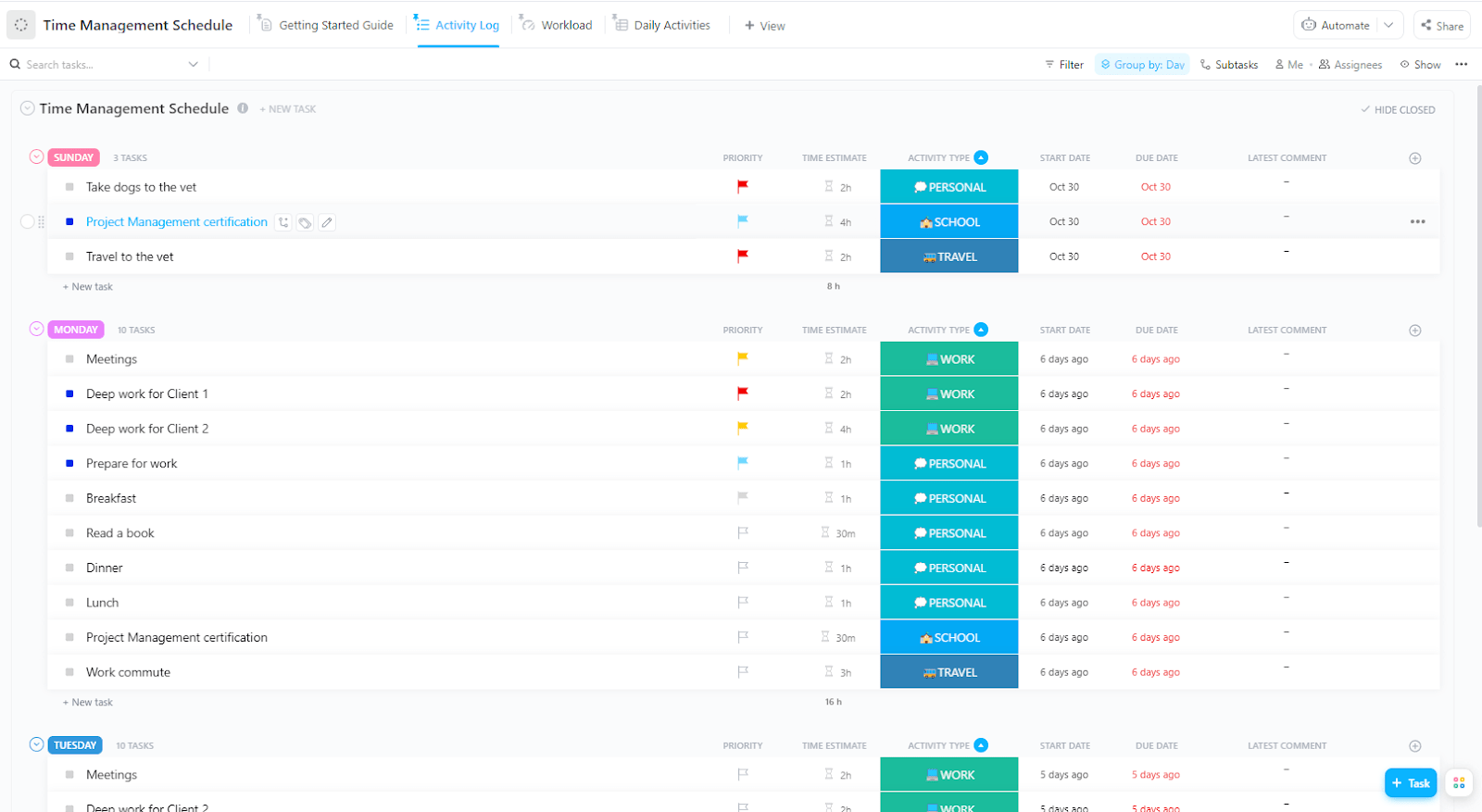
Juggling multiple projects is effortless with the ClickUp Time Management Schedule Template.
The template lets you log activities for each project with specific time estimates, activity type, start date, and due date. The Workload View displays daily time estimates for each task. Click on any time block to expand and view task-specific details.
🔑 Ideal for: Freelancers and team members who want to manage and optimize time for projects
Here’s what Alfred Titus, Administrative Support Manager at Brighten A Soul Foundation, has to say about using ClickUp for project management:
To any organization struggling with how to manage their projects, ClickUp will help in task collaboration. With this software, people can keep track of their to-do list items and work on those tasks within the stipulated time. It also helps the project management team to track the overall progress of the projects to ensure deadlines are kept.
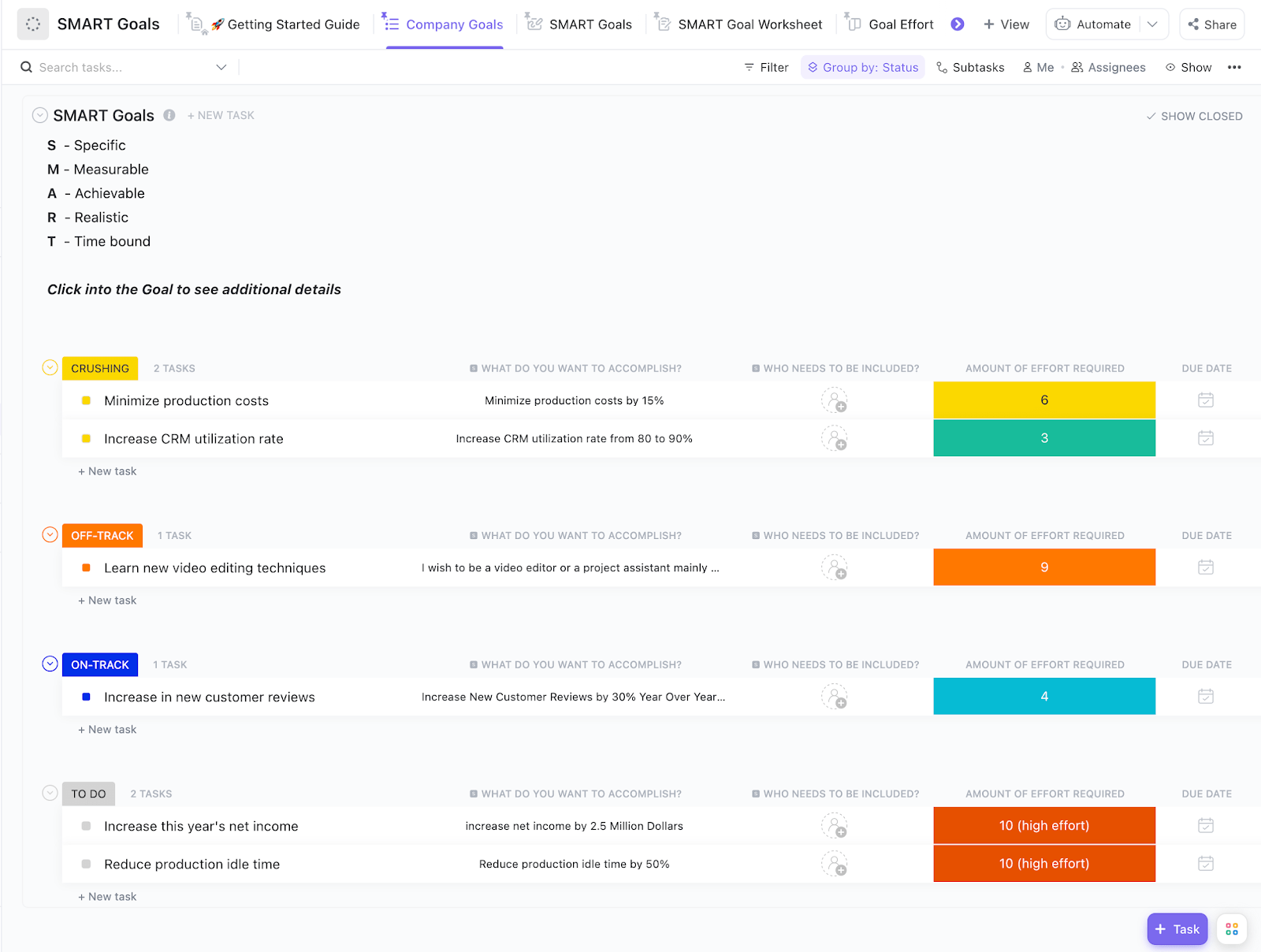
With the ClickUp SMART Goals Template, you can define clear, specific goals and visualize them using images and color coding for smooth navigation.
Easily outline the who, what, when, where, and why behind each goal. The best part? The Board View shows goal status—on track, off track, in progress, completed, or to-do—making it easy to monitor performance.
🔑 Ideal for: Project managers, marketing teams, and operations teams searching for a tool that helps set specific goals and monitor the results
➡ Read More: Best Goal Tracking Apps
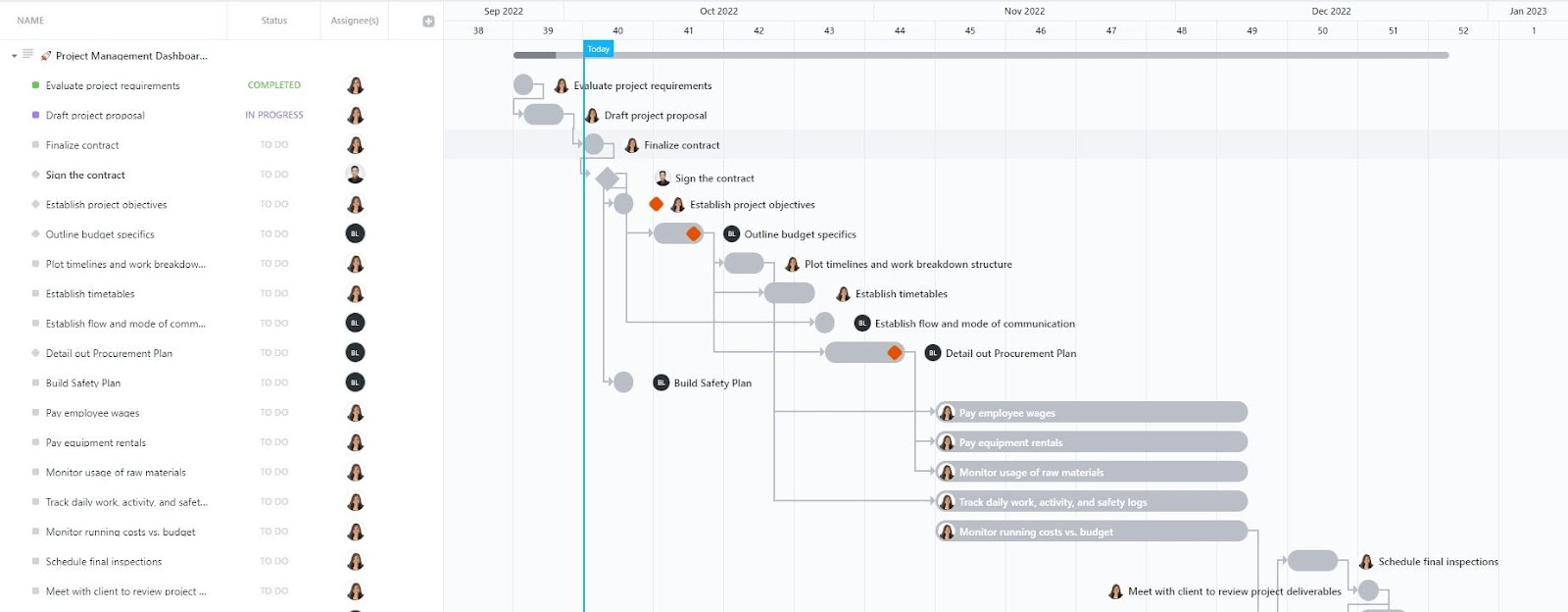
Turn messy project workflows into seamless and clear project tracking with the ClickUp Project Management Dashboard Template. This template gives your entire team a shared visual hub for communicating and swiftly resolving problems.
Use rich Custom Fields such as Planned Cost, Issue Level, Actual Cost, Project Phase, and Remaining Budget to monitor finances, risks, and project stages in detail. Paired with Custom Statuses like To Do, In Progress, On Hold, and Completed, they help you standardize task flow and surface bottlenecks instantly.
🔑 Ideal for: Project managers and team leads who want a centralized space to run projects smoothly
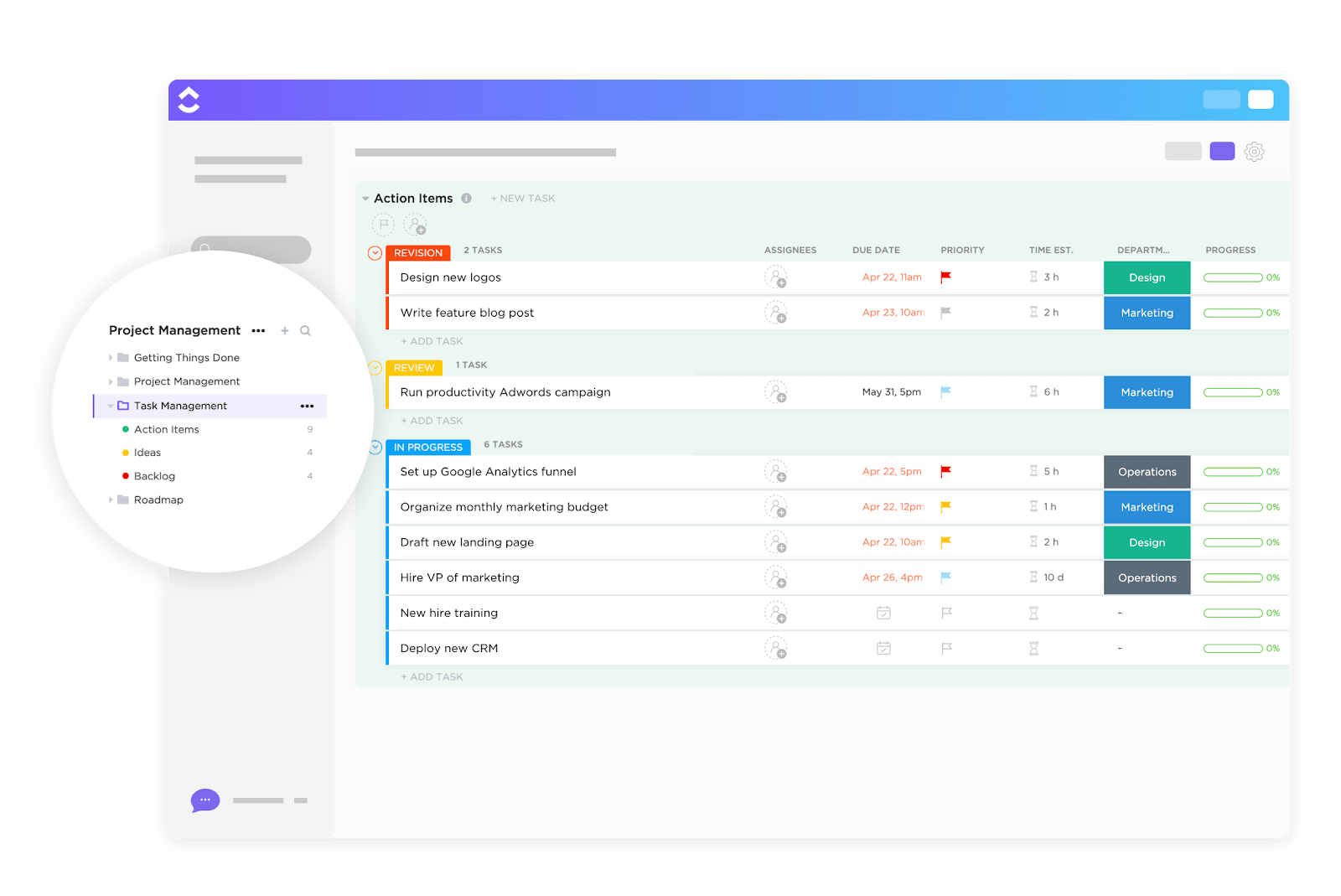
Looking for a template that helps your team find the best working framework? Try the ClickUp Task Management Template.
Organize your tasks into intuitive segments—so your team stays focused on what’s action-ready, keeps innovative ideas in sight, and knows what’s still in planning.
At a glance, see who’s assigned to each task, when tasks are due, and how long they might take. You can also add Custom Fields for budgets, URLs, file attachments, or any other detail critical to your project.
🔑 Ideal for: Project managers, team leads, and freelancers trying to find a framework to plan, manage, and track project aspects
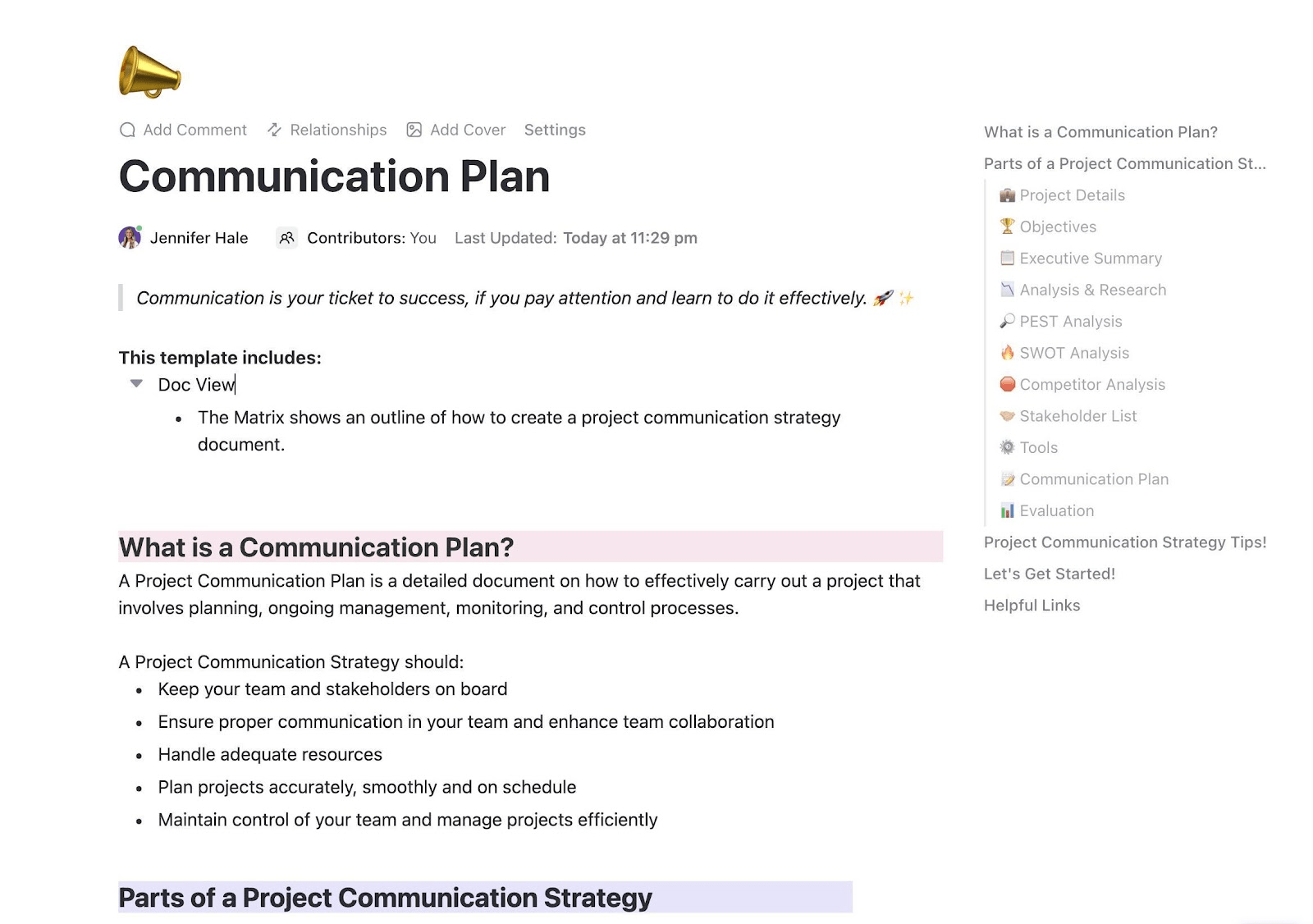
Use the ClickUp Communication Plan Template to streamline project communication and keep efforts aligned in the same direction. It helps you plan, monitor, and manage messages and communication processes based on your project goals.
The template also helps you evaluate team communication effectiveness and identify areas for improvement, making your strategy more focused and results-driven.
🔑 Ideal for: Customer support teams, marketing teams, and project managers looking to streamline communication with clients, stakeholders, and internal teams
🧠 Fun Fact: When cortisol (the stress hormone) dominates, it narrows our focus and creativity. To counter this, a carefully balanced “brain cocktail” of positive neurochemicals—oxytocin, dopamine, and endorphins—can unlock flow and radical ideas. The simplest way? Encourage teamwork and collaborative trust via simple acts like eye contact, laughter, sharing funny or embarrassing moments, or pairing up people who don’t normally collaborate.
The ClickUp Project Status Report Template streamlines monitoring project progress. It lets you categorize project reports by department, stage, and status for customized insights.
It also helps you define project schedules and scopes. Its color-coded linear timeline provides a visual overview, making it easy to spot any overdue items at a glance. With a structured view of every detail, it keeps your project status reports organized and easy to manage.
🔑 Ideal for: Project managers and operations teams seeking a structured format to track project status and budget
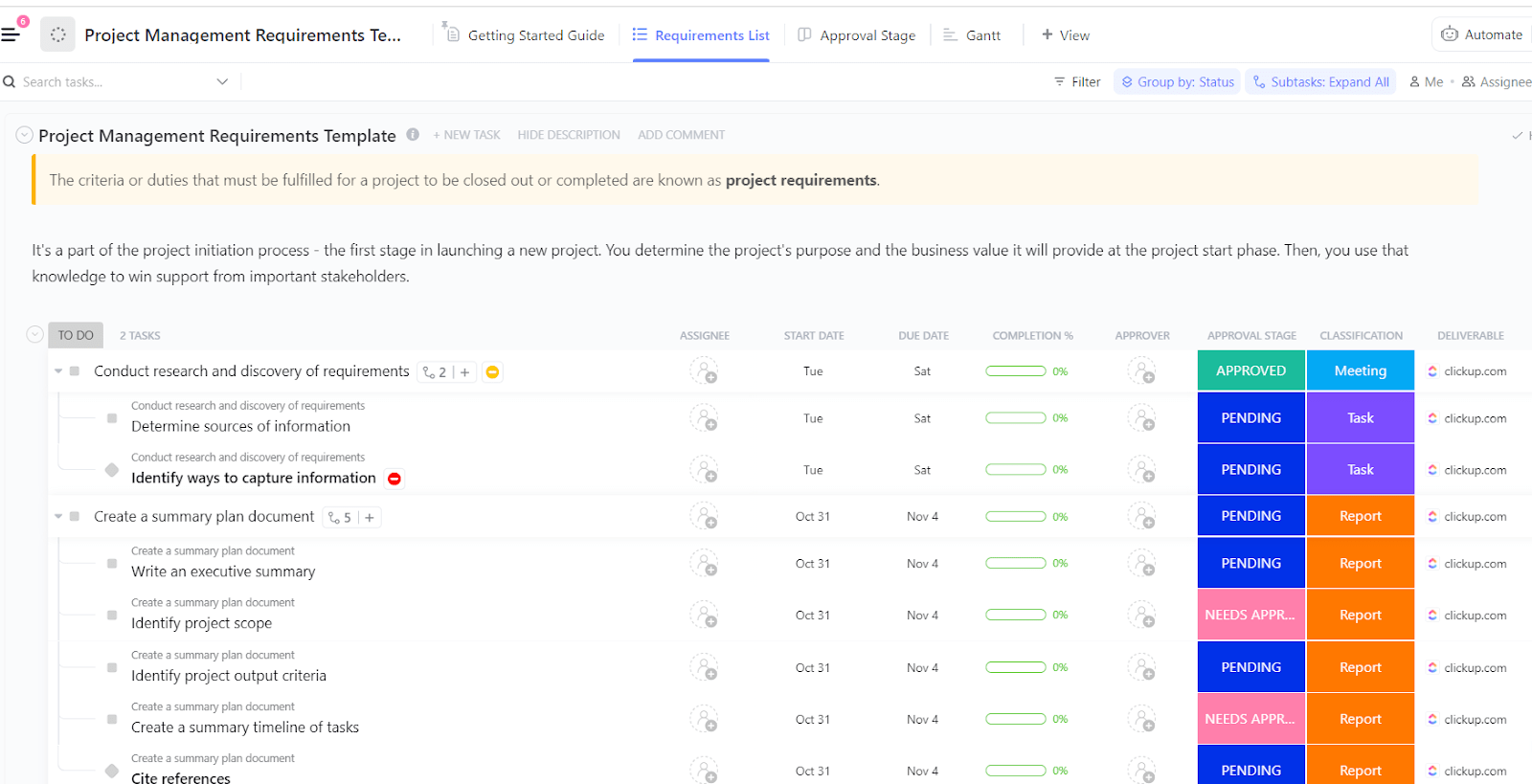
Start your projects on a foundation built for clarity and alignment with ClickUp’s Project Management Requirements Template, which is perfect for both beginners and seasoned PMs. This ready-to-go List-style template streamlines how teams define and document project requirements, helping everyone—from stakeholders to contributors—stay on the same page.
Its checklists and subtasks guide project execution. Powerful Custom Fields—Approval Stage, Deliverable, Classification, Completion, and Approver—provide essential context and streamline task navigation.
🔑 Ideal for: Small teams and operations leads seeking a structured approach to planning project requirements
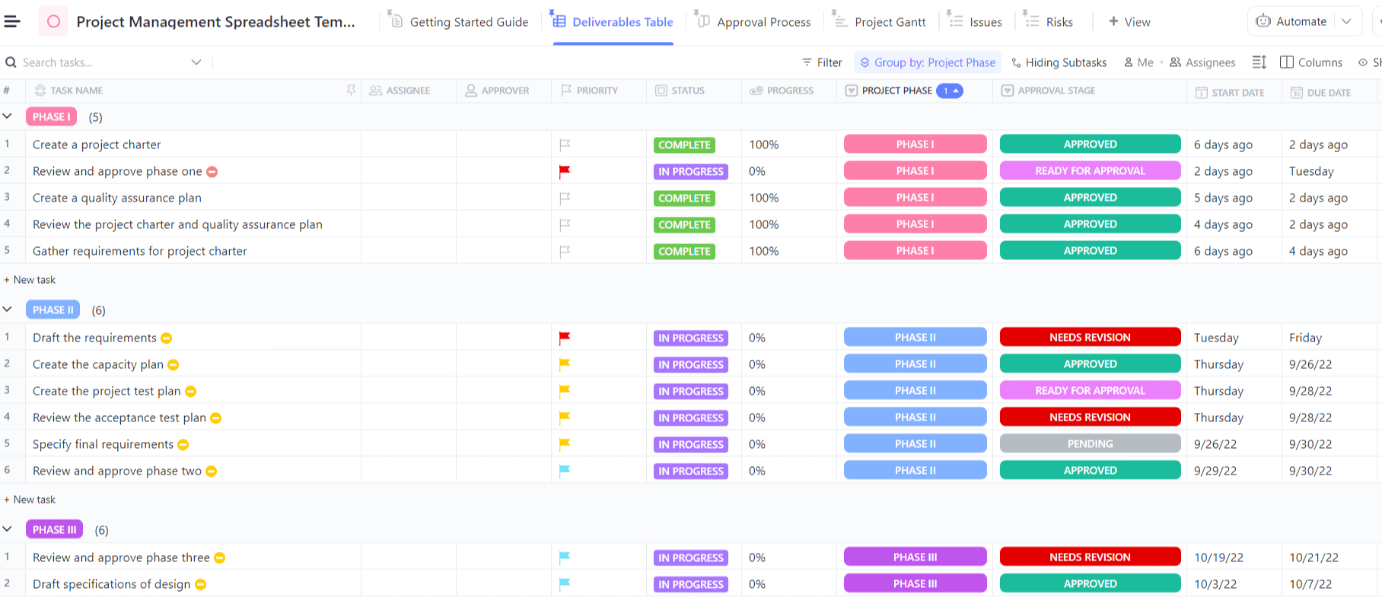
Whether you manage a large team or a small one, keeping projects organized can be a significant challenge. The ClickUp Project Management Spreadsheet Template solves this with a clear, structured layout.
It arranges all deliverables, along with their status, project phase, and approval stage, in one place for easy reference. Plus, the dedicated approval process tab indicates which deliverables require attention and which have cleared the approval funnel.
🔑 Ideal for: Project leads, marketing managers, operations managers, and small teams who want a structured spreadsheet template to plan, manage, and collaborate on
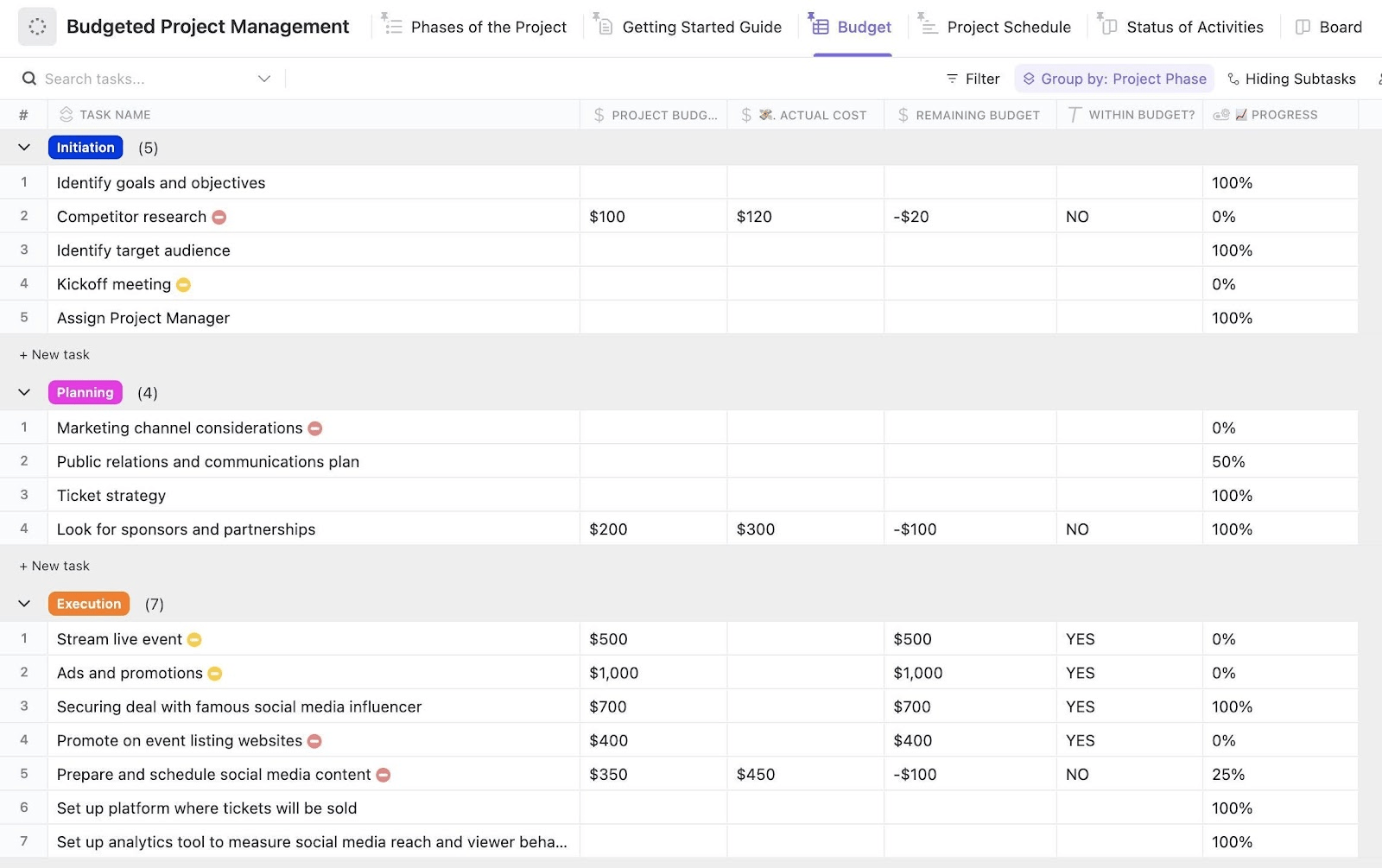
Keep your projects financially on track with clarity and precision using ClickUp’s Budgeted Project Management Template. Designed for project managers and finance teams managing cost-sensitive initiatives, this template streamlines budgeting, task sequencing, and real-time cost tracking.
🔑 Ideal for: Freelancers, marketing managers, development teams, and operations teams looking to keep the project budget on track
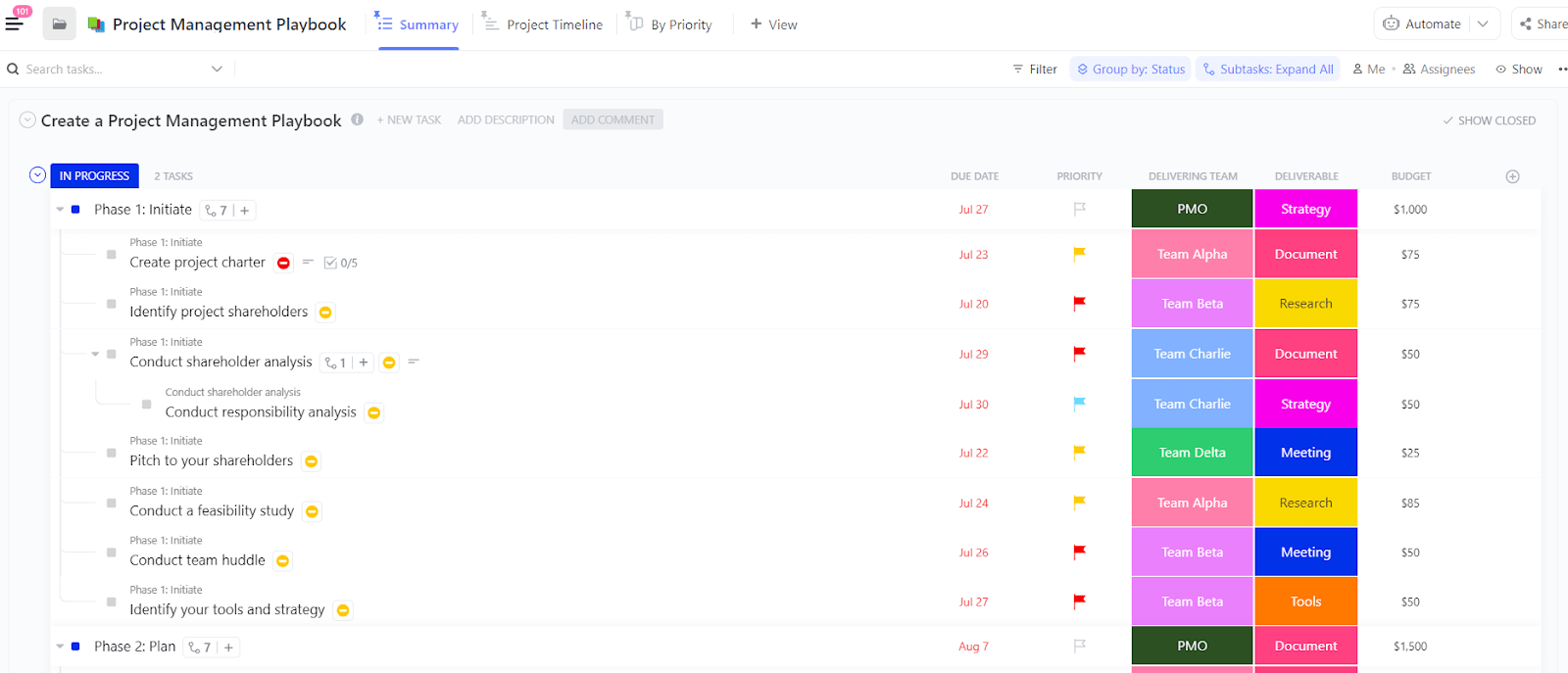
The ClickUp Project Management Playbook Template offers a clear roadmap for successful project execution.
It helps you define processes, set goals, and outline performance KPIs for every stage. The dashboard view provides an overview of the resources, documents, assignees, and timelines.
Plus, the summary tab highlights each project phase at a glance. This makes it easier to track progress, so your team can stay aligned throughout.
🔑 Ideal for: Project managers, team leads, and operations teams seeking an organized approach to plan and execute project phases
Smartsheet project templates offer a centralized space to organize tasks, resources, and goals. However, as team size grows, limitations around scalability, automation, and performance begin to slow things down.
That’s where ClickUp steps in. As the everything app for work, it simplifies project management with powerful collaboration, tracking, and analysis tools, along with a wide range of ready-to-use templates.
Tired of chasing deadlines and scattered files? Sign up for ClickUp and take control of your team’s goals, timelines, and outcomes.

© 2026 ClickUp