






Still downloading templates?
There’s an easier way. Try a free AI Agent in ClickUp that actually does the work for you—set up in minutes, save hours every week.
Sorry, there were no results found for “”
Sorry, there were no results found for “”
Sorry, there were no results found for “”
You’re juggling location scouting, camera rentals, scheduling talent—and praying you don’t need a reshoot. Shooting high-quality video content shouldn’t feel like pulling off a feature film every time. But unless you have a full production team behind you, it often does.
Remote video production flips that script.. With the right tools and setup, you can record, edit, and produce pro-level video—without flying in a crew or locking down a studio.
Whether you’re a marketing team working across time zones or a solo creator chasing deadlines, this approach gives you complete control of your project while cutting down cost, time, and stress.
Let’s break down how it works—and what you need to make it happen. 🛠️
🔍 Did You Know? 82% of consumers have bought a product or service after watching a marketing video. This reinforces the ROI potential of investing in efficient video workflows to accelerate production, especially for explainer videos, product demos, or short-form social content.
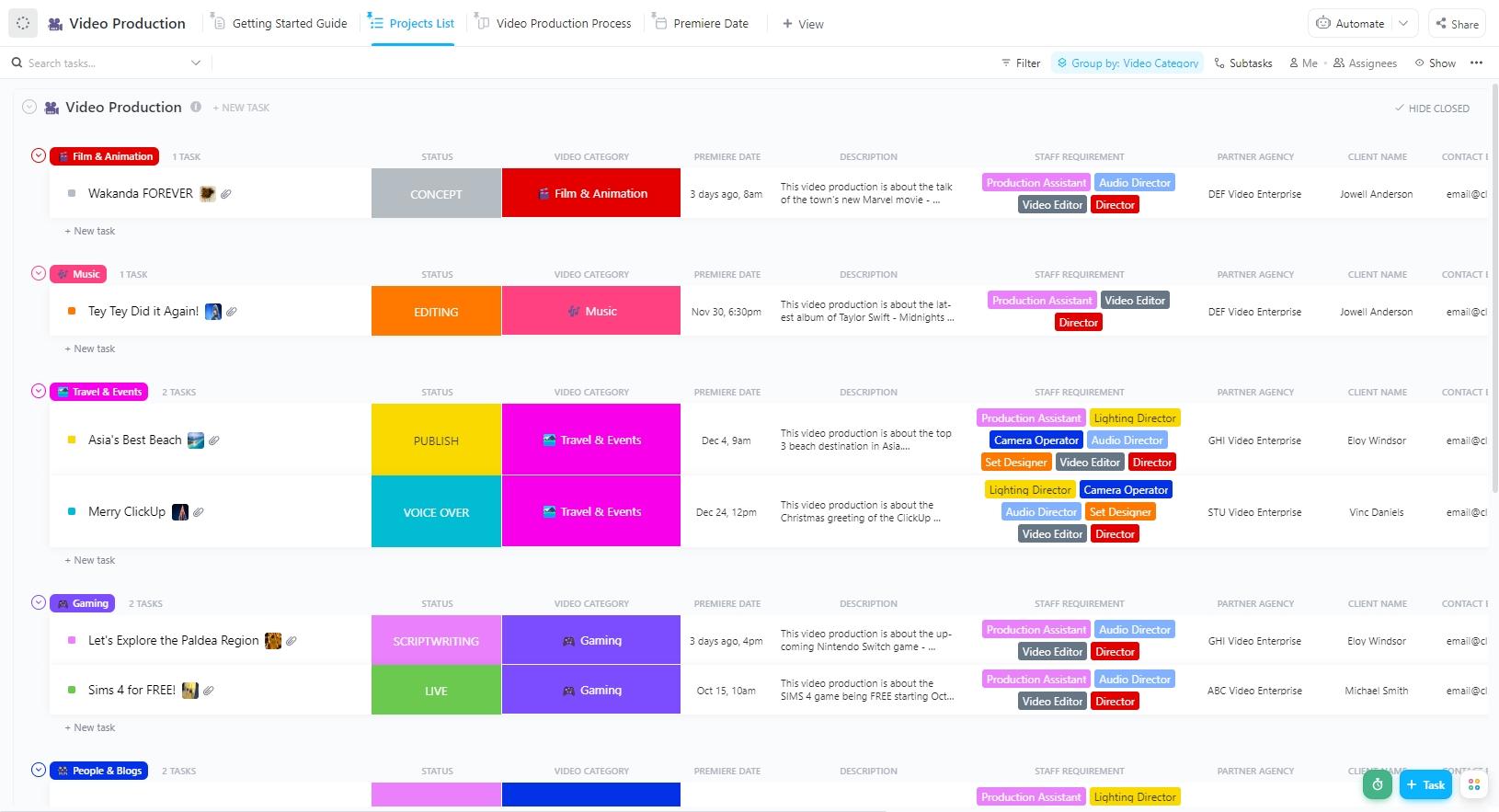
The ClickUp Video Production Template empowers teams to plan, manage, and execute high-quality videos—reasoned strategically from pre-production through delivery. It helps define creative goals, organize pre-production tasks, schedule shooting resources, oversee post-production workflows, and streamline final delivery. This comprehensive template enables smoother collaboration, reduces oversights, and accelerates project timelines.
Remote video production is the process of creating high-quality video content without an on-site crew. Using cloud-based tools, remote teams can handle everything virtually, from directing and filming to editing and delivery.
It’s a cost-effective and scalable solution for brands and creators to produce content from any location, with complete control and flexibility.
Using cloud-based platforms, PTZ cameras, and plug-and-play equipment kits, the remote production team can adjust image settings, direct the camera, and capture every real-time shot.
Once filming wraps, the same team handles post-production, assembling a polished final video ready to publish or share.
This approach saves time, lowers costs, and removes the logistical mess of traditional video production without sacrificing quality. It also makes experimenting with short-form content like TikTok hacks or trendspotting clips easier without needing a whole crew.
➡️ Read More: How to Use Trendspotting (with Examples)
For brands, marketing teams, and content creators, remote video production offers a fast and flexible way to create everything from corporate to explainer videos. However, having the right tools is critical to making it work smoothly across distributed teams.
Here’s what to consider:
Cloud-based editing platforms let teams work on the same project without having to pass around large files or install software. They offer browser-based timelines, drag-and-drop editors, and shared workspaces—ideal for real-time team feedback.
This eliminates version confusion and speeds up the entire editing cycle. These platforms support real-time review and lightweight editing from anywhere—perfect for remote teams.
AI editing tools speed up the turnaround of polished video content. From auto-captioning and scene detection to noise cleanup and pacing adjustments, they reduce manual labor, helping editors focus on creativity.
These solutions are especially useful for short-form content, social media clips, and bulk edits, where speed and consistency are crucial. They’re built to optimize time-intensive tasks while maintaining professional quality.
Remote video teams need more than messaging apps—they need tools that integrate directly with the creative process. Platforms built for collaboration let teams leave frame-specific comments, track feedback cycles, and stay aligned without hopping between tools.
They’re critical when multiple stakeholders review edits, sign off on scripts, or adjust timelines. These platforms ensure everyone stays in sync from kickoff to final cut.
High-res footage and raw files can be gigabytes, making fast and reliable file transfer essential. Cloud platforms for media workflows offer high-speed uploads, folder organization, and version control to prevent confusion between edits.
They support team access, custom permissions, and links for easy external review. Without these tools, production bottlenecks and storage issues can slow down delivery.
➡️ Read More: Best Project Management Software for Video Production
Remote video production demands coordination across time zones, fast approvals, and clear task tracking from concept to final delivery.
Now, juggling all this with separate tools—Docs, spreadsheets, Slack threads, feedback platforms, and file sharing—only makes things slower and more challenging to manage.
ClickUp changes that. This everything app for work brings project planning, team collaboration, video script ideation, client communication, feedback, file sharing, and even screen recording into one unified workspace.
ClickUp doesn’t just track tasks—it runs your entire video pipeline, from idea to upload.
🔍 Did You Know? ClickUp reduced marketing review and approval time by 50% for teams like Shopmonkey, cutting days off production cycles in remote workflows.
ClickUp’s Project Management Solution for Remote Teams is designed to give you precise control over your entire production pipeline and bring your ideas to life. Unlike tools that track tasks, ClickUp builds a layered system that connects people, assets, timelines, and approvals across customizable workflows.
You can map out every stage with detailed tasks—from pre-production planning and scriptwriting to location coordination, shoot scheduling, editing milestones, and client review rounds.
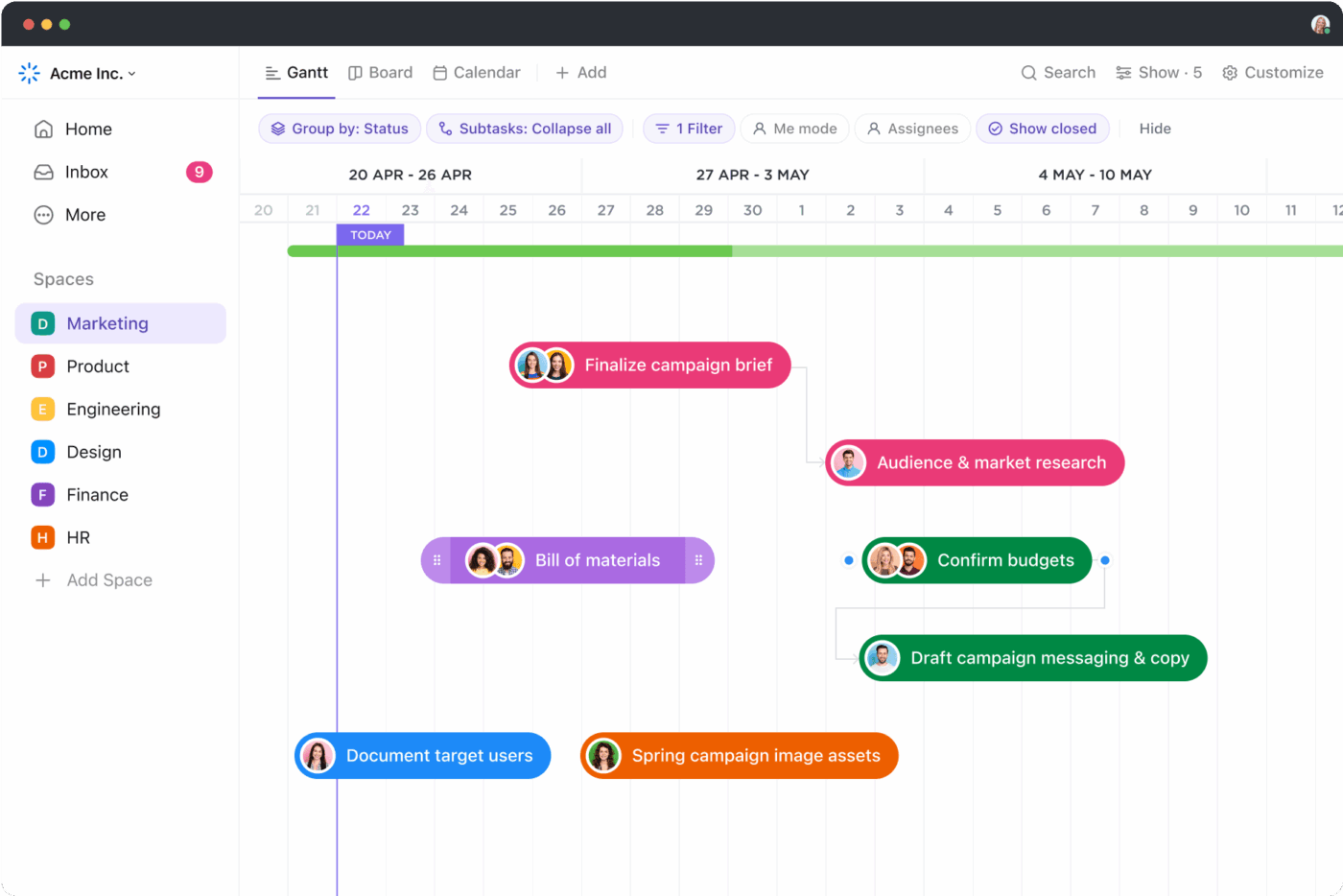
Each task can have dependencies, time tracking, status changes, priority tags, assigned team members, and even nested subtasks. Plus, views like Gantt, Board, Calendar, and List allow you to monitor progress from multiple angles, depending on the stakeholder viewing it.
That means your producer can check timelines, your editor can live in the checklist view, and the client can see delivery estimates—all in the same workspace.
With ClickUp video production project management features, you can:
🔍 Did You Know? Teams using ClickUp, like Finastra, saw a 30% increase in collaboration effectiveness, streamlining communication across global video and marketing teams.
The ClickUp Video Production Template is purpose-built for producers, directors, video editors, and content managers looking to track everything from shooting schedules to post-production timelines. Here’s why you’ll love it:
🔑 Ideal for: Video production teams, content creators, and project managers seeking an organized and efficient workflow.
💡 Pro Tip: Include storyboard templates in your creative briefs to visualize video flow early and reduce rework during production.
ClickUp Marketing is designed to support the full lifecycle of video marketing—from strategy and planning to distribution and analytics.
Instead of piecing together different tools for content calendars, asset approvals, and performance tracking, ClickUp consolidates everything in one platform.
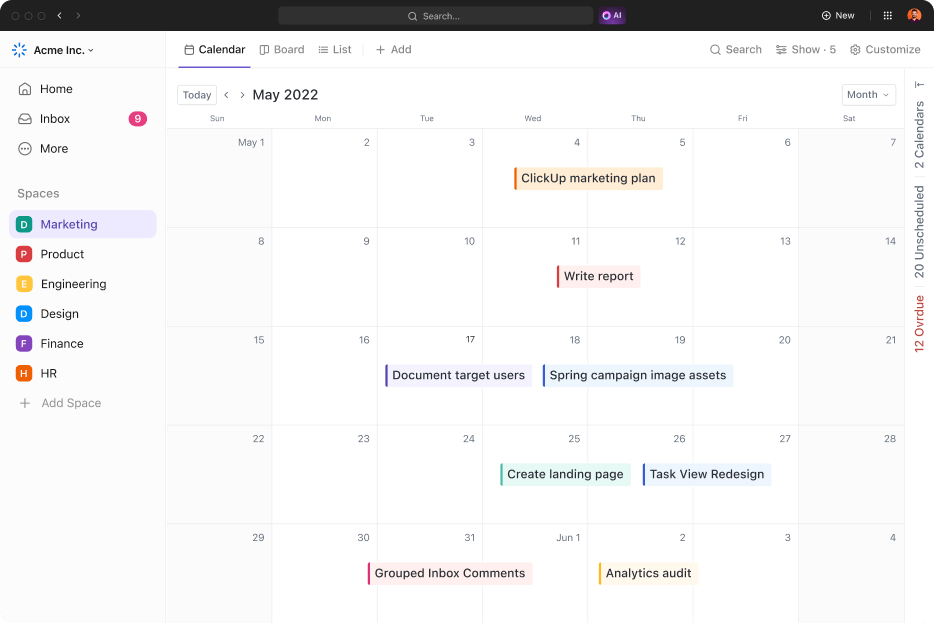
Whether you publish explainer videos, product walkthroughs, or testimonials, you can align timelines, assign CTAs, and even manage copywriting alongside the video team.
Its integrated dashboards provide campaign performance, production bandwidth, and visibility into content output. Creative and marketing teams can work in sync, minimizing delays caused by miscommunication or siloed updates.
With ClickUp’s marketing tools, you can:
💡 Bonus Tip: Use social media templates to organize video assets across different platforms and formats—from story crops to thumbnails and callouts.
ClickUp Clips is a built-in screen recording tool that lets you record tutorials, feedback, or visual walkthroughs from your browser or desktop. It’s perfect for creating product demos and training material or sending visual instructions to editors and collaborators.
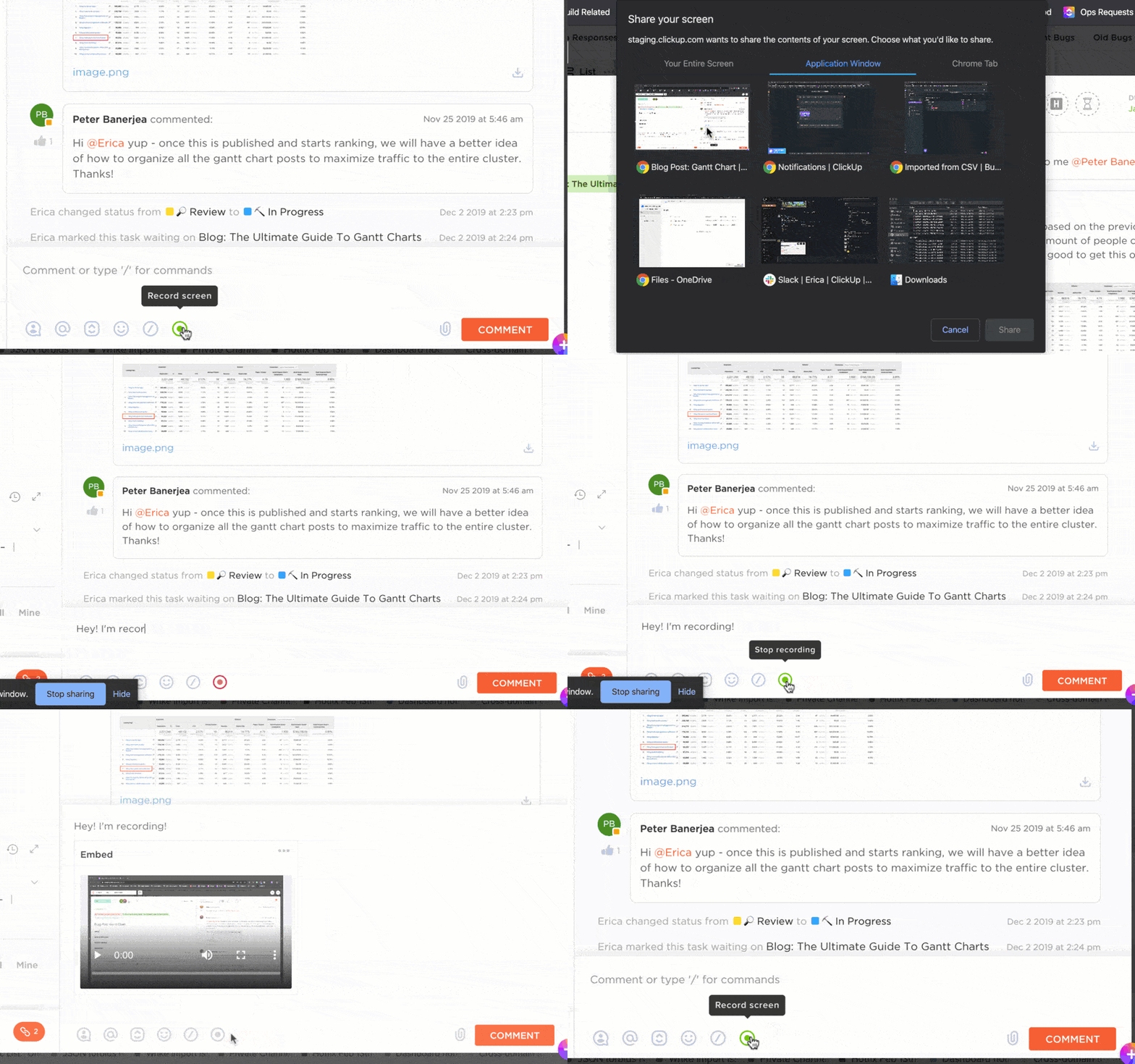
These clips are transcribed automatically using AI; you can convert parts of the transcript into new tasks or comments. The transcript is fully searchable and integrated into your workspace, so nothing gets lost.
For remote teams, especially those working across time zones, Clips replace long calls with fast visual context. With ClickUp Clips, you can:
🎬 See how you can instantly turn your video and audio recordings into searchable, actionable transcripts—right inside ClickUp! 🚀
💡 Pro Tip: Use the ClickUp Content Marketing Plan Template alongside the Video Production Template to align your long-term content strategy with weekly production work.
You can also use ClickUp’s social media templates to organize video assets across different platforms and formats—from story crops to thumbnails and callouts.
ClickUp Brain plugs directly into your workspace and acts like a creative team member who’s always available. It can write content for video scripts, campaign ideas, and social snippets, and even help structure outlines or video brief templates.
This feature cuts pre-production time significantly for teams working under pressure or clients expecting quick turnarounds.
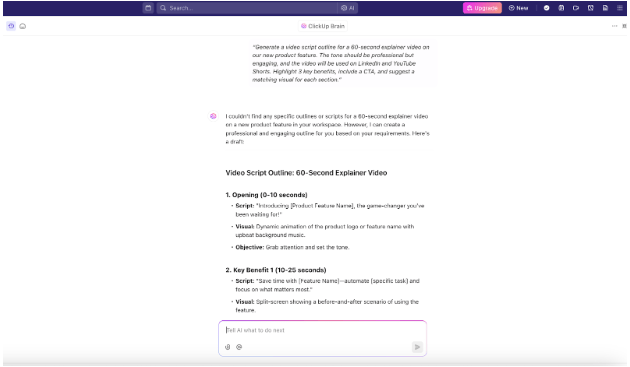
ClickUp AI helps you create targeted, structured scripts based on tone, audience, and format, making your AI video generation process easier. You can also use it to rephrase existing material, summarize scripts, or brainstorm intro hooks.
ClickUp also offers Brain Max, a desktop version of ClickUp Brain that includes talk-to-text capabilities. This makes capturing ideas and generating content hands-free even easier.
Since it’s baked directly into ClickUp Docs and ClickUp Tasks, there’s no need to copy/paste from outside AI tools. With ClickUp AI, you can:
🔍 Did You Know? 75% of video marketers have used artificial intelligence (AI) to help them create video content.
ClickUp makes real-time content collaboration effortless by consolidating chat, comments, whiteboards, Docs, and Proofing into a single system.
Teams can co-write briefs, leave timestamped feedback on video content, and track internal changes without leaving ClickUp. Instead of switching between email, Slack, and Google Docs, everything is synced to the task or video it’s related to.
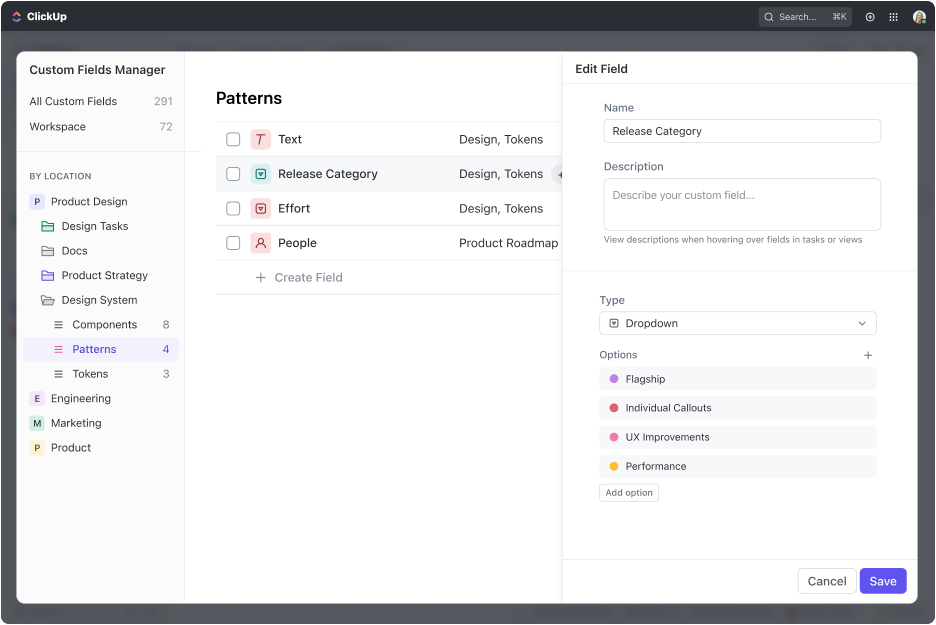
Clients can also be added as guests with permission-controlled access so they can approve scripts, leave visual feedback, or monitor delivery timelines.
The Proofing tool lets users drop feedback directly on uploaded frames or video previews, eliminating vague notes and miscommunications. With ClickUp’s content collaboration features, you can:
💡 Pro Tip: Use comment threads on specific tasks or Docs to centralize all client feedback—then turn them into sub-tasks with a click.
Why it matters:
Centralizing feedback in comment threads ensures that every suggestion, question, or approval from your client is captured in one place, directly tied to the relevant task or document. This eliminates the confusion of scattered emails or chat messages and keeps your team aligned on what needs to be addressed.
Running a remote video team includes structuring the work to avoid chaos mid-project and maintain creative flow from start to finish. Here are four best practices that go beyond the basics:
Use a RASCI matrix (Responsible, Accountable, Supportive, Consulted, Informed) instead of vague task lists. That way, everyone from the video editor to the client approver knows precisely where they stand at every stage—shooting, editing, reviewing, and publishing. It avoids duplicated effort and gaps in delivery.
➡️ Read More: Explore the ClickUp RACI Planning Template
Instead of endless back-and-forth edits, use time-boxed feedback cycles. For example, 24 hours for the first review, 12 hours for revision notes, and 48 hours for sign-off. Combine this with frame-accurate review tools and status check-ins via dashboards to keep revisions tight and on schedule.
Not everything needs a meeting. Lean into async tools like screen recordings, time-stamped comments, and ClickUp Docs to give direction or critiques. It reduces creative burnout, respects time zones, and prevents context-switching during editing or production.
Don’t reinvent the wheel with each project. Use a modular creative brief format with consistent sections: audience, tone, objective, CTA, visual reference, and scripting notes.
This reduces misalignment across remote teams and dramatically speeds up pre-production. Save it as a reusable template in your project management tool to ensure consistency.
Instead of measuring video success after publication, embed performance metrics into your production process. Use tools like ClickUp Dashboards to track content marketing KPIs—CTR, view duration, conversions, and engagement—alongside the task list.
This keeps the video team aligned with marketing goals and grounds creative decisions in performance data rather than just aesthetics
📮ClickUp Insight: ClickUp’s meeting effectiveness survey data suggests that nearly half of all meetings (46%) involve just 1-3 participants. While these smaller meetings may be more focused, they could be replaced by more efficient communication methods, such as better documentation, recorded asynchronous updates, or knowledge management solutions.
Assigned Comments in ClickUp Tasks let you add context directly within tasks, share quick audio messages, or record video updates with ClickUp Clips—helping teams save valuable time while ensuring important discussions still occur—just without the time drain!
💫 Real Results: Teams like Trinetrix are experiencing a 50% reduction in unnecessary conversations and meetings with ClickUp
➡️ Read More: Free Creative Brief Templates & Examples
Remote video production isn’t just a workaround—it’s the new normal for scaling high-quality video content without draining your time or budget. Whether you’re producing corporate videos, launching explainer videos, or building your content calendar with trend-driven pieces like TikTok hacks, the right workflow decides your output.
ClickUp brings all your tools into one place—from storyboarding and scripting to editing, approvals, and KPI tracking. There are no silos, no missed updates, and no extra subscriptions.
If you’re serious about creating better video content faster, ClickUp can be your edge.
Start free with ClickUp today and streamline your remote video production from day one.

© 2026 ClickUp

There’s an easier way. Try a free AI Agent in ClickUp that actually does the work for you—set up in minutes, save hours every week.