
Sorry, there were no results found for “”
Sorry, there were no results found for “”
Sorry, there were no results found for “”
Spreadsheets, emails, and documents. Are you still using these to keep your team in sync? Take it from us—they’re often the reasons for missed deadlines, miscommunication, and skydiving productivity.
It’s time for a fresh approach, and this is where modern collaboration tools come into the picture.
These tools don’t just streamline communication; they centralize everything. Messages, emails, documents, and even project tracking—all in one organized hub!
In this blog post, we’ll compare two heavy hitters of the collaboration space, ClickUp and Lark. From key features to integrations, we’ll help you determine which works best for your project workflows.
Spoiler alert: You’ll find your team’s new favorite tool right here!
Whether you’re a freelancer, a startup, or a full-blown enterprise, ClickUp acts as your trusty productivity sidekick. It’s an everything app for work that organizes your to-dos, streamlines workflows, tracks deadlines, simplifies team collaboration, and more. With ClickUp, you can get all your work done without switching between multiple tools or apps.
ClickUp offers multiple features that change the way you work. Here’s a quick overview:
Plan every project in detail and track the progress of your action items with ClickUp’s Project Management Solutions.

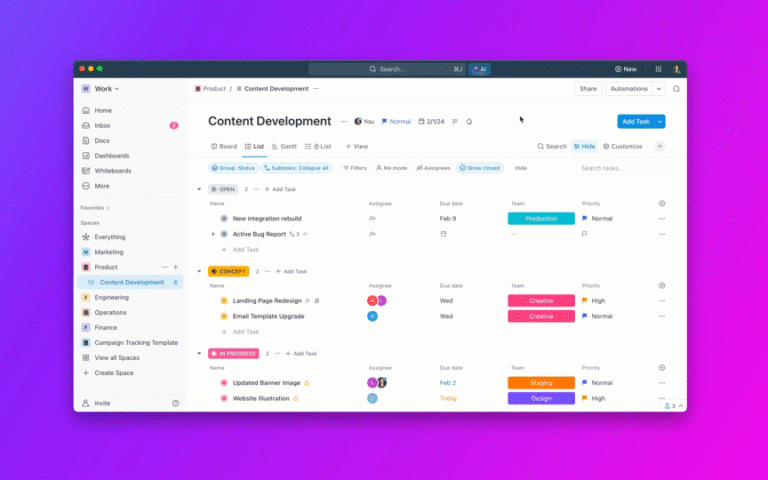
Visualize your work the way you want with lists and Kanban boards, or choose others from ClickUp’s 15+ Custom Views. This helps you focus on the nitty gritty and make sure nothing gets overlooked.
Need to record project details? Use ClickUp Docs to create a document and invite stakeholders and team members to collaborate, leave feedback, and assign action items. You can centralize critical information in one place so everyone has access to what’s important.

To further enhance collaboration, ClickUp Whiteboards help you brainstorm and discuss ideas with your team on a digital canvas. Let your ideas flow—sketch or draw your thoughts, use connectors to link related concepts, and employ AI image generation to turn text into visuals.

💡Pro Tip: Choose from ClickUp’s vast library of communication plan templates to fast-track collaboration and have all your project details in one central doc.
Organize your project’s finer aspects and responsibilities with ClickUp Tasks. It goes beyond basic task management, allowing users to create task types, set priority levels, and link dependent or related tasks.

Tasks can be categorized into multiple lists to optimize your workflows, and they easily adapt to different project types—whether in marketing, HR, finance, legal, or engineering. For every task, use ClickUp’s Custom Statuses to monitor progress and add Custom Fields to provide additional layers of information, such as assignees, due dates, blockers, etc.
💡Pro Tip: Stay organized and tackle tasks systematically with the help of pre-built task list templates. This helps you coordinate large projects and ensures complex tasks are completed on schedule.
Keep your teams connected and aligned with ClickUp’s robust collaboration features.
With built-in ClickUp Chat, share quick updates and catch up in real time. Here’s how it enhances communication:

Additionally, ClickUp Meetings help streamline your meetings. Plan your agenda and create a checklist for all the items you want to discuss so that you always have the talking points ready for meetings. With features like collaborative note-taking, time tracking, and integrations with your favorite video conferencing tools—useful for generating transcriptions—ClickUp ensures every meeting is productive and actionable.
Explain complex concepts with ease with ClickUp Clips. These are short video clips that can be shared with your team, avoiding the need for long meetings or endless instructions. Recorded clips will be saved into ClickUp, and you can either download it or create a public link to share the recording.
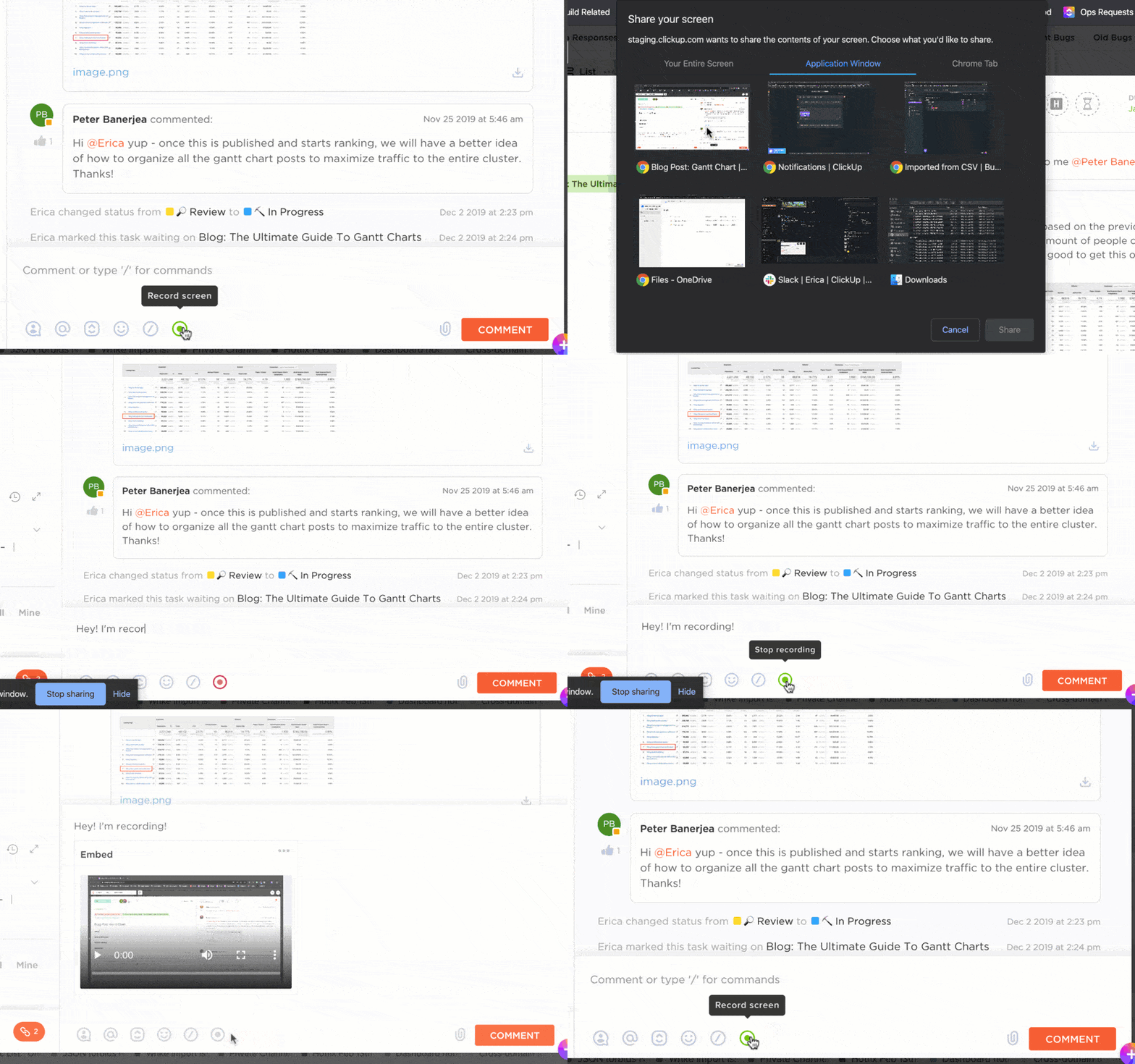
Your teammates can view the Clip at their convenience, making asynchronous video communication a breeze.
👀 Did You Know? You can use ClickUp Brain, ClickUp’s native AI, to transcribe your Clips and voice notes. It can also summarize meeting discussions and conversation threads in ClickUp Chat. And it doubles as a writing assistant and sparring partner for your ideas!
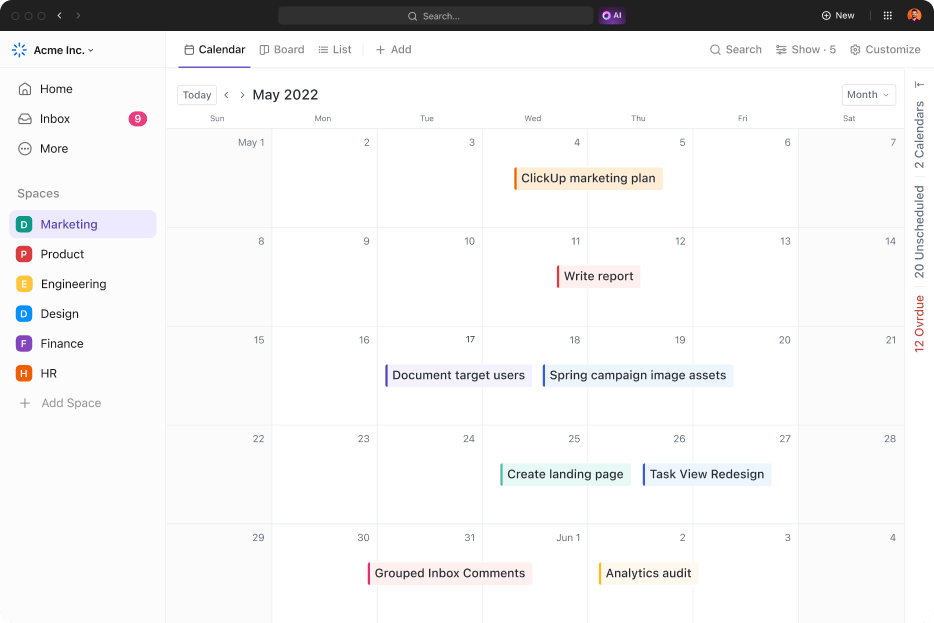
Stay on track with your schedule, complete tasks on time, and manage timelines with the ClickUp Calendar View.
Use the daily, weekly, or monthly view to get a quick overview of your tasks, meetings, and upcoming events. Drag and drop tasks into your calendar to schedule important work and adjust their duration. You can also view your team’s calendar in ClickUp to schedule collaborative tasks and meetings without switching to another calendar tool!
💡Pro Tip: Always prepare a meeting agenda and share it with participants before a meeting. This way, attendees know exactly what will be discussed, and it allows them to proactively offer suggestions or recommendations, leading to more productive discussions.
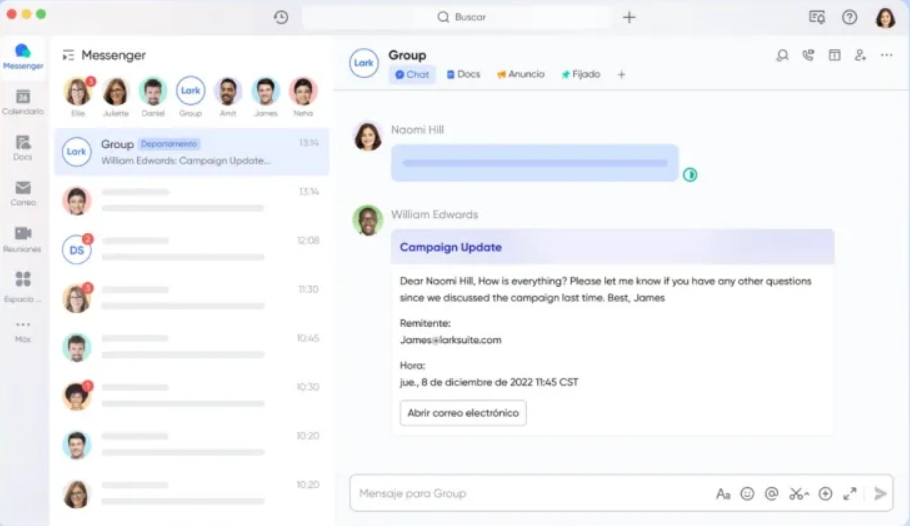
Lark is a productivity app for organizations with features to streamline team communication, document collaboration, and task management. In addition to instant messaging, video conferencing, and collaborative editing, the tool allows you to schedule and manage calendars, build workflows, and integrate with third-party enterprise systems.
This project management platform also offers cloud storage for uploading, storing, and accessing files from any device or location.
Lark offers several effective features for teams looking for a simple and cohesive tool to stay connected and manage tasks. Here are some of them:
A suite of tools built for project management, Meegle allows you to manage tasks, create custom workflows, and organize key project details. Add context to every task with fields and details like assignees, due dates, and progress indicators.
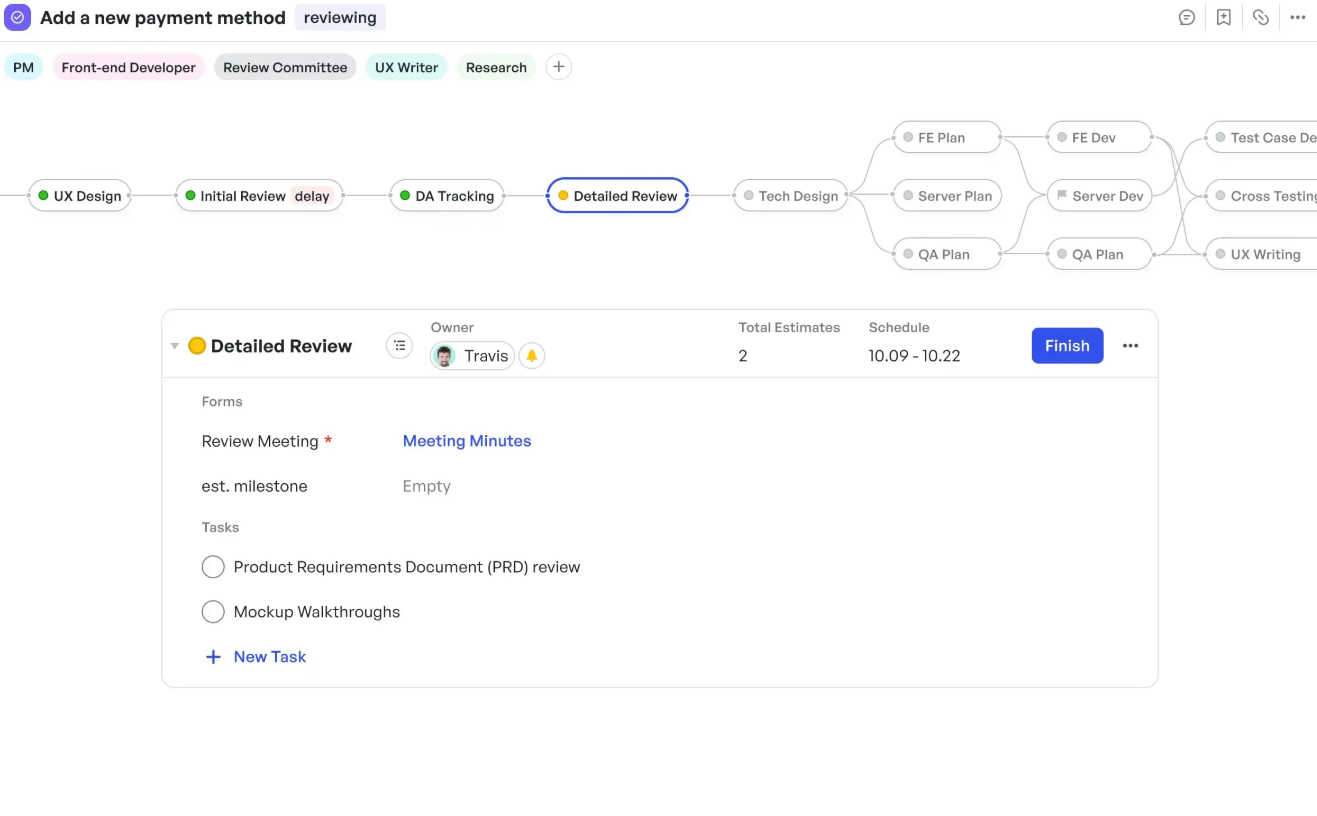
Tasks are represented using Kanban boards or Trees (to showcase dependencies and related tasks), and their progress can be viewed using Gantt charts and dashboards.
Read More: Free Project Management Templates
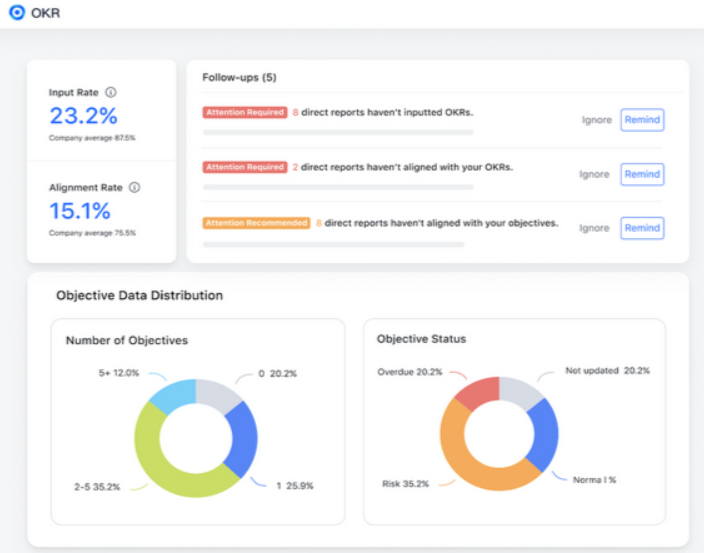
Keep your teams focused by setting OKRs and individual goals so everyone works toward realistic and impactful objectives. Team members have complete visibility into what others are working on, improving cross-team collaboration and context.
Updates to OKRs are made in Lark docs, with dashboards to track and manage your team’s progress towards their goals.
Collaborate with team members in real-time using Lark Messenger. Add emojis to express your tone and reduce misunderstandings when communicating over text. You can even auto-translate messages into different languages, so it’s easier to grasp conversations.
With the help of in-call docs, you can facilitate quick note-taking and collaborative editing without leaving your video call window.

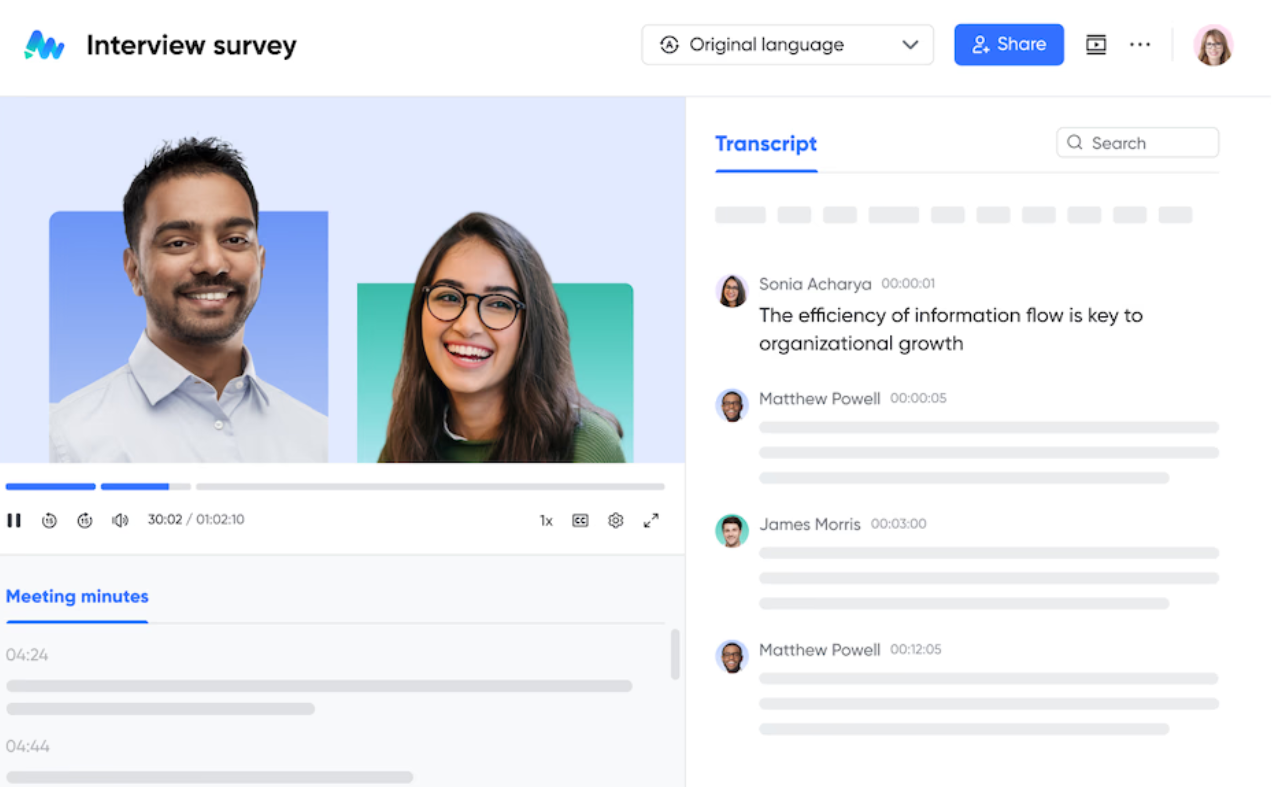
With Lark Minutes, you can automatically generate meeting transcriptions that you can view, search, and collaborate on. Leave comments for feedback and emojis for reactions, and facilitate communication across global teams with Lark’s auto-translation. This makes it easier to catch up asynchronously, even when you miss a meeting.
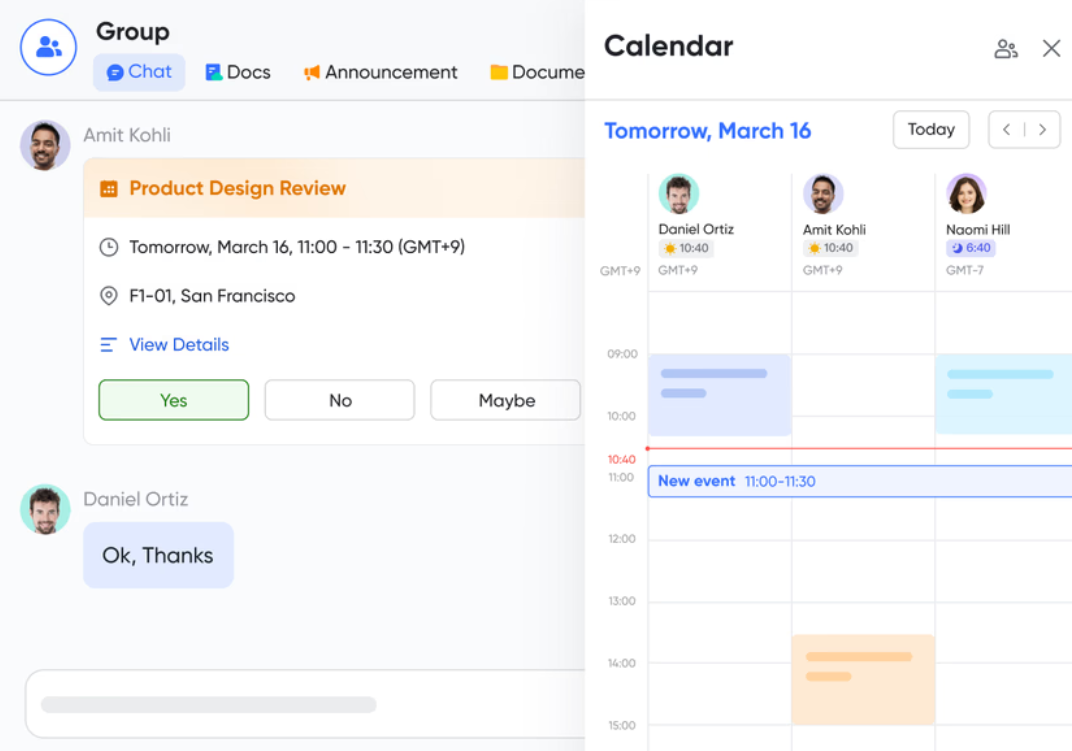
Lark Calendar makes it easy to view your team’s availability and schedule calls or meetings. Compare your team’s calendars side-by-side to book slots without endless back and forth, and create separate calendars for town halls, product launches, editorial releases, and more.
Let’s put both Lark and ClickUp head-to-head and see how they measure up. 💪🏻
In this first round, we’ll see which platform comes out on top for project and task management.
A standout feature of ClickUp is that it allows you to view and manage your work in multiple ways. Choose a perspective that best aligns with your workflow to improve your productivity and gain clarity into different aspects of your project.
You have:

With ClickUp Tasks, you can categorize action items by task type, status, and due dates and add subtasks for complex, multistep projects to simplify tracking. Dependencies can be established between tasks to make it easier to manage project schedules.
You can further improve accountability by creating a task checklist for each task. And if you have to make edits to multiple tasks, use the ClickUp Bulk Action Toolbar to make changes all at once.

Organize your tasks using Kanban boards to view task progression through different stages, making it easier to track and focus on active action items.
You can also use a Tree structure to organize tasks in a hierarchical manner. This simplifies the visualization of task dependencies and provides clarity for complex projects.
You can also view task timelines and critical milestones with Lark’s Gantt Chart view.

Create tasks directly from documents or Lark Messenger and assign them to team members. Use fields to capture granular details like priority, complexity, important links, issue type, and more. Catalog task descriptions, steps, attachments, comments, and change requests through custom fields.

Is ClickUp or Lark better when it comes to project and task management?
🏆 Winner: ClickUp
With multiple project visualization options, advanced resource management, collaboration tools, and task dependency management, ClickUp definitely has an edge over Lark when it comes to project and task management. Using ClickUp, teams can centralize everything from task assignment to progress tracking in one place, ensuring projects stay on track. Additionally, its extensive integrations, advanced reporting, and templates make it a one-stop solution for managing projects of any scale.
Time for round two of the ClickUp vs Lark debate. This time, we look at which tool is better for project collaboration.
ClickUp offers some super interesting features for real-time collaboration.
Virtually brainstorm with your team, irrespective of where they are, with ClickUp Whiteboards. Once you finalize your ideas, you can link them to other docs, chats, or tasks in your workspace to ensure they are thoroughly executed.
ClickUp Docs are another way for your team to collaborate on project updates and information. You can create helpful information resources or wikis using docs and centrally manage them so your team can access them whenever required.
💡Pro Tip: Link Docs to specific tasks so that all relevant information is available in one place, allowing you to reduce back-and-forth communication while working on projects.
ClickUp Chat opens up right inside your workspace so you can keep workplace communication tied to your tasks at all times.
Additionally, it has SyncUps, which makes it easier to connect with your team on voice and video calls! ClickUp Brain will summarize everything discussed during a call and even pull action items from meeting minutes, making it that much easier for you to stay on top of critical discussions.
Read More: Best Team Communication Apps
Lark Docs streamlines content collaboration for teams. It is linked to chat, so you’re immediately notified when someone comments on your document. You can make your documents more interactive by adding formatting elements, polls, diagrams, and charts.
Lark Messenger supports direct messaging with team members. It integrates with emails, calendars, and tasks to support file sharing, meeting scheduling, and task assignment. Besides this, you have the option to send and receive messages in your native language using the auto-translate feature in chat, eliminating language barriers.
🏆 Winner: ClickUp
While both platforms offer team collaboration capabilities, features like Whiteboards, Docs, and Chat mean ClickUp integrates creative brainstorming, collaborative editing, and AI-powered communication into a single platform. This makes ClickUp a superior choice for productive and actionable communication as compared to Lark’s robust but basic chat functionality.
Next, we look at how ClickUp’s and Lark’s AI and automation compare against each other.
ClickUp helps you focus on complicated tasks while automating the busywork. Choose from over 100 pre-built ClickUp Automations to streamline your workflows or build your own using the NLP (Natural Language Processing) Automation Builder.
You can build automations for multiple use cases like assigning tasks, posting comments, updating statuses, and sending emails. This saves time, reduces errors, and helps your teams stay productive and focused.

ClickUp Brain acts as your personal assistant to ensure you’re always focused and updated on tasks.
Have a work-related query? Brain surfaces insights from your workspace. Need progress updates or status reports? Brain auto-generates summaries and insights based on your chat, tasks, and docs. Looking for a better way to craft an email? Ask Brain for suggestions and spell checks.

💡Pro Tip: Streamline your document management workflow by setting up automations to notify relevant team members any time a document is created, updated, or approved. This ensures the smooth and reliable handover of information.
Base is Lark’s no-code workflow automation builder suitable for handling gruntwork. Optimize team communication, task management, and knowledge management to improve your overall productivity. Base also allows you to import data from spreadsheets and forms to extract business insights and make informed decisions.
Lark does not have a built-in AI feature. Instead, it offers an integration with OpenAI. You can use this combo to generate content at scale using different AI prompts.
🏆 Winner: ClickUp
Hands down, ClickUp takes the crown here, offering native AI capabilities and customizable automation. Lark, on the other hand, does not have built-in AI features and offers limited automation capabilities. While this is enough for basic process optimization, it’s difficult to automate complex tasks without third-party integrations.
In the final round, we’ll see which of the two platforms wins in terms of pricing.
🏆 Winner: ClickUp
Both ClickUp and Lark offer competitive pricing options for users. However, ClickUp offers extensive features like unlimited tasks, collaborative docs, sprint manager, real-time chat, and more just with its free plan as compared to Lark.
Besides, ClickUp’s Unlimited Plan is also a great option for small teams to avail critical project management features at $7/month per user in comparison to Lark’s mid-tier plan, which is priced at $12/month per user.
If you’re still trying to decide between ClickUp and Lark, Reddit is a great place to find out what real users think of these tools.
We did some digging, and here’s how users describe their experience with both platforms.
One Redditor recommends Lark for personal productivity, specifically due to its integration capabilities.
I’ve been using larksuite for my personal stuff. I highly recommend Lark suite for productivity due to amount of embeds and integrations available.
However, another Redditor finds the platform less intuitive, especially when it comes to managing calendars or tasks.
Email client needs a lot of work, ability to add item to calendar or tasks or even move stuff from email to any other app you have to copy stuff. Also security is only good with paid plan of 12$ where all the others start at 6$. You would think the security would be the top priority.
On the other hand, ClickUp users find the platform to be well worth the price.
We’ve been using Clickup for at least 4 years now and honestly it’s by far one of the best project management tools. Best choice ever! I never had any big issues and the customer service has been helpful. I’m on a paid subscription and with the new version, it keeps getting better. Overall, for the price and vast amount of tools, Clickup has definitely surpassed all my expectations.
Yet another user highlights exactly why they love ClickUp.
ClickUp is worth it as you get a real project management workflow with automations, overview of all projects and progress. I also like the video recording feature on the platform
While Lark has some good integration capabilities, it can be less intuitive and costly for many users. Also, Lark’s security features are available only in its higher pricing plans, which could be a problem for SMBs looking for an affordable yet secure collaboration tool.
ClickUp receives praise from most users because of its versatile project management capabilities. Coupled with its reliable customer service, most users find that the platform exceeds their expectations.
So we put ClickUp and Lark in a head-to-head battle, and here’s the moment you’ve been waiting for…
*Drumroll please…* 🥁
The winner is… ClickUp!
ClickUp offers advanced AI automation, customizable dashboards, and features like Chat, Whiteboard, and Docs for collaboration in one app. Plus, the flexible pricing provides more bang for your buck!
Overall, ClickUp is a well-rounded tool that adds value, provides seamless collaboration, and supercharges productivity.
Sign up for ClickUp today, and find out why it’s the only collaboration tool that your team will ever need!

Arya P Dinesh
Max 15min read

Manasi Nair
Max 15min read
Manasi Nair
Max 19min read

© 2026 ClickUp




