Sorry, there were no results found for “”
Sorry, there were no results found for “”
Sorry, there were no results found for “”
The definition of productivity is subjective and expandable. Before COVID, it was all about hustling and working as many hours as possible. Now, people are now focused on maintaining a balanced routine that supports both career and personal growth.
One thing is, however, certain: with remote work in the picture and commute time out of the frame, we can finally do more. A study reported in Forbes found that employees working remotely were 20% happier on average than those who couldn’t work from home.
To make sure this continues—and even improves—as we embrace remote work culture, here are some strategies and tools to stay productive throughout the day and make the most of your work hours.
Here’s a quick recap of how you can enforce productive techniques and methods into your remote work setup:
Want to learn how to manage personal tasks while being productive at work? Here are some proven strategies that will help boost your overall productivity.
For generations, parents and grandparents have sworn that waking up early is the key to a good day. While we’re not yet sold on that, psychologists agree that having a consistent morning routine can reduce stress, boost energy levels, and improve productivity at work.
While everyone’s routine will be different, here are some essential habits to help you stay productive throughout the day:
💡 Pro Tip: Struggling to keep up with your tasks but still feeling unproductive? 10 Tips on How to Work Faster and Get Things Done With ClickUp breaks down practical strategies to help you manage time efficiently, and finally take control of your productivity.
“How do you possibly work 8+ hours, take care of your home, AND still have time for fun?” That’s the million-dollar question a Reddit user recently asked—and many of us can relate to that.
When you’re in the flow of deep work, the last thing you need is the sudden realization that you have nothing prepped for lunch. Here’s how to stay productive by tackling household tasks ahead of time:
There’s an excellent ClickUp template called Chore Chart Template for staying organized. With it, you can:
✅ Track all household tasks in one place instead of relying on memory
✅ Instantly assign chores to family members (so it’s not all on you)
✅ Set deadlines so that tasks don’t pile
📮 ClickUp Insight: Your team has to sit down together to figure out tasks
According to ClickUp’s research, the average knowledge worker needs to connect with six people daily just to gather essential context, align on priorities, and keep projects moving. The challenge? Endless follow-ups, version mix-ups, and lack of visibility slow teams down. A centralized platform like ClickUp, with Connected Search and AI Knowledge Manager, eliminates these roadblocks by instantly surfacing the information you need—right when you need it.
Few things in life are as satisfying as striking off a checklist. But if your tasks aren’t organized, they can quickly stray from your goals, leaving you busy but not actually productive.
That’s why you need a tool that helps you track your progress.
ClickUp is the ultimate everything app for work, combining project and task management. Here’s how you can tie your tasks together using ClickUp Goals:
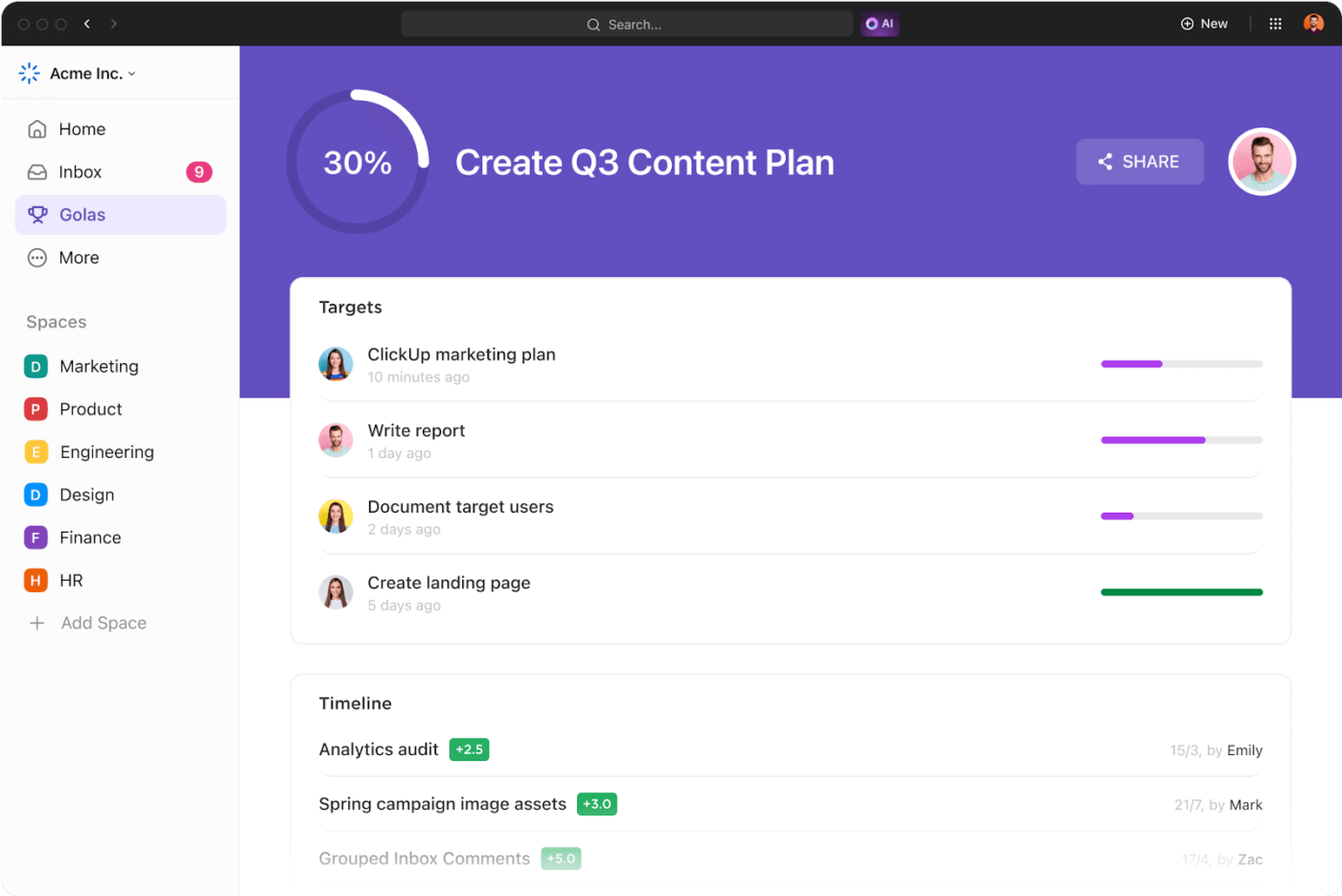
Also Read: 10 Free Work Plan Templates & Examples
According to the Digital Noise Impact Report, one in three workers reports being interrupted every 15 minutes thanks to workplace notifications.
Here’s what you can do to minimize distractions in your home office setup:
✅ Find a quiet space and close the door
✅ Invest in noise-canceling headphones
✅ Set clear boundaries with housemates
Where you work can make or break your productivity at home. You want to create an environment where you actually want to spend your work hours.
Rachel, a Brooklyn-based product manager, learned this the hard way after nine-hour days in a cheap dining chair left her with back pain.
Her solution? A designated workspace with an ergonomic chair and, if possible, a sit/stand desk.
It would be smart to stock your space with additional work from home essentials including:
💡 Pro Tip: Struggling to balance big ideas with daily tasks? 10 Productivity Tips for Entrepreneurs will help you maximize every minute, eliminate distractions, and turn your vision into action.
If you’ve ever thought, I’ll just check this one notification real quick, only to resurface 50 minutes later in a deep scroll through Instagram—you’re not alone.
FOMO (Fear of Missing Out) is real. The constant influx of updates, chats, and mentions creates a compulsive need to check everything—even if 90% of it isn’t urgent. The key to staying productive at home is mastering notification prioritization so you only see what actually matters.
ClickUp Chat has your back with customizable notifications that help you stay productive throughout the day without drowning in alerts. Here’s how:
Remote work has its perks but it can also feel isolating. When you’re working remotely, feeling disconnected from your team can kill motivation.
This is why a quick check-in or a casual chat can boost energy levels and prevent the dreaded “Did I miss something?” feeling.
ClickUp’s communication tools make staying in sync easy:
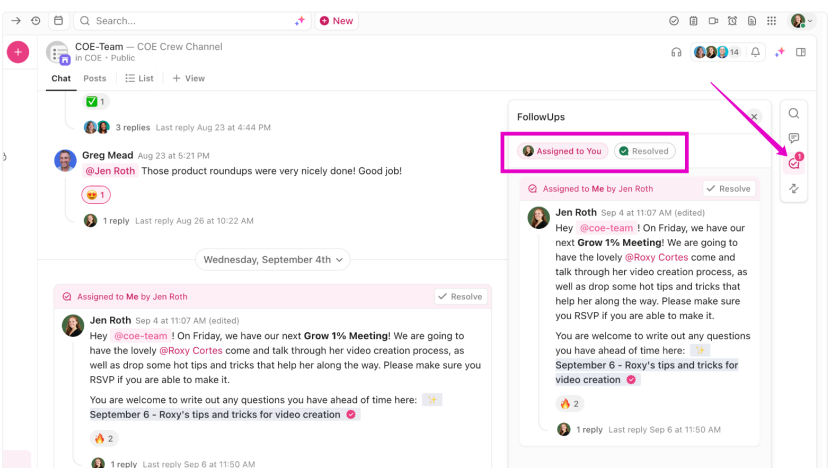
Additionally, ClickUp Docs makes team collaboration seamless by centralizing all information in one place.

With live editing, multiple team members can contribute simultaneously in ClickUp Docs. Moreover, the built-in version history tracking ensures that mistakes can be undone and progress remains visible, so no update ever goes unnoticed.
Feedback doesn’t just sit in comments though—ClickUp Assign Comments lets you instantly turn those thoughts into actionable tasks. Each comment can be assigned to the right person, tracked, and resolved right within the doc.
Also, ClickUp Docs is tightly integrated with tasks, chats, and dashboards, so you can edit, assign, and launch projects directly from within your writing space. Add widgets to your Docs to update task statuses, track progress, or link to dashboards—without ever switching tools.
App switching drains focus and wastes time. To avoid this, ClickUp offers a range of features that help you plan, self-monitor, automate, and improve your tasks throughout the day.
ClickUp for remote teams is built for collaboration. This means, from managing workloads to syncing on priorities, remote workers can rely on ClickUp to execute projects faster, without miscommunication.
For starters, ClickUp’s 15+ customizable views help remote teams visualize progress in ways that match how they work best. And with integrations like Zoom, Slack, and Google Drive, you can keep every conversation, file, and update in one place.
ClickUp’s Project Time Tracking helps you self-monitor tasks and see exactly where your time goes. Just hit start before beginning a task and stop when you’re done—whether you’re on your computer or mobile device.
Want a structured workflow? You can use ClickUp Dashboards to:
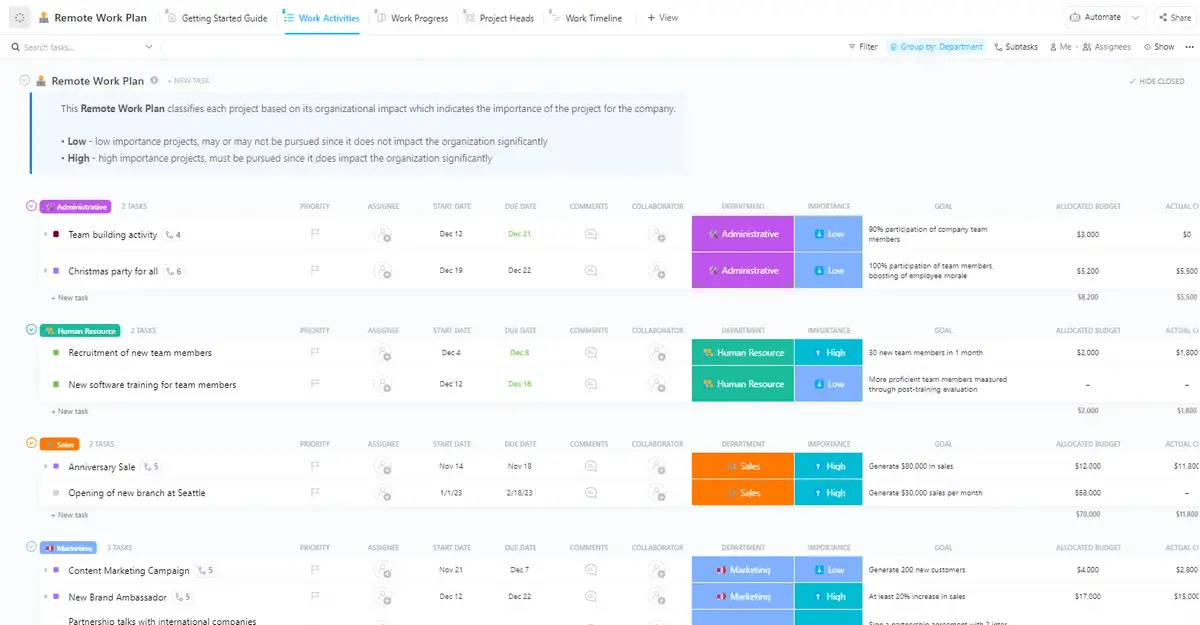
If you have a newly remote team, ClickUp’s Remote Work Plan Template simplifies the transition to remote work by providing a clear structure for team collaboration, task tracking, and role management.
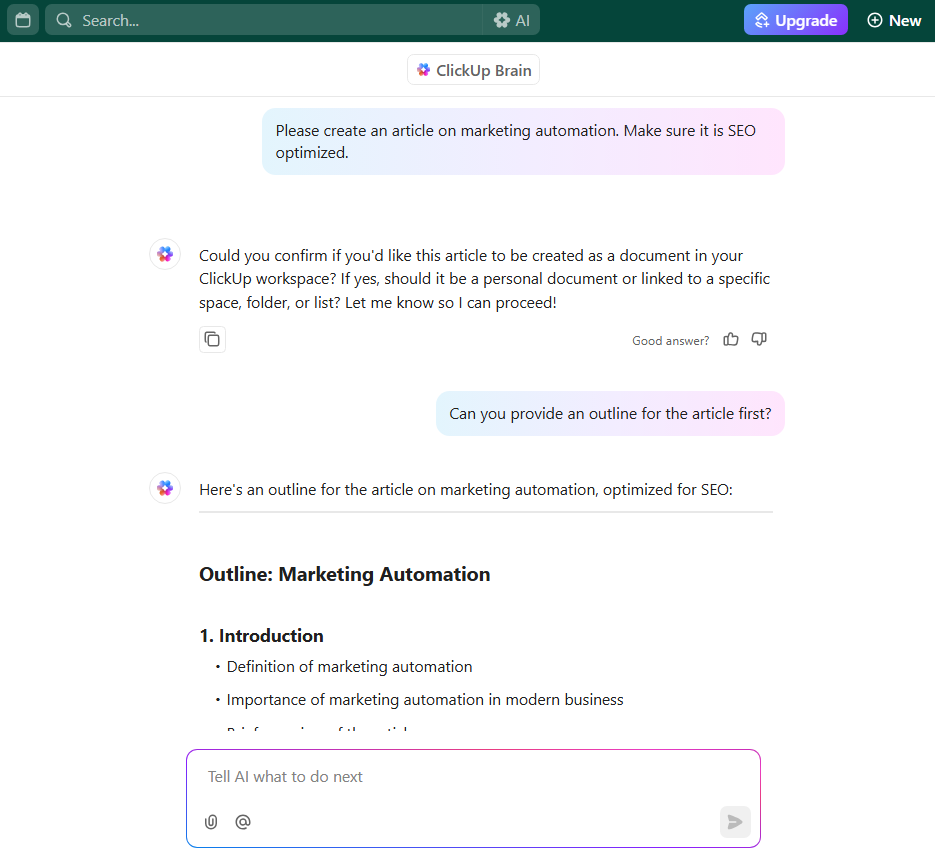
Another feature that can really help you manage your work better? AI-powered tools. These can make your work faster and smarter by automating repetitive tasks, summarizing information, and generating content on demand. ClickUp Brain, for example, enhances productivity at home by:
Lastly, repetitive workflows slow down productive remote workers. ClickUp Automations allows you to set up triggers, actions, and conditions that handle time-consuming tasks for you.
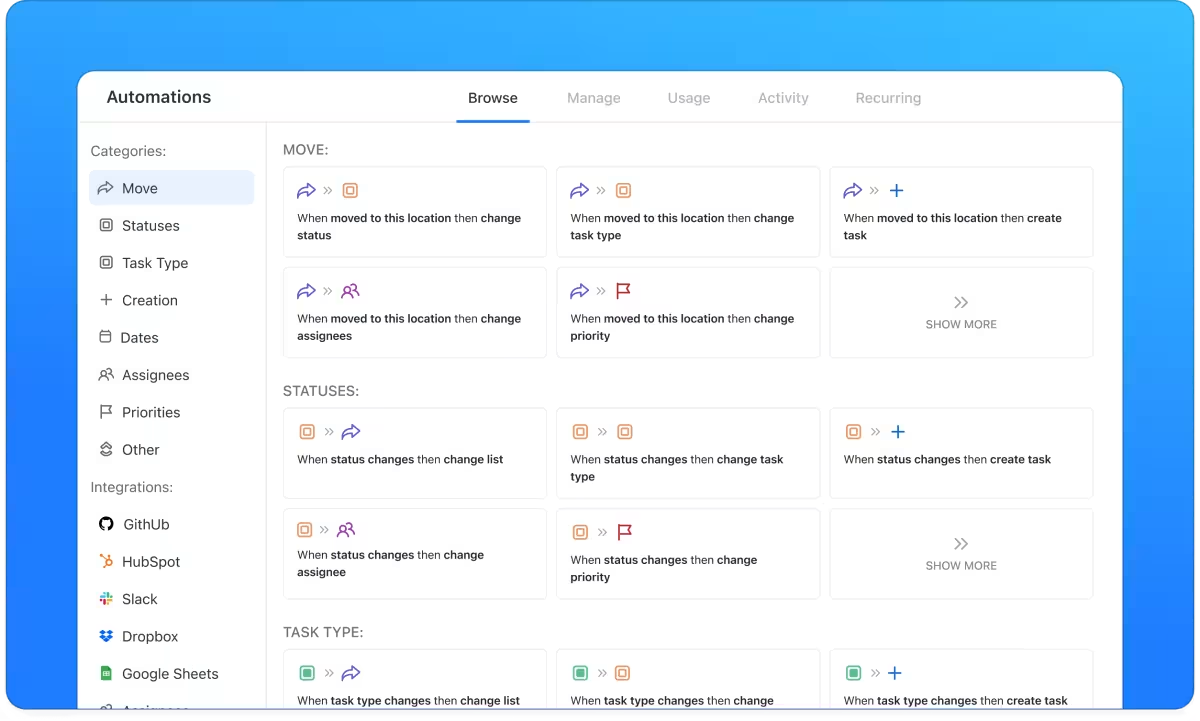
Now, with ClickUp Brain, you can even build automations using natural language—just describe what you need, and it sets up conditions for you.
📌 Example: If you’re a payroll manager, ClickUp can:
If you still feel like your to-do list is running your life instead of the other way around, try the Personal Productivity Template by ClickUp.
When tasks pile up and priorities blur, staying productive can feel impossible. This template helps you organize tasks, set clear priorities, and track progress so you can stay in control and make the most of your time every day.
💡 Pro Tip: Struggling with missed deadlines and project chaos? How to Create an Effective Work Plan (+Templates) gives you the structure, tools, and free templates to simplify tasks, manage resources, and keep projects on track.
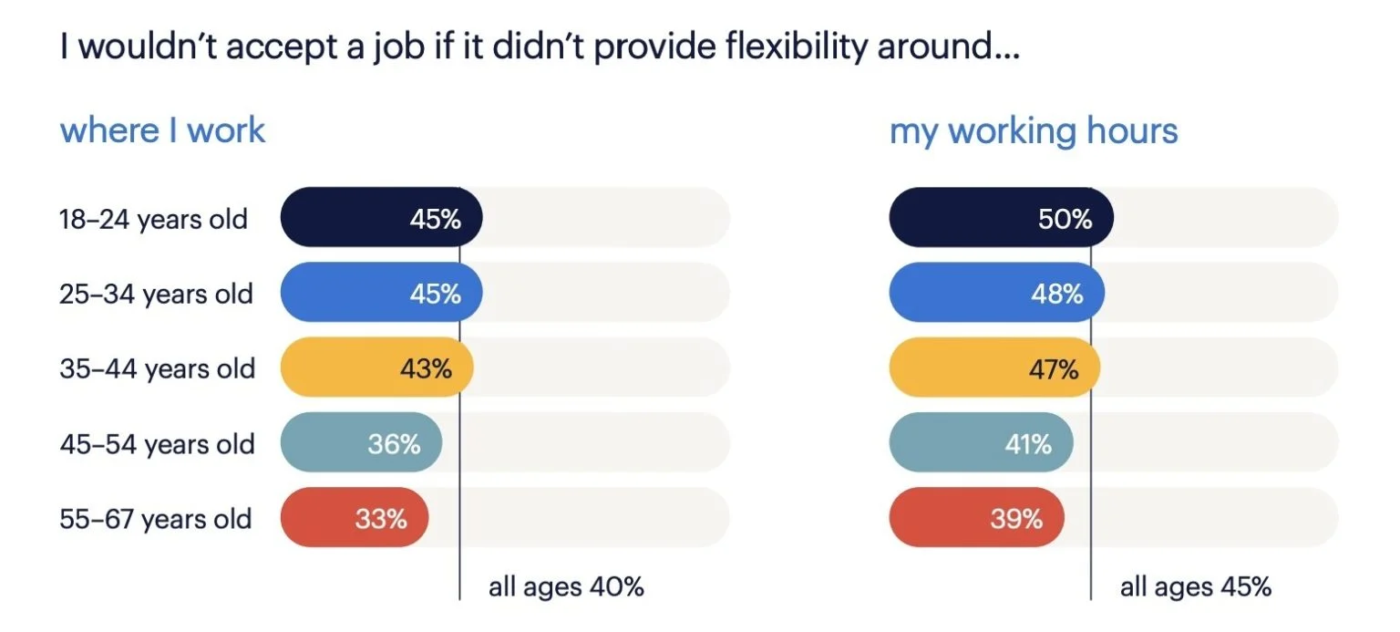
Remote workers are redefining the line between work hours and personal life. Still, more and more professionals are drawn to it because of the flexibility.
What can help here is to set boundaries and actually stick to them. Here are some work from home hacks:
🧠 Did You Know: According to the Pew Research Center, 1 in 10 remote employees struggle with work-life balance, often working beyond hours without realizing it. How to Create a Work-From-Home Schedule offers practical tips to set clear boundaries, structure your day, and stay productive without burnout.
Also, don’t forget to move, stretch, and get some fresh air. Sitting all day isn’t just bad for your back—it kills energy levels and drains creativity.
In case you’re struggling with time management, try the time blocking method to structure your day into focused blocks for deep work, emails, and meetings.
Remote work offers flexibility, but it also comes with unique hurdles. The smart thing would be to recognize these challenges and implement practical solutions.
✅ Solution: Establish regular video meetings, document decisions clearly, and use instant messaging tools to maintain transparency.
✅ Solution: Encourage virtual team-building activities, casual check-ins, and social interactions for a sense of connection.
✅ Solution: Set clear work hours, take scheduled breaks, and use time management techniques to prevent work from spilling into personal life.
✅ Solution: Create a dedicated workspace, mute non-essential notifications, and use ClickUp’s time tracking and automation tools to stay focused.
A California-based study found a 47% boost in productivity among remote employees. For the rest 53%, a few simple strategies can make a big difference.
For that to happen, we have to first understand the fundamentals of working from home—and why being productive at home actually matters:
West Tech Shipping’s Accounts Officer, Starr notes: “ClickUp helps keep me organized and increases my productivity at work. I now get more done in less time since I’m more focused.”
This statement captures ClickUp’s power—simplified task management, automation, and collaboration so you can stay productive at home without needing a hundred other tools.
Sign up on ClickUp for free now and get more done in less time!

Sudarshan Somanathan
Max 22min read

Manasi Nair
Max 20min read
Sudarshan Somanathan
Max 23min read

© 2026 ClickUp