Marketing agencies often juggle multiple tools just to run a single client campaign. In fact, Okta found that organizations across industries now deploy an average of 101 apps, making fragmentation nearly impossible to escape.
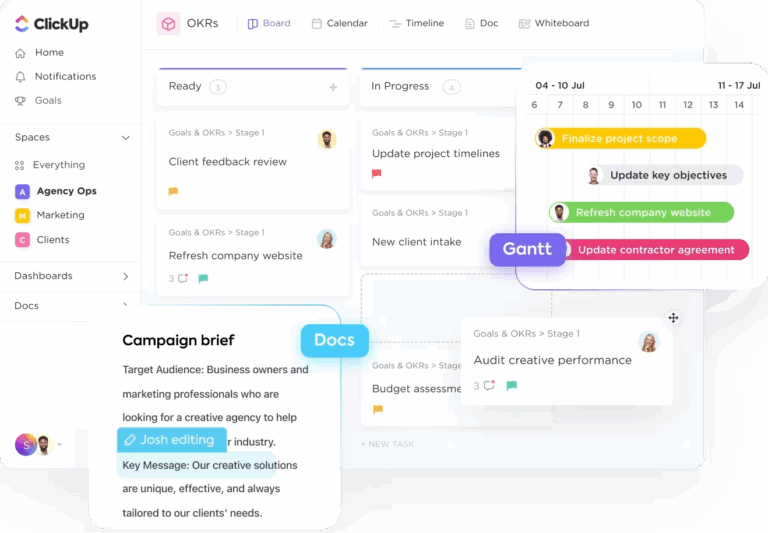
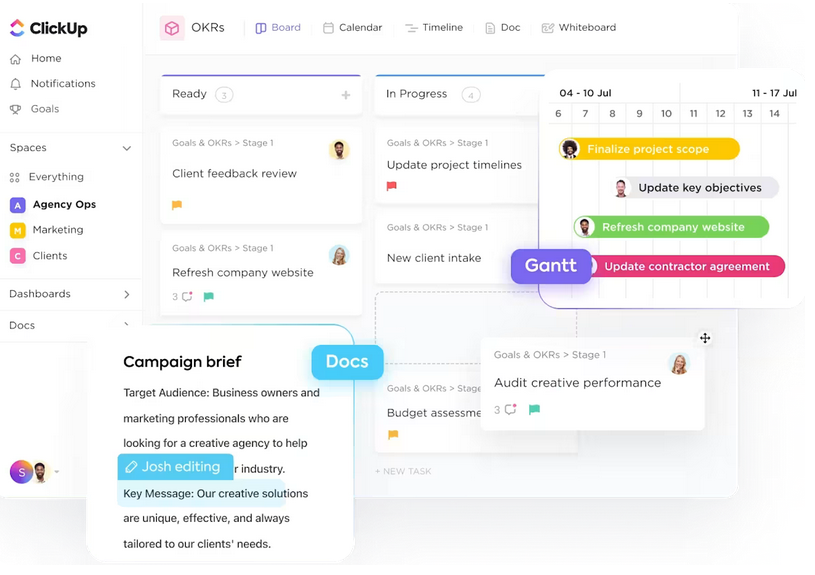
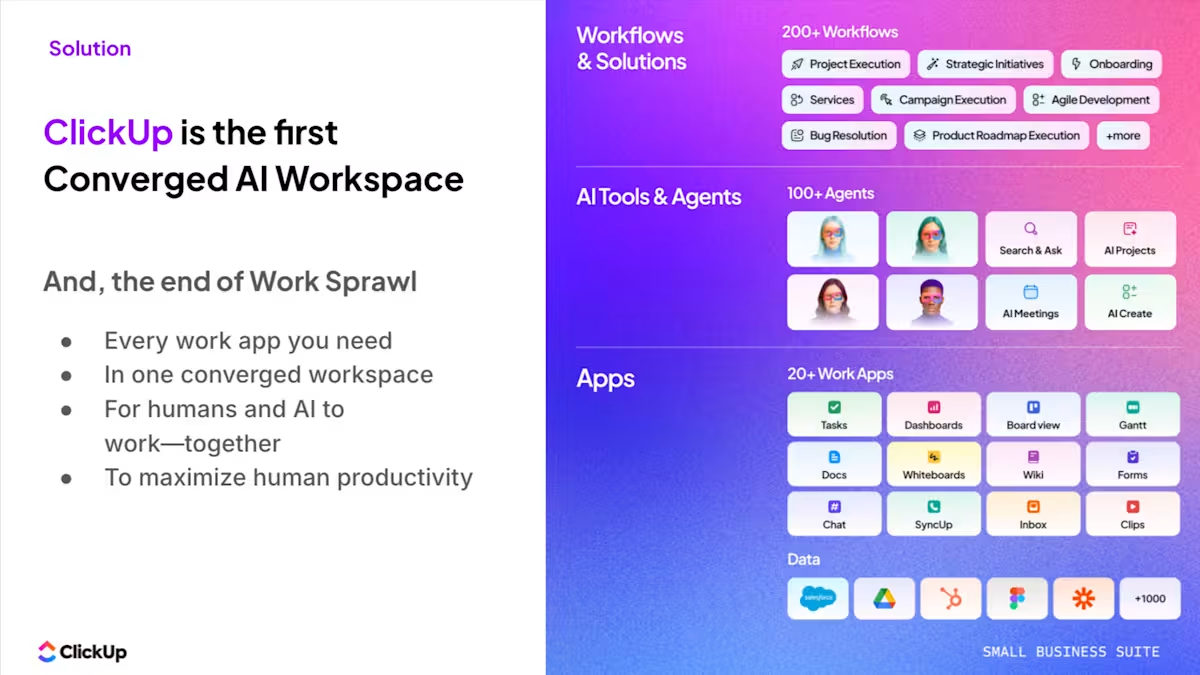
This guide outlines seven concrete workflow changes to reclaim those lost hours for your agency. We’ll also show you how ClickUp’s converged AI workspace—a single, secure platform where projects, documents, conversations, and analytics live together with AI embedded as the intelligence layer—can be your superpower in this effort.
Summarize this article with AI
ClickUp Brain not only saves you precious time by instantly summarizing articles, it also leverages AI to connect your tasks, docs, people, and more, streamlining your workflow like never before.
Summarize this article for me please
Why Most Marketing Agencies Lose 15+ Hours Every Week
When a single client deliverable requires checking your project management tool for tasks, Google Docs for briefs, Slack for feedback, and email for approvals, the minutes add up fast.
This context sprawl means that teams waste hours hunting for the information they need, switching between apps, and repeating the same updates across multiple platforms. Every tool switch, every “where’s that file?” Slack message, and every manually built status report adds time that nobody tracks.
Here’s where those 15+ hours actually go: 👀
Context switching between apps: Jumping from your PM tool to docs to chat to time tracking breaks focus constantly
Duplicating updates across platforms: Posting the same status in three places is triple the work for zero extra value
Chasing approvals via email: Feedback threads get buried, and versions get confused
Rebuilding reports from scratch: Pulling data from different tools into a slide deck every Monday morning means half your day is lost
Searching for deliverable versions: When files live across Google Drive, Dropbox, and email attachments, nobody trusts they have the right one
Together, however, these tiny inefficiencies compound into a massive drain on marketing agency productivity every single week. One agency we spoke with calculated that their team spent 45 minutes per person per day just navigating between platforms.
🎥 Before we go on, here’s a video with real, actionable tips to increase your marketing agency’s productivity without burning everyone out!
Summarize this article with AI
ClickUp Brain not only saves you precious time by instantly summarizing articles, it also leverages AI to connect your tasks, docs, people, and more, streamlining your workflow like never before.
Summarize this article for me please
The Real Cost of Running Five Disconnected Agency Tools
The problem with a fragmented tool stack isn’t just lost time—it’s how that fragmentation slows down your entire agency.
When campaign information is split across multiple platforms, decisions take longer. Teams hesitate because they’re not fully confident they’re looking at the latest data. A creative director reviews one version, an account manager references another, and by the time feedback reaches the client, the story doesn’t fully align.
This lack of a single source of truth creates subtle but costly friction. Approvals stall, handoffs get messy, and simple questions turn into long back-and-forths just to confirm what’s already been done.
Over time, this impacts more than execution:
Client communication becomes reactive instead of proactive
Teams spend more time validating work than moving it forward
Strategic thinking takes a backseat to operational coordination
The real cost isn’t money—it’s capacity. Every hour your team spends managing tools is an hour not spent on client strategy or creative work.
📮ClickUp Insight: Low-performing teams are 4 times more likely to juggle 15+ tools, while high-performing teams maintain efficiency by limiting their toolkit to 9 or fewer platforms.
But how about using one platform? As the everything app for work, ClickUp brings your tasks, projects, docs, wikis, chat, and calls under a single platform, complete with AI-powered workflows. Ready to work smarter? ClickUp works for every team, makes work visible, and allows you to focus on what matters while AI handles the rest.
Summarize this article with AI
ClickUp Brain not only saves you precious time by instantly summarizing articles, it also leverages AI to connect your tasks, docs, people, and more, streamlining your workflow like never before.
Summarize this article for me please
How One Workspace Replaces an Entire Agency Tech Stack
Instead of stitching five tools together, agencies are consolidating their tech stack and moving everything into one workspace.
This is where the converged workspace approach pays off. Because tasks, docs, and conversations are linked, opening a campaign task shows you the brief, comment thread, time logged, and approval status—all without leaving the screen.
✨ Customer story: Scaling without the operational drag
As teams grow, coordination—not execution—becomes the bottleneck.
That’s what video production agency path8 Productions ran into. Their work was spread across multiple tools like Smartsheet, Slack, Toggl, and Dropbox Paper, forcing producers to spend time syncing updates rather than advancing projects.
60% reduction in meeting prep time (from 30–60 minutes to ~10)
Fully implemented in under 8 weeks with ClickUp’s support
Real-time visibility across projects, communication, and time tracking
With everything in one place, the constant “update every tool” cycle disappeared. Time is logged directly on tasks, conversations stay connected to the work, and meeting agendas build themselves from live data. Hear it in Pat Henderson’s own words 👇
Summarize this article with AI
ClickUp Brain not only saves you precious time by instantly summarizing articles, it also leverages AI to connect your tasks, docs, people, and more, streamlining your workflow like never before.
Summarize this article for me please
7 Workflow Changes That Save Marketing Agencies 15+ Hours
These 7 strategies will help your agency save hours each week. Each one maps to an actual time sink and a specific way to eliminate it inside a unified workspace.
Centralize project management across every client account
Most agencies manage each client differently—different tools, naming conventions, and workflows. That makes it impossible to see workload or deadlines across accounts.
🚀 Organize your entire agency into a clear structure with ClickUp Spaces, Folders, and Lists.
Centralize your agency operations with ClickUp
Spaces let you arrange your different workflows by clients, departments, or initiatives. Folders go inside Spaces for complex workflows, and Lists hold your actual tasks.
Space: Client name (e.g., Acme Corp)
Folder: Campaign type (e.g., Q3 Product Launch)
List: Deliverable category (e.g., Social Content, Email Sequences)
Tasks: Individual deliverables with assignees, due dates, and statuses
💡 Pro Tip: Track client-specific metadata like campaign type and deliverable status without building separate systems with ClickUp Custom Fields. You can add dropdown menus, dates, labels, and more to any task to keep data structured and reportable.
Automate client updates and status reports
Account managers spend hours each week compiling updates from various sources to send client-facing emails. That’s admin overhead that doesn’t move the needle.
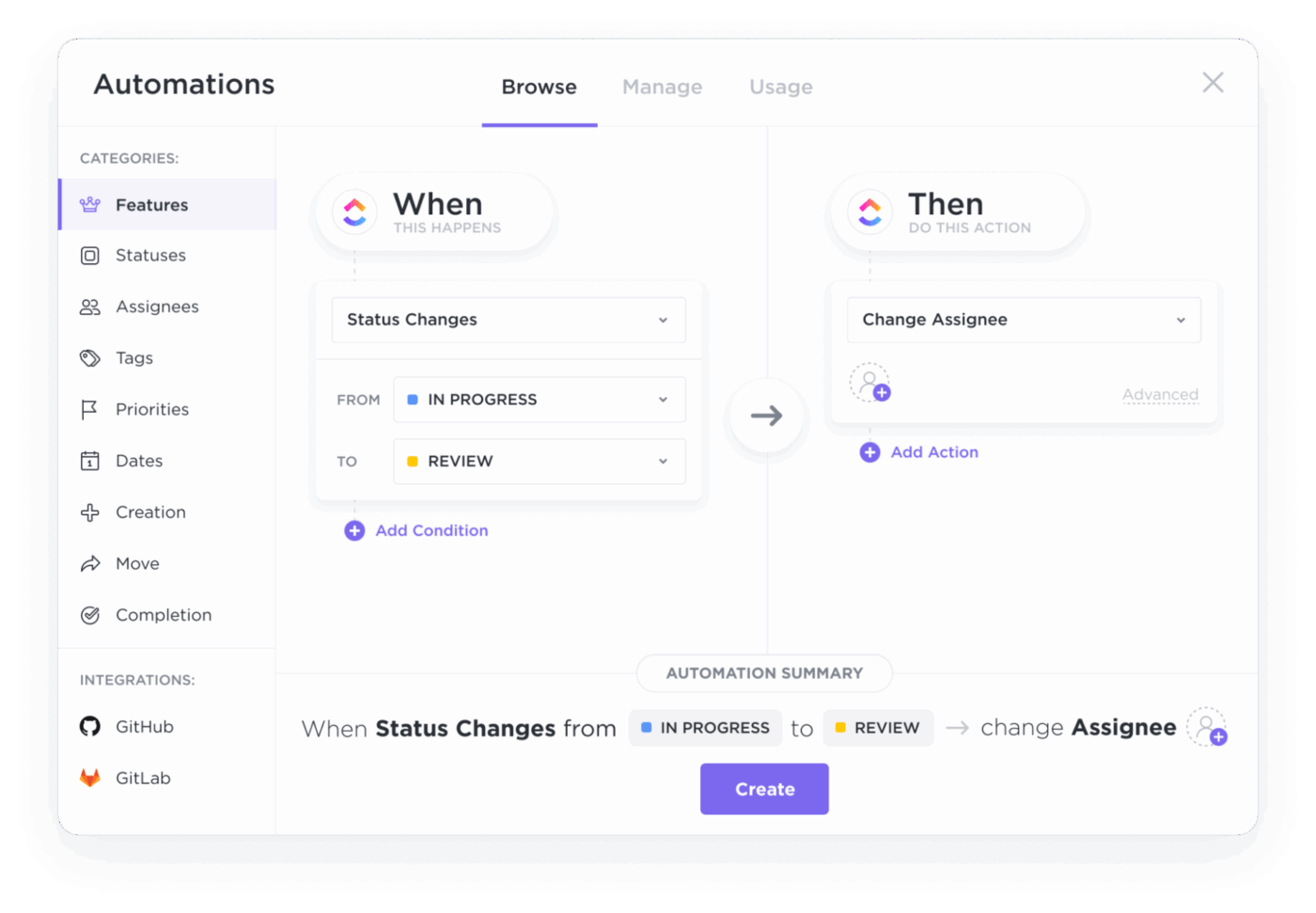
Let your day-to-day tasks run on autopilot with ClickUp Automations
You define triggers, conditions, and actions—like “when a task moves to Client Review, notify the account manager and assign a due date.” The system handles the rest.
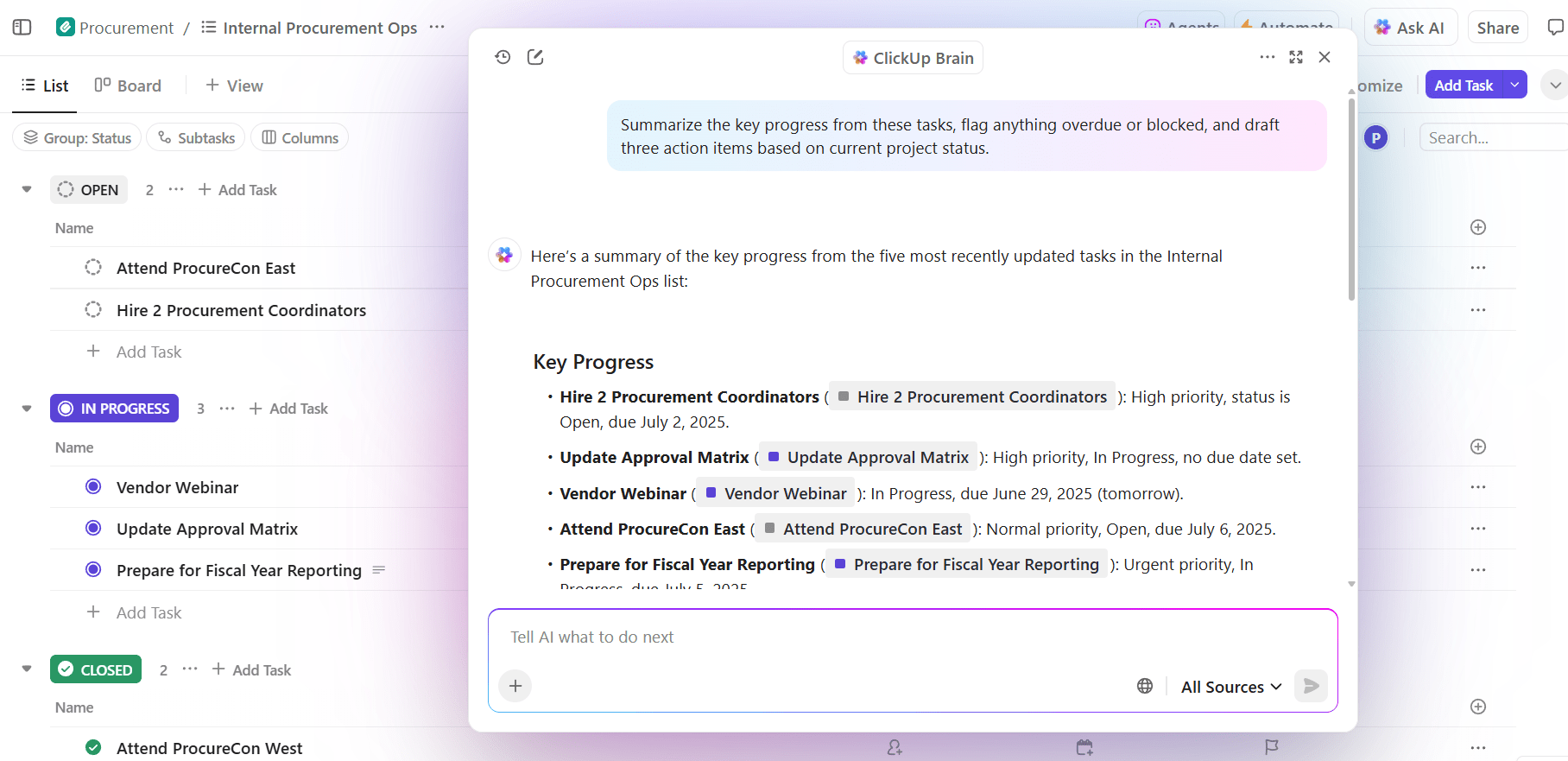
🌟 Draft weekly status summaries automatically from your actual task data with ClickUp Brain, the integrated AI that has the full context of your work in ClickUp.
Surface key insights, follow-ups, project updates, and progress from your workspace with ClickUp Brain
Instead of writing an update from scratch, ClickUp Brain pulls what happened that week—tasks completed, items in review, upcoming deadlines—into a structured update. All you need to do is just review and send.
Give the agent access to your project, and it generates a stakeholder-ready status report that covers progress against milestones, notable completions, items at risk, and upcoming deadlines.
👀 Watch how ClickUp’s AI Super Agents can automate repetitive tasks and provide intelligent assistance across your team’s day-to-day work:
Track time directly inside tasks and projects
When time tracking lives in a separate tool, entries are inaccurate or missing entirely. That kills billing accuracy and makes profitability analysis an exercise in guesswork.
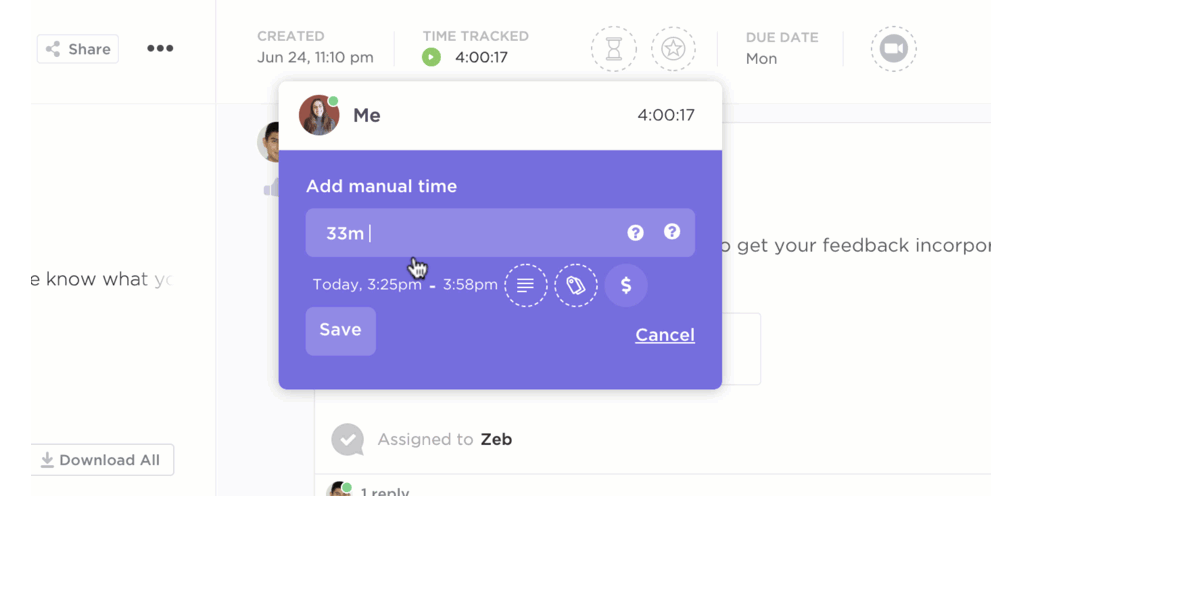
⏱️ Log time exactly where you’re already working with ClickUp Time Tracking built into every task.
Track time seamlessly with ClickUp Time Tracking
You can start a timer or manually add entries from tasks, ClickUp List View, ClickUp Board View, or even the Quick Action menu. Each entry can be marked as billable or non-billable and include descriptions or tags. You can track:
Billable hours per client
Internal (non-billable) hours per project
Estimated vs. actual time per deliverable
Time distribution by deliverable type
👉🏽 Our Small Business AI Playbook breaks down exactly how to use AI to reduce complexity in your agency operations.
Replace manual reporting with real-time dashboards
Building weekly performance reports by pulling data from multiple tools and pasting it into slides? That report’s already outdated by the time you finish it.
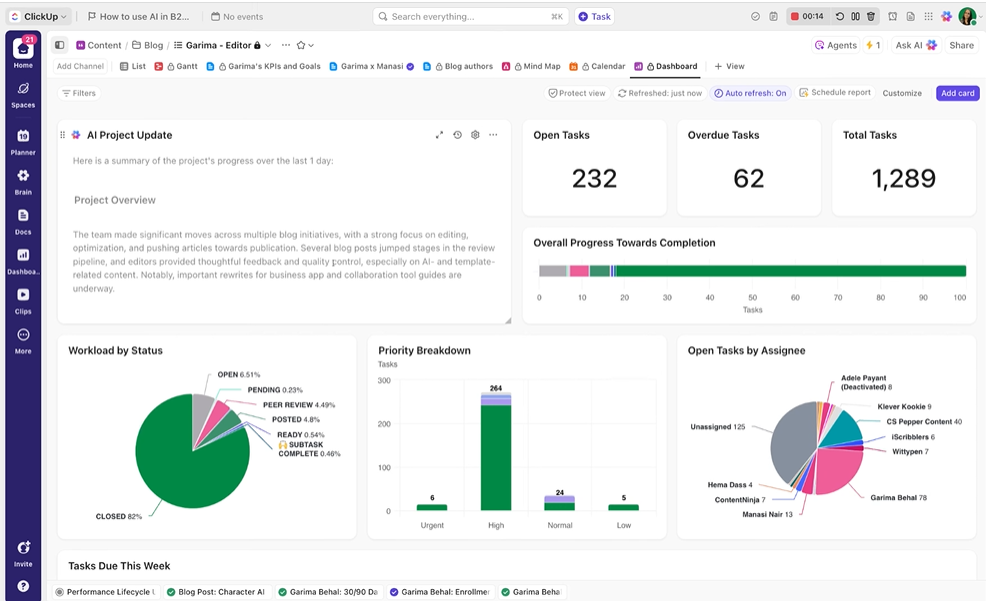
Create custom ClickUp Dashboards to track team productivity
Dashboards convert your workspace data into visual widgets—no export needed.
Common agency report
ClickUp Dashboard Widget that’s useful
Team workload summary
Workload by assignee
Campaign progress
Tasks by status
Client billing hours
Time tracked by client
Overdue deliverables
Overdue tasks list
Add AI Cards to your dashboard to access always-updated, AI-powered insights. For example, you can add:
AI StandUp: Summarize your recent activity during a selected time period
AI Team StandUp: Summarize selected people and teams’ recent activity during a selected time period
AI Executive Summary: Generate an up-to-date executive summary, showing the health and status of your department, team, or projects
AI Project Update: Create a high-level overview of your project status and progress
You can even schedule dashboard reports to automatically send copies to stakeholders.
Hawke Media, a growing digital marketing agency, chose ClickUp as its platform to improve productivity and visibility. They sawproject delays drop by 70% within the first year of implementation.
Many of our top-level executives have a lot to keep track of and don’t necessarily want to log in to ClickUp. But we can send out View Only links so they–or anyone else who needs to–can see a content calendar or sprint dashboard to quickly understand what we’re working on.
Scattered approval workflows across email, Slack, and markup tools lead to missed revisions and delayed launches. Nobody can tell which version is current, or where a particular approval is stuck.
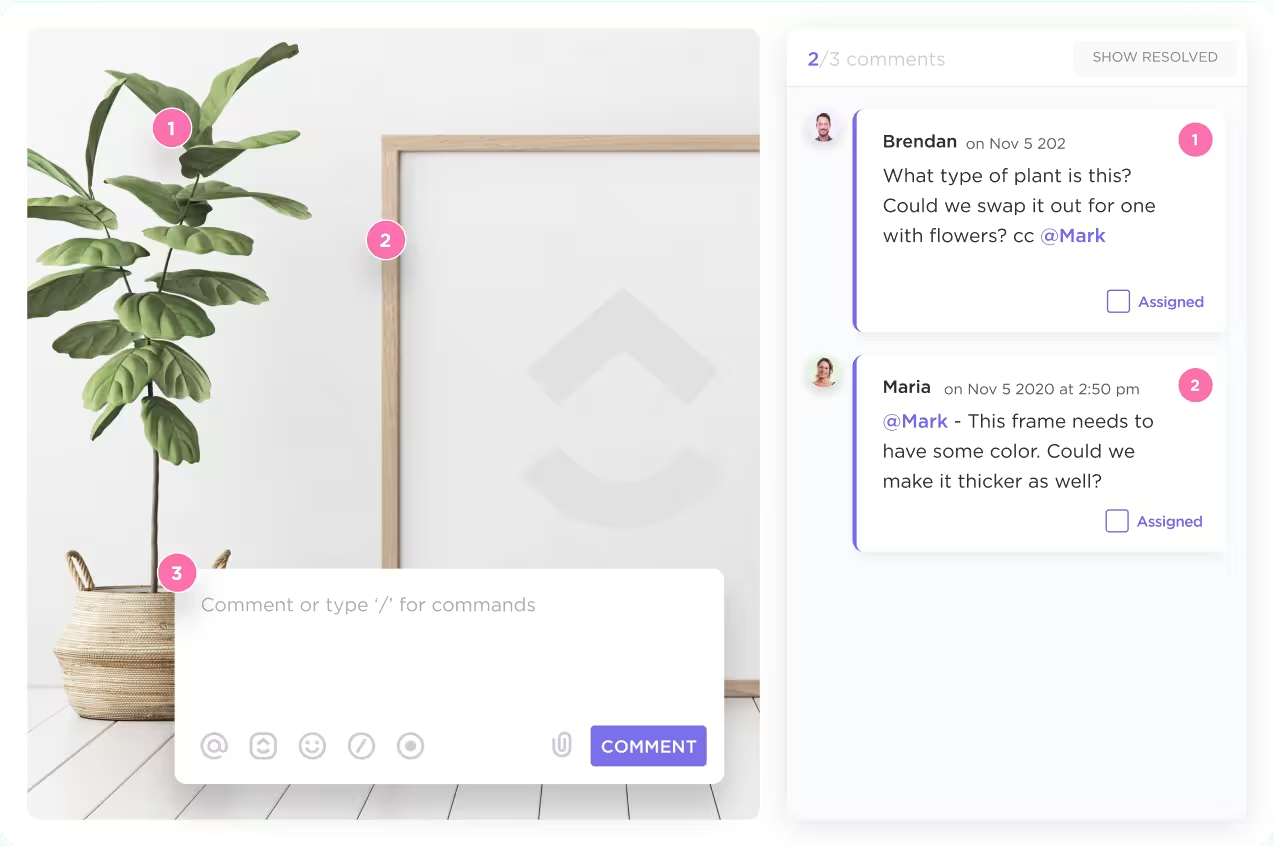
🏆 Keep all feedback tied to the deliverable with ClickUp Tasks.
Keep team members aligned by keeping communication contextual to the work in ClickUp Tasks
Have focused conversations beneath each task with Threaded Comments, so everyone stays in the know
Let stakeholders annotate directly on images, videos, and PDFs with Proofing in ClickUp—assigning feedback as comments right on the creative asset itself
Record and share async video feedback through ClickUp Clips and embed them in the original task, Chat thread, or Doc
Every stakeholder sees the same thread, the same version, and the same approval status.
Keep team members aligned on creative feedback with ClickUp’s Proofing features
💡 Pro Tip: Easily work with clients by inviting guests to your Workspace. Share any file or dashboard, invite them to add comments to mockups, and set permissions to control who sees what.
Search across tasks, docs, and messages with AI
📮ClickUp Insight: More than 50% of employees struggle to find the information they need at work. While only 27% say it’s easy, the rest face some level of difficulty, with 23% finding it very difficult.
When knowledge is scattered across emails, chats, and tools, wasted time adds up fast. With ClickUp, you can turn emails into trackable tasks, link chats to tasks, get answers from AI, and more within a single workspace.
💫 Real Results: Teams are able to reclaim 5+ hours every week using ClickUp—that’s over 250 hours annually per person—by eliminating outdated knowledge management processes. Imagine what your team could create with an extra week of productivity every quarter!
It works across Tasks, Docs, Comments, and Chat, so you type a natural-language question and get an answer pulled from your actual workspace data.
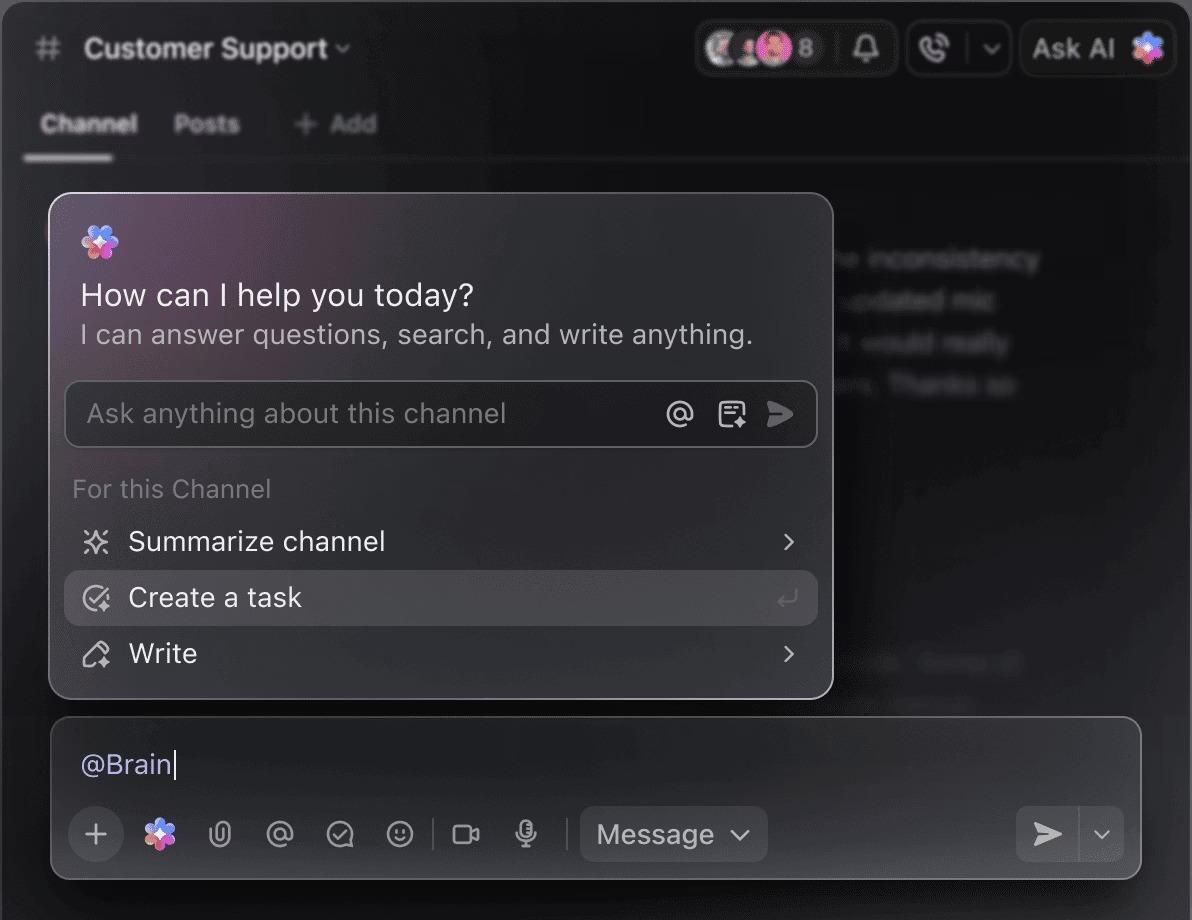
Find relevant answers quickly from your workspace using ClickUp Brain
Because ClickUp Brain sits inside a converged workspace, it already has context across everything. ✨
You can access it from the AI Command Bar anywhere in ClickUp. Alternatively, simply type @brain in task comments or Chat, just like you would mention another person.
💡 Pro Tip: Turn time saved into insights with ClickUp Brain MAX. With this intelligent desktop assistant, you can go beyond generating updates and actually analyze your workflows in real time. Ask questions like:
“Which clients are taking the longest approval cycles?”
“Where are we losing the most non-billable hours?”
“Which projects are at risk of delays this week?”
Because Brain MAX has full context across your tasks, time tracking, and dashboards, it doesn’t just surface data—it connects the dots and highlights patterns you’d otherwise miss.
The result? You’re not just saving 15+ hours a week—you’re making smarter decisions about where your team’s time should go next.
Templatize repeating projects and client onboarding
Agencies run the same project types repeatedly, but rebuild the task structure from scratch each time. That’s hours wasted reinventing a wheel you’ve already built.
💪🏻 Save entire project structures—including Tasks, Subtasks, Dependencies, Custom Fields, and Automations—and deploy them in one click with templates in ClickUp.
You can browse the ClickUp Template Center for pre-built options or save your own from any Space, Folder, or List. Here are some examples of processes and assets you can build templates for:
Summarize this article with AI
ClickUp Brain not only saves you precious time by instantly summarizing articles, it also leverages AI to connect your tasks, docs, people, and more, streamlining your workflow like never before.
Summarize this article for me please
How To Measure the Time Your Agency Saves
Once you consolidate your workflows into a single workspace, the next question is simple: Is this actually saving us time?
The mistake most agencies make here is tracking vanity metrics instead of operational ones. You don’t need more dashboards—you need a small set of leading indicators that clearly show whether work is moving faster and with less effort.
Here are the metrics that actually tell that story:
Average task completion time: How long it takes for a deliverable to move from “in progress” to “done.” A drop here means your workflows are cleaner and your team is spending less time stuck or waiting
Time spent on reporting: Hours spent compiling weekly or monthly updates. This should shrink significantly once reporting pulls from live data instead of manual exports
Number of tools used per workflow: How many platforms a single campaign or deliverable touches. Fewer tools = less context switching and higher throughput
Approval cycle length: The time from first draft to final sign-off. Shorter cycles indicate clearer feedback loops and better collaboration
Hours logged as non-billable admin: Time spent on internal coordination, status updates, and tool management. This is the hidden drain—reducing it directly improves utilization rate and profitability
The advantage of using ClickUp here is straightforward: all this data already lives inside your workspace.
💡 Pro Tip: With ClickUp Dashboards, you can track cycle time, throughput, on-time delivery, and utilization trends without stitching together multiple reports.
A practical approach: Don’t try to measure everything at once. Pick two or three metrics, establish a baseline for a week, then compare again after 30 days. That delta is your real “time saved.”
Summarize this article with AI
ClickUp Brain not only saves you precious time by instantly summarizing articles, it also leverages AI to connect your tasks, docs, people, and more, streamlining your workflow like never before.
Summarize this article for me please
How To Start Consolidating Your Agency Workflow
The fastest way to see results is to start small, prove the value, and expand from there.
Audit your current tools and workflows: Map out where work happens today—project management, docs, communication, reporting. You’re looking for overlap and friction, not perfection
Identify your highest-friction workflow: Pick one process that’s consistently painful (client onboarding, weekly reporting, creative approvals). Start where time loss is most obvious
Set up a dedicated ClickUp Space: Recreate that workflow inside ClickUp using Spaces, Folders, Lists, and Tasks so everything lives in one structured environment
Templatize the process: Turn that workflow into a reusable template with tasks, dependencies, custom fields, and automations so your team never rebuilds it again
Expand to the next workflow: Once the first use case is running smoothly, repeat the process for the next one—campaign execution, content production, or reporting
💡 Pro Tip: For teams that can’t cut over all at once, connect your existing tools with ClickUp Integrations during the transition so you don’t lose data.
Get buy-in by showing the team that the daily friction—chasing status updates, searching for files, rebuilding reports—disappears immediately.
Summarize this article with AI
ClickUp Brain not only saves you precious time by instantly summarizing articles, it also leverages AI to connect your tasks, docs, people, and more, streamlining your workflow like never before.
Summarize this article for me please
Stop Managing Work. Start Moving it Forward, With ClickUp
The time agencies lose each week is the sum of dozens of small inefficiencies spread across too many tools. Every extra tool, every duplicate update, every approval buried in email—it all adds friction. And friction compounds. It slows execution, eats into billable hours, and pulls your team away from the strategic and creative work clients actually pay for.
Consolidating your work into a single workspace with built-in AI eliminates the root cause.
Those 15+ hours aren’t just time—they’re the difference between an agency that’s always catching up and one that has room to think. Consolidate your stack, and you’ll find out what your team can do when they’re not fighting their tools.
Get started for free with ClickUp and see where your team’s time is actually going. 🙌
Summarize this article with AI
ClickUp Brain not only saves you precious time by instantly summarizing articles, it also leverages AI to connect your tasks, docs, people, and more, streamlining your workflow like never before.
Summarize this article for me please
Frequently Asked Questions
What are the biggest time-wasters in marketing agencies?
Common time drains include switching between multiple tools, manually creating reports, chasing approvals across email and chat, duplicating updates, and searching for files across disconnected systems.
How can marketing agencies save time on daily operations?
Marketing agencies save time by consolidating tools, automating repetitive tasks like reporting and approvals, and centralizing communication and project management in one workspace. This reduces context switching and eliminates duplicate work.
How does a unified workspace improve agency productivity?
A unified workspace connects tasks, documents, communication, and reporting in one place. This creates a single source of truth, speeds up decision-making, and reduces time spent coordinating work.
Can small marketing agencies benefit from workflow automation?
Yes. In fact, smaller agencies benefit the most because automation reduces manual workload, improves consistency, and allows lean teams to scale without adding headcount.
What KPIs should agencies track to measure time savings?
Key metrics include task completion time (cycle time), approval turnaround time, time spent on reporting, non-billable hours, and overall team utilization rate.
Everything you need to stay organized and get work done.