






Still downloading templates?
There’s an easier way. Try a free AI Agent in ClickUp that actually does the work for you—set up in minutes, save hours every week.
Sorry, there were no results found for “”
Sorry, there were no results found for “”
Sorry, there were no results found for “”

Ever heard of alignment debt?
It’s what happens when your developers build features nobody asked for, or your product manager shifts priorities mid-sprint, breaking the flow.
Left unchecked, it leads to missed deadlines, frustrated teams, and additions that fail to truly delight users, slowing product velocity and making each release more painful than the last.
But it’s completely fixable.
In this blog post, we’ll explore practical strategies on how developers can align with product managers on feature priorities.
Plus, you’ll understand how ClickUp makes it easy to turn those strategies into real workflows. 🤩
Let’s get started!
Getting product development teams on the same page directly impacts how efficiently and effectively your product gets built.
Don’t believe us?
Take the Samsung Galaxy Note 7. Its rushed development and poor coordination between suppliers and product teams led to battery safety flaws, necessitating a full recall and resulting in significant brand damage.
On that note, here are a few solid reasons why alignment on feature priorities matters for more successful outcomes:
🧠 Fun Fact: The term ‘Scrum’ was borrowed from rugby to emphasize the framework’s focus on a self-organizing, cross-functional team working together. It was first mentioned in the famous Harvard Business Review article by Professors Hirotaka Takeuchi and Ikujiro Nonaka, The New New Product Development Game.
Collaboration between developers and product managers can hit roadblocks that slow progress and affect product quality. Here’s what to watch out for. 👀
📮 ClickUp Insight: 27% of our survey respondents believe weekly updates could be replaced with asynchronous alternatives, while 25% say the same for daily standups. However, this may involve juggling multiple specialized tools, creating scattered information, and incurring additional costs.
ClickUp revolutionizes teamwork by centralizing discussions via comment threads, enabling quick recorded updates through ClickUp Clips, and more—all within one platform.
💫 Real Results: Teams like Trinetrix have reduced unnecessary meetings by 50% with ClickUp!
Aligning developers and product managers is crucial for creating products that deliver customer value. So, follow these strategies to stay ahead of the challenges and ensure every sprint moves the product forward. 👇
Nothing kills momentum faster than product and dev teams working off two different roadmaps. One says ‘launch next week,’ the other says ‘blocked by backend refactor.’
Here’s what you can do:
ClickUp Product Management Software is the everything app for work that combines project, knowledge, and chat in one place—all powered by AI that helps you work faster and smarter.
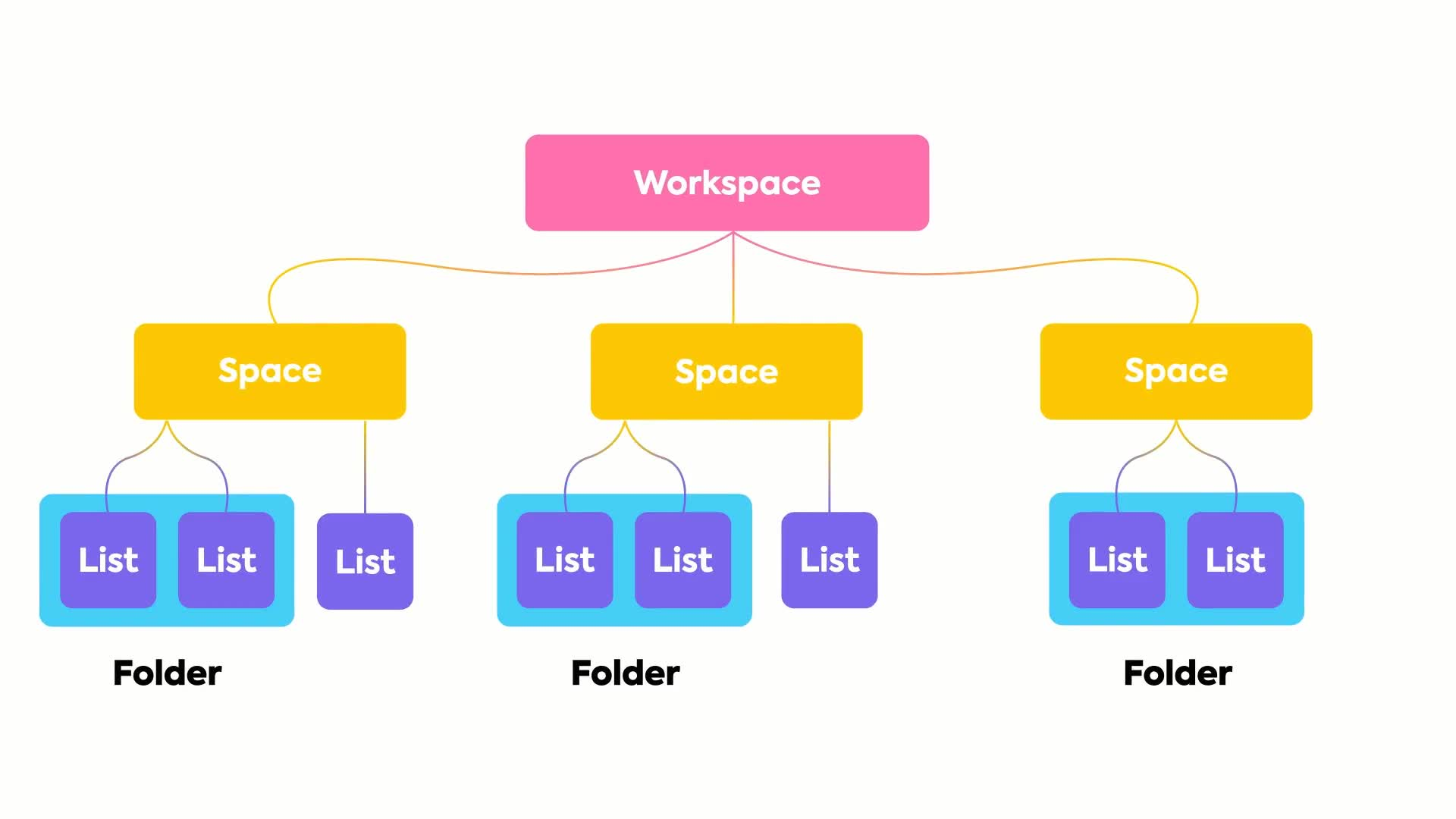
ClickUp’s Project Hierarchy is built with a simple structure that visualizes roadmaps, backlogs, and sprints from top to bottom.
Create a Product Space for your core app and set up Folders inside it for each feature set, say ‘User Dashboard’ or ‘Notifications.’ Within those, use Lists to manage sprint cycles or feature rollouts. ClickUp Tasks represent individual stories, bug fixes, or enhancements here, keeping every item actionable.
Developers can update task progress while PMs track dependencies, release timelines, and priorities, all in one view.
🔍 Did You Know? The first known ‘product manager’ role was created at Procter & Gamble in the 1930s, not in the tech industry. They were called ‘brand men,’ tasked with aligning marketing, production, and customer needs. The concept originated from a 1931 memo by Neil H. McElroy, an advertising manager at P&G, who advocated for employees to have sole responsibility for a brand.
Too often, ‘priority’ means whoever argues loudest wins. A better approach is to quantify it.
Assign impact and effort scores to every feature so decisions are based on trade-offs, not gut feelings. Follow these simple agile prioritization techniques:
💡 Pro Tip: Standardize scoring using agile estimation techniques like fixed numeric scales (Impact 1-10) or the Fibonacci sequence/small sets for Effort (1,2,3,5,8 or Low/Med/High). This ensures consistent and objective evaluations across teams, reducing bias.
Add ClickUp Custom Fields to ClickUp Tasks, including numeric fields such as Impact Score and Effort Score, to your feature list, allowing both PMs and developers to rate each task objectively.
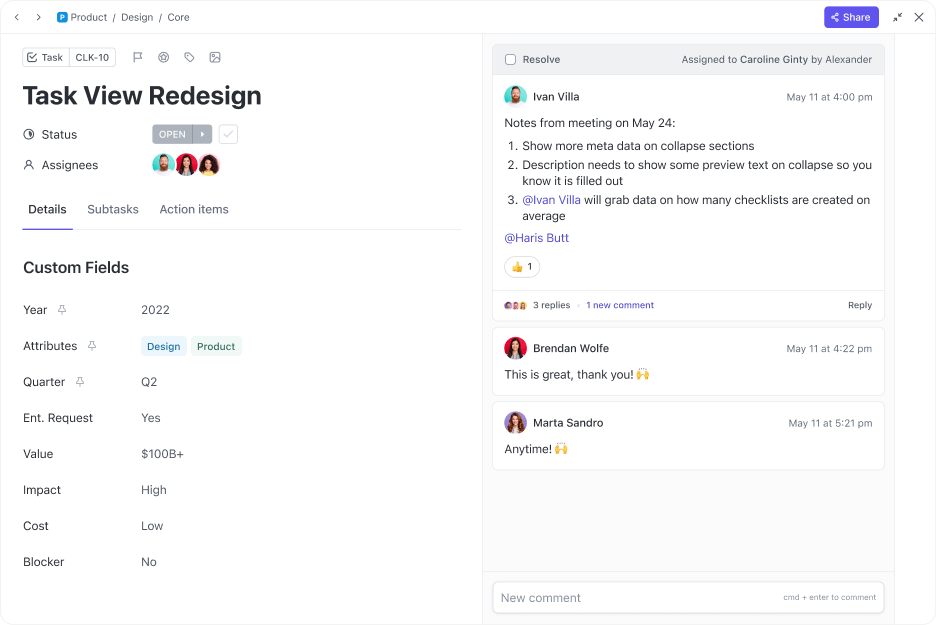
Let’s say your PM marks ‘Team Dashboard’ as a five in impact, but your development team gives it a four in effort due to the heavy API work involved. This way, you can instantly sort to find high-impact, low-effort wins or flag items that may drain resources with little payoff.
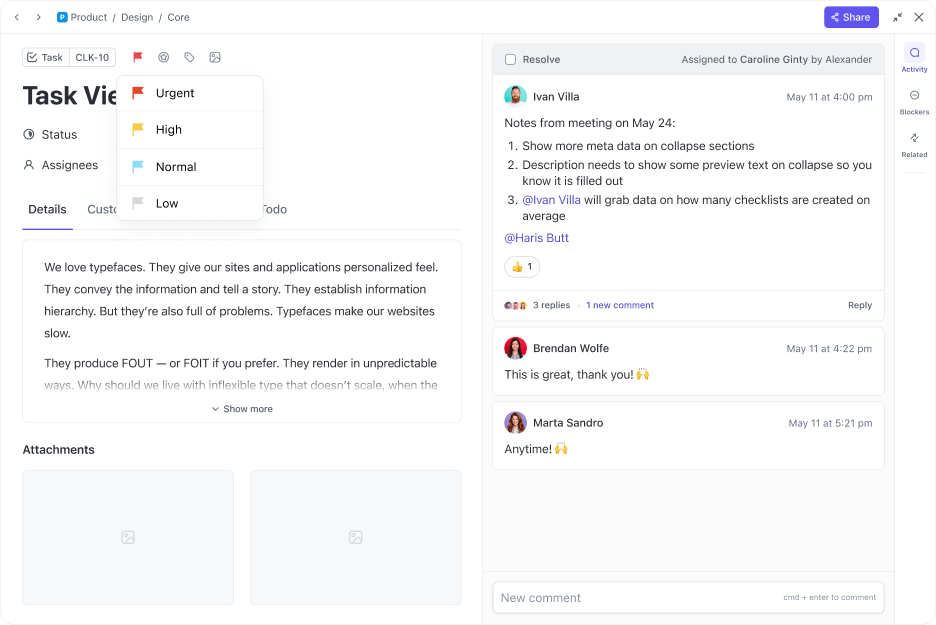
Once you’ve aligned on what matters most, make it visible using ClickUp Task Priorities. Assign features Urgent, High, Normal, or Low flags to give every team member an instant cue about what comes first.
💡 Pro Tip: Add context with ClickUp Task Tags, such as Customer Request, Tech Debt, or Quick Win, to help everyone understand why a task matters and when.
Before sprint planning, gather both developers and product managers in the same room (or on a board) to map out which features depend on others.
For example, a backend API must exist before frontend UI work can begin. This helps developers understand how a feature’s delay affects others, and product managers can see timeline constraints holistically. This improves cross-functional negotiation on feature sequencing.
You must:
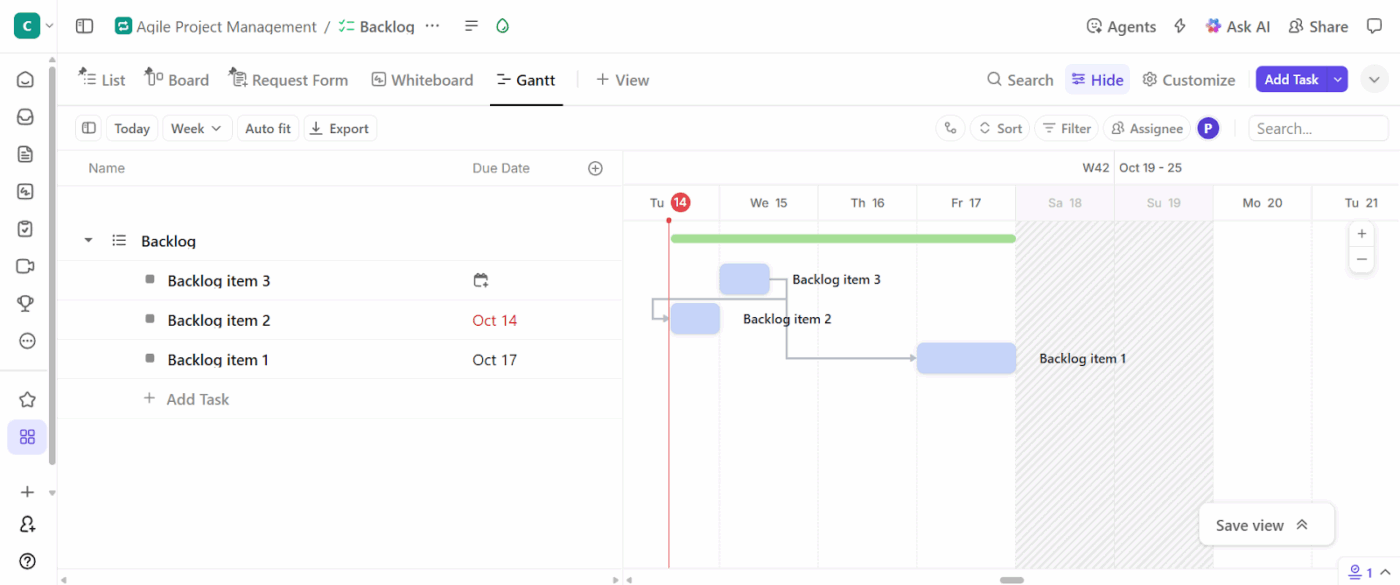
ClickUp Gantt View gives you a complete visual timeline of your project. Here, you can map your ClickUp Task Dependencies with durations and how they connect. You can mark your Tasks as ‘Blocking’ or ‘Waiting On’, so it’s instantly clear which features need to be completed first.
If one task slips, the ripple effect on downstream tasks is immediately visible, helping PMs and developers make faster decisions.
🔍 Did You Know? ‘Feature creep’ is a real phenomenon that can silently derail projects. Constantly adding small, unplanned features increases delivery time and frustrates both developers and users.
Encourage PMs to document user stories and business rationale while developers add technical constraints or requirements. This evolves as the project progresses, keeping both strategic and technical reasoning visible.
When a developer spots an infrastructural limitation, they can annotate immediately. And when a PM rethinks a use case, the devs see it in real time.
ClickUp Docs serves as a living document, allowing both product managers and developers to edit, comment, and annotate simultaneously.
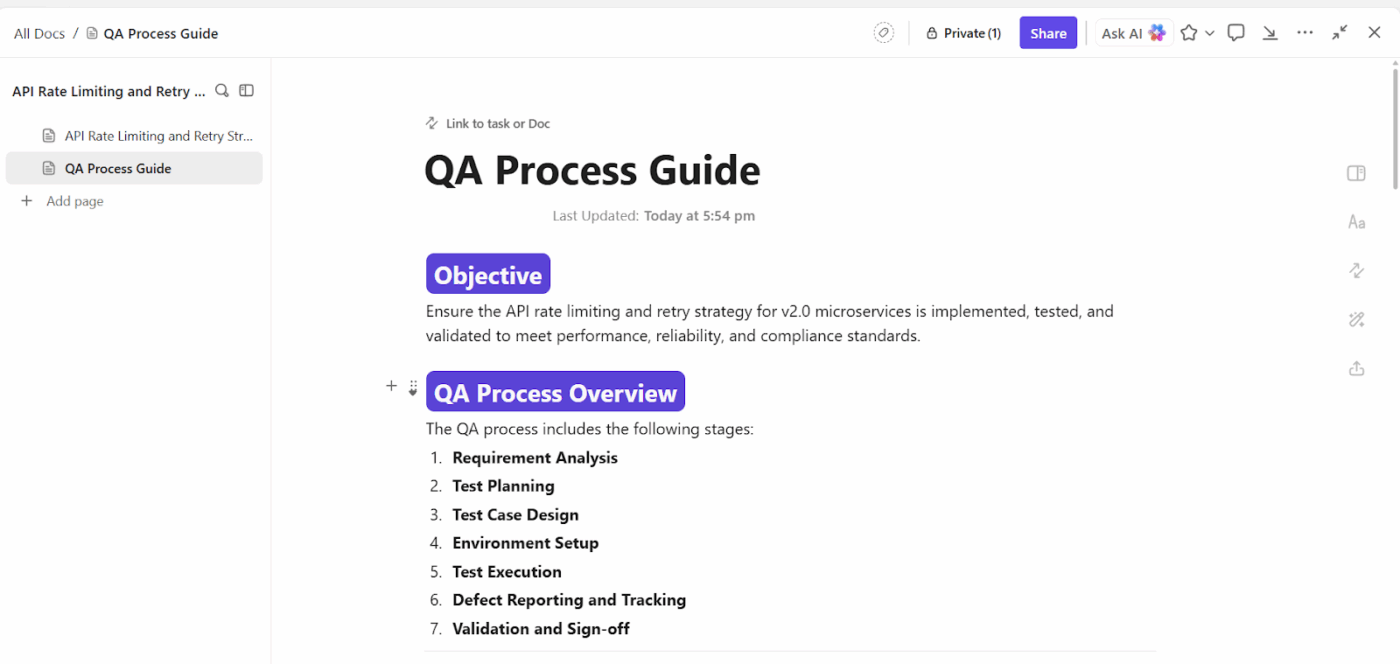
For example, when rolling out a new ‘One-Click Checkout’ feature request, the product manager outlines the business rationale and user stories. At the same time, developers add technical requirements, API details, and security notes in clearly organized sections.
Using features like checklists, code blocks, and comments with @mentions, both parties can ask questions, flag issues, and update information in real-time. The Doc stays linked to the relevant task or sprint, so everyone has access to the latest requirements and decisions.
Sarah McKinney from SkylineWeb Solutions shares their experience with using ClickUp:
ClickUp offers the tools needed for remote teams need to complete and deliver projects. The features and functionality it offers is powerful with its ease of use. Also it is more customizable to meet the needs of our developers, project managers and remote team.[sic]
🤝 Friendly Reminder: It’s okay to disagree. Healthy tension between product vision and technical feasibility fuels innovation. Just ensure every debate ends with clarity, not confusion.
With a shared spec in hand, don’t just jump into coding. Dedicate short pre-sprints (1-2 days) where devs and PMs validate assumptions, run through edge cases, estimate effort, and confirm deliverables.
But these alignment sprints don’t have to end before coding begins. Even once development is underway, short micro-sprints, a few hours at key milestones, help PMs and devs align on feature priorities.
This ‘alignment’ phase typically fades once sprint planning wraps up. However, ClickUp Sprints keeps it in check.
Set sprint dates, assign story points, and mark priorities so everyone knows what needs to be shipped first. Unfinished work? It automatically rolls into the next sprint, keeping your flow unbroken.
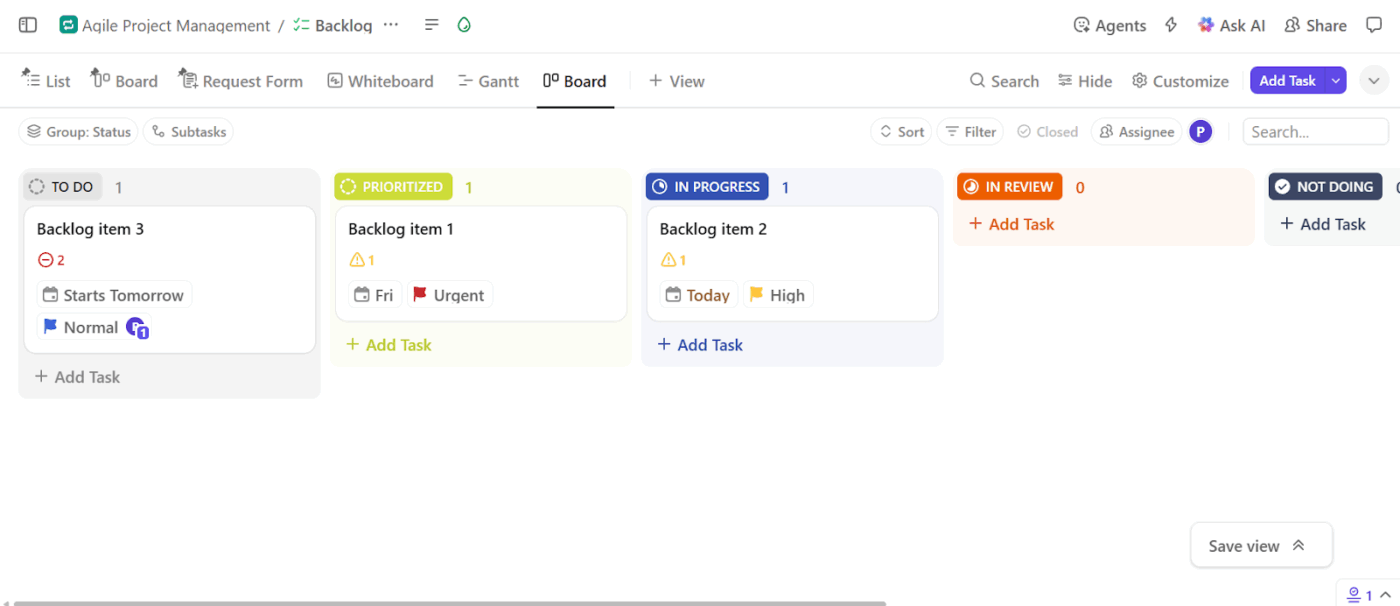
Developers can sync their sprints directly with GitHub, GitLab, or Bitbucket, keeping code commits and issues tied to the same tasks PMs are tracking. Meanwhile, product managers can monitor real progress through Burndown Charts, Velocity Reports, and Cumulative Flow Diagrams in the product management tool.
⚡ Template Archive: ClickUp Agile Sprint Planning Template is a tool ready to plug straight into your workflow. You have four Custom Fields, including Development Status, Type, Epics, and Remaining Hours, to help you sort through your data. The template also ships with views such as Sprint Backlog Items, Development Status, and Resources.
Even the best-laid plans can hide conflicts or overlaps. To avoid that, leverage AI-powered workflows to identify priority conflicts, resource over-allocations, or feature bottlenecks based on historical data and current sprint commitments.
Here’s what you can do with modern AI workflows:
Now, you need a tool that could do all of the above without you writing a single line of code.
The best option: ClickUp Brain.
As an intelligent AI-powered project assistant, it constantly scans your workspace to flag priority conflicts, overlapping deadlines, and overloaded teammates.
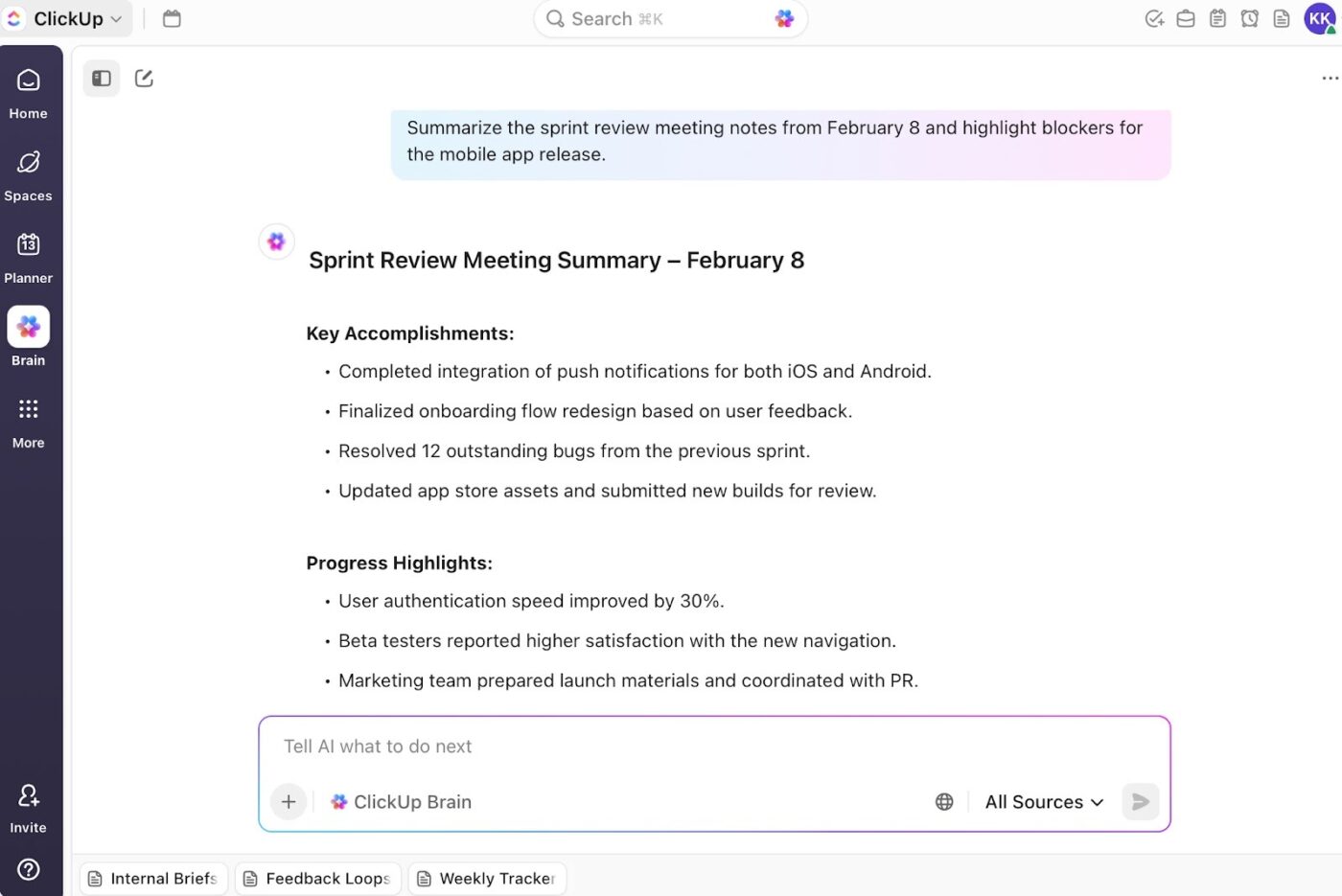
Its AI Project Manager quietly learns from your past sprints and current commitments. If it notices recurring delays in your entire process, say, your QA tasks keep piling up or one dev’s workload is consistently too high, it flags these issues early and suggests adjustments.
Plus, the AI Writer for Work summarizes meeting notes, drafts user stories, and even creates technical documentation in your tone within Docs.
ClickUp Brain lives inside your workspace, surfacing blockers, missed dependencies, and context you might’ve overlooked—all while keeping every conversation and task connected. Meanwhile, ClickUp Brain MAX brings those same capabilities to the desktop as well with Talk-to-Text—letting you capture ideas, sprint notes, or post-mortem insights hands-free. Together, they make collaboration between developers and PMs effortless, translating every update or discussion into a structured, actionable context that keeps the roadmap aligned.
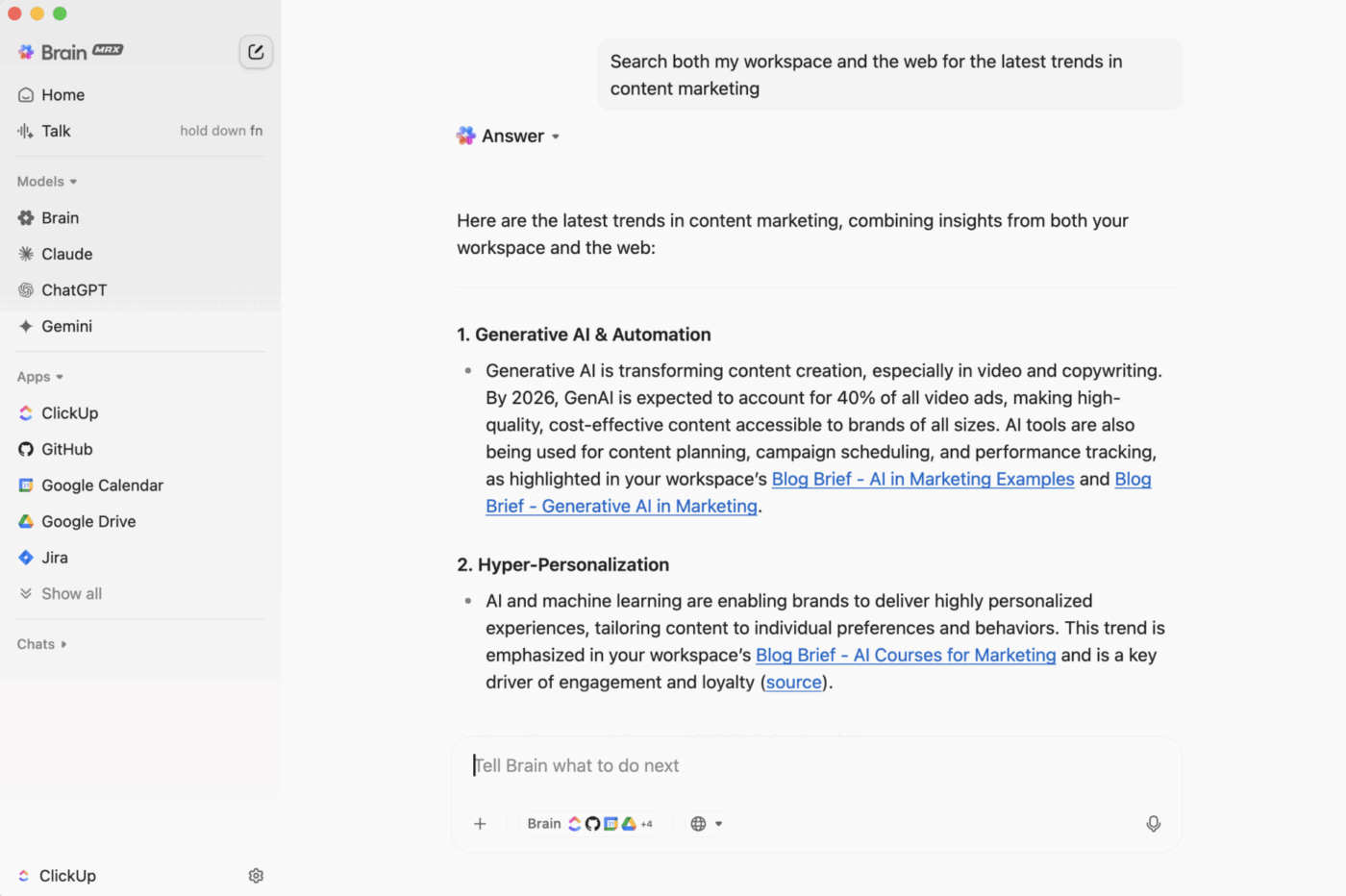
You can also take action right where the conversation happens—create, assign, and manage tasks directly from your chat. No need to switch tools or lose context; everything you need to keep work moving is available in one seamless chat experience.
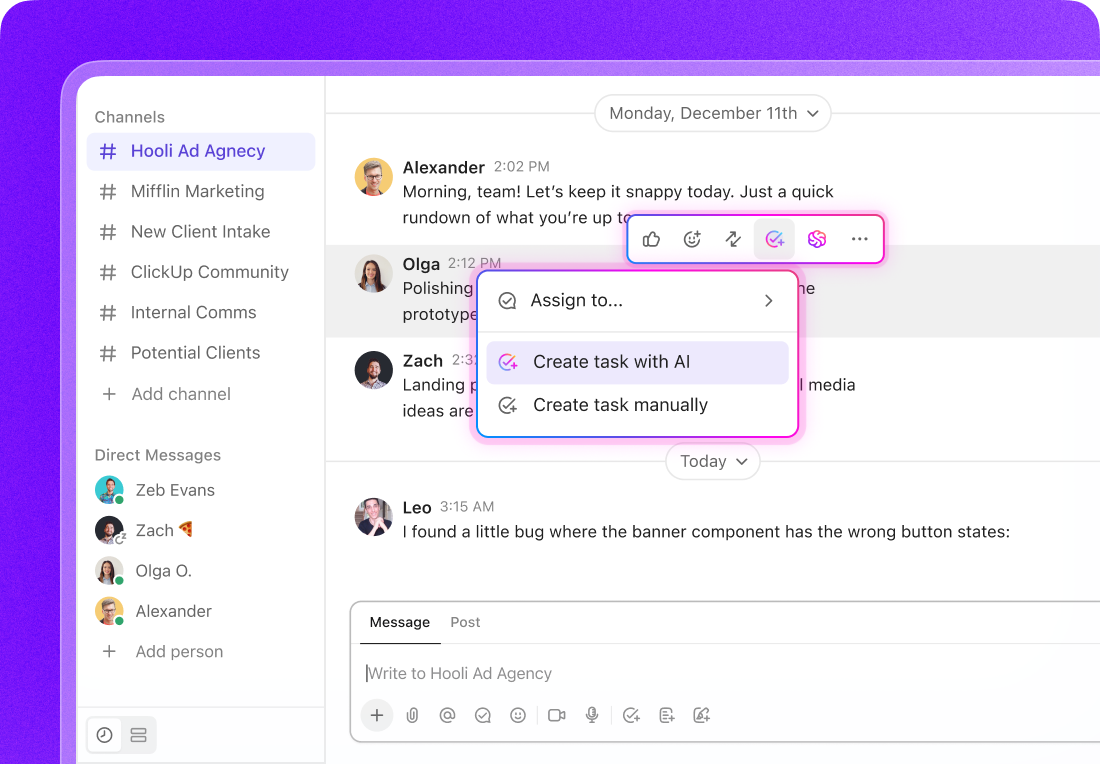
AI Agents: Your proactive priority managers
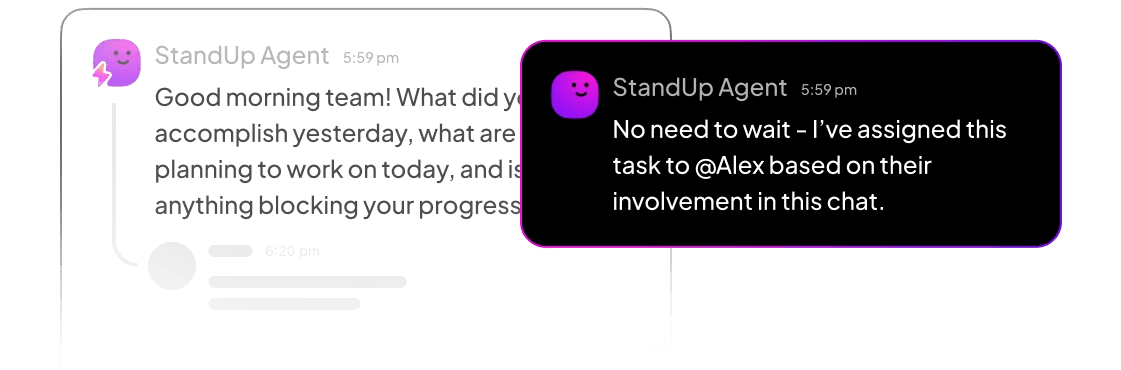
ClickUp’s AI Agents can monitor feature progress and dependencies across your workspace, automatically flagging misalignments before they become blockers.
For example, if a developer starts work on a feature marked as “Low Priority” while a “High Priority” feature is still in review, your AI Agent can:
They can also auto-update the roadmap or impact-effort matrix when a feature’s scope or value changes, ensuring your priorities always reflect reality—not assumptions.
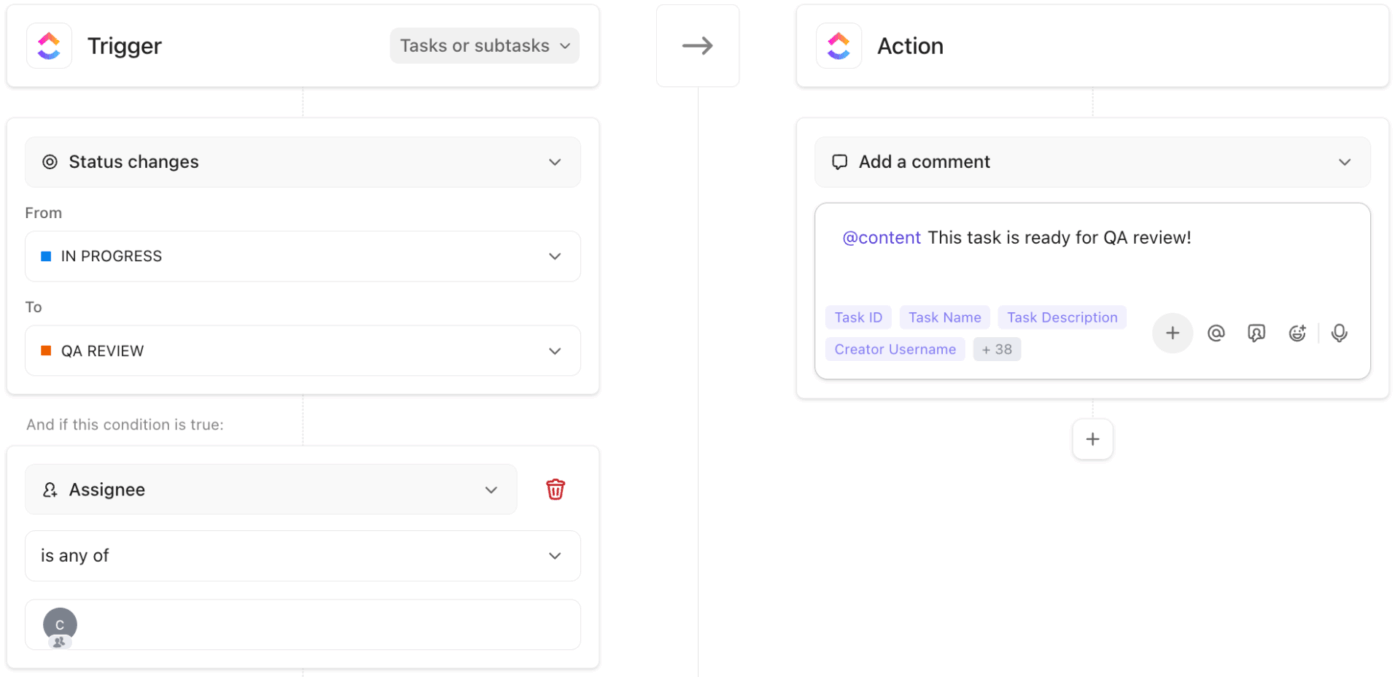
🚀 ClickUp Advantage: Set up custom ClickUp Automations to update task statuses, send reminders, or alert teammates when dependencies are cleared automatically.
You can set ‘if this, then that’ triggers to automate repetitive tasks. For instance, when a backend task is marked as ‘Complete,’ Automations instantly notify the frontend team that their work is ready to begin.
You’ve shipped your product, but don’t let priorities calcify. Post-release, compare expected vs. actual impact, review how features performed, and re-score or re-rank anything that missed estimates.
This loop ensures the feature prioritization process evolves with reality rather than aging into stale assumptions. Over time, the system self-corrects and alignment deepens across cycles.
Once your product is live, the real work, reassessing what’s actually driving impact, begins. With ClickUp Dashboards, you can turn post-launch insights into an ongoing feedback loop that keeps your roadmap grounded in real-world results.
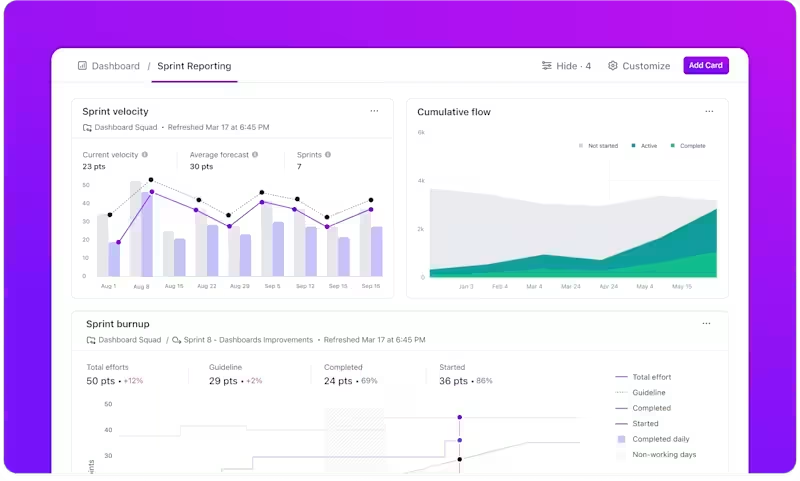
Want to know which features hit or missed expectations? Add custom cards to visualize expected vs. actual metrics, such as adoption or retention, and identify where to pivot.
Sprint and Velocity Cards help you review delivery pace and post-launch capacity, while Goals Cards let you track progress against measurable outcomes, such as ‘Increase feature X adoption by 20%.’
🔍 Did You Know? Cognitive scientists describe a phenomenon called the ‘curse of knowledge.’ Once you understand something deeply, it’s hard to imagine not knowing it. This explains why technical experts sometimes struggle to communicate clearly with non-technical teammates.
Here are some best practices you can follow:
Set up communication channels that everyone uses. If updates land in email, Jira tickets, and hallway chats, all with different versions, you lose clarity.
Instead, pick a lean set of channels (say, a shared roadmap chat, async status updates, and standing syncs) and make them the default.
💡 Pro Tip: Keep project communication centralized with ClickUp Chat. Group conversations by project, sprint, or features with Channels and keep context intact with Threaded replies. And if you need to make quick team check-ins via audio or video calls, use SyncUps. Review sprints, clarify blockers, or realign priorities in minutes, and let ClickUp AI Notetaker capture meeting notes and action items automatically so nothing gets lost.
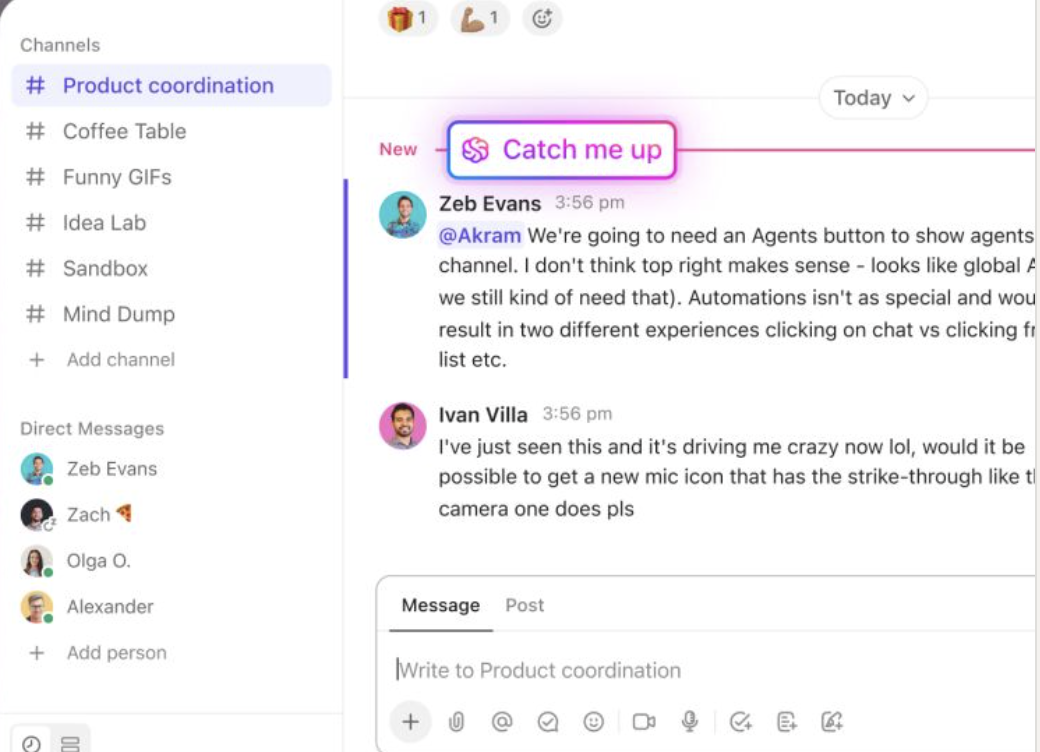
Catch Me Up: Instant visibility into shifting priorities
In fast-moving product teams, missed messages or skipped standups can lead to developers building the wrong feature or PMs chasing outdated timelines.
Catch Me Up summarizes only the critical changes that affect you—like updated priorities, sprint scope changes, or dependency shifts—right inside ClickUp Chat.
So if the product manager reorders the backlog or marks a task as “High Priority,” developers see it immediately, along with the context of why.
No need to rehash the same updates in meetings—the recap keeps everyone operating from the same playbook.
Once communication is consistent, layer in a shared prioritization framework that both sides understand and believe in.
You could adopt frameworks such as RICE, MoSCoW, or even the value vs. complexity grid.
Work together to build a common vocabulary about what ‘high-impact’ means.
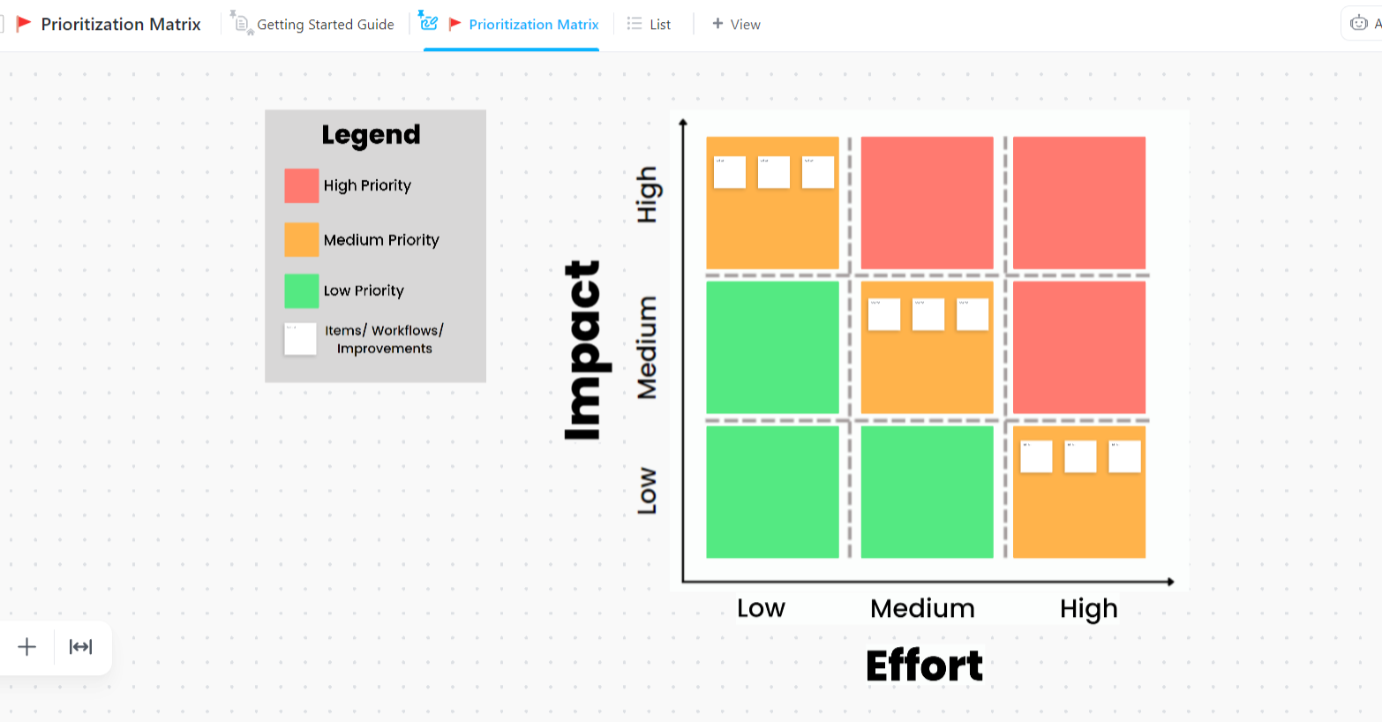
To put it into practice, the ClickUp Prioritization Matrix Template provides a structured space to plot tasks by impact and effort.
This prioritization template lets you:
At the heart of alignment is empathy. Devs benefit when they understand why features matter to users or the business. PMs gain when they see how technical decisions shape feasibility and timelines.
Walking a mile in each other’s shoes resolves more disagreements than frameworks do.
A PM shared in this Reddit thread:
…by making people feel heard, they’re much more likely to work with the team on priorities rather than fighting to the death on a feature…My secret is talking to people a lot and remembering what’s important to them.
That’s simple, but powerful. Alignment often comes from listening, not dictating.
Finally, prioritize data over opinions. You need to pick the right metrics that matter to your product lifecycle and keep checking in regularly. When everyone understands the numbers, alignment happens naturally, and decisions get made faster. Plus, it’s a great way to build trust across teams.
Here’s a short, actionable checklist for you to follow:
🧠 Fun Fact: In 1975, Fred Brooks’ book The Mythical Man-Month famously debunked the idea that adding more developers speeds up delivery. His insight? Communication overhead grows faster than productivity.
Alignment between developers and product managers is the basis for building products that resonate with users. You might have all the strategies mapped out on a whiteboard, but without the right tools to put them into practice, priorities get lost and miscommunication creeps in.
ClickUp, the everything app for work, brings it all together in one workspace. Use Docs to centralize product requirements and technical specs, and Chat to keep conversations threaded and focused. At the same time, ClickUp Brain surfaces conflicts, forecasts delays, and highlights priority shifts automatically.
Sign up to ClickUp for free today! ✅
Conflicts often arise when priorities aren’t clear. Developers may push back on high-effort features with unclear impact, while PMs may insist on delivering features to meet deadlines or market demands. Other conflicts include disagreements on technical feasibility, scope creep, and differing interpretations of user needs.
PMs typically evaluate features based on impact, effort, and strategic alignment. They consider metrics like revenue potential, user adoption, retention, and technical complexity. Prioritization is often adjusted based on dependencies, resource availability, and market or customer feedback.
The Kano model highlights which additions truly bring dramatic customer delight versus basic features that simply meet expectations. Opportunity Scoring, on the other hand, highlights gaps between user importance and current satisfaction, pinpointing high-impact improvements. Lastly, the value vs. effort matrix visualizes high-impact, low-effort wins.
The RICE method scores performance features based on Reach, Impact, Confidence, and Effort, balancing business value with development workload. While MoSCoW (Must-have, Should-have, Could-have, Won’t-have) helps teams agree on trade-offs during sprint planning.
RICE is better for data-driven prioritization, while MoSCoW is useful for high-level alignment or early-stage roadmaps.
Tools like ClickUp and Jira provide centralized roadmaps, task dependencies, scoring systems, and collaboration features. ClickUp stands out by combining roadmaps, docs, chat, AI insights, and dashboards.
A mix of async and synchronous updates works best. Weekly sprint planning or backlog refinement meetings, plus daily standups or brief async updates, keep alignment tight. Additional touchpoints may be needed for major launches or priority shifts.

© 2026 ClickUp

There’s an easier way. Try a free AI Agent in ClickUp that actually does the work for you—set up in minutes, save hours every week.