






Still downloading templates?
There’s an easier way. Try a free AI Agent in ClickUp that actually does the work for you—set up in minutes, save hours every week.
Sorry, there were no results found for “”
Sorry, there were no results found for “”
Sorry, there were no results found for “”

Your inbox says three deadlines are due this week, while your team says they need more time. The client says the delivery date hasn’t changed. And you? Your brain is going at a mile an hour!
For team leads, overlapping deadlines across teams are a source of resource conflicts (pun intended).
PM software for managing overlapping deadlines across teams helps you avoid drowning in spreadsheets. In this blog post, we’ll delve into the top three tools that help you untangle your timelines without losing sanity. 🏁
Here’s a glimpse of the top three PM software for managing overlapping deadlines across teams. 👀
| Tool | Best for | Key features | Pros and cons | Pricing* |
| ClickUp | AI-powered project management and collaboration for individuals, startups, and enterprises | ClickUp Brain (AI summaries, task tagging, and automations), AI Autopilot Agents, customizable workflows, time tracking, resource and capacity management, Dashboards, and Integrations | Pros: 🌟 AI-powered productivity with workflow automation, smart scheduling, reminders, and prioritization 🌟 Realistic scheduling with robust time and deadline management 🌟 Works just as well for solo users as for large enterprises Cons: 🧐 Steep learning curve for new users due to its wide feature set | Free forever; Customizations available for enterprises |
| Wrike | Workflow automation and resource allocation for mid-sized to large organizations | Wrike AI (workload predictions and task tagging), dashboards, project portfolio management, time tracking, automations, cross-department collaboration | Pros: 🌟 User-friendly interface 🌟 AI-powered features to optimize processes and prevent delays 🌟 Fast and accurate approvals with dynamic proofing and file version comparison Cons: 🧐 Limited time tracking and scheduling capabilities 🧐 Sync issues 🧐 Advanced security features are only available on higher-tier plans | Free; Paid plans start at $10/month per user |
| Smartsheet | Spreadsheet-style project management for teams needing flexible grid-based planning | Grid, Gantt, and Kanban views, formulas, reporting dashboards, resource management, automations, AI, and integrations with Microsoft Teams & Google Workspace | Pros: 🌟 Easy to see and reassign capacity 🌟 Cell-level automation 🌟 Workload heatmaps that highlight when individuals or teams are overcommitted Cons: 🧐 The mobile interface lacks features compared to the desktop version 🧐 No free plan; only a free trial is available 🧐 The setup of formulas or complex workflows is time-consuming | Free trial; Paid plans start at $12/month per user |
🧠 Fun Fact: Douglas Adams, the author of The Hitchhiker’s Guide to the Galaxy, famously joked, ‘I love deadlines. I like the whooshing sound they make as they fly by.’ That quote has become a running joke among writers and creatives everywhere.
For managing multiple projects and deadlines across multiple teams, a project management tool makes the messy parts of project coordination clear, manageable, and collaborative. Here’s what to look for:
🔍 Did You Know? There’s a phenomenon called the student syndrome: people start working seriously on a task only right before the deadline, no matter how much time they had. It’s so common that project managers factor it into scheduling.
Our editorial team follows a transparent, research-backed, and vendor-neutral process, so you can trust that our recommendations are based on real product value.
Here’s a detailed rundown of how we review software at ClickUp.
Here are the top PM software for managing overlapping deadlines across teams. 👇
ClickUp for Project Management is the everything app for work that combines project management, documents, and team communication, all in one platform—accelerated by next-generation AI automation and search.
It helps project managers stay on top of overlapping deadlines, combining task clarity, AI-driven insights, and automated workflows in one workspace.
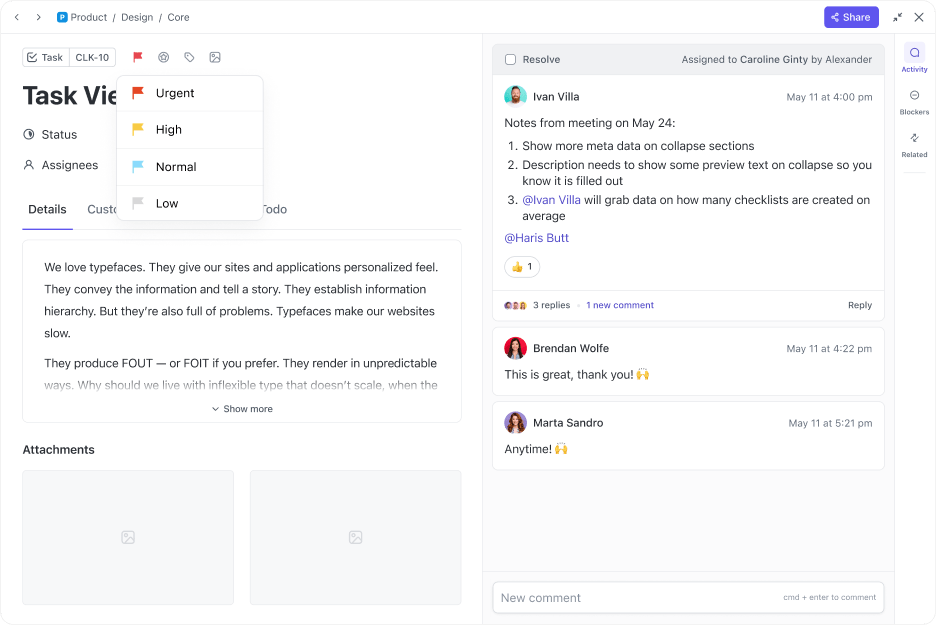
ClickUp Tasks gives you a base to capture all the moving parts of a project: assignments, deadlines, conversations, and even supporting documents.
With ClickUp Task Priorities, you’ll always know what should come first when everything feels urgent. A critical bug fix might get an urgent flag, while a feature enhancement could be marked normal. Teams can then filter or sort their views by priority, due date, or workload.
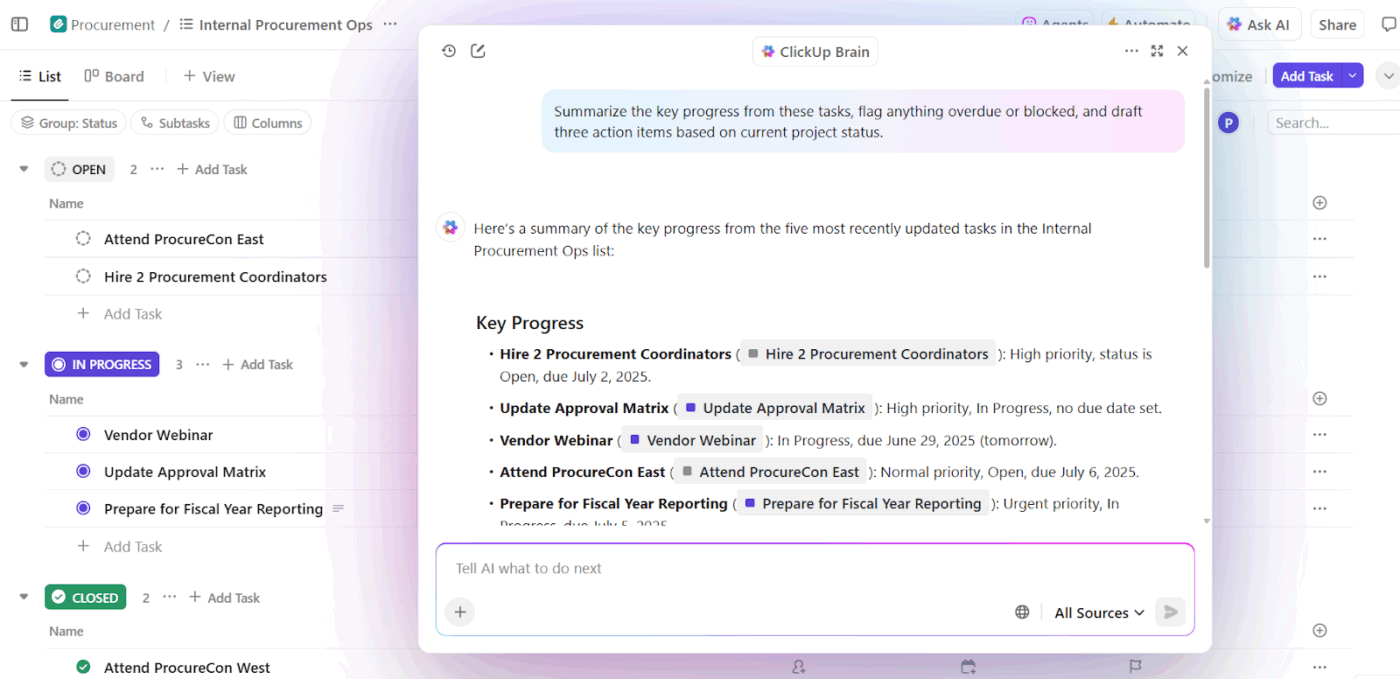
ClickUp Brain acts like a project strategist inside your workspace. It surfaces instant summaries, identifies at-risk deadlines, and suggests next steps based on real project data.
For example, if you’re leading a product launch, Brain can summarize overdue tasks across multiple departments. When managing parallel deadlines, ask which tasks are blocking a milestone, and it’ll highlight the exact dependency holding things up.
📌 Try these prompts:
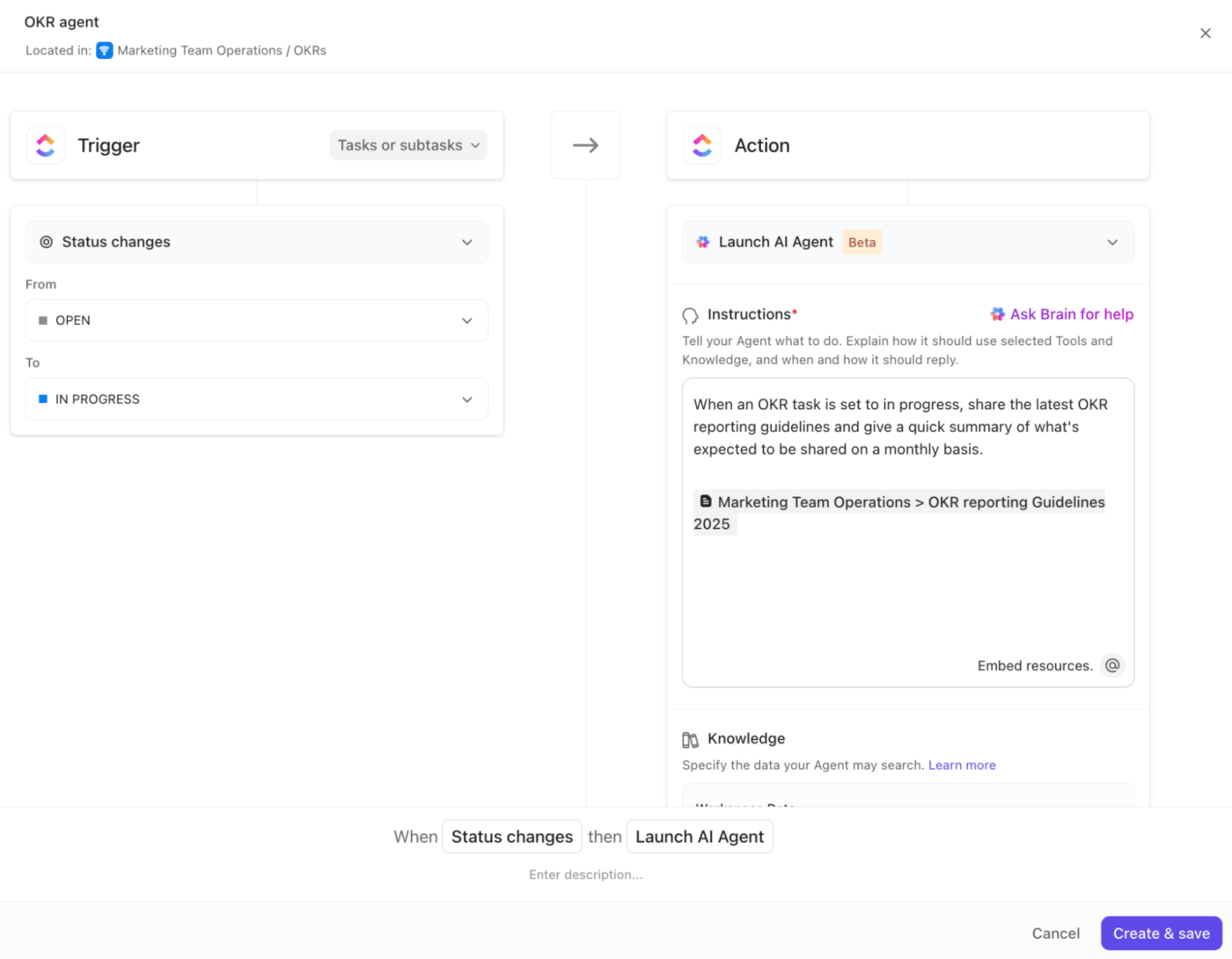
ClickUp AI Agents take care of repetitive admin work so you can focus on the parts of a project that need human judgment. Here are the two types:
ClickUp Calendar is an interactive scheduling hub that adapts as your projects evolve. Every task, subtask, or milestone you create in ClickUp can appear on the calendar, giving you a real-time picture of what’s coming up and who’s responsible.
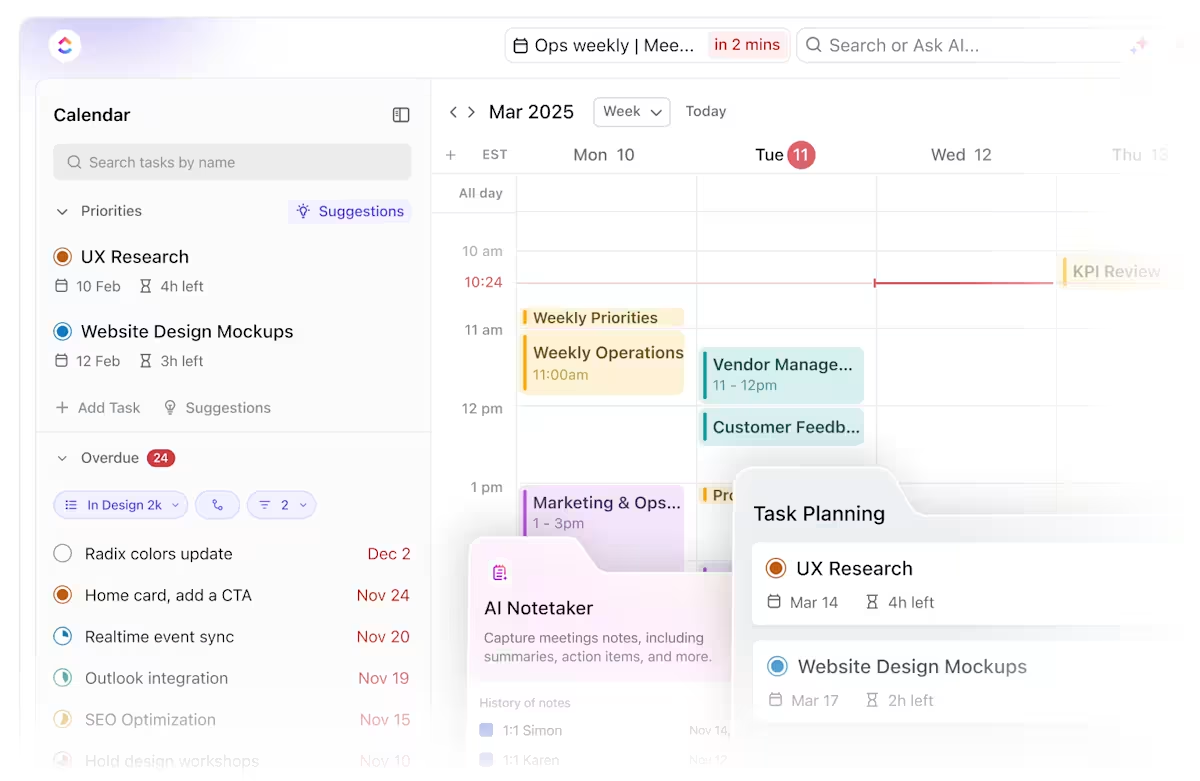
Since it integrates directly with tools like Google Calendar and Outlook, updates flow seamlessly across platforms, reducing the risk of missed deadlines.
Where it gets powerful is how AI supports shifting priorities. Say your product launch is bumped by a week. Instead of you manually moving dependent tasks, AI can reshuffle the entire project timeline, adjusting due dates and dependencies automatically.
If two big deadlines overlap, the calendar suggests ways to stagger tasks or reassign work to balance capacity.
Here’s a glimpse of how it works:
By giving teams a unified space to see all work simultaneously, ClickUp makes it easier to juggle competing deadlines. Task Priorities flag what’s most urgent, the AI Calendar keeps scheduling on track, while Views like Gantt and Workload help managers spot overlaps and balance assignments before bottlenecks hit.
ClickUp Brain surfaces at-risk deadlines and suggests next steps, and AI Agents automatically reassign work or adjust timelines when things shift.
This G2 review really says it all:
ClickUp has completely changed the way I organize and manage my work. Its intuitive interface and customizable features make tracking tasks, projects, and deadlines effortless. I can seamlessly collaborate with my team, automate repetitive processes, and stay on top of everything without feeling overwhelmed. ClickUp has not only improved my productivity but also given me clarity and peace of mind. I can’t imagine managing my workflow without it!
📮 ClickUp Insight: 32% of workers believe automation would save only a few minutes at a time, but 19% say it could unlock 3-5 hours per week. The reality is that even the smallest time savings add up in the long run.
For example, saving just 5 minutes daily on repetitive tasks could result in over 20 hours regained each quarter, which can be redirected toward more valuable, strategic work.
With ClickUp, automating small tasks—like assigning due dates or tagging teammates—takes less than a minute. You have built-in AI Agents for automatic summaries and reports, while custom Agents handle specific workflows. Take your time back!
💫 Real Results: STANLEY Security reduced time spent building reports by 50% or more with ClickUp’s customizable reporting tools—freeing their teams to focus less on formatting and more on forecasting.
📖 Also Read: A Project Manager’s Guide to AI-Powered Execution
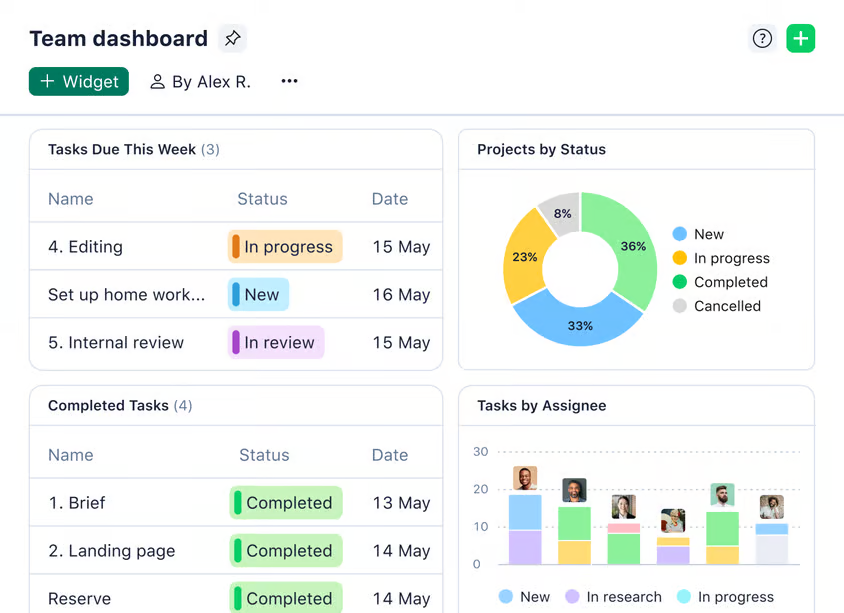
Wrike is built for teams that prefer interactive Gantt charts, making it easy to see tasks, deadlines, dependencies, and milestones. You can drag and drop tasks to adjust timelines, shift priorities, and instantly spot where projects overlap or clash. The big-picture view helps teams stay on track when plans change.
This task management software also lets you break work into tasks and subtasks, set due dates, assign owners, and attach files, all with real-time progress tracking.
Flexible workflows and automations eliminate repetitive approvals, while proofing and annotation tools smooth out creative feedback loops.
Wrike also allows managers to see who’s overloaded and rebalance assignments before things slip. Time tracking and customizable dashboards add another layer of visibility, surfacing bottlenecks or risks early so projects don’t stall.
Wrike makes handling multiple priorities easier with live dashboards, portfolio visibility, workload tools, and flexible frameworks like custom folders. Teams can assess team capacity issues, reprioritize instantly with drag-and-drop scheduling, and adjust individual tasks dynamically across projects.
From a G2 review:
I love the new table view aggregation and the customizable calculations for sub-items. Ask AI is another timely and relevant feature that makes for more productive workflows…Some basic improvements to focus on would be to support bullet point lists in a table format, comments in a table format etc. I’m also not a big fan of the check out and check in mechanism…
📖 Also Read: Best Wrike Alternatives & Competitors
🧠 Fun Fact: In workplaces, soft deadlines, where missing the date isn’t catastrophic, often improve output compared to hard deadlines. The flexibility reduces stress while still providing structure, which makes people more willing to take on challenging tasks.
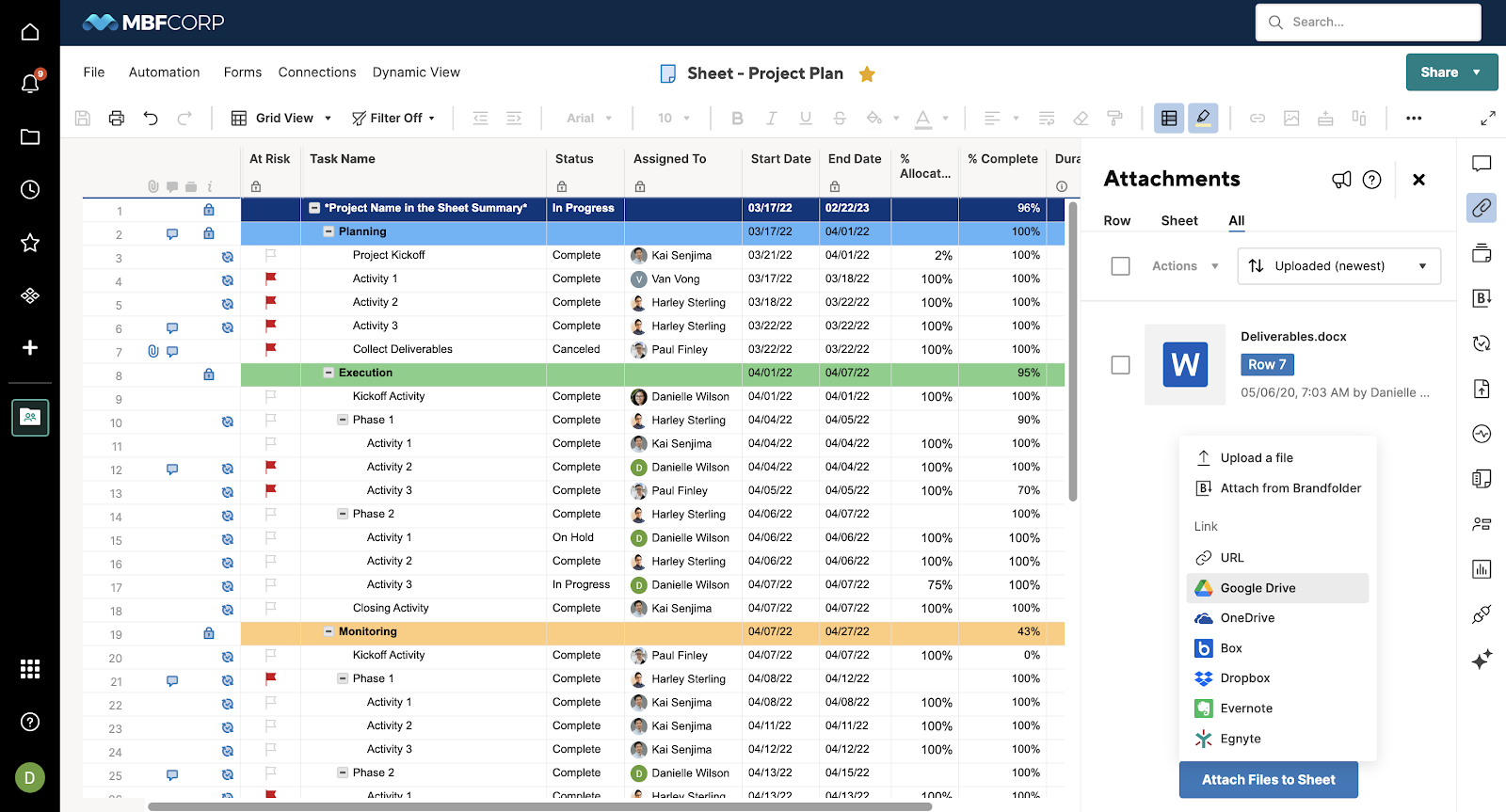
Smartsheet combines a familiar spreadsheet layout with richer project tools so you can move beyond static lists. It lets you switch between grid, Kanban, or Gantt views, manage task dependencies, assign resources, and track everything in real time.
Dashboards make it easy to see the whole picture, while reports, alerts, and automations help reduce manual check-ins and spot issues early. Additionally, you can use Smartsheet for project management using its integrations with tools like Zapier, Teams, and Microsoft 365.
Permission control settings let you manage who sees and changes what, and add-ons like Resource Management and Bridge boost capacity planning or cross-tool workflows.
Smartsheet is well-suited for managing multiple priorities because it combines smart resource management with real-time visibility. Its automated alerts, approval workflows, and dependency tracking help teams stay aligned when priorities shift and deadlines change.
These capabilities keep communication clear, making it easier to predict project risks early and ensure project success even when multiple initiatives compete for attention. Plus, the spreadsheet layout makes it easy for Excel-friendly teams to start quickly.
Straight from a G2 review:
The most like about is the interface with powerful project management, automation, and collaboration tools. The grid view is instantly familiar to anyone who has used Excel or Google Sheets, which dramatically reduces training time and user resistance…The pricing can be a barrier for small businesses or startups. While simple task tracking is easy, building complex automated workflows, dashboards, and formulas requires significant technical skill and training, often needing a dedicated admin or “power user.
📖 Also Read: Smartsheet Alternatives & Competitors
While these task management tools didn’t make it to the top three, they’re worth a look:
📖 Also Read: Free Multiple Project Tracking Templates
🧠 Fun Fact: The word ‘deadline’ originally had a deadly meaning. During the American Civil War, prisoners of war were kept inside camps with a literal line created around them. Anyone who crossed it risked being shot. The term later softened into the time-bound meaning we use now.
Here’s how you can manage multiple projects without breaking a sweat:
🔍 Did You Know? Psychologists have found that shorter deadlines often motivate people more than longer ones. In one study, participants given a three-day deadline to complete a task were more likely to finish than those with a month-long one. Urgency kept them focused.
Overlapping deadlines are inevitable in growing teams, and while they often reflect healthy progress, they can also create stress when timelines, priorities, and responsibilities collide. Project management software creates a system where they can be managed without confusion.
ClickUp combines project tracking, team communication, and automation in one adaptable, AI-powered workspace.
When priorities shift, timelines can be reshaped instantly without unraveling the entire plan, and workload views help leaders balance responsibilities before small clashes turn into bottlenecks. With ClickUp Brain providing summaries and surfacing risks in real time, you gain insight into what matters most and where to act first.
Sign up to ClickUp for free today! ✅

© 2026 ClickUp

There’s an easier way. Try a free AI Agent in ClickUp that actually does the work for you—set up in minutes, save hours every week.