






Still downloading templates?
There’s an easier way. Try a free AI Agent in ClickUp that actually does the work for you—set up in minutes, save hours every week.
Sorry, there were no results found for “”
Sorry, there were no results found for “”
Sorry, there were no results found for “”
Ever find yourself spending hours on repetitive tasks that feel…pointless? Like copying data between tools, assigning tasks to the right owners when the status changes, and sending reminders for due/overdue tasks.
About 60% of organizations report that their teams lose five hours a week to manual tasks and repetitive processes. That’s 1.5 months in a year! Imagine the drain of these repetitive tasks that can be easily automated!
What if your project management software could spot repetitive tasks for you and even automate them? Sounds too good to be true?
In this blog, we look at three project management (PM) tools that automatically identify redundant tasks and give you back those precious hours.
| Tool Name | Best for | Key Features | Pricing* |
| ClickUp | AI-powered project management, task management, and collaboration | Brain and Brain MAX, ClickUp Task Priorities, Automations and Agents | Free forever; customizations available for enterprises |
| Motion | AI-powered task prioritization and calendar scheduling | AI Project Manager, AI Task Manager, AI Notetaker | Paid plans start at $29/month per user |
| Notion AI | AI-powered documentation | AI workspace assistant AI AutofillAI Q&A | Free; Paid plans start at $12/month per user |
Our editorial team follows a transparent, research-backed, and vendor-neutral process, so you can trust that our recommendations are based on real product value.
Here’s a detailed rundown of how we review software at ClickUp.
⚡ Template Archive: Free Multiple Project Tracking Templates To Spot Dependencies and Prioritize Tasks
The fastest way to eliminate redundant work is to let your project management software automate it. Here are the capabilities that make automation possible:
Below are our picks for the best project management software. They use automation to surface duplicate tasks, remove manual updates, and free your team to focus on meaningful work
Most project management software only shows you the tasks you create. It can’t tell you that the “customer onboarding flow redesign” task in the product team’s sprint is essentially the same as the “improve new user experience” task sitting in the marketing team’s backlog.
ClickUp addresses this as the world’s first Converged AI Workspace, bringing together all work apps, data, and workflows where AI can actually see patterns across your entire operation.
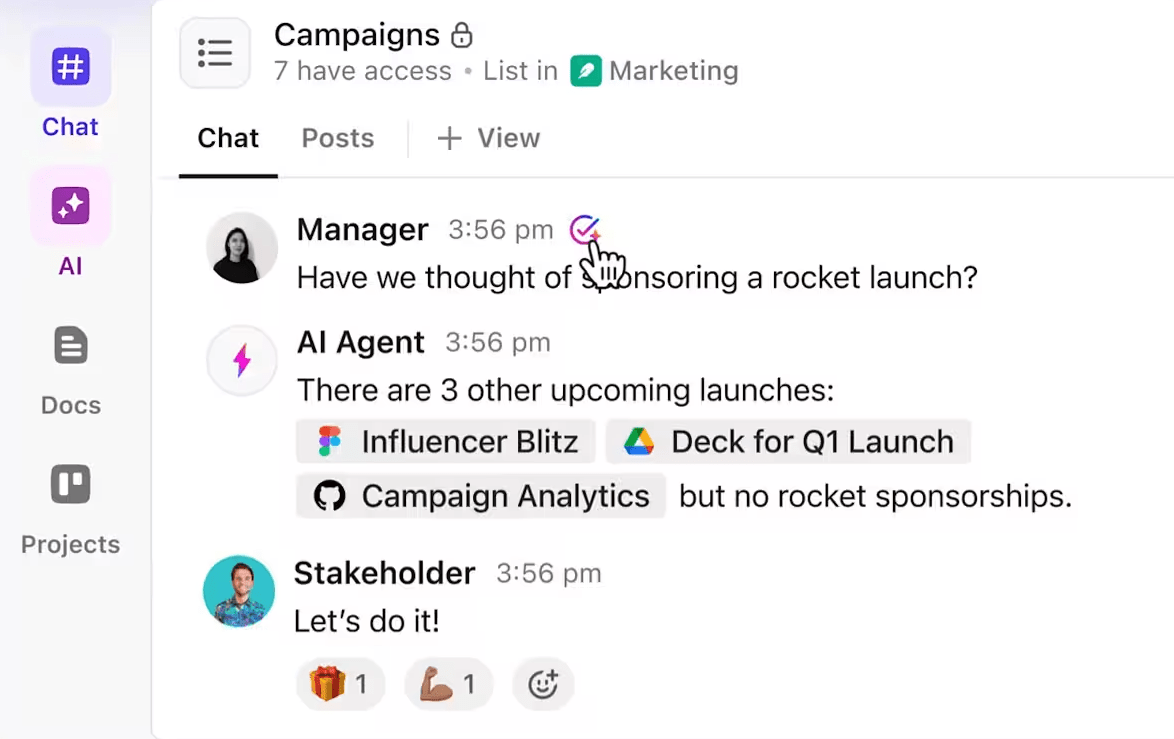
Because all your tasks, projects, docs, and team conversations live in one platform, ClickUp’s AI can identify when multiple people are tackling similar problems, when task descriptions overlap significantly, or when new requests duplicate existing work.
Thus, ClickUp eliminates Work Sprawl to provide 100% context—meaning the AI understands not just individual tasks, but how they relate to each other across teams, and timelines, catching redundancies that would otherwise stay hidden until it’s too late.
Let’s explore its features in-depth.
Without a prioritization system, it’s hard to make out what matters from what doesn’t. That’s when low-value tasks slip into workflows.
With ClickUp Tasks, every task lives in one centralized workspace, including docs, comments, subtasks, dependencies, and more. This reduces the biggest source of redundancy: scattered work across tools.

ClickUp’s advanced search and filtering tools let you quickly find tasks with matching keywords, tags, or Custom Fields. For example, you can search for all tasks containing “onboarding” or filter by a specific tag like “urgent.”
This makes it easy to spot overlapping or repeated work, especially in large projects or across multiple teams.
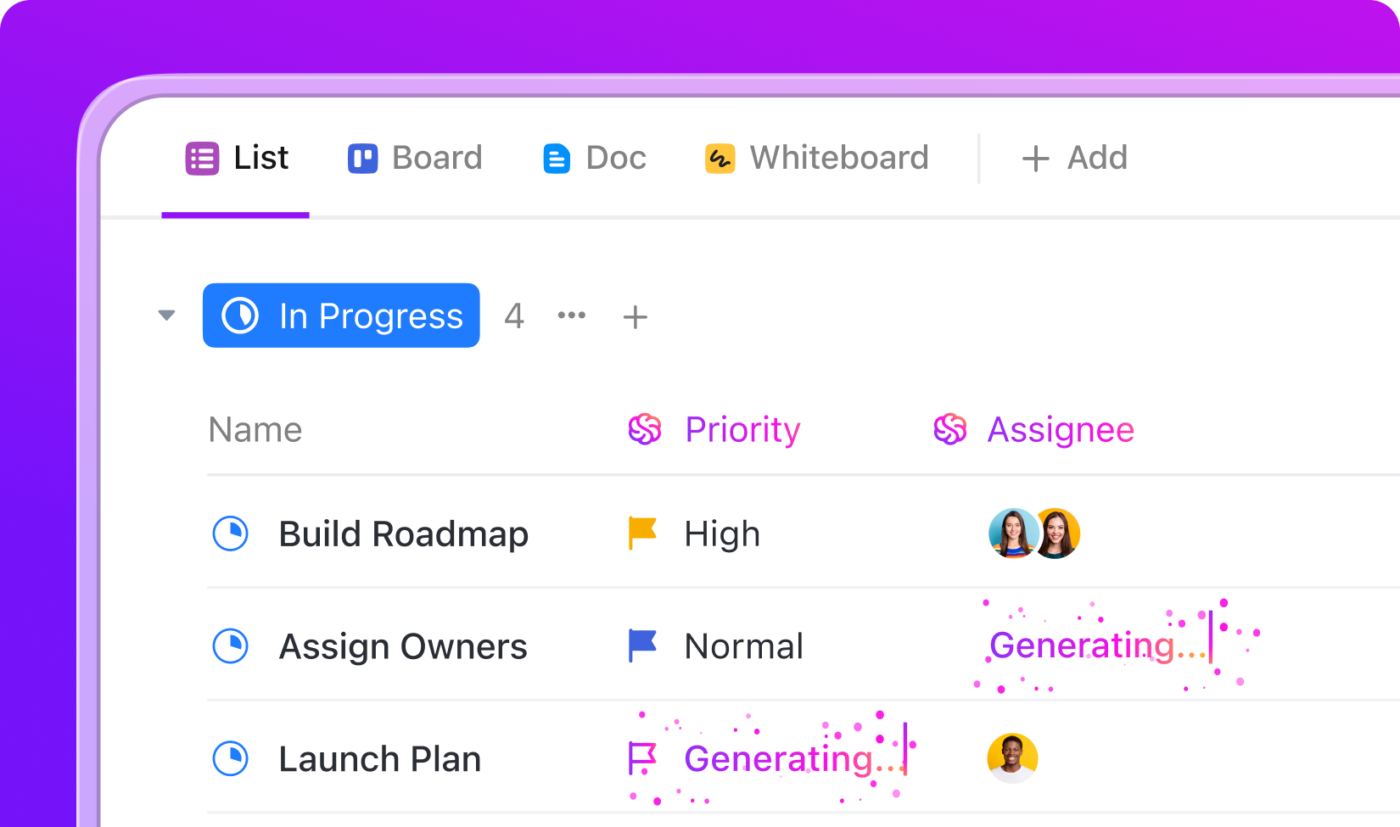
ClickUp’s Task Priorities and Dependencies feature takes this a step further. Mark all your tasks in four flags: Urgent, High, Normal, Low, so everyone knows what to do when. Dependencies can help you track which task is waiting on another. Sort, filter, or group tasks by priority in List or Board view. Similar or low-value tasks are instantly visible and not lost in clutter.
With ClickUp AI, you can even auto-assign priorities based on your prompts, ensuring that the most impactful work rises to the top.
Then there’s ClickUp’s AI Cards.
You can customize these cards by filtering tasks, subtasks, archived items, or time ranges, making it effortless to spot bottlenecks or duplicate tasks that shouldn’t be in the workflow.
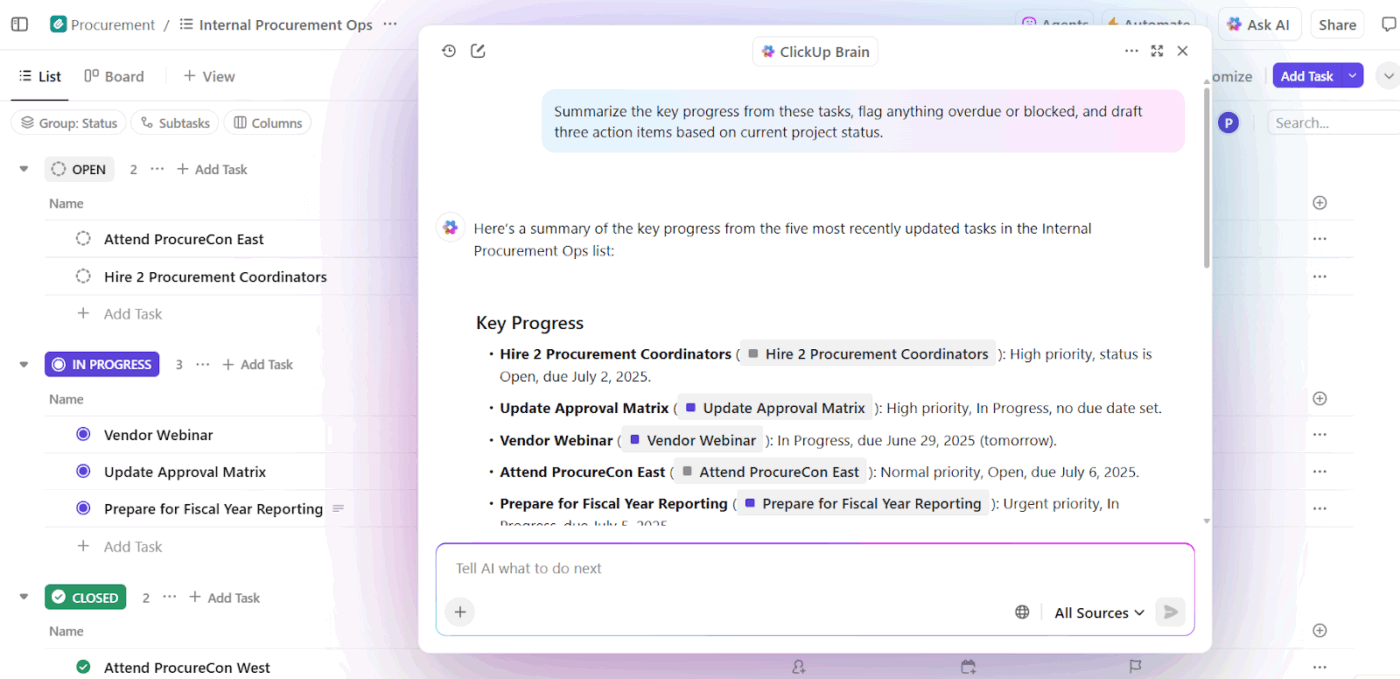
ClickUp Brain is your personal AI assistant that understands the context of your work and surfaces insights you’d normally spend hours digging for.
ClickUp Brain analyzes your workspace for tasks with similar titles, descriptions, or assignees and flags potential duplicates. It can surface suggestions like, “These tasks look similar—consider merging or updating.”
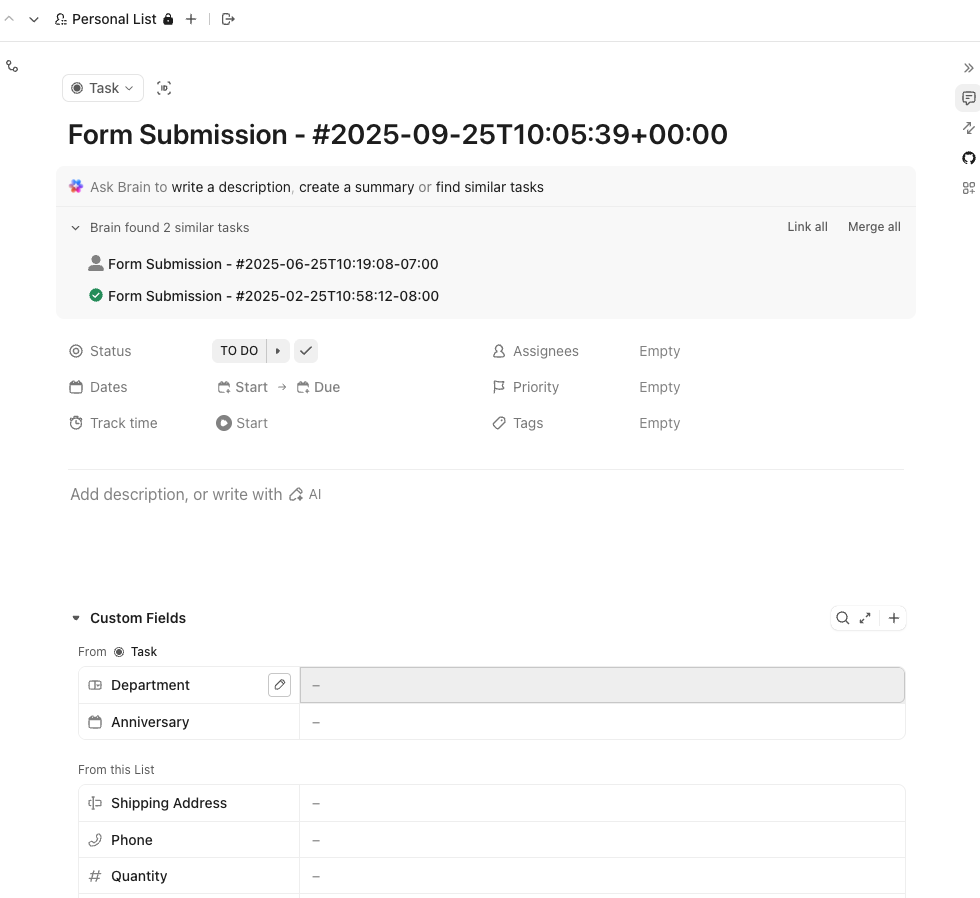
With ClickUp Brain, you can:
That’s not all. ClickUp Brain’s Enterprise Search is an AI-powered tool that unifies information retrieval across various platforms, including Google Drive, Notion, Slack, and Gmail.
With its unified search, you can instantly scan docs, tasks, and chat across all your connected apps in one place—no more toggling between tools. Plus, real-time indexing ensures you’re always searching the most current data (even if it’s buried in different lists or apps).
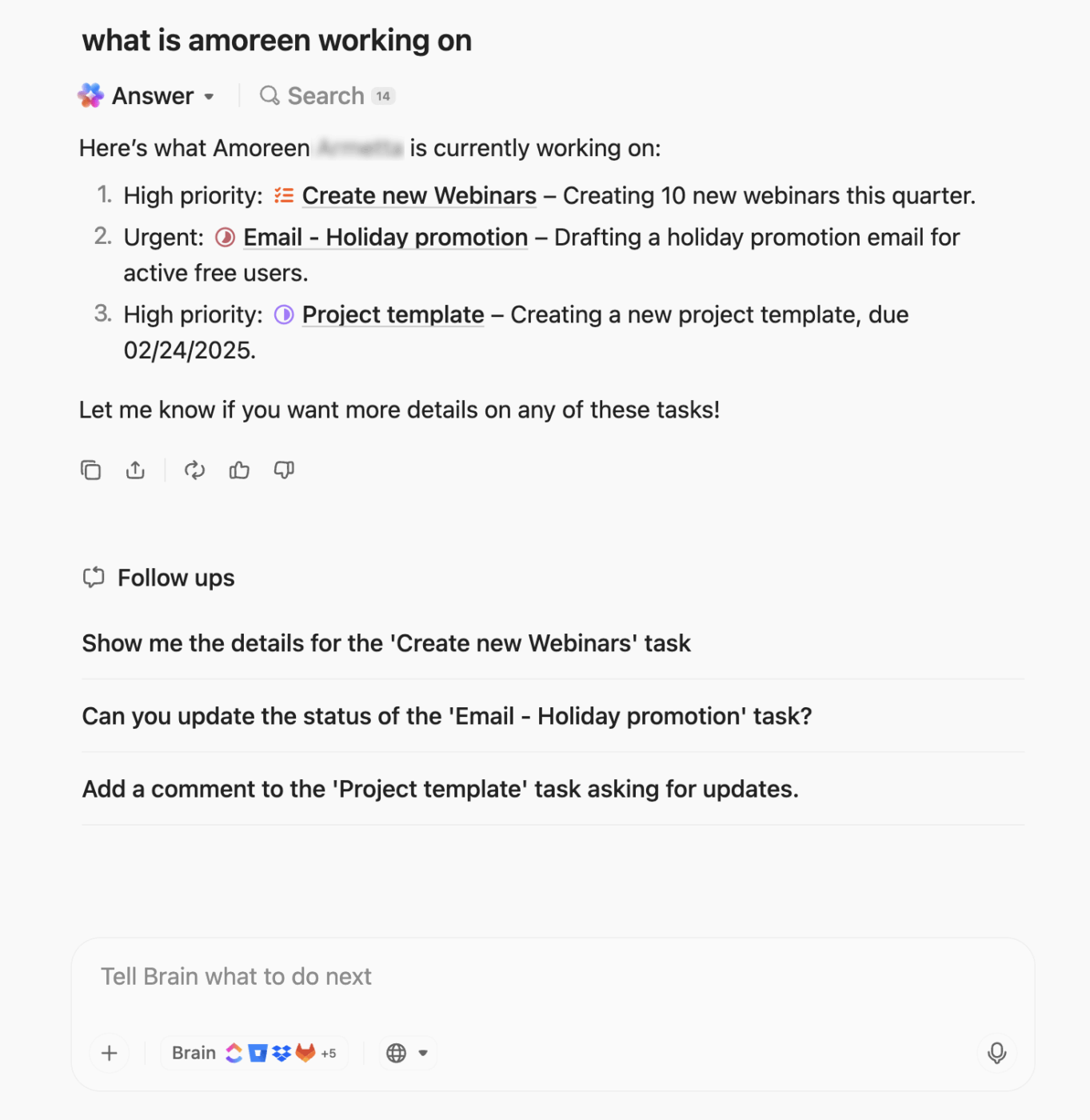
⭐ Bonus: Want AI that spots duplicate work before it starts? ClickUp Brain MAX understands your entire workspace—every task, project, document, and conversation. Here’s how:
Set custom rules to automate repetitive tasks using ClickUp Automations
ClickUp Automations allows you to create no-code custom rules or choose from a library of pre-built templates to automate recurring tasks.
You can set up automations to notify you when a new task matches the criteria of an existing one (e.g., same project, similar title, or tag). This helps catch duplicates at the point of creation.
For instance, if someone creates a task called “Update Website Banner” and a similar task already exists, ClickUp can automatically notify you or the task creator, reducing the risk of duplicate work.
Plus, ClickUp’s bulk action tools allow you to merge, update, or delete them in a group, streamlining your workflow and reducing clutter.
For more context on how to automate your workflows, watch this video.
Let Super Agents do the heavy lifting for you
Most AI tools sit outside your workflow. As ClickUp Agents live inside your workspace, they cannot only suggest but also reduce redundant work.
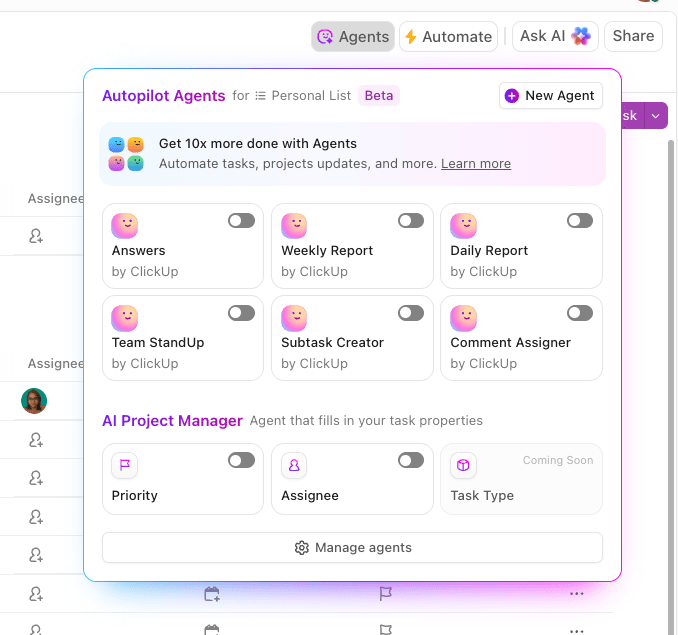
ClickUp Agents act like AI teammates you can assign work to. Tag them in a task or trigger them through an automation, and they take over repetitive or duplicate-heavy work, such as:
💡 Pro Tip: ClickUp allows you to create Custom Views that group tasks by name, tag, assignee, or other fields. With these visual groupings, you can easily scan for repeated or redundant tasks.
ClickUp automatically detects overlapping or duplicate work by analyzing tasks through Task Priorities, Dependencies, and ClickUp Brain’s context-aware insights.
Here’s a TrustRadius review:
This tool is very effective for personal and professional growth. Through this, you can mark your attendance and track your working time also and segregate your individual tasks according to your needs. You can set the priority of the tasks in your to-do and it can remind you of the due date mentioned by you in your tasks.
💟 Bonus: Want a calendar that autoschedules your tasks? ClickUp Calendar is just what you need!
📚 Read More: How to Manage Personal Tasks and Boost Productivity
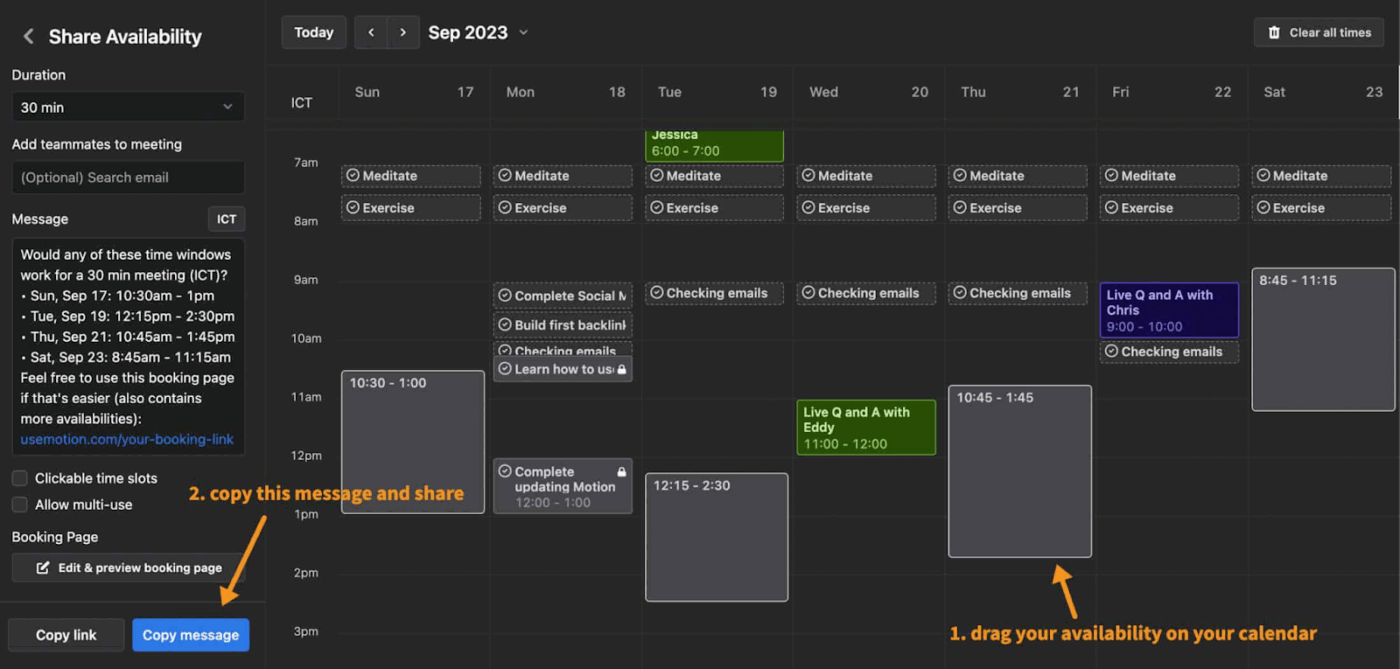
Imagine having a scheduling assistant that learns your needs and preferences. And it starts to better accommodate those requirements. That’s Motion AI.
This AI-scheduling app and project management tool plans your day, schedules your tasks, and automatically reallocates your workload. Its AI Project Manager constantly analyzes deadlines, workloads, and priorities to build an effective daily plan.
You don’t need to manually reorganize tasks when plans change. Motion automatically reschedules and reprioritizes work. If two tasks overlap or become unnecessary, the AI flags them, allowing you to remove or merge them.
You can add tasks, mark urgency, and Motion decides when they should happen. Motion’s AI Calendar combines tasks and meetings into a single real-time schedule. It continuously reallocates time blocks when priorities shift, reducing the need for back-and-forth scheduling.
AI-scheduling app Motion continually evaluates what’s on your plate, across tasks, meetings, and recurring work. Because every task has to fit into a real, time-blocked schedule, redundant or low-value tasks become impossible to ignore.
Here’s a Capterra review:
I have really enjoyed motion so far. It has been a huge resource that has helped me stay on task and get things accomplished both professionally and at home.
📮 ClickUp Insight: 24% of workers say repetitive tasks prevent them from doing more meaningful work, and another 24% feel their skills are underutilized. That’s nearly half the workforce feeling creatively blocked and undervalued. 💔
ClickUp helps shift the focus to high-impact work with easy-to-set-up AI agents, automating recurring tasks based on triggers. For example, when a task is marked as complete, ClickUp’s AI Agent can automatically assign the next step, send reminders, or update project statuses, freeing you from manual follow-ups.
💫 Real Results: STANLEY Security reduced time spent building reports by 50% or more with ClickUp’s customizable reporting tools—freeing their teams to focus less on formatting and more on forecasting.
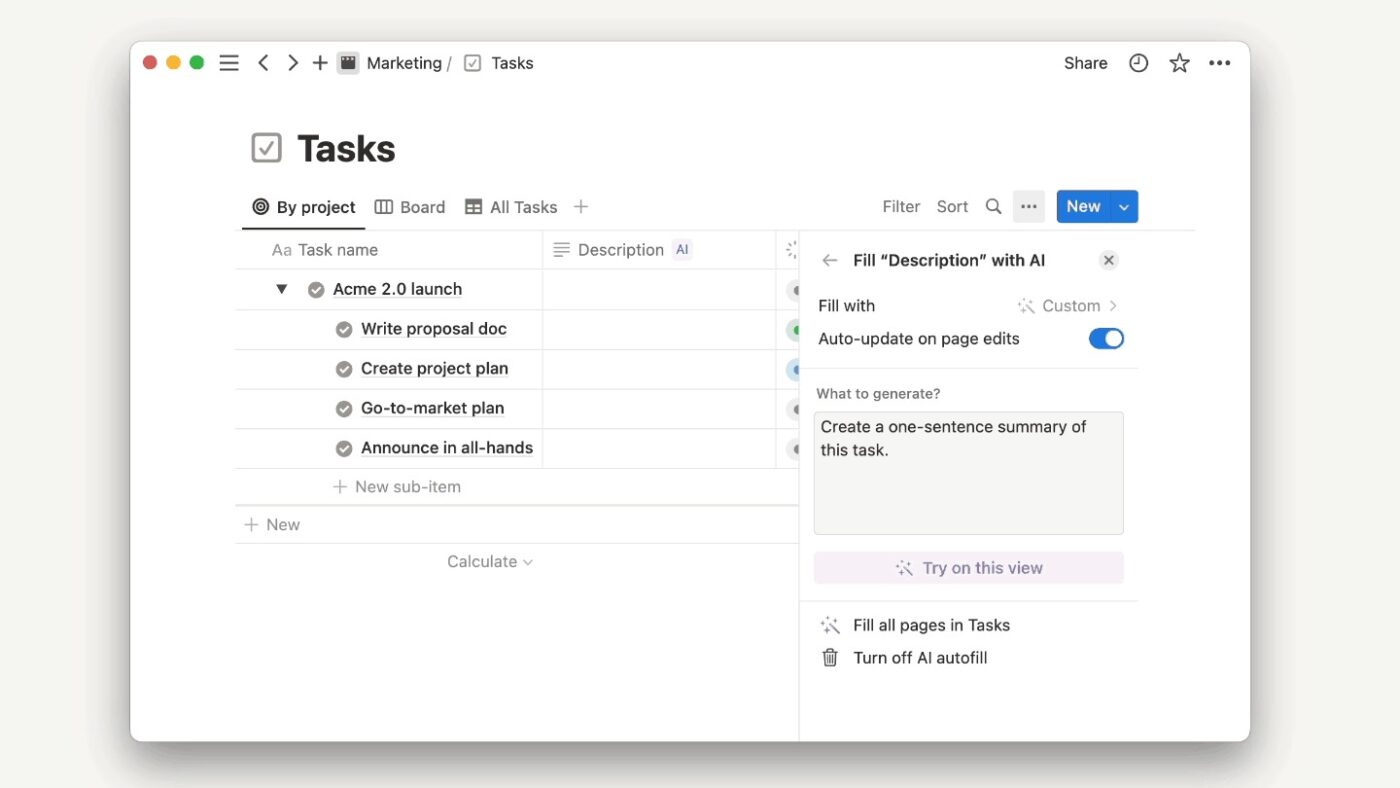
Notion AI transforms your workspace into a connected system where tasks, documents, and project information coexist. Because everything is organized in one place, it helps you spot redundant tasks.
Use Notion AI to reduce duplicate work. It turns notes, emails, and conversations into actionable tasks and also checks for similar existing items. The Autofill helps populate fields such as status, priority, owner, and next steps. When multiple tasks appear similar or contain repeated content, Notion suggests merging or updating them to maintain a clean database.
Notion’s AI Q&A acts like a search engine for your workspace. Just ask a question (What are the tasks blocked this week?), and Notion surfaces relevant tasks or pages.
Redundant tasks become visible when the system has enough context across projects, tasks, docs, and notes. Notion AI can also search your entire workspace and surface related or similar items, making it easy to recognize overlap.
Here’s a Capterra review:
Notion really shines and shows its efficacy when the entire team embraces it. It’s collaboration features make team document-editing VERY easy, which improved communication and workflow. The templates and AI writing assistance are also awesome to get a head start on work.
📚 Read More: Notion AI Alternative for Content Creation
👀 Did You Know? NASA lost a $125 million Mars orbiter because one team used metric units while another used English units. This redundancy in data entry, combined with human error, caused the spacecraft to burn up in Mars’ atmosphere.
Beyond these three, here are some other project management tools that you can use to automate tasks in your daily workflows:
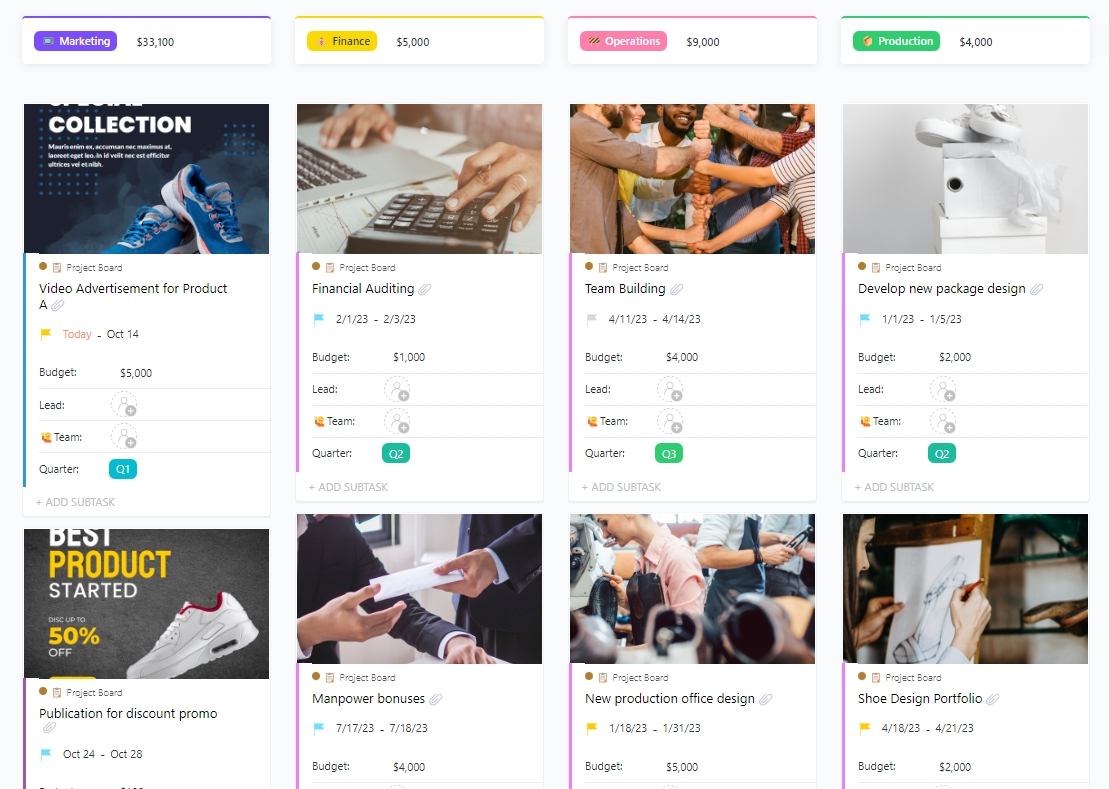
If you prefer a visual way to manage all your projects, Monday is your PM tool of choice. Use Automations to trigger actions such as auto-assign, auto-update status, or notify when a task is created that resembles an existing one.
The Workload View helps spot overlapping ownership. If multiple people are creating tasks for the same goal, the platform flags overloaded resources, revealing redundant work. The Doc → Task conversion also prevents duplication, because action items live in the same board where tasks are visible.
👀 Did You Know? Gantt chart planners have been around for a long time now. Over the years, they’ve gone through many changes. These are primarily driven by the need for more efficient project management.
In the manual era, Gantt charts were created manually on paper. They were static and required significant effort to update. With the Excel revolution, project managers could create and edit Gantt charts digitally. For complex projects, they were still time-consuming to update.
Fast-forward to today. Modern Gantt chart software automatically reschedules your tasks when you make adjustments to your project schedule. They also facilitate better cross-team collaboration by providing an accessible shared view of the project timeline.
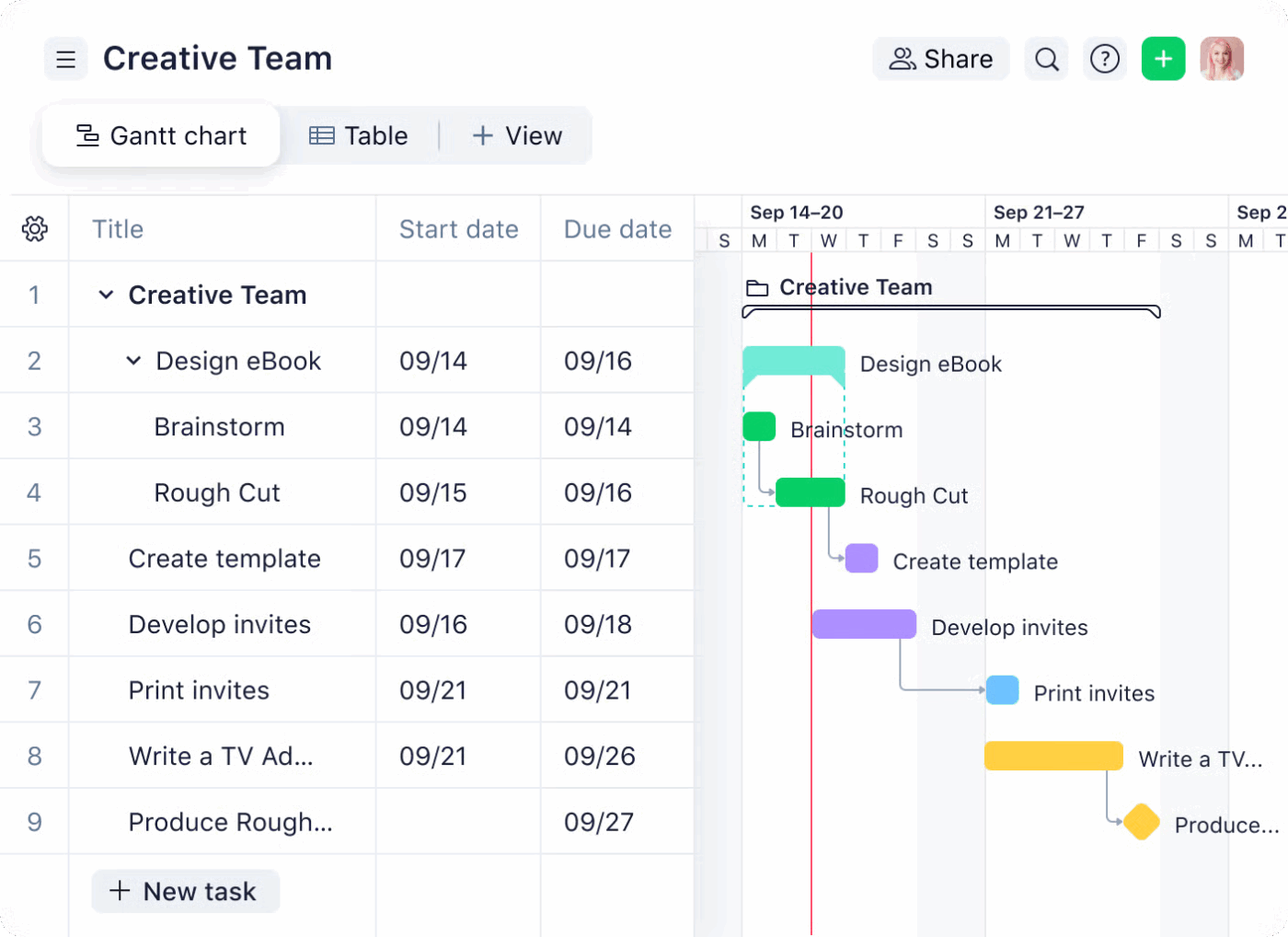
The project management software Wrike uses Gantt charts to map dependencies in detail. If two tasks are scheduled with the same deliverable or depend on the same step, the chart highlights the connection.
Wrike highlights redundant or stalled tasks through Task Dependencies, Critical Path Analysis, and Dashboards, helping with project prioritization. With real-time project projections, Wrike automatically recalculates timelines. You can see how shifting one task affects the project plan in this board.
The Request Forms with auto-task creation rules allow you to match incoming requests against existing ones based on fields such as project and deadline.
💡 Pro Tip: Funnel all new work through a single request form that feeds into your project management tools. When everything enters the system in the same way, the project management software can auto-merge duplicates, tag requests properly, and ensure that no one is working on the same task twice—in silos. A small setup step saves hours of recurring tasks down the line.
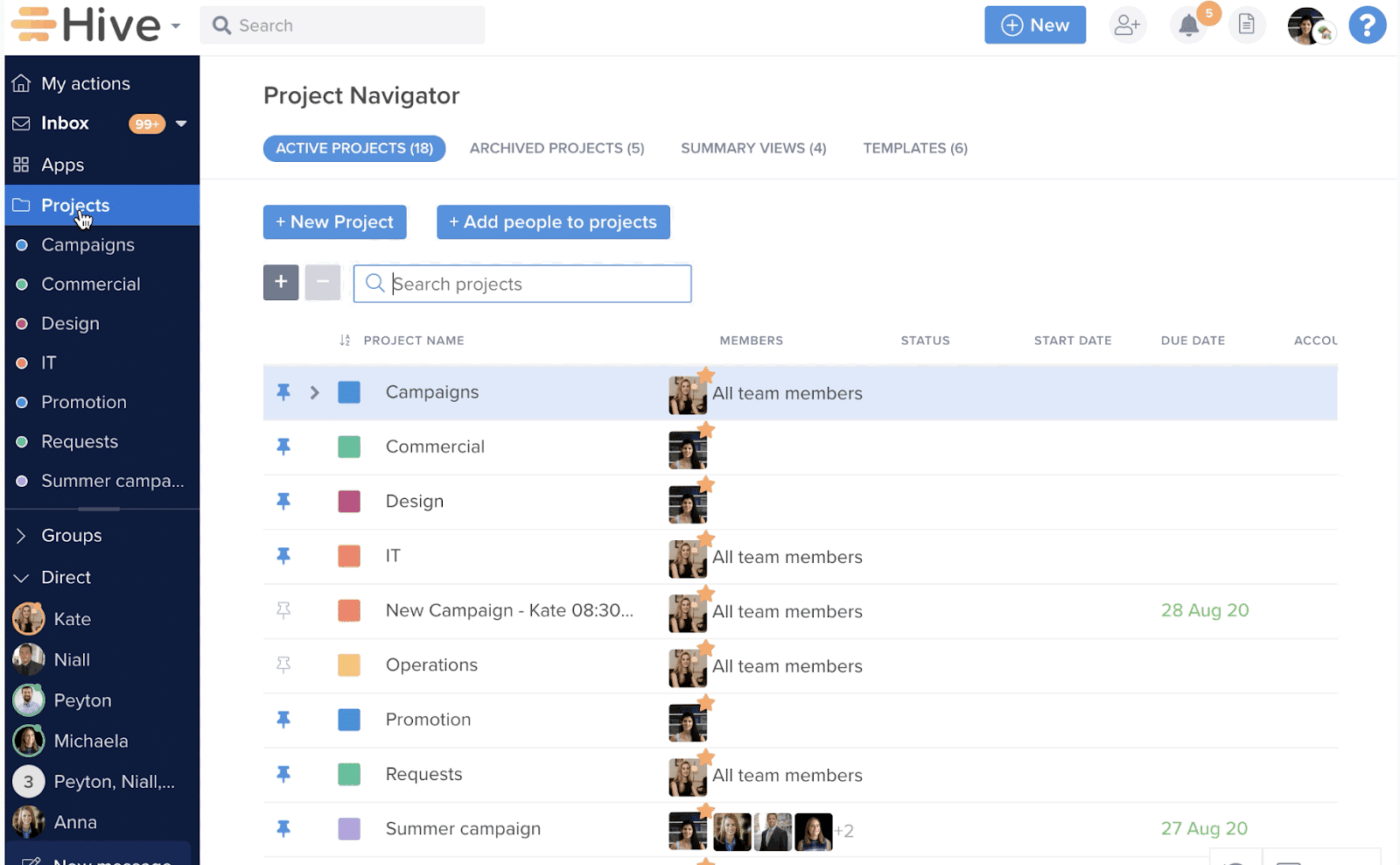
If you want AI-powered project execution, Hive has Buzz AI to help you. Buzz pulls updates from all projects, tasks, approvals, and messages into a single feed. If two team members create similar tasks or start parallel work, you’ll see both updates side by side, making duplicate work visible and allowing you to automate repetitive tasks.
👀 Did You Know? Over 95% of AI projects fail, according to MIT. Disappointing, but not surprising. Although generic tools like ChatGPT excel for individual use because of their flexibility, they stall in enterprise use because they don’t learn from or adapt to workflows.
A converged AI workspace, on the other hand, adds a system-wide layer of contextual intelligence. It understands your tasks, docs, chats, and timelines—and uses that context to deliver faster, more actionable insights.
Here are practical ways to reduce duplicate work and recurring busywork, even before automation kicks in.
One common challenge in project management is the lack of clarity in roles and responsibilities. As a project manager, you want your teams to move fast and not be stuck in the confusion of who is doing what.
✅ Solution: Assign one owner per task. Use the RACI framework to ensure team members are not duplicating work. RACI charts are particularly helpful in resource management when decision-making is split across tasks. For example, it outlines who performs task X, who weighs in on it, and who is responsible for the end decision on the job.
When tasks are managed across emails, Slack messages, spreadsheets, and personal notes, the task list gets cluttered.
Old tasks never get closed, outdated work sits in limbo, and no one knows what’s still relevant. Because it’s easier to create a new task than to dig through a messy backlog, people unintentionally duplicate work. The result? Your team wastes time checking statuses and chasing updates.
✅ Solution: Use a task management software. Instead of manually hunting tasks, the tool lets you filter for items with no activity, tasks with no owner, or duplicates based on title or keywords. You can bulk close or archive old tasks, merge duplicates into one, and reassign anything that’s stuck, all in minutes.
After a meeting, here’s a scenario that you might’ve faced. One person hears ‘prepare deck,’ another writes ‘create slides,’ someone else logs “presentation outline.”
Three different people create three different tasks for the same deliverable.
✅ Solution: Use ClickUp’s AI Notetaker to join the meeting. It transcribes the discussion and extracts action items into actual tasks with owners and due dates.
No one needs to rewrite notes or create tasks manually during project planning. You can even ask ClickUp questions like, ‘What are my open action items from this week’s client meetings?’ and it pulls answers across all your notes instantly.
Watch this video to see how to use AI for meeting notes to eliminate redundant task creation and streamline processes.
Let go of the old way of managing projects manually, where you spend more time pushing tasks forward than getting work done.
With ClickUp as your project management software, you get built-in AI, automations, and customizable workflow automation.
Whether you’re managing multiple projects or a single one, ClickUp helps you create custom workflows for your use case. It becomes the command center for resource allocation, tracking project progress, and improving overall project performance.
Sign up on ClickUp for free to see how it auto-identifies redundant tasks.

© 2026 ClickUp

There’s an easier way. Try a free AI Agent in ClickUp that actually does the work for you—set up in minutes, save hours every week.