






Still downloading templates?
There’s an easier way. Try a free AI Agent in ClickUp that actually does the work for you—set up in minutes, save hours every week.
Sorry, there were no results found for “”
Sorry, there were no results found for “”
Sorry, there were no results found for “”

Our research shows that while 40% of employees spend less than an hour each week on invisible tasks at work, 15% lose more than five hours every week. That adds up to roughly 2.5 full workdays every month.
This time goes into chasing clarity, making sense of broken handoffs, translating decisions, and keeping work moving when ownership stays fuzzy. All of it pulls focus away from delivery. As teams scale and work crosses functions, this hidden layer grows quietly and predictably.
Work execution management addresses this gap by providing a structure for how work moves after plans are approved. It gives teams a shared way to break down work, assign ownership, track progress, and adjust when conditions change.
This guide explains ways to implement work execution management with ClickUp, the world’s first Converged AI Workspace, to support your efforts. 🤩
Work execution management is the practice of coordinating how work gets done after plans are approved. It directs how teams break work into tasks, assign responsibility, sequence dependencies, track progress, and resolve blockers during delivery.
It gives teams a shared operating model for running work day to day, especially when delivery spans multiple roles, collaboration tools, and teams.
🧠 Fun Fact: Ford Motor Company’s implementation of the moving assembly line in 1913 sped up car manufacturing and cut the time to build a car from over 12 hours to 1 hour and 33 minutes. That massive jump proved that breaking down work into small, repeated tasks + tight planning = huge gains.
Project management concentrates on organizing projects. Work execution management concentrates on running the work itself. The difference shows up once delivery starts. 🗃️
| Area of comparison | Work execution management | Project management |
| Core responsibility | Keep active work moving across teams | Define and organize projects |
| Primary unit of focus | Tasks, dependencies, handoffs, capacity | Projects, phases, timelines |
| View of progress | Current state of execution and blockers | Planned milestones and completion status |
| Ownership model | Continuous ownership tied to outcomes | Role-based ownership tied to projects |
| Response to change | Rebalances work as conditions shift | Manages change against the agreed scope |
| Operating cadence | Ongoing, daily execution rhythm | Periodic planning and status cycles |
🔍 Did You Know? In 1958, the Navy created the PERT method to coordinate thousands of tasks and contractors. It helped them deliver a weapons system ahead of schedule, something previously considered impossible.
Work execution management breaks down into a set of mechanics that govern how work moves:
📖 Also Read: Free Productivity Templates in Excel & ClickUp
Here’s what effective work execution management brings to your team and why it’s become non-negotiable for high-performing teams:
📮 ClickUp Insight: 29% of managers say bottlenecks are discovered too late—but only 12% use automated status reports to prevent them.
That delay has a cost. By the time a task gets flagged, it’s often already blocking progress downstream. Truth time? Bottlenecks don’t start big—they start invisible.
ClickUp Brain can help you proactively track dependencies, monitor updates, and flag risks in real time. Use it to generate instant status reports and smart alerts when tasks go quiet, deadlines shift, or workloads spike.
💫 Real Results: Finastra saw a 30% lift in collaboration and 40% growth in GTM efficiency thanks to ClickUp’s unified workspace.
Strong work execution management relies on interconnected pillars that transform how teams plan, deliver, and scale their operations. Here’s a quick breakdown of the six key pillars. 📁
Most organizations run blind. Engineering tracks work in one system, marketing uses another, and finance maintains separate spreadsheets. A VP asks for a portfolio update, and three people spend two days compiling information that’s already outdated. That’s work sprawl.
Strong execution management puts all work in one place where everyone can see it. This means:
When a new request comes in, teams can immediately see what will get bumped to make room.
💡 Pro Tip: Default to reversible decisions. Most choices aren’t one-way doors. Stop agonizing over things you can undo. Move fast on reversible calls, slow only on irreversible ones (hiring, architecture, brand).
Every organization has more ideas than capacity. The question is who decides what gets built and how those decisions get made.
Without clear prioritization, teams default to whoever yells loudest or emails most persistently. High-value work gets delayed because someone convinced the team that a minor feature needs to ship immediately. Projects stretch on for months because no one has the authority to kill them.
Effective prioritization creates breathing room:
Teams that master this spend less time on work that doesn’t matter. They deliver fewer things, but those things move the business forward.
Learn how to put your work on autopilot inside your project management app:
Teams without capacity planning consistently overcommit. They accept every project that lands on their desk, then scramble when deadlines collide. Burnout becomes the norm, and quality suffers as people rush to catch up.
Strong execution management treats capacity as a finite resource that needs to be managed actively. This means implementing practices that prevent overallocation before it happens:
Organizations that master this pillar can flag capacity constraints early, negotiate realistic timelines, and maintain sustainable workloads. Teams deliver more because they commit to less.
Find the best capacity planning strategies here:
Dependencies kill timelines: marketing waits for product, product waits for legal, and legal waits for someone to send them the actual contract. Three weeks pass, and no one has made progress.
Organizations that map dependencies early can route around them. This requires:
When teams know what they need from others upfront, they can sequence work intelligently.
🧠 Fun Fact: The US Department of Defense and NASA formalized the work breakdown structure in 1962, so every large program had to be decomposed into product-oriented chunks before execution. It later became a mandatory standard [MIL-STD-881] and still shapes how big work is planned today.
Every team that lacks standards wastes time recreating the wheel. New projects start from scratch. People debate the same questions every time: Who approves this? What information do we need? When does this go live?
Standardization eliminates repetitive thinking:
These guardrails speed up execution. Teams spend less time figuring out processes and more time shipping. New hires onboard faster because the path is clear.
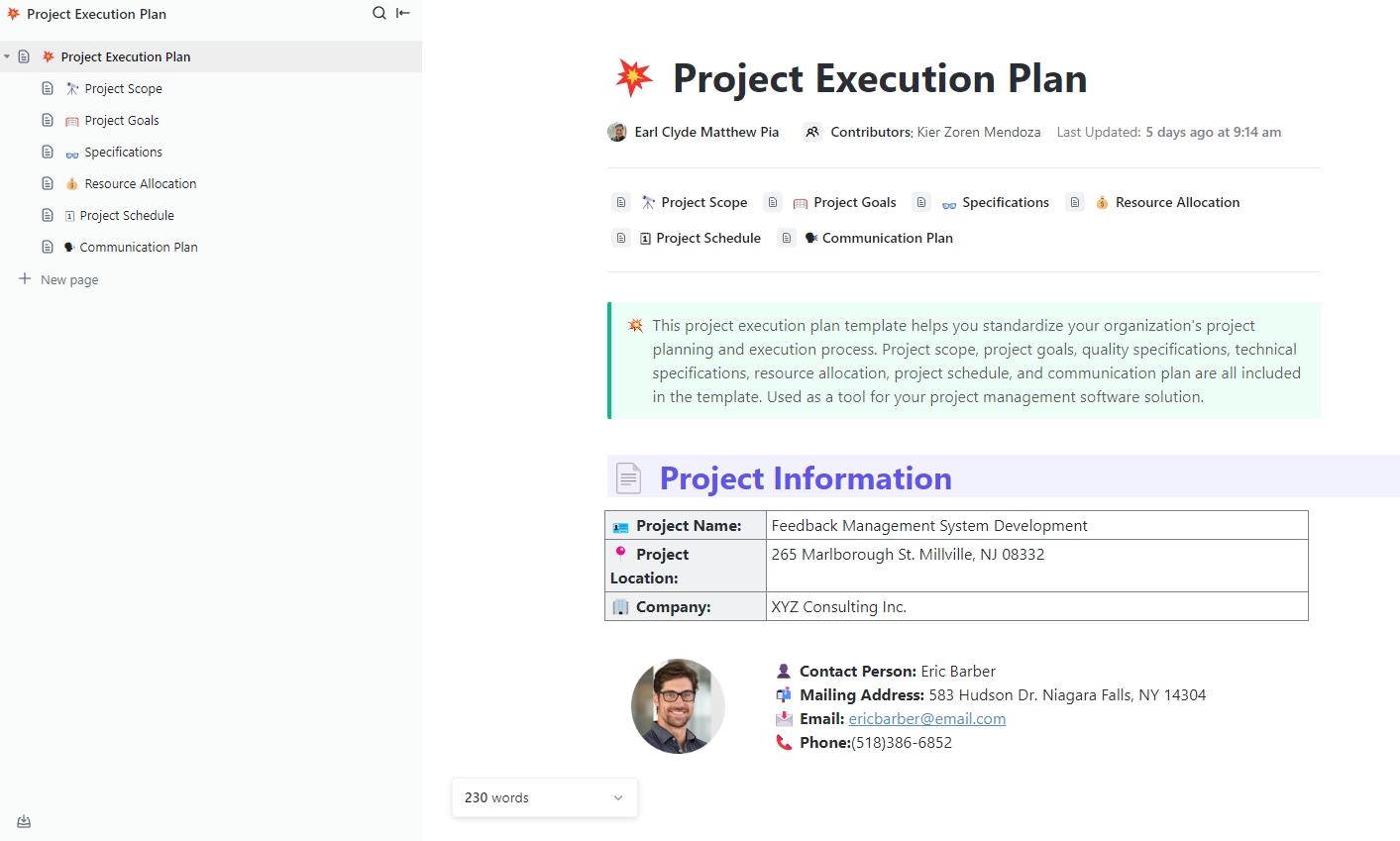
⚡️ Template Archive: Get every project moving forward with confidence using the ClickUp Project Execution Plan Template. It lays out goals, timelines, roles, risks, and progress, so everyone knows what needs doing and when.
The template also helps you translate high-level plans into structured tasks, owners, milestones, and delivery checkpoints.
Most organizations plan in January and don’t look back until December. They treat the annual plan like scripture, even when market conditions change, or early results show the strategy isn’t working.
Teams that build in feedback loops adapt faster:
Organizations improve when they learn from experience. They refine estimates, streamline processes, and stop repeating mistakes. Each quarter’s execution gets sharper because teams apply insights from the last one.
🚀 ClickUp Advantage: Bake feedback collection and analysis into your workflow with ClickUp Agents.
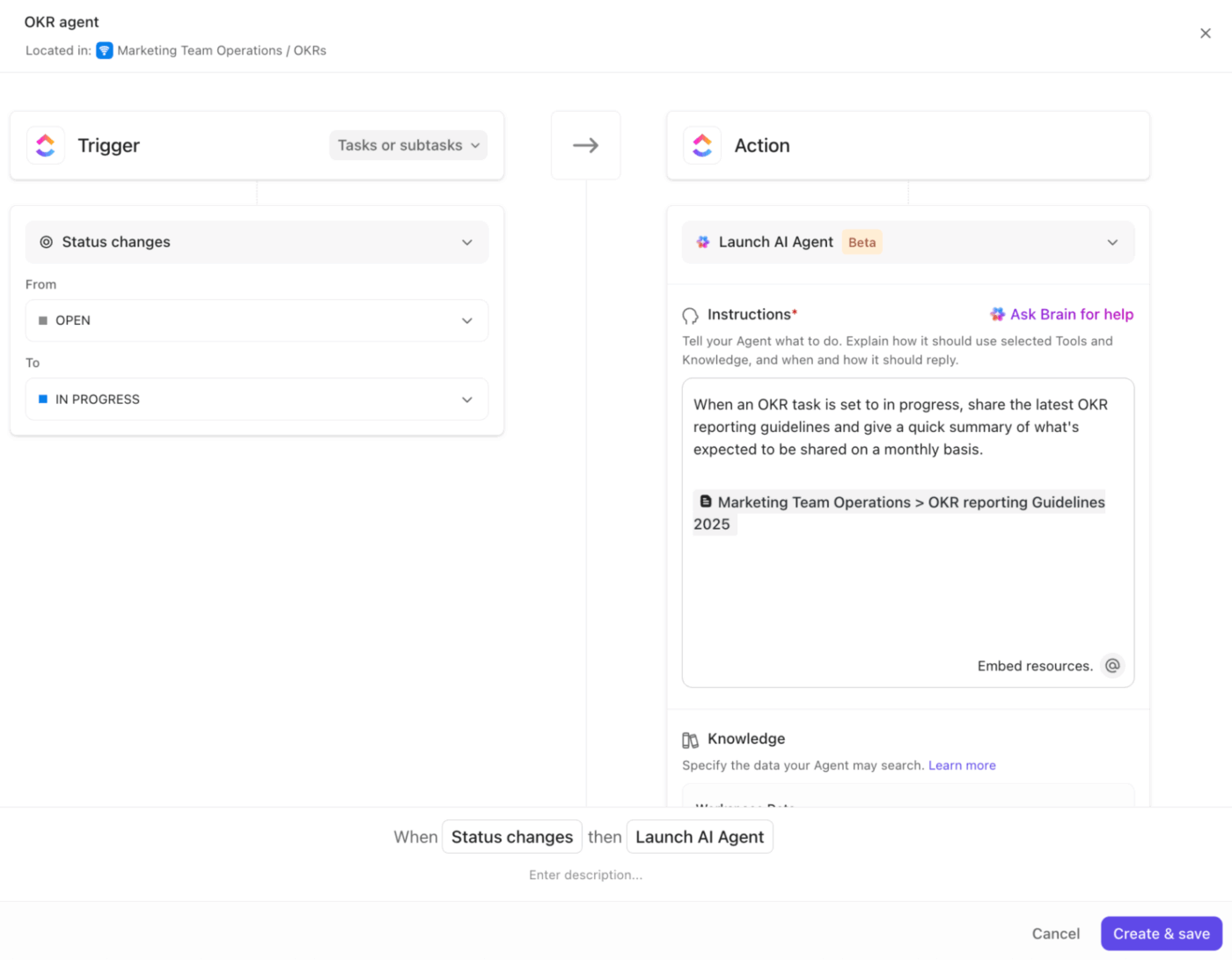
Agents act like intelligent teammates to keep your work environment responsive and adaptive. They monitor triggers, conditions, and workspace data, so actions happen automatically when specific events occur.
For instance, you can build a feedback-collection Agent to automatically gather team feedback at the end of each sprint or milestone, sort responses by theme, and summarize key blockers and wins.
When the sprint ends, the Agent populates a weekly review in Docs and alerts the team lead with a snapshot of trends like delays due to unclear requirements or capacity bottlenecks. This continuous loop turns lessons into action faster than waiting for end-of-quarter reviews.
Learn how to build your own AI agent:
Software is converging. Teams can’t afford scattered tools slowing execution anymore.
ClickUp’s Project Management Software brings work, context, and intelligence together so progress doesn’t stall between systems. The steps below show how to build a work execution management system that runs on that same principle. 👇
Start by dividing your projects into individual tasks that one person can own and complete. The goal is to reach a level of specificity where someone can look at a task and know exactly what they need to deliver.
Instead of creating a task called ‘Launch email campaign,’ break it into distinct pieces:
The right level of granularity depends on your team and project complexity. A good test: if you can’t immediately identify who should do this task and roughly how long it should take, you need to break it down further.
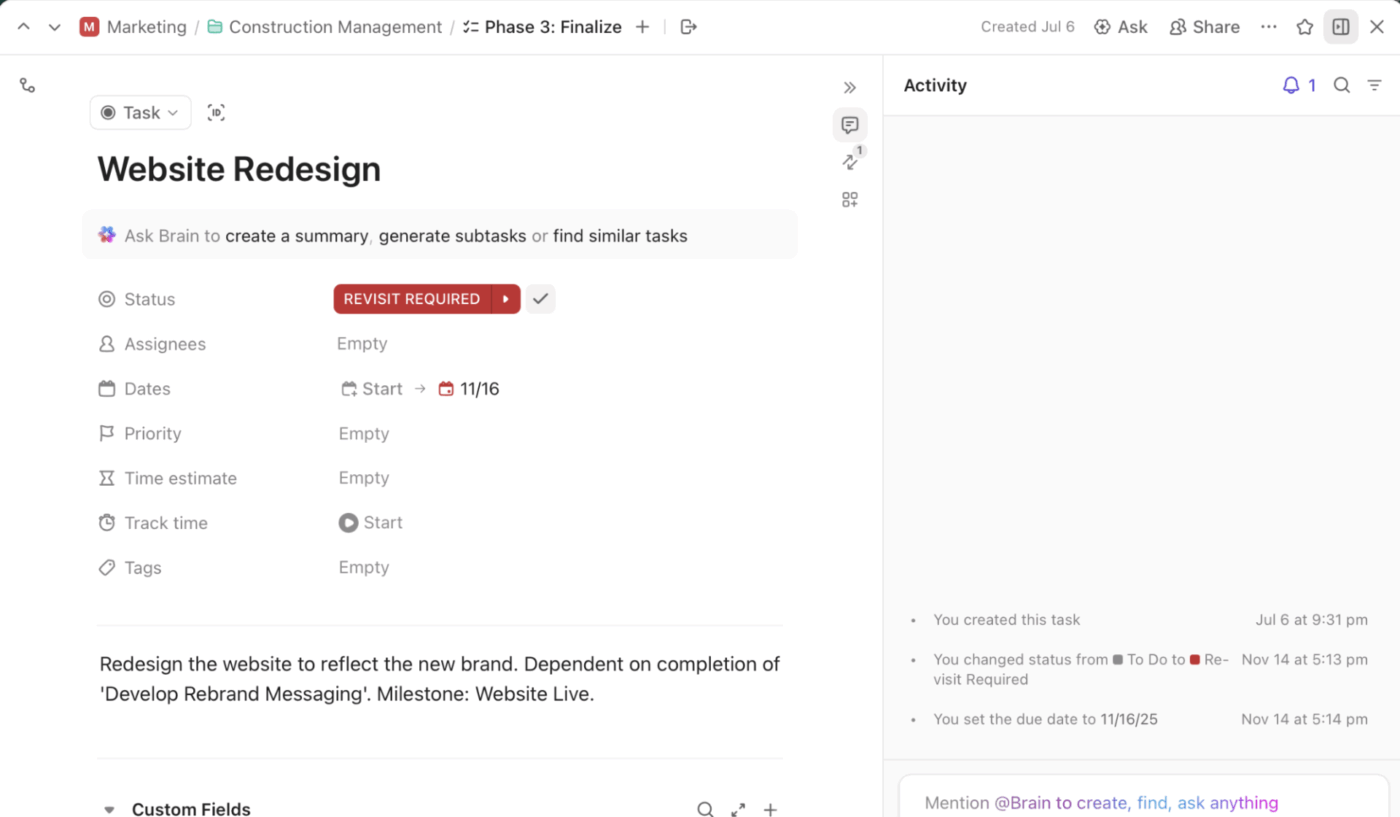
ClickUp Tasks provides the framework to capture all these details in a structured way. Each task can hold:
What makes this particularly useful is how different people can view the same work in ways that match their thinking using ClickUp Views.
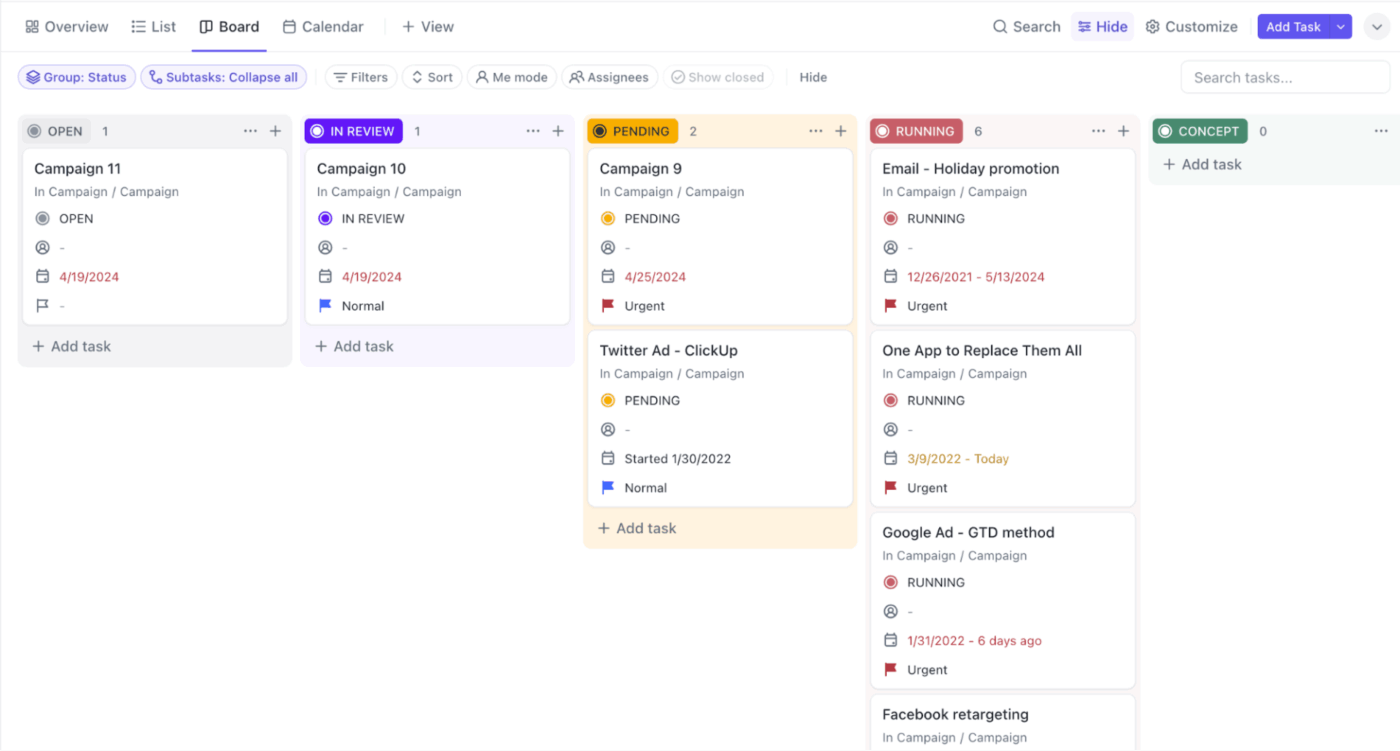
Your project manager may like Board View in ClickUp to see how work moves through stages. On the other hand, your department head might prefer the ClickUp Gantt Chart View to show how projects overlap in time.
For example, a software development team building a new feature might create tasks like ‘Design database schema for user preferences table,’ ‘Implement API endpoints for preference updates,’ and ‘Create React components for settings page.’
Each engineer knows exactly what they’re building.
💡 Pro Tip: Run preflights 48 hours before launches. Get the actual humans who will execute in a room. Walk through every step like a pilot checklist. Who updates the customer list? What happens if the API is slow? Surface the gaps while you can still fix them.
Document each stage your work goes through from initiation to completion. Most execution problems happen during handoffs when work transitions between people or stages.
A content piece might move from drafting to editing to design to approval to publishing. A feature request might progress through triage, specification, design, development, QA, and deployment. Whatever your stages are, make them explicit and visible.
For each stage, define what must be true before work can move forward:
These gates keep quality consistent and reduce back-and-forth. Also, identify who’s responsible at each stage. Shared responsibility often means no responsibility. When a task is ‘In Review,’ name the reviewer. When something needs approval, specify who has the authority to approve.
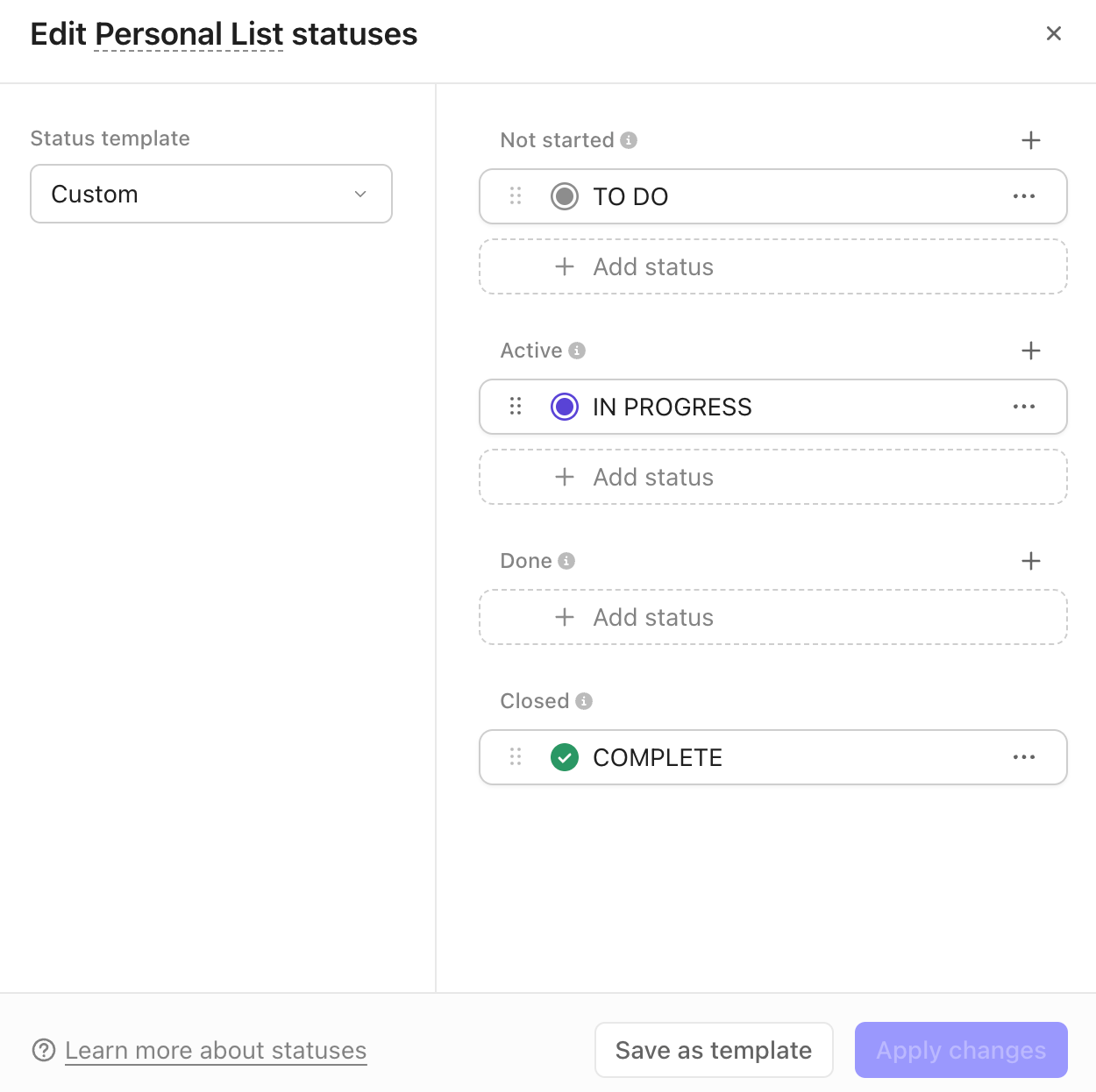
Turn these workflow maps into functional execution paths with ClickUp Custom Task Statuses.
You create statuses that mirror your actual process stages. A marketing team might use Briefing, Creating, Internal Review, Client Review, Revisions, and Approved. When someone updates a task’s status, everyone sees where it stands.
Dependencies in ClickUp add another layer of workflow control. Link Task B to Task A, and ClickUp shows that Task B cannot start until Task A is completed. This makes the critical path visible:
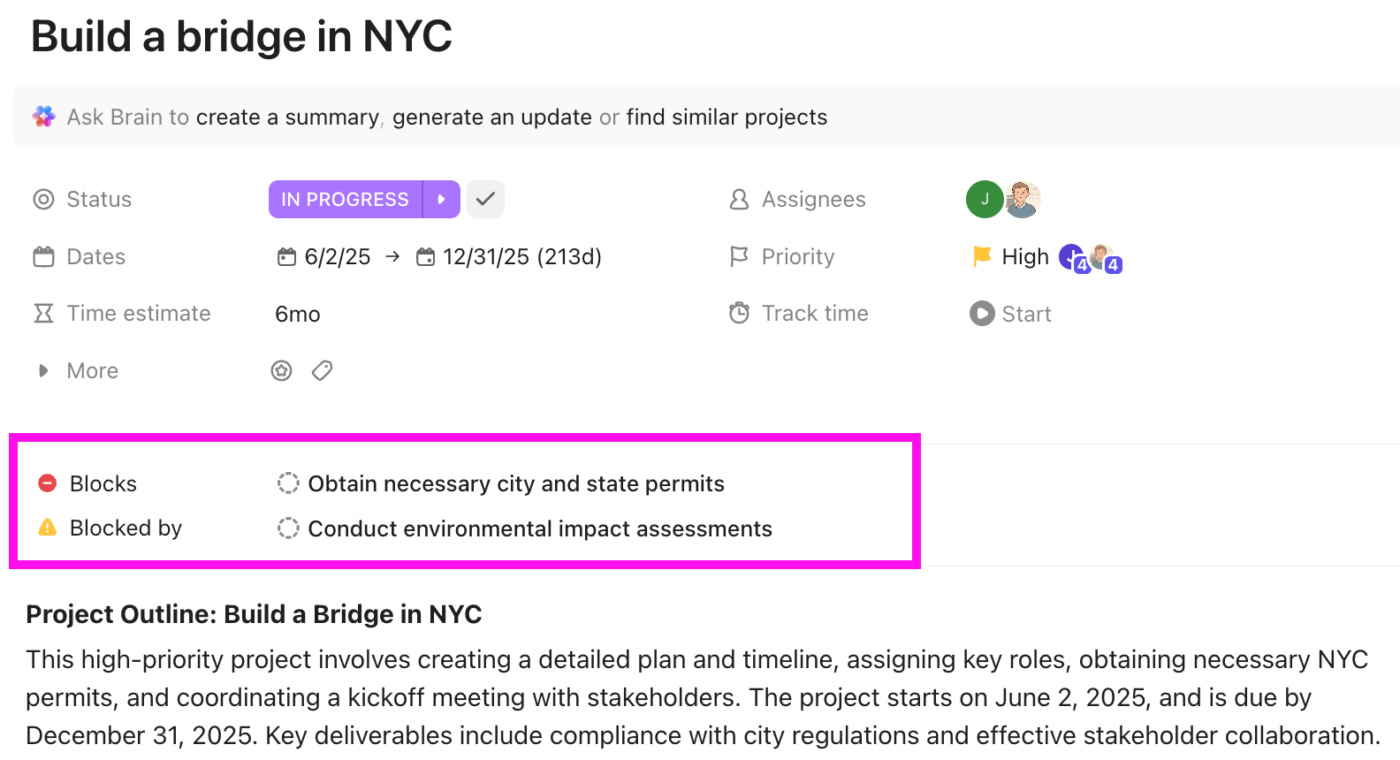
For example, say a video production team creates a workflow where:
The editor instantly sees when filming wraps and knows their work can start. The producer can look at the dependency chain and identify that if script writing runs late, everything downstream shifts.
Build a system where everyone can see what’s happening without constant status meetings or interruptions. The information needs to be current, accurate, and presented in ways that different stakeholders can quickly interpret.
Think about what different people need to know:
The mistake many teams make is creating visibility reports manually. Someone spends hours each week pulling data and building spreadsheets. This information is outdated the moment it’s published, and it trains people to wait for updates rather than checking progress themselves.
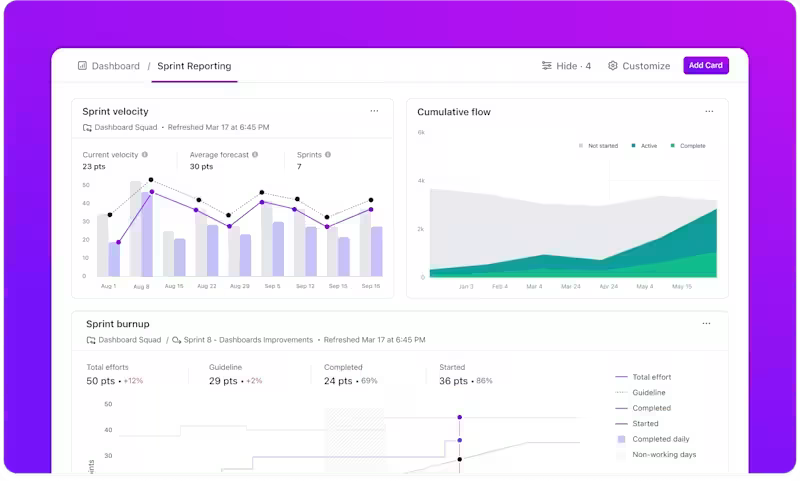
Build Dashboards in ClickUp that pull live data directly from where work is happening. They aggregate real-time data from your tasks, projects, and workspaces to show different slices of your execution data:
The power comes from how current this information is. You’re not looking at a report from last Friday’s data pull. You’re seeing exactly what’s true right now, which enables much faster decision-making.
Look at your workflows and identify patterns where routine actions follow predictable rules. When X happens, Y should happen next. When a deadline is Z days away, someone should receive a reminder. These predictable patterns are perfect automation candidates.
The key is automating actions, not decisions. Automation should handle the rote process steps so humans can focus on work that requires creativity, problem-solving, or judgment.
So, for example, you don’t automate whether a design is good enough to approve. You automate notifying the approver when a design is ready for their review.
💡 Pro Tip: Start with the most repetitive, high-volume processes. If your team creates 50 tasks per week that all follow the same workflow, automating that workflow saves significant time. If a particular handoff gets missed frequently because people forget to notify the next person, automate that notification.
Execute repetitive actions based on triggers and conditions you define with ClickUp Automations. The Automation Builder lets you create rules like ‘When task status changes to Complete, then move it to the Done list and notify the project manager.’ You set this up once, and it runs every time those conditions are met.
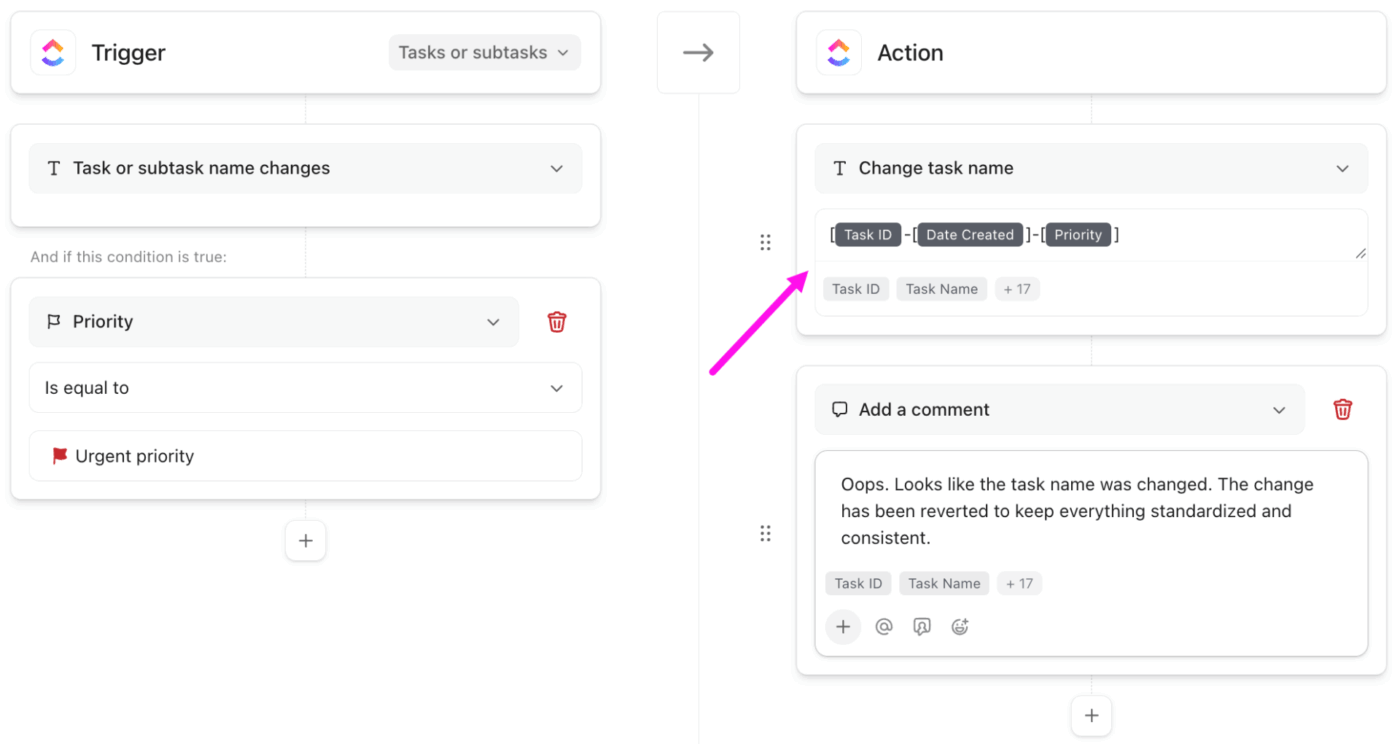
Here are some workflow automation examples you can try:
The automation library includes dozens of trigger options (status changes, due date approaching, assignee changes, custom field updates, task creation) and action options (move tasks, change fields, create subtasks, post comments, send notifications, apply templates).
This video shows you how to save precious time with AI task automation:
Every task someone works on connects to something larger. That bug fix supports product reliability goals. That blog post drives the content strategy for demand generation. When people understand these connections, they make better decisions about how to execute their work.
The problem is that strategic context lives in different places from daily work. Goals and objectives get documented in planning sessions, then filed away in strategy documents that people rarely reference.
Meanwhile, everyone’s task list grows longer, and they’re just trying to get through their work without thinking about the bigger picture.
To prevent this, make strategic context readily accessible where people do their work. Link tasks to the goals they support. Tag work with strategic initiatives. Document decisions and rationale in places people can easily find them later.
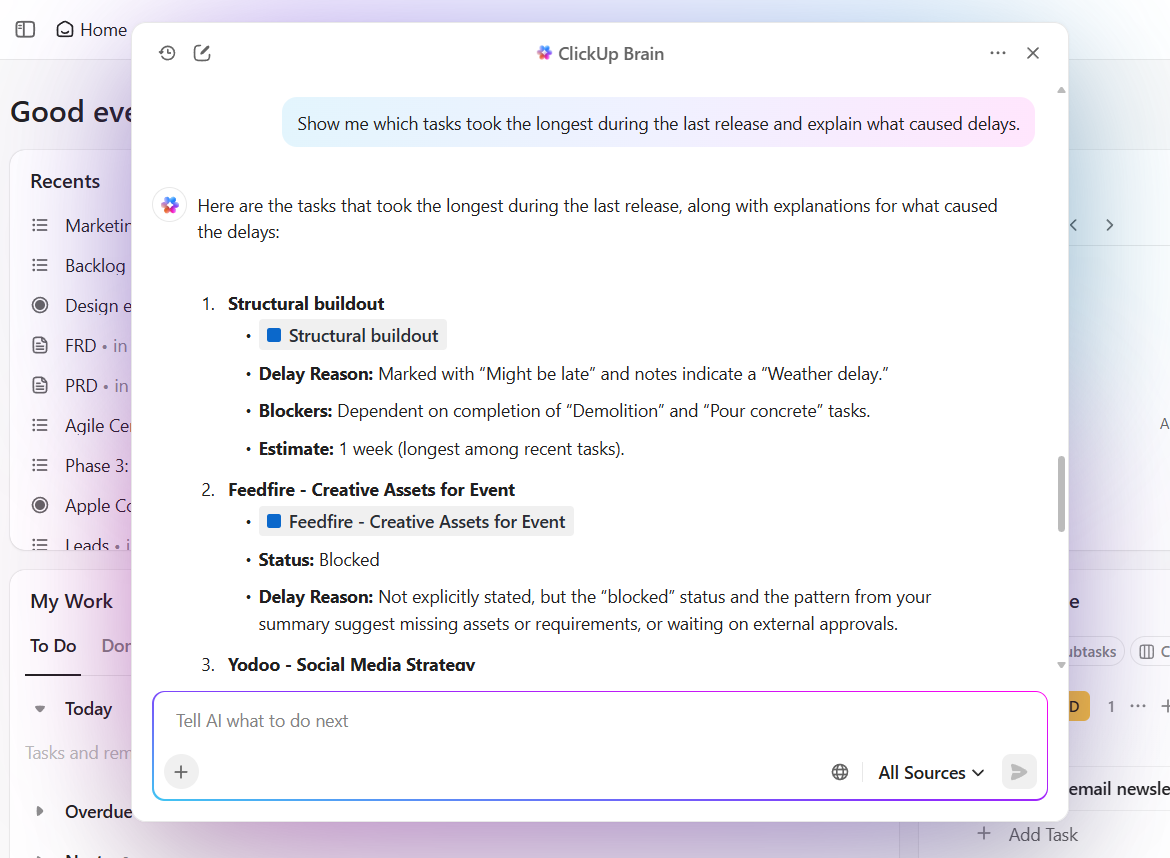
ClickUp Brain helps surface these connections through Contextual AI. Instead of manually searching through tasks, documents, and comments to piece together context, you can ask ClickUp Brain questions in natural language and get answers drawn from your actual work.
📌 Try this prompt: Show me which tasks took the longest during the last release and explain what caused delays.
ClickUp Brain searches across all your work to find relevant tasks and answer your question.
It can also summarize project history, explain what’s been tried before, and show how different pieces of work relate to each other.
A product manager preparing for sprint planning can ask ClickUp Brain, ‘Show me all incomplete tasks for the Q1 product launch.’ It’ll compile a list, organized by feature area, with each task’s current status and assignee.
Hear it from a real user:
I find ClickUp incredibly valuable as it consolidates functions into a single platform, which ensures that all work and communication are gathered into one place, providing me with 100% context. […] I particularly like the Brain AI feature, as it functions as an AI agent that executes my commands, effectively performing tasks on my behalf. This automation aspect is very helpful because it streamlines my workflow and reduces manual effort.
📖 Also Read: Best Time Management Techniques Proven To Work
Your execution system will never be finished. As your team grows, as work changes, as you learn what works and what doesn’t, you need to continuously refine how execution happens.
Schedule dedicated time to examine your execution system itself, separate from reviewing project progress. This might happen monthly, quarterly, or after major projects are completed. The frequency matters less than making it a consistent practice.
Focus these reviews on specific, observable patterns:
Gather input from everyone who interacts with the system. The person doing the work sees friction points that observers miss. Your designer knows which approval steps add value and which ones just add delay. Your developer knows which task fields provide useful context and which ones they never fill out.
💡 Pro Tip: When you identify improvements, implement them incrementally. Change one workflow and observe how it performs before redesigning everything. Add a new dashboard card and see if people actually use it before building five more. Test an automation for a sprint before expanding it to other projects.
Here are some best practices that compound over time and turn delivery into a repeatable system. 🧑💻
Teams waste months building the wrong thing because they committed to a direction too early. They skip the messy exploration phase and jump straight to execution, then discover fundamental flaws when changing course becomes expensive.
The solution: run two-week decision sprints for complex initiatives. Test three competing approaches at low fidelity.
Then, get actual users (not executives) to react to rough prototypes. This helps kill bad ideas when they’re still sketches on a whiteboard.
This works beyond product development. Marketing can test three campaign concepts before producing assets. Operations can pilot new workflows in one region before rolling out globally. The pattern remains the same: invest small to learn fast, then scale what works.
🚀 ClickUp Advantage: When teams rush into execution, they often pick a direction too early and waste time building the wrong thing. ClickUp BrainGPT gives you a smarter way to explore multiple approaches before locking in a plan.
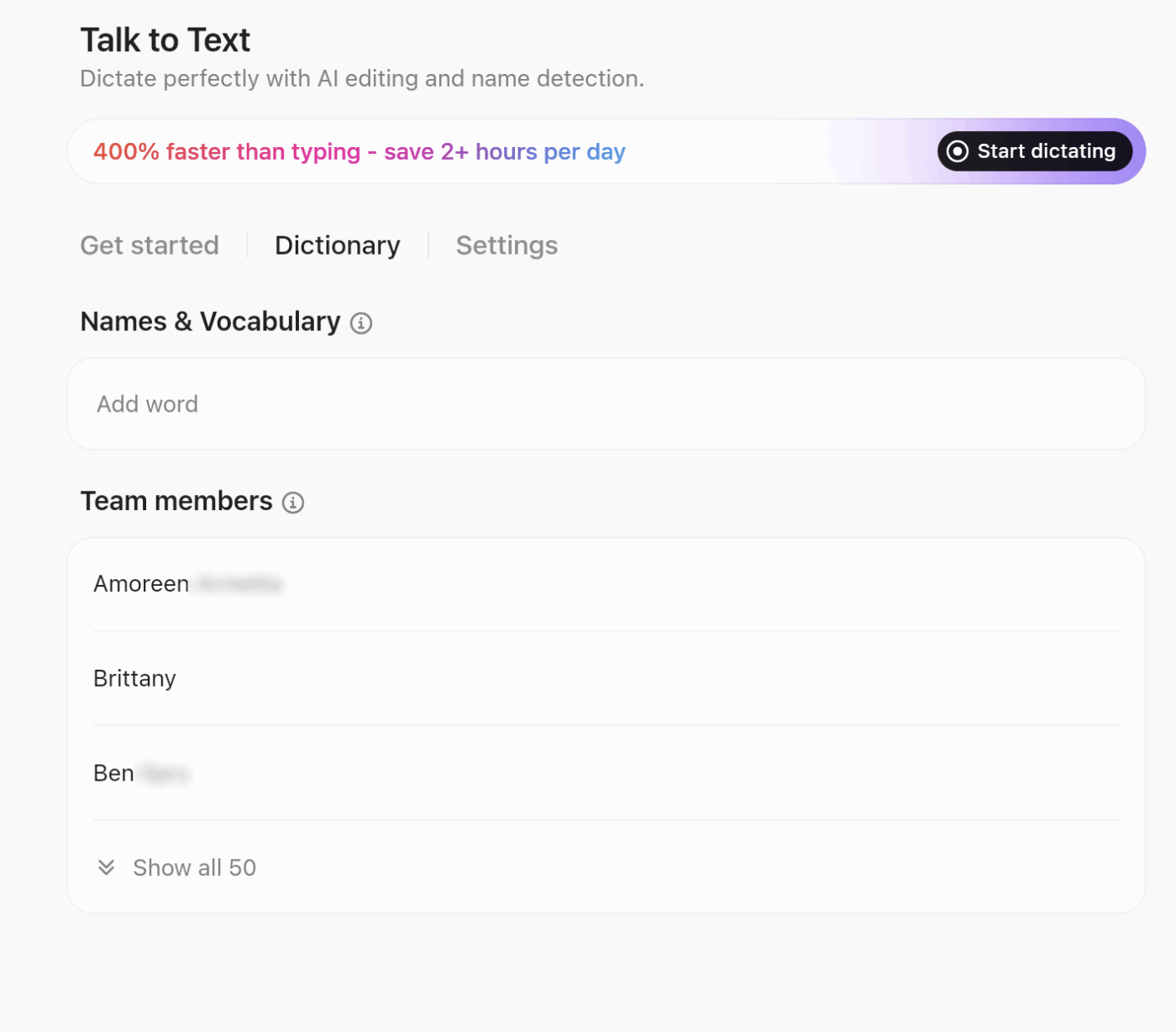
Here’s how to use BrainGPT for faster decisions:
Most roadmaps sequence work based on stakeholder pressure or arbitrary dates. Teams tackle the politically visible project first, even when they lack critical information to execute well. Then they stall mid-stream waiting for answers they could have gathered upfront.
Flip the sequencing logic:
Agile project management gets this right—maximize learning per unit of effort.
🔍 Did You Know? The Boeing 777 was the first jetliner fully pre-assembled inside a computer before anyone touched real metal. Engineers used 3D CAD [CATIA] to build a complete digital twin, check every fit, and avoid physical mockups. That virtual planning meant far fewer surprises in execution and became a template for complex product delivery.
Deadlines reveal the truth. Teams can debate architecture for months, but a two-week prototype deadline forces them to pick an approach and test it. Problems hide in abstract planning but surface quickly under execution pressure.
The key is inserting artificial checkpoints that force concrete progress:
These constraints prevent teams from gold-plating solutions in isolation. A failed experiment in week two costs nothing. The same failure in month six derails everything.
💡 Pro Tip: Build smoke tests you can run in five minutes. Before any release or handoff, run a quick sanity check to catch obvious issues. It saves the embarrassment of delivering something that doesn’t even load. Automate it if you do it more than twice.
Most teams treat feedback as a post-mortem activity. They ship the project, hold a retrospective, write down lessons, then promptly ignore them on the next initiative. Learning stays theoretical because it never integrates into daily execution.
Embedding feedback mechanisms directly into workflows changes this dynamic:
Resource management improves when teams see real-time utilization data showing who’s overloaded. Make the feedback loop so tight that ignoring it becomes harder than acting on it.
Teams waste energy reinventing processes for work they’ve done dozens of times. Every product launch follows a different checklist. Each campaign starts from a blank planning document. People spend hours debating logistics that should run on autopilot.
The fix? Template everything you do more than twice:
When the process runs on autopilot, people can concentrate on strategy, innovation, and handling the unexpected complications that templates can’t anticipate.
💡 Pro Tip: Capture hard-won process knowledge in ClickUp Docs. You can document the exact steps, timelines, and ownership that successful projects followed, then connect them directly to live tasks so the process guides execution.
Teams often adopt work execution management in name but miss the mechanics that make it effective. These are some mistakes that show up repeatedly, along with clear ways to correct them. ☑️
| Common mistake | How it shows up during execution | What to do instead |
| Treating execution as a one-time setup | Teams assume plans will carry work through delivery | Actively manage execution throughout the lifecycle |
| Assigning shared or rotating ownership | Tasks sit idle while responsibility stays unclear | Assign a single owner responsible for forward movement |
| Relying on status updates to track progress | Progress sounds good, but work does not move | Track progress through task state changes and completion |
| Planning work without mapping dependencies | Teams wait for inputs or approvals unexpectedly | Make dependencies visible and sequence work explicitly |
| Leaving priorities implicit | Urgent work crowds out important work | Define and maintain clear priority signals during execution |
| Reacting to blockers late | Issues surface near deadlines | Surface blockers early and route them through clear escalation paths |
| Skipping execution reviews | The same issues repeat across cycles | Review execution patterns and adjust how work runs |
💡 Pro Tip: Use breadcrumb communication for async teams. When you stop work, leave a 2-sentence note about where you are and what’s next. The next person [or future you] doesn’t waste an hour reconstructing context.
Work execution management brings discipline to the messy middle. It gives teams a shared way to break work down, keep it moving, surface operational risk early, and adjust without chaos.
ClickUp supports this entire flow in one Converged AI Workspace. Tasks, workflows, dashboards, automations, docs, and Contextual AI all connect directly to live work. Teams see what is happening, understand what to do next, and act faster without switching tools or chasing updates.
If you want execution to run as smoothly as your plans look on paper, it starts here. Sign up for ClickUp today! ✅
Work execution management focuses on how work moves from request to completion. It covers intake, prioritization, assignment, tracking, and delivery across teams. The goal is to keep work flowing smoothly and predictably.
Project management centers on planning and delivering defined projects. Work execution management looks across all work, including ad hoc requests, ongoing operations, and cross-team tasks, not only projects.
An effective system includes clear intake channels, defined priorities, ownership, visibility into progress, and feedback loops. It also relies on consistent workflows and shared standards.
Standardization starts with common workflows, shared definitions, and agreed-upon statuses. Teams align on how work gets requested, approved, tracked, and completed while keeping flexibility for team-specific needs.
A unified intake process uses a single entry point for all requests, supported by clear criteria and required information. This reduces confusion and helps teams assess and prioritize work quickly.
Common frameworks include MoSCoW, RICE, Eisenhower Matrix, and WSJF. These frameworks help teams rank work based on impact, urgency, effort, and business value.

© 2026 ClickUp

There’s an easier way. Try a free AI Agent in ClickUp that actually does the work for you—set up in minutes, save hours every week.