


Product development involves numerous moving parts, from research and planning to prototyping and sourcing. To ensure each task and step is managed to the best of your team’s ability, it’s crucial to treat them equally and give them the attention they deserve.
However, when you’re running a complex project, chances are certain tasks will get prioritized over others, potentially resulting in subpar outcomes. Scrum framework solves this problem by dividing detailed development processes into cycles, making the workload easier to manage, keeping scrum teams motivated, and boosting product quality. 👌
If you feel like this Agile framework is the answer to your prayers, you’re in luck! This article will tell you all you need to know about Scrum workflows, benefits, events, and roles to fully grasp Scrum project management. Plus, you’ll learn how to launch a Scrum workflow and which tools to use to streamline the process.
Mastering the Art of Scrum: A Comprehensive Guide to Launching a Scrum Workflow

 Summarize this article for me please
What is a Scrum Workflow?
A Scrum workflow, often called an agile workflow or sprint, is centered around Scrum, a framework within the Agile project management methodology.
This type of workflow revolves around roles and events that allow your team to organize their work and complete tasks in short cycles, also known as sprints. Every sprint usually lasts up to four weeks, after which the team does a sprint review—a retrospective meeting to discuss what went well and identify areas for improvement. 🏃
By breaking up large tasks into smaller, more manageable bits, the Scrum workflow process helps teams feel less overwhelmed with work and, consequently, be more productive and responsive.
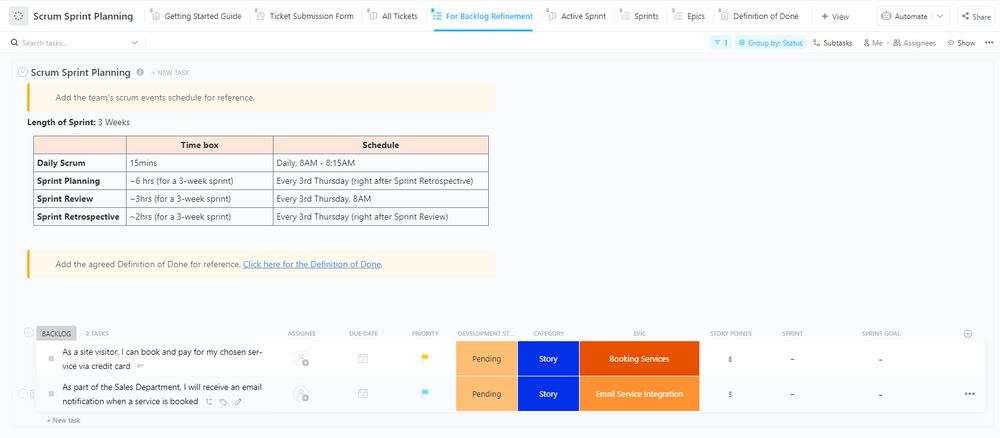
You can build sprint cycles from scratch—or start planning them immediately with the ClickUp Scrum Sprint Planning Template, which has dedicated lists and boards to support every step of your plan!
Key benefits of using a Scrum workflow
These workflows are hugely popular in the business world, and scrum team members enjoy this Agile methodology for numerous reasons. Here are the main benefits of implementing scrum workflows:
- Learning on the go: Since Scrum workflow lets you break work down into smaller chunks, you’re more likely to reflect on your work as you go and make the necessary improvements
- Prioritizing the customer: The main goal of Scrum is to deliver high-quality work that your customers will be happy with. When you use Scrum in your operations, you’ll tend to think about the impact of your work more frequently and make constant enhancements to keep the customers satisfied
- Enhance cross-functional collaboration: Scrum is all about teamwork—it motivates teams to work closely together and collaborate every step of the way to achieve common goals more effectively
- Encourages accountability: Since roles and responsibilities are clearly defined within the Scrum workflow, each team member is aware of the work that needs to be done and feels accountable for their tasks
Summarize this article for me pleaseWhat are the Main Events in a Scrum Workflow?
Each sprint cycle consists of four main events or ceremonies—here’s what’s included in each:
- Sprint planning: The initial meeting that requires the presence of the whole Scrum team. The agenda is to plan out the tasks that need to be completed in the next sprint cycle to reach the defined goal
- Daily Scrum: A short daily meeting to check work progress. It helps the team ensure the deliverables are on track and make the necessary adjustments if they’re falling behind
- Sprint review: This takes place at the end of every sprint cycle. It helps the Scrum team determine if the sprint was successful by reviewing the work they’ve done and analyzing stakeholder feedback
- Sprint retrospective: It’s organized before the next sprint cycle to make improvements in future sprint planning. The aim is to go over the things that went well and those that didn’t
Summarize this article for me pleaseWhat are the Main Roles in a Scrum Workflow?
Scrum workflows function as well as they do because the roles and responsibilities are always clearly defined, and everyone is held accountable for their work. Let’s look at the three roles that make up a Scrum team. 🧐
Product Owner
The Product Owner is the central figure in a Scrum workflow. Their job is to maximize the product value for the business and the customer. This role comes with the following responsibilities:
- Goal setting
- Product backlog maintenance
- Feedback collection
Additionally, Product Owners must have answers to questions like why the process is important, what it should include, and who it is intended for to ensure the product is of high quality.
Scrum Master
The Scrum Master’s job is to oversee the sprint cycle and support the Scrum workflow. They should be well-versed in the Scrum framework to guide other team members and teach them how to implement it more effectively.
Scrum Masters should also:
- Keep the team motivated to complete the sprint cycle successfully
- Remove anything that may distract the team from reaching goals
- Promote Scrum values throughout the cycle
Development team
Software development teams are cross-functional teams. They usually include developers, testers, and designers, among other relevant roles. They are essentially responsible for all the activities within the workflow, such as:
- Modifying work based on the received feedback
- Managing the sprint backlog items,
- Working toward the collective sprint goal
In most cases, these teams consist of three to nine members to ensure the sprints are not too complex to manage.
💜 Bonus: For an objective way to estimate the effort of each backlog item, a Story Point Calculator can be a helpful tool.
Summarize this article for me pleaseHow to Launch a Scrum Workflow in 5 Steps
To ensure success in launching a Scrum workflow, taking the proper steps in the correct order is essential. All team members must know their roles at all times, and the whole team must be updated on progress so they can implement changes and improve the workflow before the sprint cycle ends.
Managing all these moving parts may seem challenging, but we’re here to show you how to handle them like a pro with the help of ClickUp—the ultimate Agile project management tool! It has an entire feature set, ClickUp Sprints, to empower Scrum and agile teams to efficiently collaborate toward shared goals. 🛠️
Let’s look at the key steps you need to take to launch a successful Scrum workflow.
Step 1: Identify roles
Clearly defined roles keep team members accountable and focused on carrying their weight and reaching the goal as quickly and effectively as possible.
When assembling your Scrum team, you’ll want to choose the people with the knowledge, skills, and experience to thrive in the role they’re recruited for. Remember that Scrum roles don’t necessarily have to coincide with the job titles these individuals already have in your company. For instance, if you believe a certain employee has the potential to be a great Scrum Master due to their profound knowledge of the Scrum framework, go ahead and give them the role! 👍
Ensure all roles are clearly assigned with the ClickUp Project Management Roles and Responsibilities Template! This handy tool helps you set your team’s mission, objectives, and responsibilities. You can document the crucial project details in its pre-built Custom Fields for:
- Project Overview
- Objectives
- Goals
- Project Timeline
- Budget and resources

Leverage the Meet the Team section to define the responsibilities of each team member, along with a short role description. Plus, you can include their photos to personalize the doc and make sure everyone gets a copy to avoid confusion. 😏
Step 2: Host a sprint planning session
With all the roles in place, it’s time for a sprint planning session! In this step of launching a Scrum workflow, the Product Owner shares project updates with the whole team. They also present the product backlog and inform the team about which tasks need to be prioritized. These tasks then form a sprint backlog.
Next, the Scrum team reviews each backlog item and the available resources to decide if the backlog can be implemented. If everything seems feasible, they determine dependencies and the sprint length—typically from one week to one month.
Good team communication is vital during this planning stage. Take advantage of ClickUp’s top-notch collaboration tools to centralize collaborative efforts!
Use ClickUp Whiteboards to brainstorm, create Mind Maps and flow charts to illustrate your sprint plan, and share your digital workspace with the team for real-time coordination. 🤝

To save time and keep your sprint plan accessible to everyone, use the ClickUp Agile Sprint Planning Template. This powerful tool is ideal for assigning tasks, evaluating the team’s progress, and tracking the effort required for each sprint through Custom Fields for deadlines and working hours.
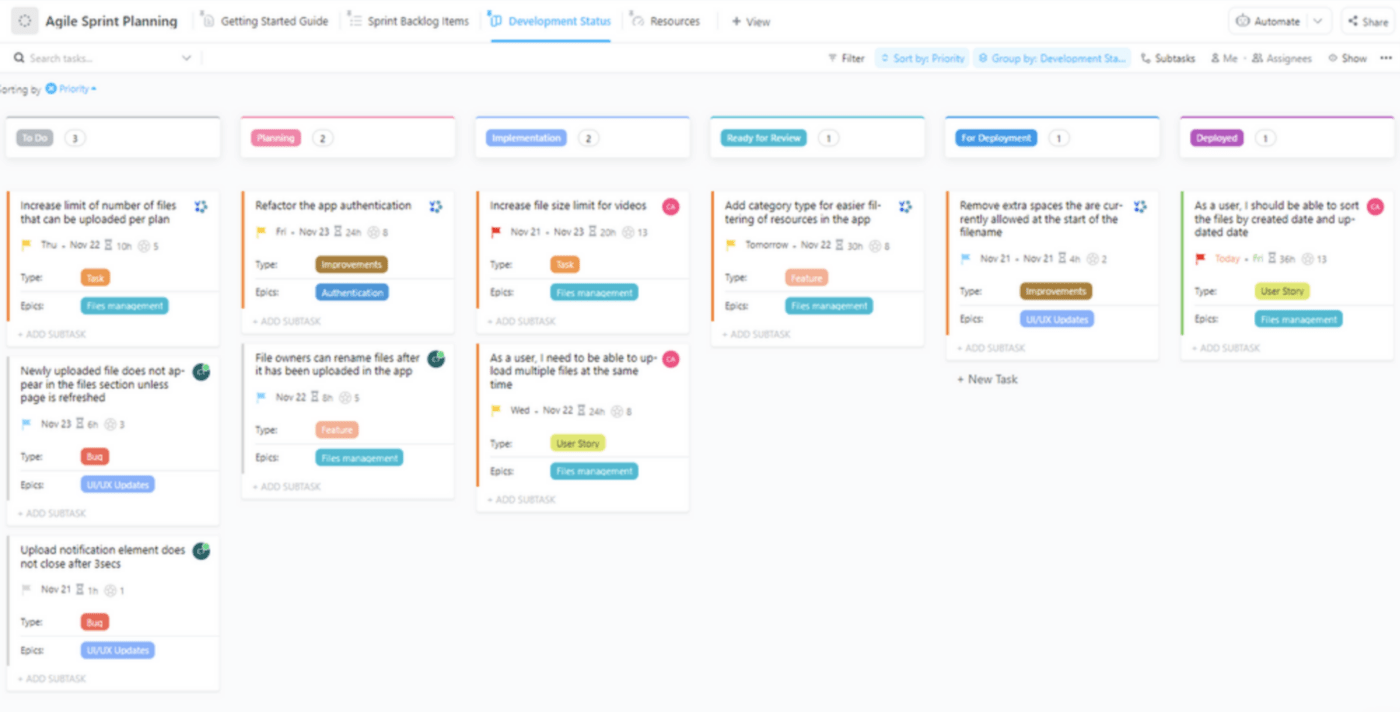
Enter your sprint backlog items into the provided list and monitor their development on a drag-and-drop Kanban board. The Development Status board lets you see whether the items are in the Planning, Implementation, or Ready for Review stage, enabling you to stay on top of the sprint cycle easily.
Bonus tip: Setting SMART goals is a must if you want to measure the sprint cycle performance objectively. Use the ClickUp SMART Goals Template and its pre-made Custom Fields to set specific, measurable, achievable, realistic, and time-bound Scrum goals. 🥅
Step 3: Launch the sprint
After a detailed planning session, it’s finally time to hit the ground running! With a clear plan, launching the sprint should be a breeze—the team knows what to do, they’re familiar with the deadlines, and they’re all striving toward the same goal.
Still, challenges may occur along the way, so this is the time for the Scrum Master to shine. In case things aren’t going according to plan, the Scrum Master should provide the support and measures that will get the project back on track. To do so, they must always be informed about the sprint cycle’s progress.
Using the ClickUp Agile Scrum Management Template simplifies the process by providing all the Scrum workflow essentials—backlog tracking, sprint and test management, and an overview of retrospectives. You can organize all Scrum events and keep a neat record of them through folders like:
- Ceremonies: Includes lists and boards for monitoring sprint retrospectives and tracking meetings
- Backlog: Comes with diverse views to help you track product backlog and bugs
- Sprints: Lets you manage sprint cycles and daily stand-ups
- QA: Provides an overview of test runs
This Folder template is fully customizable—insert your sprint details, create personalized Custom Fields, and stay on top of the whole cycle so nothing slips through the cracks! 💥

Step 4: Organize daily stand-up meetings
A successful Scrum workflow requires everyone to be on the same page while the sprint cycle is in progress. This helps prevent errors and ensures the necessary changes will be implemented immediately. That’s why it’s crucial to organize daily stand-ups and allow everyone to share their progress.
To keep your meetings concise but informative, we suggest the following best practices:
- Stick to the timeframe: Nobody likes a meeting that seems to last forever. To avoid this, keep it short and sweet—cover the most essential updates and leave time for work on the sprint. Ideally, the meeting shouldn’t be longer than 10-15 minutes
- Hold the meetings at the same time every day: Developing habits makes routine tasks feel less daunting. Hosting the daily meetings at the same time, be it at the beginning or the end of the day, will create a habit that boosts productivity and promotes accountability
- Stay on track: Once the meeting starts, stick to the plan and don’t let the discussion wander off. If any digressions happen, quickly change the subject back to the original topic so you can finish the meeting in optimal time without rushing over important information
The best way to ensure you’ll cover all the bases in daily meetings is to note them in a handy ClickUp Daily Standup Meeting Template! Next to each team member’s name and profile photo, this Whiteboard template has sections for real-time updates, planning, note-taking, and progress tracking. However, you have all the freedom to customize it to match your sprint cycle’s needs—change colors, shapes, and font and add or remove text and sections. 🎨
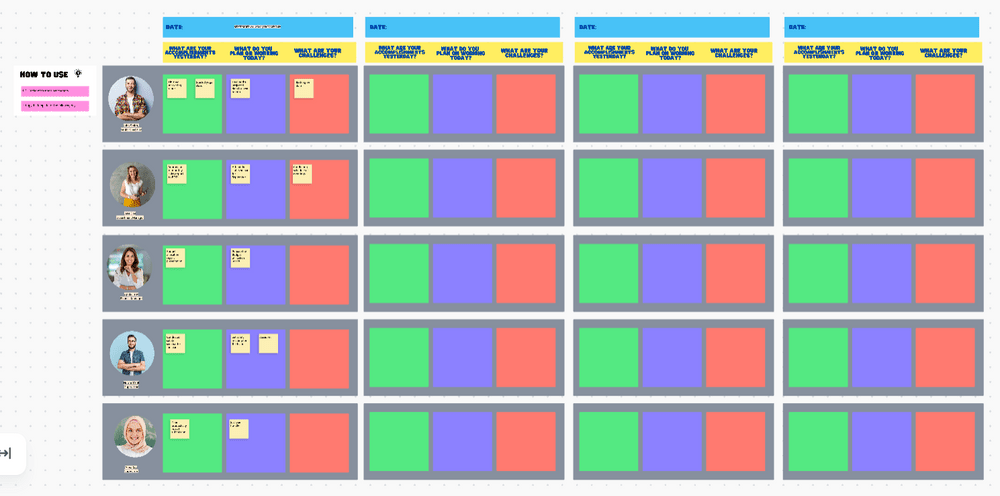
Once you modify the template to match your vision, share it with your teammates. They can use sticky notes to jot down what they’d like to discuss in the next meeting. That way, you’ll have a clear idea of what’s on the meeting agenda, which leaves less room to deviate from the subject.
Step 5: Conduct a Scrum retrospective
At the end of every sprint cycle comes the time for a retrospective. In this stage, you’re supposed to look back on your work to see what went well, what could use improvement, and what actions you can take to make the necessary changes in the future.
There’s no need to start this process from scratch since the ClickUp Sprint Retrospective Brainstorm Template covers all the main sections you need for discussions. All you need to do is customize them by adding your own conclusions and color-coding each section to your liking.
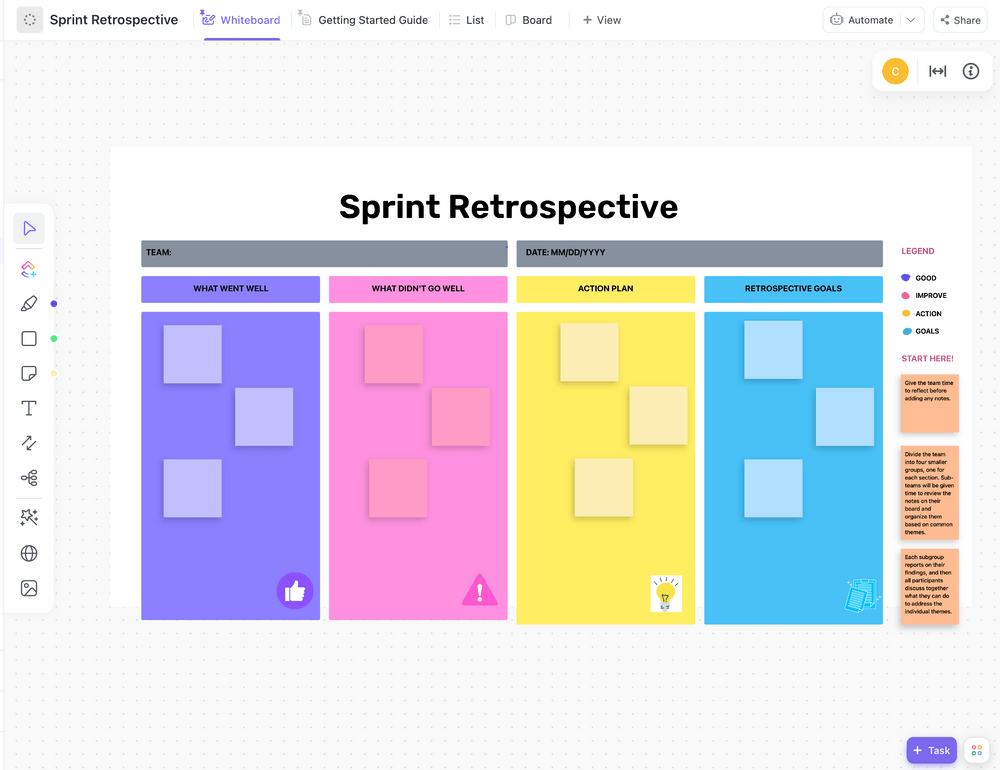
Share the template with your team and instruct them to review their notes so that they can organize their thoughts and conclusions on the Whiteboard based on common themes. These include:
- What went well: Highlight all the successful areas—discuss if the teams collaborated effectively, evaluate the project’s success regarding goal completion, and assess whether the customers were happy with the final product
- What didn’t go well: Identify areas for improvement by pinpointing bottlenecks, delivery time struggles, and problems with the final product (if there were any). This will help you improve your work in the future so you don’t repeat the same mistakes
- Action plan: Consider both successes and failures and decide how to handle future projects based on them. Focus on the things that went well and try to implement them in the next cycle, but also dedicate valuable time to improving the things that could have gone better
- Retrospective goals: Create a list of goals you want to achieve during the next sprint cycle and commit to them. You can even assign action plan items to different team members to establish accountability for the tasks once the meeting is done
Keep your team close and this template even closer! Revisit it from time to time during the next sprint cycle to see if everything is going according to plan and if the team is sticking to the preset goals and lessons learned. 👨🏫
Summarize this article for me pleaseStreamline Scrum Workflow with ClickUp
Before you start your next sprint cycle, use our step-by-step guide on launching a Scrum workflow as a checklist to see if you have all the processes covered. And remember, no skipping—every step is as important as the next one if you want your work to be smooth sailing.
Streamline your efforts even further, and sign up to ClickUp for free now! From sprint planning and scrum management to product backlog templates, you’ll absolutely love using its user-friendly features in every stage of your Scrum workflow. 💖


Everything you need to stay organized and get work done.

Recent Articles
How to Use Scrum Project Management for Modern Teams 
How to Use Scrum Project Management for Modern Teams

