






Still downloading templates?
There’s an easier way. Try a free AI Agent in ClickUp that actually does the work for you—set up in minutes, save hours every week.
Sorry, there were no results found for “”
Sorry, there were no results found for “”
Sorry, there were no results found for “”

Finishing a project on time is a juggling act. Executing tasks, managing budgets, and meeting deadlines are the most important moving parts among many others.
As a project manager, I’ve lost count of the number of times a client comes to me with ‘just one small addition’ or ‘one change’ that, unfortunately, wasn’t accounted for in the project plan.
They’re likely to add up, and before you know it, the project timeline and budget are in danger.
That’s scope creep. Even the most tightly planned projects fall prey to it, preventing the successful completion of your project.
I’ve tried a variety of project management (PM) software to help you deal with these disruptions. They will help you set guardrails to prevent you from losing your margin to surprise work.
I’ve tested enough project management tools to know that not all handle scope creep the same way. Here are the ones worthy of your attention:
| Tool | Best for | Key features | Pros and cons | Pricing |
| ClickUp | AI-powered project management for teams of all sizes | ClickUp Brain (Contextual AI and AI-generated summaries), Scope of Work Template, Tasks, Automations, Pre-built Agents | Pros: 🌟 Converged AI Workspace for all your work 🌟 Centralizes all project communication 🌟 Eases capacity management 🌟 Enables team collaboration Cons: 🧐 Steep learning curve for new users due to its wide feature set | Free forever; Customizations available for enterprises |
| Teamwork | Project management with built-in time tracking and billing for agencies | Resource management, Teamwork AI, automation rules, profitability dashboards | Pros: 🌟 Simplifies time tracking and workload management 🌟 Automates tedious tasks 🌟 Enables smoother client management Cons: 🧐 Dashboard has limited controls, which affect the visualization process | Free plan available; Paid plans from $13.99/user/month |
| Asana | Streamlined task and workflow management for small to mid-sized teams | Automated workflows and rule-based triggers, workload and progress dashboards, 270+ integrations, AI Studio | Pros: 🌟 Makes deadline tracking easy 🌟 Supports team collaboration 🌟 Automates routine approvals and updates Cons: 🧐 Reports are basic 🧐 Notifications can become overwhelming | Free plan available; Paid plans from $10.99/user/month (billed annually) |
👀 Did You Know: Scope creep is sometimes called “kitchen sink syndrome” or “requirement creep” and is known to affect over half of all projects. And it’s shown no signs of slowing down. The impact of scope creep has risen from 43% to 52% in the past decade on all projects.
Not every PM software is programmed to tackle additional work stemming from client scope creep. It might look perfect on paper, but the workflows may not be as intuitive.
Here’s what I look for when evaluating software to help me create better schedules and deliver work to clients faster:
🧠 Fun Fact: The word “deadline” was first used in 19th-century American prisons, referring to a physical boundary that inmates crossed at the risk of being shot. By the mid-20th century, the term evolved into the modern sense we use today: a point in time you dare not cross.
⭐ Bonus: Are you still creating every single task from scratch, manually typing out all those briefs and details? With ClickUp Brain MAX’s Talk-to-Text feature, you can just “talk” about the task, say what you need in the brief, and Brain MAX will instantly turn your voice into text.
And it’s not just for tasks! You can drop feedback in docs or chat with your team by just speaking what’s on your mind, and our AI will automatically transcribe it, notify/ tag the right people, remember your favourite words over time, and then edit the transcribed text accordingly.
Now, let’s break down the three leading project management software to manage scope creep in your projects:
Our editorial team follows a transparent, research-backed, and vendor-neutral process, so you can trust that our recommendations are based on real product value.
Here’s a detailed rundown of how we review software at ClickUp.
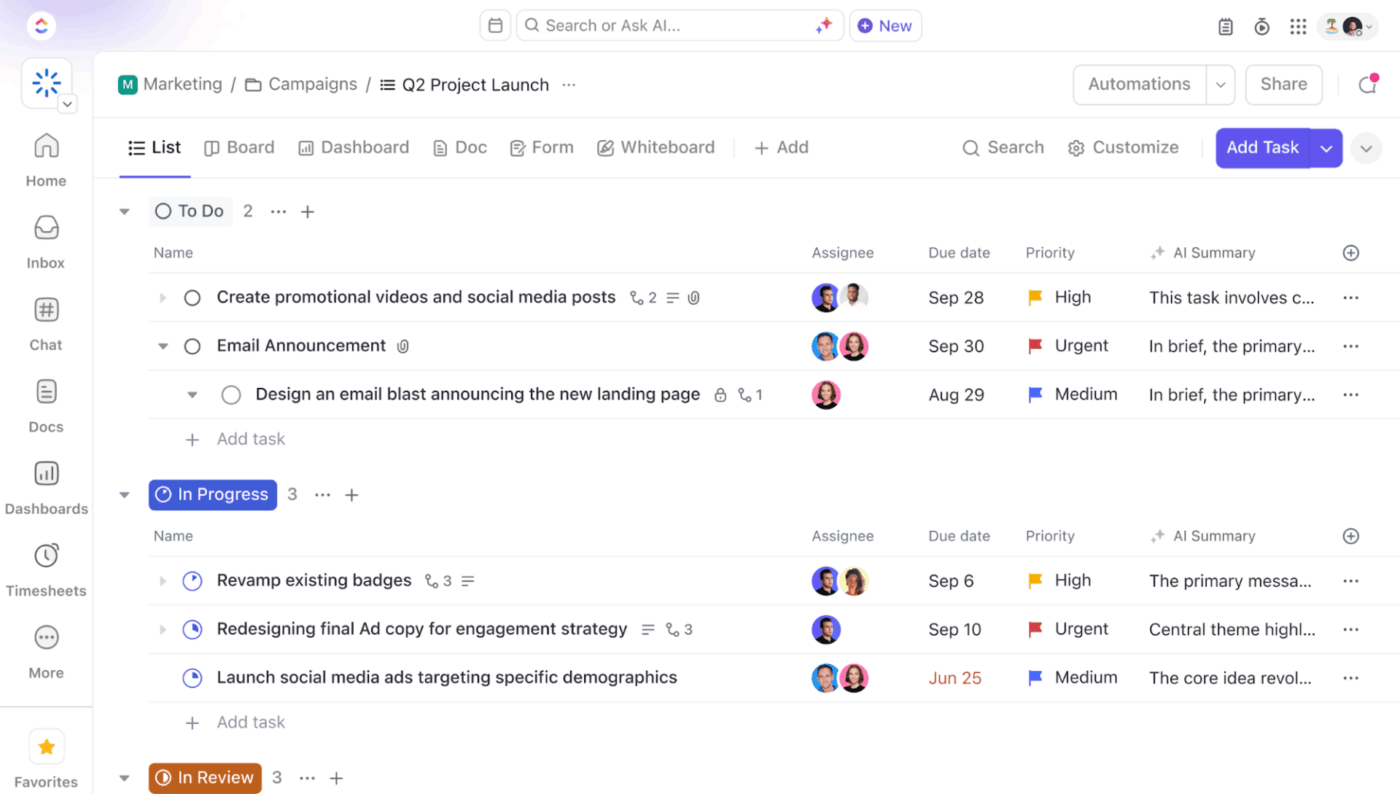
ClickUp, the everything app for work, combines project management and team collaboration with AI-driven automation. Plan your projects, assign tasks, chat with your team, share deliverables with the client, and monitor team performance right inside ClickUp! This prevents scope creep and minimizes the chances of your project being thrown off balance.
But most importantly, ClickUp’s Project Management Software is built to scale. Small teams can hit the ground running on ClickUp’s Free Forever plan, while larger organizations get the advanced views, reporting, and AI-powered support they require to manage complex projects.
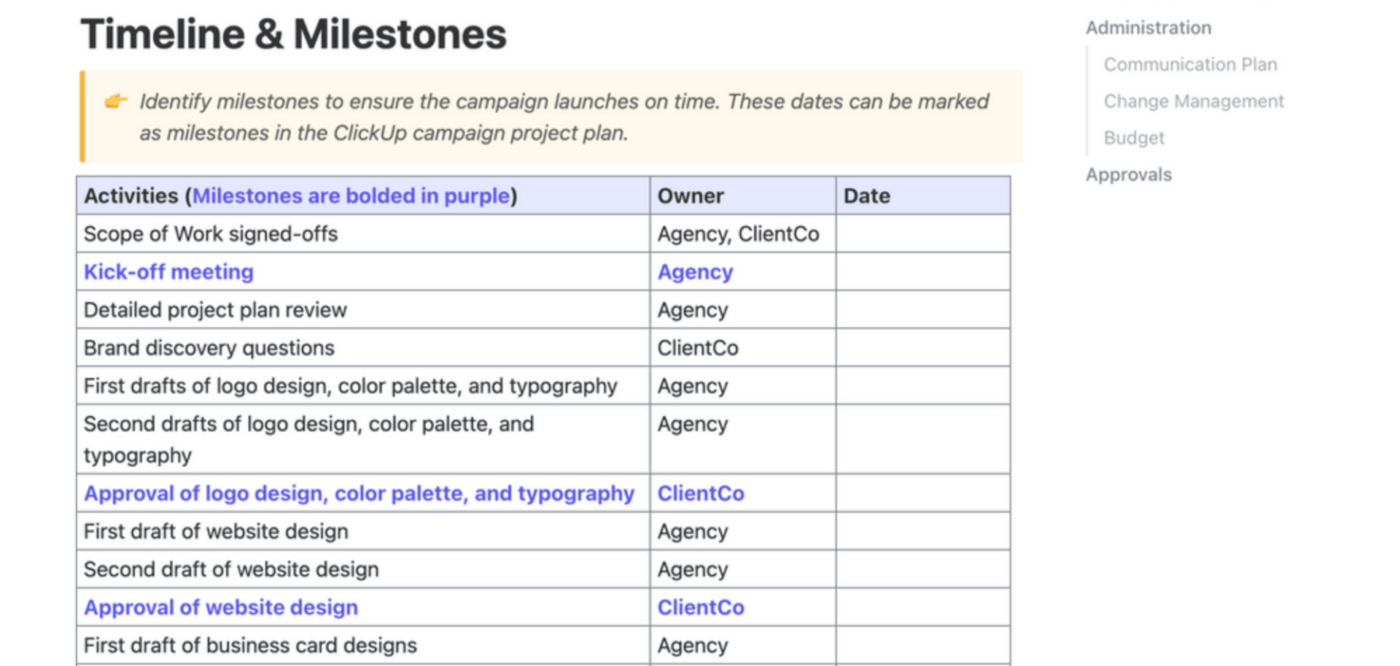
A major cause of project scope creep is a discrepancy between the project and the client’s vision and expectations.
ClickUp’s Scope of Work (SOW) Template solves that by giving you a ready-made framework to define what’s in the project scope—and just as importantly, what’s not.
You can use this template to:
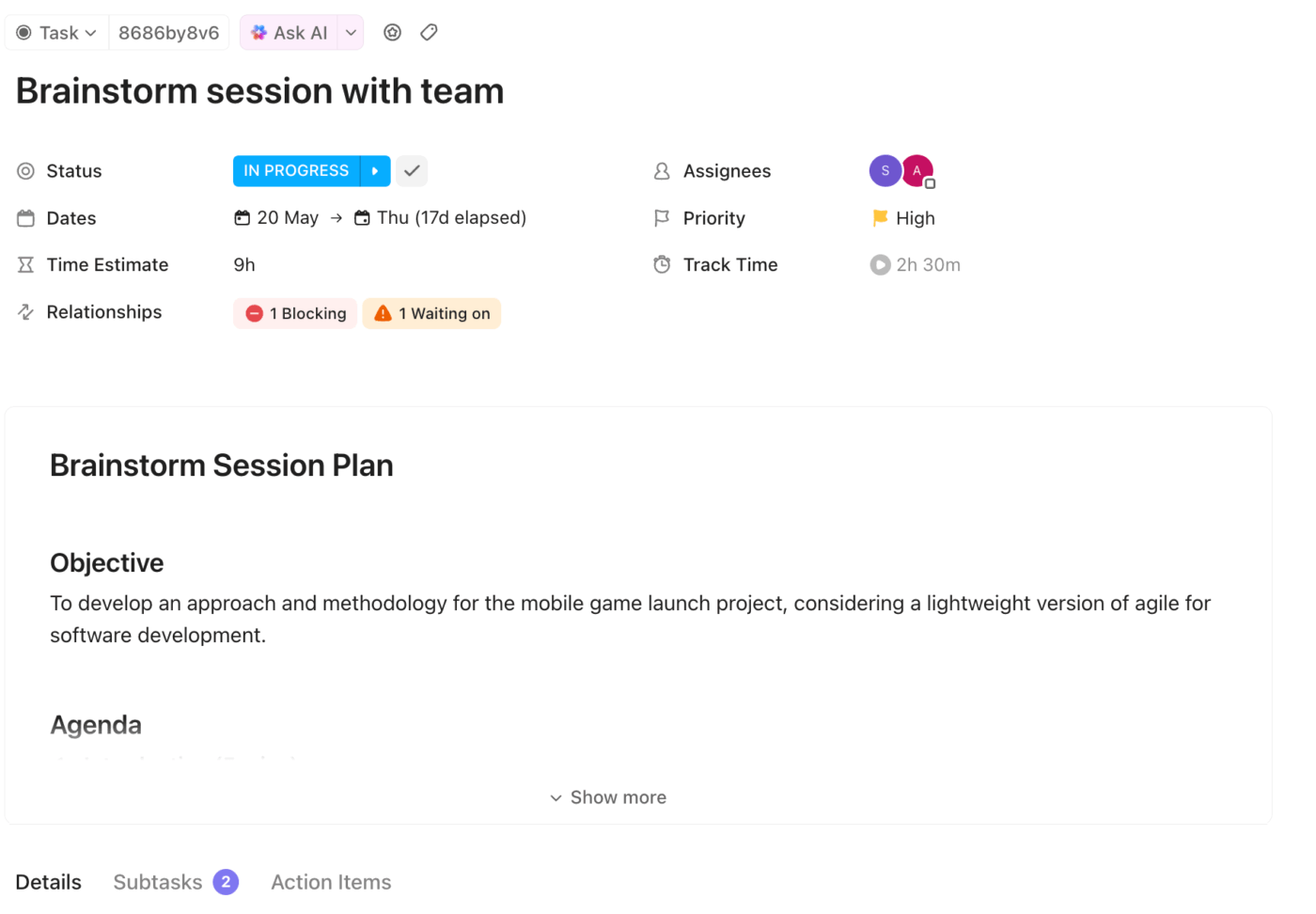
The best way to keep project scope creep under control is to divide the project into small, trackable steps. With ClickUp Tasks, you can:
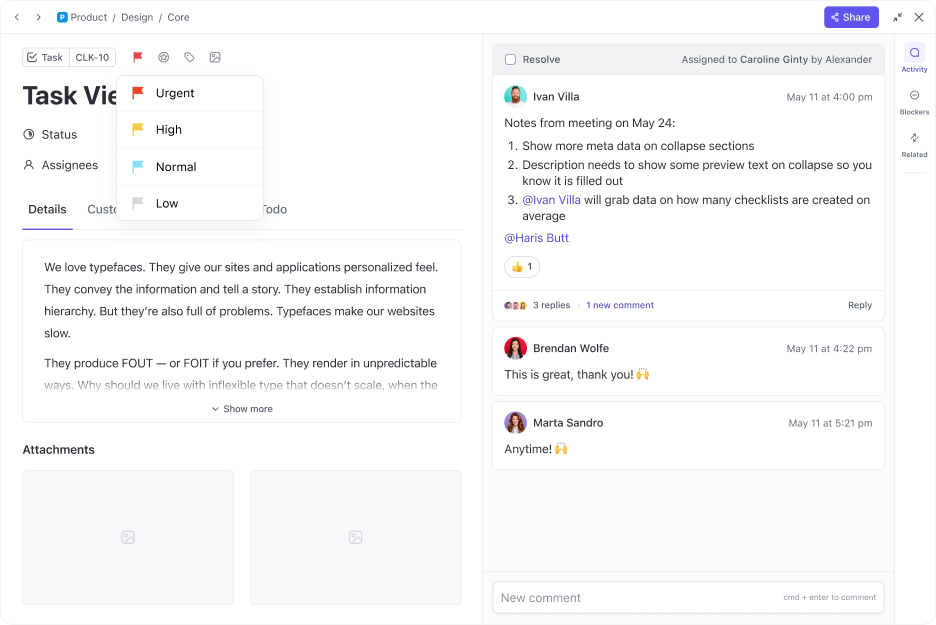
A ClickUp Tasks feature that I find highly useful is ClickUp Task Priorities. By setting the priority level (urgent, high, normal, low), the team knows exactly which tasks demand immediate attention and which ones can be addressed later.
ClickUp Brain is a powerful AI assistant that can help your team keep a watchful eye on scope creep. Use Brain to clarify project boundaries, summarize client requests for key stakeholders, conduct impact analysis, or identify tasks that may not align with the original project plan.
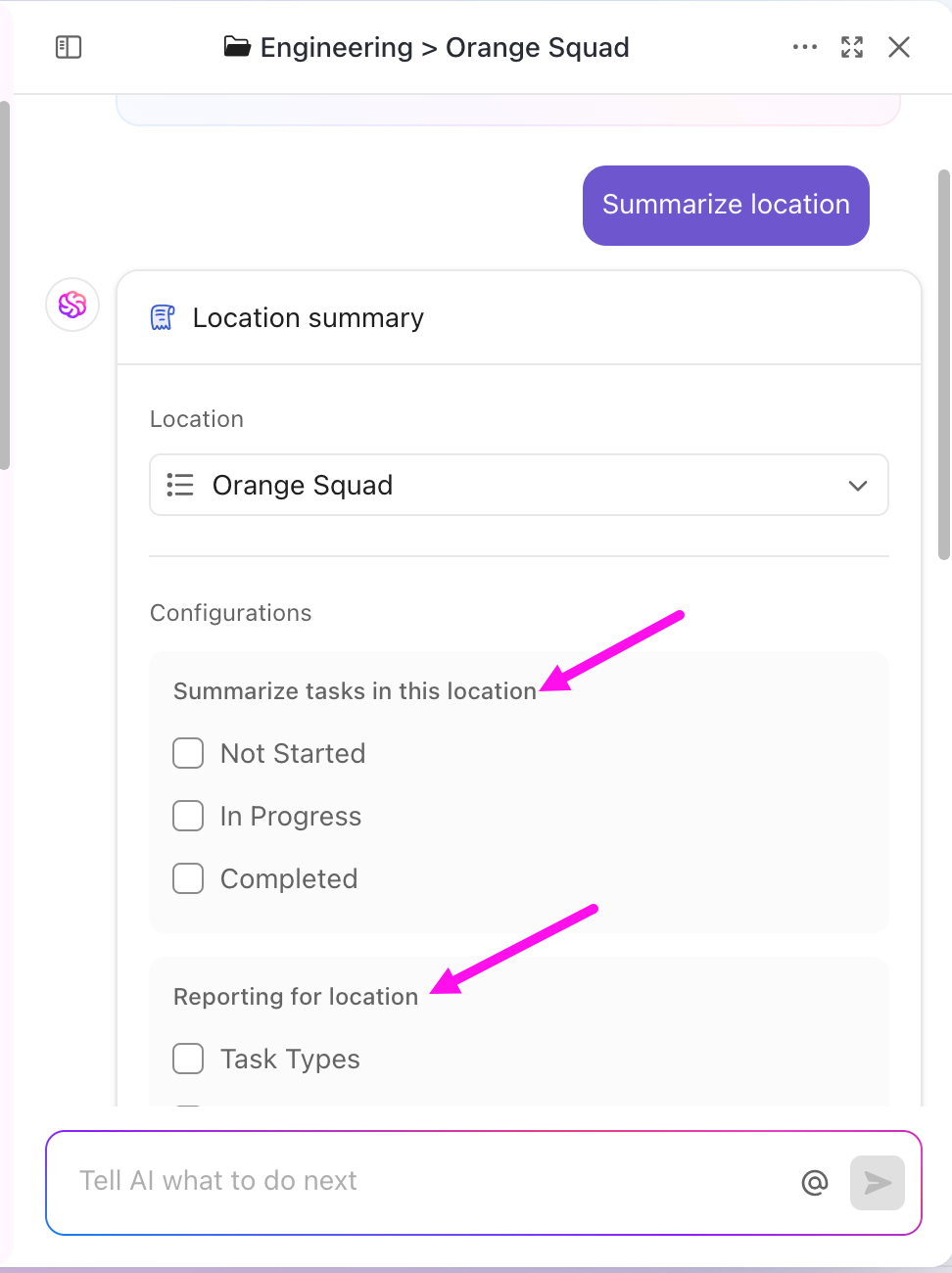
Brain is also context-aware. When a new client request comes in, Brain assesses if it’s within or outside scope and flags it, and even suggests creating a change request task for approval.
You catch potential scope creep at the comment stage, not after wasting hours on the new work.
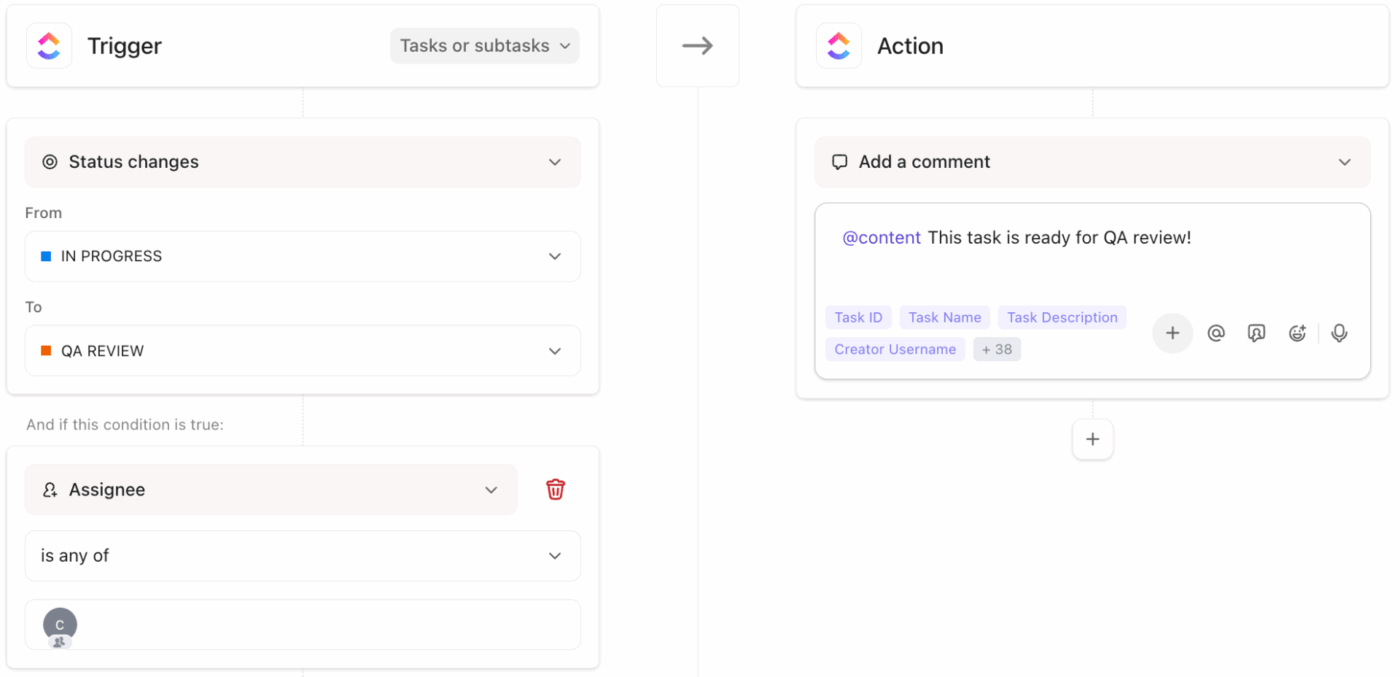
This scope management tool has a standout feature: ClickUp Automations, the no-code builder whose ‘if this, then that’ rules let you create custom automated workflows in minutes. Set the rules once, and the system handles notifications, task routing, and stakeholder visibility automatically.
For example, you can create an automation to:
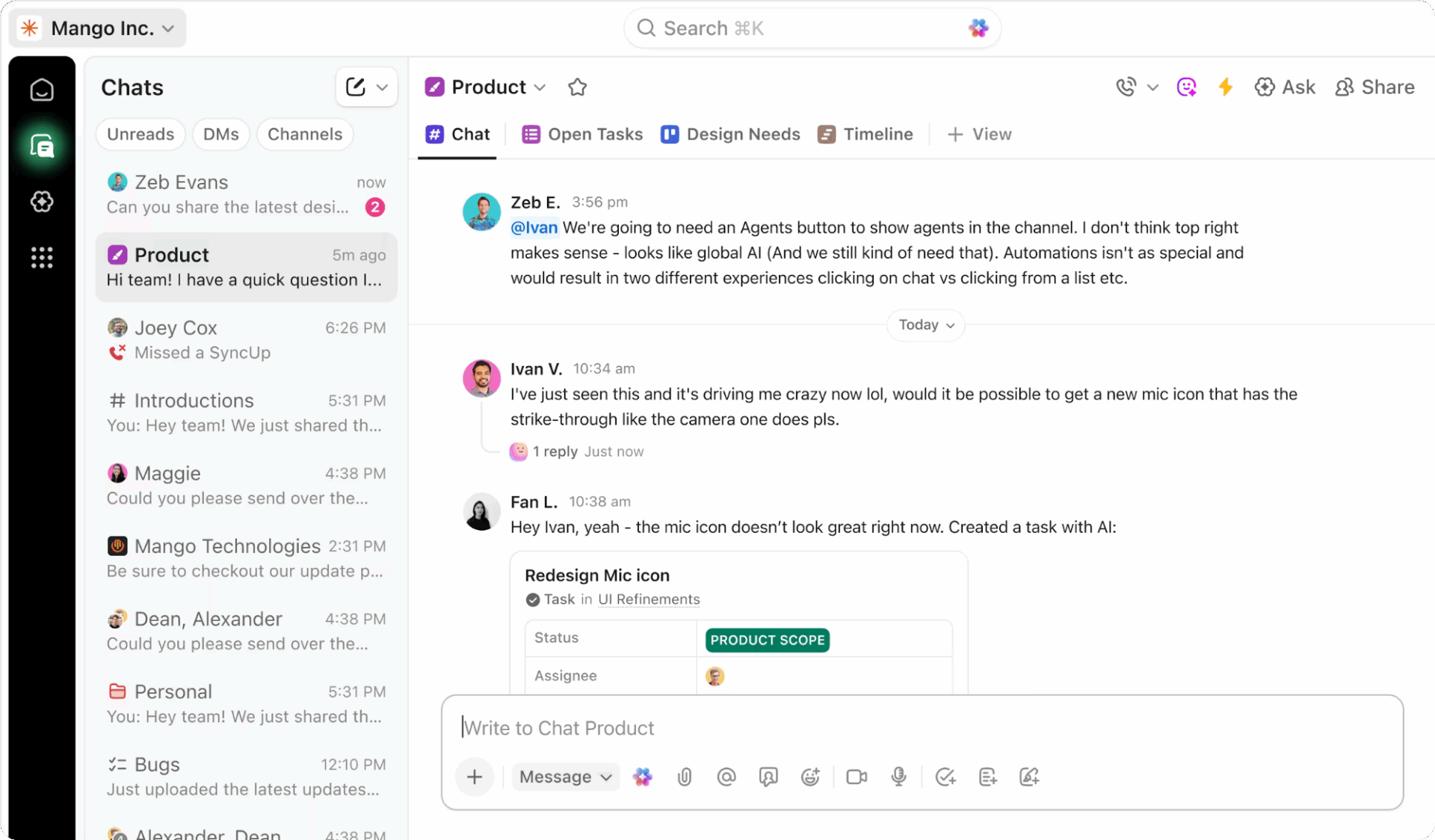
ClickUp’s PM software centralizes all project communication, making it easy to keep everyone aligned and manage scope creep.
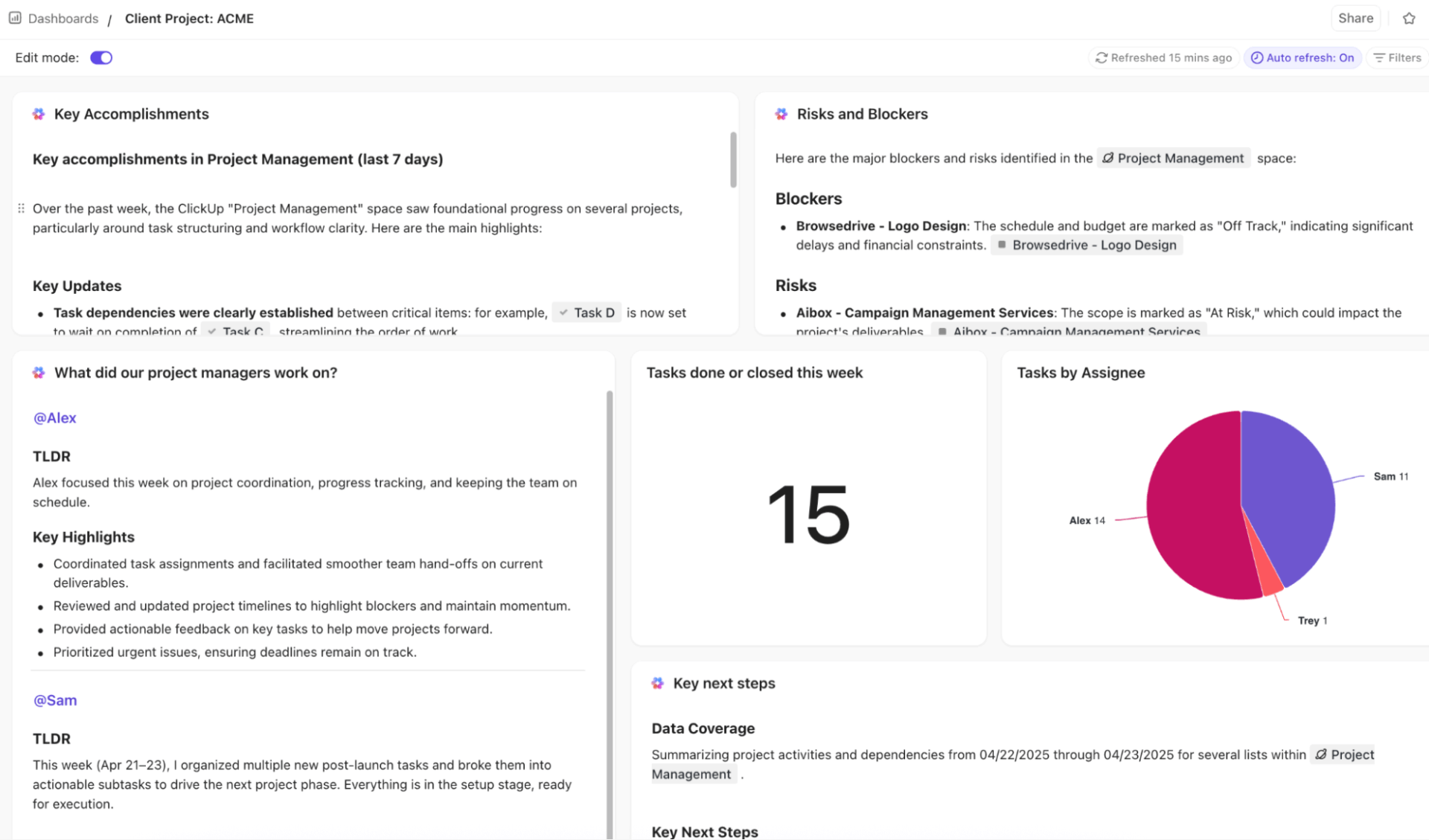
ClickUp Dashboards provide real-time insight into what’s completed, what’s pending, the roadblocks, etc. AI Cards give you instant summaries, helping you save time that would otherwise be wasted in analyzing data.
This project manager’s review says it all:
ClickUp offers an impressive range of features that make it easy to customize workflows, manage tasks, and track progress in one place. I love how I can create views tailored to each project, set automations, and integrate it with other tools I already use. It’s very versatile, whether for personal task tracking or complex business operations. The templates and dashboards are especially helpful for keeping everything organized and easy to follow.
📮 ClickUp Insight: Only 15% of managers check workloads before assigning new tasks. Another 24% assign tasks based solely on project deadlines.
The result? Teams end up either overworked or underused, and in most cases, burnt out.
Without real-time visibility into workloads, balancing them isn’t just hard — it’s almost impossible.
ClickUp’s AI-powered Assign and Prioritize features help you assign work equally within the team by matching tasks to team members based on real-time capacity, availability, and skills. Try our AI Cards for instant, contextual snapshots of workload, deadlines, and priorities.
💫 Real Results: Lulu Press saves 1 hour per day, per employee using ClickUp Automations — leading to a 12% increase in work efficiency.
🧠 Fun Fact: The Sydney Opera House is considered one of the worst project management failures of our time. It was 10 years late, 14 times over budget, and the architect never saw it completed.
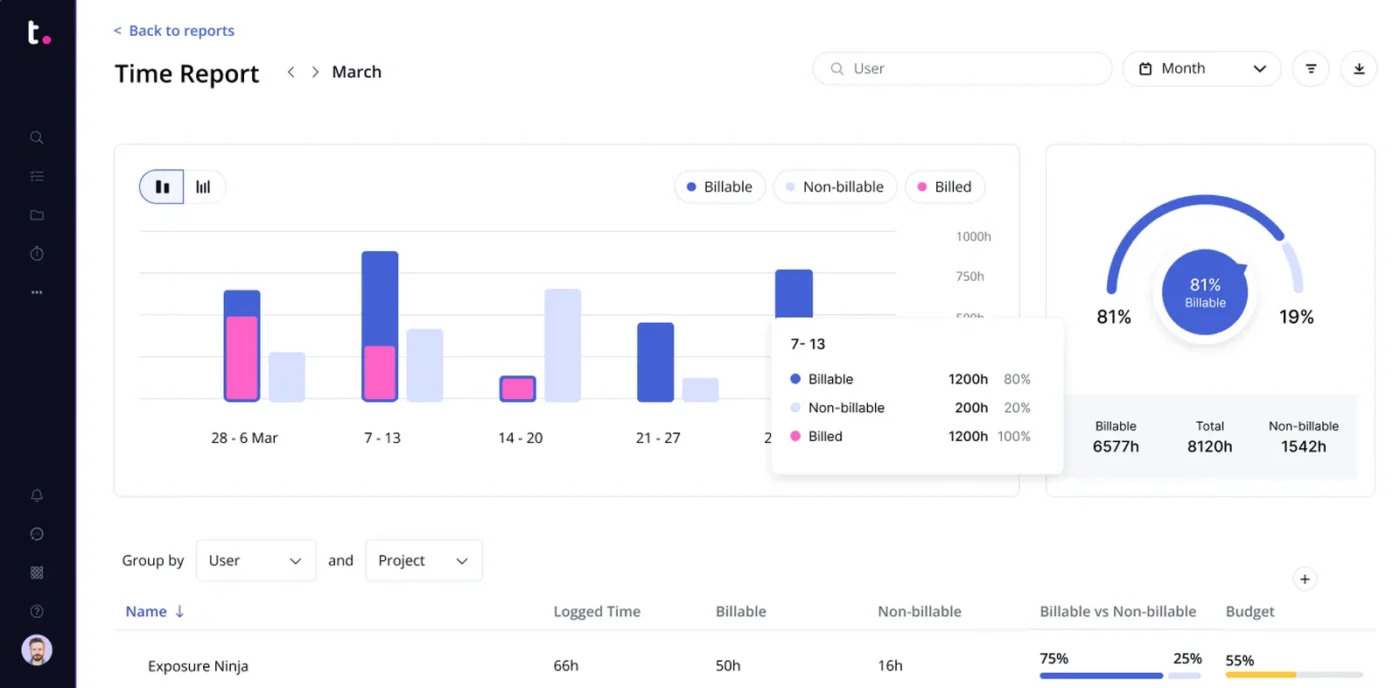
Teamwork is a PM software built for agencies and client service teams that handle time-sensitive projects within a tight budget, even when faced with challenges like scope creep.
This project management software gives you project boards to create timelines, set milestones, and map all deliverables in one place. This ensures that the team and the client are both on the same page.
For client management, a centralized proofs hub helps see each proof’s current status, with a historical log of all feedback from start to finish. To avoid scope creep, the tool lets you monitor and review internal and external feedback, whether it comes from clients or your team.
A feature in this PM software that helps me manage scope creep is budgeting and profitability.
By tracking time and linking it to our project budget, Teamwork gives me real-time reports on project profitability. If a new request threatens to push us into the red, I have the data right there to explain the necessity of a change order. Moreover, I can set and track profit margin targets.
Since I manage multiple projects simultaneously, creating spreadsheets for each of them is time-intensive. Teamwork helps me quickly make adjustments to deliverables, pricing, timelines, and resources.
Here’s what a G2 user says about using Teamwork to manage multiple projects:
We have a team of four leads, each with between 5 and 15 projects going at once and at various stages of completion. These are year-long projects with so many moving pieces that without our project manager and Teamwork, we would not be able to do as much as we do. Not only do we get everything accomplished, we do it on time and on budget.
🧠 Fun Fact: The Gantt chart, a PM favorite, is over 100 years old (invented in 1910!). It’s older than the internet, TV, and even sliced bread.
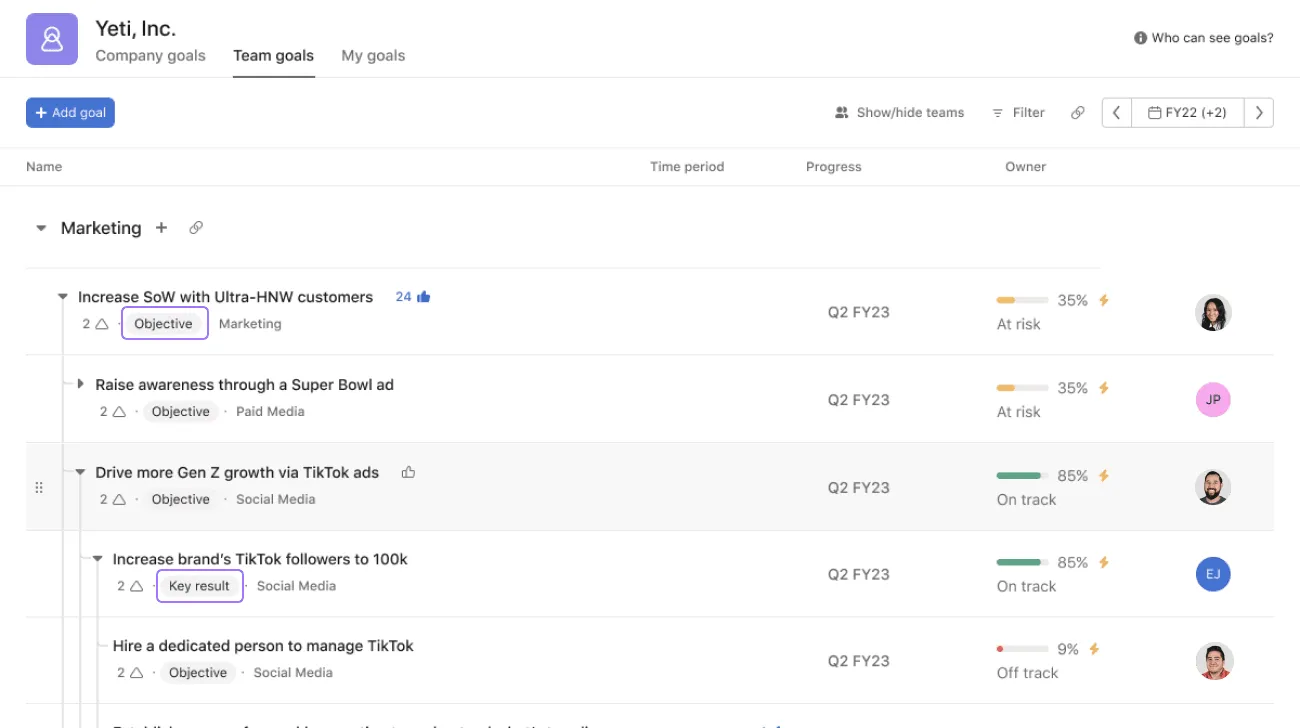
Asana simplifies task and workflow management for teams of all sizes, especially those coordinating remotely. As a PM tool, Asana makes it easy to connect day-to-day work with broader business goals, thus reducing scope creep and bringing more clarity into your projects.
Organize your projects in Asana using pre-built templates, assign tasks with owners and deadlines, visualize progress, and track everything in one place to avoid any last-minute changes to your timelines.
You can easily integrate tools such as task management software, development tools, reporting tools, and collaboration tools, among many others, into your tech stack with Asana.
A feature I’ve recently started using is AI Teammates for AI-powered project execution. It uses Asana’s Work Graph data model to provide business context across all interactions. For example, AI Teammates can analyze project history and recommend realistic timeline adjustments based on previous launches or similar deliverables.
The Asana AI Studio includes a no-code workflow builder that helps you at every stage. AI can capture, sort, and assign intake requests, which you can then verify. AI can also draft the initial version of a project brief and summarize stakeholder feedback.
Here’s what a manager involved in strategy has to say about Asana on G2:
What I appreciate most is the AI-powered efficiency. The smart suggestions and task automation features save me hours every week, making it feel as though I have a digital co-pilot anticipating my next move.
Here are some other project management tools that also help you with scope management.
⚠️ The Concept of Gold Plating: Using PM tools will help you set processes in place. But here’s a concept that, according to Shopify’s Growth Marketing Lead, Simon Heaton, leaves you vulnerable: gold plating.
It means adding extra features, enhancements, or work that wasn’t part of the original project scope or client requirements. It is an attempt to please the customer or deliver something better than asked for. Gold plating drives up internal costs with no additional benefits.
👀 Did You Know: Workplace burnout increases the risks of hypertension, depressive disorders, and diabetes in employees. 7% of employees experience burnout from overworking. On the flipside, 20% get demotivated and disengaged from work when they’re underutilized. It is imperative for employers to ensure an equitable distribution of work amongst employees to prevent burnout.
PM software can ease much of the stress that comes with scope creep through meticulous organization. But that alone isn’t enough. You also need to employ the right approach to managing multiple priorities as client demands evolve:
When everything feels urgent, nothing truly gets done. When resources are scarce, it’s essential to communicate effectively with your client to determine which deliverables you need to work on immediately and which can be deferred.
🌟 Example: Instead of simply agreeing to every client request, you can explain to them how the new priorities will affect the existing project schedule, and if they’re okay with it.
Something like, “If we add this new feature, which existing task should we push back?” not only protects timelines but also keeps clients engaged in making trade-offs.
⚡ Template Archive: Free Project Prioritization Templates
By breaking big, vague deliverables into smaller tasks, you can not only make progress measurable, but also prevent clients from casually adding just one more thing.
When each task is visible on your project board, it becomes easier to manage them all and deliver on time.
🌟 Example: Consider a campaign launch. Instead of treating “create campaign assets” as a single task, you can divide it into “design hero banner,” “write landing page copy,” and “product social media graphics.”
A common mistake when managing multiple projects? Assigning work without checking if your team actually has the bandwidth.
Capacity planning ensures that work is distributed fairly and realistically. It also keeps conversations with clients fact-based, such as – ‘We can take this on the next sprint, but adding it now will delay X milestone.’
🌟 Example: If your designer already has 30 hours of committed work this week, avoid giving them another “urgent” task without taking anything else off their to-do list first.
⭐ Bonus: AI agents in ClickUp can help.
Pre-built Agents handle all the routine stuff: reminding your team of deadlines, sharing daily updates with clients, or answering quick questions about the project.
Put together a Custom Agent to automate complex actions like assigning tasks based on workload or sharing project summaries with stakeholders. This way, your projects run smoothly in the background, without constant supervision.
Setting up an AI agent in ClickUp is pretty simple. Watch this video to learn how:
⚡ Template Archive: Free Multiple Project Tracking Templates
Scope creep and competing priorities are an inalienable part of life for a project management professional. But don’t let it torpedo your project.
With the right PM software, it becomes an opportunity to boost your bottom line and schedule your deliverables more efficiently.
Teamwork is ideal for agencies that bill clients by the hour or need granular visibility into profitability and resource use.
Asana works best for teams that thrive on structure—helping them map out repeatable workflows, automate approvals, and stay aligned with broader business goals.
But ClickUp is built for scope management for teams of all sizes, within a unified all-in-one workspace.
If you want one project management platform that connects everything—from project scope and client communication to AI-powered summaries and workflow automation—ClickUp is built for you.
With ClickUp Brain, you get context-aware insights, and with Automations and AI Autopilot Agents, you can let routine approvals, updates, and follow-ups run in the background while you focus on client strategy.
If scope creep is draining your ability to deliver projects, I recommend you sign up for ClickUp for free and give it a try.

© 2026 ClickUp

There’s an easier way. Try a free AI Agent in ClickUp that actually does the work for you—set up in minutes, save hours every week.