


When your business finally turns the window shoppers into loyal customers, the demand for your products surges. As an inventory manager, it’s your job to keep everything running smoothly, ensuring you’re tracking, recording, and monitoring stock to meet that rising demand.
But the real question is, how do you track your inventory accurately? How do you know what’s running low or costing you more in storage?
In this guide, we’ll break down inventory lists, including what they are, why they’re essential, and the different types you can use.
We’ll also share the perfect tool and an inventory checklist template to speed up the process, making inventory management a breeze. Let’s go! 🚀
How to Make an Inventory List (+Template)

 Summarize this article for me please
⏰ 60-Second Summary
🏁 Inventory lists track your stock, including items, quantities, and SKUs
🏁 Inventory sheets help manage stock levels, preventing overstocking or shortage
🏁 To create an inventory list, start by assessing your needs, choosing the right tool, and using templates like this one to organize your list efficiently and assign roles for faster management
🏁 For quicker tracking, follow our tips and best practices on customizing templates and using specific roles
🏁 Use ClickUp to streamline the inventory management process end-to-end. With features like templates, Custom Status, Dashboard, and Table View, you can monitor current stock levels, identify trends, and optimize resource allocation
Summarize this article for me pleaseWhat Is an Inventory List?
An inventory list is a snapshot of everything your business has in stock. It’s an itemized list of all your products or materials, from raw supplies to finished goods. It helps you keep track of everything you’ve got so you don’t overstock or run out of anything important.
Each entry typically shows the item description, the quantity you have on hand, the item’s SKU number, and sometimes additional details like where it’s located or the supplier name.
This list is key to managing stock levels and ensuring you meet customer demand without losing money on excess inventory.
Benefits of an inventory list
Let’s look at the many ways an inventory list makes your business more efficient:
👩💼 Meet customer demand on time
When you scramble to reorder materials at the last minute, you miss out on deals, discounts, and profits. With an inventory list, you’ll always know what’s in stock to fulfill customer orders on time without the stress. This way, you stay ahead of demand and make the most of your inventory without hiccups.
📈 Data-driven insights
Using modern software to manage stocks enables you to spot trends in customer buying patterns, see which products are flying off the shelves and why, and predict seasonal demand. This real-time data analysis helps you decide what to order and when.
💸 Improved budgeting and financial planning
Tracking inventory lists makes budgeting and financial planning a whole lot easier. You can adjust your budget to improve profitability (while avoiding stockouts or overstocking) just by identifying which products are doing well and which aren’t.
Types of inventory list
There are different types of inventory lists for different needs. Let’s look at three of the most common ones that inventory managers use 👇
1. Raw materials
Raw materials inventory lists help you track materials you have on hand to make finished products. With complete visibility into your raw material needs and availability, you can keep production lines moving smoothly.
2. Work-in-process
Work-in-process inventory lists track items currently being worked on or used in production. This detailed record is helpful when you need to quickly check or reorder materials if things don’t go as planned at the last minute.
3. Finished goods
This is the simplest type of inventory list—just a record of all the finished goods ready for sale. By updating it regularly, you’ll have a clear view of what’s ready to ship, helping plan marketing strategies and creating demand for your products.
Summarize this article for me pleaseComponents of an Effective Inventory List
Create a thorough and effective inventory list to keep your inventory tracking on point.
Here are the key components a company’s inventory list should include:
- Product names: List each product by name, but feel free to use shorter or more familiar versions as long as everyone can identify products without confusion
- Unique descriptions: For products of the same category (like jackets), add an attribute, like color, size, or model, to make it easy to tell them apart. For example, ‘Size 10 brown-colored jacket’
- Stock Keeping Unit (SKU): SKUs are unique alphanumeric codes for each product, such as ‘AKSNA01.’ They make it easier to track and identify items, so be sure each product gets its own SKU
- Quantities: This one’s key! Keep track of how many units of each item you have on hand. Accurate numbers help you avoid overstocking or running out of stock
- Locations: If your products are spread across different warehouses, note where each item is stored, whether that’s a specific warehouse, shelf, or storage bin. This makes finding and retrieving products a lot quicker
- Reordering thresholds: Set a minimum stock level for each item; this way, you’ll get an alert when it’s time to reorder before you run out
- Supplier details: Keep your supplier’s contact info handy, like name, phone number, and email, so you can quickly get in touch when it’s time to place an order
- Expiration date: If the items have expiration dates (like food or beauty products), add that info to your inventory list
While these are the must-have components, you can add more or modify them based on your industry.
Also Read: What is a Goods Received Note (GRN)?
Summarize this article for me pleaseCreating an Inventory List: A Step-by-Step Guide
Step 1: Assess your needs
Before you start creating an inventory list, perform an initial assessment of the items that need to be inventoried. Use the ABC method to classify items based on their worth, demand, sales value, usage frequency, etc.
Also, this is where you decide how detailed your inventory list will be. You can include primary details, such as SKU, category, stock level, and storage location, or add details like special storage needs, supplier details, and lead time for restocking.
Based on this initial assessment, you can decide on the tool that will help optimize inventory management costs and efficiency.
Step 2: Select the right tools
There are a few ways to create an inventory list, depending on your needs:
- Manual processes: If you’re starting simple, you can rely on a manual inventory list. It’s economical but time-consuming and prone to mistakes, especially when tracking several inventory levels
- Microsoft Excel or Google Sheets: Microsoft Excel or Google Sheets organizes your inventory list in rows and columns where you can set up automatic formulas to update numbers as you change your stock quantity. This helps reduce errors and streamline tracking, but this still requires manual data entry
- Inventory management software: With inventory management software, you can manage inventory turnover, set reorder points, and even perform data analysis to track and optimize stock quantity
Step 3: Use pre-built templates
An advanced inventory management software offers free inventory templates that keep everything organized, track stock in real time, and automate the entire process.
These pre-designed frameworks can be customized for unique business needs and integrated with sales, accounting, and supply chain management systems.
⌛ Time-Saver: Use ClickUp’s Inventory Template to track your inventory. Add all the components—like SKUs, reordering thresholds, and total inventory value—and modify it for your industry.
Summarize this article for me pleaseUsing ClickUp for Inventory Management
ClickUp is an all-in-one platform that takes the headache out of managing your inventory.
Instead of juggling multiple tools for different needs, ClickUp lets you do it all, from creating inventory lists to tracking your stock levels in one place.
ClickUp Table View
For starters, ClickUp’s Table View makes inventory tracking much more intuitive. Think of it like an inventory spreadsheet but with way more power.
It lets you create, update, and organize inventory lists with ease, all while keeping everything interconnected.
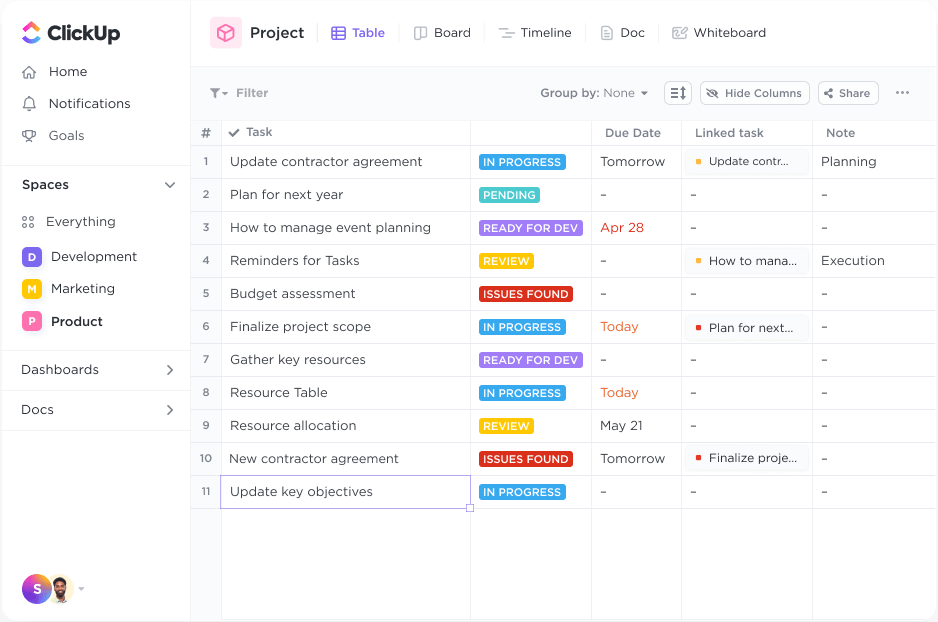
With ClickUp’s Custom Task Statuses and labels, you can get a comprehensive overview of your inventory and establish relationships to streamline inventory management.
To further enhance your inventory list, you can:
- Customize the spreadsheet with robust filter and grouping options
- Pin columns to easily sort and retrieve inventory information
- Drag-and-drop columns to organize inventory data according to your needs
ClickUp Dashboard
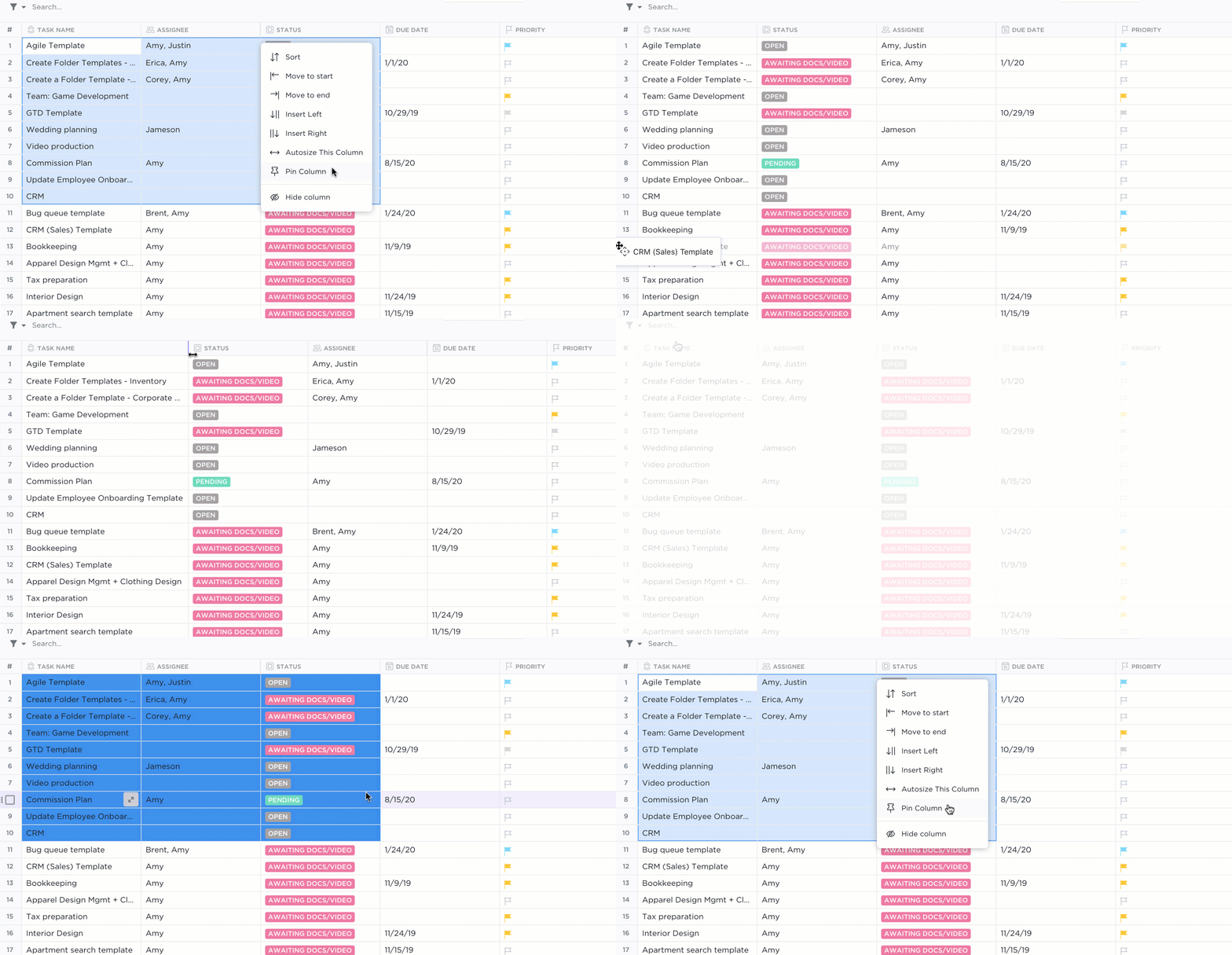
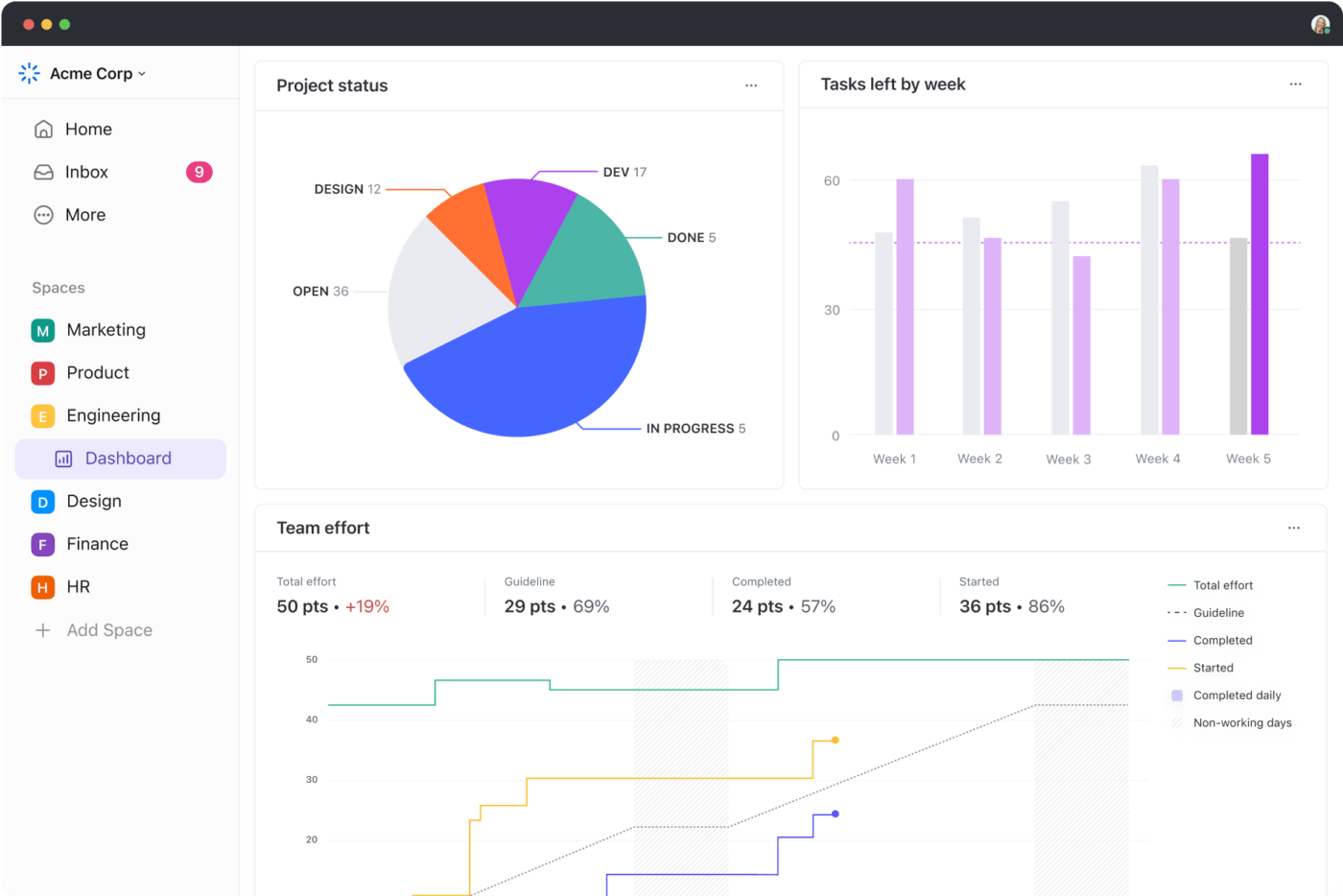
ClickUp Dashboards provide a 360° view across your inventory and allow you to share insights with key decision-makers.
Dashboards are super customizable, too. Whether you’re tracking inventory turnover, team performance, or sales, you can add charts, graphs, and cards that make the data easy to digest and act on. That’s not all! With ClickUp Automations, you can automate routine tasks such as low-stock alerts and inventory replenishment activities.
Moreover, ClickUp’s library of free inventory and order tracking templates provides ready-to-use frameworks to track stock levels, order statuses, vendors, costs, and more.
ClickUp Inventory Management Template
For instance, ClickUp’s Inventory Management Template makes it easy to manage large or complex inventories across multiple locations and sales channels.

Here’s how to put this free template to work for you →
- Organize inventory data and track insights such as inventory levels, stock availability, stock movements, and cost changes
- Create tasks with Custom Statuses such as ‘In Stock’, ‘No Longer Used’, and ‘Out of Stock’ to track stock items
- Set up recurring tasks with ClickUp Automations to review your inventory flow, streamlining daily operations and auditing processes
Summarize this article for me pleaseBest Practices for Inventory List Management
To get the most out of your inventory list, here are some best practices to follow:
1. Regular auditing and reconciliation of inventory
An inventory list isn’t just a one-and-done task; it’s a living document. Regular audits and compliance checks ensure each inventory management process aligns with industry-specific rules and regulations.
✅ Audit your inventory regularly and reconcile it with physical counts
✅ Document discrepancies, analyze causes, and take corrective action
✅ Create standard operating procedures (SOPs) for inventory management best practices
2. Strategies for maintaining accuracy and reducing errors
Accuracy is everything when it comes to inventory management. A quick way to measure how well you’re doing is by calculating your accuracy rate:
Inventory accuracy rate = Counted units / Units on record × 100
✅ Use inventory management software to automate processes and minimize errors
✅ Analyze historical data and demand forecasting tools to predict needs accurately
✅ Standardize labeling, item descriptions, units of measure, etc., to prevent confusion
3. Leveraging technology for real-time inventory management
Inventory management software can significantly improve your inventory planning. With the help of AI and automation, these tools provide real-time visibility into inventory levels and ensure seamless order fulfillment without overstocking.
✅ Track stock movement and reduce handling errors with barcode scanning and radio-frequency identification (RFID) systems
✅ Use a project management solution to centralize inventory data and enhance collaboration
✅ Enable real-time tracking of shipment during transportation with GPS and geo-tagging
Summarize this article for me pleaseCommon Challenges in Inventory List Creation
Every business faces its own hurdles in creating an inventory list, but some challenges seem universal across industries.
Let’s break them down:
1. Data handling issues
Managing an inventory list with outdated software might work when you’re dealing with a small inventory or a single warehouse.
But as your business grows, juggling tons of inventory across multiple storage locations becomes daunting. The process often becomes time-consuming, requiring additional labor to collect and input data.
2. Inaccuracies and redundancies
Relying on manual methods or multiple spreadsheets to manage inventory lists often leads to errors, redundancies, and discrepancies. These mistakes can result in overstocking, financial strain, or wrong product deliveries—issues no business can afford.
👀 Did You Know? A study by Netstock revealed that nearly 80% of SMBs struggle with overstocking, with excess stock accounting for 38% of their inventory. This highlights how poor inventory tracking and inefficient processes impact businesses worldwide.
3. Large-scale inventories
Legacy systems and spreadsheets for inventory list creation often need to integrate with existing business tools like ERP systems, e-commerce inventory management software, or procurement management software.
This creates silos, making it harder to manage workflows.
Summarize this article for me pleaseBenefits of Using Technology in Inventory Management
Technology simplifies the inventory management process, making it faster, smarter, and seamless. Here’s how:
1. Automation and efficiency in inventory processes
With advanced inventory management tools, you can automate repetitive tasks like tracking stock quantity, generating reports, and creating purchase orders. This frees up your team to focus on more strategic business operations.
2. Real-time data and analytics for informed decision-making
Real-time tracking lets you monitor stock levels and calculate lead time easily. This enables businesses to respond quickly to demand fluctuations and ensure customers always find what they want.
👀 Did You Know? According to a study, leveraging AI technologies to manage inventory levels helps reduce the effects of extreme error by 60% and safety stock by 40-50%.
3. Cost savings and resource optimization
Cost savings come naturally when you automate workflows through inventory management tools and logistics software. As a result, you can eliminate errors and reduce costs tied to excess inventory or lost sales. The result? A leaner, more profitable inventory management process for your business.
4. Increased flexibility and scalability
Cloud-based inventory management systems let you adjust your setup on the fly, whether it’s adding new modules or managing stock quantity across locations. They’re built to grow your business so you stay competitive without breaking a sweat.
Summarize this article for me pleaseStreamline Your Inventory Management Processes With ClickUp
Creating accurate inventory lists is vital for preventing stockouts and understocking, meeting customer demands, and improving your cash flow.
A good inventory list offers a 360-degree view of your inventory, leading to accurate business decisions and streamlining inventory replenishment processes.
ClickUp offers a comprehensive solution to simplify inventory management. With a wide range of features and free inventory templates, you can monitor current stock levels, identify trends, make better decisions, and optimize resource allocation.
Sign up on ClickUp for free and take control of your inventory system today.


Everything you need to stay organized and get work done.

Recent Articles
What Is Tacit Knowledge? Definition, Benefits and Examples 
What Is Tacit Knowledge? Definition, Benefits and Examples
AI Performance Metrics: 50+ KPIs to Measure AI-Driven Efficiency 
AI Performance Metrics: 50+ KPIs to Measure AI-Driven Efficiency
