


Sorry, there were no results found for “”
Sorry, there were no results found for “”
Sorry, there were no results found for “”
A CRM (customer relationship management) tool is mission-critical for most businesses today. It’s not just a lifeless database of prospective and existing customers; it’s a key business enabler that ushers strangers along the path to becoming satisfied customers and loyal advocates.
Of course, a tool is just that.🛠️ When it comes to maximizing your marketing ROI, you need more. You need a plan.
That’s where CRM campaigns come in. Built on top of customer research and a solid marketing strategy, effective CRM campaigns help you close more deals and nurture lasting customer relationships.
Let’s talk about what makes CRM campaigns valuable, check out examples of CRM campaigns, and discover how to craft winning CRM strategies that convert cold leads into repeat buyers.
But first, here are the basics.
A CRM campaign is a coordinated series of marketing actions that use CRM software to manage interactions with existing and potential customers. These campaigns analyze customer data, personalize communication, and foster a long-term relationship with your customer base to enhance retention and drive sales growth.
Essentially, a CRM campaign is a marketing campaign that’s hyper-personalized and targeted towards leads and customers in your CRM database. For example, onboarding and trial emails to your leads and customers are examples of CRM campaigns.
Some common characteristics of a CRM campaign are:
A CRM system bridges the gap between customer, marketing, and sales teams and unites them toward common goals: customer engagement, conversion, and retention. For this reason, CRM campaigns—when run well—are highly effective.
Here are the top benefits of using CRM software to run your marketing campaigns:
Well-executed CRM campaigns can go a long way in engaging customers, building customer loyalty, and increasing a customer’s lifetime value.
Now that we’ve seen the benefits of CRM campaigns, let’s explore some examples of CRM campaigns done right. CRM campaigns can be used at all stages of a customer’s journey. Here are some ideas for how you can incorporate CRM campaigns at different funnel stages:
Not just this, you can also use CRM campaigns after you close a deal—to onboard customers, request testimonials, and share product updates.
Here are some ways you can use features in your CRM software to deepen your customer relationships.
The most common type of CRM campaign, triggered emails are sent to your prospects and customers at different stages of their journey. ✉️They’re heavily used in B2B CRM strategy, and businesses typically send one to five emails each month.
Good CRM software has built-in email automation that helps you segment your customer list so they receive highly contextual and personalized emails.


Depending on your business type and platform used, there are endless CRM campaign templates online that you can use to design relevant campaigns.
Another useful feature of most marketing CRM platforms is web forms. Anytime you create gated content—ebooks, white papers, free tools—or a landing page, you can use these web forms to get lead information.
Lead information is automatically synced with your CRM tool, so you can add these leads to different workflows and engage with them appropriately.
Many SaaS companies—including HubSpot, Salesforce, or Cvent—collect visitor data using web forms before providing access to their long-form content pieces and free tools.
CRM software also shines in social media ads and retargeting campaigns. Most CRM tools have a social CRM feature that allows you to integrate your CRM with your social media accounts to nurture customer relationships.
Here are some ways these tools can help:
While both LinkedIn and Facebook give companies many ways to retarget website visitors, adding a social CRM to the mix will improve your chances.
A lot goes into running a CRM campaign—from deciding your campaign goals to segmenting your audience and setting up workflows. But what if you could do all of it and more in one place?
Some of the world’s best-performing marketing teams use ClickUp for marketing to run their CRM campaigns from start to finish. But before you get cracking, here are some basic tasks to complete:
Next, you must create a comprehensive strategy document for your CRM campaign. Your strategy should establish the following:

ClickUp Docs is a versatile tool packed with brainstorming features like Whiteboards and Mindmaps, that come in handy when drafting your campaign strategy plan. Add the strategy document to a team folder and share it with all stakeholders so everyone can collaborate to build the CRM campaign strategy.
Bonus tip: Create a custom template of your strategy document and duplicate it for all future CRM campaigns.

The next step is breaking your strategy document into actionable tasks and subtasks, such as:
Each of these tasks should have a DRI and due date. You can also include information like dependencies, priority levels, and task details.

As a project management app, ClickUp has all the tools you’ll need to track your campaign tasks in real time. These features will make task tracking faster and easier:
Bonus tip: Add video or screen recording clips to task descriptions to give teammates more context.
Now that you’ve completed the planning phase of your CRM campaign, it’s time to start the execution.
Begin by creating an audience list.
You can do this by segmenting your customer database using predefined attributes. These attributes are the ‘triggers’ to add a customer to your campaign workflow.

In ClickUp CRM, you can filter your customer database using field information, tags, and statuses. Let’s say you’re running an upselling campaign. In that case, you can create a segmented list of customers who’ve crossed a specific revenue metric or customers who have been active users for a certain period and target them.
Some common criteria that you can use to segment your customer database are:
Bonus tip: Use ClickUp Automations to segment your audience dynamically and send them customized emails and marketing messages based on real-time interactions. For example, if someone purchases a higher plan after your first email, send them a thank-you email; if they haven’t, send them a second nudge.
The next step is to build your content repository, whether emails, additional resources like ebooks and white papers, or product demo videos. If you create this content using different tools, you can add the respective links to your project management tool to make it accessible to your teammates.
Enhance your Use of ClickUp’s AI features to improve your writing
Don’t want to create content from scratch? Let ClickUp AI be your brainstorming partner. Use it to create and edit content, correct grammatical errors, modify tone of voice, and more.
Bonus tip: Localize your emails using ClickUp AI’s translate feature for greater impact and resonance when running regional campaigns.
Now that you’ve laid the groundwork, it’s time to assemble everything together. Create email campaigns in your CRM, set up your workflows, and automate follow-up actions based on customer response.
How ClickUp helps

The Email in ClickUp app is a versatile campaign builder that allows you to generate email workflows from within ClickUp. You can link it to your email provider, compose and schedule emails, and run email automation workflows.
Bonus tip: Create a ‘board’ view of all your customers based on workflow statuses to see at what stage of the CRM campaign your customers are in.
Now, we move to the final step—creating dashboards and reports to track and visualize your campaign progress. As most CRM campaigns run over a long period, you can use these analytics to refine your campaign and hone its effectiveness.
In-depth reports on the success of your campaign will also go a long way toward getting buy-in from stakeholders for advanced campaigns or more resources in the future.

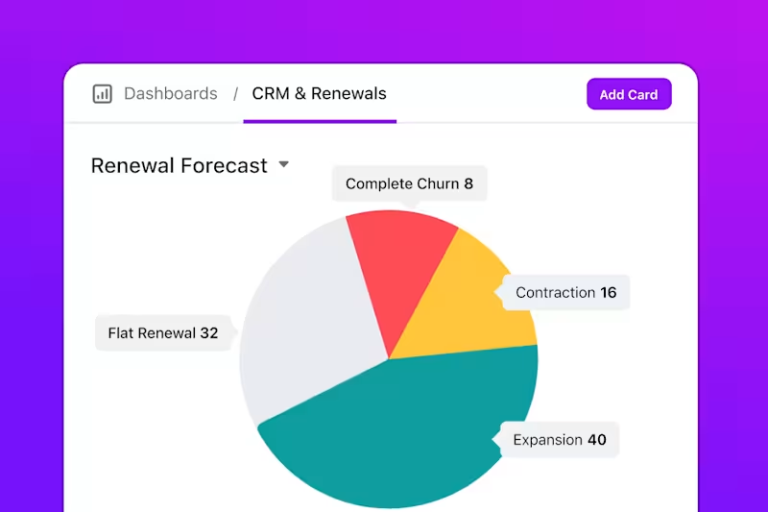
ClickUp provides real-time reporting capabilities and advanced data visualization features that you can use to track the progress of your campaign. This includes details like leads in the pipeline, revenue generated, and more. You can also create custom charts to view the reports exactly how you want.
Bonus tip: Create a ClickUp dashboard with custom tables and charts to view your campaign’s project tracker and weekly campaign progress in the same place.
While CRM campaigns can help you acquire, nurture, and retain customers, a lot rides on the CRM platform you choose. For example, are you looking for a personal CRM tool or a SaaS CRM tool? Also, is your CRM tool just a place to view your customer database, or will your team use it to nurture leads and track projects?
If you’re in the early stages of your company’s growth, it’s always advisable to choose a CRM software that scales with your business—that way, you can use its advanced features as your company grows.
For many marketers, the search ends with ClickUp CRM. It’s an all-in-one tool that runs your CRM campaigns and includes features like project and document management in a single dashboard. With ClickUp CRM, your team will never need to switch between multiple tools.
Give ClickUp a try today!

Sean Hardy
Max 26min read

Manasi Nair
Max 29min read
Manasi Nair
Max 22min read

© 2026 ClickUp





