


Salespeople spend only 36% of their time selling, or a little over two hours a day.
The rest of their time is spent on necessary, everyday tasks like team meetings, sorting through different tech tools, or manually updating CRM systems.
Imagine how much more revenue you’d close each month if these manual practices were taken care of.
This is where project management software can help both sales professionals and project managers. Integrating core project management strategies into sales processes can help sales managers:
- Streamline lead tracking
- Enhance sales forecasting accuracy
- Accelerate the sales cycle
So, sales project management ultimately leads to increased revenue and customer satisfaction.
Want to see how these fundamentals can transform your sales operations? Let’s get into it.
How to Do Project Management for Sales Teams

 Summarize this article for me please
Benefits of Sales Project Management
Implementing project management software in your sales strategies has tangible benefits for your sales team. Here’s a quick look at the top five:
- Clear goal setting: When everyone shares an understanding of the goal, hitting targets becomes simpler. Imagine your team starting each month with well-defined project goals broken down by region and product. This clarity prevents confusion and keeps everyone focused on the same final objective.
- Improved collaboration: Effective project management encourages your teams, like sales, marketing, customer support, etc., to collaborate smoothly. For instance, sales project management tools enable better communication, so marketing knows exactly what types of leads sales need, and sales can provide real-time feedback. This could mean quicker lead qualification and marketing materials that truly resonate with potential customers.
- Smart resource allocation: Knowing where to assign your resources can make a big difference. Say you have a high-value client who needs extra attention. Sales project management helps you adjust your team’s workload so your top performers can nurture this potential customer or key relationship without neglecting their other clients.
- Better time management: With project management tools, your team can organize their day-to-day tasks more effectively, ensuring nothing slips through the cracks. Imagine using a project management tool that alerts your salesperson when it’s time to follow up with a lead or renew a contract. It will keep the sales process on track and efficient. Time tracking tools in project management platforms like ClickUp can also show sales reps where their time is being over- or under-utilized.
- Accountability: Adopting project management in sales helps build accountability by establishing clear roles and responsibilities. When sales opportunities are assigned and tracked as individual tasks, team members feel a greater sense of responsibility and ownership in managing sales projects. It also enables constructive feedback and continuous improvement. For example, auditing all closed lost opportunities can help identify areas of improvement for your team.
Summarize this article for me pleaseKey Components of Sales Project Management
To nail sales project management, it’s crucial to master a few core components. Let’s break down what makes this approach work and how you can apply it effectively.
1. Set clear objectives and goals
Start every project by defining what success looks like. Clearly state your sales goals and objectives so everyone knows what they’re working towards. This alignment is the foundation of effective sales project management and ensures all team members aim for the same outcomes.
For instance, if you’re selling new marketing software to businesses, a clear objective could be to secure 30 new contracts within the next financial quarter. This objective is measurable and provides a target for the sales team.
2. Plan your milestones and strategy
Break down your sales strategy into actionable milestones. This way, you can track progress step-by-step and make adjustments as needed. Planning helps you stay on schedule and keeps the team motivated by celebrating small wins along the way.
Continuing with the software sales example, one milestone could be achieving 100 qualified leads within the first month. This is an actionable step toward the overall objective of securing contracts.
3. Manage risks proactively
Identify potential risks early in the project. Whether it’s market changes, client unpredictability, or internal challenges, having a plan to mitigate these risks keeps you prepared and responsive, reducing the chances of project derailment.
Let’s say a competitor is launching a similar software with more advanced features. A mitigation plan could involve stronger pitches highlighting your software’s ease of use and simplicity or other differentiating features.
4. Establish effective communication channels
Ensure a collaborative environment where everyone can easily share updates, ask questions, and access important information. Setting up efficient and open communication channels such as regular meetings, shared digital workspaces, or instant messaging groups helps maintain clarity and continuity across the team.
💡Pro Tip: Use ClickUp Chat View to share and get instant updates. Assign tasks directly from chats to avoid any confusion and save time.
5. Delegate tasks clearly
Assign tasks based on team members’ strengths and capacities. Clear delegation ensures accountability and optimizes your team’s performance. It’s about giving the right tasks to the right people and providing the support they need to execute them effectively.
6. Conduct a thorough post-project analysis
A detailed post-project analysis allows your sales team to learn from past successes and failures, refine their strategies, identify lessons learned, and ultimately achieve greater success in future projects. Even if the sales objectives are met, analyzing the project might reveal areas of improvement.
For instance, you might find some marketing channels were less effective than others. This information can be used to refine the strategy for future sales projects.
Even the best-laid plans in sales project management can encounter some typical hurdles. Recognizing these challenges is key to effectively navigating them. Let’s explore some specific issues you might face:
Summarize this article for me pleaseCommon Challenges in Sales Project Management
Navigating the world of sales project management isn’t always a smooth journey. You’ll likely encounter a few common hurdles that can disrupt your projects. Here are the three most common challenges:
1. Scope creep in your projects
According to a study by the Project Management Institute, 39% of North American companies experience scope creep in their projects.
Scope creep can occur in a sales project when the goals of a sales campaign expand or shift without clear and necessary adjustments made to resources or timelines. This might happen due to changing client expectations and demands or internal miscommunications about the project’s scope.
The result? Your team may end up chasing moving targets, which can lead to missed deadlines and increased costs without corresponding increases in revenue.
2. Unexpected stakeholders entering the scene
Sales projects often attract interest from unexpected quarters, such as the sudden involvement of an executive or different departments who want to have a say in the project.
These new stakeholders can introduce new requirements or shift the project’s focus, complicating the sales strategy and its execution. Managing these unexpected inputs without derailing the project is a delicate balancing act.
3. Ensuring high client satisfaction throughout the project
Client satisfaction is pivotal in sales project management. Each client’s expectations vary widely, and meeting (or surpassing) them involves more than achieving sales targets.
To keep clients happy, sales teams might have to deliver tailored solutions, respond swiftly to feedback, and adapt processes to meet their needs better—while managing the project’s scope and resources. This dynamic can be particularly challenging as it often requires real-time adjustments and excellent sales project management skills.
Also read: A day in the life of a sales manager
Summarize this article for me pleaseWhat Tools Do You Need To Manage Sales Projects
A quality technology stack can help manage sales projects effectively. Such a system can include various types of software, including:
- CRM systems
- Communication tools
- Analytics platforms
- Project management software
What’s more, you don’t need to overload your system with multiple apps to use all these technologies.
An all-in-one tool like ClickUp unifies project management, CRM functions, communication tools, and analytics. Manage customer relationships, track deals in sales pipelines, and collaborate easily with your team—all within ClickUp.
💡Pro Tip: Don’t want to let go of some existing tools? Then, don’t. ClickUp offers integrations with popular apps like Slack, Google Drive, Salesforce, HubSpot, Zoom, and Dropbox, and more. You can connect your favorite apps and keep using them within the ClickUp ecosystem.
ClickUp: A versatile sales project management platform
ClickUp for Sales Teams excels in blending sales and project management, enabling a sales project manager to oversee the sales project from inception to project delivery. It brings all the necessary tools like B2B CRM software, sales enablement tools, analytics, task management, communication, and more under one roof.
Let’s take a detailed look at how ClickUp can enhance your sales project management:
1. Customer relationship management (CRM) software
With the ClickUp CRM system, you can organize all client interactions and information in one place. It allows teams to manage and track their sales pipeline effectively with customizable views such as Lists, Kanban Boards, and Tables.
These views enable sales teams to visualize their pipeline, monitor progress, and prioritize tasks. Custom fields help track essential details like lead status, deal size, and customer interactions, ensuring no information is overlooked. ClickUp’s contact management system allows you to organize and analyze customer data accurately, facilitating better relationship management.
By automating routine tasks and providing robust pipeline management tools, ClickUp CRM boosts sales team productivity and efficiency.
💡Pro Tip: Automate follow-up tasks with ClickUp Automations to ensure timely responses to leads and keep your sales pipeline moving efficiently.

2. Analytics tools
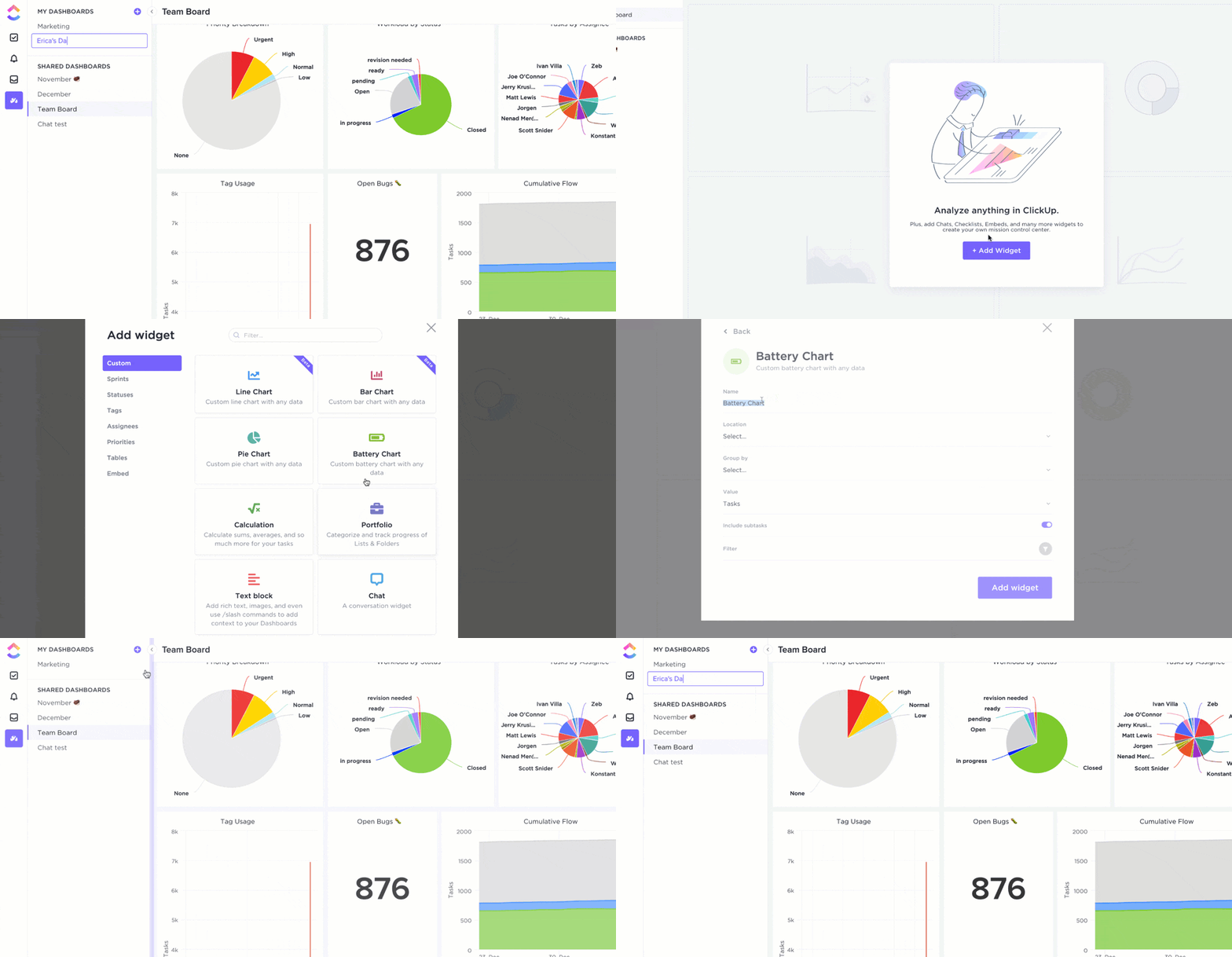
ClickUp’s analytics tools provide real-time insights into your sales KPIs, performance, deal progress, and team productivity. With ClickUp’s Dashboards, you can visualize data trends, track team performance and productivity, and measure success against targets.
Additionally, ClickUp offers customizable reports that you can tailor to your specific needs. It also integrates with many of your day-to-day tools like Salesforce and Zoho, further enhancing your ability to track and analyze sales data.
These analytics help both sales leaders and project managers make data-driven decisions, identify bottlenecks, solve problems quickly, and adjust strategies to improve outcomes. Understanding these metrics allows teams to optimize their sales processes continually and ensures they align with broader business objectives.
3. Centralized task management
With ClickUp Tasks, you can break down any project of any size into smaller, manageable tasks. This helps sales reps manage everything from initial lead tracking to final deal closure in a structured way.
Each task can be tailored to fit the specific needs of the sales process, ensuring that every detail is accounted for. For example, you can add Custom Fields such as ‘Organization size’ or ‘Budget’ to capture specific information.

4. Document and AI integration
ClickUp Docs is especially useful for sales reps needing to access pitch documents, contracts, or strategic plans quickly. Having all related documents linked directly to relevant tasks means quicker preparation for meetings and presentations, boosting overall productivity.
Additionally, ClickUp Brain enhances this integration by providing AI-driven insights and automation. Sales reps can use it to ask questions about documents, receive instant summaries of contents, and even generate meeting notes or presentation outlines.

Also read: How to use AI in sales
5. Goal tracking
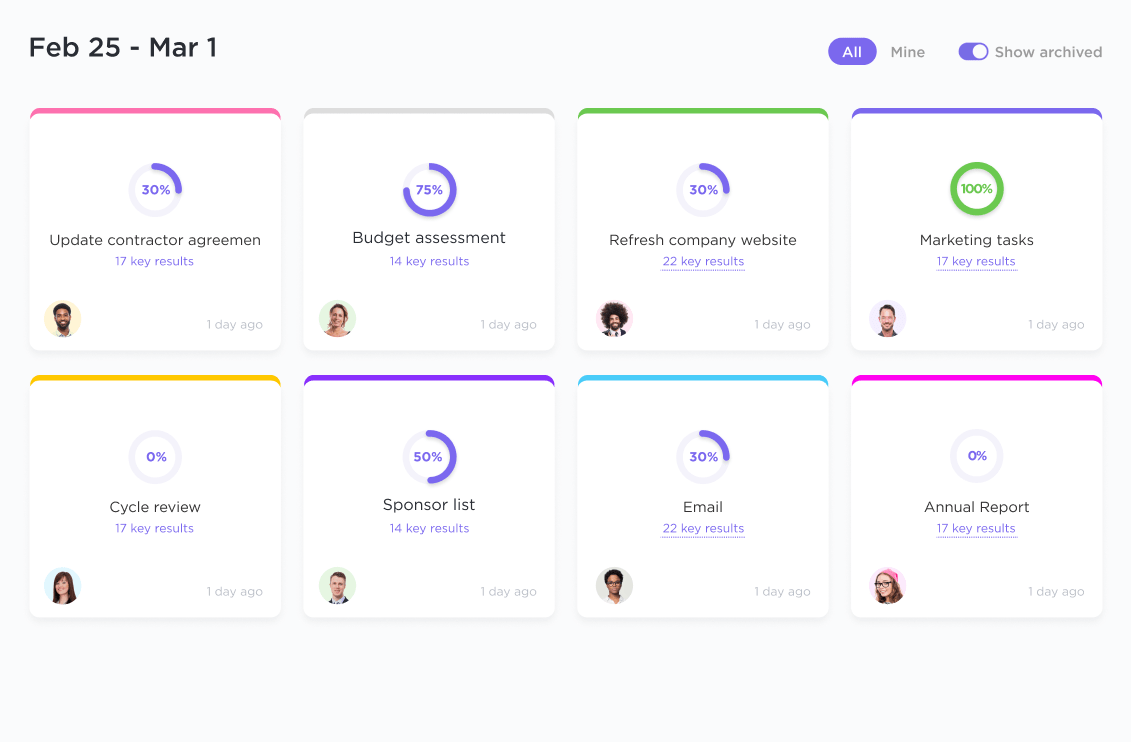
ClickUp Goals enables sales teams to track their work against strategic goals with measurable targets. This is critical for sales where outcomes can be attached to specific objectives, such as quarterly sales targets or customer acquisition goals.
6. Visual collaboration tools
ClickUp Whiteboards bring team ideas to life, facilitating visual collaboration that’s perfect for strategizing sales pitches or mapping out sales funnels. These tools help teams brainstorm in a dynamic, engaging way, making it easier to develop and refine sales strategies.

7. Customizable sales-specific templates
Templates can significantly reduce the time spent on repetitive tasks and help maintain a standard approach to sales-related activities. ClickUp offers multiple sales-specific templates, such as sales plan templates, to streamline processes across your team’s activities. Let’s have a look at a few of these templates:
a. ClickUp’s Sales Plan Template

The ClickUp Sales Plan Template is ideal for setting clear, actionable sales goals. It’s beginner-friendly, fully customizable, and ready to use in seconds. This template helps you structure your sales strategy, track performance, and adapt as needed. This ensures that your team remains aligned and focused on achieving defined targets.
b. ClickUp Sales Pipeline Template

The ClickUp Sales Pipeline Template is designed to efficiently manage your sales process from lead qualification to deal conversion. This ready-to-use, fully customizable template provides a structured approach to tracking leads and managing deals. With features allowing for a consistent qualification framework and deal process, it’s engineered to boost your sales performance.
c. ClickUp Sales Report Template
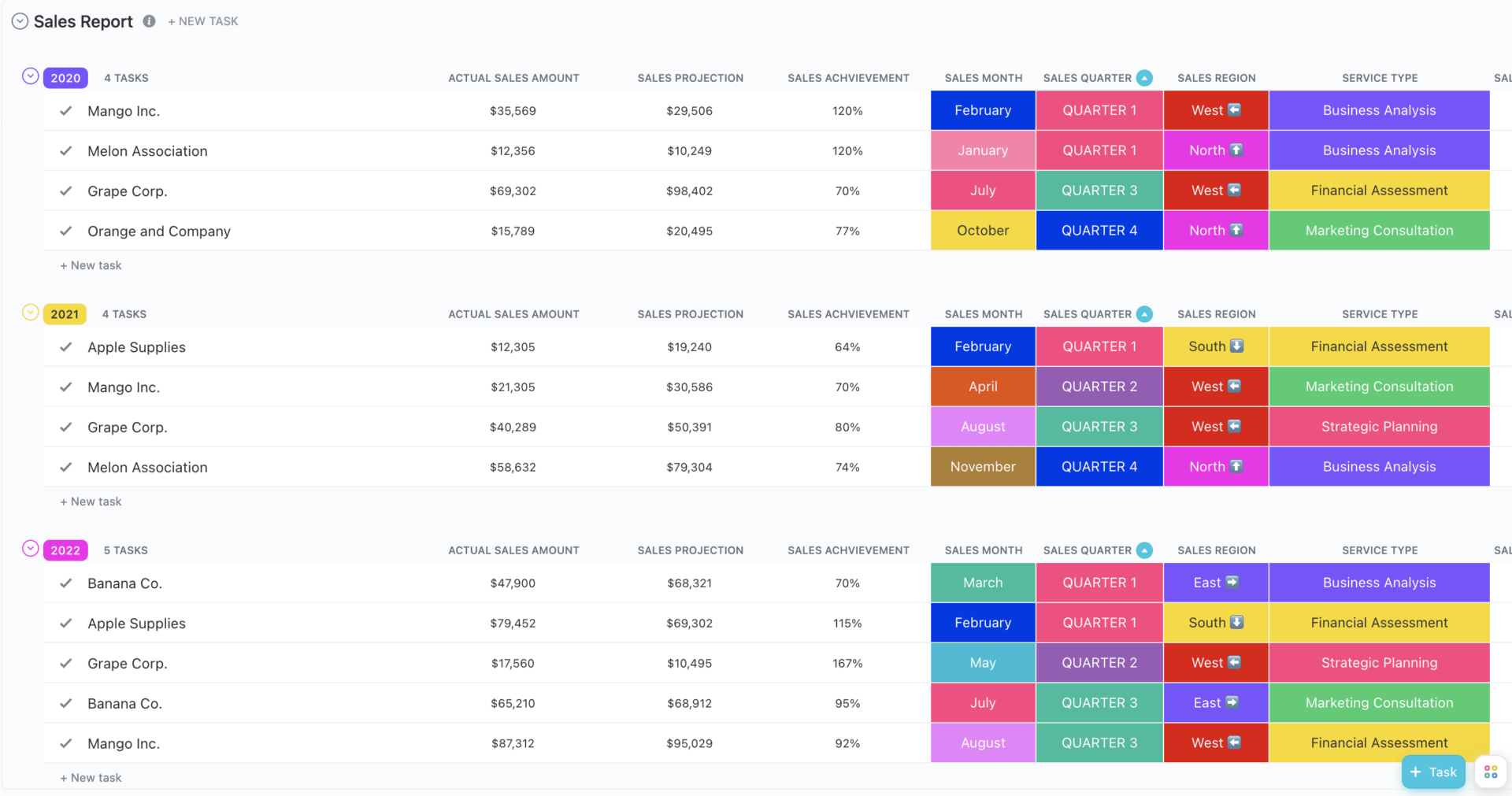
The ClickUp Sales Report Template provides a comprehensive approach to tracking monthly, quarterly, or annual sales. It helps you monitor the progress of your sales activities effectively. It lets you organize key metrics across departments, visualize sales trends with various charts, and identify areas for improvement. Some of its key features include custom statuses for tracking progress, custom fields for detailed data categorization, and multiple views like annual and monthly sales reports.
Summarize this article for me pleaseBest Practices for Sales Project Management
To keep your sales project on track while keeping your teams aligned, you need to adopt certain sales project management techniques and best practices. Here’s how you can apply these practices effectively to manage your sales project successfully:
1. Centralize your information
Keep all your project information in one place. This creates a central repository where you and your team can access client data, project updates, and performance metrics. This approach:
- Prevents information silos
- Ensures everyone is on the same page
- Allows for quick decision-making based on accurate, up-to-date data
To do this, you need to:
- Use a project management tool like ClickUp to store all project-related data
- Encourage team members to update project information immediately after meetings or client interactions to keep data current
- Set up permissions to ensure that sensitive information is protected yet accessible to those who need it
2. Create a stakeholder registry
Know who’s involved in your project and what their roles are. Setting up a stakeholder registry helps you track everyone’s interests, involvement, and influence. For sales projects, this means understanding who within your company influences decisions and who directly interacts with potential customers and clients.
💡Pro Tip: Create stakeholder maps and other visual tools to understand and display the relationships and influence levels of different key stakeholders.
3. Document shared goals
Ensure everyone on the project plan or team knows the collective targets. Documenting shared project goals helps align your team’s efforts and provides a benchmark for measuring project success. This could mean setting clear targets for customer acquisition, retention rates, or revenue goals in sales. Having these documented makes it easier for everyone to stay focused and motivated.

4. Establish a mutual action plan
Develop an action plan that everyone agrees on. This plan should outline each sales process step, assign responsibilities, and set deadlines. A mutual action plan ensures that no task is overlooked and that each team member knows their specific roles and deadlines. Here are a few best practices for the same:
- Divide the main objectives into smaller, manageable tasks with assigned responsibilities
- Establish clear deadlines and incorporate buffer periods for unexpected delays
- Ensure that all tasks have the necessary resources allocated, from manpower to tools and budget
5. Maintain regular communication
Keep the lines of communication open. Regular updates, whether through meetings, emails, or quick check-ins, help keep everyone informed about the project’s progress and emerging issues.
For the sales department, consistent and transparent communication can mean the difference between missing and seizing opportunities, as it ensures timely responses to market changes and client needs.
💡Pro Tip: Encourage an open-door policy where team members feel comfortable bringing up issues or suggestions at any time.
Summarize this article for me pleaseHarnessing Project Management for Sales Success With ClickUp
Integrating project management principles into sales strategies streamlines sales operations and enhances team collaboration, accountability, and overall efficiency. With the right project management and sales automation tools, sales managers can overcome resource constraints and improve their processes, increasing revenue and customer satisfaction.
Among the myriad of sales tools available for a sales project manager, ClickUp stands out with its comprehensive features that cater to every aspect of sales project management, from CRM integration to real-time analytics and customizable templates. For sales project managers looking to optimize their processes, do more business, and achieve higher targets, ClickUp could be a game-changer.
Sign up with ClickUp today and transform your sales management approach!


Everything you need to stay organized and get work done.

Recent Articles
How to Write a Scope of Work (+ Examples & Templates) 
How to Write a Scope of Work (+ Examples & Templates)
8 Best Workfront Alternatives & Competitors in 2026 
8 Best Workfront Alternatives & Competitors in 2026
What Are Project Goals? Definition, Examples & How To Write Them 
What Are Project Goals? Definition, Examples & How To Write Them
