






Still downloading templates?
There’s an easier way. Try a free AI Agent in ClickUp that actually does the work for you—set up in minutes, save hours every week.
Sorry, there were no results found for “”
Sorry, there were no results found for “”
Sorry, there were no results found for “”
Ready-to-go to-do list templates save time and free up bandwidth. They even motivate you to get started, whether it’s a grocery run or a product launch.
However, creating to-do lists for every task or project is exhausting, especially when using project management tools like Notion, where many options carry a price tag.
This blog rounds up some of the best free Notion to-do list templates for every kind of task. And if you’re after something even faster, we have a few picks by ClickUp, your everything app for work, that’ll feel like an instant productivity boost.
What actually separates an effective to-do list template in Notion from a glorified digital sticky note? Let’s break it down.
💡 Pro Tip: Double-check if the platform or app is mobile-friendly. If you’ve a lot of tasks, you need to be able to close them on the go.
🧠 Fun Fact: The oldest known to-do list dates back to ancient Mesopotamia (around 2500 BC) — scribbled on a clay tablet, listing beer rations for workers!
With an idea of what Notion templates to prioritize, here are the top free Notion to-do list templates available on the platform:
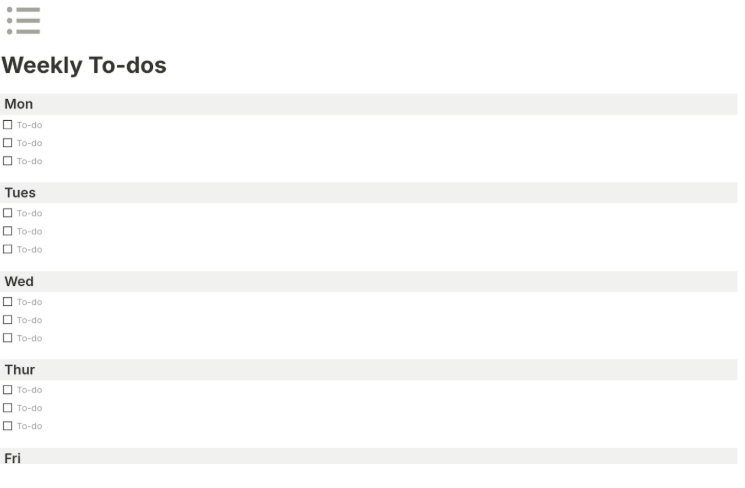
The Simple Weekly To-Do List Template is a checklist-type tracker that helps you see your entire week at a glance. It lets you add and plan your goals daily and offers a fuss-free layout to get things done.
This to-do list solution’s simple structure also keeps things clean, so you can keep moving.
Here’s why you’ll like it:
🔑 Ideal for: Freelancers juggling multiple small projects or anyone who plans weekly.
➡️ Read More: How to Keep Track of Tasks at Work
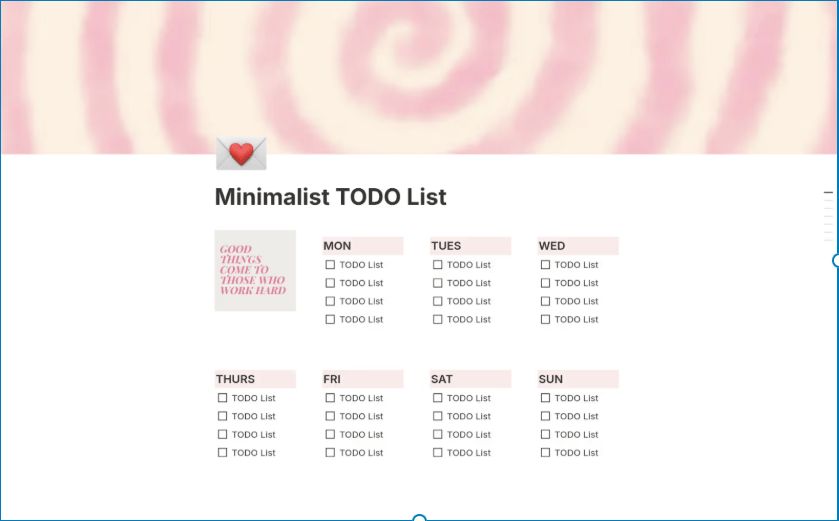
Do you need a bit of color and a whole lot of white space to focus? The Minimalist TODO List template is built for you. Its single-space layout eliminates scrolling.
This simple Notion template comes with the essential checkboxes and a customizable theme. Plus, if you’d like a motivational kickstart, there’s a space to write down quotes.
Here’s why you’ll like it:
🔑 Ideal for: Designers, students, minimalists, or productivity lovers who want sleek, efficient task management.
➡️ Read More: How to Improve Focus: Ways To Improve Concentration
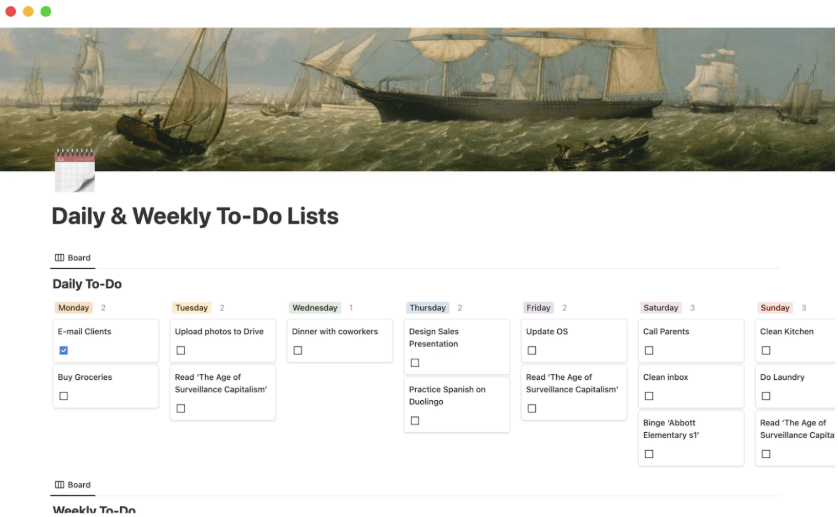
For users who need to toggle between daily and weekly planning, the Daily & Weekly To-Do Lists template is a great choice to keep you on track. With two synced views, there’s no need to duplicate tasks; just switch between your priorities with ease.
The daily panel is designed for focused execution, helping you power through urgent tasks and meetings. The weekly board, on the other hand, offers a clear snapshot of upcoming goals and milestones.
Here’s why you’ll like it:
🔑 Ideal for: Working professionals who plan across days but execute in hours.
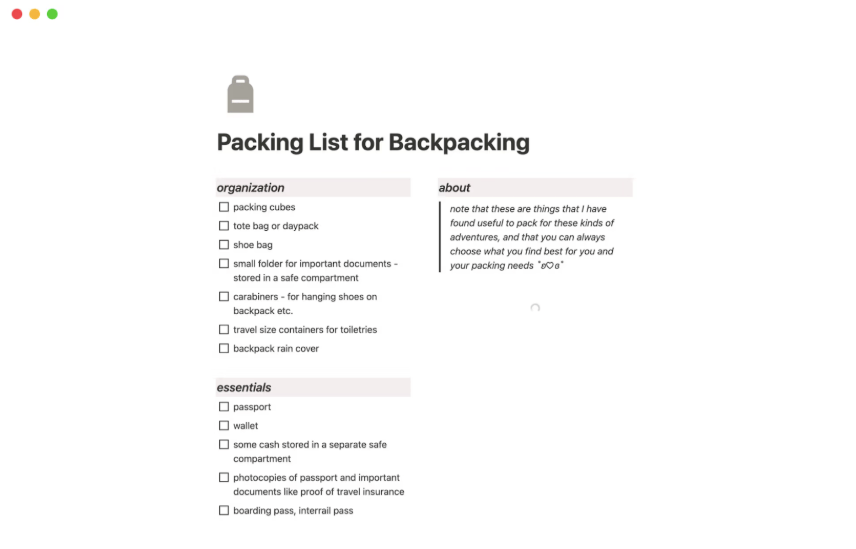
Planning to set out somewhere? The Simple Packing List for Backpacking template is just about perfect for basic travel prep. It offers a customizable checklist of tasks a backpacker must do, from travel documents to must-have gadgets.
The template’s task lists are pretty easy to read, even for Notion beginners, with segregated sections for organization, essentials, clothing, and toiletries.
Here’s why you’ll like it:
🔑 Ideal for: Backpackers, solo travelers, and professionals prepping for anything from out-of-town business meetings to long-overdue road trips.
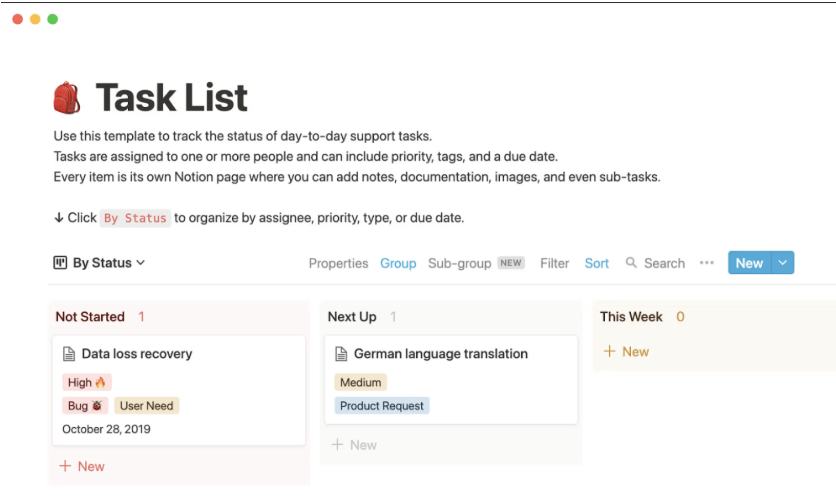
Teams looking to ensure every task drives project end goals will find the Support Task List template a go-to. Its layout helps break down due, upcoming, and overall weekly to-dos.
It also lets you add priority levels and task types through color-coded tags. By presenting all tasks as flash cards, this solution keeps teammates in sync and firefighting to a minimum.
Here’s why you’ll like it:
🔑 Ideal for: SaaS customer support teams or agencies managing numerous service tickets.
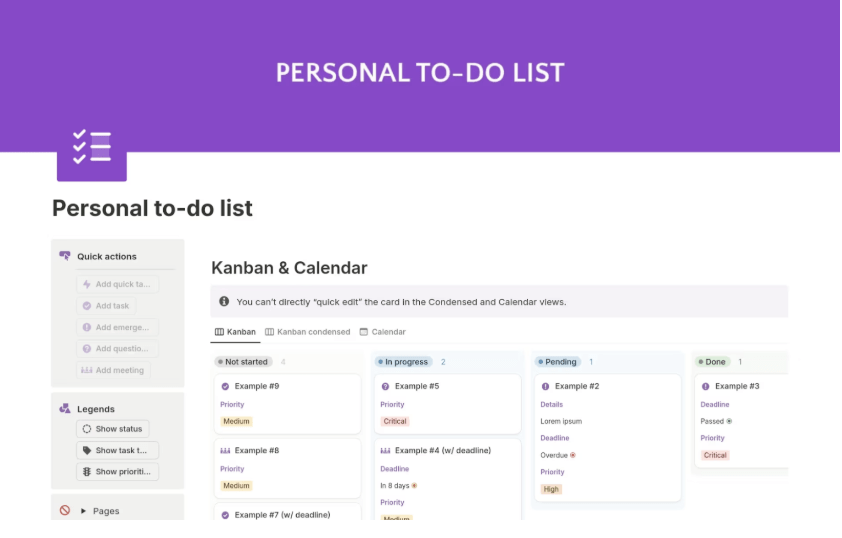
Graphs stressing you out? Keep things simple with the Personal To-Do List Without Graphs template. It has a Kanban-style board that maps task details, deadlines, and priorities, so no charts and no clutter.
It also includes a calendar view for time-based planning and visual clarity without the hassle of spotting problems in patterns.
Here’s why you’ll like it:
🔑 Ideal for: Students or solo professionals who want straightforward task tracking.
🔍 Did You Know? Completing a task releases a surge of dopamine, the feel-good chemical. The more demanding the task, the bigger the boost, and the better you feel afterwards.
Also Read: Free Task List Templates in Excel & ClickUp
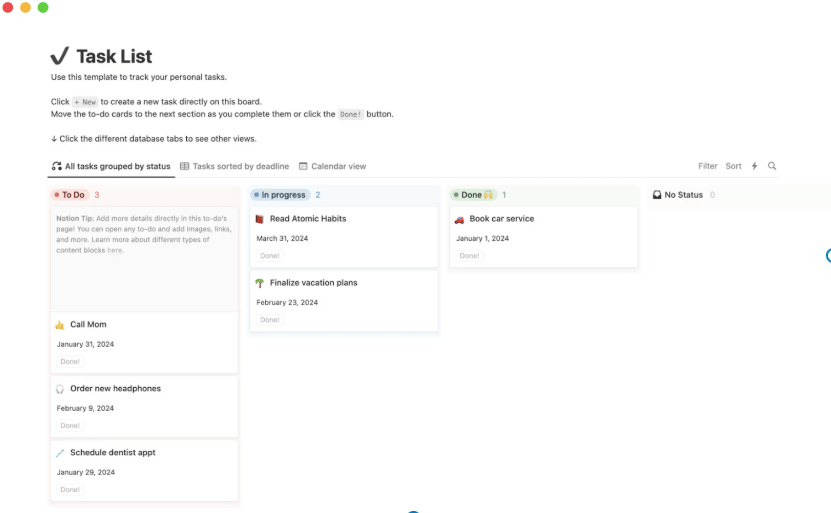
The Task List Template in Notion lets you create and complete your targets more efficiently.
Tasks on the Kanban board are divided into To-do, In progress, and Done statuses for quick progress logs, and activities are segregated by due dates and timelines.
You can create a new task right from the board and add descriptions and images to provide greater context.
Here’s why you’ll like it:
🔑 Ideal for: Anyone who wants to complete basic or everyday action items efficiently.
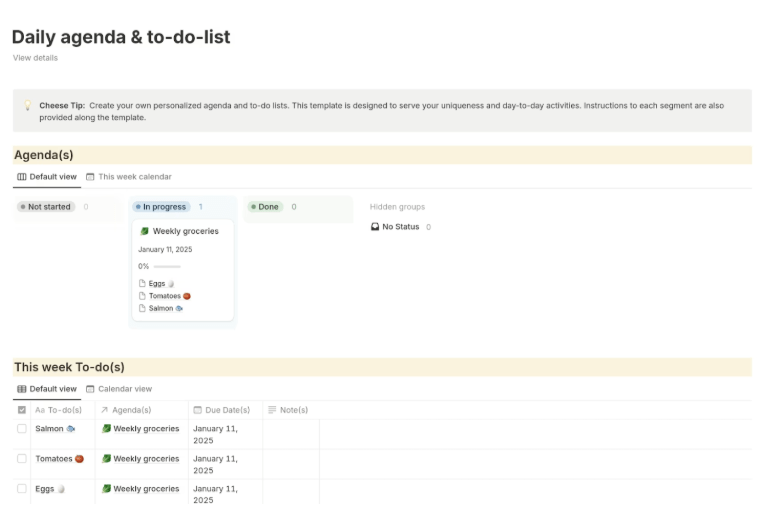
The Daily Agenda & To-Do List template is a good fit for teams that like to build work primarily around an end goal. While it also has a to-do style board view, the template links each task with a specific agenda.
Due dates and notes keep the list well-rounded, and progress is measured for each point on the agenda. Plus, you can create new line items with a single click.
Here’s why you’ll like it:
🔑 Ideal for: Remote workers or solopreneurs with packed schedules.
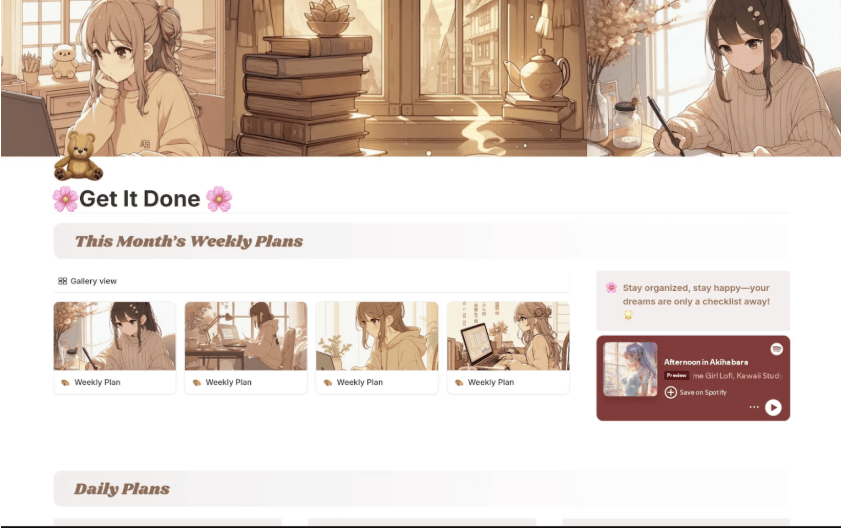
Keep your productivity aesthetic and calming with the Cute Weekly Planner & To-Do template. This pastel-themed planner features floral patterns, anime posters, and fun stickers that make checking off tasks a little more joyful.
It also includes separate sections for personal and work tasks for balanced productivity. Plus, the template lets you store new pages, images, and completed tasks.
Here’s why you’ll like it:
🔑 Ideal for: Students, creative professionals, and lifestyle bloggers who love aesthetic vibes.
➡️ Read More: Best Productivity Systems to Stay Productive
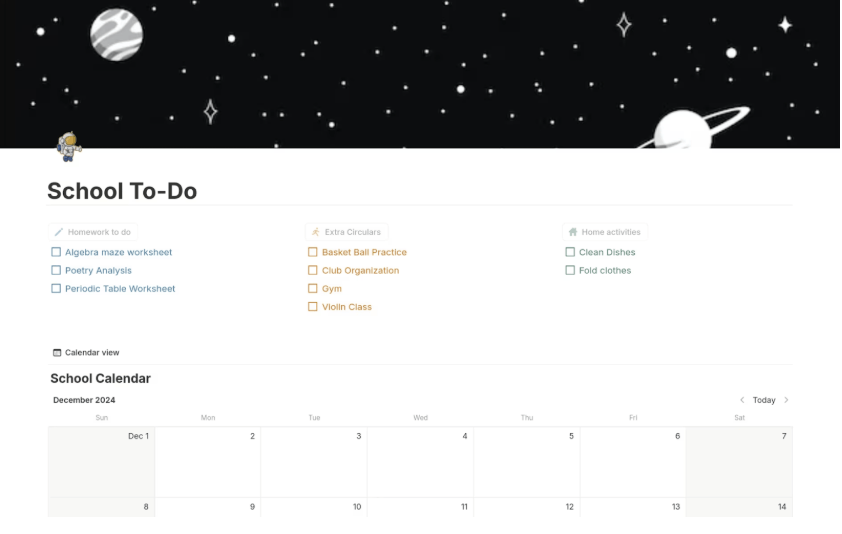
The Simple School To-Do List template is a convenient way to manage academic, extracurricular, and personal tasks in one place.
A standout element is the fast-access checklists for routines like homework and extracurricular activities.
The template also has a calendar view that maps out deadlines and upcoming events. And for all your one-time tasks, a to-do list table helps record all the tasks’ subjects, due dates, and latest progress.
Here’s why you’ll like it:
🔑 Ideal for: High school or college students managing classwork and exams.
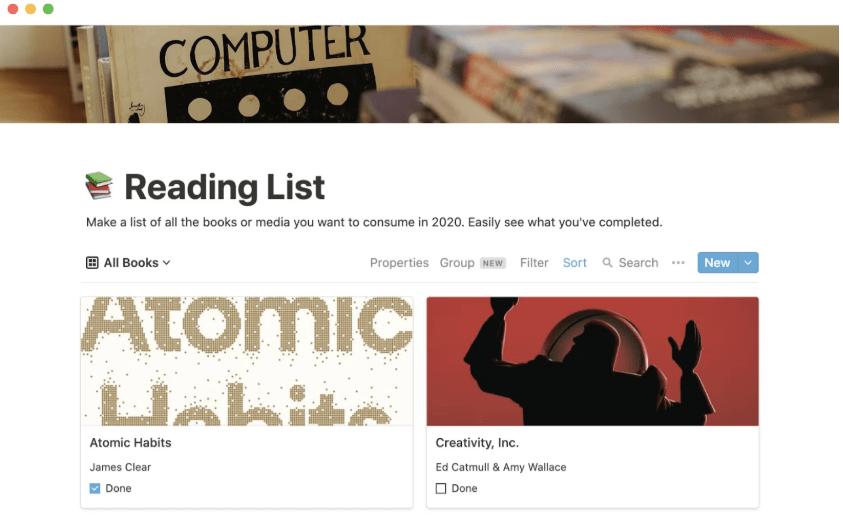
Do your personal or professional learning plans involve studying or reading? The Book List Template helps you manage what’s read and what’s still on your TBR list.
With flashcard-style tasks, it even lets you visualize the cover art and quick blurbs in each book.
The template also has fields for reading or purchasing links, making it easy to share or revisit. Plus, its smart filters show you what’s next, keeping your learning goals on track.
Here’s why you’ll like it:
🔑 Ideal for: Avid readers, students, book club organizers, or reviewers.
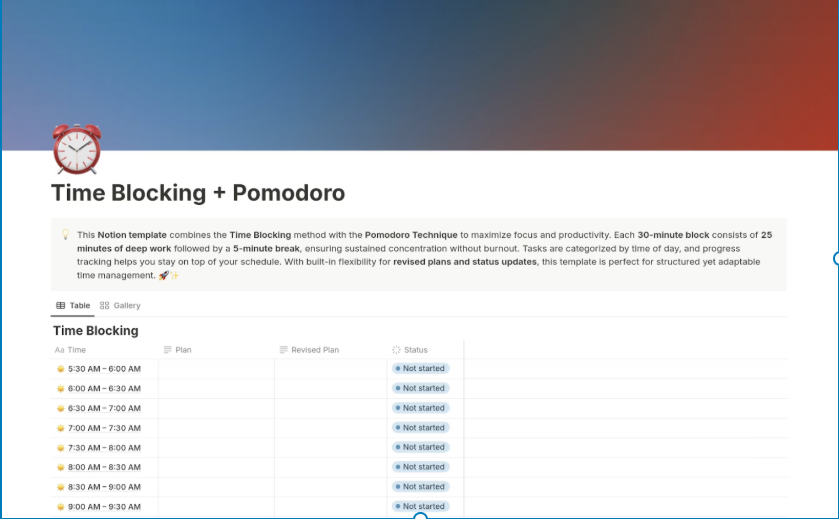
The To-Do List (Time Blocking + Pomodoro) Template helps manage time and work efficiently.
Its table view is structured with 30-minute time blocks and cells to add plans. If your plan changes, you can also update it in a ‘revised plan’ section to compare the changes. Plus, updating progress takes only a quick click.
Here’s why you’ll like it:
🔑 Ideal for: Students, coders, writers, or remote workers who combine structured sprints and time-management techniques.
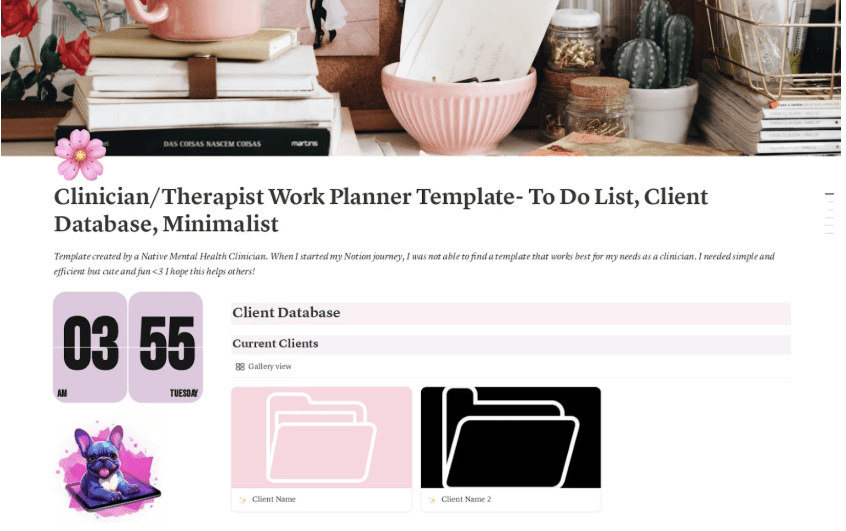
Juggling client data, session notes, and tasks at the same time? The Clinician/Therapist Planner: To-Dos & Clients template in Notion is tailor-made for you.
It lets you store all your client details and all related tasks in folders. The template also has weekly to-do list tables and a space to drop completed or closed clients.
Plus, there’s a real-time clock to keep track of session times. ⏰
Here’s why you’ll like it:
🔑 Ideal for: Therapists, counselors, and wellness coaches managing client care.
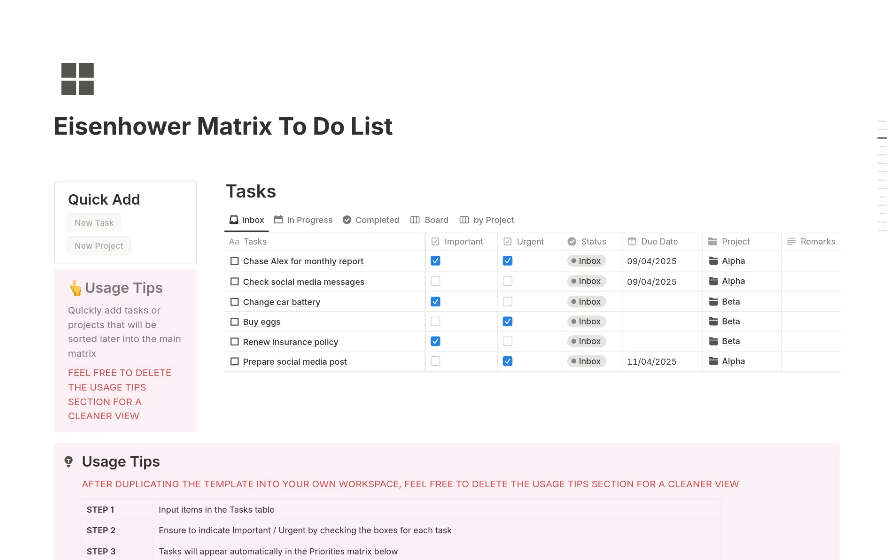
The Eisenhower Matrix To Do List template is built to sharpen prioritization. It offers a simple table layout with checkboxes to quickly sort tasks by importance.
This Notion template also has built-in fields for due dates, status, and project tags. With all details recorded, it makes deciding what to do, schedule, delegate, or delete instant.
The linked database makes it easy to track your tasks and have a clear overview of the project at all times.
Here’s why you’ll like it:
🔑 Ideal for: Entrepreneurs, managers, or overwhelmed decision-makers
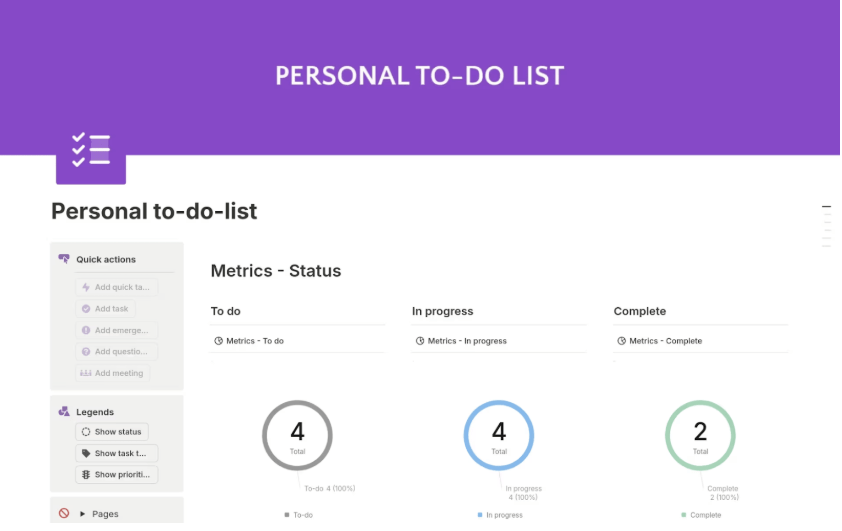
The Personal To-do List With Graphs template is for task managers who’d like their metrics visualized. This template showcases your task status and progress with pie charts and bar graphs.
Add and edit tasks on the to-do list in real time. Got questions about a task, or want to mark any as particularly heavy lifting? Just add these details directly. It also has a Kanban board for you to track status conveniently.
Here’s why you’ll like it:
🔑 Ideal for: Analysts or productivity-driven individuals who love data-backed results.
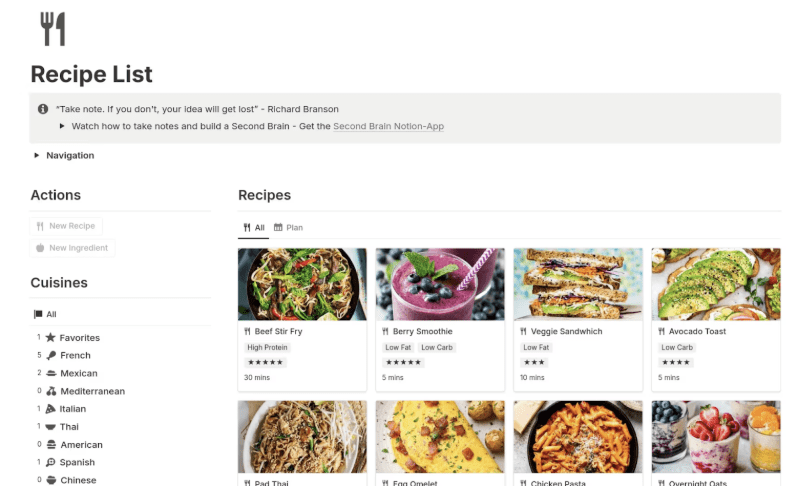
Want to focus on cooking rather than constantly scrolling through your list of ingredients? The Recipe List template is a great choice.
This Notion template has key data fields like cuisines and courses to help you categorize your dishes. Besides, it helps with menu planning, cooking time, and keeping track of ingredients.
It also simplifies your decision-making with diet-specific tags and average ratings.
Here’s why you’ll like it:
🔑 Ideal for: Home cooks, food bloggers, or anyone with a growing recipe stash.
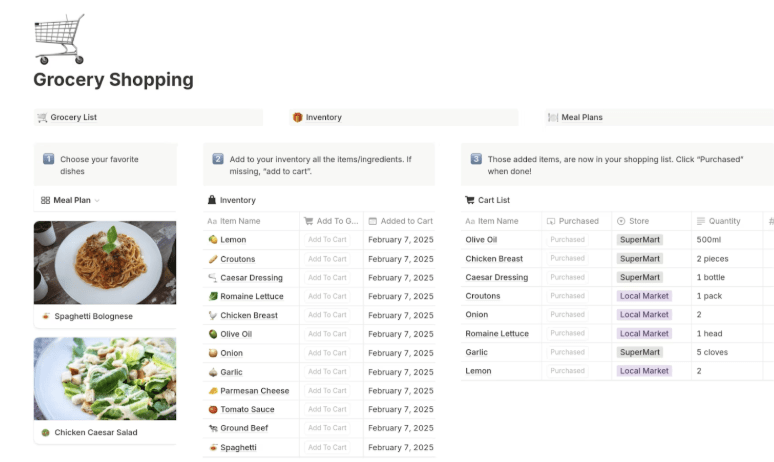
For anyone planning to stock up on supplies, the Grocery Shopping List template helps get it done in one go.
This template helps you stay organized with its built-in meal plan and inventory table. Plan your weekly meals, link the ingredients to your pantry inventory, and missing ingredients are automatically added to your shopping list.
Plus, its dedicated cart list helps track and even map the specific store each item is available in. Overall, the template simplifies and organizes the grocery shopping process.
Here’s why you’ll like it:
🔑 Ideal for: Busy families, restaurant procurement teams, or meal-preppers who plan ahead.
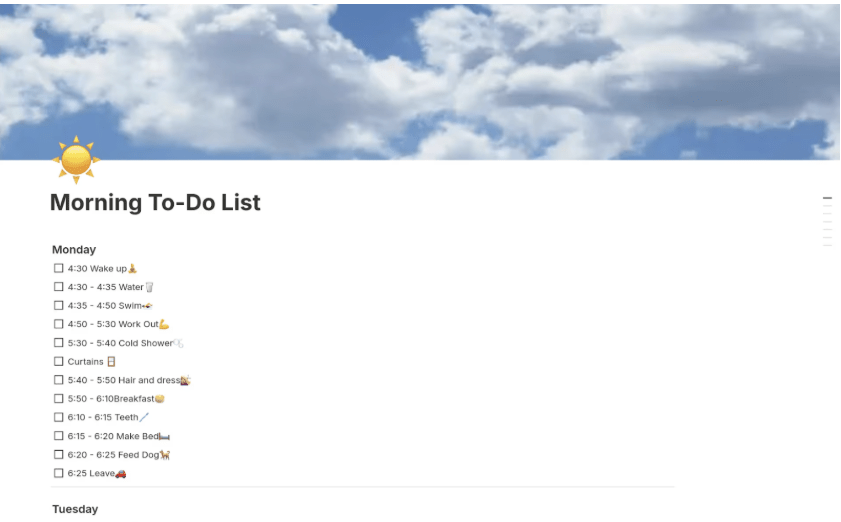
Designed for early risers, this Morning To-Do List 4:30–6:30 template kicks off your morning flow with intent. It opens with cover images of clear skies and sunshine to set the energy levels for your routine.
Moreover, it has checkboxes covering everything from morning workouts to breakfast habits. The template is a great way to build mental clarity and avoid decision fatigue, as you can customize it for different routines and times.
Here’s why you’ll like it:
🔑 Ideal for: Founders, fitness buffs, or morning routine fanatics.
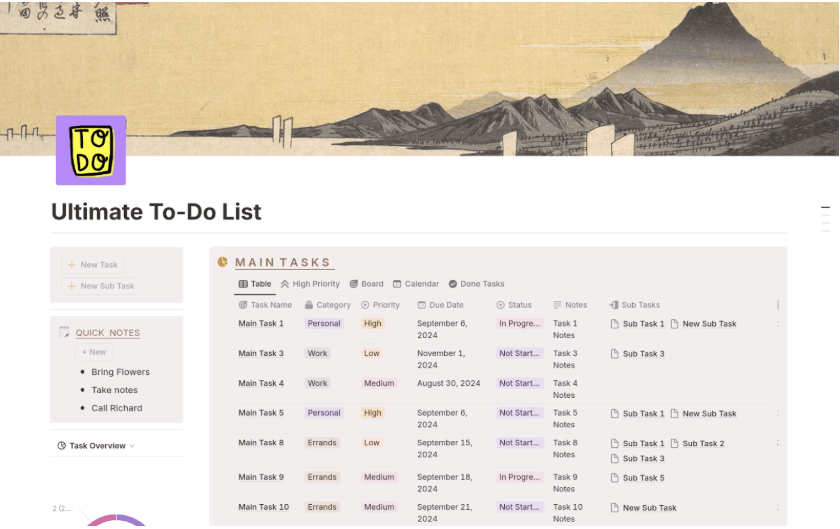
If you don’t want to stop with task overviews, the Ultimate To-Do List template will take a spot in your Notion workspace. Its main task section monitors everything from priority and task category to linked subtasks and live progress.
The template offers sticky notes on the left pane for quick checklists. There’s also a dedicated section to review subtask details and overdue activities.
Here’s why you’ll like it:
🔑 Ideal for: Project leads or power users with multiple priorities and complex schedules.
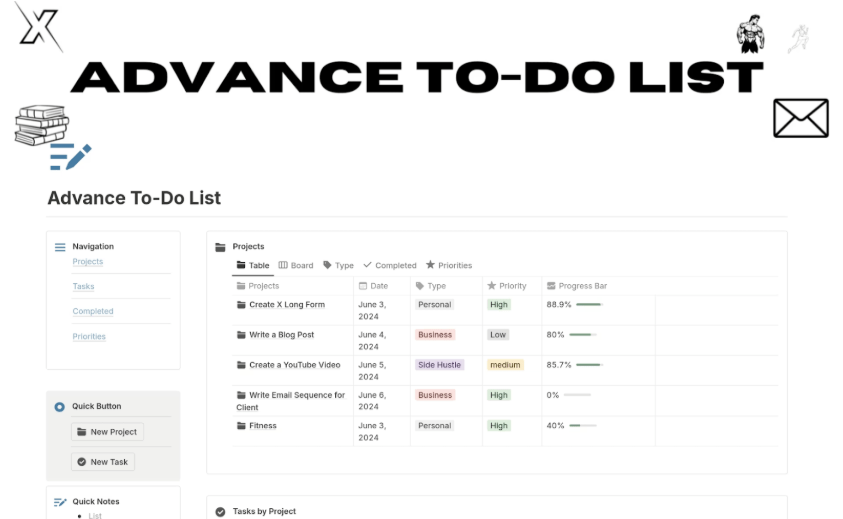
The Advance To-Do List template is another solution that takes the deep-dive approach. Instead of dedicated sections, it organizes tasks into various tabs.
Its primary table records all relevant task information, including tags and priorities. In addition, the template has specific tabs for completed and project-specific activities. Add new tasks and projects in one click, and view your tasks by priority, status, or type.
Here’s why you’ll like it:
🔑 Ideal for: Project managers, consultants, or productivity geeks handling multifaceted workflows.
Sure, Notion offers plenty of templates, but that doesn’t mean it’s without drawbacks. Before you commit to using it as a task management software, here are a few limitations to keep in mind:
➡️ Read More: How to Use Notion for Project Management
Notion may not be the best fit if you need thorough and seamless task completion.
When your eyes turn to Notion alternatives, you’ll quickly spot ClickUp among the top choices in terms of customization, task tracking, and AI-powered productivity.
Here’s what a G2 user has to say about ClickUp:
After struggling with Notion for two years, the ability to set up automations in seconds has been revolutionary. ClickUp replaced multiple subscriptions (Loom, Slack, and Notion) while providing an organized system with dedicated lists, folders, and docs that don’t require building from scratch. Everything feels naturally organized, saving hours previously spent just maintaining our workspace, and allowing more time for actual client projects.”
Now, let’s dive into what free to-do list templates by ClickUp have to offer to make it instantly outshine Notion for your professional and personal life:
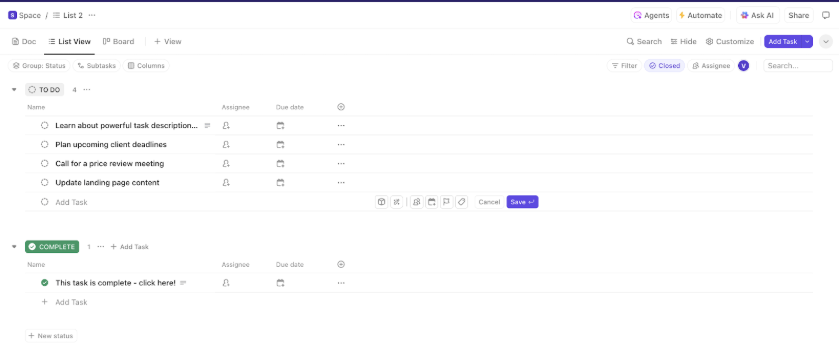
Want to start knocking off things you need done? The ClickUp Basic To-Do List Template is a no-fuss launchpad that lets you type it, plan it, and smash it. With start dates, deadlines, assignees, and priority lists, this customizable template is built for high-focus days.
Each task also includes space for detailed descriptions and built-in time tracking to keep your team sharp and on budget.
Here’s why you’ll love it:
🔑 Ideal for: Individuals, freelancers, and teams who want a clean, effective way to manage tasks and stay on top of deadlines.
🔍 Did You Know? Effective prioritization is almost two times more likely to lead to positive change. Think about what dedicated priority lists could do for you!
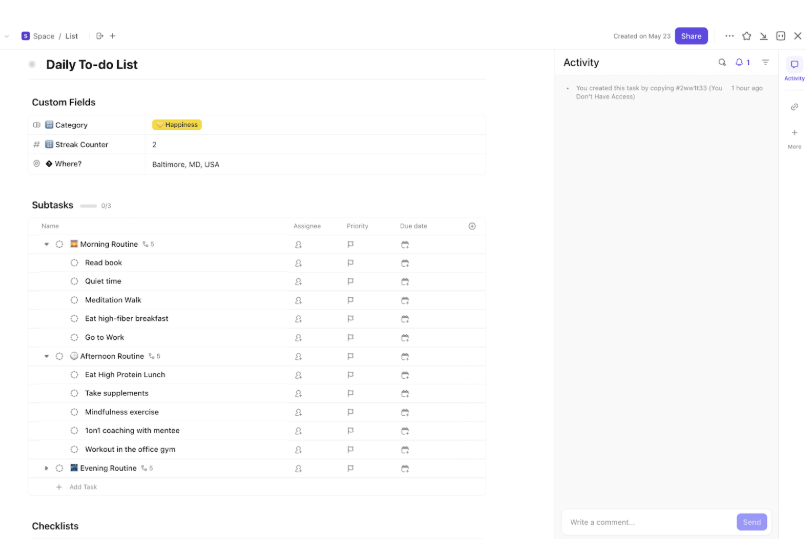
If you’re looking to optimize your existing routine, ClickUp’s Daily To-Do List Template is a great choice. Its pre-designed subtasks for morning, afternoon, and evening routines make sure healthy habits stay active.
Automated reminders and progress updates will help keep you on track. Plus, the template offers emoji-filled categories like happiness, work, and chores to add focus to your actions.
Here’s why you’ll love it:
🔑 Ideal for: Habit-trackers, daily task planners, students, and remote professionals who want structured yet flexible day-to-day task management.
📮 ClickUp Insight: Think your to-do list is working? Think again. Our survey shows that 76% of professionals use their own prioritization system for task management. However, recent research confirms that 65% of workers tend to focus on easy wins over high-value tasks without effective prioritization.
ClickUp’s Task Priorities transform how you visualize and tackle complex projects, highlighting critical tasks easily. With ClickUp’s AI-powered workflows and custom priority flags, you’ll always know what to tackle first.
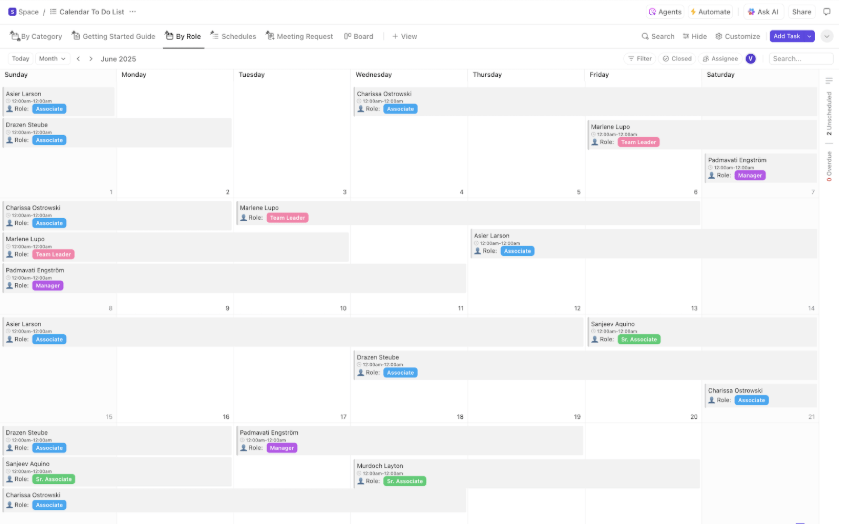
Tired of struggling with unplanned tasks and sudden meetings? Simplify and schedule discussions better with the ClickUp Calendar To-Do List Template. It stands out with its multiple calendar views that highlight roles and task categories in vibrant color codes.
There’s also a schedule dashboard with details, names, and times to help prepare smarter. Plus, the template comes with a meeting request form for users to put in requests with agenda points and priority levels.
Here’s why you’ll love it:
🔑 Ideal for: Project leads, executive assistants, and client-facing teams who manage high volumes of meetings and need a tool to organize every detail with ease.
💡 Pro Tip: We’ve compiled a quick explainer on how to best use ClickUp’s Calendar View. Watch it here 👇.
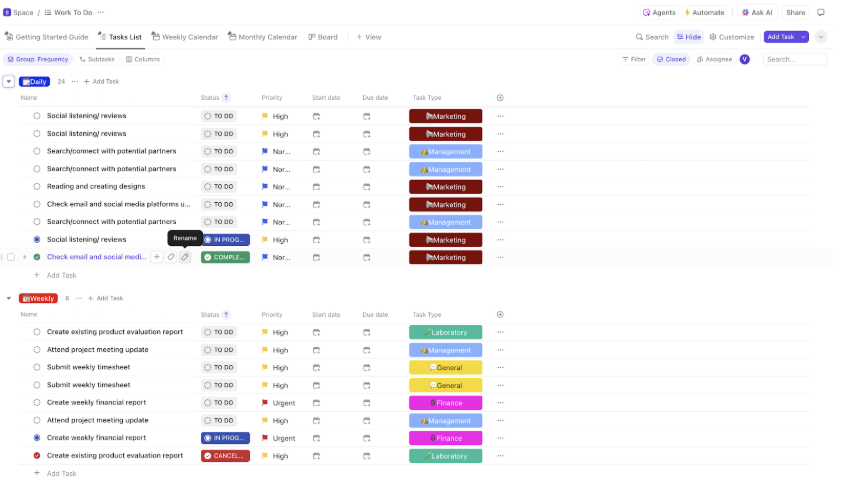
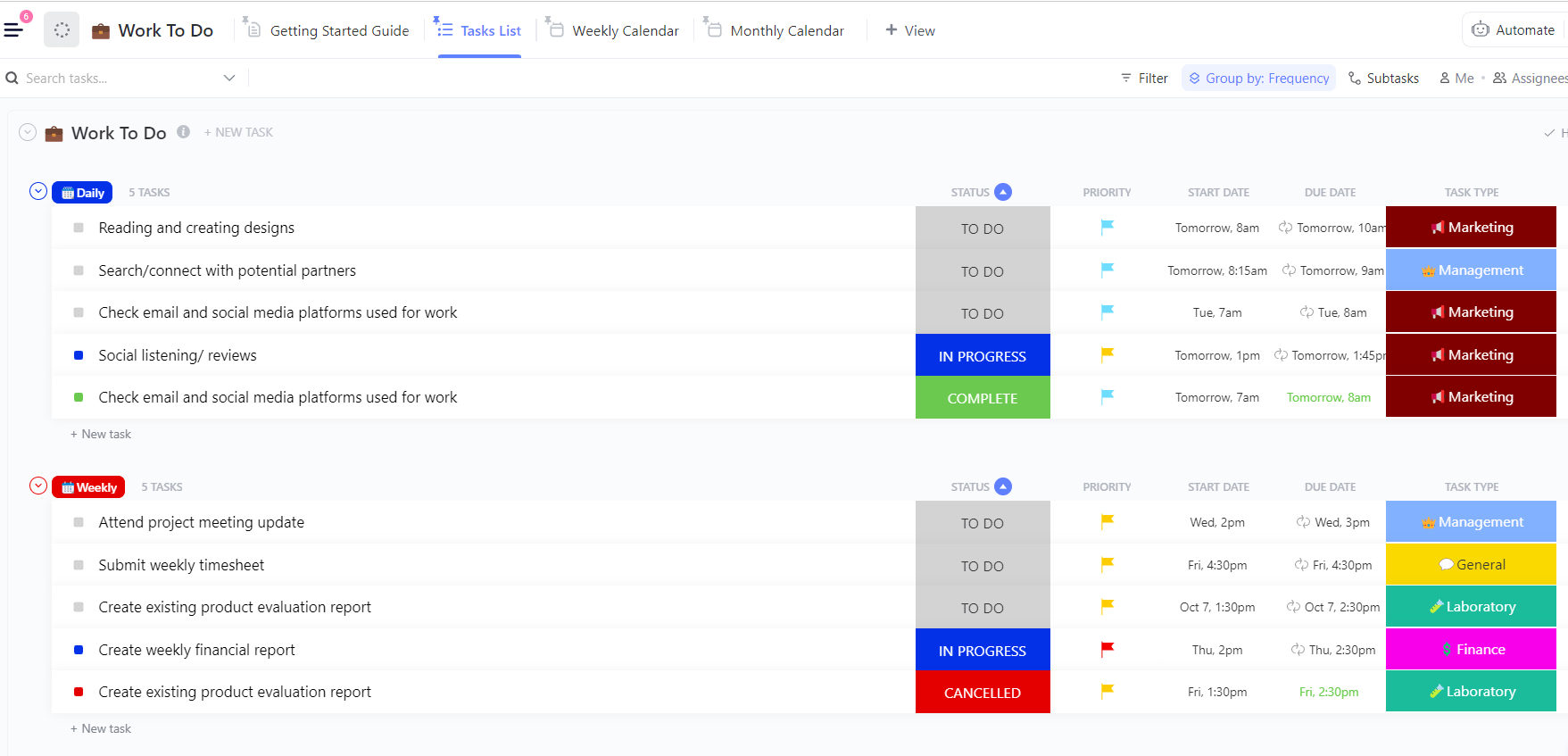
The ClickUp Work To-Do List Template is a kickstarter tool for teams to streamline work-specific tasks. It offers over five data fields for anything from task frequency to contact information for a more tailored workflow.
This template also has month- and week-wise calendar views for managers to drive long-term goals like budget management and sales tracking. Plus, flexible task statuses and notes sections centralize progress reviews and key communications.
Here’s why you’ll love it:
🔑 Ideal for: Marketing teams, project managers, and operations leads managing recurring and deadline-driven tasks.
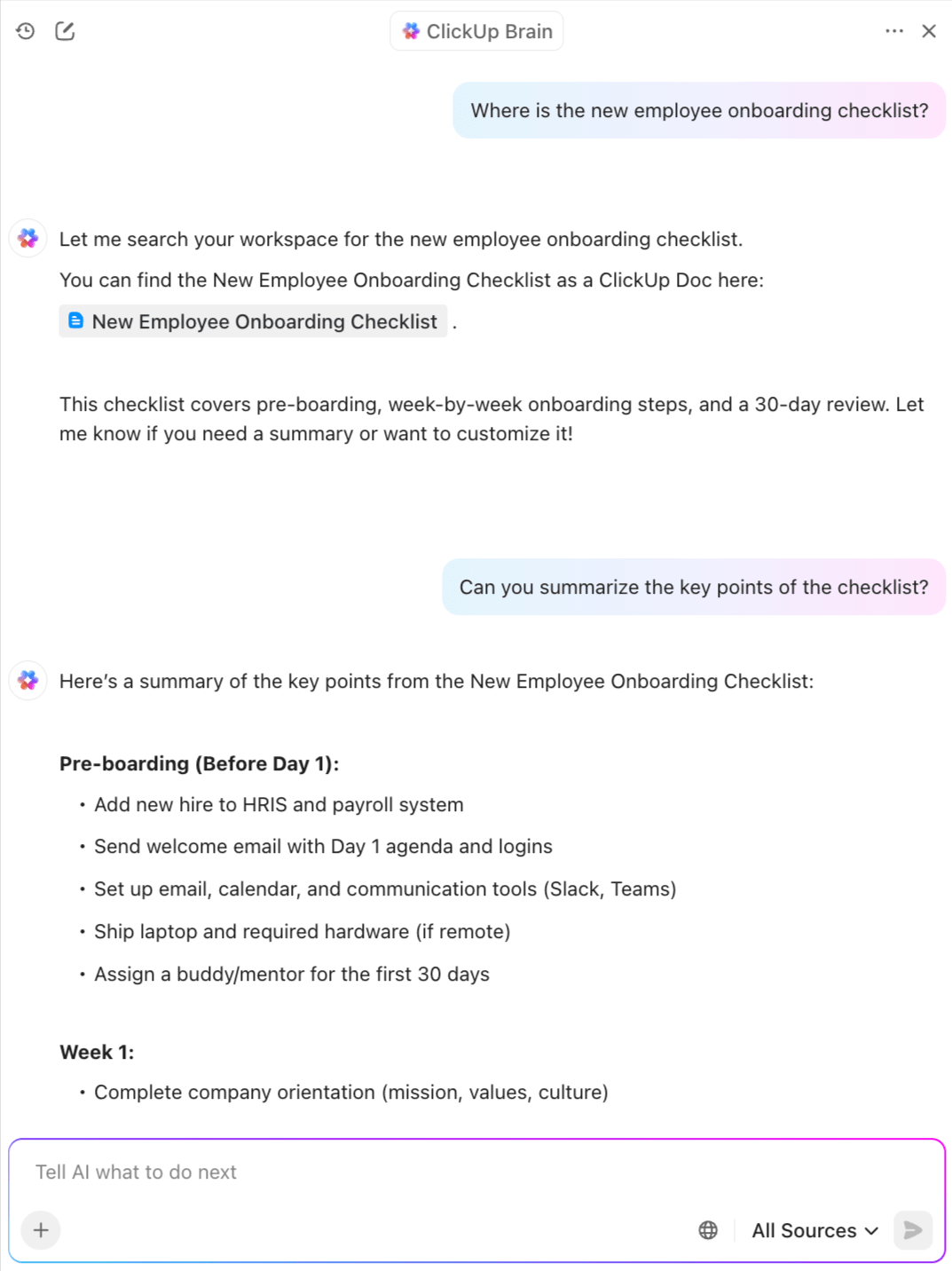
💡 Pro Tip: Manage your work to-do lists hassle-free with ClickUp Brain: It lets you:
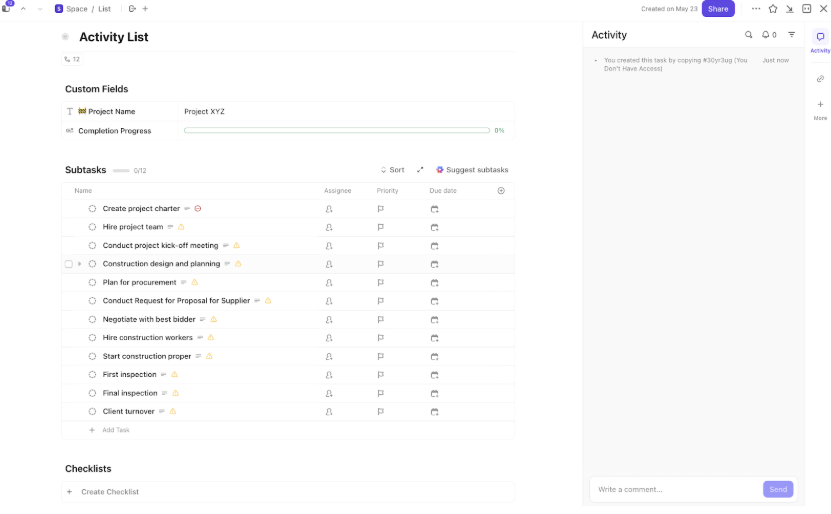
Expecting a new project on top of your current workload? ClickUp’s Activity List Template is built to beat the overwhelm. As a task template, it comes with a whole list of activities planned in quick subtasks.
For teams focusing on quality control, the template includes easy-to-add checklists that everyone must complete before closing any task. The best part? If you’re unsure of the next steps, just hit ‘Suggest subtasks’ and let AI draft your action plan.
Here’s why you’ll love it:
🔑 Ideal for: QA teams, sprint managers, or fast-paced ops teams juggling multiple deliverables under tight timelines.
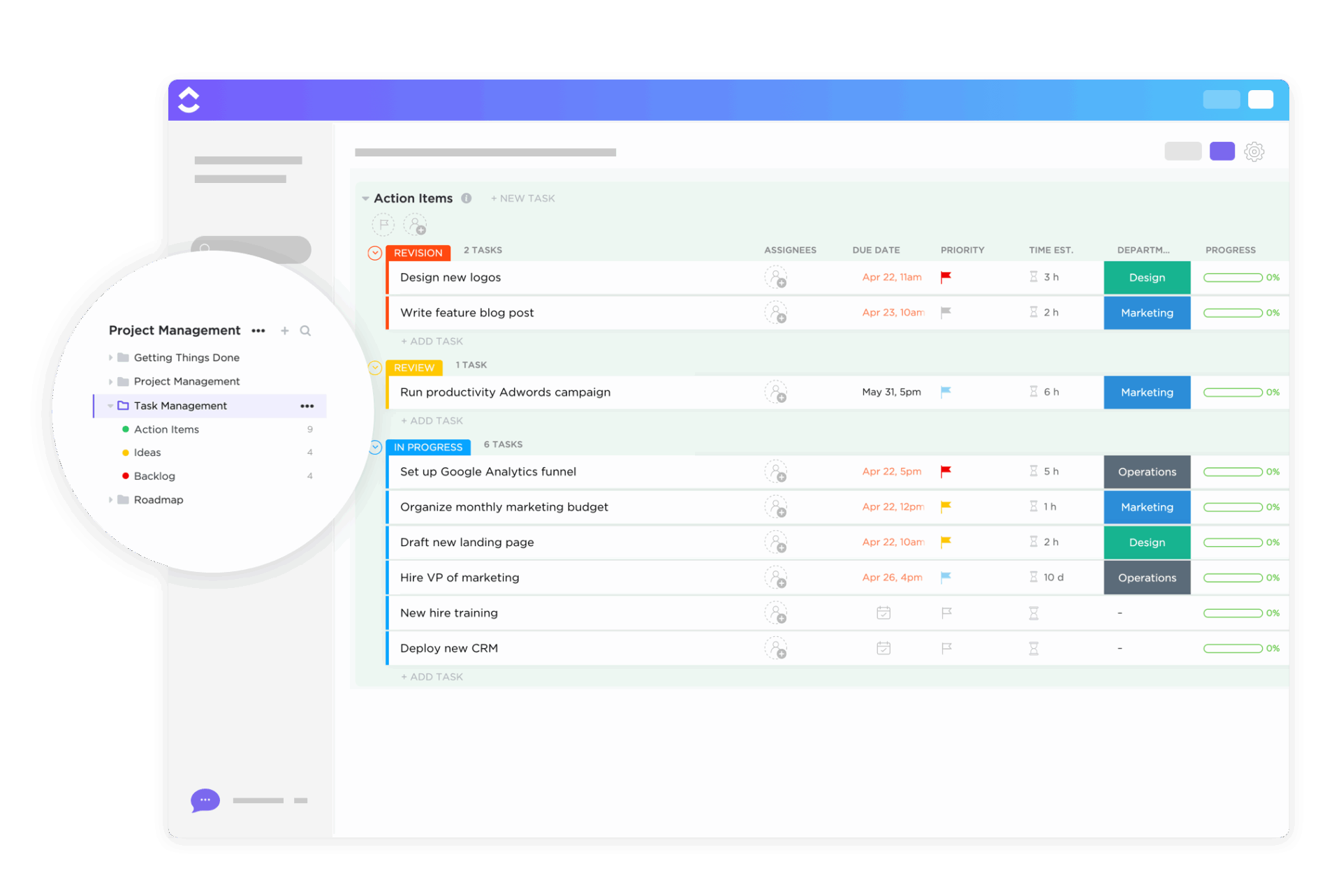
ClickUp’s Task Management Template helps segment efforts with separate lists for ideas, action items, and backlogs, and boosts prioritization, too.
Every view and list comes with a real-time progress bar to revisit bottlenecks and track momentum. Plus, all docs you create are auto-added to a dedicated view, making it super-simple to blend task tracking with the latest information and updates.
Here’s why you’ll love it:
🔑 Ideal for: Team leads, cross-functional managers, and operations heads juggling multiple projects and looking for a command-center style task view.
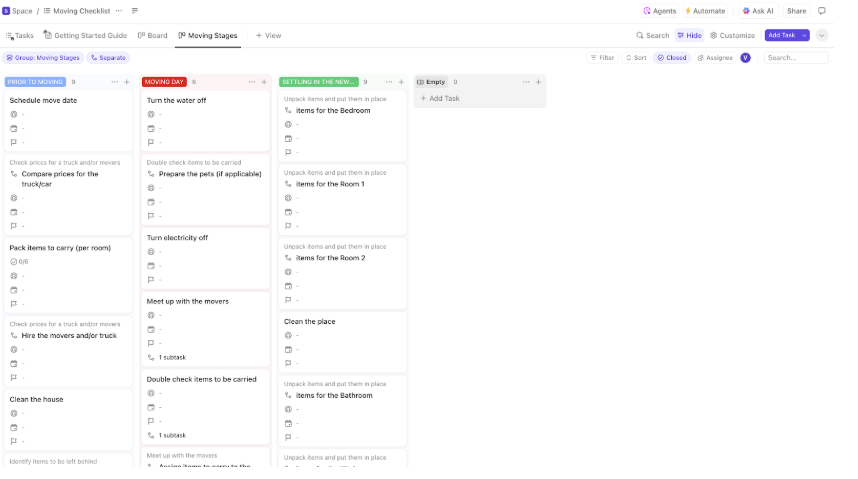
Are you worried about forgetting something on moving day? The ClickUp Moving To-Do List Template takes away all that chaos. Its Board View covers every object, activity, and room, making it super easy to navigate.
The template also comes with date and assignee fields, perfect for professional movers who must balance team workloads. And if you’re the kind of family that plans everything digitally, it has your name on it.
Here’s why you’ll love it:
🔑 Ideal for: Families moving homes, relocation professionals, or anyone managing a home setup checklist, start to finish.
💡 Pro Tip: New to Kanban boards for task management? No sweat. Here’s our video guide that’ll show you everything you need to know.
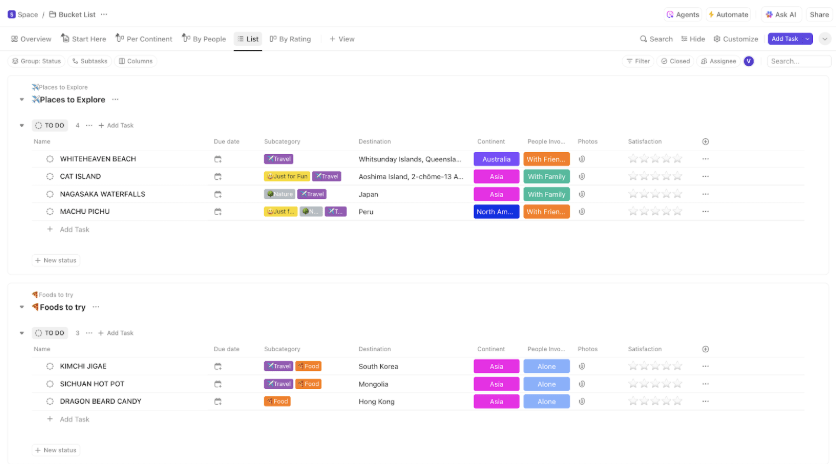
ClickUp’s Bucket List Template is your pre-designed space to plan the experiences you’ve always dreamt of, without the chaos. Before your desires get lost in the clutter, it helps you organize them by categories like food and activities.
This template also includes subcategories for your travel, fun, relationships, and spiritual goals.
Plus, you can rate each experience by priority, so you can choose what to focus on first.
Here’s why you’ll love it:
🔑 Ideal for: Travelers, goal-oriented couples, digital planners, or anyone turning dreams into doable plans.
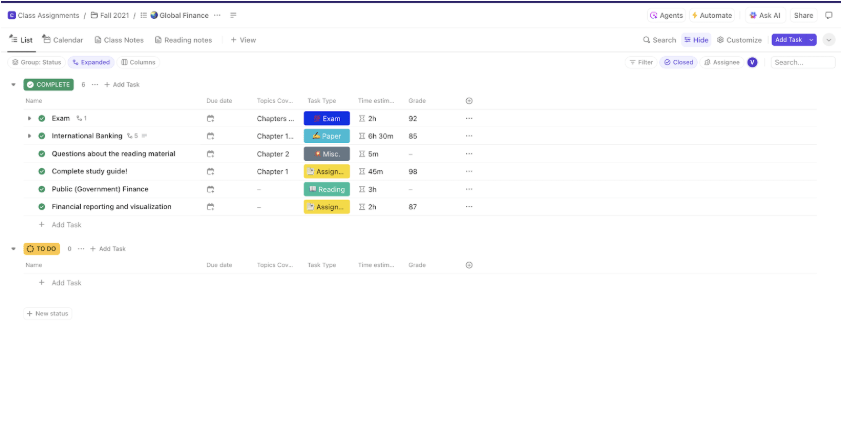
Juggling classes, quizzes, and deadlines? The ClickUp Class Assignment To-Do List Template is your semester sidekick. It sets you up with ready-to-go folders for both spring and fall for easy navigation.
This template also offers subject-wise lists, such as Spanish, History, Geology, Global Science, and Computing, each with pre-filled, customizable assignments.
The best part? It lets you record how long each assignment will take, what it’s worth, link study books, and mark the chapters involved.
Here’s why you’ll love it:
🔑 Ideal for: College students who want to stay on top of things in every subject and term.
🔍 Did You Know? MIT offers a pirate certificate to students who complete its archery, fencing, pistol, and sailing courses. Talk about leveling up your PE checklist!
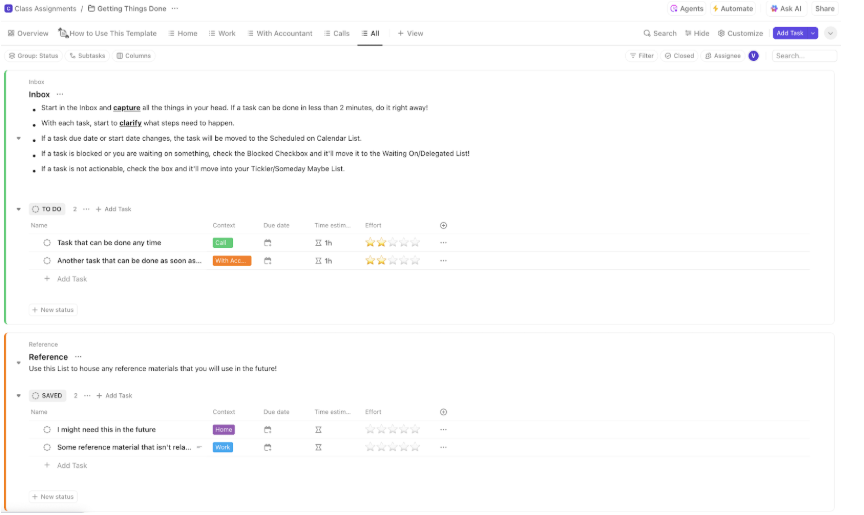
Need to move beyond planning and into real action? The ClickUp Getting Things Done Template is a ready-to-use folder built to drive momentum.
Its most effective aspects are its custom fields that capture every possible context, from work and home tasks to delegated items, open projects, and finances.
New to the action-first mindset? This Getting Things Done a.k.a GTD template includes a quick-start guide, tutorial video, and pinned tasks for easy, instant access. It’s pretty helpful in cutting out unnecessary delays and brain fog.
Here’s why you’ll love it:
🔑 Ideal for: GTD fans, productivity nerds, or anyone who wants less stress and more done by Friday.
💡 Pro Tip: Track your goals’ progress with custom statuses like ‘To Do’, ‘In Progress’, and ‘Done’ with ClickUp Custom Statues.
Notion to-do list templates are a solid start to closing your pending activities. With the right task templates, work, and possibly your entire life can become clutter-free and efficient.
If you’re choosing from the free Notion templates we’ve covered, you’re on the right track. But why stick to basic checklists when you can get super organized with ClickUp’s advanced visualizations and intuitive task tracking?
ClickUp also features comprehensive task management, AI-powered task summaries, instant content generation, and customizable analytics. Plus, all of it is accessible from any tool or template.
Ready to level up how you check tasks off? Sign up with ClickUp today!

© 2026 ClickUp

There’s an easier way. Try a free AI Agent in ClickUp that actually does the work for you—set up in minutes, save hours every week.