






Still downloading templates?
There’s an easier way. Try a free AI Agent in ClickUp that actually does the work for you—set up in minutes, save hours every week.
Sorry, there were no results found for “”
Sorry, there were no results found for “”
Sorry, there were no results found for “”

You check your phone in the morning: three notifications from Instagram, a client DM on LinkedIn, and someone tagging your brand on X.
Meanwhile, today’s content? Not even scheduled.
Managing multiple accounts for your brand can quickly consume time. The good news? You don’t need a big team or budget to stay on top of it.
In this guide, you’ll get an 8-step workflow to plan, produce, schedule, and review content across platforms without living in five tabs.
Managing multiple accounts means balancing diverse content styles, audience expectations, and platform guidelines, often simultaneously. Let’s understand why managing different social media accounts is difficult:
As account volume grows, so does the complexity. Coordinating assets, approvals, timelines, and engagement across platforms becomes difficult without a dedicated social media management tool and a regular audit process.
🔍 Did You Know? Over 91% of Instagram users watch videos weekly! Even better? Short videos—especially around 26 seconds—get the most comments. And almost half of users prefer Instagram Stories over other types of content.
Managing multiple social accounts gets easier when you run it like a workflow, not a daily scramble. The tips below help you set a strategy, map content in one calendar, expedite approvals, automate handoffs, and measure what’s working, so you can do more of it.
ClickUp gives social teams a central hub to plan, draft, collaborate, and track performance, plus AI to move faster on content and decisions. Pair it with ClickUp Marketing Project Management Software, and you can keep campaigns, comments, files, and tasks connected without living in five tabs.
Let’s dive into the tips.
Before writing a caption or assigning a designer, start with clarity. Define your goals for each platform, outline who you’re targeting, what kind of content fits each audience, and how you’ll measure success.
Instagram may focus on brand awareness, while LinkedIn drives leads or partnerships. Each platform has its own role, and each role requires its own plan.
ClickUp Docs helps teams organize this planning in one place. The document management space is built into your ClickUp Task workflows.
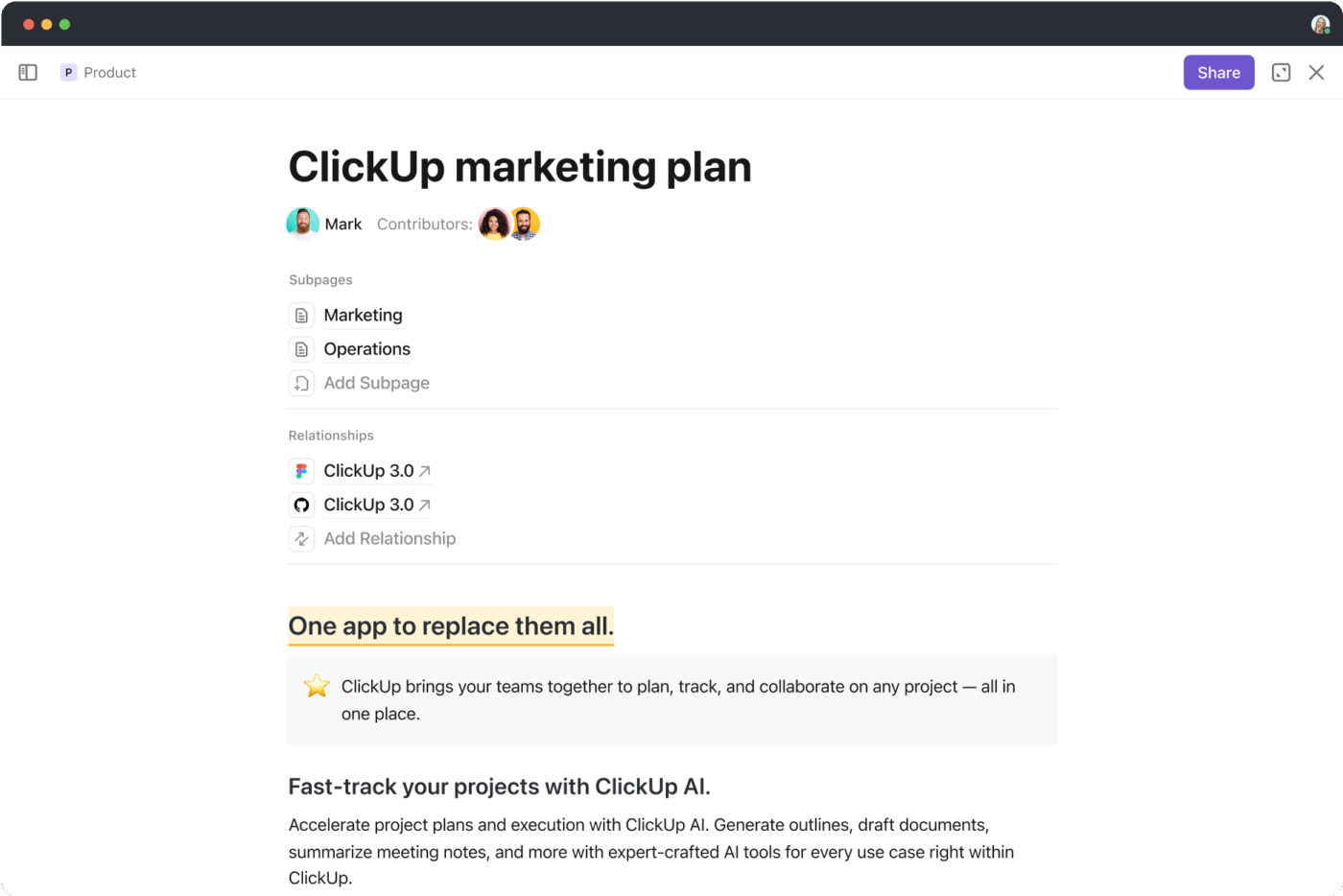
Start by creating a Doc for each client or brand you manage. Use one section to break down voice and tone, another to map platform goals, and a third to define post types—like Reels, carousels, or case studies.
For example, if you’re managing three clients across five platforms, use separate Docs to capture content marketing strategy details for each brand, and then link them to active campaigns so team members can refer to them before creating content.
🧠 Fun Fact: Meta (Facebook) was the first social network to hit one billion accounts—and it didn’t stop there. Today, it has over 3 billion monthly active users, making it more populous than any single country on Earth!
Once the strategy is clear, turn it into a calendar. Each social media channel has a different rhythm. You need a way to see campaigns across clients and channels without toggling through tools.
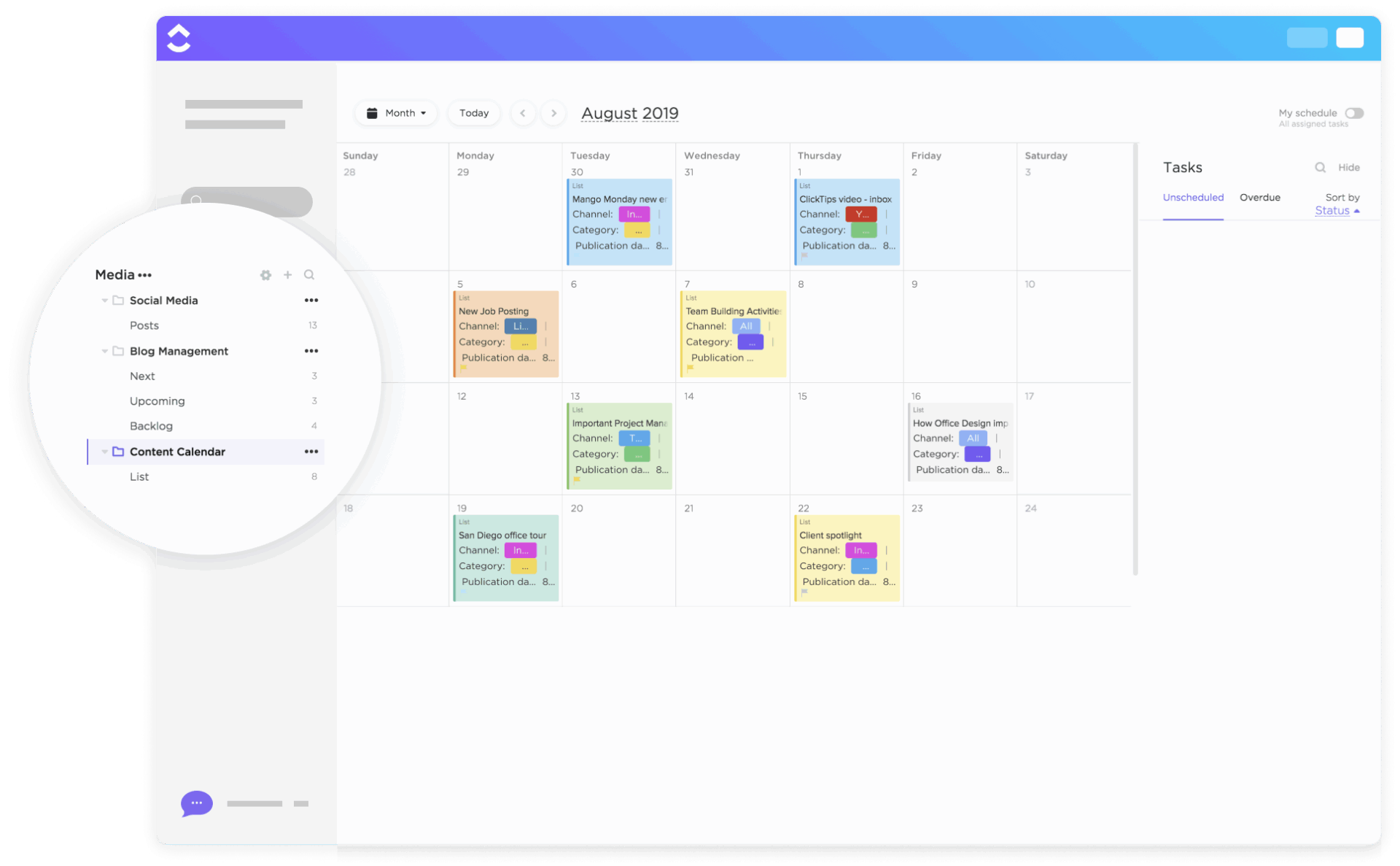
ClickUp Calendar saves the day here. Its automatic task scheduling helps you prioritize your day without micromanaging your timeline.
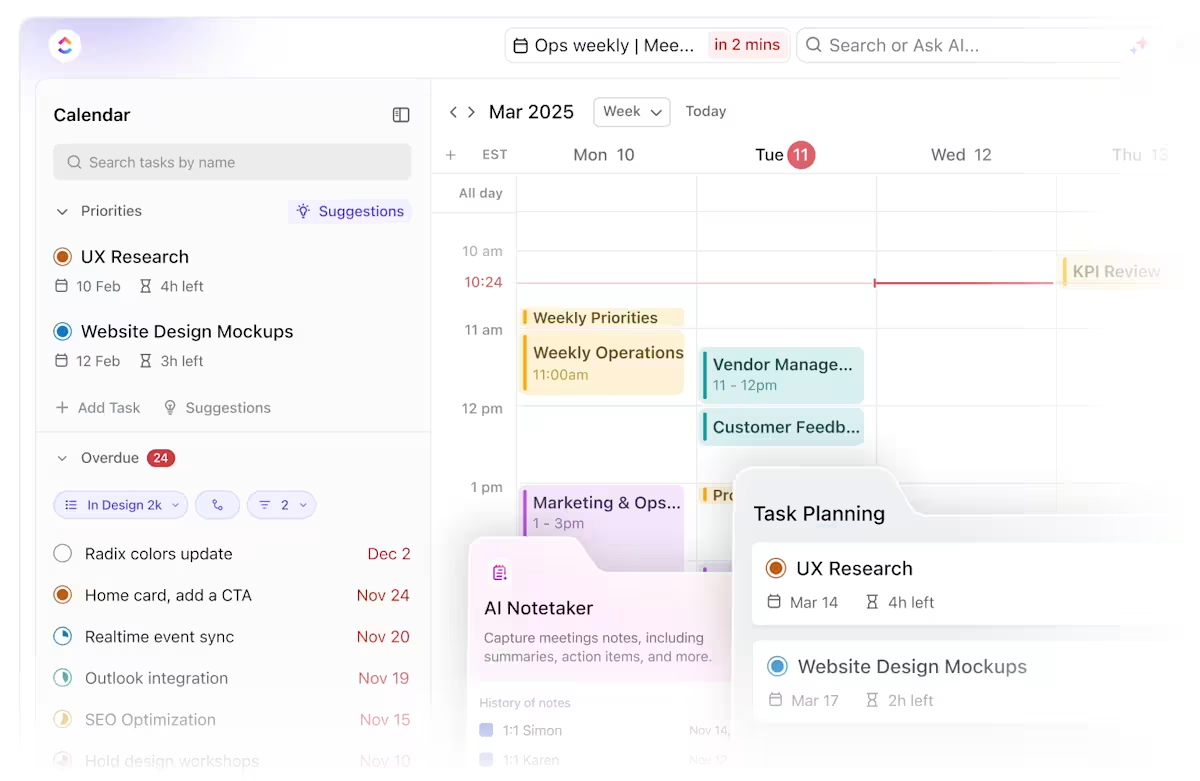
Say you’re a freelance social media manager handling three brands: the content calendar software can slot in content planning for Brand A’s product launch in the morning and schedule community engagement for Brand B in the afternoon. It also reminds you of Brand C’s campaign review call.
You can even invite collaborators, assign tasks to content creators or designers, and track what’s in progress or going live that week. For recurring planning calls, ClickUp AI Notetaker can capture decisions and action items, ensuring updates don’t disappear after the meeting.
If you don’t want to start from scratch? Turn to ClickUp’s social media calendar templates.
The ClickUp Content Calendar Template gives you a calendar view where every post sits as a task. Use it to lay out content across Instagram, LinkedIn, Facebook, and TikTok in one shared workspace. Filter by brand, assign deadlines, and shift dates as needed. The content calendar template lets you adjust timing or content owners instantly with its drag-and-drop interface.
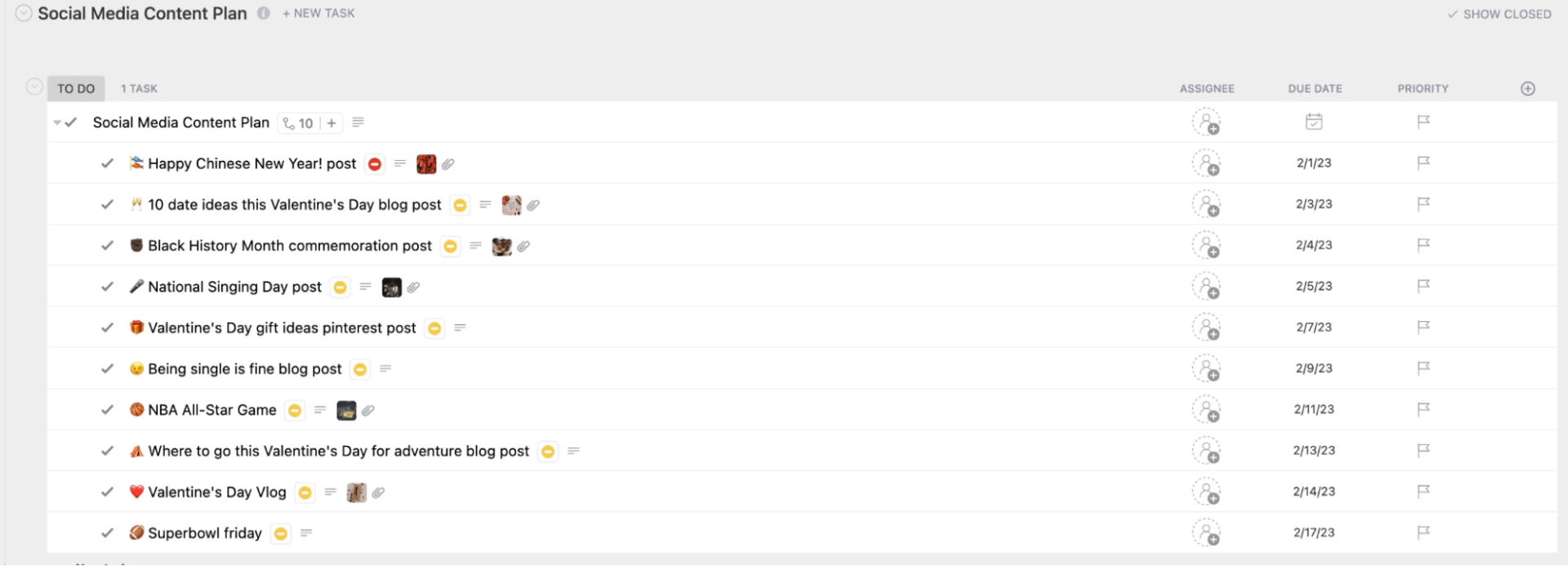
For campaigns that span multiple formats, the ClickUp Social Media Content Plan Template brings added control. Organize posts by platform, format, or campaign goal while tracking captions, visuals, and hashtags side by side without losing context.
You can also tag writers, attach briefs, and manage status from draft to final within the social media template.
⭐ ClickUp customer review:
I use ClickUp for project and task management, as well as workflow organizing, which helps me keep better track of tasks and time management. I love the feature that allows creating boards to see the flow of tasks for a project. This is extremely valuable as I use these boards to set up monthly social media schedules, which helps me visualize the content effectively.
Additionally, the overall usability of ClickUp is exactly what we wanted in project management software, as it replaced a self-developed app with many shortcomings. The initial setup was very easy, which was a big plus. Moreover, the seamless integration with tools like Google Drive and Outlook makes ClickUp even more efficient for my workflow. Overall, ClickUp provides an intuitive and comprehensive solution that meets our project management needs perfectly.
Think of ClickUp as the system of record (planning + approvals) and your scheduler as the publishing engine.
Once your calendar’s mapped out, don’t wait around to hit ‘Post’ manually on every platform. Turn to tools like Buffer, Hootsuite, or Later. These social media project management tools let you plan content, auto-publish across multiple platforms, and even preview how posts will look, great for keeping your grid aesthetic or brand tone consistent.
You can integrate these platforms within your workspace with ClickUp’s Zapier Integration. This means you can create a task in ClickUp, attach your post draft, and link it to a scheduled time slot in your scheduling tool.
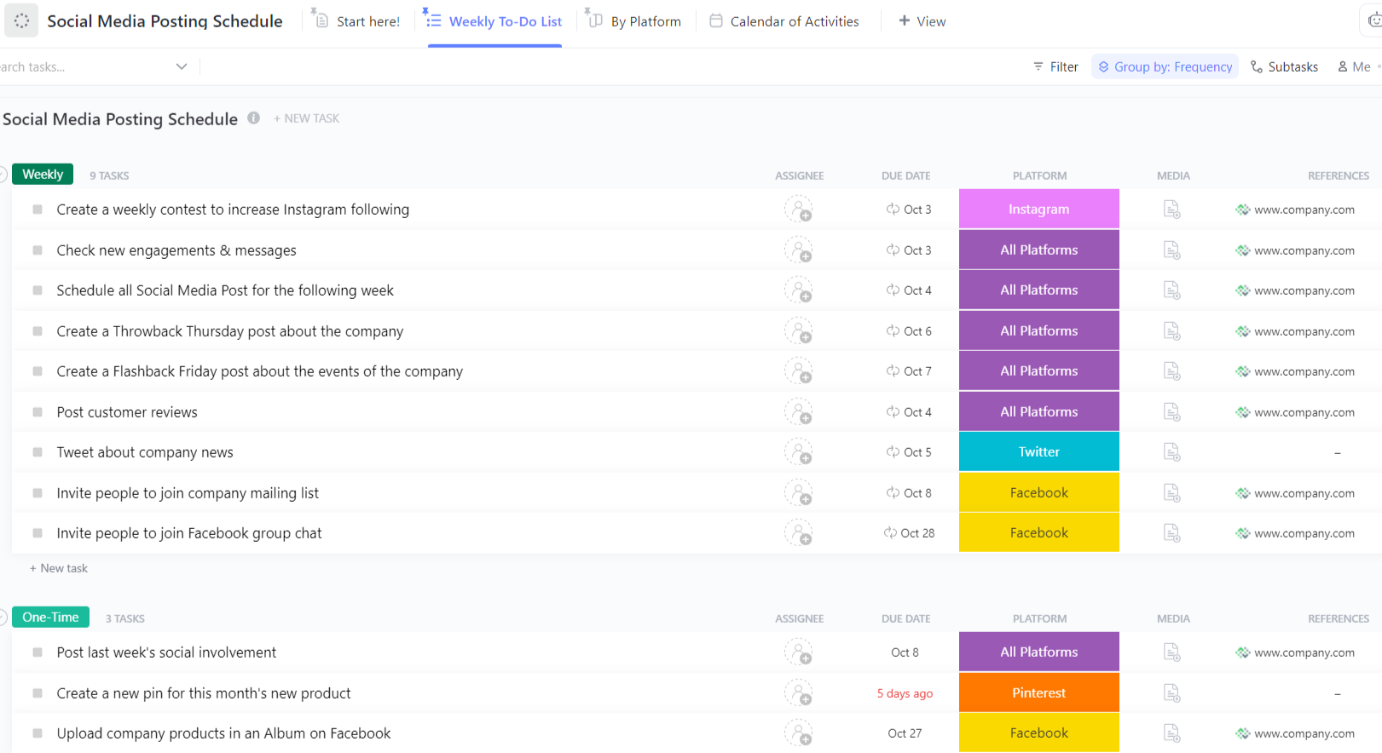
The ClickUp Social Media Posting Schedule Template is an effective way to manage this, helping you reach new audiences and promote your brand while giving each post the attention it deserves.
Every post is a task that progresses through clear stages, including Brief Ready, In Design, Waiting for Approval, and Ready to Schedule, allowing you to stay ahead of schedule for consistent engagement. It helps you standardize handoffs and track performance notes/links per post, so optimization is easier later.
Writing one post at a time doesn’t scale. Batching helps you stay focused, especially when managing high volumes. You save hours when you group tasks like drafting captions, sourcing visuals, and editing video in blocks.
ClickUp Docs supports batch work by letting you draft long-form ideas and pull smaller pieces directly into your workflow.
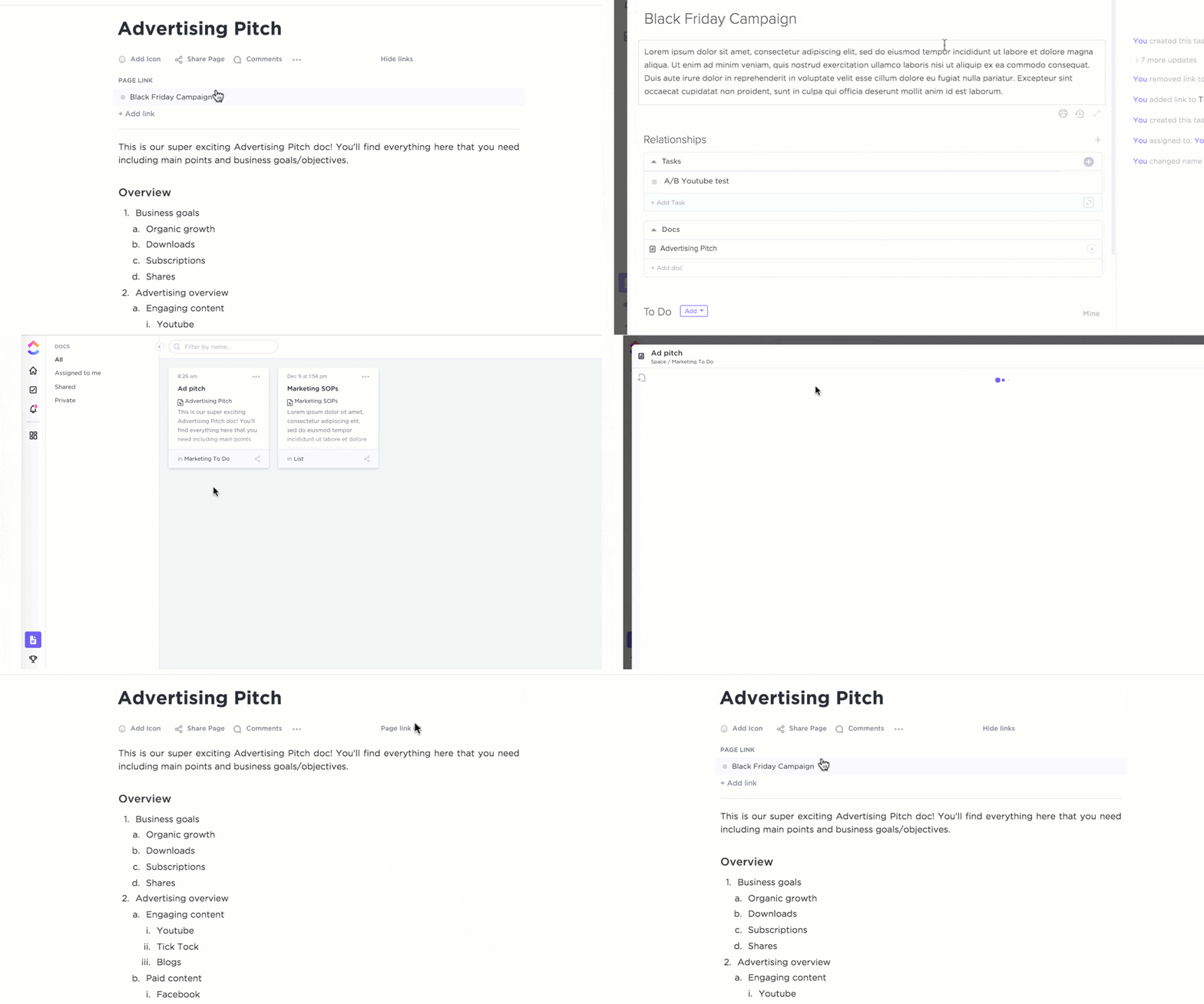
For example, start a Doc to outline a new campaign, then break it into an Instagram caption, a LinkedIn post, and a reel script. Keep all versions linked to a single source, so edits or updates can sync easily. This approach works exceptionally well when managing recurring series, such as weekly tips or client spotlights.
ClickUp Brain adds speed to this process.
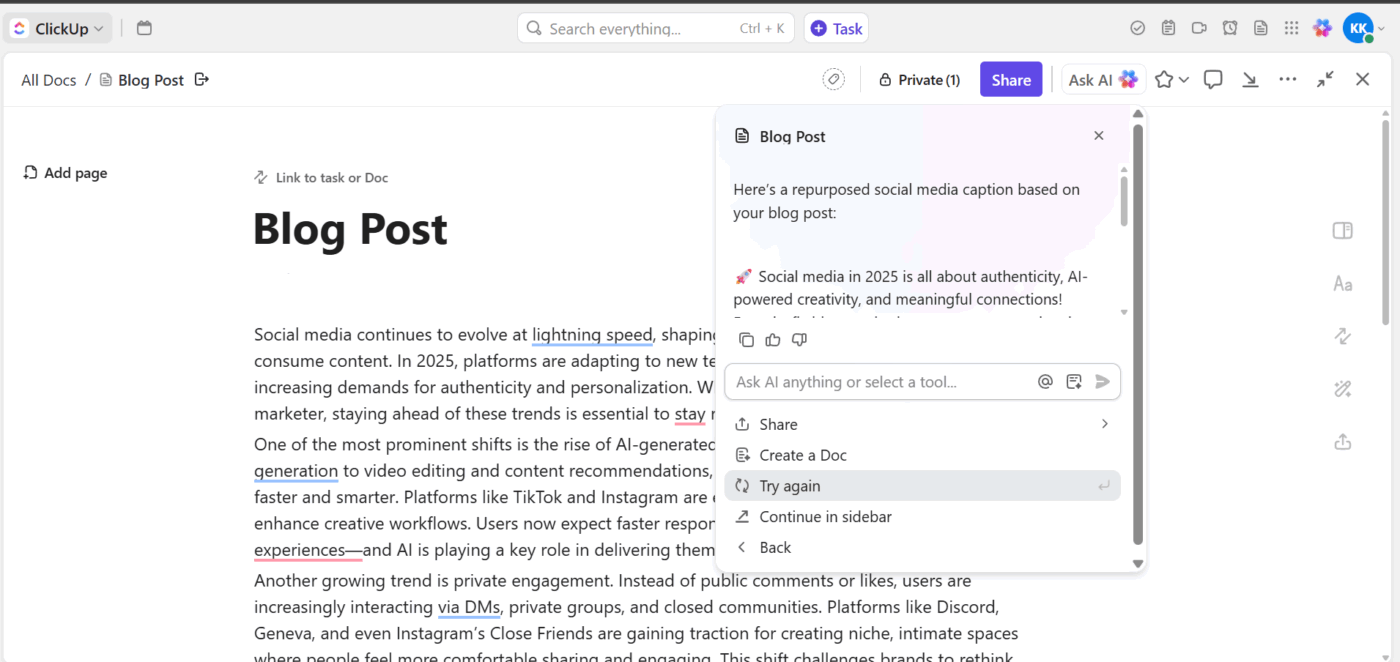
This built-in AI assistant helps rephrase, summarize, or adapt your content writing tone to the brand voice instantly. If you’ve drafted a new blog post or video script, use ClickUp Brain to shorten it into a caption or reformat it for a different platform, all inside your task.
If you’re handling three clients with overlapping themes, it localizes language or reworks one campaign concept into multiple brand tones without starting from scratch.
🧠 Fun Fact: While the U.S. dominates in the number of global social media platforms, China is right up there with WeChat, QQ, and Douyin (which you probably know as TikTok). Yep, TikTok is just the international version of Douyin!
Workflow Tip:
Most people think they’ll remember a good hook when it hits later in the day. They won’t.
ClickUp BrainGPT fixes that with the Talk to Text feature, which lets you draft variations, hashtags, or content ideas the moment you think of them.
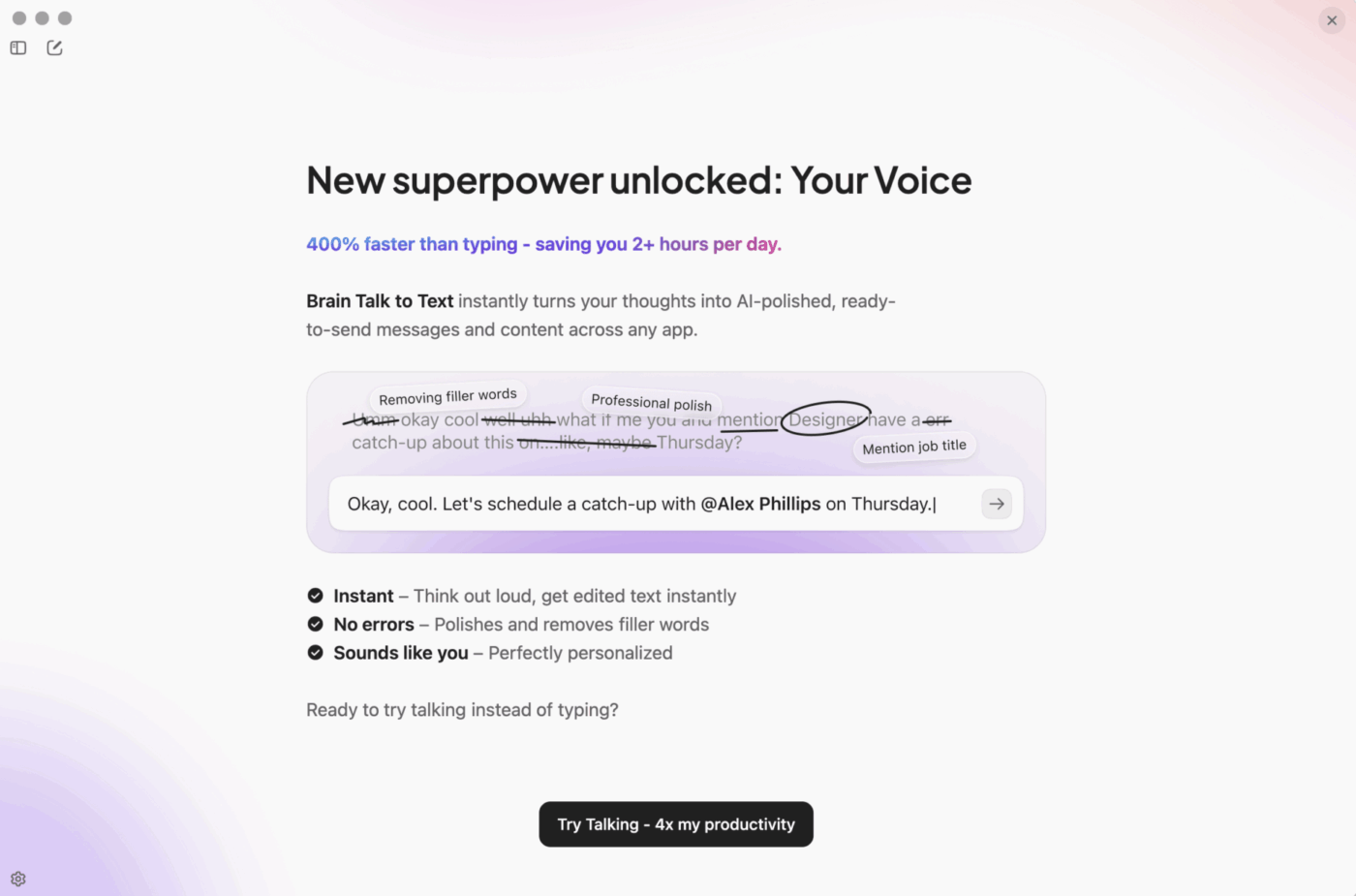
It picks up the tone and structure automatically, so you capture messy thinking without stopping what you’re doing. For creators juggling several brands, it’s the simplest way to keep ideas from slipping away and turn voice notes into ready-to-edit copy.
Managing multiple accounts often involves multiple people, including writers, designers, brand managers, and sometimes clients. Without a shared system, feedback gets lost in emails, roles become blurred, and deadlines get missed.
ClickUp Tasks ensure everyone knows their role at each stage with multiple assignees, custom due dates, and checklists for substeps within one card.
However, to add accountability, you can use ClickUp Assigned Comments.
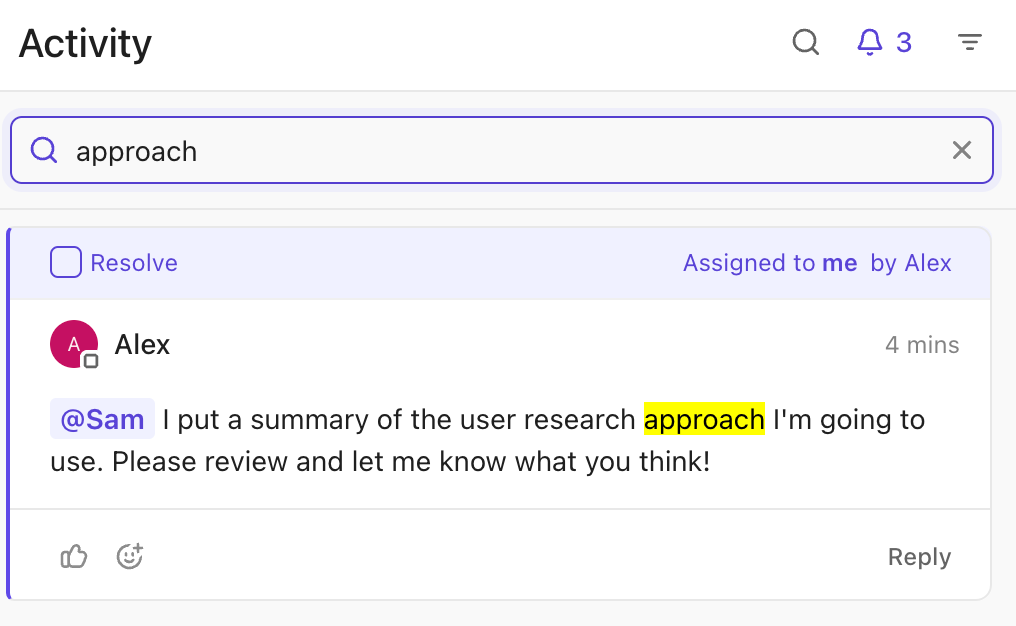
It lets you centralize feedback directly within your tasks and docs. Tag team members, request updates, and resolve threads once done. Everyone sees the whole history in context.
For example, if the brand manager wants to tweak the CTA in a carousel post, they can leave a comment directly inside the task where the caption draft lives. The writer sees the issue, makes the change, and marks it as resolved.
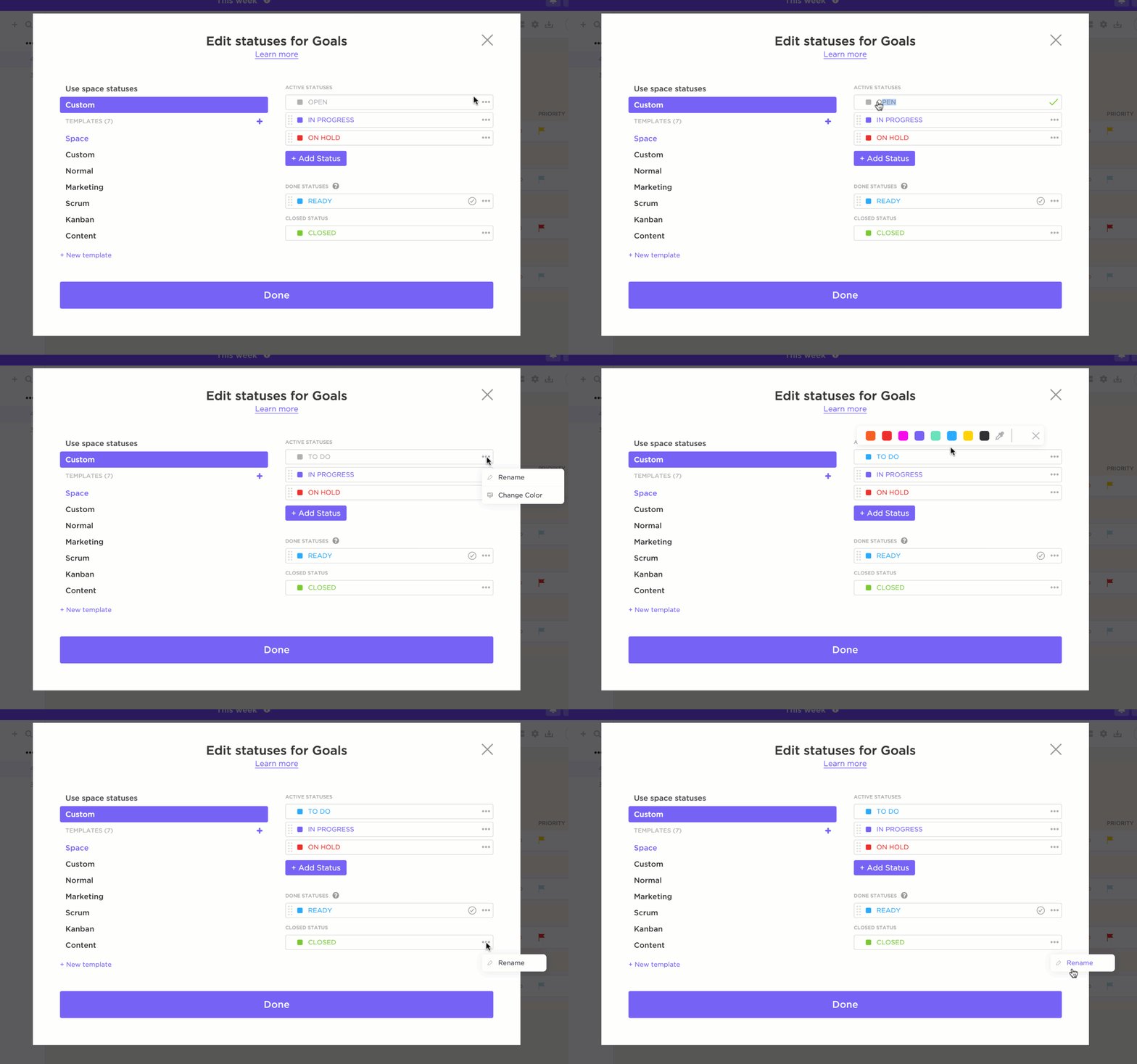
ClickUp Custom Task Statuses help teams track content through each stage of production. Instead of generic ‘To Do’ or ‘Done’, create statuses that reflect your editorial workflow, like Draft in Progress, In Review, Approved, and Scheduled.
Repetitive admin work slows down content teams. If you’re spending time marking statuses, assigning handoffs, or copying briefs, that’s time you could be using for content strategy or community engagement.
ClickUp Automations come in handy here.
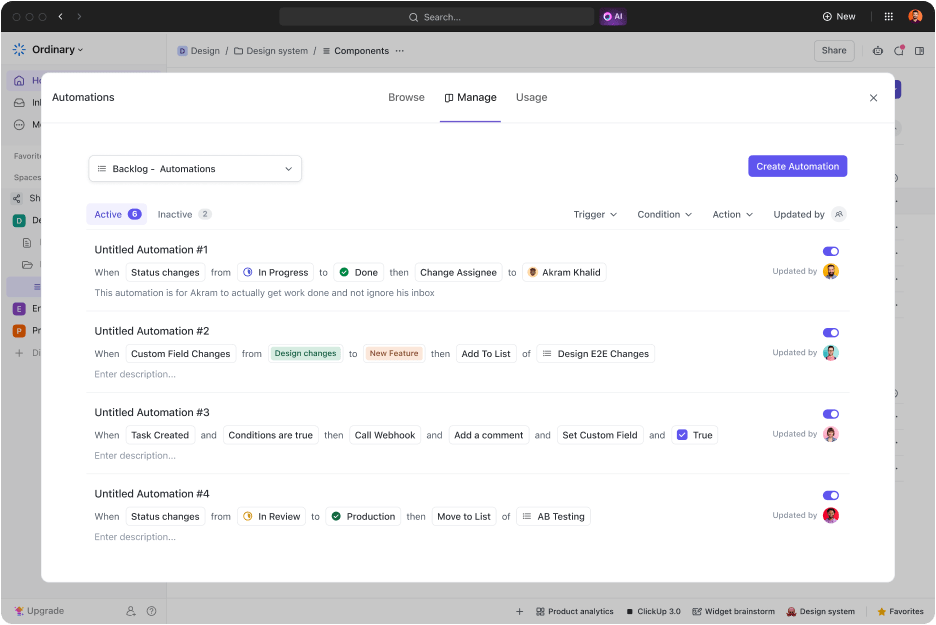
You can set up simple rules like: ‘If a post is approved, tag the scheduler, mark it as ‘Ready,’ and ping the team on Chat.’ And you’re done. You can even auto-tag campaigns or content types to keep analytics clean and consistent. This helps agencies, freelancers, and small teams work faster without micromanaging steps.
With automations, you can schedule recurring posts and tasks like industry trendspotting sessions, trigger platform-specific handoffs, and get notified when approved content gets auto-published.
🔍 Did You Know? The GaryVee Content Model is one of the most effective social media marketing strategies. It starts with creating one big piece of pillar content, then breaking it down into bite-sized micro-content to share across different platforms.
💫 Workflow upgrade
Super Agents give social managers breathing room when everything hits at once. They can watch your workflow and step in when something needs to move: nudging a reviewer who hasn’t approved the draft yet, gathering missing assets before scheduling, or checking if captions match platform guidelines.
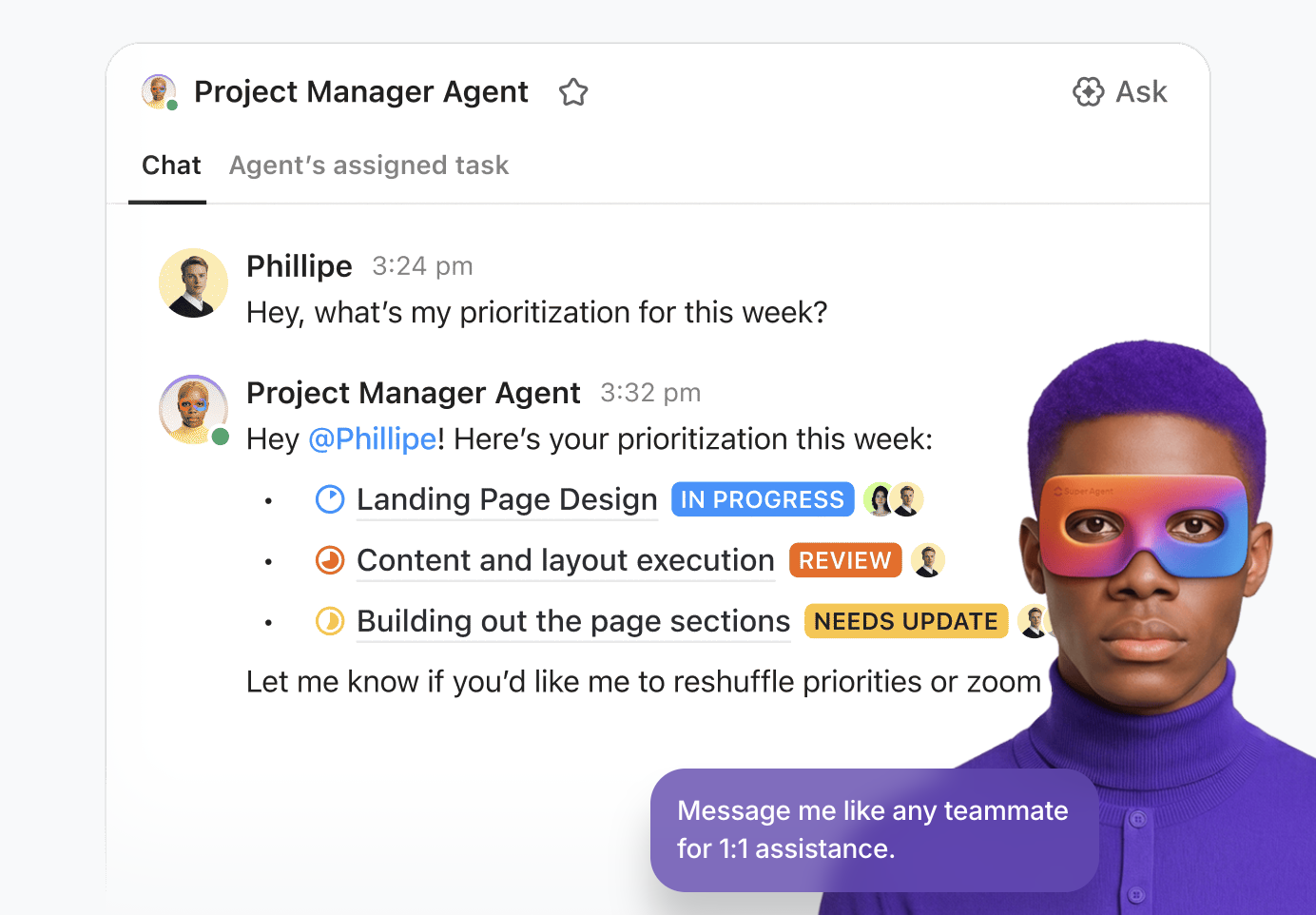
They even prep weekly summaries of what shipped, what slipped, and what needs attention—without you digging through five tools. When you’re managing multiple accounts, these quiet behind-the-scenes helpers keep the machine running so you can focus on the creative decisions that actually move a campaign forward.
Once content goes live, your focus shifts to performance. Views, clicks, comments, and shares only tell part of the story. You also need to track how campaigns perform across platforms, how goals stack up over time, and what’s worth repeating with analytics tools for Instagram, Meta, X, and other platforms.
Want to bring all this data together? Create custom ClickUp Dashboards.
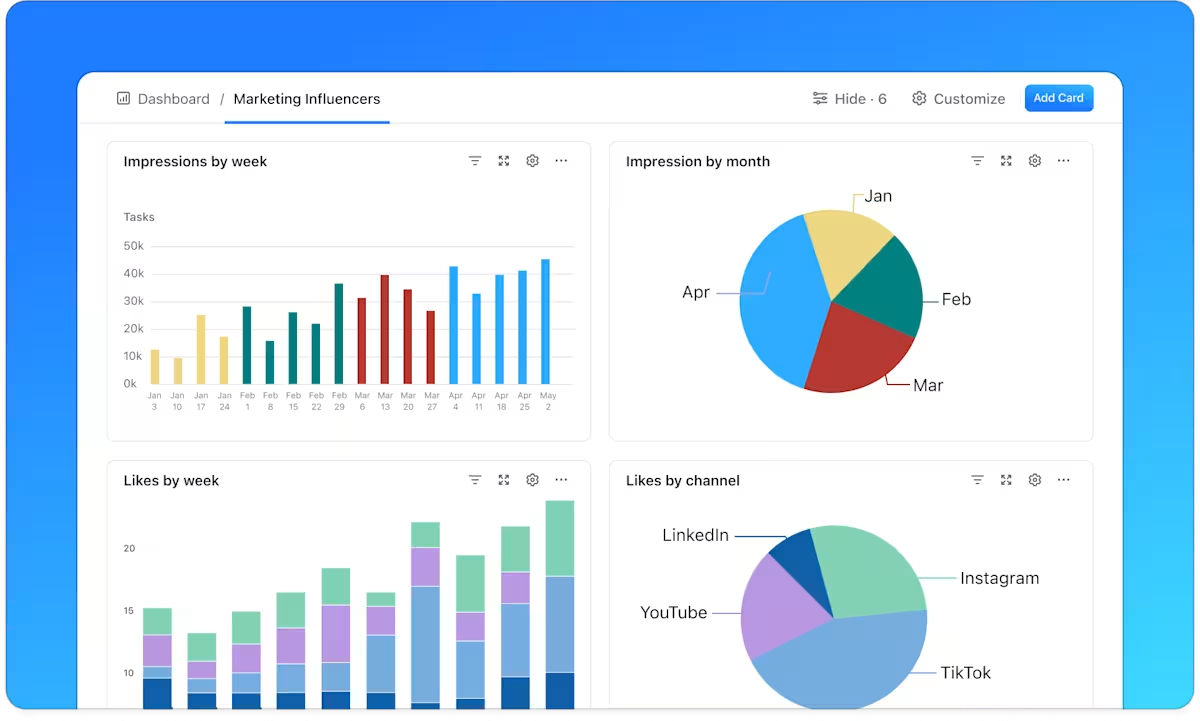
These dashboards help you track performance trends alongside production metrics, such as what has shipped, what’s stuck in approval, and what needs a refresh. You can also attach weekly exports or reports to keep results and decisions in one place. Use cards to visualize data such as engagement trends, campaign KPIs, and team workload.
For example, if you manage five brands, set up a Dashboard that pulls in each brand’s weekly performance. Use line charts for follower growth, bar graphs for engagement by platform, and task completion rates for internal content goals. And if you’re using social media listening tools? Plug in those insights to guide your next move.
ClickUp has been an all-in-one solution, true to its goal, where we could manage just about every aspect of our business activities. This includes things such as web design projects, search engine optimization clients, social media management, and business management for two other associated companies.
Content strategies need room to evolve. Platform algorithms shift, audience behavior changes, and campaign goals move. Reviewing social media metrics, such as social listening and performance, regularly helps you refine what works and eliminate what doesn’t.
Create a ClickUp Doc to serve as your media planning template. Outline key questions like: What performed well? What didn’t? What will we test next month? Tag your team, attach screenshots, and add platform-specific insights directly to the doc so everything stays in one place.
🔍 Did You Know? Videos on X (formerly Twitter) can boost your tweet engagement by up to 10 times! And if your video shows positive human interaction, response rates can jump by 40%.
When the accounts multiply, the goal stays the same: one strategy, one calendar, one approval flow, and one place to track what shipped and what worked.
ClickUp keeps those pieces connected so you spend less time coordinating and more time creating. Plan content in Calendar or List View, assign clear owners, streamline reviews with Docs and Assigned Comments, and automate handoffs so posts move from draft to scheduled without requiring manual intervention.
Ready to make multi-account management feel sane again? Sign up for ClickUp for free today. ✅
It depends on posting frequency + approval complexity.
– Solo + no approvals: 3–6 accounts is realistic if you batch content weekly
– Client approvals + multiple platforms: 1–3 brands is more realistic
– With templates + automation + batching: you can scale, but only if the workflow is consistent
A good benchmark: if your day is spent “where is the asset / who approved / what’s posting today?” you’ve hit capacity—not because you need more effort, but because you need a tighter system.
Use consistency over intensity. Start with a cadence you can maintain for 6–8 weeks, then increase.
– Instagram: consistent feed posts + Reels when you can sustain them
– LinkedIn: steady posts that match your sales cycle and audience attention
– X: higher frequency works, but only if it doesn’t dilute quality
– TikTok: consistency matters most—batching helps a lot
If you’re stretched thin, post fewer, better, and reuse pillars (one theme → multiple outputs).
Not word-for-word. Your audience expects the platform to “feel native.”
Use this approach:
– Keep the same idea
– Change the format + hook
– Adjust the CTA
– Match the tone to the platform
Example:
– LinkedIn = story + takeaway
– X = opinion + punchline
– Instagram = visual-first + short caption
Same message, different packaging.

© 2026 ClickUp

There’s an easier way. Try a free AI Agent in ClickUp that actually does the work for you—set up in minutes, save hours every week.