










Still downloading templates?
There’s an easier way. Try a free AI Agent in ClickUp that actually does the work for you—set up in minutes, save hours every week.
Sorry, there were no results found for “”
Sorry, there were no results found for “”
Sorry, there were no results found for “”
You left the meeting feeling on top of things.
Now it’s two days later, and all you’ve got is a fuzzy memory and zero notes.
An Evernote meeting notes template makes sure that such a thing never happens again.
And if you want something more than just a place to scribble meeting minutes? ClickUp, the everything app for work, gives you templates that turn your notes into actionable ones. 🤩
Let’s get started! 💪
Here’s a summary table wit the best Evernote and ClickUp meeting notes templates:
| Template Name | Download Template | Best Features | Ideal For | Visual Format |
| Evernote Meeting Notes Template | Download This Template | Structured sections, real-time checkboxes, clean format | Marketing leads, PMs, remote teams | Evernote Page |
| Evernote Agenda Template | Download This Template | Color-coded schedule, non-negotiables checklist, time-boxing | Remote workers, busy professionals | Evernote Page |
| Evernote Ideas Brainstorming Template | Download This Template | Kick-off prompts, flexible idea capture, calendar links | Team leads, event planners, product designers | Evernote Page |
| Evernote Project Plan Template | Download This Template | Actionable phases, clickable TOC, deliverable tracking | Writers, project coordinators | Evernote Page |
| Evernote Cornell Notes Template | Download This Template | Three-column layout, active listening, efficient review | Professionals in training, students | Evernote Page |
| Evernote Daily Planner Template | Download This Template | Time blocks, checklists, notes/links column | Freelancers, remote pros, busy team members | Evernote Page |
| Evernote Weekly Planner Template | Download This Template | Top priorities, daily breakdown, category organization | Remote workers, busy professionals | Evernote Page |
| ClickUp Minutes of Meeting (MoM) Template | Get Free Template | Attendance, agenda, open actions, post-meeting checklist | Team leads, PMs, remote teams | ClickUp Doc, List |
| ClickUp Meeting Note Style Template | Get Free Template | Color-coded blocks, key takeaways, action items | Busy pros, remote teams, ClickUp users | ClickUp Doc |
| ClickUp Meeting Notes Template | Get Free Template | Real-time collab, multi-page, AI-powered notes | Remote teams, team leads, PMs | ClickUp Doc, List |
| ClickUp Recurring Meeting Notes Template | Get Free Template | Repeatable structure, agenda steps, action tracking | PMs, remote leads, cross-functional teams | ClickUp Doc |
| ClickUp Meeting Minutes Template | Get Free Template | Subpages, attendee tags, action item tables | Ops managers, client success, remote leads | ClickUp Doc |
| ClickUp Meeting Agenda Template | Get Free Template | Meeting details, participant checklists, prep clarity | Team leads, EAs, remote pros | ClickUp Doc |
| ClickUp 1-on-1s Meeting Template | Get Free Template | Before/during/after sections, async talking points | Team leads, HR, remote managers | ClickUp Doc |
| ClickUp Meetings Template | Get Free Template | Trackable categories, status, reminders, topics | Team leads, PMs, ops | ClickUp List, Board |
| ClickUp Meeting Checklist Template | Get Free Template | Pre-meeting logistics, attendee selection, repeatable | Ops managers, EAs, team coordinators | ClickUp Doc, List |
| ClickUp Project Note Template | Get Free Template | One-pager, linked sections, accountability | Project leads, account managers, supervisors | ClickUp Doc |
| ClickUp Class Notes Template | Get Free Template | Tagging, summary rows, filterable notes | Team leads, remote pros, students | ClickUp List, Doc |
| ClickUp Meeting Tracker Template | Get Free Template | Color-coded, date-grouped, subtasks, prep details | Remote leads, ops managers | ClickUp List, Doc |
Let me know if you want to add, remove, or adjust any templates or columns!
An Evernote meeting notes template is a pre-designed, reusable layout within the tool to help professionals quickly capture and structure important information from meetings.
These meeting notes templates typically include dedicated sections for meeting details, like date, time, attendees, agenda, discussion points, decisions, action items, and next steps.
Here’s what you should look for in Evernote templates:
Here are some free options from Evernote’s template gallery to help you run effective meetings. 💁
via Evernote
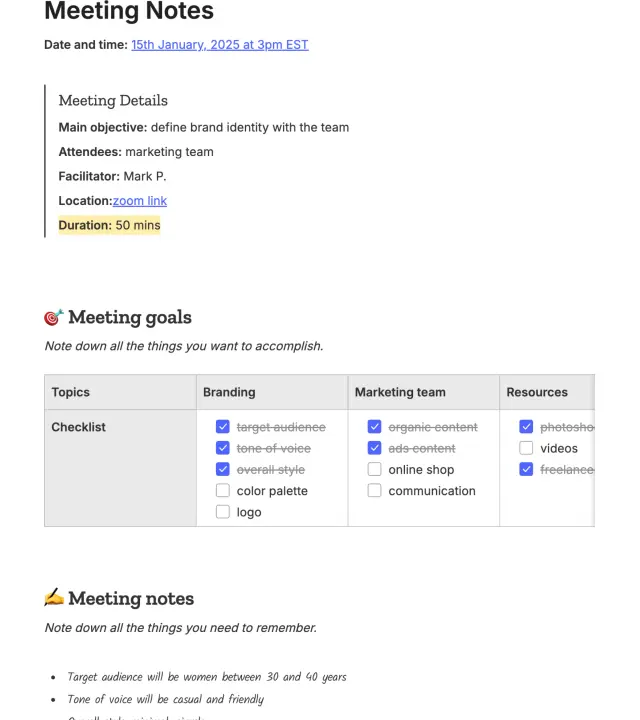
This meeting notes template from Evernote offers a clean, structured approach to documenting team discussions and decisions. It breaks the meeting into three essential parts: Meeting Details, Meeting Goals, and Meeting Notes.
The goals section features a simple table format with checkboxes categorized by topic, enabling teams to visually track progress in real-time.
📌 Ideal for: Marketing team leads, creative project managers, and remote professionals who need to align branding strategies and delegate responsibilities across teams.
via Evernote
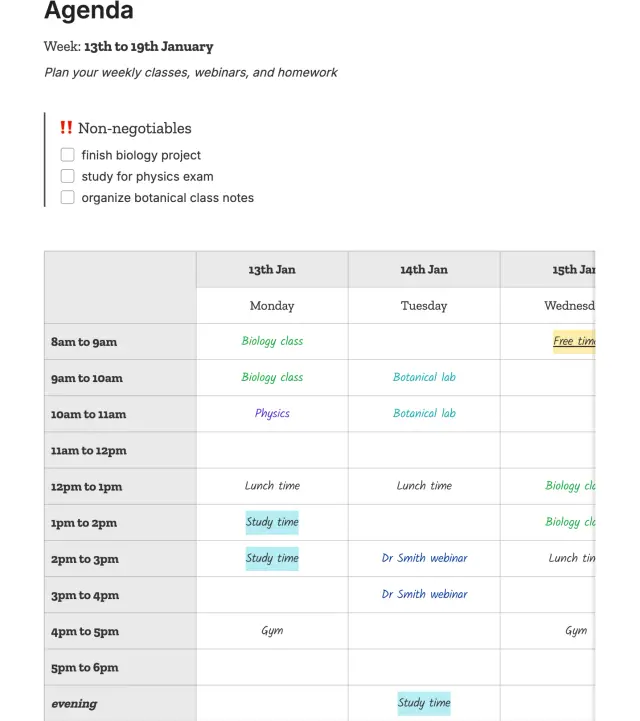
This meeting agenda template in Evernote is your go-to tool for weekly time management. It structures your days with clarity and intent, using a simple, color-coded table that maps out your entire week by the hour.
At the top, there’s a Non-negotiables checklist, great for spotlighting your top three priorities for the week. Below that, the hourly schedule runs from 8 AM to evening hours, segmented by day.
📌 Ideal for: Remote workers or working professionals who juggle multiple commitments and want a visual breakdown of their week.
💡 Pro Tip: Use ClickUp Brain to summarize content and speed up follow-ups, a major win for remote teams and managers juggling multiple meetings a week.
Example Prompt: ‘Summarize the key points, decisions made, and next steps from this meeting. Create a task list with assigned owners and deadlines.

via Evernote
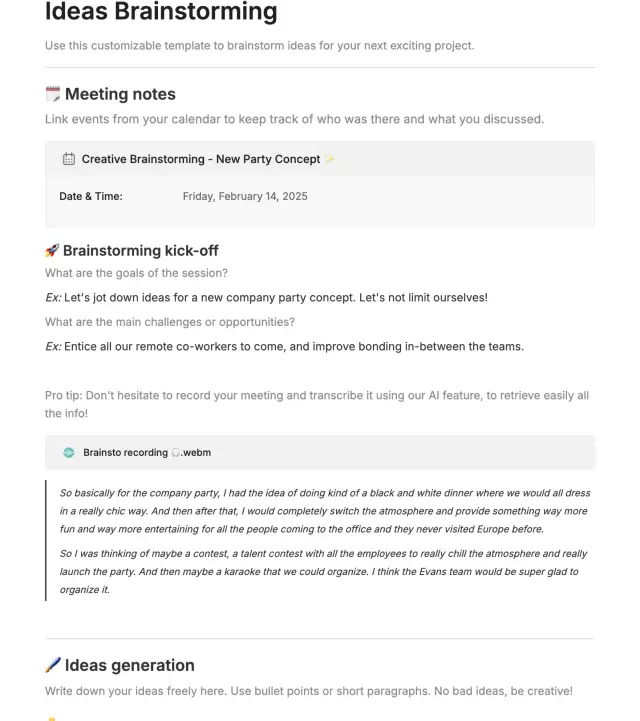
Evernote’s Ideas Brainstorming template starts with a Meeting Notes section, where you can link to calendar events and document basic details, such as topic, date, and participants.
The Brainstorming Kick-off section sets the stage by prompting goals, challenges, and opportunities. Finally, the Ideas Generation section gives you free space to record all suggestions in bullet points or short paragraphs.
📌 Ideal for: Team leads, event planners, and product designers running productive brainstorming sessions and product meetings.
🧠 Fun Fact: One of the most famous ‘meetings’ in history? When Socrates stood in the Athenian Agora and questioned passersby about life’s meaning. Philosophy, democracy, and public discourse all found roots here. No calendar invites needed—just show up and bring your existential dread.
via Evernote
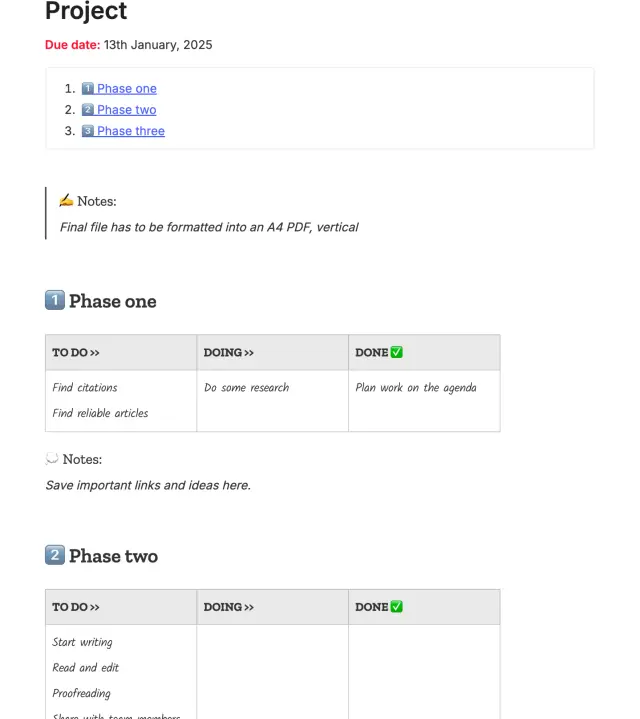
This Evernote meeting notes template gives structure to complex, multi-stage work. If you’re managing a marketing campaign or a client deliverable, it breaks things down into actionable chunks.
A clickable table of contents at the top makes it easy to jump between sections, while each phase includes a dedicated space for task notes and helpful links.
📌 Ideal for: Writers and project coordinators who need a lightweight but effective way to track progress across multiple deliverables or team contributions within the meeting management software.
📮ClickUp Insight: 21% of respondents want to leverage AI to excel professionally by applying it to meetings, emails, and projects. While most email apps and project management platforms have AI integrated as a feature, it may not be seamless enough to unify workflows across tools.
But we cracked the code at ClickUp! With ClickUp’s AI-powered meeting management features, you can easily create agenda items, capture notes from meetings, create and assign tasks from meeting notes, transcribe recordings, and more—with our AI notetaker and ClickUp Brain. Save up to 8 meeting hours per week, just like our clients at Stanley Security!
via Evernote
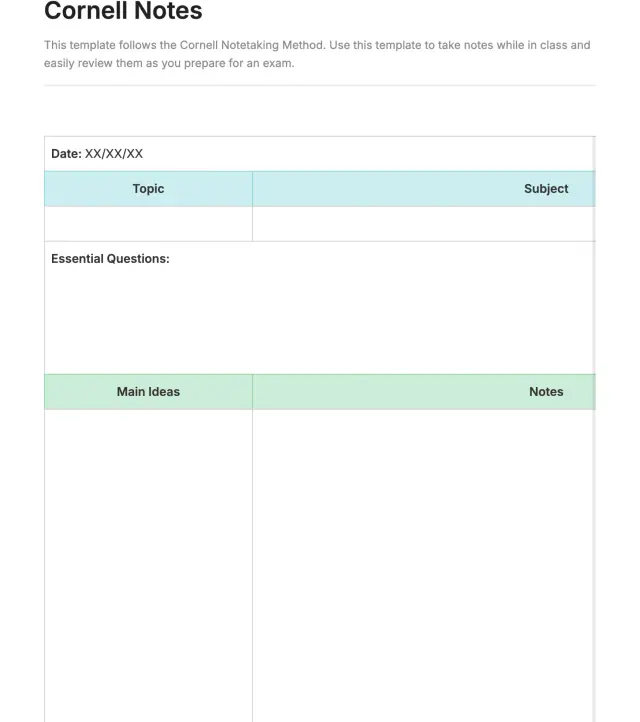
This Cornell notes template is a tried-and-true layout for anyone who wants to take smarter, more organized notes.
The note-taking app’s template separates your notes into three key areas: Essential Questions, Main Ideas, and Notes. This layout encourages active listening or reading by prompting you to ask questions, identify key points, and then expand on them with supporting details or examples.
📌 Ideal for: Professionals attending training sessions who want to retain more from lectures, webinars, or readings.
🧠 Fun Fact: The concept of meetings started over 2,600 years ago in Ancient Greece, where people gathered in a central space called the Agora, literally meaning meeting place. It was for exchanging ideas, debating, and even gossiping.
via Evernote
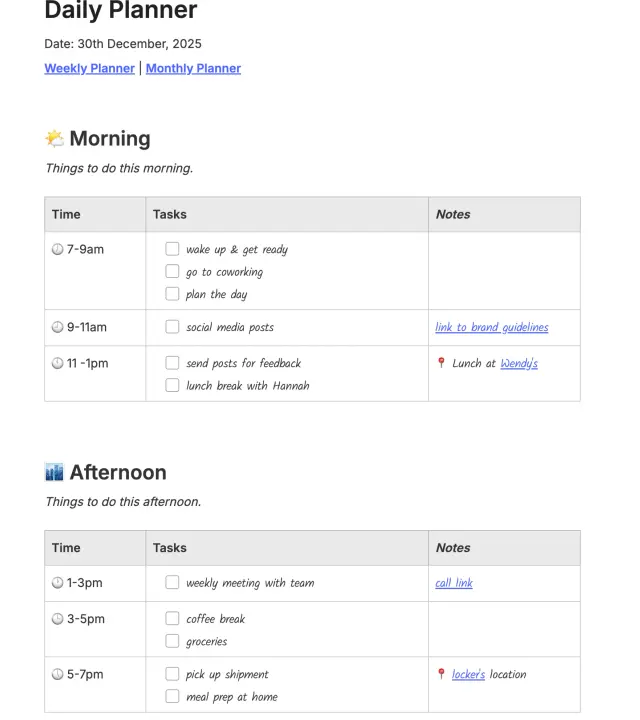
This daily planner template is a simple yet powerful way to take control of your day, one time block at a time. It’s laid out to guide you from morning through evening, with clearly defined time slots, checklists for tasks, and a column for links, notes, or location details.
The structure is broken into Morning and Afternoon sections, making it easier to balance work, breaks, and personal errands. Need to link to a meeting call or brand guideline? There’s a space for that. Got lunch plans or a shipment to pick up? Add those notes too.
📌 Ideal for: Freelancers, remote professionals, and busy team members who need a time-blocked view of their day to balance project meetings, deep work, and errands.
📖 Also Read: How to Use AI for Meeting Notes (Use Cases & Tools)
via Evernote
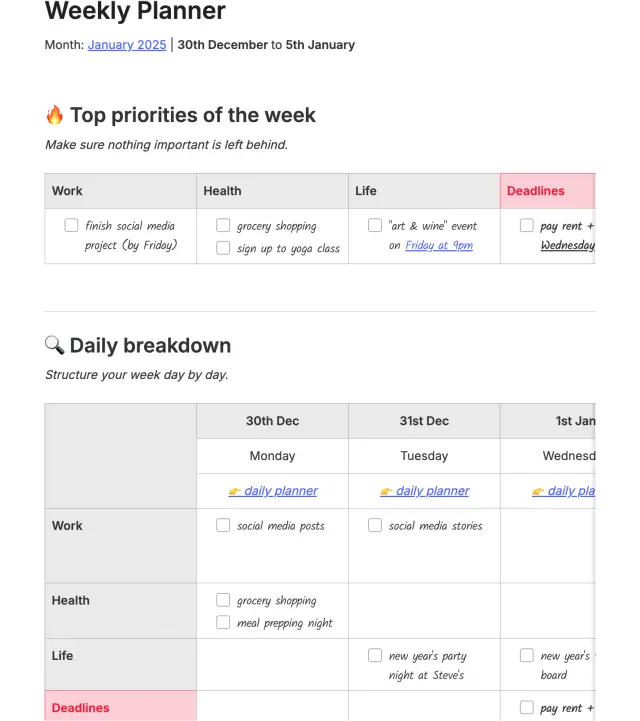
With two clean sections, Top Priorities of the Week and Daily Breakdown, this Evernote meeting notes template lets you take a step back and view your tasks through a wider lens.
You can organize responsibilities by category (Work, Health, Life, and Deadlines) and quickly spot what matters most each day. At the top, the priority grid helps you lock in your non-negotiables. Below that, each day is broken down into simple blocks. It even links to your Daily Planner for a more detailed view.
📌 Ideal for: Remote workers and busy professionals who want a flexible planning system to balance productivity and personal life.
💡 Pro Tip: Make weekly meetings fun and rewarding! You can:
Here are some challenges you might face that can make you consider using Evernote alternatives:
While Evernote team meeting notes templates are great for capturing what was said, they stop short when it comes to what happens next.
If you’re looking for a more execution-oriented system, ClickUp might be a better fit.
Plus, with ClickUp Meetings, you can document your discussions, assign follow-up tasks in real time, track progress, and link notes directly to larger projects.
Here are some alternative meeting note templates and tools that’ll help you decide between Evernote vs. ClickUp:
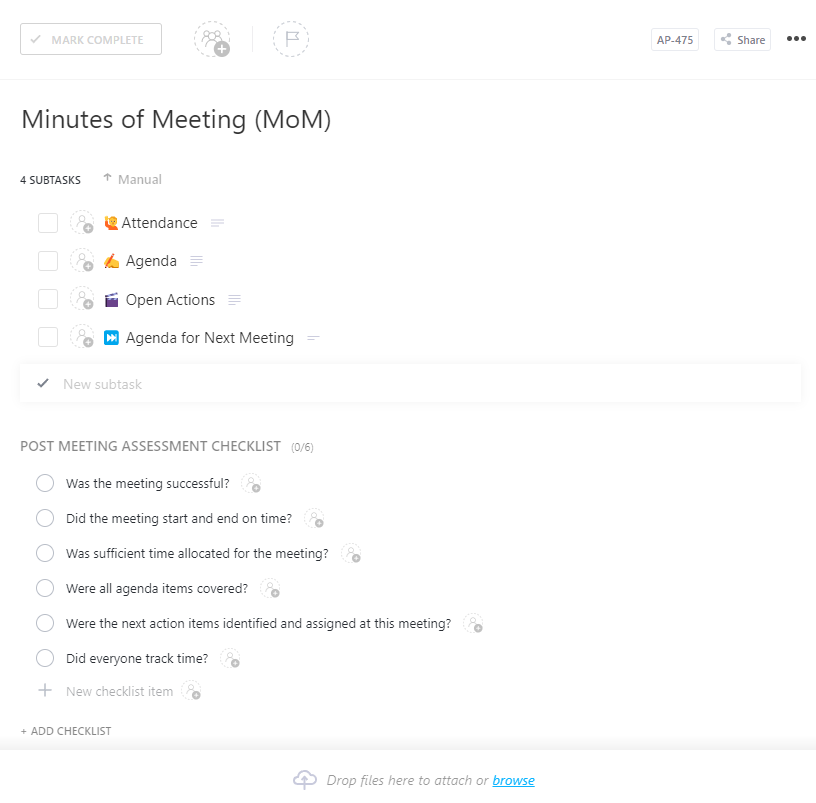
The ClickUp Minutes of Meeting (MoM) Template breaks down the meeting structure into four neatly arranged subtasks: Attendance, Agenda, Open Actions, and Agenda for Next Meeting. This allows you to capture who attended, what was discussed, what needs follow-up, and what should be prioritized next time.
What makes this template stand out is the Post Meeting Assessment Checklist. It asks the right questions: Was the meeting on time? Did you cover all sales meeting agendas? Did everyone track time? These checkpoints serve as a quick retrospective tool to improve meeting quality over time without the need for a formal review.
📌 Ideal for: Team leads, project managers, and remote professionals who need a structured, repeatable way to plan and assess meetings.
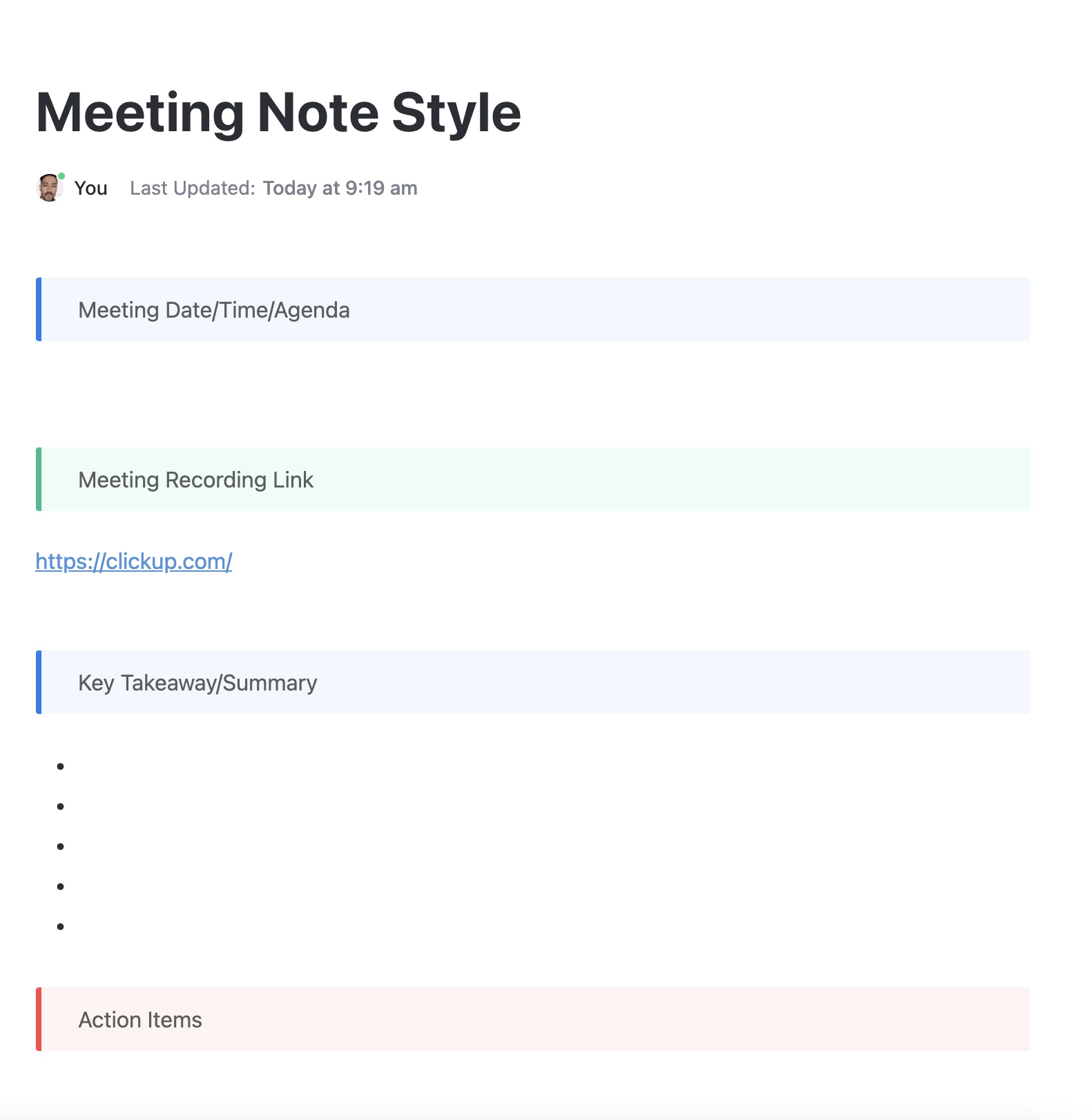
The ClickUp Meeting Note Style Template provides a no-frills framework that walks you through all the essentials: meeting date/time/agenda, a space for the recording link, key takeaways, and most importantly, action items.
Built in ClickUp Docs, the layout is visually organized using color-coded blocks, making it easy to distinguish between different sections at a glance. The summary section has bullet points for clarity, and the action item block at the bottom ensures tasks are front and center for immediate follow-up.
📌 Ideal For: Busy professionals, remote teams, and ClickUp power users who want a frictionless, repeatable way to capture meeting notes quickly.
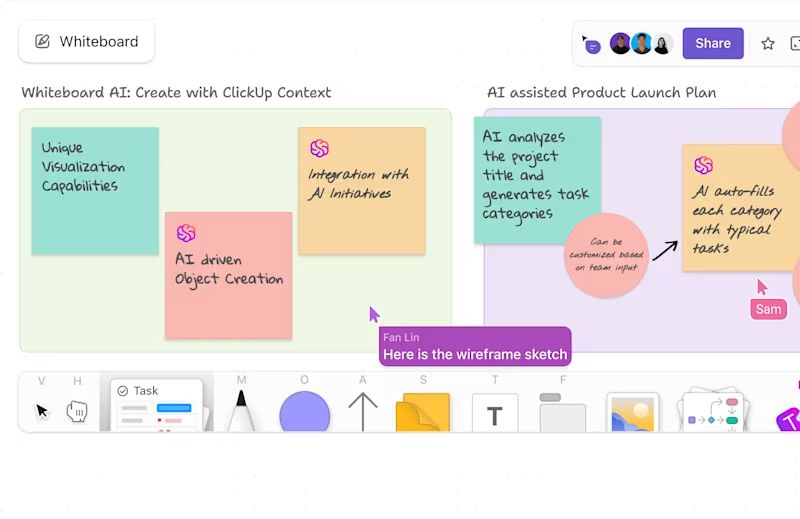
💡 Pro Tip: Use ClickUp Whiteboards to visualize complex topics in real time during your meetings. Co-create diagrams, graphs, or roadmaps during the call to improve understanding and recall. This also keeps people engaged.
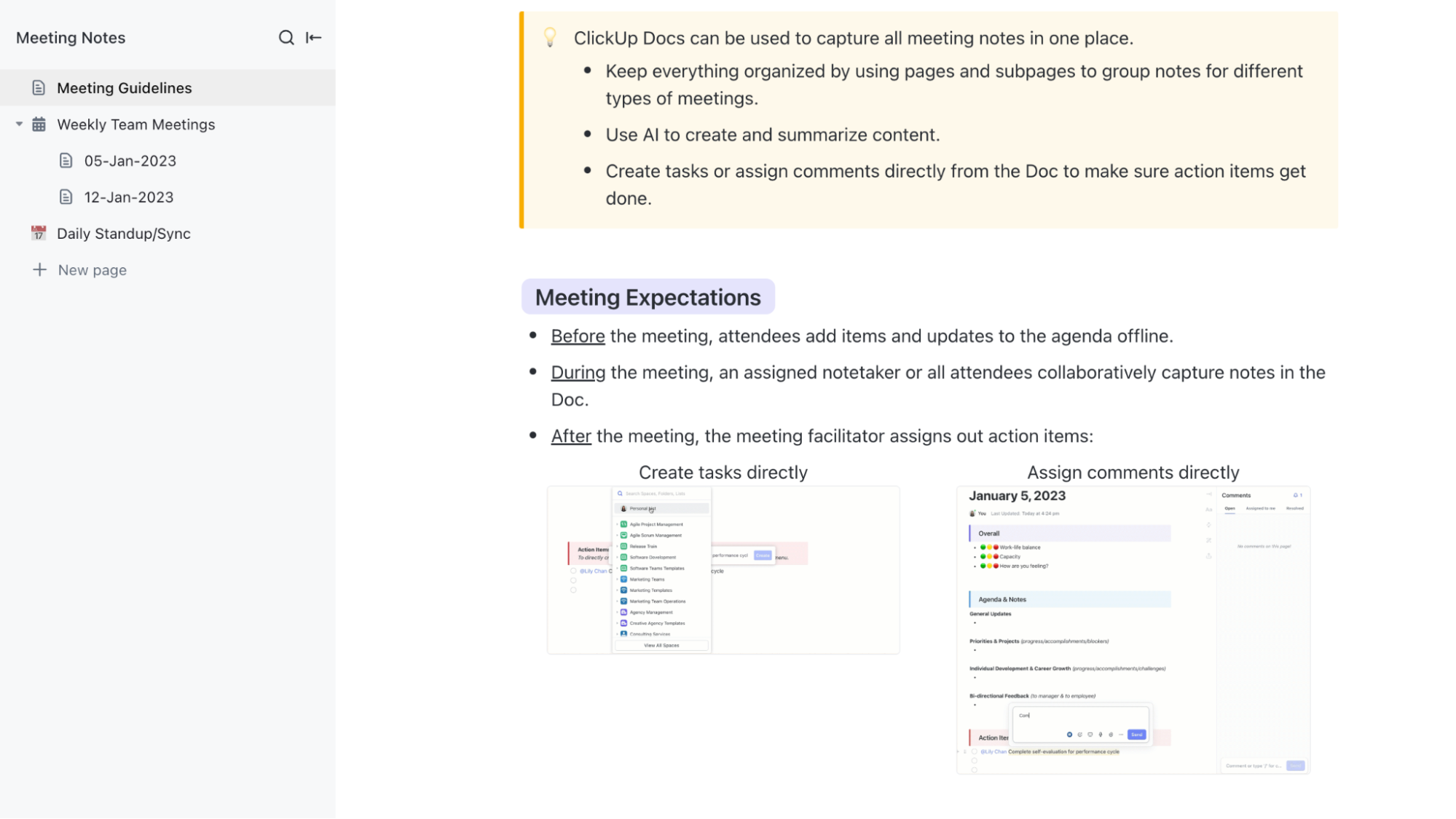
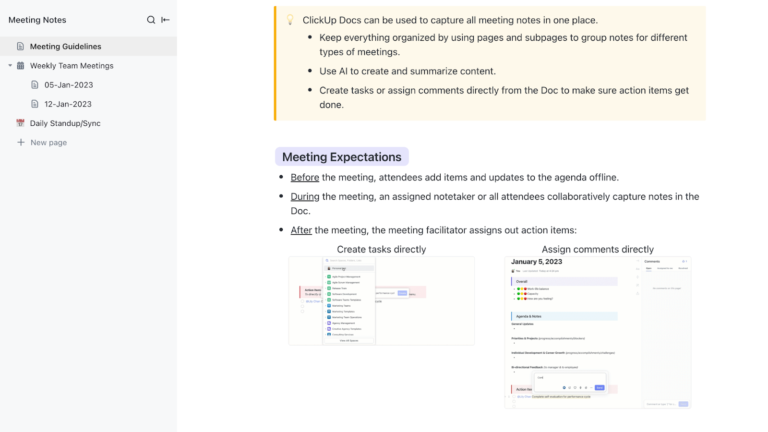
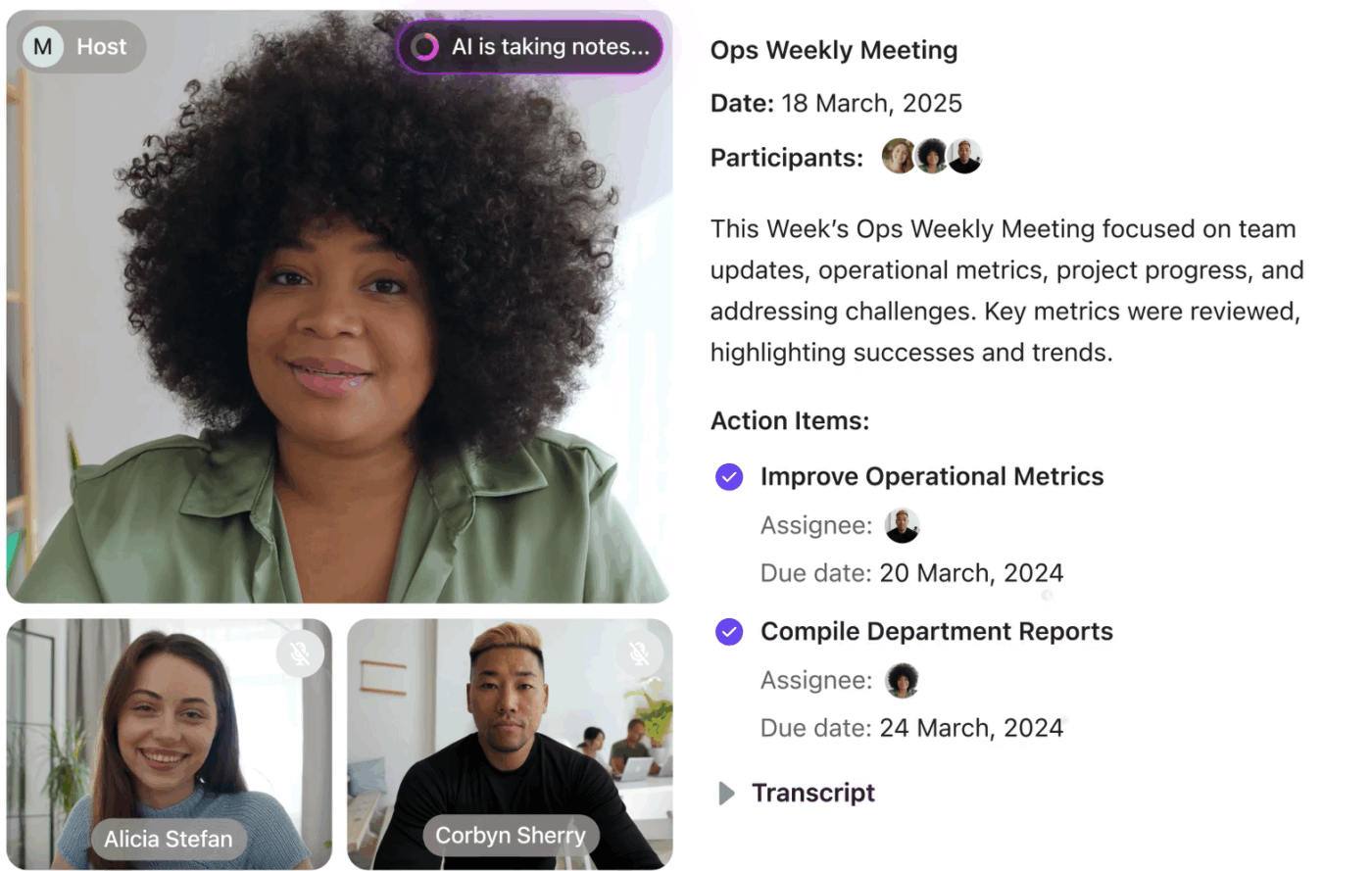
The ClickUp Meeting Notes Template is built for real-time collaboration and ongoing team organization. It offers a multi-page structure with dedicated sections for Meeting Guidelines, weekly meeting entries, and a page for Daily Standups.
What sets this template apart is its comprehensive focus on the entire meeting lifecycle, encompassing both the pre-meeting and post-meeting phases. Attendees are encouraged to update their agendas in advance, while ClickUp’s AI Notetaker contributes live during the meeting.
📌 Ideal For: Remote teams, team leads, and project managers who run recurring syncs or stand-ups and want a centralized, collaborative space.
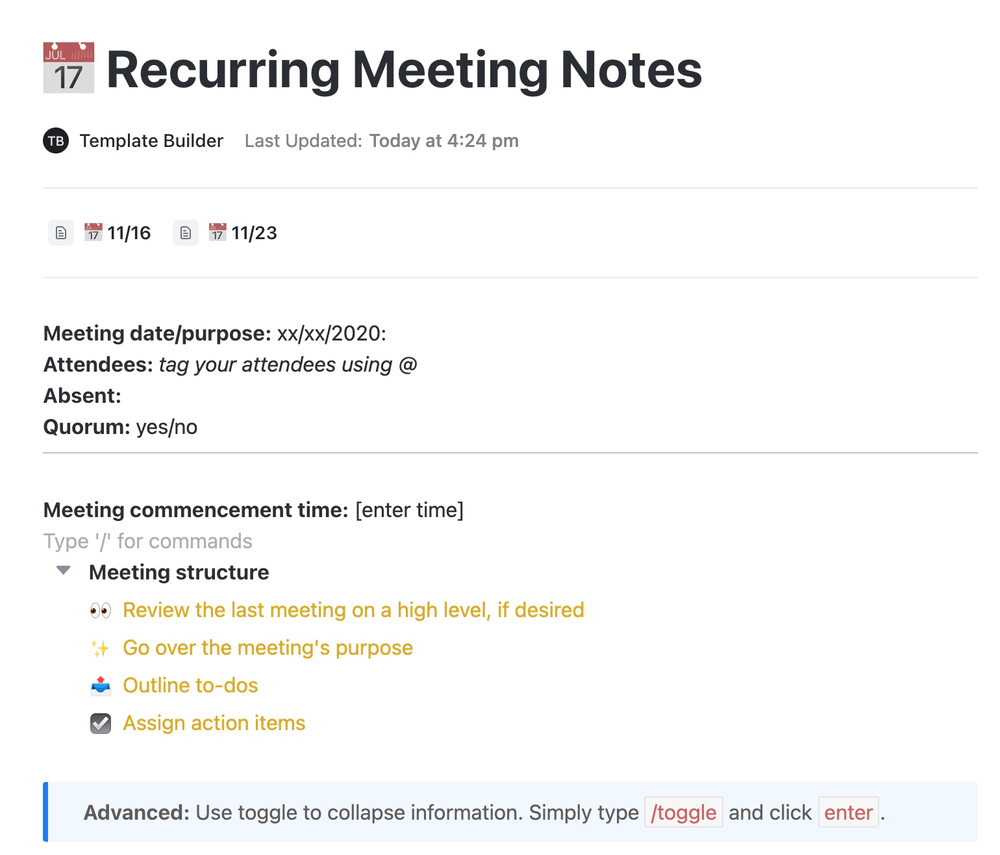
The ClickUp Recurring Meeting Notes Template helps teams streamline meetings that occur on a regular schedule, such as weekly check-ins, monthly reviews, or ongoing project syncs. It begins with the essentials: meeting date, purpose, attendee tags, quorum, and list of absentees.
From there, it guides you through a repeatable meeting structure that encourages reflection, clarity, and accountability. The meeting structure block outlines four consistent agenda steps: review previous discussions, state the purpose, outline to-dos, and assign action items.
📌 Ideal For: Project managers, remote team leads, and cross-functional squads who run frequent recurring meetings.
💡 Pro Tip: Use a timer for each agenda item (like the Pomodoro technique, but for meetings). Example:
Time-boxing keeps meetings focused, an integral part of high-performing teams.
The ClickUp Meeting Minutes Template is ideal for teams that value documentation and require a comprehensive record of all their discussions. This task management template smartly organizes meeting notes into subpages, with each entry (such as 20221027 Meeting) following a consistent structure that includes key sections.
Each subpage includes: a space to tag attendees with @mentions, a Links section for recordings, tasks, and key references, and a neatly formatted Action Items table with assignees and due dates.
📌 Ideal For: Operations managers, client success teams, and remote project leads who want a reliable and scalable structure to document meetings of all sizes.
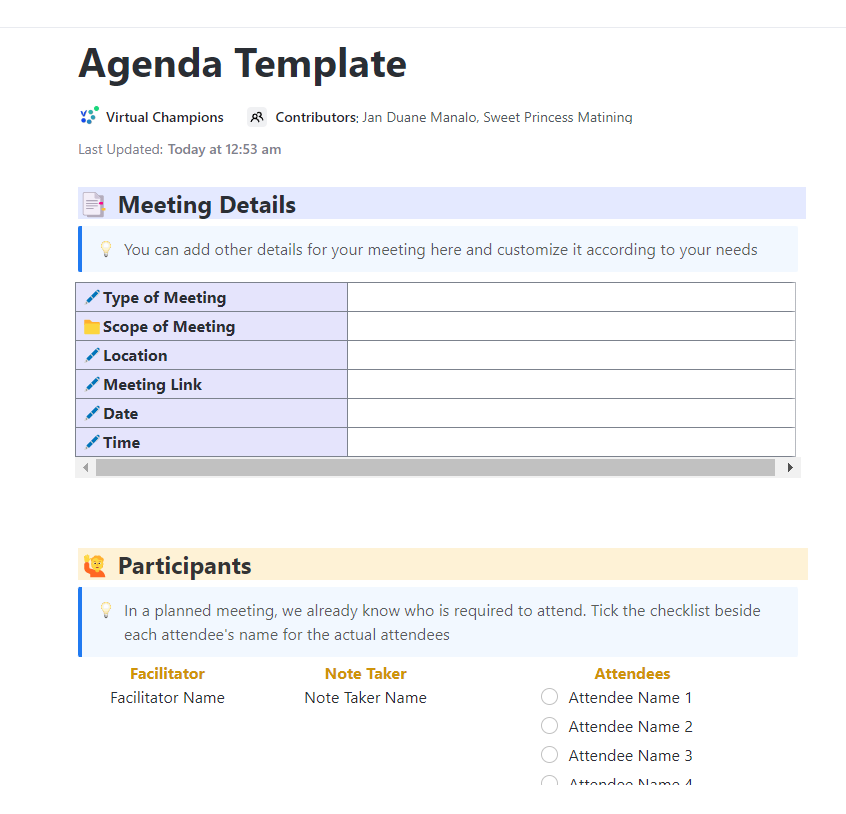
The ClickUp Meeting Agenda Template is all about setting the tone before the meeting starts. It focuses on getting the logistics and expectations locked down ahead of time, saving everyone from confusion or wasted time.
The template breaks the prep into two main sections: Meeting Details and Participants. The Meeting Details table is cleanly laid out, covering the type and scope of the meeting, location, link, date, and time. While the Participants section allows you to list the facilitator, note taker, and attendees, and even use a checklist to mark who is present.
📌 Ideal For: Team leads, executive assistants, and remote professionals needing a clear, structured way to plan meetings ahead of time, set roles, and ensure that everyone shows up aligned.
👋🏾 Learn how to write an effective meeting agenda here:
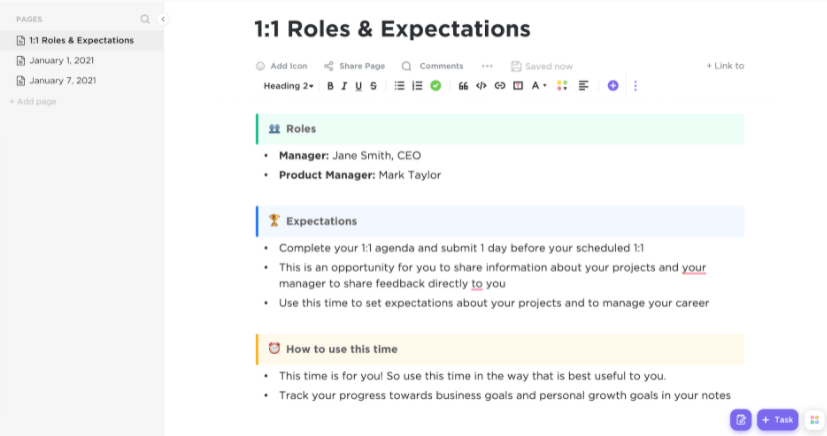
The ClickUp 1-on-1s Template is tailor-made for meaningful employee-manager conversations. It’s divided by meeting dates and anchored with a central 1-on-1 Guidelines page, helping teams stay consistent while still allowing flexibility.
Each meeting page includes sections for agenda items, meeting minutes, and action items. The flow is built around a clear three-step process: Before the 1-on-1 (both parties can asynchronously add talking points), During the meeting (notes are captured live), and After the meeting (action items are converted into tasks or comments directly from the doc).
📌 Ideal For: Team leads, HR professionals, and remote managers who want to make 1-on-1s more intentional and trackable.
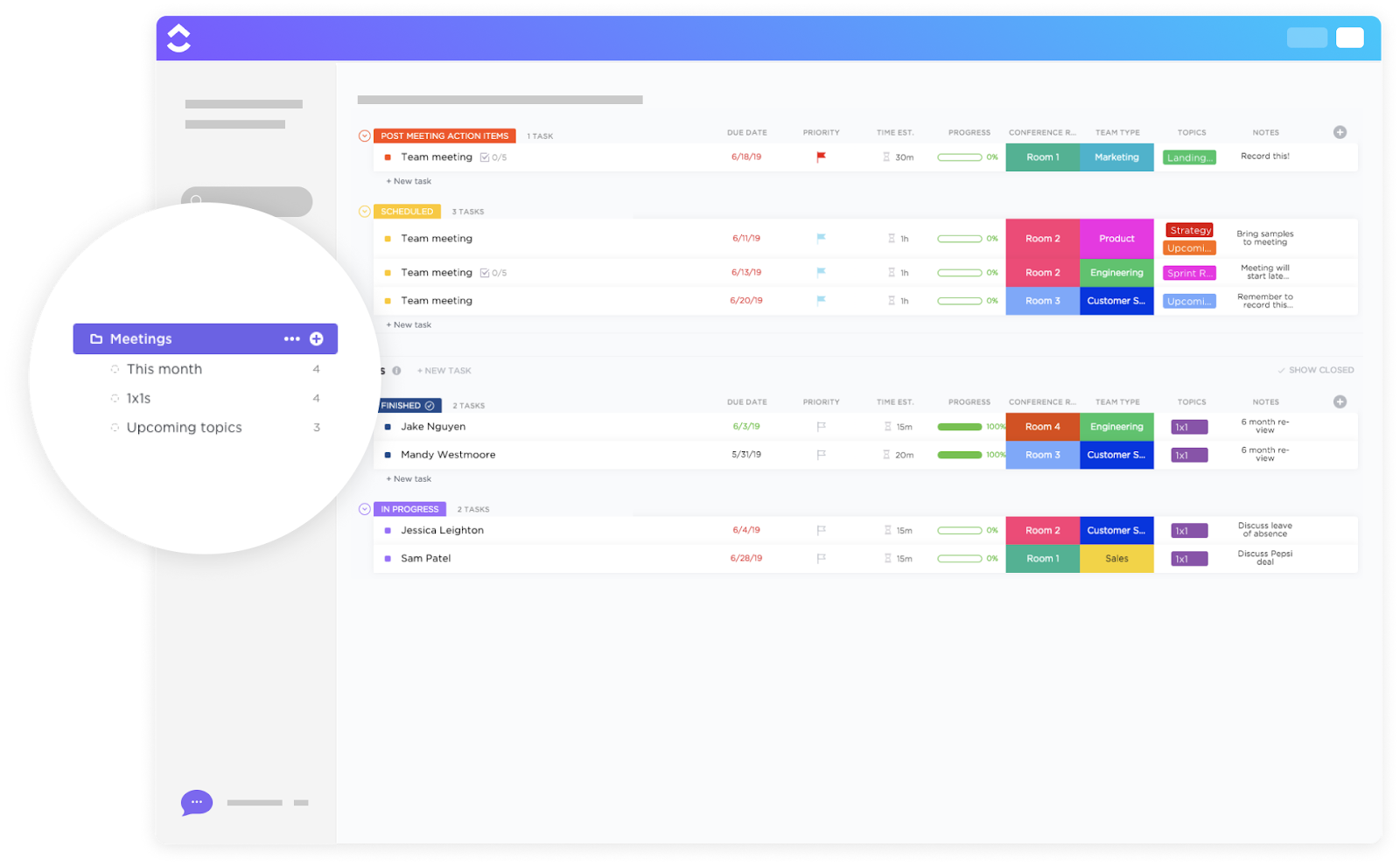
The ClickUp Meetings Template is perfect for teams that want to treat meetings like projects: structured, trackable, and outcome-driven. It organizes notes by categories, such as Scheduled, Post-Meeting Action Items, Finished, and In Progress. Each meeting is a task with fields for due dates, duration, conference room, team type, tags, and notes.
The visual layout gives instant clarity on what’s upcoming, what’s overdue, and what’s still in motion. There’s even space to mark the meeting topic (such as 1:1s or strategy) and a note field to capture quick reminders, like ‘Record this!’ or ‘Discuss leave of absence.’
📌 Ideal For: Team leads, project managers, and operations folks who want to track meetings just like any other task in their workflow.
The ClickUp Meeting Checklist Template strips things down to the essentials. It kicks off with a Pre-Meeting section that houses all tasks to be completed before the meeting takes place.
One of the standout parts is the Appointment Scheduling block. It’s a simple checklist that walks you through attendee selection, availability checks, finalizing the date and time, and even scouting and booking the meeting location.
📌 Ideal For: Operations managers, executive assistants, and team coordinators who need a straightforward, repeatable process to lock down all meeting logistics ahead of time.
💟 Bonus: Brain MAX is your AI-powered desktop companion that takes the stress out of meeting management. With deep integration across your calendar, emails, documents, and project tools, Brain MAX can instantly pull up past meeting notes, agendas, and action items—so you’re always prepared. Need to catch up? Just ask Brain MAX for a summary of last week’s meeting or a list of outstanding tasks, and it delivers the key details in seconds.
After meetings, you can use voice commands or text prompts to add your own notes, clarify next steps, or create new tasks directly from the discussion. Brain MAX automatically organizes and links these updates to the right projects and team members, sets reminders, and ensures nothing slips through the cracks. With enterprise search, context-aware insights, and proactive follow-up, Brain MAX keeps your meetings organized, actionable, and productive—so you can focus on moving work forward, not managing the details.
The ClickUp Project Note Template is a digital one-pager that covers everything essential at the start of a project, from the high-level summary to milestone dates and clear ownership. The layout begins with a clean table listing all the key identifiers: project name, reference number, project manager, owner, note date, and completion date.
The Project Brief section goes a step further, giving space to lay out the purpose, objectives, and scope in your own words. On the sidebar, you’ll find a breakdown of linked sections like Scope, Milestones, Best Practices, and even a Project Note Acknowledgement, making it great for accountability without being overbearing.
📌 Ideal For: Project leads, account managers, and team supervisors who want a consistent, ready-to-fill framework to kick off new initiatives.
💡 Pro Tip: Create a ‘Meeting Operating System’ for your team! Establish norms like:
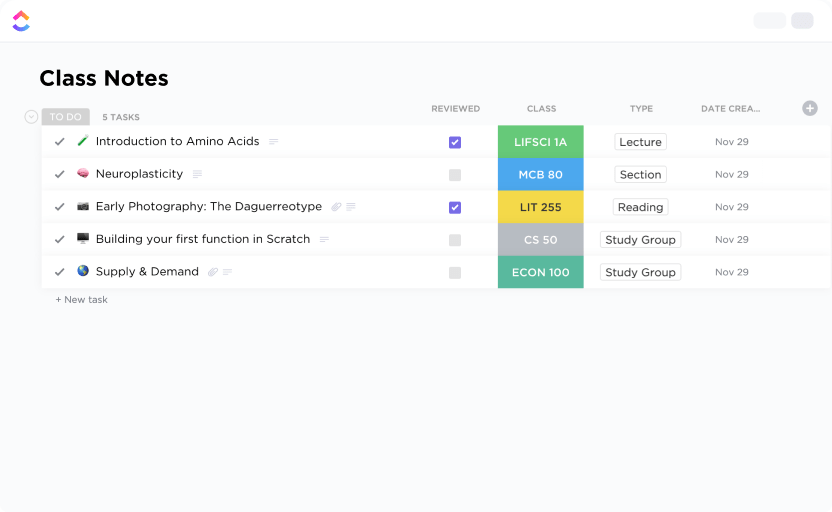
The ClickUp Class Notes Template offers a clean, streamlined solution for your meetings. Originally designed for students, it works just as well for teams juggling ongoing discussions, cross-functional sessions, or recurring workshops.
The layout groups notes into tasks, assigning tags for class (or project), type (such as section, reading, or study group), and review status, making it easy to filter, sort, and find what matters. Each row functions like a mini-summary: Is the topic reviewed? Which session or team does it belong to? You get a quick snapshot without having to dig through files.
📌 Ideal For: Team leads or remote professionals wanting a structured yet flexible way to document, tag, and revisit discussions across different meetings, workstreams, or learning sessions.
The ClickUp Meeting Tracker Template makes it ridiculously easy to stay on top of your team’s entire meeting calendar. The layout is grouped by date and color-coded by meeting type, giving you a bird’s-eye view of your week without switching between to-do list apps or email threads.
Each row is a dynamic task with subtasks, assignees, and prep details built right in. Planning ahead? There’s a column for linked docs and facilitation roles. Want to reflect afterward? Everything’s still in one place.
📌 Ideal For: Remote team leads or operations managers needing a high-visibility way to log, organize, and prep for internal meetings across departments and formats.
Hear it from this ClickUp user:
It’s been phenomenal to see how much time we’ve saved in meetings since moving to ClickUp. What used to take us three hours per week for event planning and updates now takes us just over an hour. The teams involved now have more time to focus on more important marketing priorities.
Capturing clear, actionable meeting notes doesn’t have to be a hassle. Using an Evernote meeting notes template is a great first step.
However, ClickUp does more than just store your notes. It turns them into dynamic, trackable action items. Assign tasks, set due dates, add comments, and even integrate them directly into your team’s workflow. Your meeting notes become part of the bigger business picture, helping your team stay aligned, on track, and fully accountable.
Sign up to ClickUp for free today! ✅
Yes, Evernote can be used to take meeting notes. It provides a flexible and organized platform where you can quickly jot down key points, decisions, and action items during meetings. Its features, such as notebooks, tags, and search functionality, make it easy to organize and retrieve your meeting notes whenever needed.
The best format for meeting notes typically includes the meeting’s date and time, a list of attendees, the agenda or topics discussed, key discussion points, decisions made, and action items with assigned responsibilities. Using bullet points or numbered lists can help keep the notes clear and easy to follow.
To create a note template in Evernote, start by designing a note with your preferred structure, such as headings for agenda, discussion, and action items. Once you’re satisfied with the layout, save the note as a template. This allows you to reuse the same format for future notes, ensuring consistency and saving time.
To take high-level meeting notes, focus on capturing the main topics discussed, important decisions made, and any follow-up actions or assignments. Avoid writing down every detail; instead, summarize the key points and outcomes. This approach keeps your notes concise and ensures that the most critical information is easily accessible.

© 2026 ClickUp

There’s an easier way. Try a free AI Agent in ClickUp that actually does the work for you—set up in minutes, save hours every week.