Sorry, there were no results found for “”
Sorry, there were no results found for “”
Sorry, there were no results found for “”
Fireflies AI is an easy-to-use meeting transcription tool that comes with a mobile app and integrates with multiple third-party tools. However, some handy features, like advanced search or integrations, are locked behind paywalls. All its plans also cap AI credits and meeting recording durations.
Understanding Fireflies’ pricing structure is essential before you commit. If you are not careful, you might end up paying for features you don’t need or miss out on the ones you do.
The right plan can help you streamline meetings, stay productive, and get the best value without stretching your budget.
So, let’s break down Fireflies.ai’s pricing plans and features in detail. If you still don’t find anything suitable, we’ll introduce you to ClickUp’s AI Notetaker as an alternative.
Our editorial team follows a transparent, research-backed, and vendor-neutral process, so you can trust that our recommendations are based on real product value.
Here’s a detailed rundown of how we review software at ClickUp.
Here’s a quick feature comparison to start things off:
| Feature | ClickUp | Fireflies.ai |
| Meeting transcription | ✔️ Auto-transcribe Zoom, Google Meet, and MS Teams meetings via ClickUp AI Notetaker | ✔️ AI-powered transcription with multiple integrations |
| Action item extraction | ✔️ ClickUp AI Notetaker auto-generates meeting tasks & summaries | ✔️ Summarizes meetings and offers AI task suggestions |
| Task integration | ✅ Native: Instantly convert action items to ClickUp tasks and attach notes to workflows | Teams who want meetings + action, + execution in one place |
| Centralized workspace | ✅ Full work management platform (tasks, docs, dashboards, etc.) | ❌ Focused on meeting intelligence only |
| Meeting context in tasks | ✅ Meeting notes, recording, and transcripts live inside relevant tasks | ❌ Notes live in Fireflies—not automatically tied to tasks unless manually exported |
| Searchable knowledge base | ✅ Unified search across tasks, docs, notes, and meeting recordings | ❌ Only searches transcribed meetings |
| AI-powered summaries | ✅ In-task summaries, next steps, and thread-aware comments via ClickUp Brain | ✅ Smart summaries and topic detection |
| Ideal For | Teams who want meetings + action + execution in one place | Teams who want standalone meeting intelligence |
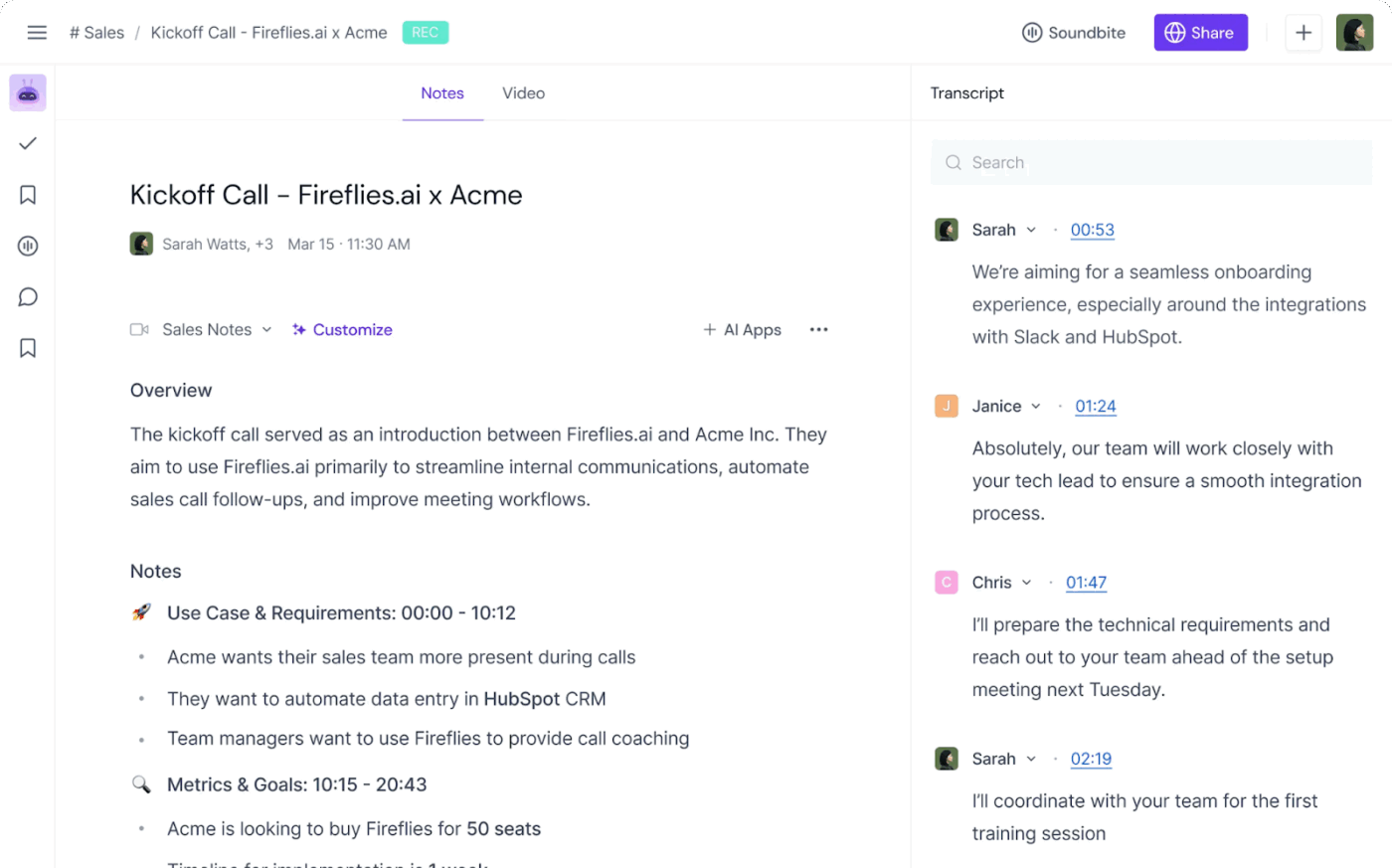
Fireflies AI is a smart meeting assistant that automatically records, transcribes, and summarizes meeting conversations. This AI-powered tool listens in on your meetings, identifies speakers, and picks out key points. You can revisit exactly what was said and by whom.
It generates shareable AI summaries and action items, helping your team stay in the loop and quickly act on follow-ups. Fireflies.ai integrates seamlessly with popular meeting tools like Zoom, MS Teams, and Gmeet, making it an effortless upgrade to your remote or hybrid workflow.
Key features include:
👀 Did You Know? Ebbinghaus’s Forgetting Curve shows that people forget 50% of information within the first hour of learning it. A reliable AI meeting notetaker helps beat this by ensuring you have all the meeting data organized to refer back to.
📮ClickUp Insight: 49% of our meeting effectiveness survey respondents still take handwritten notes—a surprising trend in a digital-first era. This reliance on pen and paper may be a personal preference or a sign that digital note-taking tools aren’t fully integrated into workflows.
At the same time, another ClickUp survey found that 35% of people spend 30 minutes or more summarizing meetings, sharing action items, and keeping teams informed.👀
ClickUp AI Notetaker eliminates this administrative burden! Let AI automatically capture, transcribe, and summarize your meetings while identifying and assigning action items—no more handwritten notes or manual follow-ups needed! Boost productivity by up to 30% through ClickUp’s instant meeting summaries, automated tasks, and centralized workflows.
Fireflies.ai offers multiple pricing tiers. However, choosing the right one depends on how you work and how much help you want from your AI assistant.
Are you just looking for smart meeting transcripts? Or do you need full-blown meeting management software with intelligence, integrations, and automations?
Let’s break down the pricing plans so you can derive maximum ROI from the tool.
Fireflies’ free plan lets you record meetings on Zoom, Google Meet, Microsoft Teams, and 10 more platforms with auto language detection, time stamps, and global search.
🎯 Who it’s for: Solo users, students, and smaller teams who just want basic meeting notes and transcripts without extra features or integrations can try Fireflies’ free plan.
Fireflies.ai offers a Pro plan with unlimited transcriptions and AI summarization. This plan should be sufficient for a small business with 4 or 5 people.
🎯 Who it’s for: Small businesses and startups that hold weekly meetings and need basic AI meeting intelligence will find this plan useful.
With the Fireflies Business plan, you get unlimited transcriptions and private storage space, video recordings, and advanced analytics.
🎯 Who it’s for: Medium-sized companies and fast-growing businesses that collaborate on virtual meetings often and need more detailed AI meeting analytics can invest in the Business tier plan.
If you run a big corporation with diverse teams and hold multiple meetings every day, go for the Fireflies’ Enterprise plan. Besides unlimited transcription credits and AI summaries, you get detailed meeting analytics, rapid assistance, and API access for organization-wide deployment.
🎯 Who it’s for: Big companies that need extensive AI tools for meetings and enterprise-grade security, besides accurate transcriptions and AI summaries
📖 Also Read: How to Share and Collaborate on Notes
Fireflies.ai offers some excellent transcription features, but so do some other AI transcription tools. So what makes Fireflies.ai’s pricing plans stand out (or fall short)?
Let’s find out so that you can choose a plan that best suits your needs and budget.
Here are some perks that make Fireflies one of the standout AI meeting minutes generators:
📖 Also Read: Free Task List Templates in Excel & ClickUp
Before choosing a pricing plan, consider these drawbacks in Fireflies.ai:
While Fireflies.ai is a useful platform for automating meeting notes, you must consider some drawbacks before investing in its plans.
So, here are some reasons why you should consider Fireflies AI alternatives:
While Fireflies offers tiered pricing, some essential features like integrations, longer recordings, and advanced search are locked behind higher plans.
You can’t access sentiment analysis and discussion intelligence or capture and download meeting videos in the free and Pro plans. Moreover, you get only three private channels in the free plan.
So, if you have a smaller team with a limited budget, you will either have to make peace with these limitations or opt for higher-tier plans where you may not even use all the features.
As one G2 review puts it:
Another thing is that some of the more advanced features—like deeper integrations or analytics—are locked behind the higher-tier plans. It’s worth it if you use it a lot, but it can feel limiting if you’re just getting started or working with a smaller team.
While the paid plans allow unlimited transcriptions, all plans come with a credit cap and a recording duration limitation. The free plan gives each member only 800 minutes of storage. If you hold meetings very frequently, you must subscribe to pricier plans and bear the cost of unnecessary features.
In addition, even the Enterprise plan has a limit of 50 AI credits. So, Fireflies is not a feasible option for teams that frequently need an AI meeting assistant.
A G2 user also points out the problem with such limitations:
I would suggest you are very careful with the AI credits. They set this so that for every meeting you will end up going to a new tier of credits. So be careful because you could burn through money quickly with no much more value add.
Fireflies is a solid AI transcription tool. However, it’s not exactly built to let you customize workflows. Its team collaboration capabilities are limited to editing transcriptions and summaries, whereas some alternatives offer built-in chat features as well.
Moreover, without third-party tools, you can’t fully automate post-meeting actions or deeply customize how insights are shared.
While you can process live meetings from Zoom and other platforms with the Free and Pro plans, that’s all you get as integrations in these two tiers. Syncing with CRM, scheduling platforms, and other third-party tools is only reserved for the Business and Enterprise plans.
You have to spend more money to enjoy advanced features and more AI credits on Firefly. Why go through such inconveniences when a better and more affordable alternative like ClickUp exists?
ClickUp is your everything app for work that combines project management, knowledge management, and chat—all powered by AI that helps you work faster and smarter.
ClickUp offers you the most complete work AI on the planet in the form of ClickUp Brain.
It not only has the full context about your work across ClickUp and connected apps, but it also uses it to think, ideate, write, and analyze with you in lockstep.
With ClickUp Meetings, all your syncs are powered by contextual AI.
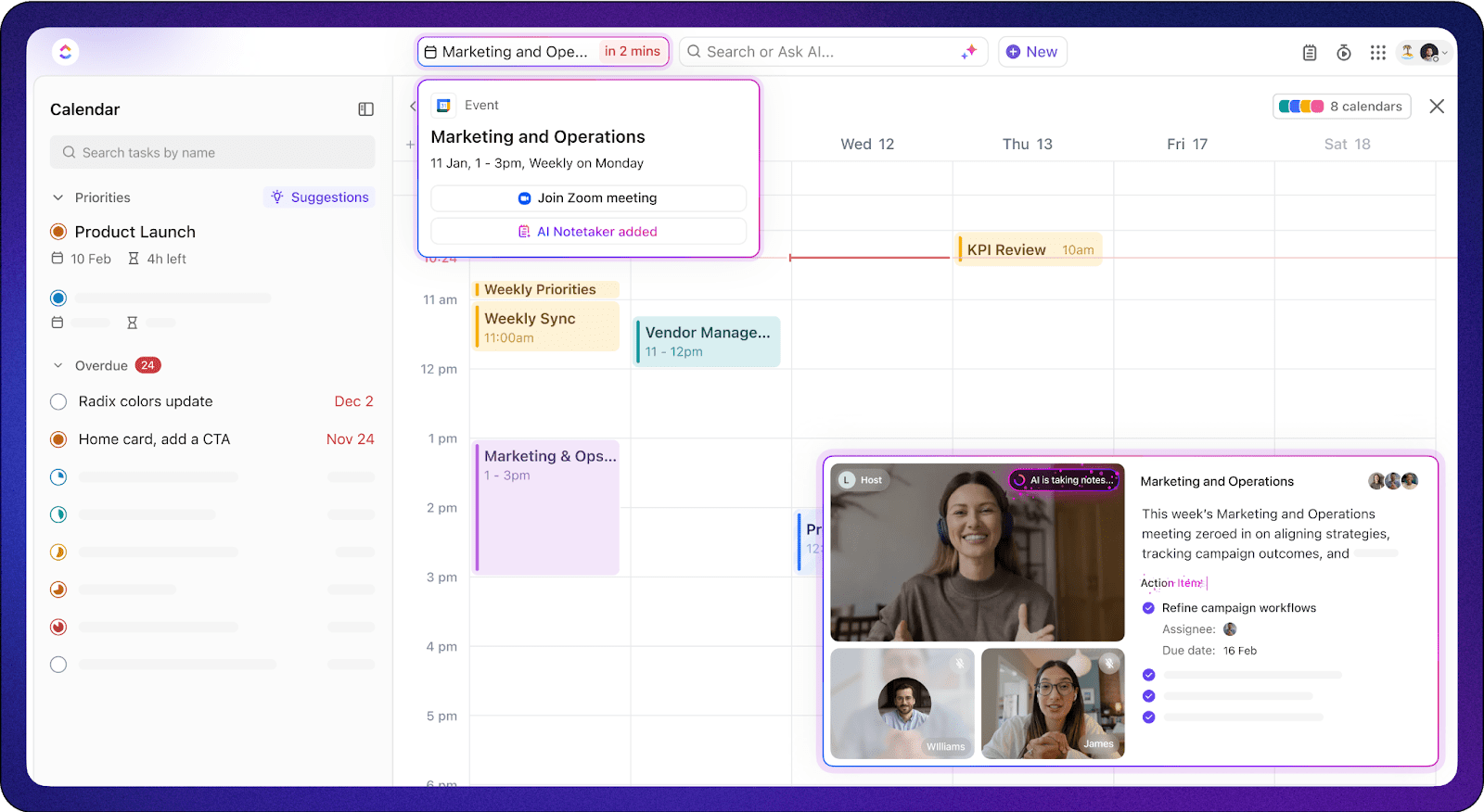
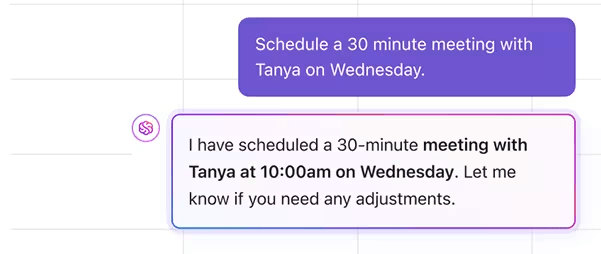
You start by scheduling meetings on ClickUp’s AI Calendar via natural language commands.
For example, prompt “Schedule a catch-up call with Megan at 3 p.m.” and ClickUp Brain will block the time for you and Megan on your respective calendars. You can also ask Brain to find mutually convenient times to meet after checking both your schedules.
Keeping up with crowded meetings or back-to-back lectures is difficult enough. On top of that, if you have to jot down who said what, it can get very messy really fast. You can miss out on capturing important details or, worse, lose track of the discussion altogether.
With the ClickUp AI Notetaker, you won’t have to worry about that ever again.
Invite it to your meetings, and let it video-record your discussion and transcribe it with speaker labels. It also generates detailed meeting notes that land in your inbox after the meeting, complete with a summary, a word-by-word and time-stamped transcript, and auto-created sections for key takeaways and action items. This lets you refer back to important moments and meeting highlights whenever you want.
🎥 Here’s a sneak peek into how it works:
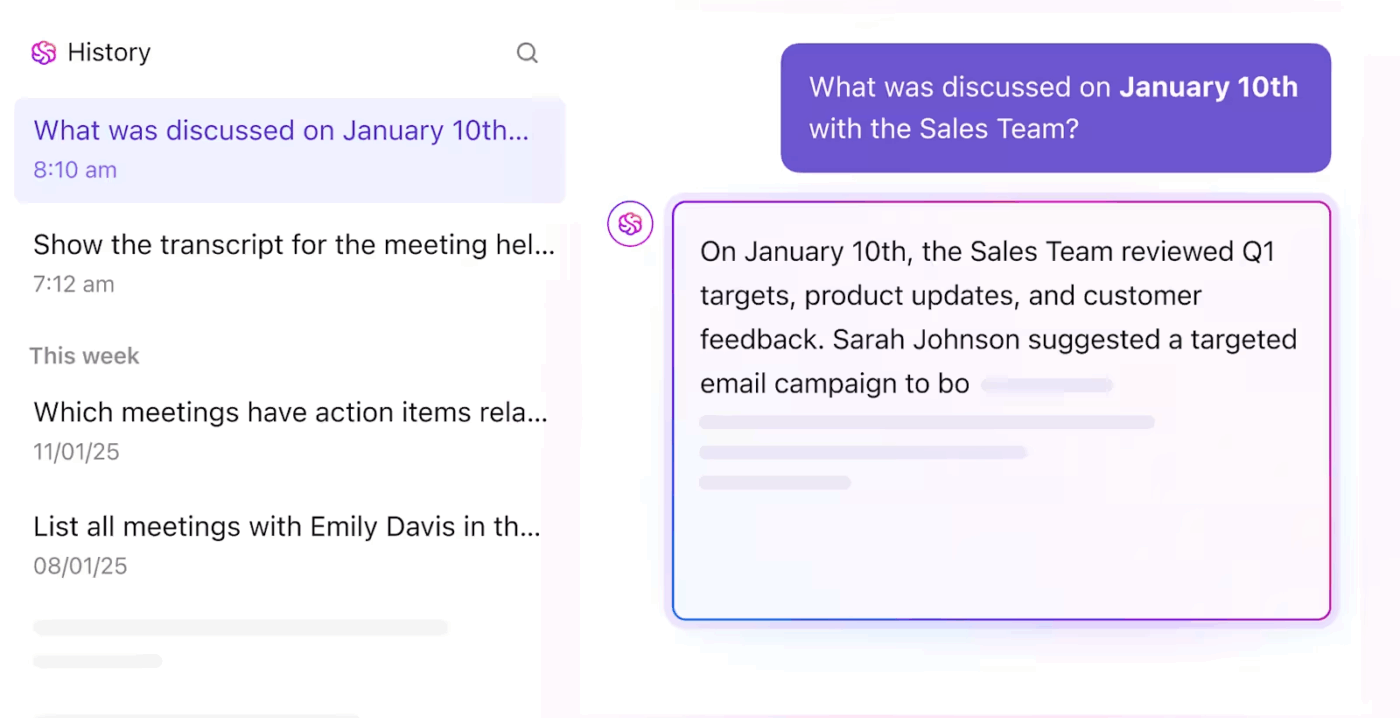
💡 Pro Tip: Too pressed for time to scroll through an entire transcript for insights? Simply ask ClickUp Brain: “What was the primary objection mentioned in the client call on 10th July?” and get the right answer at your fingertips.
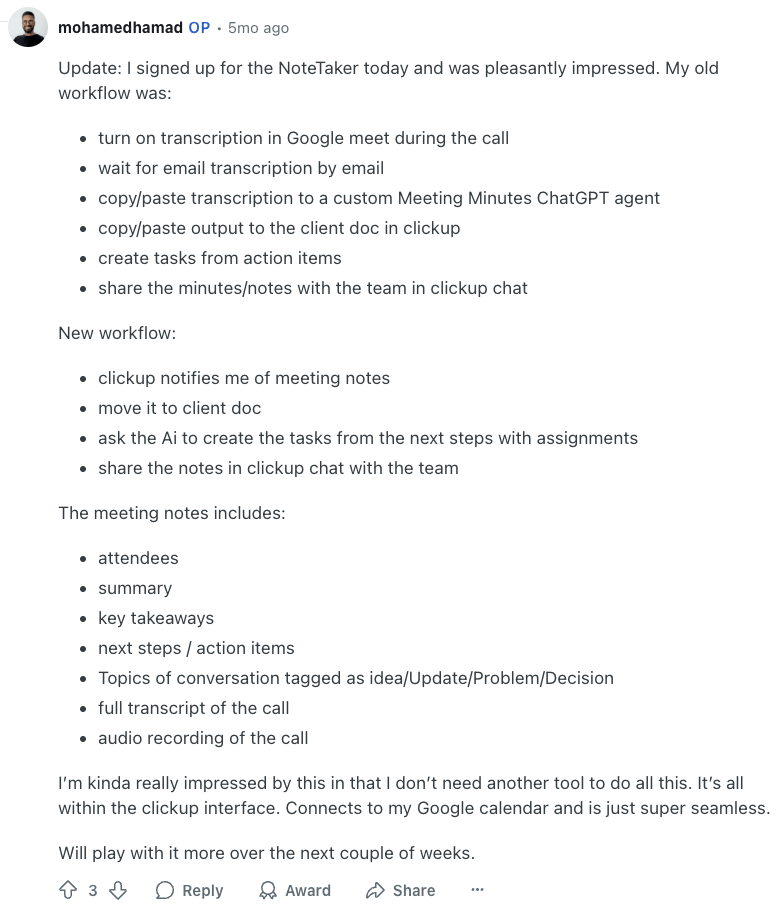
Here’s how a Redditor’s workflow improved after using ClickUp’s AI Notetaker:
92% of knowledge workers risk losing important decisions scattered across chat, email, and spreadsheets. But what if you had a centralized hub where every meeting transcript could live forever, arranged and organized the way you want?
With ClickUp Docs and Docs Hub, you get exactly that—a place to reference all your meeting agendas, collaborate on meeting notes with teammates, and connect discussions to action items.
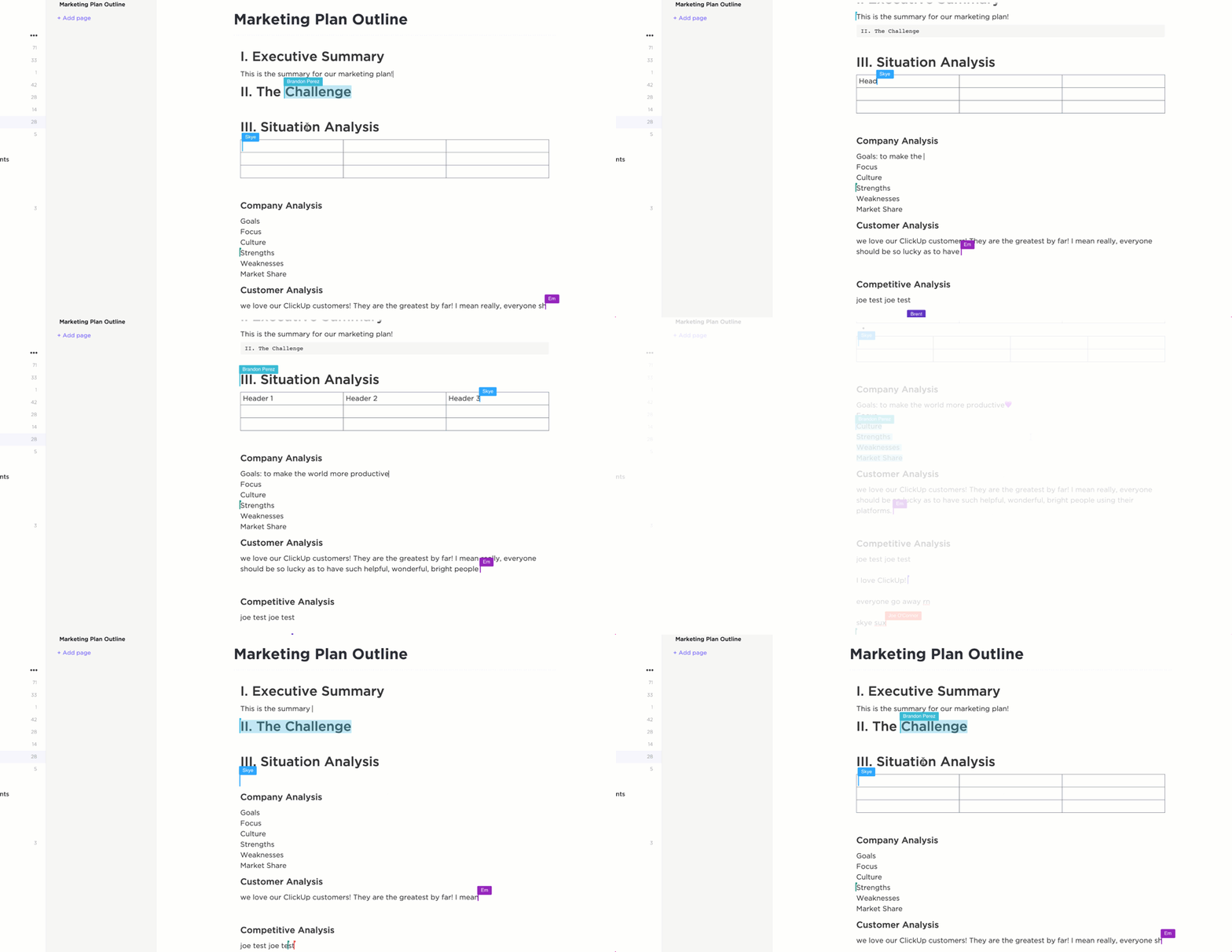
Once your meetings are transcribed, you automatically get the transcript as a Doc in your ClickUp Inbox. You can then co-edit the meeting minutes and convert simple text into ClickUp Tasks from a Doc. It’s also possible to Assign Comments for action and feedback to the right person.
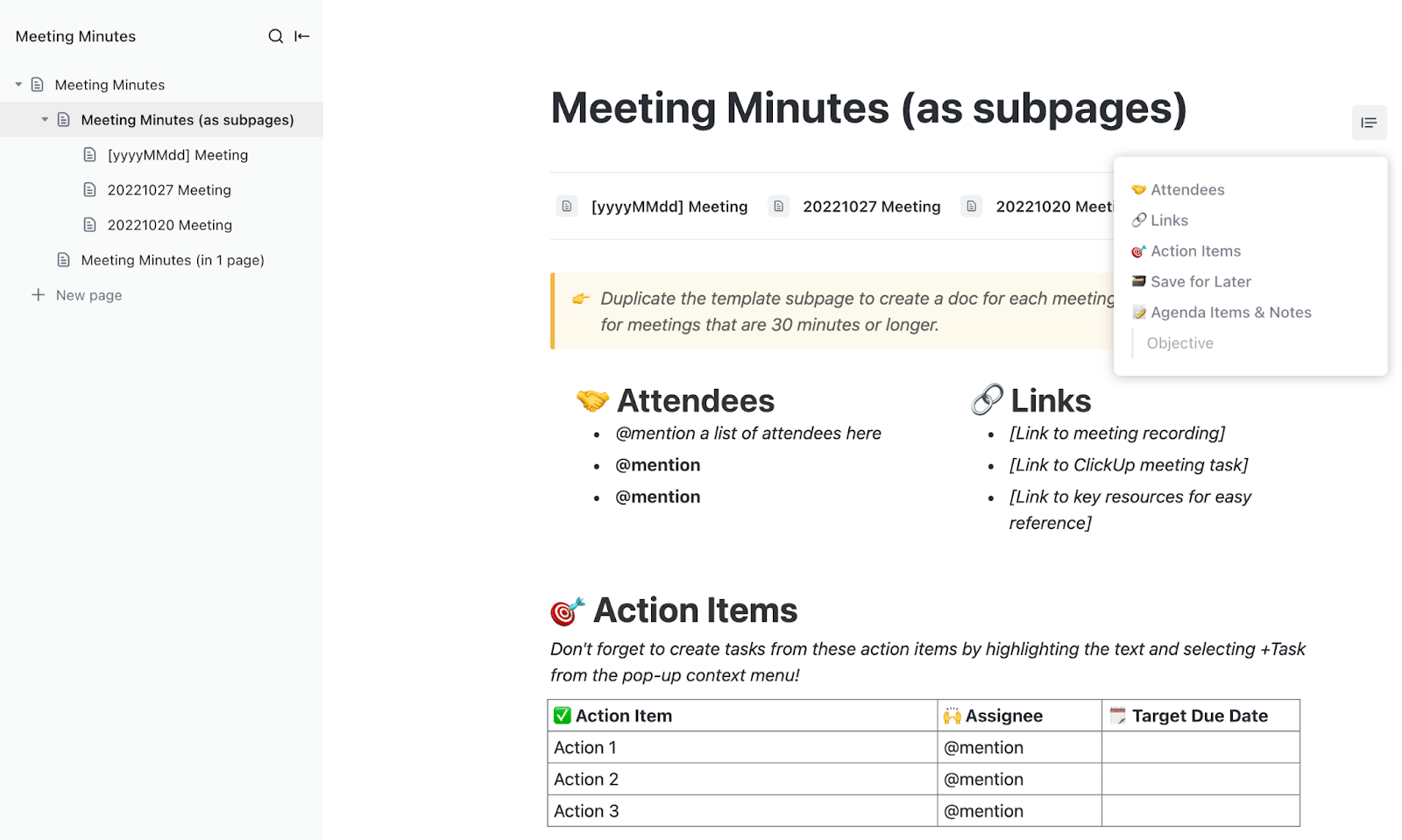
If you want to format notes neatly or make them presentable for internal and external follow-ups, try the ClickUp Meeting Minutes Template. Whether you’re brainstorming with your team or aligning with clients, this template keeps your agenda clear, decisions documented, and next steps actionable.
Why it’s useful:
Want a more real-time discussion? Use ClickUp Chat to ping your team one-on-one. Or have an open conversation in dedicated project or task channels to keep context connected and visible.
See how this is so much better than investing in transcription tools, where collaboration is an afterthought?
You must sign up for the Fireflies.ai Business or Enterprise plan if you want to record meeting clips for visual reference. But with ClickUp Clips, you can capture relevant parts of online meetings on any platform easily, even if you are on the free plan.
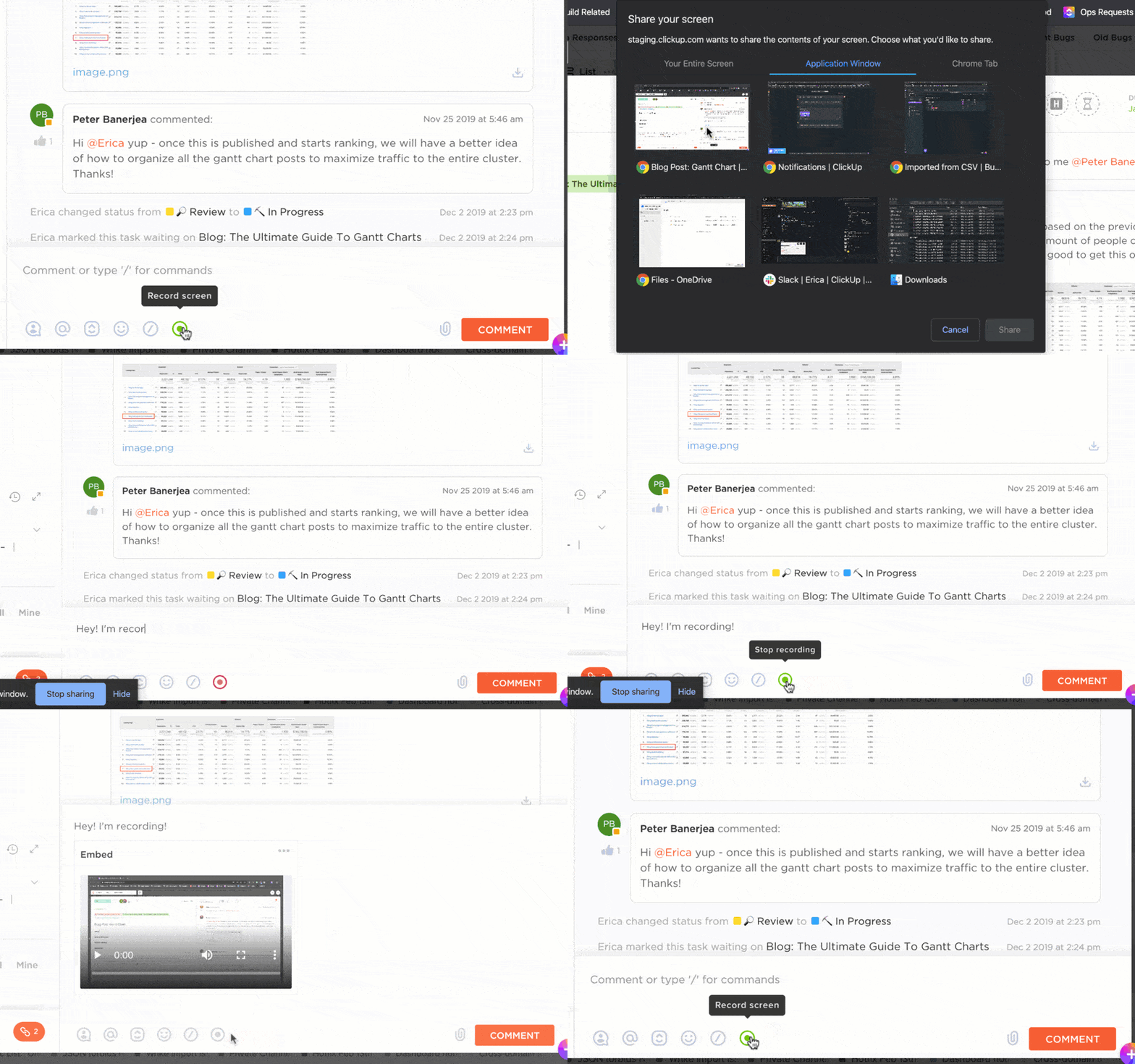
This feature lets you record your screen, webcam, and voice easily. You can use it to capture virtual meeting clips and save them directly on ClickUp. Then, embed them in ClickUp Docs, share them with ClickUp Chat, and even add them to ClickUp Tasks so your team understands the context clearly.
No one has the time to sift through enormous transcription files to find specific information. It’s tiring and a huge waste of energy and time. With Fireflies.ai, you can generate summaries and pull out AI highlights, but the credits are very limited.
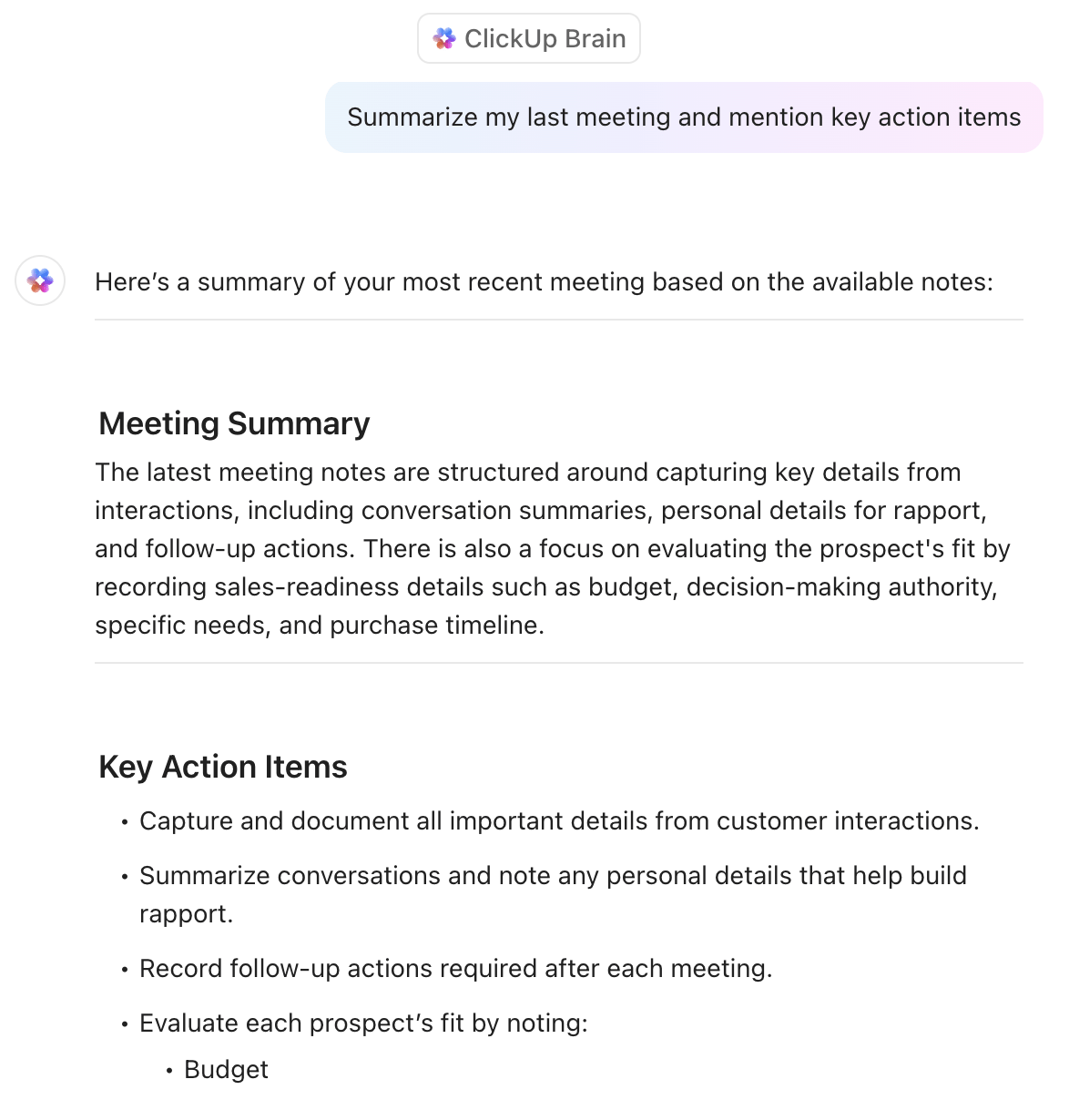
You can ask ClickUp Brain to generate meeting summaries and find gaps in your meeting agenda. Moreover, you can turn the meeting highlights into action items and import them to your task list directly from ClickUp Brain.
Firefly may not offer integrations without high-tier plans, but ClickUp does. You can use ClickUp Integrations to sync with 1000+ popular tools, including Zoom, Microsoft Teams, Google Workspace, Calendars, and more, even if you are on the free plan.
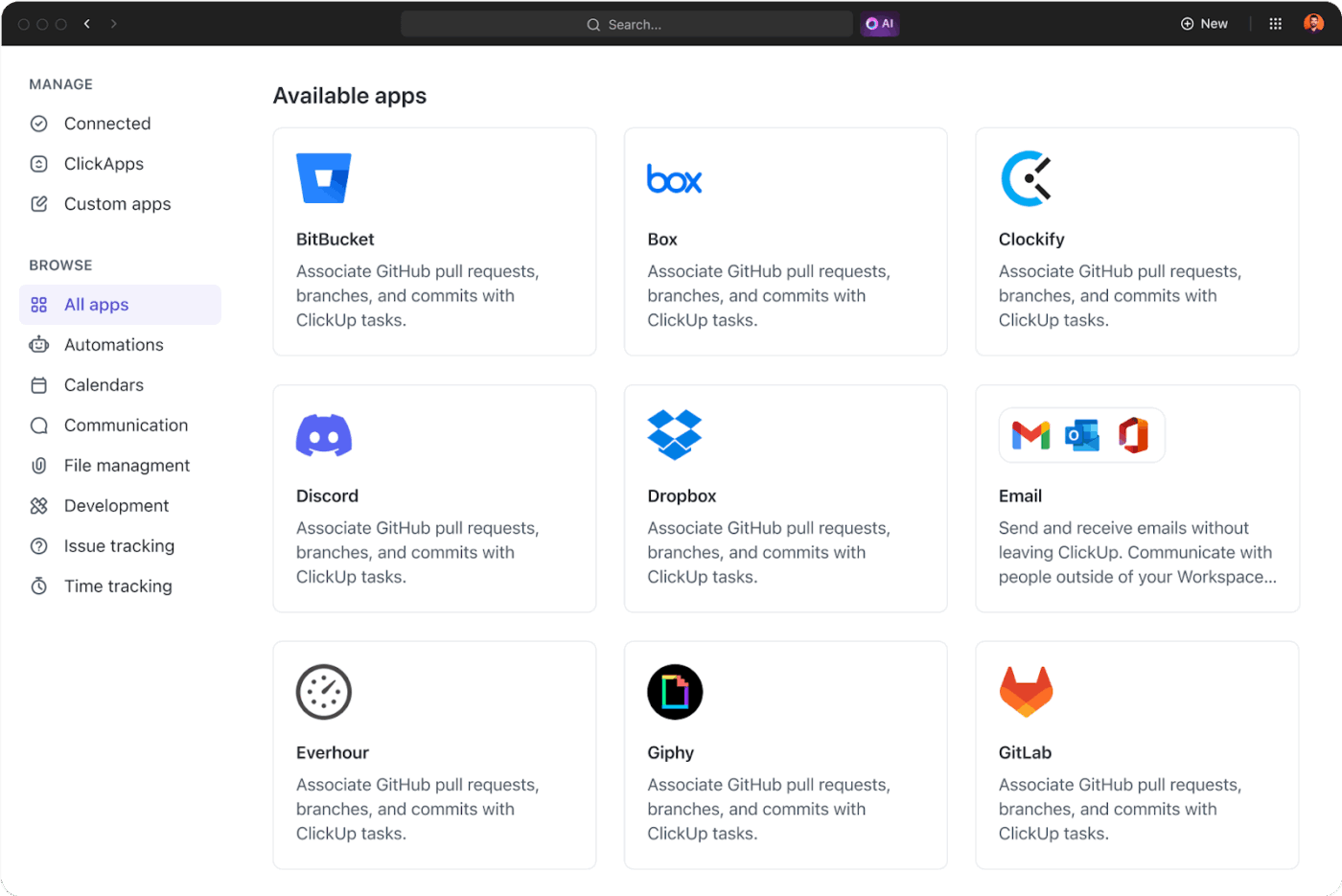
ClickUp also integrates with CRMs, scheduling apps, and communication platforms. So, you can keep your sales data organized, schedule meetings, and stay connected with stakeholders from one platform.
💡 Pro Tip: Link your Zoom account to ClickUp to unlock powerful meeting automation.
While Fireflies.ai is excellent for standalone transcription, ClickUp goes far beyond by turning meetings into actionable work inside your unified productivity platform:
If you’re tired of siloed tools and want meetings to drive real progress, ClickUp gives you the power to go from “talking about it” to actually “getting it done”—all in one workspace.
Generate AI meeting notes and meeting summaries, let your team collaborate on the meeting agenda, and even record Clips from live meetings. Unlike Fireflies.ai, ClickUp lets you do all this and more without worrying about exhausting AI credits.
As Marcos Vinícius Costa de Carvalho, Business Analytics Analyst at ACE, puts it:
We use it to help and accelerate our daily meetings from our Scrum ritual. It helps me out getting to know the progress of my sprint, the progress of my tasks and to keep an organized backlog for all of my errands.
📮ClickUp Insight: 37% of workers send follow-up notes or meeting minutes to track action items, but 36% still rely on other, fragmented methods. Without a unified system for capturing decisions, key insights you need may get buried in chats, emails, or spreadsheets.
With ClickUp, you can instantly turn conversations into actionable tasks across all your tasks, chats, and docs, ensuring nothing falls through the cracks.
ClickUp offers multiple pricing plans to accommodate different team sizes and budgets. Here is a breakdown of the subscription plans:
Fireflies.ai is an amazing tool as long as you need it for basic transcriptions and summaries. But if you need access to AI assistants and collaboration tools without spending money on unnecessary features, look for an alternative like ClickUp.
With flexible add-ons and collaborative workspaces, you won’t ever feel like you lack an important feature due to transcription caps, regardless of your chosen plan. You can edit meeting minutes with teammates, start and record meetings directly, and even turn action items into tasks!
Sign up with ClickUp for free today!
© 2025 ClickUp