

Sorry, there were no results found for “”
Sorry, there were no results found for “”
Sorry, there were no results found for “”
Imagine going to a party where every group speaks a different language—sales and marketing teams in one corner, customer support in the other, and friends catching up across the room.
Chat platforms today feel like that party.
There’s a platform for every purpose, and it’s hard to know which one to use when.
After exploring most of them, I’ve compiled a list of the best chat platforms for any conversation—whether you’re at work, catching up with friends, or handling customer queries.
According to Forbes, nearly 50% of employees say poor communication hampers their productivity.
Therefore, to get the most out of your chat platform, here are some features you can keep in mind while onboarding your next solution.
Now that we know what features we should keep in mind while shortlisting chat platforms for instant messaging, I’m going to share my list of the top contenders:
We’ve all been there— scattered tasks, lost conversations, and files that seem to disappear into the digital void. Hunting them down feels like venturing into a rabbit hole, only to resurface hours later with nothing to show but frustration.
ClickUp is the antidote to this chaos.
Designed for teams of any size (yes, even those on different continents), ClickUp brings order to the madness with customizable features that boost team collaboration, save time, and keep everyone in sync—literally. ClickUp integrates conversations directly into your workflow, eliminating the need to juggle between multiple apps.
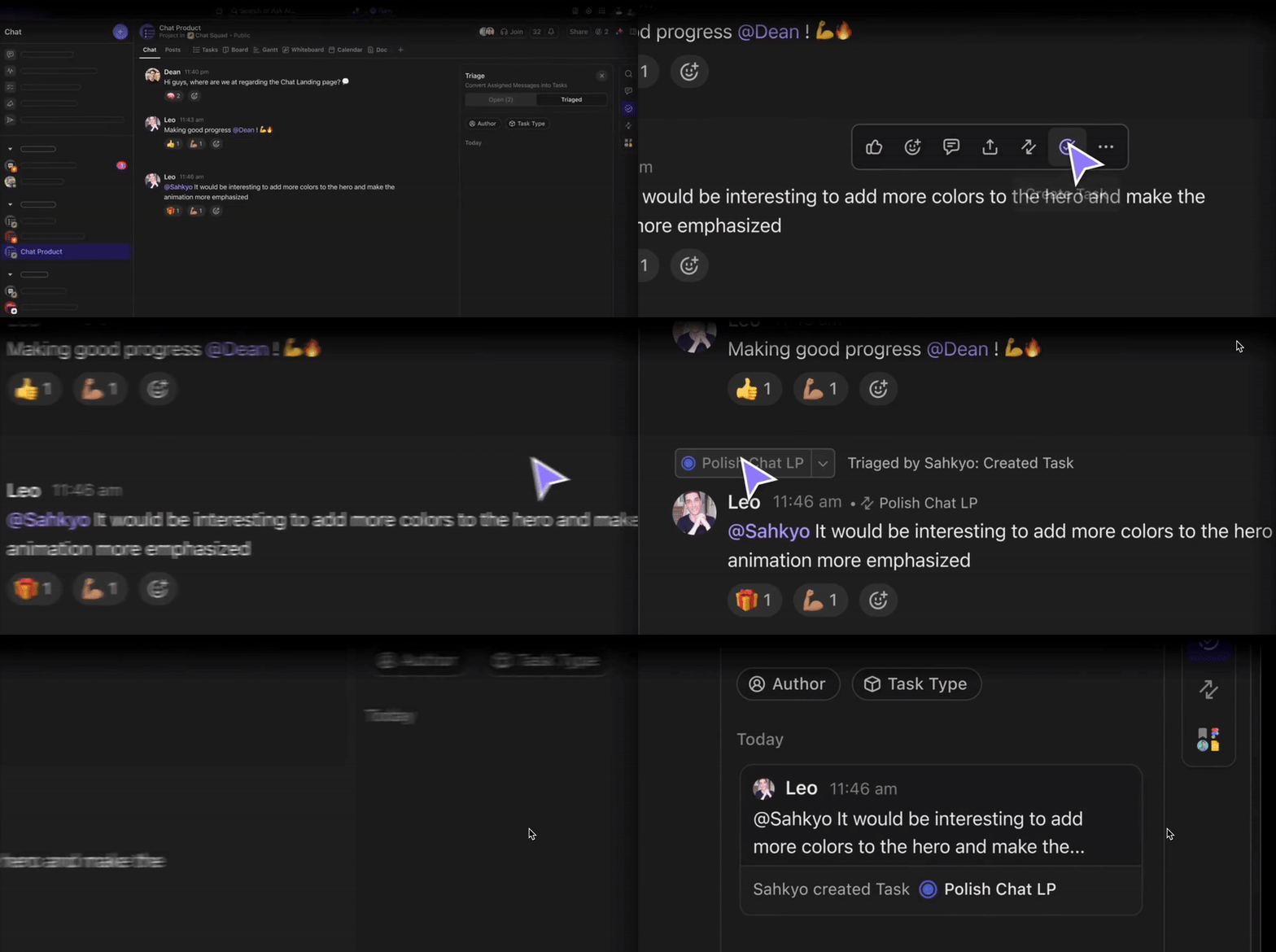
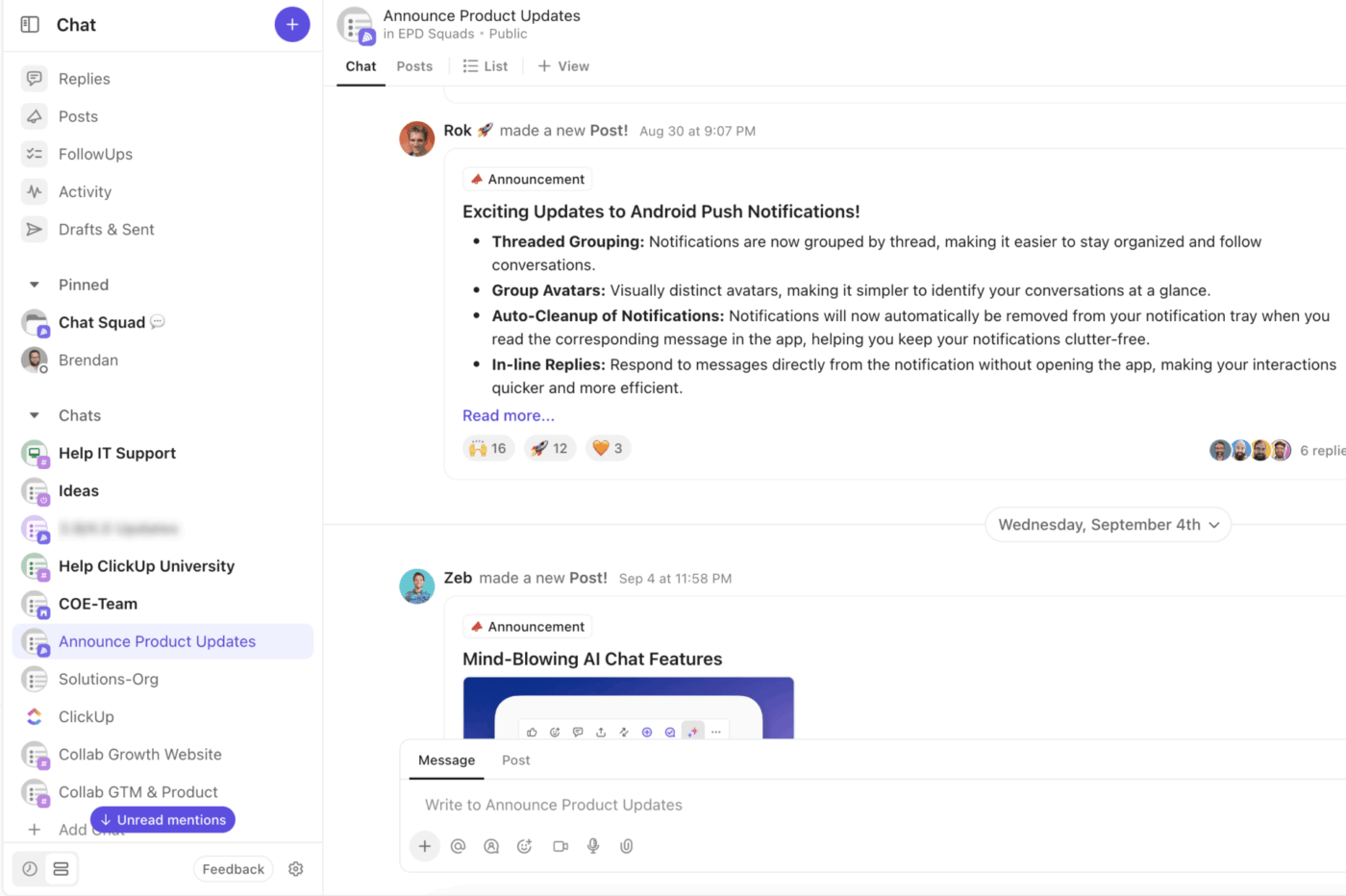
Need to centralize all those scattered conversations? Enter ClickUp Chat, where all your important discussions finally meet in one convenient hub. Chat with your team directly within the relevant task or docs so everybody has context!
ClickUp’s chat feature is built right into your workspace, allowing you to discuss tasks, share updates, and brainstorm ideas without leaving the platform. Know more about ClickUp Chat in this video.
With threaded discussions, mentions, and real-time notifications, ClickUp makes it simple to collaborate with teammates, assign action items, and keep track of important decisions. With Assigned Comments in ClickUp, comments and feedback turn into trackable tasks that won’t get lost. And that’s only the beginning.
Key ways Brain MAX helps:
ClickUp Brain MAX is designed to supercharge team communication and collaboration by bringing AI-powered assistance directly to your desktop. Unlike traditional chat tools, Brain MAX unifies conversations, knowledge, and actions across all your work apps—making teamwork seamless and efficient.
Leverage real-time collaboration on ClickUp Docs to edit documents simultaneously with multiple team members without the version control nightmare. No more “Who edited this?”

Unlike standalone chat tools, ClickUp combines chat, task management, docs, and more in a single platform. This all-in-one approach streamlines workflows, boosts transparency, and helps teams stay organized and focused.
Here’s Alfred Titus, Brighten A Soul Foundation’s Administrative Support Manager, summing up the ClickUp experience perfectly:
To any organization struggling with managing their projects, ClickUp will help in task collaboration. With this software, people can keep track of the to-do list items and work on those tasks within the stipulated time. It also helps the project management team to track the overall progress of the projects to ensure deadlines are kept.
Also Read: 10 Best Team Group Chat Apps for Businesses

Like ClickUp, Slack is a productivity chat app that gives businesses a central spot for everything, from discussions to collaboration.
One of the advantages of using Slack is its 2,600+ integrations (yes, really).
So, if you get onboarded with this chat platform, it is likely compatible with all the business apps you already use.
Slack’s project management strength lies in its ability to store and organize all communication—forever (well, almost). Whether it’s a one-on-one chat, a group huddle, or even messages exchanged during Slack Huddles (their quick audio and video call feature), everything stays in one place for easy access.
Here are some of the features that I found to be very useful for a high-functioning team like mine (and probably yours):
Also Read: 10 Best Slack Competitors

Is ‘drag and drop’ your idea of advanced coding? Then say hello to Intercom, your new best friend.
Intercom’s no-code customization lets even the least tech-savvy folks build efficient workflows. It uses features like custom objects to create data structures tailored to your business needs.

Tidio combines live chat software and chatbots into one sleek platform, helping you engage with customers, manage queries, and boost sales—whether you’re talking to customers in real time or letting chatbots handle the FAQs.
Plus, Tidio integrates seamlessly with Facebook Messenger, Instagram, and email, bringing all your communication channels under one roof.

Imagine this: You’re running an online store, handling customer inquiries about shipping, returns, and promotions.
With LiveChat, you can see what a customer is typing before they even hit send!
Combine that with canned responses and rich messages (you can even add fun GIFs and images), and your customer service is bound to get you great reviews.

Whether you’re a small business or a global enterprise, the Zendesk chat platform has something for everyone.
You can manage emails, handle live chats, track support tickets, and even help onboard your employees.
My favorite part has been Zendesk’s ticketing system, which centralizes requests from email, chat, voice, and social messaging channels in one neat package.

Hubspot is a popular chat platform for businesses of all sizes.
It offers tools for sales, marketing, and customer service. You can store up to one million contacts with no expiration date.
This is particularly useful for those managing hundreds of messy spreadsheets.

Ever feel like you’re losing customers just because they couldn’t find the ‘Contact Us’ button or navigate your help section?
Olark’s no-fuss live chat platform comes to the rescue.
Olark offers customizable chat boxes and easy-to-use features like automated chat tools, visitor tracking, chat transfer, and file sharing for both small and growing businesses.

Have you ever felt you’re simultaneously trying to balance a million customer support tasks? Emails, live chat, social media, and maybe even a customer FAQ section—it can get overwhelming fast.
Re:amaze’s customizable chat widgets, CRM integration, and automated workflows are, well, ‘amazing’ for teams!

What if you could track and respond to customer inquiries across multiple channels—without breaking a sweat?
This is the edge you get when you onboard with LiveAgent.
Moreover, in addition to centralizing your support, LiveAgent allows you to monitor your website visitors in real time.

Ever wished you could chat with your customers while also allowing them to hop on a call—without leaving the same platform?
Meet ClickDesk, the popular live chat and voice support combo.
I tried it out recently and liked how it combined real-time conversations, voice support, and social media integration into one platform.

You know, video customer support is supposed to grow by 150% in the coming years. I mean, it makes sense. Don’t you wish you could hop on a quick video call with a confused customer or share screens to clear up a problem in seconds?
Acquire is one platform already making the most out of this trend.
Its live chat with built-in video and VoIP support makes it perfect for real-time, face-to-face customer service.

Let’s face it: almost everyone is already on Facebook—3 billion active users, to be precise. So why not use Facebook Messenger as your go-to customer support platform?
It’s free, familiar, and lets you connect with your customers where they’re most comfortable.

I use WhatsApp; you use WhatsApp; 50 million companies use WhatsApp.
Wait, what?
Yes, startups and enterprises worldwide are switching to WhatsApp to connect with their audience.
We all know how it works on a personal level, but how does it serve a business? Let’s find out.
Check out these WhatsApp alternatives!

Over a billion people use WeChat every month. It’s a powerful platform for individual and group messaging, marketing promotions, and customer support.
However, since WeChat is based in China, let’s find out how it will work for your overseas business.
Let’s bring the conversation back to what matters—finding a chat platform that fits your needs and your company’s goals.
With so many options out there, each claiming to be the best in some way, ClickUp stands out for one simple reason—it gives you exactly what you need without the fluff. Why waste time (and money) on features you’ll never touch?
ClickUp is designed to give you the most efficient project management experience and is loaded with tools that keep your team and customers happy.
Ready to ease your workflows? Hop on board and sign up for ClickUp for free today!

Arya P Dinesh
Max 16min read

Manasi Nair
Max 26min read
Arya P Dinesh
Max 18min read

© 2026 ClickUp




