The Leader’s Playbook for Building Your AI-Native Team

The playbook to building an AI-Native Team model by converging work in one workspace and rolling out a focused set of AI Agent workflows for intake, planning, reporting, and executive visibility.

Watch the Webinar

Watch the full webinar where our hosts show the playbook to:

  • Define what “AI‑native” really means for your team, beyond ad‑hoc tools and pilots.
  • Replace tool sprawl with one converged workspace for projects, docs, and communication.
  • Map a real workflow and decide where humans vs. AI Agents should own the work.
  • Use a simple blueprint to pilot AI‑native workflows with one team, then scale what works across the org.
Video cover

Why most AI initiatives stall

The pressure to “have an AI strategy” is real. Boards are asking about it. Leadership teams are asking about it. Individual departments are already trying tools on their own.

That urgency is not the problem. The bigger issue is where those efforts land. Recent studies show that over 90% of AI pilots fail.

When work is spread across project tools, docs, chat threads, spreadsheets, email, and department-specific systems, AI never gets a full picture. It sees fragments. It responds to fragments. And the results feel thin, unreliable, or too generic to trust.

That is the pattern behind a lot of failed pilots.

Most companies are trying to layer AI onto a broken system of work. The technology moves fast. The underlying operating model does not. So teams end up with more tools, more tabs, and more experiments, but very little change in how work actually runs.

That failure pattern usually shows up in a few ways:

  • Teams use AI for isolated writing or summarization, but not for the actual flow of work.
  • Leaders still rely on manual status meetings because no system gives them a clear view.
  • Requests come in through too many channels, so intake stays messy.
  • Context lives with individuals instead of the team. When someone leaves, the knowledge leaves with them.
  • Every department starts a different pilot, but none of those pilots adds up to a real operating model.

The result is familiar. AI feels promising. It does not feel operational.

old way of working is broken

What an AI-Native Team actually looks like

An AI-Native Team is not just a team that uses AI tools.

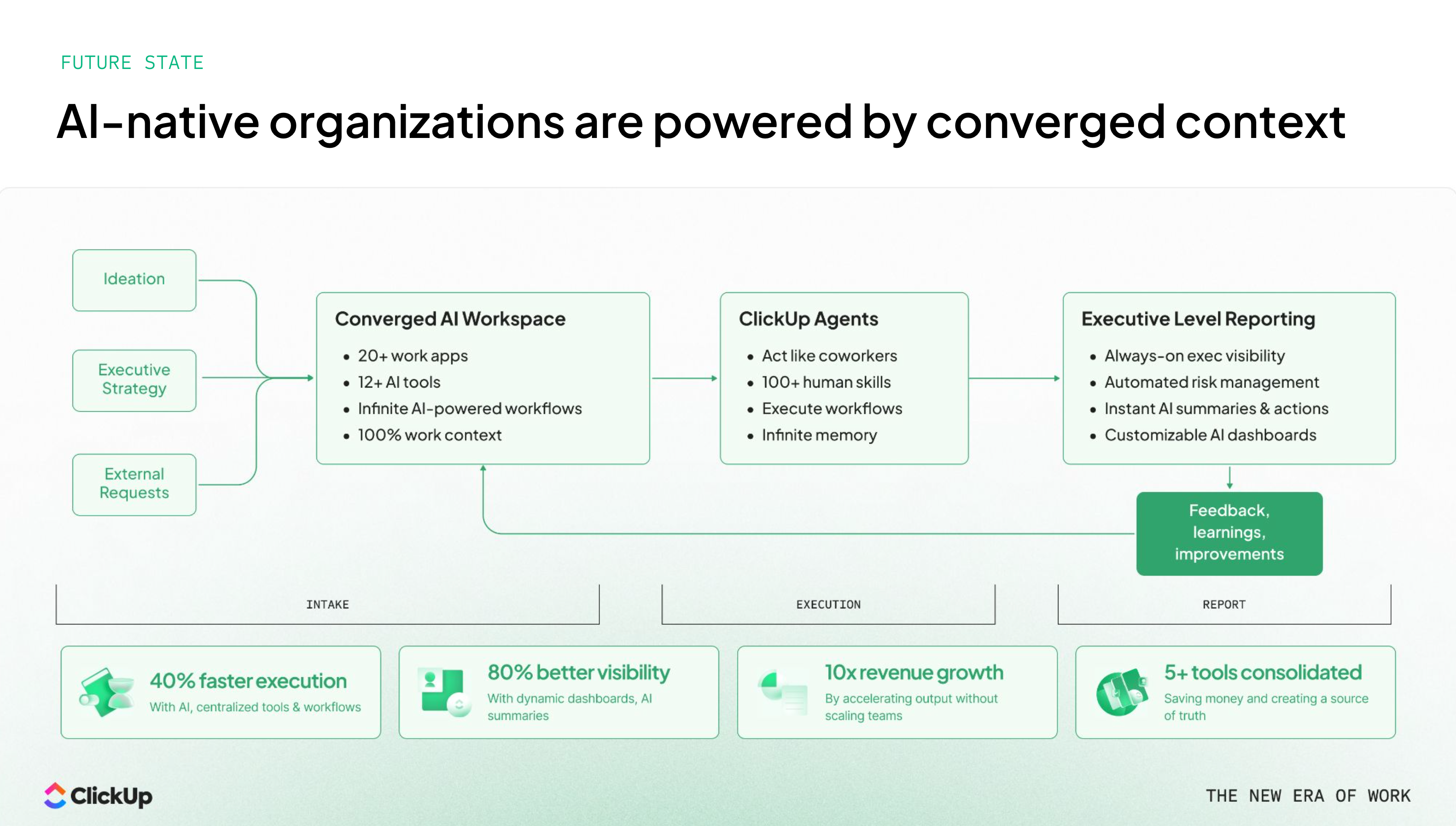
It is a team where work, context, and coordination happen in one connected system. AI is built into the way requests are handled, projects are planned, meetings are captured, and status is communicated. Humans still make judgment calls.

AI Native Orgs

Humans still own priorities, tradeoffs, and relationships. But the repetitive coordination work stops eating the week.

That model depends on two things working together.

Bottom-up adoption

People need AI where they already work.

The behavior has to feel familiar. The lift has to be obvious. If every use case requires a new tool, a new workflow, or a lot of training, adoption falls apart fast.

Bottom-up adoption works when:

  • AI lives inside the tools people already use to manage work.
  • The path from question to answer is short.
  • Outputs are good enough to trust and easy to edit.
  • Teams can reuse the same patterns across functions.
Top-down AI systems

AI also needs to exist at the system level. The most important workflows in the business need to be designed so that AI can support them on purpose.

That means identifying the workflows that matter most, breaking them into clear steps, and deciding where AI should assist, where it should automate, and where a person should stay in control.

Top-down systems work when:

  • There is a clear process behind the workflow.
  • The system has enough context to act on real work.
  • Outputs feed the next cycle, so the process keeps improving.
  • Leaders can see whether the workflow is actually reducing drag.

When these two pieces lock together, the team starts to feel different. Work moves with less chasing. Updates arrive with more signal. Decisions happen faster because the context is already in the room.

AI Native Way to Work

The leader’s blueprint for building an AI-Native Team

The shift does not start with a giant re-platform or a catalog of AI experiments. It starts with a smaller set of decisions made in the right order.

1. Converge the work before you automate more of it

If requests come through chat, email, forms, docs, spreadsheets, and hallway conversations, AI will struggle for the same reason your team struggles. The context is incomplete.

Start by choosing one place where the work should live. Projects, tasks, docs, decisions, and updates need a shared home. That does not mean every system disappears overnight. It means the operating center becomes clear.

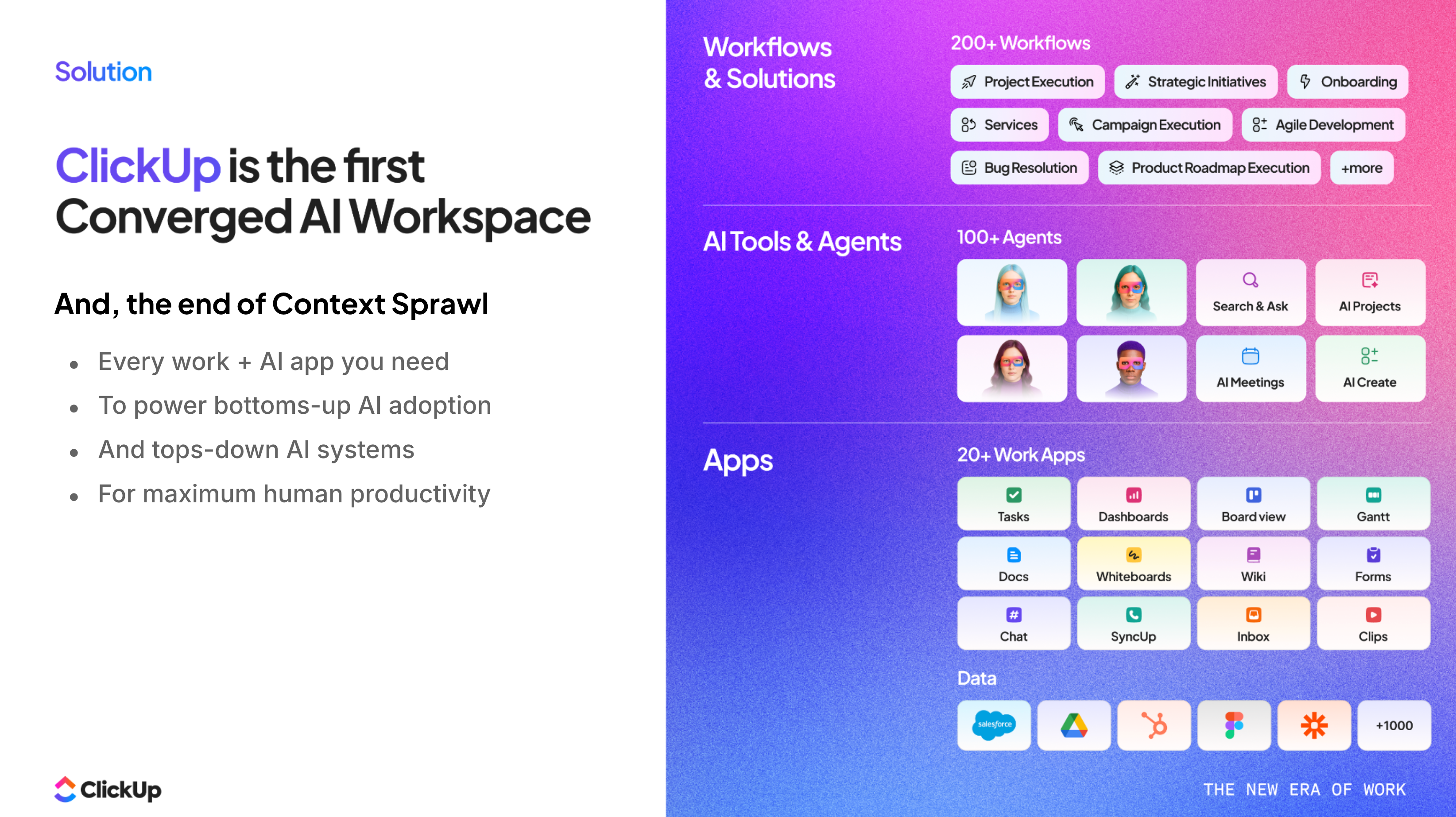
ClickUp is the converged AI Workspace

This is the base layer that makes everything else possible.

Without it, every future agent needs hand-built workarounds just to understand what is happening. With it, the agent starts with the same context your team uses every day.

2. Redesign one operating rhythm, not twenty separate tasks

Teams often begin with micro use cases. Summarize this meeting. Draft this email. Rewrite this note. Those can help, but they rarely change how the team runs.

A better move is to redesign one full operating rhythm.

Pick something that repeats every week:

  • intake and routing
  • campaign planning
  • project status reporting
  • meeting follow-up and decision capture
  • executive briefings

Then ask a more useful question: what should this workflow look like if AI is part of the team from the start?

That changes the conversation from “Where can we use AI?” to “How should this work now?”

3. Give AI Agents the coordination work first

The highest-value starting point is usually not deep subject matter work. It is coordination work that repeats, follows a pattern, and slows down the whole team when done by hand.

Agents hero 1

That is why the strongest examples in the webinar centered on a tight set of workflow-agnostic and executive use cases.

Executive briefings
Leaders need to know what matters today. They need to understand what moved, what stalled, and where intervention is needed.

An executive briefing agent can pull open work, risks, progress updates, and meeting context into one view. That does two things. It shortens the time leaders spend hunting for signal, and it raises the quality of the conversations that happen next.

Meeting recap and decision capture
A lot of teams still lose value right after the meeting ends. Notes live in one place. Next steps live somewhere else. Decisions get remembered differently by different people.

An AI notetaker and recap flow changes that. The transcript, summary, action items, and follow-up work can land in the same workspace where the team is already operating.

Intake and triage
Requests are one of the fastest places to create drag. A team can look “busy” for weeks when the real issue is just inconsistent intake.

An intake and triage agent can review incoming requests, check what is missing, standardize the brief, and route the work to the right owner. That creates cleaner planning and better downstream execution.

Status and reporting
This is one of the clearest pain points in the session. Holly Butterworth described how much time can disappear into status gathering alone. The first gain often comes from taking 80 percent of the manual collection work out of the process.

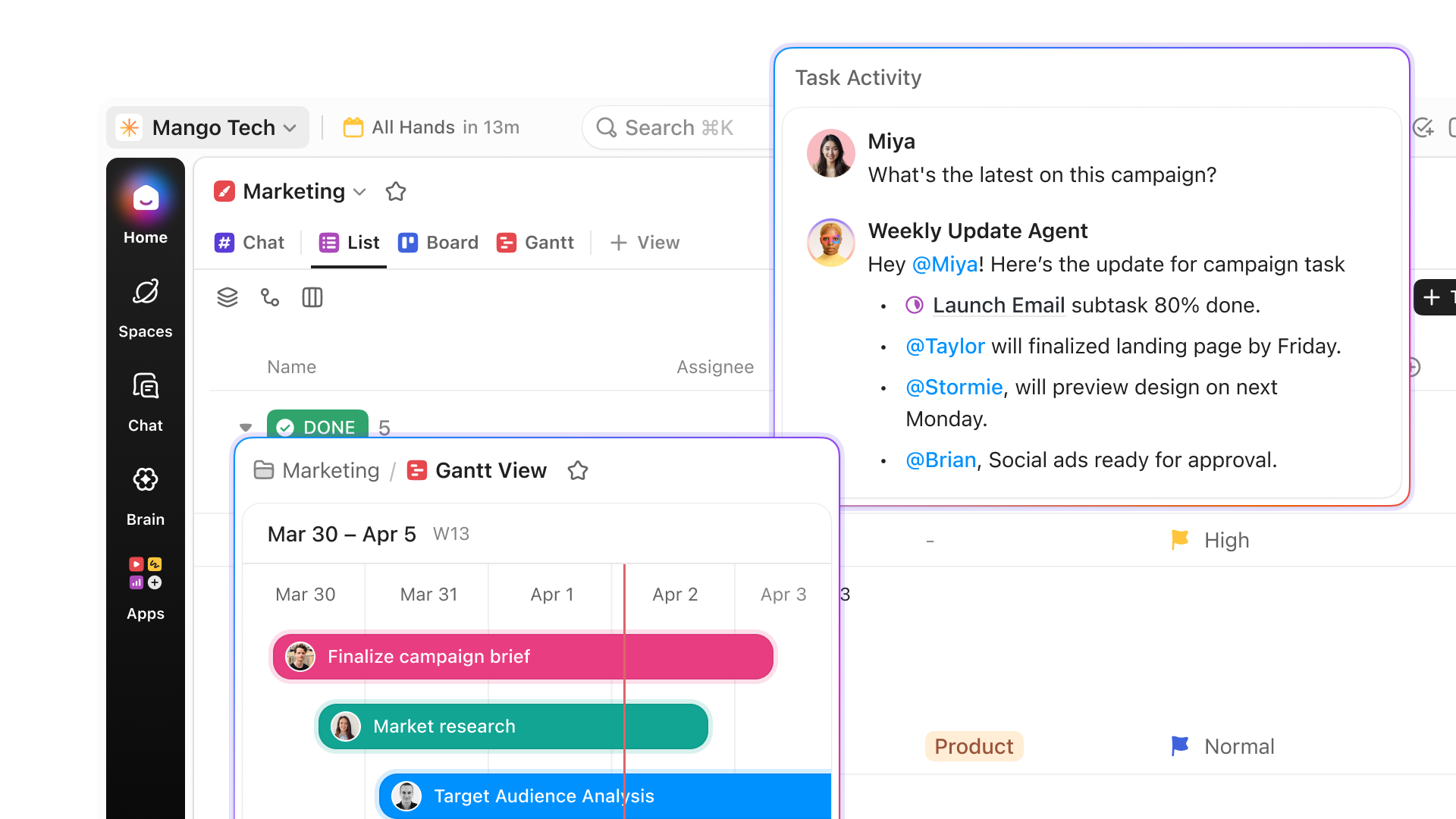
Status reporting agents can assemble updates, summarize progress, flag risks, and prepare a review before the meeting ever starts. That gives humans more time for judgment and less time for admin.

4. Keep the human role focused on judgment

A good AI-Native Team does not blur accountability. It sharpens it.

The agent handles collection, synthesis, routing, and first-pass drafting. The human handles prioritization, approval, escalation, and decisions that need business context or relationship management.

That division matters for two reasons.

First, it makes adoption easier. People trust the system more when they understand where the line is.

Second, it protects the quality of the work. The goal is not to remove people from the process. The goal is to remove the repetitive work that keeps people from doing the part only they can do.

In the best version of this model, the bottleneck moves from admin work to expertise. That is a much better bottleneck to have.

5. Make the experience feel familiar

Adoption rises when AI appears where people already work.

That was one of the clearest ideas in the webinar. If the change management burden is high, usage will be low. Teams do not need another tab to check. They need AI where they already manage projects, review work, chat, and capture decisions.

This is where Convergence becomes practical, not just conceptual.

When chat is connected to the work, context is easier to recover. When docs live with the project, AI can reference the process. When whiteboards, tasks, and updates are linked, fewer things disappear in the handoff.

The real win is not just that AI gets smarter. It is that the team stops paying the tax of moving information from one place to another all day.

6. Start with one flagship use case and prove the model

Do not try to turn the whole company into an AI-Native Team in one move.

Start with one team. Pick two or three workflows. Set a short pilot window. Then measure what changes.

Look for signals like:

  • fewer meetings spent on status collection
  • cleaner intake quality
  • faster planning cycles
  • better visibility into blockers
  • less rework caused by missing context
  • more consistent follow-through after meetings

This is the point of a flagship use case. It gives the team something real to compare against the old way of working.

Once that pilot works, the story becomes easier to carry into the next team.

Accelerator

Ready for the next step?

The teams moving fastest right now are not waiting to figure out AI in the abstract. They are mapping real workflows and turning them into operating systems their teams can actually use.

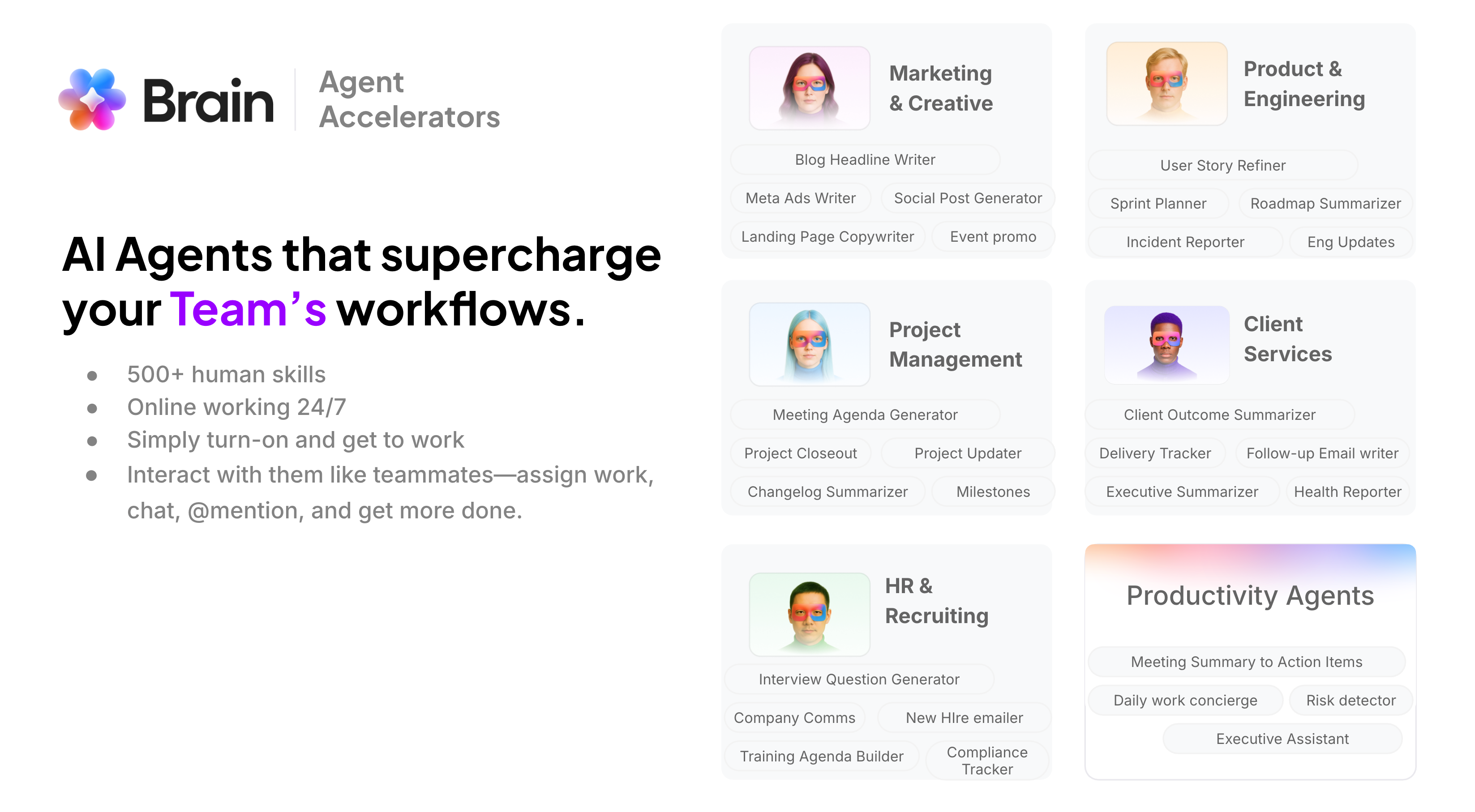
AI Agents that supercharge your Team’s workflows

If you want to apply that approach to your own event program, the next move is simple. Book a free consultation with our team to see how we can help you map your workflow, identify the right Agent opportunities, and build a system that gives your team real time back.