


Sorry, there were no results found for “”
Sorry, there were no results found for “”
Sorry, there were no results found for “”
Clarifying project roles and responsibilities is critical if you wish to prevent project management-related issues such as schedule delays, scaling costs, and lower performance, just to name a few.
That’s when the RACI matrix, also known as the RACI diagram or the responsibility assignment matrix, comes into the picture. 🖼️
The RACI model helps map all of the stakeholders’ roles and responsibilities, bringing structure and clarity and engaging everyone from the team in successful project delivery so that miscalculations are out of the question.
Here’s why many people from the corporate world across various industries, from healthcare to construction, swear by RACI charts for project planning. 🙏
We’ve compiled some RACI matrix examples, templates, and best practices to help you get started.
The RACI matrix is a simple approach to defining project roles and responsibilities that help produce desired outcomes.
This term is an acronym that stands for Responsible, Accountable, Consulted, and Informed. A RACI matrix in project management essentially describes the different roles assigned to team members involved in the project and details who does what.
This person is responsible for taking action and ensuring that the project’s tasks are being worked on.
Typically, this is a team member or a project manager who reports to an ‘A’. You can have more ‘R’s in a RACI, and some of them can also be involved in the decision-making process.
However, it is highly advisable not to blow things up out of proportion and over-assign the number of Responsibles in your responsibility assignment matrix.
That’s someone who ensures all the responsibilities are assigned properly, approves or rejects work or decisions (basically, this person is a decision maker), and ensures that everything is successfully and timely delivered. According to the RACI matrix, there should be only one ‘A’.
This is the expert the team consults about various topics and actions. This person, or multiple persons, provides feedback and evaluates so tasks can be performed.
Someone who should be updated on progress once everything is done and dusted but isn’t directly involved in the process. This person doesn’t contribute to making decisions or delivering tasks nor is consulted on any matter.
We know project management teams love abbreviations: PMP, KPI, SOW, and SME. The list goes on and on, but the RACI matrix chart makes it a breeze to scheme out key decisions, tasks, milestones, and roles.
Also Read: Stakeholder Mapping Templates
In large project management teams, where team members are distributed across multiple departments and reliant on other teams, it is kind of natural to suffer from role confusion.
In a situation like this, it’s up to a project manager or the leading project team to step up and make sure that every member of every team is well aware of what’s expected from them. Things can get even more challenging if the work is remotely managed and done. However, that’s when a simple RACI matrix comes to the rescue! 🚀
The RACI chart model provides many benefits:
It’s worth mentioning that RACI matrix examples can be created to manage any relationship, whether it be with customers, sponsors, VIP clients, internal users, suppliers, investors, executives, analysts, or government regulators.
That’s why this model ticks all of the boxes for both B2B and B2C businesses. ✅
Also Read: Alternatives to the RACI framework
Here’s a comparison of the RACI and DACI frameworks:
| Aspect | RACI Framework | DACI Framework |
| Definition | A responsibility assignment matrix that defines roles in a process or project | A decision-making framework that clarifies roles in group decision-making |
| Acronym Stands For | Responsible, Accountable, Consulted, Informed | Driver, Approver, Contributors, Informed |
| Primary Focus | Clarifies task ownership and responsibilities in a project | Clarifies decision-making authority and involvement |
| Used For | Assigning roles and responsibilities in project management, process execution, and operations | Streamlining decision-making processes in teams, product development, and business strategy |
| Role of the Main Actor | “Responsible” executes the task, while “Accountable” ensures completion | “Driver” leads the decision-making process |
| Decision-Making Authority | The “Accountable” person has the final say | The “Approver” has the final decision authority |
| Collaboration Level | Defines how different stakeholders contribute to execution | Defines how different stakeholders contribute to decisions |
| Best For | Projects, workflows, and operational processes | Product development, strategic initiatives, and high-stakes decisions |
| Key Benefit | Ensures clear task ownership, avoiding confusion in execution | Speeds up decision-making and avoids bottlenecks in team decisions |
| Potential Drawback | May lead to ambiguity in decision-making if not properly defined | Can slow down execution if too many contributors are involved in discussions |
RACI is about task ownership, while DACI is about decision-making.
Sometimes, teams on large or complex projects also use the RASCI model. This is an extended version of RACI, adding a role for support (Responsible, Accountable, Support, Consulted, Informed).
This model offers more flexibility by acknowledging supportive roles that aren’t directly responsible.
Like in the RACI matrix, the “Accountable” person still has the final say. Its potential drawback is that it can complicate role assignments if “Support” is overused or misunderstood.
Also Read: RACI Templates for Excel
The RACI matrix can be used for all things project management, from clarifying team member roles and tasks to eliminating confusion and stalled processes.
The great thing is that it is unbelievably flexible, and you can use it in any industry. 🤩
Here are some examples of RACI charts being helpful:
As an example, any project manager or product owner is somehow (wrongfully) seen as responsible for every little detail and the success of a project team in general.
The RACI chart takes the burden of these roles. It allows developers and designers to be responsible for their scope of work.
However, note that RACI is not the one-size-fits-all solution.
It works wonders with larger, complex projects that involve multiple stakeholders. On the other hand, it simply doesn’t cut it for smaller project management teams and fast-moving projects since it can only slow down the decision-making process and the project as a whole.
Before you actually start creating a RACI chart, take these factors into account:
Define and list the main project tasks that need to be completed and list them all on the left side of the RACI chart, one under another.
Do not include all of the project deliverables in the chart, or else you’ll go too granular and make it too complex to use and understand.
Identify members of the project team and their roles (Responsible, Accountable, Consulted, and Informed ) and add them to the top of the chart, one next to another.
For instance, you can go for something like this: project executive, project manager, business analyst, technical architect, and application developer.
Alternatively, you can specify roles by name. This is particularly useful since it clarifies who does what and if multiple stakeholders are assigned similar roles.
Now is the time to connect tasks and roles. ♻️
Assigning Responsible and Accountable per task is a must, while you should also think carefully about who needs to be Consulted and who is Informed about the deliverables.
Ideally, one team member should be assigned to only a few responsibilities (two to three maxi).
If there are many empty cells, try reallocating resources (change Responsible to Consulted).
Also, if there are too many Accountable roles, this could slow down the decision-making process, so aim to have just one Accountable person per task.
Too many Cs can also cause delays for project managers since some under the consultant role can often be switched to Informed. Having no C and I roles usually points to a lack of communication within the team.
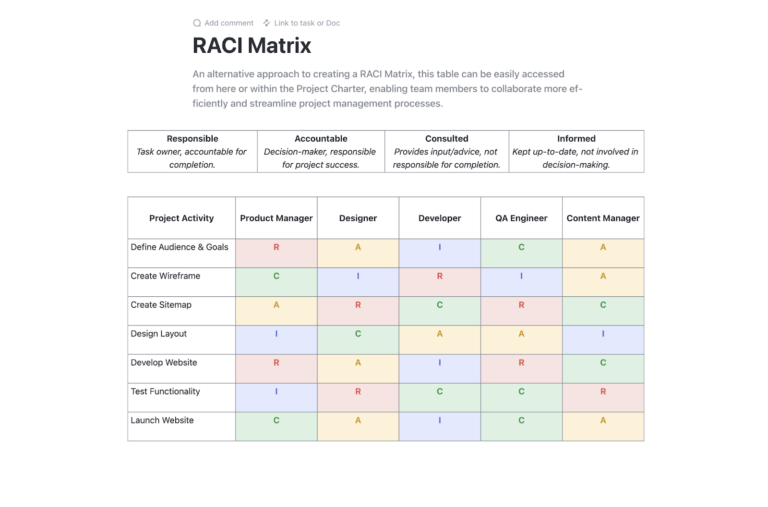
When you need inspiration or guidance in building a RACI framework, ClickUp offers ready-to-use and editable RACI model templates.
This is a Doc template with a chart that identifies and outlines the roles and responsibilities of team members in relation to project tasks. ClickUp’s RACI Planning Template helps you:
Using this template, your team can stay organized and plan better together.
The RACI Matrix Template from ClickUp is an effective way to stay on top of your projects and ensure that everyone knows their part in the process.
Use the Project Status View to easily keep track of the status of each project. The Project Leadership View will help you identify who is responsible for each task, while the Project Team View will help you assign tasks to members of the team.
Also Read: Check out these other RACI matrix templates
The RACI matrix is widely used in modern workplaces to clarify roles and responsibilities, improve accountability, and reduce confusion. Here are some key use cases of RACI matrix examples:
Example
A software development project may use RACI as follows:
Example
An employee onboarding process in HR may be based on the RACI framework in this way:
Example
Here is how roles may be defined for a new product launch involving marketing, sales, and engineering:
Example
A software upgrade in an organization could be divided as follows:
Example
A data privacy compliance process could have roles distributed as follows:
Example
Handling customer complaints in a SaaS company may take this shape:
Example
A merger between two companies could see roles defined as shown:
Example
Roles in a continuous deployment process can be divided as shown:
The RACI model is a versatile tool that ensures clarity, accountability, and efficiency across various functions in the modern workplace. Whether it’s project management, IT, compliance, or customer service, RACI helps teams work more effectively by eliminating role confusion.
Bonus: Matrix Templates
With ClickUp, it is easier than ever to create your ideal RACI matrix.
Let’s see how much flexibility ClickUp offers for creating RACI charts. We’ve created 5 sample RACI charts in ClickUp.
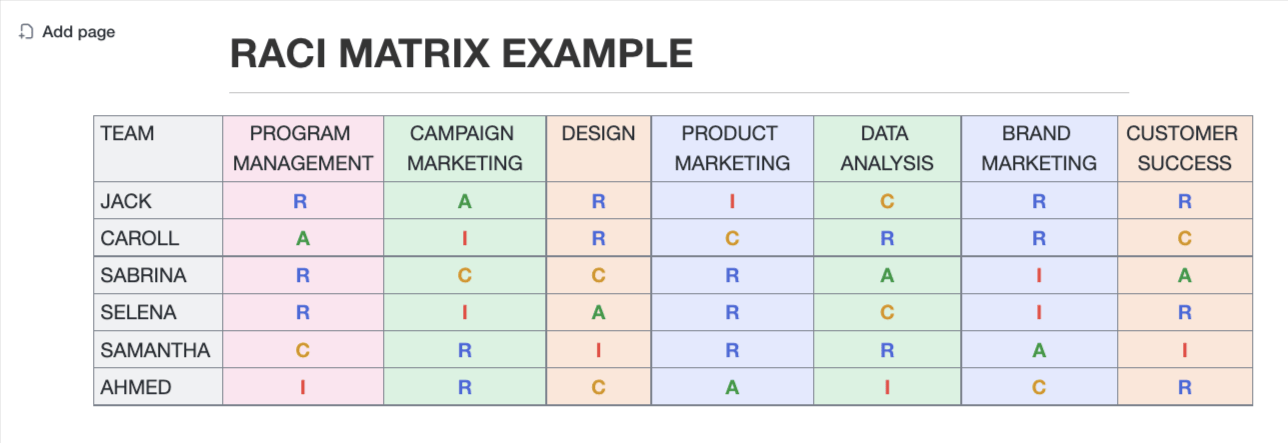
Here’s a perfect example of what we’ve explained above. ClickUp Docs can be used for making a RACI chart without overcomplicating things.
Stakeholders to the left, roles to the top and right. Jack, Sabrina, and Selena are Responsible for program management, Caroll is Accountable, Samatha is Consulted, and Ahmed is Informed.
It’s a great thing that there’s only one responsible person who holds the role of Accountable when it comes to program management. That’s the thing with campaign marketing, design, product marketing, data analysis, brand marketing, and customer success, too!
It’s also easy to spot that no resources are overallocated. Jack is the Responsible person for program management, brand marketing, and customer success while he is Accountable for campaign marketing, Informed for product marketing, and Consulted for Data Analysis.
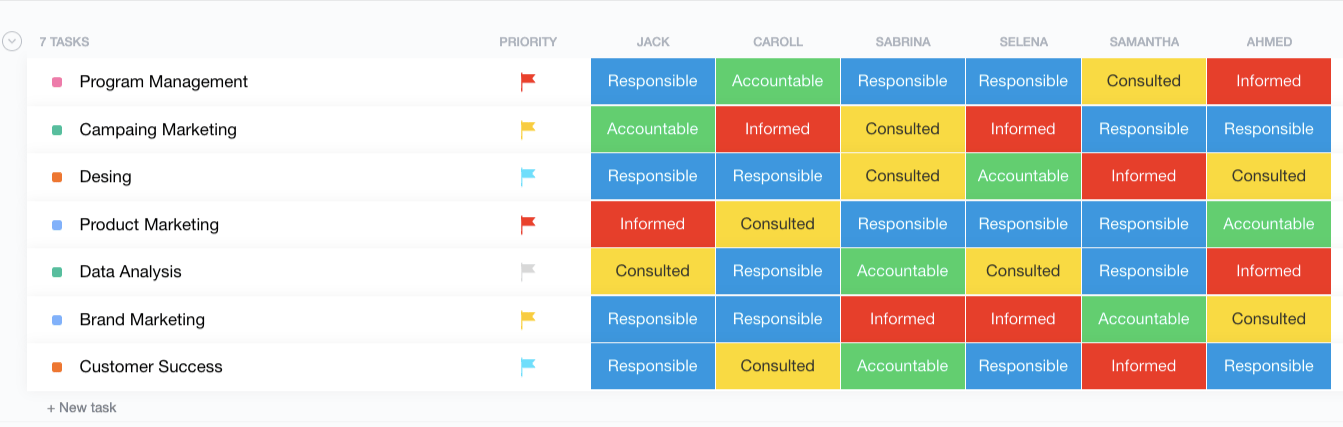
ClickUp’s List View lets us go more into detail with the RACI chart. It also allows you to bring a pop of color to the whole concept to make sometimes dull project management more refreshing. 🌈
You can actually choose between various role colors. We used blue for Responsible, green for Accountable, and so on. It’s totally up to you to customize the table and roles to your liking.
Here, we also have slightly different positioning of roles and tasks. Project tasks are listed on the left, one under another, while names and responsibilities are located on the top and to the right (if you prefer this kind of visualization, that’s totally cool).
You can also see priority flags that can give everyone direction and point out tasks that need to be taken care of ASAP and the ones that can wait a little bit. 🚩
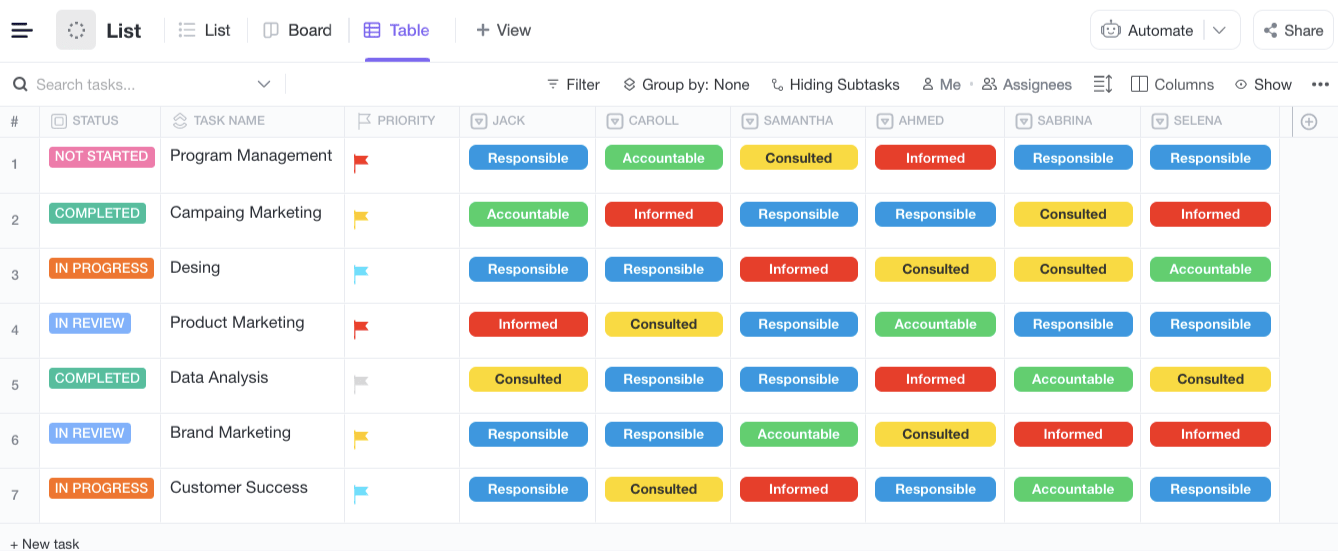
ClickUp’s Table view allows getting more nitty-gritty with your RACI chart. Aside from seeing roles, tasks, and priorities, you can also track the status of each task from the chart.
Statuses are fully customizable; this is just an example of how you can name and color each.
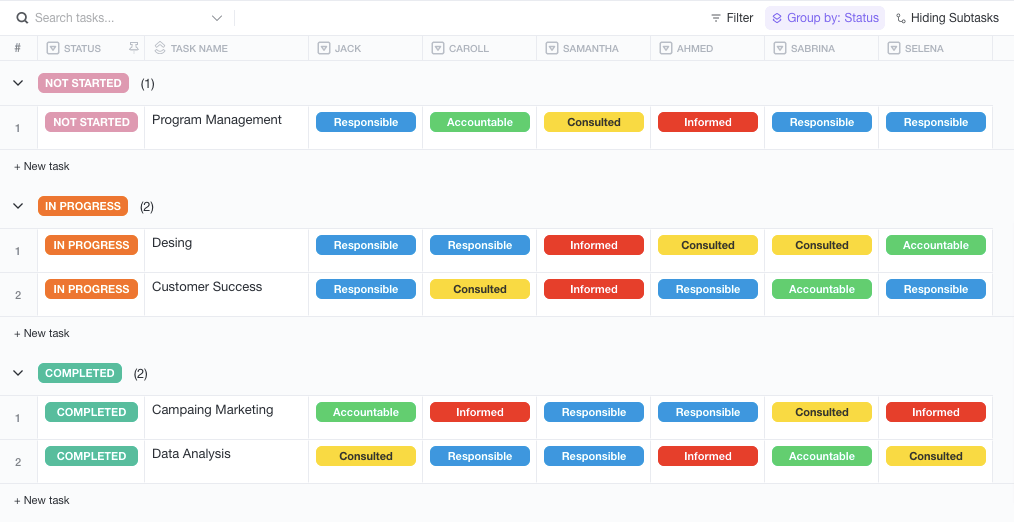
Within the Table view, ClickUp also lets you filter and group tasks by name, role, status, priority, etc.
This allows you to get more into the nitty-gritty details of your RACI chart and see which tasks are in progress, which ones are yet to be worked on, and which ones are completed.
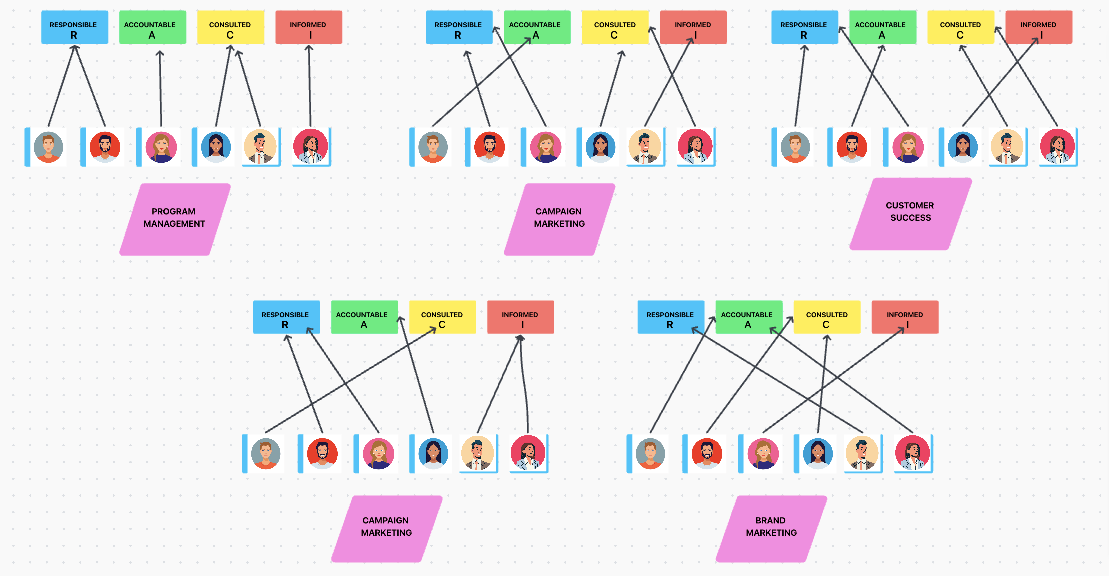
The ClickUp Whiteboard makes it easy to visualize tasks, roles, and roles separately, all with a touch of color.
It ensures that everyone works as a team, leaving practically no room for conflicts or low morale.
Also Read: Perceptual map templates
Creating a RACI or responsibility matrix effectively ensures clarity in roles and responsibilities. Here are some best practices to follow:
Identify the process, project, or workflow that requires a RACI chart and set clear objectives to ensure it aligns with business goals. Keep it focused to avoid unnecessary complexity.
List all tasks, decisions, or deliverables that require role assignments. Ensure tasks are specific and actionable, not too broad or vague
Example: Instead of “Manage project,” use “Define project scope,” “Approve budget,” or “Monitor progress”.
Identify all roles that will be involved in the process (teams, individuals, departments). Use roles or job titles instead of names to ensure scalability.
Example: Use “Marketing Manager” instead of “John Doe.”
Each role in the matrix must have a clear, distinct responsibility.
Remember, too many “Accountable” or “Consulted” roles will slow execution.
Review the chart with all key stakeholders to ensure accuracy and address any role conflicts or overlaps. Secure buy-in from leadership and team members.
Avoid overcomplicating the responsibility matrix with excessive details. It must be accessible to all stakeholders and easy for anybody to understand.
Use color-coding or formatting for better visibility
✅ Here’s an example RACI format:
| Task | Responsible (R) | Accountable (A) | Consulted (C) | Informed (I) |
| Define project scope | Project Manager | Sponsor | Stakeholders | Team Members |
| Approve budget | Finance Lead | CFO | Project Manager | Department Heads |
| Develop marketing strategy | Marketing Team | Marketing Director | Sales Team | Executives |
Update the RACI chart as the project evolves.
Reassess roles during team changes, new priorities, or workflow shifts. Keep it aligned with real-world responsibilities
Ensure everyone understands their role and how RACI applies to them.
Train new employees on how to use RACI effectively and encourage teams to refer to the RACI chart when in doubt.
Integrate the RACI matrix into project documentation, meetings, and workflows for better execution.
Also Read: Matrix Organizational Structure Examples
A RACI chart is a useful tool for project managers who need to track the various tasks and roles associated with a project. By tracking these roles, it helps to ensure that everyone involved in the project is held accountable for their individual tasks.
A RACI chart is also useful for business leaders who need to clearly define the roles and responsibilities of each team member. This chart can also be used to identify gaps in roles and responsibilities and help develop an effective plan for allocating resources accordingly.
Helpful resources for project managers 😎
How to structure your project: Best practices
The RACI acronym is useful for defining roles and responsibilities—it provides more than a clear outline, so your job is to ensure that work and responsibilities are fairly allocated. It also describes the project tasks that need to be completed in advance to eliminate confusion and bottlenecks.
Now that you’ve seen these RACI matrix examples, it’s your turn to try it for yourself! Load one of the templates, like the ClickUp RACI template, customize it to your liking, and start delegating tasks and responsibilities more effectively.
But that’s not all you can use ClickUp for. With collaborative whiteboards, AI assistance, 15+ custom views, goal tracking, knowledge management, communication, and task management all together, ClickUp is the only project management tool you need. Try the Free Forever Plan today.

Sudarshan Somanathan
Max 22min read

Praburam Srinivasan
Max 23min read
Praburam Srinivasan
Max 21min read

© 2026 ClickUp





