

Project managers have myriad responsibilities in their jobs—juggling multiple complex projects simultaneously, coordinating with cross-functional teams, managing stakeholders, and a never-ending task list.
Project management can be complex and demanding. However, it doesn’t have to feel overwhelming.
With the right tools and project management workflow, you can streamline your processes and ensure a smoother project execution.
This is why it is essential to plan and optimize your workflow. It improves productivity, helps you track project progress, and ensures that you stay within budget.
In this blog, we discuss ten practical project management tips to help you improve the efficiency of your project team, increase the chances of project success, and optimize their workflow.
10 Project Management Tips to Optimize Your Workflows
- Understanding Project Management
- 10 Project Management Tips to Effectively Manage Your Projects
- 1. Define the project objectives and scope
- 2. Develop a detailed project plan
- 3. Establish a timeline
- 4. Prioritize tasks
- 5. Simplify collaboration
- 6. Implement agile methodologies
- 7. Leverage KPIs to track performance
- 8. Pay attention to resource allocation
- 9. Automate time-consuming, repetitive, and consistent tasks
- 10. Adapt and learn for continuous improvement
- Common Project Management Challenges

 Summarize this article for me please
Understanding Project Management
Project management is a systematic approach to plan, oversee, and execute any project from start to finish.
Effective project management allows you to utilize available resources to achieve specific goals within specified timelines and budgets. It ensures that project outcomes follow a certain standard and involves communicating, coordinating, and tracking multiple tasks, functions, and departments to achieve strategic objectives.
There are essentially five steps in the project management lifecycle:
- Initiation: Stakeholders and project managers define the project’s scope and feasibility
- Planning: A detailed plan is developed to oversee project execution. The plan should include details about the scope, timelines, project goals, budget, project milestones, and other important information for the project team members
- Execution: The plan is divided into smaller tasks assigned to skilled project managers who oversee its execution and allocate resources for each task
- Monitoring and controlling: An effective project manager monitors the tasks and activities to ensure they are completed on time while mitigating project risks. If any bottlenecks arise, they are proactively managed to deliver projects on time. The best project managers excel at managing project stakeholders’ expectations—a skill needed when unexpected roadblocks crop up
- Closing: Once all project activities are finalized, their deliverables are consolidated and submitted to stakeholders for their approval and feedback, along with detailed progress and performance reports
Read More: 15 Free Project Management Templates for Project Managers
Difference between traditional and agile project management
Traditional and agile project management are two broad project management techniques. Each approach has its own set of frameworks, principles, and processes that match different types of projects.
Here are a few key differences between the two approaches.
| Aspect | Traditional project management | Agile project management |
|---|---|---|
| Approach | Sequential approach where each phase needs to be completed before moving to the next | Incremental and iterative approach where work is divided into short cycles with continuous feedback throughout the project |
| Structure | Hierarchical, with roles and responsibilities clearly defined | Flexible, with different teams working collaboratively to achieve outcomes |
| Planning | A detailed plan is developed upfront to outline project activities from start to finish | Starts with high-level planning, which is then adapted to the requirements of each iteration |
| Execution | Follows the plan carefully with less room for changes | Dynamic and changes according to iterations and feedback |
| Delivery | Happens at the end of the project with a few finalized deliverables | Value is incremental, with small outcomes delivered in phases throughout the project |
An example of traditional project management
Suppose you are developing an e-commerce website. Each step, such as designing the wireframe, creating UI/UX design, development, testing, and deployment, should be completed sequentially.
An example of agile project management
For instance, you are developing a mobile app. The project is divided into sprints, the first of which involves creating a basic version with core features. Once the sprint is over, the product is reviewed.
The second sprint involves enhancing existing features and adding new ones based on stakeholder feedback. This continues in multiple sprints until key features are implemented and the app meets the required quality standards.
Importance of managing risk in project management
Project management is a complex process, and unexpected events could negatively affect project objectives or outcomes.
These project management challenges can include:
- Technology issues
- Resource shortages
- Economic shifts
- Ecological issues
- Legal obligations
- Quality issues
Irrespective of the cause, you need an effective risk management strategy to anticipate these issues and minimize their impact on the project’s success.
A risk management strategy is a structured approach that helps project managers and stakeholders make informed decisions whenever an unexpected event occurs. It allows you to manage risks proactively, and having a contingency plan in place is a great way to reassure stakeholders and build their confidence.
💡Pro Tip: For new project managers, here are the 10 project management courses that will level up their careers
Summarize this article for me please10 Project Management Tips to Effectively Manage Your Projects
An optimized project workflow helps streamline processes, improve operational efficiency, and mitigate risks when managing projects. Here are ten proven strategies for successfully planning, executing, and delivering project outcomes.
1. Define the project objectives and scope
Project objectives highlight the specific outcomes that need to be achieved, while scope defines the project’s boundaries. It highlights what is included in the project and what is out of scope and aligns stakeholders, project managers, and team members.
Defining project goals and objectives provides clear direction to everyone working on the project.
Project scope prevents uncontrolled changes or expansions and sets proper and realistic expectations.
Here’s an example of a well-defined project objective and project scope.
| Project objective | Develop and launch an e-commerce mobile application in six months. The application should increase online sales by 20% and improve user engagement metrics such as average session duration by 30% |
| Project scope | The e-commerce mobile application project will include full-stack development, payment gateway integration, UX design, and third-party integrations. It will exclude the implementation of any additional features not mentioned in the scope |
While defining these aspects is critical, you should also follow through with tracking to ensure that the project does not deviate from the specified objectives and scope.
You can either track the project workflow manually using spreadsheets or use project management software to manage every aspect of the project.
The benefits of project management software are:
- Gives you better visibility and control over tasks, dependencies, team workload, and progress
- Consolidates all information about the project in one place—no juggling multiple tools
- Improves productivity and team performance and minimizes burnout with advanced features like automation, integrations, role-based access control, and collaboration tools
- Allows you to identify and mitigate risks well in advance
2. Develop a detailed project plan
A project plan is a comprehensive document that outlines the project’s different components, including:
- A breakdown of complex tasks and project processes into manageable tasks
- A work breakdown structure defining who is accountable for what
- Budgets, resource allocation, and workload distribution
- Success metrics, key performance indicators, and reporting frameworks so that project managers can ensure the project progresses according to planned timelines and stays within the budget
- The potential risks the project might encounter
You can simplify the project planning process using a tool like ClickUp’s Project Management Software, which has advanced features to help you work smarter.
Use ClickUp Docs to create a comprehensive project plan and maintain essential information in a single place within the project management tool.
Invite stakeholders and team members to collaborate on the document and suggest real-time changes. To make the Doc more contextual, add relevant links, reports, and presentations and embed videos and other relevant information.

Project management tools like ClickUp also have pre-built templates to help you capture and organize information in a structured way.
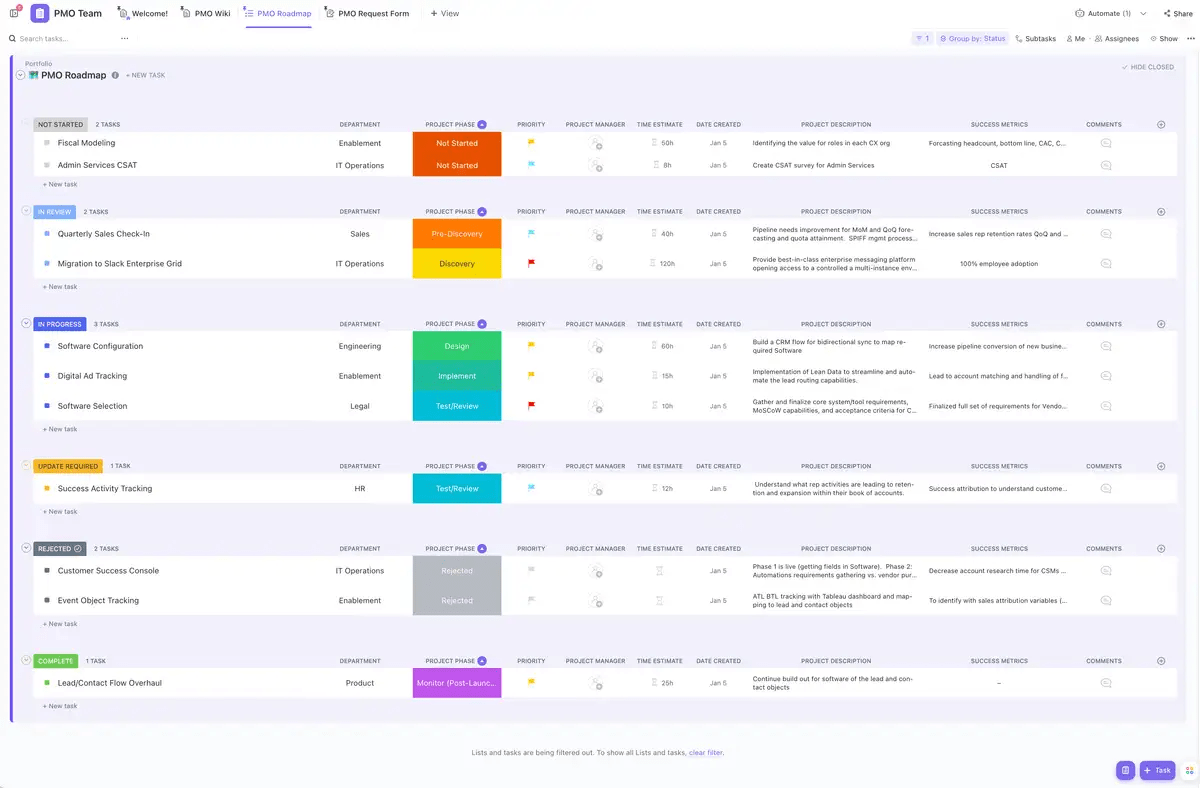
Project managers love using ClickUp’s Project Management Template to document all information from inception to completion and quickly create detailed project plans.
You can plug in important information such as:
- The department responsible for a task
- Internal and external stakeholders in the project team
- Project description
- The team responsible for each task
- Priority levels for upcoming tasks
- Estimated time
- The project manager responsible for the task
- Success metrics and project risks
3. Establish a timeline
How long will different tasks and activities take, and what’s the realistic timeline for the project’s completion? As a project manager, you must have answers to these critical questions, irrespective of the project’s complexity.
Your timeline acts as a roadmap highlighting the project lifecycle’s different phases. It helps teams understand how the sequence of activities should flow so they can prioritize tasks accordingly.
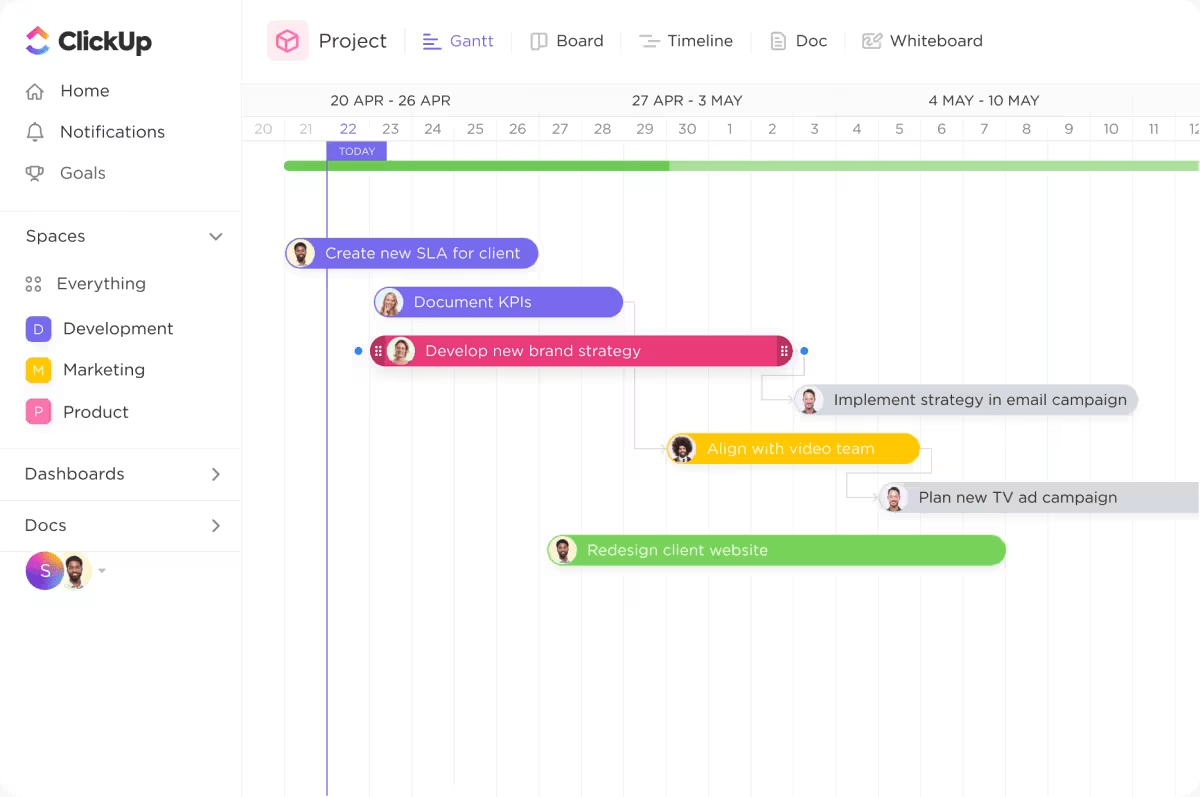
You can visualize your project in 15+ ClickUp Views, including the Gantt Chart and the Timeline View.
Gantt Chart Views
Visualize all your tasks and dependencies along a timeline, with key milestones to help track project progress. Use cascading views to see how one task flows to the next. The Gantt chart also helps track dependencies and identify slack time and lets you adjust timelines at a click.
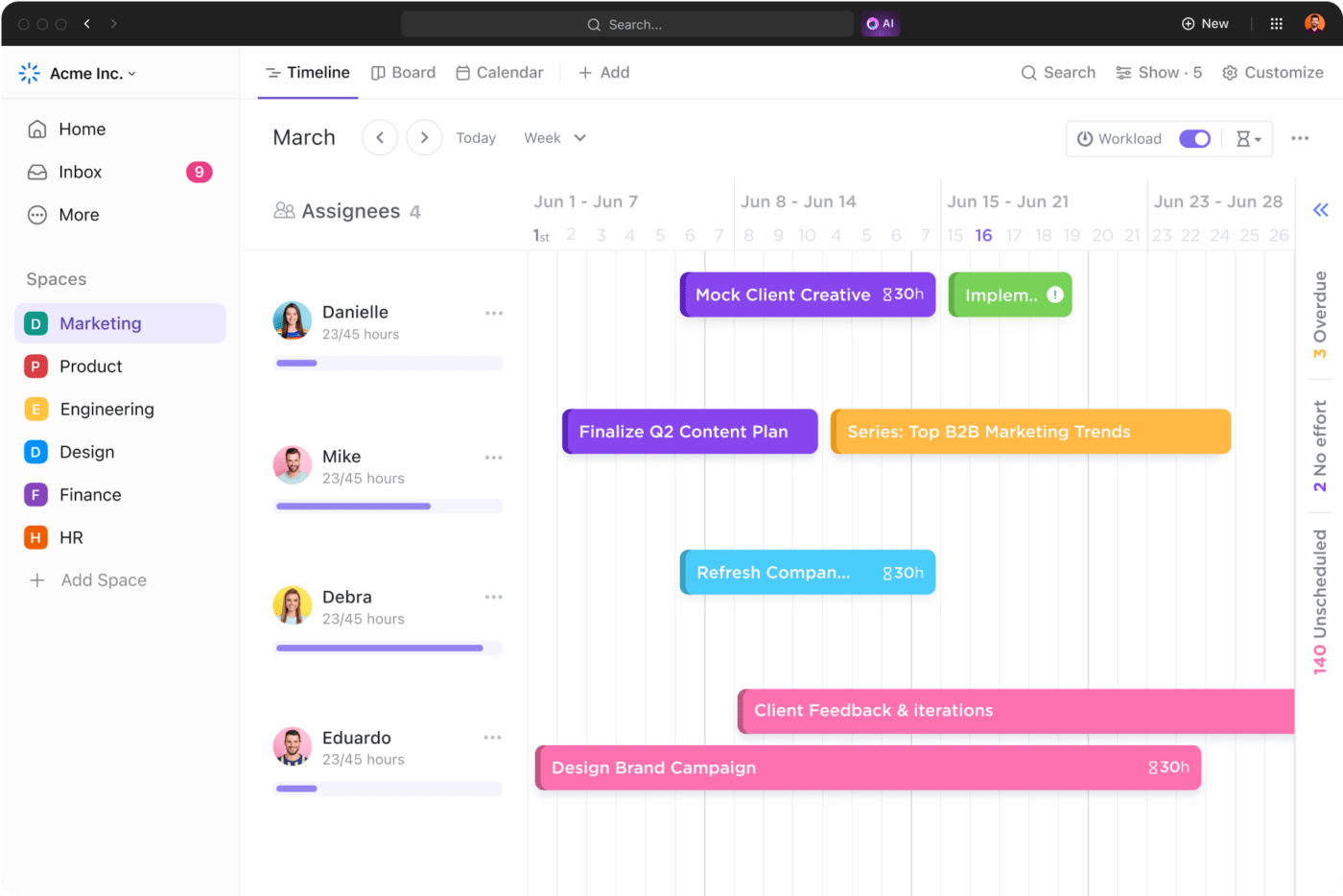
Timeline View
Plot tasks along a flexible timeline, enabling team members to view how different tasks are progressing. Share it with stakeholders to communicate a detailed overview of the project roadmap, upcoming events and tasks, and tasks completed so far.
Gantt charts are a great way to see how multiple projects with interdependent tasks are progressing. They also help identify work that is waiting on another task.
On the other hand, the Timeline view gives you an overview of the tasks and milestones in a project, along with high-level project timelines.
4. Prioritize tasks
Prioritizing tasks increases focus and ensures that critical deliverables are completed on time. Project management tools like ClickUp make this easier.
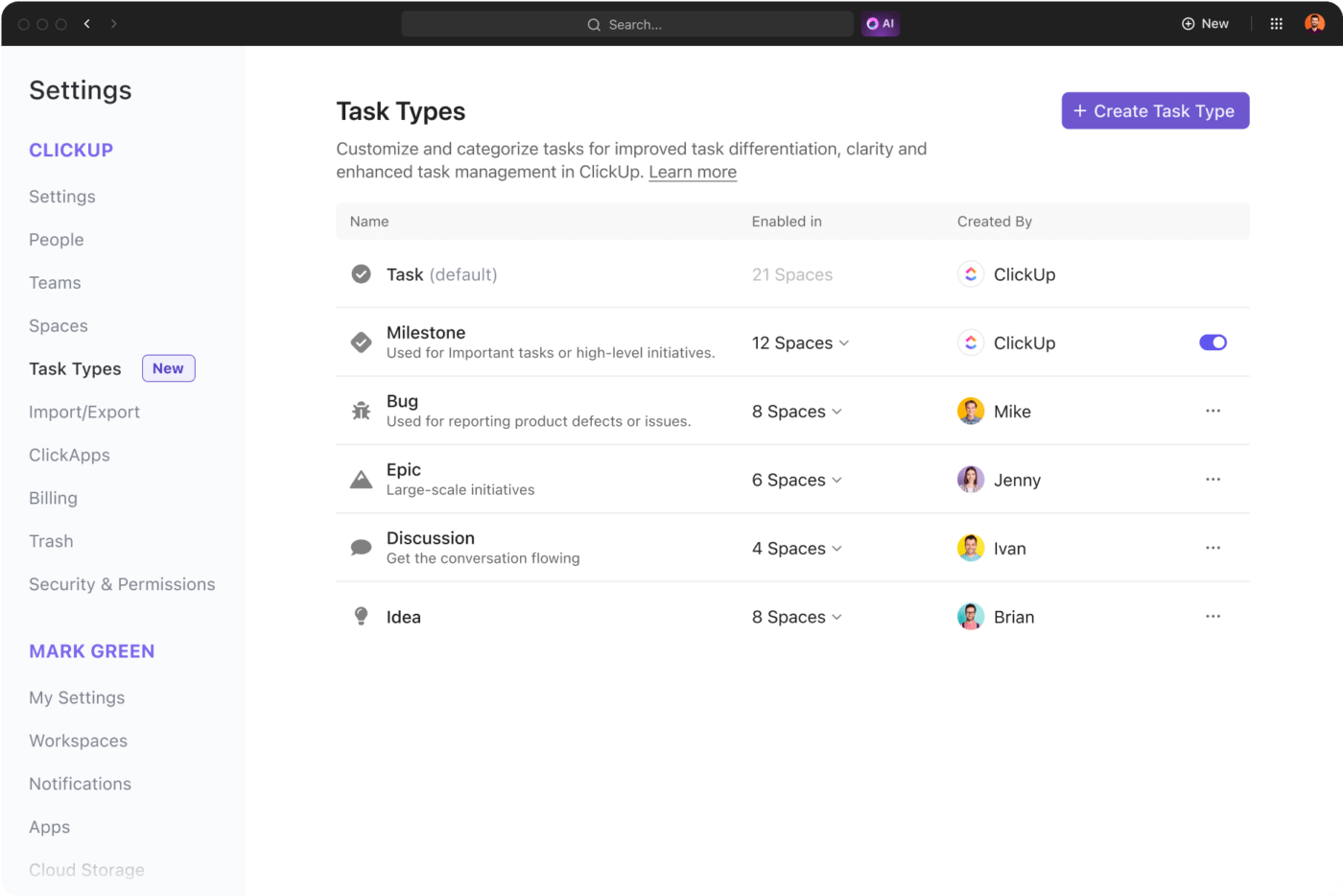
Use ClickUp Tasks to create multiple lists to organize and categorize your tasks.
You can create a list for each phase of the project and then add corresponding tasks to each list.
A list named ‘Initiation’ will have the following tasks under it:
- Define project scope
- Identify stakeholders
- Allocate resources
- Estimate budget
The project manager will then assign tasks to the other team members with due dates, priority levels, and custom fields to record additional information such as project notes, wiki page, or an internal knowledge base.
These features can help you structure your tasks more effectively and make it easier to keep track of the project workflow.
5. Simplify collaboration
When multiple departments work on a project, you want everyone to collaborate smoothly, using a single source of information on tasks, sharing updates, and resolving issues.
Imagine the chaos that would occur if each team worked in silos; there would be misunderstandings, delays, and duplicate work.
To avoid this, define the communication channels: email for formal communication, chat for real-time updates, and ClickUp Docs for all project documentation.
Conduct regular meetings to check on task progress and inform key stakeholders about critical updates.
Suggested read: 50 Team Building Activities & Exercises for Work in 2024
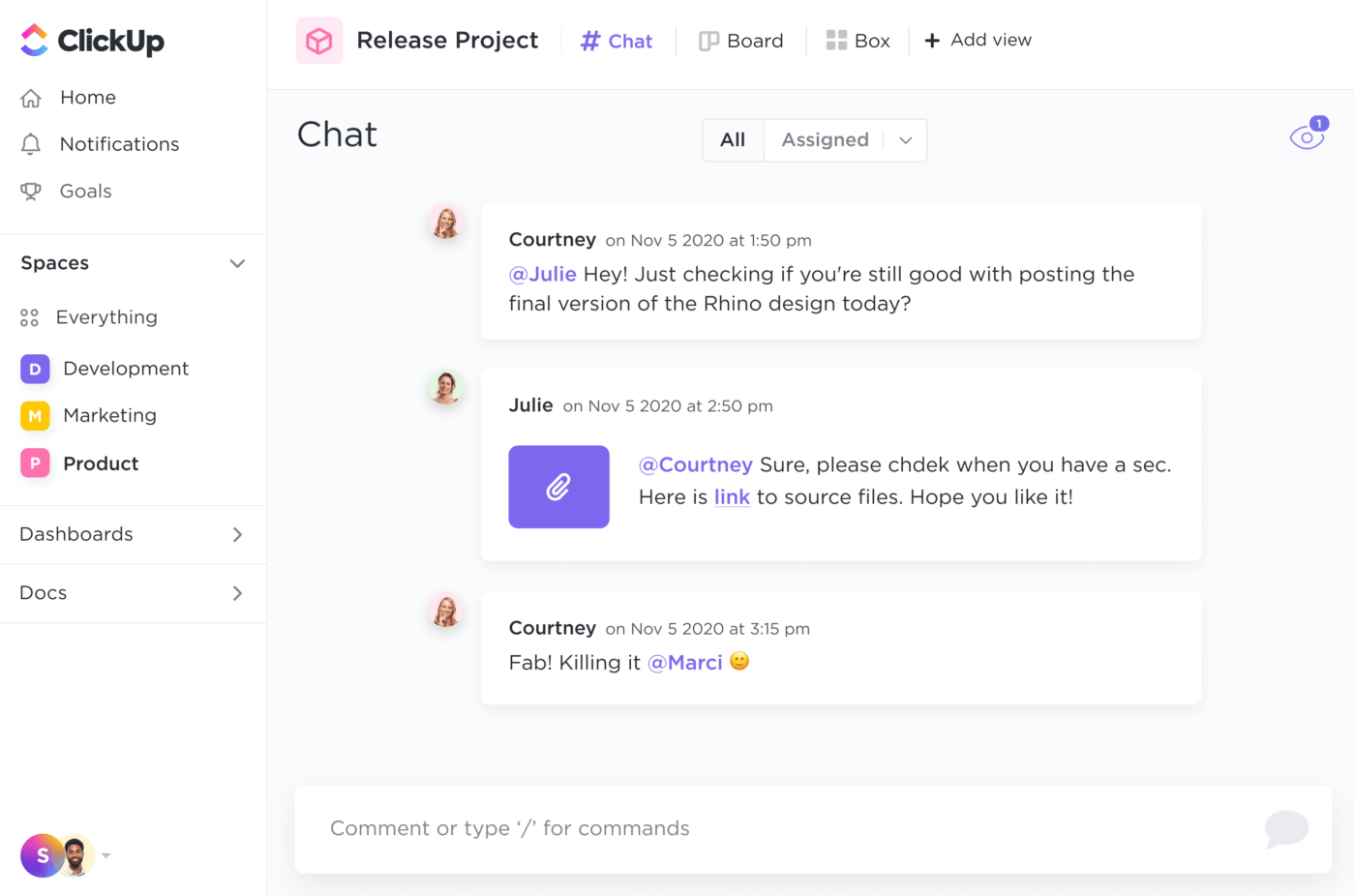
ClickUp Chat offers a real-time chat channel where team members can collaborate and share information. The features loved by users are:
- Use @mention to add a team member to a conversation
- Include color blocks, bullet lists, and banners to details in an easy-to-understand format
- Create separate chat channels for company-wide updates or specific teams
- Embed specific videos, spreadsheets, and PDFs within the chat window
6. Implement agile methodologies
Consider using the Agile project management methodologies when your project does not have explicit constraints, timelines, or available resources.
This helps teams respond and adapt to changes in requirements, even during the later stages of project execution. The continuous feedback enhances the quality of outcomes, resulting in greater stakeholder satisfaction.

ClickUp’s Agile Project Management Template helps you implement agile methodologies like Kanban or Scrum to improve continuously. It is an ideal starting point for non-software development teams looking to adopt Agile. Use the Form to streamline requests into the backlog and execute using the Board View. The template gives you a variety of custom statuses to tailor as per your preferred workflow.
7. Leverage KPIs to track performance
Key performance indicators, or KPIs, are quantitative data that can help you evaluate the health of your project, track progress toward project milestones, and make data-driven decisions. They help project managers ensure outcomes are aligned with goals and allocate resources effectively.
KPIs vary according to the type and size of the project.
For instance, the effectiveness of a social media marketing campaign could be measured by tracking click-through rate, organic impressions, engagement, and follower or subscriber count.
Similarly, software development KPIs would include velocity, lead time, cycle time, defect density, defect resolution time, etc.
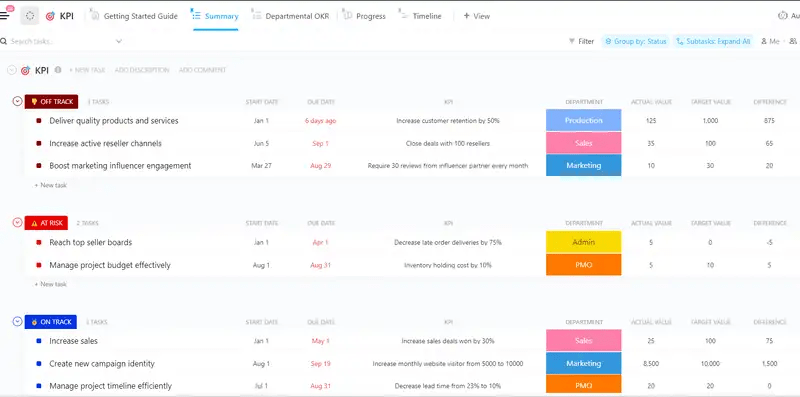
Use the ClickUp KPI Template to track project progress against goals and objectives, analyze data, identify areas of improvement, and track performance with easy-to-read visuals.
8. Pay attention to resource allocation
Effective and efficient resource allocation is one of the most important project management soft skills. Ensuring you have skilled team members working on the right project can maximize efficiency, enable faster project completion, and help you deliver quality outcomes cost-effectively and on time.
Here are a few steps you can take for smarter resource allocation:
- Assess available resources: Evaluate current resources and compare them against the project’s requirements. For this, use ClickUp’s Technical Skills Matrix Template to track skill gaps and understand your team’s expertise. This allows you to match tasks with the individual skills of your team members and plan for filling the skill gaps
- Prioritize tasks: Allocate resources for high-impact, high-priority tasks to meet deadlines and complete tasks with the most impact. Analyze tasks and conduct dependency mapping to get insights into resource requirements and distribution
- Create a resource allocation plan: Develop a resource schedule to plan how resources will be allocated and for how long. Define roles and responsibilities to ensure everyone understands what they’re supposed to be working on and there is no overlap
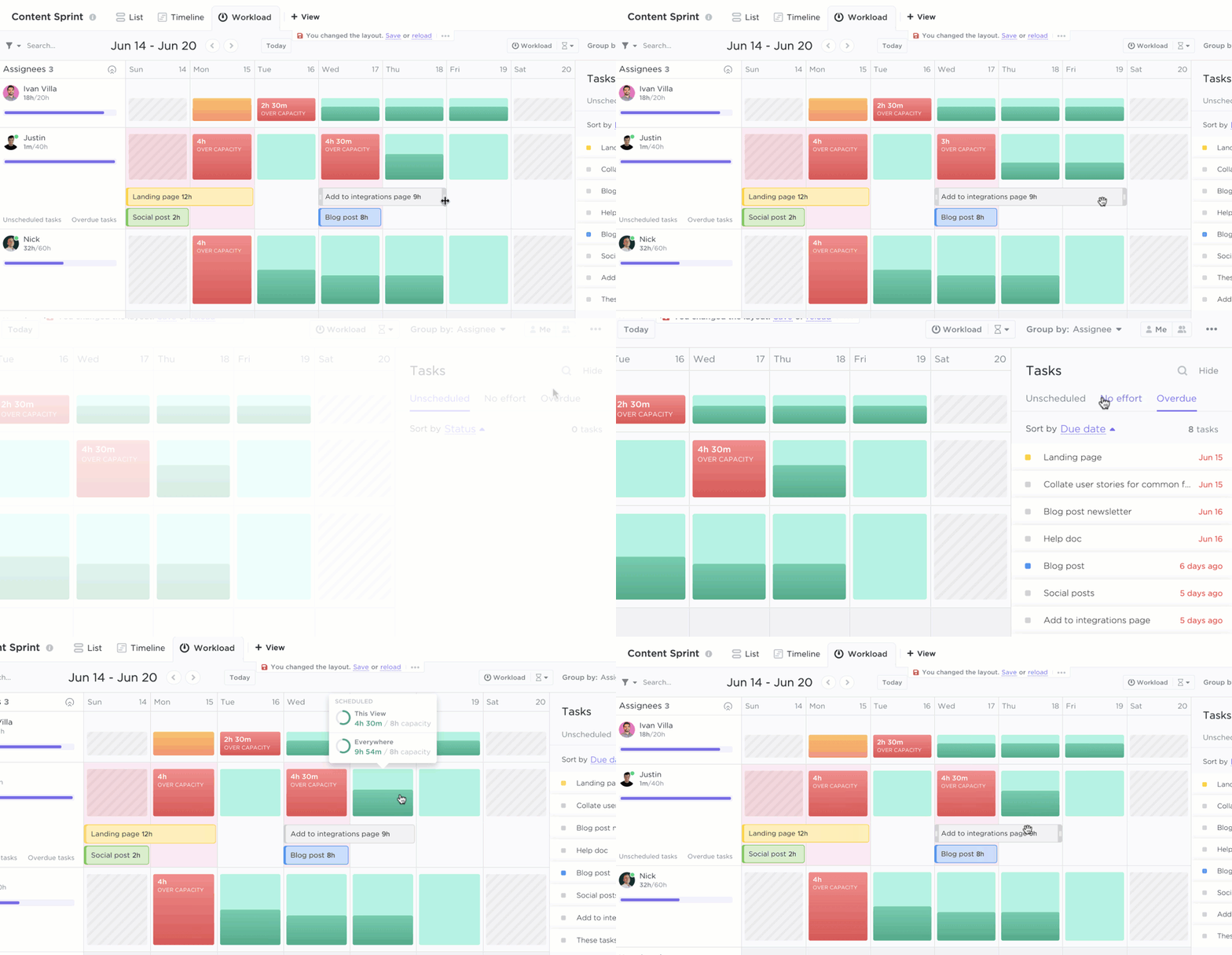
💡Pro Tip: ClickUp’s Workload View allows you to visualize the amount of work each team member is assigned during a specific time period. You can compare each person’s workload against their capacity.
9. Automate time-consuming, repetitive, and consistent tasks
Automated project management saves time and manual effort and reduces human error by offloading manual work to machines.
Project management has several moving parts that are ripe for AI automation to make your project management office more productive. They include:
- Automatically assigning tasks to team members
- Generating progress and project status reports
- Pre-filling project Docs, templates, and product requirement documents
- Creating project briefs and adding critical information such as dependencies, start and end dates to tasks, objectives, and deliverables
- Summarizing Docs, standup meetings and meeting notes, conversation threads, and reports and whitepapers
- Creating blog outlines, marketing plans, and writing case studies
ClickUp’s built-in AI assistant, ClickUp Brain, does all this for busy project management teams and is designed to fit into your workflows.
ClickUp Brain maximizes your team’s productivity in the following ways:
- Boosts productivity by 30%: Teams save time with fewer meetings, quicker summaries, and automated tasks
- Improves alignment: Improving communication and knowledge sharing helps teams feel more connected and aligned toward shared goals
- Cuts down costs by up to 75%: Mid-market companies save around $94K per year by cutting down the spending on other AI tools

10. Adapt and learn for continuous improvement
Continuous adaptation ensures that your project remains flexible and responsive to new information. This is important for successful project management, which drives better outcomes and, more importantly, fosters innovation and improvement for future projects.
For example, collect regular feedback and track project success metrics to get insights and identify areas for improvement. Based on these insights, develop an action plan summarizing the suggestions you want to implement, how you arrived at them, and why they are essential.
Project management tools like ClickUp have features like ClickUp Forms that allow you to collect feedback internally and externally in a systematic format to optimize your project management workflow.
Summarize this article for me pleaseCommon Project Management Challenges
1. Scope creep
Scope creep happens when additional changes or requirements are made to the project that were not included in the initial objectives and deliverables. This leads to unexpected expansion in scope that can delay project timelines and cause budget overruns.
Solutions:
✅Create an exhaustive project intake form using ClickUp Forms for the client to document their expectations and requirements in detail
✅Implement a change management process with a formal structure for requesting, reviewing, and approving additional changes
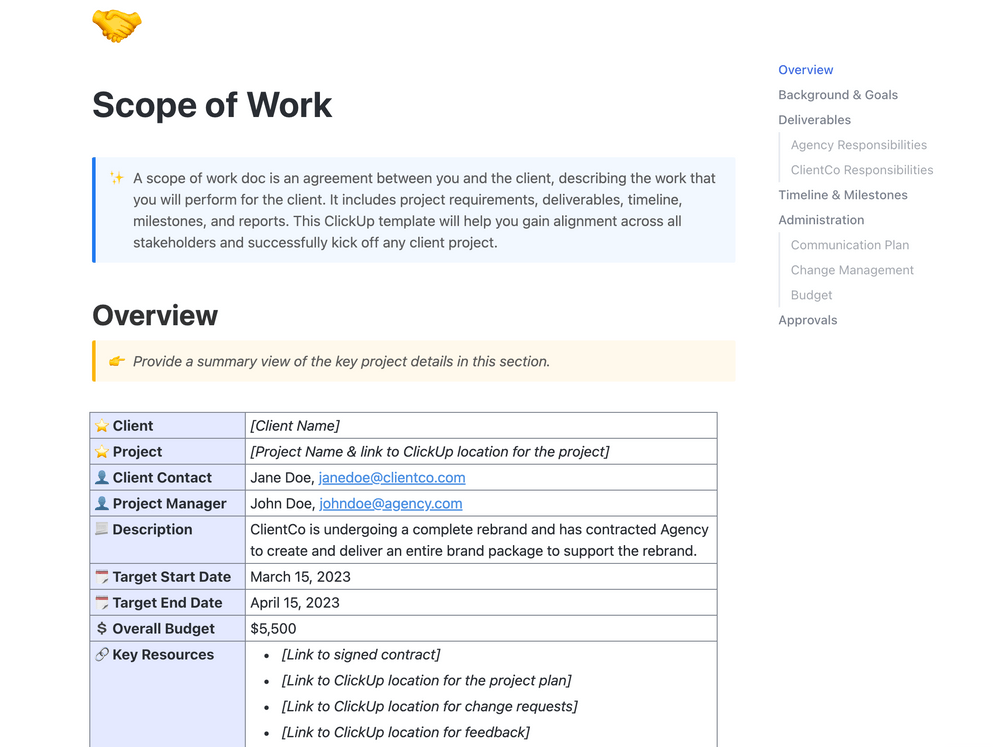
✅Use the ClickUp Scope of Work Template to create a clear plan of action for the project, outline the timelines, tasks, and deliverables, and set up notifications to stay updated on the progress
2. Time management
Time estimation errors and a lack of task prioritization can result in ineffective time management. Team members may spend too long on less critical or tedious tasks instead of focusing on what moves the needle, impacting the timely delivery of project outcomes.
Solutions:
✅Set realistic goals and timelines for every task
✅Evaluate project tasks and divide them into high-priority tasks and low-priority activities for better prioritization
✅Use ClickUp Time Tracking to track how much time is being spent on different tasks and how they can be optimized
✅Conduct regular check-ins to collect timely feedback and approvals

3. Quality control
Quality control ensures that project outcomes align with stakeholder expectations and benchmarks. However, ambiguity in defining quality standards and inconsistent processes can make quality control one of the biggest project management challenges you’re likely to face.
Solutions:
✅Involve stakeholders when defining the criteria for quality control for every project
✅Ensure you carry out sufficient testing before final delivery of outcomes for successful project completion
✅Use a checklist for all the essential quality control steps
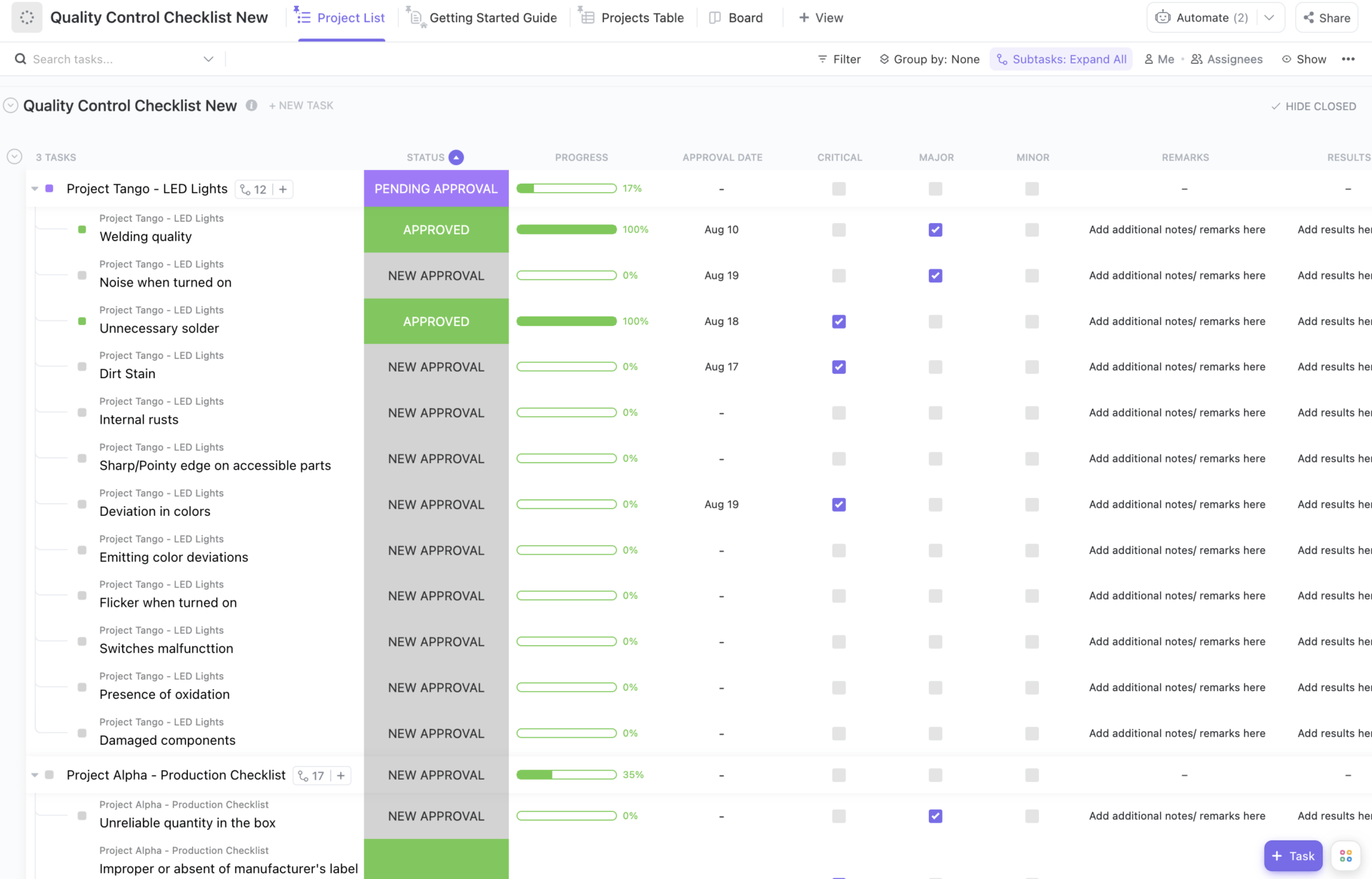
Use the ClickUp Quality Control Checklist Template to create a checklist for all the essential quality control steps. This ensures all processes are diligently followed, helping to maintain a high level of quality throughout the project management process
Summarize this article for me pleaseClickUp: Your Project Management Partner for Efficient Workflows
Project management is a complex process that involves paying close attention to dozens of details to achieve success in your company’s goals. Add the multiple projects you manage to the mix, and things can get hairy. PM tools can supplement your project management skills and improve performance.
ClickUp’s all-in-one AI-powered project management software offers a comprehensive solution to help you optimize your workflow and improve your efficiency. With advanced features for task management, collaboration, and resource optimization, your life as a project manager is much easier.
With ClickUp, take out the guesswork from project management and deliver successful projects every time. Sign up on ClickUp for free and start optimizing your project management workflows.


Everything you need to stay organized and get work done.

Recent Articles
Project Governance: A Practical Framework That Doesn’t Slow Teams Down 
Project Governance: A Practical Framework That Doesn’t Slow Teams Down
10 Monte Carlo Simulation Software in 2026 (Free & Paid) 
10 Monte Carlo Simulation Software in 2026 (Free & Paid)
