
How to Make and Manage Accurate Project Assumptions [Complete Guide with 30+ Examples]


Sorry, there were no results found for “”
Sorry, there were no results found for “”
Sorry, there were no results found for “”
We make assumptions or suppositions in our everyday lives—for instance, you assume your car will work in the morning and get you to work on time. Or, your phone won’t stop functioning while you’re trying to locate an address using Google Maps.
Now imagine making these assumptions as a project manager—there’s suddenly a lot more at stake. With the goal to deliver a project on time, you have plenty of assumptions, like availability of resources or timely approval of the requested budget, to navigate as you make a project plan.
As you can assume, managing project assumptions is tricky. You cannot rely on guesswork as poor assumptions can derail project delivery, especially if you don’t have backup plans and are unprepared to handle associated risks.
In this article, we’ll discuss how to identify and manage project assumptions to estimate project management outcomes more accurately. We’ll learn about:
Project assumptions are factors, events, and circumstances project managers and their teams assume to be true—even though there’s no empirical evidence to back them up.
All project managers rely on certain assumptions during the entire project lifecycle. From the project planning process to development and delivery, the right set of assumptions helps them visualize project success and prevent roadblocks like:
Despite the no-evidence aspect, most project assumptions are based on data trends and past experience or are an educated guess. They seem like common sense—until they don’t and become a project risk. 🥲
Assumptions are called so because they’re rooted in unknowns and uncertainties.
So, there’s always a nexus between assumptions and risks. Multiple things can go wrong, invalidate your assumptions, and rock your project management boat. That’s why you need to have a game plan that will help you account for the potential risks you may encounter if your assumptions go haywire.
Successful project managers typically cope with these uncertainties by:
Pro tip: When identifying key assumptions, it’s always wise for the project manager to note down the risk potential side side by side. A quick way to do this is through the ClickUp Risk Assessment Whiteboard Template—it comes with a color-coded map to help you track the likelihood and severity of all project risks.
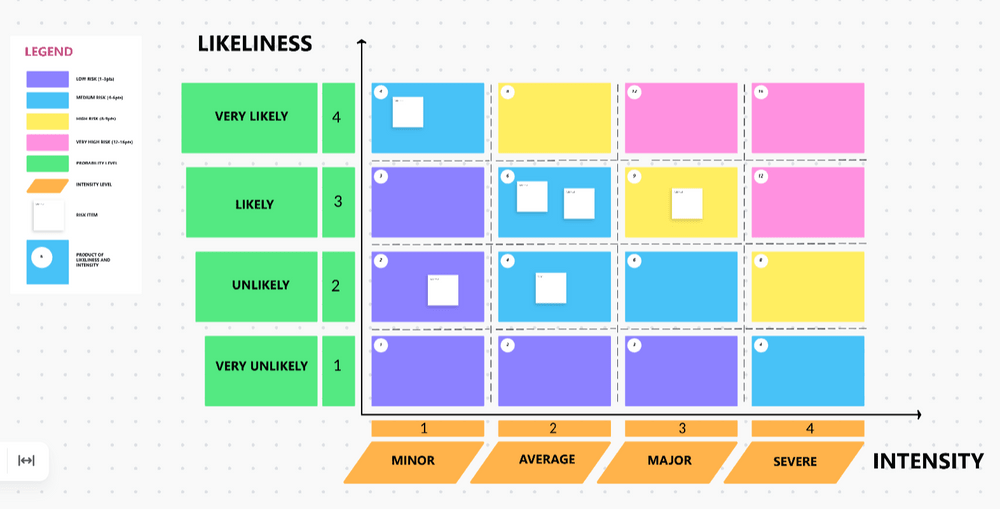
Risks related to unreliable project assumptions often end up in the top-right corner of the map and require constant monitoring.
We can divide project assumptions into different categories depending on what they focus on. While the categorization is up to you, here are the six most common types with examples:
Every project manager knows about the inherent risks within daily operations, like scope creep, equipment breakdowns, team conflicts, or miscommunication with project stakeholders.
Here are broad-scope operations-related project assumption statements you can consider:
Many implicit assumptions here can be potential liabilities and lead to delays and even project failure, so it’s important to be prudent with your estimates. For example, instead of assuming 100% team availability, it’s wiser to estimate 80% availability to account for sick leaves and vacations.
Environmental project assumptions, also called location assumptions, focus on environmental factors you have no control over. Let’s observe a few examples of project assumptions related to environmental scenarios below:
Tip: Use the ClickUp Contingency Plan Template to devise alternative solutions for environmental assumptions gone wrong.
Time-based or scheduling project assumptions focus on the project duration, aiming to predict how long each activity and task will last. You use them to create a realistic project timeline to stick to. ⌛
A few examples of common project assumptions in this space:
These assumptions are concerned with the availability and management of all the resources necessary for delivering projects, from materials and technology to human capital.
Check out a few examples of resource assumptions:
Map out these assumptions during the project planning process—you may need approval from key stakeholders in certain areas (like budgeting).
Some teams like to log financial assumptions separately to have more detailed project cost estimations—the idea is to set aside money for each project phase, task, or milestone.
Here are a few examples of budget assumptions:
A project scope describes the delivery goals, requirements, and tasks you need to complete for an established end result—additional demands mean your original project plan is rendered useless. Essentially, your entire project scope is an assumption.
Here are some project assumption examples in terms of scope:
Bonus: Use the ClickUp Project Scope Template or the ClickUp Project Charter Template to organize all scope-related data, including project dependencies, schedules, and timelines. Both templates are collaborative, allowing team members to contribute and make real-time changes to the scope for enhanced transparency.
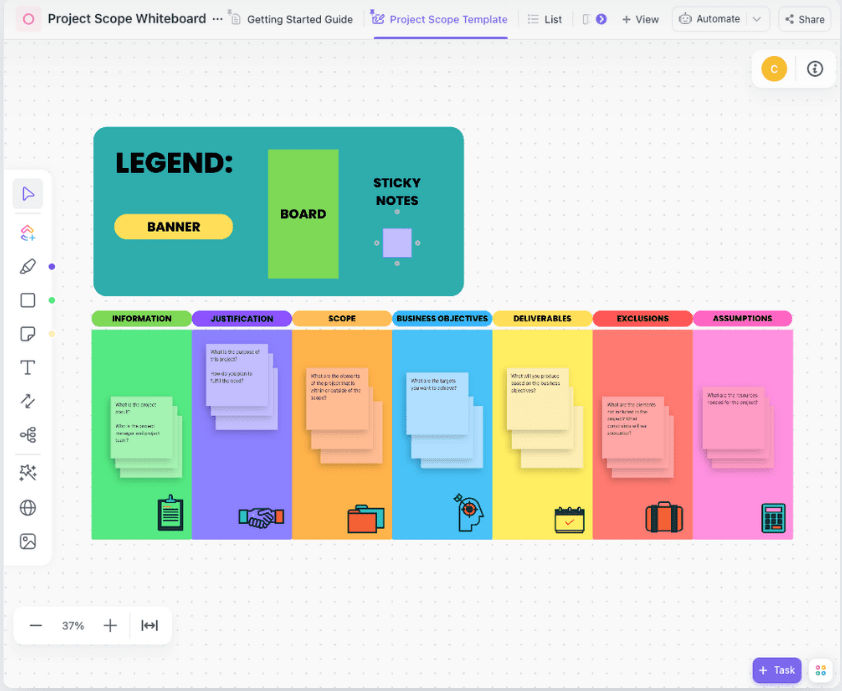
We know that project assumptions, dependencies, and risks dictate the course of a project and help manage the workflows efficiently—but how do these concepts affect each other? Let’s find out.
Both assumptions and project dependencies can lead to risks but in different ways. As we discussed before, every assumption has a risk potential since there’s always a chance it’s invalid. In most cases, assumptions apply to the entirety of projects. For example, you assume that your project team members will reach milestones without delay—but the likelihood that they won’t is a risk.
Dependencies, on the other hand, denote the risk related to two or more interconnected activities. Let’s say for a project to move to the launch phase, it first requires final approval from the key stakeholders, which project managers assume to get on time.
In this case, the approval task is a “dependency” as its delay can postpone the entire project launch timeline—so that’s a pretty heavy risk.
Project assumptions, risks, and constraints are overlapping concepts, so let’s shed some light here. 🔦
Let’s focus on risks and constraints individually for the sake of comparison.
Both assumptions and risks are noted before a project starts. The difference here is that you want your assumptions to hold true for all-around project success. However, it’s the opposite for project risks—they will jeopardize your project if they materialize, so you need a risk management plan to reduce the likelihood of each documented risk.
Project constraints are pre-existing limitations you need to account for when making project assumptions. Unlike assumptions that may or may not be true, constraints are certain. According to the Project Management Institute, there are six types of project constraints:
You identify assumptions and constraints early on during the initiation phase. Every project assumption helps you plan and lead the direction forward, while project constraints are like boundaries that keep you moving in the right lane.
Here are three expert-approved tips and strategies to help you manage project assumptions throughout the project lifecycle. 🌻
If you want to manage assumptions like a pro, you need to use a tool that can help you visualize workflows to spot risks, have a bird’s-eye view of your project budget and human resources, and make adjustments on the fly.
If finding all these options in a single tool sounds impossible, it’s only because you haven’t seen what ClickUp can do!
ClickUp is one of the best-rated project management tools on the market because it has options that help you zoom in on micro project details, as well as keep an eye on the bigger picture. 😍
Everything you need to identify project assumptions and manage them is available within the ClickUp Project Management feature bundle.
Let’s start with ClickUp Docs—this knowledge management option can help you create, edit, share, and store all project-related documentation, from a project plan and charter to standard operating procedures (SOPs). This is also an excellent option if you need to document assumptions, risks, and their deviations in one place.
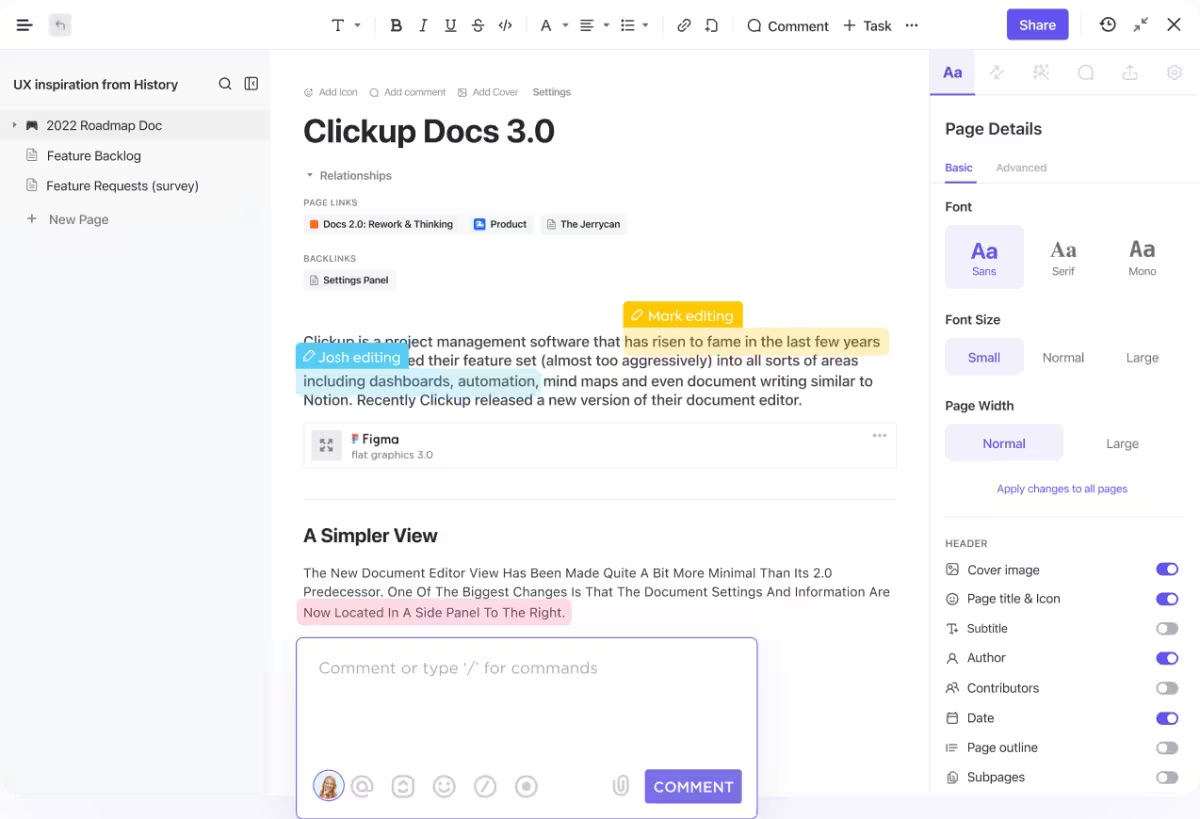
You’ll find ClickUp Brain, a powerful AI writing assistant, within ClickUp Docs. With it, you can brainstorm, write text, or summarize your text to save time and boost productivity.
ClickUp Brain has a convenient feature named AI Tools—it lets you use 100+ research-based prompts for a variety of tasks across cross-functional teams. For instance, if you choose the Project team option, you’ll see customizable prompts like Create scope document and Create a project risk management plan, which will help you carve out your project’s assumptions.

Furthermore, if you want you and your stakeholders to have clarity over project assumptions and deadlines, use ClickUp views. You get 15+ options to observe projects from different perspectives, identify stable or false assumptions, and locate dependencies and risks proactively.
Use the List view to organize workflows or the Board view to sort tasks based on the level of completion. Take advantage of advanced views like the Workload view to manage your team’s workload or the Gantt chart view to track project constraints and dependencies on an adjustable, drag-and-drop-enabled timeline.
Need to discuss risks with teams faster? Use the Chat view to communicate with your team without leaving ClickUp, minimizing the need for long meetings and context switching.

Think of an assumptions log as a project manager’s diary—this is where you’ll record every assumption you make from the project planning phase to project execution.
Having all project assumptions in one place will help you keep track of them, monitor their validity, and make changes when necessary.
ClickUp offers 1,000+ templates for various purposes, including maintaining assumption logs. These templates come with premade sections and serve as a shortcut for quality documentation.
If you want to manage project assumptions, we recommend checking out ClickUp risk assessment and project assessment templates.
For example, the ClickUp Assumption Grid Decision Matrix Template is perfect for organizing project assumption logs based on risk and uncertainty factors.
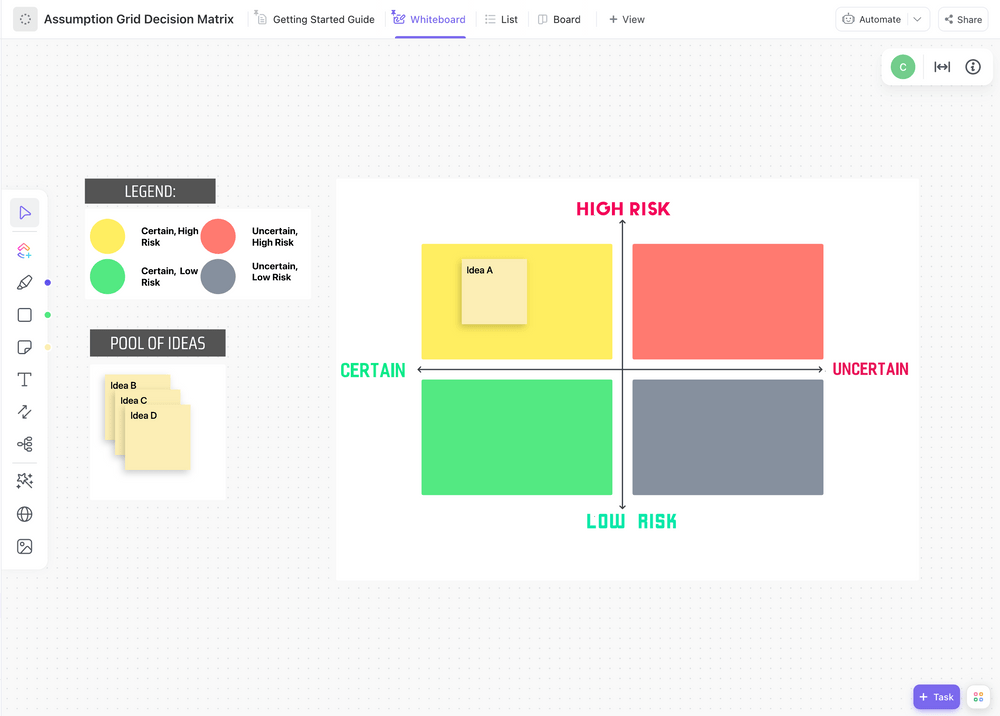
You can use the template’s Custom Fields to specify your assumptions, add attributes to each, and explain its impact on your decision-making criteria. Its real-time updates feature can keep your stakeholders informed of all the changes you make.
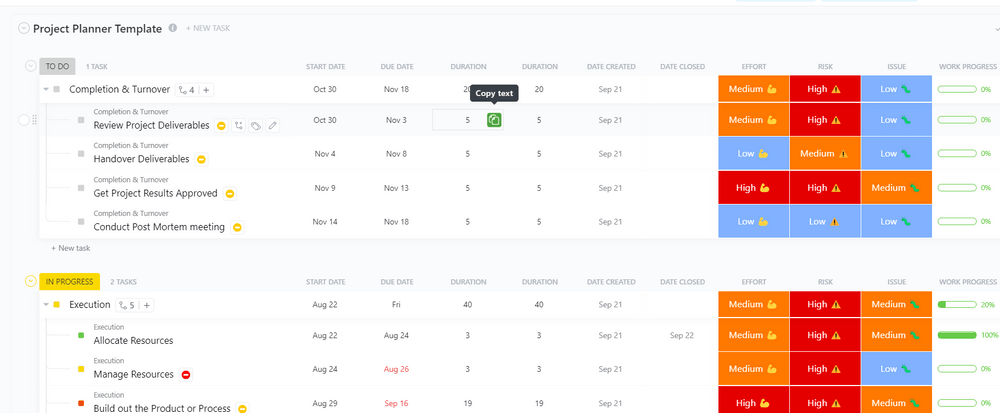
Once you’re done with assumptions, use the ClickUp Project Planner Template to break down your project, organize tasks and resources, and track progress to ensure your assumptions are correct.
Documenting assumptions isn’t enough. As your project progresses, some of your assumptions will be proven right, while a few may stand invalid. This means your project plan may change, and you need to think on your feet to tweak team workflows.
That’s why you need to constantly track your project assumptions list as a project manager and keep an eye out for unexpected events. This will help you spot the smallest changes and adjust your course accordingly.
ClickUp offers a range of solutions to identify project assumptions that turn out to be untrue. For instance, you can set up ClickUp Automations to send you an alert for changes in critical assumptions and constraints.
Let’s say your assumption is that a certain task demands 50 hours—you can configure a simple automation to send you a notification if the time tracked on the task exceeds 50 hours.

Additionally, visualize project metrics and conduct assumption analysis with ClickUp Dashboards. Choose from 50+ cards to customize your Dashboard and present the specific numerical or visual data you’re interested in. Visualizing assumptions from previous projects can help you plan for future projects and minimize deviations.

Coordinating project assumptions is no easy feat—there are a number of challenges that could slow you down and affect your project’s success.
Here are some common challenges and ways to overcome them:
This is the number one issue of keeping project assumptions—you can’t tell if they’ll come true or not. Unfortunately, there’s no way to beat uncertainty, which is inherent to every project assumption.
However, you can manage uncertainties better by communicating their impact with your teams and stakeholders, documenting every decision made and action taken, and carefully monitoring the project’s timeline.
A lack of communication among team members can lead to misunderstandings and project delays. To overcome this, you need to ensure your staff isn’t afraid to speak up and voice their concerns, especially when it comes to aspects like resource management and delivery time. If you’re working remotely, use tools like ClickUp that allow real-time and transparent communication without the need for tense and overly formal meetings.
Bonus: Use ClickUp Whiteboards to brainstorm resource management with cross-functional teams in real time. These digital canvases let you draw, write text, add and connect shapes, and create tasks in a more relaxed setting that promotes easy communication.
Both project managers and stakeholders need to be flexible and willing to make changes on the go to accommodate new assumptions. A lack of willingness to do so on either side can affect project outcomes.
When managing assumptions in project management, ensure everyone involved understands the consequences of not adapting to changes. Hold regular meetings with stakeholders, keep them updated, and explain the reasoning behind every action and decision.
Coordinating project assumptions is one of the pillars of successful project management. Without assumptions, you can’t estimate project outcomes or determine goals realistically.
As a free project management tool, ClickUp offers everything you need to keep a project assumptions log, collaborate with teams and stakeholders, and identify dependencies, constraints, and risks in a friction-free manner.
Sign up for ClickUp today and see how the solution helps you fly from assumptions to success. 🦋

Sudarshan Somanathan
Max 23min read
Sudarshan Somanathan
Max 22min read
Sudarshan Somanathan
Max 22min read

© 2026 ClickUp




