


Sorry, there were no results found for “”
Sorry, there were no results found for “”
Sorry, there were no results found for “”
By failing to prepare, you are preparing to fail.
This isn’t just a glorified saying. For the 55% of organizations that struggle to achieve project success, the absence of proficient work planning is to blame.
Without a clear plan, everything about your project is vague—goals, schedule, and project team responsibilities. This confusion can lead to project management challenges like resource clashes, budget overruns, and tasks falling off-course.
If you’re unsure where to begin, don’t worry—we’ve got you covered with the tips, tools, and free templates you need!
Here’s how to create a work plan in 10 easy steps:
An effective work plan is a tool that guides you or your team to project completion. The best way to think of it is a roadmap. It lays out the project deliverables, milestones, and tasks, clearly defining who does what and by when. In simpler terms, a work plan is your action plan to get things done.
While a work plan and a project plan might sound the same, they’re not entirely interchangeable. A work plan is all about action. The ‘how’ behind your project plan includes a more high-level project overview.
Here’s a quick rundown to distinguish the two:
| Work plan | Project plan |
| Focuses on tasks and responsibilities | Covers overall strategy, project scope, and the entire project pipeline |
| Breaks down action items for team members | Sets overall project goals and milestones |
| Helps manage individual workloads | Helps in resource allocation and project scheduling |
Here’s how a good project management work plan can benefit you:
So, what does a well-structured work plan look like? Let’s break it down into key components to understand how each part contributes to a seamless and efficient process.
👀 Did You Know? A recent PMI Pulse of the Profession report states that poor project performance costs companies 9–10.5% of their investment.
A solid work plan built on project management best practices can make all the difference in a project’s success. Software such as ClickUp, the everything app for work, can make creating a work plan seamless!
📮ClickUp Insight: Low-performing teams are four times more likely to manage 15+ tools, while high-performing teams maintain efficiency by limiting their toolkit to nine or fewer platforms. But how about using one platform?
As the everything app for work, ClickUp brings your tasks, projects, docs, wikis, chat, and calls under a single platform, complete with AI-powered workflows. ClickUp works for every team, makes work visible, and allows you to focus on what matters while AI handles the rest.
Let’s get into the steps for creating a work plan that keeps things on track:
The first thing you need to do is define the goal of your project.
What’s the core purpose? Are you aiming to improve your service delivery for customers? Or are you gearing up to expand operations and scale your efforts?
Once you have your main goal, break it down into specific milestones or objectives. Use the SMART method to guide your objectives.
With ClickUp Goals, you can track your objectives visually, breaking down larger goals into smaller, measurable steps and monitoring your KPIs.

For example, if your main goal with your latest campaign is to increase brand awareness, you could set specific targets like improving reach by 50% or boosting the click-through rate by 20%. Then, you can track the campaign’s performance in real time on your chosen platforms.
The best part is that you can easily adjust your work plan in ClickUp. ClickUp Sprints allows you to plan and implement sprints to test different strategies, track outcomes, and make changes quickly to stay on course.

Now, it’s time to ‘scope’ your project. This means defining all the tasks and subtasks you need to complete, setting up teams, and estimating the budget.
When creating the task list, include time estimates to gauge how long each step will take.
Your goals and objectives play a key role here. They guide your decisions for your scope of work and set the project’s direction. With a well-defined scope, everyone knows precisely what is included and what isn’t. This keeps the project focused and aligned toward a single vision.
You need resources to get things done. This includes everything from ensuring the completion of internal documents and assets to hiring outside consultants or requesting an additional budget.
Once you’ve identified what’s needed, assign tasks to team members to avoid confusion later. Be clear about who is responsible for each task.
💡Pro Tip: Want to delegate a task to more than one team member? It’s simple with the Multiple Assignees feature in ClickUp!

ClickUp Tasks can help you manage it all. Create a task for each work area—whether it’s social media, email, or content creation. You can also build subtasks for each task, assign them to team members, and set due dates.
You can also use Tasks to add Checklists in ClickUp for key steps in your work plan. For example, if your plan is to publish 50 blog posts a month, check off stages like drafting, approval, and publishing for each post so that nothing is missed.
A work plan is only effective if it’s time-bound. So, be sure to set clear deadlines for each task. While these deadlines might change, they are crucial for keeping the team on track and managing client expectations.

ClickUp’s Timeline feature is ideal for this. It lets you visually map your work plan, showing how tasks and projects unfold over time. You can set start and end dates and color-code different tasks or media channels. Key milestones and deadlines are easy to track, helping you stay on top of everything.
Pair the Timeline with the ClickUp Calendar View for an overview of your day-to-day plan. This combination ensures that everyone stays on the same page and has a clear view of the long-term schedule and upcoming deadlines.
💡Pro Tip: Use the Gantt Chart View in ClickUp to set and track task dependencies. This is helpful to prevent bottlenecks and ensure that your tasks progress in the required sequence.
Even the best plans face obstacles. Unexpected issues, like illnesses among team members or technical problems, can derail progress. Identify potential risks early and create backup plans. This proactive approach helps you stay flexible when challenges arise.

ClickUp’s Kanban Board View makes it easy to spot delays by visualizing tasks in a clear, drag-and-drop workflow. You can see where tasks are piling up, indicating bottlenecks, and track progress with status updates like “In Progress” or “Blocked.” WIP (Work In Progress) limits help prevent overload by capping the number of tasks in each stage. Plus, real-time updates and automation notify teams when tasks stall, ensuring nothing slips through the cracks.
A solid budget is crucial to keeping your work plan on track. It helps you allocate resources, track spending, and focus on your financial goals. Without a clear budget, you risk overspending or missing key investments.

Use ClickUp Custom Fields to build a budget tracker for your work plan. For a high-stakes promotional campaign, for example, you can create fields for each media channel, set an allocated budget per channel, track actual spending, and measure ROI to identify the most profitable channel and double down on your efforts there.

This way, you can also monitor overall spending and make necessary adjustments.
Creating a schedule is key to organizing and executing your work plan. A clear timeline keeps everyone on track and ensures tasks are completed on time. It helps prevent chaos and allows your team to stay focused.
ClickUp offers a huge library of ready-made work plan templates to help you plan and visualize your schedule. For instance, the ClickUp Project Work Plan Template lets you manage everything in one place, from start to finish. It helps you:
This template allows you to use nine Custom Fields, such as Schedule, Effort, Actual Duration Days, Actual Start Date, and Duration Days, to capture key project details and easily visualize your work schedule, ensuring smooth tracking and alignment of timelines.
You can also use the ClickUp Simple Work Plan Template for an easy-to-manage approach. It helps you break down every task that needs to be completed before your project wraps up. You can:
The template also includes Custom Fields, allowing you to adjust it to your needs. Regardless of size, it’s a flexible starting point for any project or task.
Risk management is a key part of any work plan.
Potential risks range from losing a key team member during a critical planning phase to running into unexpected budget constraints.

Sit down with your team and brainstorm possible risks and how you might handle them. With ClickUp Whiteboards, you can collaborate in real time, creating a shared space for exchanging ideas. Identify potential bottlenecks and plan solutions ahead of time for better risk management.
Use sticky notes, flowcharts, and connectors to visualize risk factors and their impact on your project. Assign tasks directly from the Whiteboard, linking them to action items in your workflow for seamless execution. With real-time editing and comments, everyone stays aligned on contingency plans and next steps.
Dive deeper into project planning on Whiteboards with the tips shared in the video below!
👀Did You Know? According to Wellingtone’s State of Project Management Report, 64% of project managers include risk management in their project planning.
Once everything’s in place and everyone knows their roles, it’s time for project execution.
ClickUp Chat allows the team to handle assigned responsibilities, share updates, and ask questions without leaving your project workspace.
📮ClickUp Insight: About 41% of professionals prefer instant messaging for team communication. Although it offers quick and efficient exchanges, messages are often spread across multiple channels, threads, or direct messages, making it harder to retrieve information later.
With an integrated solution like ClickUp Chat, your chat threads are mapped to specific projects and tasks, keeping your conversations in context and readily available.

Automate repetitive steps with ClickUp Automations to streamline handoffs and approvals.
A solid work plan is a reference point throughout the project lifecycle, keeping everyone on track—even if you don’t have a project manager.

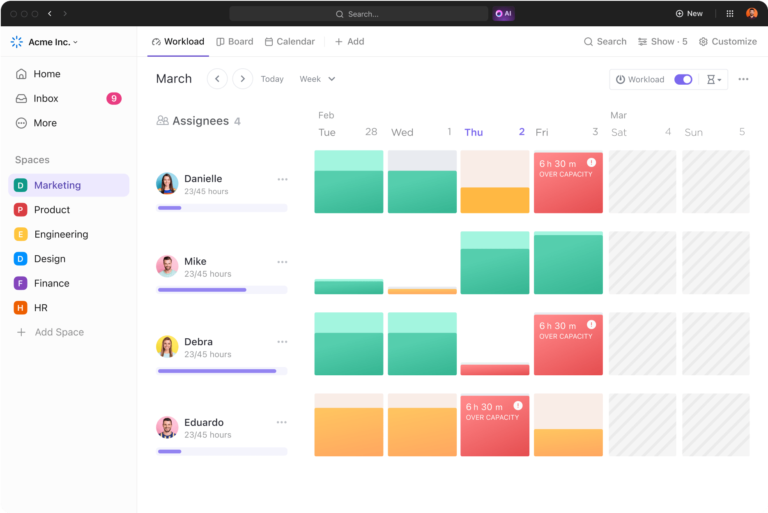
With 15+ ClickUp Views, tracking your work plan and real-time progress on it is simple.
For instance, use the Calendar View to stay on top of important deadlines and milestones; the Kanban Boards to track tasks through various stages of completion, and the List View to get a bird’s-eye view of all project components together.
The work doesn’t stop once the plan is in motion. As your project progresses, you must monitor performance and adjust if necessary.

ClickUp Dashboards offer a real-time view of task progress, helping you track key metrics like completion, timelines, and resource availability and usage. With 50+ customizable cards and charts, you can monitor team performance, task deadlines, and work effort.
This data helps you identify issues, adjust strategies, and keep your team on track for successful project completion.
As a manager, team lead, or entrepreneur, you know a solid work plan is key to keeping projects on track. It helps manage timelines, allocate resources, and guide decision-making.
Creating one from scratch can be difficult, but ready-made templates can help. These customizable templates allow you to quickly get started and tailor your plan to your project’s needs.
Here are our recommended work plan templates:
If you want to keep your team or business on track throughout the year, the ClickUp Annual Work Plan Template is exactly what you need. It’s built to help you set long-term goals and break them down into manageable steps.
With dedicated sections for task responsibilities and status, this template ensures you’re always aware of your overall project progress while keeping your team accountable. This template provides the structure you need to ensure that your goals turn into reality.
⚡️Ideal for: Project managers planning and tracking large-scale projects and initiatives across the entire year
Managing remote teams can be tricky, especially when everyone’s working from different locations. The ClickUp Remote Work Plan Template makes collaboration easier and ensures everyone’s on the same page. It categorizes projects based on their impact, helping your team prioritize what matters most.
You can add specific goals, budget information, effort levels, and key deliverables for each project. This way, everyone knows exactly what’s expected and can access all project details in one place for improved remote collaboration.
⚡️Ideal for: Remote team managers coordinating tasks, managing workloads, and ensuring effective communication within distributed teams
This template is perfect if you work quarterly or need a focused plan for the next 12 weeks. The ClickUp 12-Week Plan Template helps you break your tasks into manageable action items.
Track personal and work-related goals while keeping a clear overview of your progress. Use the template to list tasks, set due dates, and set your priorities for the next three months. It also helps you stay focused with progress tracking and categories like ‘work,’ ‘personal,’ or ‘finances.’
⚡️Ideal for: Individuals focused on personal productivity, goal setting, and time management on a quarterly basis
Before you start creating your work plan, here are a few quick tips to help you avoid common mistakes:
Work planning doesn’t have to be complicated. With the right work plan and project management tools, you can simplify the planning process and stay on track.
ClickUp makes it easy to organize everything in one place. You can see your team’s tasks clearly, track progress, and quickly update the project timeline or reassign work. You can even fill scheduling gaps with new projects and stay within budget. Real-time data helps you make smarter decisions and keep everything running smoothly.
Ready to take control of your work planning? Sign up to ClickUp for free and start managing your project resources seamlessly!

Sudarshan Somanathan
Max 29min read
Sudarshan Somanathan
Max 17min read

Manasi Nair
Max 21min read

© 2026 ClickUp





