
Sorry, there were no results found for “”
Sorry, there were no results found for “”
Sorry, there were no results found for “”
Have you been short-staffed, over budget, and panicking about deadlines halfway through a project? 👀
Everything looks fine at kickoff. Then, midway, work piles up, timelines slip, and priorities change.
If this is happening repeatedly, there is a strong likelihood you have a capacity planning issue.
Ahead, we break down how to improve capacity planning to set and hit realistic targets consistently. We’ll also cover capacity planning strategies, real-world examples, common mistakes, and some tools worth trying.
Capacity planning is a critical element of project management. It helps teams anticipate workload, align resources early, and avoid firefighting once execution is underway. Demand forecasting often feeds into capacity planning, but it’s not the same thing.
It includes:
Effective capacity planning leads to optimal resource utilization. This way, you won’t end up consuming too much or too little of your company’s resources.
💡 Capacity planning vs. resource planning: Often used interchangeably, they handle two different stages of planning:
Capacity planning ensures you have the right system in place before the work begins, so nothing breaks down midway.
Here are some key benefits of capacity planning:
⚡ Template Archive: Free and Customizable Team Capacity Planning Templates
👀 Did You Know? According to Gartner, many companies only review workforce plans once a year. The catch? Talent needs change much faster than annual cycles. This is why capacity planning should be an ongoing process with regular check-ins and quick adjustments.
The key components of capacity planning are:
🧠 Fun Fact: In 1086, William the Conqueror commissioned a giant survey of England to map out every resource in his kingdom. It tracked every plow, ox, and acre of land. This was the ultimate resource inventory back then (aka the Domesday Book), allowing the crown to calculate exactly how much tax revenue the country could earn.
There are three different ways to approach capacity planning.
Each method has pros and cons. Your choice depends on your business goals, budget, and the level of risk you’re willing to take.
Here’s a quick snapshot of the capacity planning strategies 👇
The lag strategy is a conservative way to manage growth.
You only increase your production capacity after your current resources are stretched to their limit. You wait for the demand to actually materialize before spending money on excess capacity (additional team members, equipment, etc.).
✅ Upside: Low overhead and protected profit margins, as you don’t have to pay for extra hands unless they are needed
⚠️ Downside: Burnt-out teams, delayed deadlines, bad reputation with clients, poor customer satisfaction, and missed new opportunities
🏆 Best for: Startups with tight budgets or organizations in unpredictable industries where staying lean is the only way to survive
📌 Example: A small commercial bakery uses two ovens. They notice they sell out of bread by noon every day, but they don’t invest in a third oven right away. Instead, they wait until they have a profitable waiting list of wholesale clients that will protect the return on their new investment.
The lead capacity planning strategy is a 180-degree turn. It’s bold, proactive, and future-proof.
Here, you don’t wait for the work to pile up. Instead, you increase your capacity requirements based on the anticipated demand.
You look at your historical seasonal trends, the velocity of your sales pipeline, and even broader market shifts. If your sales team sees a 20% spike in qualified leads this month, you can bet the production team will feel that pressure in the next 60 days.
✅ Upside: You can easily manage multiple projects without any resource constraints or last-minute panic
⚠️ Downside: If the projected customer demand doesn’t show up, you’re left with high fixed costs and a team with nothing to do
🏆 Best for: High-growth teams and market leaders who want to move faster than the competition and can afford the upfront investment
📌 Example: A software development agency hires three senior developers in October because they expect a massive surge of contracts in January. They want the team fully onboarded and culturally integrated so they can hit the ground running without any hiccups.
📚 Read More: How to Do Software Development Capacity Planning
Match strategy planning sits between lag and lead capacity strategy.
You make minor adjustments to your current capacity, like adding a little more bandwidth here or trimming a bit there to keep the balance. This keeps you perfectly aligned with a growing workload (or a shrinking one).
✅ Upside: Minimizes the risk of overstaffing or understaffing, helps maintain a realistic resource pool, ensures team productivity, and project success
⚠️ Downside: Requires a high level of operational maturity, constant monitoring, and a flexible workforce
🏆 Best for: Businesses with steady, predictable growth that have the data infrastructure to track their capacity down to the hour
📌 Example: A marketing agency uses a core group of freelancers to handle small spikes in project volume. Instead of hiring a full-time employee or letting the team crash, they bring in contract help month by month to keep the workload level.
The real value of capacity planning comes from how you apply it. Here’s a step-by-step guide to doing it effectively.
⭐ Bonus: We’ll also show you how the ClickUp Project Management Software and the ClickUp Resource Management Software work together to help you at each step.
Start by getting a clear view of your team’s current capacity.
List every person involved in the project and define their actual working time. If someone is part-time or on flexible hours, capture that clearly.
Factor in planned leaves, holidays, training days, recurring meetings, and admin work. If you ignore this, your workforce capacity planning numbers will always be wrong.
Also, look at how many projects each person already has. Juggling multiple priorities lowers employee productivity and work capacity.
⚠️ A Word of Caution: An eight-hour workday never equals eight hours of deep work. Most teams over-allocate because they ignore the time lost to context-switching, quick pings, and rework. Don’t forget to factor in this lost time when planning team capacity.
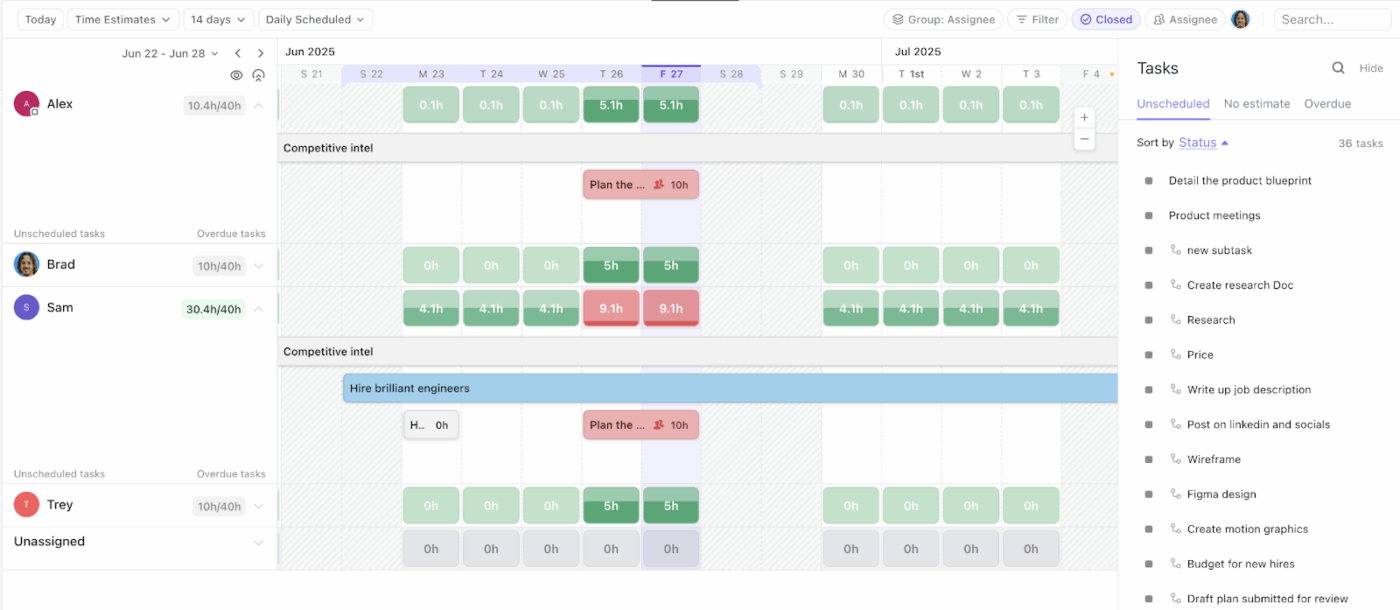
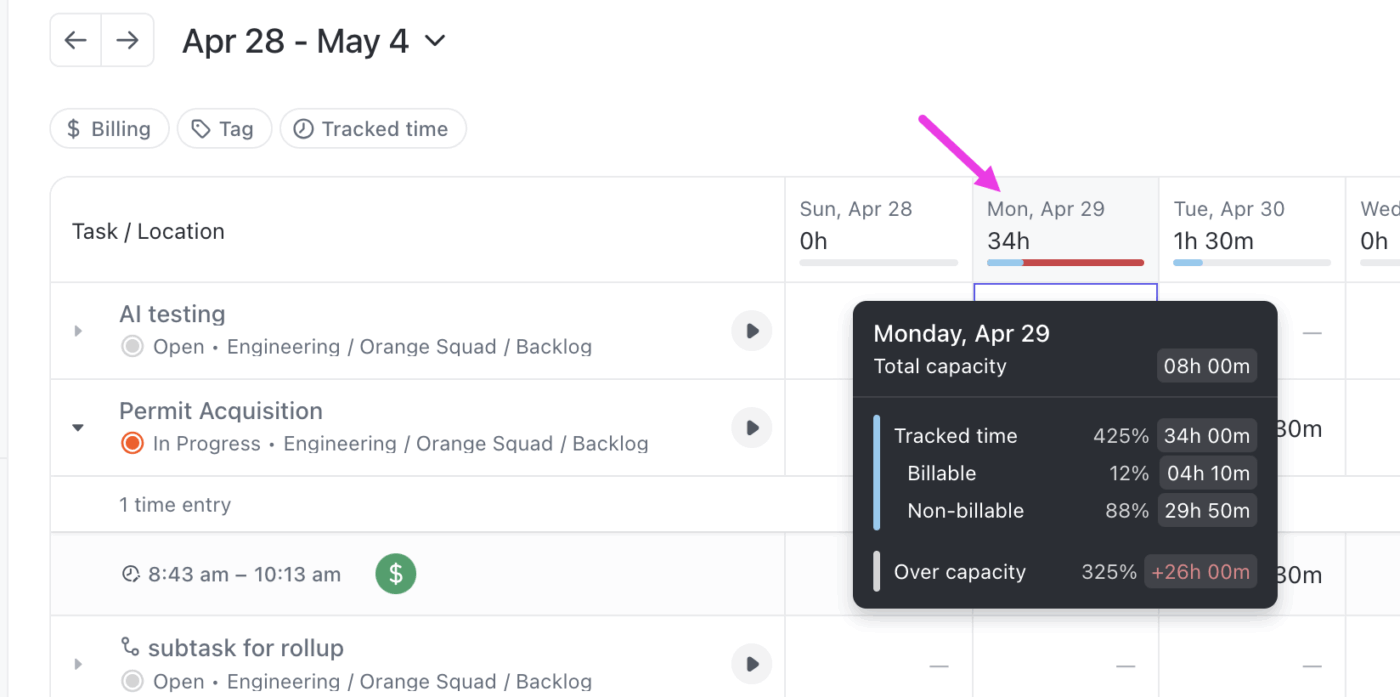
Use ClickUp’s Workload View as your high-level visual planner and check everyone’s capacity at just a glance. It gives you a real-time heatmap of your team’s bandwidth so you can allocate resources smartly.
The Workload View lets you:
🎥 Check out this video to see what more you can do using ClickUp’s Workload View 👇
📮 ClickUp Insight: Context-switching is silently eating away at your team’s productivity. Our research shows that 42% of disruptions at work come from juggling platforms, managing emails, and jumping between meetings. What if you could eliminate these costly interruptions?
ClickUp unites your workflows (and chat) under a single, streamlined platform. Launch and manage your tasks from across chat, docs, whiteboards, and more—while AI-powered features keep the context connected, searchable, and manageable!
Next, figure out how much effort each project requires. This is how you build realistic project plans even for the most complex project scope.
To do so, list out all upcoming projects and break them into smaller tasks. Assign an hour estimate to each one to understand how long it would actually take to finish the job.
Refer to similar tasks from past projects to keep your rough estimates and project timelines realistic.
Account for review cycles, approvals, and hidden work. Things like coordination, handoffs, fixes, and follow-ups still consume time even if they are not actionable tasks in your project tracker.
Don’t forget to add a buffer period for unexpected changes or shifting requirements.
💡 Pro Tip: Involve your team in this step. The people doing the actual work have the best sense of how long a task takes and what other resources you need (tools, skill sets, subscriptions, hardware, etc.).
Project managers use ClickUp Tasks to split larger projects into manageable chunks. You can add task briefs, assignees, start and due dates, task statuses, QA checklists, attachments, etc., to ensure everything is properly scoped.
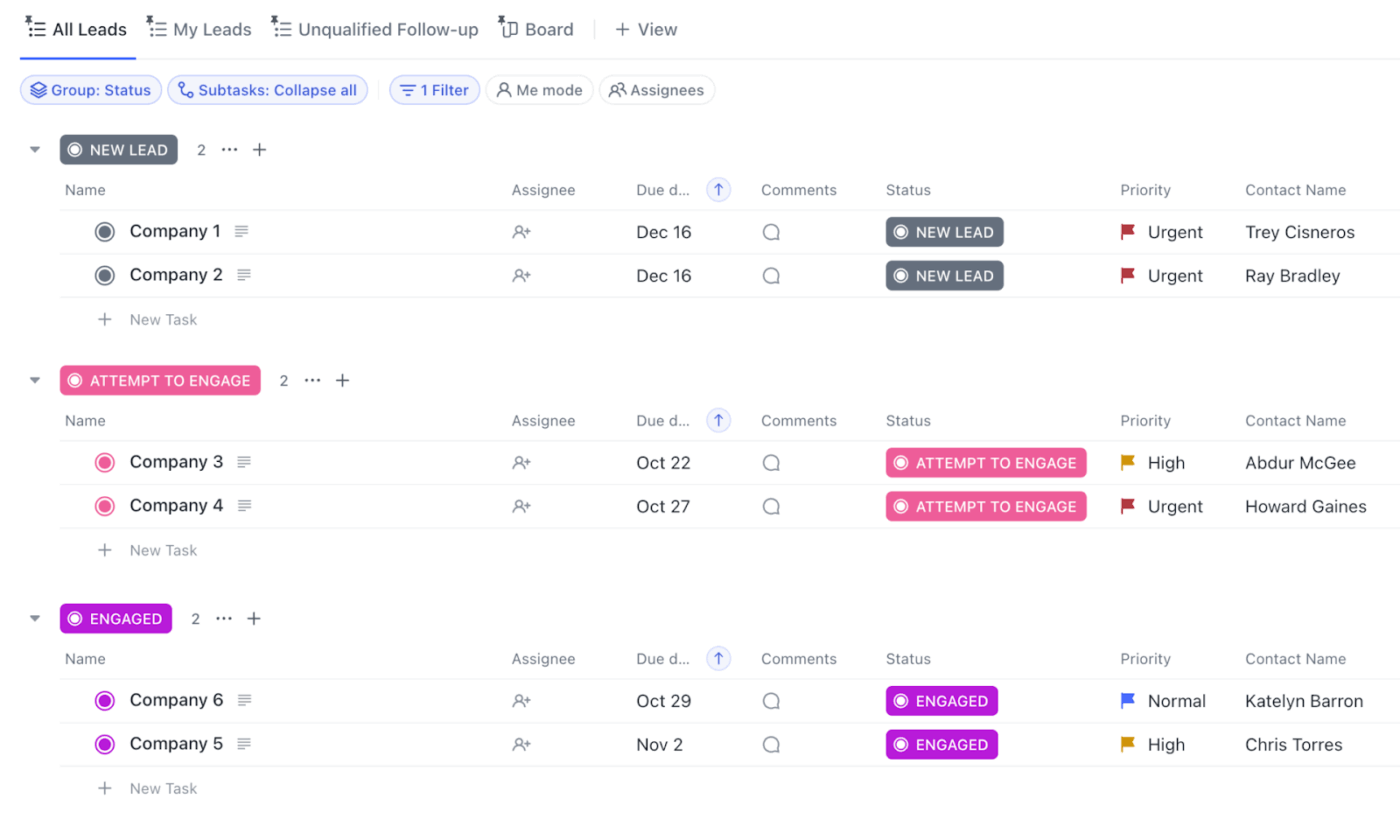
Next, add specific time predictions directly to these tasks and subtasks using ClickUp Time Estimates. For example, if you set one hour for subtasks A and B and two hours for subtask C, the parent task’s time estimate rollup will automatically show four hours.
This data flows straight into your Workload View, making it easy to see if your estimates align with team capacity.
Custom Fields combined with Project Time Tracking offer a faster way to learn from past projects and set smarter estimates. For example, you can check the average tracked time for all “Ad Design” tasks from the last six months before estimating the time for a new ad design task.
⭐ Try This: Use multiple ClickUp Views to visualize your work from every angle:
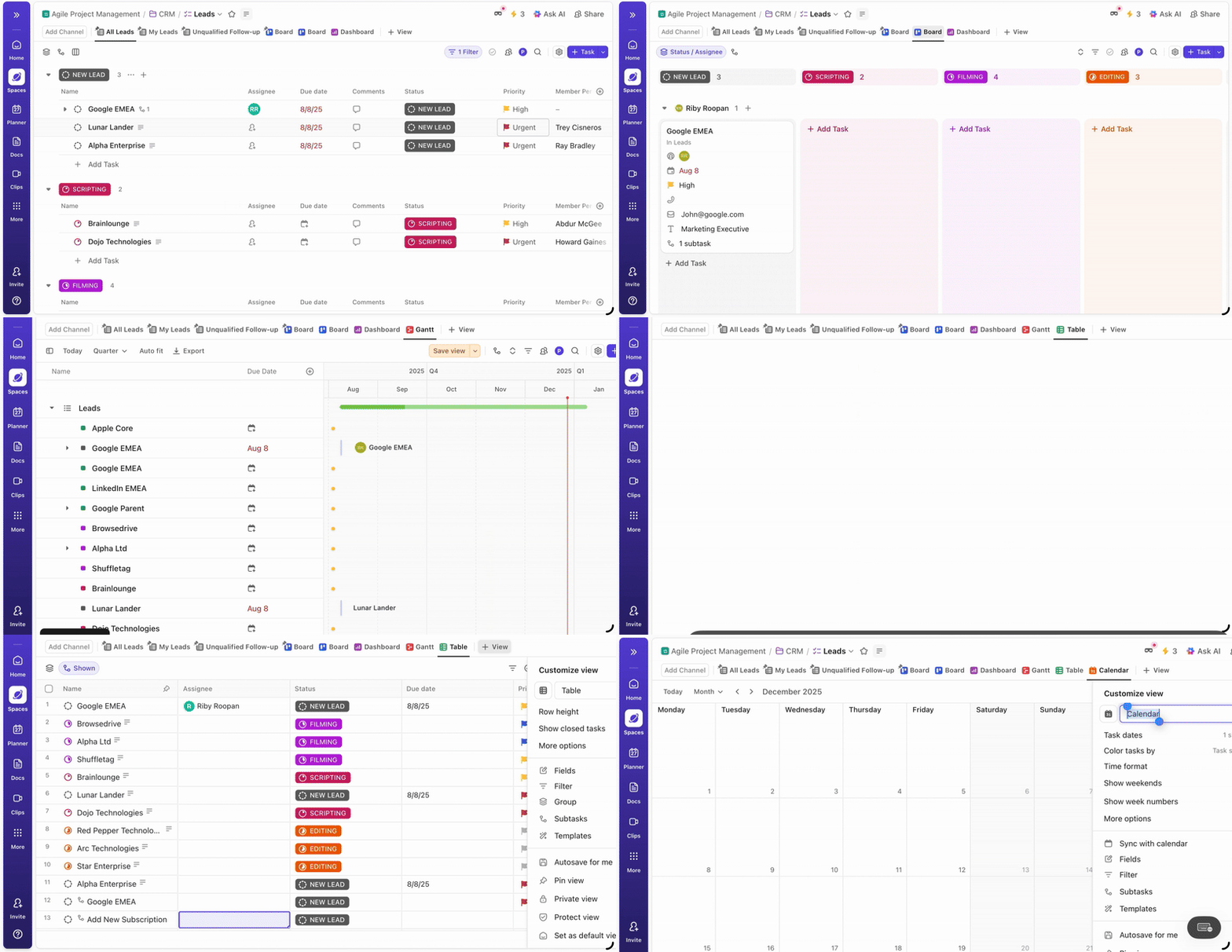
👀 Did You Know? The first version of a Gantt chart was developed in the 1890s by a Polish engineer, Karol Adamiecki. He called it a “harmonogram.” Because he published his findings in Polish and Russian, the Western world didn’t catch on until Gantt popularized his own version years later.
In this step, you lay your workload over available resources. The goal is to find out whether you’re over-committed, understaffed, or simply have a distribution problem.
To compare demand with current capacity, follow these steps:
The biggest reason why most teams fail to meet project demands is a lack of centralization. Your client project docs are in one tool, while your resource availability stats are in another.
You end up jumping between tabs to piece together the whole picture, risking crucial data slipping through the cracks.
With ClickUp, you skip all this.
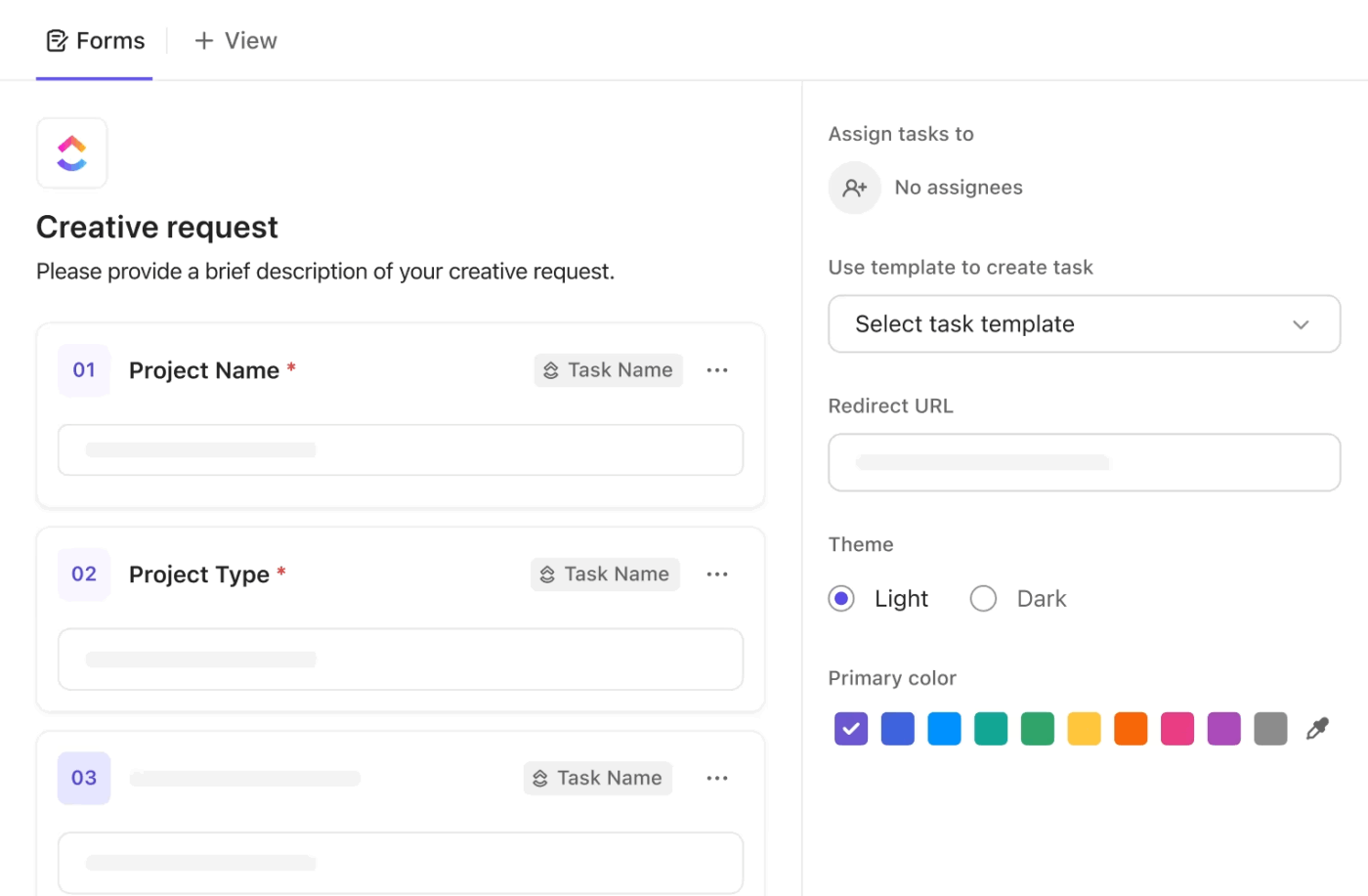
For starters, use ClickUp Forms to capture new demand in a structured way automatically. Gather info on required skills, priority, project scope, and deadlines directly from stakeholders.
💡 Pro Tip: You can also auto-create tasks directly from these forms. For example, when a project request comes in, ClickUp can automatically create tasks prefilled with checklists and due dates, then assign them to the right person.
To speed up analysis and avoid manual cross-checking, bring ClickUp Brain into the capacity planning process. Because it’s a conversational AI assistant, you can interact with it using simple, natural language—just like you’re asking a teammate for a quick update.
It works directly on your task data to consolidate new demands, summarize current capacity, spot bottlenecks, and suggest alternate paths.
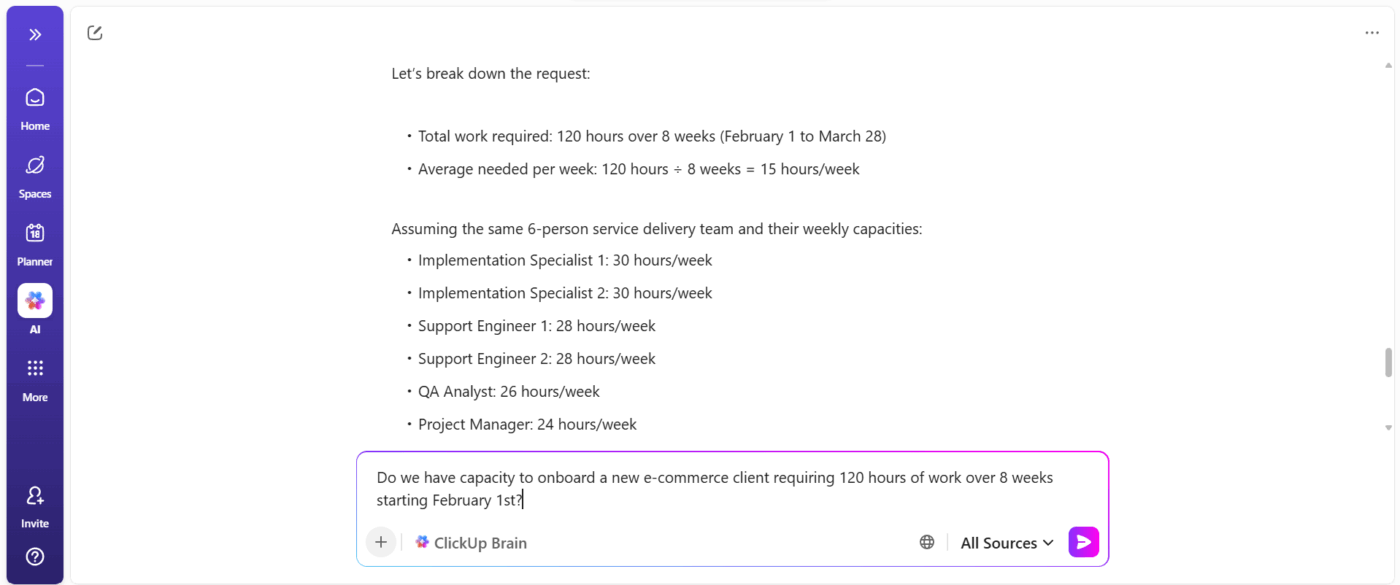
Here’s how it helps you analyze demand vs capacity:
🚀 ClickUp Advantage: You know what eats up most of the time during resource planning? Building a tracker when you should be hitting deadlines!
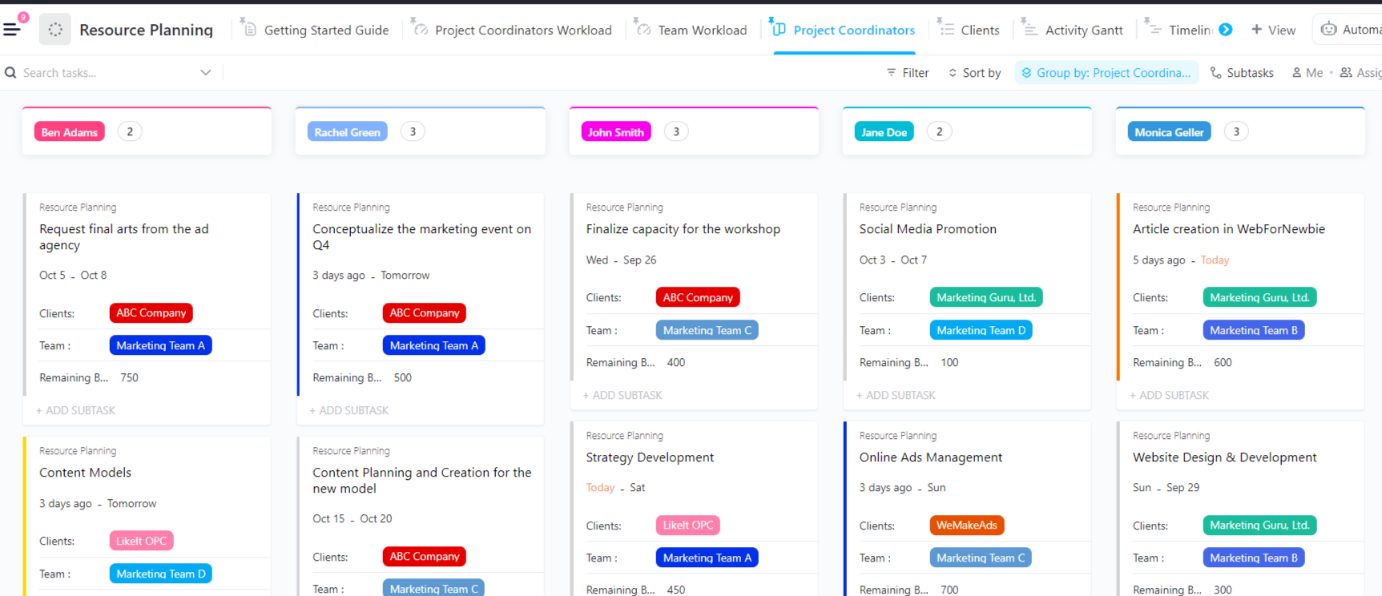
The ClickUp Resource Planning Template is a free, ready-to-use setup that helps you track team capacity, allocate work, and avoid overloads.
Import it with one click into your ClickUp workspace, and it comes pre-configured with:
👀 Did You Know? Archaeological finds at the workers’ village in Giza show that the Pharaohs were master capacity planners. They tracked both labor and the team’s metabolic capacity. They calculated exactly how much bread and beer were required to keep 10,000–30,000 workers productive across decades.
Once you have compared future or actual demand vs available capacity, it’s time to act. This means redistributing work, adjusting priorities, or reshaping timelines.
Now here’s where most teams get stuck: they can’t change the entire project plan on the fly.
The key is to understand what needs to change right now versus what can wait. If your required resources consistently fall short, consider structured fixes. Add temporary support (e.g., freelancers) or say no to low-impact work.
Make sure to communicate these changes clearly so everyone stays in the loop.
Take the friction out of reallocating and reprioritizing using ClickUp Automations. They fire on triggers like priority changes, assignee added/removed, or due date changes, which are perfect for capacity workflows.
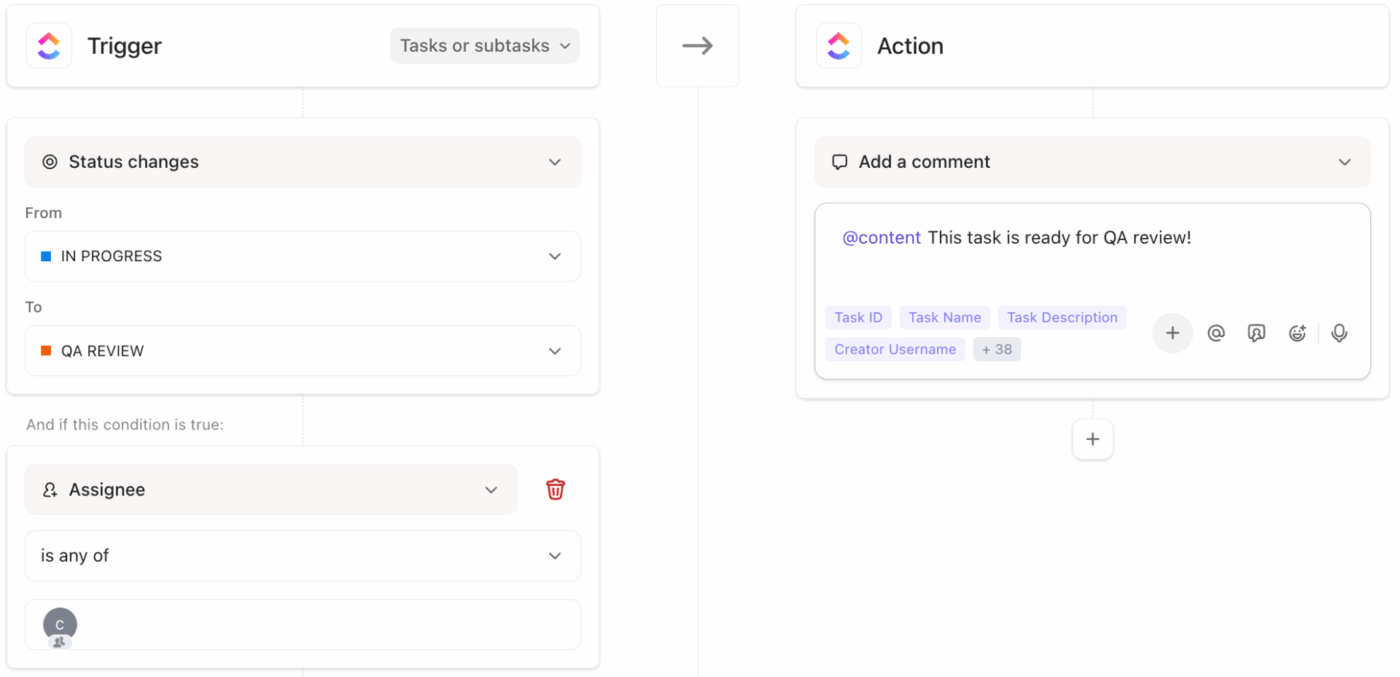
Some rule-based automations you can try:
Bonus: Rule-based automations are great at handling predictable scenarios. But when demand and capacity shift unexpectedly, deploy ClickUp’s AI Super Agents for fully automated capacity planning.
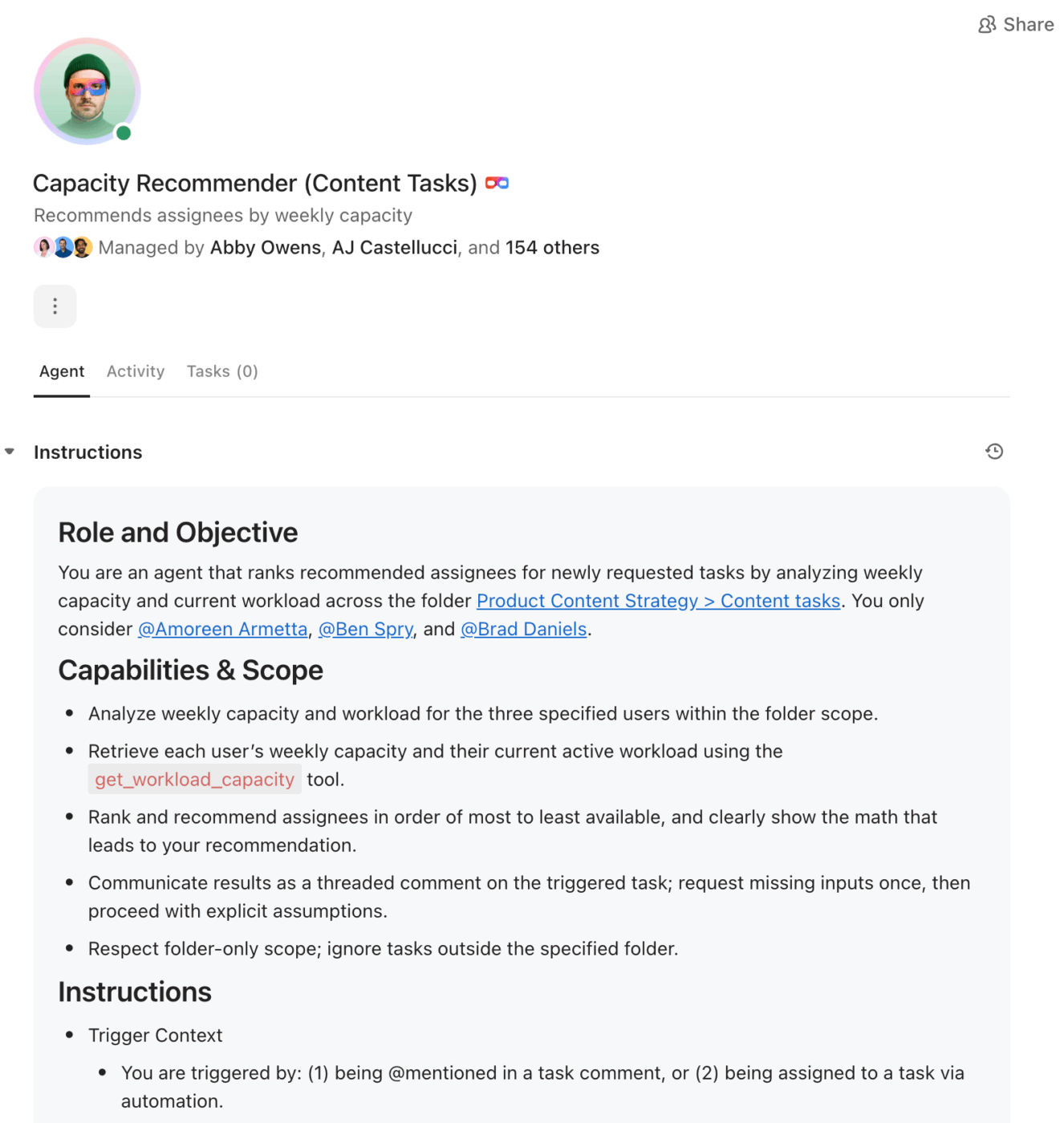
These AI-powered agents live inside your workspace like actual team members. They observe patterns, learn from feedback, and execute complex workflows on your behalf.
For example, you can set up an AI super agent to:
📮 ClickUp Insight: Only 15% of managers check workloads before assigning new tasks. Another 24% assign tasks based solely on project deadlines.
The result? Teams end up overworked, underused, or burned out.
Without real-time visibility into workloads, balancing them isn’t just hard; it’s almost impossible.
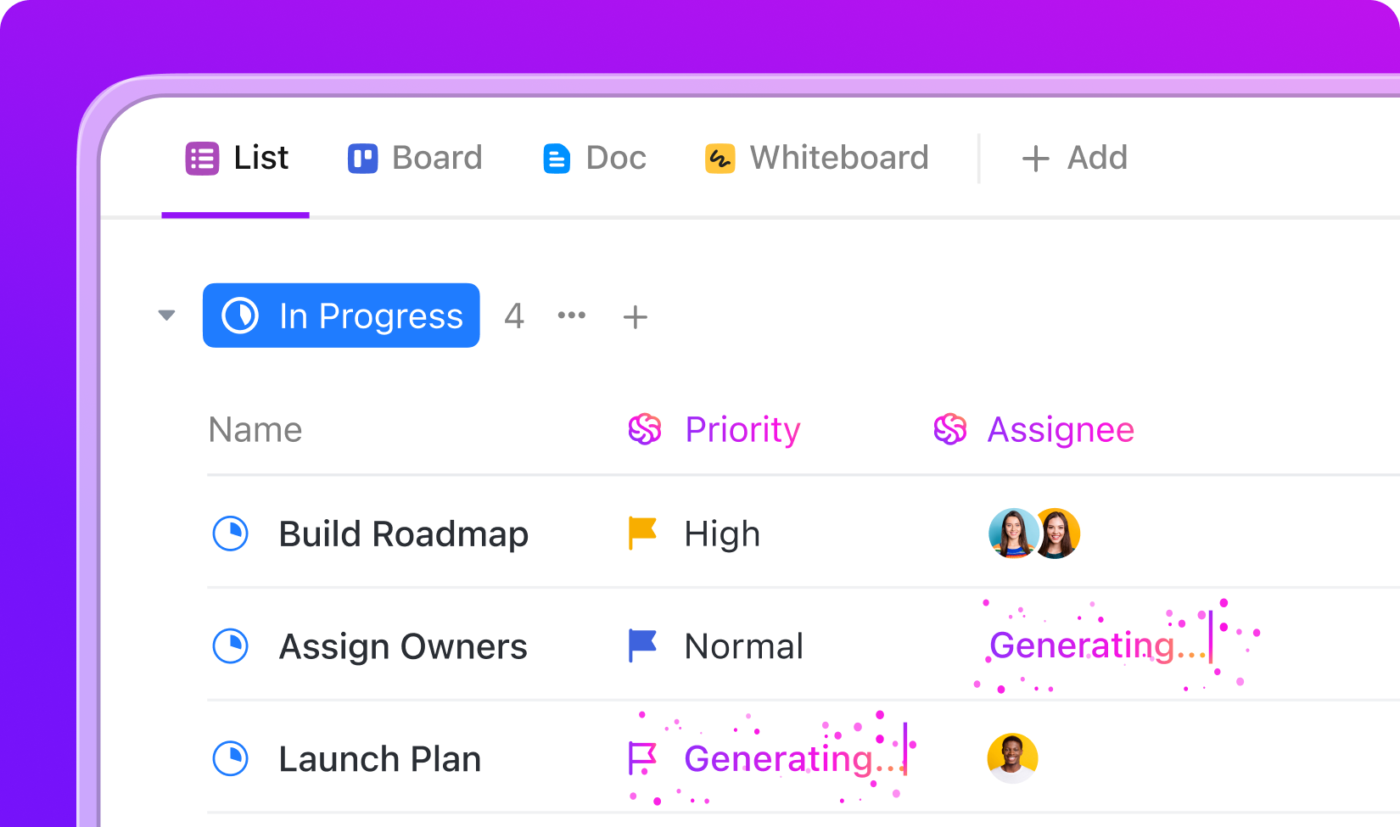
ClickUp’s AI-powered Assign and Prioritize features help you assign work with confidence, matching tasks to team members based on real-time capacity, availability, and skills. Try our AI Cards for instant, contextual snapshots of workload, deadlines, and priorities.
💫 Real Results: Lulu Press saves 1 hour per day, per employee using ClickUp Automations—leading to a 12% increase in work operational efficiency.
Capacity planning only works if you revisit the plan regularly. A weekly check-in is usually enough to keep things under control.
What to monitor each week:
Use what you learned to make informed decisions and improve plans.
Monitor your demand vs capacity trends and adjust on the spot using ClickUp Dashboards. You can build multiple dashboards (like “Weekly Capacity Review” or “Team Health”) and toggle between them instantly to see exactly what you need.
ClickUp offers 20+ specialized widgets to customize your dashboard. Resize, rearrange, or collapse sections as you deem fit.
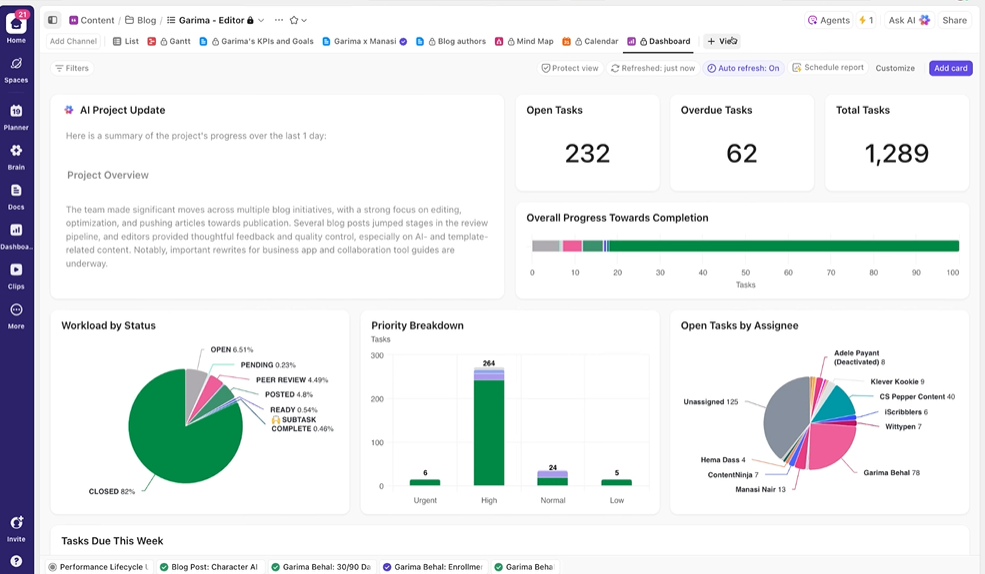
Below are the go-to widgets for demand vs capacity tracking:
💡 Pro Tip: Once your metrics cards are live, layer on AI Cards (powered by ClickUp Brain) for automated analysis. These cards generate dynamic reports and summaries from your task data, so you never have to write a manual report again.
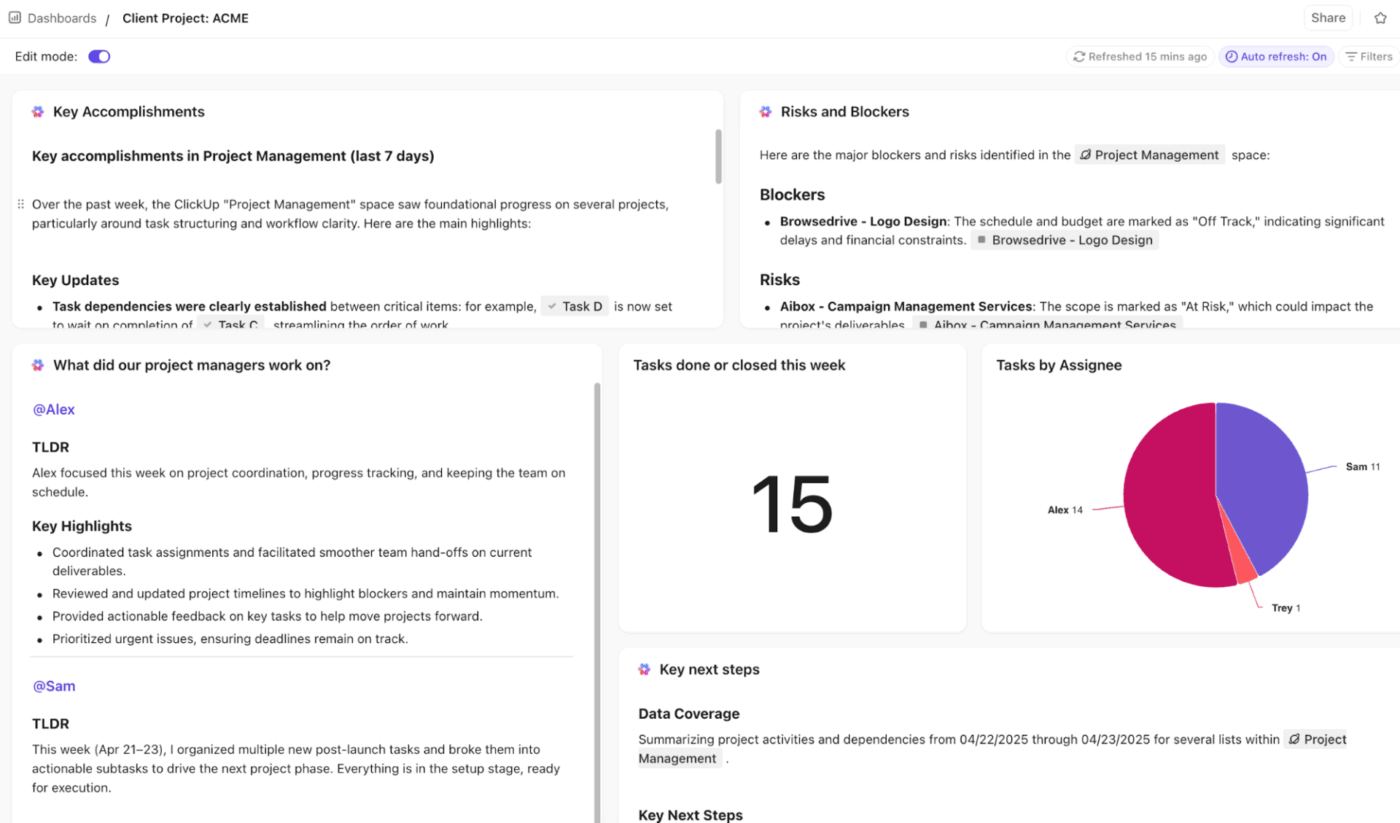
Try these AI cards for deeper insights:
🧠 Fun Fact: In 1943, Kelly Johnson of Lockheed Martin was tasked with building a jet fighter in just 150 days. He purposefully limited the team size as he believed that over-allocating people to a project actually slowed it down. The result: He delivered the XP-80 in only 143 days by protecting his team’s focus time.
Here are a few practical examples of how teams apply capacity planning in day-to-day work:
A software team is gearing up for a two-week sprint. Instead of manually auditing calendars and task lists, the sprint lead, Jake, asks ClickUp Brain to summarize team availability and workload.
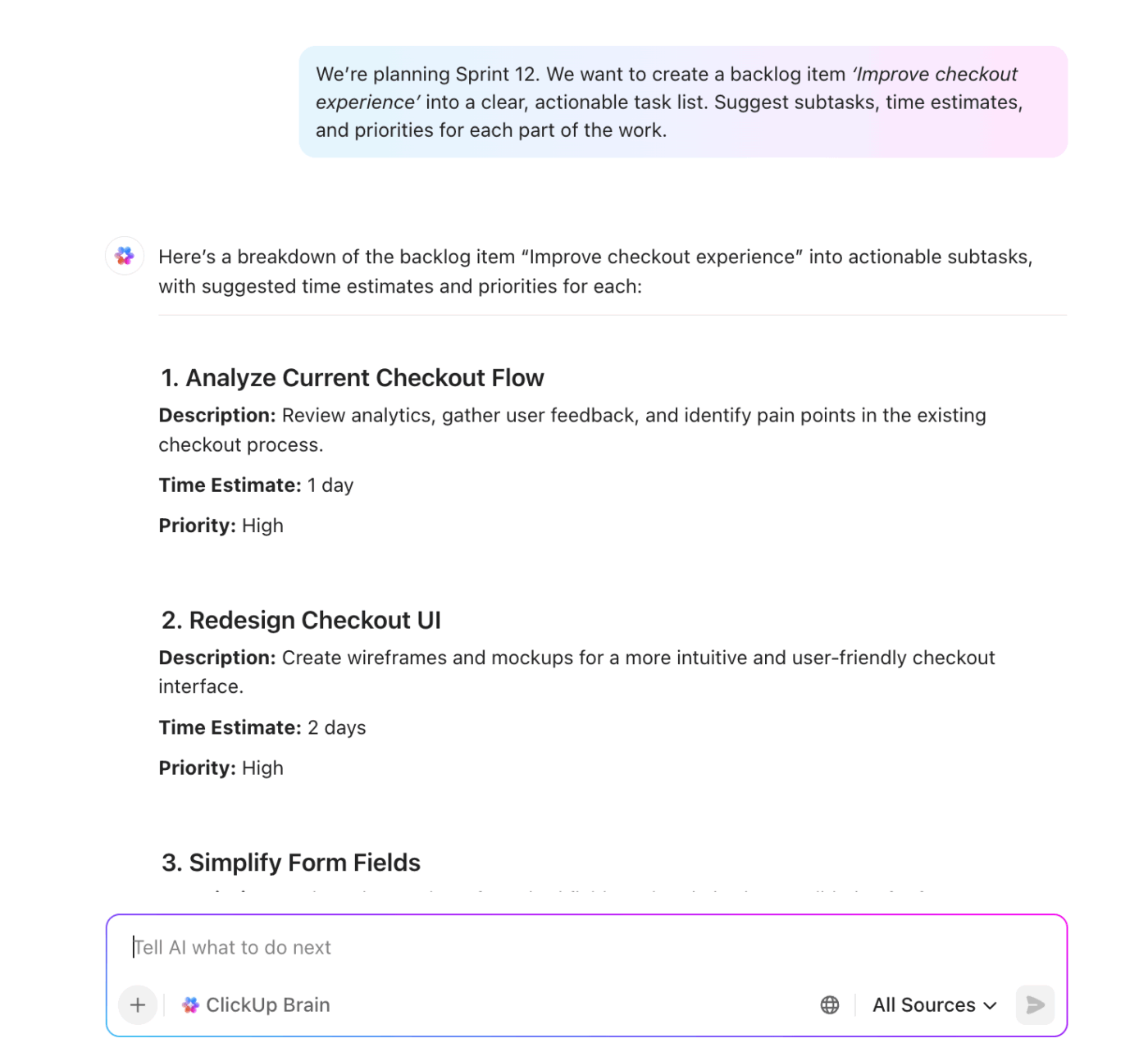
Brain surface key constraints immediately:
Based on this, Jake moves five non-essential features to the next sprint to avoid overloading the team. This keeps the developers focused and the sprint realistic with no last-minute scramble.
Imagine Sarah, a marketing campaign manager. She’s planning the workload for the next two weeks and asks ClickUp Brain to break down capacity by channel.
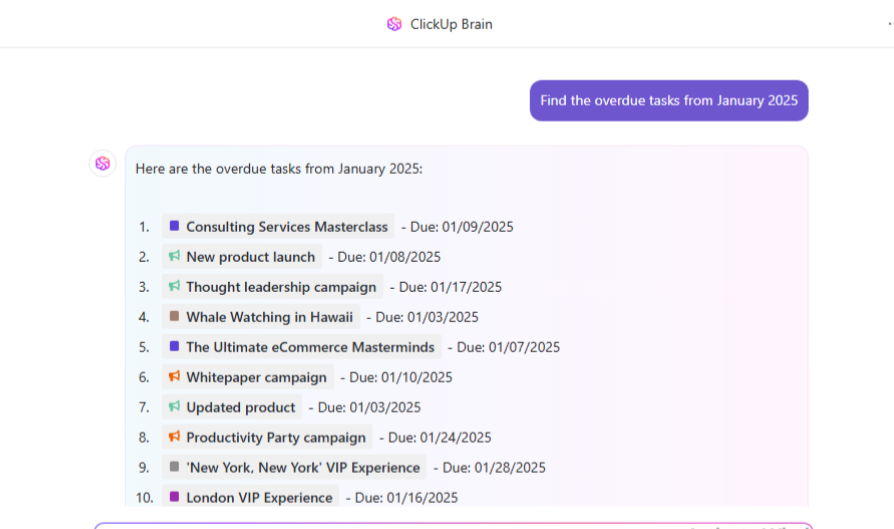
Brain gives her the play-by-play:
When a new client asks for a quick social campaign, Sarah confirms it with ClickUp Brain first: “What happens if we add 30 hours of social work for Client X next week?”
ClickUp Brain simulates the change and warns her that the team’s workload would jump to 150%. This allows her to push back or reprioritize current campaigns.
For agencies and consultancies, every hour spent on non-billable tasks is a hit to the bottom line. Jason, a project manager, uses ClickUp Brain to find out team members with the highest non-billable hours this week.
Brain scans the time logs and identifies that two senior consultants will spend 40% of their time in internal sync meetings.
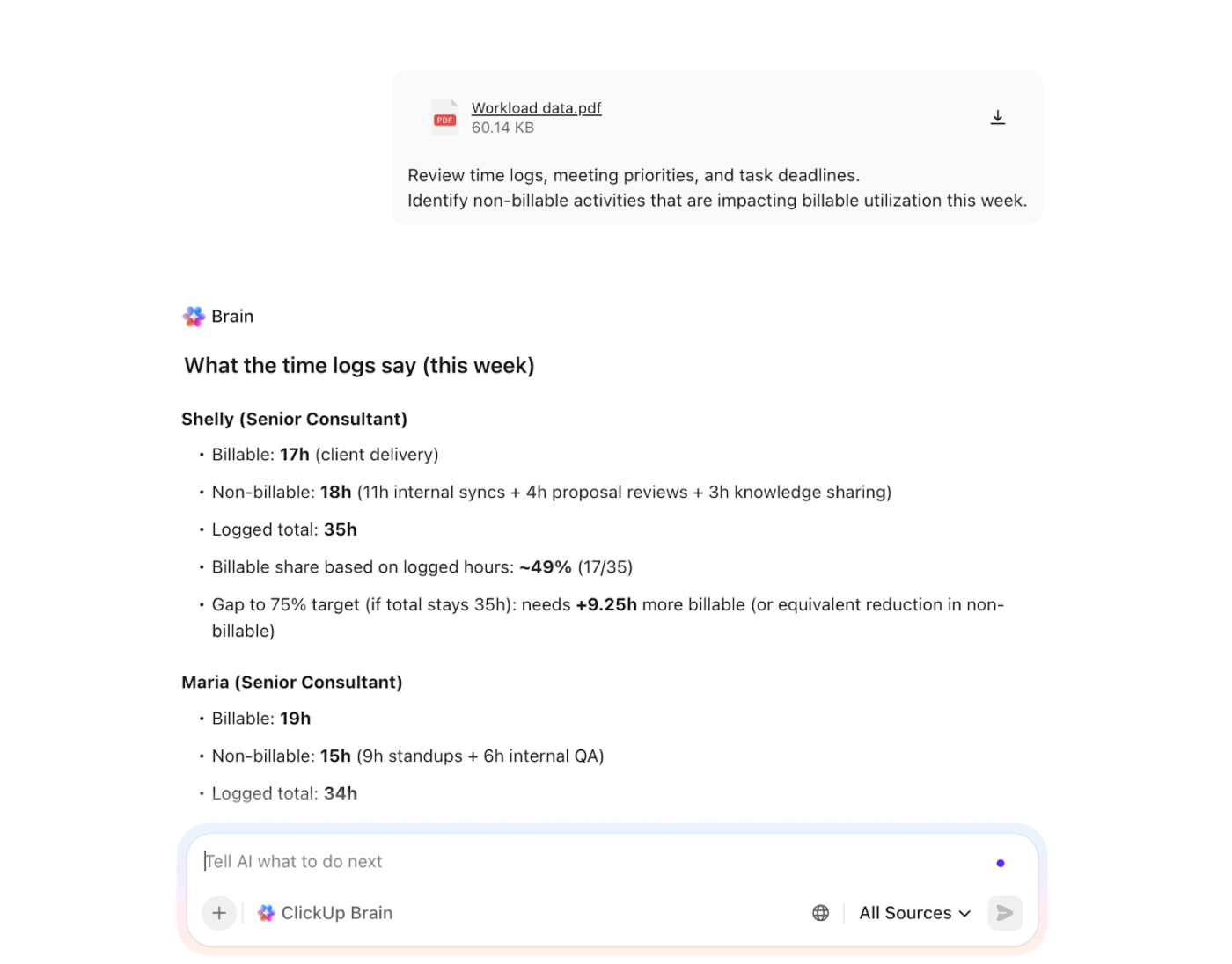
It also analyzes the priority levels of those meetings against pending high-value tasks and suggests skipping two standups to free up time for a major client kickoff call.
Once you know your planning cadence and what data you’ll track, the right tool makes the process repeatable. Here are a few options, starting with an all-in-one setup.
Now, let’s take a look at our top three recommendations for capacity planning tools:
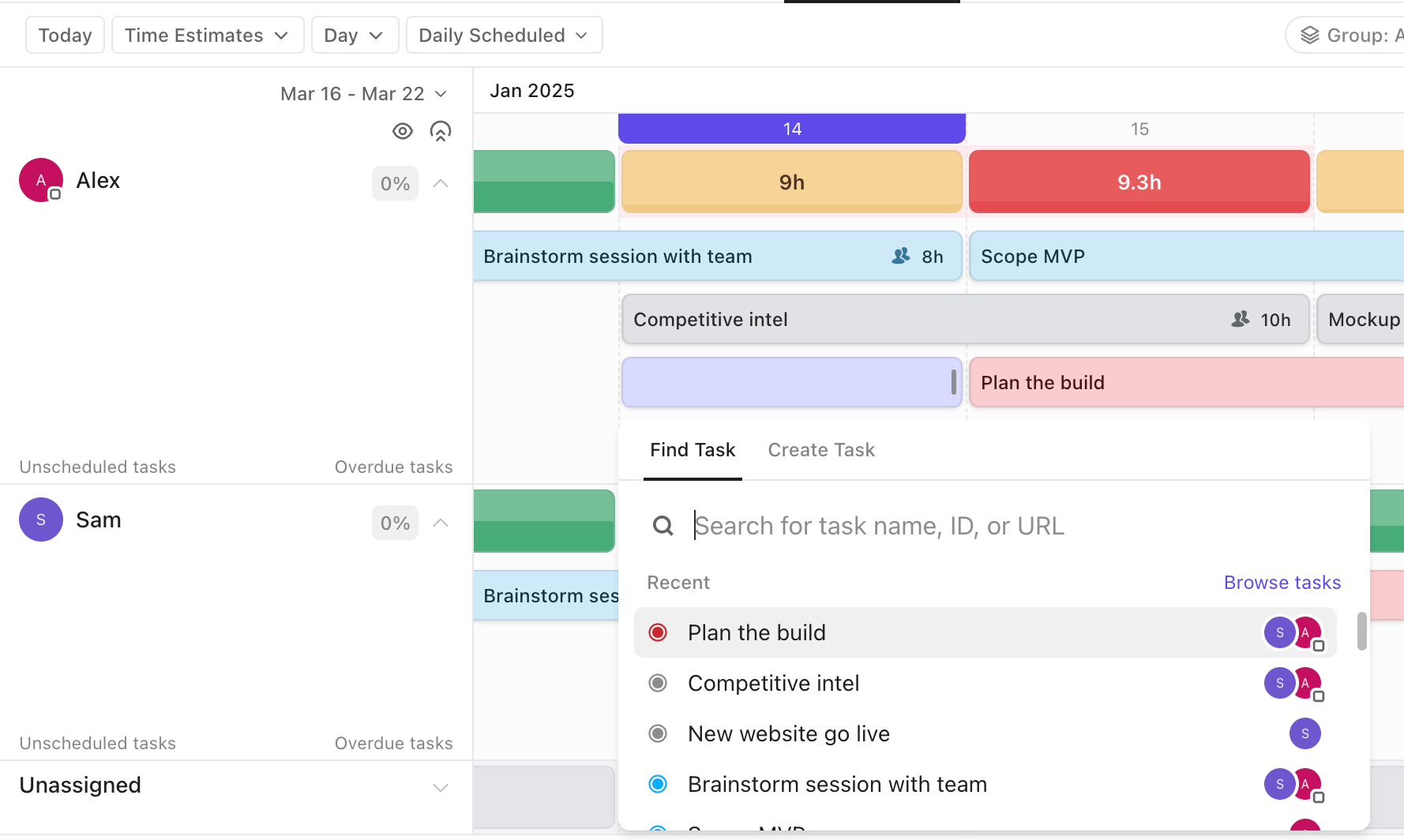
Capacity planning is time-consuming and stressful when your data is scattered across five different apps.
ClickUp solves that by bringing daily work, communication, automation, and decision-making into a single, connected platform.
Here’s how you can use ClickUp as the all-in-one solution to multiple software needs:
⭐ Bonus: Extend ClickUp Brain’s intelligence across your entire tech stack using ClickUp Brain MAX, our AI-powered desktop app. It connects your CU workspace with external tools (such as Google Drive and GitHub) to truly unify work and enable precise capacity planning.
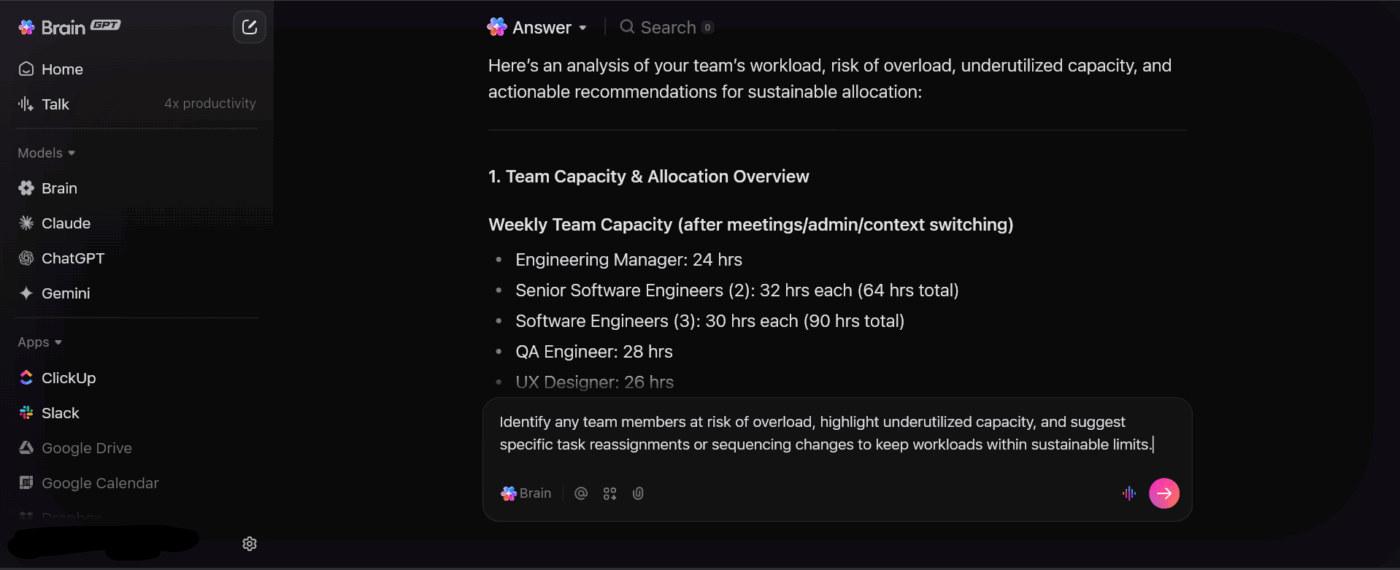
With Brain MAX, you can:
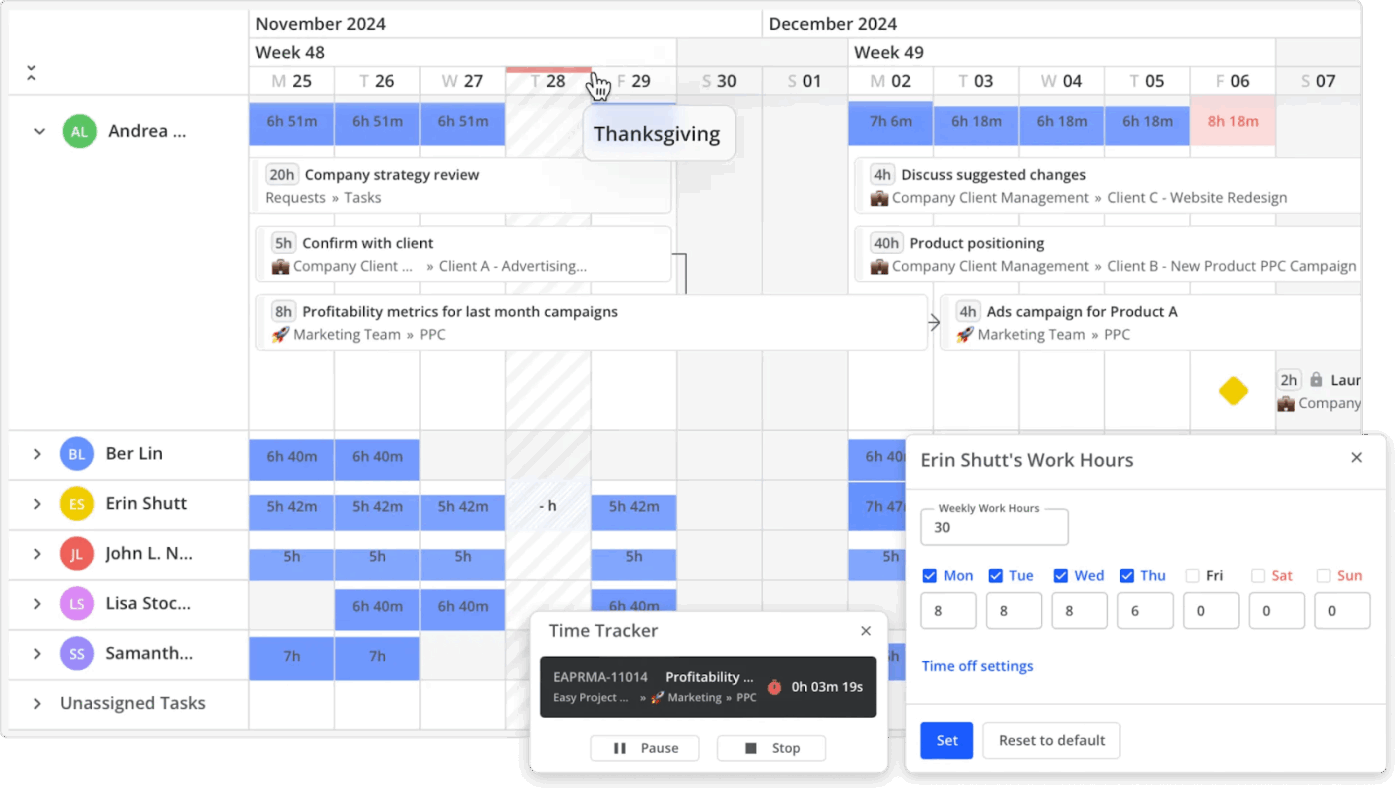
Teamhood is a visual capacity planning tool that helps teams optimize workloads across projects and meet customer demand. It combines Kanban agility with Gantt precision, making it ideal for B2B SaaS teams managing marketing campaigns and creative workflows.
Key features of Teamhood:
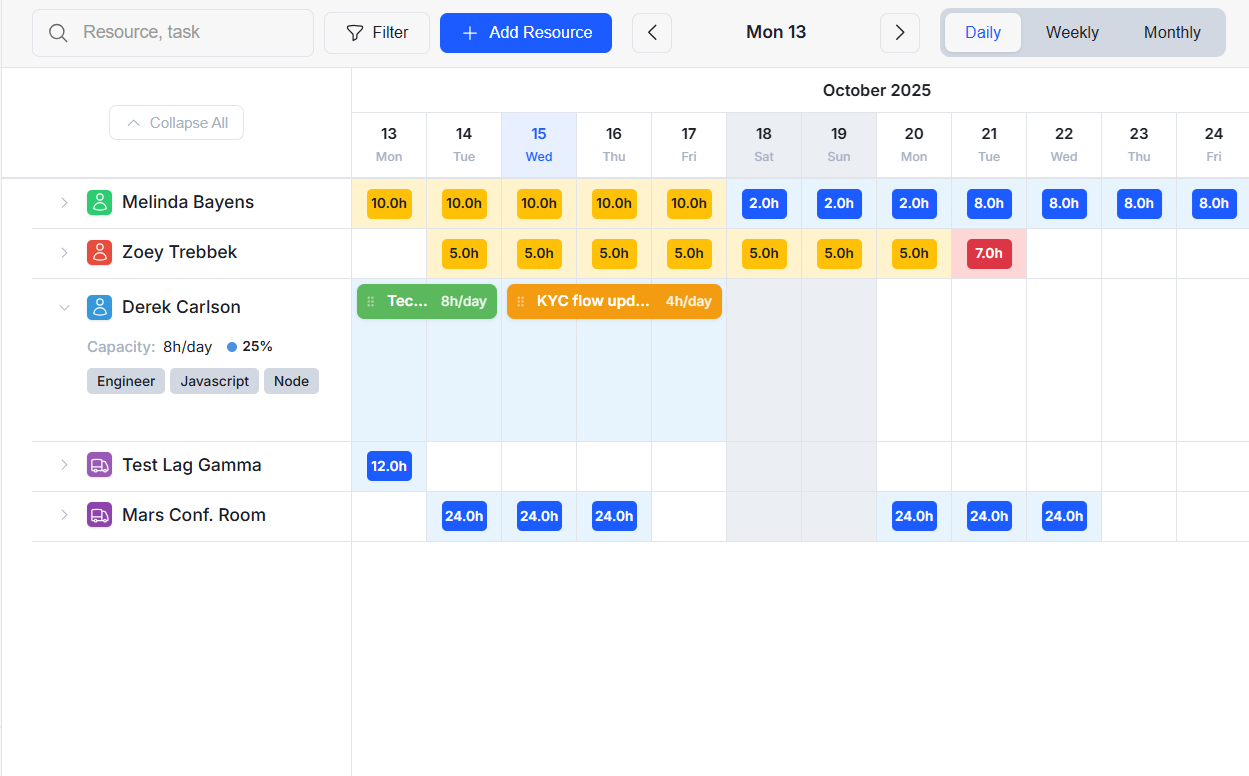
Planroll.io is a lightweight capacity planning software built for individuals and small teams. It emphasizes visual planning over advanced forecasting, perfect for simpler business workflows.
Key features of Planroll.io:
✅ Fact Check: 42% of project leaders feel their outdated tools and processes are the biggest roadblock to successful resource management.
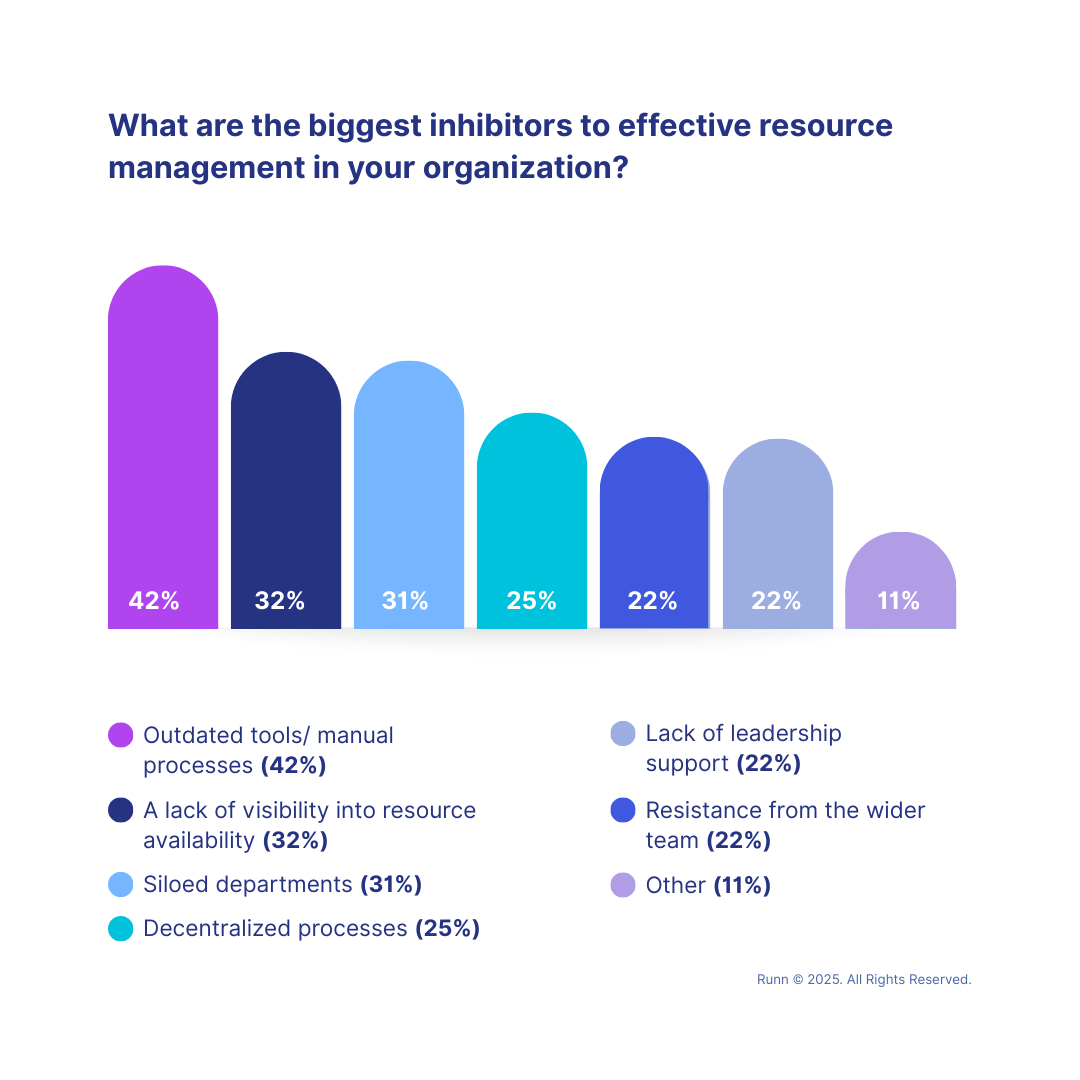
Even the best capacity plans fail due to small but costly missteps. Watch out for these common mistakes and adopt the following capacity planning best practices:
You rely on gut feelings about how long a task takes. This leads to unrealistic resource capacity planning and missed deadlines once the actual work starts.
✅ Solution: Base capacity management decisions on actual availability, task estimates, and historical performance.
Teams often forget that the workday isn’t 100% project time. So, they fill a team member’s 40-hour week with 40 hours of project tasks, forgetting about meetings and emails.
✅ Solution: Always account for meetings, admin work, context switching, and planned leaves.
You give the hardest tasks to your top performers because you know they’ll get them done, leading to their burnout.
✅ Solution: Identify the specific skills your reliable person has and pair them with junior team members on those tasks. This builds trust, skills, and capacity.
You set a perfect plan on day one. But projects are dynamic. Both demand and resource availability fluctuate. This makes your original capacity plan irrelevant and outdated.
✅ Solution: Perform weekly pulse checks to compare your plan against what actually happened that week.
You move tasks between team members in the system without notifying them, causing confusion and frustration.
✅ Solution: Whenever you reassign work to fix a capacity gap, send a quick update and explain why it was necessary.
You’ve built your capacity plan, and you’re adjusting it as demands shift. But how do you know if it’s actually working?
To see if your efforts align with your strategic business objectives, you must track the correct data.
Monitor these five key performance indicators to measure capacity planning success:
✅ Fact Check: As per Deloitte’s Workplace Burnout Survey, 70% of employees across various industries have experienced burnout in their current job. Waiting until the team is drowning to add resources often means you’re already losing your best people to exhaustion.
There’s a classic irony to scaling a business.
You need more team members to grow. But more employees mean more complexity in managing workloads, which ultimately stifles that growth.
ClickUp simplifies this dynamic by removing resource management from the equation so that you can focus solely on growth.
Built-in Workload Views help you balance allocations in seconds, while AI-powered Dashboards track demand and capacity in real time. ClickUp Brain acts as your strategic partner at every step, guiding your analysis and helping you make data-backed decisions.
So, what are you waiting for? Sign up for ClickUp today!
You can calculate team capacity in two ways:
Manually using the team capacity formula (Team capacity = total number of team members x productive hours/day x no. of working days)
Use an automated capacity planning tool like ClickUp to visualize bandwidth and skip tedious formulas. Such tools let you estimate time for each task, log actual hours, and monitor new demand to understand team capacity at any given time.
Conduct monthly or quarterly team and tool capacity planning to align with your roadmap, but revisit the plan weekly. This way, you can pivot quickly as new project demands or unexpected delays shift your team’s actual bandwidth.
Capacity planning is the broader concept that tells you whether you have enough supply (or resources) to meet future demand.
Resource planning, on the other hand, is a subset that focuses on assigning people, tools, or other resources to individual tasks once you’ve created the plan.

Sudarshan Somanathan
Max 22min read

Praburam Srinivasan
Max 23min read
Praburam Srinivasan
Max 21min read

© 2026 ClickUp