






Still downloading templates?
There’s an easier way. Try a free AI Agent in ClickUp that actually does the work for you—set up in minutes, save hours every week.
Sorry, there were no results found for “”
Sorry, there were no results found for “”
Sorry, there were no results found for “”

You already know student-centric learning leads to stronger engagement and better results. But limited time and growing admin work can make that goal feel out of reach.
This is where the proper use of artificial intelligence tools can make a meaningful difference. They take on repetitive tasks that drain your time and energy. These GenAI tools help you design more personalized learning paths, monitor progress continuously, and deliver timely feedback.
In this guide, we’ll explore the best AI teaching tools for educators that support remote teaching and personalized learning.
Here’s a quick overview of the top generative AI tools for remote educators and what each one brings to your workflow. 📊
| Tool name | Key features | Best for | Pricing* |
| ClickUp | Docs for organizing lesson plans; Tasks, Custom Statuses, and Custom Fields to track pacing and standards; Automations to streamline teacher workflows; Dashboards to visualize progress; AI for knowledge recall and assistance | Schools and teachers that want instructional planning and project management in one place | Free Forever; Customization available for enterprises |
| MagicSchool AI | Lesson creation automation, special-education supports (IEP, 504 plans), analytics dashboards, easy export to Docs/Word/Classroom/Canvas | Teachers who want fast, differentiated lesson prep and SPED support | Free plan available; Paid plans start at $12.99/month per user |
| Eduaide.ai | 110+ teaching tools, standards aligned content (5E, pedagogy-grounded), feedback bot with rubrics | Educators who need diverse, standards-aligned classroom resources | Free plan available; Paid plans start at $5.99/month |
| Brisk Teaching | Direct Google integration for feedback, writing process replay (Inspect Writing), 50+ language translation, FERPA and COPPA compliant | Teachers using Google tools who want streamlined feedback and accessibility | Free plan available; Custom pricing for schools and districts |
| ChatGPT | Personalized lesson plans, custom GPTs for standardized teaching, multilingual communication help, Canva and Drive/M365 integration | Remote and hybrid educators who want versatile planning, content creation, and communication | Free plan available; Paid plans start at $20/month |
| Wayground (Quizizz) | AI resource creation from prompt/file/URL, automated grading for open-ended/audio responses, large library of teacher-made content | Educators who want engaging quizzes and data-driven insights | Free plan available; Custom pricing for schools and districts |
| Gradescope | Institutions handling large-volume grading with a focus on fairness and analytics | Institutions handling large-volume grading with focus on fairness and analytics | Free plan available; Custom pricing for institutions |
| Curipod | AI-generated interactive lessons, instant AI feedback with rubrics, upload and enhance existing slides, FERPA and COPPA compliant | Teachers needing interactive, live engagement in remote or hybrid classrooms | Free plan available; Paid plans start at $24/month |
| Diffit | Learning resource generation from text/uploads/links, graphic organizers and scaffolds, standards alignment and vocabulary control | Teachers who need adaptable reading materials for mixed-ability classrooms | Free plan available; Paid plans start at $14.99/month |
| Turnitin | Similarity Reports for plagiarism and AI-generated content, Inline comments, QuickMarks, rubrics, voice/media feedback, Manipulation detection (white text, character swaps) | Educators who want academic integrity checks and structured digital grading | Custom pricing |
| Khanmigo | AI-generated lesson plans, quizzes, hooks, and rubrics, curriculum-aligned content from Khan Academy | Teachers who want fast content creation within the Khan Academy ecosystem | Free plan available; Paid plans start at $4/month |
| Education Copilot | AI lesson planner, English + Spanish support, adjustable level and structure, 10+ time-saving tools | Teachers needing a quick starting point for lesson plans and worksheets | 30-day free trial; Paid plans start at $9/month |
| Kahoot! | Game-based learning, live or self-paced kahoots, multiple question types, accessible design (read-aloud, high-contrast, screen-reader) | Teachers focused on student performance and real-time understanding checks | Custom pricing |
Our editorial team follows a transparent, research-backed, and vendor-neutral process, so you can trust that our recommendations are based on real product value.
Here’s a detailed rundown of how we review software at ClickUp.
A good AI tool for teachers helps you suggest personalized learning paths and provides resources or content tailored to each student’s needs.
Here are some advanced features to look for in GenAI tools for teachers.
📚 Read More: Top 11 AI Tools for Lesson Planning
Here are the top generative AI tools that make lesson planning, student tracking, and teaching easier for remote educators. 👇🏼
84% of teachers say they don’t have enough time during their regular hours to complete grading, plan lessons, handle paperwork, or clear out parent emails. When every task lives in a different tool, even simple work stretches longer than it should.
ClickUp brings everything together in a converged AI workspace so you can spend more time teaching instead of switching between apps. Powered by AI, it understands your context and pulls up what you need instantly; no more work sprawl!
Your tasks, quizzes, lesson plans, documents, and communication stay connected in a single, organized workspace with connected AI.
Here is how ClickUp Education Project Management Software helps you manage remote teaching more smoothly:
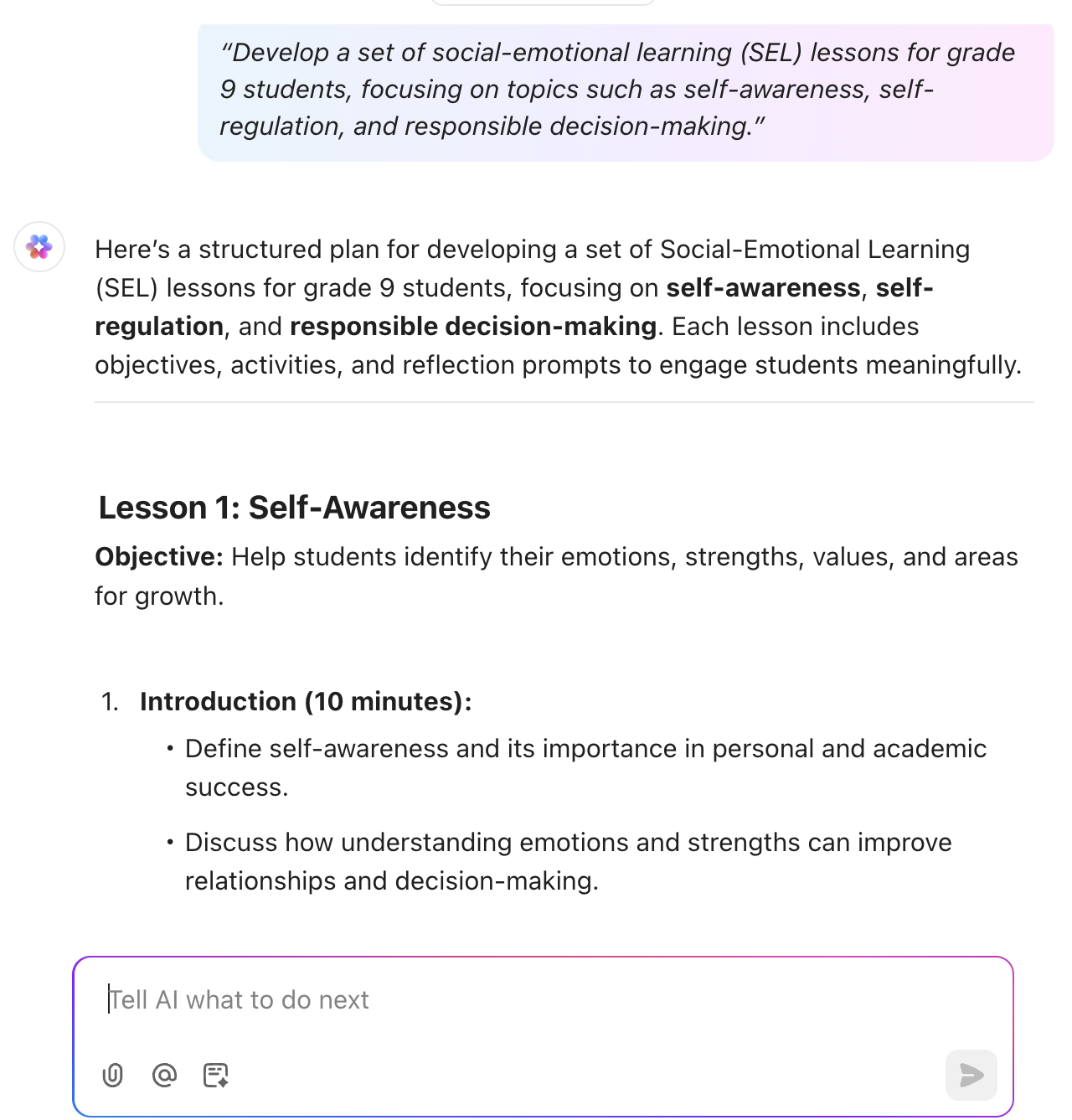
ClickUp Brain, your in-built AI assistant, helps you quickly generate lesson plans, assignment questions, project guidelines, and more. This responsible AI sits right beside your lessons, documents, and assignments, providing the support you need the moment you need it.

Here’s how you can use this AI for students to make a real difference in your day:
Try these prompts:
Skip the blank page. Describe your needs, let ClickUp Brain build the draft, and get straight to teaching. Check out this video to see how easy it is.
After Brain helps you create your materials, ClickUp Docs becomes the place where you turn them into structured, classroom-ready resources. You can format lesson plans, collaborate with peers in real time, add activity instructions, embed visuals or links, and share them with students or co-teachers.

ClickUp Docs also works as your knowledge management system, helping you build a growing library of everything you teach. Categorize by subject or unit, apply searchable tags to instantly find what you need, and keep important academic documents organized year after year.
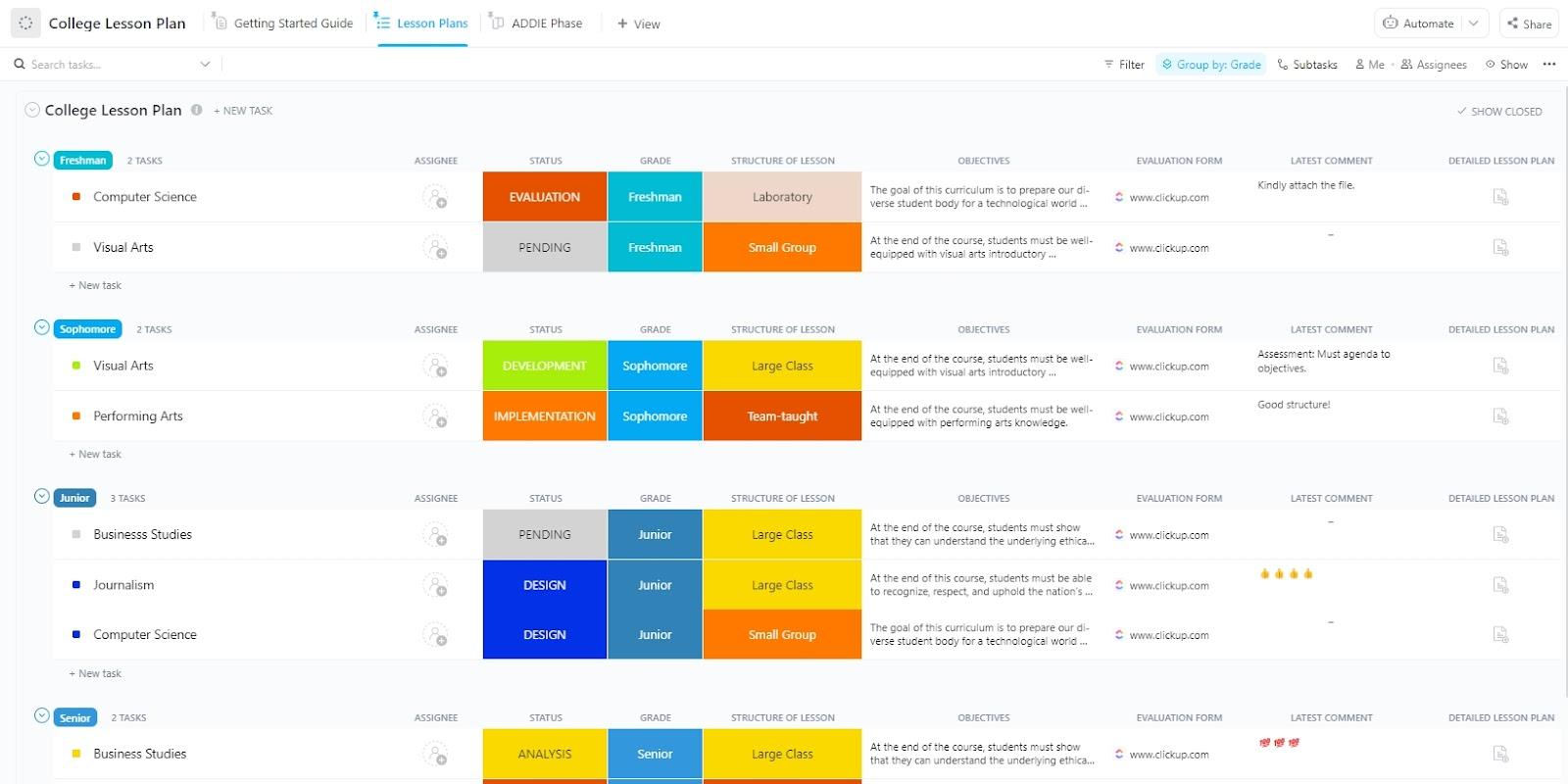
💡 Pro Tip: The ClickUp College Lesson Plan Template makes lesson planning a lot easier. You can easily create and customize lesson plans, then organize all your lecture content, assignments, and exams in one place.
Each lesson becomes a task where you track progress with clear statuses and due dates. Just add your outline from Brain, fill in the objectives and activities, and turn it into a student-ready lesson you can confidently reuse every semester.
ClickUp Tasks turns your teaching plans into a clear, trackable workflow. Create a task for each class session or assignment, add checklists for lesson activities, and attach all the necessary files or slides.

When multiple assignments run late, feedback piles up, and a quiz still needs reviewing, manual tracking can quickly get out of hand. ClickUp gives you two ways to offload that pressure: rule-based automation and natural-language AI Agents working side by side.
ClickUp Automations takes care of the routine, repetitive workflows. You set the rule once, and ClickUp applies it consistently. For example, when a student submits an assignment, an automation can move that task into your grading list, update the status, and even send reminders for upcoming grading deadlines.

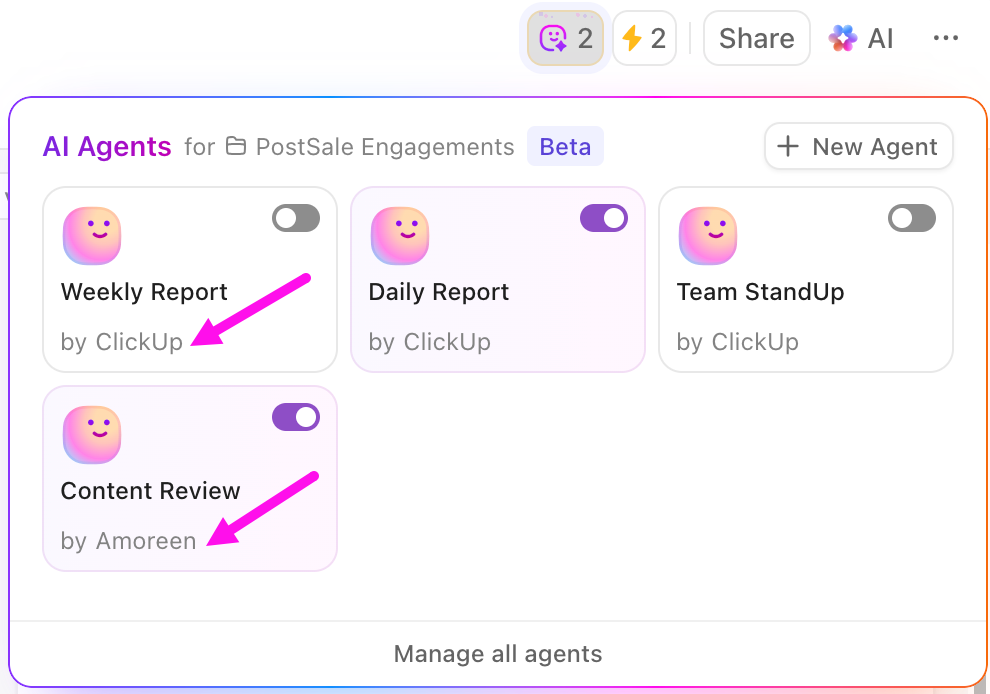
ClickUp AI Agents handle the more flexible work that isn’t tied to predefined rules.
You can simply ask: ‘Collect all assignments missing feedback and add them to a priority list‘ or ‘Send a message to students whose submissions need revision.’ The agent understands your request and completes the action across your workspace.
Help students stay on top of homework, projects, and reminders with ClickUp Student Project Management Software. They can mark progress, attach their work to tasks, add comments, and always know what’s pending and what’s done.
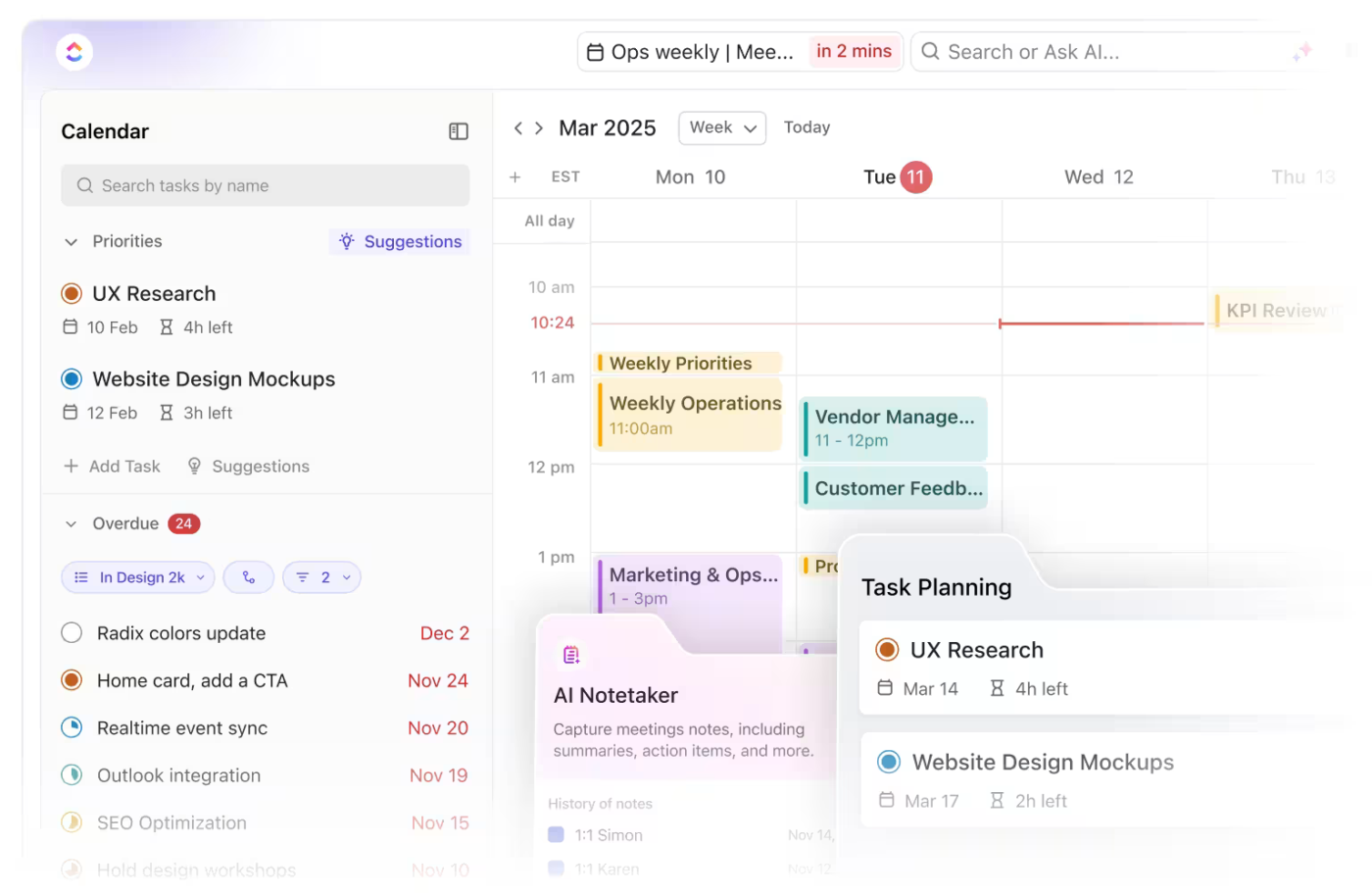
The ClickUp Calendar can help them plan their week by visually mapping assignments, tests, and revision sessions in one place.
A G2 review says:
It’s intuitive, easy and fast to do what I need to do. I think it truly lives up to its promise of minimizing clicks! I don’t ever feel frustrated with the tool or think “why can’t I just do xyz?” I literally could not do my job or keep track of any of my own stuff without this tool. And it’s SO affordable!
📮ClickUp Insight: 88% of our survey respondents use AI tools for personal tasks every day, and 55% use them several times a day.
What about AI at work? With a centralized AI powering all aspects of your project management, knowledge management, and collaboration, you can save up to 3+ hours each week, which you’d otherwise spend searching for information, just like 60.2% of ClickUp users!

MagicSchool brings lesson creation, student support, and administrative tasks into one AI platform.
It is especially useful for special education needs. You can generate IEP and 504 plans, behavior-intervention plans, accommodation suggestions, and scaffolded resources that help every learner access the lesson.
Sharing your work is just as simple. Export lessons into Google Docs or Microsoft Word, or send them straight into Google Classroom or Canvas without any extra formatting.
When you want visibility into what’s working, MagicSchool provides analytics dashboards that highlight student progress and engagement trends. This helps you make instructional decisions backed by clear data.
A Reddit review says:
I love magic school. I make custom bots and have students use them for different projects. I can monitor the student logs live. Students used AI when learning about the engineering design process, and I had set the context as if they were on a spaceship on Mars and would eventually do the egg drop challenge as an “emergency lander’
⚡ Template Archive: Free Tutoring Templates to Plan Lessons and Manage Administrative Tasks

With Eduaide.ai, you can generate more than 110 types of teaching resources. This includes quizzes, vocabulary lists, scaffolded lessons, escape room activities, classroom games, and graphic organizers.
All the generated material is pedagogically grounded. The content follows established educational frameworks and best practices, including structured instructional models like the 5E framework.
The platform makes reviewing work easier as well. A feedback bot provides actionable, rubric-based comments for student work. Additionally, the assessment builder lets you create questions with adjustable difficulty and different formats.
🧠 Fun Fact: Teachers did use playful approaches long before ‘gamification’ became a buzzword. The Oregon Trail, a game-based learning tool, was created by Don Rawitsch, Bill Heinemann, and Paul Dillenberger in 1971 for use in an 8th-grade history class.
In the game, players take on the role of a wagon leader guiding a group of settlers traveling from Missouri to Oregon in the 1840s. The game teaches history through consequences, showing how choices and trade-offs shaped settlers’ journeys.
Bonus: ClickUp BrainGPT works as your AI assistant on desktop, bringing together contextual AI, information search, and workflow automation across every tool you use to teach online. Instead of separate AI tabs and scattered resources, you get one intelligent system that already knows your courses, student work, and classroom tasks.
Here’s how ClickUp BrainGPT supports remote education:


Brisk is an AI educator tool that helps you design instructional content and personalize learning without leaving your existing workflow.
You can quickly create classroom resources like presentations, guided notes, podcast scripts, and interactive activities. Plus, Brisk integrates directly with Google tools, so feedback is easy to give. Choose a feedback style and insert comments right into Google Docs to guide your students more effectively.
The ‘Inspect Writing’ feature gives a video-style replay of each student’s writing journey from first draft to final version. See what they typed, deleted, pasted, and revised, including how they responded to feedback. This makes it easier to diagnose writing struggles and highlight improvement.
A Reddit review says:
I’ve used it for two years. It’s great. The school that I teach at now purchased the upgraded version and it is even better.
📚 Also Read: How to Use AI for Note-Taking: Tools & Use Cases

ChatGPT is more than just an AI writing tool. Upload student information, such as strengths or learning preferences, and it generates personalized lesson plans that match each learner’s needs.
You can also standardize templates and resources across your school using custom GPTs. Anything you share with ChatGPT for Teachers is not used to train models by default, and data is protected with encryption, multi-factor authentication, and SSO.
Plus, it helps you connect with multilingual students more easily. Translate instructions, rubrics, classroom updates, or emails into languages such as Spanish, French, Italian, and many more, while keeping your message accurate and professional.
A Reddit review says:
I teach online and use ChatGPT to help me create lectures and assignments that achieve the outcomes I want. Without the focus I can ramble and get distracted, so I use it to help me identify my key points, but also create added context that I give to students in the form of lecture notes. I add the notes to my PowerPoints and then create handouts that I post online.
⚡ Template Archive: Free Assignment Tracker Templates to Organize & Track Deadlines

Wayground (formerly Quizizz) has evolved from a simple quiz tool into a comprehensive AI learning platform. You can create a wide variety of educational content, including assessments, quizzes, lessons, reading passages, flashcards, and interactive videos, using over 18 different question types.
Every session you run comes with detailed class-level and student-level insights you can edit, download, print, or share with parents and guardians.
Wayground also offers you access to millions of publicly available resources created by other teachers. Pull resources from the library to assign as live sessions, homework, or incorporate individual questions into your lessons and activities.
A Capterra review says:
I love Quizizz. It’s one that my students really enjoy. I can have them compete between classes to see which one can get the highest accuracy on an assessment, and they love choosing the music to listen to during the game.
👀 Did You Know? Sixty percent of educators now use AI in their classrooms. Younger teachers lead the way, with those under 26 reporting the highest adoption of AI tools for teaching and student support.

Gradescope is an online grading and assessment platform built to handle large volumes of student work while maintaining high-quality feedback. It supports many submission formats, including handwritten exams, worksheets, bubble sheets, typed responses, and even programming assignments.
You can start with the rubrics you planned ahead or draft new ones while grading. If you adjust points or criteria mid-grading, the platform retroactively updates scores for all submissions to reflect the change.
Gradescope AI speeds up the process further without compromising accuracy. It automatically groups similar answers together, allowing you to review and grade them as a batch.
To ensure fairness, the tool uses a question-based workflow and hides student identities (names and email addresses) during grading. This minimizes bias and keeps your focus on the quality of each response.
A Capterra review says:
I rely heavily on Gradescope for grading MCQ questions that are done in class using an MCQ Bubblesheet. Gradescope makes the process extremely simple by integrating seamlessly with Blackboard to get the students roster and link it automatically to the respective student bubble sheet.
📚 Read More: Best Time Management Techniques Proven To Work

Curipod is a web-based interactive teaching platform built around AI-powered slide and activity creation. You can use it to build complete lessons, quick reviews, and engaging class activities for remote teaching.
Getting started is simple. Create lessons from scratch with Curipod AI, or upload existing slide decks from PowerPoint or Google Slides. From there, you can enhance your lesson with interactive elements such as polls, drawings, or word clouds.
As students respond with answers, drawings, or open-ended responses, Curipod provides instant, rubric-aligned AI feedback. Curipod also supports student privacy and is fully compliant with FERPA and COPPA, making it a safe and secure choice for remote classrooms.
A G2 review says:
What I like most about Curipod is that it enhances my lessons and makes them interactive and students can access it on their Chromebooks. I also love how Curipod can create a lesson for you using AI technology and how it can also “Curify” a lesson you have already created to make it interactive. It is such a wonderful tool!
🌟 Bonus: With just a few natural language commands, educators can build a Super Agent in ClickUp to automate and streamline repetitive tasks, provide real-time support, and enhance student engagement. Here’s what Super Agents could do:
Learn more about Super Agents 👇
🧠 Fun Fact: Classrooms are embracing AI in new ways. Top tools in the educational setting are AI-powered educational games at 51 percent. Close behind are adaptive learning platforms at 43 percent and automated grading systems at 41 percent, both helping personalize learning and lighten the workload.

Differentiating class materials takes time, but it can completely change how accessible learning feels for every student. Diffit is an AI instructional tool that helps you do this by generating learning resources to match different reading and language levels.
Simply enter a topic, paste text, upload a document, or share a webpage or video link. The tool then turns it into differentiated passages and activities tailored to your students’ reading levels.
You also get graphic organizers and scaffolds that support students in breaking down complex ideas, helping them understand and respond more confidently.
A Reddit review says:
I have used its PDF import feature and I love it. It makes great slides as well as notebooks. I’ve found with any AI writing, you need to be very specific and detailed with your instructions.
⚡ Template Archive: Paid and Free Lesson Plan Templates to Create Engaging and Meaningful Sessions

Turnitin is an academic integrity and assessment platform that helps you detect improper citations and copied text in student work.
The tool lets you compare submissions against an extensive database of web pages, academic journals, and previously submitted papers to generate ‘Similarity Reports’. These reports show where sources were used correctly and where citation issues may exist.
With AI-generated content becoming more common, the tool also highlights the likelihood that portions of a submission were written by tools like ChatGPT. This helps you understand how much of the work represents authentic student writing.
If your students complete handwritten or paper-based assessments, you can scan responses and bring them into the system for digital grading.
🧠 Did you know? The VARK model, created by Neil Fleming in 1987, helps you understand how your students learn best.
It identifies four learning types:
By using these insights, you can tailor your lessons to different learning styles and help every student succeed.

With Khanmigo, you can quickly generate lesson plans, quiz questions, exit tickets, rubrics, lesson hooks, and student groups tailored to different learning needs. Plus, you get on-demand summaries of student work to check progress and identify areas where learners need support.
Since it is connected to the Khan Academy learning ecosystem, the tool has access to a large and trusted library of lessons, videos, and exercises across many subjects. You get curriculum-aligned content without spending time searching for reliable resources.
A G2 review says:
What I like best about Khan Academy is it is self-paced learning. I can assign lessons that go with our math curriculum, and students can complete them during intervention time or at home.
📚 Read More: Best AI Tools for Students
Education Copilot is an AI-powered lesson planning and content creation platform that helps you cut down on preparation time. You can generate fully structured lesson plans for any subject or concept in just a few seconds using the built-in AI lesson planner.
Customize every resource by adjusting the level, scope, and structure, so the content fits your curriculum goals and your students’ needs more closely.
Education Copilot gives you a quick starting point, so you can spend more time teaching and less time formatting worksheets or writing plans from scratch.
🧠 Fun Fact: High school students are leveraging GenAI to make learning easier. 67% use it to summarize and understand complicated concepts, 61% rely on it for writing assignment ideas, and 55% use it to create their own study materials.

Kahoot! is a game-based learning platform that turns lessons into interactive quizzes and activities. It is best suited for boosting student engagement, checking understanding in real time, and bringing energy into the classroom.
You can create ‘kahoots’ (kahoot quizzes) in minutes and run them live or assign them as self-paced practice or homework. Questions can include images, videos, and media from Kahoot’s built-in library to make the learning experience more visual and fun.
Students join from their own devices while questions display on a shared screen, making participation collaborative and fast-paced.
With accessibility features such as read-aloud support, high-contrast mode, and screen-reader compatibility, every learner can join in comfortably.
A G2 user says:
I love that my students love it so much! I love that they are able to practice their skills and their vocabulary for Spanish in a fun and easy way. They enjoy the friendly competition among their peers as well
Remote teaching should not feel like a constant trade‑off between personalizing learning and handling admin work. The best AI teaching tools for educators offer ways to manage tasks, create content, and track student progress across your school district.
Before committing, test free trials and demos in real scenarios. Hands-on testing ensures you choose a platform that saves time and supports your students.
If you want a platform that brings together lesson planning, content creation, assignment tracking, and student analytics, ClickUp is a powerful option. Its AI-driven content generation, centralized Docs, Tasks, Automations, and Dashboards help you teach without switching multiple apps.
ClickUp’s community has grown from 14 million to more than 24 million users, with over 10 million new sign-ups recently. That kind of adoption shows how many educators and teams are choosing one place to handle their work.
Sign up on ClickUp for free today and simplify your remote teaching workflow.
If you are looking for the best generative AI tools that make lesson planning easier, ClickUp is worth trying. It supports both the creative and the practical aspects of lesson planning. ClickUp Brain helps you draft the core ideas for your lesson whereas ClickUp Docs lets you turn those ideas into a complete plan that is easy to manage, update, and reuse each semester.
Yes. Many AI tools can automatically grade quizzes, multiple-choice questions, and even short written responses by checking accuracy and following scoring rubrics. They offer instant feedback to students and save teachers time. However, teachers can still review final grades to ensure fairness, especially for creative or open-ended work.
AI tools collect student information to personalize learning, so you need to make sure that the data is stored securely and only accessed by authorized people. You must also ensure it isn’t used for tracking, advertising, or shared without consent. Reviewing privacy policies and permissions helps you protect your students’ information.
Some of the best AI presentation makers for university-level remote lectures are Canva and Curipod. Canva helps you design slides in minutes using AI to suggest layouts, visuals, and even full slide decks from a short prompt. Curipod adds interactivity by generating slides with polls, word clouds, drawings, and discussion prompts that keep students engaged from a distance.
AI tools help you personalize the learning experience by adapting content to each student’s pace, strengths, and style. AI can suggest practice questions, provide targeted feedback, and recommend resources based on where a student needs support. You can also use AI insights to group students who need support on the same topic.
AI grading assistants give you instant scoring on quizzes and short responses, reducing manual workload and returning feedback faster. Traditional grading takes longer but allows you to evaluate creativity, reasoning, and personal expression more accurately. The best approach is to use AI for repetitive checks while you focus on deeper evaluation. You can then assess things like how well a student builds an argument, applies concepts, or expresses original ideas.

© 2026 ClickUp

There’s an easier way. Try a free AI Agent in ClickUp that actually does the work for you—set up in minutes, save hours every week.