






Still downloading templates?
There’s an easier way. Try a free AI Agent in ClickUp that actually does the work for you—set up in minutes, save hours every week.
Sorry, there were no results found for “”
Sorry, there were no results found for “”
Sorry, there were no results found for “”

Artificial Intelligence (AI) is shaping the future of project management, and a natural question for most PM leaders is: Which AI stack is right for my project management team?
But here’s the catch: randomly throwing money at the flashiest tools won’t deliver the results you’re after. Worse, it might even tank your project quality.
The real win comes from choosing the right combination of AI tools (also known as an AI stack) that work together to enhance how your team plans, executes, and delivers projects.
When you nail this stack, AI stops being a series of isolated, disconnected tools, and you can get over the unnecessary AI tool sprawl.
In this guide, we’ll break down what a typical AI stack for project management looks like. We’ll also walk you through how to build one that fits your team and some common mistakes to avoid along the way. 🚀
As a busy project manager, haven’t you always wanted an assistant to do the repetitive tasks for you? An assistant who is on duty 24/7? Enter AI project management.
While you manage timelines, team dynamics, and client demands, the AI project management tool works in the background, doing the crunchwork for you.
So what does the AI tech stack in project management look like? Let’s break down the five main layers that make up an AI stack for project management.
But, before we get into it, here’s a handy explainer video to help you get started with AI project management.
📚 Read More: Top Project Management Methodologies
Every project starts with a plan. But manually piecing one together takes up hours of your time. Sifting through spreadsheets, chasing down estimates, and praying you didn’t miss a critical detail is far from ideal.
⚒️ The planning layer includes AI tools that help
You’ve finished the planning, assigned tasks, and shared the project timelines with your team. But this isn’t the time to sit back and relax. You still have to keep those projects moving, prepare for unexpected client changes, and actively monitor team capacity, task dependencies, and resource availability.
⚒️ The execution layer includes AI tools that help:
If you’ve ever felt that your project management job is only about facilitating communication, summarizing meetings and tasks, and translating complex project finances into stakeholder-friendly reports, you’re not wrong.
This layer in AI project management helps you reclaim your time from these repetitive communications, allowing you to focus on more strategic aspects of influencing and negotiating.
⚒️ The communication layer includes AI tools that help:
Your team probably has enough analytics tools already. The real problem is, all that data is usually stuck looking backward, which affects project tracking. It only tells you what went wrong after the deadline was missed or the budget exploded.
The tech stack, in the form of AI project management tools, curates all this data and transforms it into forward-looking insights.
⚒️ The reporting layer includes AI tools that help:
Ever started a new project and thought, “Wait, how did we handle that last time?”
That’s exactly what the knowledge layer provides in AI project management, contributing to successful project outcomes. It captures what your team learns as they work, organizes it automatically, and makes it easy to find later. No one has to rely on memory or spend time manually documenting everything again.
⚒️ The knowledge layer includes AI tools that help:
Though these application layers seem nothing short of revolutionary, we’re still light years away from AI replacing project managers. Because AI engines lack human judgment.
While AI handles repetitive tasks, it cannot make complex, informed decisions.
For example, if a developer is consistently overloaded across cross-functional projects, AI might not recognize the potential for burnout. A human project manager will consider these factors when managing resources and might redistribute the workload to maintain team well-being.
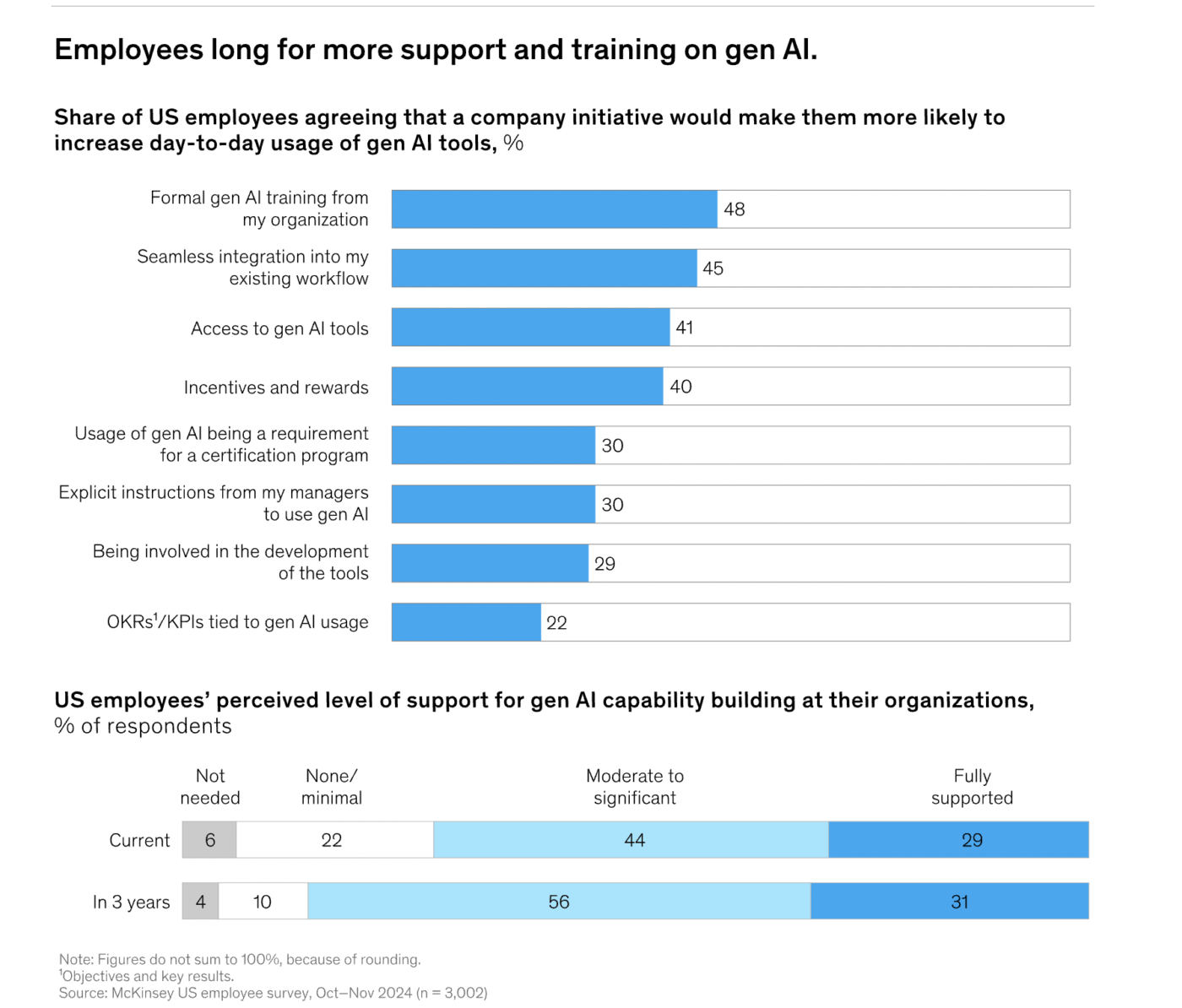
📢 Reality Check: AI adoption starts with people. Employees already believe that AI will have a dramatic impact on their work. They believe they need formal training to boost AI adoption. However, a McKinsey report found that they receive minimal to no training or support.
Before diving into tools, every project team faces one strategic choice: build your own AI tech stack or choose an integrated one. The answer depends on your team’s scale, technical maturity, and how much customization you need.
Let’s explore the two options before going into the details.
It is ideal for enterprises or technically mature teams with internal data and dev support. Why so? Because it gives complete control over integrations, models, and data security. However, it requires ongoing maintenance, MLOps expertise, and governance investment.
It is best for small to mid-size teams that want faster deployment with minimal setup. Why so?
Because it combines project management, automation, and reporting in one ecosystem. It eliminates tool sprawl and the subsequent confusion it carries.
Regardless of which route you take, building your own stack or choosing an integrated platform, the next steps remain the same: understanding your current system, identifying pain points, and layering AI where it makes the biggest impact.
Let’s look at how you can do this, step-by-step:
Look for the top three or five highest-impact administrative burdens that regularly drain your team or pose a risk. This is where AI in project management needs to make the most impact.
To find out these pain points:
When you’re done, you’ll have a clear, evidence-based view of your current system to jump to the next step.
📮 ClickUp Insight: 88% of our survey respondents use AI for their personal tasks, yet over 50% shy away from using it at work.
The three main barriers? Lack of seamless integration, knowledge gaps, or security concerns.But what if AI is built into your workspace and is already secure?
ClickUp Brain, ClickUp’s built-in AI assistant, makes this a reality. It understands prompts in plain language, solving all three AI adoption concerns while connecting your chat, tasks, docs, and knowledge across the workspace. Find answers and insights with a single click!
💡 Pro Tip: Implementing solutions for every single pain point will spread your budget thin. Instead, focus on problems that offer the biggest payoff for the least amount of headache. Use the Impact-Effort Matrix. Measure each problem against two factors: how much better things will be once it’s solved (the Impact), and how much work it will take to fix it (the Effort).
You’ll immediately see the easy “quick wins” that are perfect for building the foundation of your team’s project management AI stack.
Here’s what a subject matter expert has to say: Alan Zucker says he’s skeptical that AI-enabled systems will do anything but automate tedious tasks. He adds,
The central function of the project manager—ensuring the successful delivery of the project—remains.
For each pain point you prioritized, you need to answer this question: “Which of the five AI layers is really causing, or is supposed to solve, this problem?”
Match each pain point to the right layer. It’s a good idea to double-check your answers with a few key team members to make sure you’ve nailed the root cause (for example, is the issue actually “Reporting,” or is the data just bad because of sloppy “Execution?”).
📌 Example: If post-meeting action items are frequently missed because they are buried in long transcripts, that’s clearly a problem in the Communication layer.
Similarly, if your project schedule is always off because the original estimates were unrealistic, that’s a Planning problem, not an Execution Issue.
Why bother with this step? For efficient resource allocation and purchasing.
If you find that three of your top five problems are in the Reporting layer, you know you have a serious reporting issue. Basis this, you’ll look for an AI project management tool with advanced reporting.
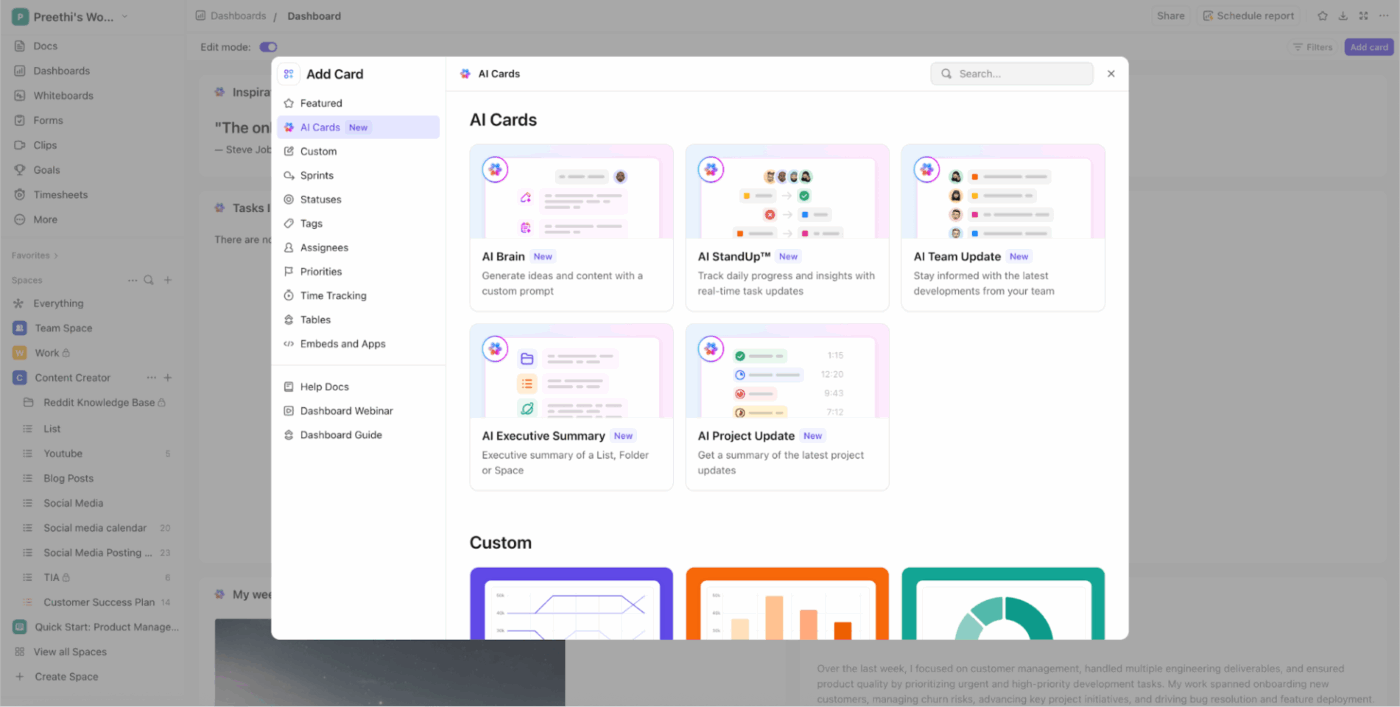
💡 Pro Tip: Try a platform like ClickUp, where AI Cards automatically surface real-time summaries, status updates, and project forecasts—turning raw data into actionable insights without manual effort.
Now for the exciting part: finding the absolute best tools for managing project workflows effortlessly. Here’s a three-step process to make sure you find the right AI project management tool for your tech stack:
💡 Pro Tip: To make that final decision strategic and not driven by gut feelings, use a weighted scorecard. Here’s how:
Now that you’ve finally built your AI stack, it’s time to implement it and actually start using AI for project management.
Below are five key steps to this process:
Building a custom AI stack is hard work. It requires you to have a budget and resources for every step—selecting models, building integrations, training your team, maintaining security standards, and keeping everything updated as AI capabilities evolve.
For most project management teams, this isn’t realistic. The solution: ClickUp’s Project Management Software.
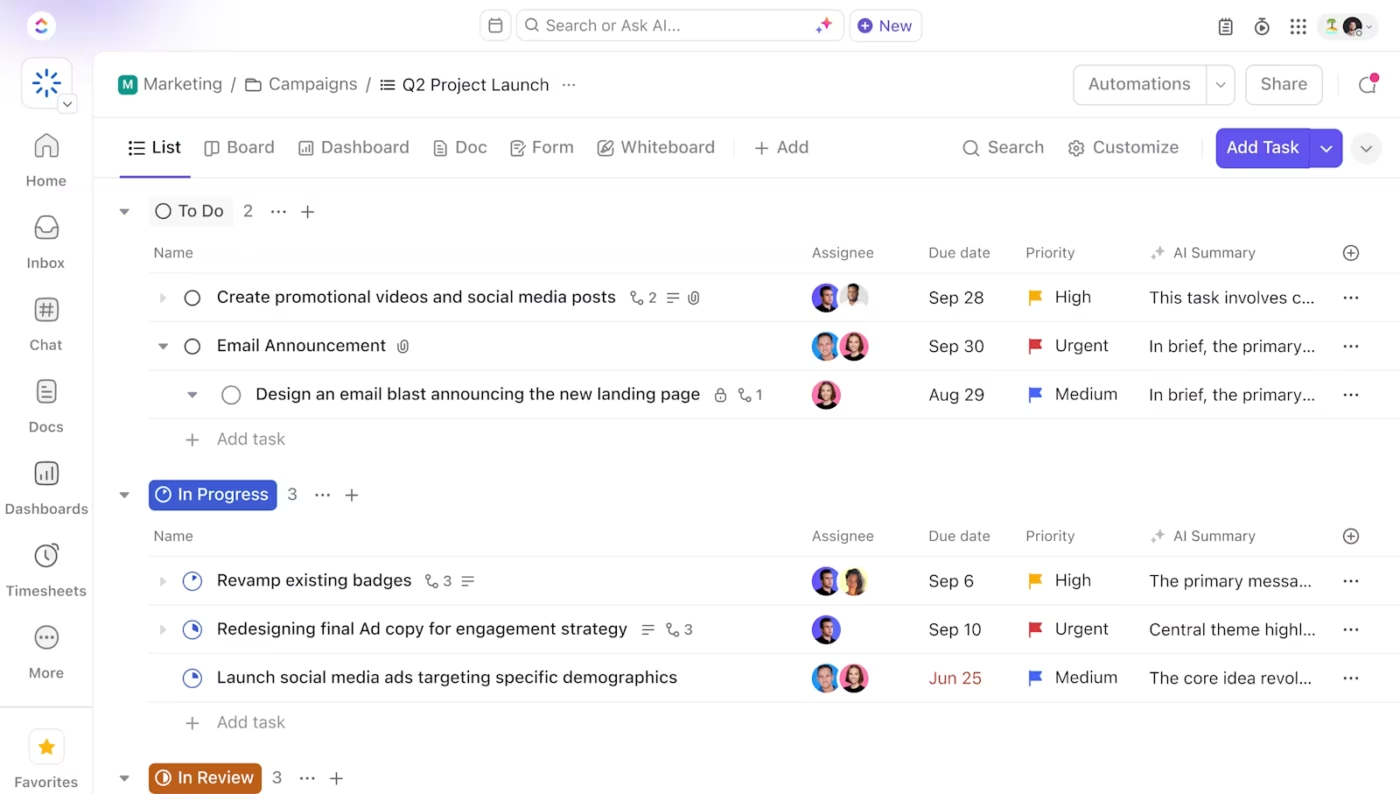
ClickUp is the world’s first Converged AI Workspace, which brings together all work apps, data, and workflows with AI built directly into project management. This means you get AI that understands the full context of your work, including tasks, timelines, resources, dependencies, and team capacity.
All that without requiring custom development or stitching together multiple subscriptions. At the end of the day, ClickUp eliminates Work Sprawl to provide 100% context in a single place where humans and agents work together.
Let’s see how ClickUp offers AI-driven automation for all five layers natively within its single platform.
Managing projects manually means non-stop context switching. You’re constantly digging through emails and external apps just to find one piece of information, all while wrestling with a to-do list that never shrinks.
AI takes all this soul-crushing drudgery right off your plate.
With an AI assistant like ClickUp Brain, you can transform your project management. It uses context-aware intelligence to handle low-value repetitive work, allowing you to reclaim your energy and focus entirely on high-value strategic work.
Think of it as the smart layer sitting right on top of all your basic project tools.
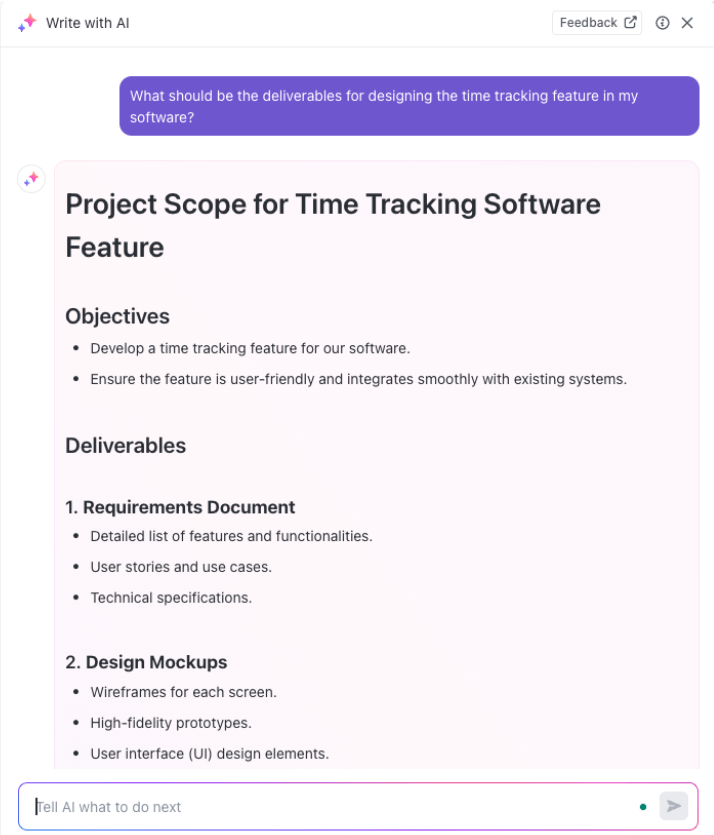
How ClickUp Brain eliminates repetitive work:
ClickUp Brain is the next step for us to unlock efficiency across each team. The knowledge management applications are massive.
Curious what AI imagines project managers as? Here’s a funny take:
Smart AI helps you actively manage your work, as it understands your task dependencies, resource allocation, project timelines, and team capacity.
ClickUp BrainGPT surpasses generic AI assistants by comprehending the complete context of your projects, teams, and workflows across your connected work ecosystem. Here’s how:
BrainGPT gives you full access to multiple AI models like ChatGPT, Claude, and Gemini within your workspace, so you’re not copying project details into separate AI tools. It already knows your project status, who’s working on what, and where bottlenecks exist.
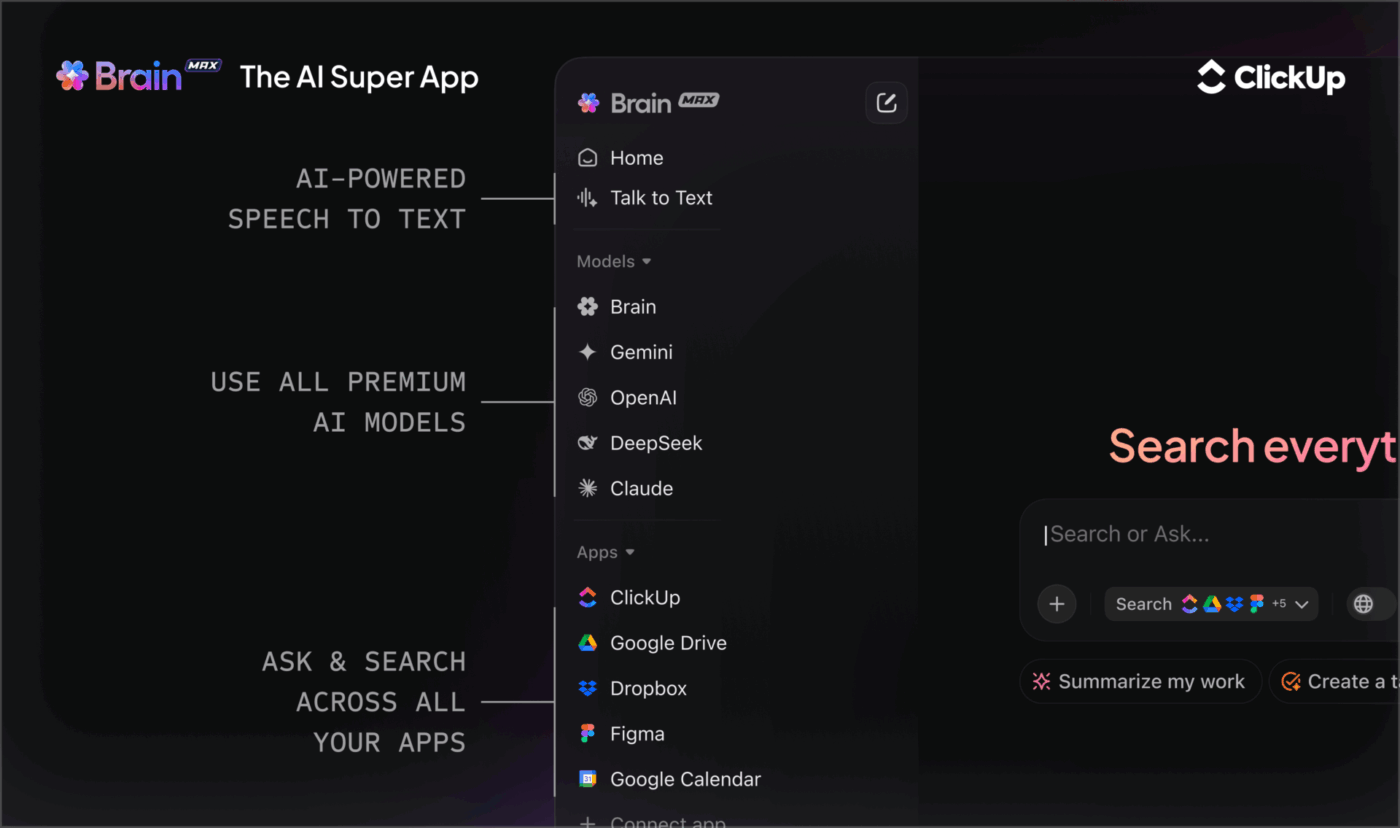
Ask it to generate a status report, and it pulls real data from your tasks. Request a resource reallocation plan that considers actual team workloads and deadlines.
Search everything, instantly
When you need that risk assessment doc or the latest budget spreadsheet, BrainGPT searches across ClickUp, Google Drive, OneDrive, SharePoint, GitHub, and all your connected apps in seconds. No more asking teammates where files live or digging through folder hierarchies while stakeholders wait for answers.
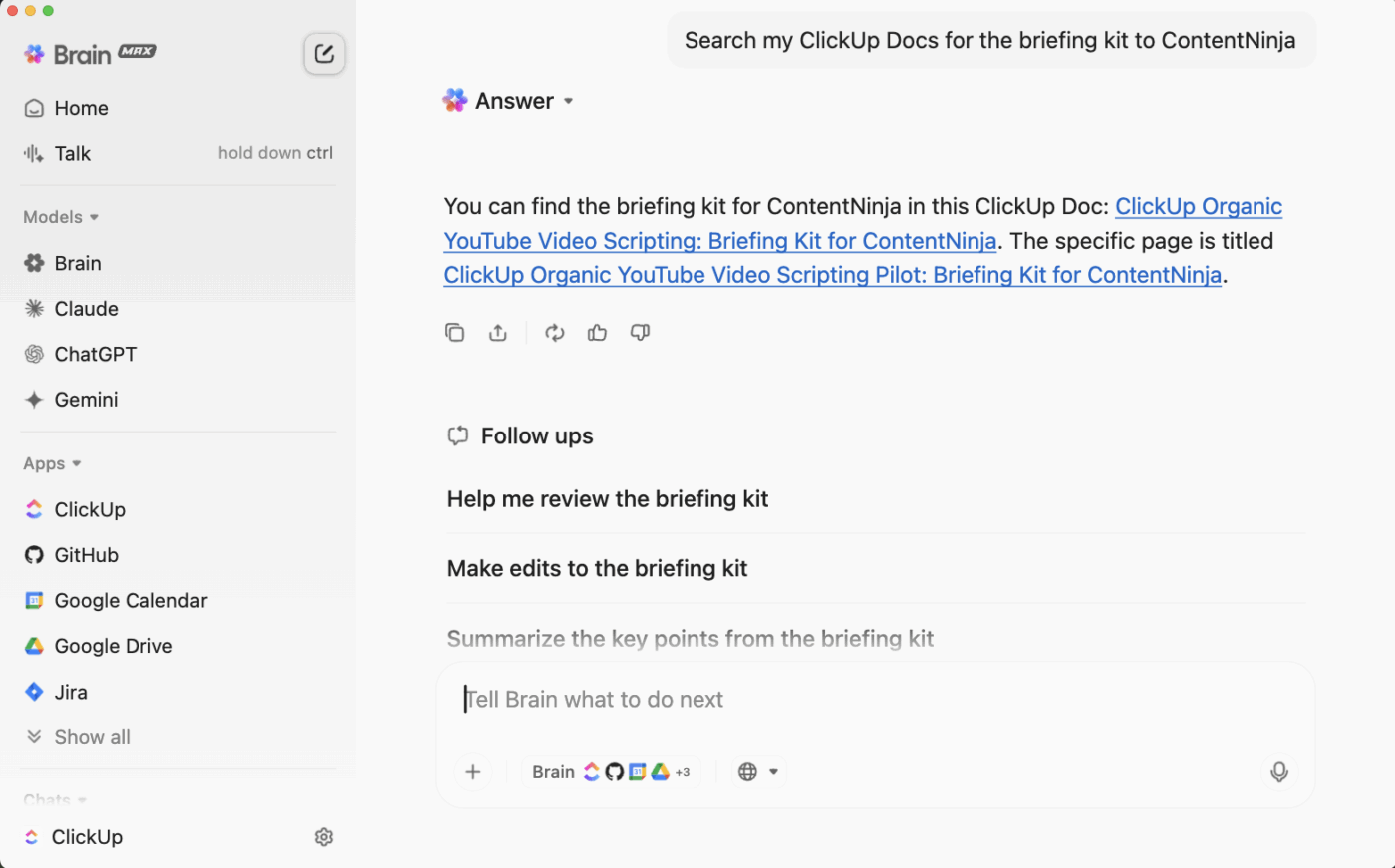
Voice-enabled project management
Use Talk to Text to update project status, reassign tasks, or generate reports by voice. Whether you’re reviewing site progress, commuting between client meetings, or need to multitask during a busy day.
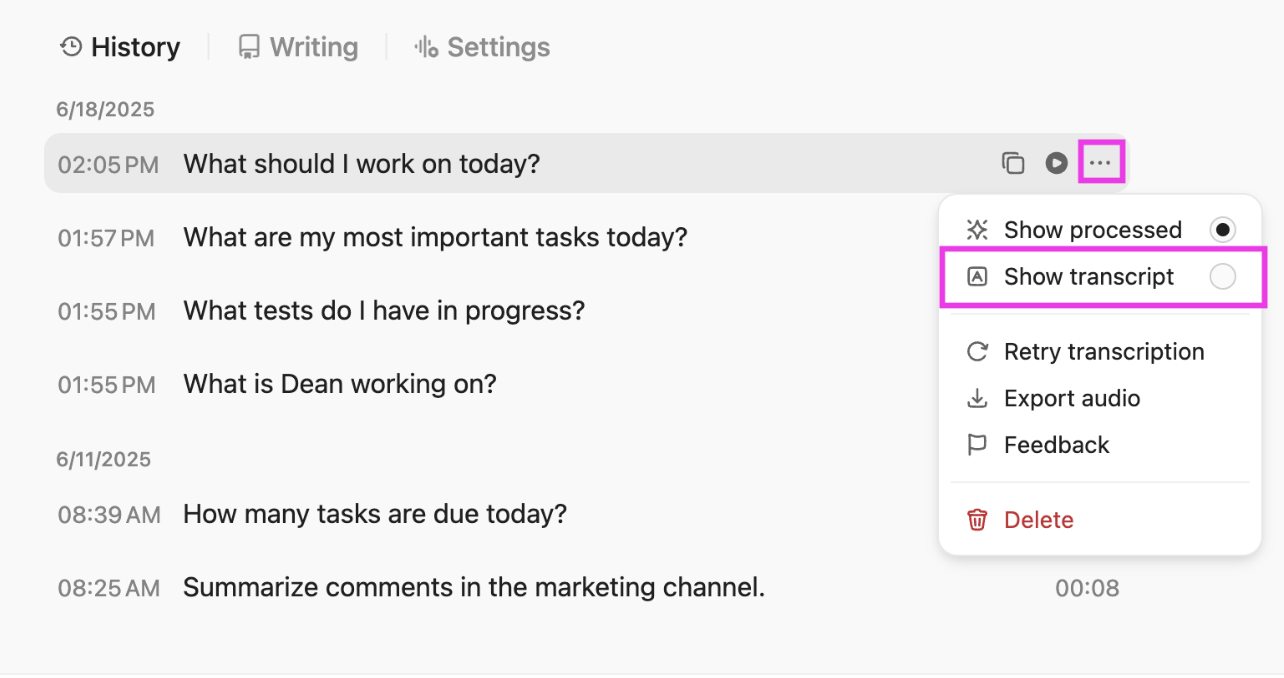
Built for teams, not just individuals
Unlike standalone AI tools that only help one person at a time, BrainGPT works across your entire project team.
It can draft meeting agendas based on project milestones, suggest task assignments based on team capacity, automate recurring project documentation, and keep everyone aligned without constant manual coordination.
⚒️ Quick Hack: Save your most effective AI prompts in a prompt library in ClickUp Docs to avoid rewriting them from scratch in the future. Choose who can access it and make sure everyone uses the exact same instructions for consistent output.
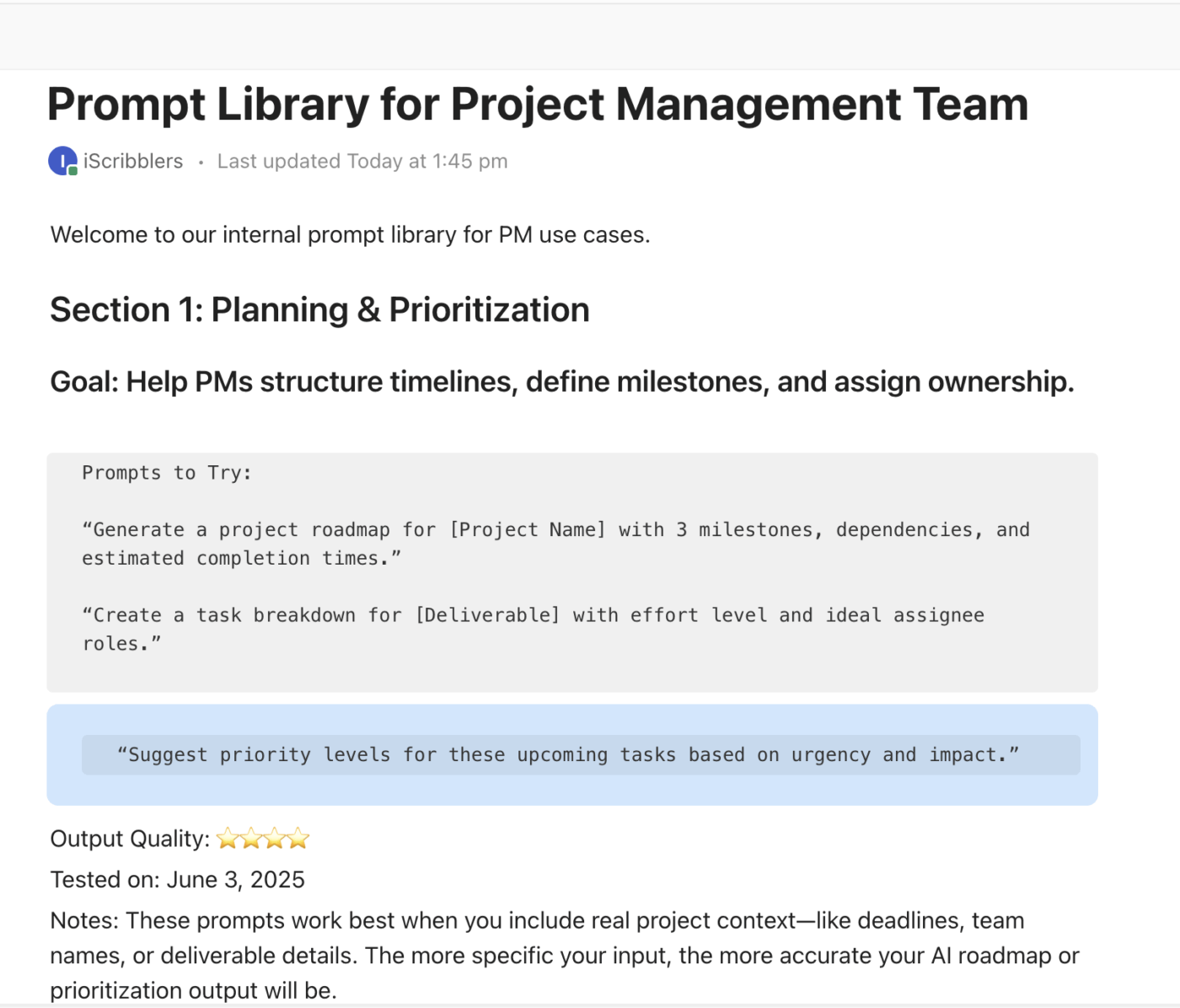
For project managers, meetings are where key decisions get made, everything from sprint priorities and task dependencies to budget shifts and change requests. But too often, those insights stay trapped in meeting notes that no one revisits.
Far from driving action, the PM ends up spending hours writing summaries, assigning tasks, and chasing clarification from teammates who “missed that part.” But it doesn’t have to be that way.
We highly recommend using ClickUp’s AI Notetaker, a built-in assistant that attends your virtual meetings (like Zoom or Google Meet) with you. It transcribes conversations in real time and automatically creates action-oriented summaries.
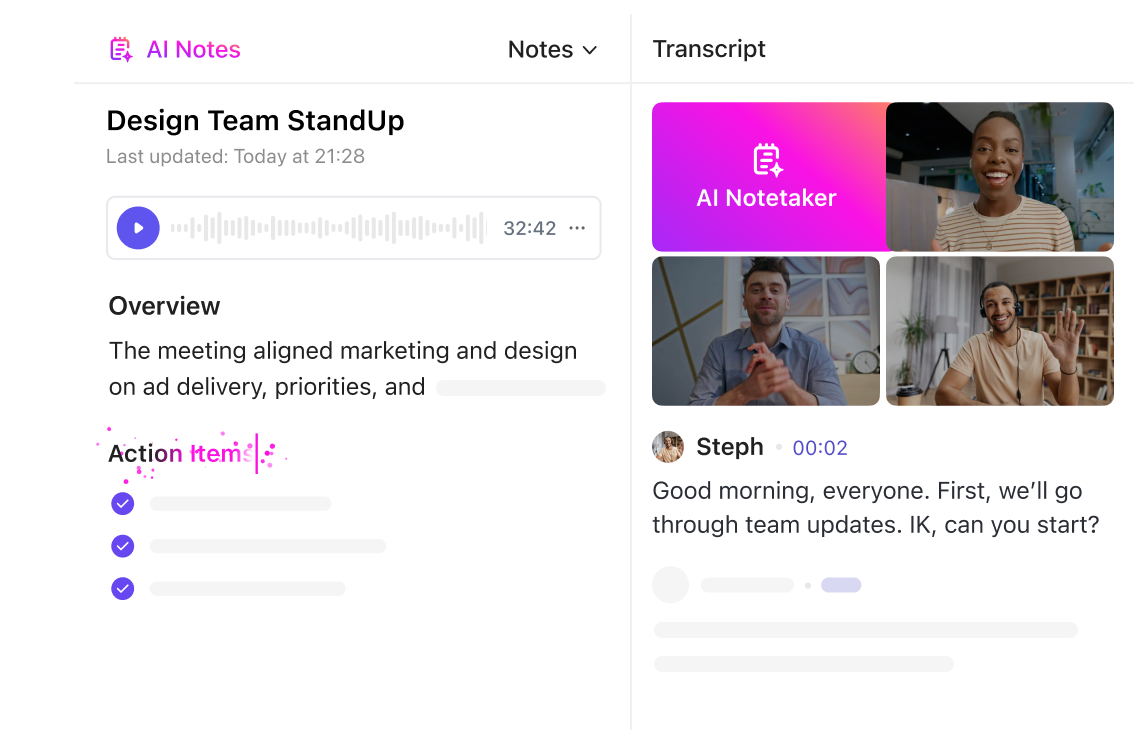
Each summary is linked to relevant tasks or Docs, so when the team decides to “extend the testing phase by two days,” that update appears in ClickUp immediately.
The result? Fewer follow-up pings, no manual re-entry, and a complete audit trail of what was discussed, decided, and delivered. Focus on facilitation and decision-making instead of administration, allowing the team to gain full clarity on what happens next.
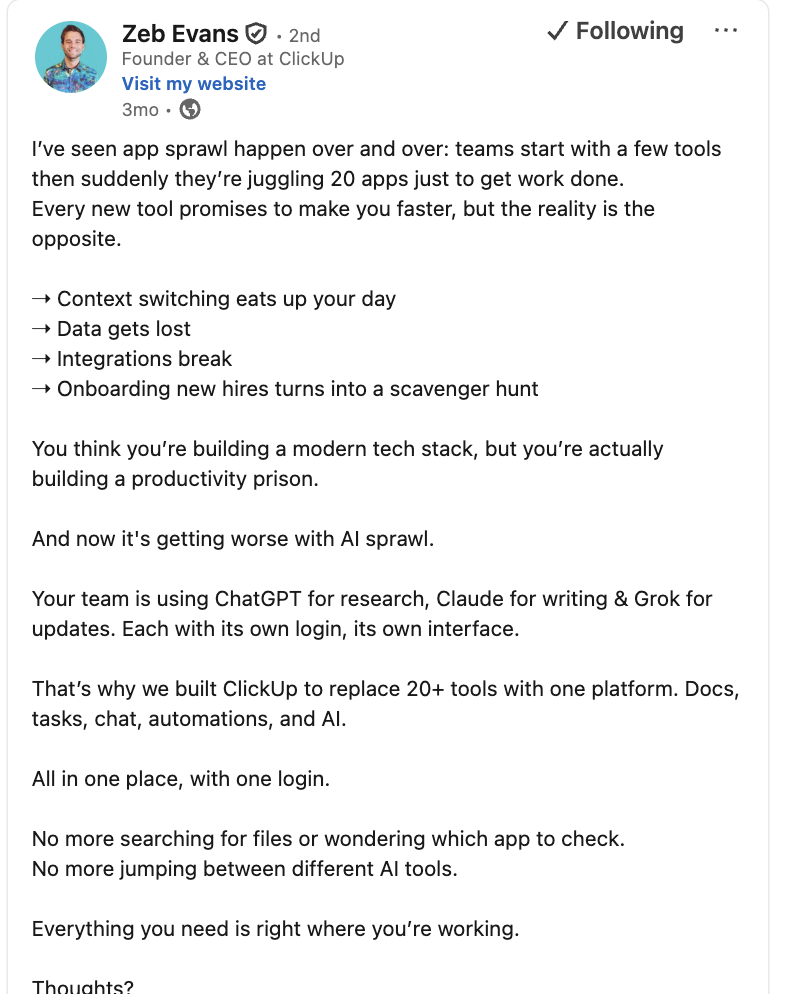
Here’s what Zeb Evans, CEO of ClickUp, thinks about app and AI sprawl. The need for having an AI stack is greater than ever:
💡 Pro Tip: Instead of toggling the AI Notetaker on for every single meeting, go to the settings in your Planner. Under the “Automatically join meetings for” option, select all the calendars on which you wish to use the Notetaker. This way, you’ll never forget to record an important discussion.
Think about how many hours your team loses every week just hunting for documentation.
Where is the final marketing plan? Is the latest project brief in Slack? Who moved the budget spreadsheet and where? This messy fragmentation of knowledge not only annoys people but also directly impacts productivity, time management, and project success.
ClickUp Docs solves this by centralizing all your project knowledge. This is where you put everything, from complex project plans and technical specifications to meeting notes and marketing plans.

Docs are super flexible too. You can add images, tables, videos, PDFs, and embedded spreadsheets right inside them, making them versatile for all your project needs. Plus, multiple team members can edit Docs simultaneously, leave comments, and tag colleagues using @mentions for easy team collaboration.
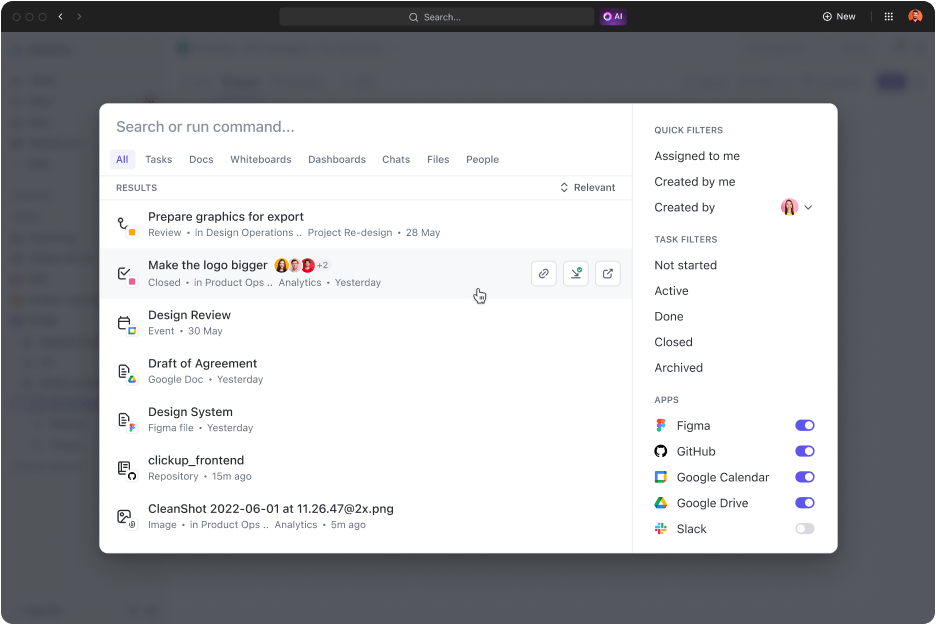
Since all Docs live in the unified workspace, they are instantly discoverable via ClickUp Enterprise Search. This reduces the time wasted searching through random emails or external applications.
⚒️ Quick Hack: Speed up documentation workflows with ClickUp AI. While reviewing a Doc, ask AI to generate action items from notes and link them to the right list or folder. Then, use Summarize Doc to produce an instant executive summary to share with stakeholders.
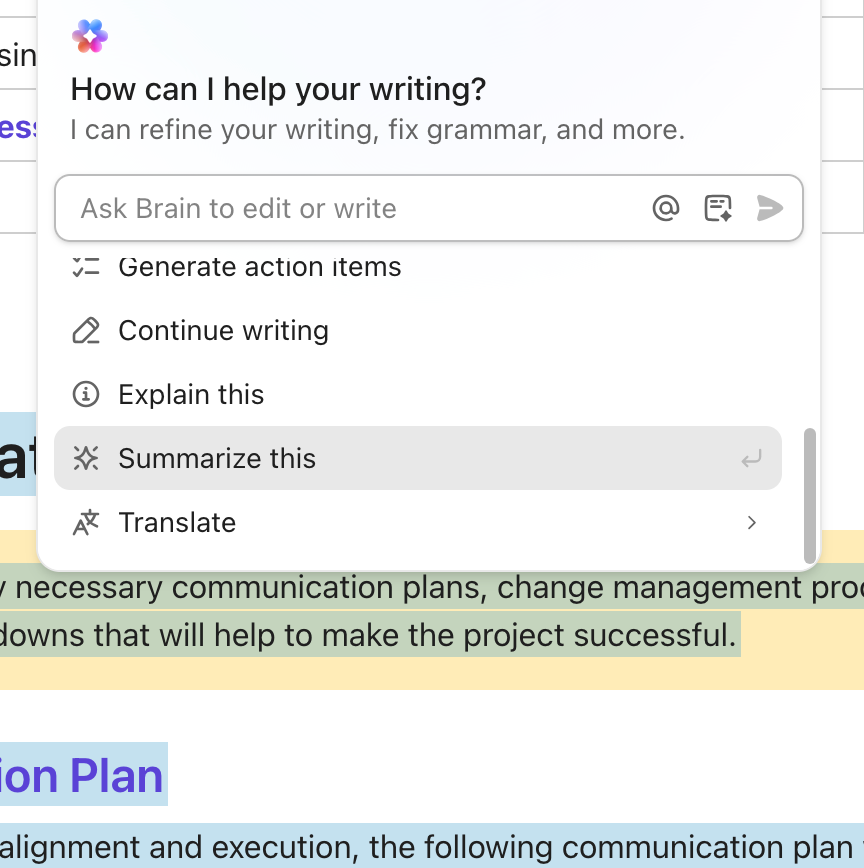
Save that paired workflow—“Action-items + summary” as a Doc template, so your team can reuse it consistently across projects.
If you’ve ever used spreadsheets to manage work, you know the drill: they’re way too static. You have to do everything manually: from creating tasks to assigning them to tracking status updates.
The result? You waste more time doing work about work than actually improving project quality and delivery.
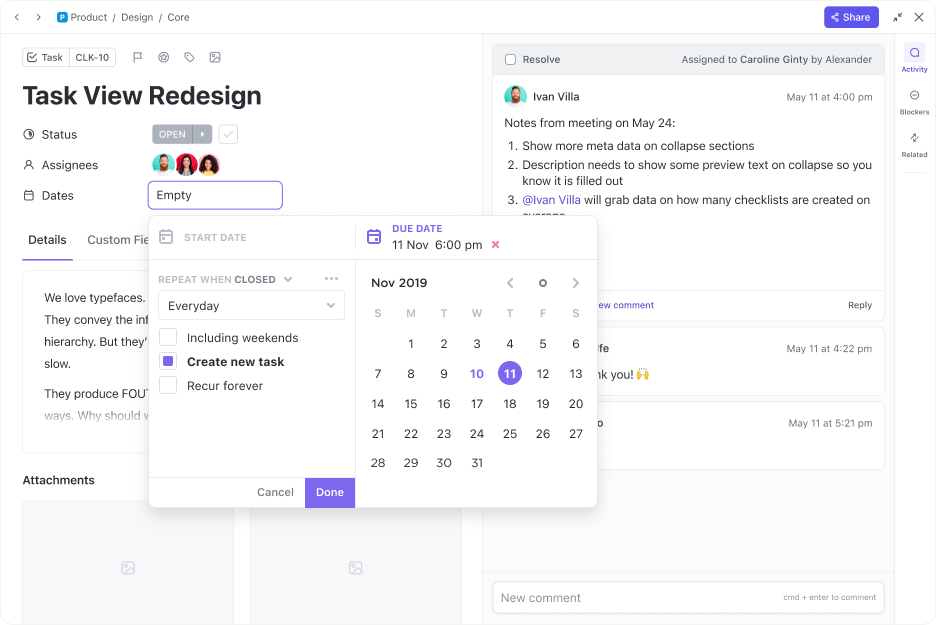
ClickUp Tasks make it super easy for project managers to create, assign, track, and manage work. For every task you create, you can add key details like Assignees, Due Dates, Status, and Task Descriptions. Plus, you can customize them even further with unique fields like estimated time or a quick task summary.
⚡ Template Archive: Free Project Management Templates for All Types of Projects
Got a complex task? Break it down! Use Subtasks for more manageable steps, or create simple ClickUp Task Checklists within the main task so the person working on it never misses any requirement.
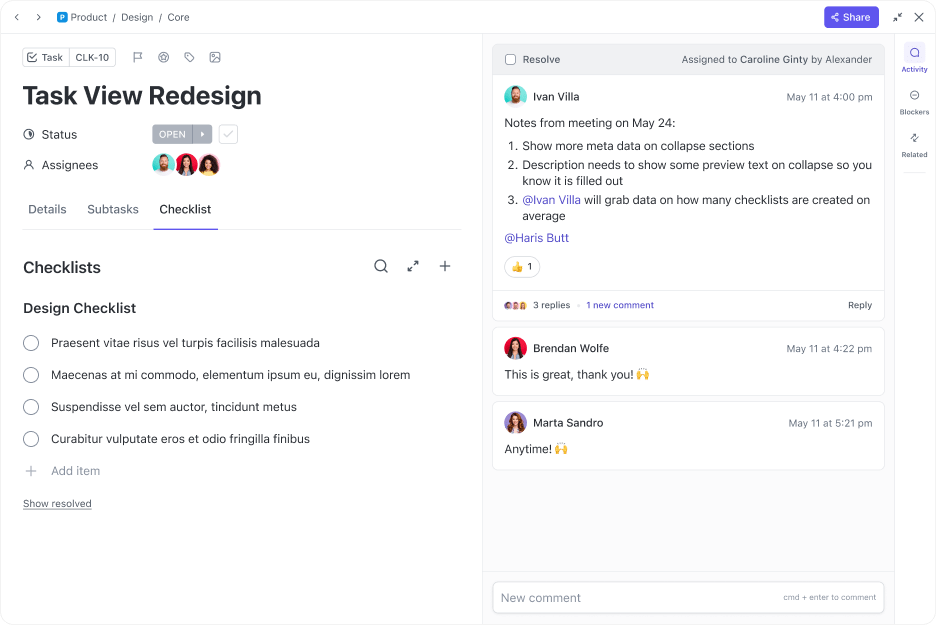
You can automate this entire process using ClickUp Brain. Instead of manually assigning tasks, the AI can instantly read your task descriptions, automatically generate checklists, and even suggest the right assignee based on team availability and past performance.
👀 Did You Know: According to a recent survey by Gartner, 45% of organizations with high AI maturity report that their AI projects remain operational for at least three years—a sharp contrast to just 20% in low-maturity organizations.
That longevity is linked to how these organizations choose projects based on business value and technical feasibility, and pair them with strong governance and engineering practices.
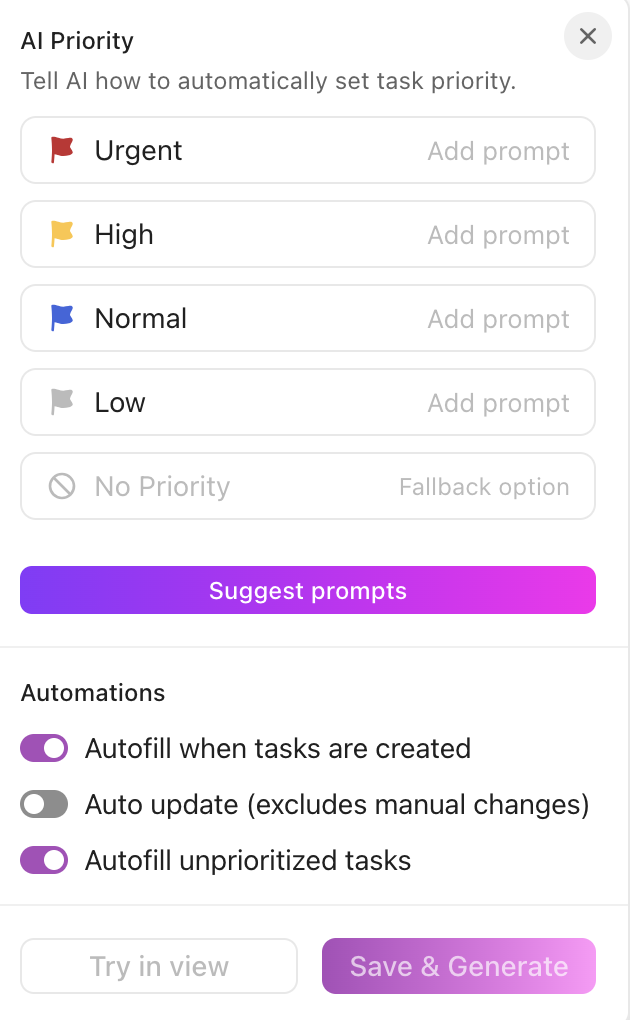
⚒️ Quick Hack: ClickUp AI can auto-populate key fields for your ClickUp Tasks. This includes due dates, priorities, and time estimates right where you create Tasks. The moment you create a task, AI analyzes your task description and context to recommend the right details—saving you the effort of filling them out manually.
When the task you need to do is in one tool, but the latest update about it just got dropped in a separate chat app, you’re bound to lose context and waste time. You need to have a native collaboration tool inside your project management platform.
We’re talking about chat that lives inside the task itself.
ClickUp Chat enables instant messaging within the ClickUp Workspace, keeping all your conversations organized by project context, rather than isolated in external collaboration tools. You can easily link specific Tasks within your chat messages, and even better, you can convert those chat messages directly into actionable tasks.
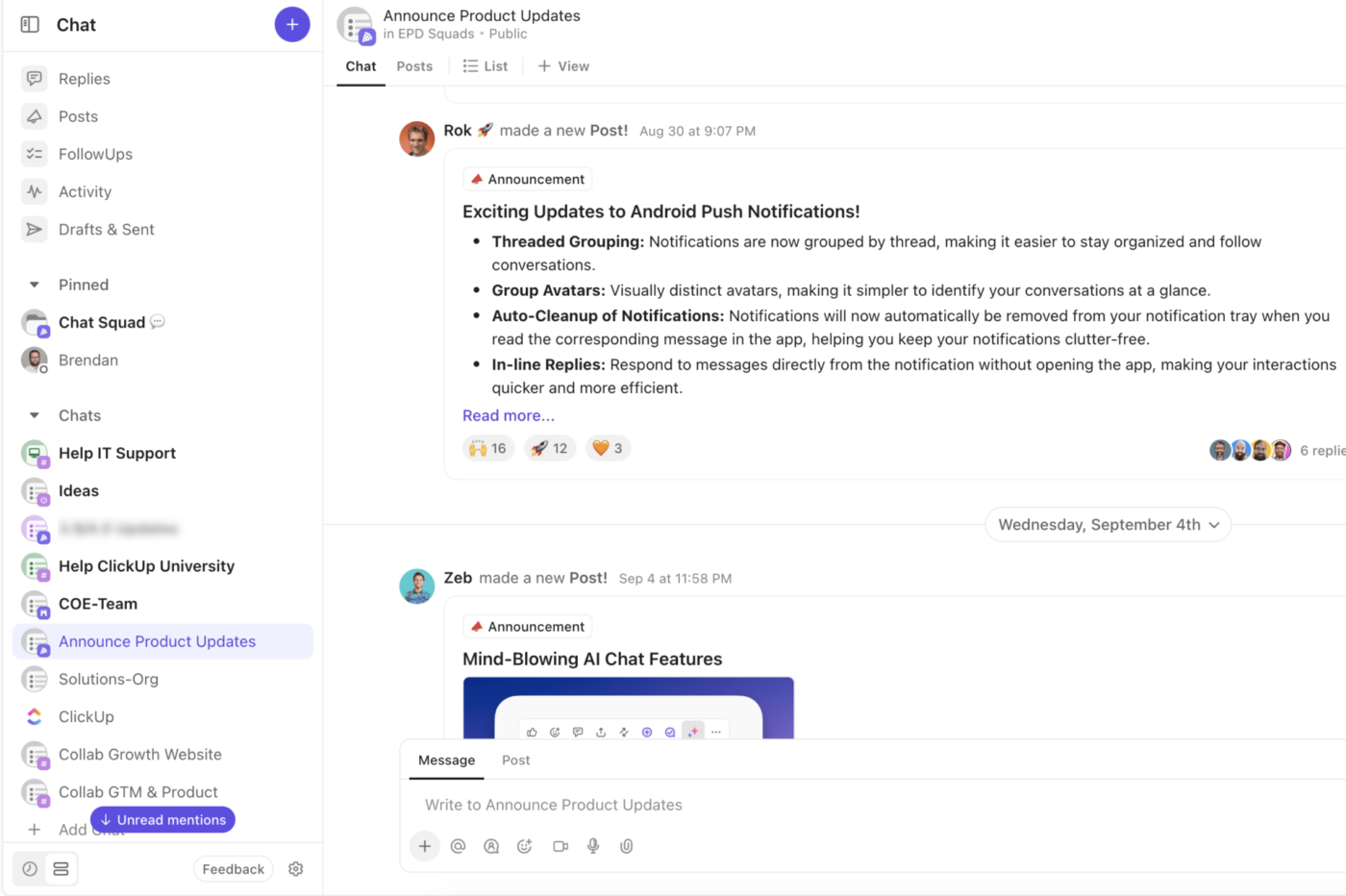
All your chats are secure, with controlled access at multiple levels (Space, Folder, List), ensuring sensitive project data stays confidential.
And if you log in to find a hundred messages waiting for you? Just use the “Catch Me Up” feature to instantly generate a summary of the entire discussion you missed using ClickUp AI!
💡 Pro Tip: Instead of writing a message from scratch, type @brain to open Brain Assistant. Ask it to help you edit, shorten, or completely draft your message before you send it.
Live project insights are great. But if you still have to manually generate a customizable report, send it to the stakeholders, and update the status every week, you’re not actually saving time.
The real payoff comes from automated and intelligent monitoring. When the AI project management tool handles this, the only thing left for you is the critical part: making the decisions.
ClickUp Dashboards give your project managers a real-time, visual overview of the entire project or workspace. They’re essential for making quick, informed decisions because they pull all your key metrics and project data into one easy-to-read spot.
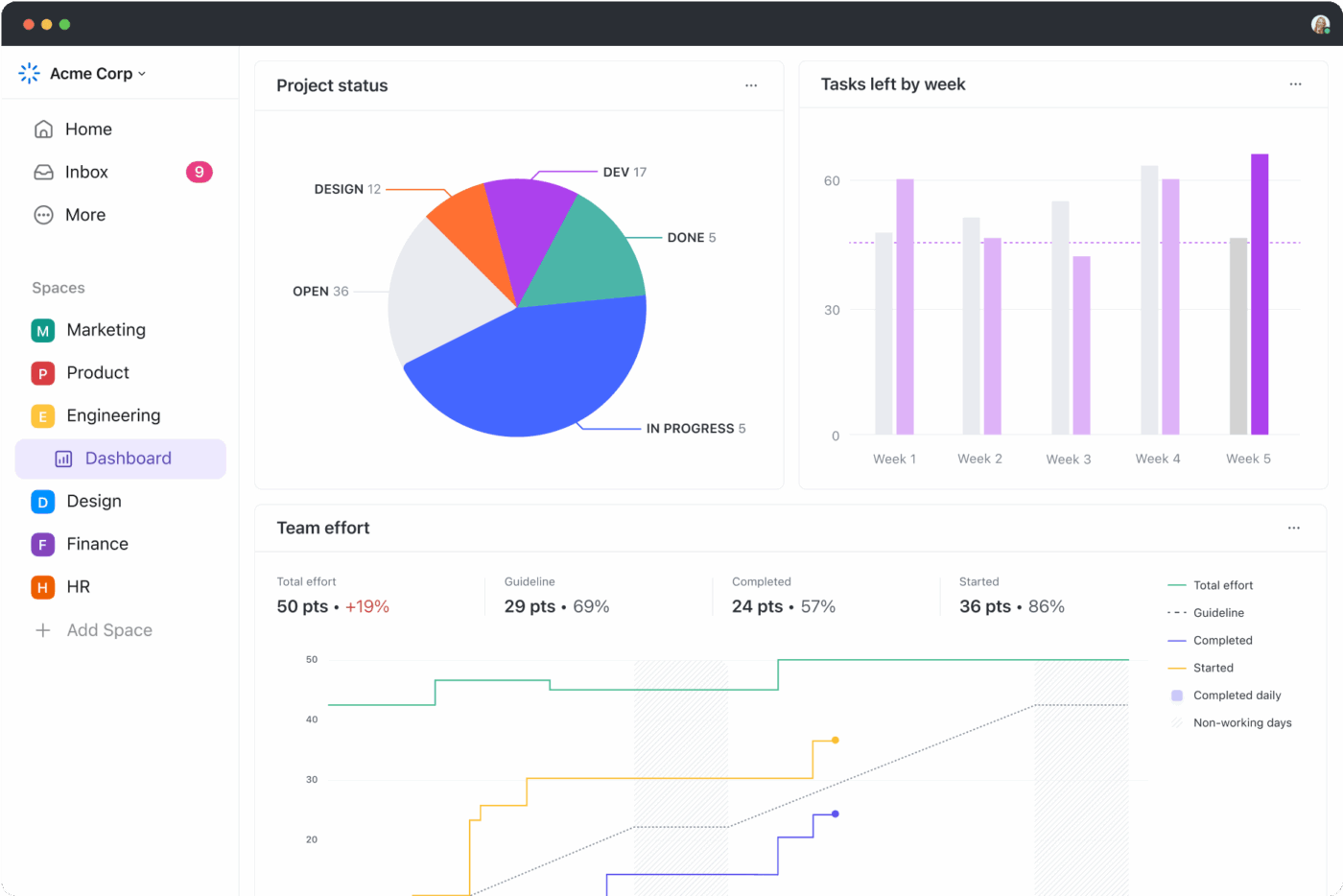
You can easily tailor each Dashboard for a specific audience. You might make a “Team Performance Dashboard” just for managers, or an “Executive Health Dashboard” for leadership. What’s more, you can customize the dashboard for individual team members as well as the department as a whole. Every stakeholder sees only the most relevant KPIs and numbers.
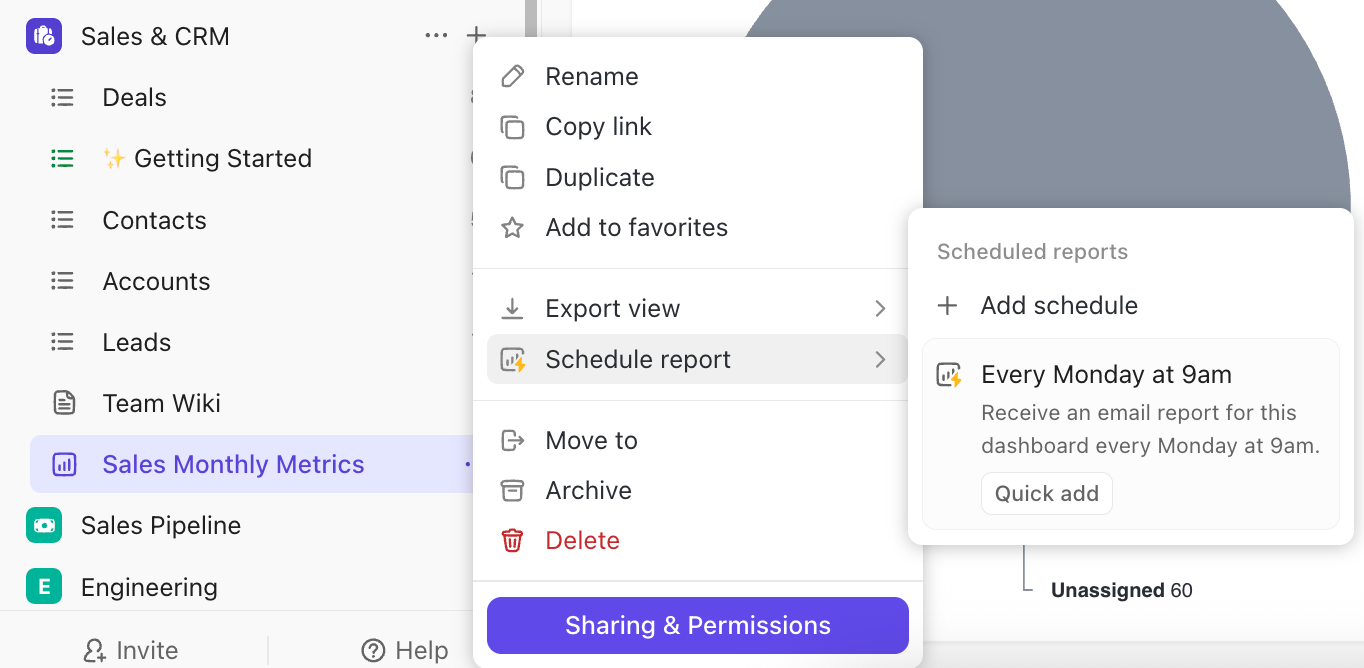
By scheduling dashboard reports, you can automatically send a PDF copy of your dashboard to the project stakeholders at set intervals.
🎙️Customer Voice: Wake Forest University faced mounting inefficiencies across its internal departments—siloed systems, fragmented task tracking, and delayed cross-team updates made it difficult to maintain project momentum.
To unify operations and improve visibility, Wake Forest adopted ClickUp Dashboards to centralize performance tracking, automate reporting, and create a single source of truth for leadership and staff.
The impact was immediate: the university streamlined workflows across academic and administrative units, reduced manual reporting time, and fostered stronger accountability through data-driven transparency.
We can now collaborate within one system and have visibility into critical data. This allows our various teams to report progress, identify workload and capacity issues, and plan in a more accurate way.
A robust AI stack should give you the freedom to automate parts of or entire workflows however you like. That’s the difference between being forced to follow rigid, pre-set software rules and having the intelligence to instantly automate whatever you want.
ClickUp Automations are the magic behind the scenes!
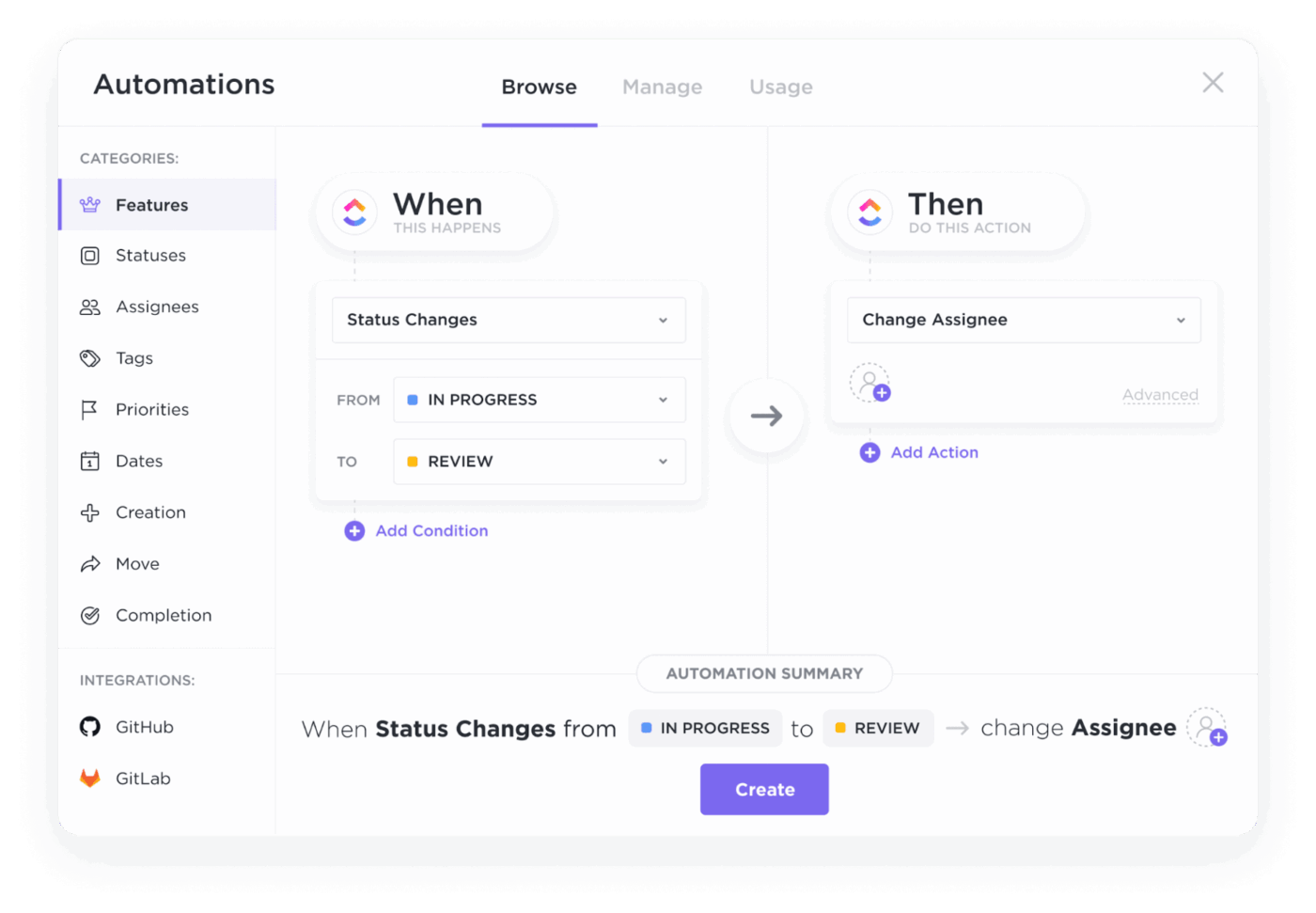
Creating Automations in the project management tool is super simple. Define Triggers (like “when a task is overdue”), set Conditions (like “if the task priority is High”), and automate Actions (like “send an alert to the task owner”). Or, you can just use ClickUp Brain AI to create those automations using natural language!
📚 Read More: Data Dashboard Examples to Take Inspiration From
You can also set up recurring ClickUp Reminders, put task management on autopilot, and oversee projects without drowning in administrative details.
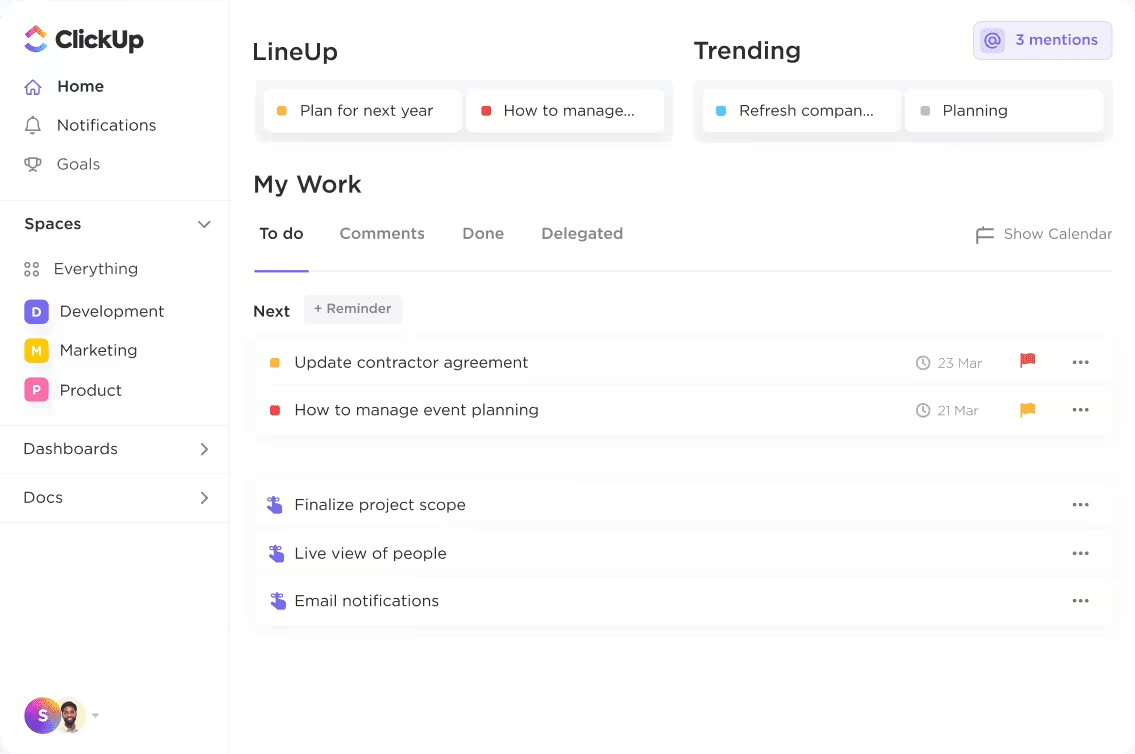
⭐ Bonus: ClickUp’s AI Agents are game changers for anyone looking to minimize context switching and boost productivity in their project management process.
You get Pre-Built Agents, such as daily standups, asynchronous team updates, project status summaries, and automated responses to work-related questions.
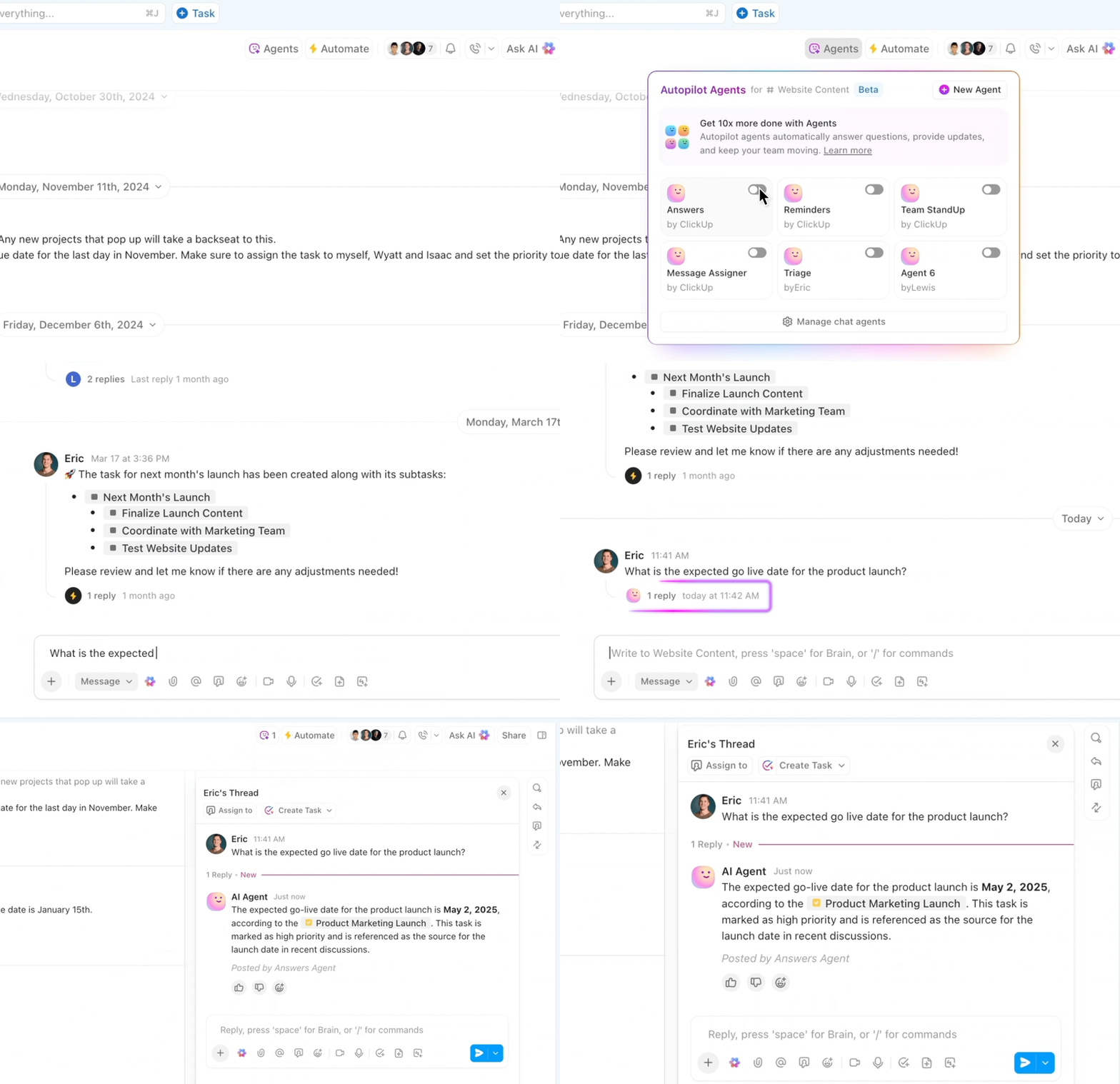
You can also use ClickUp’s Custom AI Agents to design custom automations (with zero code!) tailored to your team’s specific processes. For example, you could create a custom agent that automatically analyzes newly created project requests in a particular List, drafts initial project briefs, and assigns them to the relevant project manager.
Here’s exactly why project managers shouldn’t hesitate to switch from traditional project management platforms to an integrated project management AI stack:
Think about the last time you wanted to know if a project was at risk of a budget overrun. You probably spent an hour asking the finance team for the latest spend, gathering updates from task owners, and whatnot. By the time you had the answer, the data was already stale.
An integrated AI stack fixes this by creating a single, reliable source of truth for all your project activity, including financial management. Since all project data from different layers is constantly merged into one secure place, project managers can instantly access every single detail without having to jump between five different tools.
🧠 Fun Fact: Without centralized visibility, crisis meetings often descend into chaos as people scramble to find out why they weren’t informed sooner, inevitably leading to finger-pointing. This is called “Blamestorming,” meaning teams spend all their time arguing and assigning fault rather than fixing the problem.
With an integrated AI stack, you get back hours every week that were previously spent on manually doing tedious, repetitive chores, contributing to timely project completion.
The AI automatically tracks tasks and feeds project progress data into reports, transcribes meetings, chases task owners for updates, and much more.
The result is a huge win for everyone: leaders and project managers gain more time to focus on strategy, and team members gain more focus time to spend 100% on delivering successful project outcomes.
📚 Read More: How to Streamline Workflow Automation?
In traditional project management, your reports are usually just “snapshots.” For example, a project manager gathers data every Friday afternoon and reports on it the following Monday. The information is old news before it even leaves the inbox!
AI-powered project execution solves this. It automates data flow across all five layers. So, when a team member marks a task complete in the project management tool, the status is immediately and automatically sent to the reporting dashboard.
Even better, the AI stack uses predictive analytics. It compares the live data from your current project (e.g., velocity, burn rate) against historical patterns to project the most likely final outcome based on how you’re performing right now.
For instance, the AI might tell you, “Based on our current rate of spending and the complexity of the remaining tasks, we have an 80% probability of exceeding the budget by $50,000.”
✅ Fact Check: As per The State of Project Management Report by Wellingtone, over half (54%) of companies still lack access to real-time insights. This forces at least one-third of teams to waste an entire day or more just collecting and manually compiling status reports.
Your AI stack is essentially a smart, connected nervous system for project management that synchronizes all information in real time.
Task owners don’t need to manually hunt down and share updates; the AI automatically fetches that progress and shares it with relevant stakeholders, keeping everyone on the same page while cutting down on notification “noise.”
On top of that, AI standardizes how information is documented. Whether it’s a risk report, a lessons-learned document, or a key decision log, the AI handles the structuring and formatting, meaning every piece of content looks the same and is easy to read.
📚 Read More: Best AI Content Creation Tools
👀 Did You Know? Creating a comprehensive weekly status report for a single project often takes even an experienced human PM 30 to 60 minutes to gather and synthesize the data. AI support can prepare the same report within seconds, instantly transforming weekly reporting from a repetitive task into a quick review.
Since all tools and information are connected, adding new projects or team members doesn’t fragment operations. Everyone plugs into the same integrated ecosystem with shared visibility and standards.
Plus, AI handles the repetitive parts of the workflow, like summarizing meetings, consolidating data, and generating standardized reports. That means you can manage task assignments for 20 projects just as easily as five.
In short, the admin burden doesn’t balloon with the project load. The project management AI stack quickly absorbs it, helping you balance workloads and manage project managers.
🧠 Fun Fact: Project managers have a colorful, albeit unofficial, term for projects that are failing but look fine on paper: the “Watermelon Project.” This is because the status reports are green on the outside (meaning “on track” for budget, time, and scope), but when you look beneath the surface (or “cut it open”), the project is actually red (in trouble or failing), like the colors of the fruit itself.
Before we wrap up, let’s look at some common mistakes project managers make when building an AI stack and the simple ways you can dodge them:
It’s easy to get swayed by trendy features. As a result, you may end up investing in a tool without verifying if it actually solves a high-impact pain point.
✅ How to avoid it: Always identify and prioritize your biggest headaches first before you even start looking at new AI project management tools.
Project managers often confuse AI and automation with completely removing human input. This leads to acting on unverified results or flawed insights.
✅ How to avoid it: Offer short, hands-on training sessions, communicate the switch early and often, and show quick wins to build team trust.
Companies often announce that a new tool is available without explaining why it makes the team’s life easier or providing proper support.
✅ How to avoid it: Offer short, hands-on training sessions, communicate the switch early and often, and show quick wins to build team trust.
You trust the vendor’s amazing demo and assume the tool will handle your messy, real-world project data without issues.
✅ How to avoid it: Always run a Proof of Concept (POC). Test the tool with your team and your actual data for a few weeks to prove it truly hits your performance goals.
Ultimately, the right AI stack for any project management team isn’t just about having smart tools; it’s about connectivity across all layers, especially when managing multiple projects. If your AI tools are brilliant but can’t talk to each other, the stack won’t actually change anything—it’ll just be more tools to manage.
ClickUp, the everything app for work, fixes this. It offers powerful features to support every single layer of your AI stack in one cohesive, unified way.
Whether you’re planning projects, documenting requirements, allocating tasks, tracking project progress, or leaving feedback, you can get everything done inside ClickUp without ever leaving the platform.
Sign up for ClickUp today and experience the power of a truly unified AI stack!
An AI stack is a cohesive system of integrated AI tools that power the complete project management workflow through five key layers: planning, execution, communication, reporting, and knowledge. Together, they minimize manual admin work and deliver real-time, accurate project insights.
By enabling real-time visibility, instantly pulling execution data (like completed tasks) into dashboards and reports without any manual syncing, and using predictive analytics, where machine learning models analyze live project data against historical patterns to forecast risks, budget overruns, and deadlines proactively.
ClickUp is one of the best project management software solutions that offers an all-in-one solution. Teams can use ClickUp Goals to plan projects, ClickUp Docs to manage project documentation, ClickUp Dashboards to track project progress, ClickUp Chat to facilitate team collaboration, and ClickUp Automations to eliminate repetitive admin work.
ClickUp integrates AI through its built-in assistant called ClickUp Brain, which acts as a digital knowledge manager and productivity assistant accessible anywhere in ClickUp. It helps with real-time task management, workflow automation, and finding contextual info instantly, turning the whole platform into a unified project management platform.
The biggest pitfall when implementing AI in project management is failing to integrate tools into a single, cohesive stack that can lead to data silos. Other mistakes include neglecting training and change management, making purchase decisions based on product hype instead of pilot test evidence, and underestimating the role of project managers in light of AI automation.

© 2026 ClickUp

There’s an easier way. Try a free AI Agent in ClickUp that actually does the work for you—set up in minutes, save hours every week.