


Sorry, there were no results found for “”
Sorry, there were no results found for “”
Sorry, there were no results found for “”
When crunching numbers for your projects, Microsoft Excel is a familiar go-to tool. But its licensing costs can stack up, especially for growing teams.
As someone who’s navigated the maze of subscription fees and functionality trade-offs, I understand the need for budget-friendly yet powerful Excel alternatives.
What if you could get tools that offer similar—or even better—features at a fraction of the price?
That’s what led me to explore the top Excel alternatives. I was looking for tools that don’t just replicate Excel’s functionality but bring unique advantages. Think real-time collaboration, advanced project management integrations, and seamless cloud access—all while being kinder to your pocket.
👀Did You Know? Excel was first released in 1982 as Multiplan, a popular CP/M (Control Program for Microcomputers) program.
Explore the 13 Excel alternatives that deliver efficiency, collaboration, and value in one software:
When choosing an alternative to Excel, consider the use case you want to solve. Your choices will change depending on whether you prioritize data analysis, pivot tables, or enhanced project management features.
A few standout elements to consider in the right Excel alternative include:
Focusing on these features will help you find an Excel alternative that meets and exceeds your project management and data handling expectations.
Also Read: 10 Best Data Entry Software Programs
When exploring Excel alternatives, I sought tools that combined advanced data analysis with project-focused features. Each of the 13 tools on this list offers a unique edge, from real-time collaboration to powerful visualizations and customization options.
After looking for an all-in-one platform that blends project management, data management, and data analysis, I found ClickUp to be the top Excel alternative. It’s perfect for high-performing teams that want to refine their processes and improve overall productivity.
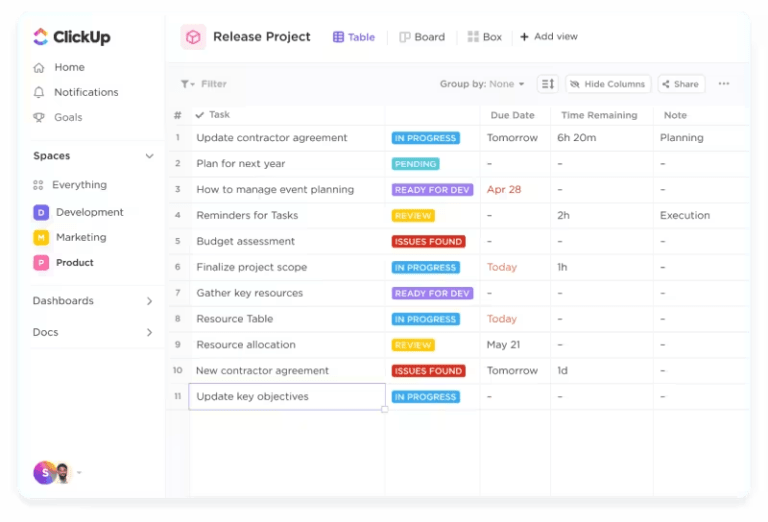
The ClickUp Table View mirrors Excel’s familiar grid format but with added flexibility and computation power.
It allows you to organize tasks as rows in spreadsheet format and automate complex calculations in your columns (or Custom Fields) with ClickUp Formula Fields.

If you’re used to Excel’s formulas, this feature will feel familiar, but it goes a step further. With ClickUp, formulas are tied to your tasks and projects, offering real-time calculations on project timelines, budgets, or task dependencies. This functionality eliminates the need for manual updates and ensures that your spreadsheet data stays dynamic and up to date.
ClickUp even lets you go beyond simple data calculations by providing advanced Formula Fields Automations. You can automate routine workflows and calculations based on formula-driven triggers and conditions.
If you enable automation in your workspace, you can ask ClickUp Brain, your best alternative to Excel AI tools, to write you an advanced formula. You can use other Formula Fields as variables in your advanced Formulas!
As someone who explored ClickUp Brain extensively, I can confidently say it’s an amazing AI tool for anyone managing complex data. Apart from creating advanced formulas by integrating AI with ClickUp’s advanced Formula Fields, it effortlessly offers personalized, context-aware solutions (check task dependencies or deadlines, calculate performance metrics, etc.) to improve the workflows.

For example, I’ve set up automation to flag overdue tasks based on calculated due dates or reassign tasks once specific project metrics are met. It’s a time-saver and a significant upgrade from manually managing spreadsheets.
The ClickUp Editable Spreadsheet Template is a powerful tool my finance team uses to store, organize, and analyze data (even the most complex financial statements). From budget tracking to project planning, it helps my team manage all information in one convenient place.
What I appreciate most about this template are the automated data imports. They save a significant amount of time and reduce the risk of errors. Creating custom formulas allows quick number crunching, while intuitive visuals help track progress on projects and investments.
The template also includes Custom Statuses, Custom Fields, and Custom Views, allowing me to manage financial records effectively. For instance, I can categorize my entries with attributes like Gross Sales and Administrative Expenses and switch between views such as Financial Statements and Approval Process.
I need a blog to write everything I like about ClickUp. They have EVERYTHING: Tasks (in list view, table view, board view, calendar view, map view, etc), Docs, Dashboards, automations… You can share public links to tasks or docs. The tasks have an activity tab, so you can see all the history about that task. It’s so flexible and professional. With ClickUp we have the control of everything.
🧠Fun Fact: Some of the suggested names for Excel were Mr.Spreadsheet and Master Plan.

I have long used Google Sheets as a free alternative to Excel for personal use. Its cloud-based functionality means I can use the spreadsheet software anywhere without worrying about version control or missing updates. It smoothly integrates with Google Workspace, which makes it easy to pair with tools like Google Docs and Gmail.
💡Pro Tip: Create a miniature chart in a cell with the Sparkline command. For example, SPARKLINE(A2:E2,{“charttype”,”bar”;”max”,40}) creates a bar chart.
👀Did You Know? Excel 3.0 was the first software to introduce a toolbar in 1990.

If you’re a Zoho user looking to enhance collaboration and automate workflows, Zoho Sheet is a natural platform extension perfect for everyday team needs. And if you already use tools like Zoho CRM or Zoho Forms, this spreadsheet software is for you. For example, I’ve used it to pull data directly from Zoho CRM into a live spreadsheet, creating dynamic reports without manual updates.
That said, Zoho Sheet is best for those managing straightforward datasets within the Zoho suite. While it excels at simplifying operations and keeping everything connected, it can’t handle highly complex datasets or advanced analytics with as much ease.

If you need something beyond traditional spreadsheets, Airtable is an incredible choice as a Microsoft Excel alternative. What sets Airtable apart is its ability to combine spreadsheet functionality with the power of a relational database, making it far more versatile than typical spreadsheet software.
It’s beneficial for teams that want to organize everything from marketing campaigns to project management spreadsheets, all in one place, and build custom workflows or apps on top of these databases
Also Read: Best 15 Airtable Alternatives & Competitors

For managing large, complex projects or working with big teams, Smartsheet is a fantastic Microsoft Excel alternative. With Smartsheet, you can create customized views and task dependencies for project management that Excel couldn’t handle as intuitively.
Also Read: How to Use Excel for Project Management

I’ve tested LibreOffice Calc for projects that didn’t need cloud features or collaboration tools, and it holds up well for most offline data management tasks. It comes packed with features similar to Excel but without the cost, making it a suitable solution for those who want a fully offline spreadsheet software without limitations.
LibreOffice Calc can work across operating systems (Linux, macOS, Microsoft Windows, and FreeBSD), unlike some other offline spreadsheet software providers.
WPS Office Spreadsheets is a highly adaptable and mobile-friendly alternative to Excel, perfect for users like me who value flexibility and innovative features. One of its highlights is the Smart Toolbox, which simplifies complex tasks with over 60 mini-tools, from text extraction to batch format conversion.
I also found the Picture-to-Text OCR feature valuable for extracting information from images directly into spreadsheets, saving time on manual data entry. The Smart Split Columns function makes it the perfect Google Sheets alternative. It can intelligently handle data separation with customizable splitting methods—ideal for organizing messy datasets.

When reflecting on Apple Numbers, I see its distinct edge in its harmonious blend of design and functionality. Unlike Excel, which prioritizes advanced computation, Numbers stands out for its sleek, visually-driven approach.
Its interactive canvas helped me in data organization, such as arranging multiple tables, charts, and media within a single sheet to create presentations that are as visually compelling as they are functional. For me, this flexibility turned spreadsheets into dynamic storytelling tools rather than static grids.

Gnumeric is an open-source spreadsheet program for professionals prioritizing speed and accuracy over a wide array of features. Its lightweight design made it incredibly fast when handling complex calculations and large datasets without the lag often associated with heavier tools like Excel.
Gnumeric excels in supporting highly efficient algorithms, mathematical functions, and statistical analysis for computations, especially in fields like finance and engineering, where precision is crucial.

If your team depends on Salesforce to manage customer data and drive sales processes, Quip is like an extension of your CRM.
You can use it to embed live Salesforce data into spreadsheets and collaborative documents, allowing your team to update sales forecasts and customer details in real time—all without switching tools.
The built-in chat and comments feature lets teams discuss updates directly within documents, keeping everything centralized. Whether you’re closing deals or tracking customer success metrics, Quip’s tight integration with Salesforce simplifies the entire process.
Apache OpenOffice Calc is a fully open-source spreadsheet tool that provides you with a robust set of customizable features for data analysis, chart creation, and calculations, all without the cost of proprietary software.
What makes this free Excel alternative unique is its strong community-driven product development. The community keeps the tool free and provides highly customizable options like features, macros, and codes for users who need spreadsheet functionality without being locked into a commercial product with irrelevant features.
Hancom Office Cell is transformative and uniquely able to directly edit and convert PDFs without additional software. This is something that truly sets it apart from other spreadsheet tools.
This is good software for those who need to access financial reports and other documents on the go, whether on mobile or desktop.
🧠 Fun Fact: In Excel, 1900 is still a leap year even though it wasn’t. This is because Excel wanted to be compatible with Lotus 123 (once Excel was an alternative to this spreadsheet software)

Tableau’s ability to easily work with diverse data sources, from SQL databases to cloud platforms, lets you create visualizations far superior to Excel dashboards. With advanced analytics and storytelling features, the drag-and-drop intuitive interface can turn raw data into compelling narratives.
It’s one of the best Excel alternatives to elevate data presentations to a professional level.
There you have it. The ultimate list of paid and free Excel alternatives that do more than just handle rows and columns of data.
While all of them have specific strengths, in my experience, ClickUp is one of the few powerhouses for managing data, workflows, and team collaboration under one roof. Unlike standalone spreadsheet software, ClickUp merges advanced formula fields, customizable dashboards, spreadsheet templates, and automation with task management, Gantt charts, and real-time updates.
Its ability to unify data visualization tools with actionable project management tools makes it a transformative choice for most use cases.
Don’t settle for the limitations of Microsoft Excel. Sign up for all the benefits of ClickUp today.

Jeremy Galante
Max 26min read

Manasi Nair
Max 23min read

Arya Dinesh
Max 22min read

© 2026 ClickUp





