


Imagine a situation where a maintenance task is scheduled to repair a critical machine. However, due to miscommunication and missing details on the work order, parts weren’t ordered on time, or technicians were dispatched without the essential tool set or materials needed.
The consequences? Delayed operations, frustrated clients, and extra costs.
So, how can you ensure that your work orders are thorough, customizable, and easy to manage? This article provides the steps and tools you need to do so.
How to Create an Effective Work Order Format

 Summarize this article for me please
What Is a Work Order?
A work order is a formal document detailing a task or set of tasks to be completed, often in response to a request or maintenance need.📝
Work orders serve as a central source of information, specifying all the job details, timelines, responsible personnel, labor costs, contact details, and required materials.
A well-organized work order system is vital for businesses in manufacturing, facilities management, and field service jobs. It ensures clear communication and simplified workflows.
Work orders can cover a variety of requests, from routine maintenance to urgent repair jobs. Each requires specific information to guarantee accuracy and timely completion.
Summarize this article for me pleaseEssential Elements of a Work Order Format
A well-designed work order format should capture all the necessary information to ensure all gaps are understood.
Here are the fundamental elements to include:
- Work order number: A unique identifier for tracking and referencing
- Date of request: When the work order was created
- Description of work required: Clear, detailed description offering information on the task to be completed
- Assigned personnel or team: The individuals or teams responsible for carrying out the task
- Priority level: Indicating whether the task is urgent, standard, or low priority
- Expected completion date: Setting a realistic timeline for task completion
- Materials and equipment needed: Listing all necessary resources to avoid delays
- Cost estimate: Projected cost, especially useful for budgeting and billing purposes
- Approval signature(s): Authorization for the task, essential for accountability
Summarize this article for me pleaseTypes of Work Orders
Work orders come in various forms depending on the nature of the task and industry. Some common types include:
- Preventive maintenance work orders: Scheduled to keep equipment or machinery in optimal condition
- Corrective maintenance work orders: Issued in response to problems requiring urgent repair
- Inspection work orders: Routine checks to ensure quality, safety, or compliance
- Service work orders: Typically used in customer-facing fields for services like installations or repairs
- Special project work orders: One-off or unique projects with distinct objectives
By understanding these types, companies can better categorize and manage tasks, ensuring appropriate resources are allocated to each.
Summarize this article for me pleaseSteps to Create a Work Order Format
Creating a work order format involves more than just filling out a form; it requires strategic planning to ensure the format is clear, functional, and efficient. A user-friendly, comprehensive project management software like ClickUp can simplify the entire process.
Here’s how:
Step 1: Define objectives

Identify what you aim to accomplish with the work order system. Are you focusing on maintenance, service, or project tracking?
Use ClickUp Docs to track collaborative notes on objectives. It allows for:
- Real-time collaboration: Multiple team members can work on the same work order template simultaneously, streamlining the creation process
- Comment and feedback: Leave comments and suggestions directly on the document, facilitating efficient collaboration and feedback
- Task assignment: Assign specific tasks related to work order creation or review to different team members, ensuring clear responsibilities
Step 2: Identify key data
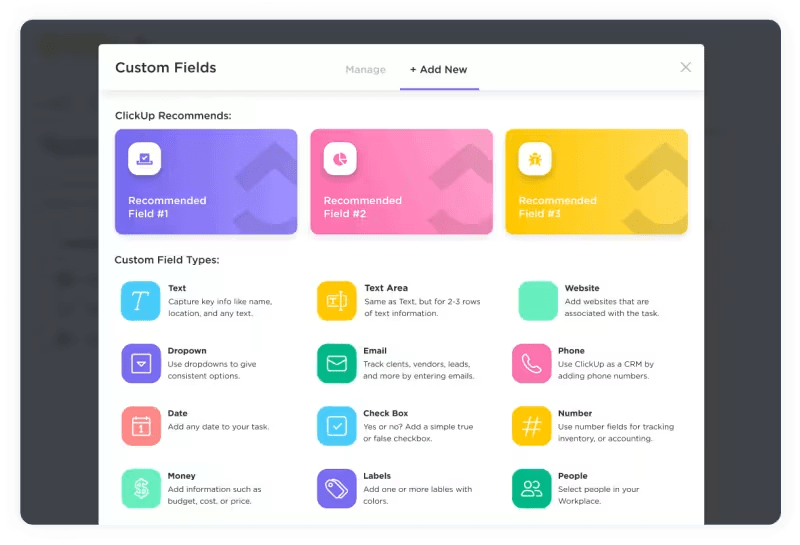
Determine which ClickUp Custom Fields are necessary based on your objectives. This will help you customize order form templates or ready-to-use work logs you want to use.
📌Example:
- Text fields: For open-ended inputs like ‘Request Description’ or ‘Comments’
- Dropdown fields: Use for ‘Priority’ or ‘Status’ to standardize options
- Date fields: Assign ‘Start Date’ and ‘Due Date’ to plan timelines
Some examples of these data fields corresponding to common objectives:
Objective 1: Identify and manage work progress
- Requester/company name
- Request date
- Request description
- Category/Type of request
- Actual completion date
Objective 2: Assign and monitor work progress
- Assigned to
- Status
- Start date and due date
Objective 3: Monitor resources and costs
- Estimated hours
- Material requirements
- Cost estimate
Objective 4: Ensure quality and compliance
- Checklist of requirements
- Approval fields
- Attachments
Objective 5: Analyze and improve workflows
- Priority level
- Work order ID
- Comments/Notes
Additionally, ClickUp Tasks is a great feature for staying more organized and capturing every detail of work orders.
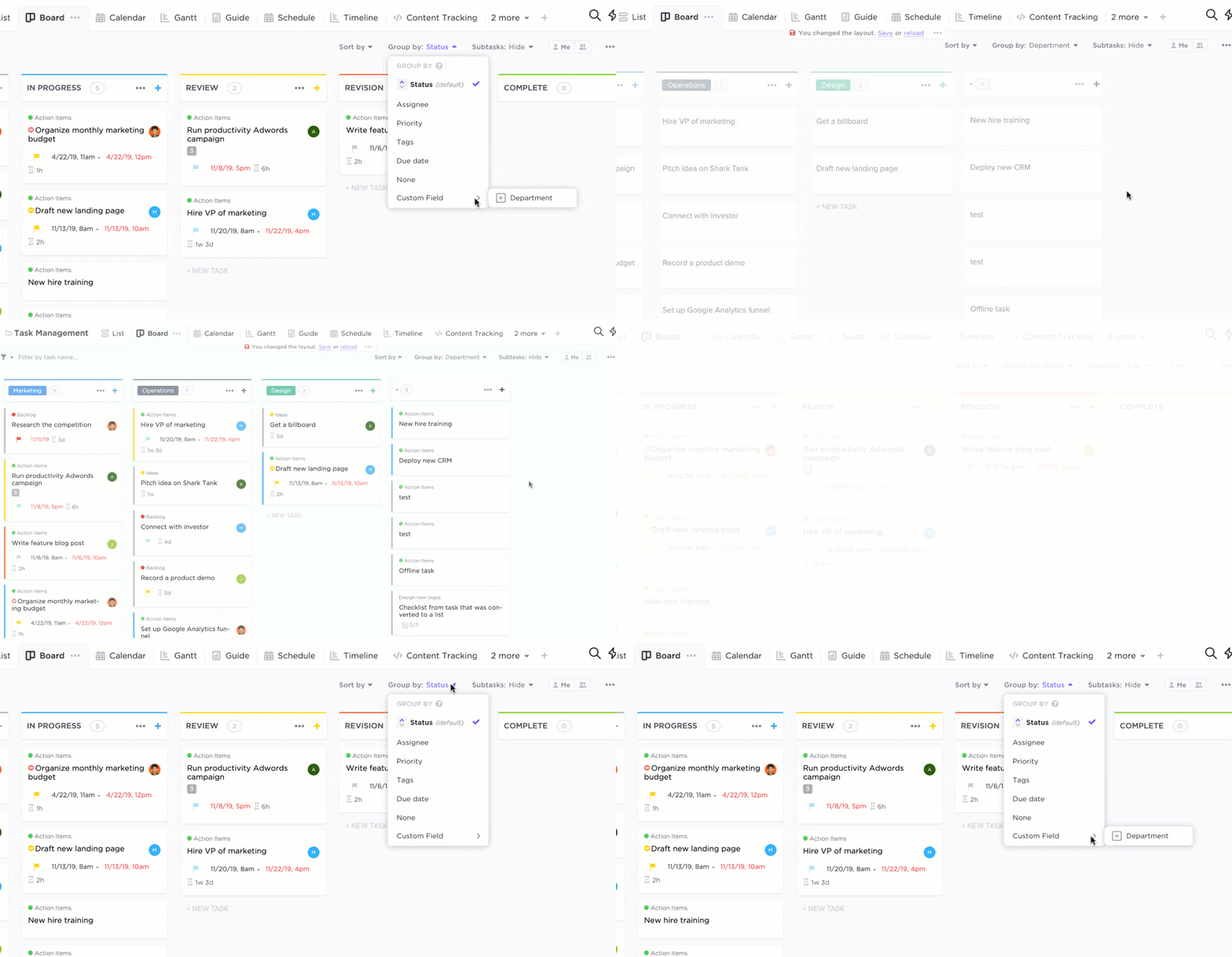
Here’s how it can help:
- Task status updates: Track the progress of each task in real-time, allowing you to visualize the overall status of the work order
- Time tracking: Integrate time tracking to monitor the time spent on each task, helping to optimize resource allocation and budgeting
- Progress tracking: Use progress bars or checklists to visualize the completion status of each task, providing a clear overview of the work order’s progress
Step 3: Set up your workspace
Once you have your objectives and field data ready, it’s time to start building the work order format. There are three methods to do this:
Method 1: Using ClickUp Forms
This option works best if you have an Unlimited plan in ClickUp.
In your chosen ClickUp Space, click ‘+’> Form > Order Form. This will open an editable format for you to customize the work order.

Adjust fields, options, and layout to suit your specific needs and industry requirements. You can then easily add and assign tasks, set priorities and due dates, track progress, and more.
Method 2: Using ClickUp Table View
This is ideal for creating classic, simplified formats.
Choose a Space to work in or create a fresh one for your new work order.
Go to + View > Table to launch the basic table format.

Start customizing the table per the objectives and data tasks you identified during Step 2 of creating the work order format.
Simply add them as tasks, set due dates and priorities by clicking on the icons on the right, and then save each task.

Once you are happy with the table, share the format with relevant team members and stakeholders for real-time collaboration.
Method 3: Using the ClickUp Work Request Template

The ClickUp platform transforms into a dedicated work order software with different features and work order templates.
For instance, adding the ClickUp Work Request Template to your workspace will preload with fields and structures suited for managing work requests and orders.

All the fields you see here can be renamed and customized to suit your specific requirements and preferences.
This work order template simplifies the process of managing and tracking work requests, making it a valuable tool for:
- Consolidating all work requests into one place for better visibility
- Reducing the risk of losing or mismanaging requests
- Creating tailored forms to capture necessary details (e.g., priority, work description, deadline)
- Ensuring complete and accurate information for each request
💡Quick Tips:
- Use ClickUp Milestones and ClickUp Calendar View to track all deadlines and ensure timely deliveries, updates, and reviews
- Set up automated notifications to ensure everyone is on the same page regarding task statuses
- Visualize projects easily with ClickUp Board View
Step 4: Monitor progress and reporting

Use ClickUp Dashboards to monitor all active and completed work orders. The reporting feature will help analyze trends such as the average time to complete work orders and the most frequent request types.
Summarize this article for me pleaseProfessional Features for Seamless Work Order Management
Creating an effective order format is just the beginning. The right work order management software will elevate your work order system from functional to optimized, providing benefits like flexibility and improved accuracy while helping you save time.
Here are some benefits of a customized work order format:
- Time-efficient solutions: Pre-made work schedule templates and automation tools can save hours of manual work by auto-filling fields and tracking deadlines
- Multiple sharing options: Seamless sharing between departments, clients, and vendors keeps everyone in the loop
- Creation in different formats: With software like ClickUp, you can create work orders as documents, forms, or checklists, depending on the type of work and preferences
Tools for tracking, managing, and organizing inventory
Tracking resources and inventory is key to managing work orders efficiently. ClickUp’s automation and integration features can significantly streamline and optimize your work order management processes.
Automating repetitive tasks and integrating with other tools can improve efficiency, reduce errors, and enhance productivity.
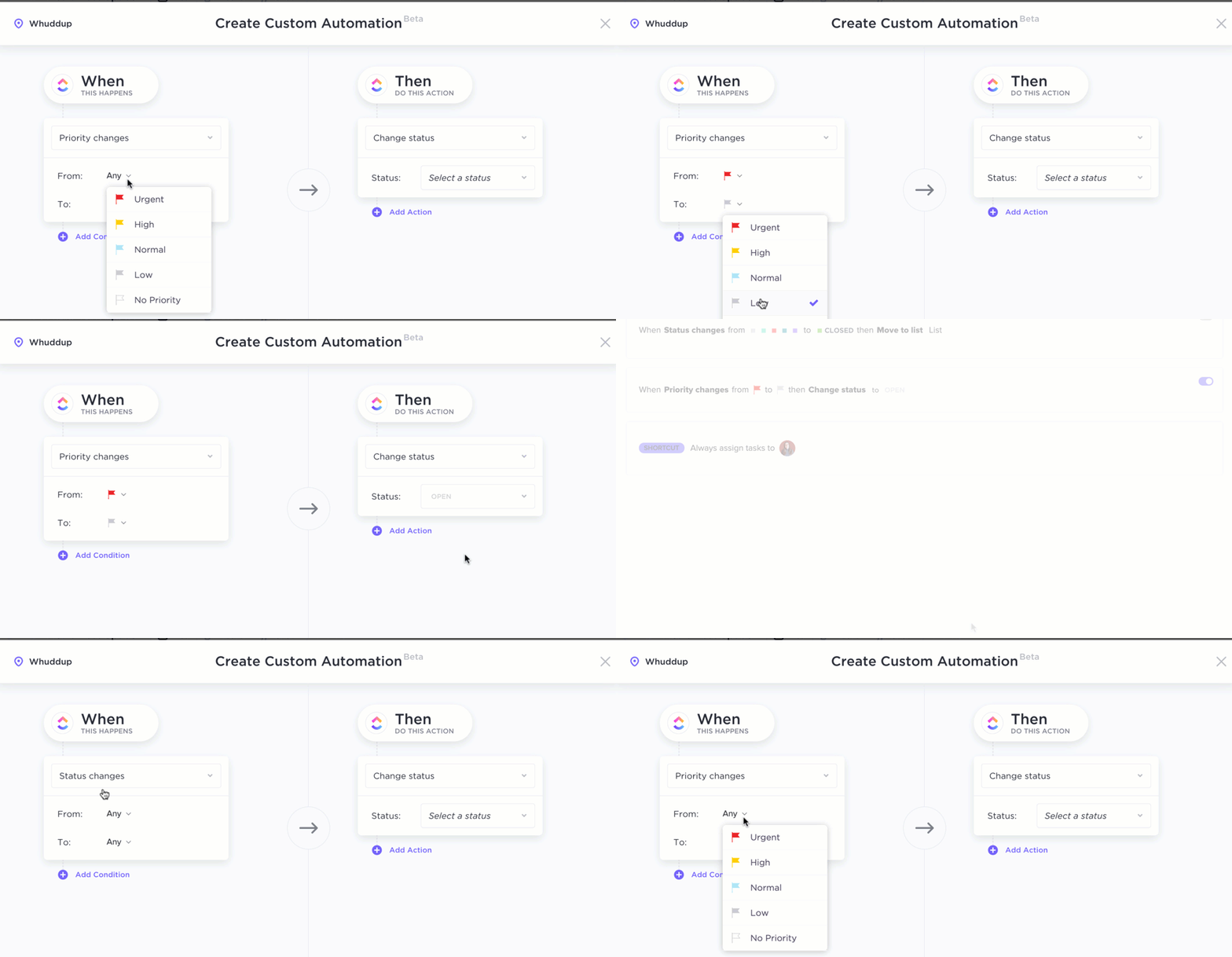
ClickUp Automations allows you to set up automated workflows to trigger specific actions based on predefined conditions. For instance, when creating a new work order, you can automatically assign it to the appropriate technician or team.
Additionally, you can schedule automated actions at specific times, such as sending technicians reminders about upcoming deadlines or generating weekly or monthly reports.

Seamless ClickUp Integrations with various tools can help enhance your work order management. Integrating with your CRM system allows you to automatically create work orders from customer requests or service tickets, ensuring faster response times.
Integrating with field service management tools lets you automatically dispatch technicians, track their location, and update the work order status in real time. Furthermore, integrating with inventory management systems helps you automatically update stock levels when parts are used for work orders, preventing shortages and ensuring efficient resource allocation.
Lastly, integrating with communication tools like Slack or Microsoft Teams lets you send notifications and updates about work orders directly to relevant team members, improving collaboration and reducing response time.
Summarize this article for me pleaseWhy Standardizing Work Orders Is Important
Standardizing work and purchase orders across an organization brings a sense of structure and reliability. It ensures that all teams follow the same format, leading to fewer discrepancies and more consistent data across projects.
This standardization is critical for industries that rely on compliance, such as healthcare, manufacturing, and government services.
Using ClickUp’s Reporting and Analytics features offers insights into work order trends, completion rates, and resource allocation. With access to detailed analytics, managers can make informed decisions, create and optimize workflows, and enhance service quality, achieving better outcomes and productivity.
Summarize this article for me pleaseIndustries that Use Work Order Formats
Many industries depend on work orders to streamline operations and track essential tasks.
Here are a few:
- Manufacturing: Help the maintenance team track equipment repairs, upkeep, and production tasks
- Facilities management: Schedules regular maintenance, inspections, and emergency repairs
- Construction: Manages building inspections, on-site issues, and special projects
- Healthcare: Organizes equipment maintenance, patient services, and facility upkeep
- IT services: Schedules installations, repairs, and network maintenance
- Hospitality: Manages room repairs, cleaning schedules, and guest services
These industries use work orders to ensure that tasks are performed on time, resources are adequately managed, and services meet quality standards.
Summarize this article for me pleaseUsing the Right Tool for Work Order Management
A well-organized work order system is essential for operational success, and a comprehensive platform like ClickUp ensures such efficiency.
ClickUp provides automation, integration, and customization options, making it a valuable choice across industries. From reducing manual effort to boosting efficiency and accountability, ClickUp’s tools empower teams to work smarter, not harder.
Bring clarity, control, and customization to every project.
Try ClickUp today!


Everything you need to stay organized and get work done.

Recent Articles
8 Communication Strategies That Actually Fix Team Chaos 
8 Communication Strategies That Actually Fix Team Chaos
AI Workload Management: A Practical Guide for Teams in 2026 
AI Workload Management: A Practical Guide for Teams in 2026

