


Sorry, there were no results found for “”
Sorry, there were no results found for “”
Sorry, there were no results found for “”
Launching a new product, innovating existing ones, or expanding into new markets are pivotal decisions that can shape the trajectory of your business. For new entrepreneurs, these choices often feel like stepping into uncharted territory—and with good reason.
👀 Did you know? Studies show that up to 90% of startups often fail due to poor strategic planning and misalignment with market demands. 😮💨
One proven way to mitigate such risks is to conduct a SWOT Analysis. This strategic planning framework—focusing on Strengths, Weaknesses, Opportunities, and Threats—helps entrepreneurs identify the internal and external factors influencing their success.
But, let’s be honest—SWOT analysis can be tricky without the right tools or experience.
That’s why we’ve rounded up the best SWOT analysis generators to help simplify the process. Tools like ClickUp make it easy with built-in AI, dashboards, and customizable templates—turning strategic planning into something you can actually act on.
Read on to know more. 📖
Here are the 10 best SWOT analysis generator tools for creating strategic business insights:
An effective SWOT analysis tool helps you assess four key areas—strengths, weaknesses, opportunities, and threats. It also provides a visual diagram, making it easier to spot patterns and understand what’s driving or holding back your business.
➡️ Also Read: Free Industry Analysis Templates to Track Competition
Here are the top 10 SWOT analysis generators that can optimize your strategic planning and help you make informed business decisions:
ClickUp is more than just a SWOT tool—it’s the everything app for work. Its innovative AI-powered tools also enable seamless project management, combining strategic planning with execution in one platform.
Let’s check out some of its features in detail:

Every SWOT analysis starts with fetching data—and that’s what ClickUp Custom Fields help with.
Using this feature, you can instantly add data points to every task, document, resource, etc., and categorize information into strengths, weaknesses, opportunities, and threats. It also analyzes them on your behalf to ensure no irrelevant data makes it to your SWOT analysis diagram.

Once your SWOT analysis is complete, use ClickUp Goals to set OKRs (Objectives and Key Results) and closely follow their success. Its unified interface lets you manage all your KPIs in one place—from external threats to potential opportunities.
This way, it:

Once your SWOTs are in place and your OKRs are set, it’s time to gain comprehensive insights using ClickUp Dashboards.
With a range of visually appealing graphs and easy-to-understand charts, it allows you to monitor your SWOT analysis performance effortlessly. Choose from over 15 view options to customize your experience and ensure the data is presented in a way that works best for your team.

With all your data organized and accessible, take it further by using ClickUp Whiteboards for collaborative strategic planning with your team. It provides a flexible visual space to brainstorm, outline ideas, and refine your strategy in real time.
Seamlessly integrating with ClickUp Tasks can transform your insights into actionable to-do lists. This integration keeps everyone aligned and ensures that key tasks stay on track, making it easier to execute your strategy effectively. From mapping out initiatives to assigning responsibilities, ClickUp’s collaborative tools help you stay organized and move faster.
Use ClickUp Brain to kickstart your SWOT analysis

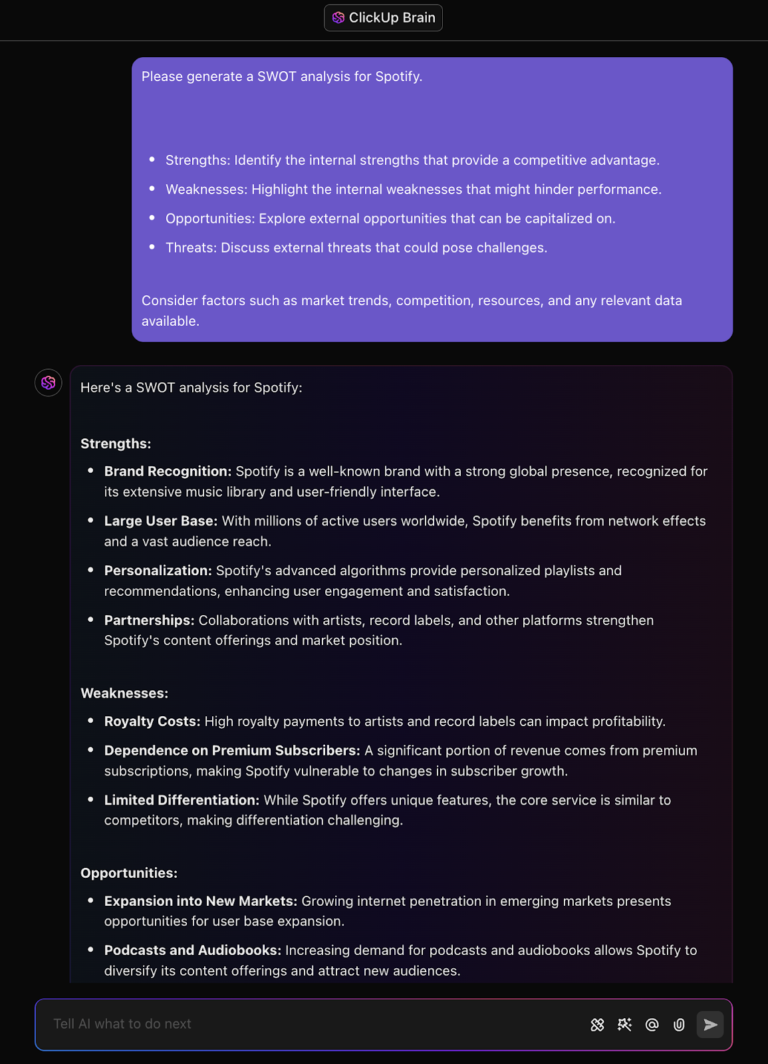
Not sure where to begin with your SWOT analysis? ClickUp Brain can help you get unstuck.
Instead of staring at a blank page, you can ask simple prompts like, “What are the strengths of our recent product launch?” or “Any risks we should consider before this campaign goes live?” ClickUp Brain pulls from your actual workspace—like tasks, Docs, comments, and goals—so the insights are grounded in what your team’s already working on.
It’s a great way to get a fresh perspective or fill in any gaps you might’ve missed. Whether you’re preparing for a strategy session or just exploring ideas, this AI-powered approach helps you quickly sketch out strengths, weaknesses, opportunities, and threats—without overthinking it.
Think of it as a brainstorming buddy that’s already up to speed.
📮 ClickUp Insight: 18% of our survey respondents want to use AI to organize their lives through calendars, tasks, and reminders. Another 15% want AI to handle routine tasks and administrative work.
To do this, an AI needs to be able to: Understand the priority levels for each task in a workflow, run the necessary steps to create tasks or adjust tasks, and set up automated workflows.
Most tools have one or two of these steps worked out. However, ClickUp has helped users consolidate up to 5+ apps using our platform! Experience AI-powered scheduling, where tasks and meetings can be efficiently allocated to open slots in your calendar based on priority levels. You can also set up custom automation rules via ClickUp Brain to handle routine tasks. Say goodbye to busy work!
Additionally, ClickUp offers a wide range of free SWOT analysis templates that help streamline the process of creating and organizing your assessments. These free SWOT analysis templates allow you to easily input your strengths, weaknesses, opportunities, and threats without starting from scratch.
ClickUp’s Personal SWOT Analysis Template empowers you to enhance your organization’s operational strengths, capitalize on opportunities, address weaknesses, and mitigate threats.
It allows you to assess your strengths, weaknesses, opportunities, and threats, clarifying key areas for professional growth. With this template, you can create actionable strategies to accelerate progress toward your goals.
💡 Pro Tip: Looking for an easy and accessible way to start your analysis without needing extra tools? Use free SWOT analysis templates in Google Docs. These customizable templates can be shared seamlessly with your team for collaborative input.
Users love ClickUp for several reasons. But this user specifically loves it for its comprehensiveness:
Our experience with ClickUp has been a graceful and productive one. It has helped us to work better on our projects by allowing us to bring together and consolidate all our project resources. ClickUp also unites us by giving us an excellent collaboration space for working together on our shared projects.

Feedough is a popular SWOT analysis tool known for its professional features and beginner-friendly interface. Despite its simplicity, it allows users to conduct in-depth analyses.
Answer a few key questions, and Feedough provides specific and insightful information. That’s not all—unlike most tools mentioned on the list, you can also use Feedough to conduct a SWOT analysis for assessing personal strengths, project cost risk, etc.

Another free tool, MyMap.AI’s SWOT analysis generator, is popular for creating visual SWOT analyses.
Enter your business details—AKA key strengths, weaknesses, potential risks, and opportunities—this strategic planning tool generates an easy-to-interpret, 2×2 matrix highlighting the four SWOT elements in an actionable format. This helps with early risk identification.
➡️ Also Read: How to Perform Risk Assessment: Tools & Techniques

Canva’s intuitive design platform makes it easy to create high-quality SWOT diagrams.
Its user-friendly interface allows you to easily incorporate graphs, charts, sticky notes, stock photos, and more to design your custom SWOT analysis. Plus, if you’re new to SWOT analysis, Canva provides tailored templates and examples to help you get started quickly.
While there are several reasons users like Canva, this user is exclusively in awe of its simplicity and ease of use:
What I relish about Canva is its simplicity and versatility. It’s so easy to use that even beginners can make use of the program, and its library of templates, graphics, and fonts is immense for a plethora of projects. Whether you’re creating a design for a business presentation, post for social media, or marketing materials, Canva ensures that designing is quick and normal people-oriented, without needing graphic design to be quite the advanced skill.

Creately’s SWOT analysis generator is professional and visual-driven. However, the tool’s actual standout feature is its collaboration capability.
With Creately, you can work with your team to create SWOT analysis diagrams and brainstorm effective strategies in real-time. Apart from this, Creately also lets you conduct other useful business analyses like the SOAR Analysis, which focuses on Strengths, Opportunities, Aspirations, and Results, offering a different approach to strategic planning.
Creately’s customizable templates are a hit—take it from this user:
Creately’s interface is intuitive, which makes creating diagrams and visual content easy even for beginners. I love the numerous templates that Creately provides, which saves me a lot of time. Another thing I love is the integration with different tools.

Voilà is a free SWOT analysis generator that turns your data into powerful insights quickly! Input your company’s details, like strengths, weaknesses, etc., and it generates a SWOT analysis within minutes.
You also have the option of changing the language and tonality of the content. This makes it ideal for marketing teams.
💡 Pro Tip: Wondering how to conduct a SWOT analysis in project management?
Here are some tips to follow:

Looking for apps that specialize in creating detailed SWOT analysis charts? Lucidchart is your answer!
This online tool considers external and internal factors to visualize your business’s strengths, weaknesses, threats, and opportunities. Simply choose a ready-made SWOT analysis example/template and get started.
Additionally, since Lucidchart is also highly collaborative, you can invite your team to the whiteboard and develop strategies together.
While going through the online reviews of Lucidchart, we noticed a lot of users specifically like it for its versatility—this feedback testifies to this:
Lucidchart is my preferred software of choice for creating all forms of process diagrams – flowcharts, product mockups, and the likes.

EdrawMax stands out for its AI-powered capability to generate detailed SWOT analyses from basic inputs. Provide fundamental details about your business environment’s internal and external factors, and the AI handles the analysis, delivering a comprehensive SWOT matrix.
In addition, the tool’s generated SWOT analysis is visually engaging, featuring diagrams, charts, graphs, and other pictorial elements, making it easy to interpret and present findings effectively.
EdrawMax is highly admired by users for its ease of use and vast template library. This review accurately sums it up:
Easy-to-use application, with lots of shapes and templates to choose from. Very easy to install and update.

Next on the list is IvyPanda. Primarily a student resource hub, the platform also offers a free project analysis tool for SWOT.
This tool allows for an objective analysis and evaluation of your business, covering all internal and external factors. It is user-friendly, intuitive, and customizable, enabling you to adjust layouts, colors, and more. You can also export your analysis in various formats, including DOCX, PDF, and PNG.
➡️ Also Read: Free Competitive Analysis Templates in Excel and ClickUp

Upmetrics is a popular tool for generating SWOT analyses, especially if you aim to identify strengths, weaknesses, opportunities, and threats while formulating actionable strategies.
Its simple yet comprehensive structure suits small businesses and startups seeking in-depth competitor analysis.
Upmetrics is particularly popular among users for its seamless navigation—this review raves about it:
Easy and quick to navigate, and the end result is well formatted to share with others.
⭐ Special mention SWOT analysis generator tools:
🧠 Remember: When using AI tools for competitor analysis, you need to ensure that the data you input is accurate and up-to-date to achieve reliable and actionable insights. Additionally, it’s essential to regularly review and refine your analysis, as market conditions and competitor strategies can evolve.
A well-executed SWOT analysis provides invaluable insights into your business’s strengths, weaknesses, opportunities, and threats. With this information, you can make proactive decisions and craft strategies to tackle challenges, from internal inefficiencies to market shifts.
ClickUp makes SWOT analysis fast and simple. Whether you’re assessing internal strengths or spotting external threats, its AI-powered tools and customizable templates help you work smarter and make better decisions.
Whether you’re building a SWOT analysis online, preparing SWOT analysis presentations, or brainstorming with your team, ClickUp’s all-in-one platform equips you with everything you need to move from strategy to execution.
So why wait? Sign up on ClickUp and explore the potential for smarter strategies and faster growth today! 📈

Manasi Nair
Max 26min read

Arya P Dinesh
Max 16min read
Manasi Nair
Max 24min read

© 2026 ClickUp





