

Sorry, there were no results found for “”
Sorry, there were no results found for “”
Sorry, there were no results found for “”
I’ll admit when I first started managing a team, the thought of creating standard operating procedures (SOPs) felt like a chore. I’d spend hours formatting, rewriting, and tweaking documents, only to find something still missing or unclear.
So, I tested 10 SOP generators to see if they could make my life easier. Spoiler alert—they did. 😌
If you’re looking for such tools, here’s my take on what to look for in an SOP creator software—and the ones worth your attention. 👇
If you’re still creating and managing SOPs in Word docs and shared drives, you’re missing a massive opportunity. Today’s pace of work demands speed, consistency, and scale—something manual SOP creation simply can’t keep up with. SOP software isn’t just a nice-to-have anymore. It’s the modern backbone of operational excellence.
Here’s why it matters more than ever for smoother workflow management :
🧠 Fun Fact: SOPs date back to ancient civilizations. The first known recorded procedures detailing medical practices were found on ancient Egyptian papyrus.
| Tool | Key features | Best for | Pricing* |
|---|---|---|---|
| ClickUp | – AI-powered SOP creation with ClickUp Brain – SOP templates, Docs, Tasks, Whiteboards – Task dependencies, custom fields, real-time collaboration – Centralized SOP library with version control | Small to enterprise teams needing SOPs tied to project execution and automation | Free plan available; Customizations available for enterprises |
| Scribe | – Real-time SOP generation from screen recordings – Auto screenshots and annotations – Customizable templates, browser extension | Solo users to midsize teams needing quick, visual SOPs without manual writing | Free plan available; Paid plans from $15/month/seat; Custom pricing for enterprises |
| Process Street | – Drag-and-drop process builder – Task automation and logic branching – Version control and audit logs – Code Tasks for complex logic | Small to midsize ops teams handling recurring workflows, HR, IT, and compliance | Custom pricing for all plans (Startup, Pro, Enterprise) |
| SweetProcess | – SOPs with videos, images, quizzes – Built-in versioning and flowcharts – Task assignments and progress tracking | Small businesses and lean teams centralizing all processes in one place | $99/month for up to 20 users; $5/additional user |
| Tallyfy | – Workflow automation + conditional logic – Shareable intake forms + client portals – Open API integrations – Real-time tracking + collaboration | Mid-size to large distributed teams automating internal + client-facing SOPs | $30/month per full user; $5/month per light user |
| Notion | – Real-time collaboration on docs – AI Q&A, templates, revision history – Integrations, databases, custom layouts | Startups to midsize teams building SOP hubs, wikis, and project docs | Free plan available; Paid plans from $12/user/month; Custom pricing for enterprises |
| Zoho Creator | – Drag-and-drop low-code builder – SOP automation + role-based access – Compliance dashboards, reminders | Medium to large IT-savvy teams embedding SOPs into custom apps | Paid plans from $10–$30/month; Flex plan with custom enterprise pricing |
| Lucidchart | – AI diagram generation – SOP flowcharts, swimlanes, UML – Drag-and-drop collaboration – Live data linking | Teams of all sizes mapping SOPs visually for operations or engineering | Free plan available; Paid from $9/month (Individual), $10/user/month (Team); Custom pricing for enterprises |
| Google Docs | – Real-time collaboration + commenting – Suggesting mode, auto-saves, version history – TOC generator + integration with Google Sheets, Forms | Solo users and collaborative teams needing simple, universally accessible SOPs | Free forever |
| Coda | – AI-generated dynamic SOPs – Embedded checklists, logic, and data – Custom workflows + integrations – Internal app-like functionality | Tech-forward midsize teams needing SOPs with embedded logic and automation | Free plan available; Paid from $12–$36/month per Doc Maker; Custom pricing for enterprises |
Our editorial team follows a transparent, research-backed, and vendor-neutral process, so you can trust that our recommendations are based on real product value.
Here’s a detailed rundown of how we review software at ClickUp.
I’ve tested plenty of tools to streamline SOP creation, and these ten are the best of the bunch. Each one offers something unique to help you develop effective procedures quickly.
Let’s find out what makes each SOP generator stand out. 🤩
As the everything app for work, ClickUp is one of the most robust tools for managing and generating comprehensive standard operating procedures.
As a free AI SOP generator, it offers a range of features that streamline document creation, task management, and team collaboration, making it a one-stop solution for businesses looking to maintain consistency and efficiency in their workflows.
ClickUp Docs is a dynamic documentation tool that allows you to create professional SOPs in real time—with rich-text formatting including headings, checklists, embedded media, and more. You can collaborate with your colleagues to draft detailed procedures and align on procedural changes.
You can also invoke ClickUp Brain’s AI assistance within your Doc to fast-track and automate parts of the SOP creation process. It analyzes previous workflows to provide suggestions for task prioritization, automates routine tasks, and helps you import existing SOPs and use them to generate relevant templates for future SOPs.

💡 Pro Tip: If you want to 10X your SOP generation process, you need Brain MAX, the AI desktop companion from ClickUp.
Use it to work with multiple LLMs to write and refine your SOP via a single interface! You can pick between lighter models, such as o3-mini or Claude Sonnet 4, and more powerful models such as Gemini 2.5 Pro and o1. The best part? You can use its Talk-to-Text feature to share detailed SOP ideas!
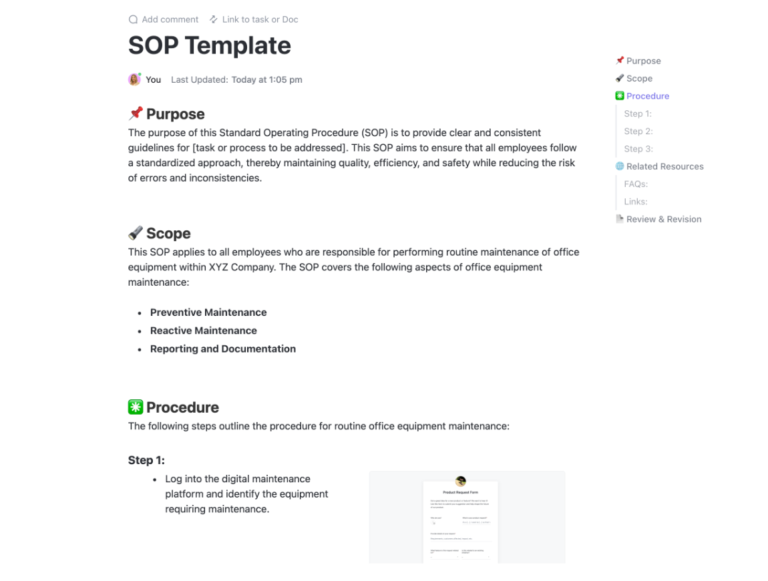
The ClickUp SOP Template also simplifies creating and managing standard operating procedures collaboratively for businesses of any size.
You can use checklists to automate tasks, reducing errors and boosting productivity. With this template in place, you’ll benefit from lower procedural training costs, smoother workflows, and standardized performance across various tasks.
⏩ AI Capability: From AI-powered task breakdowns and summarizing SOP docs to driving handoffs and follow-ups, ClickUp’s AI can both generate and execute SOP steps—thanks to deep integrations across tasks, docs, chats, whiteboards, and connected tools.
ClickUp’s Autopilot Agents automate standups, reports, Q&A in ClickUp Chat channels, and more. They proactively generate meeting summaries, daily updates, and task assignments aligned with your SOP workflows. Connected Search and Ask AI make it easier to query answers from your SOPs at your fingertips.
As we’ve mentioned above, ClickUp’s Brain MAX is also available as a standalone desktop app for you!
Team size
Small to enterprise teams
Use This Template When You Need To
It houses all of my SOPs. I honestly never had standard operating procedures, it was all in my head. That was fine when I was a solopreneur, but once I added an assistant, I realized I need to document things, not only for him, but if I ever needed to replace him. Now, it saves me time with more complex projects because I don’t have to remember how I did it before, I just look back at my ClickUp SOP and it’s all right there. I feel like I have more of an official business now. It also makes me feel better knowing if my current assistant ever leaves, I can have someone new take over much faster and with less of my one-on-one attention.
You can easily get overwhelmed because you have so many options, clickapps, and features. Best to get started with templates and some good youtube tutorials. Their onboarding is excellent though.
📮ClickUp Insight: 37% of our respondents use AI for content creation, including writing, editing, and emails. However, this process usually involves switching between different tools, such as a content generation tool and your workspace. With ClickUp, you get AI-powered writing assistance across the workspace, including emails, comments, chats, Docs, and more—all while maintaining context from your entire workspace.
Scribe provides an AI-powered platform that automatically records user actions and generates detailed SOPs. It captures screenshots and annotates steps as they happen, making it easier to document process details accurately.
⏩ AI Capability: Scribe’s AI captures screen workflows and auto-generates polished SOPs—step-by-step guides with screenshots—cutting manual documentation time. A ChatGPT-powered SOP creator lets you produce company-specific SOPs in seconds.
Team size
Solo users to midsize teams
Use case
Fast, automatic SOP creation from screen recordings—ideal for step-by-step guides, onboarding materials, and quick process documentation without manual writing
The browser extension makes starting a new guide frictionless, and the ability to export or share via link is perfect for both internal and external use.
When I finish a guide, I do find myself spending a lot of time deleting extra clicks and adding text… I would also love to delete steps as I go instead of having to wait until the end, it’s a little harder to remember what I want to delete when I finish a guide, but it’s easier as I go to just delete them on the right if that were an option
Process Street offers customizable templates and an intuitive drag-and-drop editor for simpler SOP creation. Recent enhancements have taken it further: centralized Document Management with version control and audit logs keeps your SOPs compliant and organized, and the new “Preview” sandbox lets you test workflows—including logic, roles, and approvals—before publishing.
For advanced users, JavaScript-powered Code Tasks enable powerful calculative automations right inside SOPs.
⏩ AI Capability: Process Street’s “Process AI” leverages GPT to auto-generate workflows from prompts, build dynamic checklists with conditions, and summarize or analyze documents. AI Tasks also execute on-the-fly data transformations and task automation.
Team size
Small to midsize ops teams
Use case
Recurring workflows and checklist-driven SOPs—great for HR, finance, IT, and compliance processes that require approvals, conditions, and automations
It also keeps track of versioning so you can look back at when a process changed and has a notes section at the bottom of each step in the process to let you process runners keep notes for themselves or send notes to the internal admin about changes/issues with the process
Needs a bit more reporting flexibility – sorting by more than one field, more grouping options
SweetProcess simplifies SOP creation with a visual, cloud-based platform that supports rich media—text, images, videos—and collaborative editing in real time.
To me, its standout features include AI-powered SOP drafting (SweetAI), interactive quizzes for training, built-in version control with rollback, and process mapping diagrams for clarity. You can assign tasks directly from SOPs, track completion progress, and centralize procedures, policies, and knowledge base files—all accessible via mobile apps.
⏩ AI Capability: SweetProcess includes “SweetAI,” which can generate, edit, and enforce uniform policy and procedure documents using prompts. You review, refine, and approve AI-generated drafts directly within the interface.
Team size
Small businesses and lean teams
Use case
Centralizing company processes in one place—ideal for documenting and continuously improving SOPs across departments
I love the accountability that this holds me to, and equally my coworkers! You don’t have to figure out who’s court the ball is in, the software does it for you. Takes the need to constantly send friendly, “Hi, just a friendly reminder to……” emails!
While SweetProcess has many useful features, there are some potential drawbacks:
Cost: pricing can be a bit steep for small businesses or those on a tight budget.
Learning curve: There is a bit of a learning curve when first getting started, particularly when setting up procedures and delegating tasks.
Limited integrations: The integrations with other platforms are somewhat limited compared to other workflow management tools.
Lack of customization: The platform’s templates and formatting options can be somewhat limiting.
Tallyfy is a powerful workflow automation tool designed to digitize and streamline SOPs. By providing real-time tracking and automation, Tallyfy enables organizations to manage processes more efficiently without relying on manual updates.
I really liked Tallyfy’s conditional logic feature for creating dynamic SOPs that adapt based on different conditions or inputs. This flexibility enables the tool to support complex workflows without overwhelming the user.
⏩ AI Capability: Tallyfy’s AI suggests form fields, automates routine steps, and helps enforce compliance by predicting process paths and approvals.
Team size
Mid-size to large distributed teams
Use case
Client-facing and internal SOPs that need real-time tracking, workflow automation, and process transparency. Especially useful in legal, healthcare, and consulting roles
Great product to not only create systems and processes but also to push your customers to give you the information/documents needed. It’s also simple and actually fun to use. It gives the user satisfying completion noises and strike thrus. My clients have been happy using Tallyfy.
Just a very minor gripe. Although I’m sure many users like this feature, I wish the user had the ability to disable AI suggestions when creating work flows as not everybody uses them and they can be a bit distracting.
Notion is a versatile workspace tool that simplifies organizing and creating SOPs through customizable templates.
Its block-based structure made it easier for me and my team to integrate text, images, and databases into our documentation, while real-time collaboration ensured that we could work together seamlessly on SOP documentation.
⏩ AI Capability: Notion AI features allow summarization, rewriting, tagging, and searching within SOP pages—turning static documents into interactive knowledge hubs.
Team size
Startups to midsize teams
Use case
Collaborative SOP documentation with a flexible structure—ideal for cross-functional knowledge hubs, wikis, and internal documentation tied to broader projects
Its customizable workspace keeps everything organized, and the Q&A AI feature helps me find information fast, saving time during hectic days. The Notion Calendar integration is a lifesaver for scheduling without juggling apps
It isn’t always intuitive and I didn’t like having to put building blocks of functionality together before I could start on the actual task I wanted to get done. U found it a bit confusing and it’s potentially a big distraction from what you are supposed to be doing.
⚡ Template Archive: Discover a range of process documentation templates to outline, standardize, and improve your business processes.
Zoho Creator is a low-code platform ideal for generating custom SOP templates for your business. It also lets you manage SOPs through role-based access for secure documentation.
My favorite feature? You can set up automated workflows to handle routine tasks within your SOPs, such as sending reminders for SOP reviews, notifying relevant team members of updates, or even generating reports.
⏩ AI Capability: Zoho’s AI Modeler and CoCreator (Zia + OpenAI) enable users to build and train custom AI models—no code needed. These can power SOP workflows, trigger automations, and embed predictive logic into form-driven procedures.
Team size
Medium to large IT-savvy teams
Use case
SOPs embedded into custom internal apps and automations—great for teams needing process enforcement with logic, forms, and workflow triggers
Zoho creator helps me to design my workflow with less technical knowledge in less time without maintaining any other tools. It also helps me to automate my workflows as per my needs.
While full control of UI features in apps like Zoho Creator is typically limited, I think they can raise the bar, and allow developers create truly bespoke looking apps doesn’t just function to design, but looks and feels like a premium app, especially on moble.
Lucidchart excels at creating SOPs through visual documentation. It offers intuitive flowchart templates that help users clearly map out SOP processes. Its drag-and-drop interface let me easily arrange steps, symbols, and connectors, making mapping SOPs straightforward. This can be helpful even for those with little diagramming experience.
The platform’s real-time collaboration tools allow teams to contribute to the documentation, streamlining the creation of detailed and well-structured SOPs.
⏩ AI Capability: Lucidchart’s AI can generate diagrams from text prompts, auto-layout flowcharts, visualize processes instantly, and integrate with GPTs, Microsoft Copilot, and Slack for smoother diagram creation.
Team size
Teams of all sizes, especially in operations or engineering
Use case
Visual SOP mapping—best for process diagrams, swimlane workflows, and flowcharts
Lucidchart is a great product for Architects, Developers, Sales. Its user-friendly interface, making diagramming accessible even for beginners. The ability to share it within the organization and also outside makes it more accessible and easy to refer along with the ability of multiple sheets. The ability to link diagrams to external data sources like Google Sheets and Excel is a powerful feature.
I wasn’t able to copy diagrams directly into Excel or Word, which was a bit inconvenient—but I could still manage by using workarounds like exporting or taking screenshots
🔍 Did You Know? According to the National Institute of Standards and Technology (NIST), clear and well-documented processes can reduce errors by up to 60%.
Google Docs is a simple yet effective tool for generating and managing SOPs. Its commenting feature lets anyone on the team leave feedback, ask questions, or highlight changes to SOPs. In Suggesting mode, edits appear as suggestions that can be accepted or rejected, making it easier to manage version control and feedback.
You can also use the built-in Table of Contents tool to automatically generate a clickable list of headings and navigate long SOPs quickly. Its integration with the Google ecosystem further enhances data management and accessibility.
⏩ AI Capability: Google Workspace’s Gemini AI is predicted to summarize PDFs/forms, generate documents, refine drafts, and even create podcast-style audio summaries of SOPs. The current “Duet AI” provides drafting, summarizing, and rewriting abilities within Docs.
Team size
Solo users to collaborative teams
Use case
Basic SOP writing and real-time editing—perfect for teams looking for a free, simple, and universally accessible documentation tool
I like that I can create a document on any device (phone, tablet, computer, etc) and access all my work from any device, anywhere (with access to internet). It is very convenient to have all my documents automatically save too! Plus I can share documents with anyone, and as long as they have a Gmail account, they can download and edit from anywhere too.
Formatting can get clunky, especially if you’re trying to clean up something that came from another source. Styles don’t always hold when you’re copying content in, and tables can be awkward to manage. It’s great for fast collaboration, but if I’m building something that needs tighter visual control, I usually end up switching to another platform.
Coda is an AI-powered SOP creator that enables users to build documents that function as interactive workspaces. SOPs can include text, tables, checklists, buttons, and integrations, all within a single document, reducing the need for multiple tools or platforms.
Easily link SOPs in Coda to other docs or databases within the same workspace and create a network of related documents and reference materials. Integrate with extrenal tools without a hitch.
⏩ AI Capability: Coda AI helps generate and refine SOPs with context-aware writing, table automation, and inline AI review tools. It can summarize docs, suggest action items, and pull data from connected apps to make SOPs dynamic and interactive. With features like AI Chat, AI Columns, and Coda Brain, it turns your doc into a powerful work assistant.
Team size
Tech-forward midsize teams
Use case
Interactive SOPs that combine docs, data, and logic—great for dynamic documentation with embedded checklists, automation, and integrations
I like that Coda is a great mixture of app, spreadsheet, database and codable solution… What’s great is there is excellent out of the box functionality for things like conditional formatting but also the Coda formulas allow for more customised approach where required.
I dislike Coda’s steep learning curve, slower performance with large docs, limited offline access, higher pricing for advanced features, and a less polished mobile experience.
When it comes to managing your SOPs, ClickUp clearly stands out as the top choice. With its powerful combination of document creation, task management, and AI-driven automation, it offers everything you need to write, track, and update your SOPs efficiently.
ClickUp’s customizable templates make SOP creation straightforward and standardized. And its AI-powered tools go beyond simple document editing. They assist with creating content, summarizing long sections, and ensuring clarity and conciseness in your SOPs.
So, if you’re looking for the ultimate tool to take control of your workflows, ClickUp is the way to go.
Sign up for ClickUp today and cover every aspect of your standard operating procedures—from creation to implementation and improvement!

Manasi Nair
Max 26min read
Manasi Nair
Max 26min read
Manasi Nair
Max 20min read

© 2026 ClickUp





