


Once upon a time, all business processes required manual labor, and hardly any technology was available to facilitate them. Then came the era of business process management (BPM) tools, which helped streamline and visualize workflows within an organization.
Fast forward to today, and we’re in the age of AI and automation, in which new workflow automation platforms like Pipefy have emerged to help us put many labor-intensive processes on auto-pilot. These tools take repetitive work off our hands and minds so we can focus on more strategic activities.
However, Pipefy is not for everyone—some prefer a more user-friendly interface and robust integration capabilities, while others are looking for a more cost-beneficial workflow automation platform.
We’ve done the detective work for you and come up with a handy list of the top 10 Pipefy alternatives for managing and automating your processes.
We’ll break down the tools’ respective features, point to a few limitations, and shed light on their pricing plans to help you choose the right fit for your business.
Top 10 Pipefy Alternatives to Automate Your Processes

 Summarize this article for me please
What Is Pipefy?
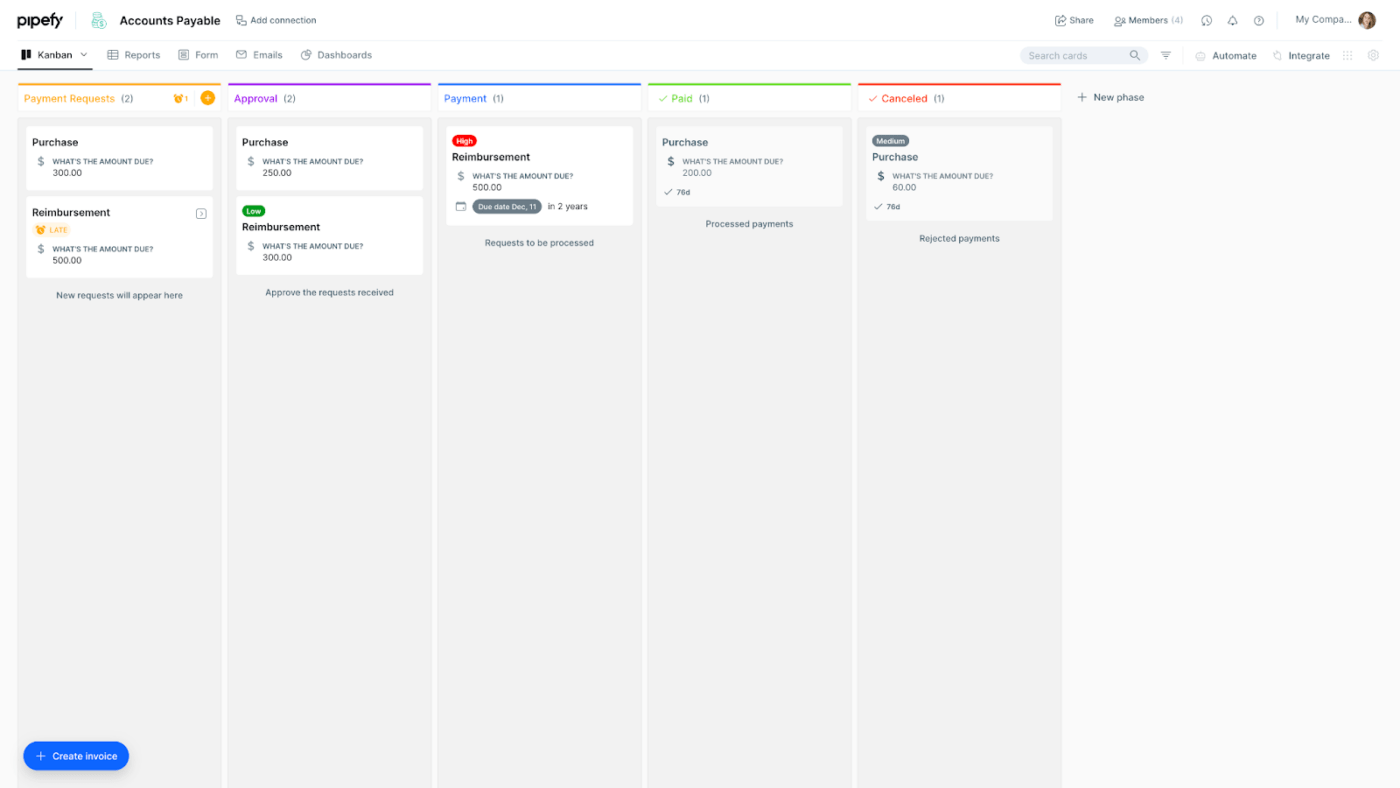
Pipefy is an AI-powered platform that allows organizations to design, automate, and manage workflows to achieve optimal efficiency and team productivity.
With its intuitive interface and generative AI capabilities, creating custom workflows is as easy as chatting and requires zero coding knowledge! You just send a message to its chatbot explaining what you want your workflow to look like, and AI takes care of the rest.
Pipefy can automate a wide range of business processes, but it’s most effective in streamlining HR, IT, and procurement operations.
Summarize this article for me pleaseWhat Should You Look for in Pipefy Alternatives?
Pipefy has gained prominence in the world of business process automation mainly because of its unique set of features that make it super easy to use. Therefore, what you want in your Pipefy alternatives should also serve the following features on the plate:
- AI capabilities: The alternative should have AI-powered, especially generative AI-powered capabilities to streamline the process of workflow automation
- No-code interface: Coding is not everyone’s cup of tea, so your Pipefy alternative should allow you to create custom automated workflows with zero coding involved
- Data-driven process optimization: The tool should be able to optimize the workflows based on historical data to maximize efficiency
- Security: When you automate a business process, it’s important to ensure that no one else can tinker with it. Therefore, enterprise-grade security should also be a priority when evaluating your Pipefy alternatives
- Integrations: The process automation tool is only as effective as the number of external tools and services it can integrate with, so that should also be a part of your selection criteria
Summarize this article for me please10 Best Pipefy Alternatives to Use in 2024 and Beyond
We’ve prepared this list of Pipefy alternatives after sifting through dozens of workflow automation tools and platforms available in the market. We’ll take you through what they offer, what they lack, their pricing, and, most importantly, how they can improve your workflows. Let’s begin! ?
1. ClickUp
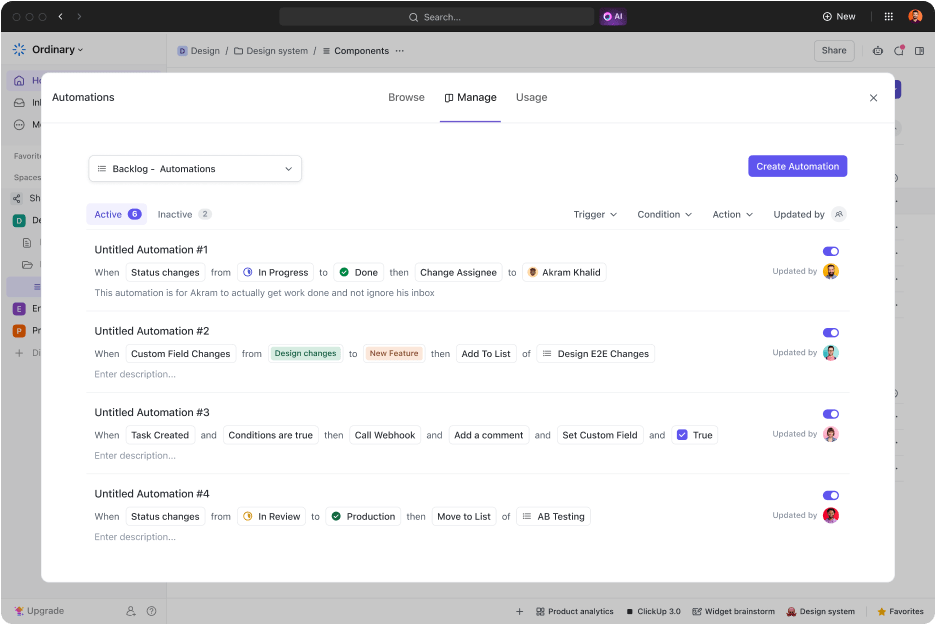
ClickUp is a visual project management platform with incredibly powerful workflow automation capabilities that make it a great Pipefy alternative. Its automation functionality, ClickUp Automations, comes with 100+ pre-built automation templates to get you started in no time. ⏰
The automated workflows you create in ClickUp can be linked to your ClickUp tasks and projects to automatically mark assignments as done, create new tasks, update project statuses, change assignees and priorities, and a whole lot more.
For instance, you can create a custom automated workflow that gets triggered when a specific task in your project is marked done by you or any of your team members. Once set in motion, the automated workflow can create and assign new tasks by itself or update the project status. That way, you won’t have to track and update the progress of your project manually as different tasks get completed.
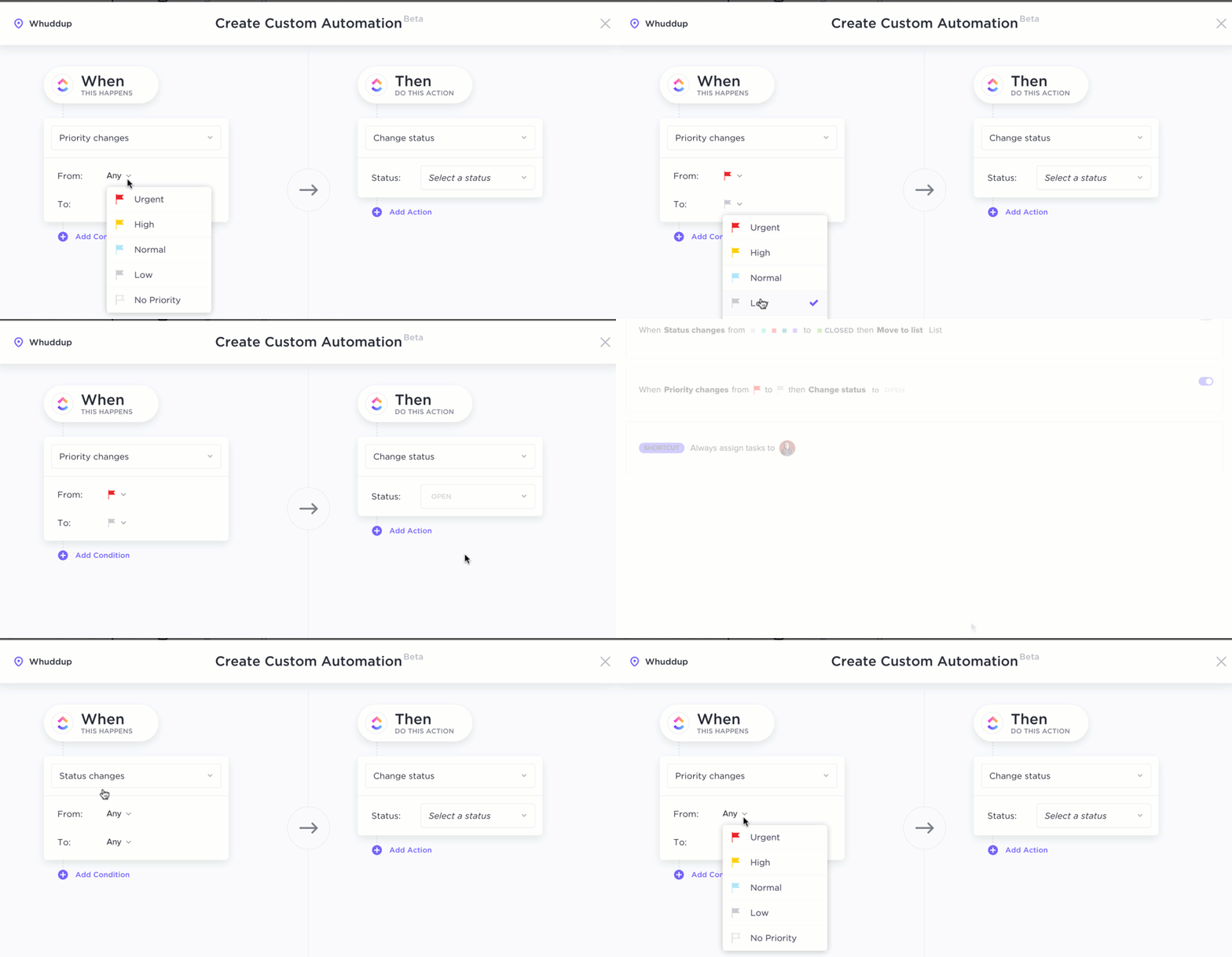
You can further streamline workflow management by combining your tasks and Automations with ClickUp AI, the platform’s handy AI tool. The AI can create individual sub-tasks automatically without your input, based on task descriptions and comments left by your teammates.
ClickUp best features
- No-code automations for creating and assigning tasks, setting due dates and priorities, updating task and project statuses, and more
- 100+ pre-built automation templates
- Generative AI capabilities for automated task creation
- Define custom conditions for all your automations
- Integrations with 100+ tools and services
- Extremely well-designed and intuitive UI
ClickUp limitations
- Can be a little overwhelming initially for new users
- Automation fields could be more dynamic
ClickUp pricing
- Free Forever
- Unlimited: $7/month per user
- Business: $12/month per user
- Enterprise: Contact for pricing
- ClickUp AI is available on all paid plans for $5 per Workspace
*All listed prices refer to the yearly billing model
ClickUp ratings and reviews
- G2: 4.7/5 (9,000+ reviews)
- Capterra: 4.7/5 (3,900+ reviews)
2. Process Street
For money flow, there’s Wall Street. For workflow, there’s Process Street! ?️
Jokes aside, Process Street is another no-code workflow automation platform and alternative to Pipefy with features to make your work (and life) easier. It has pre-designed templates for standard business processes to help you start automating your workflows in a jiff.
Process Street flaunts some impressive AI capabilities as well. For instance, its workflow generator can create a new workflow for you in seconds based on the title and description you specify. It can also read through documents and extract the necessary data for performing the actions of a workflow. If necessary, the AI can even create and send emails as part of an automated workflow.
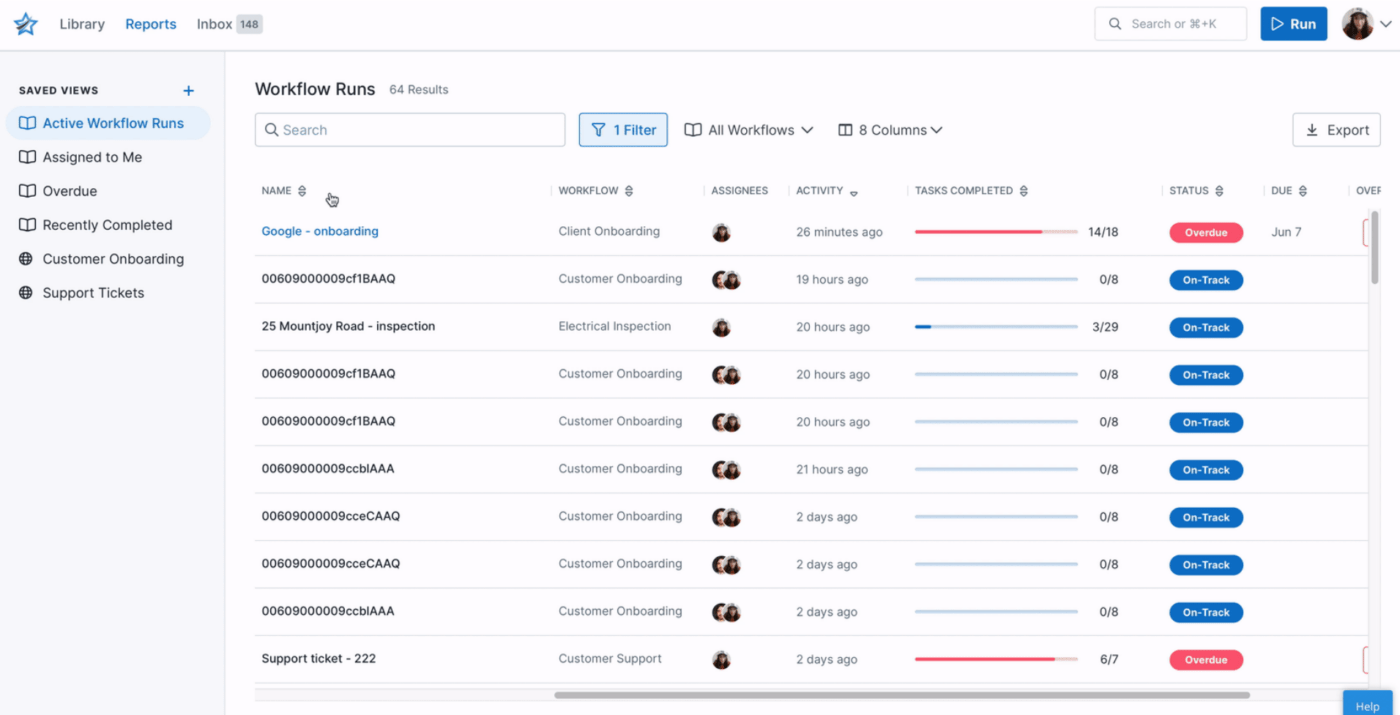
Finally, Process Street provides analytics and data about all your workflows in an intuitive dashboard. This enables you to make data-driven decisions regarding KPIs and evaluate the performance of various processes and team members.
Process Street best features
- AI-powered workflow generator
- Intelligent AI-powered document analysis
- No-code automations
- Data and analytics for all workflows
- Pre-designed templates for common workflows
Process Street limitations
- Can be a little confusing to navigate
- Organization of features could be improved
Process Street pricing
- Startup: $100/month
- Pro: $415/month
- Enterprise: $1,660/month
Process Street ratings and reviews
- G2: 4.6/5 (380+ reviews)
- Capterra: 4.7/5 (600+ reviews)
3. Kissflow
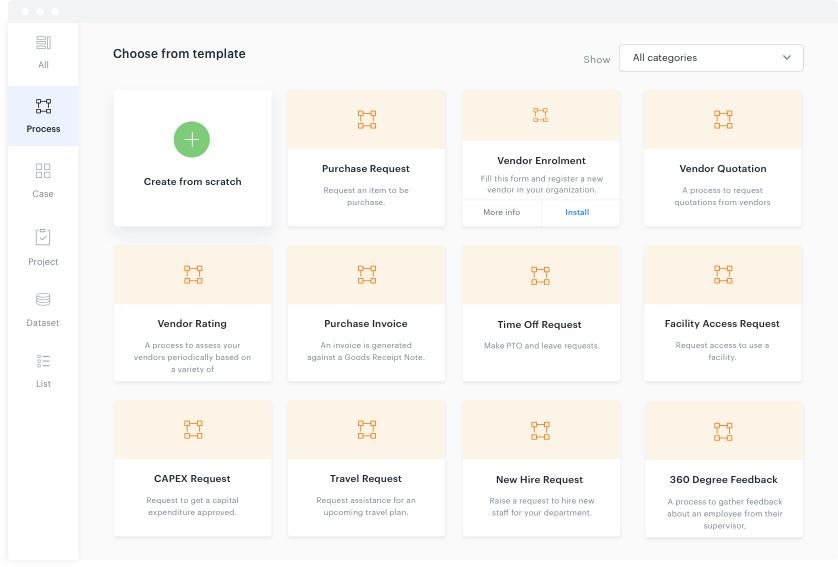
Kissflow takes pride in its 3-step process for creating and automating any kind of workflow. The process involves:
- Creating a form with customized fields for your workflow
- Defining your workflow (i.e., what happens when the form is submitted)
- Applying the necessary permissions to publish your form as well as workflow
Design the forms with the help of a drag-and-drop form builder and customize workflows through a visual representation, eliminating the need for coding. Submitting a form triggers a specific workflow associated with it, which results in performing the action defined in it. ✅
As you can see, Kissflow’s automation mechanism is a bit different from other workflow automation tools, where you define a trigger event and then the consequent action(s). Its functionality is primarily focused on automating processes that require a form submission.
Kissflow best features
- Focused on automating processes involving form submissions
- No-code, visual customization of workflows
- Drag-and-drop form builder
- Data and analytics to evaluate the performance of all workflows
- Integrations with all major 3rd-party tools and services
- Pre-built automation templates for project management
Kissflow limitations
- Some users have reported issues with customer support
- Can be a bit challenging to navigate and configure compared to other Pipefy alternatives
Kissflow pricing
- Basic: Starts at $1,500/month
- Enterprise: Custom pricing
Kissflow ratings and reviews
- G2: 4.3/5 (500+ reviews)
- Capterra: 3.9/5 (30+ reviews)
4. Kintone

Kintone is more of a process mapping and visualization software than a dedicated workflow automation-focused platform. That said, it’s perfectly capable of automating reminders, approvals, and task hand-offs between team members.
The tool comes with a drag-and-drop workflow builder that you can use to design workflows from scratch and set up rules to automate various parts of the workflow.
You can also define multi-step approval processes for your workflows if you want, and thanks to 3rd-party integrations, your workflows can automate the actions of many business applications and services.
Kintone best features
- Process visualization and management
- Automated reminders, task hand-offs, and approvals
- Integration with 3rd-party services and tools
- User-friendly interface with drag-and-drop workflow builder
- Multi-step approvals for each workflow
Kintone limitations
- The UI isn’t very slick
- Can’t send automated emails and texts
Kintone pricing
- $24/month per user (minimum five users, so effectively $120/month)
Kintone ratings and reviews
- G2: 4.6/5 (200+ reviews)
- Capterra: 4/5 (3 reviews)
5. ProcessMaker

The ProcessMaker combines generative AI with AI-powered Intelligent Document Processing (IDP) capabilities and a decision-making engine to help your team unleash “Hyper Productivity.” Like many other alternatives to Pipefy, it includes templates to help you set up your processes quickly.
The tool’s key selling point is the ability to extract the required content from your documents (i.e., invoices, contracts, emails, etc.) and make decisions based on the extracted information. By doing so, its decision-making engine effectively eliminates the need for scripting.
In other words, ProcessMaker can automatically make decisions and execute them outside the workflow for which you might otherwise have to write scripts in various programming languages. ??
Finally, its generative AI allows you to build your processes by simply describing your desired workflow.
ProcessMaker best features
- No-code process building
- AI-powered Intelligent Document Processing (IDP)
- Generative AI for quick process creation
- AI-powered decision-making engine
- Pre-built process templates for project management workflows
- Data and analytics for every type of business process
ProcessMaker limitations
- Documentation may be a bit outdated
- UI can be a bit difficult to navigate for non-tech-savvy users
ProcessMaker pricing
- Platform: $1,475/month
- Pro: Pricing available on request
- Enterprise+: Pricing available on request
ProcessMaker ratings and reviews
- G2: 4.3/5 (280+ reviews)
- Capterra: 4.7/5 (170+ reviews)
6. Creatio

One of the most impeccably designed workflow software on our list, Creation stands out for seamlessly combining CRM and workflow automation capabilities, eliminating the need for two separate tools.
This no-code platform allows building automated workflows through an intuitive drag-and-drop user interface. You can define rules to automate various parts of your workflow and include approvals to ensure that a particular step is executed only after you or your team have okayed it.
Creatio also offers insights to help you evaluate the performance of all your workflows and optimize them for efficiency.
Creatio best features
- Combination of a CRM platform and workflow automation software
- No-code, drag-and-drop workflow design and automation
- Approvals for certain parts of the workflow
- Well-designed and intuitive interface
- Analytics for all processes
Creatio limitations
- Automation functionality isn’t very rich
- User licensing is a bit restrictive and inflexible
Creatio pricing
- Growth: $25/month per user
- Enterprise: $55/month per user
- Unlimited: $85/month per user
Creatio ratings and reviews
- G2: 4.6/5 (230+ reviews)
- Capterra: 4.8/5 (19 reviews)
7. Monday.com
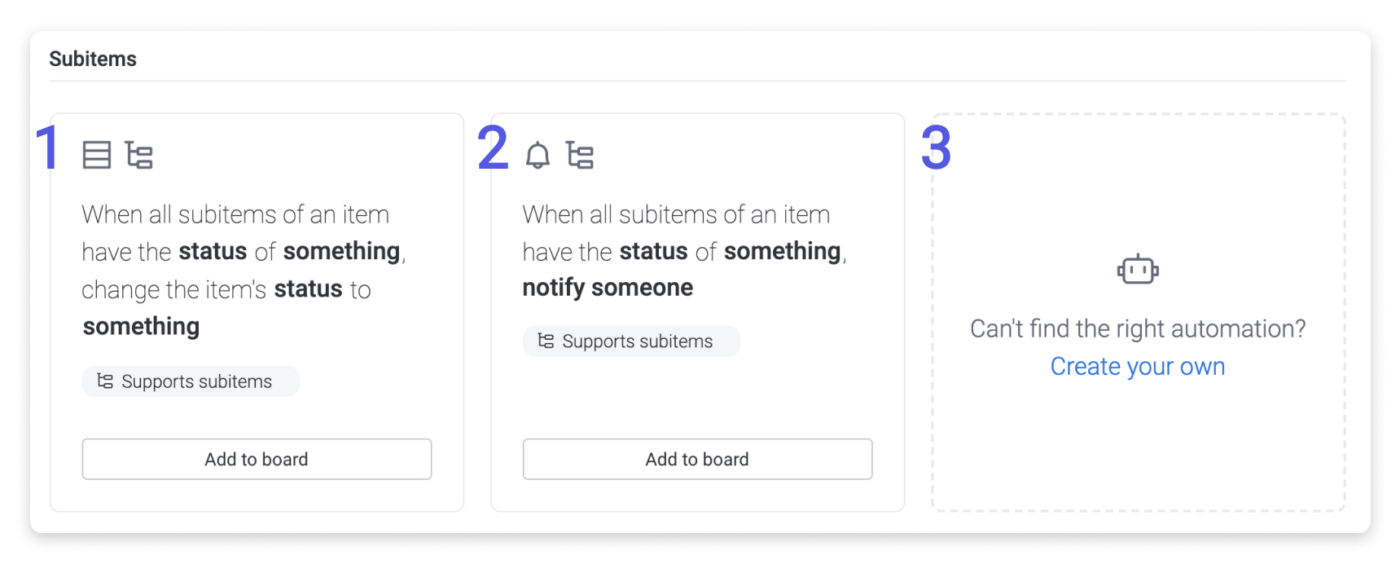
Monday.com calls itself the “Work OS” because it has features for almost any aspect of business and project management. More specifically, its Automations Center has a straightforward three-step process for building an automated workflow:
- Define a trigger (date, status change, creation of an item, etc.)
- Select a condition (the criteria that the trigger event should meet)
- Select the action that needs to be performed after the trigger event
You can also build multi-step automated workflows that perform multiple actions or get triggered when multiple conditions are met. If you want to skip much of the previously explained process, choose pre-built automation templates, known as recipes on Monday.com.
Monday.com best features
- Intuitive and no-code interface
- Multi-step automations
- Pre-built automation recipes
- Integrate workflows into Monday.com projects and CRM accounts
- 100+ integrations to connect to project management tool
Monday.com limitations
- Can be a little complex to navigate initially compared to other project management software
- Main screen is not very customizable
Monday.com pricing
- Free forever
- Basic: $8/month per user (minimum three users)
- Standard: $10/month per user
- Pro: $16/month per user
- Enterprise: Price available on request
*All prices refer to the annual billing model
Monday.com ratings and reviews
- G2: 4.7/5 (8,600+ reviews)
- Capterra: 4.6/5 (4,300+ reviews)
8. Asana

Asana is another work and task management and productivity celebrity with extensive workflow automation capabilities, making it a promising Pipefy alternative. It gives you a nice headstart with 80+ pre-built workflow templates and plenty of task templates to help you easily create tasks linked to your workflow. ?
The software comes with a unique “Bundles” feature, which groups task templates, automation rules, form fields, and sections together so they can be applied to multiple projects simultaneously (you won’t find this in most Asana alternatives).
Lastly, Asana’s reporting dashboards provide a visually rich overview of how your workflows are performing.
Asana best features
- 80+ pre-built automation templates
- No-code platform
- Bundles to apply automated workflows to multiple projects
- Links workflows to projects and tasks
- Reporting dashboards with analytics
Asana limitations
- Can be a little overwhelming initially
- Some automations and integrations are locked behind the most expensive Enterprise plan
Asana pricing
- Basic: Free forever
- Premium: $10.99/month per user
- Business: $24.99/month per user
- Enterprise: Contact for pricing
- Enterprise+: Contact for pricing
*All listed prices refer to the annual billing model
Asana ratings and reviews
- G2: 4.3/5 (9,500+ reviews)
- Capterra: 4.5/5 (12,200+ reviews)
9. Way We Do

Way We Do is primarily geared toward helping you manage and visualize business processes.
It has some basic automation capabilities related to recurring tasks, task routing between team members, and automated reminders. But if you need more advanced, trigger-based automations, you’ll have to integrate Way We Do with Microsoft Power Automate to extend its functionality.
Way We Do best features
- Automatic reminders and notifications
- Automatic task routing between team members
- Ability to set up recurring tasks
- Integrates with Microsoft Power Automate
- Reporting and analytics for all workflows
Way We Do limitations
- Not a dedicated workflow automation platform; limited automation features
- Users can be added only in multiples of 10
Way We Do pricing
- Entry: $99/month (starts at 10 users)
- Enterprise: Contact for pricing
Way We Do ratings and reviews
- G2: 4.4/5 (10 reviews)
- Capterra: 4.9/5 (9 reviews)
10. Workato

Workato is a full-fledged workflow automation platform that combines the power of AI with automation. It has a massive library of 1,200+ pre-built connectors to integrate your various apps and services using a drag-and-drop interface. It then allows you to automate them easily with the help of AI.
Thanks to generative AI and Workbot GPT, Workato lets you build automations using natural language commands. It goes a step further by allowing you to set up your own custom chatbots for automating workflows.
Another major highlight of Workato is its collection of pre-built automation recipes. It boasts more than 500,000 recipes catering to various business needs and processes, which puts it in a league of its own! ?
Workato best features
- AI-powered workflow automation with natural language prompts
- Custom chatbots for workflow automation
- 1,200+ integrations and connectors
- 500,000+ pre-built automation recipes
- Drag-and-drop interface to build workflows
Workato limitations
- Can be a bit complex for new users
- Native support for Java and Python is missing
Workato pricing
- Available on request
Workato ratings and reviews
- G2: 4.7/5 (370+ reviews)
- Capterra: 4.7/5 (50+ reviews)
Summarize this article for me pleaseMaximize Team Productivity with the Best Pipefy Alternative
If you’re still on the fence about which Pipefy alternative to choose to manage and automate your workflows, here’s our top pick: ClickUp!
With the help of AI, ClickUp can automate and streamline project and task management, document creation, scheduling, reminders, and many other parts of your operations. In fact, it can become a single window for managing and automating almost any business process in a few clicks.
The best part—you can get started with it for FREE, so sign up and achieve productivity like never before! ?


Everything you need to stay organized and get work done.

Recent Articles
Top 11 Microsoft Copilot Alternatives to Make Your Life and Workflows Easier in 2026 
Top 11 Microsoft Copilot Alternatives to Make Your Life and Workflows Easier in 2026
Google Keep Vs. Google Tasks: What’s the Difference? 
Google Keep Vs. Google Tasks: What’s the Difference?

