






Still downloading templates?
There’s an easier way. Try a free AI Agent in ClickUp that actually does the work for you—set up in minutes, save hours every week.
Sorry, there were no results found for “”
Sorry, there were no results found for “”
Sorry, there were no results found for “”

Most teams don’t lack tools—they lack workflows that actually work together.
If your team is drowning in repetitive tasks and context-switching, it’s time to automate the busywork.In this guide, you’ll discover the best n8n workflow templates to streamline your systems—and if you’re looking for a more connected, all-in-one alternative, we’ve got ClickUp workflow templates that do the job without patching tools together.
Let’s dive into the top templates that can help your team save hours every week and build scalable, stress-free workflows.
| Template name | Download template | Ideal for | Best features |
| Weekly Coffee Chat | Download this template | Team leads and HR departments | Promotes team collaboration |
| AI-Powered PDF Invoice Parser with Google Drive, Google Sheets & OpenAI Template | Download this template | Accounting teams and small-business admins | Extracts invoice data from PDFs |
| Extract Invoice Data from Google Drive to Sheets to Sheets with Mistral OCR & Gemini | Download this template | Freelancers or agencies | Automates data entry with OCR |
| Automatically Document and Backup n8n Workflows | Download this template | Individuals and small teams | Handles workflow backup and documentation |
| Generate Weekly Workflow Analytics Reports with n8n API & Email Delivery | Download this template | Small teams | Generates worklfow analytics reports and shares them via email |
| Automate Lead Qualification & Routing with GPT-4o-mini, Google Sheets & HighLevel CRM | Download this template | Small to medium-sized businesses | Automates lead qualification, prioritization, and routing to the right person/team |
| AI-Powered Post-Sales Call Automated Proposal Generator | Download this template | Small and medium-sized sales teams | Uses AI to create customized proposal documents |
| Multi-Channel Customer Support Automation Suite | Download this template | E-commerce stores or SaaS services | Automates tagging and routing of tickets |
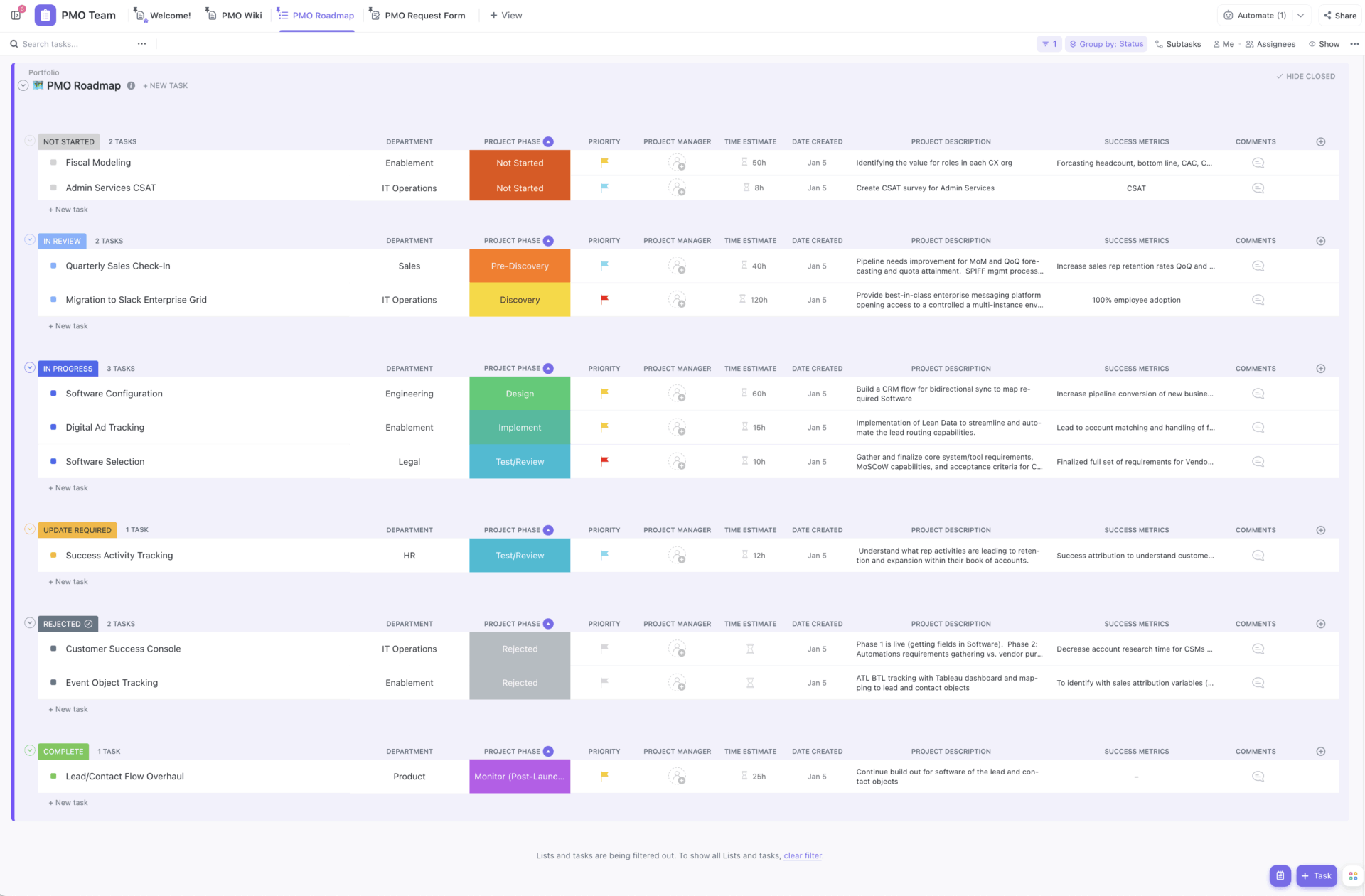
| ClickUp Project Management Template | Get free template | Project managers, PMO leads, and cross-functional teams | Connects and centralizes tasks, docs, communication, timelines, and reports |
| ClickUp Task Management Template | Get free template | Project managers overseeing multiple projects simultaneously | Facilitates task management with Custom Fields, 15+ Views, and ClickUp Automations |
| ClickUp Process Flowchart Template | Get free template | HR teams, recruiters, and operations managers | Enables teams to create detailed process flowcharts on ClickUp Whiteboard and converts action items to ClickUp Tasks |
| ClickUp Process Mapping Template | Get free template | Operations managers and team leads | Integrates process mapping with task management to enhance visibility and accountability |
| ClickUp Swimlane Flowchart Template | Get free template | Teams and developers working on cross-department workflows | Outlines process steps along with roles and responsibilities for cross-departmental workflows |
| ClickUp Simple Mind Map Workflow Template | Get free template | Operations managers and team leads | Provides a visual canvas to break down complex workflows into actionable steps |
| ClickUp Graphic Design Workflow Template | Get free template | Design teams and marketing departments | Streamlines graphic design workflows with Custom Views, Custom Fields, and ClickUp Tasks |
| ClickUp Email Marketing Template | Get free template | Marketing teams and growth managers | Supports automation and workflow status tracking for email marketing campaigns |
| ClickUp Kanban Template | Get free template | Software teams and product managers | Helps monitor task progress and keep teams aligned with Kanban-style ClickUp Board View |
| ClickUp Content Management Template | Get free template | Marketing and content teams | Helps manage content pipelines across channels with ClickUp Automations |
| ClickUp Project Request and Approval Template | Get free template | Project managers and department leads | Streamlines and standardizes the project intake process across the organization |
| ClickUp Email Automation Template | Get free template | Project teams and operations managers | Supports email workflow automation inside your project management workspace |
| ClickUp Blog Management Workflow Template | Get free template | Agencies or in-house creative teams | Consolidates all blogs, assets, posts, and deadlines into one organized system |
Want to know how workflow automation helps teams save 5+ hours every week? Watch this video ⬇️
n8n workflow templates are pre-built automation frameworks that connect apps and execute logic without writing code. Each template serves as a visual blueprint where users can define triggers, actions, and conditions to automatically create and run multi-step workflows.
These templates offer user experiences similar to those of workflow automation software, but they’re built on a no-code interface. This makes them ideal for scaling automation across departments, improving process visibility, and saving time on recurring work.
A reliable n8n template gives teams a reusable structure that solves a real problem with minimal setup.
Here’s what a good template must include:
Below, we’ve got some n8n workflow templates that give ready-made task automation frameworks so you can skip setup and move straight to execution.
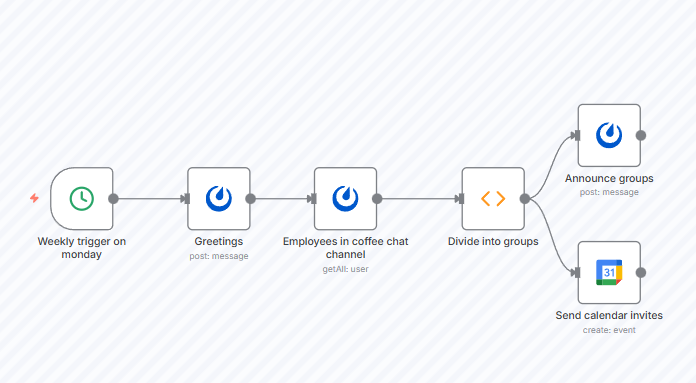
The Weekly Coffee Chat Template randomly groups people from a Mattermost channel and sends them invitations for a ‘virtual coffee chat’. It is a good choice when you want to nurture team culture in remote or hybrid settings by scheduling informal check-ins without manual effort.
Why you’ll like this template:
✅ Ideal for: Team leads and HR departments looking for a tool to boost organic collaboration
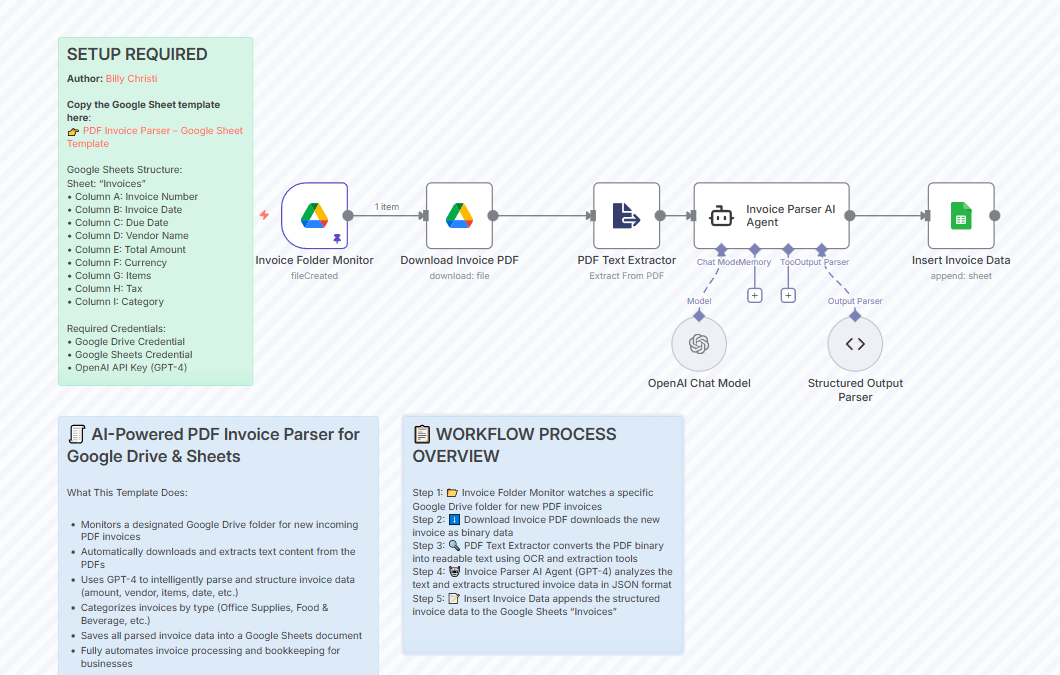
Designed for finance teams and business operations, the AI-Powered PDF Invoice Parser with Google Drive, Google Sheets & OpenAI Template monitors a Google Drive folder for new invoice PDFs, applies OCR and AI extraction (via GPT-4.1 or GPT-4o-mini for structured extraction), then outputs structured data into Google Sheets.
This template now supports updated OCR+LLM extraction using OpenAI’s Vision models, which improves accuracy for itemized invoices.
Why you’ll like this template:
✅ Ideal for: Accounting teams and small-business admins who want to automate back-office workflows
📮 ClickUp Insight: 1 in 4 employees uses four or more tools just to build context at work. A key detail might be buried in an email, expanded in a Slack thread, and documented in a separate tool, forcing teams to waste time hunting for information instead of getting work done.
ClickUp converges your entire workflow into one unified platform. With features like ClickUp Email Project Management, ClickUp Chat, ClickUp Docs, and ClickUp Brain, everything stays connected, synced, and instantly accessible. Say goodbye to “work about work” and reclaim your productive time.
💫 Real Results: Teams are able to reclaim 5+ hours every week using ClickUp—that’s over 250 hours annually per person—by eliminating outdated knowledge management processes. Imagine what your team could create with an extra week of productivity every quarter!
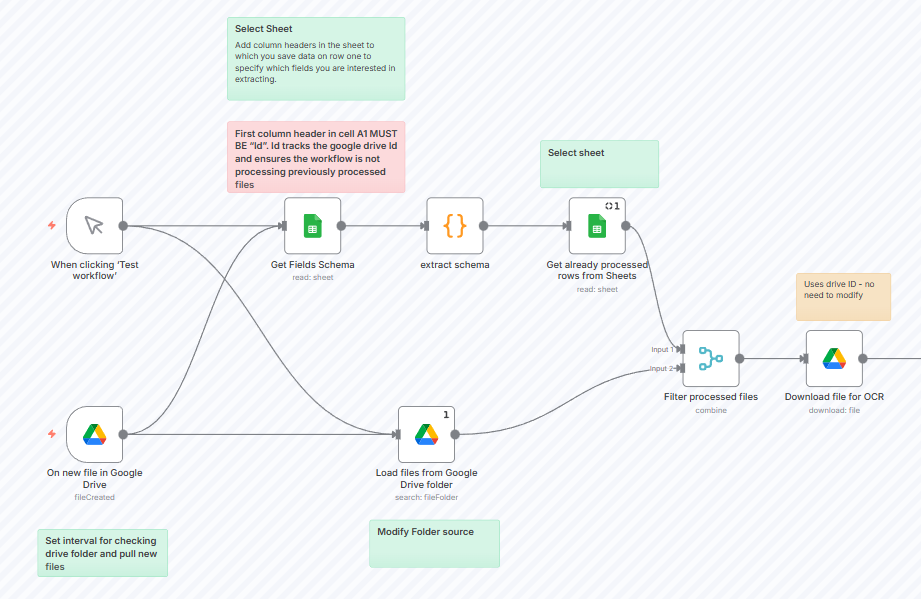
The Extract Invoice Data from Google Drive to Sheets with Mistral Nemo OCR & Gemini Template monitors a designated folder in Google Drive—a folder where you drop invoice PDFs or image files. Whenever a new invoice appears, the workflow uses Mistral OCR to extract the text content from the invoice. Then, Gemini AI parses the values and appends them as a new row into a Google Sheet.
Why you’ll like this template:
✅ Ideal for: Freelancers or agencies who receive and process invoices
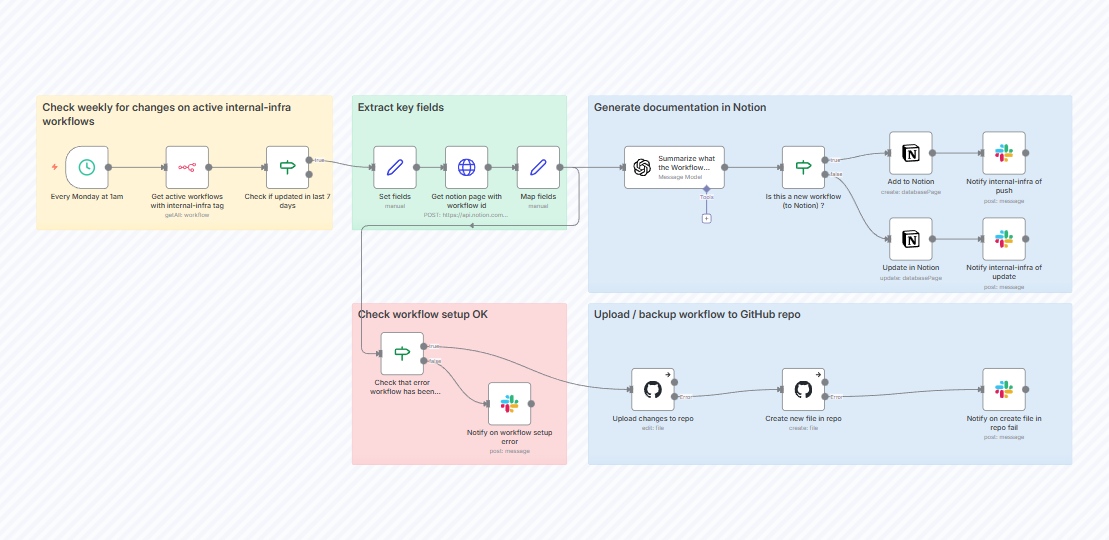
The Automatically Document and Backup N8N Workflows Template runs on a schedule. For new and recently modified workflows, it creates a backup and stores it in a version-controlled repository like GitHub. It also generates a summary along with metadata and stores it in a Notion database.
Why you’ll like this template:
✅ Ideal for: Users or teams with many n8n workflows, who want to maintain a backup and version history
📚 Read More: Workflow Examples and Use Cases
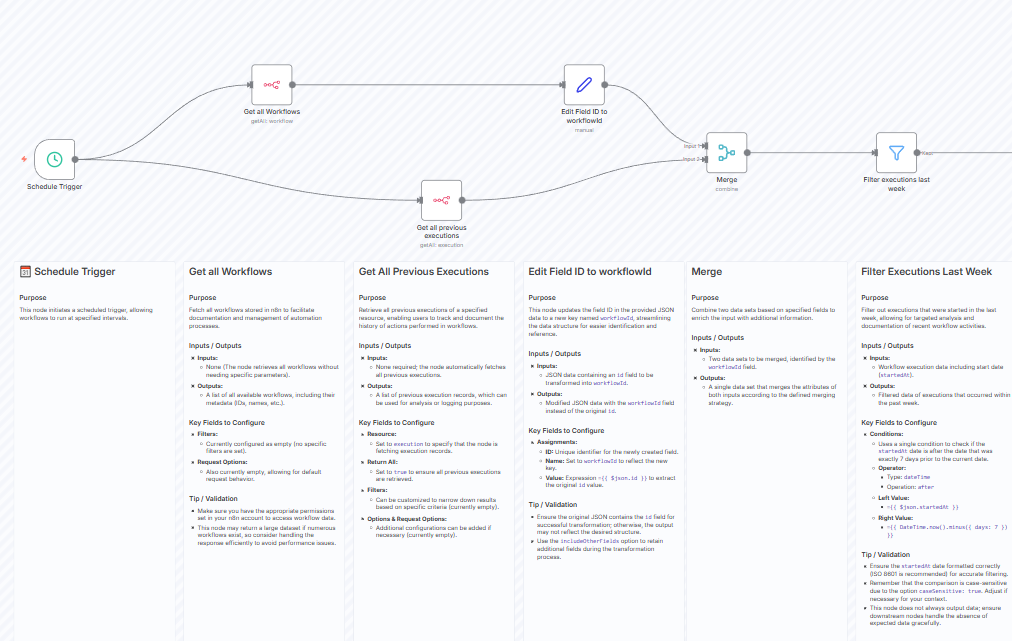
The Weekly Workflow Analytics Reports with n8n API & Email Delivery Template tells you which workflows are failing most often, or which ones take too long. It can be configured with both Gmail and Outlook to give stakeholders a clean, weekly report in their inbox.
Why you’ll like this template:
✅ Ideal for: Small teams that want a simple, no-code way to track which workflows run reliably vs. which fail often
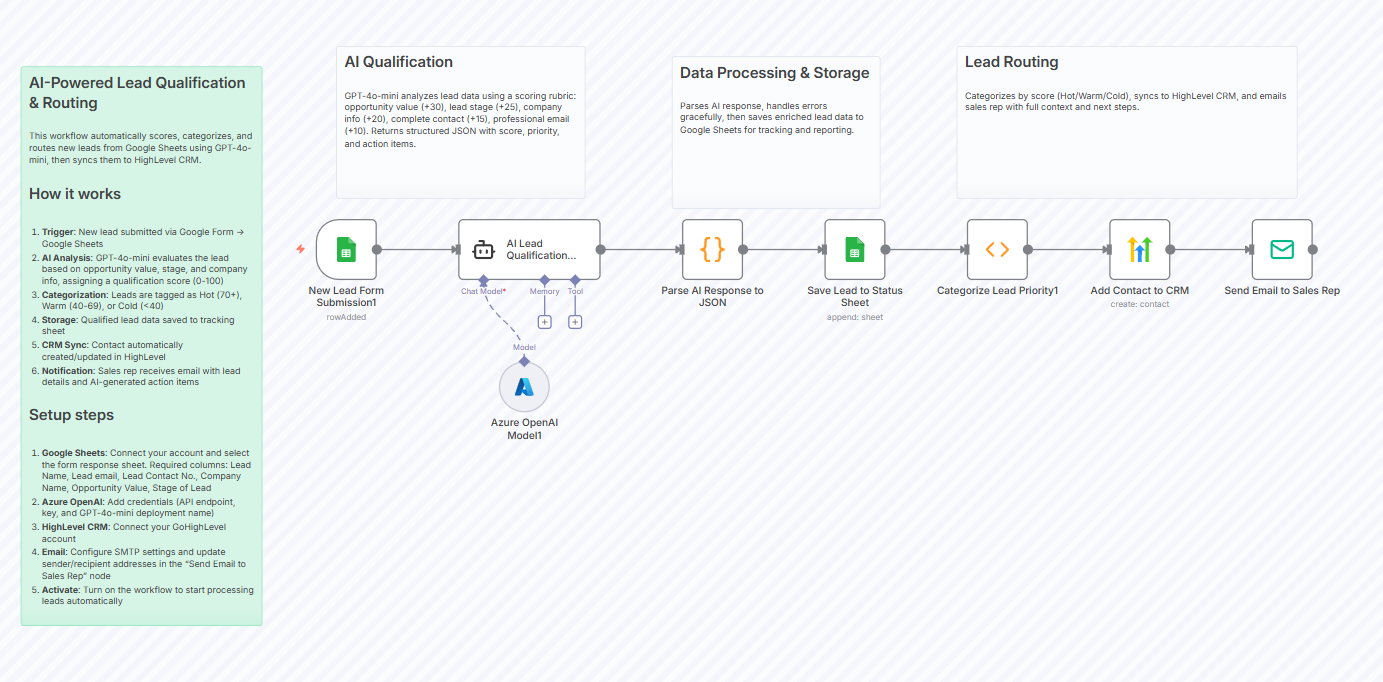
With the Automated Lead Qualification & Routing with GPT-4o-mini, Google Sheets & HighLevel CRM Template in n8n, you can triage and prioritize leads effectively. Leads get logged, prioritized, entered into CRM, and assigned to reps automatically.
Why you’ll like this template:
✅ Ideal for: Small to medium-sized businesses that want to avoid manual lead evaluation
💡 Pro Tip: Name nodes clearly!
A workflow is only as understandable as its labels. Use clear names like “Check CRM Status,” “Filter Paid Invoices,” or “Clean Email Input” to make maintenance and handoffs painless.
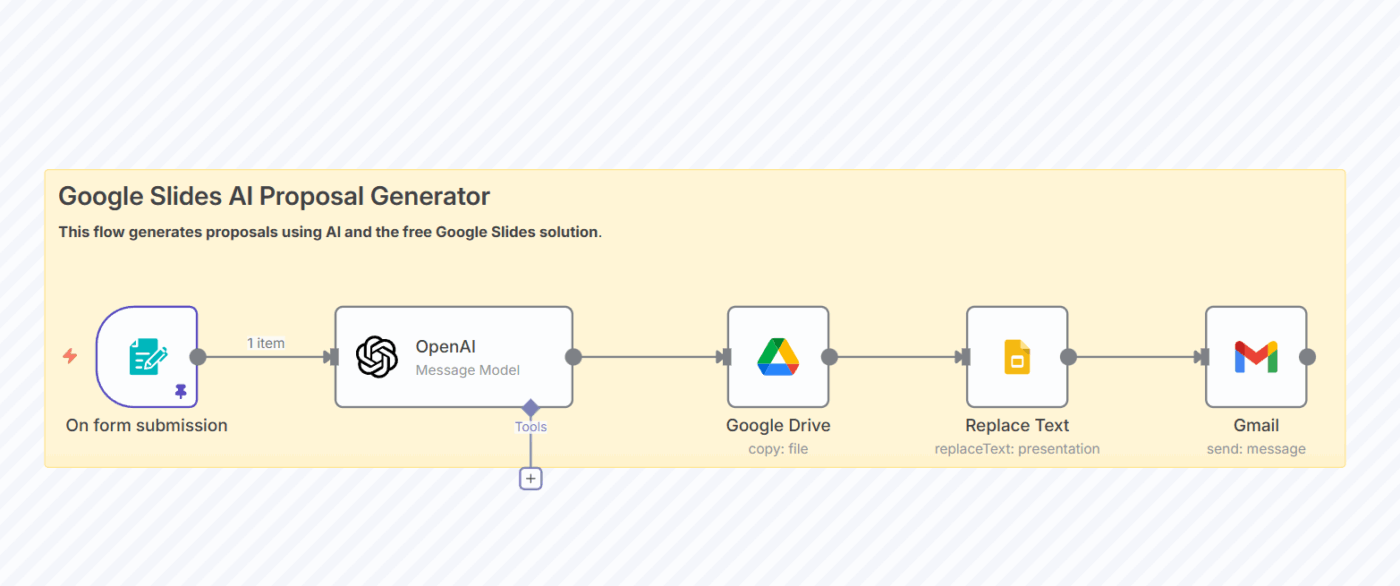
After a sales call, the AI-Powered Post-Sales Call Automated Proposal Generator workflow takes your call notes or transcript, runs them through AI to outline key requirements, and generates a tailored proposal you can send to the prospect. Instead of spending hours writing and formatting a proposal, you get a ready document in seconds.
The template also accepts audio call recordings (transcribed with Whisper v3 or Gemini Audio) and can generate proposal drafts as DOCX files.
Why you’ll like this template:
✅ Ideal for: Small and medium-sized sales teams that want to speed up proposal generation and reduce manual copywriting effort
💡 Pro Tip: Set up failure alerts
Even simple workflows can fail because of expired tokens, changed file names, or missing data. Add a notification step that pings you when something breaks so issues don’t pile up.
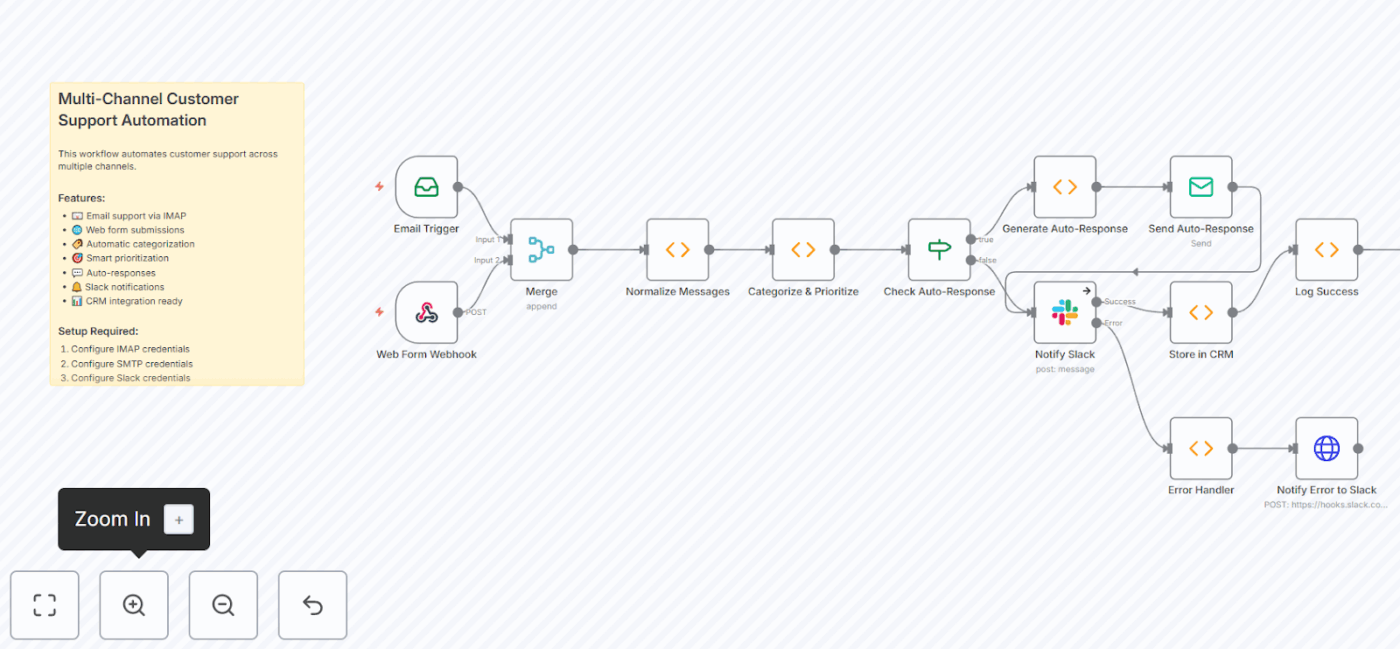
n8n’s Multi-Channel Customer Support Automation Suite pulls your support requests from multiple channels into a single ticketing workflow. Tickets can be tagged and routed to your helpdesk or CRM so that conversations and issues get resolved promptly.
Why you’ll like this template:
✅ Ideal for: E-commerce stores or SaaS services that expect moderate daily customer support volume
n8n is a flexible tool for teams that want to build scalable operations or automatically trigger tasks across platforms.
However, here’s where n8n sometimes falls short:
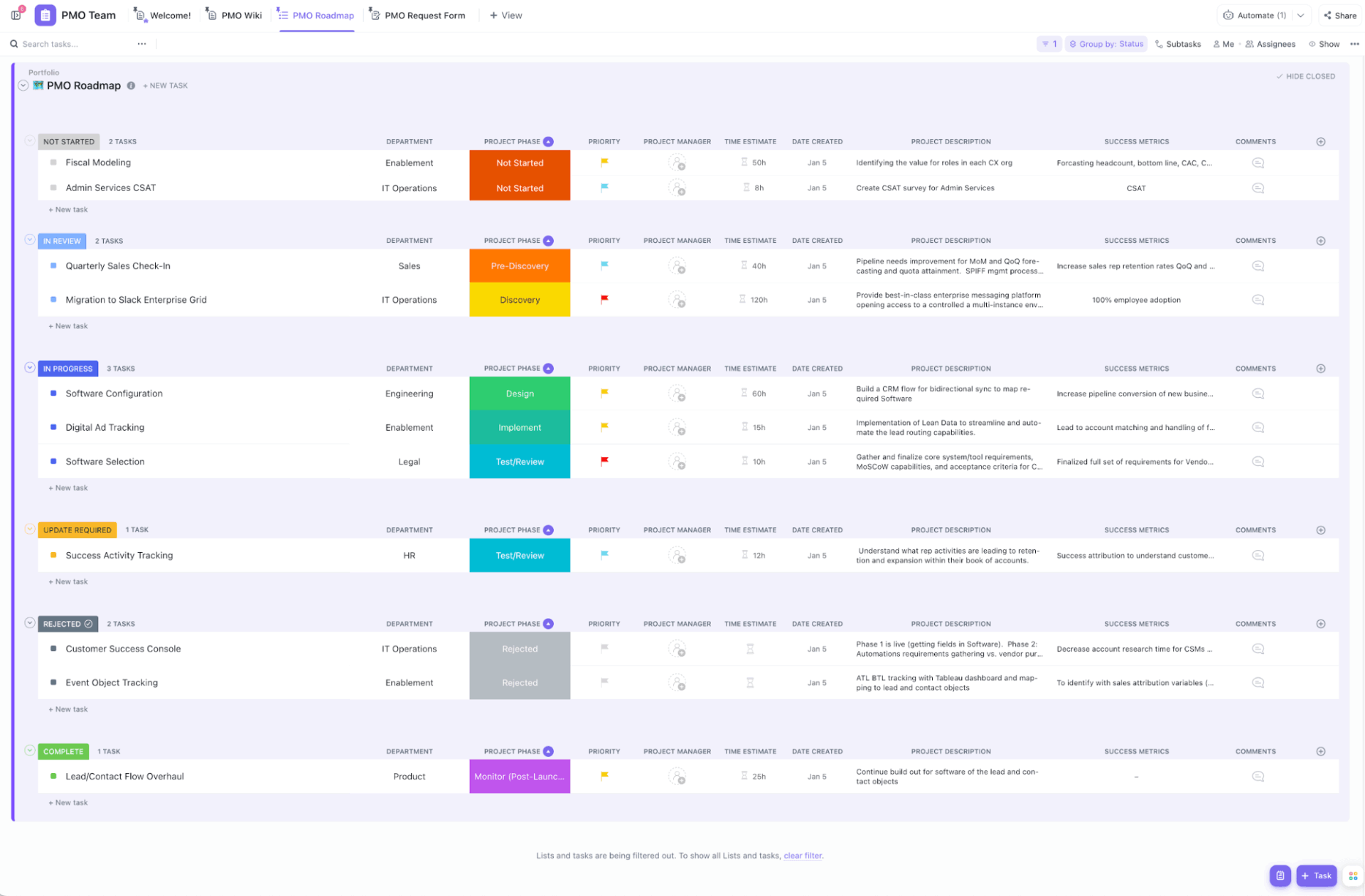
Start delivering complex projects faster with structure and clarity. Use the ClickUp Project Management Template that keeps programs and portfolios from idea to execution in a single workflow.
Organizing work is easy with Spaces for different departments or teams, Folders for projects, and Lists for phases or milestones. ClickUp Custom Fields let you capture details, such as priority, risk, budget, owner, due date, etc., for each task.
For project management automation, you get if/then triggers, 100+ prebuilt templates, and the flexibility to customize them to your needs.
ClickUp Automations eliminate manual work. When a task’s status changes to ‘Completed’, you can automatically move it to another List or notify stakeholders. Or when a due date is missed, change priority to ‘Urgent’ and notify the assignee and the project manager.
Why you’ll like this template:
✅ Ideal for: Project managers, PMO leads, and cross-functional teams managing multi-phase initiatives that demand real-time visibility
📚 Read More: Process Map Templates for ClickUp, Excel, and Word
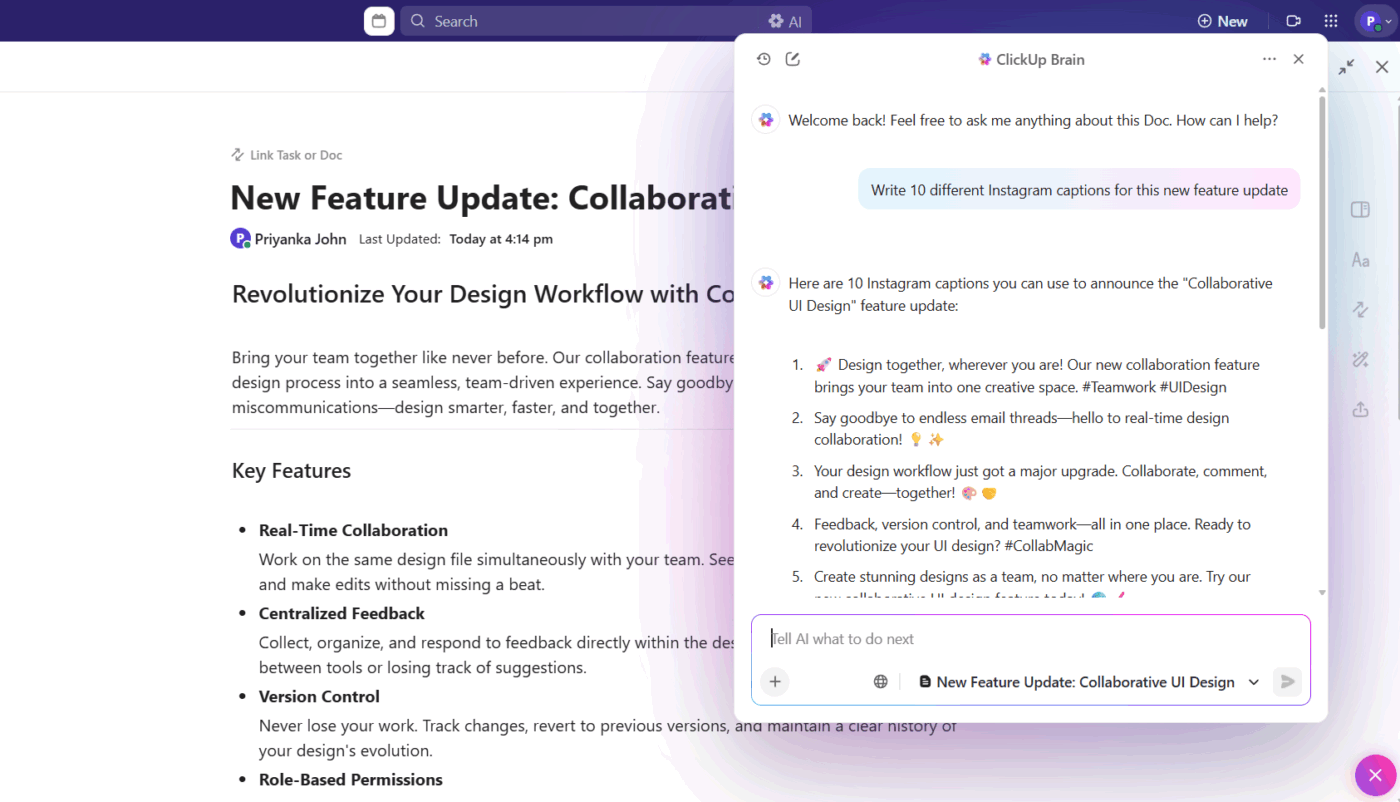
🚀 ClickUp Advantage: ClickUp Brain, an AI-powered and context-aware assistant, helps speed up workflows by fetching insights from across your workspace. It scans your documents to generate summaries, connects tasks with delivery timelines to help you prioritize, and generates everything from email subject lines to catchy captions for social media.
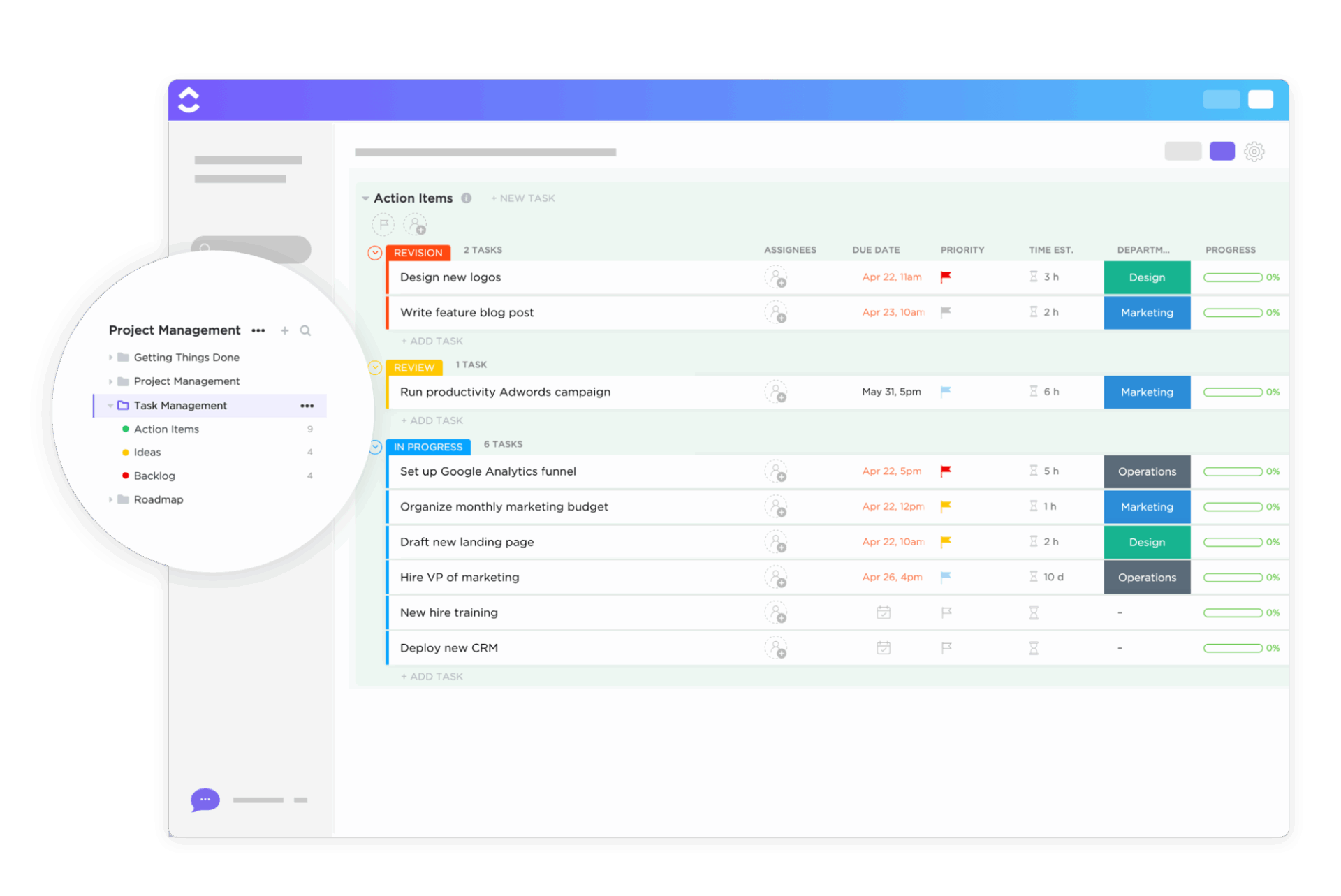
The ClickUp Task Management Template offers a clear and customizable system for planning, assigning, and tracking tasks with ease. You can switch between ClickUp’s 15+ Custom Views to see work from different perspectives, including deadlines, ownership, and progress.
The By Priority List View sorts all your tasks based on urgency, from high to low. The By Department List View shows tasks for each department with their assignees, due dates, statuses, priority, comments, etc. You also get a Calendar View to see timelines mapped on a daily, weekly, or monthly timeline.
Why you’ll like this template:
✅ Ideal for: Project managers who need a centralized task hub to plan and track deliverables across teams
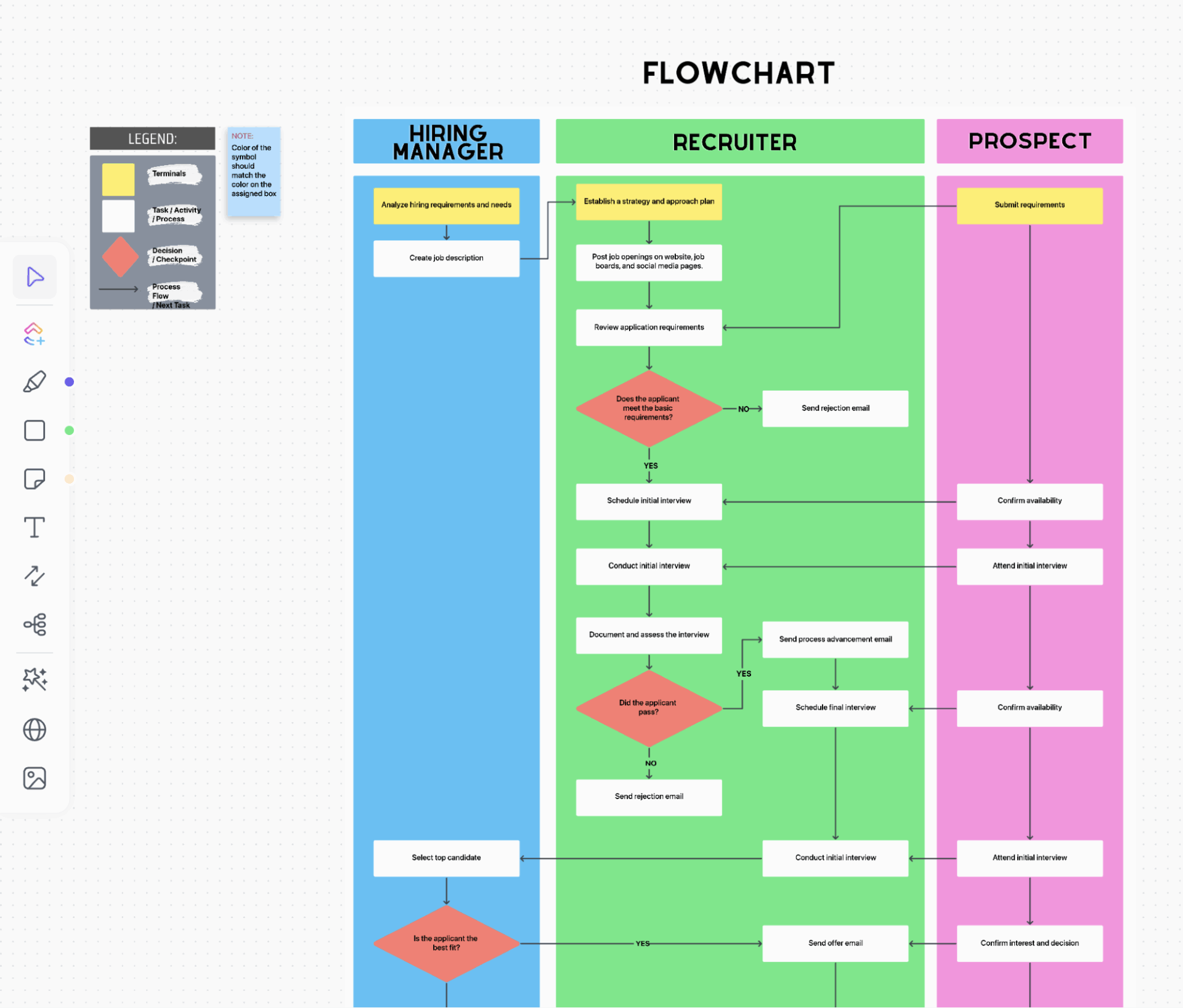
The ClickUp Process Flowchart Template transforms complex operations into clear, step-by-step visuals. This one is built on collaborative ClickUp Whiteboards with accountability for who does what at each stage. It’s a useful template for structured, multi-step processes like hiring, onboarding, handoffs, or long-chain approvals.
Each shape in the Whiteboard represents tasks, decisions, and process flow with arrows indicating the next stage. You get a ready-made flowchart view, but you can drag elements to reorder them according to your workflows.
Why you’ll like this template:
✅ Ideal for: HR teams, recruiters, and operations managers relying on visual clarity to keep processes consistent and transparent
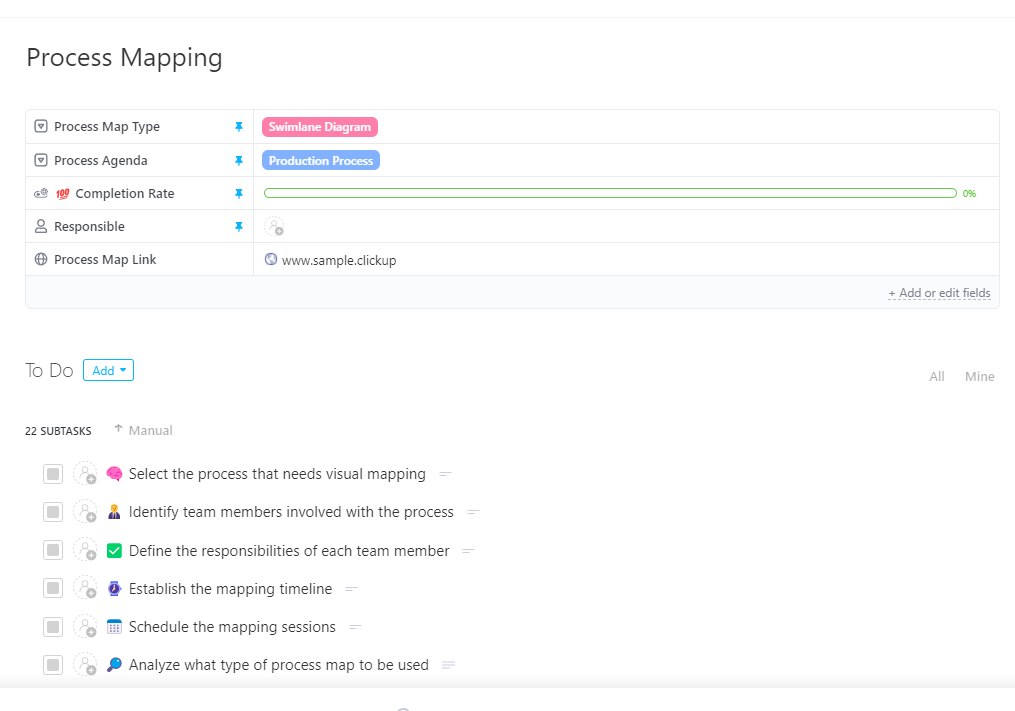
The ClickUp Process Mapping Template is a ready-to-use task list with 20+ steps defined as sub-tasks for documenting and optimizing processes across departments.
Once you have decided which workflow or process you want to map, write down all the steps involved in ClickUp Docs. Here, you can collaborate in real-time with your team members and decide responsibilities and timelines. Convert action items into ClickUp Tasks, set assignees, priorities, and due dates to make tracking effortless.
Why you’ll like this template:
✅ Ideal for: Operations managers and team leads who need to standardize workflows in cross-functional setups
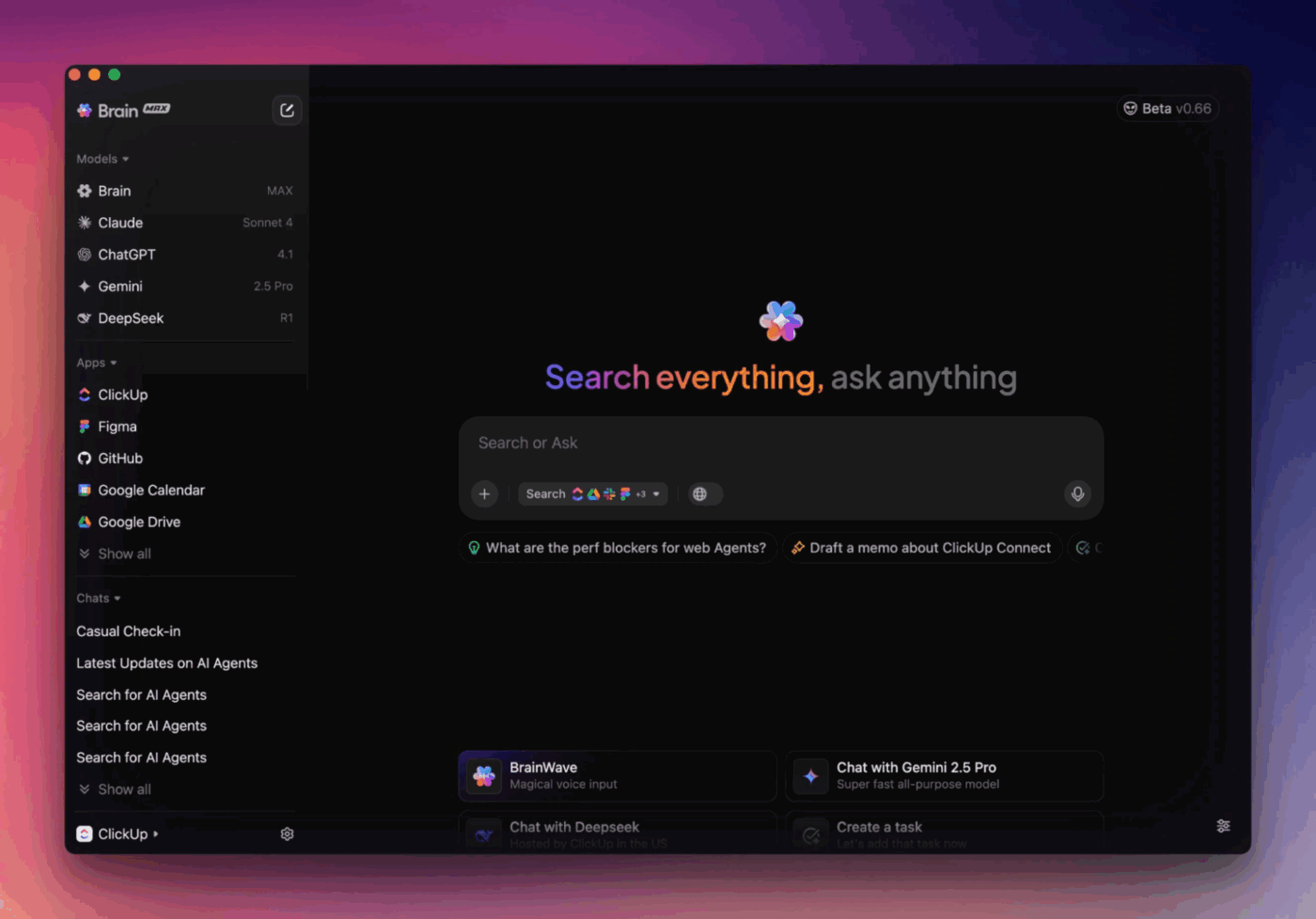
🚀 ClickUp Advantage: Workflow automation works best from a unified workspace. ClickUp Brain MAX helps you automate routine steps, summarize updates, and move information across apps automatically. From summarizing meeting notes to converting chat messages into ClickUp Tasks, it can automate processes across platforms.
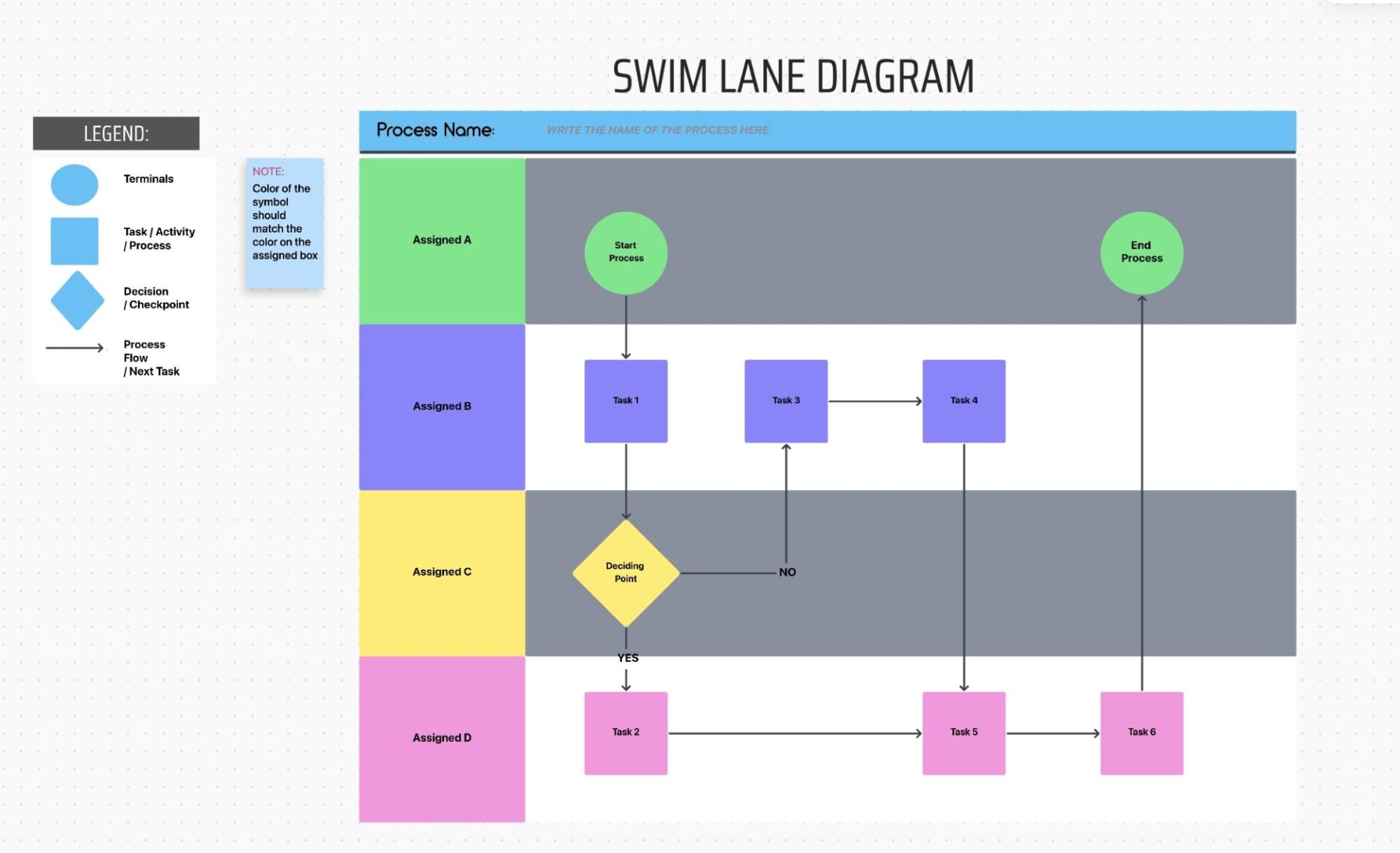
To visualize processes that involve multiple teams, use this interactive whiteboard setup in the ClickUp Swimlane Flowchart Template. Every lane in this flowchart represents a person or team, and flowchart elements represent tasks, decisions, or steps.
Unlike static flowcharts, this one is a fully actionable template where every shape can turn into a ClickUp Task, with customizable Custom Fields and Custom Task Statuses. Lanes are color-coded by teams and can be rearranged vertically or horizontally depending on your preferred layout.
Why you’ll like this template:
✅ Ideal for: Teams and developers who want to visualize, automate, and manage cross-department workflows
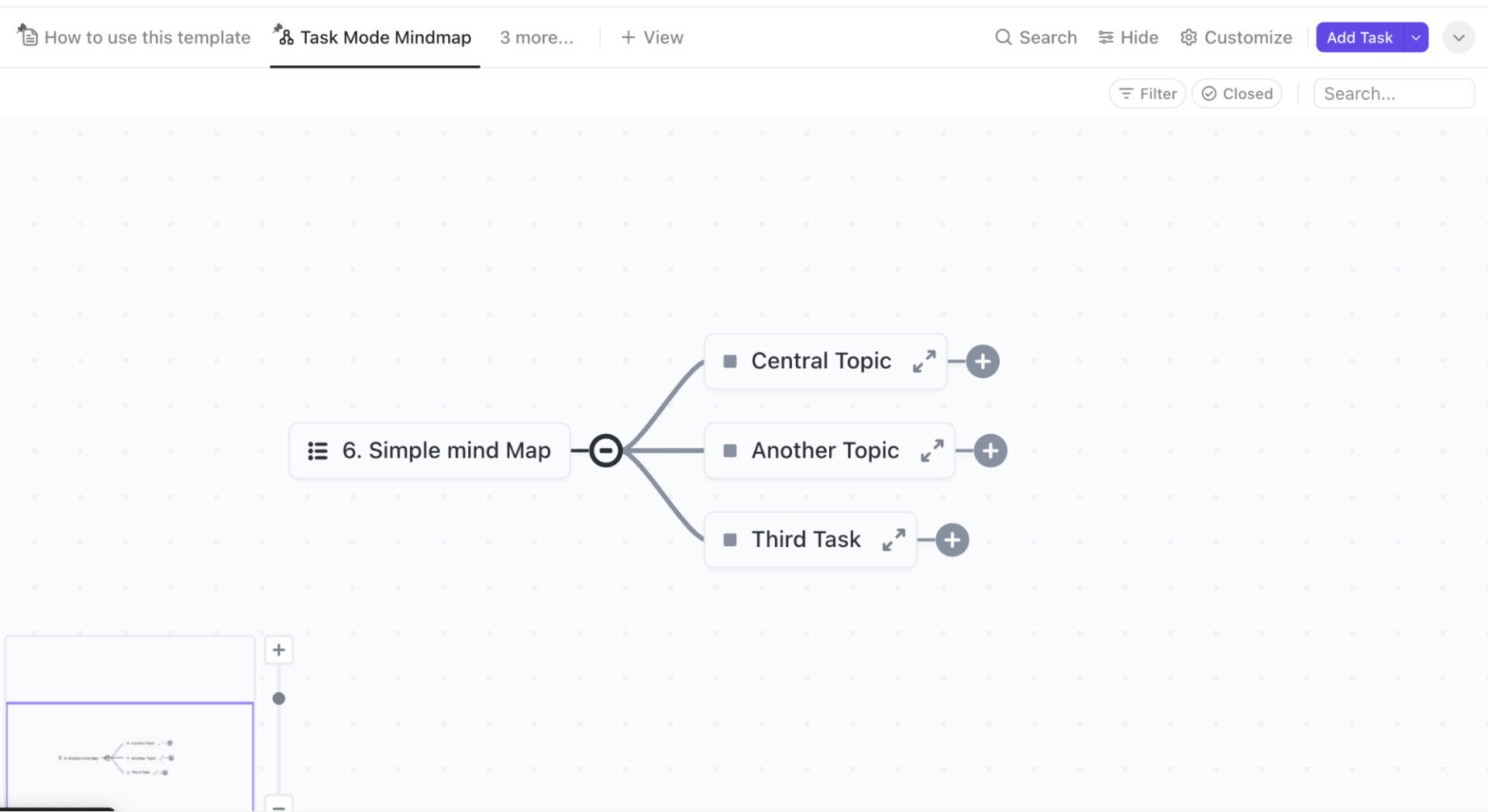
Brainstorm smarter with this ClickUp Simple Mind Map Template that offers a visual way to connect ideas and design workflows. It is best suited for early-stage planning and requirements gathering sessions.
This ClickUp Mind Maps template comes pre-configured with views and nodes/connectors, but you can drag nodes around to reorganize the layout and restructure branches as you need. Here, collaboration works in real time. Teams can edit the mind map, add ideas, turn nodes into tasks, highlight priorities, and more.
In Task Mode, nodes represent actual tasks and subtasks from your ClickUp workspace so you can visualize existing processes. The Blank Mode is where you start from scratch and experiment freely before you build.
Why you’ll like this template:
✅ Ideal for: Product managers and marketing strategists who need to organize complex ideas and test workflow logic
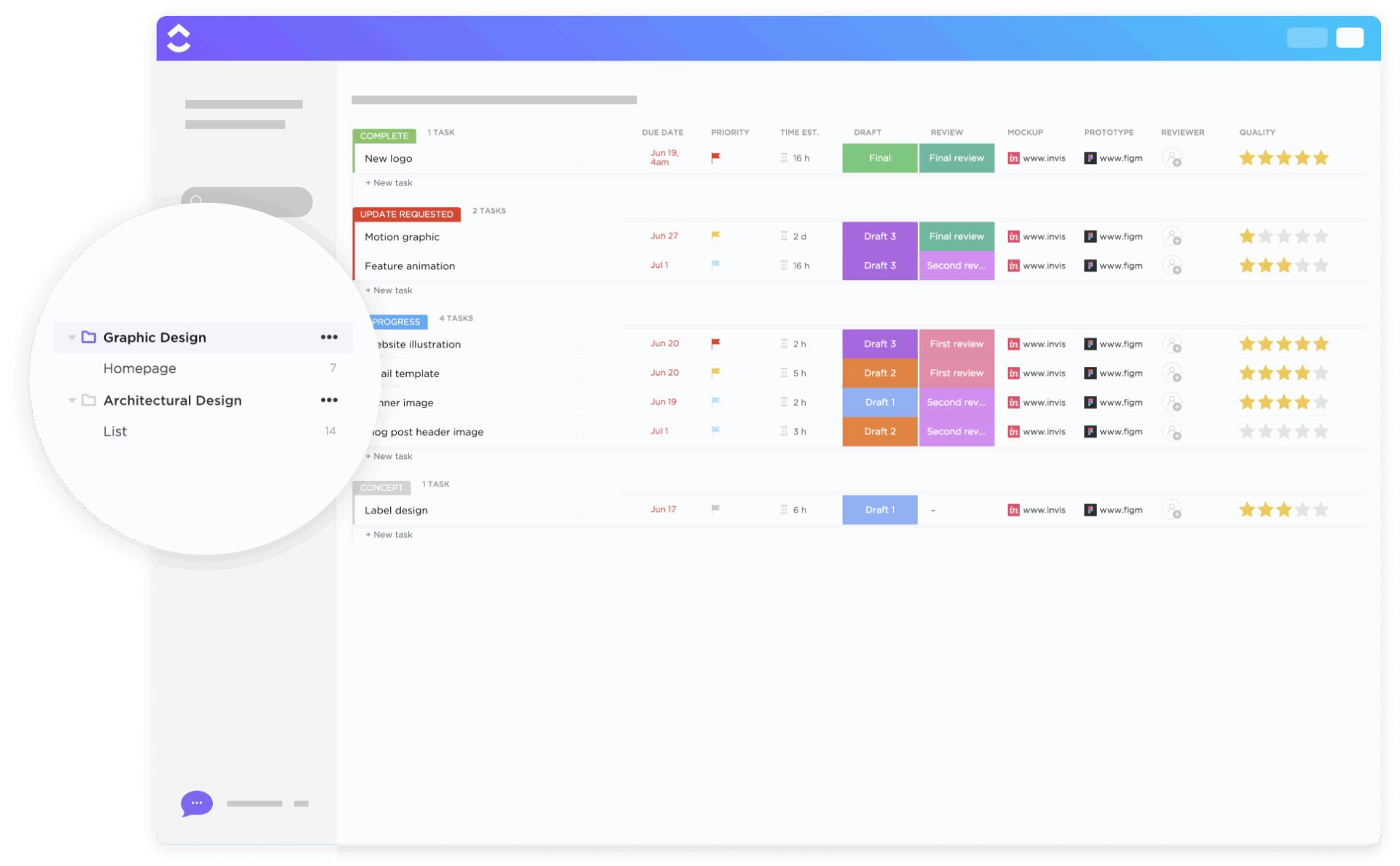
With the ClickUp Graphic Design Workflow Template, your design team gets a structured yet flexible space to organize deliverables and track them through different stages. There are three pre-defined lists: New Requests, Active Requests, and Client List. Group, sort, and filter tasks however you like to manage incoming and ongoing work.
On the Kanban-style Board view, tasks can be grouped by status, assignee, priority, tags, or due dates. And the Gantt Chart View lets you see the project schedule and any dependencies on a visual timeline.
Custom Fields like Types of Projects, Channel, and Requested Format let you capture additional details accurately. The People field is where you can add reviewers and approvers to clarify who is responsible for which task.
Why you’ll like this template:
✅ Ideal for: Design teams and marketing departments managing high volumes of design requests or client deliverables
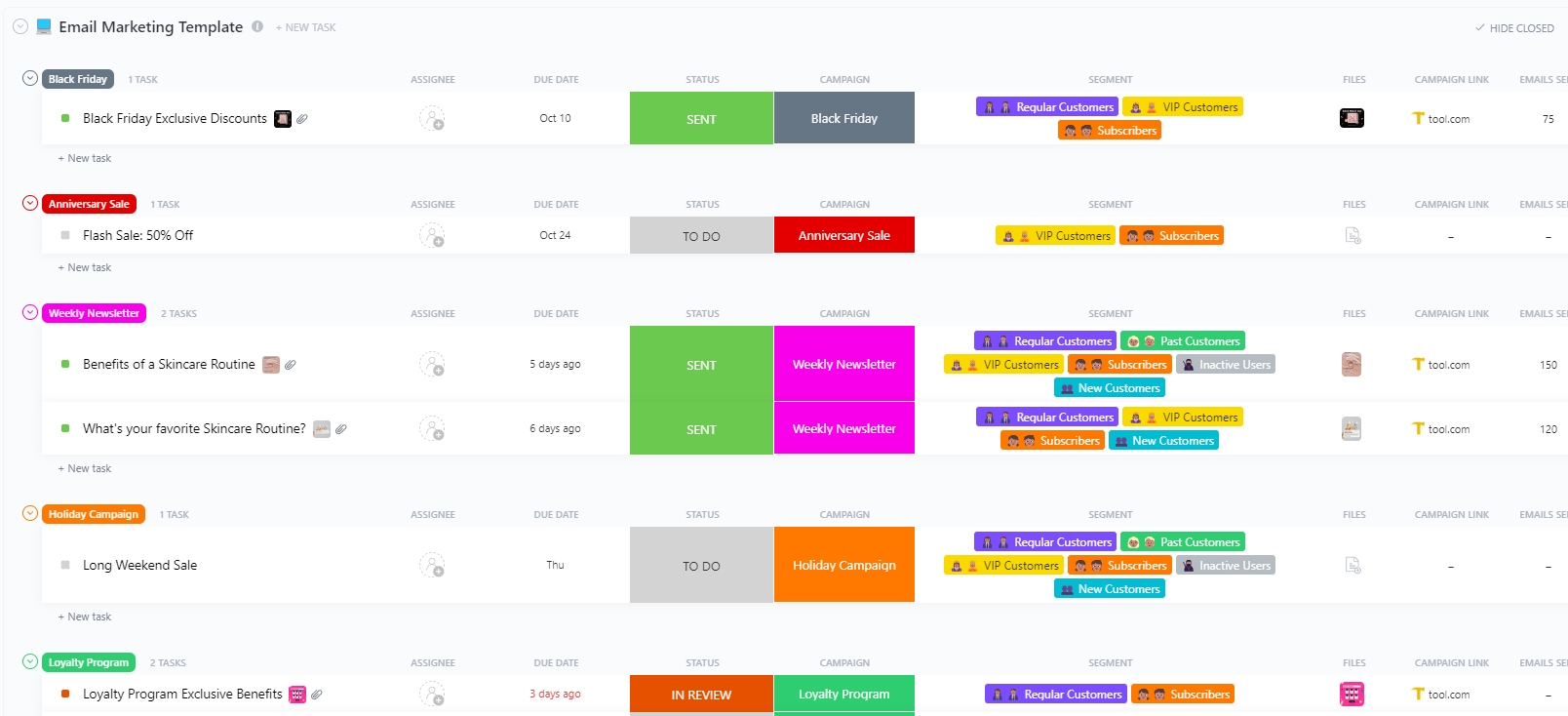
The ClickUp Email Marketing Template acts as a command center for all your email campaigns. Use it to create campaigns, schedule emails, run performance analytics, and even track workloads.
All campaign-related tasks you create appear in the Campaigns List, where you can see every piece of content scheduled for release along with details like channel and target audience. Content Calendar View then maps your campaigns across the month, with color-coded task cards that make it easy to track progress at a glance.
The Email Results Tracking table lists all sent campaigns along with key engagement metrics for each segment. Planning for future campaigns becomes easier when you get clarity on how your content performed.
Why you’ll like this template:
✅ Ideal for: Marketing teams and growth managers looking for a tool to centralize campaign planning and measure outcomes
🚀 ClickUp Brain in Action: For marketing teams, ClickUp Brain performs sentiment analysis to uncover how customers feel about a brand and its products, campaigns, or competitors. The insights can then be used, or flag areas with the most concerns and prioritize improvements.
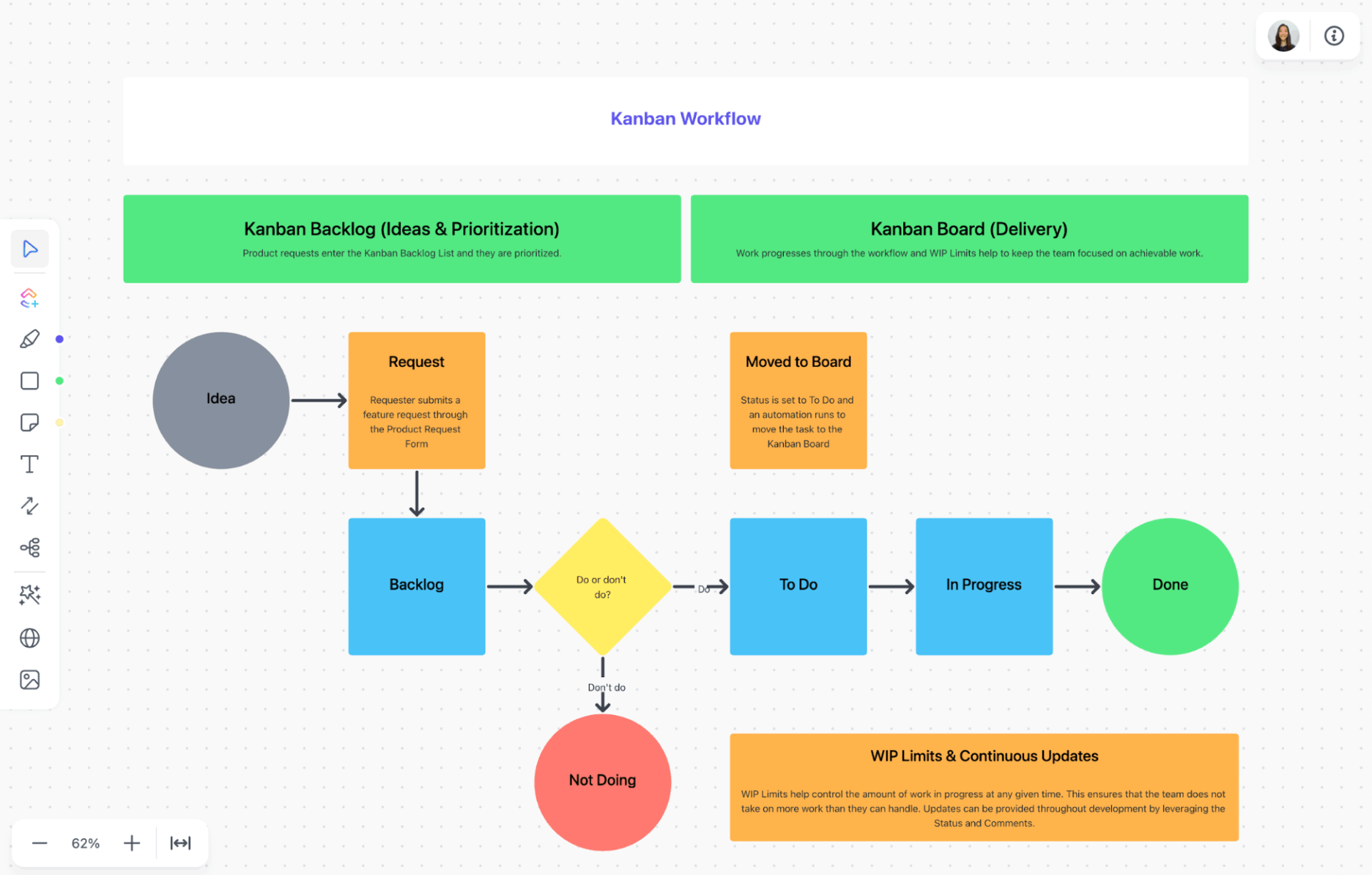
The ClickUp Kanban for Software Development Template gives teams a structured way to manage development workflows and improve accountability.
The template comes with a set of pre-defined columns that represent different stages of software development, like backlog, in progress, review, testing, done, blocked, etc. You can modify or extend these statuses to match your team’s actual workflow.
Tasks, represented as cards, can represent feature enhancements, bug fixes, process improvements, or backlog items. You can easily drag-and-drop cards to move them across stages as work progresses.
Why you’ll like this template:
✅ Ideal for: Software teams looking for a tool to manage work visually using a Kanban board
📚 Also Read: How to Use AI to Automate Tasks
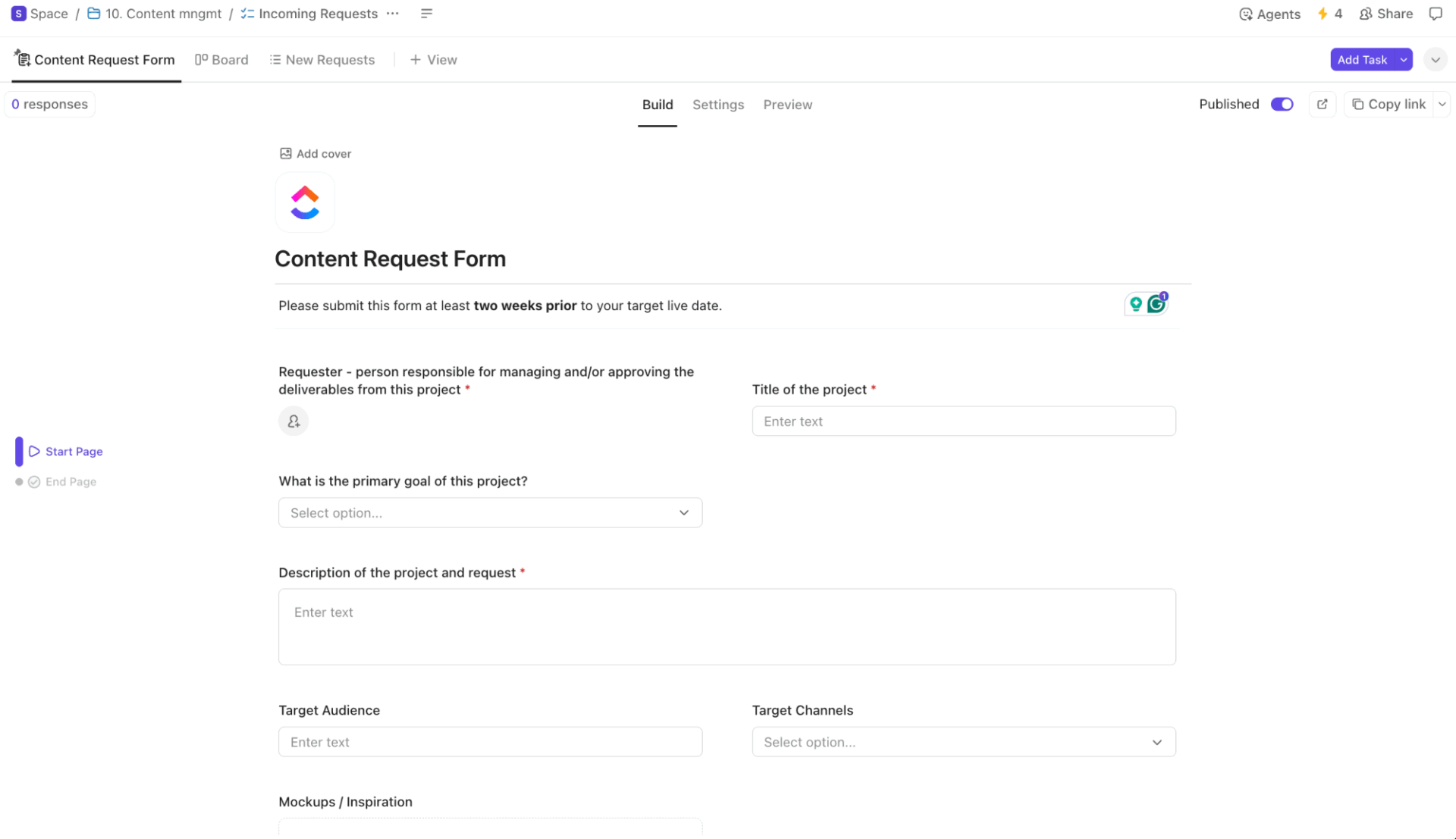
The ClickUp Content Management Template is a ready-to-use system for managing your entire content pipeline. Within this template, you’ve a dynamic workspace with dedicated lists for each channel, such as Website, Blog, Social, and Email.
Content requests start in the Incoming Requests list, where you can log ideas, assign owners, and estimate effort. From there, each item flows into channel-specific boards with stages, such as Concept, In Development, In Review, and Ready to Publish, allowing you to standardize content workflows across channels.
The collaborative workspace lets you work with your writers, designers, editors, and marketers in real time. You can use subtasks or checklists for content pieces with multiple steps and add attachments or links for assets, briefs, guidelines, and branding kits.
Why you’ll like this template:
✅ Ideal for: Marketing and content teams managing multi-channel calendars and creative workflows
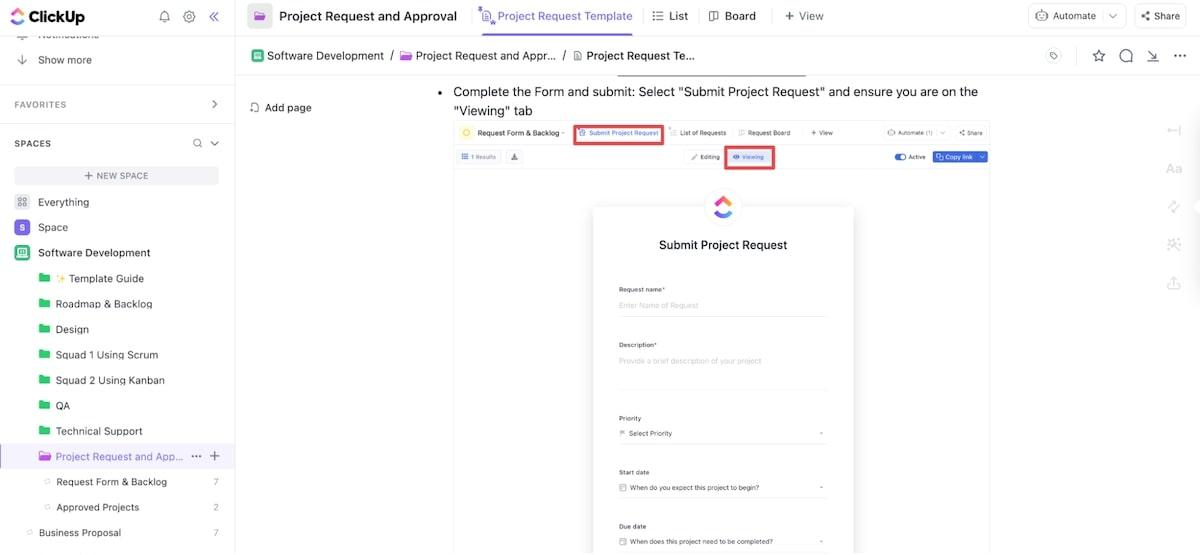
The ClickUp Project Request and Approval Template helps standardize requests across your organization so every new project follows a defined approval process.
Status markers help track work. Every new request starts in ‘Under Review.’ As stakeholders evaluate and make decisions, the status can be changed to ‘Approved,’ ‘Rejected,’ or ‘In Progress’ depending on the outcome. Once approved, project tasks can be assigned to the right team members, and you can use the same workspace to track progress until delivery.
Why you’ll like this template:
✅ Ideal for: Project managers handling project ideas or work requests from multiple stakeholders or departments
📚 Also Read: How to Use AI for Productivity (Use Cases & Tools)
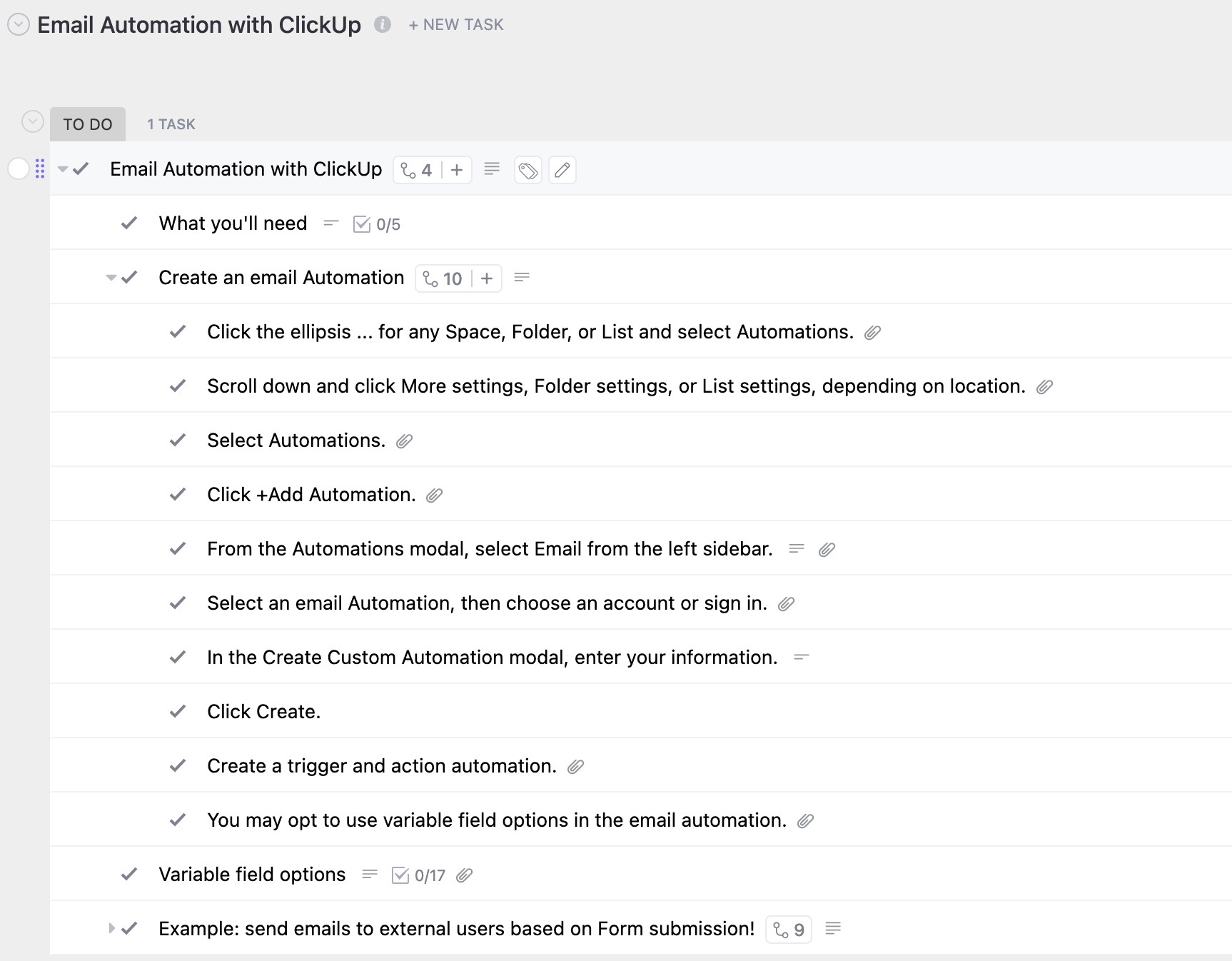
ClickUp Email Automation Template lets you send emails based on pre-defined conditions or triggers. You can choose from 100+ templates or set custom rules based on your workflows.
Triggers can be process steps like task creation, status changes, or Custom Fields values like ‘Send Date’. Email content can be stored in ClickUp Docs and attached to tasks, along with other assets such as images or brand kits.
If you are running email campaigns, you can track metrics and see them on ClickUp Dashboards to analyze performance and adjust future emails or workflows.
Why you’ll like this template:
✅ Ideal for: Anyone who needs to send timely, consistent emails without manual work
💡 Pro Tip: Document as you build
Add short notes inside your workflows explaining what each section does. Your future self — and your teammates — will thank you when it’s time to troubleshoot or update.
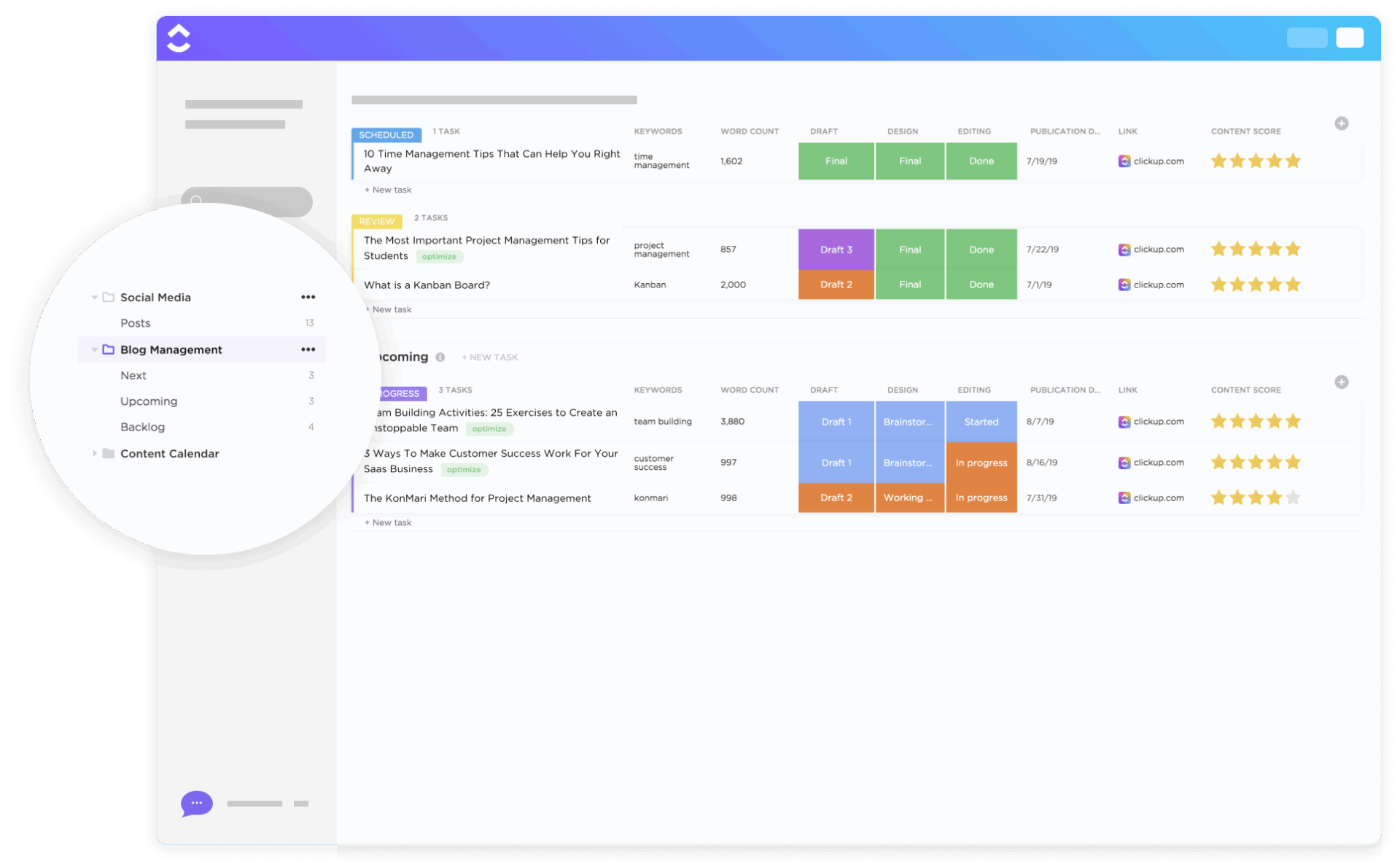
The Blog Management Workflow Template gives you a centralized, automated workspace where every post moves from ideation to publication through a clear workflow.
You get a built-in request form so new blog ideas can be captured in a structured format. Each submission becomes a new task. Once it is approved, execution can be assigned to writers and designers, along with details such as blog title, author, due date, required assets, post date, channel, etc.
Why you’ll like this template:
✅ Ideal for: Agencies or in-house creative teams publishing blogs for multiple brands or content streams
📚 Also Read: Powerful AI Agents Examples Transforming Industries
Every workflow is only as strong as the system behind it. n8n workflow templates make automation accessible to teams by connecting tools and eliminating manual tasks.
But if you want to turn manual workflows into self-running systems, you need ClickUp.
ClickUp’s workflow templates give teams a balance of control and momentum, helping you design systems that grow with the work instead of slowing it down.
Sign up on ClickUp for free and start finding ready-to-use setups for marketing, engineering, operations, and more.

© 2026 ClickUp

There’s an easier way. Try a free AI Agent in ClickUp that actually does the work for you—set up in minutes, save hours every week.