









Still downloading templates?
There’s an easier way. Try a free AI Agent in ClickUp that actually does the work for you—set up in minutes, save hours every week.
Sorry, there were no results found for “”
Sorry, there were no results found for “”
Sorry, there were no results found for “”
The hardest part of innovation isn’t coming up with ideas.
Most teams generate ideas constantly, but without a clear execution framework, those ideas scatter across documents, chats, and half-remembered conversations. Momentum fades, ownership gets fuzzy, and progress stalls.
That’s why idea execution planning matters. It defines what happens next, who owns it, how progress is tracked, and when decisions get made.
In this blog, we’ve rounded up 10 free idea execution planner templates designed to help teams move from brainstorming to delivery without losing clarity, context, or speed.
This table helps you quickly scan and compare our top templates to find the perfect fit for your use case. All templates are free, fully customizable, and ready to use in ClickUp.
| Template Name | Download Template | Best Features | Ideal For | Visual Format |
| ClickUp Innovation Idea Management Template | Get free template | Custom statuses, impact/effort scoring, form-based submissions, Whiteboard brainstorms | Teams handling high volumes of ideas that need structured intake, scoring, and selection | ClickUp List, Board, Form, Whiteboard |
| ClickUp Project Execution Plan Template | Get free template | Risk and objective docs, subtasks, Gantt/timeline, priority-based tracking | Project leads who want planning docs and live execution in one place | ClickUp Doc, List, Gantt, Timeline |
| ClickUp Build Plan Template | Get free template | Roadmap visualization, cross‑team tasks, real‑time status, capacity views | Product, engineering, and design teams taking features from concept to launch | ClickUp List, Board, Timeline, Workload, Calendar |
| ClickUp Project Planner Template | Get free template | Budget tracker, schedule/itinerary views, 10 custom fields, time tracking & dependencies | Managers running mid‑sized projects who need visibility into budget, timing, and risk | ClickUp List, Board, Calendar, Timeline |
| ClickUp Implementation Plan for Simple, Complex, and Enterprise Teams Template | Get free template | 30 custom statuses, client resources & billing fields, overview & Gantt views, effort/cost tracking | Teams delivering implementations of different sizes that need one scalable framework | ClickUp List, Gantt, Dashboard |
| ClickUp Advanced Implementation Plan Template | Get free template | Phase tracking, effort/team fields, timeline & Gantt, client rating | Large, multi‑phase initiatives with complex dependencies and stakeholder groups | ClickUp List, Gantt, Timeline |
| ClickUp New Product Development Template | Get free template | Phase‑gated workflow, complexity/impact fields, process board, dependency alerts | Product teams moving ideas from validation through development and launch | ClickUp List, Board, Timeline, Gantt |
| ClickUp Squad Brainstorm Template | Get free template | Team Work Canvas, impact/effort sorting, direct task conversion, priority labels | Fast‑moving squads that want brainstorms to produce prioritized, owned actions | ClickUp Whiteboard, List, Board |
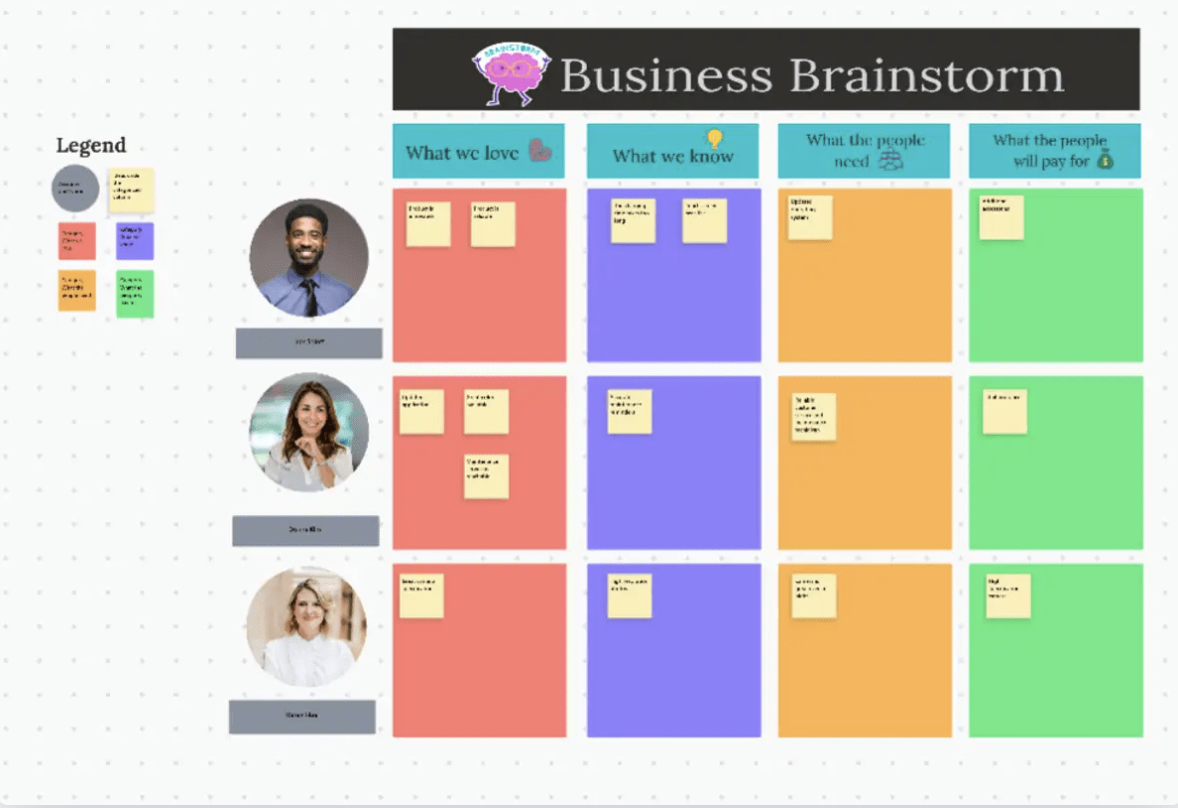
| ClickUp Business Brainstorming Template | Get free template | Visual ideation, milestone tracking, voting, action‑plan documentation | Leadership and strategy teams turning big‑picture ideas into initiatives with owners and milestones | ClickUp Whiteboard, Board, List |
| ClickUp Project Management Tasks Plan Template | Get free template | Task/subtask hierarchy, team fields, Gantt & Workload, completion tracking | Teams that need granular task breakdowns, clear ownership, and day‑to‑day execution tracking | ClickUp List, Gantt, Timeline, Workload |
An idea execution planner template is a structured framework that turns raw ideas into actionable work. It bridges the gap between brainstorming and delivery by defining what happens after an idea is proposed.
Instead of ideas living in notes, chats, or whiteboards, the template captures them in a shared system where ownership, next steps, timelines, and success criteria are clearly defined. Each idea moves through a visible workflow, from evaluation to execution, so progress doesn’t depend on memory or follow-ups.
With a repeatable execution path, an idea execution planner template removes ambiguity. Teams know who is responsible, what needs to happen next, and how progress will be tracked all the way to completion.
The result is faster momentum, clearer accountability, and fewer good ideas lost between discussion and delivery.
📖 Read More: A Project Manager’s Guide to AI-Powered Execution
A truly effective template is a flexible system that helps your team get work done, not just a static document. Here are the characteristics that make a template truly useful for your team. ✨
📮ClickUp Insight: 92% of workers use inconsistent methods to track action items, which results in missed decisions and delayed execution.
Whether you’re sending follow-up notes or using spreadsheets, the process is often scattered and inefficient. ClickUp’s Task Management Solution ensures seamless conversion of conversations into tasks, so your team can act fast and stay aligned.
Move from idea to execution in one connected workflow with these free ClickUp Task Templates. Here we go! 🛠️
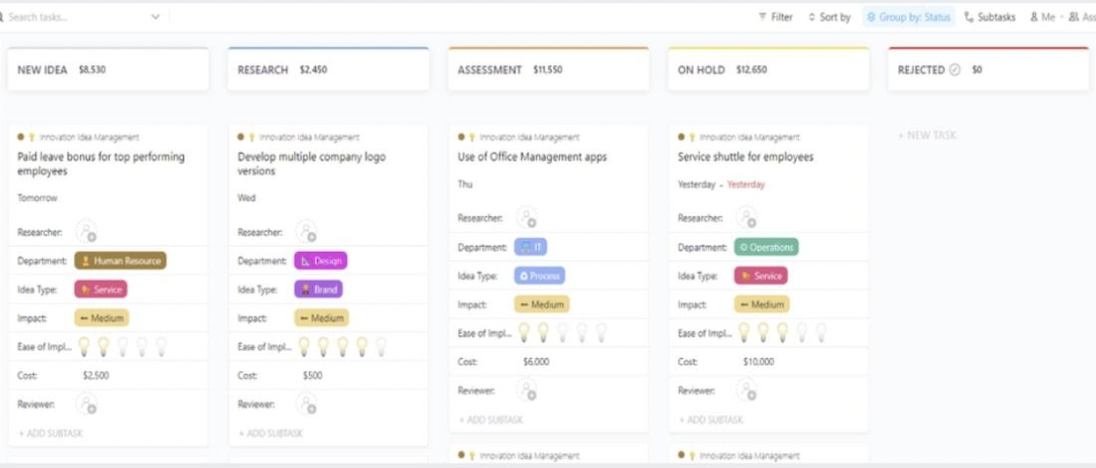
Your team is drowning in ideas but struggles to evaluate and prioritize them systematically. This is a classic example of innovation management failure, resulting in low-impact projects while high-value opportunities slip through the cracks.
ClickUp Innovation Idea Management Template creates a structured funnel to capture, score, and move winning ideas into execution. Make data-driven decisions and keep all your ideas in one place. You can also use ClickUp Brain to summarize submissions and suggest next steps, so nothing gets lost.
➡️ Ideal for: Teams that collect a high volume of ideas and need a consistent, fair way to evaluate, score, and decide which ones are worth investing in.
The project plans live in one tool, but the actual work happens somewhere else. This disconnect leads to misalignment, as teams work off outdated documents and stakeholders lack visibility into real-time progress.
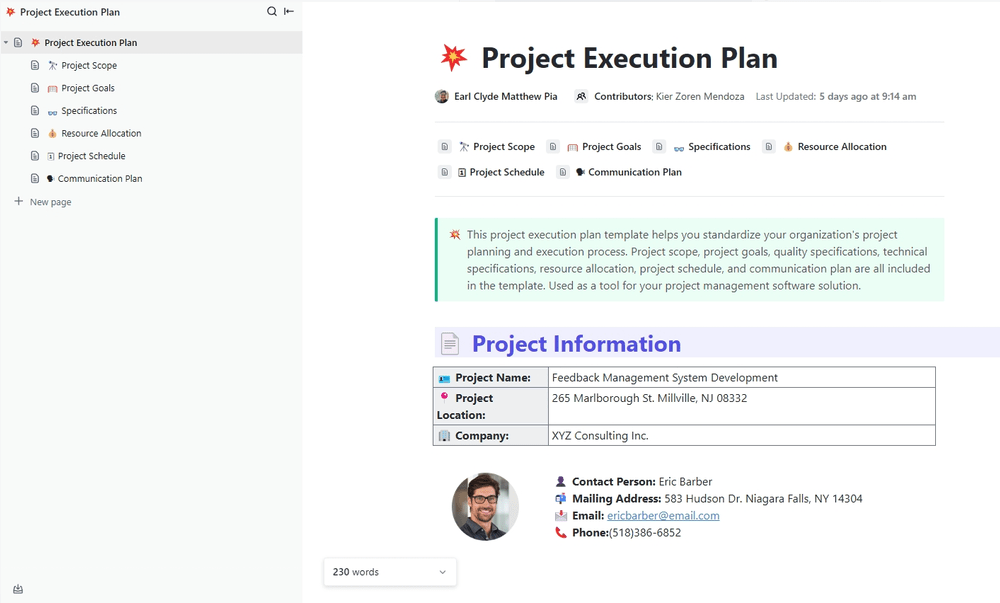
The Project Execution Plan Template by ClickUp solves that by connecting your plan directly to your work.
Plan and execute projects from kickoff to completion with a comprehensive framework that keeps your execution plan linked to your tasks. This is possible with the ClickUp Docs view within the template, which eliminates the gap between planning and doing.
➡️ Ideal for: Project leads who need a single source of truth that connects planning documents directly to live tasks and execution timelines.
Imagine that your product and development teams are trying to coordinate a launch. But the roadmap is in one tool, designs are in another, and tasks are scattered elsewhere. This tool sprawl creates confusion, missed handoffs, and delayed releases.
Build Plan Template brings everyone together into a single, clear roadmap.
Designed for teams taking ideas from concept to launch, this template provides task visualization, priorities, and timelines with real-time progress tracking. Your build plan is linked directly to sprint tasks, design documents, and stakeholder communication in one connected workspace.
➡️ Ideal for: Product, engineering, and design teams coordinating work from concept through launch across multiple disciplines.
🎥 Learn how to use AI Agents for project management. Watch this video:
Managing a project with a lot of moving pieces, but your current system is either too simple to handle the complexity or too rigid to adapt? You need a visual way to track progress without losing sight of critical details, such as budget and resource management.
The Project Planner Template from ClickUp gives you structure without the straitjacket.
With ClickUp Kanban View, you can track progress at a glance while keeping team members and resources aligned. The 10 pre-built ClickUp Custom Fields provide the data you need for informed decisions, all without creating spreadsheet sprawl.
➡️ Ideal for: Managers running mid-sized projects who need structure and visibility without heavyweight process or rigid workflows.
Your team handles implementations of varying sizes, but using a one-size-fits-all plan doesn’t work. Simple rollouts get bogged down in unnecessary processes, while complex projects lack the necessary structure. This leads to inconsistent delivery and frustrated clients.
This Implementation Plan for Simple, Complex, and Enterprise Teams Template scales from simple software rollouts to enterprise-wide implementations, providing tailored strategies for various needs within a single adaptable framework.
With 30 ClickUp Custom Statuses, you can accommodate even the most complex approval workflows and multi-phase projects.
➡️ Ideal for: Teams delivering implementations of varying scope who need one adaptable system instead of separate plans for every project size.
When managing a complex, multi-phase implementation, keeping track of all the dependencies and risks in a spreadsheet is a recipe for disaster. A single missed dependency can cause a cascade of delays, and unidentified risks can blow up your timeline and budget.
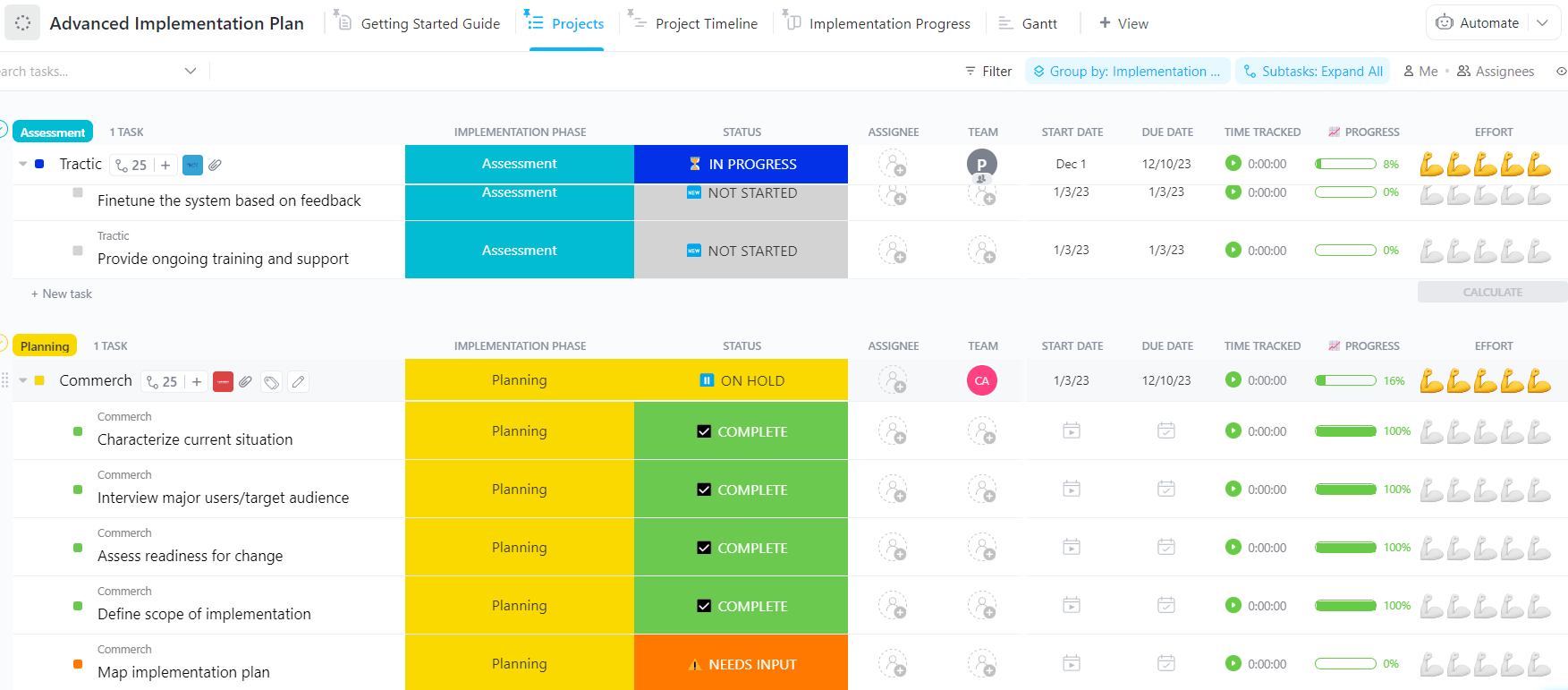
ClickUp’s Advanced Implementation Plan Template is designed to handle complexity.
This template helps you break down large-scale projects into smaller, manageable pieces with built-in visualizations for identifying dependencies and risk factors. You can link your implementation plans directly to SOPs, training docs, and stakeholder communication to keep everything connected.
➡️ Ideal for: Large, multi-phase initiatives with complex dependencies, risk considerations, and multiple stakeholder groups.
📖 Read More: How to Write Standard Operating Procedures (SOPs)
For a product team that is ready to innovate, structured processes matter more than anything. Without it, they risk skipping critical steps, such as market validation and user testing.
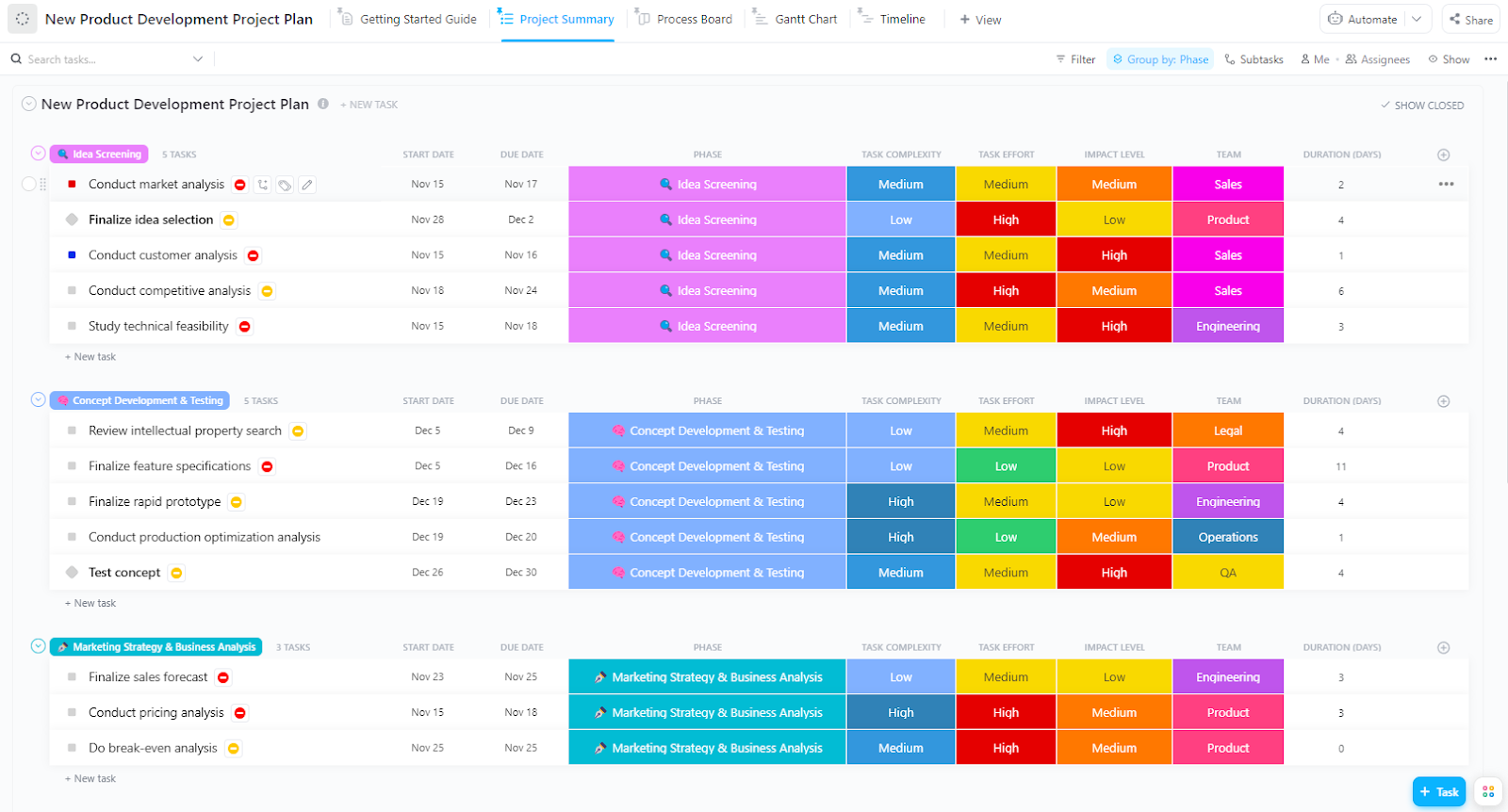
This can lead to building features nobody wants or launching a product that isn’t ready for the market. The New Product Development Template from ClickUp provides the phase-gate structure such teams need to succeed.
It guides product teams from initial concept through a successful launch, ensuring no critical steps are missed. You can even use ClickUp Brain to help generate task descriptions, summarize user feedback, and surface related work from across your workspace.
➡️ Ideal for: Product teams that need a phase-gated approach to move ideas from validation through development and launch without skipping critical steps.
Your brainstorming sessions are chaotic. Ideas are shouted out, written on a whiteboard, and then promptly forgotten once the meeting ends.
Squad Brainstorm Template from ClickUp transforms those sessions into organized, actionable outcomes.
Because it comes with the ClickUp Whiteboard view, ideas generated in the session can be converted directly into tasks with a single click—no manual re-entry or lost context. The visual canvas encourages creativity, while the template’s structure ensures that every idea is prioritized based on its impact and effort.
➡️ Ideal for: Fast-moving teams that want brainstorming sessions to produce prioritized, actionable work instead of forgotten ideas.
Most strategic planning sessions generate a lot of talk but not enough action. Ideas are discussed, but they lack a clear path to evaluation, refinement, and execution.
Business Brainstorming Template by ClickUp provides both the creative freedom for big thinking and the structured workflow to make it happen.
The visual Whiteboard format encourages participation, while the structured approach ensures ideas get properly evaluated. With this template, your strategic ideas flow seamlessly from brainstorming to milestone tracking to a concrete action plan, all within one connected workspace.
➡️ Ideal for: Leadership and strategy teams turning high-level discussions into concrete initiatives with milestones and owners.
⚡️ Template Archive: Free Action Plan Templates to Organize Goals and Track Progress
Projects often get bogged down because tasks are too big and lack clear ownership. Without a granular plan, it’s impossible to track progress accurately or manage your team’s capacity.
ClickUp’s Project Management Tasks Plan Template provides a detailed framework for breaking any project into manageable, trackable tasks.
With powerful visualization options like ClickUp Timeline View, ClickUp Gantt View, and ClickUp Workload View, you can stay on top of deadlines and prevent team burnout. The built-in ClickUp Task Hierarchy, with support for ClickUp Subtasks and ClickUp Task Checklists, ensures no detail falls through the cracks.
➡️ Ideal for: Teams that need to break large initiatives into clearly owned tasks and manage execution at a detailed, day-to-day level.
The right idea execution planner template provides structure without being rigid.
It provides your team with a clear path from concept to completion by including essential elements such as clear objectives, task breakdowns, accountability, and project tracking.
Choosing the right template today means you’ll have fewer lost ideas and faster execution tomorrow. The templates above cover every stage of the journey, from the initial brainstorm to the final delivery.
Ready to put your ideas into action? Get started for free with ClickUp to access all these templates instantly.
Start by customizing the template to match your team’s specific workflow, then commit to using it consistently for every new idea. The key is to treat it as a living document, regularly updating statuses and adding context, rather than setting it up once and forgetting about it.
An idea execution plan is focused on the early stages—moving a concept from ideation through validation and initial implementation. A project management plan covers the broader scope of delivering a fully defined project with established requirements and project milestones, and it often begins after an idea execution plan has validated the concept.
Yes, the best execution plan templates are designed for cross-functional collaboration. They include features such as role-based views and permission settings that enable different teams—such as marketing, product, and engineering—to view the information most relevant to them while still working from a single source of truth.

© 2026 ClickUp

There’s an easier way. Try a free AI Agent in ClickUp that actually does the work for you—set up in minutes, save hours every week.