






Still downloading templates?
There’s an easier way. Try a free AI Agent in ClickUp that actually does the work for you—set up in minutes, save hours every week.
Sorry, there were no results found for “”
Sorry, there were no results found for “”
Sorry, there were no results found for “”
HR is more than hiring and payroll; it’s the first line of defense against fines and regulatory risk.
If you’ve ever scrambled to find a signed contract or prove policy updates during an audit, you already know how quickly things can spiral without structure.
An HR audit checklist is one solution to this common challenge. ✅
It gives your HR department a clear, repeatable way to review employee records, HR policies, and workplace safety in one place. Looking to not repeat the checklist process every year? You can instead use an HR audit checklist template, which saves you time and is usually easy to get started with.
In this article, we’ll walk through 14 free HR audit checklist templates to help you tighten documentation and keep your HR practices aligned with current employment and labor laws.
| Template name | Download template | Ideal for | Best features | Visual format |
| ClickUp Internal Audit Checklist Template | Get free template | HR teams running recurring internal audits across employee records, HR policies, and HR practices | Centralizes HR audit checklist items with scores, evidence, and nonconformance views for fast remediation | ClickUp Folder (List + Board views) |
| ClickUp Audit Plan Template | Get free template | HR leaders structuring audit timelines, owners, and scope across the HR function | Maps audit phases with custom fields, dependencies, and Calendar/Gantt scheduling | ClickUp Doc + List |
| ClickUp Process Audit and Improvement Template | Get free template | HR teams reviewing recruitment, onboarding, and performance management workflows end to end | Folder of process lists with risk/impact fields, Timeline views, and improvement tracking | ClickUp Folder |
| ClickUp Internal Audit Form Template | Get free template | HR professionals turning audit forms into trackable tasks and follow-up actions | ClickUp Forms feed into a List with department, risk, and owner fields plus “By Department” and “Summary” views | ClickUp List |
| ClickUp Business Audit Doc Template | Get free template | HR and operations leaders summarizing HR audit results for senior management | Structured Doc sections for findings, root causes, and actions linked to tasks and evidence | ClickUp Doc |
| ClickUp Audit Program Template | Get free template | HR and compliance teams running a year-round HR audit program across regions and HR functions | Master schedule of audits grouped by function or region with status, dates, and dashboard-ready fields | ClickUp Folder |
| ClickUp Audit Policy Template | Get free template | HR and compliance teams defining how HR audits are planned, executed, and reported | Policy Doc outlining scope, roles, legal and regulatory requirements, and documentation standards | ClickUp Doc |
| ClickUp Corporate Audits Template | Get free template | Enterprises coordinating HR-related audits across multiple departments, sites, or subsidiaries | Multi-list setup with risk, owner, due dates, and dashboards to compare HR compliance across locations | ClickUp Folder |
| ClickUp HR Handbook Template | Get free template | HR teams maintaining a single, up-to-date employee handbook that supports HR audits | Doc with sections for conduct, leave, employee benefits, and workplace safety plus review metadata | ClickUp Doc |
| ClickUp HR SOP Template | Get free template | HR departments documenting standard operating procedures across the employee lifecycle | SOP hub combining Docs and Whiteboards to map steps, responsibilities, and links to forms or checklists | ClickUp Doc + Whiteboard |
| ClickUp Onboarding Checklist Template | Get free template | HR teams standardizing onboarding checklists for new employees across roles and locations | Role-based task List with custom fields for start date, manager, department, and completion status | ClickUp List |
| ClickUp Hiring Checklist Template | Get free template | HR teams and hiring managers managing a structured, compliant recruitment process | List that tracks job descriptions, interview stages, background checks, and approvals in one place | ClickUp List |
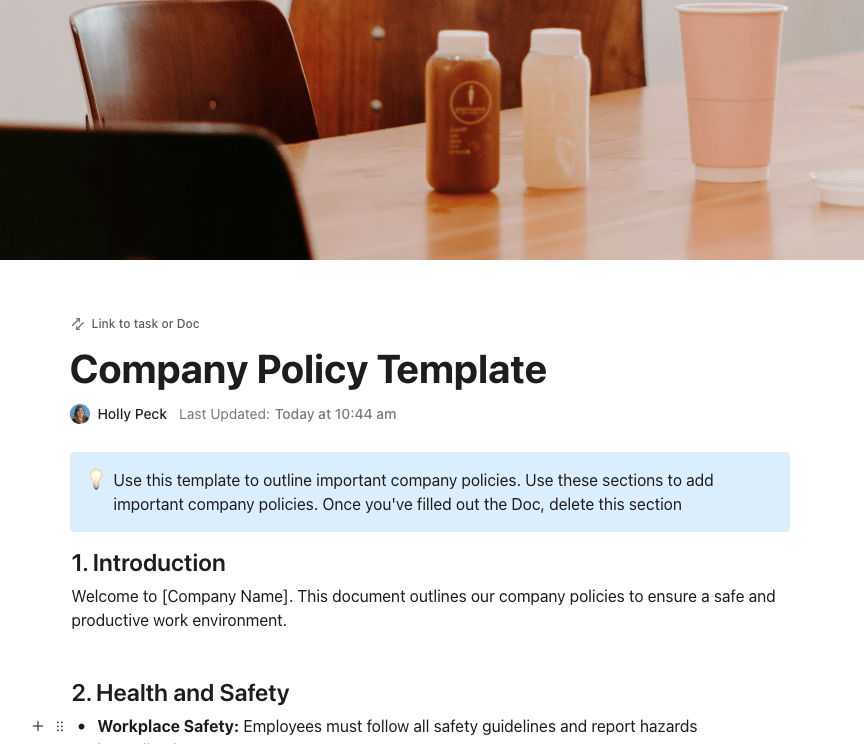
| ClickUp Company Policy Template | Get free template | HR teams consolidating company policies into a single, auditable source of truth | Policy Doc with statuses for Draft/In Review/Published and assigned owners to stay up to date with laws | ClickUp Doc |
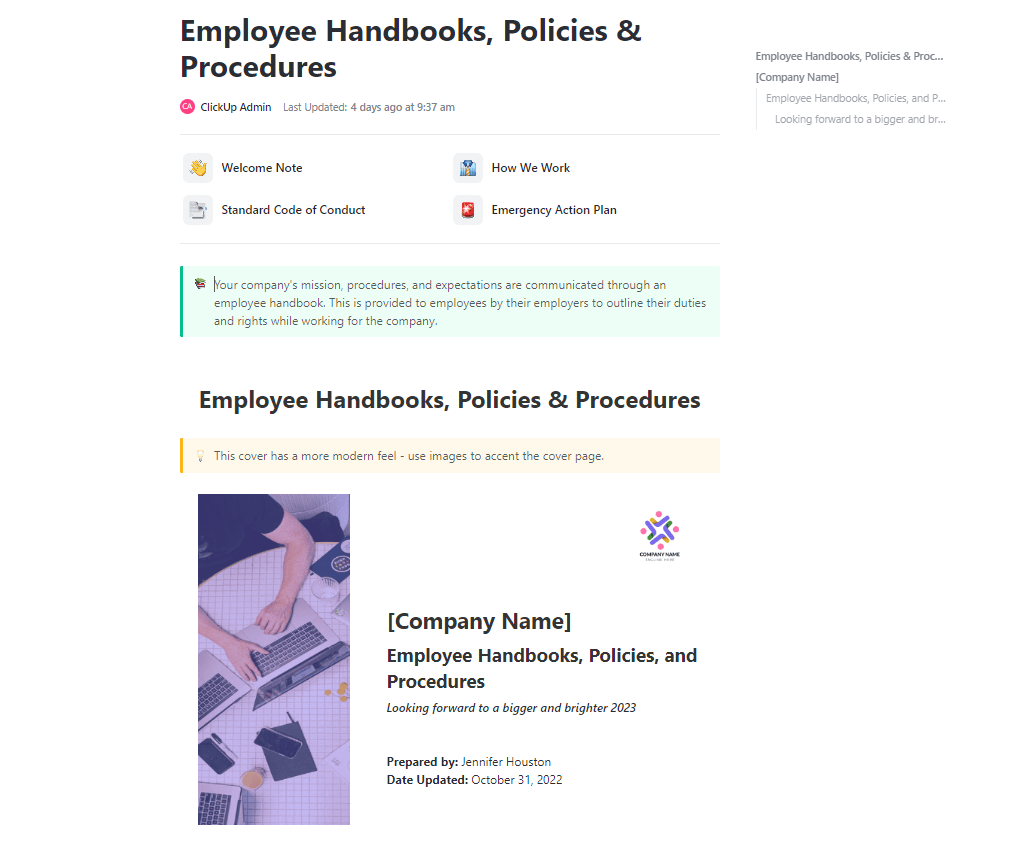
| ClickUp Employee Handbooks, Policies & Procedures Template | Get free template | HR teams building a comprehensive library of employee handbooks, HR policies, and procedures | Doc hub connected to Lists and views with statuses, fields, and filters for audits and everyday use | ClickUp Doc + List |
An HR audit checklist template is a structured tool used by HR professionals to systematically assess their organization’s HR practices, policies, and procedures using HR technologies.
Taking a closer look at these templates, here’s what HR teams can achieve by using them across various HR functions:
A good HR audit checklist template is clear, detailed, and adaptable to the specific needs of an organization.
It should also be user-friendly, simple to update, and designed for practical use during the HR audit process. To be specific, here’s precisely what to look for in human resources:
✅ Covers all key HR areas, including recruitment, onboarding, performance management, compensation packages, and employee relations, while adhering to laws and regulations
✅ Includes specific, measurable checks related to employee records, job descriptions, employee classification, and hr policies
✅ Helps ensure project compliance with labor laws, equal employment opportunity guidelines, workers’ compensation, and data privacy laws
✅ Allows customization based on industry regulations, company size, and unique hr compliance needs
✅ Provides a structured format with clear instructions for reviewing documentation, collecting data, and planning corrective action
🧠 Did You Know: According to Gallup, disengaged employees cost the global economy around $8.8 trillion in lost productivity, sick days, and retraining. By auditing and improving your internal processes, you can reduce that cost inside your own organization and adapt well to the labor market.
When HR information is split between email threads, standalone spreadsheets, and separate tools, audits become manual and slow. That is HR work sprawl.
ClickUp brings those pieces into one converged AI workspace for your teams, where your HR audit checklists, employee records, company policies, and incident reports can all sit in the same ClickUp Workspace.
Instead of tracking HR compliance in one app and follow-ups in another, you review everything in one place.
These 14 ClickUp templates help you assess HR compliance and standardize HR practices across the employee lifecycle.
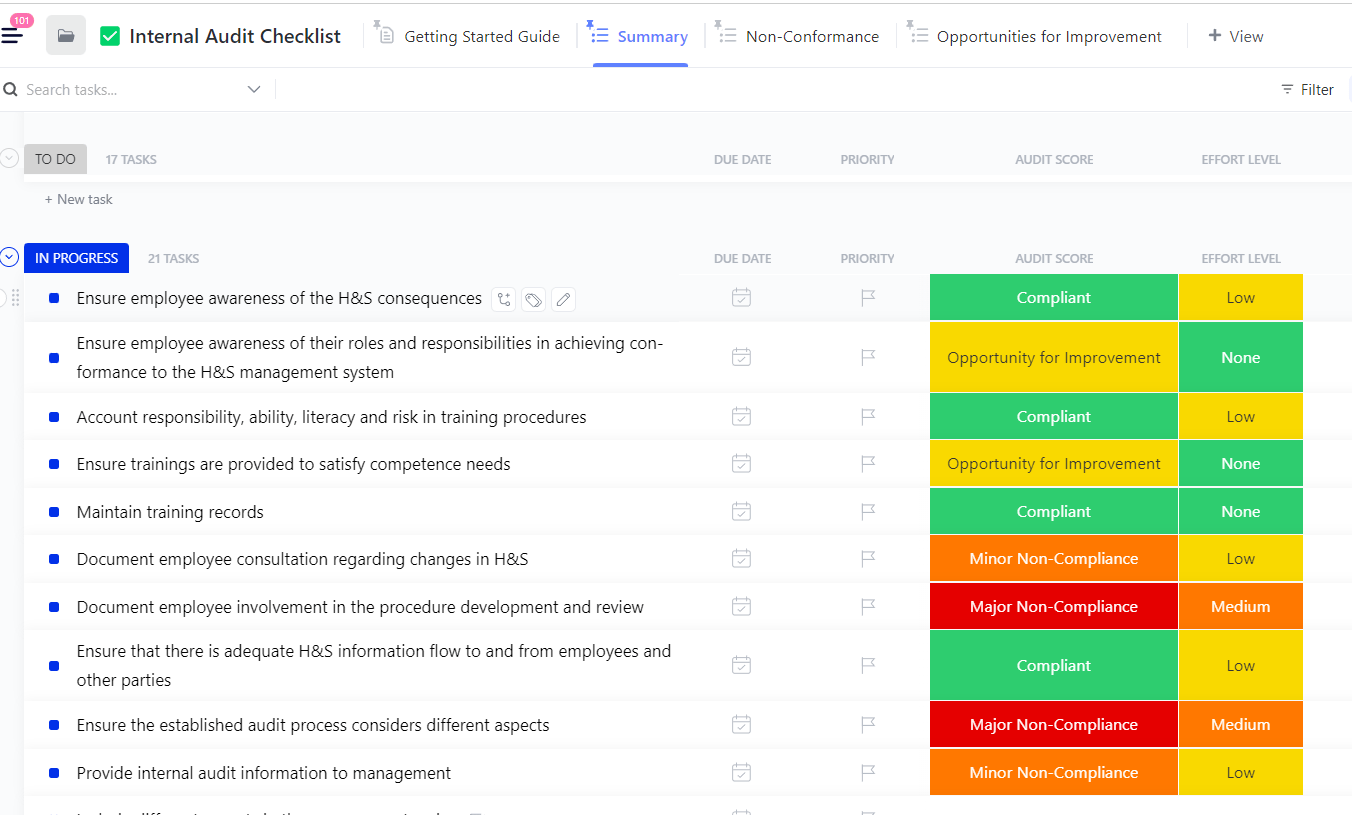
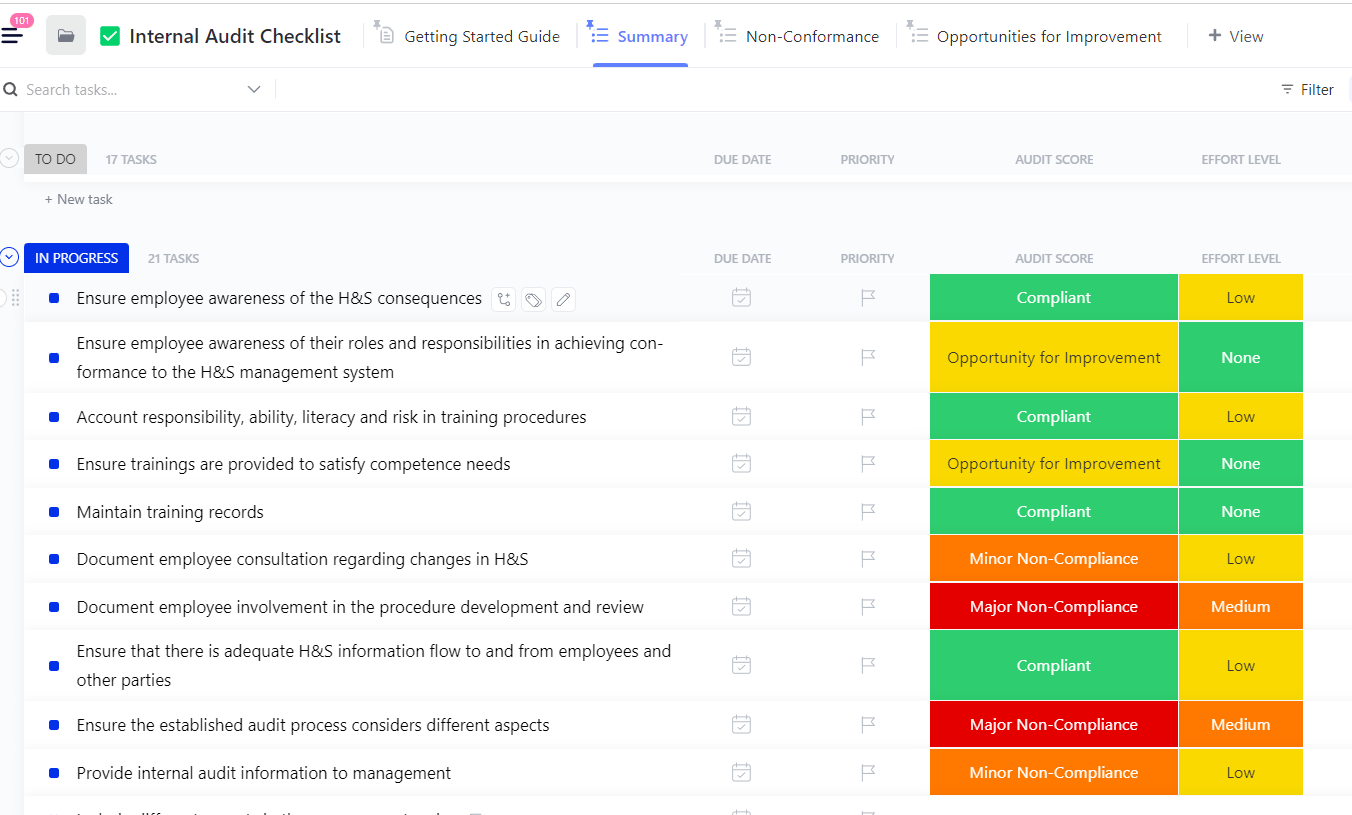
If every HR audit feels like starting from zero, this template gives you a repeatable structure. The ClickUp Internal Audit Checklist Template helps HR teams capture audit items across recruiting, onboarding, payroll, benefits, and workplace policies in a single audit checklist.
Behind the scenes, the template adds custom statuses for each audit step, views for “Summary,” “Nonconformance,” and “Opportunities for Improvement,” and Custom Fields for audit score, effort level, evidence, and root cause. That means you are able to document how to fix common issues and who owns each follow-up.
🌻 Here’s why you’ll like this template:
✨ Ideal for: HR teams running recurring internal audits across employee records, HR policies, and HR practices.
📖 Also Read: SOX Compliance Checklist for Finance and IT Teams
Davide Mameli, Business Unit Manager – ICM.S (Accenture), shares:
Clients can create tickets related to projects, and our team leads can quickly respond and delegate tasks. This saves tons of time sending emails back and forth and provides a better client experience. And onboarding clients to ClickUp is simple because the tool is very user-friendly.
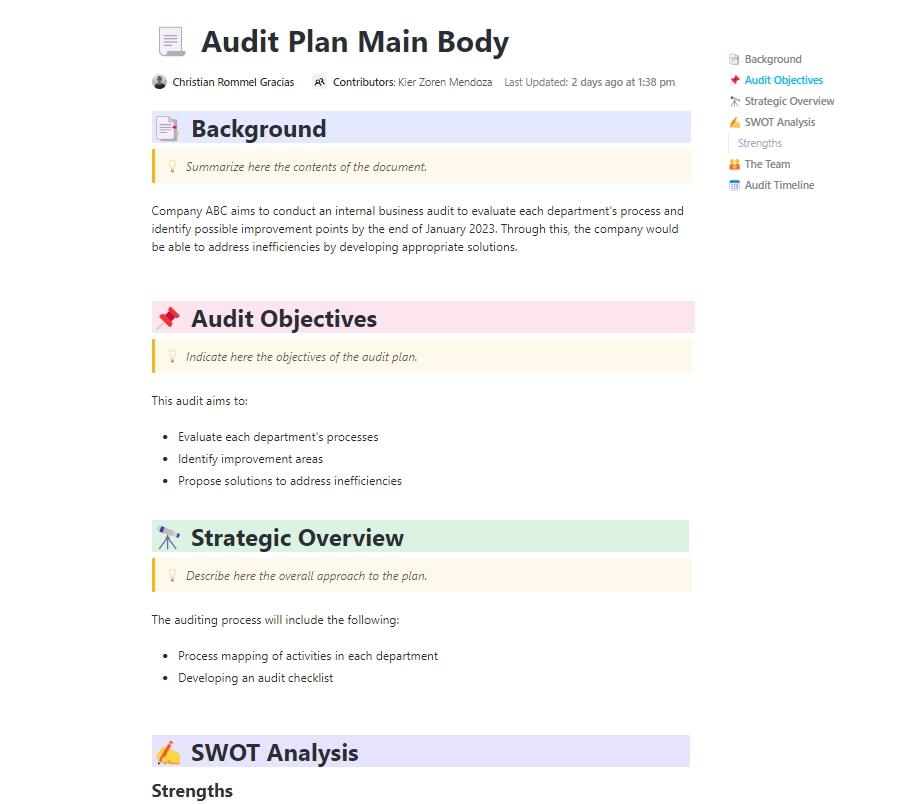
If your HR audits stagnate due to unclear timelines, the ClickUp Audit Plan Template helps you map the scope of each HR audit, define the audit objectives, and set realistic timelines for planning and reporting.
HR teams can also use this template for focused reviews, like equal pay practices or employee classification.
The template comes with pre-built List views, Custom Fields for audit phase, priority, and owner, and task dependencies so you can see how prep work, testing, and reporting connect. Combined with Calendar or Gantt views, it becomes a live schedule that clearly indicates which HR team member is responsible for each audit item.
🌻 Here’s why you’ll like this template:
✨ Ideal for: Structuring HR audit timelines, assigning owners, and tracking end-to-end HR audit phases.
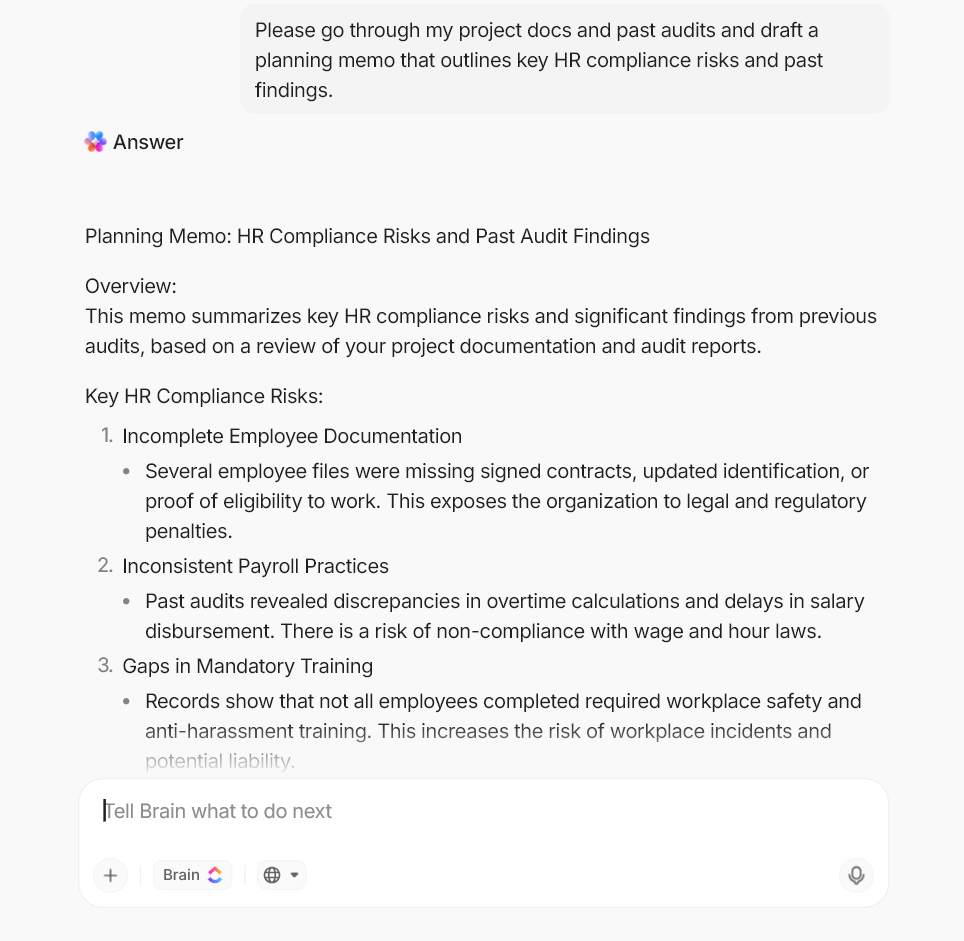
💡 Pro Tip: Pair your audit plan with ClickUp’s Brain for quick prep. Before kickoff, ask the AI to scan related ClickUp Docs and past audits and draft a planning memo that outlines key HR compliance risks and past findings.
This helps you save time and ensures you start each HR audit with context, rather than a blank page.
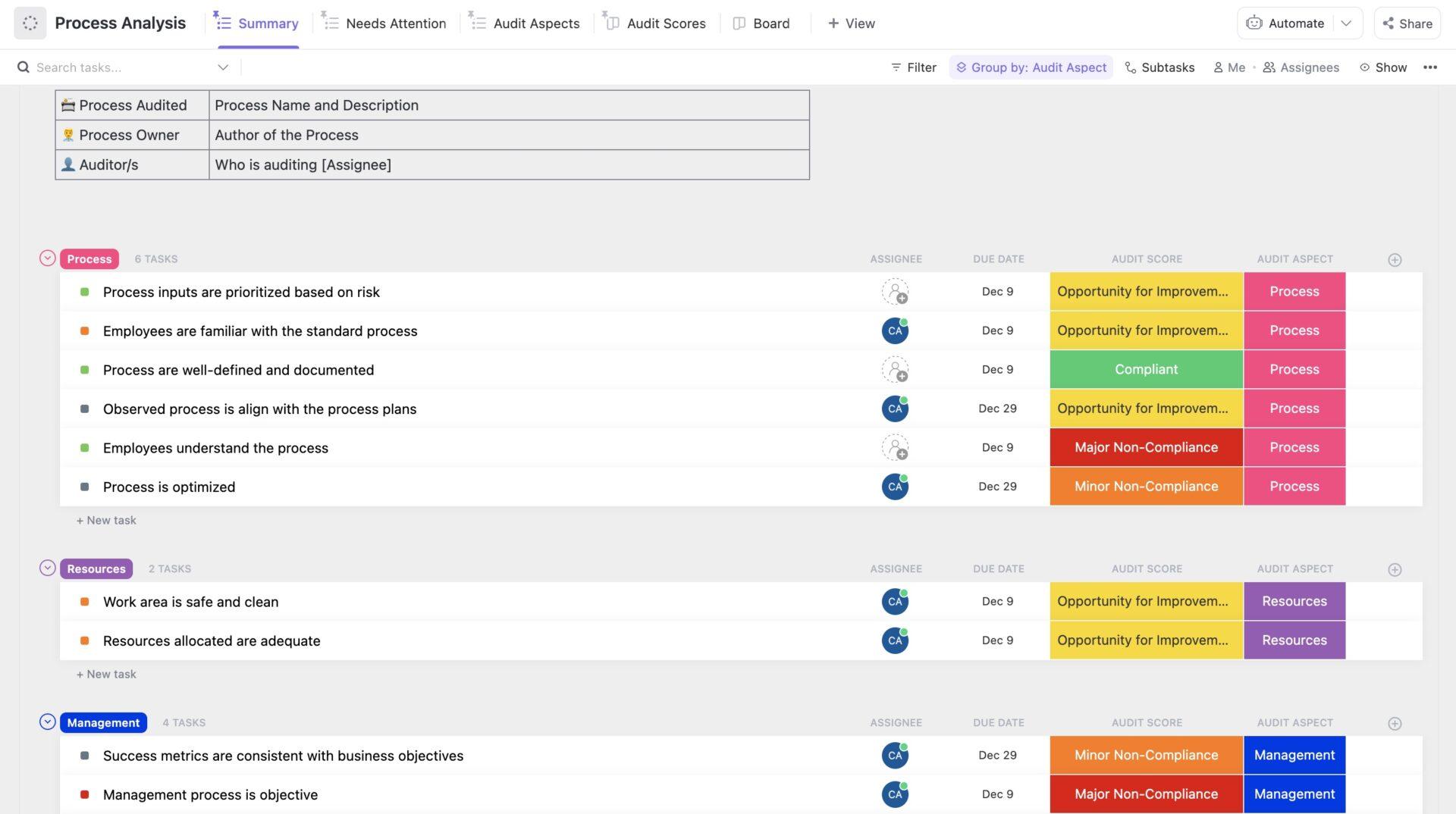
If HR teams are stuck in manual steps and inconsistent HR practices, a process-level audit can reveal why. The ClickUp Process Audit and Improvement Template helps you map HR workflows, such as recruitment, onboarding, performance management, and benefits administration, and then review each step for delays and handoff issues.
The template includes Views for process lists and timelines, along with Custom Fields for process owner, risk level, and improvement impact. As you identify bottlenecks or compliance issues, you can immediately assign corrective tasks and track them through to completion in the same Workspace.
🌻 Here’s why you’ll like this template:
✨ Ideal for: HR teams identifying inefficiencies in recurring workflows like onboarding, performance reviews, and benefits updates.
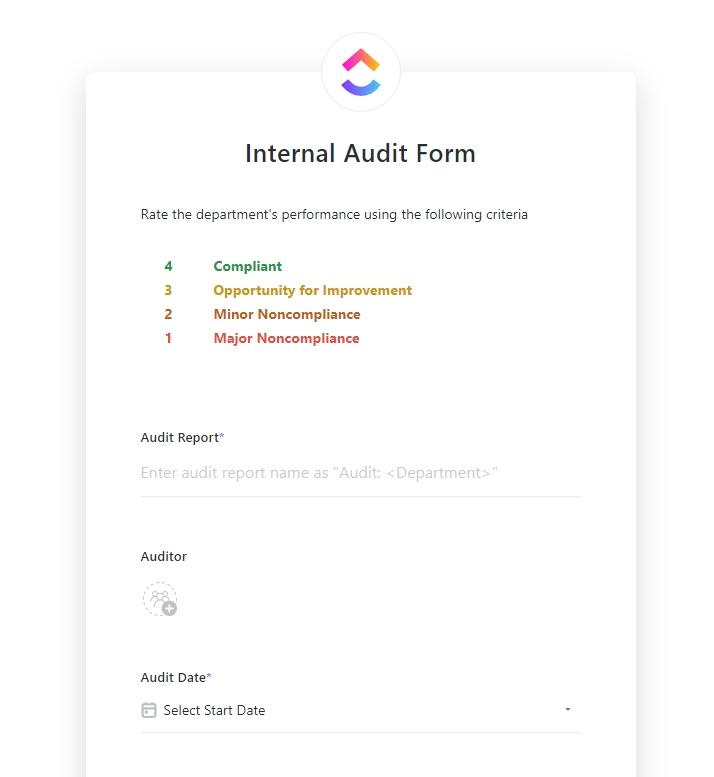
If your HR audit forms float around in email or disconnected PDFs, pulling together findings is painfully slow. The ClickUp Internal Audit Form Template turns each HR audit checklist into a structured form that feeds directly into tasks and views.
With Custom Fields and Views for “By Department,” “By Risk,” and “Summary,” HR professionals can slice results across employee records, workplace safety, and employee benefits. You can build reports for senior management or legal counsel using the same data, ensuring transparency and defensibility in your HR audit process.
🌻 Here’s why you’ll like this template:
✨ Ideal for: Documenting HR audit findings and turning form responses into trackable follow-up work.
📮ClickUp Insight: Hidden tasks aren’t harmless. They actively disrupt productivity. A full 21% of employees say these tasks slow them down, and 14% find it hard to maintain focus. This constant mental switching fragments attention and prevents deep, meaningful work.
ClickUp helps protect your team’s focus with features like Task Priorities, Me Mode, and Task Dependencies. When important tasks stay visible and organized, your team can stay in flow and get work done without distraction.
📖 Also Read: Best Compliance Management Tools and Software
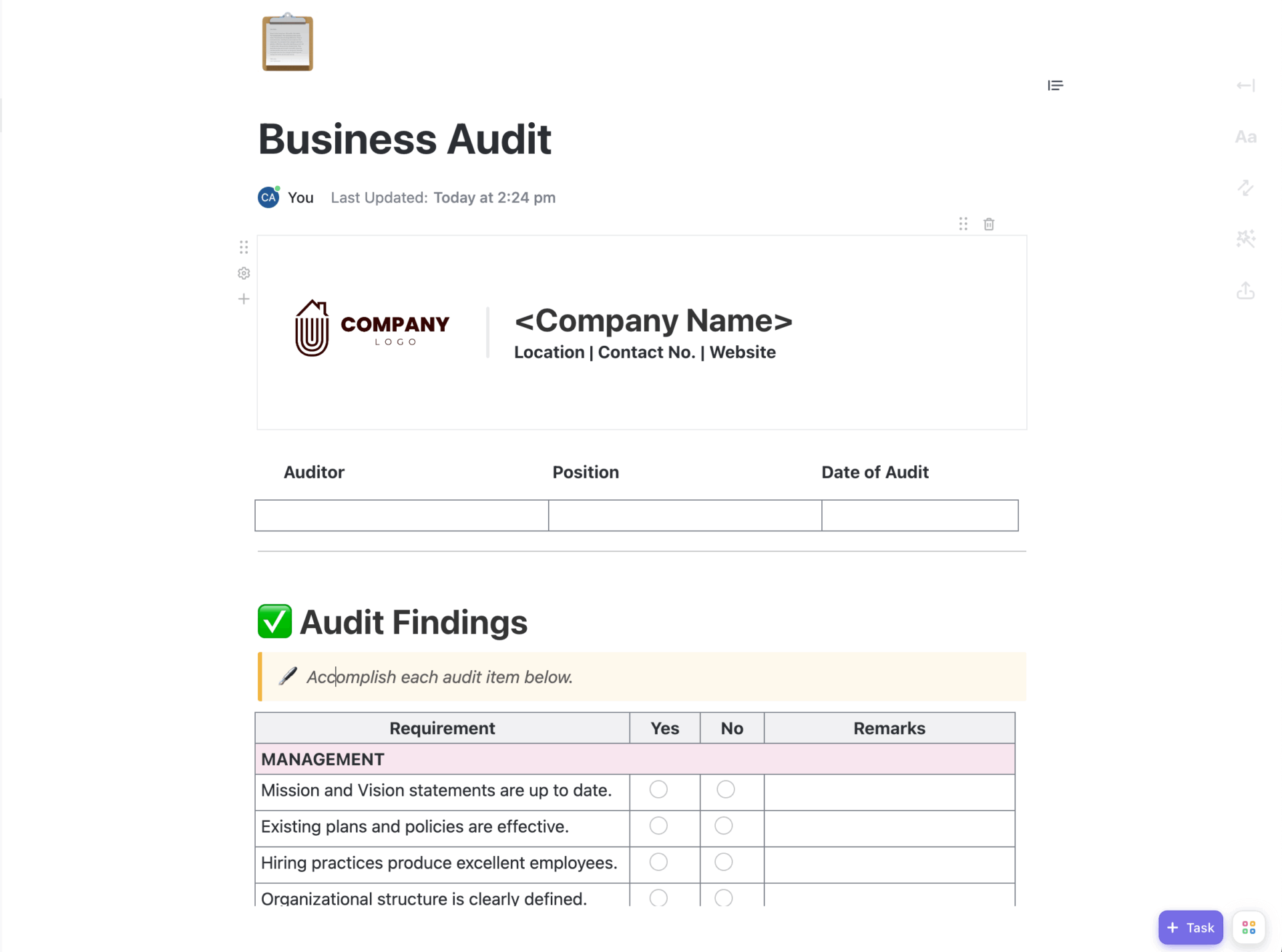
If your HR-related audit findings end up scattered across slide decks and email threads, it is hard to see the full story. The ClickUp Business Audit Doc Template gives you a doc-first structure to organize audit scope and recommendations in one place.
Sections for executive summary, observations, root causes, and action plans make it easier to present HR audit results to senior management and other stakeholders.
Because the template sits inside ClickUp Docs, you can tag owners on specific sections, attach supporting files, and link each recommendation back to tasks on your HR audit checklist.
🌻 Here’s why you’ll like this template:
✨ Ideal for: HR and operations leaders who need a clear written record of audit findings and agreed actions.
👀 Fun Fact: Companies with strong onboarding processes improve new hire retention by 82%. But here’s the kicker—only 12% of employees say their company does onboarding well.
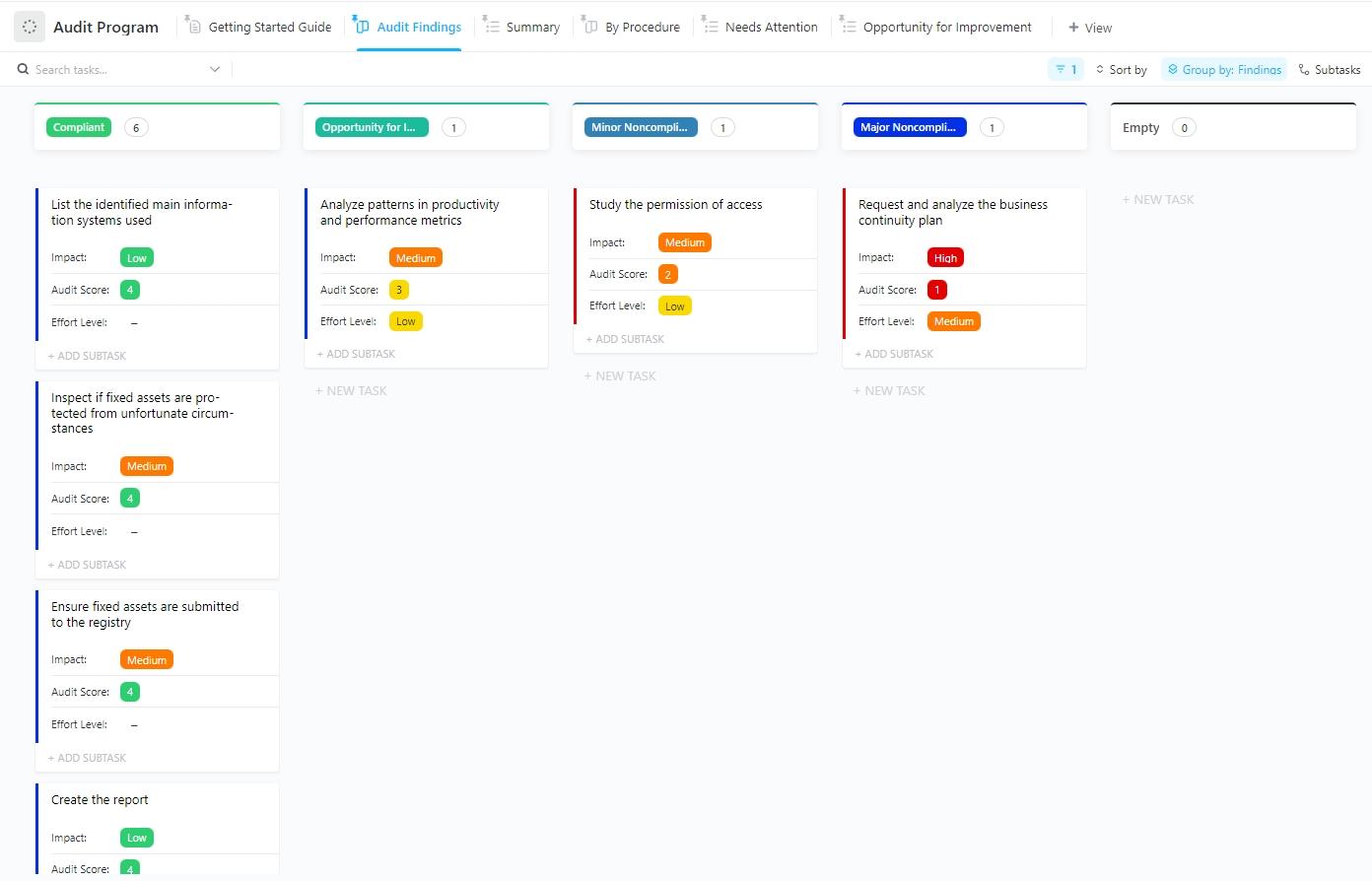
Managing multiple audits across different HR functions can get messy fast. The ClickUp Audit Program Template is built for teams that need to run recurring, structured audits without starting from scratch every time.
Instead of piecing together timelines and reports manually, human resource teams using this template can build a clear, repeatable audit workflow with defined checkpoints and responsibilities. Views like “By Quarter” or “By Department” show you which HR teams are under review and whether you are meeting internal audit coverage goals.
This turns your HR audit checklist from a one-off list into part of a continuous audit program.
🌻 Here’s why you’ll like this template:
✨ Ideal for: Standardizing recurring HR audits across hiring, compensation, workplace safety, and data privacy.
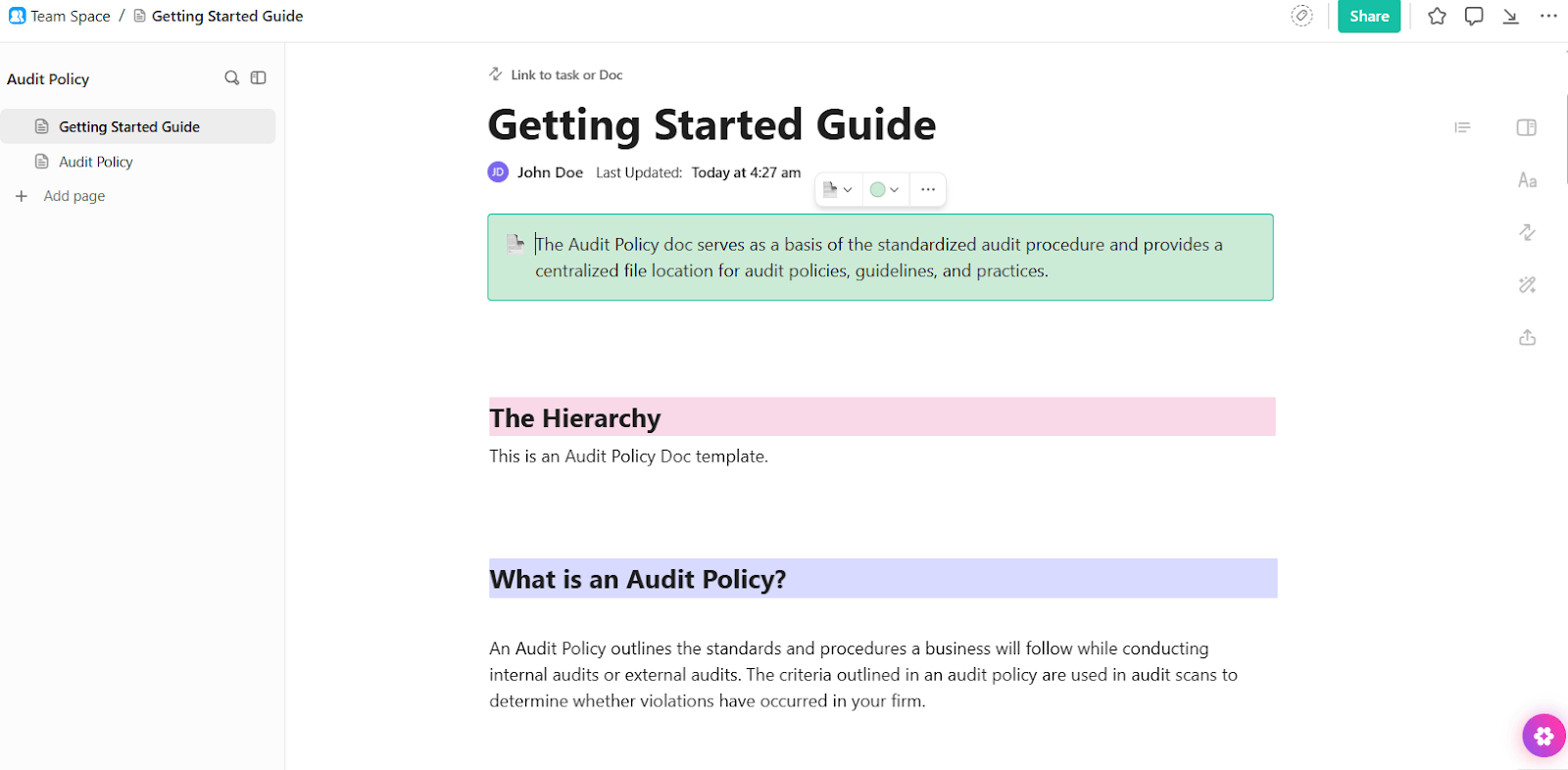
If every HR audit is run differently, it is hard to show consistency or ensure compliance. The ClickUp Audit Policy Template helps you draft an audit policy that spells out purpose, scope, roles, frequency, and reporting expectations for audits that touch HR.
The template gives you a pre-built Doc with sections for responsibilities, legal and regulatory requirements, documentation standards, and escalation paths. HR teams can also use this as a company policy template, and then share the policy with internal auditors and managers for review and implementation.
🌻 Here’s why you’ll like this template:
✨ Ideal for: HR and compliance teams defining the structure, frequency, and expectations for HR-related audits.
📖 Also Read: How Our Onboarding Team Uses ClickUp
🧠 Did You Know: In a recent UK trial, 90% of businesses continued with a 4-day workweek, with many citing productivity and retention benefits.
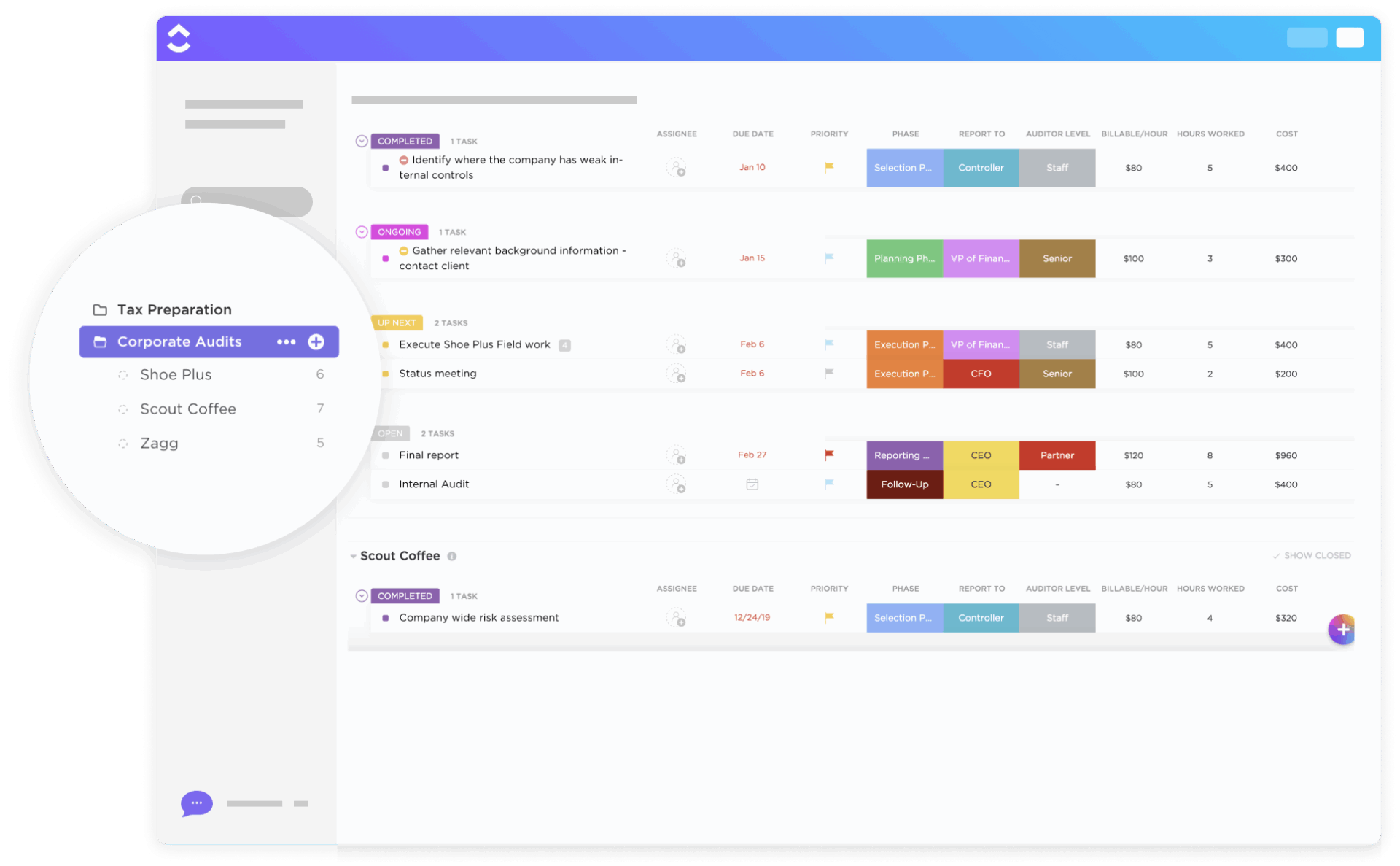
As your organization grows, HR practices often vary between teams, sites, or subsidiaries. The ClickUp Corporate Audits Template helps you track enterprise-wide audits that cut across HR, finance, and operations, while still giving you visibility into HR policies, employee benefits, and workplace policies by location.
The template uses Lists and Dashboards to track audit status by department and region, with Custom Fields for risk, owner, and due dates. You can attach HR policies and employee handbook excerpts to tasks, making it easier to test how well the organization’s HR policies are implemented in practice.
🌻 Here’s why you’ll like this template:
✨ Ideal for: Managing HR-related audits across multiple departments, business units, or locations.
💡 Pro Tip: Turn every audit meeting into a searchable record with ClickUp AI Notetaker.
ClickUp AI Notetaker can join your Zoom, Google Meet, or Microsoft Teams calls, record the conversation, and automatically generate a transcript and action items in a ClickUp Doc. Instead of relying on someone to type notes during an HR audit kickoff or calibration session, you get consistent, structured documentation every time.
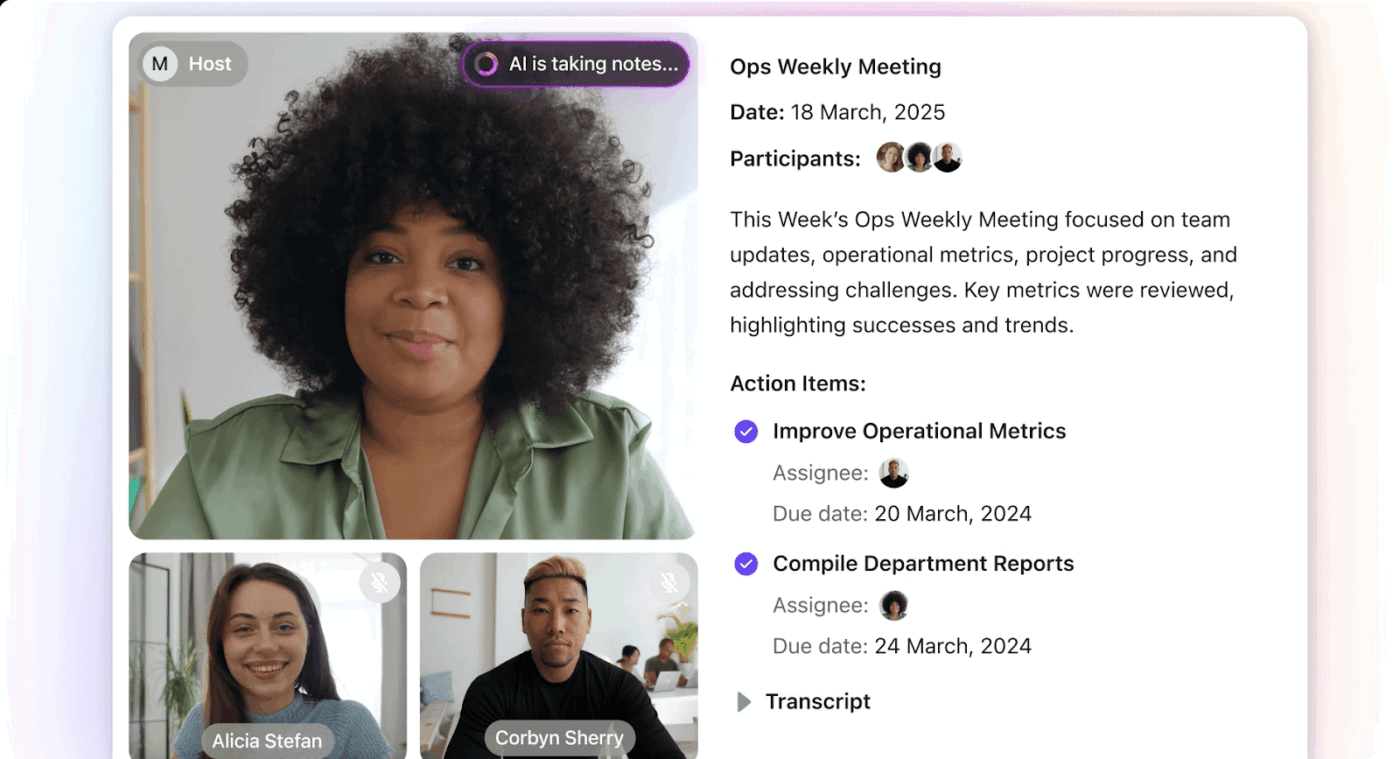
For HR, that means your audit planning call or investigation debrief all land in one place, with takeaways you can immediately turn into tasks. Over time, you build a searchable history of decisions, risks, and agreed follow-ups that is easy to reference in the next audit cycle.
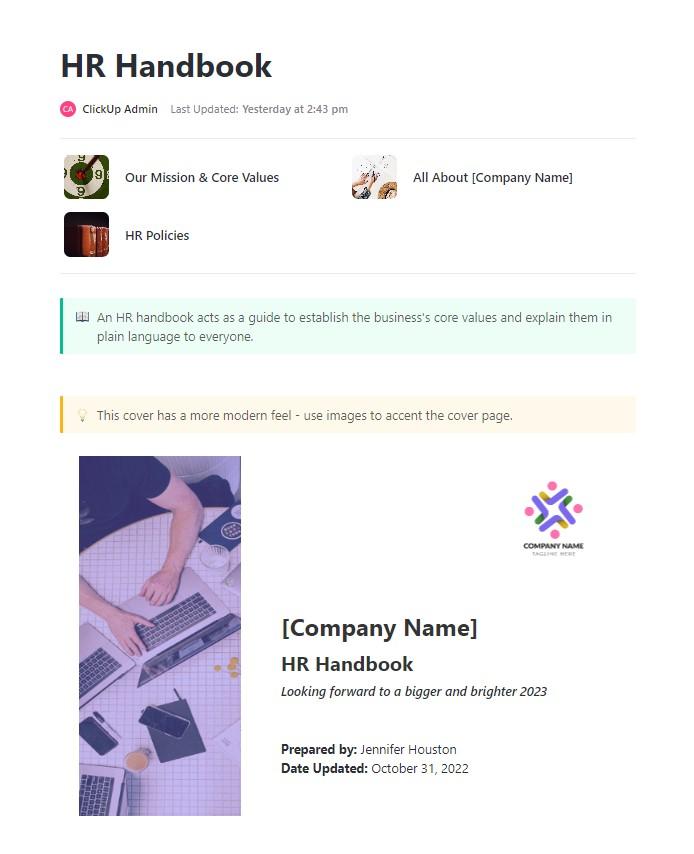
As your team grows, so does the risk of inconsistent messaging around policies and expectations. The ClickUp HR Handbook Template helps HR teams build a single, accessible source of truth that evolves with the organization.
The template is a ClickUp Doc with pre-structured sections for topics like behavior, benefits, and workplace safety. HR teams can adapt sections and keep everything up to date with custom fields like department and policy ownership. That makes it easier to show auditors that employees had access to clear, current policies.
🌻 Here’s why you’ll like this template:
✨ Ideal for: HR teams creating or updating an employee handbook that supports audits and everyday questions.
📖 Also Read: Human Resource KPIs & Examples
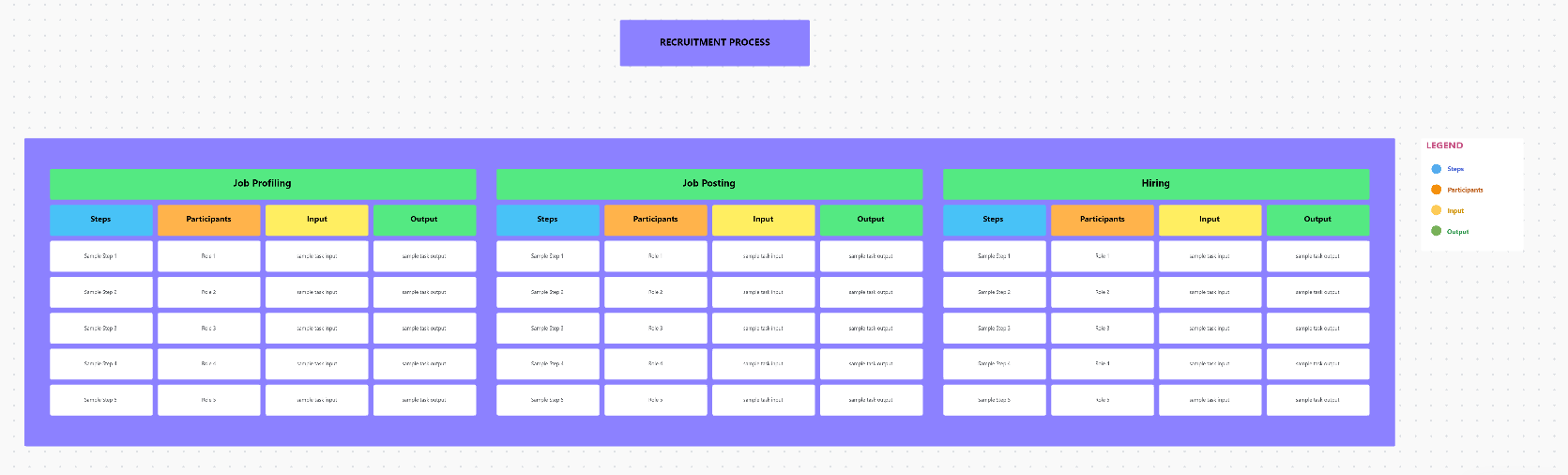
If every HR coordinator runs processes differently, audits will highlight gaps in fairness and consistency. The ClickUp HR SOP Template helps HR teams document standard operating procedures for recruitment, onboarding, performance reviews, and offboarding using visual Whiteboards and Docs.
The governance template provides a central repository where you can map each step, assign responsibilities, and link to forms or Docs. It also helps HR departments keep track of activity histories, which is critical when reviewing compliance with HR policies and equal employment opportunity standards.
🌻 Here’s why you’ll like this template:
✨ Ideal for: HR teams that need consistent, documented SOPs across the employee lifecycle.
💡 Pro Tip: ClickUp’s Talk to Text is a desktop and browser companion that lets you speak and turns your words into clean, structured text you can reuse in tasks, Docs, or messages. This AI tool is designed to be up to 4x faster than typing, so HR leaders can dictate audit notes or policy changes while reviewing evidence or walking between meetings.
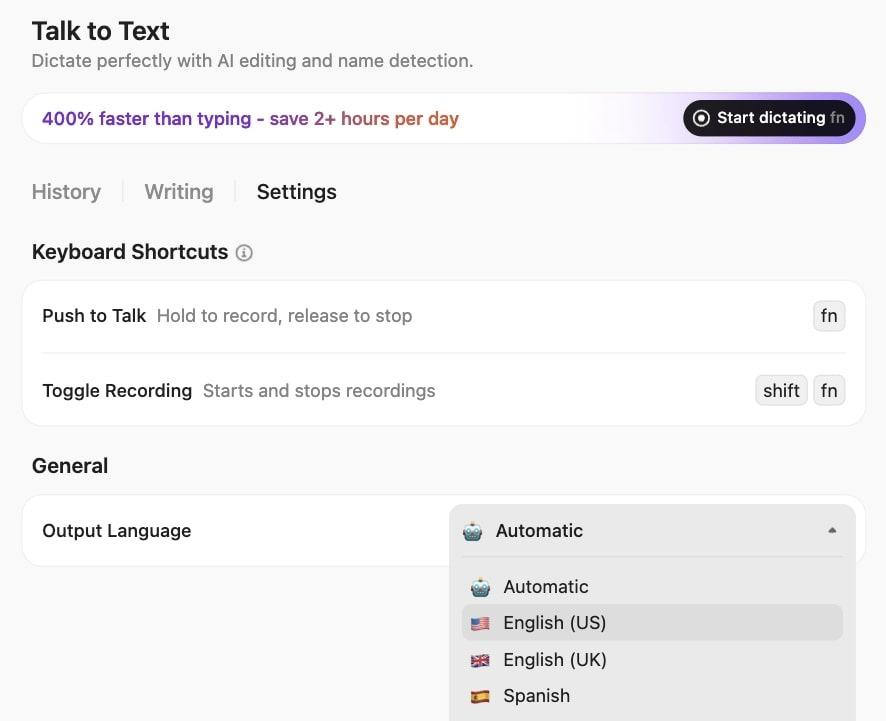
Because ClickUp BrainGPT integrates with your work apps and leading AI models, such as ChatGPT, Claude, and Gemini, from a single platform, you can ask follow-up questions like “Summarize the key issues from our last two HR audits” without needing to switch between tools. Then, you can paste or send that output straight into ClickUp Tasks or Docs for review.
For HR teams, this turns small gaps in the day into useful audit work: as ClickUp BrainGPT shapes those rough ideas and observations into audit-ready text you can share with stakeholders.
👀 Fun Fact: Research shows that positive onboarding experiences release oxytocin (the “trust hormone”), helping new employees feel more connected and confident.
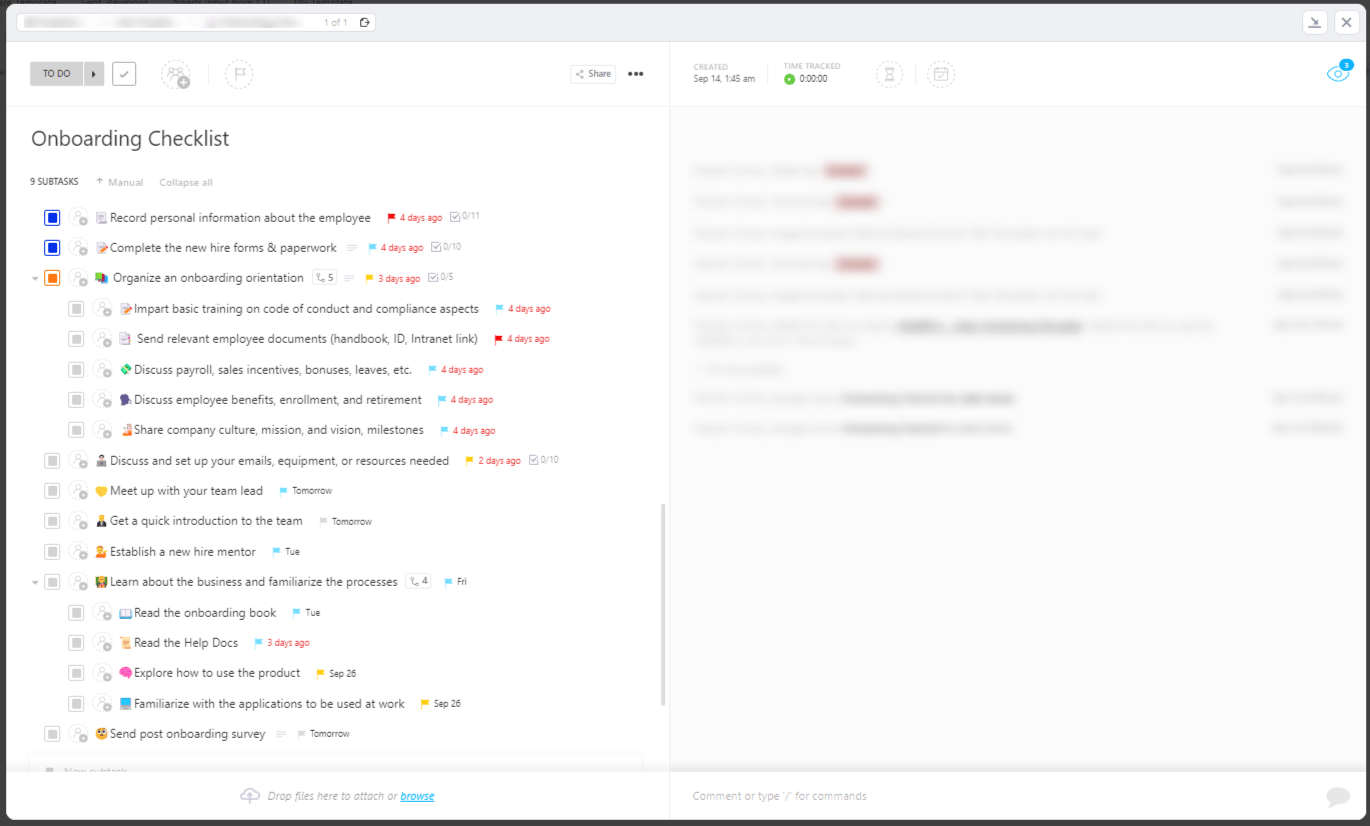
If onboarding tasks are stored in separate spreadsheets and emails, new employees may miss key steps, such as safety training or policy acknowledgments. The ClickUp Onboarding Checklist Template applies a detailed task List to your Workspace with a detailed onboarding checklist for every position.
With Custom Fields for start dates, role, manager, and equipment status, plus real-time task updates, HR teams can see which onboarding tasks are done and which still need attention.
This makes it easier to ensure compliance with policies and data privacy laws during the onboarding process and to provide auditors with a clear record of what each new hire has completed.
🌻 Here’s why you’ll like this template:
✨ Ideal for: HR teams standardizing onboarding across roles, offices, and remote employees.
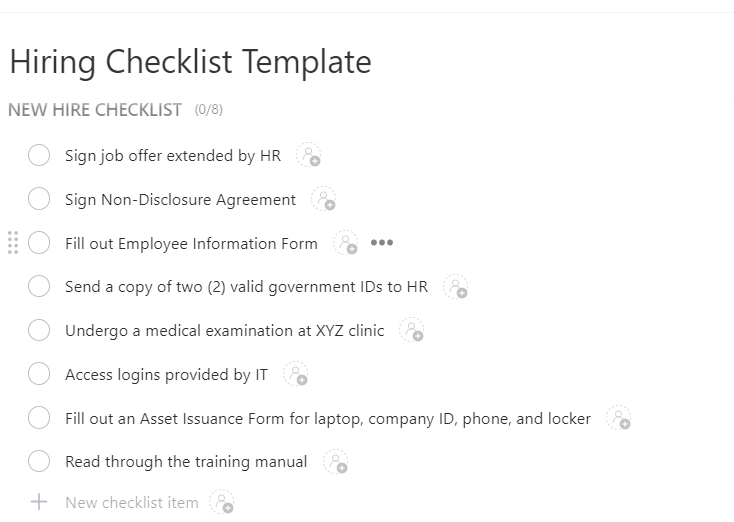
According to the Employ Recruiter Nation Report, it takes businesses an average of 47.5 days to fill an open role. That timeline stretches even further when the hiring process lacks structure. The ClickUp Hiring Checklist Template helps HR teams reduce delays by bringing clarity and consistency to every step.
The template can track progress on each candidate, coordinate tasks across HR teams, and keep hiring practices in line with legal requirements. With tasks for background checks and approvals, it reduces compliance issues and keeps your recruitment process transparent and auditable.
🌻 Here’s why you’ll like this template:
✨ Ideal for: Organizing recruitment tasks so every candidate moves through the same, compliant hiring process.
If policies live in different file versions and new employees are not sure which one is current, HR audits will flag it quickly. The ClickUp Company Policy Template is a ready-to-use Doc that helps HR teams and business owners draft and maintain company policies in one accessible location.
Predefined sections make it easier to cover employment terms, acceptable behavior, technology use, workplace safety, and legal requirements. You can also customize the template to your organization and assign policy owners to keep everything up to date for HR compliance.
🌻 Here’s why you’ll like this template:
✨ Ideal for: HR departments building or consolidating company policies into one accessible, auditable resource.
The ClickUp Employee Handbooks, Policies & Procedures Template helps HR teams build a comprehensive resource that covers everything from payroll and vacation policies to conduct expectations and workplace safety.
The template includes support for Custom Statuses, Custom Fields, and multiple Views so you can categorize documents and connect Docs to Lists, Gantt, and Workload views.
This keeps all the organization’s HR policies and procedures in one structured place while giving you the flexibility to use ClickUp AI to improve content.
🌻 Here’s why you’ll like this template:
✨ Ideal for: HR teams creating a comprehensive library of policies and procedures that support both daily questions and formal HR audits.
Pro Tip: Let ClickUp AI Agents watch your HR audit lists. Set up ClickUp AI Agents to monitor Lists that hold your HR audit checklist items, onboarding tasks, or policy updates.
You can instruct an agent to flag tasks where required fields (like employee classification or policy review date) are missing or overdue and create reminder tasks for HR teams. This reduces manual checks and keeps your HR audit process moving in a timely manner.
👀 Fun Fact: Behavioral psychologists say habits are formed in roughly 66 days. Meaning, your onboarding period is precisely when long-term work habits are shaped.
Without a structured HR audit checklist, even experienced HR professionals can miss critical steps or fail to document them properly. Templates give your HR department a consistent way to review HR practices, employee and independent contractors’ records, and company policies.
But ClickUp goes beyond static documents.
With ClickUp’s HR templates and features in one converged AI workspace, HR teams can run audits and track progress without switching tools.
This helps with smoother HR audit processes and leads to employee retention and a comprehensive evaluation of your HR compliance policies. Ready to stay one step ahead of compliance issues? Sign up for ClickUp today!
An HR audit consists of a thorough and systematic review of an organization’s human resources policies, procedures, documentation, and systems. The process typically covers key areas such as recruitment, onboarding, payroll, employee records, compliance with labor and data privacy laws, employee benefits, performance evaluation, and company policies. The main objective is to identify any compliance gaps, streamline HR processes, and ensure that all practices align with legal requirements and industry best practices. By conducting an HR audit, organizations can proactively address risks, improve efficiency, and foster a compliant and supportive workplace environment.
The five audit checklists commonly used in HR audits focus on the most critical aspects of human resources management. These include: compliance with employment and labor laws, recordkeeping and documentation practices, recruitment and selection procedures, compensation and benefits administration, and performance management, along with employee relations. Each checklist serves as a structured guide to ensure that HR practices are consistent, fair, and legally compliant, helping organizations maintain high standards and reduce the risk of legal or operational issues.
During an HR audit, it is important to ask questions that reveal the effectiveness and compliance of HR processes. Typical questions include: Are all employee files complete and up to date? Are hiring and termination procedures properly documented and consistently followed? Is the organization fully compliant with labor and data privacy laws? Are compensation and benefits administered fairly and consistently across the workforce? Are performance reviews conducted regularly and properly documented? These questions help uncover any gaps or risks in HR operations and ensure that the organization remains compliant and efficient.
A checklist in HR is a structured tool designed to help HR professionals systematically review and verify that all necessary tasks, documents, and procedures are in place and compliant with regulations. It acts as a step-by-step guide to ensure that nothing is overlooked during audits or routine HR operations. By using checklists, organizations can promote consistency, maintain legal compliance, and standardize HR processes, ultimately supporting a more organized and effective HR function.

© 2026 ClickUp

There’s an easier way. Try a free AI Agent in ClickUp that actually does the work for you—set up in minutes, save hours every week.