







Still downloading templates?
There’s an easier way. Try a free AI Agent in ClickUp that actually does the work for you—set up in minutes, save hours every week.
Sorry, there were no results found for “”
Sorry, there were no results found for “”
Sorry, there were no results found for “”


Writers talk to themselves all the time. Dictation tools just make it feel productive.
Dictation.io is a great place to start. Open your browser, start speaking, and your ideas land on the screen. But if you’re drafting chapters, transcribing notes, or managing long-form projects, its simplicity quickly turns into a limitation.
No structure. No formatting. No version history. No way to organize, edit, or store your work. Just a wall of unedited text.
To overcome these limitations, here are the best Dictation.io alternatives to help you upgrade from what “just works” to what works so much better.
Dictation.io is a free, browser-based speech-to-text tool that converts spoken words into written text in real time.
To understand why you need other dictation tools, let’s start by looking at the limitations holding Dictation.io back.
👀 Did You Know? Dictation tools aren’t just for convenience—it’s accessibility tech. Voice-to-text software was originally popularized to help people with mobility impairments or dyslexia. What began as assistive tech is now mainstream productivity.
Take a look at this side-by-side breakdown of Dictation.io alternatives to choose the best one for your workflow:
| Tool name | Key features | Best for | Pricing |
| ClickUp | – AI transcription – ClickUp Docs voice notes – ClickUp Brain AI summaries – Task integration – Multi-language support | Enterprises, mid-sized businesses, small businesses, and individuals | Free plan available; customizations available for enterprises |
| Otter.ai | – Real-time meeting transcription – Speaker identification – AI-generated summaries – Cross-platform support | Professionals, teams, small businesses | Free plan available; paid plans from $16.99/month; customizations available for enterprises |
| Apple Dictation | – Offline dictation – Auto punctuation – Siri integration – Voice commands | Students, Apple users, and content creators | Free on Apple devices; pro from $4.99/month |
| Google Docs Voice Typing | – Voice dictation in Google Docs – Multilingual support – Voice editing commands | Included with a Microsoft 365 subscription | Free |
| Microsoft Dictate | – Integrated with MS Office – Real-time punctuation – Sensitive phrase filtering – Voice commands for formatting | Enterprises, Microsoft 365 users | Included with Microsoft 365 subscription |
| Braina | – Voice commands – Offline transcription – AI memory – Support for 100+ languages | Professionals, tech-savvy users | Free plan available; paid plans from $99/year; customizations available for enterprises |
| Fireflies.ai | – Real-time transcription – Summaries – AskFred AI meeting assistant – Collaboration tools | Mid-sized teams, enterprises | Free plan available; paid plans from $18/month; customizations available for enterprises |
| Letterly | – 25+ rewriting styles – Offline voice notes – Webhook support | Content creators, mobile users | Customizations available |
| Speechify | – High-quality AI voices – OCR for printed text – Dyslexia-friendly – Cross-device sync | Students, professionals, accessibility users | Free plan available; premium from $29/month |
| Speechnotes | – Voice commands for punctuation – Autosave – Bluetooth external microphone support | Writers, bloggers, students | Free plan available; premium from $1.90/mo |
| Dragon by Nuance | – Personalized voice training, command lists – Advanced formatting – Text-to-speech playback – Offline control | Enterprises, medical/legal professionals | No free version; pricing varies by edition |
Now let’s explore each of the dictation tools listed above in detail with key features, limitations, pricing, ratings, and user reviews:
ClickUp, the everything app for work, brings together transcription, meeting notes summarization, and workflow management into one platform.
You can use Voice Clips in task comments to record and send audio files to your team in or outside of ClickUp. Each Clip has an upper recording limit of 20 minutes, which allows for detailed messages or updates.
To create a Voice Clip, you tap the microphone icon in the comment editor of a task’s Activity tab (on mobile or web), record your message, and then send it as part of the comment. You can also add multiple Voice Clips, along with text, images, or other attachments, in the same comment.
💡 Pro Tip: The playback speed for Voice Clips can be adjusted (1x, 2x, or 3x), and you can skim through the audio waveform to navigate the clip. And if your Workspace has ClickUp Brain, ClickUp’s native AI, your Voice Clips are automatically transcribed!
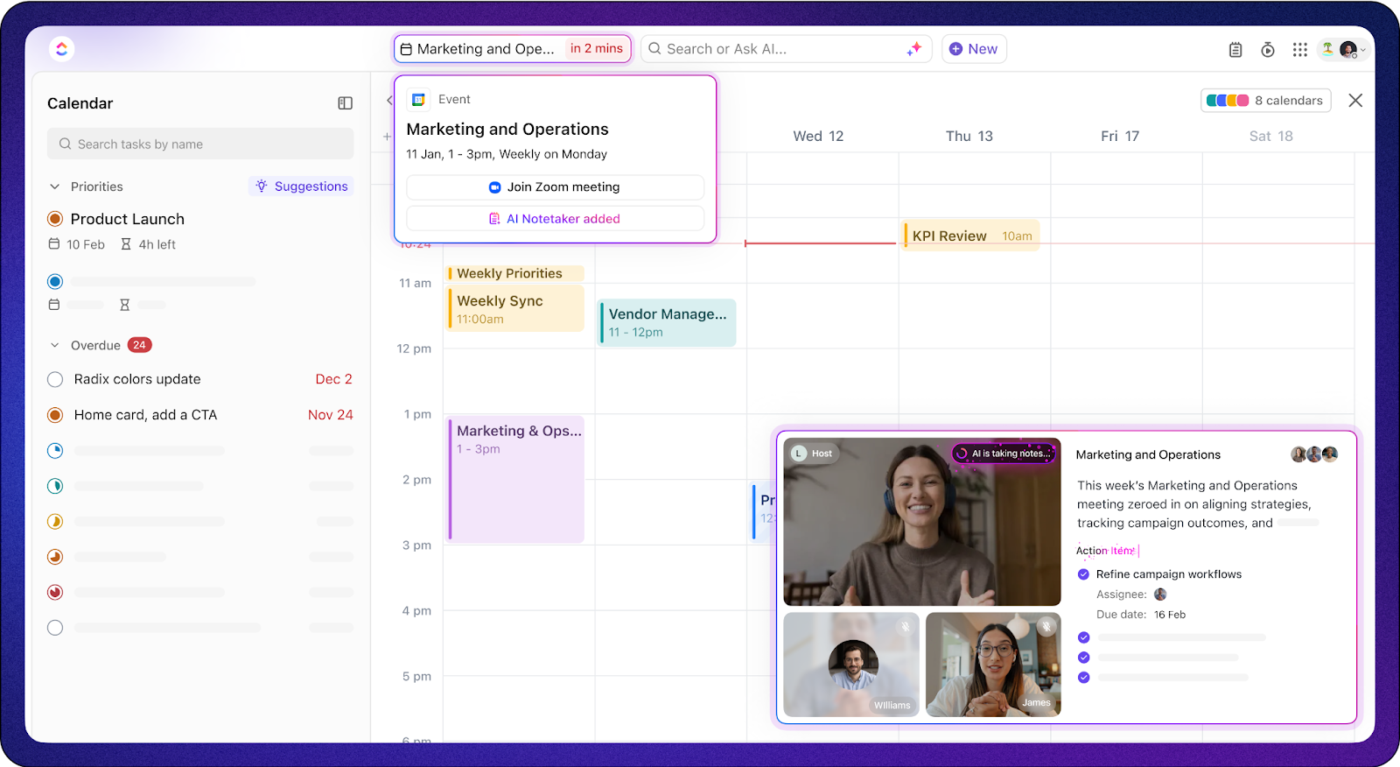
And if you want to transcribe meetings instead, ClickUp’s AI Notetaker does the work for you. Instead of scrambling to type everything out, you can stay focused on the conversation while it automatically transcribes your meetings and takes detailed meeting notes. This Dictation.io alternative works seamlessly with platforms like Zoom, Microsoft Teams, and Google Meet, so you don’t have to worry about switching tools or missing a single detail.
If you want true “dictate anywhere” speed, layer ClickUp Brain MAX on top of your workflow. It brings Talk to Text and premium reasoning models to any app.
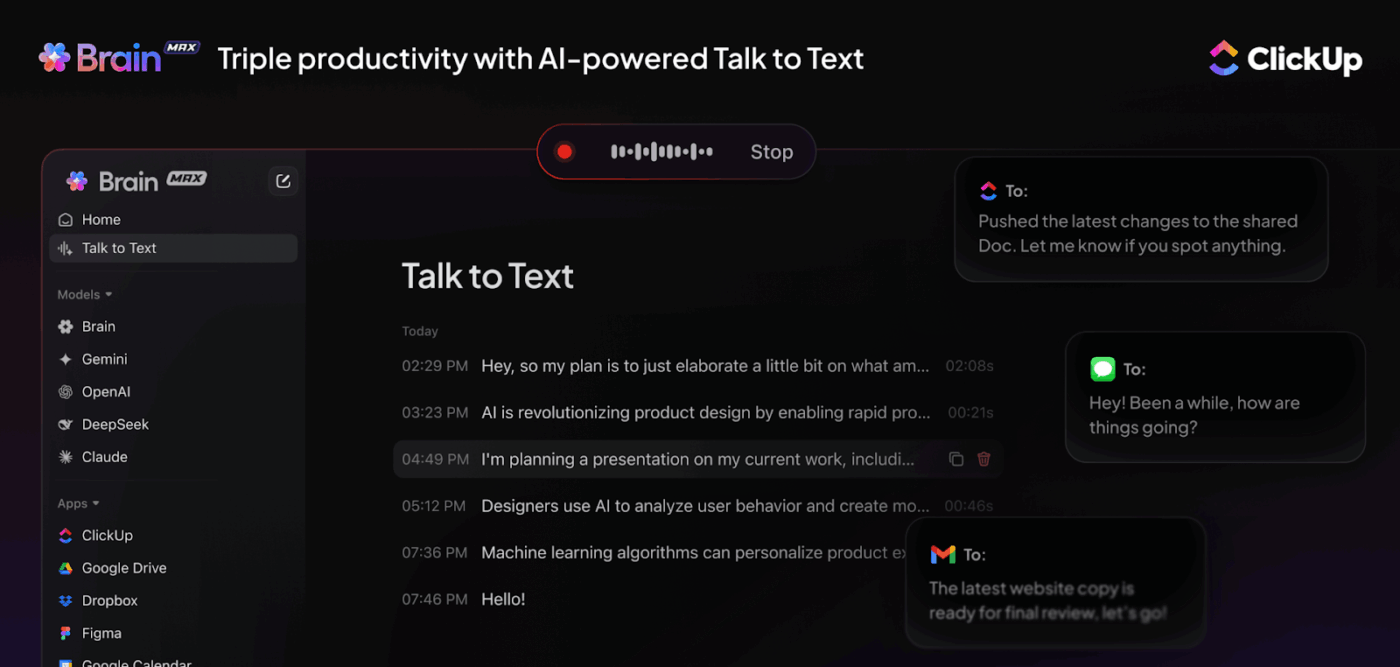
Instead of ending up with a wall of unedited text, your spoken words can become structured tasks, organized Documents, or even project updates without switching apps.
For example, say an idea comes to you during a client call. With Talk to Text, you can dictate it directly into ClickUp, and Brain MAX automatically formats it, adds context, and connects it to the right project. That means no copy-pasting, no lost notes, and no manual clean-up.
This isn’t just dictation—it’s voice input with structure and action built in. Exactly what Dictation.io users are missing when they hit its ceiling.
🔍 Why ClickUp is the smarter Dictation.io alternative
Use ClickUp Brain MAX to dictate long notes during interviews, then keep your current flow—AI Notetaker for meeting capture, Docs for editing, Tasks for follow-ups—all in one place.
But it doesn’t stop at transcription. As the best dictation software, it organizes your meeting into clean, structured notes—including key takeaways and action items—all delivered straight into your ClickUp Inbox, captured in neat ClickUp Docs.
From there, you can edit, organize, and convert your notes into actionable ClickUp Tasks or share them with your team. You can @mention teammates for gathering feedback and benefit from live collaborative editing within Docs to keep your notes updated and relevant, always. This integration keeps everything centralized, ensuring your notes are easy to find, share, and act on, without switching between multiple tools.

Once your transcripts are organized, ClickUp adds a layer of intelligence on top with ClickUp Brain. Using natural language prompts, you can interact with your notes just like you would with a teammate. Ask it to summarize key points, extract action items, or highlight critical decisions—all without digging through pages of text.
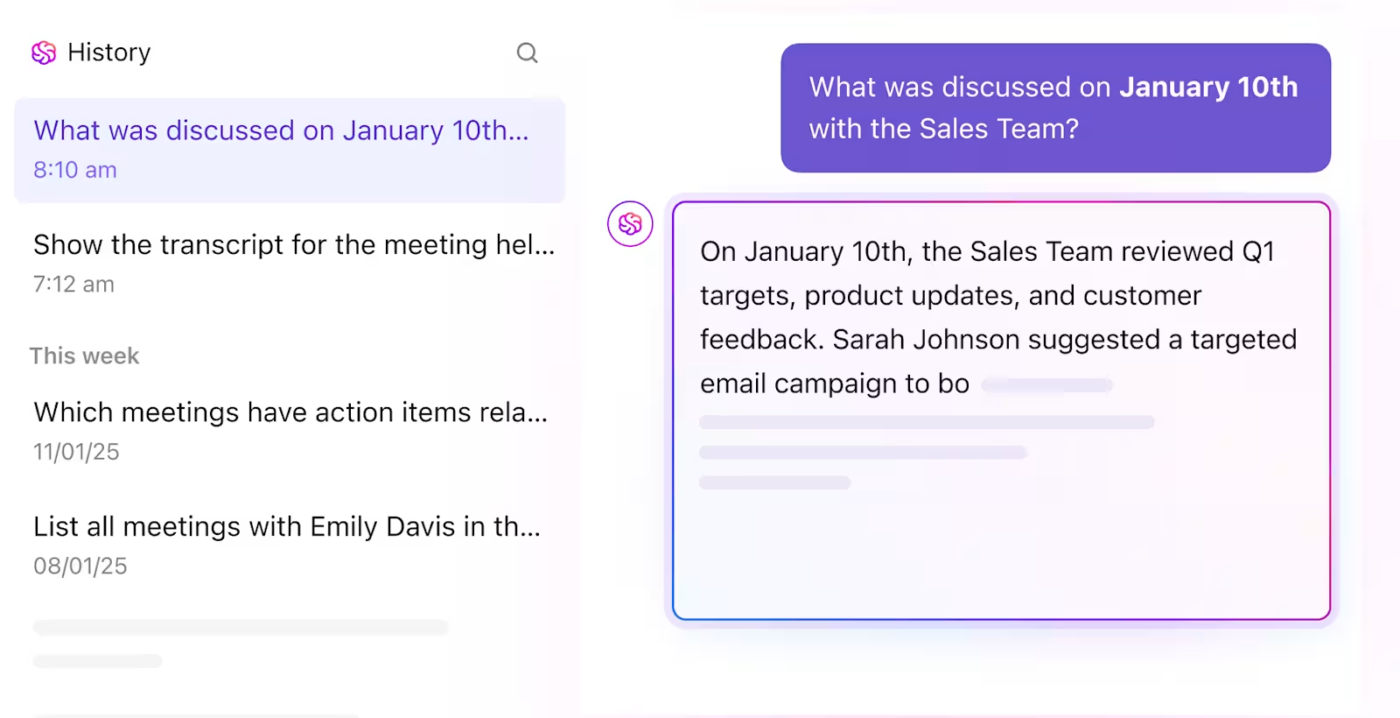
Say you’ve just finished a lengthy client onboarding call. Instead of scrolling through the entire transcript, you can simply ask, “What did the client say about project deadlines?” or “List the agreed next steps.” ClickUp Brain will surface those answers instantly, giving you the clarity you need without wasting time.
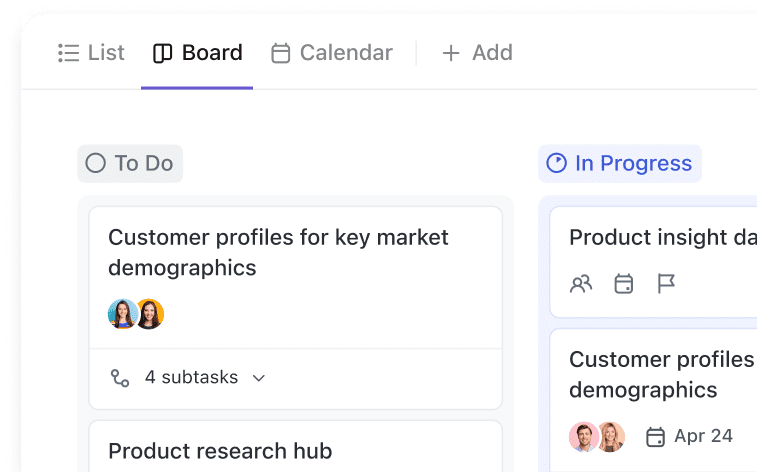
With insights from ClickUp Brain, you can quickly turn key takeaways into tasks. For example, if Brain highlights an action item like “Draft the content plan,” you can immediately assign it to the right person, set a deadline, and track progress using ClickUp Tasks. This smooth transition from insight to task keeps you and your team organized and on track.
📮ClickUp Insight: Nearly 88% of our survey respondents now rely on AI tools to simplify and accelerate personal tasks.
Looking to generate those same benefits at work? ClickUp is here to help! ClickUp Brain, ClickUp’s built-in AI assistant, can help you improve productivity by 30% with fewer meetings, quick AI-generated summaries, and automated tasks.
A G2 review says:
ClickUp Brain really is a time-saver. The built-in AI can now summarize lengthy threads, draft docs, and even transcribe voice clips right inside a task, which lets my team cut down on context-switching and chase fewer add-on tools.
🎧 Quick Hack: ClickUp’s AI Notetaker can automatically detect and transcribe meetings in 18 different languages, including English, Spanish, French, German, and Hindi. This feature ensures accurate transcription without the need for manual language selection.
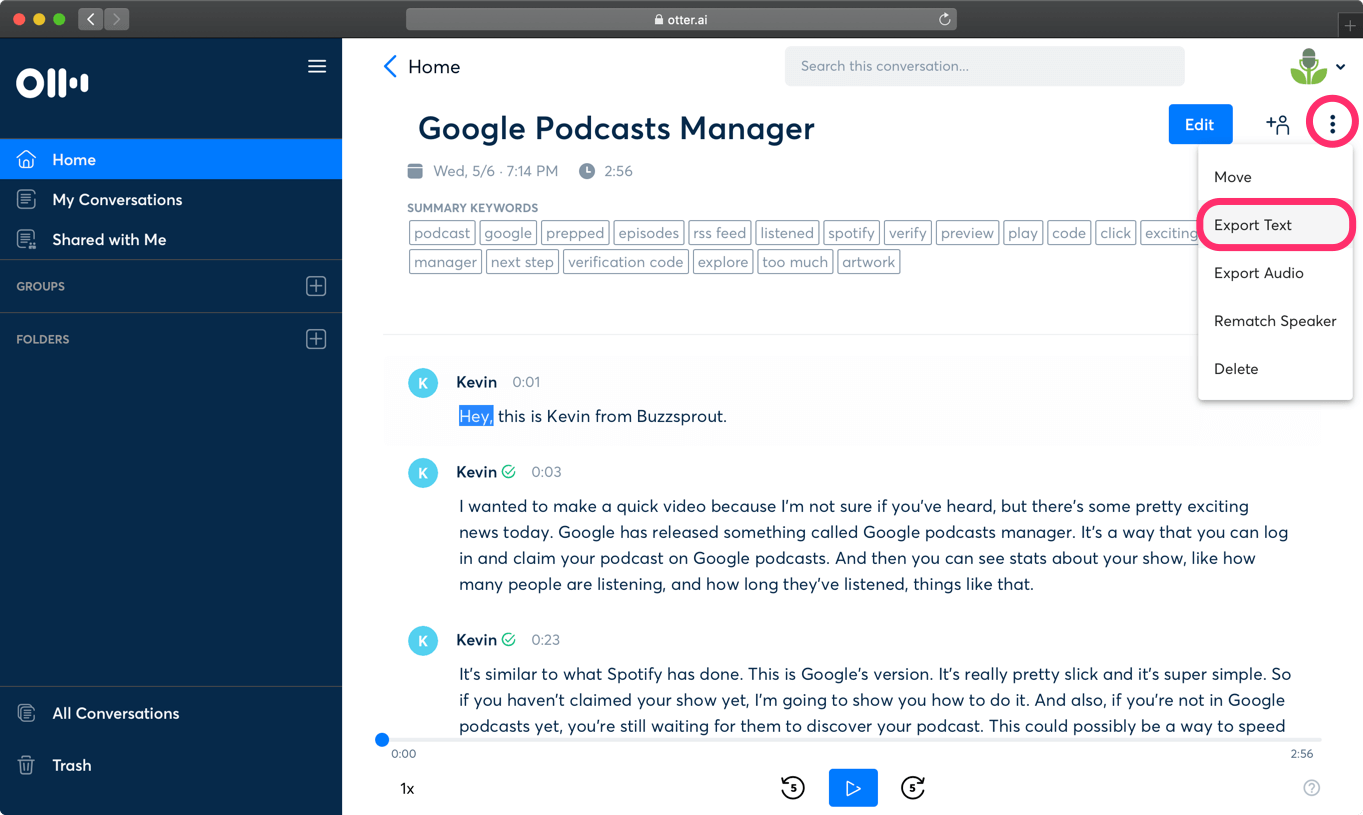
Otter.ai is an AI-powered meeting transcription and collaboration tool that turns your meeting conversations into accurate, real-time text. You can connect it to Zoom, Google Meet, or Microsoft Teams, and let the Otter Assistant join meetings on your behalf to take notes and share them with your team.
If you’re a Dictation.io user, you’ll notice a major upgrade in this AI note-taking app’s ability to automatically transcribe entire meetings—not just single-speaker voice input.
You’ll also get speaker identification, the ability to add custom vocabulary for high accuracy, and powerful search tools to find key moments fast. In addition, you can highlight, comment, and collaborate on transcripts in real time on Otter.ai’s iOS, web, and Android apps.
A G2 review says:
My favorite thing about Otter is that I can pay full attention to those I’m connecting with on a call, without having to continuously take notes. Conversations can become more free-flowing, I can ask more questions and find out a lot more information, because I know that Otter will take notes and record an audio transcript.
👀 Did You Know? While Otter and its alternatives integrate with Zoom and Google Meet, it often requires manual setup or browser extensions and a business plan. Whereas you can sync your calendar, and ClickUp’s AI Notetaker joins Zoom, Google Meet, and Teams automatically to take notes.
✅ ClickUp Advantage: No browser add-ons needed. Notes link directly to your project tasks and timelines.
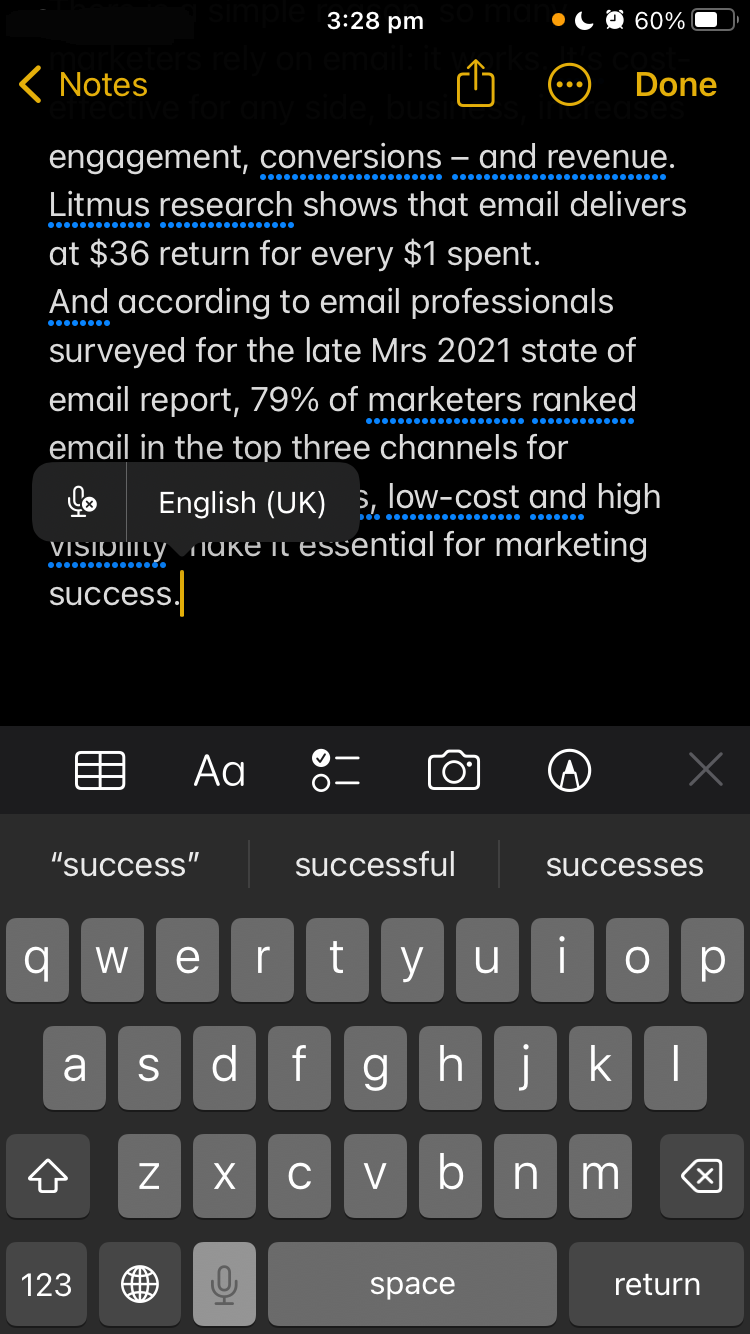
If you’re a Mac or iOS user, Apple Dictation, powered by Siri, is already built into your device. Unlike basic voice-to-text dictation tools, Apple Dictation works offline and processes voice dictation in real time. Integrated with your keyboard, it allows you to switch between voice and typing without interruption. That means you can dictate custom words, tap to fix a sentence, then go right back to start speaking.
This speech-to-text software solution follows a privacy-first approach and uses on-device processing across the Apple ecosystem. You can use voice input directly within any app.
In addition, it automatically inserts punctuation marks like periods, commas, and question marks as you speak. Dictation.io, on the other hand, does not automatically insert punctuation. Instead, it relies on voice commands; users must explicitly say to add punctuation marks (e.g., ‘comma’, ‘period’) to include them in the transcription.
An App Store review says:
I’ve been using this app to transcribe a large number of letters, some typed and some handwritten. The error rate is good, generally less than 5%.
⚡Template Archive: After transcribing your meetings, use task list templates to convert insights into actionable tasks. Within these templates, you can assign responsibilities, set deadlines, and track progress in one place.
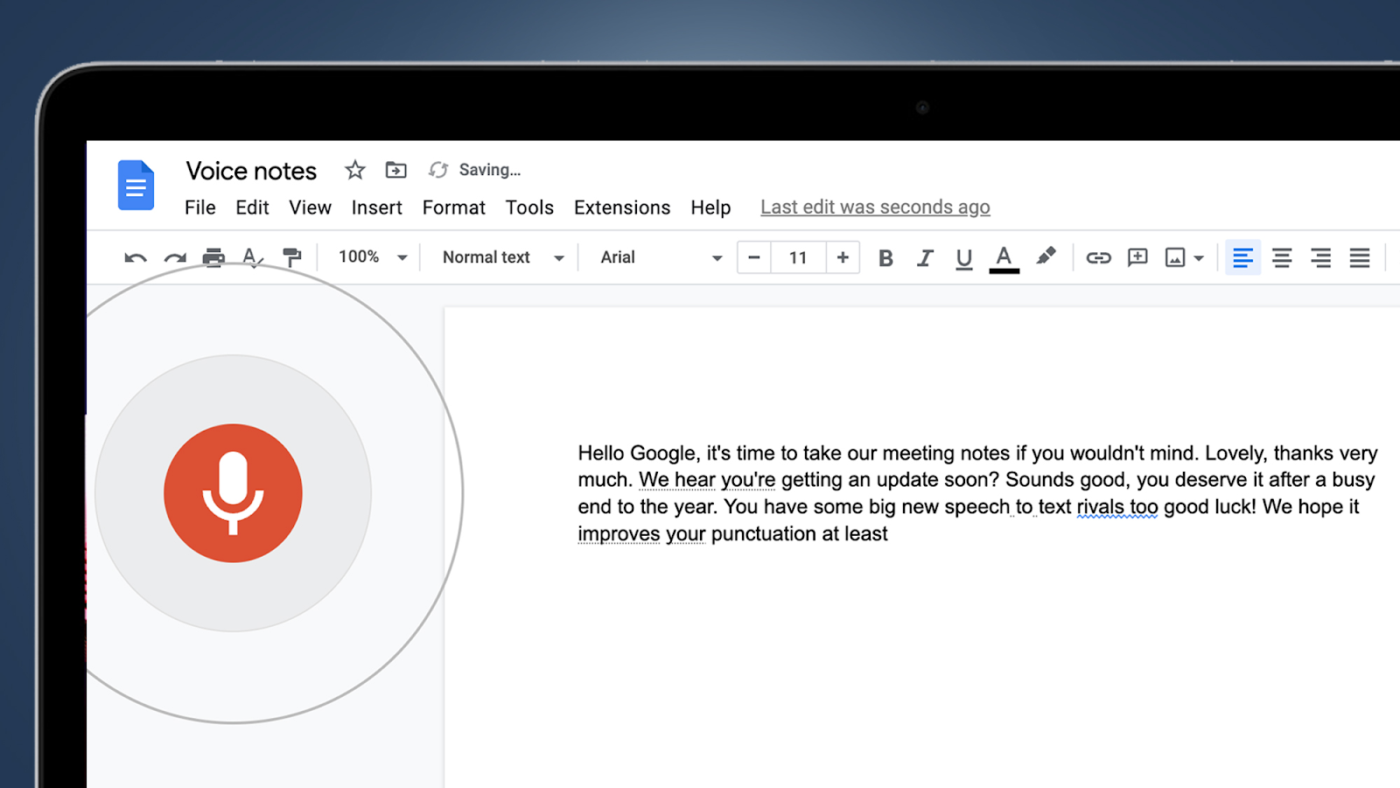
Google Docs Voice Typing is a built-in, browser-based speech-to-text tool designed for writing documents hands-free. Available only in Chrome on desktop, it supports over 100 languages and basic voice commands like punctuation and formatting.
While it doesn’t process voice recordings or offer advanced features like speaker labels, it’s great for quick notes or drafting longer content. Compared to Windows Voice Typing, it’s more tied to the Google ecosystem but just as easy to use. Since Google’s training data powers it, the accuracy improves over time for commonly used phrases, accents, and speech patterns.
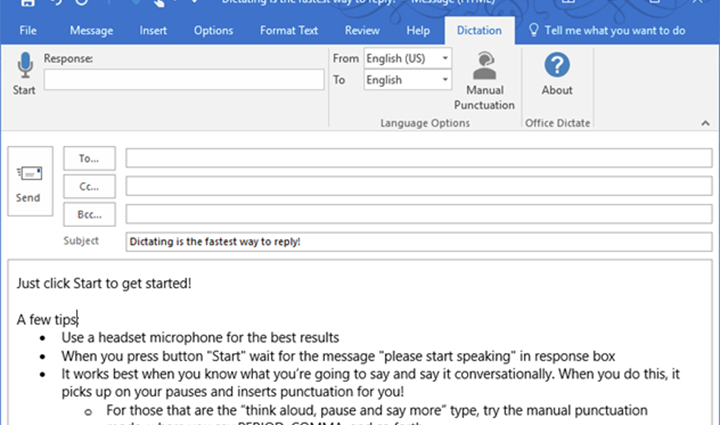
If you have an active Microsoft 365 subscription, Microsoft Dictate offers speech-to-text that integrates directly with Microsoft Office applications like Word, Outlook, PowerPoint, and OneNote.
With support for multiple languages, it’s helpful as a dictation software for users who work in diverse environments, including Microsoft Word, or need to switch between languages frequently.
This free dictation software automatically inserts commas, periods, and other punctuation marks based on your speech, reducing the need for manual corrections. Plus, you can use voice dictation commands to format text—like bolding or creating bullet points—making your document editing hands-free and more efficient.
A Reddit review says:
I used the dictate feature in Microsoft word to draft parts of my dissertation, and then go back and edit it by typing…It did a pretty good job overall. Most of the editing I ended up doing was to improve it overall, which would’ve happened whether it was dictated or typed.
👀 Did You Know? People speak at an average of 110–150 words per minute, but can only write by hand at 20–45 words per minute.
That’s a huge productivity gap in meetings where ideas fly fast and follow-ups matter. When you use AI for meeting notes, you don’t need to jot everything down. You can let AI capture conversations, organize key takeaways, and even auto-generate action items.
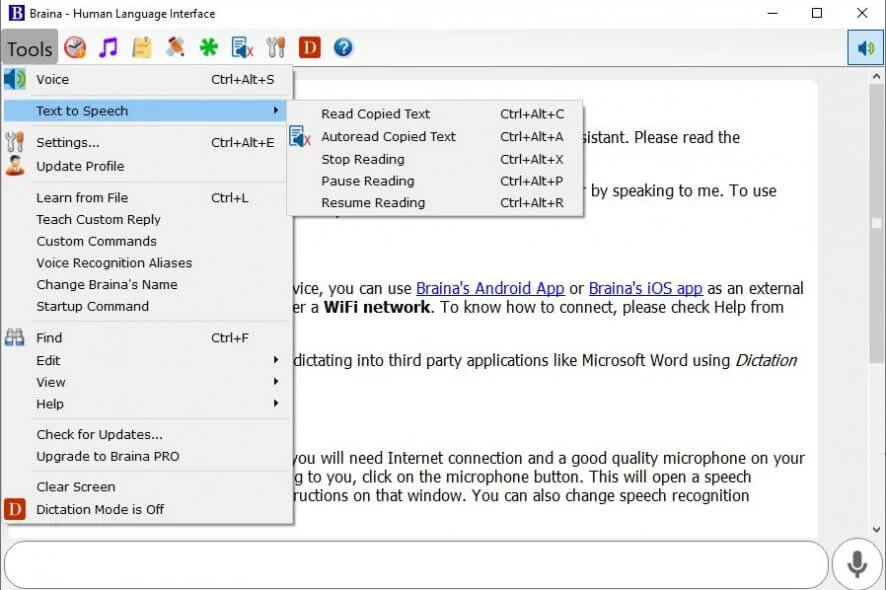
Braina is an AI-powered assistant and dictation software that converts speech to text in over 100 languages. It can be used across various applications, including MS Word, Gmail, and Notepad. Braina lets you run large language models like GPT-4 and Claude 3 locally on your PC, ensuring better privacy and faster performance by processing data offline.
Braina has AI memory, mimicking human cognitive memory to personalize interactions over time.
On the other hand, Dictation.io focuses mainly on real-time transcription and can’t remember past interactions or adapt to user preferences. Furthermore, with Braina’s LocalLibrary, you can build your own personal knowledge base and interact with it using natural language queries.
A Capterra review says:
User-friendly from the outset, great accuracy and very elastic – meaning it works just as well no matter where the text is being placed; emails, blogs, social media posts, most word platforms compatible with Windows. Ambient noise seems not to interfere with Braina’s transcription, another plus.
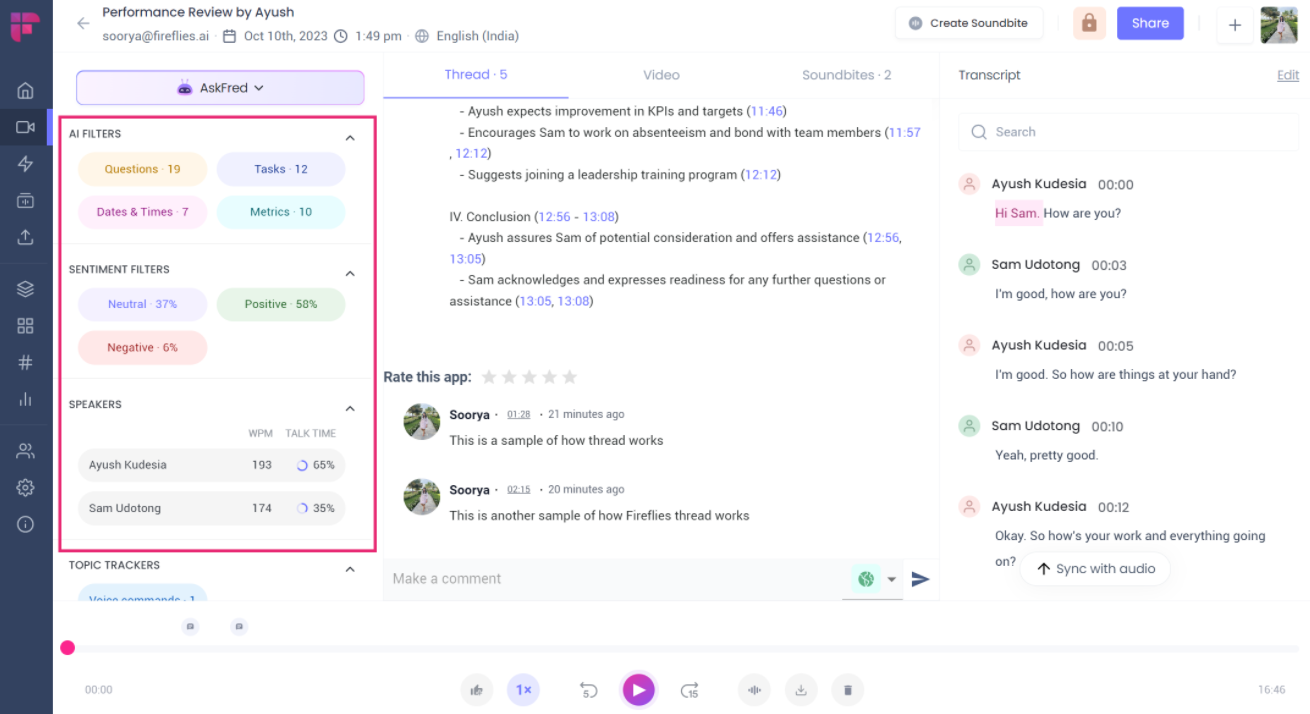
While Dictation.io offers basic voice-to-text dictation, Fireflies goes further. It can automatically join your meetings, record them, and generate real-time transcriptions. Once synced with your calendar, Fireflies can summarize your meetings across platforms like Zoom, Google Meet, and Microsoft Teams in over 30 languages.
After the call, you’ll receive concise AI-generated summaries highlighting key points, action items, and decisions.
Unlike Dictation.io, a solo note-taking tool, Fireflies lets you share transcripts, leave comments at specific moments, react to a timestamp, and even create audio soundbites for your team.
A G2 review says:
The summaries are incredibly accurate and insightful, and I love that you can expand any point for more context (a great perk on the Pro plan). The ability to view the meeting summary alongside the full transcript is a huge time-saver, and the linked timestamps make it easy to jump straight to the part of the conversation you need.
⚡Template Archive: Don’t settle for a raw transcript. Use meeting notes templates for your notes to go beyond word-for-word capture and reflect team priorities.
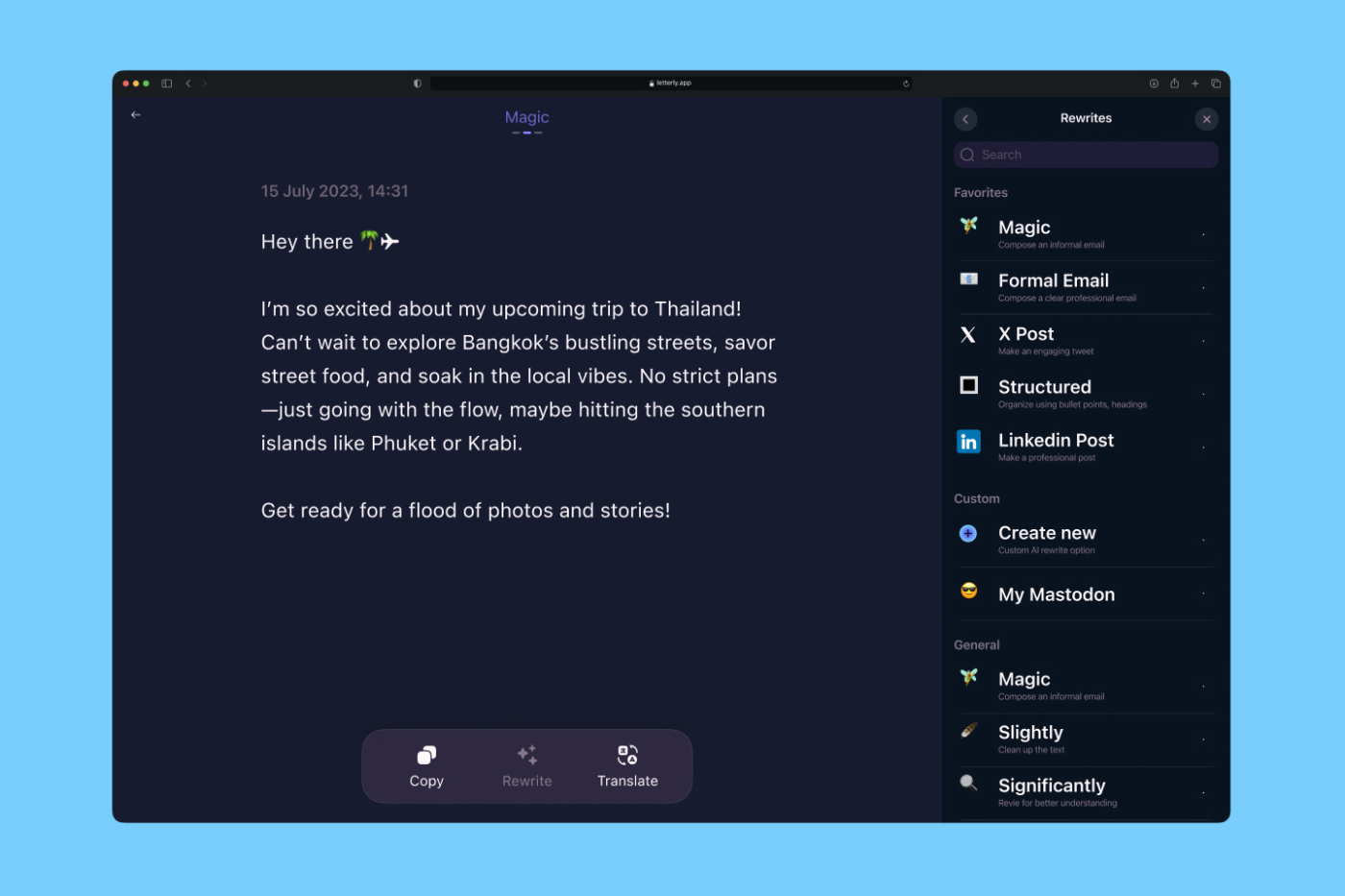
If you’re a content creator looking to turn your spoken ideas into polished, ready-to-publish text, Letterly, is an AI-powered dictation tool for you.
Available on iOS devices, Android, macOS, and web platforms, Letterly offers over 25 rewriting styles. With the voice typing feature, you can dictate words to write emails, to-do lists, social media posts, and summaries. You can even bookmark your preferred rewrite styles.
It allows you to record voice notes even with your device’s screen turned off, providing flexibility for on-the-go usage. Additionally, the app supports webhooks, enabling you to send notes directly to platforms like Google Docs and Notion and streamline your workflow.
A G2 review says:
Letterly’s interface is incredibly intuitive, making it super easy for anyone to start using it without any hassle.
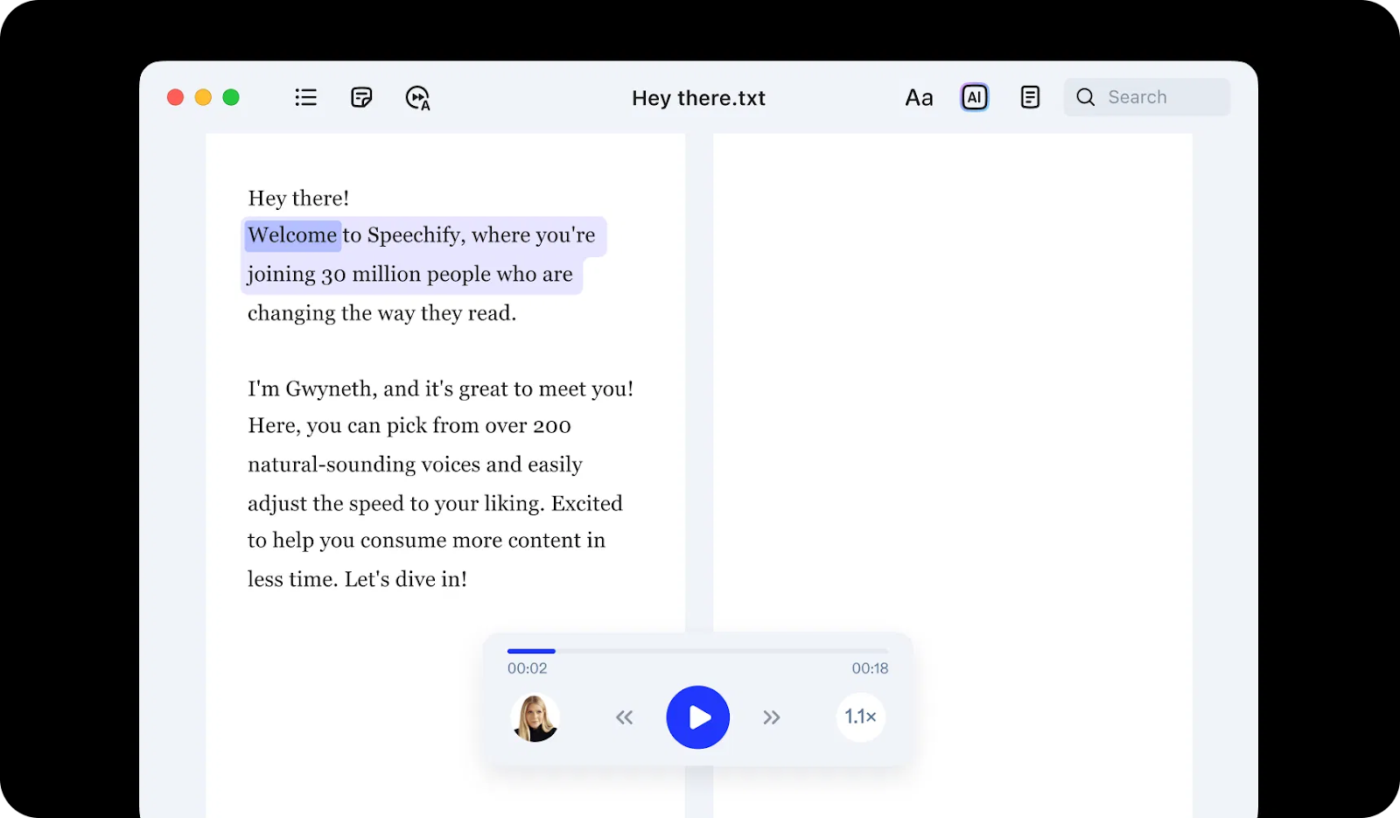
Speechify is a helpful text-to-speech tool for students who want a more flexible and accessible way to absorb reading material. It allows users to choose from over 200 AI voices, including fun options like Gwyneth Paltrow and Snoop Dogg.
You can even adjust the reading speed from 0.5x to 9x. With multi-device syncing, you can start listening during your commute and pick up where you left off on your laptop later.
If you’re working with printed handouts, books, or class materials, Speechify’s built-in OCR lets you scan physical pages with your phone and instantly convert them into audio.
A Capterra review says:
I use Speechify Text to Speech for work. I do a lot of copyediting and my brain gets tired. Being able to listen to the text aloud helps me focus and go faster. In fact, I have trained my brain to listen at 5x the speed so I can power through editing at record pace! I love the web app or browser extension I use both.
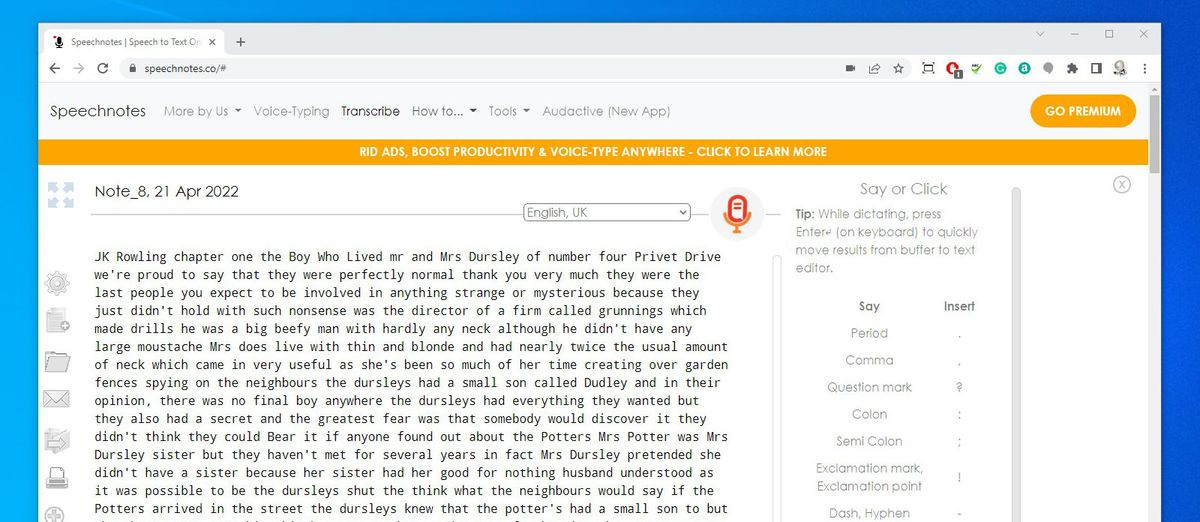
Speechnotes is a speech-to-text and transcription tool built for distraction-free voice input. It is based on Google’s speech recognition engine and supports over 70 languages. It converts your voice into structured text in real time, with voice command support for punctuation and formatting.
As a Dictation.io alternative, it auto-saves your notes. You can export or download them as plain text. You can also set custom keys for frequently used phrases and connect Bluetooth mics for hands-free input with this free dictation software.
💡 Pro Tip: Look for AI transcription tools that match your workflow. For example, writers may want editing features or voice-to-blog post formatting. Teams, on the other hand, would look for collaboration tools and speaker labeling.
Nuance Dragon NaturallySpeaking is a speech recognition software that enables you to dictate documents, compose emails, and even control computer applications using just your voice. With its built-in text-to-speech functionality, you can have your dictated text read back to you. This helps you catch errors and refine your writing more effectively.
The standout difference between Dictation.io and Dragon dictation software is how each tool handles accuracy over time. Dictation.io provides decent recognition, but Dragon learns and adapts to your voice, vocabulary, and even accent as you use it. The result is personalized and reliable transcription. It is a dedicated dictation software for longer documents or industry-specific terminology.
A G2 review says:
I have been using Dragon for the past two years. It has helped me to become more productive at work. With the Dragon software, I transcribe more audio hours per week compared to typing on a qwerty keyboard.
Dictation.io and its alternatives might be adequate for basic transcription. But when your workflow demands more accuracy, organization, and intelligence, you need something better.
That’s where ClickUp comes in.
With ClickUp’s AI Notetaker, your meetings are automatically transcribed, so you can stay focused on the conversation instead of taking notes. ClickUp Brain takes it further by generating clear summaries and extracting key insights, helping you quickly understand what matters most.
And with ClickUp Docs, you have a central place to store, edit, and organize everything—from meeting transcripts to brainstorming sessions and task notes.
Try ClickUp for free today to take control of your notes, meetings, and tasks.

© 2026 ClickUp

There’s an easier way. Try a free AI Agent in ClickUp that actually does the work for you—set up in minutes, save hours every week.