10 Best DeskTime Alternative Solutions for Time Tracking in 2025

Sorry, there were no results found for “”

DeskTime is a solid time-tracking software with a simple user interface. But it doesn’t do a lot beyond tracking time and managing tasks, does it?
Sure, you can monitor work hours, manage simple projects, and even track time on your browsers. But that’s not really enough to optimize workflows and boost your team’s productivity.
If you’ve been questioning whether DeskTime truly meets your needs, it might be time to explore a more advanced DeskTime alternative—one that offers more than just a time log.
We’ve rounded up the 10 best DeskTime alternatives that go beyond automatic time tracking. These tools help with project time tracking, employee monitoring, productivity analysis, and detailed reporting—all designed to keep procrastination at bay, improve accountability, and maximize efficiency.
Whether you’re managing remote teams, in-office employees, or freelancers, there’s a tool on this list that fits your workflow!
👀 Did You Know? A study found that only 20 minutes of interrupted performance creates significantly higher stress and frustration in people. This further shows how important time blocks and time tracking are for consistent productivity.
Anybody who runs a business with a remote team knows that generic time-tracking features don’t cut it anymore. Here is what you should be looking for while choosing a DeskTime alternative:
Now that you know what to look for in a productivity tool, here are some free DeskTime alternatives that fit the bill. Let’s explore the key features, limitations, pricing, and ratings to see which suits you the best.

ClickUp, the everything app for work, provides seamless workload management and time tracking in one centralized platform.
Unlike DeskTime, it’s a holistic task management platform with accurate time-recording capabilities, not just a time-tracking software.
You get everything you need to prioritize your tasks, from hierarchical to-do lists and recurring reminders to automatic time tracking and reporting.
Start tracking time effortlessly by toggling each task’s timer on and off. Need to log past work? Simply manually enter hours for time spent retroactively.
ClickUp also offers timesheets with automatic tracking, which provide a detailed breakdown of time spent on each project, enabling better productivity insights and accurate billing.

Want automatic time tracking for tasks across multiple Chrome tabs? ClickUp’s Chrome extension has you covered! It seamlessly tracks time spent on tasks across desktop, mobile, and web browsers, ensuring accurate data no matter where you work.

You can also set ideal time estimates for tasks and track actual time spent with ClickUp Time Estimates.
To view a project’s complete time estimate, turn on the Time Estimates Rollup. The tasks will display the total time estimates from the parent task and its subtasks.
The ClickUp Project Time Tracking suite has everything you need to stay on top of tracking time. You can add notes to each time entry, making it easy to track precisely how long tasks take. Plus, you can label, tag, and set priorities for your tasks—so when you need to find something fast, it’s right at your fingertips.
Added the wrong due date and time? No worries! You can always edit the date and time of tasks.

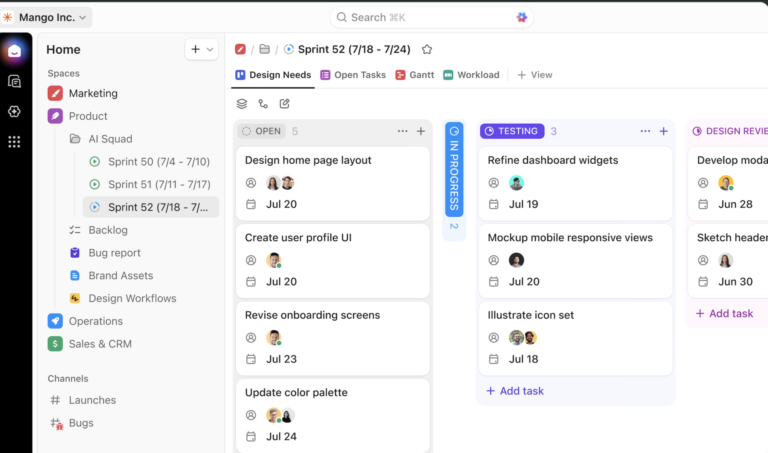
With the Workload View in ClickUp, you can set and track your team’s bandwidth and add time estimates and priorities to stay organized. Spot tasks that need extra support before they become bottlenecks, easily dragging and dropping tasks to schedule them on the calendar.
ClickUp simplifies time tracking with customizable timesheet templates. For example, the ClickUp Services Timesheet Template helps track employee hours, spot workload imbalances, and identify training gaps for better team productivity.
💡Pro Tip: ClickUp’s global timer lets you stop time from any device and switch between different projects.
Here’s what a Trustradius reviewer shared:
Time tracking has allowed teams to better manage resources and shift focus as needed both internally and in the company as a whole.
📚 Also Read: Best Clockify Alternatives

Hubstaff is a multi-device employee time tracking software that can turn time data from your desktop, mobile, or GPS into timesheets. Simply review the time, edit billable hours, and leave comments for accuracy and transparency.
Unlike DeskTime, Hubstaff also integrates with payment platforms like Deel and Wise. Managers can approve timesheets with one click, and every employee and vendor will be paid the right amount. There is no need to calculate and process payments individually.
Here’s a G2 review:
Hubstaff keeps track of both the time and activity of a remote employee, which is really a challenging job for Organizations who offer work from home jobs. Hubstaff is doing this great job and at a reasonable price.
📚 Also Read: Best Hubstaff Alternatives

Time Doctor lets you verify the specific work your team is doing, take screenshots, and monitor website and application usage for your entire team.
Time Doctor also offers idle time tracking. You can identify inactivity, unusual activities, and unproductive applications—another feature DeskTime lacks.
📚 Also Read: Top Time Doctor Alternatives

Another option for time tracking and employee activity monitoring is TimeCamp. It lets you track attendance, measure task time, and analyze your team’s daily routine to maintain productivity.
Tired of manual billing? Use TimeCamp to generate accurate invoices based on billable hours—no extra calculations needed.
Here’s what we found on G2:
I like the user interface of Timecamp, it is simple, straightforward, and easy to use.

Trying to track both personal and team productivity without the hassle? Clockify offers a time tracker, timesheets, and kiosk tracking to monitor progress and estimate time for better resource allocation and workforce planning.
As a free time-tracking software, it’s a decent DeskTime alternative for small businesses with tight budgets.
🧠Fun Fact: The first “time tracker” is considered to be a stopwatch used by Frederick Winslow Taylor in 1876 to track time spent by workers on specific tasks. He even developed an industrial management method called Taylorism to increase efficiency and productivity.

With calendar views, multi-device support, and 100+ integrations, Toggl Track is another DeskTime alternative for large teams. It has a simple user interface and offers accurate data insights into individual employee performance.
You can also customize the detailed time reports to measure performance KPIs unique to your organization. The user-friendly design makes it accessible for both beginners and experienced users.
Here’s a Trust Radius user’s feedback:
I use Toggl Track not only to track my hourly rate clients but also how long I spend on each task so that I can price my services accordingly. I love their reporting feature and the fact that you can track/organize clients, projects, and specific tasks.

If you’re looking for a non-intrusive time-tracking tool that also verifies work from employees with more transparency, Monitask could be an option.
Instead of secretly monitoring employee activities, it notifies users when it takes a screenshot and provides their current productivity ratio.
It also offers scheduling templates where you can specify allotted times, due dates, and shifts for your entire team.
📮ClickUp Insight: 92% of knowledge workers use personalized time management strategies. But, most workflow management tools don’t yet offer robust built-in time management or prioritization features, which can hinder effective prioritization.
ClickUp’s AI-powered scheduling and time-tracking features can help you transform this guesswork into data-driven decisions. It can even suggest optimal focus windows for tasks. Build a custom time management system that adapts to how you actually work!

With Jibble, your team can log hours from desktop, mobile, and web browsers. It also offers facial recognition and GPS tracking—features not available in DeskTime.
You can use biometric time clocks to streamline attendance tracking for even more accuracy.
The app also integrates with platforms like Xero and QuickBooks Online to streamline your payroll calculation processes.
A Capterra reviewer had this to say:
Jibble is incredibly easy to set up, use, and manage in the field. It has made payroll much more efficient, saving me valuable time

Calamari is a time and attendance tracking tool. While DeskTime only offers an online time-tracking clock, Calamari offers seven remote and physical ways of clocking in and out.
For example, employees can log in and out or switch between projects on Slack. Simply sync with Calamari, and it will record all hours worked. You can also install QR codes at each building entrance for employees to scan and start their clock.
Calamari needs minimum billing to be $25/month.

Are your employees frustrated with manually logging work hours? Float’s automated time-tracking feature can help. Pre-filling timesheets based on your team’s scheduled allocations streamlines time log submissions for recurring work.
Additionally, Float offers an intuitive visual timeline, making it easier to understand team schedules and project timelines. Float also syncs with time-tracking tools, enhancing accuracy in resource planning.
Every DeskTime alternative we’ve covered has its strengths and trade-offs. Some excel at attendance tracking but lack in-depth reporting. Others offer features that keep managers informed but may feel intrusive to employees. And then there are tools packed with great features—if you can overlook the occasional bug.
Want to skip the trial and error? We’d recommend picking ClickUp as your chosen DeskTime alternative.
ClickUp does more than just track time—it puts you in complete control of your projects. Customize task views, set up reminders, assign work effortlessly, and generate real-time reports. Plus, with free customizable templates, your timesheets will fit your workflow perfectly.
What’s more, ClickUp can further increase your team’s productivity by integrating tasks, time tracking, communication, and knowledge management in one AI-powered platform.
Try ClickUp today and see the difference!
© 2025 ClickUp