








Still downloading templates?
There’s an easier way. Try a free AI Agent in ClickUp that actually does the work for you—set up in minutes, save hours every week.
Sorry, there were no results found for “”
Sorry, there were no results found for “”
Sorry, there were no results found for “”
The average organization runs on 305 SaaS applications. 🤯
That’s why company management system templates are critical. Not just because they give you structure, but because the right ones connect directly to how work is assigned, tracked, documented, and reviewed.
With a company management system template, you can reduce the daily tool stack and pilot work in the right direction within a bigger system.
In this blog post, we’ll look at the best company management system templates built to make your job a little bit easier!
A company management system template is a ready-made workspace you can use to run day-to-day operations in one place. It gives you a consistent structure for organizing people, projects, processes, and performance tracking, so work doesn’t live in disorganized docs, spreadsheets, and chats.
These templates typically include:
When choosing company management templates, you should look for:
ClickUp, the world’s first Converged AI Workspace, gives you a library of 1,000+ ready-to-use templates to run your company without stitching together dozens of different tools.
And the best part is the templates don’t sit in a folder gathering dust. When you pick a company management system template, it can live right next to the work it drives: Tasks, Docs, Views, Dashboards, Agents, and more, all connected and powered by AI.
Let’s look at the top company management system templates 👇
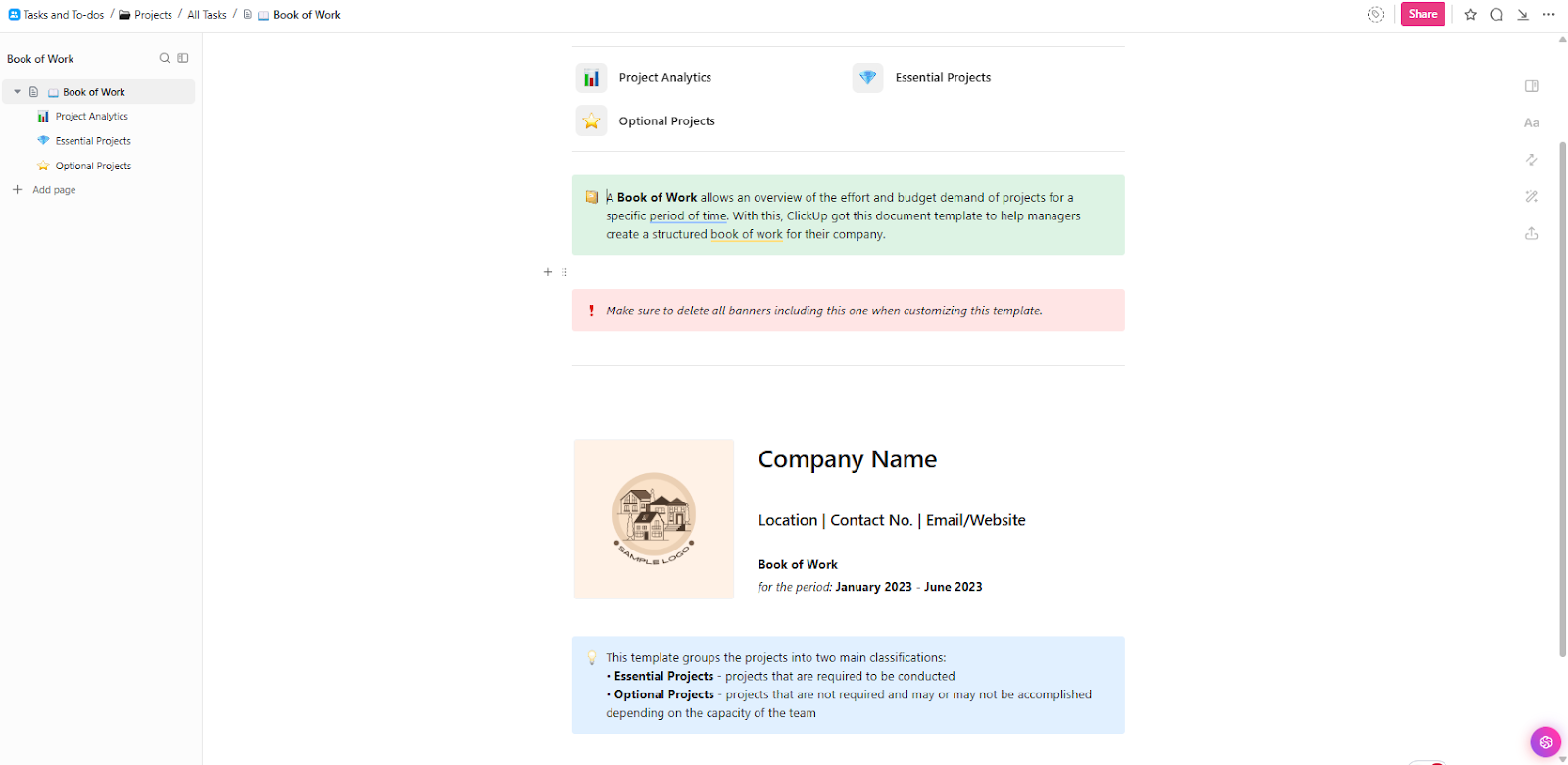
The ClickUp Book of Work Template gives managers a standalone document to review what the team is committing to over a specific time period, with visibility into effort and budget demand across initiatives. It’s organized into two buckets, Essential Projects and Optional Projects, so you can separate the work that must happen from the work that depends on workload capacity.
Use it to present an organized ‘book’ for your company, with a header for key details like company name and contact information. Then, group projects to make prioritization discussions easier and more consistent.
✅ Ideal for: PMO managers and operations leads coordinating cross-team project portfolios.
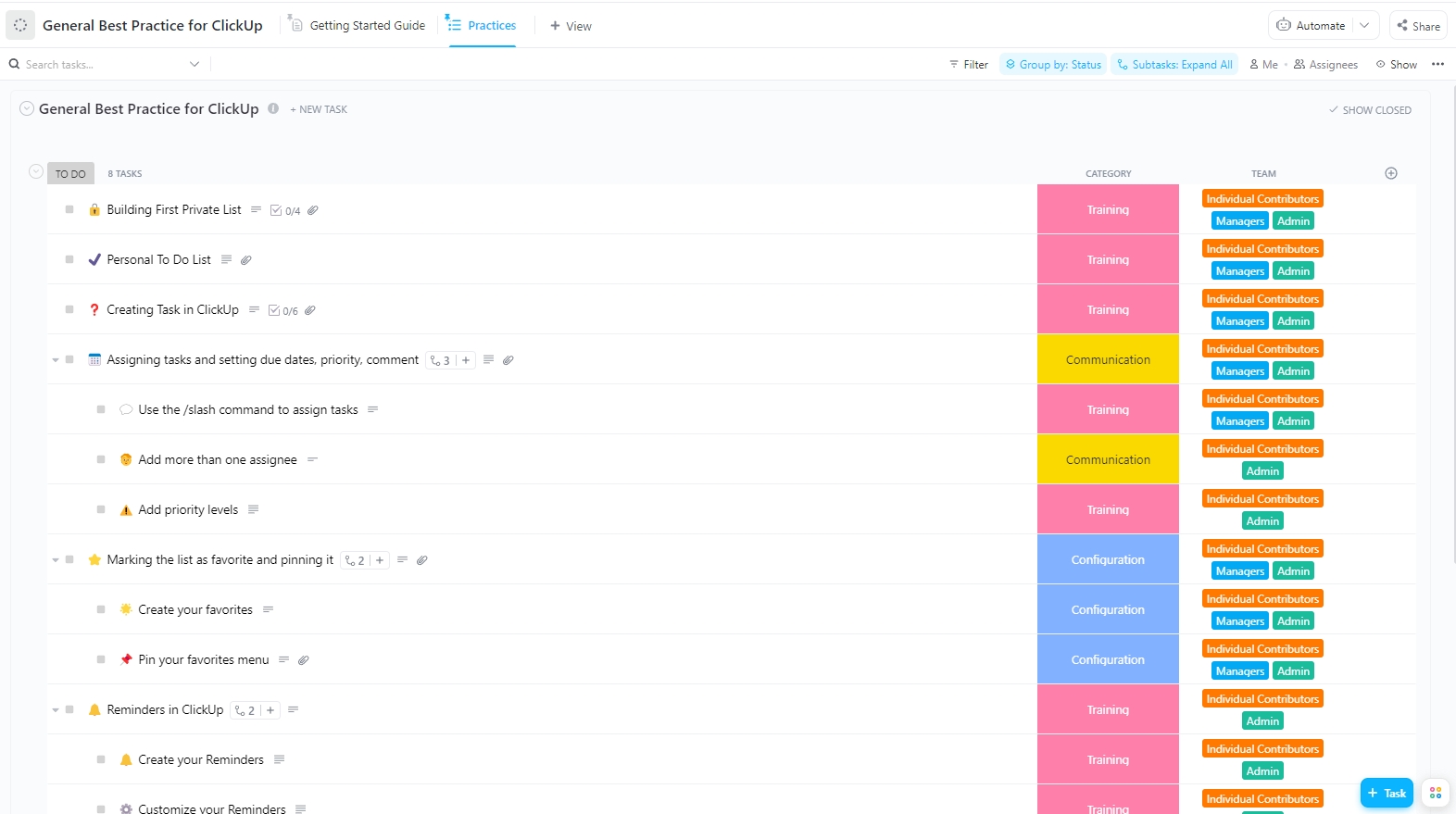
The ClickUp General Best Practice Template packs a ready-made checklist for setting up ideal workflows in your company and building consistent habits across your team. It’s designed to guide adoption through steps that teams can follow as they start using the ClickUp Workspace daily.
Inside the template, best practices are organized into clear categories and tied to the roles responsible for doing the work, so rollout tasks stay easy to assign, review, and complete.
You can also further customize the template as per your requirements.
✅ Ideal for: Workspace admins and operations managers leading rollout.
🚀 ClickUp Advantage: Reach for ClickUp Super Agents when you are done with AI that only gives you answers.
Super Agents are built to live inside your ClickUp workspace as ambient teammates with full workspace context. In fact, they can run multi-step workflows, around the clock, using the tools, triggers, knowledge, and memory you give them. That is the difference between asking AI for help and delegating work to something that can carry it through.
Learn more about Super Agents from this video we created specially for you 👇
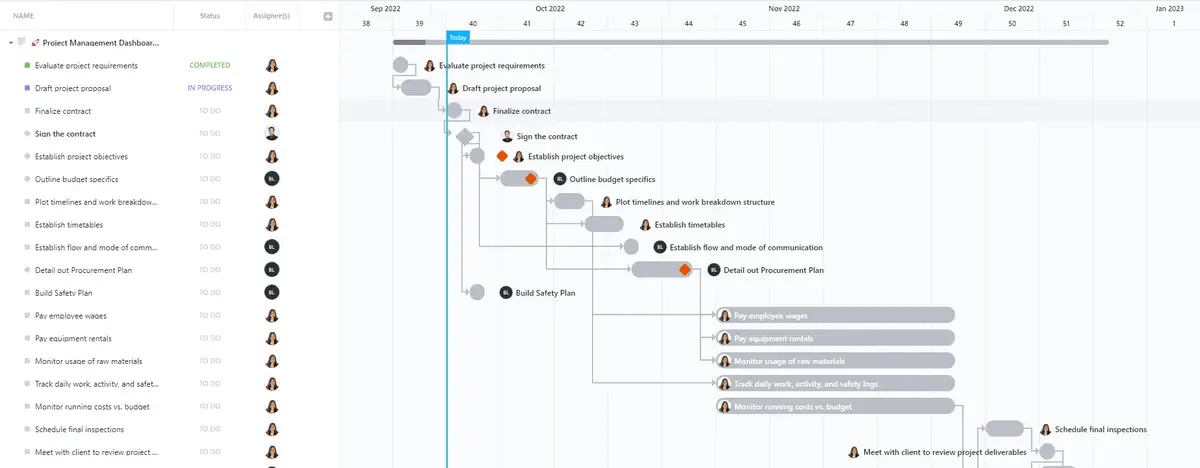
The ClickUp Project Management Dashboard Template consolidates your entire project plan into a single timeline, featuring Gantt charts that illustrate the connection between work stages from kickoff to delivery. It’s a strong starting point when your project has dependencies, overlapping phases, and deadlines that need tighter coordination.
Once the schedule is mapped, the template also gives you a place to track the numbers and signals that influence delivery, from budget movement to issue severity.
✅ Ideal for: PMO project managers and client-facing implementation leads running multi-phase projects.
The ClickUp Project Management Tasks Plan Template lays out the core setup work every project needs before execution starts, with a single place to capture the project manager, project team, project name, and a running completion status.
It opens with a ready-to-use task list that covers the fundamentals of most tasks in a project, from defining the concept and objectives to budgeting, risk planning, and communications.
And when project details circulate across several locations, use ClickUp Brain MAX, the most complete desktop AI companion. It helps you pull the right context instantly and turns it into next steps. And that can be anything—from drafting a communications plan to generating a first-pass project brief from your workspace.
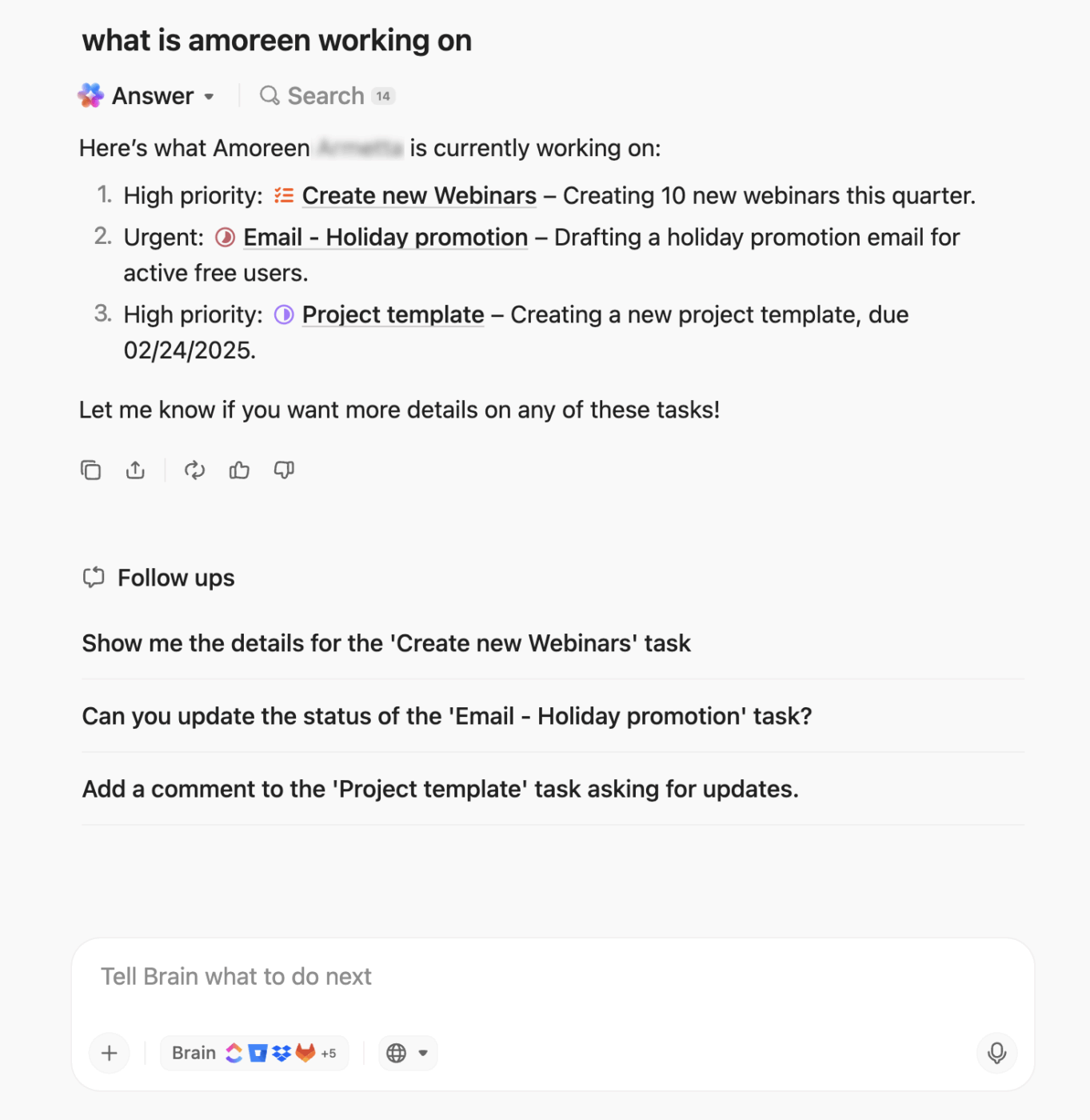
Even more, you can use different LLMs for the different types of questions you have, all from one app.
✅ Ideal for: Project managers and implementation leads kicking off new client or internal projects.
📮 ClickUp Insight: 45% of our survey respondents say that they keep work-related research tabs open for weeks. For another 23%, these treasured tabs include AI chat threads stuffed with context.
Basically, a huge majority are outsourcing memory and context to fragile browser tabs. Repeat after us: Tabs are not knowledge bases. 👀
ClickUp Brain MAX changes the game here.This AI super app lets you search your workspace, interact with multiple AI models, and even use voice commands to retrieve context from a single interface. Since MAX lives in your PC, it doesn’t compete for tab space and can save conversations until you delete them!
The ClickUp Software Integration Template lays out your integration work as a step-by-step task pipeline, with each request tracked from intake to completion. It’s built for end-to-end tracking, from early checks like availability and pricing through supplier selection, purchase orders, and payment follow-ups.
The template also separates integration efforts into dedicated lists, including Data Integrations, Systems Integrations, and Process Integrations. This helps keep different workstreams visible without mixing requirements or timelines.
And when integrations touch multiple tools, ClickUp Integrations makes sure all your workflows and tools are connected to your workspace.
✅ Ideal for: IT operations managers and implementation specialists coordinating multi-system rollouts.
⭐ Bonus Read: How to Practice Centralized Communication Strategies
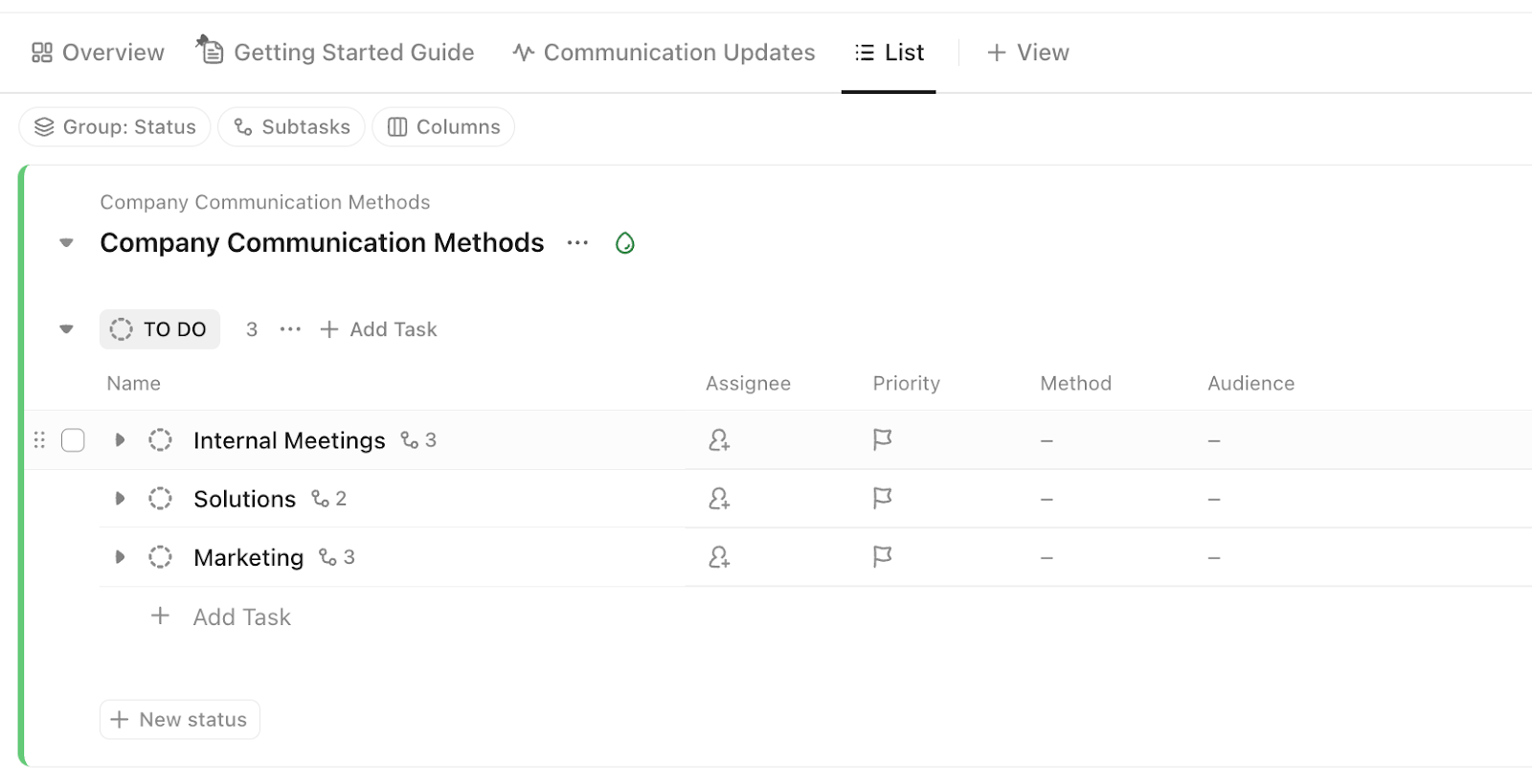
The ClickUp Employee Communication Template gives you a central place to map how internal updates should flow across teams. Add your recurring communication streams, then fill in the Method and Audience for each one to make expectations clear and repeatable.
Pair it with ClickUp Docs to turn your communication standards into a living wiki, lock down access with the right permissions, and link the Doc directly to the tasks or locations where teams work. When someone needs the policy mid-project, you can point them to the exact section using page links or even a block link.
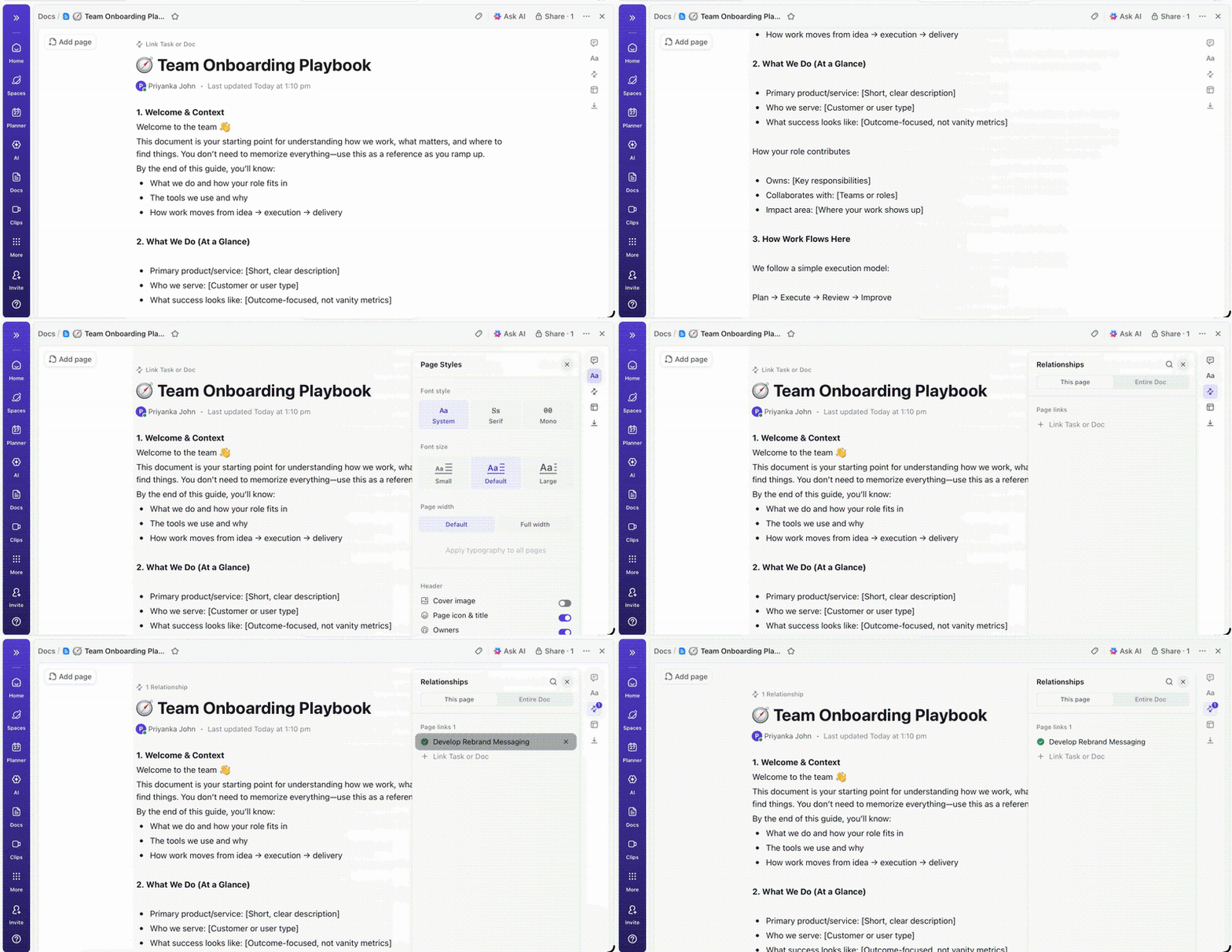
✅ Ideal for: People ops managers and internal communications leads setting company-wide communication norms.
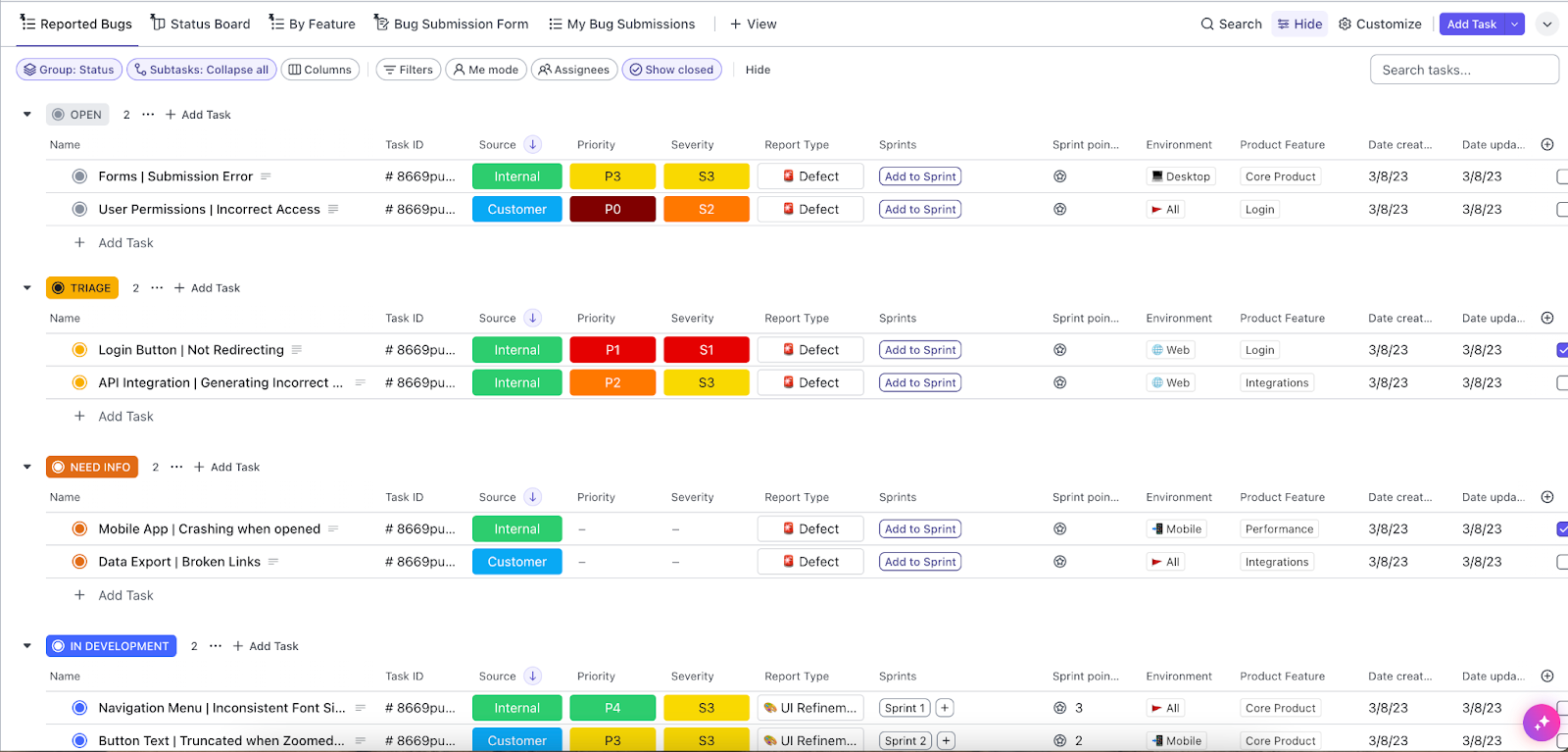
The ClickUp Agile Scrum Management Template acts as an operating system for engineering teams inside a larger company management setup. It organizes bug and sprint execution into defined stages like Open, Triage, Need Info, and In Development, giving leadership a consistent view of progress and milestones.
Under the hood, it also pairs with ClickUp for Agile Teams to support sprint planning, backlog visibility, and cross-functional coordination.
✅ Ideal for: Scrum masters and engineering managers managing sprint delivery and defect triage.
💡 Pro Tip: ClickUp is built for modern Agile teams that want to plan, ship, and learn in one workspace (minus the work sprawl 😵💫).
Watch this video to see how ClickUp supports modern Agile execution end-to-end, from backlog to release, without the tool hopping.
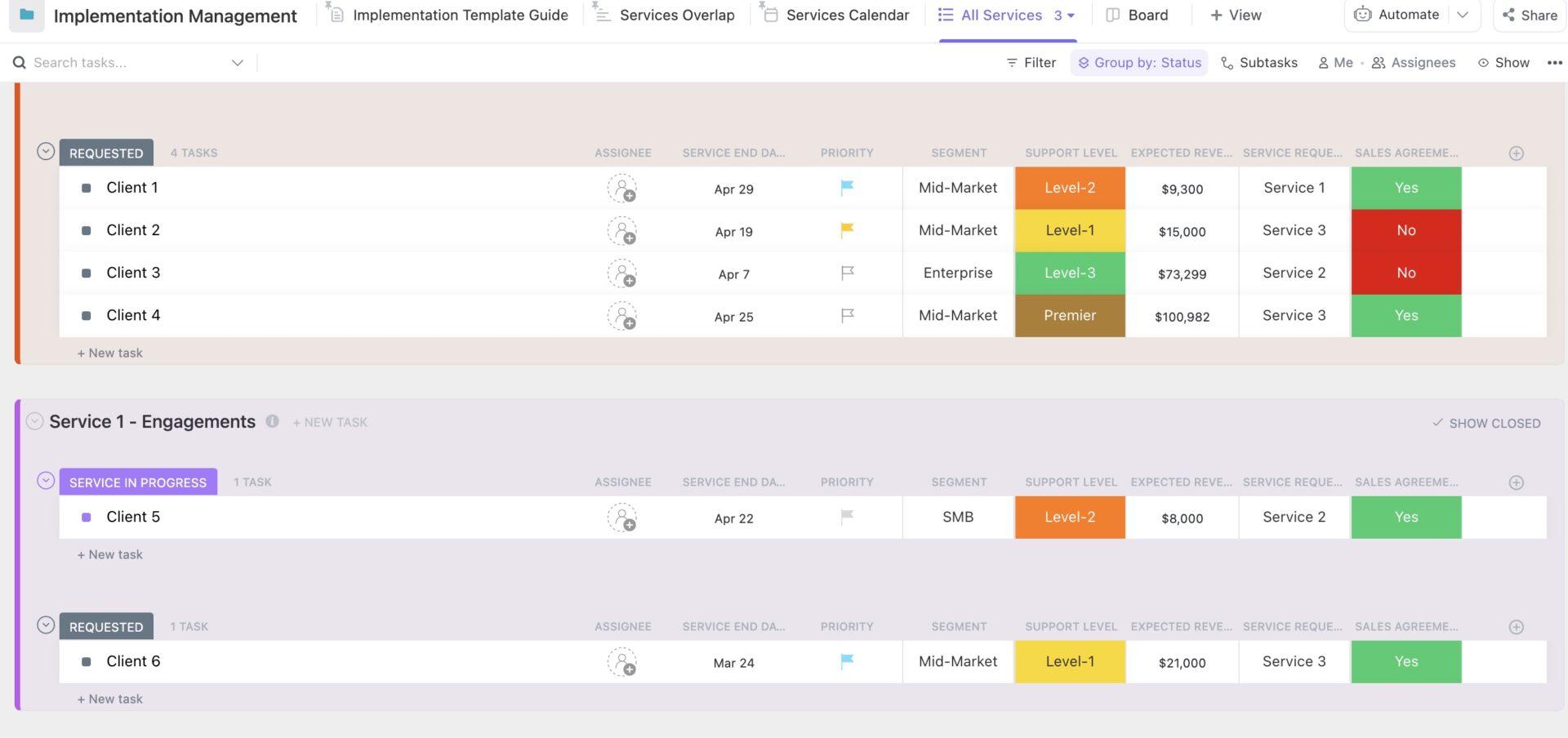
The ClickUp Implementation Management Template organizes client implementations into a single system, with each client tracked through stages like Requested and Service in Progress.
When you need portfolio visibility across all implementations, use ClickUp Dashboards to pull status, deadlines, and revenue signals into a single view. ClickUp AI Cards add an at-a-glance layer on top, summarizing all the info you need without digging into every client row.
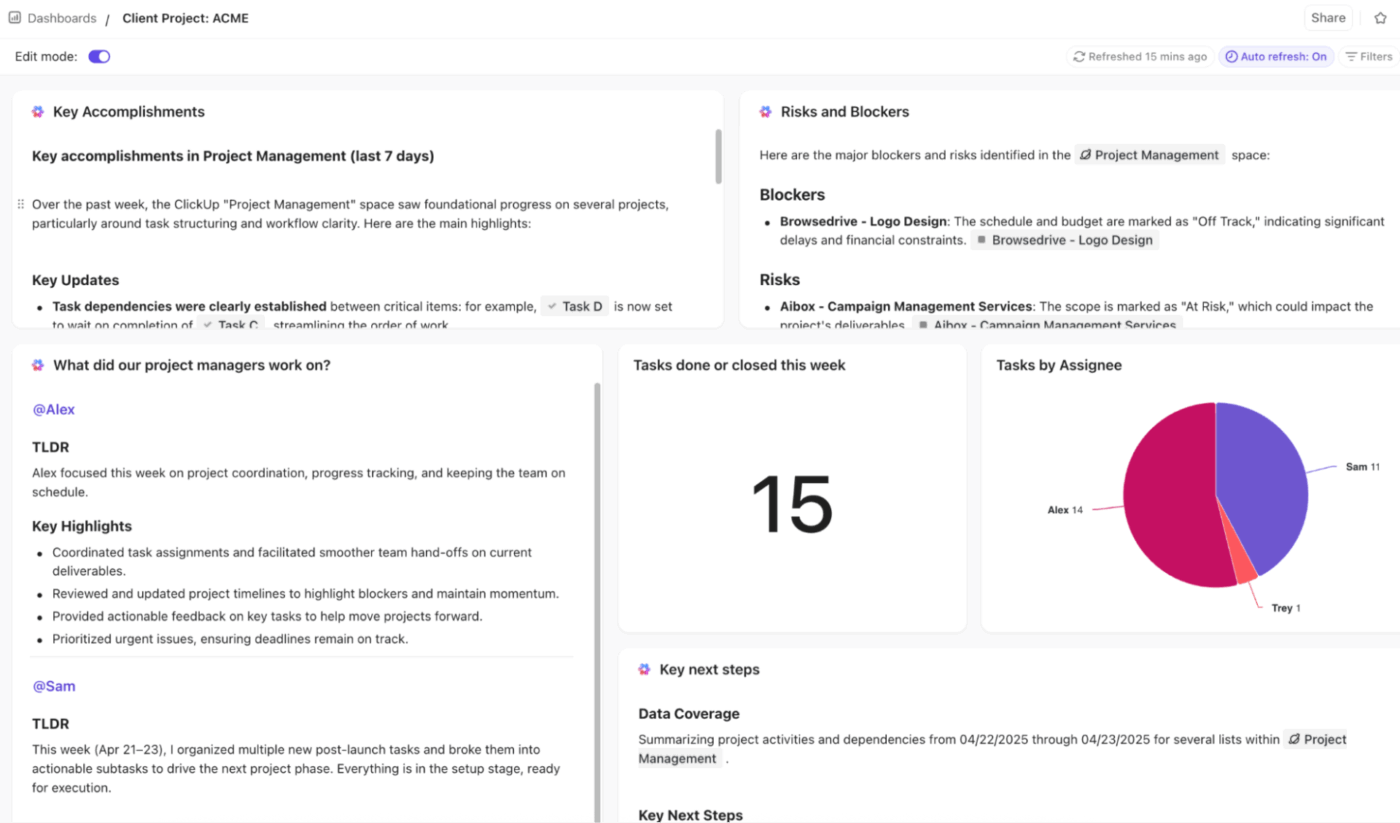
✅ Ideal for: Customer success managers and implementation leads managing multiple client rollouts.
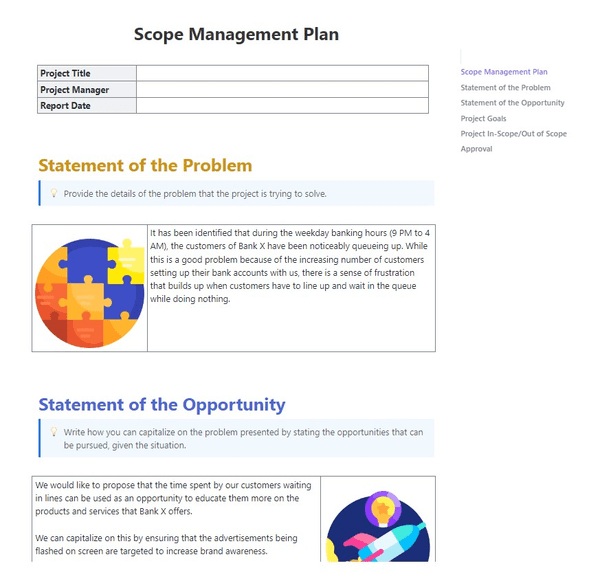
The ClickUp Scope Management Plan Template gives you a ready-to-use Doc for defining scope before work begins, with a clean structure that keeps everyone aligned on what the project will deliver. It starts with project title, project manager, and report date, then walks through the parts most teams usually scramble to document later.
Inside, you’ll find dedicated sections for Statement of the Problem, Statement of the Opportunity, Project Goals, Project In-Scope/Out of Scope, and Approval, making it easier to set boundaries early and protect the project from last-minute surprises.
✅ Ideal for: Project managers and delivery leads managing stakeholder-heavy projects.
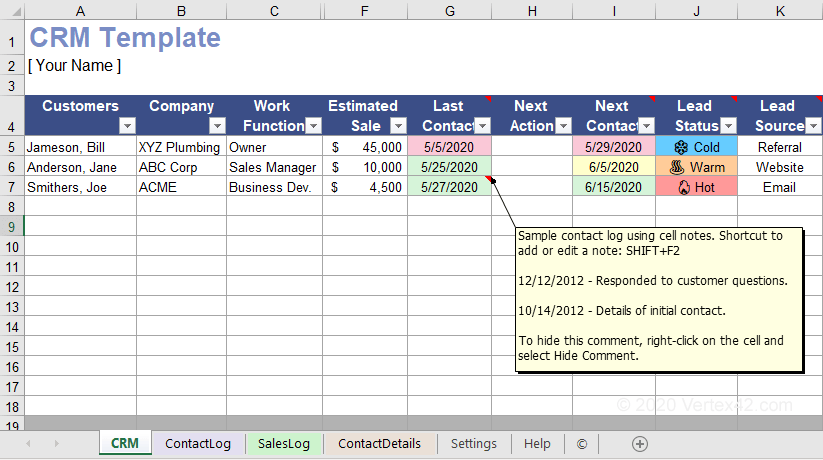
For small business teams not yet ready for a full-featured CRM, this spreadsheet-based Vertex42’s CRM Template for Small Business offers a simple way to track customer relationships and sales pipelines.
It’s a lightweight option for managing customer data without a complex system.
✅ Ideal for: Solo founders and small-business sales coordinators tracking leads and follow-ups.
A company management system template is a strong starting point, but the real value comes from what happens after you set it up.
Do people actually use it every day? Do updates stay current? Do decisions live in one place? Can leaders see what is moving without chasing after status?
That’s the difference between a template library and a management system.
ClickUp helps you turn templates into a living workflow. You can document how work runs, assign ownership, and keep priorities visible in one workspace, with AI and templates in the layer.
Get started with ClickUp today!
A project management template focuses on a single initiative with a defined start and end date. A company management template spans ongoing, cross-departmental operations like resource allocation and process standardization.
Yes, these templates are highly effective for small business teams. They provide essential structure and visibility from the start, improving operational efficiency and preventing the chaos that often comes with growth.
AI transforms static templates into dynamic systems. For example, ClickUp Brain can auto-generate status reports from your template’s data or summarize progress across departments, eliminating the manual work.

© 2026 ClickUp

There’s an easier way. Try a free AI Agent in ClickUp that actually does the work for you—set up in minutes, save hours every week.