






Still downloading templates?
There’s an easier way. Try a free AI Agent in ClickUp that actually does the work for you—set up in minutes, save hours every week.
Sorry, there were no results found for “”
Sorry, there were no results found for “”
Sorry, there were no results found for “”

Blitzit and Motion are both popular task and time management tools, each with its own unique features and capabilities. When it comes to choosing the best option, it ultimately depends on your specific needs and preferences.
In this post, we’ll give you an overview of the key differences between Blitzit vs. Motion, exploring their strengths, weaknesses, and the types of users they might be best suited for. The idea is to help you pick the best tool for your task and time management requirements.
We also throw our hat in the ring with ClickUp, a truly converged AI workspace that ties together your schedule, tasks, time tracking, team workflows, and project goals all in one platform.
| Feature | Blitzit | Motion | Bonus: ClickUp |
| Focus tools | ✅ Blitz Mode with timers | ✅ Deep work protection | ✅ Yes + Focus mode and reminders |
| Time tracking | ✅ Pomodoro & countdown timers | ✅ Auto-scheduling with reminders | ✅ Yes + Time tracking and estimates |
| Project management | ❌ No | ✅ Project tracking with dependencies | ✅ Yes + Full project management suite |
| Calendar scheduling | ✅ Manual scheduling | ✅ AI-powered auto-scheduling | ✅ Yes + Calendar, Gantt, and Timeline views |
| AI automation | ❌ No | ✅ Smart calendar & task AI | ✅ Advanced AI, automations, and Super Agents |
| Collaboration & chat | ❌ No | ❌ Limited | ✅ Yes + Built-in Chat and comments |
| Reporting & analytics | ✅ Visual productivity reports | ✅ Predictive insights | ✅ Advanced Dashboards and reporting |
| Meeting assistant | ❌ No | ✅ Smart booking | ✅ Yes + Screen recordings and Zoom integration |
| Docs & file sharing | ✅ Basic file support | ✅ Basic file support | ✅ Yes + Integrated Docs and storage |
Our editorial team follows a transparent, research-backed, and vendor-neutral process, so you can trust that our recommendations are based on real product value.
Here’s a detailed rundown of how we review software at ClickUp.
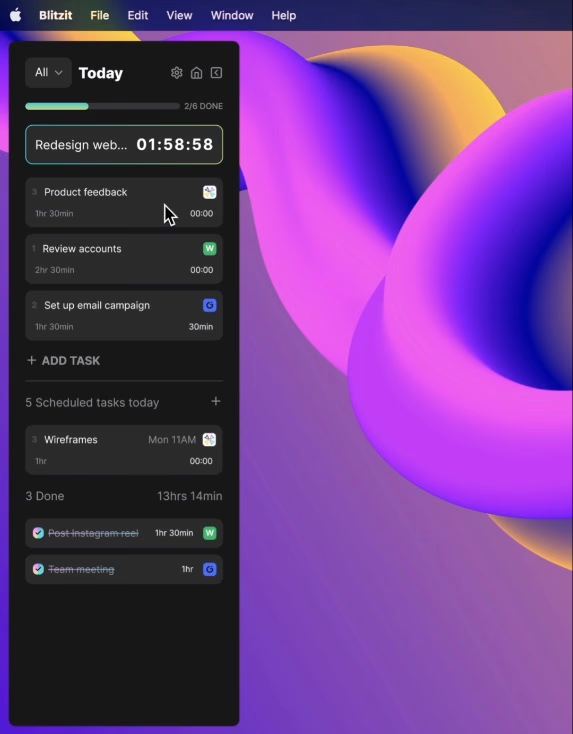
Blitzit is a personal productivity app for individuals who manage multiple priorities. It blends task tracking, time management, and accountability. With its collapsible to-do list and floating countdown timer, you can stay on track.
The app, available for Windows and macOS, builds momentum and wins back time by prioritizing essentials and eliminating distractions.
Blitzit keeps schedules tight and purposeful instead of overcomplicating things for busy professionals. Its individual-focused, manual task scheduling software helps you plan and prioritize your day.
Here’s a closer look at Blitzit’s core functionalities:
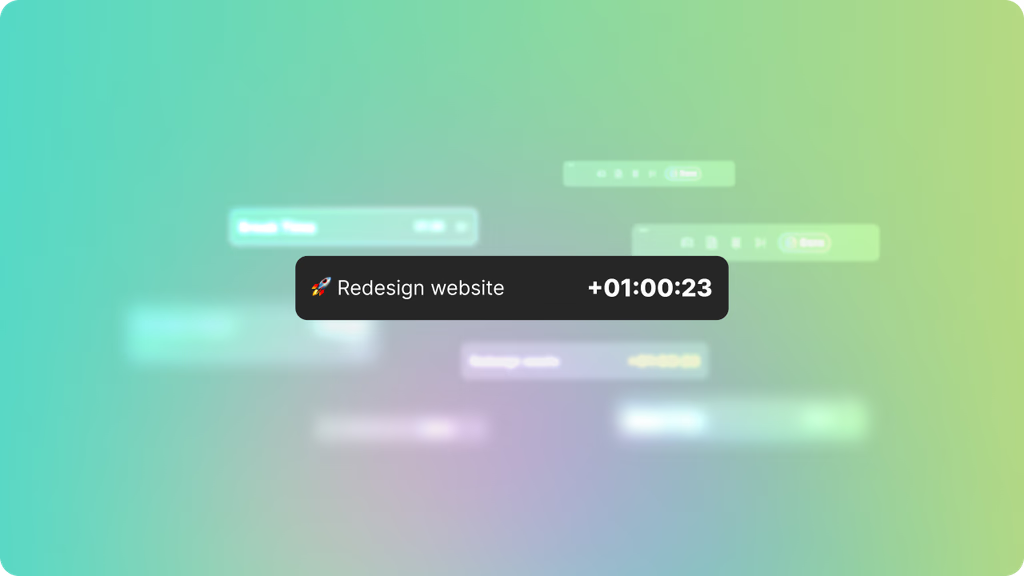
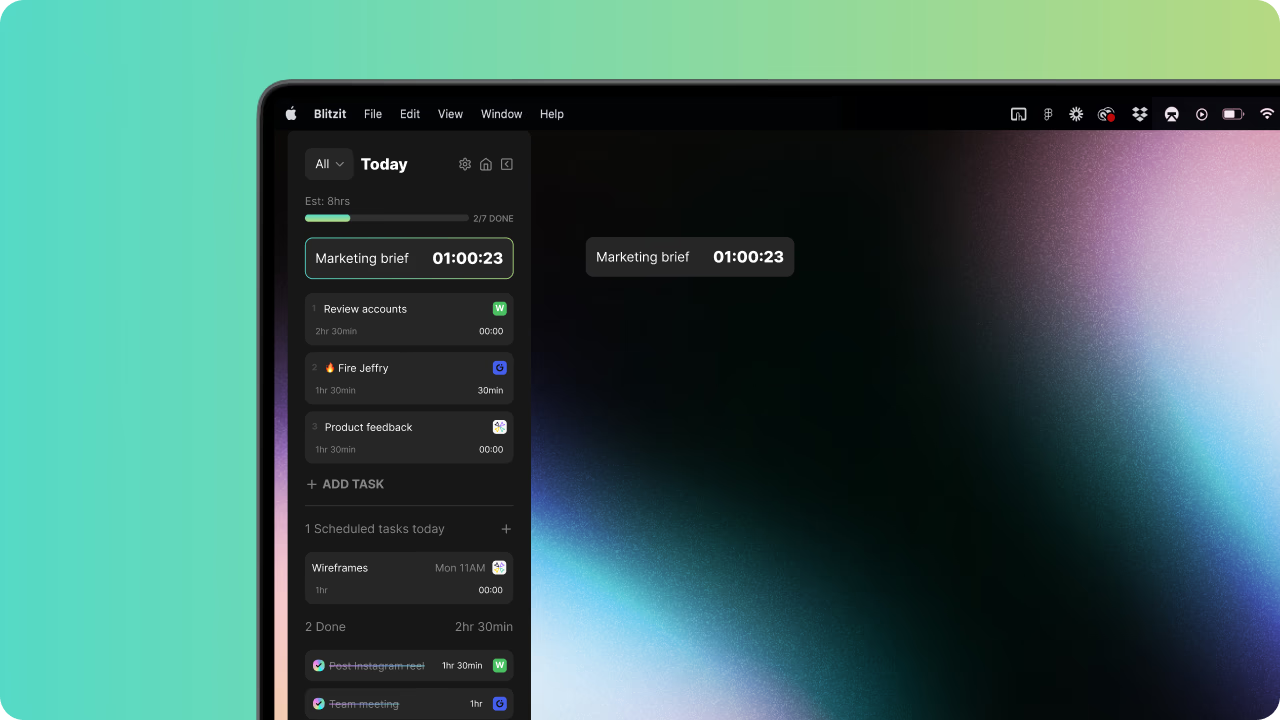
Blitz Mode turns your to-do lists into an organized command centre called the focus panel. It has a live task timer and a minimalist persistent widget to keep distractions in check.
The Blitz Mode zooms in on your high-priority tasks while the rest of your list is neatly stacked below, so you always know what’s next.
📮 ClickUp Insight: Is your to-do list working? Think again. Our survey shows that 76% of professionals use their own prioritization system for task management. However, recent research confirms that 65% of workers tend to focus on easy wins over high-value tasks without effective prioritization.
ClickUp’s Task Priorities transform how you visualize and tackle complex projects, highlighting critical tasks easily. With ClickUp’s AI-powered workflows and custom priority flags, you’ll always know what to tackle first.
Blitzit offers three intuitive timer modes that adapt to your preferred focus. If you’ve set an Estimated Time (EST) for a task, say, 15 minutes, the task timer will count down from that. This helps you stay within your target and move through your list.
It also supports the Pomodoro Technique for a structured work rhythm. The timer automatically transitions from work to break with a gentle notification—ideal for maintaining productivity without burnout.
🧠 Fun Fact: Francesco Cirillo created the Pomodoro Technique in 1987 using a tomato-shaped kitchen timer. He found 25-minute intervals with 5-minute breaks worked best. That’s how the name ‘pomodoro’ (Italian for tomato) became permanent!
Without EST and Pomodoro mode, Blitzit simply tracks time by counting upward. It becomes a straightforward time tracker, ideal for open-ended tasks or when you want to know how long something takes.
💡 Pro Tip: Add EST while creating a task or by entering time (HH:MM) in the bottom-left field of any task. If the task is live, pause the timer to edit your estimate.
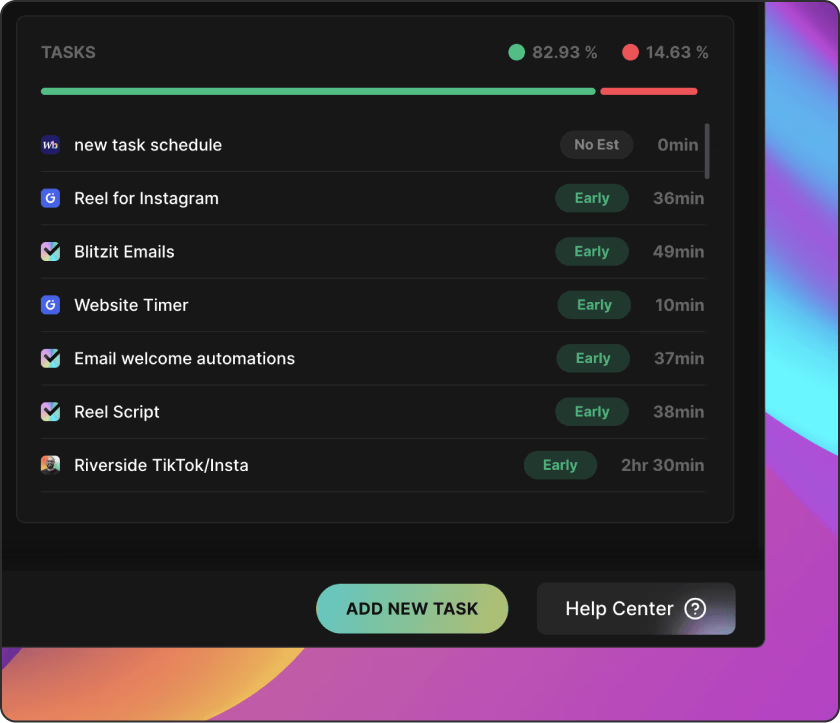
Blitzit’s productivity report provides a data-backed analysis of your time usage.
The daily productivity graph shows completed task hours, break time, and total work time. It also includes detailed stats such as total tasks, average tasks, daily hours, minutes per task, and frequency of early finishes.
Depending on the focus times, Blitzit highlights your most productive hour, day, and month. Identify patterns and know when you work best. And if you find yourself slipping, tune into its punctuality graph. It compares your estimated vs. actual task completion times.
*Check the tool’s website for the latest pricing
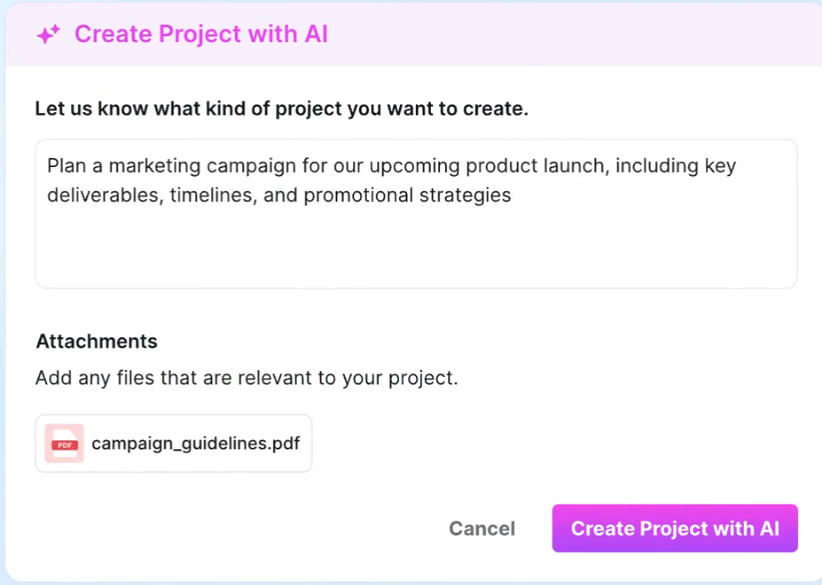
Motion is an AI calendar and task management system for anyone who wants their days planned for them.
Once you create tasks, meetings, or events, Motion uses artificial intelligence to auto-schedule them into your calendar, learning your habits along the way. It adapts to your preferences, predicts when you’re most productive, and rearranges your day when conflicts arise.
Motion has smart automation at its core. It replaces manual planning with AI for productivity and thinks for you. Here are some of its standout capabilities:
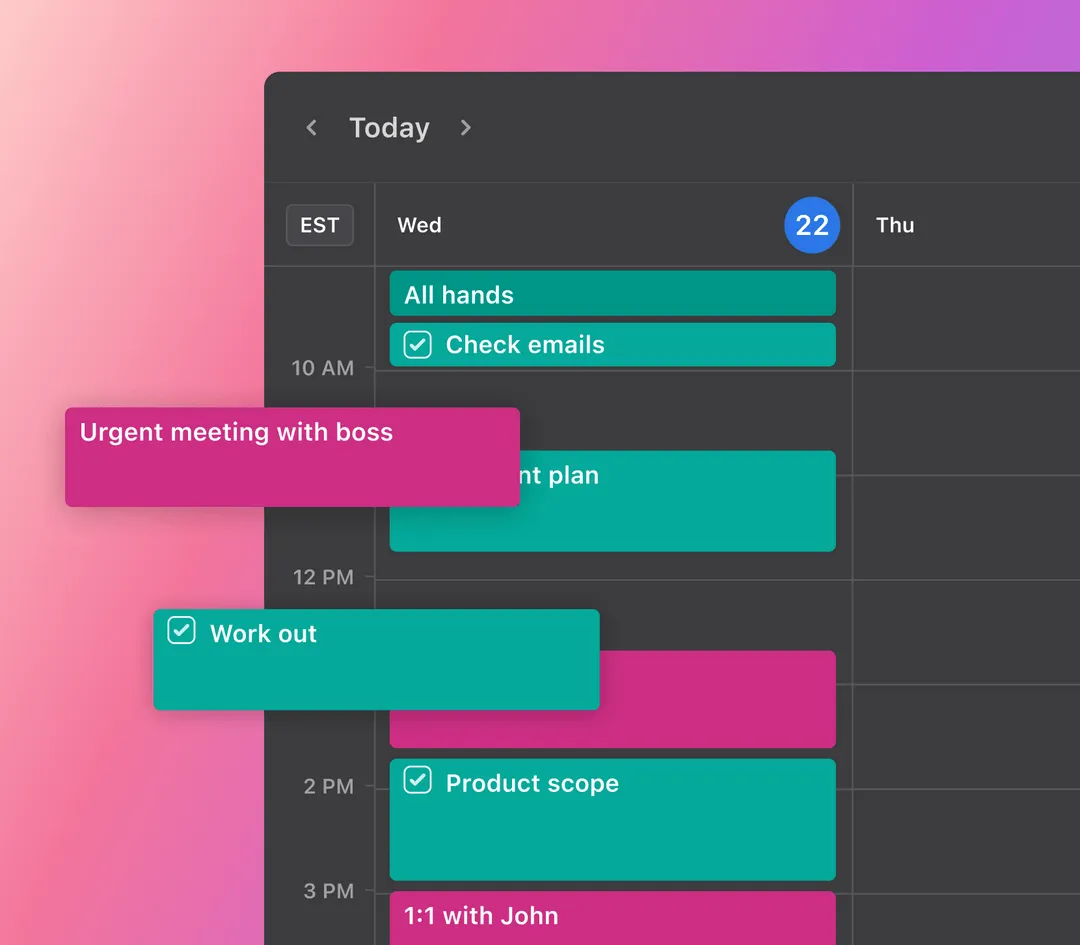
Motion’s AI calendar auto-generates an optimized schedule for your day based on your input and auto-updates in real time. It protects deep work blocks and warns you when your commitments outpace your capacity.
This smart calendar also blends tasks with meetings and supports multiple calendars from Gmail, Outlook, and iCloud within a single view. You don’t have to waste time staring at a list and picking what to do next. Motion will decide and inform you.
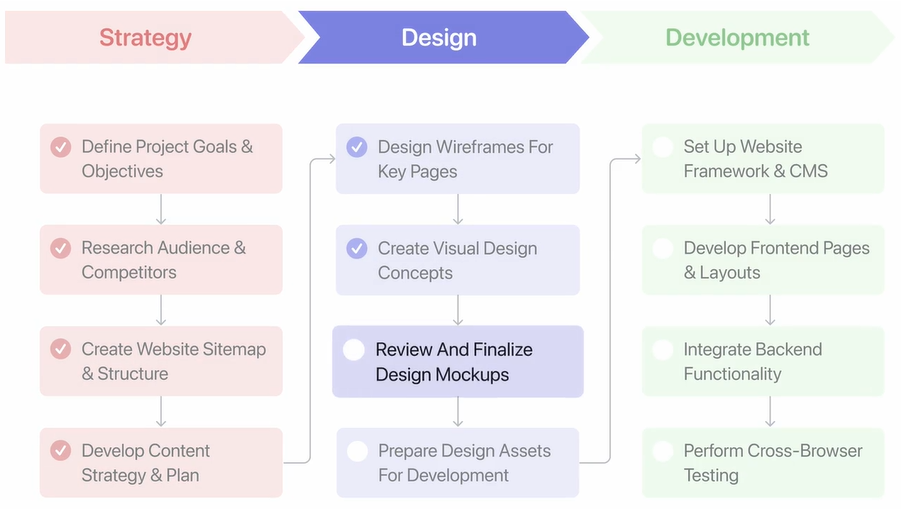
Motion groups tasks by status, priority, or project type and offers a broad visual overview of what’s in progress, delayed, and upcoming. However, this is not a manual process! Tasks move forward independently when the dependencies are cleared.
The built-in predictive insights forecast exactly when a project will finish. If you’re at risk of missing a deadline, it lets you know before it becomes a crisis. You can also see whether someone is overbooked or under-assigned at any given time and make quick adjustments.
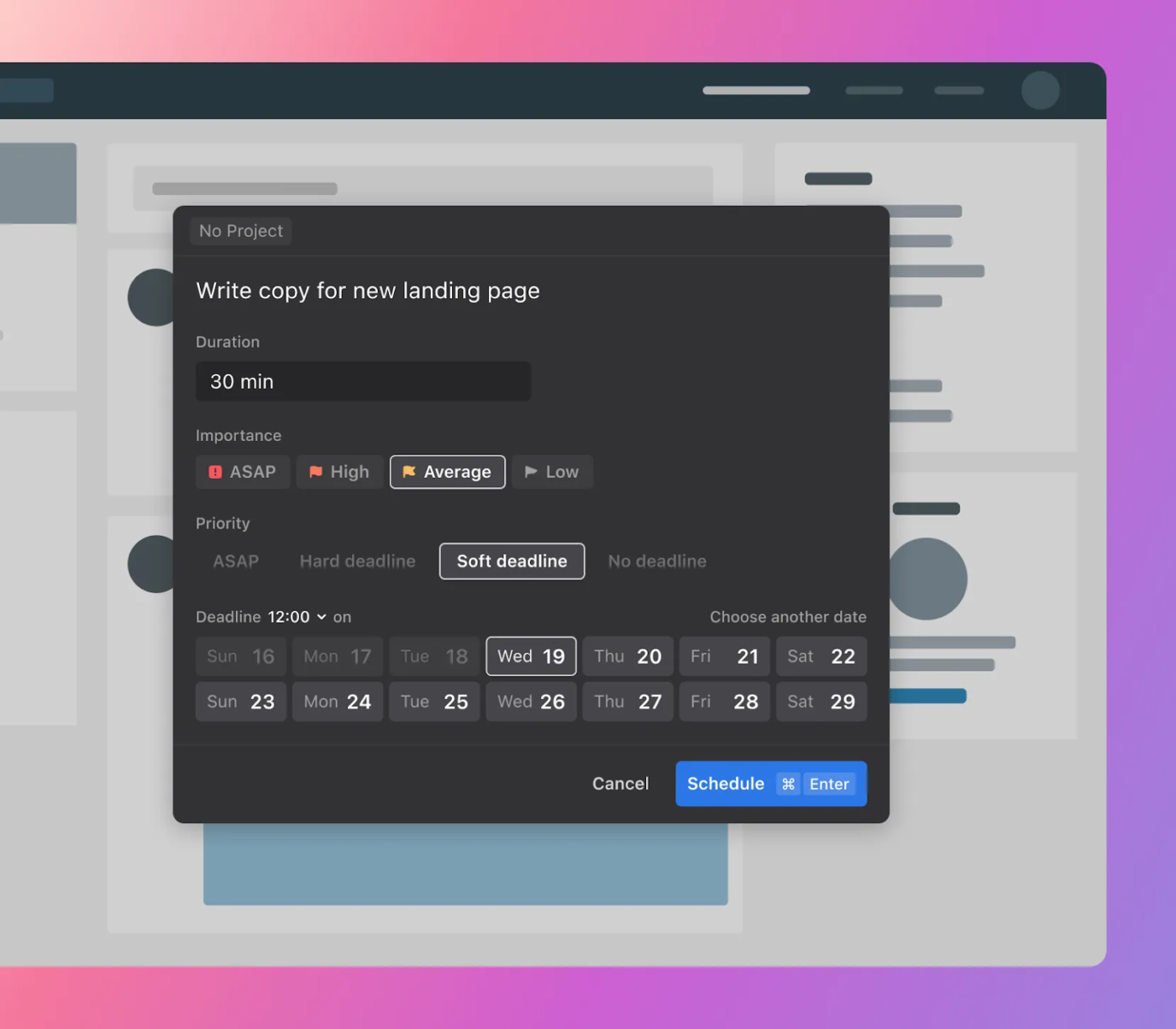
Motion’s task manager schedules your tasks into your calendar without leaving room for panic. For example, if you have a task due Friday, it will place it early enough in the week so you’re not scrambling at the last minute.
Each task can also include detailed notes for context. It also helps you regain focus with a gentle nudge as an on-screen reminder: ‘Here’s what you should be doing right now.’
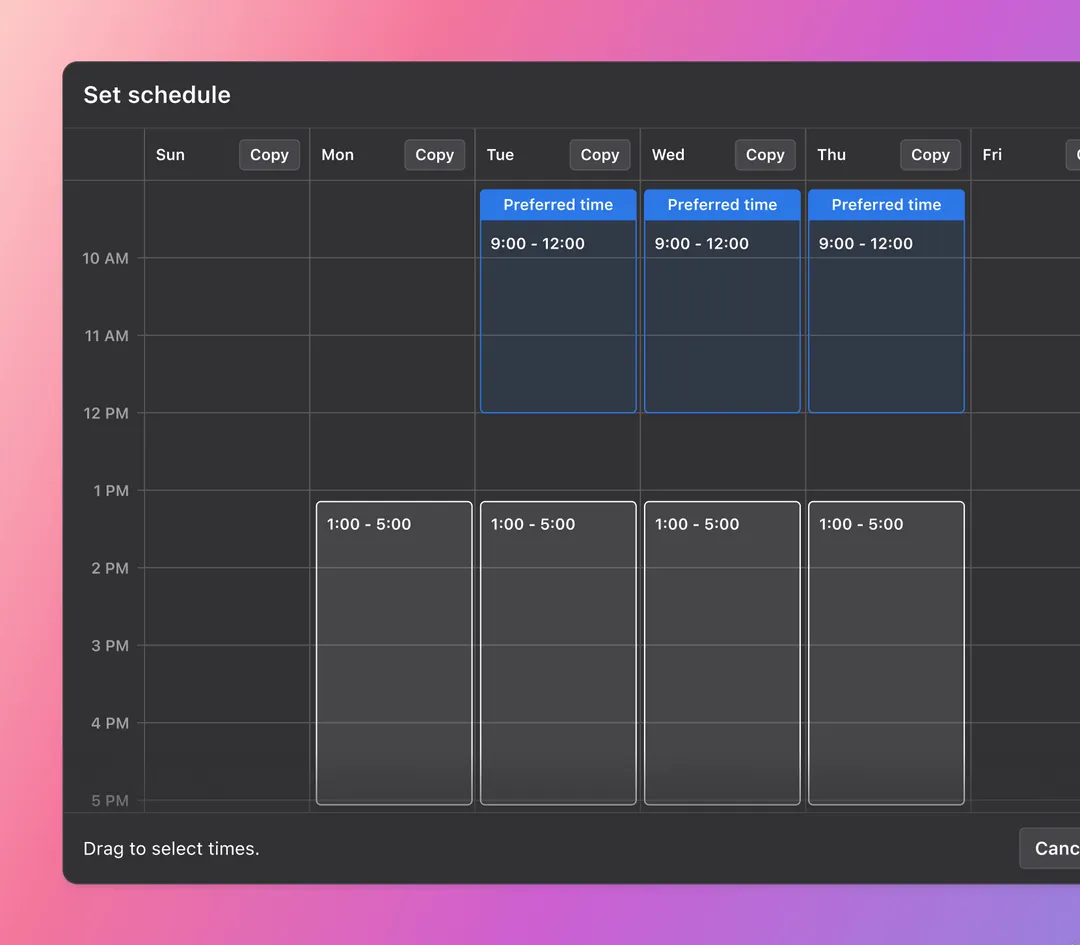
The Motion app automates your availability with its AI meeting assistant. You can set preferred time blocks, allowing bookings only during the windows you want to meet. It can also tell who’s available to make team tasks and coordination painless.
👀 Did You Know? Only 18% of people have a dedicated time management system.
It also lets you personalize your booking page with your branding, ideal meeting times, and templates for different use cases to make your brand identity count.
*Check the tool’s website for the latest pricing
📚 Also Read: Top Motion App Alternatives
Blitzit and Motion share the same philosophy for task and time management: helping you use your workday better. However, they approach it differently. To see which one works better, look closely at the comparison!
Blitzit is built for focus. Its intentionally minimal interface, collapsible to-do list, and persistent task timer stay in view while you work, so you’re never guessing what to do next.
Motion leans into complexity. It’s built for people who need to manage tasks, meetings, deadlines, and team collaborations.
🏆 Winner: Blitzit for anyone who values cognitive clarity over control. It delivers a tighter user experience for solo productivity.
Blitzit doesn’t schedule your tasks. You assign priorities and estimated times, and the app helps you stay on track with countdowns and timers. It’s ideal if you want to plan your day and stick to it manually.
On the other hand, you can feed tasks into Motion to organize your calendar, factoring in meetings, working hours, and energy peaks. If a new priority becomes available, your day will also be reshuffled to accommodate it.
🏆 Winner: Motion for managing unpredictability with its intelligent auto-scheduling.
Blitzit is all about momentum. Tasks live in a focus panel, sorted by priority, and you work through them with time estimates, countdowns, and visual feedback.
Motion automatically adds tasks to your calendar, with due dates, reminders, and dynamic reordering based on availability.
🏆 Winner: Blitzit for users who want more than a to-do list.
This one isn’t close. Blitzit is made for individual contributors. There is no team view, shared task boards, or delegation. It’s you, your focus list, and your timer.
Motion is built for teams. It automatically updates task statuses, adjusts timelines based on progress, and redistributes workload if someone falls behind. It acts as a silent project manager, optimizing in the background without your input.
🏆 Winner: Motion for its auto-management capabilities.
Blitzit goes granular. It tracks how long tasks take versus how long you thought they’d take. You get punctuality graphs, daily work summaries, and hour, day, and month breakdowns.
Motion’s focus is broader. It will notify you when tasks are done and if projects are on time, but not much about how your personal time was used. It’s about output, not reflection.
🏆 Winner: Blitzit for its self-awareness tools. It helps you understand how you are working.
Blitzit is currently desktop-only (Windows/macOS) with limited Google Calendar and Notion integrations. It might feel restrictive if you’re often on the move or switch between devices.
Motion is everywhere to make life easier: desktop, web, and mobile. You can check in on the train, tweak tasks at lunch, or hop into meetings from your phone.
🏆 Winner: Motion for platform flexibility and modern work-life integration.
Blitzit is a one-time purchase—simple, transparent, and budget-friendly. You pay once, and that’s it. It’s suitable for solo users looking for long-term value without recurring fees.
Motion runs on a subscription model, with pricing that scales with features and team size. If you only use it for yourself, the cost can feel steep.
🏆 Winner: It’s a tie. Blitzit wins on simplicity and lifetime value for solo users. Motion is worth the investment if you’re managing complexity at scale.
We also searched Reddit to see what real-life users are saying about Blitzit and Motion.
A user was quite enthusiastic about his experience with Blitzit:
I absolutely love the UI and how you can add notes and sub-tasks quickly and easily. Your tasks are divided into 4 sections within whichever list you choose. Backlog – This Week – Today and Done.
Another user found Blitzit promising, but states:
it’s kinda laggy and a bit incomplete and expensive also!
On the other hand, a user made a compelling case for Motion:
Motion will automatically re-schedule your time blocks as you add new tasks and change due dates. If your schedule or task list is fairly fixed there’s not a huge benefit, but for me I’m constantly getting new tasks with various levels of priority and urgency throughout the day.
Here’s what another Reddit user has to say about Motion:
I really liked it for a time. It worked great when I had lots of little tasks mixed in with frequent meetings or time-specific tasked. When I moved to more big-project workflow that required long periods of focus, it kind of lost its effectiveness and I couldn’t justify the cost.
👀 Did You Know? Workers toggle between apps 1,200 times a day, nearly 4 hours a week in attention resetting, or 9% of workers’ annual work time.
Unlike Blitzit and Motion, which often require integrations or juggling multiple apps, ClickUp converges all your tools, platforms, and context under one roof.
Time and task management tools are great. But when your work lives in one tool, your chats and messages in another, and then you have another set of AI tools for Agents and content generation, Work Sprawl sets in. And soon, you’re spending more time jumping from one tool to another (and paying for multiple subscriptions) just to get the full context of your work.
That’s where ClickUp steps in. From simple to-do lists to complex AI-powered, enterprise-grade project management, ClickUp’s flexible task system adapts to any workflow. You can create, assign, prioritize, and track tasks with ease, ensuring nothing falls through the cracks.
ClickUp AI is a game-changer here. ClickUp Brain and BrainGPT harness advanced AI to automate repetitive work, suggest next steps, and even summarize meetings or documents. This means less time spent on manual updates and more time focused on what matters. Though Blitzit and Motion have their advantages, the breadth and intelligence of ClickUp’s AI-powered features are hard to beat.
ClickUp Brain creates a neural layer on your workspace that constantly maps relationships across tasks, docs, and people. This lets it do three things better than any other apps:
See how ClickUp Brain instantly generates a structured update with just one prompt👇
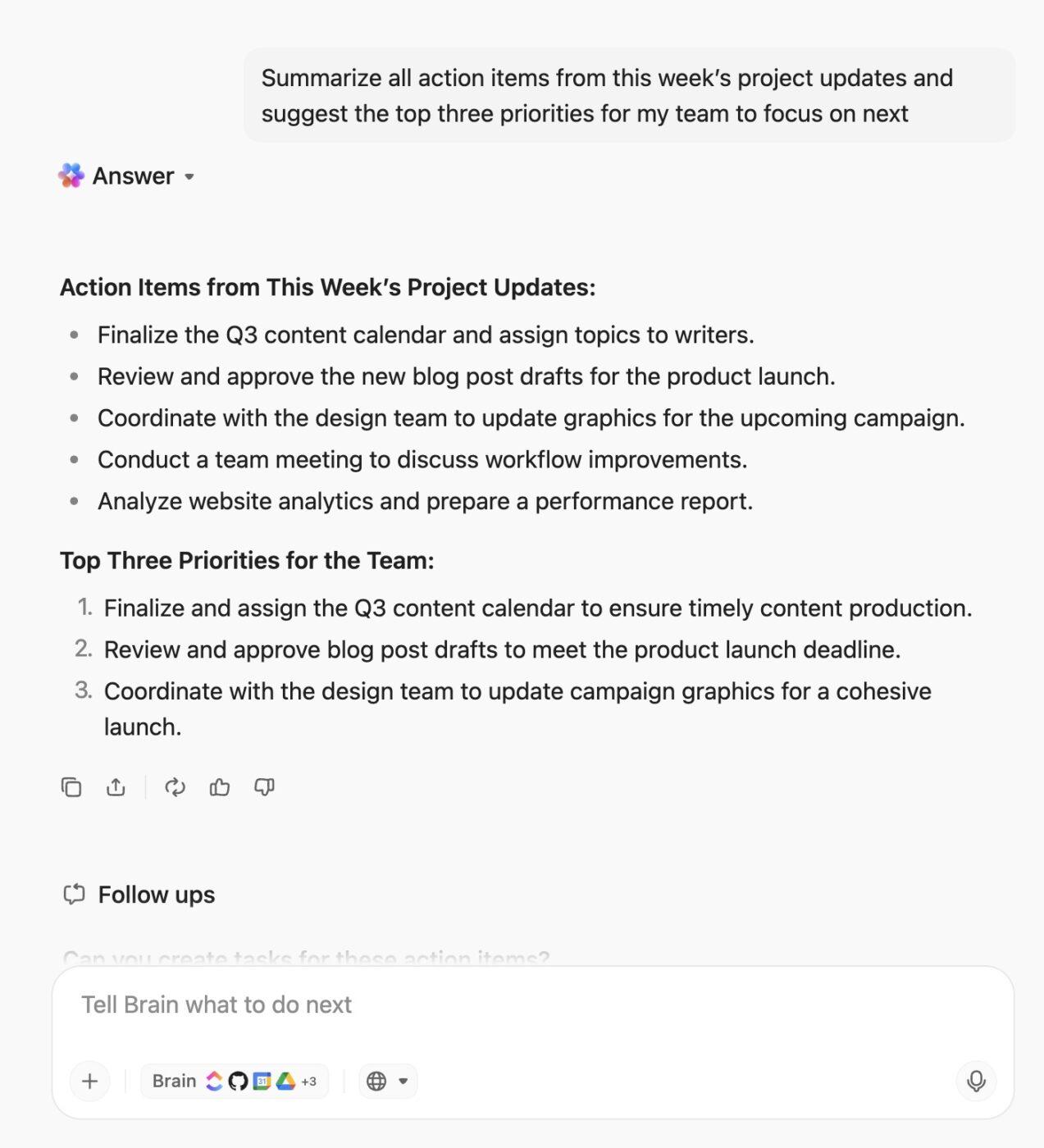
Here are some reasons why ClickUp can be your go-to solution for organizing and managing workload.
ClickUp Tasks connects every part of your workflow with automation, smart prioritization, and seamless integrations. Your tasks live where your work happens with layers of detail: assignees, priorities, subtasks, dependencies, and more for organized information.
📌 For example, let’s say a product bug gets reported.
In Blitzit, you’d manually create a task and block time to address it.
In Motion, you could add the task and let the algorithm fit it into your schedule.
But in ClickUp, you could automatically generate that task from a form submission, attach it to a sprint board, notify the dev lead, link it to customer feedback in ClickUp Docs, and track its impact in a live dashboard without switching apps.
That single task becomes part of a larger, visible system.
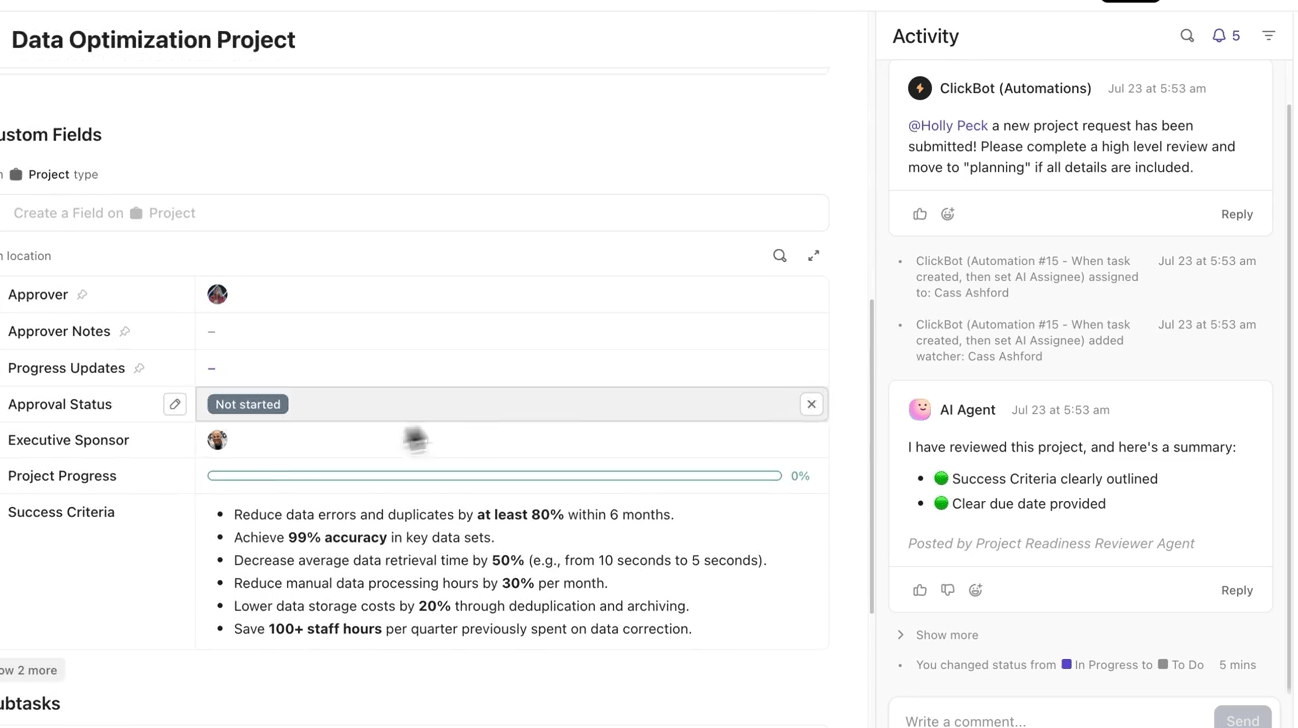
ClickUp also prevents common task management pain points.
⭐️ Bonus: AI Agents in ClickUp
ClickUp’s AI Agents automate routine processes and handle repetitive tasks, freeing up your team to focus on high-impact work. Experience next-level productivity as AI Agents proactively manage workflows and keep your projects moving forward.
And where Blitzit and Motion often assume one way of working, ClickUp is built for every workflow. You can apply templates and task types based on your team’s operations.
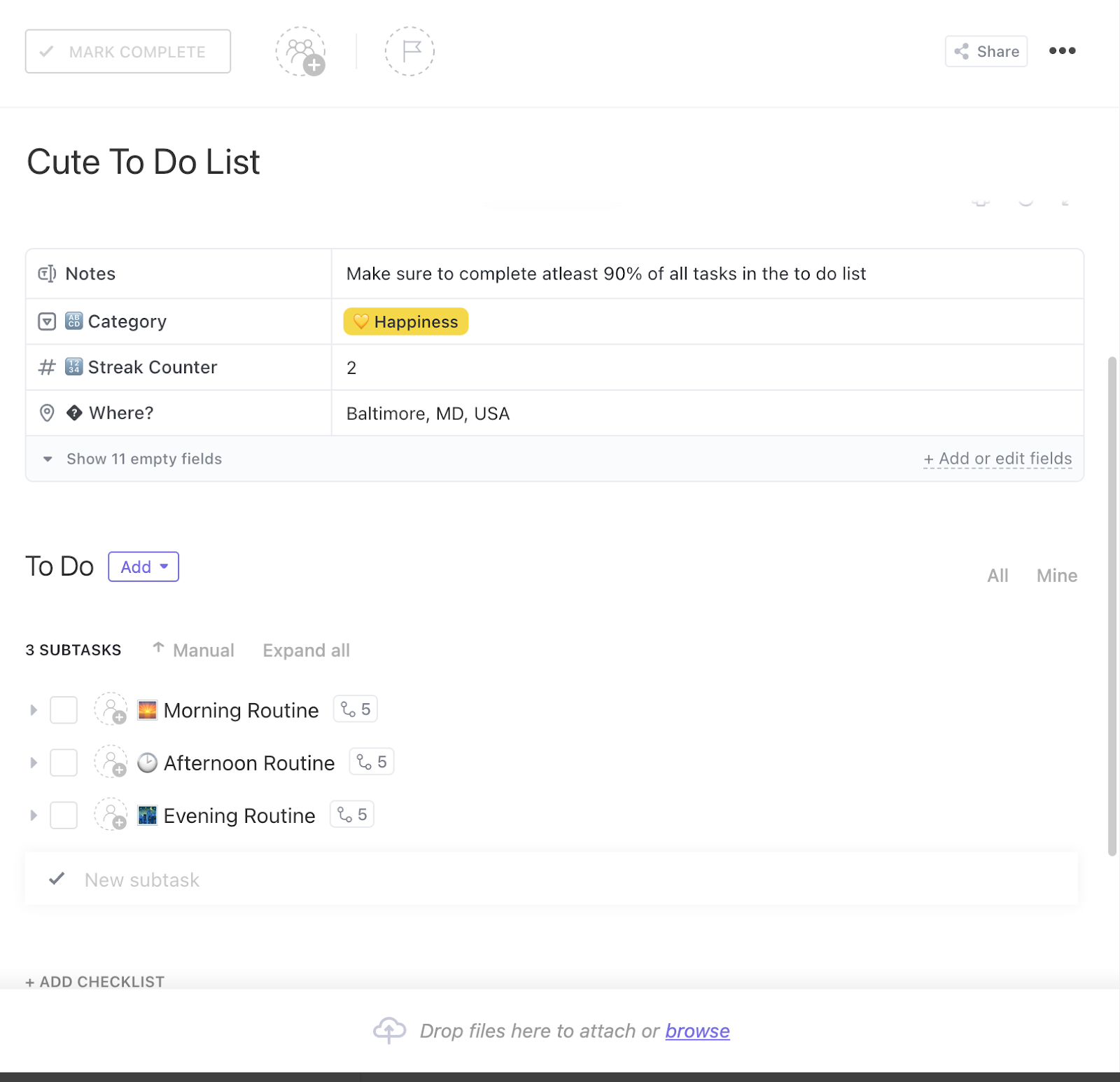
📌 For example, the ClickUp Daily To-do List Template helps you manage your day without feeling overwhelmed. This system centralizes everything from micro-tasks to milestones into one dynamic view.
It also integrates with ClickUp’s broader task management ecosystem, connecting your daily priorities to larger projects, workflows, or goals.
Here’s how this template can help you:
👀 Did You Know? 60.2% of ClickUp customers save 3+ hours weekly.
ClickUp Project Time Tracking is built for accountability, visibility, and context, and it’s woven directly into how tasks work. Every time entry is tied to a specific task, subtask, or goal, so there’s always clarity on the time spent and why it mattered.
It also understands that not everything happens on a timer. You can add time manually, adjust entries, or log time in bulk via a timesheet view, something teams often need during audits, invoices, or end-of-week cleanup.
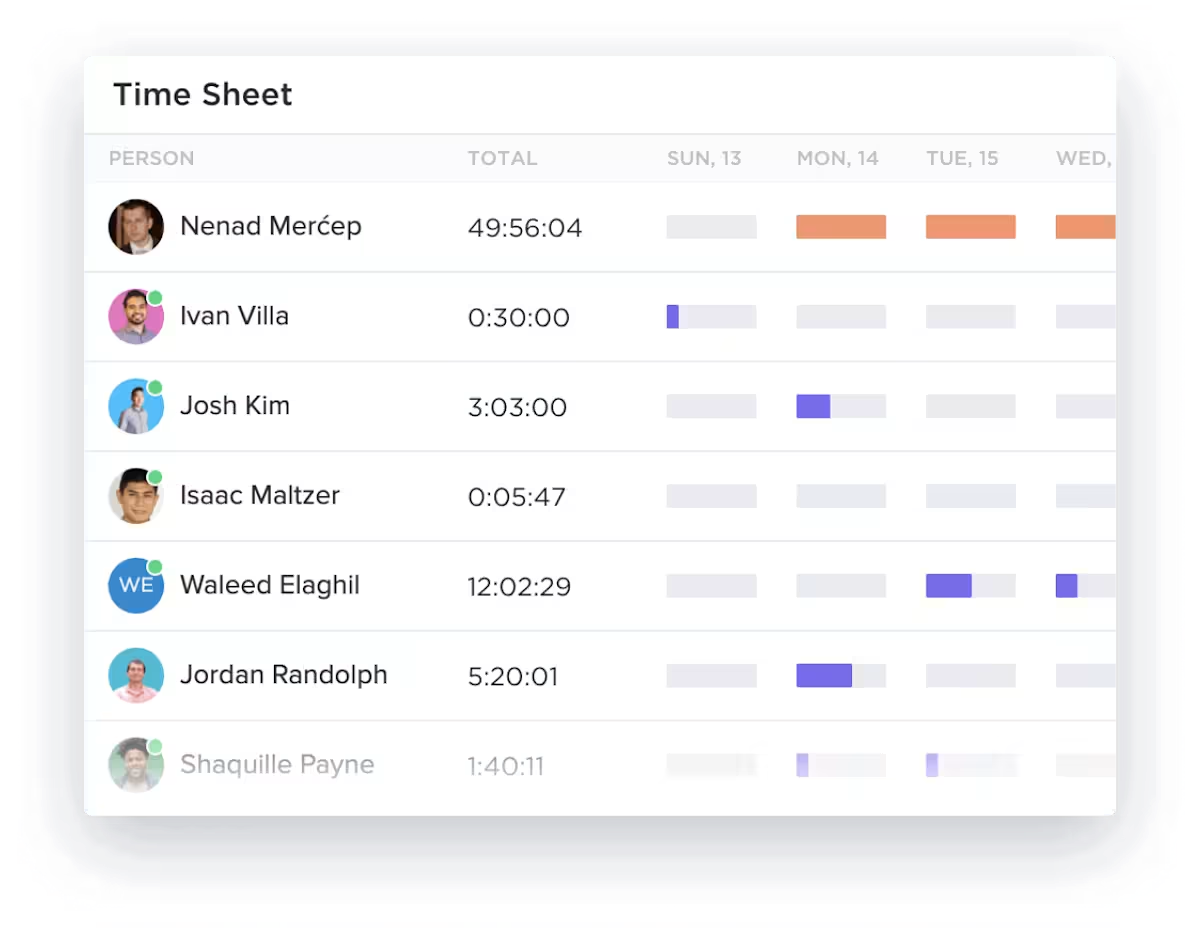
All of this feeds into smart reports that help you make better decisions. You can compare actual time spent vs. estimated time, track distributed time across your team, and catch recurring overruns before they become costly patterns.
You’ll know exactly where and why if a project consistently exceeds its estimates.
And it doesn’t stop at tracking. With ClickUp Time Estimates, you can assign granular time expectations to every person on a task, including at the subtask level. ClickUp then aggregates those into effort forecasts across your projects and lists.
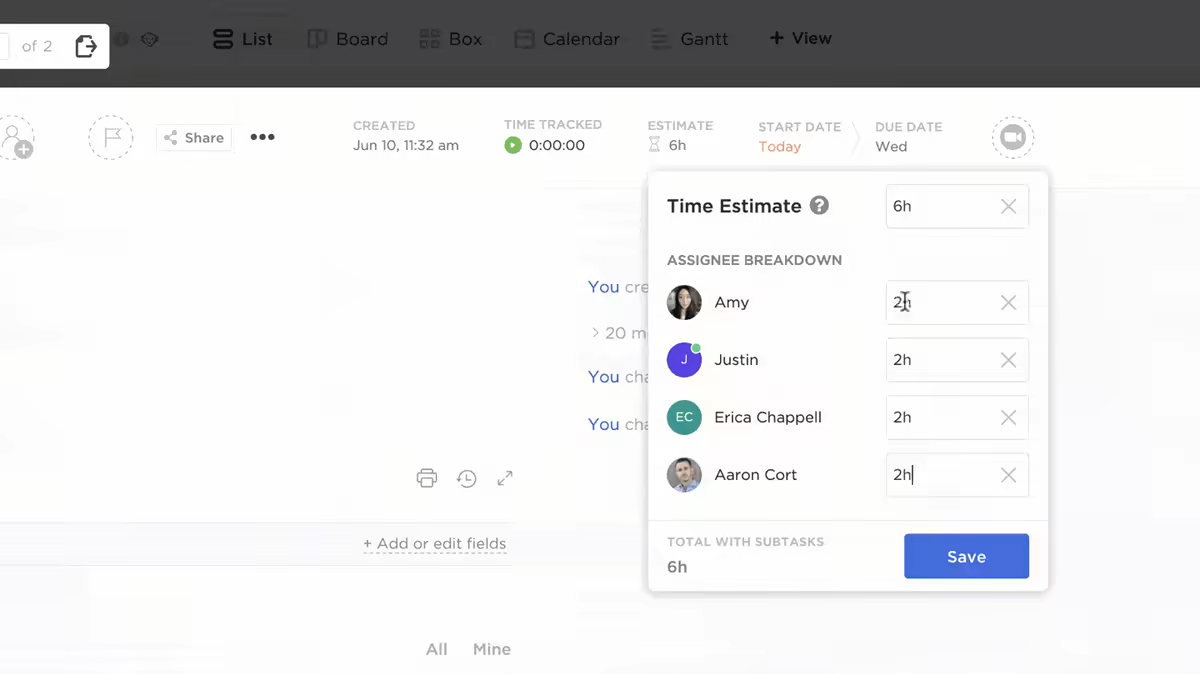
📌 For example, in Workload View, you’ll see immediately if someone’s assigned time exceeds their available capacity. Calendar and Box views let you drag and adjust those tasks in real-time. That means less reactive scheduling and more proactive problem-solving.
💟 Bonus: ClickUp BrainGPT is a next-generation AI desktop app that connects with all your favorite apps, bringing intelligent automation, research, and collaboration to your entire workflow—not just ClickUp. It’s built to be your all-in-one AI hub, helping you work smarter, faster, and more efficiently across every platform you use.
The ClickUp Calendar is part of the same ecosystem as your tasks, documents, goals, and time tracking. It generates searchable transcripts, auto-assigns action items, and links everything back to the task or doc it relates to after a meeting.
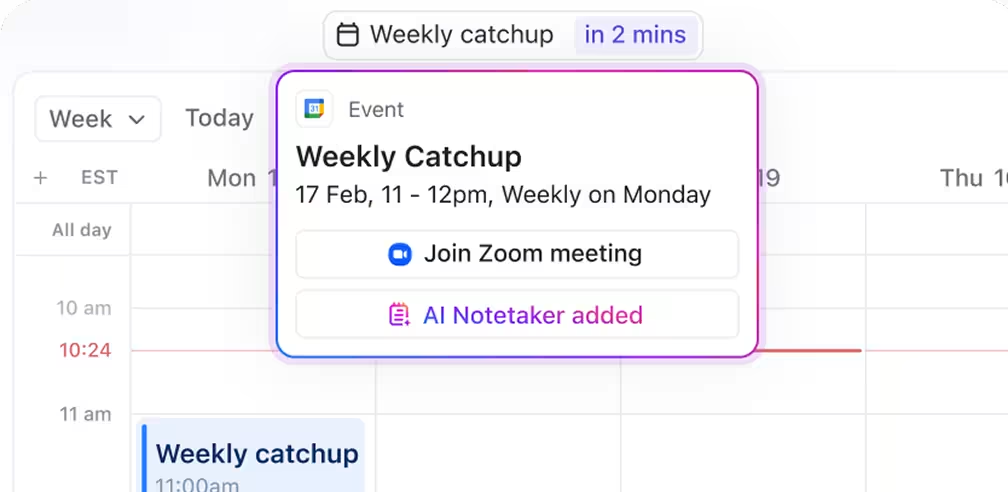
While Motion also offers auto-scheduling, it lacks ClickUp’s deep integration across workspaces. In Motion, you work on a calendar. In ClickUp, your calendar works for you alongside tasks, timelines, docs, and everything else you’re managing.
And for team coordination, ClickUp can compare availability, schedule across teams, share calendars, and send smart scheduling links with AI-picked meeting times.
You can also start with the ClickUp Calendar To-Do List Template to keep workflow simple. This template gives you a real-time visual of all your tasks in a calendar format, helping you break them into manageable action items.
After adding it to your workspace, you can customize it further, invite collaborators, and use it as a launchpad for project planning, from personal productivity to team-wide ops. You can also schedule tasks directly from this template, assign owners, track deadlines, and view progress without toggling between tools.
Davide Mameli, a business unit manager at ICM.S (part of Accenture), said:
Before ClickUp, we were working in two separate tools. Having to frequently go back and forth from one tool for task management and another for documentation was inefficient for our team.
While Blitzit and Motion offer basic task and time management, ClickUp delivers a comprehensive, AI-powered platform that transforms the way you work. With features like ClickUp Brain, Brain MAX, ClickUp AI Notetaker, and an integrated Calendar, ClickUp doesn’t just help you manage tasks—it helps you master them.
While Blitzit and Motion offer smart scheduling and task automation, ClickUp brings everything—tasks, time blocking, progress tracking, calendars, and documents into a single, tightly integrated platform.
A time log, meeting, or assignment isn’t just a standalone entry; it’s part of a larger workflow with context, collaboration, and continuity built in. From estimating effort to tracking execution, ClickUp gives teams the what, when, why, and what’s next.
If you’re looking for more than a calendar or task manager with a connected system that scales with your projects and your people, ClickUp is the clear winner.
Sign up for ClickUp today and manage time effectively for an unstoppable workflow.

© 2026 ClickUp

There’s an easier way. Try a free AI Agent in ClickUp that actually does the work for you—set up in minutes, save hours every week.